
Procedure to install TurboC++
on your computer (Desktop/Laptop)
for
Open Educational Resource
on
Logic Development and Programming (EC221)
by
Dr. Piyush Charan
Assistant Professor
Department of Electronics and Communication Engg.
Integral University, Lucknow
This work is licensed under a Creative Commons Attribution-NonCommercial-ShareAlike 4.0 International License.
Step 1: Unzip/Extract Contents
01/Sep/2020 2Dr. Piyush Charan, Dept. of ECE, IU Lucknow
Extract Files
from
TurboC.zip
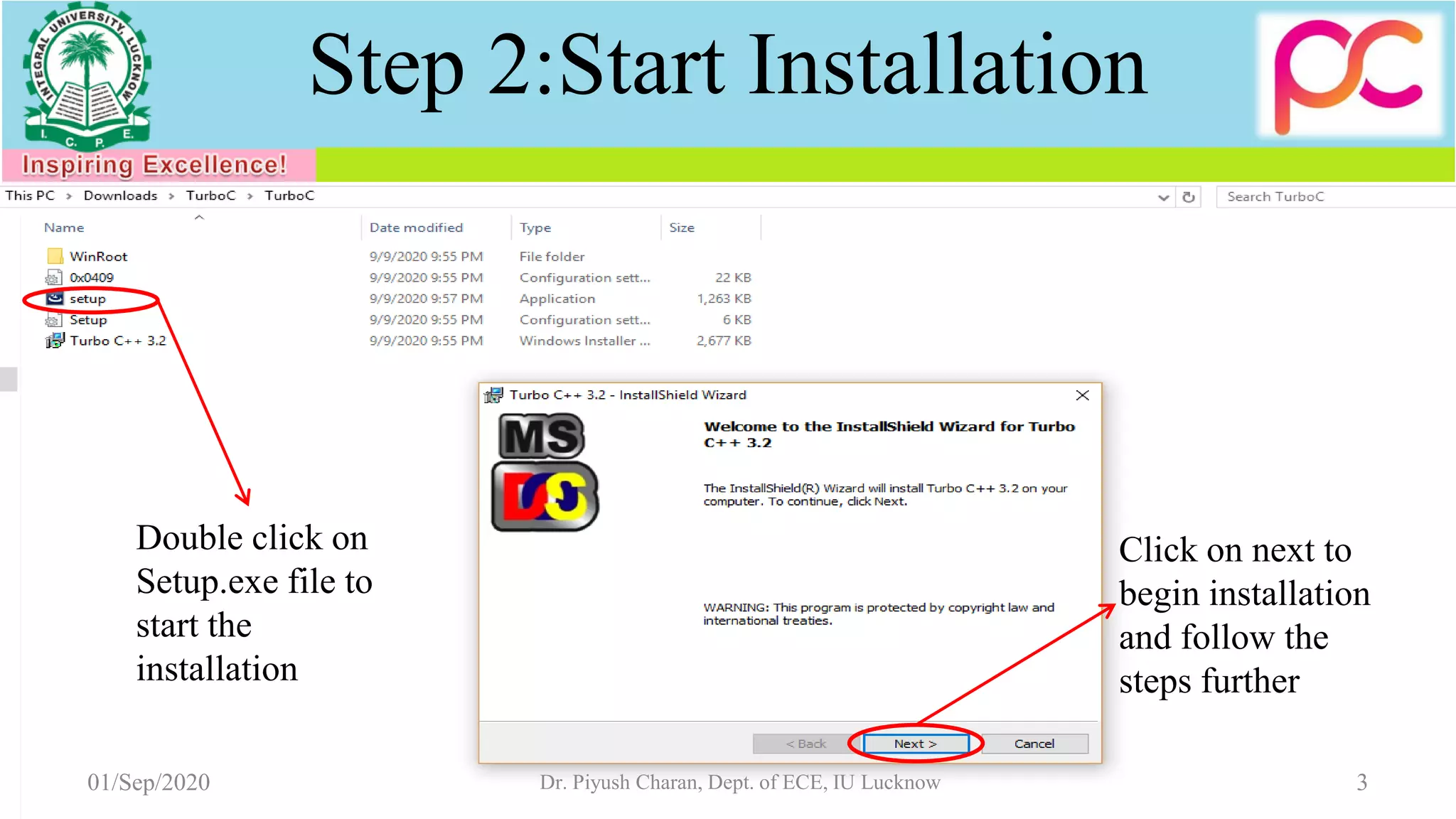
Step 2:Start Installation
01/Sep/2020 3Dr. Piyush Charan, Dept. of ECE, IU Lucknow
Double click on
Setup.exe file to
start the
installation
Click on next to
begin installation
and follow the
steps further
01/Sep/2020 Dr. Piyush Charan, Dept. of ECE, IU Lucknow 4
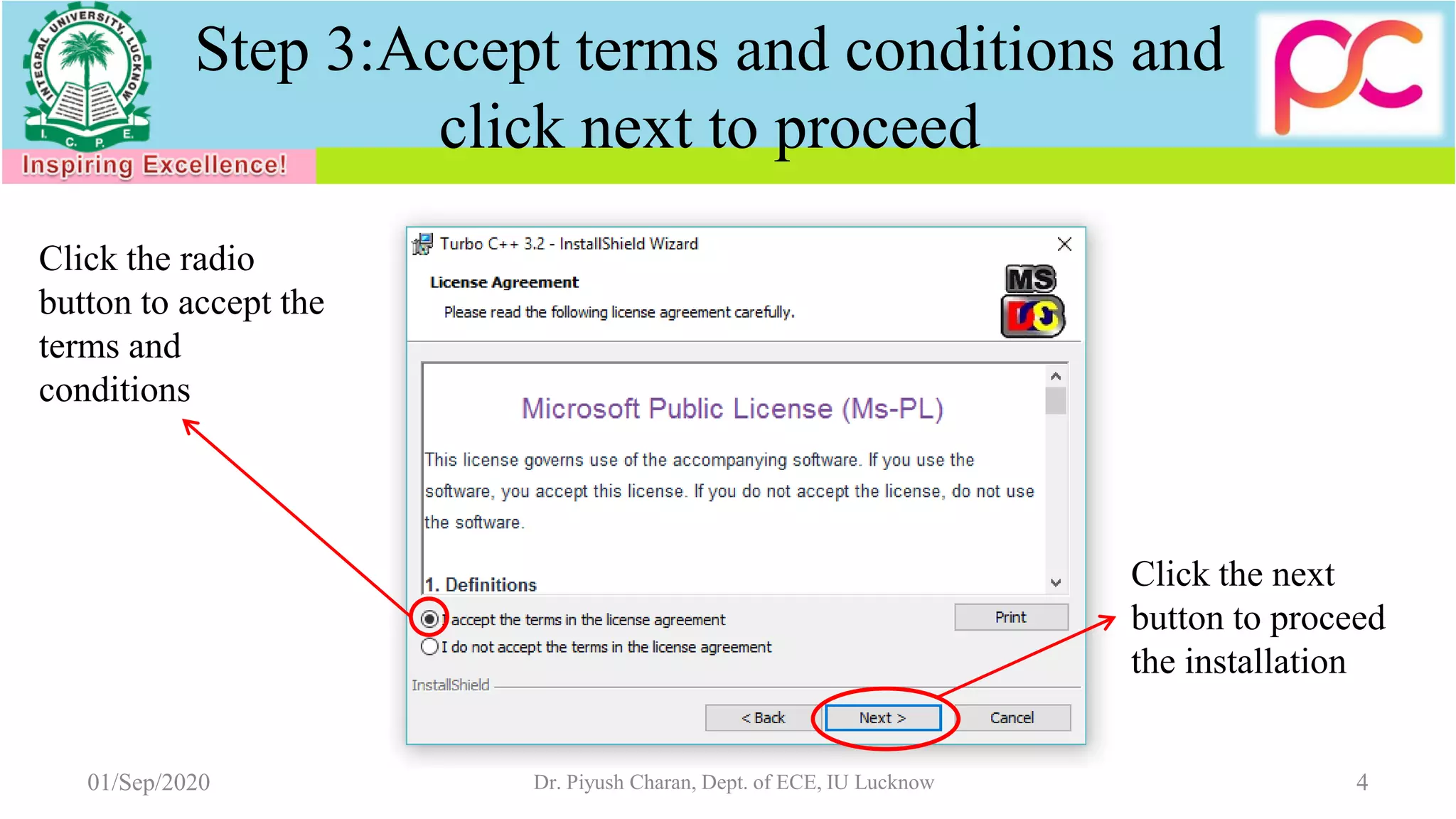
Click the radio
button to accept the
terms and
conditions
Click the next
button to proceed
the installation
Step 3:Accept terms and conditions and
click next to proceed
01/Sep/2020 Dr. Piyush Charan, Dept. of ECE, IU Lucknow 5
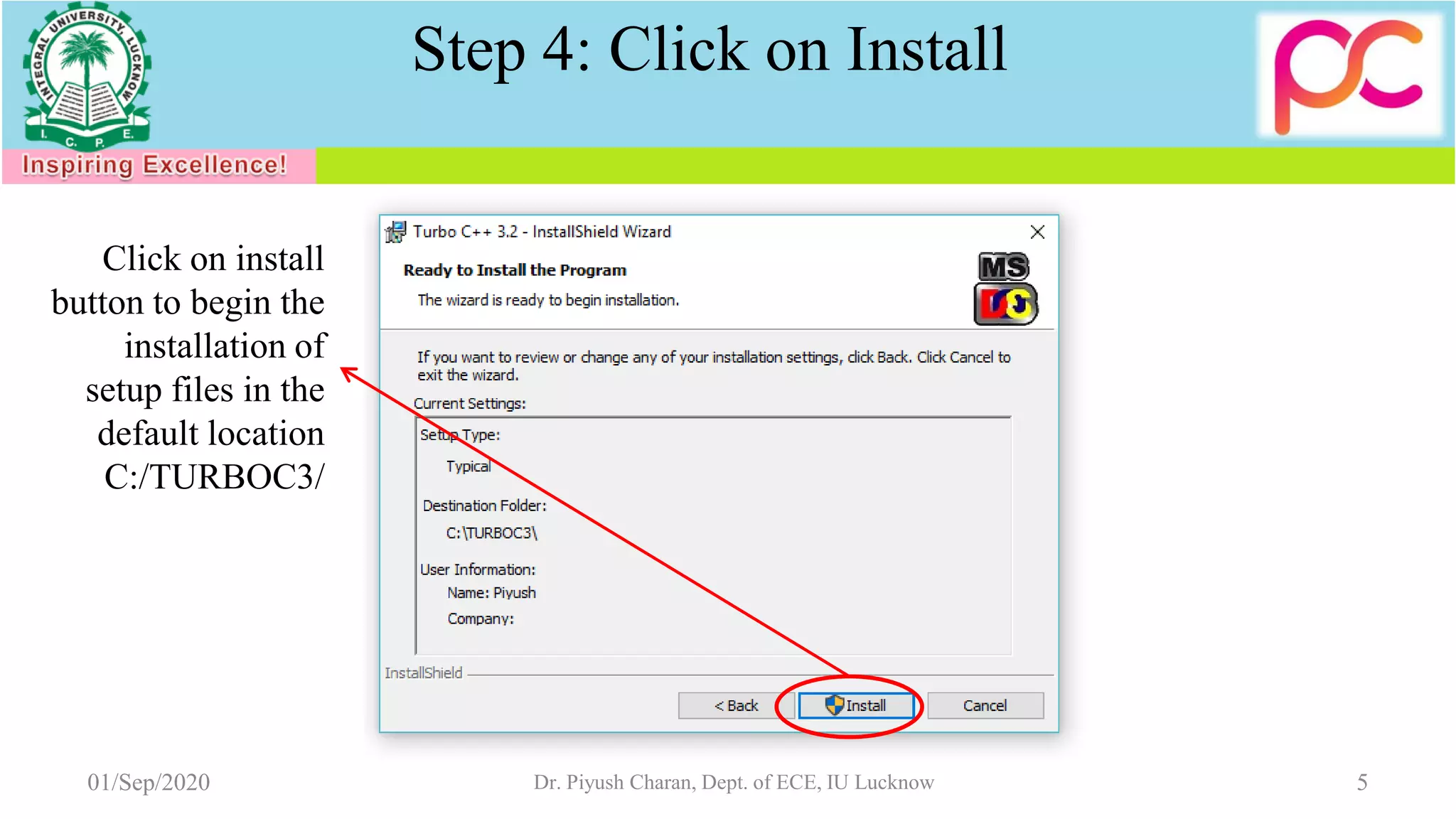
Click on install
button to begin the
installation of
setup files in the
default location
C:/TURBOC3/
Step 4: Click on Install
01/Sep/2020 Dr. Piyush Charan, Dept. of ECE, IU Lucknow 6
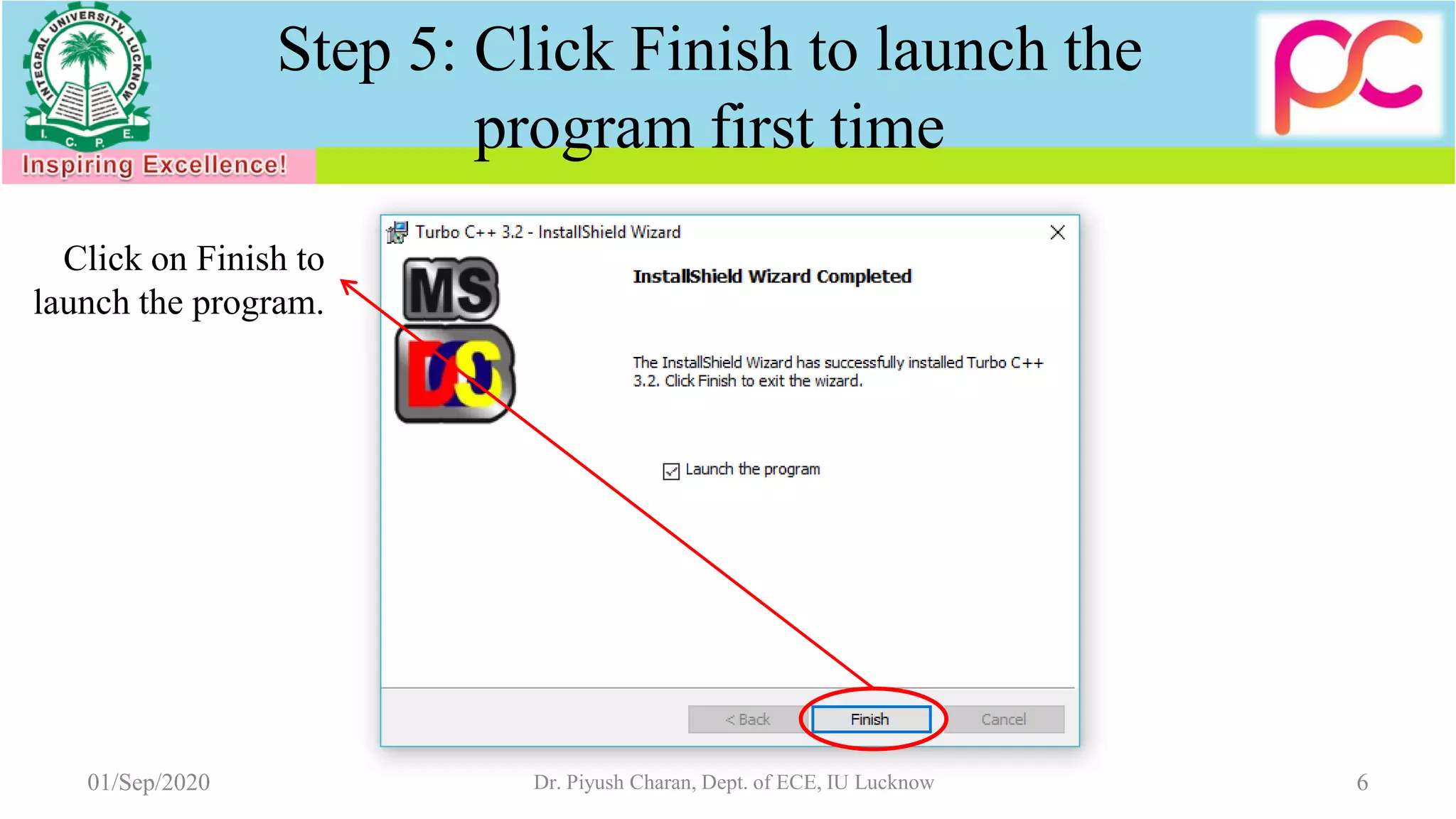
Step 5: Click Finish to launch the
program first time
Click on Finish to
launch the program.
01/Sep/2020 Dr. Piyush Charan, Dept. of ECE, IU Lucknow 7
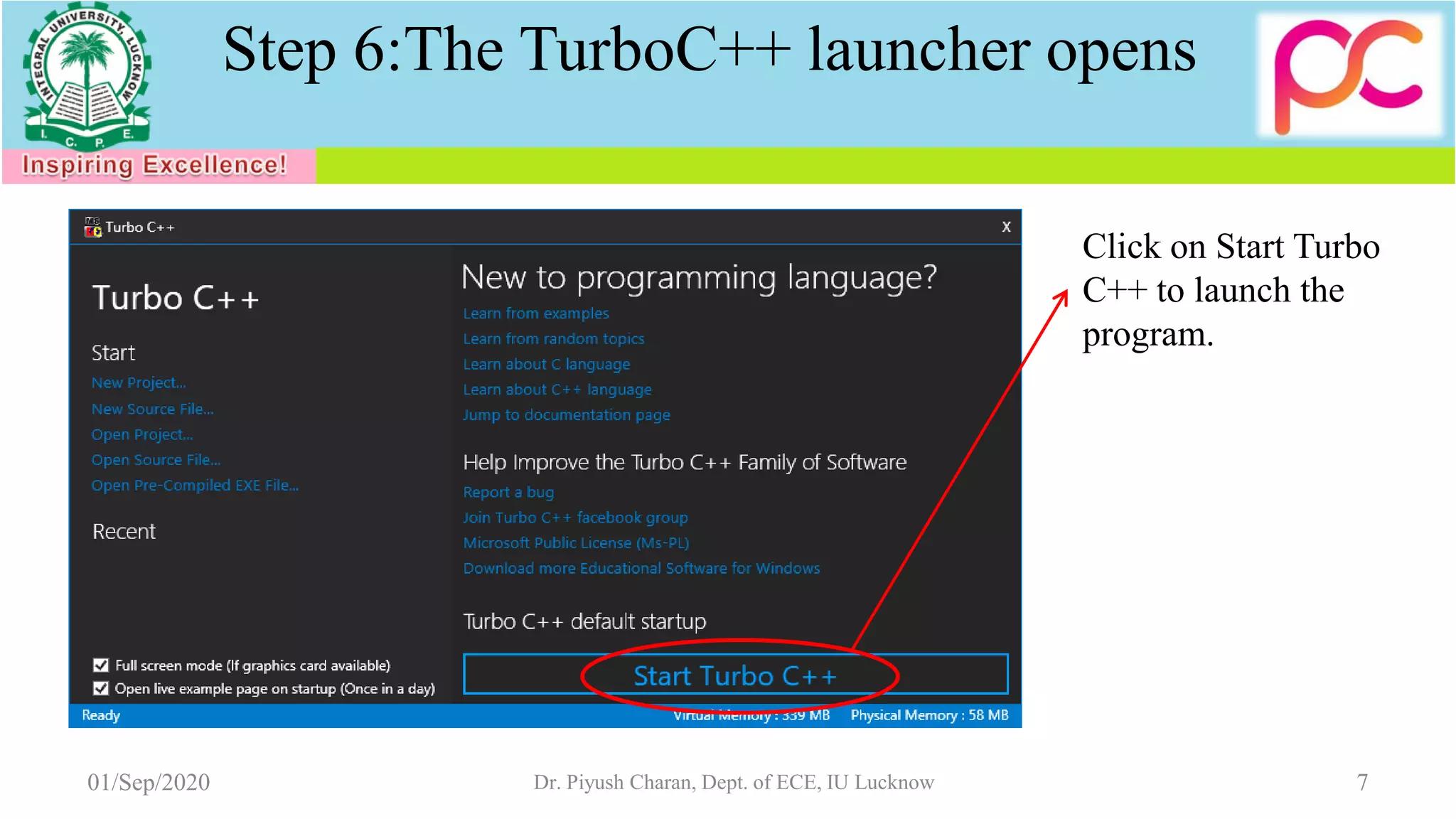
Step 6:The TurboC++ launcher opens
Click on Start Turbo
C++ to launch the
program.
01/Sep/2020 Dr. Piyush Charan, Dept. of ECE, IU Lucknow 8
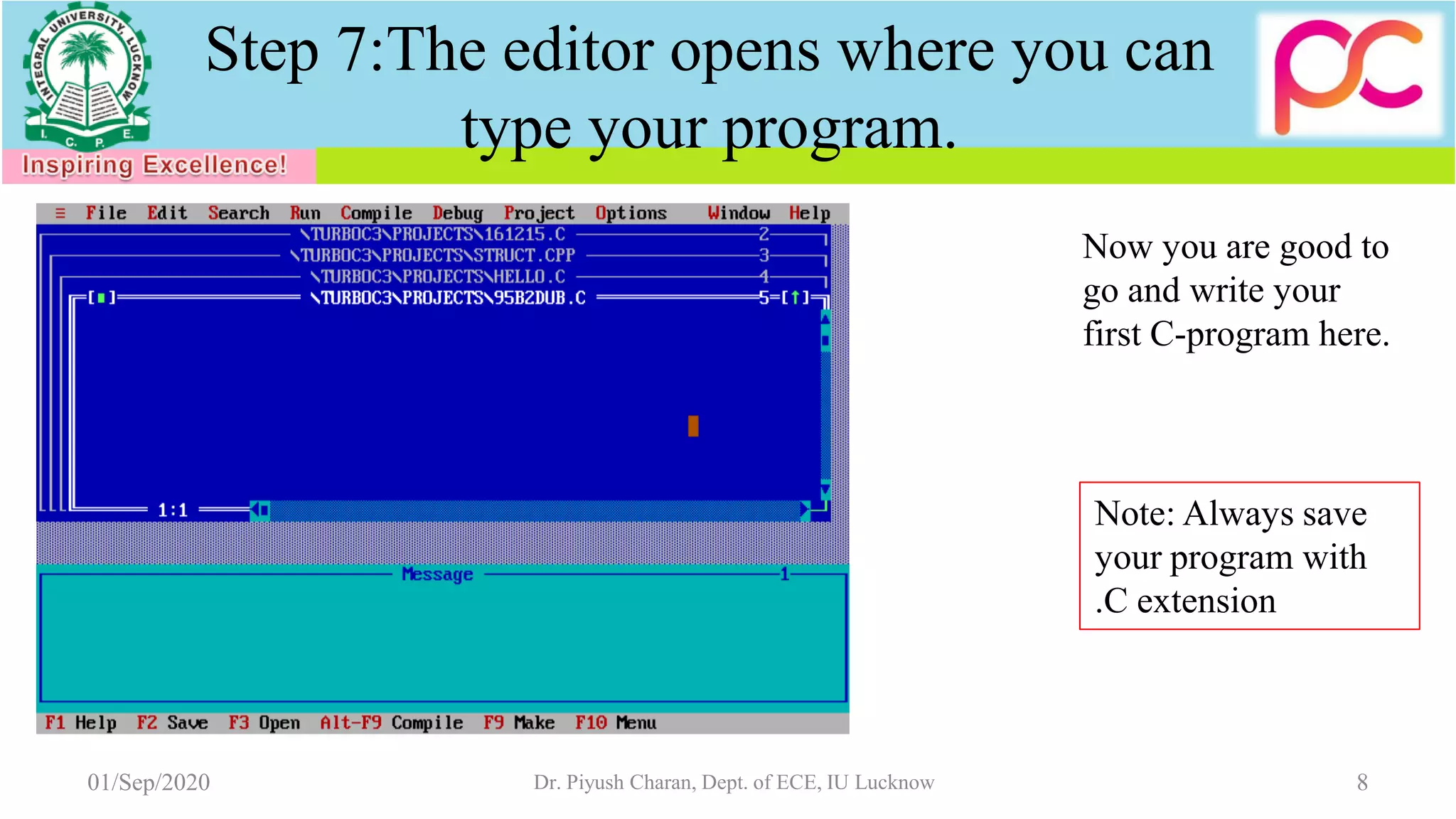
Now you are good to
go and write your
first C-program here.
Step 7:The editor opens where you can
type your program.
Note: Always save
your program with
.C extension
9Dr. Piyush Charan, Dept. of ECE, IU Lucknow01/Sep/2020

Procedure to install turbo c++

  • 1.
    Procedure to installTurboC++ on your computer (Desktop/Laptop) for Open Educational Resource on Logic Development and Programming (EC221) by Dr. Piyush Charan Assistant Professor Department of Electronics and Communication Engg. Integral University, Lucknow This work is licensed under a Creative Commons Attribution-NonCommercial-ShareAlike 4.0 International License.
  • 2.
    Step 1: Unzip/ExtractContents 01/Sep/2020 2Dr. Piyush Charan, Dept. of ECE, IU Lucknow Extract Files from TurboC.zip
  • 3.
    Step 2:Start Installation 01/Sep/20203Dr. Piyush Charan, Dept. of ECE, IU Lucknow Double click on Setup.exe file to start the installation Click on next to begin installation and follow the steps further
  • 4.
    01/Sep/2020 Dr. PiyushCharan, Dept. of ECE, IU Lucknow 4 Click the radio button to accept the terms and conditions Click the next button to proceed the installation Step 3:Accept terms and conditions and click next to proceed
  • 5.
    01/Sep/2020 Dr. PiyushCharan, Dept. of ECE, IU Lucknow 5 Click on install button to begin the installation of setup files in the default location C:/TURBOC3/ Step 4: Click on Install
  • 6.
    01/Sep/2020 Dr. PiyushCharan, Dept. of ECE, IU Lucknow 6 Step 5: Click Finish to launch the program first time Click on Finish to launch the program.
  • 7.
    01/Sep/2020 Dr. PiyushCharan, Dept. of ECE, IU Lucknow 7 Step 6:The TurboC++ launcher opens Click on Start Turbo C++ to launch the program.
  • 8.
    01/Sep/2020 Dr. PiyushCharan, Dept. of ECE, IU Lucknow 8 Now you are good to go and write your first C-program here. Step 7:The editor opens where you can type your program. Note: Always save your program with .C extension
  • 9.
    9Dr. Piyush Charan,Dept. of ECE, IU Lucknow01/Sep/2020