NAMES OF GROUP MEMBERS HERE
UNIT 28:CORPORATE AND PROMOTIONAL
PROGRAMME PRODUCTION
LIVE BRIEF
CLIENT
COMMUNICATION
CLIENT
COMMUNICATION
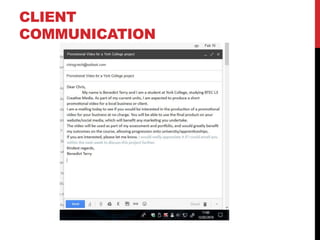
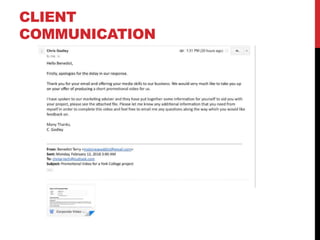
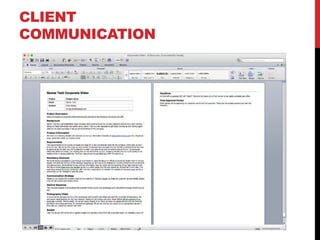
Insert screenshots of any early discussions or development
with your chosen clients.
If a phone call has been made, make a written log of the date and time, what
was discussed, and any agreed actions.
If you intend to visit your client prior to shooting, ask to look around for pre-
visualisation opportunities and risk assessment purposes. This will greatly
benefit your planning in later stages.
CLIENT
COMMUNICATION
CLIENT
COMMUNICATION
CLIENT
COMMUNICATION
CLIENT
COMMUNICATION
INTERPRETING THE
BRIEF
BRIEF
What structure of brief have you received?
I have been given an formal brief.
Is there any room for negotiation or consultation?
There is some negotiation before setting the final plan for the
brief. Afterwards, however the brief should be followed.
What opportunities are there for self-development in the
given brief? (new skills you will learn as a group, multi-
skilling)
RESEARCH
CLIENT
Identify who the client is
The client I am working for is “Gamer-Tech”.
What services do they offer?
Gamer-Tech is an independent electrical technology service who
repair electronic gadgets across the UK. They also buy and sell
electrical gadgets.
Where are they based?
They are based in the Raylor Centre Industrial Estate in York,
England.
CLIENT
Research the current client and/or their brand. Analyse both
their offline and online materials
Online
According to their website (http://gamer-tech.co.uk/) they repair
consoles, smartphones and laptops, as well as their accessories.
The variety of the items they repair also covers the general
mainstream: X-Box, PlayStation, Nintendo for consoles, Apple
iPods, iPads, iPhones and Samsung Galaxy’s for phones, and
normal laptops and Macs.
Offline
They do not have any offline services.
CLIENT
Build a profile of your client’s audience using the analysis
carried out.
Considering the majority of their repairs covers the whole of what
is currently available but not much else, their target audience is
ideally under 30. Console repairs and the name of the company
also suggests that they are appealing to a mostly young male
demographic.
EXISTING PRODUCTS
FROM SIMILAR CLIENTS
PC Revamp
Link the video.
https://www.youtube.com/watch?v=z_eif9PefnU
Discuss similarities and contrasts
Discuss the conventions (voice overs, company logo, titles, selling
point, shooting techniques, interviews, music, graphics, video/audio
transitions, language and script)
This promotional video makes very heavy use of motion graphics
and digital effects with little usage of live-action footage. What is
present in terms of live-action is closeups of electronic gadgets
being repaired or installed. Among their graphics, they say what
they do and showcase some of their reviews. Their logo is also
present throughout much of the video. Much like the Apple
corporate video, it lacks any audible dialogue and relies entirely
on text to make its point.
EXISTING PRODUCTS
FROM SIMILAR CLIENTS
MOOvin VIDEO
Link the video.
https://www.youtube.com/watch?v=AGvuCcKH4So
Discuss similarities and contrasts
Discuss the conventions (voice overs, company logo, titles, selling
point, shooting techniques, interviews, music, graphics, video/audio
transitions, language and script)
While this video is more about finding businesses as opposed to
actually repairing electronic devices, there are some conventions
that I could incorporate. It uses an interview from a customer to
explain its main objective and the services provided. It also ends
with the company logo to give the company an identity that people
will remember upon leaving the video.
EXISTING PRODUCTS
FROM SIMILAR CLIENTS
Link the video.
Discuss similarities and contrasts
Discuss the conventions (voice overs, company logo, titles, selling
point, shooting techniques, interviews, music, graphics, video/audio
transitions, language and script)
IDEA GENERATION
CLIENT
COMMUNICATION
Insert screenshots of any further discussion or development
with your chosen clients.
INITIAL IDEAS
Produce a physical brainstorm/mind map of potential ideas.
You should do this as an entire group. (You should consider the
elements you researched when analysing existing products)
INITIAL IDEAS
Develop a mood board of screenshots of camera shots,
visual styles, colours/grades you are aiming to achieve
IDEAS
List the core ideas you have generated as part of your team’s idea
generation.
1. Attention to detail
2. Ease of use
3. 3D design
4. Symbolisation of broken technology in different stages.
5.
IDEAS
Discuss the strengths, weaknesses and constraints of each idea
1. Attention to detail is definitely a key aspect to a repair company that will appeal to
audiences, as it shows the business cares about its customers. However, it will be
difficult to showcase this within digital graphics as Photoshop works best with 2D
graphics.
2. Ease of use for their website and services will definitely appeal to a more general
market. Being able to quickly find what is required for personal needs shows the
business understands some of the limitations of some of their customers. But this may
come off as amateurish for some more technically advanced customers, especially if it
comes to presenting this.
3. Incorporation of 3D design would help the corporate video stand out significantly more
than most other competitors who use the quicker and easier 2D graphics. But this would
be considerably more difficult to use effectively.
4. It would make a significant amount of sense to symbolise broken technology in different
stages. This is because it gets across the point that the company repairs broken
technology, so it interests people who want this type of service. However, it is important
to mention they repair both phones and games consoles because focusing on just one of
these would turn the other party off.
5.
PROPOSAL
PROPOSAL
Discuss what you intend to create
Provide a content outline.
The proposal (slides 20-23) is to be discussed with your client so they
understand your intentions.
TARGET AUDIENCE
Who is the intended audience? How will your video appeal to
them? Provide examples.
Assuming my basic research is correct, I will need to appeal to the
under 30. This can be achieved by dynamic visual graphics, such
as animating the logo and general text. I could also incorporate
upbeat music, like the “PC Revamp video”, to create a positive
atmosphere for the video, which attracts more attention from
viewers.
RESOURCES
What resources are required for the intended video? Consider
hardware, software, personnel, locations, budget
This project has no formal or agreed budget, but there are still
expectations from the client, meaning my brief is a formal brief, so I
can negotiate with my client on what I feel is unachievable or what I
do not agree with.
To produce the film, I will require a basic computer set. This includes
the monitor, mouse and keyboard. I will also use a flash drive to store
the files I create and work on them out of work hours if needs be.
I shall produce the graphics using Adobe Photoshop and After Effects
during work hours and Autodesk 3DS Max at home. The finished
products will be arranged on Adobe Premiere.
Based on my research and insistence from the client not to film in the
warehouse, I am the only person involved in my project, as I only
need to produce visual graphics. Also, because no filming is involved,
I do not have to fill in any letting or permission forms.
PROJECT SCHEDULE
Consider a brief schedule of your shoot, edit and delivery.
Your shoot should be formalised with your client soon.
Shooting and editing is intended W/C 26th Feb/5th March respectively.
My client expects me to complete a first draft ad send them it
during the week commencing on the 26th February and then the
final product shortly afterwards.
PRE-PRODUCTION
CLIENT
COMMUNICATION
Insert screenshots of any further discussion or development
with your chosen clients.
What was the client’s reaction to your proposed idea? Any amendments or
changes? What was the agreed content?
ROLES
Identify the agreed pre-production and production roles and
associated responsibilities. (What is your task? Specific deadline?)
As of now, I am the only person involved in the production of this
corporate video, meaning the responsibility of the entire project
rests with me. I am expected to offer a first draft by the end of the
week commencing on the 28th February with the final product
required at a later date. This is provided that there are no serious
disruptions such as my workplace being unavailable for whatever
reason.
SHOT LIST
Shot # Location Shot
Type
Camera
Angle/Movement
Description (subject,
action, lighting etc.)
1 N/A Logo and company name
2 N/A Attention to detail, with
graphics to represent this
3 N/A UK wide courier delivery
and secure facilities (+
graphics)
4 N/A Easy to use services (+
graphics)
5 N/A Send phone, quick and
easy repair (+ graphics)
6 N/A Logo and company name
with contact details
CONTINGENCY
Create a contingency plan to consider resources, personnel,
logistics, time frame etc.
RISK ASSESSMENT
Complete a risk assessment of the location available on
blackboard, and place the finished document here.
Hazard no: 32 Risk Factor (1-5) 3
Description Sudden events beyond my control that severely disrupt and delay work
Hazard Present? Severity Likelihood Risk Factor Hazard
1 Alcohol/drugs N N VU 1 1
2 Animals/insects N N VU 1 2
3 Audiences N N VU 1 3
4 Camera cable/grip equipment N N VU 1 4
5 Confined spaces N N VU 1 5
6 Derelict buildings/dangerous structures N N VU 1 6
7 Electricity/gas (other than normal supplies) N N VU 1 7
8 Fatigue/long hours N N VU 1 8
9 Fire/flammable materials N N VU 1 9
10 Hazardous substances N N VU 1 10
11 Heat/Cold/extreme weather N N VU 1 11
12 Laser/strobe effects N N VU 1 12
13 Machinery/industrial/ crane/hoist N N VU 1 13
14 Materials - glass, non-fire retardant set materials N N VU 1 14
15 Night operation N N VU 1 15
16 Noise – high sound levels N N VU 1 16
17 Non standard manual handling N N VU 1 17
18 Public/crowds N N VU 1 18
19 Radiation N N VU 1 19
20 Scaffold/Rostra N N VU 1 20
21 Smoking on set N N VU 1 21
22 Special effects/explosives N N VU 1 22
23 Special needs (elderly, disabled, inexperienced) N N VU 3 23
24 Specialised rescue/first aid N N VU 1 24
25 Stunts, dangerous activities N N VU 1 25
26 Tall scenery/suspended ceilings N N VU 1 26
27 Vehicles/speed N N VU 1 27
28 Water/proximity to water N N VU 1 28
29 Weapons N N VU 1 29
30 Working at heights N N VU 1 30
31 Working overseas N N VU 1 31
32 Other risks Y M P 3 32
RISK ASSESSMENT
Complete a risk assessment of the location available on
blackboard, and place the finished document here.
Hazard no: 32 Risk Factor (1-5) 3
Description Sitting incorrectly while working, causing injury to person
Person(s) exposed (detail if cast/crew (C), outside company (O) or public (P) ) Myself
Action to take Remain in the correct position whenever possible
Person/company responsible for action Myself
To be completed at agreed later date -
Exposed person(s) informed? (y/n) Agreed action
taken? (y/n)
Risk removed?
(y/n)
Hazard no: 32 Risk Factor (1-5) 3
Description Sudden events beyond my control that severely disrupt and delay work
Person(s) exposed (detail if cast/crew (C), outside company
(O) or public (P) )
Myself
Action to take Keep at work for as long as possible.
Person/company responsible for action Myself
To be completed at agreed later date -
Exposed person(s) informed? (y/n) Agreed action
taken? (y/n)
Risk removed?
(y/n)
RESOURCES
What resources are required for this project?
Consider time, budget, physical (equipment, location, properties, people,
crew, your talent/actors)
I have the use of two computer suites, on at college and another home computer
suite. In terms of software, I am using Adobe Photoshop to create the graphics
frame by frame and rendered into mp4 formats. I also use Adobe After Effects to
make the graphics more dynamic and eye-catching through motion and combining
numerous graphics and Adobe Premiere to create the finished products. These
are available on both computer suites expect After Effects, which is absent on the
home computer.
My client has not set a budget and being at college I am not working to any type of
budget anyway. Because I am not recording any live-action footage, I am
animating all the graphics myself. This may prove difficult to complete on time, as
animation is a long process, so the finished product will be short.
SCRIPT
Provide a script if this is required as part of your video.
Identify questions/answers/reactions you expect from your talent and/or
interviews
Because I do not require any actors, there is no scripted dialogue, so a script is
not required.
SCHEDULE AND TIMESCALE
Day Activity
20th Feb- 12th March Creating graphics
12th March First draft due
19th March Final draft w/ improvements due

[Pro forma] corporate - live project

  • 1.
    NAMES OF GROUPMEMBERS HERE UNIT 28:CORPORATE AND PROMOTIONAL PROGRAMME PRODUCTION LIVE BRIEF
  • 2.
  • 3.
    CLIENT COMMUNICATION Insert screenshots ofany early discussions or development with your chosen clients. If a phone call has been made, make a written log of the date and time, what was discussed, and any agreed actions. If you intend to visit your client prior to shooting, ask to look around for pre- visualisation opportunities and risk assessment purposes. This will greatly benefit your planning in later stages.
  • 4.
  • 5.
  • 6.
  • 7.
  • 8.
  • 9.
    BRIEF What structure ofbrief have you received? I have been given an formal brief. Is there any room for negotiation or consultation? There is some negotiation before setting the final plan for the brief. Afterwards, however the brief should be followed. What opportunities are there for self-development in the given brief? (new skills you will learn as a group, multi- skilling)
  • 10.
  • 11.
    CLIENT Identify who theclient is The client I am working for is “Gamer-Tech”. What services do they offer? Gamer-Tech is an independent electrical technology service who repair electronic gadgets across the UK. They also buy and sell electrical gadgets. Where are they based? They are based in the Raylor Centre Industrial Estate in York, England.
  • 12.
    CLIENT Research the currentclient and/or their brand. Analyse both their offline and online materials Online According to their website (http://gamer-tech.co.uk/) they repair consoles, smartphones and laptops, as well as their accessories. The variety of the items they repair also covers the general mainstream: X-Box, PlayStation, Nintendo for consoles, Apple iPods, iPads, iPhones and Samsung Galaxy’s for phones, and normal laptops and Macs. Offline They do not have any offline services.
  • 13.
    CLIENT Build a profileof your client’s audience using the analysis carried out. Considering the majority of their repairs covers the whole of what is currently available but not much else, their target audience is ideally under 30. Console repairs and the name of the company also suggests that they are appealing to a mostly young male demographic.
  • 14.
    EXISTING PRODUCTS FROM SIMILARCLIENTS PC Revamp Link the video. https://www.youtube.com/watch?v=z_eif9PefnU Discuss similarities and contrasts Discuss the conventions (voice overs, company logo, titles, selling point, shooting techniques, interviews, music, graphics, video/audio transitions, language and script) This promotional video makes very heavy use of motion graphics and digital effects with little usage of live-action footage. What is present in terms of live-action is closeups of electronic gadgets being repaired or installed. Among their graphics, they say what they do and showcase some of their reviews. Their logo is also present throughout much of the video. Much like the Apple corporate video, it lacks any audible dialogue and relies entirely on text to make its point.
  • 15.
    EXISTING PRODUCTS FROM SIMILARCLIENTS MOOvin VIDEO Link the video. https://www.youtube.com/watch?v=AGvuCcKH4So Discuss similarities and contrasts Discuss the conventions (voice overs, company logo, titles, selling point, shooting techniques, interviews, music, graphics, video/audio transitions, language and script) While this video is more about finding businesses as opposed to actually repairing electronic devices, there are some conventions that I could incorporate. It uses an interview from a customer to explain its main objective and the services provided. It also ends with the company logo to give the company an identity that people will remember upon leaving the video.
  • 16.
    EXISTING PRODUCTS FROM SIMILARCLIENTS Link the video. Discuss similarities and contrasts Discuss the conventions (voice overs, company logo, titles, selling point, shooting techniques, interviews, music, graphics, video/audio transitions, language and script)
  • 17.
  • 18.
    CLIENT COMMUNICATION Insert screenshots ofany further discussion or development with your chosen clients.
  • 19.
    INITIAL IDEAS Produce aphysical brainstorm/mind map of potential ideas. You should do this as an entire group. (You should consider the elements you researched when analysing existing products)
  • 20.
    INITIAL IDEAS Develop amood board of screenshots of camera shots, visual styles, colours/grades you are aiming to achieve
  • 21.
    IDEAS List the coreideas you have generated as part of your team’s idea generation. 1. Attention to detail 2. Ease of use 3. 3D design 4. Symbolisation of broken technology in different stages. 5.
  • 22.
    IDEAS Discuss the strengths,weaknesses and constraints of each idea 1. Attention to detail is definitely a key aspect to a repair company that will appeal to audiences, as it shows the business cares about its customers. However, it will be difficult to showcase this within digital graphics as Photoshop works best with 2D graphics. 2. Ease of use for their website and services will definitely appeal to a more general market. Being able to quickly find what is required for personal needs shows the business understands some of the limitations of some of their customers. But this may come off as amateurish for some more technically advanced customers, especially if it comes to presenting this. 3. Incorporation of 3D design would help the corporate video stand out significantly more than most other competitors who use the quicker and easier 2D graphics. But this would be considerably more difficult to use effectively. 4. It would make a significant amount of sense to symbolise broken technology in different stages. This is because it gets across the point that the company repairs broken technology, so it interests people who want this type of service. However, it is important to mention they repair both phones and games consoles because focusing on just one of these would turn the other party off. 5.
  • 23.
  • 24.
    PROPOSAL Discuss what youintend to create Provide a content outline. The proposal (slides 20-23) is to be discussed with your client so they understand your intentions.
  • 25.
    TARGET AUDIENCE Who isthe intended audience? How will your video appeal to them? Provide examples. Assuming my basic research is correct, I will need to appeal to the under 30. This can be achieved by dynamic visual graphics, such as animating the logo and general text. I could also incorporate upbeat music, like the “PC Revamp video”, to create a positive atmosphere for the video, which attracts more attention from viewers.
  • 26.
    RESOURCES What resources arerequired for the intended video? Consider hardware, software, personnel, locations, budget This project has no formal or agreed budget, but there are still expectations from the client, meaning my brief is a formal brief, so I can negotiate with my client on what I feel is unachievable or what I do not agree with. To produce the film, I will require a basic computer set. This includes the monitor, mouse and keyboard. I will also use a flash drive to store the files I create and work on them out of work hours if needs be. I shall produce the graphics using Adobe Photoshop and After Effects during work hours and Autodesk 3DS Max at home. The finished products will be arranged on Adobe Premiere. Based on my research and insistence from the client not to film in the warehouse, I am the only person involved in my project, as I only need to produce visual graphics. Also, because no filming is involved, I do not have to fill in any letting or permission forms.
  • 27.
    PROJECT SCHEDULE Consider abrief schedule of your shoot, edit and delivery. Your shoot should be formalised with your client soon. Shooting and editing is intended W/C 26th Feb/5th March respectively. My client expects me to complete a first draft ad send them it during the week commencing on the 26th February and then the final product shortly afterwards.
  • 28.
  • 29.
    CLIENT COMMUNICATION Insert screenshots ofany further discussion or development with your chosen clients. What was the client’s reaction to your proposed idea? Any amendments or changes? What was the agreed content?
  • 30.
    ROLES Identify the agreedpre-production and production roles and associated responsibilities. (What is your task? Specific deadline?) As of now, I am the only person involved in the production of this corporate video, meaning the responsibility of the entire project rests with me. I am expected to offer a first draft by the end of the week commencing on the 28th February with the final product required at a later date. This is provided that there are no serious disruptions such as my workplace being unavailable for whatever reason.
  • 31.
    SHOT LIST Shot #Location Shot Type Camera Angle/Movement Description (subject, action, lighting etc.) 1 N/A Logo and company name 2 N/A Attention to detail, with graphics to represent this 3 N/A UK wide courier delivery and secure facilities (+ graphics) 4 N/A Easy to use services (+ graphics) 5 N/A Send phone, quick and easy repair (+ graphics) 6 N/A Logo and company name with contact details
  • 32.
    CONTINGENCY Create a contingencyplan to consider resources, personnel, logistics, time frame etc.
  • 33.
    RISK ASSESSMENT Complete arisk assessment of the location available on blackboard, and place the finished document here. Hazard no: 32 Risk Factor (1-5) 3 Description Sudden events beyond my control that severely disrupt and delay work Hazard Present? Severity Likelihood Risk Factor Hazard 1 Alcohol/drugs N N VU 1 1 2 Animals/insects N N VU 1 2 3 Audiences N N VU 1 3 4 Camera cable/grip equipment N N VU 1 4 5 Confined spaces N N VU 1 5 6 Derelict buildings/dangerous structures N N VU 1 6 7 Electricity/gas (other than normal supplies) N N VU 1 7 8 Fatigue/long hours N N VU 1 8 9 Fire/flammable materials N N VU 1 9 10 Hazardous substances N N VU 1 10 11 Heat/Cold/extreme weather N N VU 1 11 12 Laser/strobe effects N N VU 1 12 13 Machinery/industrial/ crane/hoist N N VU 1 13 14 Materials - glass, non-fire retardant set materials N N VU 1 14 15 Night operation N N VU 1 15 16 Noise – high sound levels N N VU 1 16 17 Non standard manual handling N N VU 1 17 18 Public/crowds N N VU 1 18 19 Radiation N N VU 1 19 20 Scaffold/Rostra N N VU 1 20 21 Smoking on set N N VU 1 21 22 Special effects/explosives N N VU 1 22 23 Special needs (elderly, disabled, inexperienced) N N VU 3 23 24 Specialised rescue/first aid N N VU 1 24 25 Stunts, dangerous activities N N VU 1 25 26 Tall scenery/suspended ceilings N N VU 1 26 27 Vehicles/speed N N VU 1 27 28 Water/proximity to water N N VU 1 28 29 Weapons N N VU 1 29 30 Working at heights N N VU 1 30 31 Working overseas N N VU 1 31 32 Other risks Y M P 3 32
  • 34.
    RISK ASSESSMENT Complete arisk assessment of the location available on blackboard, and place the finished document here. Hazard no: 32 Risk Factor (1-5) 3 Description Sitting incorrectly while working, causing injury to person Person(s) exposed (detail if cast/crew (C), outside company (O) or public (P) ) Myself Action to take Remain in the correct position whenever possible Person/company responsible for action Myself To be completed at agreed later date - Exposed person(s) informed? (y/n) Agreed action taken? (y/n) Risk removed? (y/n) Hazard no: 32 Risk Factor (1-5) 3 Description Sudden events beyond my control that severely disrupt and delay work Person(s) exposed (detail if cast/crew (C), outside company (O) or public (P) ) Myself Action to take Keep at work for as long as possible. Person/company responsible for action Myself To be completed at agreed later date - Exposed person(s) informed? (y/n) Agreed action taken? (y/n) Risk removed? (y/n)
  • 35.
    RESOURCES What resources arerequired for this project? Consider time, budget, physical (equipment, location, properties, people, crew, your talent/actors) I have the use of two computer suites, on at college and another home computer suite. In terms of software, I am using Adobe Photoshop to create the graphics frame by frame and rendered into mp4 formats. I also use Adobe After Effects to make the graphics more dynamic and eye-catching through motion and combining numerous graphics and Adobe Premiere to create the finished products. These are available on both computer suites expect After Effects, which is absent on the home computer. My client has not set a budget and being at college I am not working to any type of budget anyway. Because I am not recording any live-action footage, I am animating all the graphics myself. This may prove difficult to complete on time, as animation is a long process, so the finished product will be short.
  • 36.
    SCRIPT Provide a scriptif this is required as part of your video. Identify questions/answers/reactions you expect from your talent and/or interviews Because I do not require any actors, there is no scripted dialogue, so a script is not required.
  • 37.
    SCHEDULE AND TIMESCALE DayActivity 20th Feb- 12th March Creating graphics 12th March First draft due 19th March Final draft w/ improvements due