Privilege Management Solution
Least Privilege = Least Risk = Least Cost
Presenter:
Syed Sajjad Jaffer Rizvi
IS-Analyst-Network Monitoring, Security & Control
MS-Information Technology
Agenda
 Privilege Management
 Challenges
 Privilege Guard Solution
 Privilege Guard Benefits
 Privilege Guard Architecture
 Market Experience
Why Privilege Management ?
 Enables a standardized, compliant desktop for all users
 Lower cost through:-
 Fewer help desk calls
 Stream-lined management of software
 Simplified management of privilege requests
 User satisfaction improvements
 Improved security, auditing and reporting
Challenge
Standard Users
ADMIN RIGHTS
Admin Task
Software Installation
• High Support Cost
• High Security Risks
• Compliance Issue
Problem Application
Standard Applications
Standard Users
Standard User Rights
Standard Application
• High Support Cost
• Less productive Users
• Poor User experience
Administrator
Grant
permission
Contd…
Controls
 Inventory of Authorized and Unauthorized Software
 Controlled Use of Administrative Privileges
 Maintenance, Monitoring, and Analysis of Audit Logs
 Account Monitoring and Control
 Controlled Access Based on the Need to Know
 Limitation and Control of Services
 Application Software Security
 Disk Quotas
 Power management
 System restore and backup
 Various Windows components
 Environment variables
 File and folder management
 Registry keys and values
 Shares
 Shortcuts
 Drive mappings etc..
PRIVILEGE GUARD
Windows Privilege Management Solution
 Deploy all users as standard users
 Assign privilege to individual applications based on user roles
and needs
 Prevent the execution of unauthorized applications
 Centrally managed through Active Directory Group Policy
 Detailed auditing and application reporting
The Privilege Guard Solution
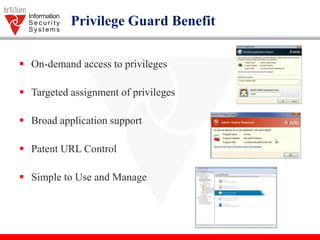
Privilege Guard Benefit
 On-demand access to privileges
 Targeted assignment of privileges
 Broad application support
 Patent URL Control
 Simple to Use and Manage
Policy Process Lifecycle
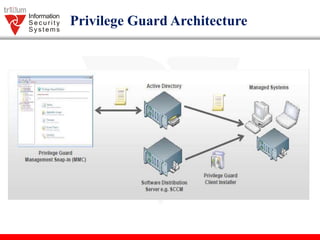
Privilege Guard Architecture
Event Centralization Approach
Reasons To choose Avecto
1. Helps achieve desktop compliance (Sarbanes – Oxley, PCI
Security, HIPAA, USGCB)
2. Works seamlessly with User Account Control (UAC) and
eliminates or replaces inappropriate UAC prompts
3. Most integrates and automated solution
4. Easy to do business with by backend channel relationship
5. Easily scales and deployment with security policies
Market Experience
Demo
 Privilege Guard Management Console
 Privilege Guard Client
 Windows 7
 Working on Local Group Policy
 Use Cases
 Blocking Application
 Allow Shell rule for Privilege User
 Elevation prompt with Authentication for Monitoring
Thank You

Privilege Management Solution

  • 1.
    Privilege Management Solution LeastPrivilege = Least Risk = Least Cost Presenter: Syed Sajjad Jaffer Rizvi IS-Analyst-Network Monitoring, Security & Control MS-Information Technology
  • 2.
    Agenda  Privilege Management Challenges  Privilege Guard Solution  Privilege Guard Benefits  Privilege Guard Architecture  Market Experience
  • 3.
    Why Privilege Management?  Enables a standardized, compliant desktop for all users  Lower cost through:-  Fewer help desk calls  Stream-lined management of software  Simplified management of privilege requests  User satisfaction improvements  Improved security, auditing and reporting
  • 4.
    Challenge Standard Users ADMIN RIGHTS AdminTask Software Installation • High Support Cost • High Security Risks • Compliance Issue Problem Application Standard Applications
  • 5.
    Standard Users Standard UserRights Standard Application • High Support Cost • Less productive Users • Poor User experience Administrator Grant permission Contd…
  • 6.
    Controls  Inventory ofAuthorized and Unauthorized Software  Controlled Use of Administrative Privileges  Maintenance, Monitoring, and Analysis of Audit Logs  Account Monitoring and Control  Controlled Access Based on the Need to Know  Limitation and Control of Services  Application Software Security  Disk Quotas  Power management  System restore and backup  Various Windows components  Environment variables  File and folder management  Registry keys and values  Shares  Shortcuts  Drive mappings etc..
  • 7.
  • 8.
     Deploy allusers as standard users  Assign privilege to individual applications based on user roles and needs  Prevent the execution of unauthorized applications  Centrally managed through Active Directory Group Policy  Detailed auditing and application reporting The Privilege Guard Solution
  • 9.
    Privilege Guard Benefit On-demand access to privileges  Targeted assignment of privileges  Broad application support  Patent URL Control  Simple to Use and Manage
  • 10.
  • 11.
  • 12.
  • 13.
    Reasons To chooseAvecto 1. Helps achieve desktop compliance (Sarbanes – Oxley, PCI Security, HIPAA, USGCB) 2. Works seamlessly with User Account Control (UAC) and eliminates or replaces inappropriate UAC prompts 3. Most integrates and automated solution 4. Easy to do business with by backend channel relationship 5. Easily scales and deployment with security policies
  • 14.
  • 15.
    Demo  Privilege GuardManagement Console  Privilege Guard Client  Windows 7  Working on Local Group Policy  Use Cases  Blocking Application  Allow Shell rule for Privilege User  Elevation prompt with Authentication for Monitoring
  • 16.

Editor's Notes

  • #5 Maximum risk occurs when users are given admin rights and do not regularly connect to the domain Even when users receive regular group policy updates, have antivirus software, and other controls are in place, the system is at risk because users with admin rights can over-ride these controls How Privilege Guard Solution Helps Privilege Guard is the most effective way to deliver the least risk desktop because all users operate under a standard user account and application whitelisting further protects the environment.
  • #6 When a standard user attempts to run a process which requires elevated privileges they will be presented with the standard UAC prompt which requires them to enter admin credentials to proceed. Another key problem is that you would need to provide an admin account to either the standard user or your support engineer and any actions performed under this elevated account cannot be audited. The Privilege Guard Solution Privilege Guard policies can be created to replace the default UAC prompt with a fully customizable Messaging prompt. for example, prompts for “Requires Authorization (Challenge / Response)” or “Blocked Execution
  • #7 Controls that need to be managed by administrator for administrative purpose on Standard Users Accounts.
  • #10  Grant the ability to elevate applications on-demand, with gated controls such as justifications and password verification. Ensure that even advanced users such as sysadmins have the ability to perform their specific roles without compromising security. Precision targeting rules mean that admin rights can be assigned securely to individual applications, rather than users, so that all users are able to successfully operate with standard user accounts. Every user is granted just the right level of access to suit their specific job role, providing a seamless transition to least privilege. With support for a broad set of application types, Privilege Guards adds the flexibility to cater for the needs of all users, and all privileged tasks. Whether it’s an application, installation, script or COM task, Privilege Guards handles all your diverse user requirements. Ability to track downloads and control Privileges based on users. Wizard-based workstyles and templates make it faster to get started. A flexible filter engine with targeted control means you can map policies to specific job roles, even developers and sysadmins in the data center. Simple configuration with clear process flows means less clutter and better visibility, keeping it manageable across thousands of users.