SHAWN
ISMAIL
My twitter is @shawnismail, my blog is at http://cloudranger.net and I work at
ARCHITECT | CONSULTANT | GENEROUS
WHAT WE WILL TALK ABOUT TODAY…
1.Overview of Azure security
2.Azure Network Security Groups (NSG)
3.Demo of NSGs in action
Cloud adaptability is strongly tied to Cloud Security
IN CLOUD WHERE WE ARE
TODAY?
• IT is playing an increasingly important role in driving
business strategy since the emergence of cloud
• Still many CIOs hesitate to fully embrace cloud-first
approach
• Large-scale data breaches dominated headlines in 2014-
2015
Cloud adaptability is strongly tied to Cloud Security
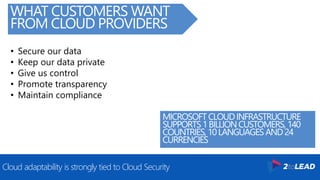
WHAT CUSTOMERS WANT
FROM CLOUD PROVIDERS
• Secure our data
• Keep our data private
• Give us control
• Promote transparency
• Maintain compliance
MICROSOFTCLOUDINFRASTRUCTURE
SUPPORTS1BILLIONCUSTOMERS, 140
COUNTRIES, 10LANGUAGESAND24
CURRENCIES
The logical isolations; Software Defined Networking (SDN) takes a lead
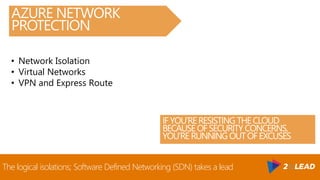
AZURE NETWORK
PROTECTION
• Network Isolation
• Virtual Networks
• VPN and Express Route
IFYOU’RERESISTING THECLOUD
BECAUSEOFSECURITY CONCERNS,
YOU’RERUNNING OUTOFEXCUSES
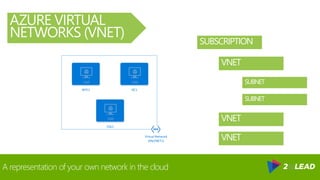
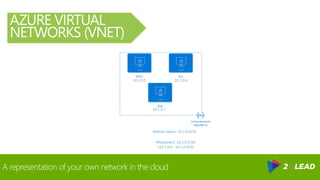
A representation of your own network in the cloud
AZURE VIRTUAL
NETWORKS (VNET)
Virtual Network
(MyVNET1)
WFE1 DC1
SQL1
SUBSCRIPTION
VNET
SUBNET
SUBNET
VNET
VNET
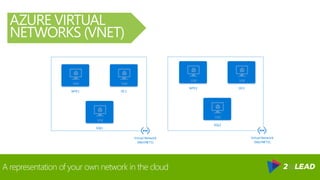
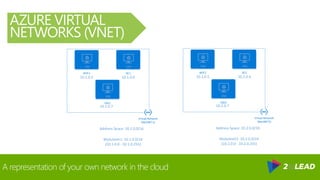
A representation of your own network in the cloud
AZURE VIRTUAL
NETWORKS (VNET)
Virtual Network
(MyVNET1)
WFE1 DC1
SQL1
Virtual Network
(MyVNET2)
WFE2 DC2
SQL2
A representation of your own network in the cloud
AZURE VIRTUAL
NETWORKS (VNET)
Virtual Network
(MyVNET1)
WFE1 DC1
SQL1
Address Space: 10.1.0.0/16
MySubnet1: 10.1.0.0/24
(10.1.0.0 - 10.1.0.255)
10.1.0.5 10.1.0.6
10.1.0.7
A representation of your own network in the cloud
AZURE VIRTUAL
NETWORKS (VNET)
Virtual Network
(MyVNET1)
WFE1 DC1
SQL1
Address Space: 10.1.0.0/16
MySubnet1: 10.1.0.0/24
(10.1.0.0 - 10.1.0.255)
10.1.0.5 10.1.0.6
10.1.0.7
Virtual Network
(MyVNET2)
WFE2 DC2
SQL2
Address Space: 10.2.0.0/16
MySubnet2: 10.2.0.0/24
(10.2.0.0 - 10.2.0.255)
10.2.0.5 10.2.0.6
10.2.0.7
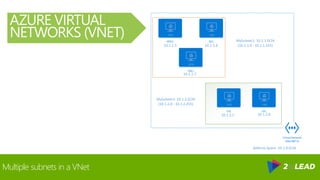
Multiple subnets in a VNet
AZURE VIRTUAL
NETWORKS (VNET)
Virtual Network
(MyVNET1)
WFE1 DC1
SQL1
Address Space: 10.1.0.0/16
MySubnet1: 10.1.1.0/24
(10.1.1.0 - 10.1.1.255)10.1.1.5 10.1.1.6
10.1.1.7
FS1 EX1
MySubnet2: 10.1.2.0/24
(10.1.2.0 - 10.1.2.255)
10.1.2.5 10.1.2.6
Azure Network Security Groups
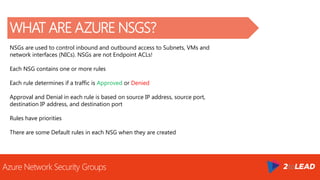
WHAT ARE AZURE NSGS?
NSGs are used to control inbound and outbound access to Subnets, VMs and
network interfaces (NICs). NSGs are not Endpoint ACLs!
Each NSG contains one or more rules
Each rule determines if a traffic is Approved or Denied
Approval and Denial in each rule is based on source IP address, source port,
destination IP address, and destination port
Rules have priorities
There are some Default rules in each NSG when they are created
Azure Network Security Groups Construct
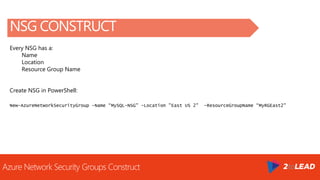
NSG CONSTRUCT
Every NSG has a:
Name
Location
Resource Group Name
Create NSG in PowerShell:
New-AzureNetworkSecurityGroup -Name “MySQL-NSG" -Location "East US 2" -ResourceGroupName “MyRGEast2"
Azure Network Security Groups Rule Construct
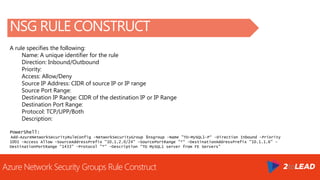
NSG RULE CONSTRUCT
A rule specifies the following:
Name: A unique identifier for the rule
Direction: Inbound/Outbound
Priority:
Access: Allow/Deny
Source IP Address: CIDR of source IP or IP range
Source Port Range:
Destination IP Range: CIDR of the destination IP or IP Range
Destination Port Range:
Protocol: TCP/UPP/Both
Description:
PowerShell:
Add-AzureNetworkSecurityRuleConfig -NetworkSecurityGroup $nsgroup -Name "TO-MySQL1-P“ -Direction Inbound -Priority
1001 -Access Allow -SourceAddressPrefix "10.1.2.0/24" -SourcePortRange "*" -DestinationAddressPrefix "10.1.1.6" -
DestinationPortRange “1433" -Protocol "*" -Description “TO MySQL1 server from FE Servers"
Azure Network Security Groups Default Rules
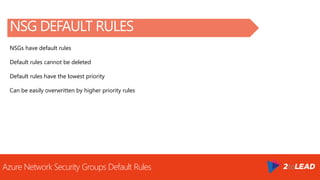
NSG DEFAULT RULES
NSGs have default rules
Default rules cannot be deleted
Default rules have the lowest priority
Can be easily overwritten by higher priority rules
Azure Network Security Groups Default Rules
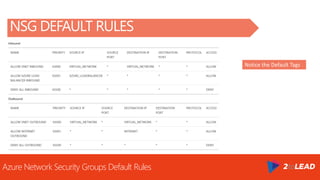
NSG DEFAULT RULES
Notice the Default Tags
Where to apply an NSG is based on individual requirements
WHERE CAN AN NSG BE APPLIED?
Apply/Associate NSG to a Subnet
Apply/Associate NSG to an individual VM
Apply/Associate NSG to a NIC
Your organization may create a best
practice that works for you
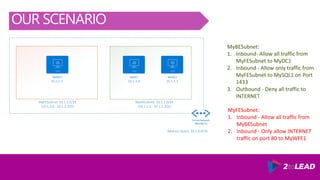
OUR SCENARIO
MyBESubnet:
1. Inbound- Allow all traffic from
MyFESubnet to MyDC1
2. Inbound - Allow only traffic from
MyFESubnet to MySQL1 on Port
1433
3. Outbound - Deny all traffic to
INTERNET
Virtual Network
(MyVNET1)
MyWFE1 MyDC1 MySQL1
Address Space: 10.1.0.0/16
MyFESubnet: 10.1.2.0/24
(10.1.2.0 - 10.1.2.255)
10.1.1.4
MyBESubnet: 10.1.1.0/24
(10.1.1.0 - 10.1.1.255)
10.1.2.4 10.1.1.5
MyFESubnet:
1. Inbound - Allow all traffic from
MyBESubnet
2. Inbound - Only allow INTERNET
traffic on port 80 to MyWFE1
Thank You!
Organizers, SponsorsandYouformakingthispossible.
MoreSlidesAt Slideshare.Net/shawnismail
MoreFreeAzureVideosAt CloudRanger.net
MoreProfessionalHelpAt 2toLead.com
Message Me On LinkedIn or Email shawn@2toLead.com
ARCHITECT | CONSULTANT | GENEROUS
My twitter is @shawnismail, my blog is at http://cloudranger.net, and I work at
ARCHITECT | CONSULTANT | GENEROUS
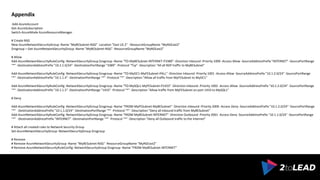
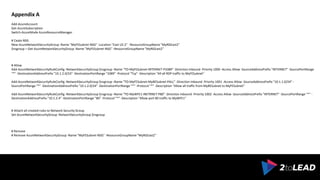
Appendix
Add-AzureAccount
Get-AzureSubscription
Switch-AzureMode AzureResourceManager
# Create NSG
New-AzureNetworkSecurityGroup -Name "MyBESubnet-NSG" -Location "East US 2" -ResourceGroupName "MyRGEast2"
$nsgroup = Get-AzureNetworkSecurityGroup -Name "MyBESubnet-NSG" -ResourceGroupName "MyRGEast2"
# Allow
Add-AzureNetworkSecurityRuleConfig -NetworkSecurityGroup $nsgroup -Name "TO-MyBESubnet-INTERNET-P3389" -Direction Inbound -Priority 1000 -Access Allow -SourceAddressPrefix "INTERNET" -SourcePortRange
"*" -DestinationAddressPrefix "10.1.1.0/24" -DestinationPortRange "3389" -Protocol "Tcp" -Description "All all RDP traffic to MyBESubnet"
Add-AzureNetworkSecurityRuleConfig -NetworkSecurityGroup $nsgroup -Name "TO-MyDC1-MyFESubnet-PALL" -Direction Inbound -Priority 1001 -Access Allow -SourceAddressPrefix "10.1.2.0/24" -SourcePortRange
"*" -DestinationAddressPrefix "10.1.1.4" -DestinationPortRange "*" -Protocol "*" -Description "Allow all traffic from MyFESubnet to MyDC1"
Add-AzureNetworkSecurityRuleConfig -NetworkSecurityGroup $nsgroup -Name "TO-MySQL1-MyFESubnet-P1433" -Direction Inbound -Priority 1002 -Access Allow -SourceAddressPrefix "10.1.2.0/24" -SourcePortRange
"*" -DestinationAddressPrefix "10.1.1.5" -DestinationPortRange "1433" -Protocol "*" -Description "Allow traffic from MyFESubnet on port 1433 to MySQL1"
# Deny
Add-AzureNetworkSecurityRuleConfig -NetworkSecurityGroup $nsgroup -Name "FROM-MyFESubnet-MyBESubnet" -Direction Inbound -Priority 2000 -Access Deny -SourceAddressPrefix "10.1.2.0/24" -SourcePortRange
"*" -DestinationAddressPrefix "10.1.1.0/24" -DestinationPortRange "*" -Protocol "*" -Description "Deny all inbound traffic from MyBESubnet"
Add-AzureNetworkSecurityRuleConfig -NetworkSecurityGroup $nsgroup -Name "FROM-MyBESubnet-INTERNET" -Direction Outbound -Priority 2001 -Access Deny -SourceAddressPrefix "10.1.1.0/24" -SourcePortRange
"*" -DestinationAddressPrefix "INTERNET" -DestinationPortRange "*" -Protocol "*" -Description "Deny all Outbound traffic to the Internet"
# Attach all created rules to Network Security Group
Set-AzureNetworkSecurityGroup -NetworkSecurityGroup $nsgroup
# Remove
# Remove-AzureNetworkSecurityGroup -Name "MyBESubnet-NSG" -ResourceGroupName "MyRGEast2"
# Remove-AzureNetworkSecurityRuleConfig -NetworkSecurityGroup $nsgroup -Name "FROM-MyBESubnet-INTERNET"
ARCHITECT | CONSULTANT | GENEROUS
Appendix A
Add-AzureAccount
Get-AzureSubscription
Switch-AzureMode AzureResourceManager
# Ceate NSG
New-AzureNetworkSecurityGroup -Name "MyFESubnet-NSG" -Location "East US 2" -ResourceGroupName "MyRGEast2"
$nsgroup = Get-AzureNetworkSecurityGroup -Name "MyFESubnet-NSG" -ResourceGroupName "MyRGEast2"
# Allow
Add-AzureNetworkSecurityRuleConfig -NetworkSecurityGroup $nsgroup -Name "TO-MyFESubnet-INTERNET-P3389" -Direction Inbound -Priority 1000 -Access Allow -SourceAddressPrefix "INTERNET" -SourcePortRange
"*" -DestinationAddressPrefix "10.1.2.0/24" -DestinationPortRange "3389" -Protocol "Tcp" -Description "All all RDP traffic to MyFESubnet"
Add-AzureNetworkSecurityRuleConfig -NetworkSecurityGroup $nsgroup -Name "TO-MyFESubnet-MyBESubnet-PALL" -Direction Inbound -Priority 1001 -Access Allow -SourceAddressPrefix "10.1.1.0/24" -
SourcePortRange "*" -DestinationAddressPrefix "10.1.2.0/24" -DestinationPortRange "*" -Protocol "*" -Description "Allow all traffic from MyBESubnet to MyFESubnet"
Add-AzureNetworkSecurityRuleConfig -NetworkSecurityGroup $nsgroup -Name "TO-MyWFE1-INETRNET-P80" -Direction Inbound -Priority 1002 -Access Allow -SourceAddressPrefix "INTERNET" -SourcePortRange "*" -
DestinationAddressPrefix "10.1.2.4" -DestinationPortRange "80" -Protocol "*" -Description "Allow port 80 traffic to MyWFE1"
# Attach all created rules to Network Security Group
Set-AzureNetworkSecurityGroup -NetworkSecurityGroup $nsgroup
# Remove
# Remove-AzureNetworkSecurityGroup -Name "MyFESubnet-NSG" -ResourceGroupName "MyRGEast2"
ARCHITECT | CONSULTANT | GENEROUS
Appendix B
Run to listen to a port on a server A:
$Listener = [System.Net.Sockets.TcpListener]1433
$Listener.Start()
$Listener.AcceptTcpClient()
Run on Server B to connect client to server A:
(new-object Net.Sockets.TcpClient).Connect(“SERVERBIP", 1433)

Azure Network Security Groups (NSG)

  • 2.
    SHAWN ISMAIL My twitter is@shawnismail, my blog is at http://cloudranger.net and I work at ARCHITECT | CONSULTANT | GENEROUS
  • 3.
    WHAT WE WILLTALK ABOUT TODAY… 1.Overview of Azure security 2.Azure Network Security Groups (NSG) 3.Demo of NSGs in action
  • 4.
    Cloud adaptability isstrongly tied to Cloud Security IN CLOUD WHERE WE ARE TODAY? • IT is playing an increasingly important role in driving business strategy since the emergence of cloud • Still many CIOs hesitate to fully embrace cloud-first approach • Large-scale data breaches dominated headlines in 2014- 2015
  • 5.
    Cloud adaptability isstrongly tied to Cloud Security WHAT CUSTOMERS WANT FROM CLOUD PROVIDERS • Secure our data • Keep our data private • Give us control • Promote transparency • Maintain compliance MICROSOFTCLOUDINFRASTRUCTURE SUPPORTS1BILLIONCUSTOMERS, 140 COUNTRIES, 10LANGUAGESAND24 CURRENCIES
  • 6.
    The logical isolations;Software Defined Networking (SDN) takes a lead AZURE NETWORK PROTECTION • Network Isolation • Virtual Networks • VPN and Express Route IFYOU’RERESISTING THECLOUD BECAUSEOFSECURITY CONCERNS, YOU’RERUNNING OUTOFEXCUSES
  • 7.
    A representation ofyour own network in the cloud AZURE VIRTUAL NETWORKS (VNET) Virtual Network (MyVNET1) WFE1 DC1 SQL1 SUBSCRIPTION VNET SUBNET SUBNET VNET VNET
  • 8.
    A representation ofyour own network in the cloud AZURE VIRTUAL NETWORKS (VNET) Virtual Network (MyVNET1) WFE1 DC1 SQL1 Virtual Network (MyVNET2) WFE2 DC2 SQL2
  • 9.
    A representation ofyour own network in the cloud AZURE VIRTUAL NETWORKS (VNET) Virtual Network (MyVNET1) WFE1 DC1 SQL1 Address Space: 10.1.0.0/16 MySubnet1: 10.1.0.0/24 (10.1.0.0 - 10.1.0.255) 10.1.0.5 10.1.0.6 10.1.0.7
  • 10.
    A representation ofyour own network in the cloud AZURE VIRTUAL NETWORKS (VNET) Virtual Network (MyVNET1) WFE1 DC1 SQL1 Address Space: 10.1.0.0/16 MySubnet1: 10.1.0.0/24 (10.1.0.0 - 10.1.0.255) 10.1.0.5 10.1.0.6 10.1.0.7 Virtual Network (MyVNET2) WFE2 DC2 SQL2 Address Space: 10.2.0.0/16 MySubnet2: 10.2.0.0/24 (10.2.0.0 - 10.2.0.255) 10.2.0.5 10.2.0.6 10.2.0.7
  • 11.
    Multiple subnets ina VNet AZURE VIRTUAL NETWORKS (VNET) Virtual Network (MyVNET1) WFE1 DC1 SQL1 Address Space: 10.1.0.0/16 MySubnet1: 10.1.1.0/24 (10.1.1.0 - 10.1.1.255)10.1.1.5 10.1.1.6 10.1.1.7 FS1 EX1 MySubnet2: 10.1.2.0/24 (10.1.2.0 - 10.1.2.255) 10.1.2.5 10.1.2.6
  • 12.
    Azure Network SecurityGroups WHAT ARE AZURE NSGS? NSGs are used to control inbound and outbound access to Subnets, VMs and network interfaces (NICs). NSGs are not Endpoint ACLs! Each NSG contains one or more rules Each rule determines if a traffic is Approved or Denied Approval and Denial in each rule is based on source IP address, source port, destination IP address, and destination port Rules have priorities There are some Default rules in each NSG when they are created
  • 13.
    Azure Network SecurityGroups Construct NSG CONSTRUCT Every NSG has a: Name Location Resource Group Name Create NSG in PowerShell: New-AzureNetworkSecurityGroup -Name “MySQL-NSG" -Location "East US 2" -ResourceGroupName “MyRGEast2"
  • 14.
    Azure Network SecurityGroups Rule Construct NSG RULE CONSTRUCT A rule specifies the following: Name: A unique identifier for the rule Direction: Inbound/Outbound Priority: Access: Allow/Deny Source IP Address: CIDR of source IP or IP range Source Port Range: Destination IP Range: CIDR of the destination IP or IP Range Destination Port Range: Protocol: TCP/UPP/Both Description: PowerShell: Add-AzureNetworkSecurityRuleConfig -NetworkSecurityGroup $nsgroup -Name "TO-MySQL1-P“ -Direction Inbound -Priority 1001 -Access Allow -SourceAddressPrefix "10.1.2.0/24" -SourcePortRange "*" -DestinationAddressPrefix "10.1.1.6" - DestinationPortRange “1433" -Protocol "*" -Description “TO MySQL1 server from FE Servers"
  • 15.
    Azure Network SecurityGroups Default Rules NSG DEFAULT RULES NSGs have default rules Default rules cannot be deleted Default rules have the lowest priority Can be easily overwritten by higher priority rules
  • 16.
    Azure Network SecurityGroups Default Rules NSG DEFAULT RULES Notice the Default Tags
  • 17.
    Where to applyan NSG is based on individual requirements WHERE CAN AN NSG BE APPLIED? Apply/Associate NSG to a Subnet Apply/Associate NSG to an individual VM Apply/Associate NSG to a NIC Your organization may create a best practice that works for you
  • 18.
    OUR SCENARIO MyBESubnet: 1. Inbound-Allow all traffic from MyFESubnet to MyDC1 2. Inbound - Allow only traffic from MyFESubnet to MySQL1 on Port 1433 3. Outbound - Deny all traffic to INTERNET Virtual Network (MyVNET1) MyWFE1 MyDC1 MySQL1 Address Space: 10.1.0.0/16 MyFESubnet: 10.1.2.0/24 (10.1.2.0 - 10.1.2.255) 10.1.1.4 MyBESubnet: 10.1.1.0/24 (10.1.1.0 - 10.1.1.255) 10.1.2.4 10.1.1.5 MyFESubnet: 1. Inbound - Allow all traffic from MyBESubnet 2. Inbound - Only allow INTERNET traffic on port 80 to MyWFE1
  • 19.
    Thank You! Organizers, SponsorsandYouformakingthispossible. MoreSlidesAtSlideshare.Net/shawnismail MoreFreeAzureVideosAt CloudRanger.net MoreProfessionalHelpAt 2toLead.com Message Me On LinkedIn or Email shawn@2toLead.com ARCHITECT | CONSULTANT | GENEROUS My twitter is @shawnismail, my blog is at http://cloudranger.net, and I work at
  • 20.
    ARCHITECT | CONSULTANT| GENEROUS Appendix Add-AzureAccount Get-AzureSubscription Switch-AzureMode AzureResourceManager # Create NSG New-AzureNetworkSecurityGroup -Name "MyBESubnet-NSG" -Location "East US 2" -ResourceGroupName "MyRGEast2" $nsgroup = Get-AzureNetworkSecurityGroup -Name "MyBESubnet-NSG" -ResourceGroupName "MyRGEast2" # Allow Add-AzureNetworkSecurityRuleConfig -NetworkSecurityGroup $nsgroup -Name "TO-MyBESubnet-INTERNET-P3389" -Direction Inbound -Priority 1000 -Access Allow -SourceAddressPrefix "INTERNET" -SourcePortRange "*" -DestinationAddressPrefix "10.1.1.0/24" -DestinationPortRange "3389" -Protocol "Tcp" -Description "All all RDP traffic to MyBESubnet" Add-AzureNetworkSecurityRuleConfig -NetworkSecurityGroup $nsgroup -Name "TO-MyDC1-MyFESubnet-PALL" -Direction Inbound -Priority 1001 -Access Allow -SourceAddressPrefix "10.1.2.0/24" -SourcePortRange "*" -DestinationAddressPrefix "10.1.1.4" -DestinationPortRange "*" -Protocol "*" -Description "Allow all traffic from MyFESubnet to MyDC1" Add-AzureNetworkSecurityRuleConfig -NetworkSecurityGroup $nsgroup -Name "TO-MySQL1-MyFESubnet-P1433" -Direction Inbound -Priority 1002 -Access Allow -SourceAddressPrefix "10.1.2.0/24" -SourcePortRange "*" -DestinationAddressPrefix "10.1.1.5" -DestinationPortRange "1433" -Protocol "*" -Description "Allow traffic from MyFESubnet on port 1433 to MySQL1" # Deny Add-AzureNetworkSecurityRuleConfig -NetworkSecurityGroup $nsgroup -Name "FROM-MyFESubnet-MyBESubnet" -Direction Inbound -Priority 2000 -Access Deny -SourceAddressPrefix "10.1.2.0/24" -SourcePortRange "*" -DestinationAddressPrefix "10.1.1.0/24" -DestinationPortRange "*" -Protocol "*" -Description "Deny all inbound traffic from MyBESubnet" Add-AzureNetworkSecurityRuleConfig -NetworkSecurityGroup $nsgroup -Name "FROM-MyBESubnet-INTERNET" -Direction Outbound -Priority 2001 -Access Deny -SourceAddressPrefix "10.1.1.0/24" -SourcePortRange "*" -DestinationAddressPrefix "INTERNET" -DestinationPortRange "*" -Protocol "*" -Description "Deny all Outbound traffic to the Internet" # Attach all created rules to Network Security Group Set-AzureNetworkSecurityGroup -NetworkSecurityGroup $nsgroup # Remove # Remove-AzureNetworkSecurityGroup -Name "MyBESubnet-NSG" -ResourceGroupName "MyRGEast2" # Remove-AzureNetworkSecurityRuleConfig -NetworkSecurityGroup $nsgroup -Name "FROM-MyBESubnet-INTERNET"
  • 21.
    ARCHITECT | CONSULTANT| GENEROUS Appendix A Add-AzureAccount Get-AzureSubscription Switch-AzureMode AzureResourceManager # Ceate NSG New-AzureNetworkSecurityGroup -Name "MyFESubnet-NSG" -Location "East US 2" -ResourceGroupName "MyRGEast2" $nsgroup = Get-AzureNetworkSecurityGroup -Name "MyFESubnet-NSG" -ResourceGroupName "MyRGEast2" # Allow Add-AzureNetworkSecurityRuleConfig -NetworkSecurityGroup $nsgroup -Name "TO-MyFESubnet-INTERNET-P3389" -Direction Inbound -Priority 1000 -Access Allow -SourceAddressPrefix "INTERNET" -SourcePortRange "*" -DestinationAddressPrefix "10.1.2.0/24" -DestinationPortRange "3389" -Protocol "Tcp" -Description "All all RDP traffic to MyFESubnet" Add-AzureNetworkSecurityRuleConfig -NetworkSecurityGroup $nsgroup -Name "TO-MyFESubnet-MyBESubnet-PALL" -Direction Inbound -Priority 1001 -Access Allow -SourceAddressPrefix "10.1.1.0/24" - SourcePortRange "*" -DestinationAddressPrefix "10.1.2.0/24" -DestinationPortRange "*" -Protocol "*" -Description "Allow all traffic from MyBESubnet to MyFESubnet" Add-AzureNetworkSecurityRuleConfig -NetworkSecurityGroup $nsgroup -Name "TO-MyWFE1-INETRNET-P80" -Direction Inbound -Priority 1002 -Access Allow -SourceAddressPrefix "INTERNET" -SourcePortRange "*" - DestinationAddressPrefix "10.1.2.4" -DestinationPortRange "80" -Protocol "*" -Description "Allow port 80 traffic to MyWFE1" # Attach all created rules to Network Security Group Set-AzureNetworkSecurityGroup -NetworkSecurityGroup $nsgroup # Remove # Remove-AzureNetworkSecurityGroup -Name "MyFESubnet-NSG" -ResourceGroupName "MyRGEast2"
  • 22.
    ARCHITECT | CONSULTANT| GENEROUS Appendix B Run to listen to a port on a server A: $Listener = [System.Net.Sockets.TcpListener]1433 $Listener.Start() $Listener.AcceptTcpClient() Run on Server B to connect client to server A: (new-object Net.Sockets.TcpClient).Connect(“SERVERBIP", 1433)