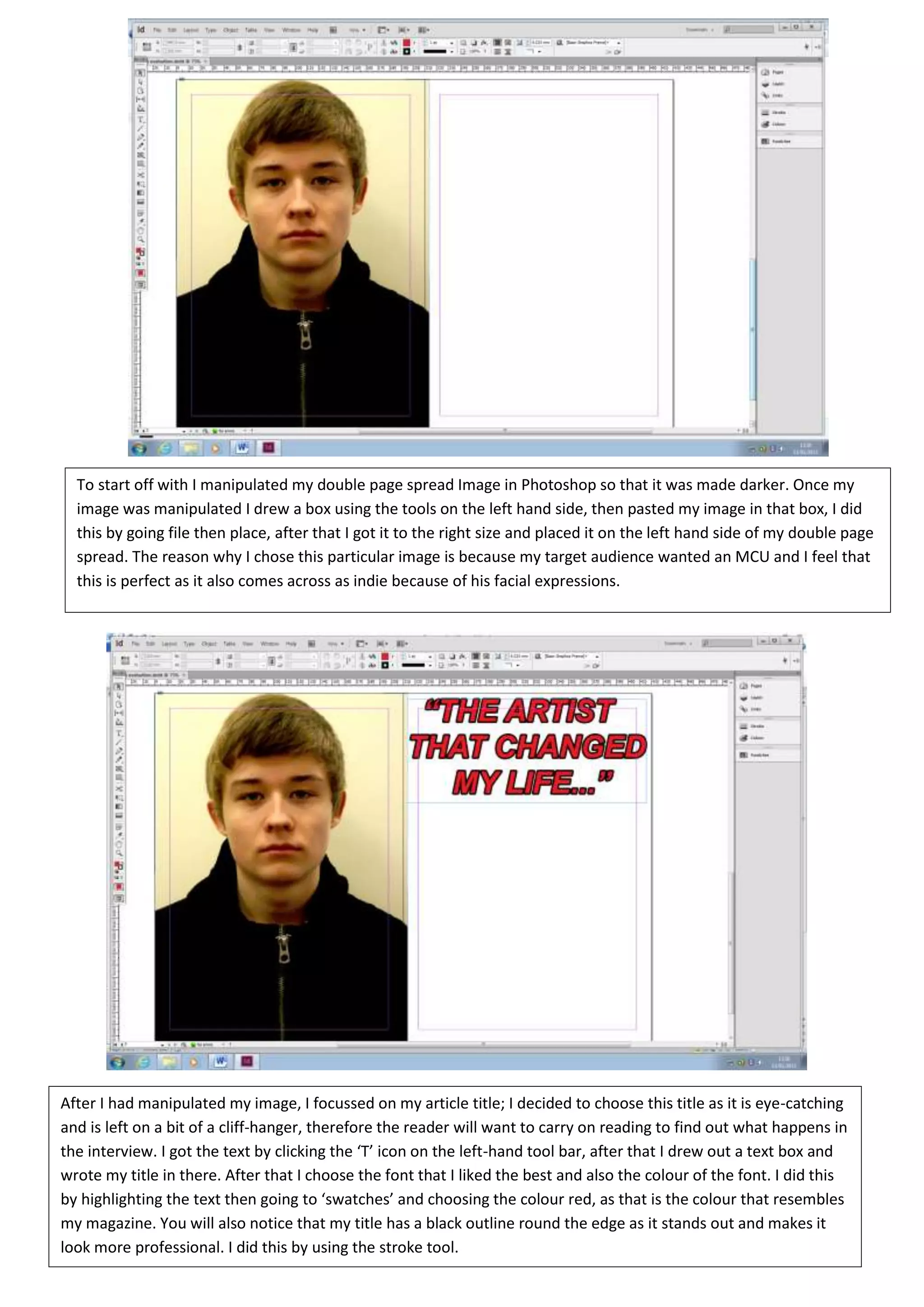
To start off with I manipulated my double page spread Image in Photoshop so that it was made darker. Once my
  image was manipulated I drew a box using the tools on the left hand side, then pasted my image in that box, I did
  this by going file then place, after that I got it to the right size and placed it on the left hand side of my double page
  spread. The reason why I chose this particular image is because my target audience wanted an MCU and I feel that
  this is perfect as it also comes across as indie because of his facial expressions.


After I had manipulated my image, I focussed on my article title; I decided to choose this title as it is eye-catching
and is left on a bit of a cliff-hanger, therefore the reader will want to carry on reading to find out what happens in
the interview. I got the text by clicking the ‘T’ icon on the left-hand tool bar, after that I drew out a text box and
wrote my title in there. After that I choose the font that I liked the best and also the colour of the font. I did this
by highlighting the text then going to ‘swatches’ and choosing the colour red, as that is the colour that resembles
my magazine. You will also notice that my title has a black outline round the edge as it stands out and makes it
look more professional. I did this by using the stroke tool.
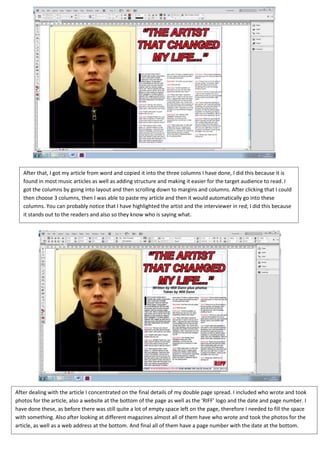
After that, I got my article from word and copied it into the three columns I have done, I did this because it is
   found in most music articles as well as adding structure and making it easier for the target audience to read. I
   got the columns by going into layout and then scrolling down to margins and columns. After clicking that I could
   then choose 3 columns, then I was able to paste my article and then it would automatically go into these
   columns. You can probably notice that I have highlighted the artist and the interviewer in red; I did this because
   it stands out to the readers and also so they know who is saying what.


After dealing with the article I concentrated on the final details of my double page spread. I included who wrote and took
photos for the article, also a website at the bottom of the page as well as the ‘RIFF’ logo and the date and page number. I
have done these, as before there was still quite a lot of empty space left on the page, therefore I needed to fill the space
with something. Also after looking at different magazines almost all of them have who wrote and took the photos for the
article, as well as a web address at the bottom. And final all of them have a page number with the date at the bottom.
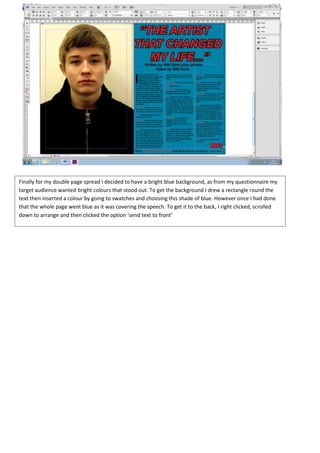
Finally for my double page spread I decided to have a bright blue background, as from my questionnaire my
target audience wanted bright colours that stood out. To get the background I drew a rectangle round the
text then inserted a colour by going to swatches and choosing this shade of blue. However once I had done
that the whole page went blue as it was covering the speech. To get it to the back, I right clicked, scrolled
down to arrange and then clicked the option ‘send text to front’

Print screen dps

  • 1.
    To start offwith I manipulated my double page spread Image in Photoshop so that it was made darker. Once my image was manipulated I drew a box using the tools on the left hand side, then pasted my image in that box, I did this by going file then place, after that I got it to the right size and placed it on the left hand side of my double page spread. The reason why I chose this particular image is because my target audience wanted an MCU and I feel that this is perfect as it also comes across as indie because of his facial expressions. After I had manipulated my image, I focussed on my article title; I decided to choose this title as it is eye-catching and is left on a bit of a cliff-hanger, therefore the reader will want to carry on reading to find out what happens in the interview. I got the text by clicking the ‘T’ icon on the left-hand tool bar, after that I drew out a text box and wrote my title in there. After that I choose the font that I liked the best and also the colour of the font. I did this by highlighting the text then going to ‘swatches’ and choosing the colour red, as that is the colour that resembles my magazine. You will also notice that my title has a black outline round the edge as it stands out and makes it look more professional. I did this by using the stroke tool.
  • 2.
    After that, Igot my article from word and copied it into the three columns I have done, I did this because it is found in most music articles as well as adding structure and making it easier for the target audience to read. I got the columns by going into layout and then scrolling down to margins and columns. After clicking that I could then choose 3 columns, then I was able to paste my article and then it would automatically go into these columns. You can probably notice that I have highlighted the artist and the interviewer in red; I did this because it stands out to the readers and also so they know who is saying what. After dealing with the article I concentrated on the final details of my double page spread. I included who wrote and took photos for the article, also a website at the bottom of the page as well as the ‘RIFF’ logo and the date and page number. I have done these, as before there was still quite a lot of empty space left on the page, therefore I needed to fill the space with something. Also after looking at different magazines almost all of them have who wrote and took the photos for the article, as well as a web address at the bottom. And final all of them have a page number with the date at the bottom.
  • 3.
    Finally for mydouble page spread I decided to have a bright blue background, as from my questionnaire my target audience wanted bright colours that stood out. To get the background I drew a rectangle round the text then inserted a colour by going to swatches and choosing this shade of blue. However once I had done that the whole page went blue as it was covering the speech. To get it to the back, I right clicked, scrolled down to arrange and then clicked the option ‘send text to front’