History
 Concept evolved in 1950(IBM) called RJE (Remote Job Entry Process).
 The cloud symbol was used to represent networks of computing
equipment in the original ARPANET by as early as 1977, and
the CSNET by 1981both predecessors to the Internet itself.
 In the 1990s, telecommunications companies began
offering virtual private network(VPN) services with comparable
quality of service, but at a lower cost.
 References to "cloud computing" in its modern sense appeared as early as 1996, with the
earliest known mention in a Compaq internal document.
 Since 2000, cloud computing has come into existence.
 The popularization of the term can be traced to 2006 when Amazon.com introduced
its Elastic Compute Cloud.
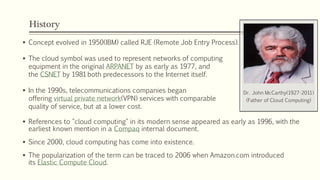
Dr. John McCarthy(1927-2011)
(Father of Cloud Computing)
History
 In early 2008, NASA's OpenNebula, enhanced in the RESERVOIR European
Commission-funded project, became the first open-source software for deploying
private and hybrid clouds, and for the federation of clouds.
 Microsoft Azure was announced as "Azure" in October 2008 and was released on 1
February 2010 as Windows Azure, before being renamed to Microsoft Azure on 25
March 2014.
 In July 2010, Rackspace Hosting and NASA jointly launched an open-source cloud-
software initiative known as OpenStack.
 On March 1, 2011, IBM announced the IBM SmartCloud framework to
support Smarter Planet.
 On June 7, 2012, Oracle announced the Oracle Cloud, this cloud offering is poised
to be the first to provide users with access to an integrated set of IT solutions,
including the Applications (SaaS), Platform (PaaS), and Infrastructure (IaaS) layers.
What is Cloud?
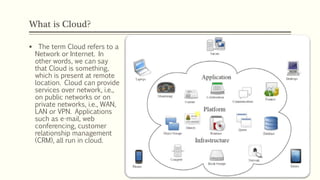
 The term Cloud refers to a
Network or Internet. In
other words, we can say
that Cloud is something,
which is present at remote
location. Cloud can provide
services over network, i.e.,
on public networks or on
private networks, i.e., WAN,
LAN or VPN. Applications
such as e-mail, web
conferencing, customer
relationship management
(CRM), all run in cloud.
What is Cloud Computing?
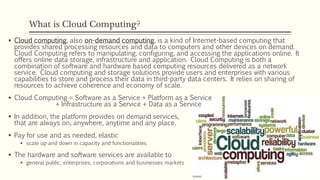
 Cloud computing, also on-demand computing, is a kind of Internet-based computing that
provides shared processing resources and data to computers and other devices on demand.
Cloud Computing refers to manipulating, configuring, and accessing the applications online. It
offers online data storage, infrastructure and application. Cloud Computing is both a
combination of software and hardware based computing resources delivered as a network
service. Cloud computing and storage solutions provide users and enterprises with various
capabilities to store and process their data in third-party data centers. It relies on sharing of
resources to achieve coherence and economy of scale.
 Cloud Computing = Software as a Service + Platform as a Service
+ Infrastructure as a Service + Data as a Service
 In addition, the platform provides on demand services,
that are always on, anywhere, anytime and any place.
 Pay for use and as needed, elastic
 scale up and down in capacity and functionalities
 The hardware and software services are available to
 general public, enterprises, corporations and businesses markets
Alternative Definition
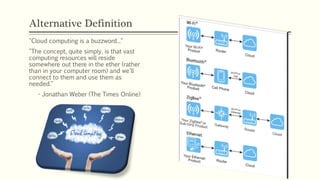
"Cloud computing is a buzzword..."
"The concept, quite simply, is that vast
computing resources will reside
somewhere out there in the ether (rather
than in your computer room) and we'll
connect to them and use them as
needed."
- Jonathan Weber (The Times Online)
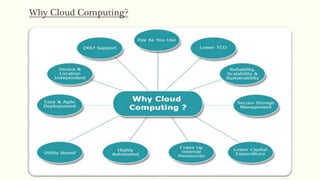
Why Cloud Computing?
Cloud Components
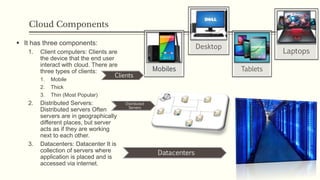
 It has three components:
1. Client computers: Clients are
the device that the end user
interact with cloud. There are
three types of clients:
1. Mobile
2. Thick
3. Thin (Most Popular)
2. Distributed Servers:
Distributed servers Often
servers are in geographically
different places, but server
acts as if they are working
next to each other.
3. Datacenters: Datacenter It is
collection of servers where
application is placed and is
accessed via internet.
Tablets
Laptops
Desktop
Datacenters
Distributed
Servers
Clients
Basic Concepts
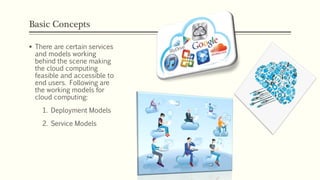
 There are certain services
and models working
behind the scene making
the cloud computing
feasible and accessible to
end users. Following are
the working models for
cloud computing:
1. Deployment Models
2. Service Models
Deployment Models
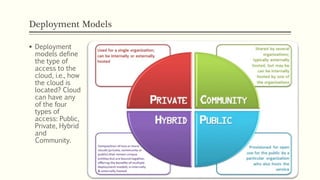
 Deployment
models define
the type of
access to the
cloud, i.e., how
the cloud is
located? Cloud
can have any
of the four
types of
access: Public,
Private, Hybrid
and
Community.
Deployment Models
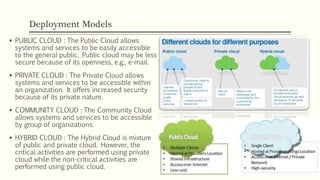
 PUBLIC CLOUD : The Public Cloud allows
systems and services to be easily accessible
to the general public. Public cloud may be less
secure because of its openness, e.g., e-mail.
 PRIVATE CLOUD : The Private Cloud allows
systems and services to be accessible within
an organization. It offers increased security
because of its private nature.
 COMMUNITY CLOUD : The Community Cloud
allows systems and services to be accessible
by group of organizations.
 HYBRID CLOUD : The Hybrid Cloud is mixture
of public and private cloud. However, the
critical activities are performed using private
cloud while the non-critical activities are
performed using public cloud.
Service Models
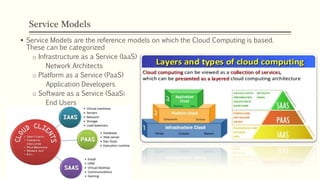
 Service Models are the reference models on which the Cloud Computing is based.
These can be categorized
o Infrastructure as a Service (IaaS)
Network Architects
o Platform as a Service (PaaS)
Application Developers
o Software as a Service (SaaS)
End Users
Infrastructure as a Service (IaaS) - Network Architects
 Also known as hardware as a service.
 It is a computing power that you can rent for a limited period of time.
 It allows existing applications to be run on a cloud suppliers hardware.
 IaaS is the delivery of technology infrastructure as an on demand scalable service.
 IaaS provides access to fundamental resources such as physical machines, virtual
machines, virtual storage, etc.
 Usually billed based on usage
 Usually multi tenant virtualized environment
 Can be coupled with Managed Services for OS and application support
 cloud providers offer computers – as physical or more often as virtual machines –
raw (block) storage, firewalls, load balancers, and networks.
 Examples: Computer and Storage(Amazon, Rackspace, GoGrid, Microsoft, Vrizon)
IaaS Examples
Platform as a Service (PaaS) - Application Developers
 PaaS provides the runtime environment for applications, development & deployment tools,
etc. PaaS provides all of the facilities required to support the complete life cycle of building
and delivering web applications and services entirely from the Internet. Typically applications
must be developed with a particular platform in mind
 Multi tenant environments
 Highly scalable multi tier architecture
 It gives us a nice API (Application Programming Interface) and take care of the
implementation.
 In the PaaS model, cloud providers deliver a computing platform and/or solution stack
typically including operating system, programming language execution environment,
database, and web server.
 It is a platform for developers to write and create their own SaaS i.e. applications. which
means rapid development at low cost.
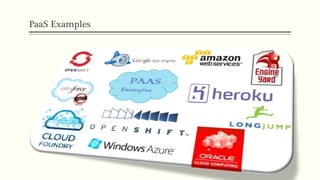
 Examples: Developer Platform – Mashups(Google App Engine, Wavemaker, Force.com)
PaaS Examples
Software as a Service (SaaS) – End Users
 SaaS model allows to use software applications as a service to end users. SaaS is a
software delivery methodology that provides licensed multi-tenant access to
software and its functions remotely as a Web-based service.
 Usually billed based on usage.
 Usually multi tenant environment.
 Highly scalable architecture.
 Also known as On-demand Service.
 It is an application that can be accessed from anywhere on the world as long as you
can have an computer with an Internet Connection.
 We can access this cloud hosted application without any additional hardware or
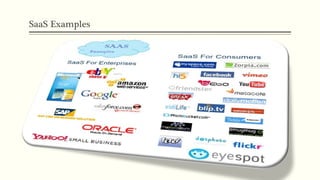
software. E.g. : G-mail, Yahoo mail, Hotmail, Linked-In, Salesforce.com etc. Also they
can provide security features such as SSL encryption, a cryptographic protocol.
SaaS Examples
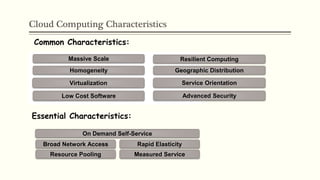
Cloud Computing Characteristics
Common Characteristics:
Low Cost Software
Virtualization Service Orientation
Advanced Security
Homogeneity
Massive Scale Resilient Computing
Geographic Distribution
Essential Characteristics:
Resource Pooling
Broad Network Access Rapid Elasticity
Measured Service
On Demand Self-Service
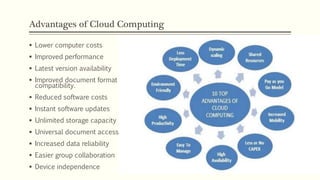
Advantages of Cloud Computing
 Lower computer costs
 Improved performance
 Latest version availability
 Improved document format
compatibility.
 Reduced software costs
 Instant software updates
 Unlimited storage capacity
 Universal document access
 Increased data reliability
 Easier group collaboration
 Device independence
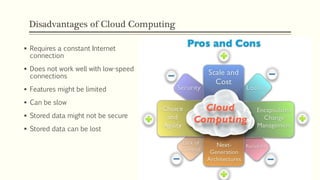
Disadvantages of Cloud Computing
 Requires a constant Internet
connection
 Does not work well with low-speed
connections
 Features might be limited
 Can be slow
 Stored data might not be secure
 Stored data can be lost
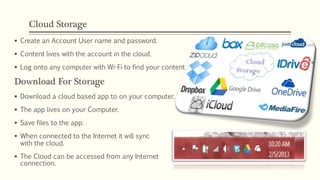
Cloud Storage
 Create an Account User name and password.
 Content lives with the account in the cloud.
 Log onto any computer with Wi-Fi to find your content
Download For Storage
 Download a cloud based app to on your computer.
 The app lives on your Computer.
 Save files to the app.
 When connected to the Internet it will sync
with the cloud.
 The Cloud can be accessed from any Internet
connection.
Cloud computing

Cloud computing

  • 2.
    History  Concept evolvedin 1950(IBM) called RJE (Remote Job Entry Process).  The cloud symbol was used to represent networks of computing equipment in the original ARPANET by as early as 1977, and the CSNET by 1981both predecessors to the Internet itself.  In the 1990s, telecommunications companies began offering virtual private network(VPN) services with comparable quality of service, but at a lower cost.  References to "cloud computing" in its modern sense appeared as early as 1996, with the earliest known mention in a Compaq internal document.  Since 2000, cloud computing has come into existence.  The popularization of the term can be traced to 2006 when Amazon.com introduced its Elastic Compute Cloud. Dr. John McCarthy(1927-2011) (Father of Cloud Computing)
  • 3.
    History  In early2008, NASA's OpenNebula, enhanced in the RESERVOIR European Commission-funded project, became the first open-source software for deploying private and hybrid clouds, and for the federation of clouds.  Microsoft Azure was announced as "Azure" in October 2008 and was released on 1 February 2010 as Windows Azure, before being renamed to Microsoft Azure on 25 March 2014.  In July 2010, Rackspace Hosting and NASA jointly launched an open-source cloud- software initiative known as OpenStack.  On March 1, 2011, IBM announced the IBM SmartCloud framework to support Smarter Planet.  On June 7, 2012, Oracle announced the Oracle Cloud, this cloud offering is poised to be the first to provide users with access to an integrated set of IT solutions, including the Applications (SaaS), Platform (PaaS), and Infrastructure (IaaS) layers.
  • 4.
    What is Cloud? The term Cloud refers to a Network or Internet. In other words, we can say that Cloud is something, which is present at remote location. Cloud can provide services over network, i.e., on public networks or on private networks, i.e., WAN, LAN or VPN. Applications such as e-mail, web conferencing, customer relationship management (CRM), all run in cloud.
  • 5.
    What is CloudComputing?  Cloud computing, also on-demand computing, is a kind of Internet-based computing that provides shared processing resources and data to computers and other devices on demand. Cloud Computing refers to manipulating, configuring, and accessing the applications online. It offers online data storage, infrastructure and application. Cloud Computing is both a combination of software and hardware based computing resources delivered as a network service. Cloud computing and storage solutions provide users and enterprises with various capabilities to store and process their data in third-party data centers. It relies on sharing of resources to achieve coherence and economy of scale.  Cloud Computing = Software as a Service + Platform as a Service + Infrastructure as a Service + Data as a Service  In addition, the platform provides on demand services, that are always on, anywhere, anytime and any place.  Pay for use and as needed, elastic  scale up and down in capacity and functionalities  The hardware and software services are available to  general public, enterprises, corporations and businesses markets
  • 6.
    Alternative Definition "Cloud computingis a buzzword..." "The concept, quite simply, is that vast computing resources will reside somewhere out there in the ether (rather than in your computer room) and we'll connect to them and use them as needed." - Jonathan Weber (The Times Online)
  • 7.
  • 8.
    Cloud Components  Ithas three components: 1. Client computers: Clients are the device that the end user interact with cloud. There are three types of clients: 1. Mobile 2. Thick 3. Thin (Most Popular) 2. Distributed Servers: Distributed servers Often servers are in geographically different places, but server acts as if they are working next to each other. 3. Datacenters: Datacenter It is collection of servers where application is placed and is accessed via internet. Tablets Laptops Desktop Datacenters Distributed Servers Clients
  • 9.
    Basic Concepts  Thereare certain services and models working behind the scene making the cloud computing feasible and accessible to end users. Following are the working models for cloud computing: 1. Deployment Models 2. Service Models
  • 10.
    Deployment Models  Deployment modelsdefine the type of access to the cloud, i.e., how the cloud is located? Cloud can have any of the four types of access: Public, Private, Hybrid and Community.
  • 11.
    Deployment Models  PUBLICCLOUD : The Public Cloud allows systems and services to be easily accessible to the general public. Public cloud may be less secure because of its openness, e.g., e-mail.  PRIVATE CLOUD : The Private Cloud allows systems and services to be accessible within an organization. It offers increased security because of its private nature.  COMMUNITY CLOUD : The Community Cloud allows systems and services to be accessible by group of organizations.  HYBRID CLOUD : The Hybrid Cloud is mixture of public and private cloud. However, the critical activities are performed using private cloud while the non-critical activities are performed using public cloud.
  • 12.
    Service Models  ServiceModels are the reference models on which the Cloud Computing is based. These can be categorized o Infrastructure as a Service (IaaS) Network Architects o Platform as a Service (PaaS) Application Developers o Software as a Service (SaaS) End Users
  • 13.
    Infrastructure as aService (IaaS) - Network Architects  Also known as hardware as a service.  It is a computing power that you can rent for a limited period of time.  It allows existing applications to be run on a cloud suppliers hardware.  IaaS is the delivery of technology infrastructure as an on demand scalable service.  IaaS provides access to fundamental resources such as physical machines, virtual machines, virtual storage, etc.  Usually billed based on usage  Usually multi tenant virtualized environment  Can be coupled with Managed Services for OS and application support  cloud providers offer computers – as physical or more often as virtual machines – raw (block) storage, firewalls, load balancers, and networks.  Examples: Computer and Storage(Amazon, Rackspace, GoGrid, Microsoft, Vrizon)
  • 14.
  • 15.
    Platform as aService (PaaS) - Application Developers  PaaS provides the runtime environment for applications, development & deployment tools, etc. PaaS provides all of the facilities required to support the complete life cycle of building and delivering web applications and services entirely from the Internet. Typically applications must be developed with a particular platform in mind  Multi tenant environments  Highly scalable multi tier architecture  It gives us a nice API (Application Programming Interface) and take care of the implementation.  In the PaaS model, cloud providers deliver a computing platform and/or solution stack typically including operating system, programming language execution environment, database, and web server.  It is a platform for developers to write and create their own SaaS i.e. applications. which means rapid development at low cost.  Examples: Developer Platform – Mashups(Google App Engine, Wavemaker, Force.com)
  • 16.
  • 17.
    Software as aService (SaaS) – End Users  SaaS model allows to use software applications as a service to end users. SaaS is a software delivery methodology that provides licensed multi-tenant access to software and its functions remotely as a Web-based service.  Usually billed based on usage.  Usually multi tenant environment.  Highly scalable architecture.  Also known as On-demand Service.  It is an application that can be accessed from anywhere on the world as long as you can have an computer with an Internet Connection.  We can access this cloud hosted application without any additional hardware or software. E.g. : G-mail, Yahoo mail, Hotmail, Linked-In, Salesforce.com etc. Also they can provide security features such as SSL encryption, a cryptographic protocol.
  • 18.
  • 19.
    Cloud Computing Characteristics CommonCharacteristics: Low Cost Software Virtualization Service Orientation Advanced Security Homogeneity Massive Scale Resilient Computing Geographic Distribution Essential Characteristics: Resource Pooling Broad Network Access Rapid Elasticity Measured Service On Demand Self-Service
  • 20.
    Advantages of CloudComputing  Lower computer costs  Improved performance  Latest version availability  Improved document format compatibility.  Reduced software costs  Instant software updates  Unlimited storage capacity  Universal document access  Increased data reliability  Easier group collaboration  Device independence
  • 21.
    Disadvantages of CloudComputing  Requires a constant Internet connection  Does not work well with low-speed connections  Features might be limited  Can be slow  Stored data might not be secure  Stored data can be lost
  • 22.
    Cloud Storage  Createan Account User name and password.  Content lives with the account in the cloud.  Log onto any computer with Wi-Fi to find your content Download For Storage  Download a cloud based app to on your computer.  The app lives on your Computer.  Save files to the app.  When connected to the Internet it will sync with the cloud.  The Cloud can be accessed from any Internet connection.