Database Environment
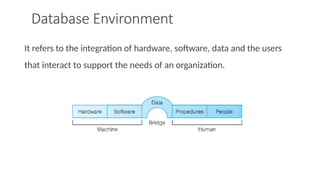
It refersto the integration of hardware, software, data and the users
that interact to support the needs of an organization.
4.
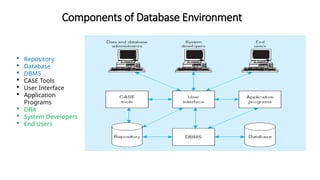
Components of DatabaseEnvironment
4
Repository
Database
DBMS
CASE Tools
User Interface
Application
Programs
DBA
System Developers
End Users
5.
5
Components of DatabaseEnvironment
CASE Tool
• Computer Aided Software Engineering Tool
• Automatic tools used to design databases and application
programs.
Repository
• Centralized storehouse of metadata
• Centralized knowledge base for all data definitions,
relationships, formats, and other system component.
6.
6
Components of DatabaseEnvironment
DBMS
• Database Management System
• A database management is a software that is used to create,
maintain, and provide controlled access to user databases.
Database
• A collection of similar records with relationships between the
records.
What is difference between Repository and database?
7.
7
Components of DatabaseEnvironment
Application Programs
• Computer programs that are used to create and maintain the
database.
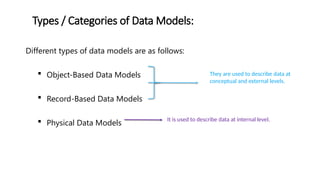
• Computer program provide information to the users.
User Interface
• Language and menus by which user interact with the various
system components.
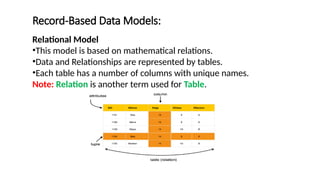
8.
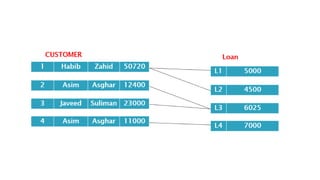
8
Components of DatabaseEnvironment
Data and Database Administrator
• DBA is a person who is responsible for the overall management
of data resources in an organization, including maintaining data
definitions and standards.
• Database Administrator is a person who is responsible for
physical database design and technical issue.
System developers
• Person who develops the database or new application programs.
9.
9
End Users
• Theperson who use the database for their need in an
organization.
• The person who add, delete, modify data in database.
Components of Database Environment
10.
Database Development Process:
10
Development of complete database application is lengthy and
complicated process.
Different strategies can be used to develop database applications
which are as follows:
Top-Down Strategies
Bottom-Up Strategies
11.
Database Development Process:
11
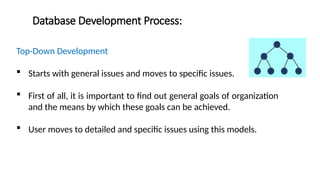
Top-DownDevelopment
Starts with general issues and moves to specific issues.
First of all, it is important to find out general goals of organization
and the means by which these goals can be achieved.
User moves to detailed and specific issues using this models.
12.
Database Development Process:
12
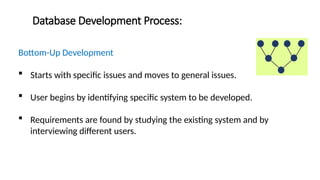
Bottom-UpDevelopment
Starts with specific issues and moves to general issues.
User begins by identifying specific system to be developed.
Requirements are found by studying the existing system and by
interviewing different users.
13.
Database Development LifeCycle (DDLC)
13
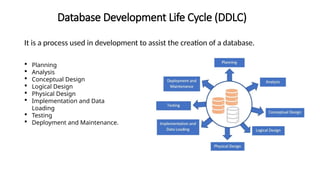
It is a process used in development to assist the creation of a database.
Planning
Analysis
Conceptual Design
Logical Design
Physical Design
Implementation and Data
Loading
Testing
Deployment and Maintenance.
14.
Database Development LifeCycle (DDLC)
14
Planning:
Organization decision whether there is a need for a database,
Determines the goals of the database,
Estimates the cost,
Objectives should be clearly defined for the database.
15.
Database Development LifeCycle (DDLC)
15
Analysis:
Requirement gathering and specification
Identify the tasks & the use cases
Objectives should be clearly defined for the database.
Coordination with stakeholders (end-users, product owners etc.)
Preparation of Software Requirement Specification (SRS).
16.
Database Development LifeCycle (DDLC)
16
Conceptual Design:
The goal is to visualize the entities, fields and connections
Requirement specification to conceptual model
Data is categorized into graphical representation of the entities
Relationship and dependencies are specified
17.
Database Development LifeCycle (DDLC)
17
Logical Design:
Defining entities with detail of all attributes
Specifying primary/foreign keys
Normalization of the database
Applying Integrity constraints
18.
Database Development LifeCycle (DDLC)
18
Physical Design:
Last step of the design
Converting entities into tables
Naming assigning data types etc.
Validation and optimization of the design
Denormalization if needed
19.
Database Development LifeCycle (DDLC)
19
Implementation and Data Loading:
Installation of DBMS
Create the data base
Load the existing data if any
Integrate the database with other applications
20.
Database Development LifeCycle (DDLC)
20
Testing:
Make sure that everything is working as expected
Fixing anomalies in the system
Testing can be done automatically or manually
Test in multiple environments for better quality assurance
21.
Database Development LifeCycle (DDLC)
21
Deployment and Maintenance:
Deploying the to the production environment
Fixing bugs raised during usage of th product
Make changes / update the system
Need to revisit the steps again and again
22.
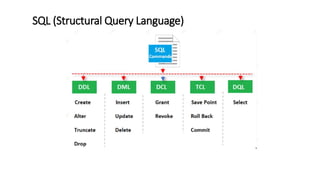
Database Languages:
22
Read, Update,Manipulate, and Store data in a database using
Database Languages.
The following are the database languages:
Data Definition Language (DDL)
Data Manipulation Language (DML)
Data Control Language (DCL)
Transaction Control Language (TCL)
Data Query Language (DQL)
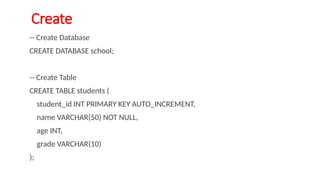
-- Create Database
CREATEDATABASE school;
-- Create Table
CREATE TABLE students (
student_id INT PRIMARY KEY AUTO_INCREMENT,
name VARCHAR(50) NOT NULL,
age INT,
grade VARCHAR(10)
);
Create
25.
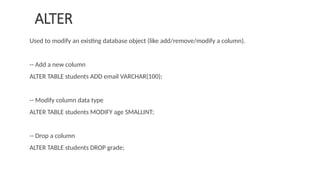
Used to modifyan existing database object (like add/remove/modify a column).
-- Add a new column
ALTER TABLE students ADD email VARCHAR(100);
-- Modify column data type
ALTER TABLE students MODIFY age SMALLINT;
-- Drop a column
ALTER TABLE students DROP grade;
ALTER
26.
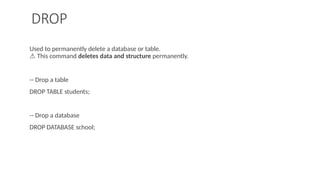
Used to permanentlydelete a database or table.
This command
⚠️ deletes data and structure permanently.
-- Drop a table
DROP TABLE students;
-- Drop a database
DROP DATABASE school;
DROP
27.
TRUNCATE TABLE students;
Deletesall data from a table but keeps the structure (faster than DELETE).
Used to rename a table.
RENAME TABLE students TO learners;
Truncate and Rename
28.
Database Languages:
28
Data DefinitionLanguage (DDL)
Used to specify the database schema.
It allows the user to describe and name the entities, attributes, and
relationships required for the application, together with any associated
integrity and security constraints.
The main purpose of DDL is to store the information of metadata like the
number of schemas and tables, their names, indexes, constraints, columns in
each table, etc.
29.
Data Definition Language(DDL):
29
The result of the compilation of the DDL statements is a set of tables stored in
special files collectively called the system catalog.
The system catalog integrates the metadata, that is data that describes objects
in the database and makes it easier for those objects to be accessed or
manipulated.
This language is used by the conceptual schema to access and retrieve the
records from/to the database respectively, where these records describe entities,
relationship, and attributes.
30.
Data Definition Language(DDL):
30
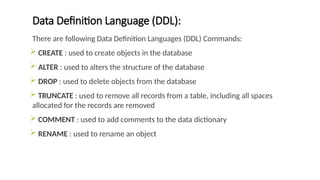
There are following Data Definition Languages (DDL) Commands:
CREATE : used to create objects in the database
ALTER : used to alters the structure of the database
DROP : used to delete objects from the database
TRUNCATE : used to remove all records from a table, including all spaces
allocated for the records are removed
COMMENT : used to add comments to the data dictionary
RENAME : used to rename an object
31.
Data Manipulation Language(DML):
31
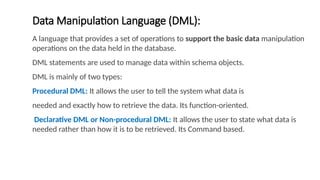
A language that provides a set of operations to support the basic data manipulation
operations on the data held in the database.
DML statements are used to manage data within schema objects.
DML is mainly of two types:
Procedural DML: It allows the user to tell the system what data is
needed and exactly how to retrieve the data. Its function-oriented.
Declarative DML or Non-procedural DML: It allows the user to state what data is
needed rather than how it is to be retrieved. Its Command based.
32.
Data Manipulation Language(DML):
32
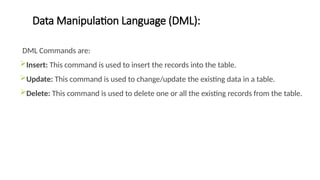
DML Commands are:
Insert: This command is used to insert the records into the table.
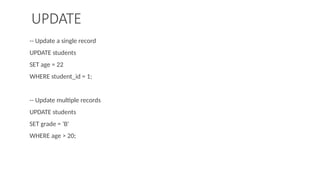
Update: This command is used to change/update the existing data in a table.
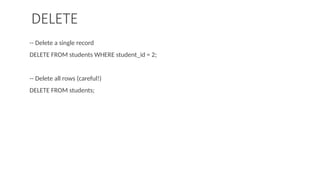
Delete: This command is used to delete one or all the existing records from the table.
33.
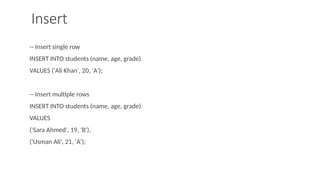
-- Insert singlerow
INSERT INTO students (name, age, grade)
VALUES ('Ali Khan', 20, 'A');
-- Insert multiple rows
INSERT INTO students (name, age, grade)
VALUES
('Sara Ahmed', 19, 'B'),
('Usman Ali', 21, 'A');
Insert
34.
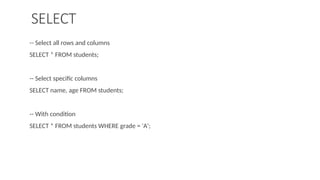
-- Select allrows and columns
SELECT * FROM students;
-- Select specific columns
SELECT name, age FROM students;
-- With condition
SELECT * FROM students WHERE grade = 'A';
SELECT
35.
-- Update asingle record
UPDATE students
SET age = 22
WHERE student_id = 1;
-- Update multiple records
UPDATE students
SET grade = 'B'
WHERE age > 20;
UPDATE
36.
-- Delete asingle record
DELETE FROM students WHERE student_id = 2;
-- Delete all rows (careful!)
DELETE FROM students;
DELETE
37.
Data Control Language(DCL):
37
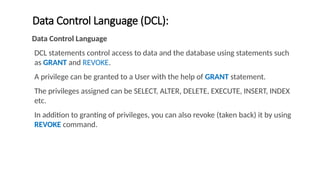
Data Control Language
DCL statements control access to data and the database using statements such
as GRANT and REVOKE.
A privilege can be granted to a User with the help of GRANT statement.
The privileges assigned can be SELECT, ALTER, DELETE, EXECUTE, INSERT, INDEX
etc.
In addition to granting of privileges, you can also revoke (taken back) it by using
REVOKE command.
38.
Data Control Language(DCL):
38
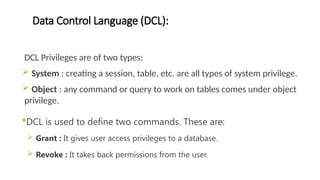
DCL Privileges are of two types:
System : creating a session, table, etc. are all types of system privilege.
Object : any command or query to work on tables comes under object
privilege.
DCL is used to define two commands. These are:
Grant : It gives user access privileges to a database.
Revoke : It takes back permissions from the user.
39.
Transaction Control Language(TCL):
39
Transaction Control Languages
TCL is a language which manages transactions within the database. It is used to
execute the changes made by the DML statements.
There are following Transaction Control Language (TCL) Commands:
Commit : This command is used to save the transactions in the database.
Rollback : This command is used to restore the database to that state which was last
committed.
40.
Data Models:
40
Amodel is a representation of ‘real world’ objects and events, and their associations.
Data Model
Integrated collection of concepts for describing data, relationships between data,
and constraints on the data in an organization.
Graphical systems used to capture the nature and relationships among data.
Data model is a set of tools that are used to develop a database design.
41.
Data Models:
41
Datamodel is used to develop a database design.
Data models define how data is connected to each other and how they are
processed and stored inside the system.
Data models define how the logical structure of a database is modeled.
Data Models are fundamental entities to introduce abstraction in a DBMS.
The purpose of a data model is to represent data and to make the data
understandable. If it does this, then it can be easily used to design a database.
42.
Components / Partsof Data Models:
42
Structural Part: It consists of set of rules. These rules specify how database
can be developed.
Manipulative Part: It defines the types of operations that can be performed
on data. [updating or retrieving data from database and changing structure of database]
Set of Integrity Rules: It ensures the accuracy of data in the database.
43.
Importance of DataModels:
43
It is used as a communication tool for database designer, application programmer
and end user to interact with one another.
Good data model enables the users to understand the organization for which
database design is developed.
Good data model is necessary for designing a good database.
Any DBMS is based on a specific data model.
No DBMS can exist without any data model.
It is very important to know the structures, manipulation languages, and integrity
facilities implemented by DBMS. It enables the users to understand the facilities
and functionalities provided by the DBMS.
44.
Types / Categoriesof Data Models:
44
Different types of data models are as follows:
Object-Based Data Models
Record-Based Data Models
Physical Data Models
They are used to describe data at
conceptual and external levels.
It is used to describe data at internal level.
45.
Object-Based Data Models:
45
Objectbased models use concepts like entities, attributes and
relationships.
Entity is a person, place, thing or event for which data is
collected and maintained in the database.
Attribute is the property / characteristics of an entity.
Relationship is an association between two or more entities.
46.
Object-Based Data Models:
46
Someof the more common types of object-based data model are:
Entity–Relationship Model
Forms the basis for the database design methodology
Semantic Model
Functional Model
Object-Oriented Model
47.
Record-Based Data Models:
47
In this model, database consists of a number of fixed format records and each
record has a fixed number of fields.
They are used to develop and specify the logical structure and provide some
options for implementation of the design.
There are three types of record-based data models:
Relational model
Network Model
Hierarchical model
48.
Record-Based Data Models:
48
RelationalModel
•This model is based on mathematical relations.
•Data and Relationships are represented by tables.
•Each table has a number of columns with unique names.
Note: Relation is another term used for Table.
49.
Record-Based Data Models:
49
NetworkModel
The network model is the extension of the hierarchical structure because it allows
multiple parent-child relationships.
Data is represented as collection of records and relationships are represented as sets.
These sets become pointers in the implementations.
Records are organized as graph structures
Nodes are records
Sets as edges
51.
Network Model:
51
ParentRecord is called Owner
Child Record is called Member
Support 1-1, 1-M & M-M relationship
Support recursive relationship
Disadvantages
Structure should must be defined in advanced which is difficult task.
It is complex to understand and develop.
52.
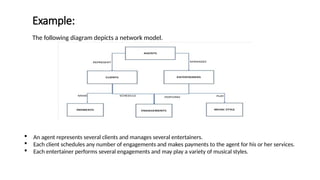
Example:
52
The following diagramdepicts a network model.
An agent represents several clients and manages several entertainers.
Each client schedules any number of engagements and makes payments to the agent for his or her services.
Each entertainer performs several engagements and may play a variety of musical styles.
53.
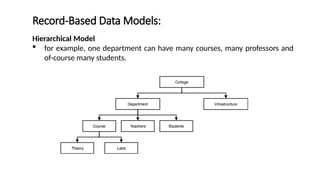
Record-Based Data Models:
53
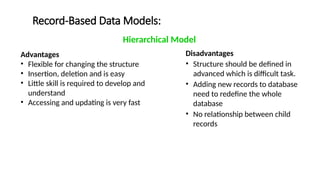
HierarchicalModel
Restricted type of Network Model
Data is represented as collection of records and relationships are
represented as sets.
It allows a node to have only one parent
It is represented by a tree graph
Records as nodes also called Segments
Sets as Edges
Record-Based Data Models:
55
Advantages
•Flexible for changing the structure
• Insertion, deletion and is easy
• Little skill is required to develop and
understand
• Accessing and updating is very fast
Disadvantages
• Structure should be defined in
advanced which is difficult task.
• Adding new records to database
need to redefine the whole
database
• No relationship between child
records
Hierarchical Model
56.
Physical Data Models:
56
Describe how data is stored in the computer, representing information such as
record structures, record orderings, and access paths.
There are limited physical data models as compared to logical data models.
The most common physical data models are unifying model and frame memory.
Editor's Notes
#5 CASE Tool help with creation of data models and in some cases can also help automatically generate the “code” needed to create the database.
#8 Data Administrator
Responsible for the management of data resources, including database planning, development and maintenance of standards, policies and procedures
Database Administrator
Responsible for the physical realization of the database including physical database design and implementation, security and integrity control, maintenance of operational systems, ensuring satisfactory performance.
#11 You first make the conceptual design like the ERD move to logical design and then physical implementation
#12 You first define the data elements the attributes and their relationships make data models as per the business need and then you integrate them together
#31 DECLARE cursor_name CURSOR FOR SELECT emp_name FROM employees WHERE dept_id = 10; BEGIN OPEN cursor_name; FETCH cursor_name INTO emp_variable; CLOSE cursor_name; END;
#46 Semantic Model: Focuses on what the system knows (concepts, entities, relationships, and meaning).
Functional Model: Focuses on what the system does (processes, functions, operations, and how data flows through the system).
ER Model is more practical and focused on database structure and implementation, making it easier to translate into relational database tables.
Semantic Model is more abstract, aiming to capture the meaning and interpretation of data in a broader, often interdisciplinary context.
The Object-Oriented Model organizes a system around objects, which encapsulate both data and behavior. It is a powerful way to model and design software systems by promoting reuse, flexibility, and real-world mapping.

![Components / Parts of Data Models:
42
Structural Part: It consists of set of rules. These rules specify how database
can be developed.
Manipulative Part: It defines the types of operations that can be performed
on data. [updating or retrieving data from database and changing structure of database]
Set of Integrity Rules: It ensures the accuracy of data in the database.](https://image.slidesharecdn.com/02-databaseenvironment-250930062701-b324d320/85/Database-Presentation-on-Topic-Database-environment-42-320.jpg)