LIBRARY
Management System
Haider Javed
Lorem Ipsum is the
biggest book of the
year by Red person.
ZAIN ALI
Lorem Ipsum is the
biggest book of the
year by Red person.
Jaffar Raza
Lorem Ipsum is the
biggest book of the
year by Red person.
Munim
Lorem Ipsum is the
biggest book of the
year by Red person.
Project Overview
Objective
 To design and implement a library management
system using Java and MySQL.
Key Features:
 Manage books (add, edit, delete, search and etc).
 Handle user information (librarian and redears).
 Record and track book borrowing and returning.
Introduction
A Learning Management System (LMS) is a
software application designed to facilitate the
management, delivery, and tracking of
educational content. It serves as a digital
environment for instructors, learners, and
administrators to interact efficiently, ensuring
seamless educational experiences.
Purpose
 To make the existing system more efficient.
 To provide user friendly environment.
 Make functionalities of library faster.
 Provide Librarian and readers with an intuitive
platform for add, delete, borrowing and
searching books.
 Track book availability, overdue returns, and
readers activity.
Functional Requirements (FR)
User Management
 Member registration and login.
 Role-based access (Librarian, Reader).
Book Management
 Add, Update, Search and Delete Books
 Categorization of books by genre, author, and availability.
Functional Requirements (FR)
Borrow, Return and Inventory Management
 Issue books to members and track due dates
 Automated overdue notifications.
 Track the status of books (Borrowed, Issued and Available)
Search and Filter
 Enable Readers to Search books using filters like title, author and
genre.
Non-Functional Requirements (NFR)
Security
 Implement a secure login and signup process to ensure user
authentication and protect sensitive data.
Performance
 Real-time response for database queries.
Scalability
 Handle multiple users simultaneously.
Usability
 User-friendly interface designed with JavaFX.
Entity-Relationship Diagram
 An entity-relationship diagram (ERD) is a data modeling
technique that graphically illustrates an information system's
entities and the relationships between those entities. An ERD is a
conceptual and representational model of data used to represent
the entity framework infrastructure.
 An Entity Relationship Diagram (ERD) is a snapshot of data
structures.
 An ERD(Entity Relationship Diagram) shows entities tables in a
database and relationships between tables within that database.
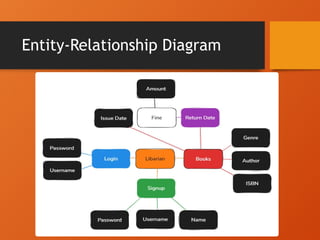
Entity-Relationship Diagram
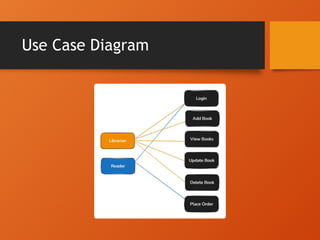
Use Case Diagram
 Used to gather requirements of a system.
 Used to get an outside view of a system.
 Identify external and internal factors
influencing
 the system.
 Show the interacting among the requirements
are
 actors.
Use Case Diagram
SQL
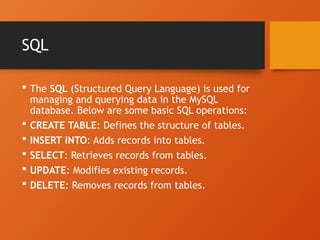
 The SQL (Structured Query Language) is used for
managing and querying data in the MySQL
database. Below are some basic SQL operations:
 CREATE TABLE: Defines the structure of tables.
 INSERT INTO: Adds records into tables.
 SELECT: Retrieves records from tables.
 UPDATE: Modifies existing records.
 DELETE: Removes records from tables.
Database Schema
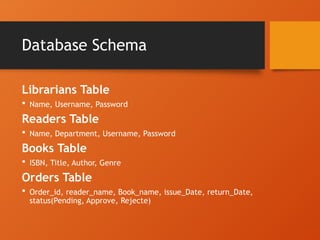
Librarians Table
 Name, Username, Password
Readers Table
 Name, Department, Username, Password
Books Table
 ISBN, Title, Author, Genre
Orders Table
 Order_id, reader_name, Book_name, issue_Date, return_Date,
status(Pending, Approve, Rejecte)
System Architecture
 Frontend: JavaFX for GUI.
 Backend: Java for logic and database
interaction.
 Database: MySQL for persistent storage.
 Data Flow: User GUI Backend Database.
↔ ↔ ↔
Challenges and Solutions
Challenges
 Establishing database connections.
 Ensuring data consistency.
 Designing an intuitive UI.
Solutions
 Used JDBC for robust database handling.
 Validated user inputs to prevent errors.
 Iterated UI design for usability.
Conclusion
• The LMS simplifies library operations.
• Demonstrates the integration of Java and SQL.
• Offers a foundation for further development.
Questions & Answers
• Open the floor for any questions from the
audience.

Library Management System | Presentation

  • 1.
  • 2.
    Haider Javed Lorem Ipsumis the biggest book of the year by Red person.
  • 3.
    ZAIN ALI Lorem Ipsumis the biggest book of the year by Red person.
  • 4.
    Jaffar Raza Lorem Ipsumis the biggest book of the year by Red person.
  • 5.
    Munim Lorem Ipsum isthe biggest book of the year by Red person.
  • 6.
    Project Overview Objective  Todesign and implement a library management system using Java and MySQL. Key Features:  Manage books (add, edit, delete, search and etc).  Handle user information (librarian and redears).  Record and track book borrowing and returning.
  • 7.
    Introduction A Learning ManagementSystem (LMS) is a software application designed to facilitate the management, delivery, and tracking of educational content. It serves as a digital environment for instructors, learners, and administrators to interact efficiently, ensuring seamless educational experiences.
  • 8.
    Purpose  To makethe existing system more efficient.  To provide user friendly environment.  Make functionalities of library faster.  Provide Librarian and readers with an intuitive platform for add, delete, borrowing and searching books.  Track book availability, overdue returns, and readers activity.
  • 9.
    Functional Requirements (FR) UserManagement  Member registration and login.  Role-based access (Librarian, Reader). Book Management  Add, Update, Search and Delete Books  Categorization of books by genre, author, and availability.
  • 10.
    Functional Requirements (FR) Borrow,Return and Inventory Management  Issue books to members and track due dates  Automated overdue notifications.  Track the status of books (Borrowed, Issued and Available) Search and Filter  Enable Readers to Search books using filters like title, author and genre.
  • 11.
    Non-Functional Requirements (NFR) Security Implement a secure login and signup process to ensure user authentication and protect sensitive data. Performance  Real-time response for database queries. Scalability  Handle multiple users simultaneously. Usability  User-friendly interface designed with JavaFX.
  • 12.
    Entity-Relationship Diagram  Anentity-relationship diagram (ERD) is a data modeling technique that graphically illustrates an information system's entities and the relationships between those entities. An ERD is a conceptual and representational model of data used to represent the entity framework infrastructure.  An Entity Relationship Diagram (ERD) is a snapshot of data structures.  An ERD(Entity Relationship Diagram) shows entities tables in a database and relationships between tables within that database.
  • 13.
  • 14.
    Use Case Diagram Used to gather requirements of a system.  Used to get an outside view of a system.  Identify external and internal factors influencing  the system.  Show the interacting among the requirements are  actors.
  • 15.
  • 16.
    SQL  The SQL(Structured Query Language) is used for managing and querying data in the MySQL database. Below are some basic SQL operations:  CREATE TABLE: Defines the structure of tables.  INSERT INTO: Adds records into tables.  SELECT: Retrieves records from tables.  UPDATE: Modifies existing records.  DELETE: Removes records from tables.
  • 17.
    Database Schema Librarians Table Name, Username, Password Readers Table  Name, Department, Username, Password Books Table  ISBN, Title, Author, Genre Orders Table  Order_id, reader_name, Book_name, issue_Date, return_Date, status(Pending, Approve, Rejecte)
  • 18.
    System Architecture  Frontend:JavaFX for GUI.  Backend: Java for logic and database interaction.  Database: MySQL for persistent storage.  Data Flow: User GUI Backend Database. ↔ ↔ ↔
  • 19.
    Challenges and Solutions Challenges Establishing database connections.  Ensuring data consistency.  Designing an intuitive UI. Solutions  Used JDBC for robust database handling.  Validated user inputs to prevent errors.  Iterated UI design for usability.
  • 20.
    Conclusion • The LMSsimplifies library operations. • Demonstrates the integration of Java and SQL. • Offers a foundation for further development.
  • 21.
    Questions & Answers •Open the floor for any questions from the audience.