© 2016 IBM Corporation
DB2 Native REST Services and
Integration with z/OS Connect
Cécile Benhamou
DB2 z/OS TechSales
cecile_benhamou@fr.ibm.com
What is REST ?
HTTP POST HTTP GET HTTP PUT HTTP DELETE
Create Read/List Update Delete
http://my.cics.example/resources/
http://my.cics.example/resources/specific_resource
URIs Examples : CollectionCollection
MemberMember
URI Conventions
…/Collection
…/Collection/Member
http://www.books.are.us/JKRowling avec GET --> liste of books of JK Rowling
http://www.books.are.us/JKRowling/HarryPotterAndThePhilosophersStonewith avec GET  info on 1er book of JK Rowling
RESTful services base
• REST is an architecture style, compared to SOAP which is a protocol
• Uses generally JSON for data format
• Uses HTTP verbs to indicate operation type (Method)
• Uses URI to indicate invoked resource
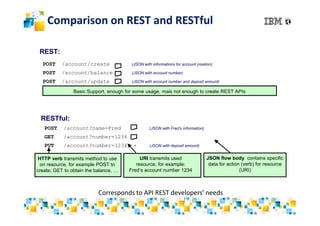
Comparison on REST and RESTful
POST /account/create + (JSON with informations for account creation)
POST /account/balance + (JSON with account number)
POST /account/update + (JSON with account number and deposit amount)
REST:
Basic Support, enough for some usage, mais not enough to create REST APIs
RESTful:
POST /account?name=Fred + (JSON with Fred’s information)
GET /account?number=1234
PUT /account?number=1234 + (JSON with deposit amount)
URI transmits used
resource, for example:
Fred’s account number 1234
JSON flow body contains specific
data for action (verb) for resource
(URI)
Corresponds to API REST developers’ needs
HTTP verb transmits method to use
on resource, for example POST to
create, GET to obtain the balance, …
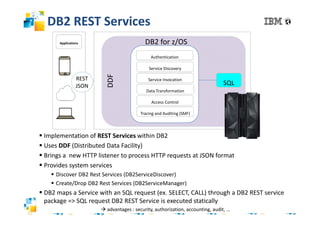
DB2 REST Services
 Implementation of REST Services within DB2
 Uses DDF (Distributed Data Facility)
 Brings a new HTTP listener to process HTTP requests at JSON format
 Provides system services
 Discover DB2 Rest Services (DB2ServiceDiscover)
 Create/Drop DB2 Rest Services (DB2ServiceManager)
 DB2 maps a Service with an SQL request (ex. SELECT, CALL) through a DB2 REST service
package => SQL request DB2 REST Service is executed statically
 advantages : security, authorization, accounting, audit, …
SQL
Applications
REST
JSON
Service Discovery
Data Transformation
Service Invocation
Access Control
Tracing and Auditing (SMF)
Authentication
DDF
DB2 for z/OS
DB2 REST Services
Prerequisites :
• APAR DB2
– V11: PI66828 and PI70477
– V12: PI70652
• Job DSNTIJRS : creation of table SYSIBM.DSNSERVICE in db DSNSVCDB
• Create a profile DB2 REST into DSNR class and authorize users to have access
to DB2 REST services
Documentation :
• DB2 Knowledge Center : DB2 REST Services
https://www.ibm.com/support/knowledgecenter/en/SSEPEK_11.0.0/restserv/src/tpc/d
b2z_restservices.html
• IBM® developerWorks : Getting Started with RESTful Web Services Support in
the Distributed Data Facility of DB2 for z/OS
https://developer.ibm.com/recipes/tutorials/getting-started-with-restful-web-services-
support-in-the-distributed-data-facility-of-db2-for-zos/
Integration with z/OS Connect
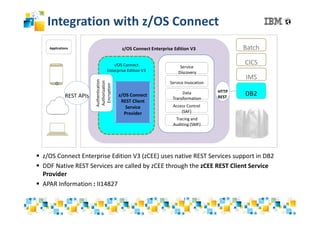
 z/OS Connect Enterprise Edition V3 (zCEE) uses native REST Services support in DB2
 DDF Native REST Services are called by zCEE through the zCEE REST Client Service
Provider
 APAR Information : II14827
z/OS Connect Enterprise Edition V3
z/OS Connect
Enterprise Edition V3
z/OS Connect
REST Client
Service
Provider
Authentication
Authorization
Encryption
Service
Discovery
Data
Transformation
Service Invocation
Access Control
(SAF)
Tracing and
Auditing (SMF)
IMS
DB2
CICS
Batch
HTTP
RESTREST APIs
Applications
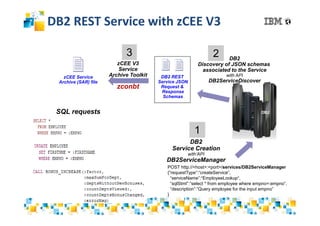
DB2 REST Service with zCEE V3
DB2
DB2 REST
Service JSON
Request &
Response
Schemas
POST http://<host>:<port>/services/DB2ServiceManager
{“requestType”:“createService“,
“serviceName”:“EmployeeLookup“,
“sqlStmt”:”select * from employee where empno=:empno”,
“description”:”Query employee for the input empno”
}
DB2
Service Creation
with’API
DB2ServiceManager
zCEE Service
Archive (SAR) file
1
23
SQL requests
zCEE V3
Service
Archive Toolkit
zconbt
DB2
Discovery of JSON schemas
associated to the Service
with API
DB2ServiceDiscover
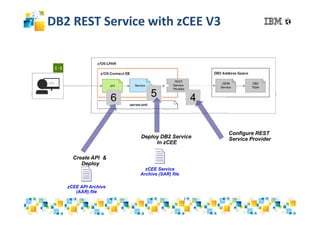
DB2 REST Service with zCEE V3
56
Deploy DB2 Service
In zCEE
Create API &
Deploy
zCEE Service
Archive (SAR) file
zCEE API Archive
(AAR) file
4
Configure REST
Service Provider
Environment: Needs
• REST/JSON Client
– Choice of POSTMAN (Google Chrome extension) for examples
• z/OS Explorer
– To be installed on worktation
– https://developer.ibm.com/mainframe/2017/06/16/whats-new-in-zos-
explorer-aqua-v310/
– Graphical Interface to access z/OS Connect
• Remark : z/OS Connect should be installed and configured
• This will not be addressed in this presentation
Operations to be done on DB2
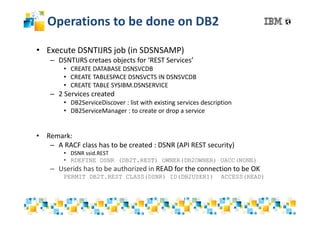
• Execute DSNTIJRS job (in SDSNSAMP)
– DSNTIJRS cretaes objects for ‘REST Services’
• CREATE DATABASE DSNSVCDB
• CREATE TABLESPACE DSNSVCTS IN DSNSVCDB
• CREATE TABLE SYSIBM.DSNSERVICE
– 2 Services created
• DB2ServiceDiscover : list with existing services description
• DB2ServiceManager : to create or drop a service
• Remark:
– A RACF class has to be created : DSNR (API REST security)
• DSNR ssid.REST
• RDEFINE DSNR (DB2T.REST) OWNER(DB2OWNER) UACC(NONE)
– Userids has to be authorized in READ for the connection to be OK
PERMIT DB2T.REST CLASS(DSNR) ID(DB2USER1) ACCESS(READ)
Scenario
• DB2 Stored Procedure Creation
• DB2 REST Service Creation
• Service Creation in z/OS Connect
• API Creation in z/OS Connect
DB2 Stored Procedure Creation
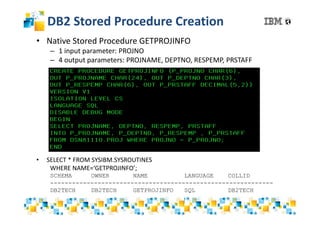
• Native Stored Procedure GETPROJINFO
– 1 input parameter: PROJNO
– 4 output parameters: PROJNAME, DEPTNO, RESPEMP, PRSTAFF
• SELECT * FROM SYSIBM.SYSROUTINES
WHERE NAME=‘GETPROJINFO’;
SCHEMA OWNER NAME LANGUAGE COLLID
-------------------------------------------------------------
DB2TECH DB2TECH GETPROJINFO SQL DB2TECH
DB2 REST Service Creation
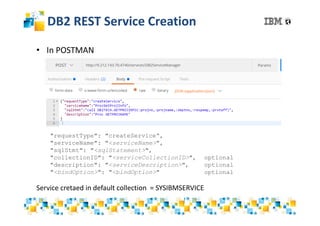
• In POSTMAN
"requestType": "createService“,
"serviceName": "<serviceName>",
"sqlStmt": "<sqlStatement>",
"collectionID": "<serviceCollectionID>", optional
"description": "<serviceDescription>", optional
"<bindOption>": "<bindOption>" optional
Service cretaed in default collection = SYSIBMSERVICE
DB2 REST Service Creation
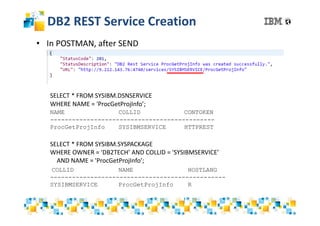
• In POSTMAN, after SEND
SELECT * FROM SYSIBM.DSNSERVICE
WHERE NAME = 'ProcGetProjInfo’;
NAME COLLID CONTOKEN
---------------------------------------------
ProcGetProjInfo SYSIBMSERVICE HTTPREST
SELECT * FROM SYSIBM.SYSPACKAGE
WHERE OWNER = 'DB2TECH’ AND COLLID = 'SYSIBMSERVICE’
AND NAME = 'ProcGetProjInfo’;
COLLID NAME HOSTLANG
------------------------------------------------
SYSIBMSERVICE ProcGetProjInfo R
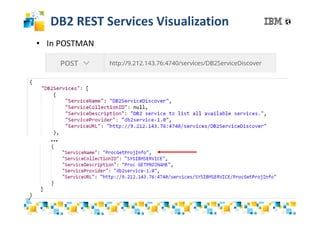
DB2 REST Services Visualization
• In POSTMAN
…
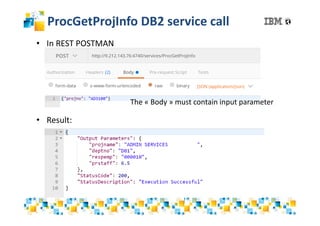
ProcGetProjInfo DB2 service call
• In REST POSTMAN
• Result:
The « Body » must contain input parameter
Service Creation in z/OS Connect
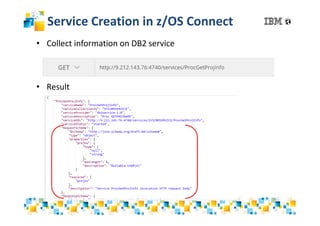
• Collect information on DB2 service
• Result
Service Creation in z/OS Connect
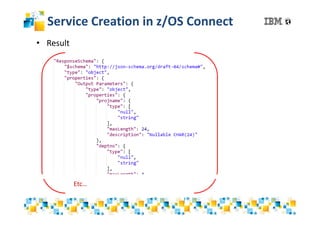
• Result
Etc…
Service Creation in z/OS Connect
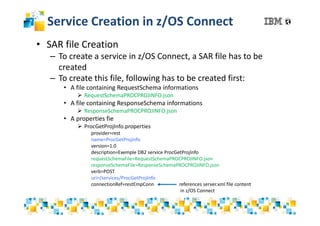
• SAR file Creation
– To create a service in z/OS Connect, a SAR file has to be
created
– To create this file, following has to be created first:
• A file containing RequestSchema informations
 RequestSchemaPROCPROJINFO.json
• A file containing ResponseSchema informations
 ResponseSchemaPROCPROJINFO.json
• A properties fie
 ProcGetProjInfo.properties
provider=rest
name=ProcGetProjInfo
version=1.0
description=Exemple DB2 service ProcGetProjInfo
requestSchemaFile=RequestSchemaPROCPROJINFO.json
responseSchemaFile=ResponseSchemaPROCPROJINFO.json
verb=POST
uri=/services/ProcGetProjInfo
connectionRef=restEmpConn references server.xml file content
in z/OS Connect
Configure REST service provider in
zCEE
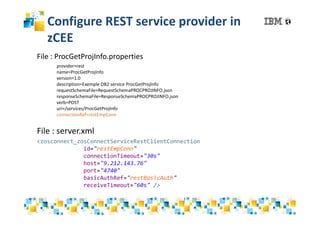
<zosconnect_zosConnectServiceRestClientConnection
id="restEmpConn"
connectionTimeout="30s"
host="9.212.143.76"
port="4740"
basicAuthRef="restBasicAuth"
receiveTimeout="60s" />
File : server.xml
File : ProcGetProjInfo.properties
provider=rest
name=ProcGetProjInfo
version=1.0
description=Exemple DB2 service ProcGetProjInfo
requestSchemaFile=RequestSchemaPROCPROJINFO.json
responseSchemaFile=ResponseSchemaPROCPROJINFO.json
verb=POST
uri=/services/ProcGetProjInfo
connectionRef=restEmpConn
Service Creation in z/OS Connect
• SAR Fiel Creation
– Utility zconbt.bat (Build Toolkit) provided to create SAR file
C:directory where is the file>C: directory where is the utility zconbt.bat zconbt.bat --
properties=ProcGetProjInfo.properties --file= ProcGetProjInfo.sar
Result
directory where is the file>C: directory where is the utility zconbt.bat zconbt.batdirectory where is the file>C: directory where is the utility zconbt.bat zconbt.bat
Service Creation in z/OS Connect
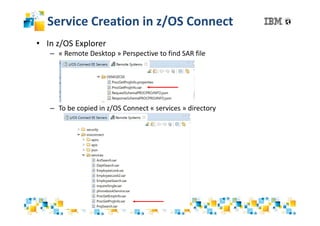
• In z/OS Explorer
– « Remote Desktop » Perspective to find SAR file
– To be copied in z/OS Connect « services » directory
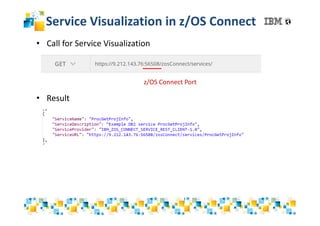
Service Visualization in z/OS Connect
• Call for Service Visualization
• Result
z/OS Connect Port
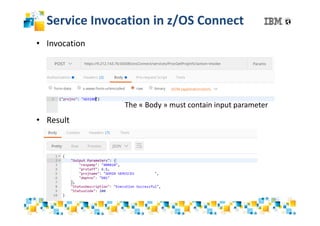
Service Invocation in z/OS Connect
• Invocation
• Result
The « Body » must contain input parameter
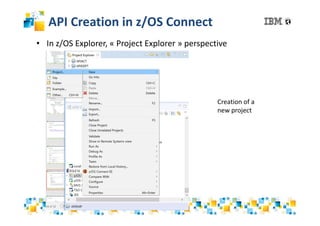
API Creation in z/OS Connect
• In z/OS Explorer, « Project Explorer » perspective
Creation of a
new project
API Creation in z/OS Connect
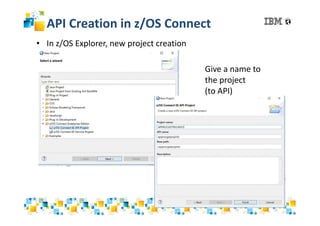
• In z/OS Explorer, new project creation
Give a name to
the project
(to API)
API Creation in z/OS Connect
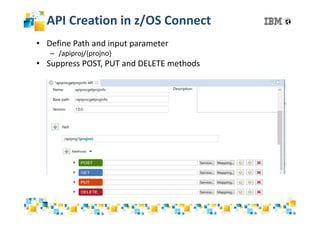
• Define Path and input parameter
– /apiproj/{projno}
• Suppress POST, PUT and DELETE methods
API Creation in z/OS Connect
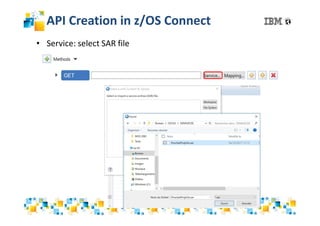
• Service: select SAR file
API Creation in z/OS Connect
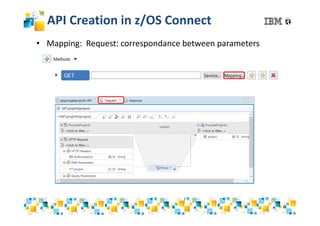
• Mapping: Request: correspondance between parameters
paramterrrespondre le paramètre en entrée
API Creation in z/OS Connect
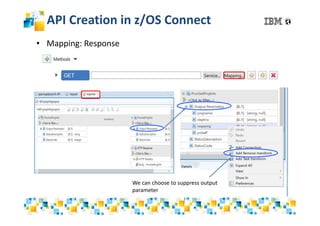
• Mapping: Response
We can choose to suppress output
parameter
API Creation in z/OS Connect
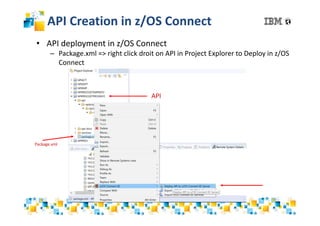
• API deployment in z/OS Connect
– Package.xml => right click droit on API in Project Explorer to Deploy in z/OS
Connect
Package.xml
API
API Creation in z/OS Connect
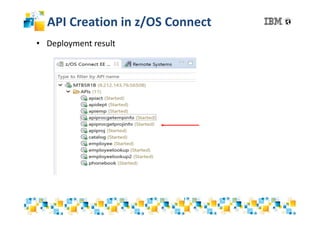
• Deployment result
API Call in z/OS Connect
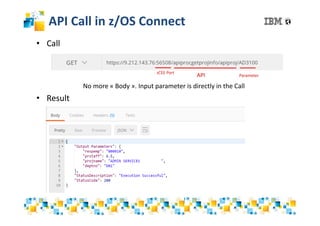
• Call
• Result
No more « Body ». Input parameter is directly in the Call
zCEE Port
API Parameter
Pres Db2 native rest json and z/OS connect

Pres Db2 native rest json and z/OS connect

  • 1.
    © 2016 IBMCorporation DB2 Native REST Services and Integration with z/OS Connect Cécile Benhamou DB2 z/OS TechSales cecile_benhamou@fr.ibm.com
  • 2.
    What is REST? HTTP POST HTTP GET HTTP PUT HTTP DELETE Create Read/List Update Delete http://my.cics.example/resources/ http://my.cics.example/resources/specific_resource URIs Examples : CollectionCollection MemberMember URI Conventions …/Collection …/Collection/Member http://www.books.are.us/JKRowling avec GET --> liste of books of JK Rowling http://www.books.are.us/JKRowling/HarryPotterAndThePhilosophersStonewith avec GET  info on 1er book of JK Rowling RESTful services base • REST is an architecture style, compared to SOAP which is a protocol • Uses generally JSON for data format • Uses HTTP verbs to indicate operation type (Method) • Uses URI to indicate invoked resource
  • 3.
    Comparison on RESTand RESTful POST /account/create + (JSON with informations for account creation) POST /account/balance + (JSON with account number) POST /account/update + (JSON with account number and deposit amount) REST: Basic Support, enough for some usage, mais not enough to create REST APIs RESTful: POST /account?name=Fred + (JSON with Fred’s information) GET /account?number=1234 PUT /account?number=1234 + (JSON with deposit amount) URI transmits used resource, for example: Fred’s account number 1234 JSON flow body contains specific data for action (verb) for resource (URI) Corresponds to API REST developers’ needs HTTP verb transmits method to use on resource, for example POST to create, GET to obtain the balance, …
  • 4.
    DB2 REST Services Implementation of REST Services within DB2  Uses DDF (Distributed Data Facility)  Brings a new HTTP listener to process HTTP requests at JSON format  Provides system services  Discover DB2 Rest Services (DB2ServiceDiscover)  Create/Drop DB2 Rest Services (DB2ServiceManager)  DB2 maps a Service with an SQL request (ex. SELECT, CALL) through a DB2 REST service package => SQL request DB2 REST Service is executed statically  advantages : security, authorization, accounting, audit, … SQL Applications REST JSON Service Discovery Data Transformation Service Invocation Access Control Tracing and Auditing (SMF) Authentication DDF DB2 for z/OS
  • 5.
    DB2 REST Services Prerequisites: • APAR DB2 – V11: PI66828 and PI70477 – V12: PI70652 • Job DSNTIJRS : creation of table SYSIBM.DSNSERVICE in db DSNSVCDB • Create a profile DB2 REST into DSNR class and authorize users to have access to DB2 REST services Documentation : • DB2 Knowledge Center : DB2 REST Services https://www.ibm.com/support/knowledgecenter/en/SSEPEK_11.0.0/restserv/src/tpc/d b2z_restservices.html • IBM® developerWorks : Getting Started with RESTful Web Services Support in the Distributed Data Facility of DB2 for z/OS https://developer.ibm.com/recipes/tutorials/getting-started-with-restful-web-services- support-in-the-distributed-data-facility-of-db2-for-zos/
  • 6.
    Integration with z/OSConnect  z/OS Connect Enterprise Edition V3 (zCEE) uses native REST Services support in DB2  DDF Native REST Services are called by zCEE through the zCEE REST Client Service Provider  APAR Information : II14827 z/OS Connect Enterprise Edition V3 z/OS Connect Enterprise Edition V3 z/OS Connect REST Client Service Provider Authentication Authorization Encryption Service Discovery Data Transformation Service Invocation Access Control (SAF) Tracing and Auditing (SMF) IMS DB2 CICS Batch HTTP RESTREST APIs Applications
  • 7.
    DB2 REST Servicewith zCEE V3 DB2 DB2 REST Service JSON Request & Response Schemas POST http://<host>:<port>/services/DB2ServiceManager {“requestType”:“createService“, “serviceName”:“EmployeeLookup“, “sqlStmt”:”select * from employee where empno=:empno”, “description”:”Query employee for the input empno” } DB2 Service Creation with’API DB2ServiceManager zCEE Service Archive (SAR) file 1 23 SQL requests zCEE V3 Service Archive Toolkit zconbt DB2 Discovery of JSON schemas associated to the Service with API DB2ServiceDiscover
  • 8.
    DB2 REST Servicewith zCEE V3 56 Deploy DB2 Service In zCEE Create API & Deploy zCEE Service Archive (SAR) file zCEE API Archive (AAR) file 4 Configure REST Service Provider
  • 9.
    Environment: Needs • REST/JSONClient – Choice of POSTMAN (Google Chrome extension) for examples • z/OS Explorer – To be installed on worktation – https://developer.ibm.com/mainframe/2017/06/16/whats-new-in-zos- explorer-aqua-v310/ – Graphical Interface to access z/OS Connect • Remark : z/OS Connect should be installed and configured • This will not be addressed in this presentation
  • 10.
    Operations to bedone on DB2 • Execute DSNTIJRS job (in SDSNSAMP) – DSNTIJRS cretaes objects for ‘REST Services’ • CREATE DATABASE DSNSVCDB • CREATE TABLESPACE DSNSVCTS IN DSNSVCDB • CREATE TABLE SYSIBM.DSNSERVICE – 2 Services created • DB2ServiceDiscover : list with existing services description • DB2ServiceManager : to create or drop a service • Remark: – A RACF class has to be created : DSNR (API REST security) • DSNR ssid.REST • RDEFINE DSNR (DB2T.REST) OWNER(DB2OWNER) UACC(NONE) – Userids has to be authorized in READ for the connection to be OK PERMIT DB2T.REST CLASS(DSNR) ID(DB2USER1) ACCESS(READ)
  • 11.
    Scenario • DB2 StoredProcedure Creation • DB2 REST Service Creation • Service Creation in z/OS Connect • API Creation in z/OS Connect
  • 12.
    DB2 Stored ProcedureCreation • Native Stored Procedure GETPROJINFO – 1 input parameter: PROJNO – 4 output parameters: PROJNAME, DEPTNO, RESPEMP, PRSTAFF • SELECT * FROM SYSIBM.SYSROUTINES WHERE NAME=‘GETPROJINFO’; SCHEMA OWNER NAME LANGUAGE COLLID ------------------------------------------------------------- DB2TECH DB2TECH GETPROJINFO SQL DB2TECH
  • 13.
    DB2 REST ServiceCreation • In POSTMAN "requestType": "createService“, "serviceName": "<serviceName>", "sqlStmt": "<sqlStatement>", "collectionID": "<serviceCollectionID>", optional "description": "<serviceDescription>", optional "<bindOption>": "<bindOption>" optional Service cretaed in default collection = SYSIBMSERVICE
  • 14.
    DB2 REST ServiceCreation • In POSTMAN, after SEND SELECT * FROM SYSIBM.DSNSERVICE WHERE NAME = 'ProcGetProjInfo’; NAME COLLID CONTOKEN --------------------------------------------- ProcGetProjInfo SYSIBMSERVICE HTTPREST SELECT * FROM SYSIBM.SYSPACKAGE WHERE OWNER = 'DB2TECH’ AND COLLID = 'SYSIBMSERVICE’ AND NAME = 'ProcGetProjInfo’; COLLID NAME HOSTLANG ------------------------------------------------ SYSIBMSERVICE ProcGetProjInfo R
  • 15.
    DB2 REST ServicesVisualization • In POSTMAN …
  • 16.
    ProcGetProjInfo DB2 servicecall • In REST POSTMAN • Result: The « Body » must contain input parameter
  • 17.
    Service Creation inz/OS Connect • Collect information on DB2 service • Result
  • 18.
    Service Creation inz/OS Connect • Result Etc…
  • 19.
    Service Creation inz/OS Connect • SAR file Creation – To create a service in z/OS Connect, a SAR file has to be created – To create this file, following has to be created first: • A file containing RequestSchema informations  RequestSchemaPROCPROJINFO.json • A file containing ResponseSchema informations  ResponseSchemaPROCPROJINFO.json • A properties fie  ProcGetProjInfo.properties provider=rest name=ProcGetProjInfo version=1.0 description=Exemple DB2 service ProcGetProjInfo requestSchemaFile=RequestSchemaPROCPROJINFO.json responseSchemaFile=ResponseSchemaPROCPROJINFO.json verb=POST uri=/services/ProcGetProjInfo connectionRef=restEmpConn references server.xml file content in z/OS Connect
  • 20.
    Configure REST serviceprovider in zCEE <zosconnect_zosConnectServiceRestClientConnection id="restEmpConn" connectionTimeout="30s" host="9.212.143.76" port="4740" basicAuthRef="restBasicAuth" receiveTimeout="60s" /> File : server.xml File : ProcGetProjInfo.properties provider=rest name=ProcGetProjInfo version=1.0 description=Exemple DB2 service ProcGetProjInfo requestSchemaFile=RequestSchemaPROCPROJINFO.json responseSchemaFile=ResponseSchemaPROCPROJINFO.json verb=POST uri=/services/ProcGetProjInfo connectionRef=restEmpConn
  • 21.
    Service Creation inz/OS Connect • SAR Fiel Creation – Utility zconbt.bat (Build Toolkit) provided to create SAR file C:directory where is the file>C: directory where is the utility zconbt.bat zconbt.bat -- properties=ProcGetProjInfo.properties --file= ProcGetProjInfo.sar Result directory where is the file>C: directory where is the utility zconbt.bat zconbt.batdirectory where is the file>C: directory where is the utility zconbt.bat zconbt.bat directory where is the file>C: directory where is the utility zconbt.bat zconbt.batdirectory where is the file>C: directory where is the utility zconbt.bat zconbt.bat
  • 22.
    Service Creation inz/OS Connect • In z/OS Explorer – « Remote Desktop » Perspective to find SAR file – To be copied in z/OS Connect « services » directory
  • 23.
    Service Visualization inz/OS Connect • Call for Service Visualization • Result z/OS Connect Port
  • 24.
    Service Invocation inz/OS Connect • Invocation • Result The « Body » must contain input parameter
  • 25.
    API Creation inz/OS Connect • In z/OS Explorer, « Project Explorer » perspective Creation of a new project
  • 26.
    API Creation inz/OS Connect • In z/OS Explorer, new project creation Give a name to the project (to API)
  • 27.
    API Creation inz/OS Connect • Define Path and input parameter – /apiproj/{projno} • Suppress POST, PUT and DELETE methods
  • 28.
    API Creation inz/OS Connect • Service: select SAR file
  • 29.
    API Creation inz/OS Connect • Mapping: Request: correspondance between parameters paramterrrespondre le paramètre en entrée
  • 30.
    API Creation inz/OS Connect • Mapping: Response We can choose to suppress output parameter
  • 31.
    API Creation inz/OS Connect • API deployment in z/OS Connect – Package.xml => right click droit on API in Project Explorer to Deploy in z/OS Connect Package.xml API
  • 32.
    API Creation inz/OS Connect • Deployment result
  • 33.
    API Call inz/OS Connect • Call • Result No more « Body ». Input parameter is directly in the Call zCEE Port API Parameter