ファイルサーバ移行ツール (SMB/NFS)
XCP, XCP File Analytics (NetAppへの移行は無償)
© 2020 NetApp, Inc. All rights reserved. — NETAPP CONFIDENTIAL —
ネットアップ合同会社
Kan Itani
2021/03/24
XCP / XCP File Analytics
ツールの特徴とできること
2 © 2020 NetApp, Inc. All rights reserved. — NETAPP CONFIDENTIAL —
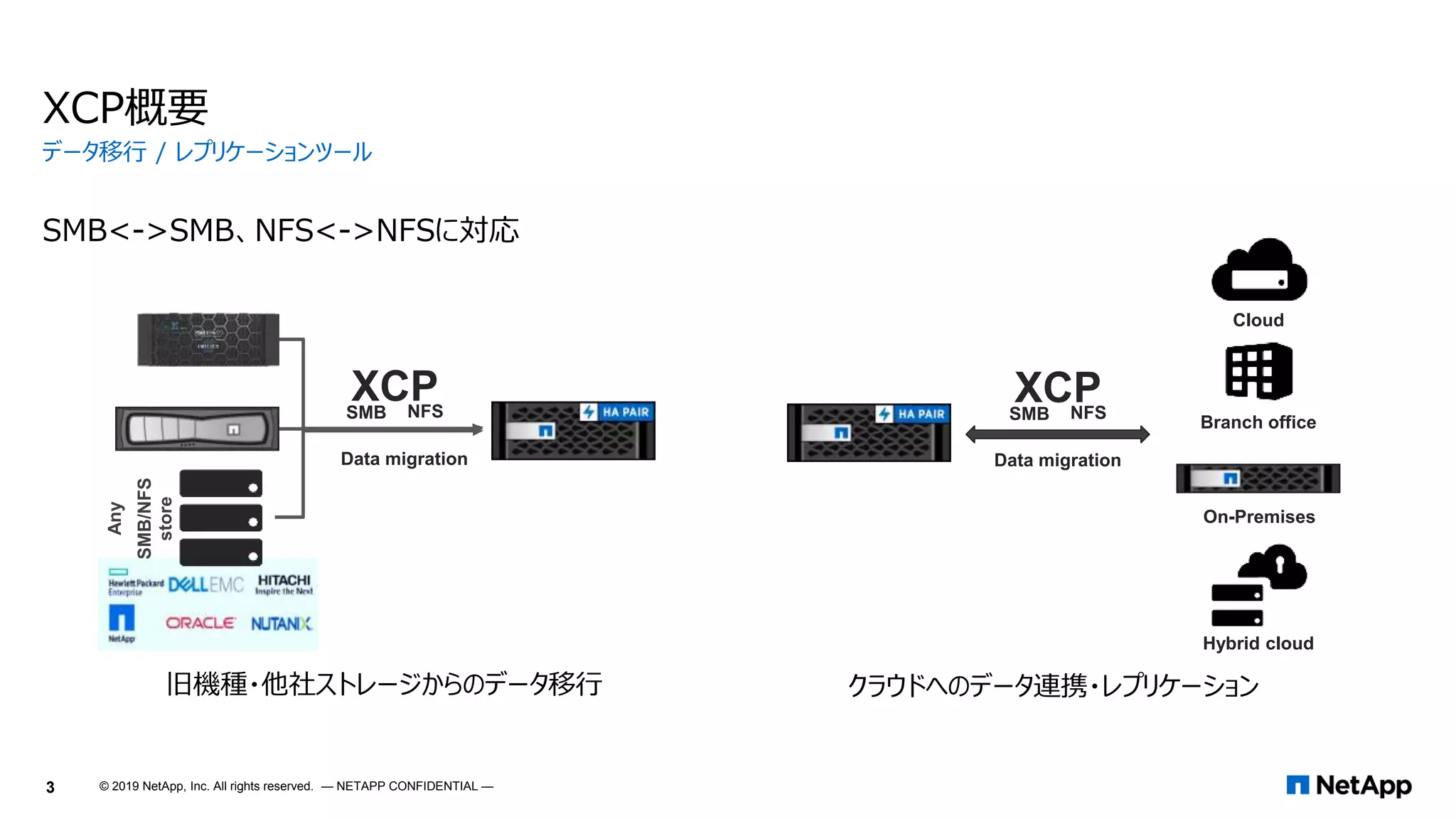
XCP概要
SMB<->SMB、NFS<->NFSに対応
データ移行 / レプリケーションツール
SMB NFS
XCP
Any
SMB/NFS
store
Data migration
SMB NFS
XCP
Data migration
旧機種・他社ストレージからのデータ移行 クラウドへのデータ連携・レプリケーション
Branch office
Hybrid cloud
Cloud
On-Premises
3 © 2019 NetApp, Inc. All rights reserved. — NETAPP CONFIDENTIAL —
 データ移行機能 (XCP)
 NFS -> NFSのデータ移行 (XCPの動作にLinuxサーバが必要)
 SMB -> SMBのデータ移行 (XCPの動作にWindowsサーバが必要)
 移行元、移行先がNetApp製品である必要はない
(Linux NFSサーバ、Windows SMBサーバにも対応。)
 ファイルシステムの権限なども同時に移行する
 非常に高速 (rsyncの23倍、robocopyの5倍)
 セットアップが簡単 (資料の後半に手順があります)
 SMBの場合、XCPサーバと移行元・移行先ストレージが同じActivce
Directoryドメインに参加していることを推奨。
 ファイルシステム簡易分析機能 (XCP & XCP File Analytics)
 XCPが存在する前提で、XCP File Analyticsが動作する
 XCPのファイルシステムスキャン機能をXCP File Analyticsがキックして、スキャ
ン結果をXCP File Analyticsサーバ内のDB (PostgreSQL)に蓄積
 XCP単体でも簡易分析結果はCLIで確認可能 (xcp scan -stats)
 SMBのWorkgroup環境ではXCP File Analyticsは使えない。
(File AnalyticsのUIではSMBファイル共有に対してアクセスする際のユーザを指定できないため、
Everyone Full Controlとなっていない場合はScan時にaccess is deniedとなる。)
XCPの概要
https://youtu.be/4CBdHwqCxVc (英語)
4 © 2020 NetApp, Inc. All rights reserved. — NETAPP CONFIDENTIAL —
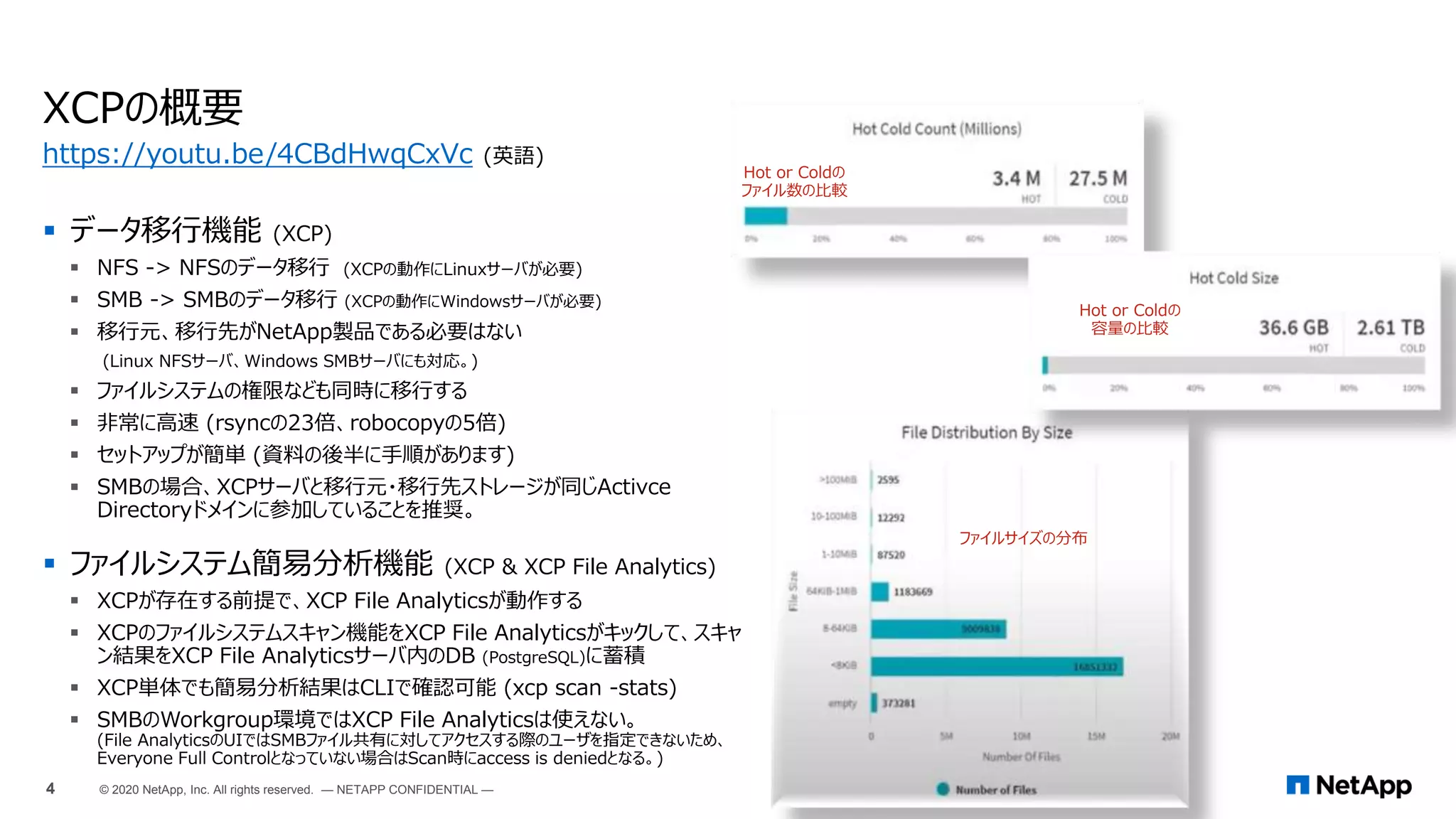
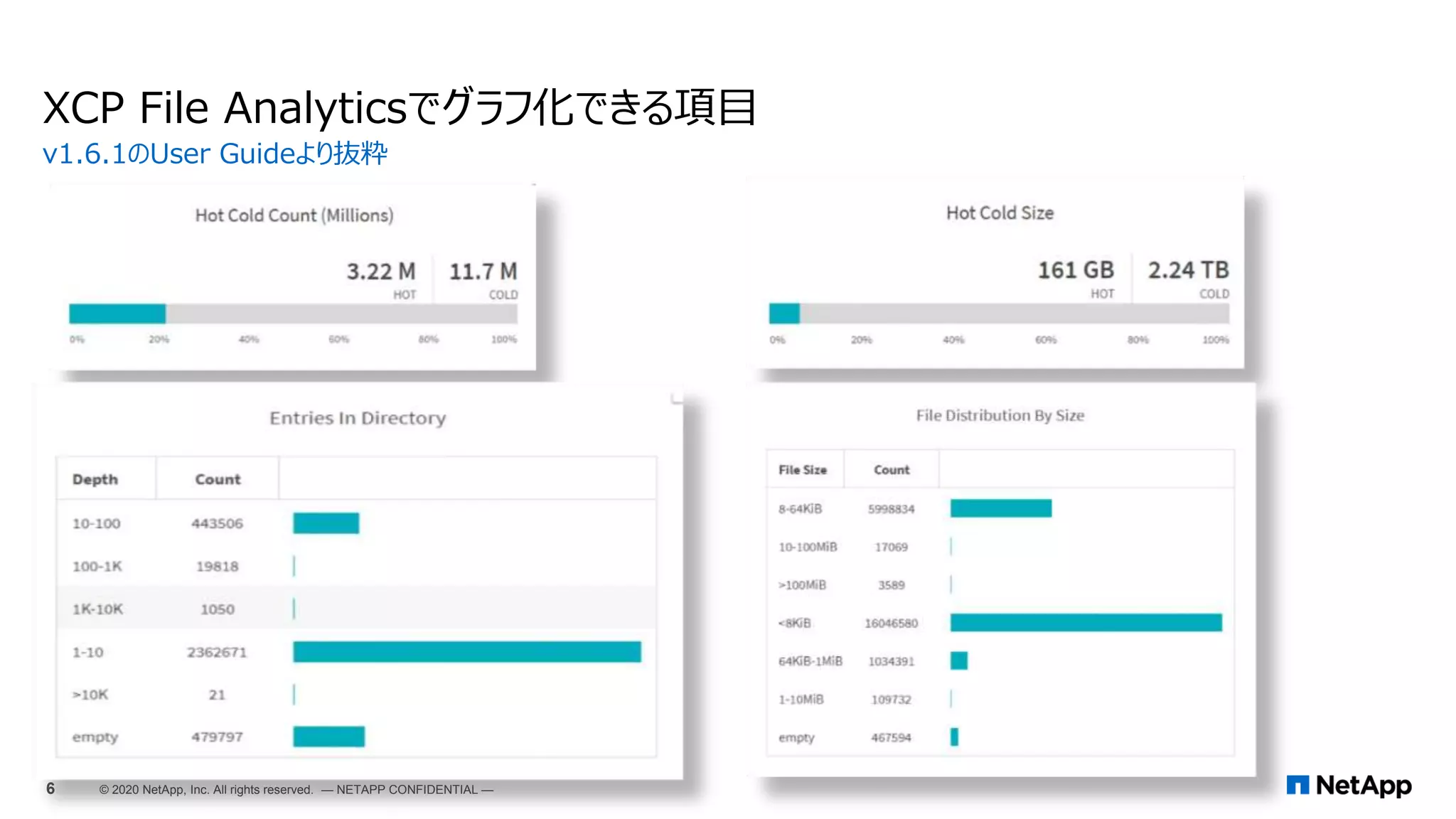
Hot or Coldの
ファイル数の比較
ファイルサイズの分布
Hot or Coldの
容量の比較
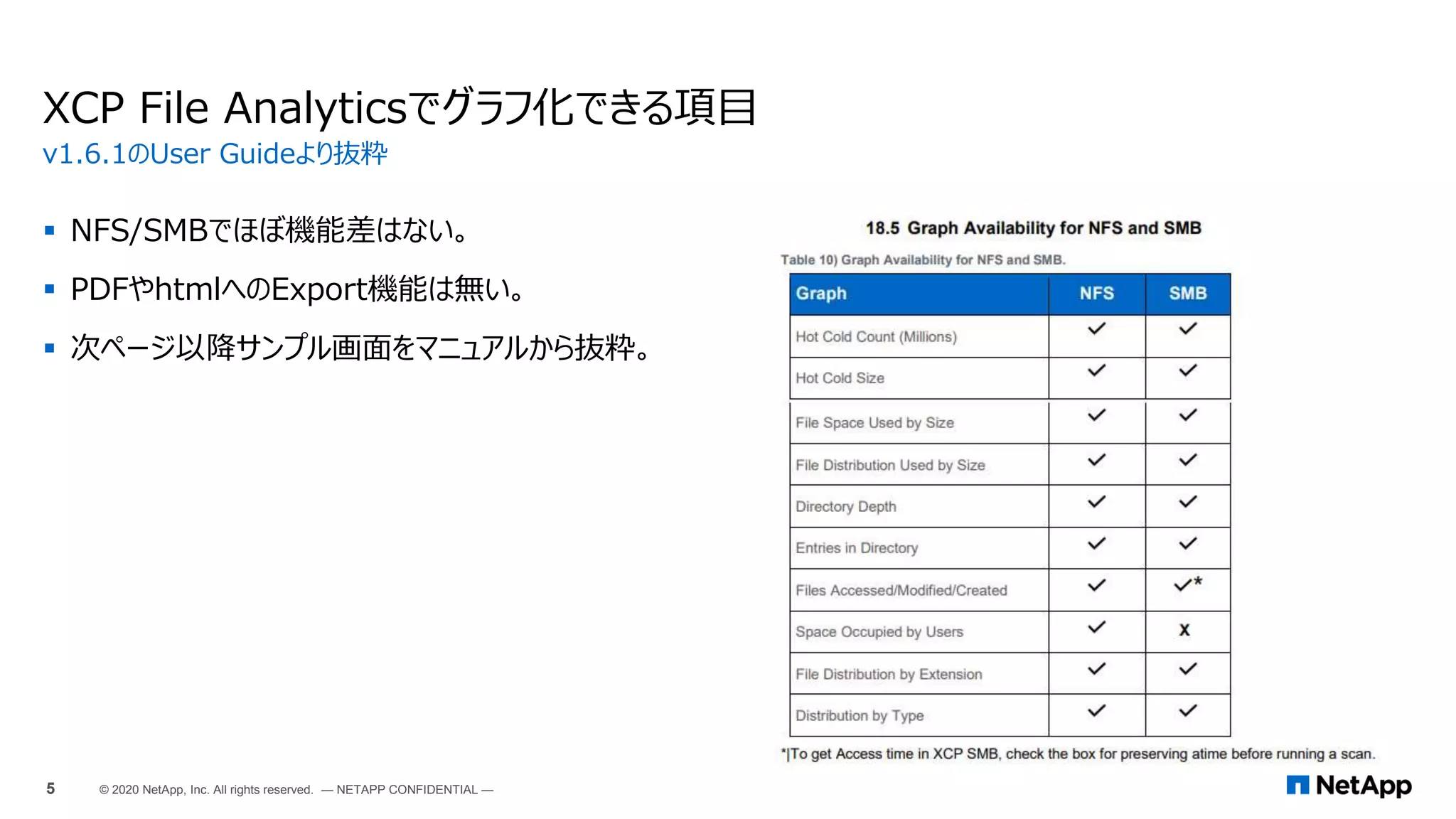
 NFS/SMBでほぼ機能差はない。
 PDFやhtmlへのExport機能は無い。
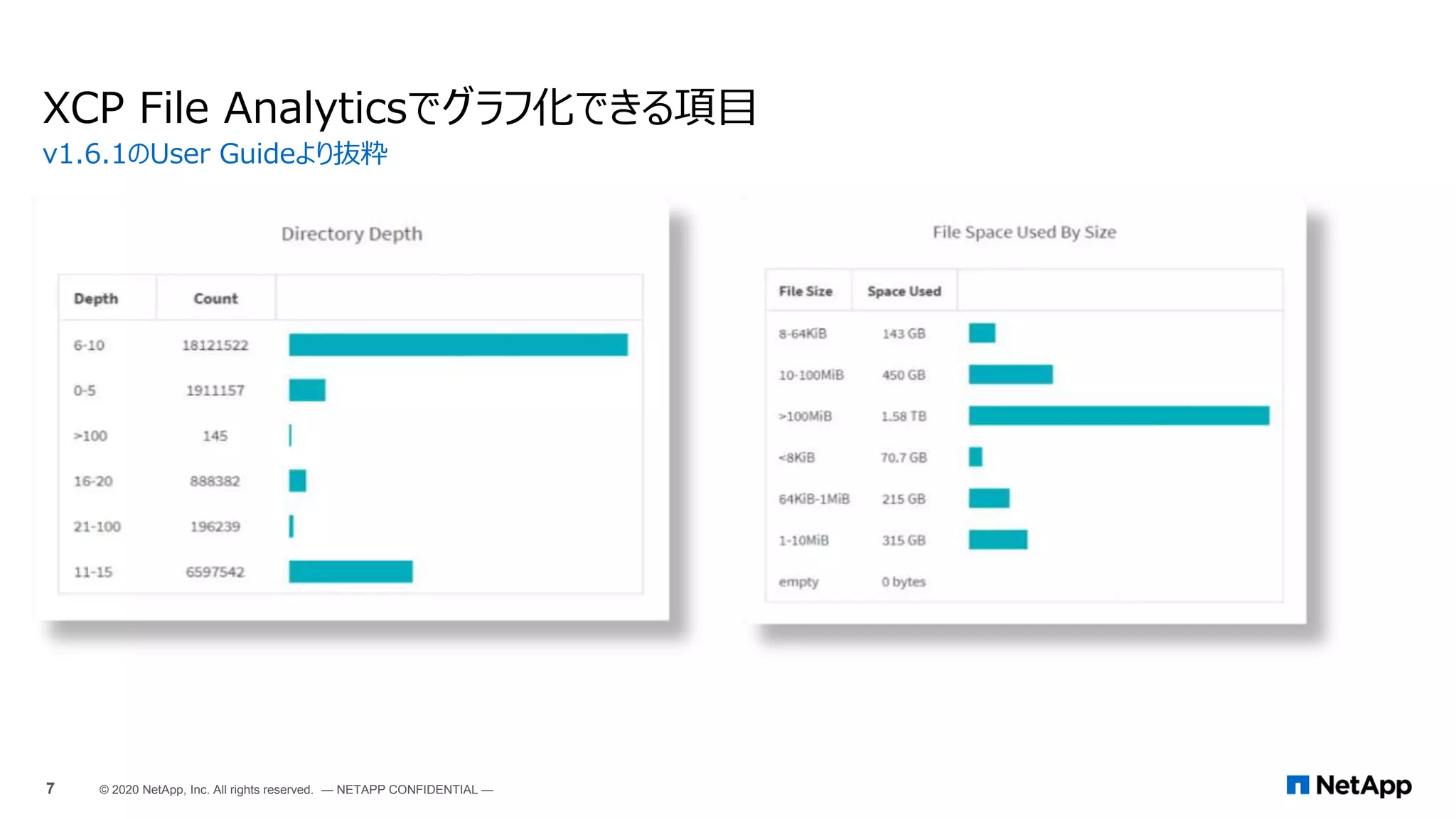
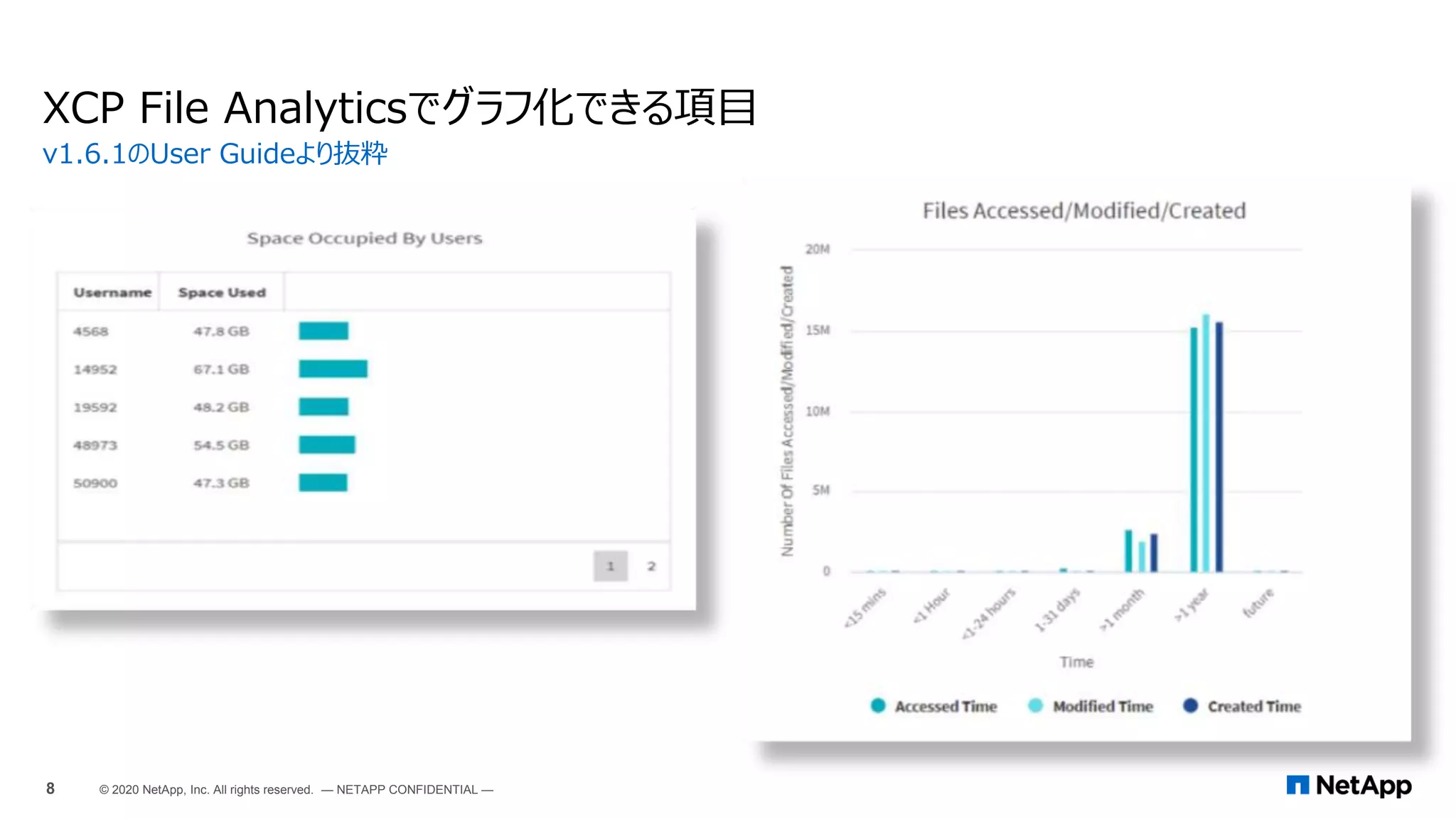
 次ページ以降サンプル画面をマニュアルから抜粋。
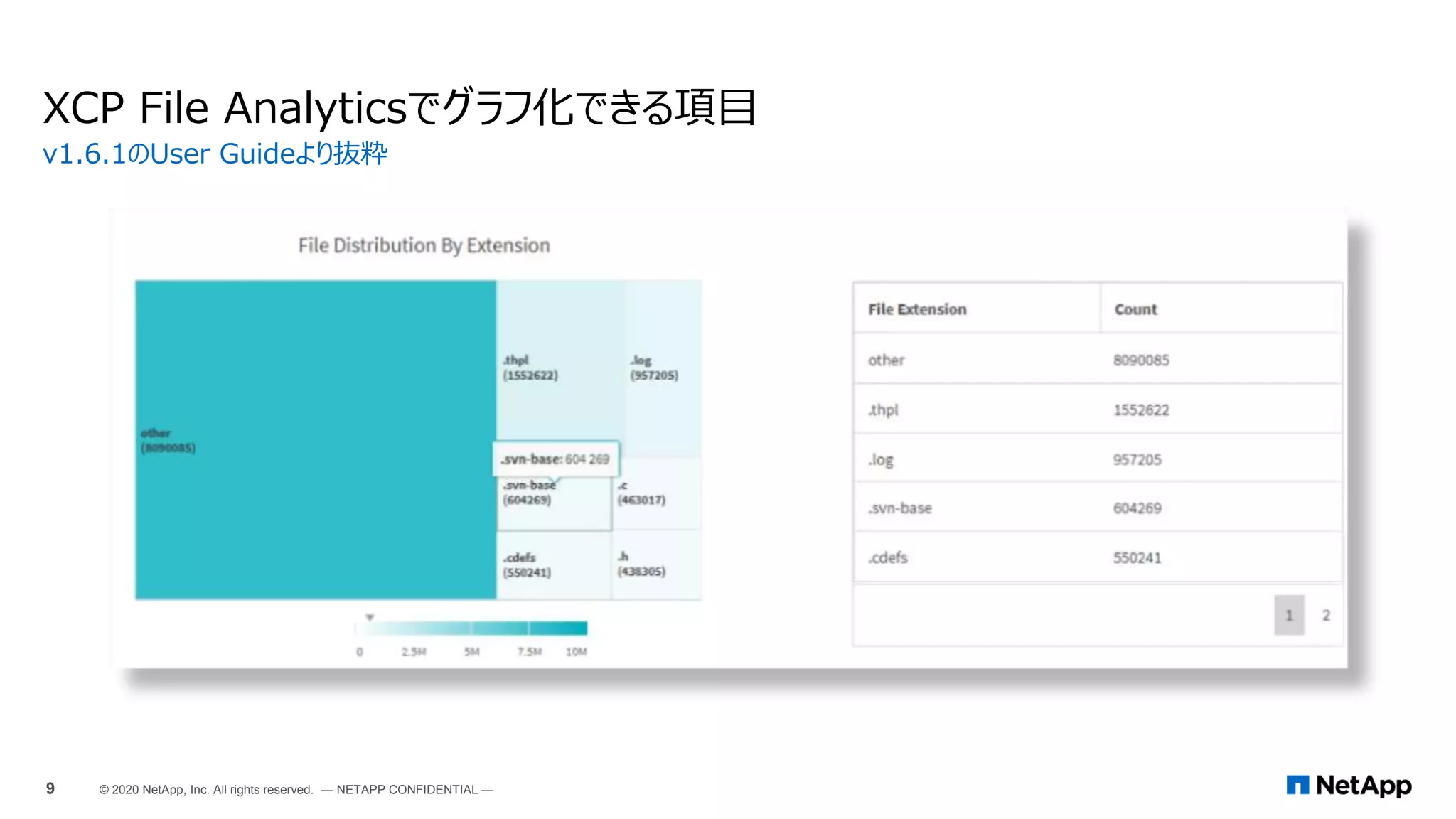
XCP File Analyticsでグラフ化できる項目
v1.6.1のUser Guideより抜粋
5 © 2020 NetApp, Inc. All rights reserved. — NETAPP CONFIDENTIAL —
XCP File Analyticsでグラフ化できる項目
v1.6.1のUser Guideより抜粋
6 © 2020 NetApp, Inc. All rights reserved. — NETAPP CONFIDENTIAL —
XCP File Analyticsでグラフ化できる項目
v1.6.1のUser Guideより抜粋
7 © 2020 NetApp, Inc. All rights reserved. — NETAPP CONFIDENTIAL —
XCP File Analyticsでグラフ化できる項目
v1.6.1のUser Guideより抜粋
8 © 2020 NetApp, Inc. All rights reserved. — NETAPP CONFIDENTIAL —
XCP File Analyticsでグラフ化できる項目
v1.6.1のUser Guideより抜粋
9 © 2020 NetApp, Inc. All rights reserved. — NETAPP CONFIDENTIAL —
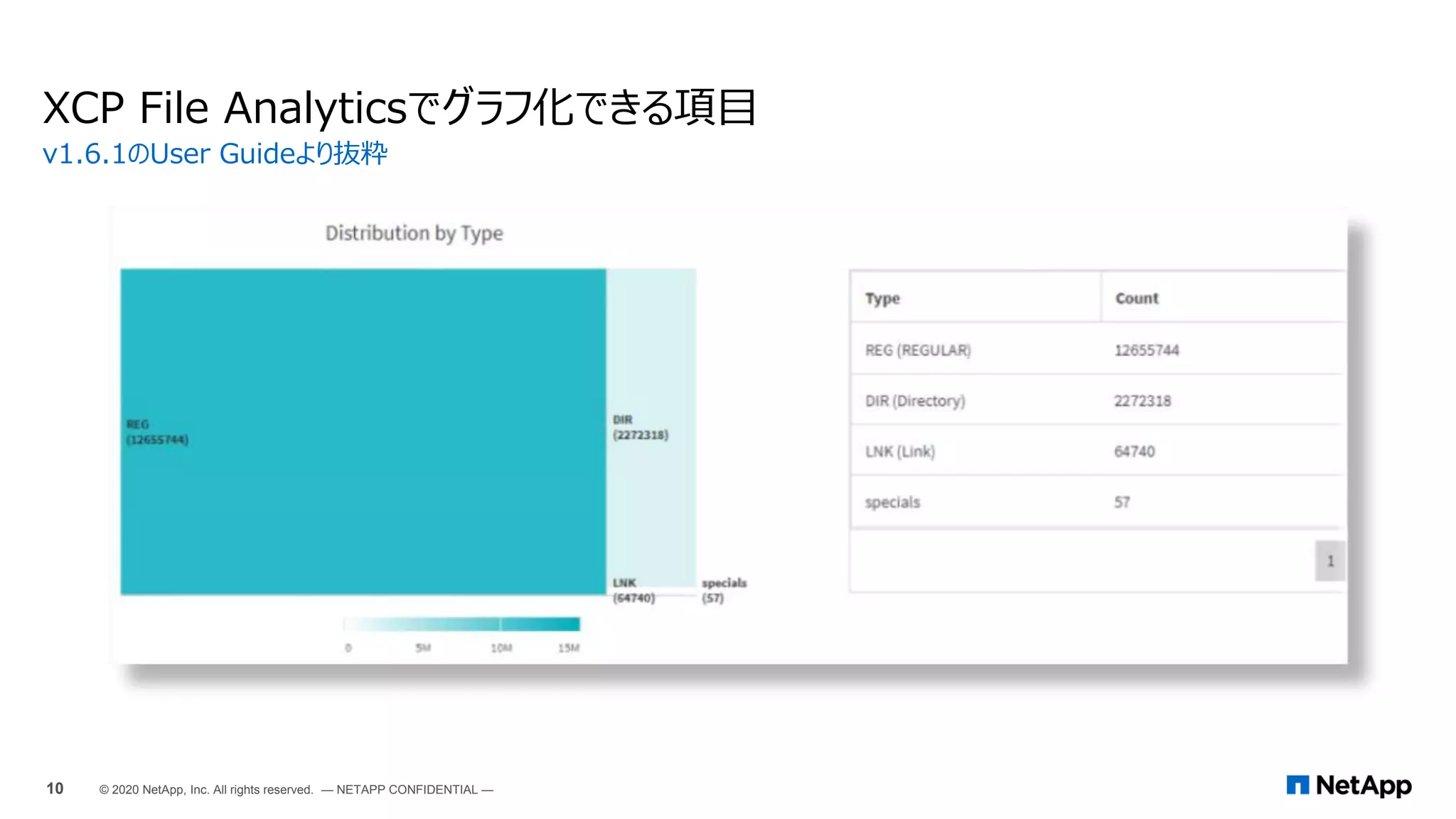
XCP File Analyticsでグラフ化できる項目
v1.6.1のUser Guideより抜粋
10 © 2020 NetApp, Inc. All rights reserved. — NETAPP CONFIDENTIAL —
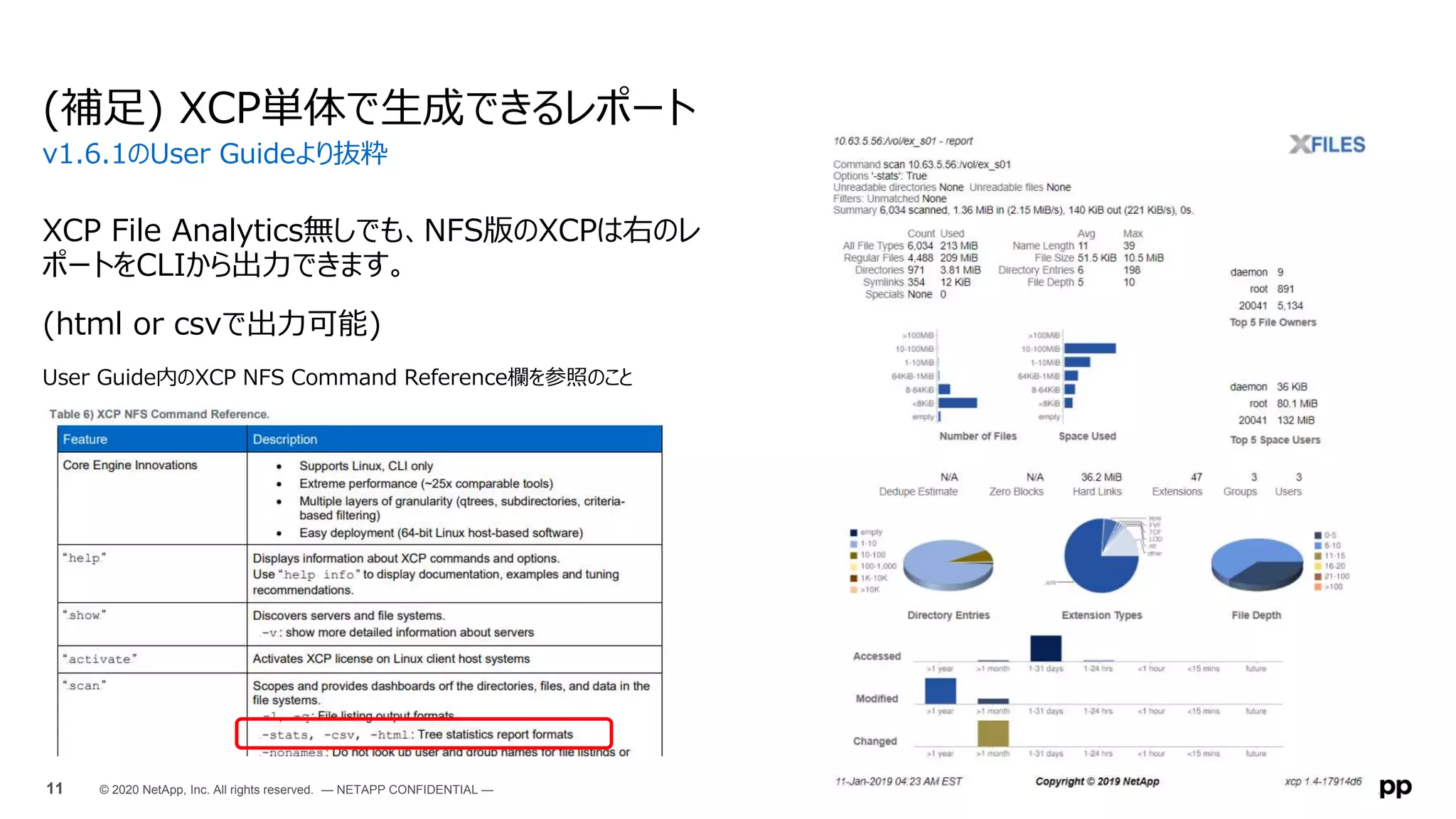
XCP File Analytics無しでも、NFS版のXCPは右のレ
ポートをCLIから出力できます。
(html or csvで出力可能)
User Guide内のXCP NFS Command Reference欄を参照のこと
(補足) XCP単体で生成できるレポート
v1.6.1のUser Guideより抜粋
11 © 2020 NetApp, Inc. All rights reserved. — NETAPP CONFIDENTIAL —
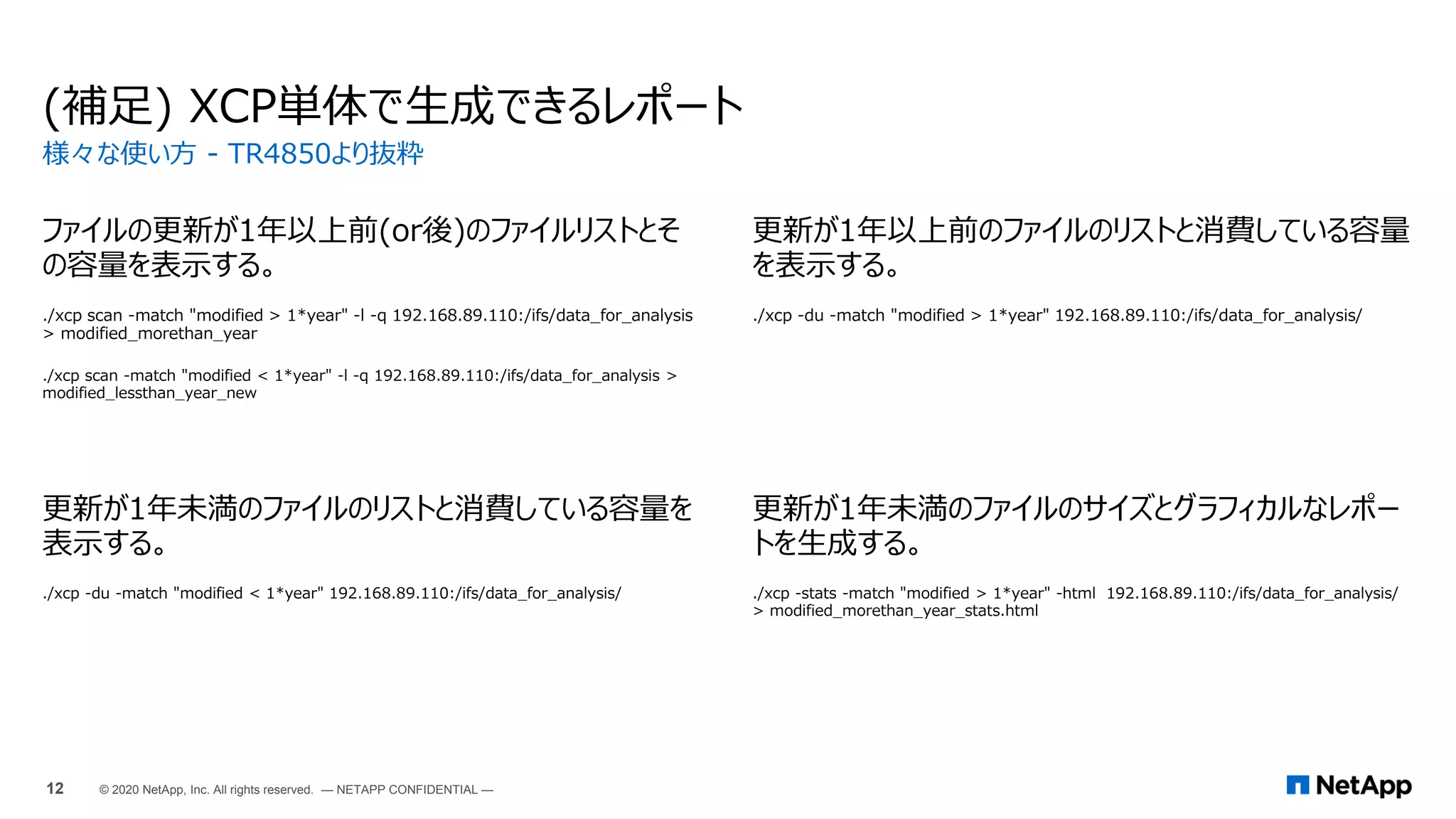
(補足) XCP単体で生成できるレポート
ファイルの更新が1年以上前(or後)のファイルリストとそ
の容量を表示する。
./xcp scan -match "modified > 1*year" -l -q 192.168.89.110:/ifs/data_for_analysis
> modified_morethan_year
./xcp scan -match "modified < 1*year" -l -q 192.168.89.110:/ifs/data_for_analysis >
modified_lessthan_year_new
更新が1年以上前のファイルのリストと消費している容量
を表示する。
./xcp -du -match "modified > 1*year" 192.168.89.110:/ifs/data_for_analysis/
更新が1年未満のファイルのリストと消費している容量を
表示する。
./xcp -du -match "modified < 1*year" 192.168.89.110:/ifs/data_for_analysis/
更新が1年未満のファイルのサイズとグラフィカルなレポー
トを生成する。
./xcp -stats -match "modified > 1*year" -html 192.168.89.110:/ifs/data_for_analysis/
> modified_morethan_year_stats.html
様々な使い方 - TR4850より抜粋
12 © 2020 NetApp, Inc. All rights reserved. — NETAPP CONFIDENTIAL —
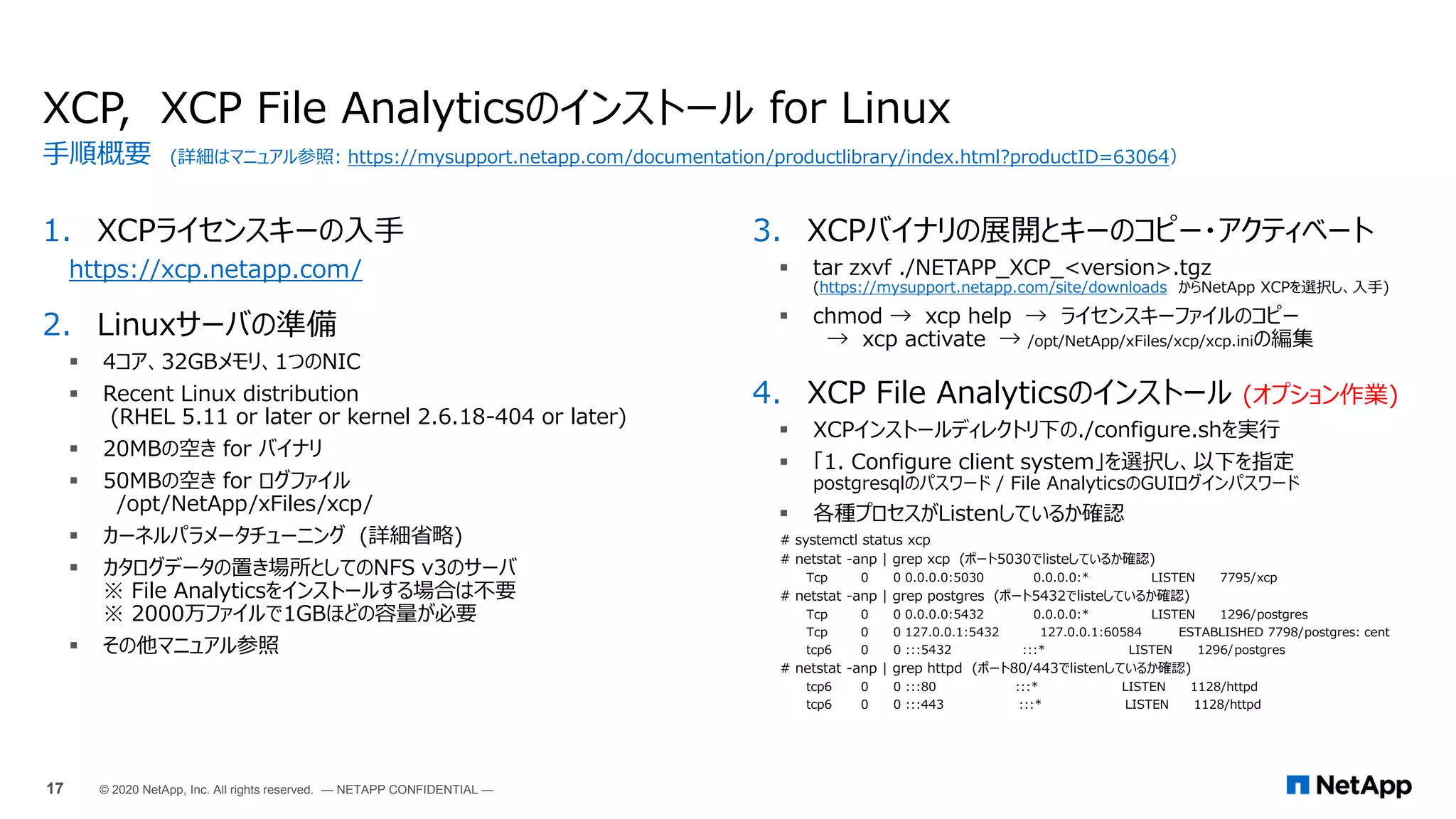
XCP, XCP File Analyticsのインストール
インストール for Linux
16 © 2020 NetApp, Inc. All rights reserved. — NETAPP CONFIDENTIAL —
1. XCPライセンスキーの入手
https://xcp.netapp.com/
2. Linuxサーバの準備
 4コア、32GBメモリ、1つのNIC
 Recent Linux distribution
(RHEL 5.11 or later or kernel 2.6.18-404 or later)
 20MBの空き for バイナリ
 50MBの空き for ログファイル
/opt/NetApp/xFiles/xcp/
 カーネルパラメータチューニング (詳細省略)
 カタログデータの置き場所としてのNFS v3のサーバ
※ File Analyticsをインストールする場合は不要
※ 2000万ファイルで1GBほどの容量が必要
 その他マニュアル参照
XCP, XCP File Analyticsのインストール for Linux
3. XCPバイナリの展開とキーのコピー・アクティベート
 tar zxvf ./NETAPP_XCP_<version>.tgz
(https://mysupport.netapp.com/site/downloads からNetApp XCPを選択し、入手)
 chmod → xcp help → ライセンスキーファイルのコピー
→ xcp activate → /opt/NetApp/xFiles/xcp/xcp.iniの編集
4. XCP File Analyticsのインストール (オプション作業)
 XCPインストールディレクトリ下の./configure.shを実行
 「1. Configure client system」を選択し、以下を指定
postgresqlのパスワード / File AnalyticsのGUIログインパスワード
 各種プロセスがListenしているか確認
# systemctl status xcp
# netstat -anp | grep xcp (ポート5030でlisteしているか確認)
Tcp 0 0 0.0.0.0:5030 0.0.0.0:* LISTEN 7795/xcp
# netstat -anp | grep postgres (ポート5432でlisteしているか確認)
Tcp 0 0 0.0.0.0:5432 0.0.0.0:* LISTEN 1296/postgres
Tcp 0 0 127.0.0.1:5432 127.0.0.1:60584 ESTABLISHED 7798/postgres: cent
tcp6 0 0 :::5432 :::* LISTEN 1296/postgres
# netstat -anp | grep httpd (ポート80/443でlistenしているか確認)
tcp6 0 0 :::80 :::* LISTEN 1128/httpd
tcp6 0 0 :::443 :::* LISTEN 1128/httpd
手順概要 (詳細はマニュアル参照: https://mysupport.netapp.com/documentation/productlibrary/index.html?productID=63064)
17 © 2020 NetApp, Inc. All rights reserved. — NETAPP CONFIDENTIAL —
[root@vdbench xcp]# ./configure.sh
--------------------------------------------------------------------------------
XCP CONFIGURATION SCRIPT
--------------------------------------------------------------------------------
# Checking if xcp service is running
# WARNING: XCP process is already running on this system.
________________________________________________________________________________
root 7795 1 0 16:01 ? 00:00:01 /usr/bin/xcp --listen
postgres 7798 1296 0 16:01 ? 00:00:00 postgres: central xcp_cmdb 127.0.0.1(60584) idle
root 13770 7795 0 16:58 ? 00:00:00 [xcp] <defunct>
root 13772 7795 0 16:58 ? 00:00:00 [xcp] <defunct>
________________________________________________________________________________
# Any running jobs will be killed abruptly if you stop xcp
# Do you want to stop XCP service: (yes/no):yes
Redirecting to /bin/systemctl stop xcp.service
Menu Help:
# Install/ Upgrade -
# Install - Installs PostgreSQL and httpd if not installed and does setup for XCP File Analytics.
# Upgrade - Upgrades takes a backup of xcp folder under /var/www/html/ to xcp_backup
# Repair - Restarts PostgreSQL database, http and XCP services incase if any of them are stopped.
# Cleanup - Uninstalls PostgreSQL and httpd.
1. Installation/Upgrade
2. Repair
3. Cleanup
0. Exit
Please select the option from the menu [0-3]: 1
--------------------------------------------------------------------------------
Setting up Postgres
--------------------------------------------------------------------------------
# Checking if postgres is installed
Redirecting to /bin/systemctl status postgresql.service
Unit postgresql.service could not be found.
XCP File Analyticsのインストール詳細① (configure.sh実行例)
パッケージ postgresql-server はインストールされていません。
# Installing PostgreSQL...
# Initializing database ....
Created symlink from /etc/systemd/system/multi-user.target.wants/postgresql.service to
/usr/lib/systemd/system/postgresql.service.
# Configuring postgres ...
# Updating pg_hab.conf file
# Updating postgresql.conf file
Redirecting to /bin/systemctl status postgresql.service
# Postgres service is running
--------------------------------------------------------------------------------
Setting up httpd
--------------------------------------------------------------------------------
# Checking if httpd is installed
パッケージ httpd はインストールされていません。
# Installing HTTPD...
# Updating httpd.conf file ...
Redirecting to /bin/systemctl status httpd.service
# Httpd service is running
--------------------------------------------------------------------------------
Setting up https
--------------------------------------------------------------------------------
パッケージ mod_ssl はインストールされていません。
# Installing HTTPs...It will take 3-5 minutes to configure
# Copying certificates...
--------------------------------------------------------------------------------
Configuring xcp
--------------------------------------------------------------------------------
# Copying xcp files.....
# Taking backup of xcp folder /var/www/html/xcp in /var/www/html/xcp_backup
NOTE:
If you are running for first time, select option 1.
If you are upgrading select option 0.
________________________________________________________________________________
(続く)
(オプション作業)
18 © 2020 NetApp, Inc. All rights reserved. — NETAPP CONFIDENTIAL —
Please choose the menu you want to start:
1. Configure client system
2. Reset admin password
3. Reset Postgres database password
4. Rebuild xcp.ini file
5. Delete database and reconfigure client system
0. Quit
--------------------------------------------------------------------------------
Enter digit between [0-5] >> 1
# Postgres service is running
Enter password for Postgres DB user(max 10 char):パスワード入力
Retype same password :パスワード入力
# Updating xcp.ini file
Enter admin password for file analytics (max 10 char):パスワード入力
Retype same password :パスワード入力
# Updating database entries
--------------------------------------------------------------------------------
Starting xcp service
--------------------------------------------------------------------------------
Redirecting to /bin/systemctl status xcp.service
# XCP service started successfully
root 15012 1 20 17:05 ? 00:00:00 /usr/bin/xcp --listen
postgres 15016 14571 0 17:05 ? 00:00:00 postgres: central xcp_cmdb 127.0.0.1(34696) idle
--------------------------------------------------------------------------------
--------------------------------------------------------------------------------
XCP File analytics is configured successfully
To start XCP service manually, use "sudo systemctl start xcp" command
Use following link and login as 'admin' user for GUI access
https://10.128.223.187/xcp
--------------------------------------------------------------------------------
[root@vdbench xcp]#
XCP File Analyticsのインストール詳細② (configure.sh実行例)
(オプション作業)
19 © 2020 NetApp, Inc. All rights reserved. — NETAPP CONFIDENTIAL —
[root@vdbench xcp]# ./configure.sh
--------------------------------------------------------------------------------
XCP CONFIGURATION SCRIPT
--------------------------------------------------------------------------------
# Checking if xcp service is running
# WARNING: XCP process is already running on this system.
________________________________________________________________________________
root 7795 1 0 16:01 ? 00:00:01 /usr/bin/xcp --listen
postgres 7798 1296 0 16:01 ? 00:00:00 postgres: central xcp_cmdb 127.0.0.1(60584) idle
root 13770 7795 0 16:58 ? 00:00:00 [xcp] <defunct>
root 13772 7795 0 16:58 ? 00:00:00 [xcp] <defunct>
________________________________________________________________________________
# Any running jobs will be killed abruptly if you stop xcp
# Do you want to stop XCP service: (yes/no):yes
Redirecting to /bin/systemctl stop xcp.service
Menu Help:
# Install/ Upgrade -
# Install - Installs PostgreSQL and httpd if not installed and does setup for XCP File Analytics.
# Upgrade - Upgrades takes a backup of xcp folder under /var/www/html/ to xcp_backup
# Repair - Restarts PostgreSQL database, http and XCP services incase if any of them are stopped.
# Cleanup - Uninstalls PostgreSQL and httpd.
1. Installation/Upgrade
2. Repair
3. Cleanup
0. Exit
Please select the option from the menu [0-3]: 3
# WARNING: This will start uninstallation. Continue? (yes/no):yes
postgresql-server-9.2.24-4.el7_8.x86_64
# WARNING: This will remove Postgres. Continue? (yes/no):yes
# Uninstalling Postgres...
XCP File Analyticsの削除
# Database initilization path is /var/lib/pgsql/data
# WARNING: This will remove the above directory. Continue? : (yes/no):yes
# Postgres uninstallation successful
httpd-2.4.6-93.el7.centos.x86_64
# WARNING: This will remove httpd. Continue? (yes/no):yes
# Uninstalling httpd ...
# WARNING: This will remove xcp service. Continue? (yes/no):no
# Checking if xcp service is running
Menu Help:
# Install/ Upgrade -
# Install - Installs PostgreSQL and httpd if not installed and does setup for XCP File Analytics.
# Upgrade - Upgrades takes a backup of xcp folder under /var/www/html/ to xcp_backup
# Repair - Restarts PostgreSQL database, http and XCP services incase if any of them are stopped.
# Cleanup - Uninstalls PostgreSQL and httpd.
1. Installation/Upgrade
2. Repair
3. Cleanup
0. Exit
Please select the option from the menu [0-3]:
(オプション作業)
20 © 2020 NetApp, Inc. All rights reserved. — NETAPP CONFIDENTIAL —
Windows版XCPのインストールと、XCP File Analyticsの連携
インストール for Windows
21 © 2020 NetApp, Inc. All rights reserved. — NETAPP CONFIDENTIAL —
インストール for Windows
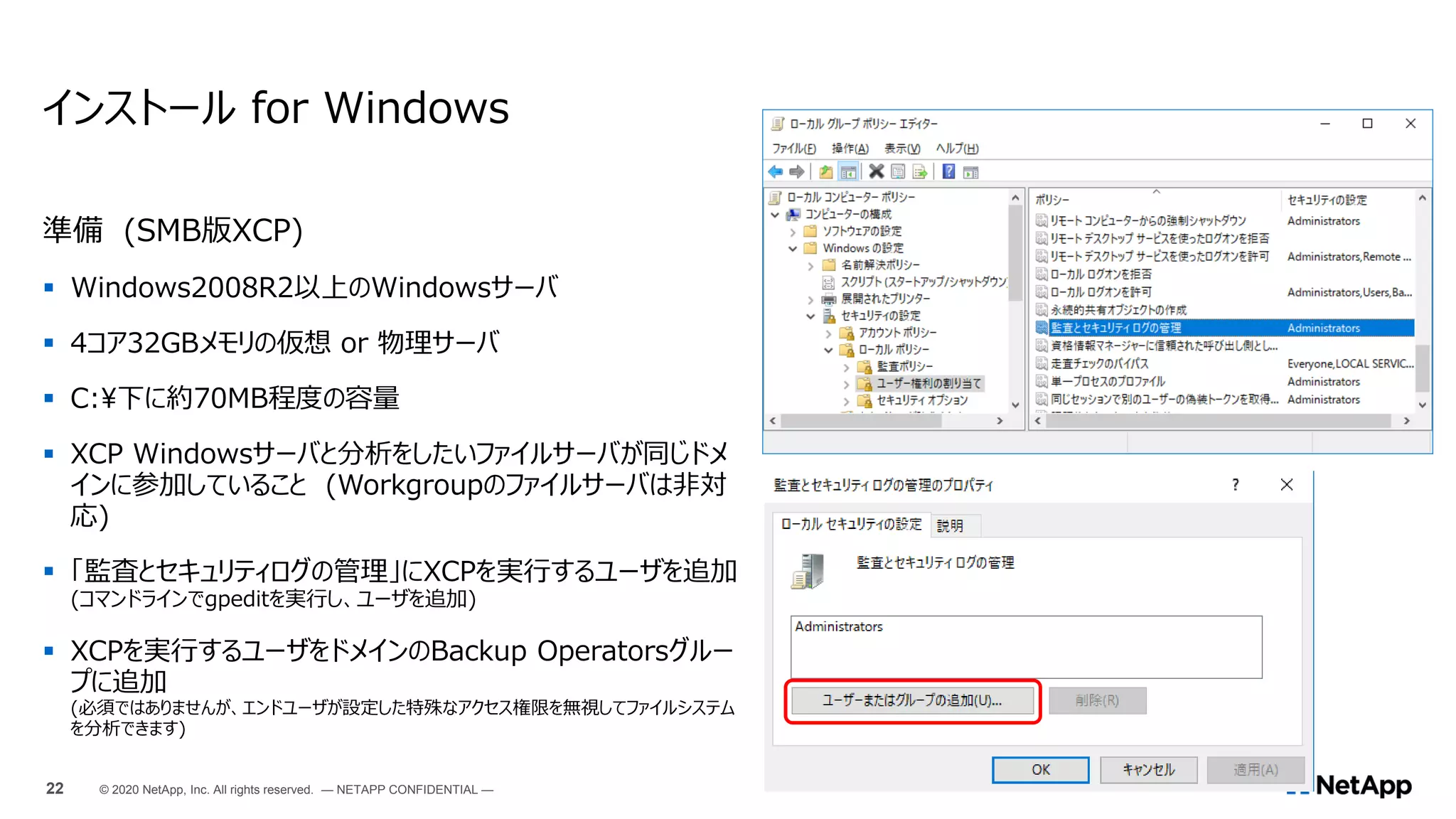
準備 (SMB版XCP)
 Windows2008R2以上のWindowsサーバ
 4コア32GBメモリの仮想 or 物理サーバ
 C:下に約70MB程度の容量
 XCP Windowsサーバと分析をしたいファイルサーバが同じドメ
インに参加していること (Workgroupのファイルサーバは非対
応)
 「監査とセキュリティログの管理」にXCPを実行するユーザを追加
(コマンドラインでgpeditを実行し、ユーザを追加)
 XCPを実行するユーザをドメインのBackup Operatorsグルー
プに追加
(必須ではありませんが、エンドユーザが設定した特殊なアクセス権限を無視してファイルシステム
を分析できます)
22 © 2020 NetApp, Inc. All rights reserved. — NETAPP CONFIDENTIAL —
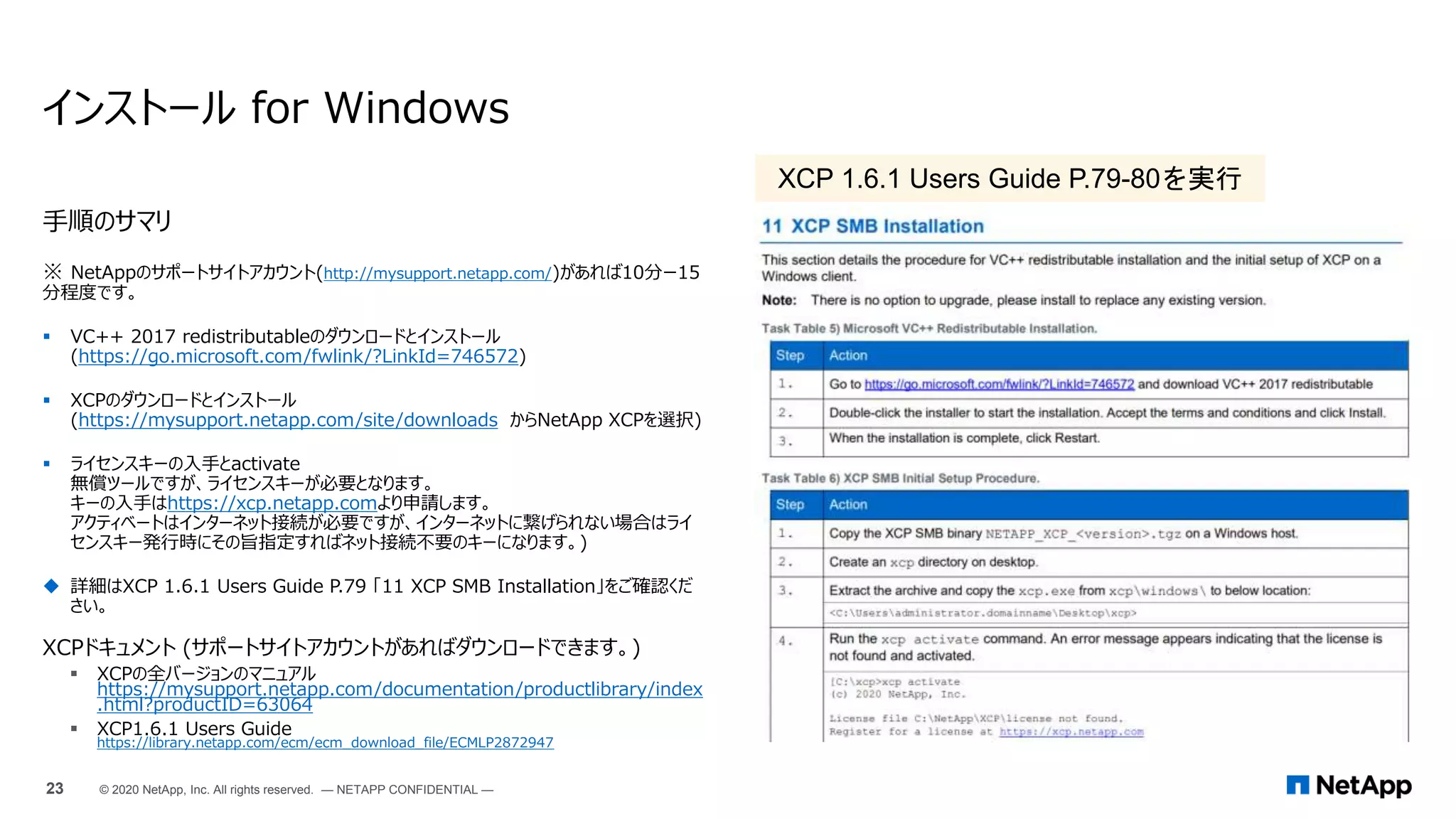
手順のサマリ
※ NetAppのサポートサイトアカウント(http://mysupport.netapp.com/)があれば10分ー15
分程度です。
 VC++ 2017 redistributableのダウンロードとインストール
(https://go.microsoft.com/fwlink/?LinkId=746572)
 XCPのダウンロードとインストール
(https://mysupport.netapp.com/site/downloads からNetApp XCPを選択)
 ライセンスキーの入手とactivate
無償ツールですが、ライセンスキーが必要となります。
キーの入手はhttps://xcp.netapp.comより申請します。
アクティベートはインターネット接続が必要ですが、インターネットに繋げられない場合はライ
センスキー発行時にその旨指定すればネット接続不要のキーになります。)
 詳細はXCP 1.6.1 Users Guide P.79 「11 XCP SMB Installation」をご確認くだ
さい。
XCPドキュメント (サポートサイトアカウントがあればダウンロードできます。)
 XCPの全バージョンのマニュアル
https://mysupport.netapp.com/documentation/productlibrary/index
.html?productID=63064
 XCP1.6.1 Users Guide
https://library.netapp.com/ecm/ecm_download_file/ECMLP2872947
インストール for Windows
23 © 2020 NetApp, Inc. All rights reserved. — NETAPP CONFIDENTIAL —
XCP 1.6.1 Users Guide P.79-80を実行
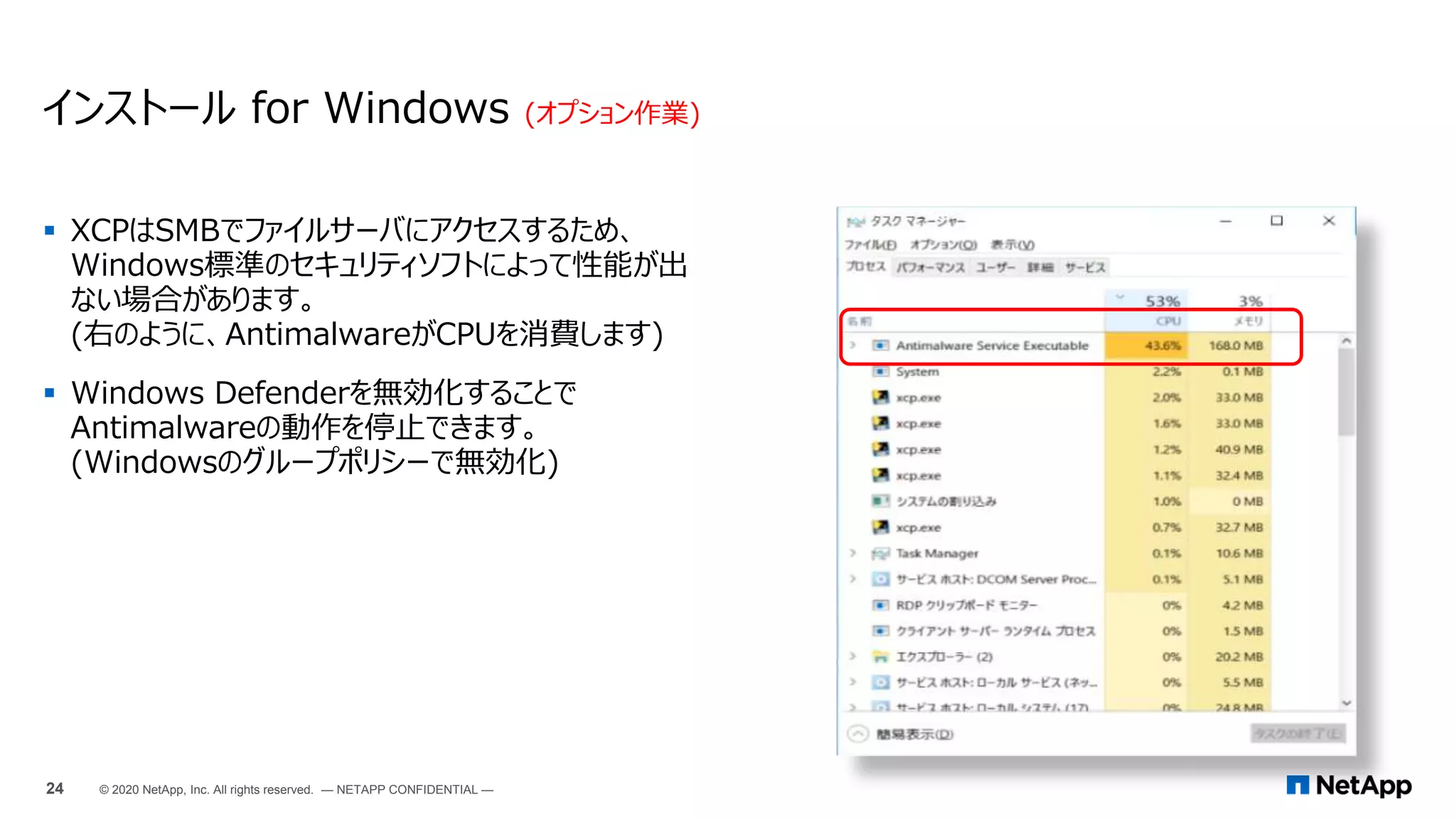
 XCPはSMBでファイルサーバにアクセスするため、
Windows標準のセキュリティソフトによって性能が出
ない場合があります。
(右のように、AntimalwareがCPUを消費します)
 Windows Defenderを無効化することで
Antimalwareの動作を停止できます。
(Windowsのグループポリシーで無効化)
インストール for Windows (オプション作業)
24 © 2020 NetApp, Inc. All rights reserved. — NETAPP CONFIDENTIAL —
 XCP File Analyticsサーバとの連携設定
c:NetAppXCP>xcp.exe configure
XCP SMB 1.6.1; (c) 2020 NetApp, Inc.; Licensed to Johan Backman [NetApp Inc] until Thu Nov 12
01:31:35 2020
--------------------------------------------------------------------------------
Please choose the menu you want to start:
1. Configure xcp.ini file
0. Quit
--------------------------------------------------------------------------------
>> 1
Enter IP adress where Postrgres Database is installed: 192.168.55.187
Enter password given for Postgres DB user: パスワード入力
Retype same password:パスワード入力
# Updating xcp.ini file
--------------------------------------------------------------------------------
XCP File analytics is configured successfully on windows host
Start the agent using command: xcp listen
Refresh the File analytics GUI, to view the SMB agent
--------------------------------------------------------------------------------
XCP File Analytics連携 for Windows (オプション作業)
 XCP File Analyticsサーバ上のファイルコピー
コピー元
XCP File Analyticsサーバ:
/opt/NetApp/xFiles/xcp/ の下の server.key と server.crt
コピー先
Windows XCPサーバ:
C:NetAppXCP 下に同名でコピー。
 XCP File Analyticsサーバとの通信設定
c:NetAppXCP>xcp.exe listen
※ xcp.exe listenを実行すると、Windows上でTCPポート5030がListenさ
れ、XCP File AnalyticsサーバのAPIを受け付けるようになります。
※ 1つ前の手順を忘れると以下のように赤文字で「Error」が出力されます。
以下の設定を事前に行うこと
25 © 2020 NetApp, Inc. All rights reserved. — NETAPP CONFIDENTIAL —
XCP単体操作 - Windows版
ファイルシステムスキャン(1)
26 © 2020 NetApp, Inc. All rights reserved. — NETAPP CONFIDENTIAL —
コマンド実行の流れ
C:UsersAdministratorDesktopxcp>xcp --help
C:UsersAdministratorDesktopxcp>xcp show 192.168.208.200
などでファイル共有が見えるか確認。 (権限のないファイル共有はアクセス拒否されるので、ドメ
インのBackup Operatorsグループにいるユーザで実行することを推奨)
NASファイルシステムスキャン(1)
(続き)
== Attributes of SMB Shares ==
Share Types Remark
takuya DISKTREE
shingoi_nas DISKTREE
kambara DISKTREE
iso_images2 DISKTREE
ipc$ DEVICE,PRINTQ,SPECIAL,IPC
c$ SPECIAL
admin$ SPECIAL
== Permissions of SMB Shares ==
Share Entity Type
error getting share security info of "192.168.208.200takuya": Access is denied.
error getting share security info of "192.168.208.200shingoi_nas": Access is denied.
error getting share security info of "192.168.208.200kambara": Access is denied.
error getting share security info of "192.168.208.200iso_images2": Access is denied.
error getting share security info of "192.168.208.200ipc$": Access is denied.
error getting share security info of "192.168.208.200c$": Access is denied.
error getting share security info of "192.168.208.200admin$": Access is denied.
c:NetAppXCP>
ファイル共有へのアクセス確認
27 © 2020 NetApp, Inc. All rights reserved. — NETAPP CONFIDENTIAL —
c:NetAppXCP>xcp show 192.168.208.200
XCP SMB 1.6P1; (c) 2020 NetApp, Inc.; Licensed to Kan Itani [Network Appliance, Inc]
until Tue Sep 15 20:50:07 2020
error getting space usage of "192.168.208.200c$": Access is denied.
error getting space usage of "192.168.208.200admin$": The parameter is incorrect.
Shares Errors Server
7 0 192.168.208.200
== SMB Shares ==
Space Space Current
Free Used Connections Share Path Folder Path
122GiB 28.3GiB N/A 192.168.208.200takuya N/A
816GiB 1.20TiB N/A 192.168.208.200shingoi_nas N/A
939GiB 33.6GiB N/A 192.168.208.200kambara N/A
1.29TiB 3.71TiB N/A 192.168.208.200iso_images2 N/A
0 0 N/A 192.168.208.200ipc$ N/A
0 0 N/A 192.168.208.200c$ N/A
0 0 N/A 192.168.208.200admin$ N/A
コマンド実行の流れ
C:UsersAdministratorDesktopxcp>xcp help scan
C:UsersAdministratorDesktopxcp>xcp scan -status -preserve-atime
-parallel 8 192.168.208.200iso_images2
注意:
-preserve-atimeオプションを付与しないと、ファイルの最終アクセス日時がscanした日時に
なりますが、-preserve-atimeでアクセス日時を元に戻します。
-parallelオプションは、CPUコアが少ない場合は減らします。(4コアの場合は7(=デフォルト)程度にする)
NASファイルシステムスキャン(2)
(続き)
== Top File Extensions ==
.jar .xml .dll .html .gif .htm other
31928 29242 27229 26949 26337 17194 141384
== Number of files ==
empty <8KiB 8-64KiB 64KiB-1MiB 1-10MiB 10-100MiB >100MiB
1968 137481 99155 43782 10465 3815 3597
== Space used ==
empty <8KiB 8-64KiB 64KiB-1MiB 1-10MiB 10-100MiB >100MiB
0 312MiB 2.27GiB 10.8GiB 31.0GiB 127GiB 6.58TiB
== Directory entries ==
empty 1-10 10-100 100-1K 1K-10K >10K
608 39905 4821 344 7
== Depth ==
0-5 6-10 11-15 16-20 21-100 >100
16026 193983 126713 8223 1003
== Modified ==
>1 year >1 month 1-31 days 1-24 hrs <1 hour <15 mins future invalid
343068 2649 163 53 3 12
== Created ==
>1 year >1 month 1-31 days 1-24 hrs <1 hour <15 mins future invalid
343158 2560 40 189 1
実際にスキャンを実行
28 © 2020 NetApp, Inc. All rights reserved. — NETAPP CONFIDENTIAL —
c:NetAppXCP>xcp scan -preserve-atime -stats -parallel 7 192.168.208.200iso_images2
XCP SMB 1.6P1; (c) 2020 NetApp, Inc.; Licensed to Shingo Itoh [Network Appliance, Inc]
until Tue Sep 15 20:50:07 2020
16,846 scanned, 0 matched, 0 errors, 5s
(中略)
344,235 scanned, 0 matched, 0 errors, 23m41s
== Maximum Values ==
Size Depth Namelen Dirsize
500GiB 22 128 3249
== Average Values ==
Size Depth Namelen Dirsize
23.6MiB 10 21 8
(続き)
Total count: 345948
Directories: 45685
Regular files: 300263
Symbolic links:
Junctions:
Special files:
Total space for regular files: 6.75TiB
Total space for directories: 0
Total space used: 6.75TiB
xcp scan -preserve-atime -stats -parallel 4 192.168.208.200iso_images2 : PASSED
345,948 scanned, 0 matched, 0 errors
Total Time : 23m43s
STATUS : PASSED
Sending statistics...
c:NetAppXCP>
NASファイルシステムスキャン(2)
実際にスキャンを実行
29 © 2020 NetApp, Inc. All rights reserved. — NETAPP CONFIDENTIAL —
XCP File Analyticsとの連携 (オプション作業)
ファイルシステムスキャン(2)
30 © 2020 NetApp, Inc. All rights reserved. — NETAPP CONFIDENTIAL —
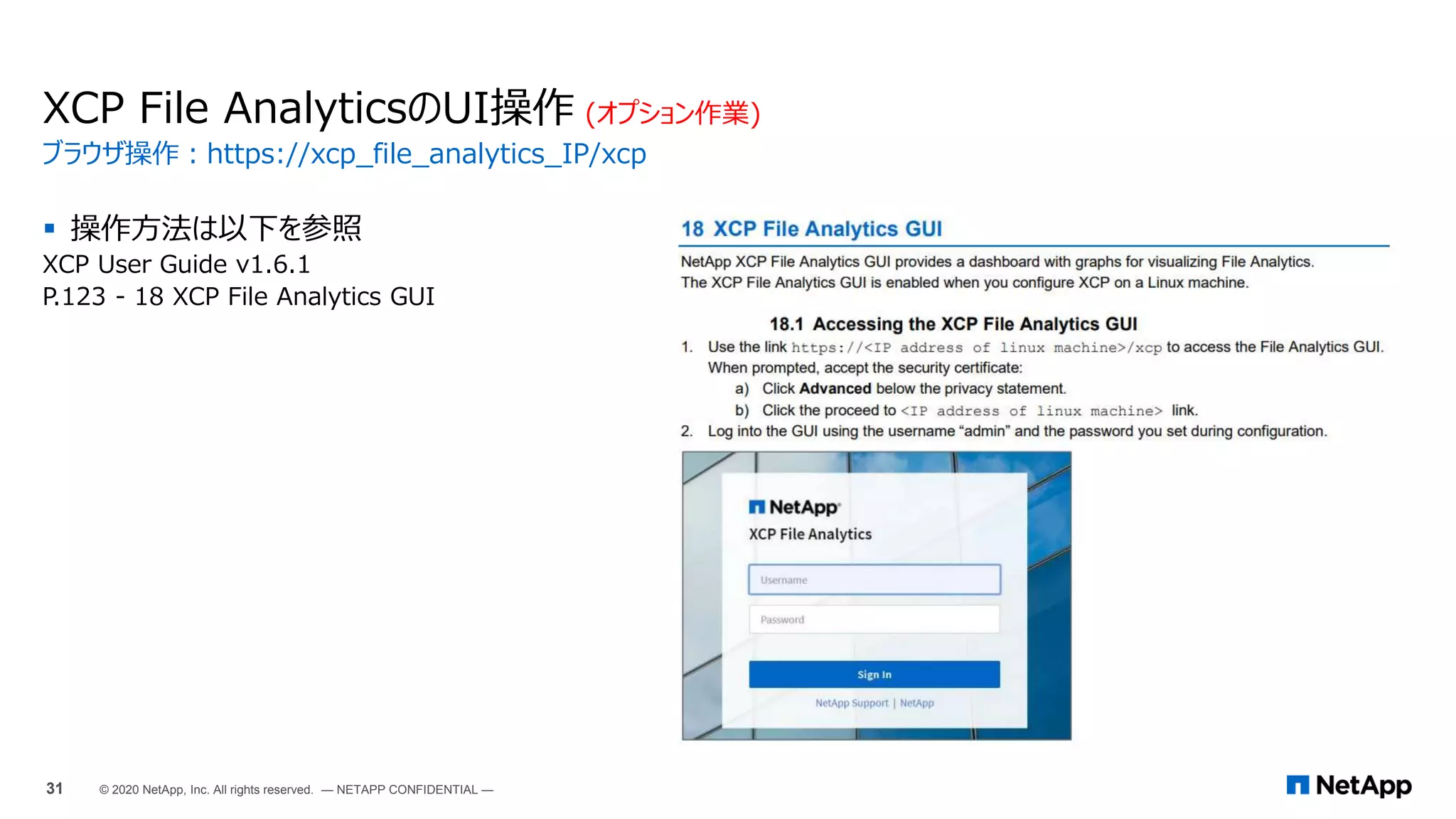
 操作方法は以下を参照
XCP User Guide v1.6.1
P.123 - 18 XCP File Analytics GUI
XCP File AnalyticsのUI操作 (オプション作業)
ブラウザ操作:https://xcp_file_analytics_IP/xcp
31 © 2020 NetApp, Inc. All rights reserved. — NETAPP CONFIDENTIAL —
XCP File AnalyticsのUI操作 (オプション作業)
ログイン後の作業:Windows XCPサーバの追加 / ファイルサーバの追加操作
32 © 2020 NetApp, Inc. All rights reserved. — NETAPP CONFIDENTIAL —
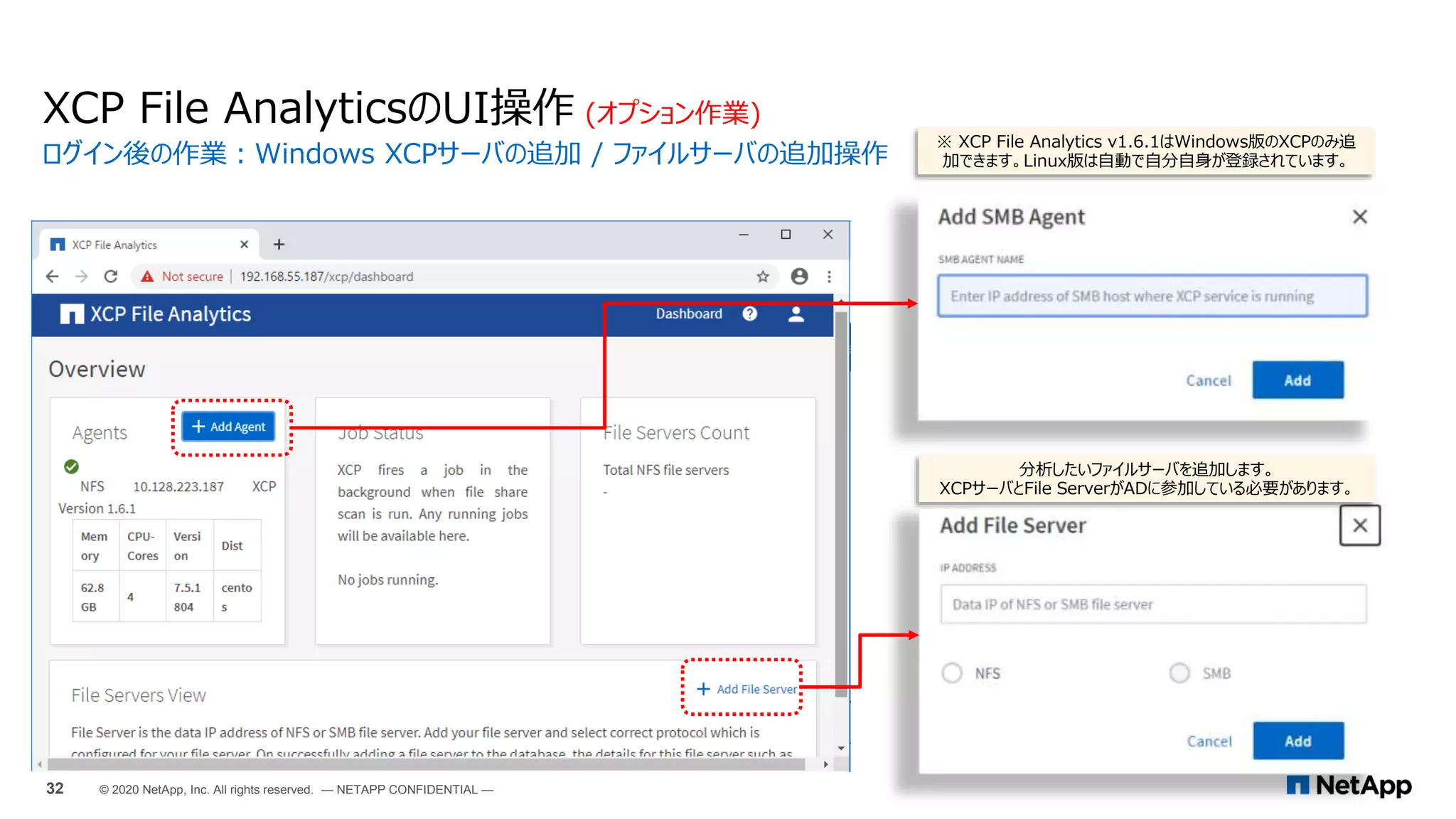
※ XCP File Analytics v1.6.1はWindows版のXCPのみ追
加できます。Linux版は自動で自分自身が登録されています。
分析したいファイルサーバを追加します。
XCPサーバとFile ServerがADに参加している必要があります。
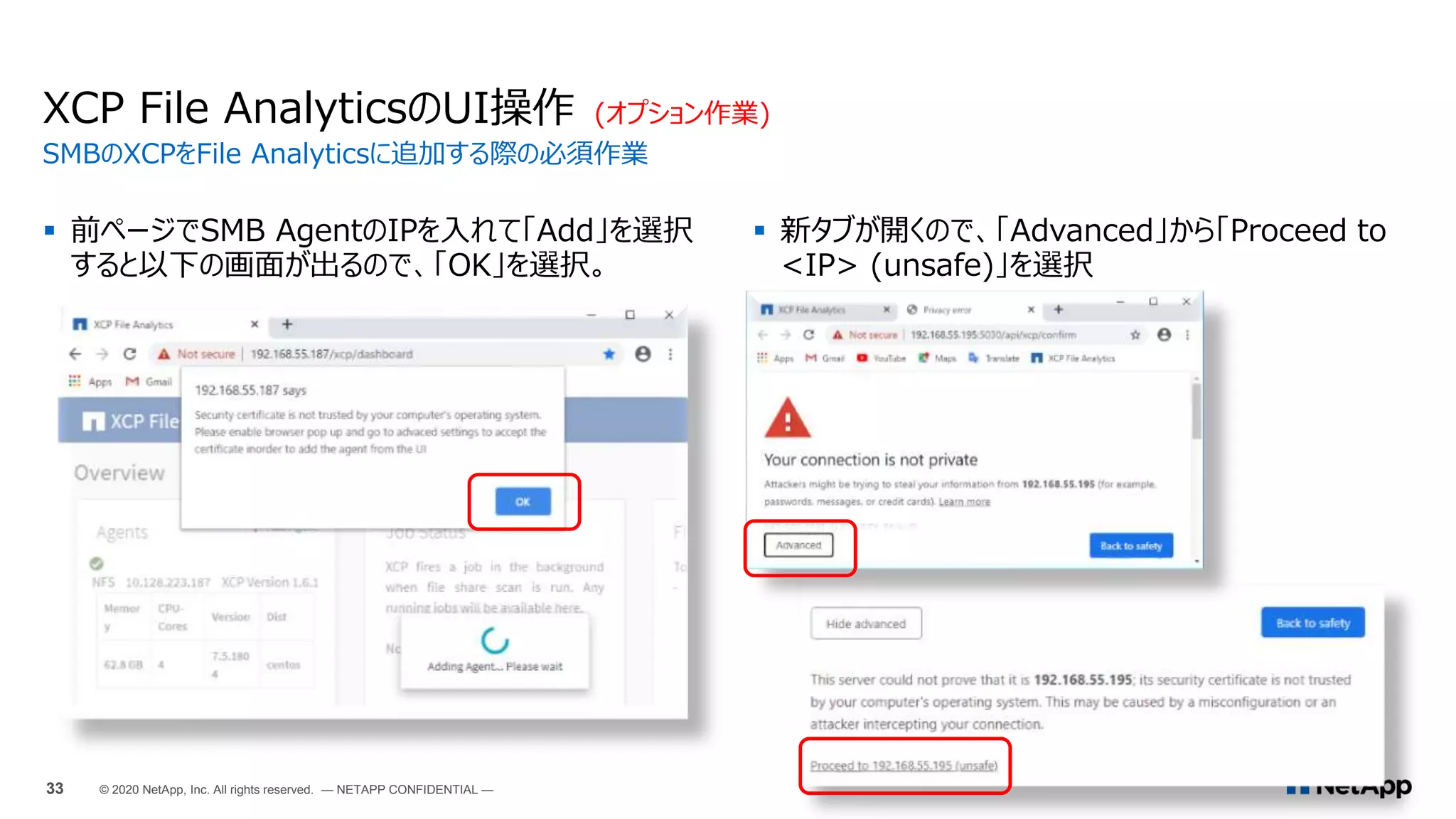
 前ページでSMB AgentのIPを入れて「Add」を選択
すると以下の画面が出るので、「OK」を選択。
XCP File AnalyticsのUI操作 (オプション作業)
SMBのXCPをFile Analyticsに追加する際の必須作業
33 © 2020 NetApp, Inc. All rights reserved. — NETAPP CONFIDENTIAL —
 新タブが開くので、「Advanced」から「Proceed to
<IP> (unsafe)」を選択
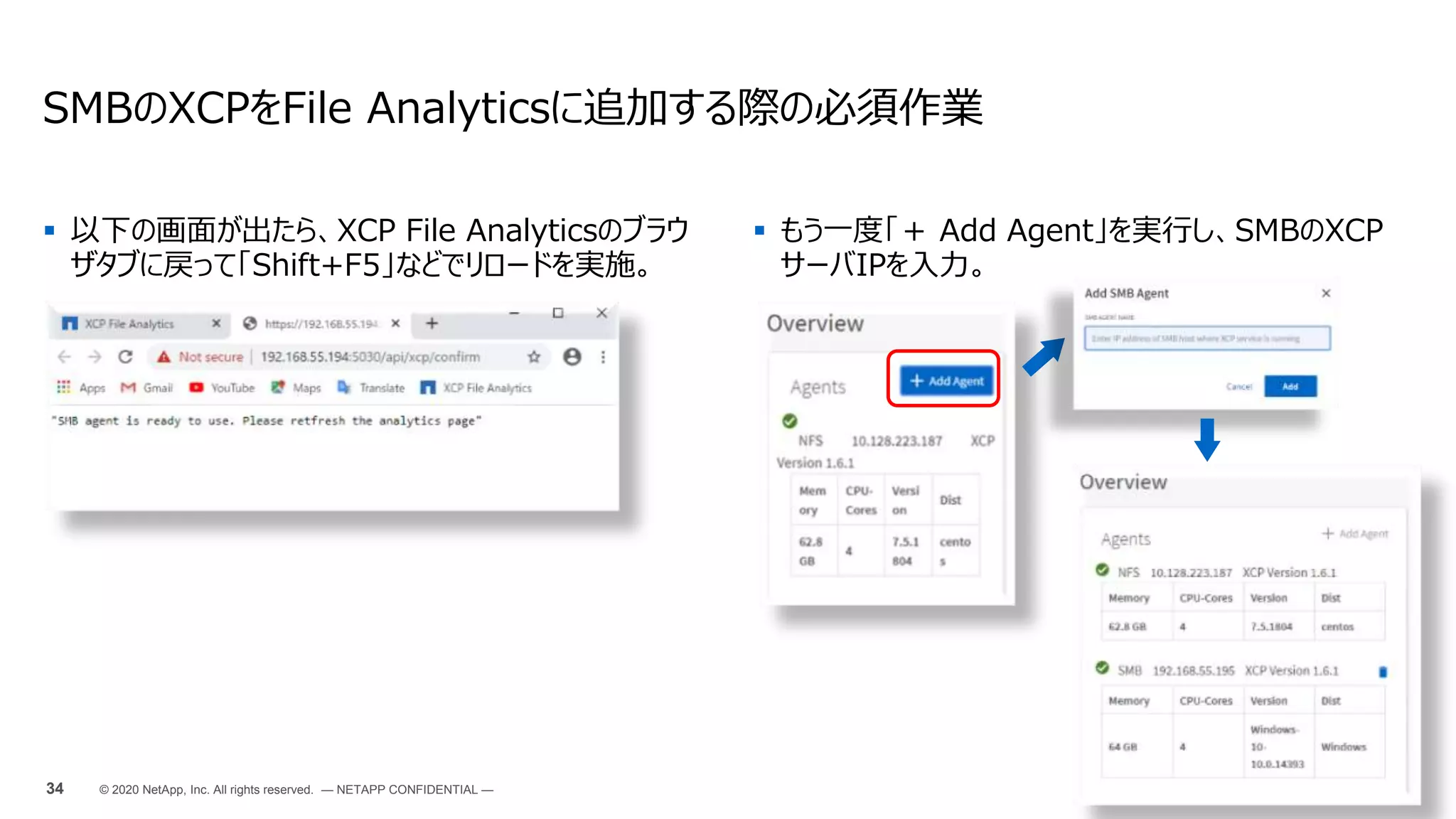
 以下の画面が出たら、XCP File Analyticsのブラウ
ザタブに戻って「Shift+F5」などでリロードを実施。
SMBのXCPをFile Analyticsに追加する際の必須作業
34 © 2020 NetApp, Inc. All rights reserved. — NETAPP CONFIDENTIAL —
 もう一度「+ Add Agent」を実行し、SMBのXCP
サーバIPを入力。
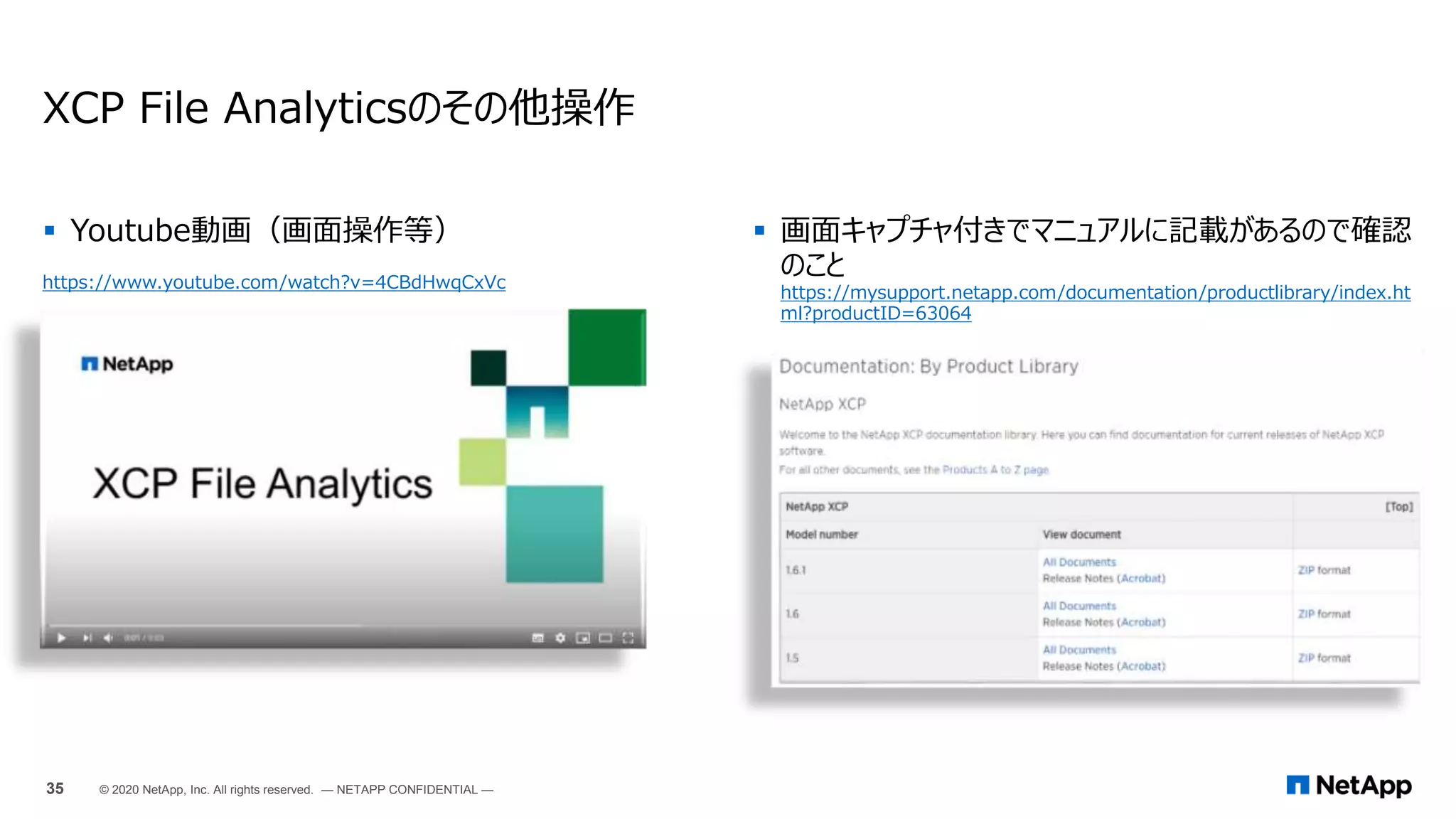
 Youtube動画(画面操作等)
https://www.youtube.com/watch?v=4CBdHwqCxVc
XCP File Analyticsのその他操作
 画面キャプチャ付きでマニュアルに記載があるので確認
のこと
https://mysupport.netapp.com/documentation/productlibrary/index.ht
ml?productID=63064
35 © 2020 NetApp, Inc. All rights reserved. — NETAPP CONFIDENTIAL —
最新情報はブログをチェック!
April 22, 2020
 Using XCP to Move Data from a Data Lake
and High-Performance Computing to ONTAP
NFS
https://blog.netapp.com/data-migration-xcp
May 8, 2020
 NetApp XCP 1.6 Delivers Open File Analytics
and Infrastructure Improvements
https://blog.netapp.com/xcp-data-migration-software
July 31, 2020
 NetApp XCP Data Mover Solution: On
Premises to Cloud
https://blog.netapp.com/XCP-cloud-data-migration
Justin ParisiによるXCPブログシリーズ
https://whyistheinternetbroken.wordpress.com/tag/xcp/
https://blog.netapp.com/tag/netapp-xcp/ ←トップページ: Chromeの翻訳機能で十分理解できます。
36 © 2020 NetApp, Inc. All rights reserved. — NETAPP CONFIDENTIAL —
37
Thank You
© 2020 NetApp, Inc. All rights reserved. — NETAPP CONFIDENTIAL —

NetApp XCP データ移行ツールインストールと設定

  • 1.
    ファイルサーバ移行ツール (SMB/NFS) XCP, XCPFile Analytics (NetAppへの移行は無償) © 2020 NetApp, Inc. All rights reserved. — NETAPP CONFIDENTIAL — ネットアップ合同会社 Kan Itani 2021/03/24
  • 2.
    XCP / XCPFile Analytics ツールの特徴とできること 2 © 2020 NetApp, Inc. All rights reserved. — NETAPP CONFIDENTIAL —
  • 3.
    XCP概要 SMB<->SMB、NFS<->NFSに対応 データ移行 / レプリケーションツール SMBNFS XCP Any SMB/NFS store Data migration SMB NFS XCP Data migration 旧機種・他社ストレージからのデータ移行 クラウドへのデータ連携・レプリケーション Branch office Hybrid cloud Cloud On-Premises 3 © 2019 NetApp, Inc. All rights reserved. — NETAPP CONFIDENTIAL —
  • 4.
     データ移行機能 (XCP) NFS -> NFSのデータ移行 (XCPの動作にLinuxサーバが必要)  SMB -> SMBのデータ移行 (XCPの動作にWindowsサーバが必要)  移行元、移行先がNetApp製品である必要はない (Linux NFSサーバ、Windows SMBサーバにも対応。)  ファイルシステムの権限なども同時に移行する  非常に高速 (rsyncの23倍、robocopyの5倍)  セットアップが簡単 (資料の後半に手順があります)  SMBの場合、XCPサーバと移行元・移行先ストレージが同じActivce Directoryドメインに参加していることを推奨。  ファイルシステム簡易分析機能 (XCP & XCP File Analytics)  XCPが存在する前提で、XCP File Analyticsが動作する  XCPのファイルシステムスキャン機能をXCP File Analyticsがキックして、スキャ ン結果をXCP File Analyticsサーバ内のDB (PostgreSQL)に蓄積  XCP単体でも簡易分析結果はCLIで確認可能 (xcp scan -stats)  SMBのWorkgroup環境ではXCP File Analyticsは使えない。 (File AnalyticsのUIではSMBファイル共有に対してアクセスする際のユーザを指定できないため、 Everyone Full Controlとなっていない場合はScan時にaccess is deniedとなる。) XCPの概要 https://youtu.be/4CBdHwqCxVc (英語) 4 © 2020 NetApp, Inc. All rights reserved. — NETAPP CONFIDENTIAL — Hot or Coldの ファイル数の比較 ファイルサイズの分布 Hot or Coldの 容量の比較
  • 5.
     NFS/SMBでほぼ機能差はない。  PDFやhtmlへのExport機能は無い。 次ページ以降サンプル画面をマニュアルから抜粋。 XCP File Analyticsでグラフ化できる項目 v1.6.1のUser Guideより抜粋 5 © 2020 NetApp, Inc. All rights reserved. — NETAPP CONFIDENTIAL —
  • 6.
    XCP File Analyticsでグラフ化できる項目 v1.6.1のUserGuideより抜粋 6 © 2020 NetApp, Inc. All rights reserved. — NETAPP CONFIDENTIAL —
  • 7.
    XCP File Analyticsでグラフ化できる項目 v1.6.1のUserGuideより抜粋 7 © 2020 NetApp, Inc. All rights reserved. — NETAPP CONFIDENTIAL —
  • 8.
    XCP File Analyticsでグラフ化できる項目 v1.6.1のUserGuideより抜粋 8 © 2020 NetApp, Inc. All rights reserved. — NETAPP CONFIDENTIAL —
  • 9.
    XCP File Analyticsでグラフ化できる項目 v1.6.1のUserGuideより抜粋 9 © 2020 NetApp, Inc. All rights reserved. — NETAPP CONFIDENTIAL —
  • 10.
    XCP File Analyticsでグラフ化できる項目 v1.6.1のUserGuideより抜粋 10 © 2020 NetApp, Inc. All rights reserved. — NETAPP CONFIDENTIAL —
  • 11.
    XCP File Analytics無しでも、NFS版のXCPは右のレ ポートをCLIから出力できます。 (htmlor csvで出力可能) User Guide内のXCP NFS Command Reference欄を参照のこと (補足) XCP単体で生成できるレポート v1.6.1のUser Guideより抜粋 11 © 2020 NetApp, Inc. All rights reserved. — NETAPP CONFIDENTIAL —
  • 12.
    (補足) XCP単体で生成できるレポート ファイルの更新が1年以上前(or後)のファイルリストとそ の容量を表示する。 ./xcp scan-match "modified > 1*year" -l -q 192.168.89.110:/ifs/data_for_analysis > modified_morethan_year ./xcp scan -match "modified < 1*year" -l -q 192.168.89.110:/ifs/data_for_analysis > modified_lessthan_year_new 更新が1年以上前のファイルのリストと消費している容量 を表示する。 ./xcp -du -match "modified > 1*year" 192.168.89.110:/ifs/data_for_analysis/ 更新が1年未満のファイルのリストと消費している容量を 表示する。 ./xcp -du -match "modified < 1*year" 192.168.89.110:/ifs/data_for_analysis/ 更新が1年未満のファイルのサイズとグラフィカルなレポー トを生成する。 ./xcp -stats -match "modified > 1*year" -html 192.168.89.110:/ifs/data_for_analysis/ > modified_morethan_year_stats.html 様々な使い方 - TR4850より抜粋 12 © 2020 NetApp, Inc. All rights reserved. — NETAPP CONFIDENTIAL —
  • 13.
    XCP, XCP FileAnalyticsのインストール インストール for Linux 16 © 2020 NetApp, Inc. All rights reserved. — NETAPP CONFIDENTIAL —
  • 14.
    1. XCPライセンスキーの入手 https://xcp.netapp.com/ 2. Linuxサーバの準備 4コア、32GBメモリ、1つのNIC  Recent Linux distribution (RHEL 5.11 or later or kernel 2.6.18-404 or later)  20MBの空き for バイナリ  50MBの空き for ログファイル /opt/NetApp/xFiles/xcp/  カーネルパラメータチューニング (詳細省略)  カタログデータの置き場所としてのNFS v3のサーバ ※ File Analyticsをインストールする場合は不要 ※ 2000万ファイルで1GBほどの容量が必要  その他マニュアル参照 XCP, XCP File Analyticsのインストール for Linux 3. XCPバイナリの展開とキーのコピー・アクティベート  tar zxvf ./NETAPP_XCP_<version>.tgz (https://mysupport.netapp.com/site/downloads からNetApp XCPを選択し、入手)  chmod → xcp help → ライセンスキーファイルのコピー → xcp activate → /opt/NetApp/xFiles/xcp/xcp.iniの編集 4. XCP File Analyticsのインストール (オプション作業)  XCPインストールディレクトリ下の./configure.shを実行  「1. Configure client system」を選択し、以下を指定 postgresqlのパスワード / File AnalyticsのGUIログインパスワード  各種プロセスがListenしているか確認 # systemctl status xcp # netstat -anp | grep xcp (ポート5030でlisteしているか確認) Tcp 0 0 0.0.0.0:5030 0.0.0.0:* LISTEN 7795/xcp # netstat -anp | grep postgres (ポート5432でlisteしているか確認) Tcp 0 0 0.0.0.0:5432 0.0.0.0:* LISTEN 1296/postgres Tcp 0 0 127.0.0.1:5432 127.0.0.1:60584 ESTABLISHED 7798/postgres: cent tcp6 0 0 :::5432 :::* LISTEN 1296/postgres # netstat -anp | grep httpd (ポート80/443でlistenしているか確認) tcp6 0 0 :::80 :::* LISTEN 1128/httpd tcp6 0 0 :::443 :::* LISTEN 1128/httpd 手順概要 (詳細はマニュアル参照: https://mysupport.netapp.com/documentation/productlibrary/index.html?productID=63064) 17 © 2020 NetApp, Inc. All rights reserved. — NETAPP CONFIDENTIAL —
  • 15.
    [root@vdbench xcp]# ./configure.sh -------------------------------------------------------------------------------- XCPCONFIGURATION SCRIPT -------------------------------------------------------------------------------- # Checking if xcp service is running # WARNING: XCP process is already running on this system. ________________________________________________________________________________ root 7795 1 0 16:01 ? 00:00:01 /usr/bin/xcp --listen postgres 7798 1296 0 16:01 ? 00:00:00 postgres: central xcp_cmdb 127.0.0.1(60584) idle root 13770 7795 0 16:58 ? 00:00:00 [xcp] <defunct> root 13772 7795 0 16:58 ? 00:00:00 [xcp] <defunct> ________________________________________________________________________________ # Any running jobs will be killed abruptly if you stop xcp # Do you want to stop XCP service: (yes/no):yes Redirecting to /bin/systemctl stop xcp.service Menu Help: # Install/ Upgrade - # Install - Installs PostgreSQL and httpd if not installed and does setup for XCP File Analytics. # Upgrade - Upgrades takes a backup of xcp folder under /var/www/html/ to xcp_backup # Repair - Restarts PostgreSQL database, http and XCP services incase if any of them are stopped. # Cleanup - Uninstalls PostgreSQL and httpd. 1. Installation/Upgrade 2. Repair 3. Cleanup 0. Exit Please select the option from the menu [0-3]: 1 -------------------------------------------------------------------------------- Setting up Postgres -------------------------------------------------------------------------------- # Checking if postgres is installed Redirecting to /bin/systemctl status postgresql.service Unit postgresql.service could not be found. XCP File Analyticsのインストール詳細① (configure.sh実行例) パッケージ postgresql-server はインストールされていません。 # Installing PostgreSQL... # Initializing database .... Created symlink from /etc/systemd/system/multi-user.target.wants/postgresql.service to /usr/lib/systemd/system/postgresql.service. # Configuring postgres ... # Updating pg_hab.conf file # Updating postgresql.conf file Redirecting to /bin/systemctl status postgresql.service # Postgres service is running -------------------------------------------------------------------------------- Setting up httpd -------------------------------------------------------------------------------- # Checking if httpd is installed パッケージ httpd はインストールされていません。 # Installing HTTPD... # Updating httpd.conf file ... Redirecting to /bin/systemctl status httpd.service # Httpd service is running -------------------------------------------------------------------------------- Setting up https -------------------------------------------------------------------------------- パッケージ mod_ssl はインストールされていません。 # Installing HTTPs...It will take 3-5 minutes to configure # Copying certificates... -------------------------------------------------------------------------------- Configuring xcp -------------------------------------------------------------------------------- # Copying xcp files..... # Taking backup of xcp folder /var/www/html/xcp in /var/www/html/xcp_backup NOTE: If you are running for first time, select option 1. If you are upgrading select option 0. ________________________________________________________________________________ (続く) (オプション作業) 18 © 2020 NetApp, Inc. All rights reserved. — NETAPP CONFIDENTIAL —
  • 16.
    Please choose themenu you want to start: 1. Configure client system 2. Reset admin password 3. Reset Postgres database password 4. Rebuild xcp.ini file 5. Delete database and reconfigure client system 0. Quit -------------------------------------------------------------------------------- Enter digit between [0-5] >> 1 # Postgres service is running Enter password for Postgres DB user(max 10 char):パスワード入力 Retype same password :パスワード入力 # Updating xcp.ini file Enter admin password for file analytics (max 10 char):パスワード入力 Retype same password :パスワード入力 # Updating database entries -------------------------------------------------------------------------------- Starting xcp service -------------------------------------------------------------------------------- Redirecting to /bin/systemctl status xcp.service Redirecting to /bin/systemctl status xcp.service # XCP service started successfully root 15012 1 20 17:05 ? 00:00:00 /usr/bin/xcp --listen postgres 15016 14571 0 17:05 ? 00:00:00 postgres: central xcp_cmdb 127.0.0.1(34696) idle -------------------------------------------------------------------------------- -------------------------------------------------------------------------------- XCP File analytics is configured successfully To start XCP service manually, use "sudo systemctl start xcp" command Use following link and login as 'admin' user for GUI access https://10.128.223.187/xcp -------------------------------------------------------------------------------- [root@vdbench xcp]# XCP File Analyticsのインストール詳細② (configure.sh実行例) (オプション作業) 19 © 2020 NetApp, Inc. All rights reserved. — NETAPP CONFIDENTIAL —
  • 17.
    [root@vdbench xcp]# ./configure.sh -------------------------------------------------------------------------------- XCPCONFIGURATION SCRIPT -------------------------------------------------------------------------------- # Checking if xcp service is running # WARNING: XCP process is already running on this system. ________________________________________________________________________________ root 7795 1 0 16:01 ? 00:00:01 /usr/bin/xcp --listen postgres 7798 1296 0 16:01 ? 00:00:00 postgres: central xcp_cmdb 127.0.0.1(60584) idle root 13770 7795 0 16:58 ? 00:00:00 [xcp] <defunct> root 13772 7795 0 16:58 ? 00:00:00 [xcp] <defunct> ________________________________________________________________________________ # Any running jobs will be killed abruptly if you stop xcp # Do you want to stop XCP service: (yes/no):yes Redirecting to /bin/systemctl stop xcp.service Menu Help: # Install/ Upgrade - # Install - Installs PostgreSQL and httpd if not installed and does setup for XCP File Analytics. # Upgrade - Upgrades takes a backup of xcp folder under /var/www/html/ to xcp_backup # Repair - Restarts PostgreSQL database, http and XCP services incase if any of them are stopped. # Cleanup - Uninstalls PostgreSQL and httpd. 1. Installation/Upgrade 2. Repair 3. Cleanup 0. Exit Please select the option from the menu [0-3]: 3 # WARNING: This will start uninstallation. Continue? (yes/no):yes postgresql-server-9.2.24-4.el7_8.x86_64 # WARNING: This will remove Postgres. Continue? (yes/no):yes # Uninstalling Postgres... XCP File Analyticsの削除 # Database initilization path is /var/lib/pgsql/data # WARNING: This will remove the above directory. Continue? : (yes/no):yes # Postgres uninstallation successful httpd-2.4.6-93.el7.centos.x86_64 # WARNING: This will remove httpd. Continue? (yes/no):yes # Uninstalling httpd ... # WARNING: This will remove xcp service. Continue? (yes/no):no # Checking if xcp service is running Menu Help: # Install/ Upgrade - # Install - Installs PostgreSQL and httpd if not installed and does setup for XCP File Analytics. # Upgrade - Upgrades takes a backup of xcp folder under /var/www/html/ to xcp_backup # Repair - Restarts PostgreSQL database, http and XCP services incase if any of them are stopped. # Cleanup - Uninstalls PostgreSQL and httpd. 1. Installation/Upgrade 2. Repair 3. Cleanup 0. Exit Please select the option from the menu [0-3]: (オプション作業) 20 © 2020 NetApp, Inc. All rights reserved. — NETAPP CONFIDENTIAL —
  • 18.
    Windows版XCPのインストールと、XCP File Analyticsの連携 インストールfor Windows 21 © 2020 NetApp, Inc. All rights reserved. — NETAPP CONFIDENTIAL —
  • 19.
    インストール for Windows 準備(SMB版XCP)  Windows2008R2以上のWindowsサーバ  4コア32GBメモリの仮想 or 物理サーバ  C:下に約70MB程度の容量  XCP Windowsサーバと分析をしたいファイルサーバが同じドメ インに参加していること (Workgroupのファイルサーバは非対 応)  「監査とセキュリティログの管理」にXCPを実行するユーザを追加 (コマンドラインでgpeditを実行し、ユーザを追加)  XCPを実行するユーザをドメインのBackup Operatorsグルー プに追加 (必須ではありませんが、エンドユーザが設定した特殊なアクセス権限を無視してファイルシステム を分析できます) 22 © 2020 NetApp, Inc. All rights reserved. — NETAPP CONFIDENTIAL —
  • 20.
    手順のサマリ ※ NetAppのサポートサイトアカウント(http://mysupport.netapp.com/)があれば10分ー15 分程度です。  VC++2017 redistributableのダウンロードとインストール (https://go.microsoft.com/fwlink/?LinkId=746572)  XCPのダウンロードとインストール (https://mysupport.netapp.com/site/downloads からNetApp XCPを選択)  ライセンスキーの入手とactivate 無償ツールですが、ライセンスキーが必要となります。 キーの入手はhttps://xcp.netapp.comより申請します。 アクティベートはインターネット接続が必要ですが、インターネットに繋げられない場合はライ センスキー発行時にその旨指定すればネット接続不要のキーになります。)  詳細はXCP 1.6.1 Users Guide P.79 「11 XCP SMB Installation」をご確認くだ さい。 XCPドキュメント (サポートサイトアカウントがあればダウンロードできます。)  XCPの全バージョンのマニュアル https://mysupport.netapp.com/documentation/productlibrary/index .html?productID=63064  XCP1.6.1 Users Guide https://library.netapp.com/ecm/ecm_download_file/ECMLP2872947 インストール for Windows 23 © 2020 NetApp, Inc. All rights reserved. — NETAPP CONFIDENTIAL — XCP 1.6.1 Users Guide P.79-80を実行
  • 21.
     XCPはSMBでファイルサーバにアクセスするため、 Windows標準のセキュリティソフトによって性能が出 ない場合があります。 (右のように、AntimalwareがCPUを消費します)  WindowsDefenderを無効化することで Antimalwareの動作を停止できます。 (Windowsのグループポリシーで無効化) インストール for Windows (オプション作業) 24 © 2020 NetApp, Inc. All rights reserved. — NETAPP CONFIDENTIAL —
  • 22.
     XCP FileAnalyticsサーバとの連携設定 c:NetAppXCP>xcp.exe configure XCP SMB 1.6.1; (c) 2020 NetApp, Inc.; Licensed to Johan Backman [NetApp Inc] until Thu Nov 12 01:31:35 2020 -------------------------------------------------------------------------------- Please choose the menu you want to start: 1. Configure xcp.ini file 0. Quit -------------------------------------------------------------------------------- >> 1 Enter IP adress where Postrgres Database is installed: 192.168.55.187 Enter password given for Postgres DB user: パスワード入力 Retype same password:パスワード入力 # Updating xcp.ini file -------------------------------------------------------------------------------- XCP File analytics is configured successfully on windows host Start the agent using command: xcp listen Refresh the File analytics GUI, to view the SMB agent -------------------------------------------------------------------------------- XCP File Analytics連携 for Windows (オプション作業)  XCP File Analyticsサーバ上のファイルコピー コピー元 XCP File Analyticsサーバ: /opt/NetApp/xFiles/xcp/ の下の server.key と server.crt コピー先 Windows XCPサーバ: C:NetAppXCP 下に同名でコピー。  XCP File Analyticsサーバとの通信設定 c:NetAppXCP>xcp.exe listen ※ xcp.exe listenを実行すると、Windows上でTCPポート5030がListenさ れ、XCP File AnalyticsサーバのAPIを受け付けるようになります。 ※ 1つ前の手順を忘れると以下のように赤文字で「Error」が出力されます。 以下の設定を事前に行うこと 25 © 2020 NetApp, Inc. All rights reserved. — NETAPP CONFIDENTIAL —
  • 23.
    XCP単体操作 - Windows版 ファイルシステムスキャン(1) 26© 2020 NetApp, Inc. All rights reserved. — NETAPP CONFIDENTIAL —
  • 24.
    コマンド実行の流れ C:UsersAdministratorDesktopxcp>xcp --help C:UsersAdministratorDesktopxcp>xcp show192.168.208.200 などでファイル共有が見えるか確認。 (権限のないファイル共有はアクセス拒否されるので、ドメ インのBackup Operatorsグループにいるユーザで実行することを推奨) NASファイルシステムスキャン(1) (続き) == Attributes of SMB Shares == Share Types Remark takuya DISKTREE shingoi_nas DISKTREE kambara DISKTREE iso_images2 DISKTREE ipc$ DEVICE,PRINTQ,SPECIAL,IPC c$ SPECIAL admin$ SPECIAL == Permissions of SMB Shares == Share Entity Type error getting share security info of "192.168.208.200takuya": Access is denied. error getting share security info of "192.168.208.200shingoi_nas": Access is denied. error getting share security info of "192.168.208.200kambara": Access is denied. error getting share security info of "192.168.208.200iso_images2": Access is denied. error getting share security info of "192.168.208.200ipc$": Access is denied. error getting share security info of "192.168.208.200c$": Access is denied. error getting share security info of "192.168.208.200admin$": Access is denied. c:NetAppXCP> ファイル共有へのアクセス確認 27 © 2020 NetApp, Inc. All rights reserved. — NETAPP CONFIDENTIAL — c:NetAppXCP>xcp show 192.168.208.200 XCP SMB 1.6P1; (c) 2020 NetApp, Inc.; Licensed to Kan Itani [Network Appliance, Inc] until Tue Sep 15 20:50:07 2020 error getting space usage of "192.168.208.200c$": Access is denied. error getting space usage of "192.168.208.200admin$": The parameter is incorrect. Shares Errors Server 7 0 192.168.208.200 == SMB Shares == Space Space Current Free Used Connections Share Path Folder Path 122GiB 28.3GiB N/A 192.168.208.200takuya N/A 816GiB 1.20TiB N/A 192.168.208.200shingoi_nas N/A 939GiB 33.6GiB N/A 192.168.208.200kambara N/A 1.29TiB 3.71TiB N/A 192.168.208.200iso_images2 N/A 0 0 N/A 192.168.208.200ipc$ N/A 0 0 N/A 192.168.208.200c$ N/A 0 0 N/A 192.168.208.200admin$ N/A
  • 25.
    コマンド実行の流れ C:UsersAdministratorDesktopxcp>xcp help scan C:UsersAdministratorDesktopxcp>xcpscan -status -preserve-atime -parallel 8 192.168.208.200iso_images2 注意: -preserve-atimeオプションを付与しないと、ファイルの最終アクセス日時がscanした日時に なりますが、-preserve-atimeでアクセス日時を元に戻します。 -parallelオプションは、CPUコアが少ない場合は減らします。(4コアの場合は7(=デフォルト)程度にする) NASファイルシステムスキャン(2) (続き) == Top File Extensions == .jar .xml .dll .html .gif .htm other 31928 29242 27229 26949 26337 17194 141384 == Number of files == empty <8KiB 8-64KiB 64KiB-1MiB 1-10MiB 10-100MiB >100MiB 1968 137481 99155 43782 10465 3815 3597 == Space used == empty <8KiB 8-64KiB 64KiB-1MiB 1-10MiB 10-100MiB >100MiB 0 312MiB 2.27GiB 10.8GiB 31.0GiB 127GiB 6.58TiB == Directory entries == empty 1-10 10-100 100-1K 1K-10K >10K 608 39905 4821 344 7 == Depth == 0-5 6-10 11-15 16-20 21-100 >100 16026 193983 126713 8223 1003 == Modified == >1 year >1 month 1-31 days 1-24 hrs <1 hour <15 mins future invalid 343068 2649 163 53 3 12 == Created == >1 year >1 month 1-31 days 1-24 hrs <1 hour <15 mins future invalid 343158 2560 40 189 1 実際にスキャンを実行 28 © 2020 NetApp, Inc. All rights reserved. — NETAPP CONFIDENTIAL — c:NetAppXCP>xcp scan -preserve-atime -stats -parallel 7 192.168.208.200iso_images2 XCP SMB 1.6P1; (c) 2020 NetApp, Inc.; Licensed to Shingo Itoh [Network Appliance, Inc] until Tue Sep 15 20:50:07 2020 16,846 scanned, 0 matched, 0 errors, 5s (中略) 344,235 scanned, 0 matched, 0 errors, 23m41s == Maximum Values == Size Depth Namelen Dirsize 500GiB 22 128 3249 == Average Values == Size Depth Namelen Dirsize 23.6MiB 10 21 8
  • 26.
    (続き) Total count: 345948 Directories:45685 Regular files: 300263 Symbolic links: Junctions: Special files: Total space for regular files: 6.75TiB Total space for directories: 0 Total space used: 6.75TiB xcp scan -preserve-atime -stats -parallel 4 192.168.208.200iso_images2 : PASSED 345,948 scanned, 0 matched, 0 errors Total Time : 23m43s STATUS : PASSED Sending statistics... c:NetAppXCP> NASファイルシステムスキャン(2) 実際にスキャンを実行 29 © 2020 NetApp, Inc. All rights reserved. — NETAPP CONFIDENTIAL —
  • 27.
    XCP File Analyticsとの連携(オプション作業) ファイルシステムスキャン(2) 30 © 2020 NetApp, Inc. All rights reserved. — NETAPP CONFIDENTIAL —
  • 28.
     操作方法は以下を参照 XCP UserGuide v1.6.1 P.123 - 18 XCP File Analytics GUI XCP File AnalyticsのUI操作 (オプション作業) ブラウザ操作:https://xcp_file_analytics_IP/xcp 31 © 2020 NetApp, Inc. All rights reserved. — NETAPP CONFIDENTIAL —
  • 29.
    XCP File AnalyticsのUI操作(オプション作業) ログイン後の作業:Windows XCPサーバの追加 / ファイルサーバの追加操作 32 © 2020 NetApp, Inc. All rights reserved. — NETAPP CONFIDENTIAL — ※ XCP File Analytics v1.6.1はWindows版のXCPのみ追 加できます。Linux版は自動で自分自身が登録されています。 分析したいファイルサーバを追加します。 XCPサーバとFile ServerがADに参加している必要があります。
  • 30.
     前ページでSMB AgentのIPを入れて「Add」を選択 すると以下の画面が出るので、「OK」を選択。 XCPFile AnalyticsのUI操作 (オプション作業) SMBのXCPをFile Analyticsに追加する際の必須作業 33 © 2020 NetApp, Inc. All rights reserved. — NETAPP CONFIDENTIAL —  新タブが開くので、「Advanced」から「Proceed to <IP> (unsafe)」を選択
  • 31.
     以下の画面が出たら、XCP FileAnalyticsのブラウ ザタブに戻って「Shift+F5」などでリロードを実施。 SMBのXCPをFile Analyticsに追加する際の必須作業 34 © 2020 NetApp, Inc. All rights reserved. — NETAPP CONFIDENTIAL —  もう一度「+ Add Agent」を実行し、SMBのXCP サーバIPを入力。
  • 32.
     Youtube動画(画面操作等) https://www.youtube.com/watch?v=4CBdHwqCxVc XCP FileAnalyticsのその他操作  画面キャプチャ付きでマニュアルに記載があるので確認 のこと https://mysupport.netapp.com/documentation/productlibrary/index.ht ml?productID=63064 35 © 2020 NetApp, Inc. All rights reserved. — NETAPP CONFIDENTIAL —
  • 33.
    最新情報はブログをチェック! April 22, 2020 Using XCP to Move Data from a Data Lake and High-Performance Computing to ONTAP NFS https://blog.netapp.com/data-migration-xcp May 8, 2020  NetApp XCP 1.6 Delivers Open File Analytics and Infrastructure Improvements https://blog.netapp.com/xcp-data-migration-software July 31, 2020  NetApp XCP Data Mover Solution: On Premises to Cloud https://blog.netapp.com/XCP-cloud-data-migration Justin ParisiによるXCPブログシリーズ https://whyistheinternetbroken.wordpress.com/tag/xcp/ https://blog.netapp.com/tag/netapp-xcp/ ←トップページ: Chromeの翻訳機能で十分理解できます。 36 © 2020 NetApp, Inc. All rights reserved. — NETAPP CONFIDENTIAL —
  • 34.
    37 Thank You © 2020NetApp, Inc. All rights reserved. — NETAPP CONFIDENTIAL —

Editor's Notes

  • #4 Scenarios: Hardware refresh or forklift upgrade Competition (Isilon, VNXe, Celera, Windows) to NetApp® ONTAP® (FlexVol®/FlexGroup volumes) Infiniti volume to FlexGroup volume Availability, disaster recovery, backup and archive, remote office, and branch office Analytics, Dev & Test, long-term retention, or compliance storage Replicate to and from the cloud in either file or object format