Net@Work

Corporate Capabilities
     Overview
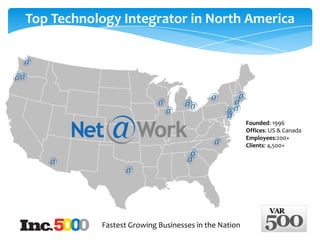
Top Technology Integrator in North America


                                                      Founded: 1996
                                                      Offices: US & Canada
                                                      Employees:200+
                                                      Clients: 4,500+


           Fastest Growing Businesses in the Nation
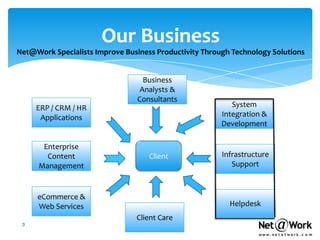
Our Business
Net@Work Specialists Improve Business Productivity Through Technology Solutions


                                   Business
                                  Analysts &
                                 Consultants
     ERP / CRM / HR                                        System
      Applications                                      Integration &
                                                        Development

       Enterprise
        Content                     Client              Infrastructure
      Management                                           Support


     eCommerce &
     Web Services                                         Helpdesk
                                Client Care
 3
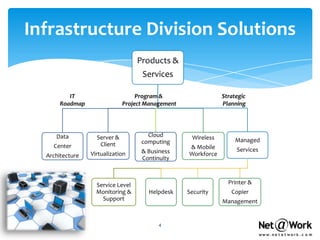
Infrastructure Division Solutions
                                   Products &
                                    Services

          IT                       Program &                   Strategic
       Roadmap                Project Management               Planning


     Data          Server &           Cloud         Wireless
                                    computing                       Managed
    Center          Client                         & Mobile
                                    & Business                      Services
  Architecture   Virtualization                    Workforce
                                    Continuity


                   Service Level                                 Printer &
                   Monitoring &       Helpdesk     Security       Copier
                     Support                                   Management


                                          4
Key Vendor Partnerships

   Microsoft Gold Partner
   Dell Premier Partner
   VMware Enterprise Partner
   Citrix Gold Partner
   Cisco Premier Partner
   Symantec Enterprise Partner
   NetApp Partner
   HP Partner
   And More…
                                  5
Trusted Advisor
     We Help You Navigate Through Technology by Providing
      Strategic, Product Agnostic IT Consulting and Services


 Cloud Computing                     Infrastructure Assessments

 Project & Program Management        Business Process Reviews

 IT Strategy and Roadmap             Business Continuity Audits

 Virtual CIO                         Security Audits
                                      Software and Technology Selection
 IT Operational Effectiveness
                                      Gap Analysis of Business Practices
 Vendor Management


                                 6
Project Implementation Process
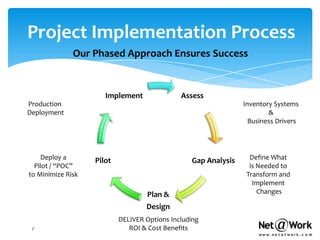
              Our Phased Approach Ensures Success


                      Implement               Assess
Production                                                      Inventory Systems
Deployment                                                              &
                                                                  Business Drivers


    Deploy a       Pilot                         Gap Analysis     Define What
  Pilot / “POC”                                                   is Needed to
to Minimize Risk                                                 Transform and
                                                                   Implement
                                   Plan &                            Changes

                                   Design
                           DELIVER Options Including
 7                            ROI & Cost Benefits
Managed Services
                                      Why?

 Ensures Application Availability 24x7x365

 Reduces Technology Complexities

 Addresses Ongoing Strategic Technology
  Challenges & Business Planning

 Supports Demanding End-users, Multiple Devices
  & Locations

 Provides Constant Administration, Patches &
  Security Updates

 Maintains ‘Living’ Documentation & Compliance
                                              8
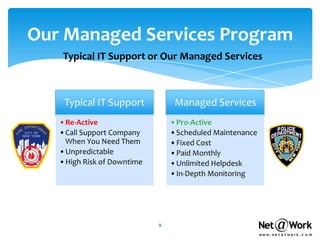
Our Managed Services Program
   Typical IT Support or Our Managed Services


    Typical IT Support           Managed Services
   •Re-Active                   •Pro-Active
   •Call Support Company        •Scheduled Maintenance
    When You Need Them          •Fixed Cost
   •Unpredictable               •Paid Monthly
   •High Risk of Downtime       •Unlimited Helpdesk
                                •In-Depth Monitoring


                            9
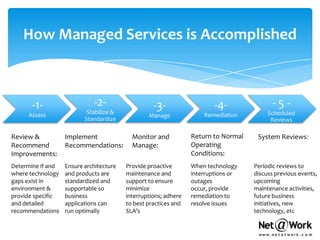
How Managed Services is Accomplished


      -1-                    -2-                   -3-                   -4-               -5-
     Assess                Stabilize &                               Remediation         Scheduled
                                                 Manage
                          Standardize                                                     Reviews

Review &           Implement               Monitor and           Return to Normal    System Reviews:
Recommend          Recommendations:        Manage:               Operating
Improvements:                                                    Conditions:
Determine if and   Ensure architecture   Provide proactive       When technology    Periodic reviews to
where technology   and products are      maintenance and         interruptions or   discuss previous events,
gaps exist in      standardized and      support to ensure       outages            upcoming
environment &      supportable so        minimize                occur, provide     maintenance activities,
provide specific   business              interruptions; adhere   remediation to     future business
and detailed       applications can      to best practices and   resolve issues     initiatives, new
recommendations    run optimally         SLA’s                                      technology, etc
Monitoring
What We Are Watching and Reporting for You


               If Critical Thresholds are Exceeded
               Operating System Services - email / SQL running
               Server & Workstation Performance & Monitoring -
                RAM, Disk, CPU etc.
               Network Device Up/Down
               Task Completion Notification - Backups, AV -
                Daily, Weekly, Monthly
               Incident Tracking
               Automated Monthly Performance Reports
               Periodic Technology Reviews and
                Recommendations & discuss client business plans
Managing
                           What We are Managing for You


 Network Equipment - Ongoing Support
 Unlimited Remote Engineering Support
 Administrating Active Directory Tasks
 Administrating Exchange
 Patching & Updating Server O/S
 Escalating to 3rd Party Vendors/ISPs
 Ensuring Anti-Virus is updated and active on Servers
 Creating & Maintaining IT Asset Info
 Reviewing System Logs
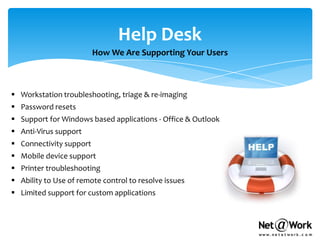
Help Desk
                         How We Are Supporting Your Users


 Workstation troubleshooting, triage & re-imaging
 Password resets
 Support for Windows based applications - Office & Outlook
 Anti-Virus support
 Connectivity support
 Mobile device support
 Printer troubleshooting
 Ability to Use of remote control to resolve issues
 Limited support for custom applications
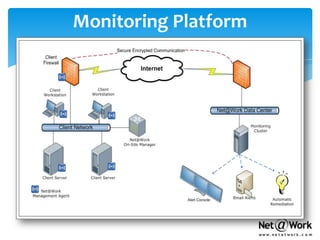
Monitoring Platform
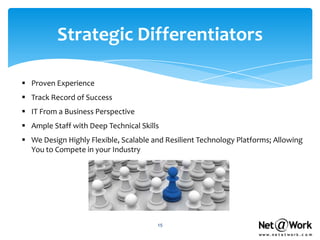
Strategic Differentiators

 Proven Experience
 Track Record of Success
 IT From a Business Perspective
 Ample Staff with Deep Technical Skills
 We Design Highly Flexible, Scalable and Resilient Technology Platforms; Allowing
  You to Compete in your Industry


                                       15
Net@Work Client Names
    Healthcare                      Financial
    Montefiore Medical Center       Morgan Stanley
    Mount Sinai Hospital            SAC Capital Advisors
    Cornell Medical Center NYP      China Construction Bank
    eClinicalWorks                  The Royal Bank of Scotland
    Equinox Fitness Clubs           Israel Bonds
    NY Blood Center                 York Capital
    Commercial                      Churchill Financial Management
    Deloitte & Touche               MBTA Retirement Fund
    Cushman & Wakefield, Inc.
    Thomson Reuters               Public Sector
    Anchin Block & Anchin         Metropolitan College of New York
    Daewoo International Corp     School of Visual Arts
    Euro RSCG Worldwide           The Juilliard School
    The Deal.com                  NYC Comptrollers Office
    Van Cleef & Arpels            Office of the Chief Medical
    New Yorker Hotel               Examiner
16   Management                    UJA Federation
Net@Work Client Logos


          17
Thank You

We look forward to partnering with you!
Table of Contents
1)   Why perform an IT security risk assessment ?
2)   What is included in an IT security Assessment ?
3)   What is Net@Work’s methodology & strategy
4)   What types of threats are tested ?
5)   What approaches for external vs. internal apps?
6)   Net@Work sample audits
7)   Recommended ongoing services


19
Why perform a security risk assessment ?
     As a valued asset, information must be managed and
     protected from internal and external threats.

     In its simplest form, we identify and evaluate potential
     threats, resulting in a ranking of risks and develop
     strategies to mitigate those risks.

     Our assessments propose a range of security controls
     focused on safeguarding information assets.


20
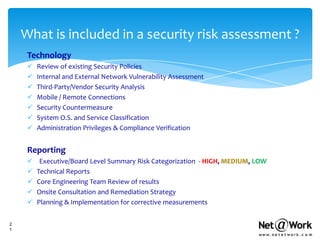
What is included in a security risk assessment ?
     Technology
        Review of existing Security Policies
        Internal and External Network Vulnerability Assessment
        Third-Party/Vendor Security Analysis
        Mobile / Remote Connections
        Security Countermeasure
        System O.S. and Service Classification
        Administration Privileges & Compliance Verification


     Reporting
         Executive/Board Level Summary Risk Categorization - HIGH, MEDIUM, LOW
        Technical Reports
        Core Engineering Team Review of results
        Onsite Consultation and Remediation Strategy
        Planning & Implementation for corrective measurements


2
1
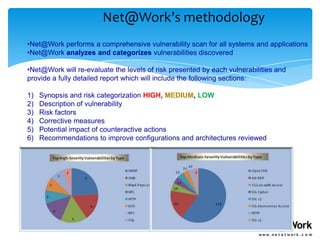
Net@Work’s methodology
•Net@Work performs a comprehensive vulnerability scan for all systems and applications
•Net@Work analyzes and categorizes vulnerabilities discovered

•Net@Work will re-evaluate the levels of risk presented by each vulnerabilities and
provide a fully detailed report which will include the following sections:

1)   Synopsis and risk categorization HIGH, MEDIUM, LOW
2)   Description of vulnerability
3)   Risk factors
4)   Corrective measures
5)   Potential impact of counteractive actions
6)   Recommendations to improve configurations and architectures reviewed
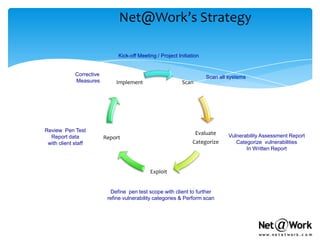
Net@Work’s Strategy

                               Kick-off Meeting / Project Initiation


             Corrective                                                Scan all systems
             Measures         Implement                     Scan


Review Pen Test
                                                                   Evaluate     Vulnerability Assessment Report
  Report data             Report
 with client staff                                               Categorize        Categorize vulnerabilities
                                                                                       In Written Report


                                             Exploit


                            Define pen test scope with client to further
                           refine vulnerability categories & Perform scan
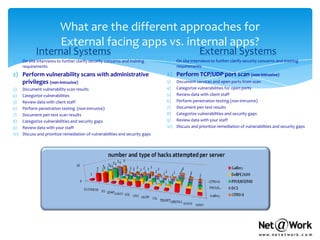
What are the different approaches for
                           External facing apps vs. internal apps?
             Internal Systems                                                                     External Systems
1)    On site interviews to further clarify security concerns and training      1)    On site interviews to further clarify security concerns and training
      requirements                                                                    requirements
2) Perform vulnerability scans with administrative                              2) Perform TCP/UDP port scan (non-intrusive)
   privileges (non-intrusive)                                                   3)    Document services and open ports from scan
3)    Document vulnerability scan results                                       4)    Categorize vulnerabilities for open ports
4)    Categorize vulnerabilities                                                5)    Review data with client staff
5)    Review data with client staff                                             6)    Perform penetration testing (non-intrusive)
6)    Perform penetration testing (non-intrusive)                               7)    Document pen test results
7)    Document pen test scan results                                            8)    Categorize vulnerabilities and security gaps
8)    Categorize vulnerabilities and security gaps                              9)    Review data with your staff
9)    Review data with your staff                                               10)   Discuss and prioritize remediation of vulnerabilities and security gaps
10)   Discuss and prioritize remediation of vulnerabilities and security gaps
Net@Work sample audits are attached below
What about ongoing services ?
     Net@Work recommends period assessments to ensure ongoing security.

     This should be performed annually at a minimum, but quarterly is recommended.


     Additionally, for clients with external facing web sites, we recommend solutions similar to
     RSA FraudAction.

     FraudAction is a service geared toward stopping and preventing phishing, pharming
     and Trojan attacks that occur in the online channel. Offered as an outsourced, managed
     service, RSA FraudAction enables organizations to minimize resource investment while
     deploying a solution quickly.

     FraudAction offers complete fraud protection against phishing, pharming and Trojan
     attacks - including 24x7 monitoring and detection, real-time alerts and reporting, forensics
     and countermeasures, and site blocking and shutdown. Today, more than 300 organizations
     have selected FraudAction to protect their customers against the latest online threats.

     For more information please see  http://www.rsa.com/node.aspx?id=3020

26

Net@Work Client Presentation with Security

  • 1.
  • 2.
    Top Technology Integratorin North America Founded: 1996 Offices: US & Canada Employees:200+ Clients: 4,500+ Fastest Growing Businesses in the Nation
  • 3.
    Our Business Net@Work SpecialistsImprove Business Productivity Through Technology Solutions Business Analysts & Consultants ERP / CRM / HR System Applications Integration & Development Enterprise Content Client Infrastructure Management Support eCommerce & Web Services Helpdesk Client Care 3
  • 4.
    Infrastructure Division Solutions Products & Services IT Program & Strategic Roadmap Project Management Planning Data Server & Cloud Wireless computing Managed Center Client & Mobile & Business Services Architecture Virtualization Workforce Continuity Service Level Printer & Monitoring & Helpdesk Security Copier Support Management 4
  • 5.
    Key Vendor Partnerships  Microsoft Gold Partner  Dell Premier Partner  VMware Enterprise Partner  Citrix Gold Partner  Cisco Premier Partner  Symantec Enterprise Partner  NetApp Partner  HP Partner  And More… 5
  • 6.
    Trusted Advisor We Help You Navigate Through Technology by Providing Strategic, Product Agnostic IT Consulting and Services  Cloud Computing  Infrastructure Assessments  Project & Program Management  Business Process Reviews  IT Strategy and Roadmap  Business Continuity Audits  Virtual CIO  Security Audits  Software and Technology Selection  IT Operational Effectiveness  Gap Analysis of Business Practices  Vendor Management 6
  • 7.
    Project Implementation Process Our Phased Approach Ensures Success Implement Assess Production Inventory Systems Deployment & Business Drivers Deploy a Pilot Gap Analysis Define What Pilot / “POC” is Needed to to Minimize Risk Transform and Implement Plan & Changes Design DELIVER Options Including 7 ROI & Cost Benefits
  • 8.
    Managed Services Why?  Ensures Application Availability 24x7x365  Reduces Technology Complexities  Addresses Ongoing Strategic Technology Challenges & Business Planning  Supports Demanding End-users, Multiple Devices & Locations  Provides Constant Administration, Patches & Security Updates  Maintains ‘Living’ Documentation & Compliance 8
  • 9.
    Our Managed ServicesProgram Typical IT Support or Our Managed Services Typical IT Support Managed Services •Re-Active •Pro-Active •Call Support Company •Scheduled Maintenance When You Need Them •Fixed Cost •Unpredictable •Paid Monthly •High Risk of Downtime •Unlimited Helpdesk •In-Depth Monitoring 9
  • 10.
    How Managed Servicesis Accomplished -1- -2- -3- -4- -5- Assess Stabilize & Remediation Scheduled Manage Standardize Reviews Review & Implement Monitor and Return to Normal System Reviews: Recommend Recommendations: Manage: Operating Improvements: Conditions: Determine if and Ensure architecture Provide proactive When technology Periodic reviews to where technology and products are maintenance and interruptions or discuss previous events, gaps exist in standardized and support to ensure outages upcoming environment & supportable so minimize occur, provide maintenance activities, provide specific business interruptions; adhere remediation to future business and detailed applications can to best practices and resolve issues initiatives, new recommendations run optimally SLA’s technology, etc
  • 11.
    Monitoring What We AreWatching and Reporting for You  If Critical Thresholds are Exceeded  Operating System Services - email / SQL running  Server & Workstation Performance & Monitoring - RAM, Disk, CPU etc.  Network Device Up/Down  Task Completion Notification - Backups, AV - Daily, Weekly, Monthly  Incident Tracking  Automated Monthly Performance Reports  Periodic Technology Reviews and Recommendations & discuss client business plans
  • 12.
    Managing What We are Managing for You  Network Equipment - Ongoing Support  Unlimited Remote Engineering Support  Administrating Active Directory Tasks  Administrating Exchange  Patching & Updating Server O/S  Escalating to 3rd Party Vendors/ISPs  Ensuring Anti-Virus is updated and active on Servers  Creating & Maintaining IT Asset Info  Reviewing System Logs
  • 13.
    Help Desk How We Are Supporting Your Users  Workstation troubleshooting, triage & re-imaging  Password resets  Support for Windows based applications - Office & Outlook  Anti-Virus support  Connectivity support  Mobile device support  Printer troubleshooting  Ability to Use of remote control to resolve issues  Limited support for custom applications
  • 14.
  • 15.
    Strategic Differentiators  ProvenExperience  Track Record of Success  IT From a Business Perspective  Ample Staff with Deep Technical Skills  We Design Highly Flexible, Scalable and Resilient Technology Platforms; Allowing You to Compete in your Industry 15
  • 16.
    Net@Work Client Names  Healthcare  Financial  Montefiore Medical Center  Morgan Stanley  Mount Sinai Hospital  SAC Capital Advisors  Cornell Medical Center NYP  China Construction Bank  eClinicalWorks  The Royal Bank of Scotland  Equinox Fitness Clubs  Israel Bonds  NY Blood Center  York Capital  Commercial  Churchill Financial Management  Deloitte & Touche  MBTA Retirement Fund  Cushman & Wakefield, Inc.  Thomson Reuters  Public Sector  Anchin Block & Anchin  Metropolitan College of New York  Daewoo International Corp  School of Visual Arts  Euro RSCG Worldwide  The Juilliard School  The Deal.com  NYC Comptrollers Office  Van Cleef & Arpels  Office of the Chief Medical  New Yorker Hotel Examiner 16 Management  UJA Federation
  • 17.
  • 18.
    Thank You We lookforward to partnering with you!
  • 19.
    Table of Contents 1) Why perform an IT security risk assessment ? 2) What is included in an IT security Assessment ? 3) What is Net@Work’s methodology & strategy 4) What types of threats are tested ? 5) What approaches for external vs. internal apps? 6) Net@Work sample audits 7) Recommended ongoing services 19
  • 20.
    Why perform asecurity risk assessment ? As a valued asset, information must be managed and protected from internal and external threats. In its simplest form, we identify and evaluate potential threats, resulting in a ranking of risks and develop strategies to mitigate those risks. Our assessments propose a range of security controls focused on safeguarding information assets. 20
  • 21.
    What is includedin a security risk assessment ? Technology  Review of existing Security Policies  Internal and External Network Vulnerability Assessment  Third-Party/Vendor Security Analysis  Mobile / Remote Connections  Security Countermeasure  System O.S. and Service Classification  Administration Privileges & Compliance Verification Reporting  Executive/Board Level Summary Risk Categorization - HIGH, MEDIUM, LOW  Technical Reports  Core Engineering Team Review of results  Onsite Consultation and Remediation Strategy  Planning & Implementation for corrective measurements 2 1
  • 22.
    Net@Work’s methodology •Net@Work performsa comprehensive vulnerability scan for all systems and applications •Net@Work analyzes and categorizes vulnerabilities discovered •Net@Work will re-evaluate the levels of risk presented by each vulnerabilities and provide a fully detailed report which will include the following sections: 1) Synopsis and risk categorization HIGH, MEDIUM, LOW 2) Description of vulnerability 3) Risk factors 4) Corrective measures 5) Potential impact of counteractive actions 6) Recommendations to improve configurations and architectures reviewed
  • 23.
    Net@Work’s Strategy Kick-off Meeting / Project Initiation Corrective Scan all systems Measures Implement Scan Review Pen Test Evaluate Vulnerability Assessment Report Report data Report with client staff Categorize Categorize vulnerabilities In Written Report Exploit Define pen test scope with client to further refine vulnerability categories & Perform scan
  • 24.
    What are thedifferent approaches for External facing apps vs. internal apps? Internal Systems External Systems 1) On site interviews to further clarify security concerns and training 1) On site interviews to further clarify security concerns and training requirements requirements 2) Perform vulnerability scans with administrative 2) Perform TCP/UDP port scan (non-intrusive) privileges (non-intrusive) 3) Document services and open ports from scan 3) Document vulnerability scan results 4) Categorize vulnerabilities for open ports 4) Categorize vulnerabilities 5) Review data with client staff 5) Review data with client staff 6) Perform penetration testing (non-intrusive) 6) Perform penetration testing (non-intrusive) 7) Document pen test results 7) Document pen test scan results 8) Categorize vulnerabilities and security gaps 8) Categorize vulnerabilities and security gaps 9) Review data with your staff 9) Review data with your staff 10) Discuss and prioritize remediation of vulnerabilities and security gaps 10) Discuss and prioritize remediation of vulnerabilities and security gaps
  • 25.
    Net@Work sample auditsare attached below
  • 26.
    What about ongoingservices ? Net@Work recommends period assessments to ensure ongoing security. This should be performed annually at a minimum, but quarterly is recommended. Additionally, for clients with external facing web sites, we recommend solutions similar to RSA FraudAction. FraudAction is a service geared toward stopping and preventing phishing, pharming and Trojan attacks that occur in the online channel. Offered as an outsourced, managed service, RSA FraudAction enables organizations to minimize resource investment while deploying a solution quickly. FraudAction offers complete fraud protection against phishing, pharming and Trojan attacks - including 24x7 monitoring and detection, real-time alerts and reporting, forensics and countermeasures, and site blocking and shutdown. Today, more than 300 organizations have selected FraudAction to protect their customers against the latest online threats. For more information please see  http://www.rsa.com/node.aspx?id=3020 26

Editor's Notes

  • #5 Lesley – Biz Appls – our core bizOne of the benefits of our organization from all (PMP) Project Management Professional with different disciplines and best practices.