ARDUINO RADAR
PROJECT
AIM :-
 To make a Arduino Project which is an Ultrasonic Sensor
for detecting the objects, a small hobbyist Servo Motor
for rotating the sensor and an Arduino Board for
controlling them.
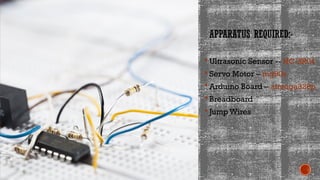
APPARATUS REQUIRED:-
 Ultrasonic Sensor -- HC-SR04
 Servo Motor – mg90s
 Arduino Board – atmega328p
 Breadboard
 Jump Wires
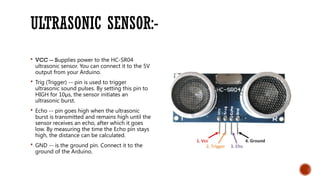
ULTRASONIC SENSOR:-
 VCC -- Supplies power to the HC-SR04
ultrasonic sensor. You can connect it to the 5V
output from your Arduino.
 Trig (Trigger) -- pin is used to trigger
ultrasonic sound pulses. By setting this pin to
HIGH for 10µs, the sensor initiates an
ultrasonic burst.
 Echo -- pin goes high when the ultrasonic
burst is transmitted and remains high until the
sensor receives an echo, after which it goes
low. By measuring the time the Echo pin stays
high, the distance can be calculated.
 GND -- is the ground pin. Connect it to the
ground of the Arduino.
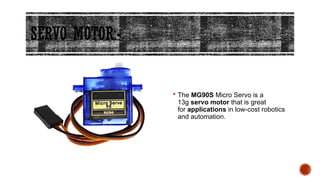
SERVO MOTOR:-
 The MG90S Micro Servo is a
13g servo motor that is great
for applications in low-cost robotics
and automation.
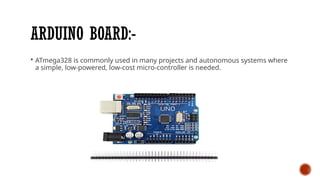
ARDUINO BOARD:-
 ATmega328 is commonly used in many projects and autonomous systems where
a simple, low-powered, low-cost micro-controller is needed.
BREADBOARD:-
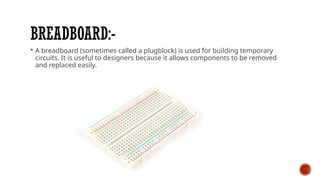
 A breadboard (sometimes called a plugblock) is used for building temporary
circuits. It is useful to designers because it allows components to be removed
and replaced easily.
JUMPER WIRES:-
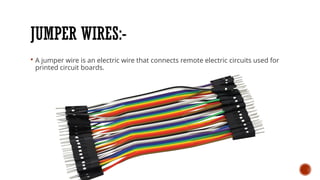
 A jumper wire is an electric wire that connects remote electric circuits used for
printed circuit boards.
How does RadarWork?
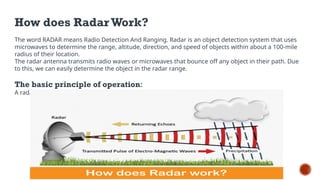
The word RADAR means Radio Detection And Ranging. Radar is an object detection system that uses
microwaves to determine the range, altitude, direction, and speed of objects within about a 100-mile
radius of their location.
The radar antenna transmits radio waves or microwaves that bounce off any object in their path. Due
to this, we can easily determine the object in the radar range.
The basic principle of operation:
A radar is an electromagnetic sensor that is used to detect and locate an object.
Preparing the Fixture
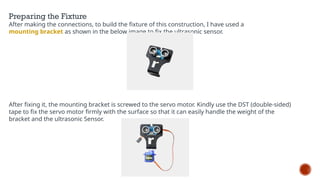
After making the connections, to build the fixture of this construction, I have used a
mounting bracket as shown in the below image to fix the ultrasonic sensor.
After fixing it, the mounting bracket is screwed to the servo motor. Kindly use the DST (double-sided)
tape to fix the servo motor firmly with the surface so that it can easily handle the weight of the
bracket and the ultrasonic Sensor.
Hardware Connection:--
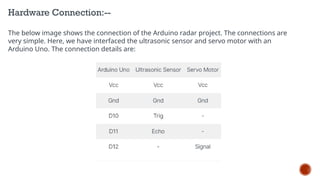
The below image shows the connection of the Arduino radar project. The connections are
very simple. Here, we have interfaced the ultrasonic sensor and servo motor with an
Arduino Uno. The connection details are:
ARDUINO RADAR CIRCUIT SCHEMATICS:-
 I connected the Ultrasonic Sensor HC-SR04 to the pins number 10 and 11 and the
servo motor to the pin number 12 on the Arduino Board.
Software Installation and Code:-
We need two software to complete this Arduino radar
project. One is Arduino IDE, and the other is Processing
IDE. Download both Software from the below links,
Arduino IDE 1.8.13
Processing IDE
Processing application is visual arts-based software for
learning to code. After downloading, extract the Zip file,
and you will get the processing application (.exe file).
In this project, we are using two codes: Arduino UNO
and the other for Processing.
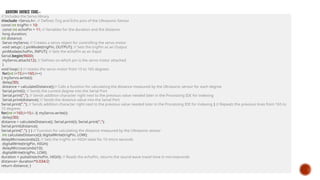
ARDUINO SOURCE CODE:--
// Includes the Servo library
#include <Servo.h>. // Defines Tirg and Echo pins of the Ultrasonic Sensor
const int trigPin = 10;
const int echoPin = 11; // Variables for the duration and the distance
long duration;
int distance;
Servo myServo; // Creates a servo object for controlling the servo motor
void setup() { pinMode(trigPin, OUTPUT); // Sets the trigPin as an Output
pinMode(echoPin, INPUT); // Sets the echoPin as an Input
Serial.begin(9600);
myServo.attach(12); // Defines on which pin is the servo motor attached
}
void loop() { // rotates the servo motor from 15 to 165 degrees
for(int i=15;i<=165;i++)
{ myServo.write(i);
delay(30);
distance = calculateDistance();// Calls a function for calculating the distance measured by the Ultrasonic sensor for each degree
Serial.print(i); // Sends the current degree into the Serial Port
Serial.print(","); // Sends addition character right next to the previous value needed later in the Processing IDE for indexing
Serial.print(distance); // Sends the distance value into the Serial Port
Serial.print("."); // Sends addition character right next to the previous value needed later in the Processing IDE for indexing } // Repeats the previous lines from 165 to
15 degrees
for(int i=165;i>15;i--){ myServo.write(i);
delay(30);
distance = calculateDistance(); Serial.print(i); Serial.print(",");
Serial.print(distance);
Serial.print("."); } } // Function for calculating the distance measured by the Ultrasonic sensor
int calculateDistance(){ digitalWrite(trigPin, LOW);
delayMicroseconds(2); // Sets the trigPin on HIGH state for 10 micro seconds
digitalWrite(trigPin, HIGH);
delayMicroseconds(10);
digitalWrite(trigPin, LOW);
duration = pulseIn(echoPin, HIGH); // Reads the echoPin, returns the sound wave travel time in microseconds
distance= duration*0.034/2;
return distance; }
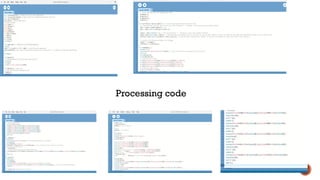
Processing code
INFERENCE OF THIS PROJECT:-
However, in general, an Arduino radar project could be used
for various purposes, such as detecting objects, measuring
distance, or tracking movement.The project may involve
using sensors, such as ultrasonic sensors or radar modules, to
gather data, and an Arduino board to process that data and
provide output.The output could be in the form of visual
feedback on an LCD screen, sound feedback through a
speaker or buzzer, or even wireless transmission of data to
another device.
Overall, an Arduino radar project can be a fun and
challenging way to learn about electronics, programming,
and physics principles related to radar technology. It can also
have practical applications in areas such as robotics, security
systems, and autonomous vehicles.

PPT Missile Radar System introduction.pptx

  • 1.
  • 2.
    AIM :-  Tomake a Arduino Project which is an Ultrasonic Sensor for detecting the objects, a small hobbyist Servo Motor for rotating the sensor and an Arduino Board for controlling them.
  • 3.
    APPARATUS REQUIRED:-  UltrasonicSensor -- HC-SR04  Servo Motor – mg90s  Arduino Board – atmega328p  Breadboard  Jump Wires
  • 4.
    ULTRASONIC SENSOR:-  VCC-- Supplies power to the HC-SR04 ultrasonic sensor. You can connect it to the 5V output from your Arduino.  Trig (Trigger) -- pin is used to trigger ultrasonic sound pulses. By setting this pin to HIGH for 10µs, the sensor initiates an ultrasonic burst.  Echo -- pin goes high when the ultrasonic burst is transmitted and remains high until the sensor receives an echo, after which it goes low. By measuring the time the Echo pin stays high, the distance can be calculated.  GND -- is the ground pin. Connect it to the ground of the Arduino.
  • 5.
    SERVO MOTOR:-  TheMG90S Micro Servo is a 13g servo motor that is great for applications in low-cost robotics and automation.
  • 6.
    ARDUINO BOARD:-  ATmega328is commonly used in many projects and autonomous systems where a simple, low-powered, low-cost micro-controller is needed.
  • 7.
    BREADBOARD:-  A breadboard(sometimes called a plugblock) is used for building temporary circuits. It is useful to designers because it allows components to be removed and replaced easily.
  • 8.
    JUMPER WIRES:-  Ajumper wire is an electric wire that connects remote electric circuits used for printed circuit boards.
  • 9.
    How does RadarWork? Theword RADAR means Radio Detection And Ranging. Radar is an object detection system that uses microwaves to determine the range, altitude, direction, and speed of objects within about a 100-mile radius of their location. The radar antenna transmits radio waves or microwaves that bounce off any object in their path. Due to this, we can easily determine the object in the radar range. The basic principle of operation: A radar is an electromagnetic sensor that is used to detect and locate an object.
  • 10.
    Preparing the Fixture Aftermaking the connections, to build the fixture of this construction, I have used a mounting bracket as shown in the below image to fix the ultrasonic sensor. After fixing it, the mounting bracket is screwed to the servo motor. Kindly use the DST (double-sided) tape to fix the servo motor firmly with the surface so that it can easily handle the weight of the bracket and the ultrasonic Sensor.
  • 11.
    Hardware Connection:-- The belowimage shows the connection of the Arduino radar project. The connections are very simple. Here, we have interfaced the ultrasonic sensor and servo motor with an Arduino Uno. The connection details are:
  • 12.
    ARDUINO RADAR CIRCUITSCHEMATICS:-  I connected the Ultrasonic Sensor HC-SR04 to the pins number 10 and 11 and the servo motor to the pin number 12 on the Arduino Board.
  • 13.
    Software Installation andCode:- We need two software to complete this Arduino radar project. One is Arduino IDE, and the other is Processing IDE. Download both Software from the below links, Arduino IDE 1.8.13 Processing IDE Processing application is visual arts-based software for learning to code. After downloading, extract the Zip file, and you will get the processing application (.exe file). In this project, we are using two codes: Arduino UNO and the other for Processing.
  • 14.
    ARDUINO SOURCE CODE:-- //Includes the Servo library #include <Servo.h>. // Defines Tirg and Echo pins of the Ultrasonic Sensor const int trigPin = 10; const int echoPin = 11; // Variables for the duration and the distance long duration; int distance; Servo myServo; // Creates a servo object for controlling the servo motor void setup() { pinMode(trigPin, OUTPUT); // Sets the trigPin as an Output pinMode(echoPin, INPUT); // Sets the echoPin as an Input Serial.begin(9600); myServo.attach(12); // Defines on which pin is the servo motor attached } void loop() { // rotates the servo motor from 15 to 165 degrees for(int i=15;i<=165;i++) { myServo.write(i); delay(30); distance = calculateDistance();// Calls a function for calculating the distance measured by the Ultrasonic sensor for each degree Serial.print(i); // Sends the current degree into the Serial Port Serial.print(","); // Sends addition character right next to the previous value needed later in the Processing IDE for indexing Serial.print(distance); // Sends the distance value into the Serial Port Serial.print("."); // Sends addition character right next to the previous value needed later in the Processing IDE for indexing } // Repeats the previous lines from 165 to 15 degrees for(int i=165;i>15;i--){ myServo.write(i); delay(30); distance = calculateDistance(); Serial.print(i); Serial.print(","); Serial.print(distance); Serial.print("."); } } // Function for calculating the distance measured by the Ultrasonic sensor int calculateDistance(){ digitalWrite(trigPin, LOW); delayMicroseconds(2); // Sets the trigPin on HIGH state for 10 micro seconds digitalWrite(trigPin, HIGH); delayMicroseconds(10); digitalWrite(trigPin, LOW); duration = pulseIn(echoPin, HIGH); // Reads the echoPin, returns the sound wave travel time in microseconds distance= duration*0.034/2; return distance; }
  • 15.
  • 16.
    INFERENCE OF THISPROJECT:- However, in general, an Arduino radar project could be used for various purposes, such as detecting objects, measuring distance, or tracking movement.The project may involve using sensors, such as ultrasonic sensors or radar modules, to gather data, and an Arduino board to process that data and provide output.The output could be in the form of visual feedback on an LCD screen, sound feedback through a speaker or buzzer, or even wireless transmission of data to another device. Overall, an Arduino radar project can be a fun and challenging way to learn about electronics, programming, and physics principles related to radar technology. It can also have practical applications in areas such as robotics, security systems, and autonomous vehicles.