What is PPC – PAY PER CLICK
PPC is known as Pay Per Click and also called (SEM) Search Engines Marketing. It is one of the best way to get high traffic
in short periods. PPC is completely depending on your budget and bidding like how much money you are spending on
your campaigns for ads. Before you start your PPC Campaign, you need to register your account with Google Adwords.
What Is Google Adwords?
Google Adwords is known for running the Paid Ads. We need to register our account to rung the run the ads. Once we
run the ads, its shows on the search engines like Google, Yahoo, Bing and more. But most of the people go with Google
Search Engine for ads, because his popularity in world.
How To Create a Ad?
As you register your account on Google Adwords with your complete information then you can start to create ads for
website. Steps are given below.
How Google Adwords Works?
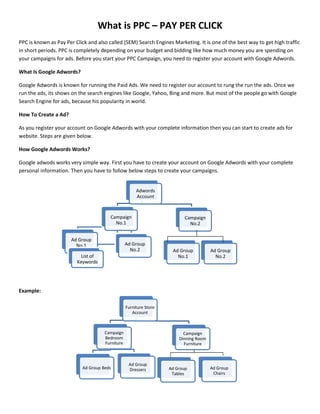
Google adwods works very simple way. First you have to create your account on Google Adwords with your complete
personal information. Then you have to follow below steps to create your campaigns.

Adwords
Account

Campaign
No.1
Ad Group
No.1

Ad Group
No.2

List of
Keywords

Campaign
No.2

Ad Group
No.1

Ad Group
No.2

Example:
Furniture Store
Account

Campaign
Bedroom
Furniture

Ad Group Beds

Campaign
Dinning Room
Furniture

Ad Group
Dressers

Ad Group
Tables

Ad Group
Chairs
Industry Related Keywords Research & Analysis For PPC
Keywords must be related with the product or campaign of the ads. Keywords must be match with the Ads. If we have
some other keywords which is not matching with campaign then we can created other separate campaigns (Misalliance
Ads).

Keywords Research
Brand Names = Exact Match
All other “Phrase Match”
Chose Broad Words Carefully
One Word – Two Word –
Phrase – 3 Words Phrase

Search Terms
Targeting

Use Google
Keywords
Research Tool

Targeting Strategy Google
Adwords

Brand Targeting

Product Targeting

Use Google
Search Based
Keyword
Research Tool

Search Term Variations
Plural And Singular Forms
Fix, Fixing, Fix Up, Fixing Up, How To Fix Up, Fix It
Spelling Mistakes
Spelling Variations e.g. Email, E-Mail
Hyphenated Version e.g. Soup Ladle and Soup – Ladle
One word V/S Two Words e.g. Tea Cup and Teacup
Who What When

Keywords Matching

Exact And Phrase

Demographic And
Location
Adjective
Price
Product
Qualifier

Product
Type

Brand

Types of
Keywords

Action
Request

Location

Keywords Research And Matching Strategy
Broad Matching

Phrase
Matching

Negative
Matching

Exact
Matching

Try to use phrase match as default to maximize reach
Brand name-exact-careful for broad match

Different ads for different ad group

Limit high volume keywords by exact match

Broad Match
This is the default option if your ad group contained the keywords “Tennis Shoes” your ad would be eligible to appear
when a users search query contained either or both words (“tennis and shoes”) in any order and possibly along with also
be displayed for singular / plural forms, synonyms and other relevant variations.
Broad Match Keywords:

Ads May Show on search for

Tennis Shoes

Tennis
Shoes
Buy Tennis Shoes
Tennis Shoes Photos
Running Shoes
Tennis Trainers

Phrase Match
If you enter your keywords in quotation marks, as in “Tennis Shoes” your ad would be eligible to appear when a user
searches on the phrase tennis shoes, with the words in that order. It can also appear for searches that contain other
terms as long as it includes the exact phrase you have specified.

Phrase Match Keywords:
“Tennis Shoes”

Ads May Show on Searches for

Ads won’t show on searches for

Red Tennis Shoes

Shoes For Tennis

Buy tennis shoes

Tennis Shoe

Tennis Shoes Photo

Tennis Trainers

Exact Match
If you surround your keywords in brackets such as [Tennis Shoes] your ad would be eligible to appear when as user
searches for the specific phrase “tennis shoes” in this order and without any other terms in the query.
Exact Match Keywords:
[Tennis Shoes]

Ads May Show on Searches for
Tennis Shoes

Ads won’t show on searches for
Red Tennis Shoes
Tennis Shoe
Buy Tennis Shoes

Negative Match
If your keyword is “Tennis Shoes” and you add the Negative Keywords used. Your ad will not appear for any searches
that contain the word used.
Negative Match Keywords:

Ads May Show on Searches for

Tennis Shoes Used

Ads won’t show on searches for

Tennis Shoes

Used Tennis Shoes

Buy Tennis Shoes

Shoe Used

Tennis

For Tennis

Keywords Strategies And Bidding Management
Keywords must be related with the campaign Ads. We can check keywords position on keywords (Eligibility) option and
its must be 5/10 that is good according to PPC. Targeting keywords must be in the content or bottom of the landing
pages.
Budget and Bidding Strategy
Position 2-5 ideal
Bid define Cost / ad position
Position 1.1 to 1.2 show over spending

Regular see your quality score
by clicking status col. On
keywords tab.

Budget And Bid Strategy

Overall Budget
Daily Budget

Max. CPC

Day parting and time parting
During lunch hour & evening
Fri – Sat – Sun
Whole Day

Listing position
Fri – Sat – Sun (3)
During lunch hour & evening (2-4) Google keyword
analysis tool to gain a quality score rating of your
ads for from Great, OK or Poor.
Bidding Strategy

Optimize (Default)

Day Part / Time Part

Increase bid by 10%
after 6 pm

Keyword
Performance

Keyword Analysis
Field

Adwords Conversion
Tracking

Highly untargeted words – less CTR – More budget less ROI
If click then uninterested shopper
Dynamic Keyword Insertion
Keywords insertion is an advance feature that can help make your ad more relevant to a diverse audience. To use
keywords insertion, you place a short piece of the code in to your ad text. Each time the ad into your ad text. Each time
the ad shows adwords will automatically replace the code with the keyword that triggered the ads.
Keywords insertion may be used with any text-based ads
When your ad appears on a search result page the code will be replaced by the keywords is too long and would cause
the ad text to exceed its character limit the ads default text will be used instead.
What Should Be On The Landing Page?
Every campaign must be different landing page e.g. Android Product Page must have Android page URL Only. Black Berry
Product landing page must be black berry product page URL only. Each landing page content must be added with
targeting keywords or you can add on the bottom / footer of the page.
Traffic Monitoring
Google analytics tool helps you to track and monitor your PPC campaign. By integrating Google adwords tool with
Google analytics, it helps you to monitor real traffic through PPC.
Ad Monitoring
Pay-per-click (PPC) advertising is a great way for businesses to target advertising at people who are ready to buy. You
must check your ads network like your ads are targeting at very specific audiences based on interests, demographics, or
search terms & keywords or not.
You must monitor your ads hourly and daily bases. Also you must to check your competitors bidding and CPC.
What is Main Base of PPC?
I)
II)

CPC: - Cost per click must be less in the every campaign. As in we must get good quality hits on the cheap
amount like Rs.3.00/- for 1 click.
Ads Position: Ads position must be up on the paid ads. As in first position. If your ad position is showing on
the 3.2 as in your ads are showing on the 3rd or 4th position.

1) Paid
2) Ads
3) Position
4)
5)
6)
7)
8)
9)
10)

Organic Ads Position

III)

Paid
Ads
Ads
Position
Position
Position
Position

QS: - People must check 3 main activities of the campaigns, details are given below.

1) Keywords Relevance: - Keywords must be relevant to the Ads.
2) LP / Load Page Time: - Loading of the Page must be quick.
3) Ad copy / Keywords: - Ad must be match with the targeting keywords.

See the Example:

Click

Feedback

Sold Out

(Note: - If someone is investing Rs.5000/- on the campaign and sold out Rs.20000/- products. So it’s mean he to the
Rs.15000/- profit behind the investment of Rs.5000/- that’s called ROI.)
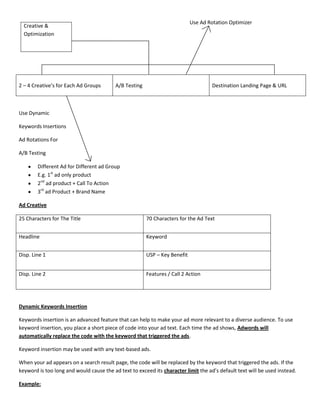
Creative
Use Ad Rotation Optimizer

Creative &
Optimization

2 – 4 Creative’s for Each Ad Groups

A/B Testing

Destination Landing Page & URL

Use Dynamic
Keywords Insertions
Ad Rotations For
A/B Testing
Different Ad for Different ad Group
E.g. 1st ad only product
2nd ad product + Call To Action
3rd ad Product + Brand Name
Ad Creative
25 Characters for The Title

70 Characters for the Ad Text

Headline

Keyword

Disp. Line 1

USP – Key Benefit

Disp. Line 2

Features / Call 2 Action

Dynamic Keywords Insertion
Keywords insertion is an advanced feature that can help to make your ad more relevant to a diverse audience. To use
keyword insertion, you place a short piece of code into your ad text. Each time the ad shows, Adwords will
automatically replace the code with the keyword that triggered the ads.
Keyword insertion may be used with any text-based ads.
When your ad appears on a search result page, the code will be replaced by the keyword that triggered the ads. If the
keyword is too long and would cause the ad text to exceed its character limit the ad’s default text will be used instead.
Example:
Ad group Name: Puppies
Keywords: Golden retrievers, Labradors, Poodles, Yorkies, Puppies
Code

Ad Text: {Keyword (Buy): Puppies}
From an Award-Winning Breeder
Satisfaction Guaranteed!
www.example.com
Search Query: Poodles

Yorkies

West Highland Puppies

Ad:

Buy Poodles

Buy Yorkies

Buy Puppies

From an Award-Winning Breeder

From an Award-Winning Breeder

From an Award-Winning Breeder

Satisfaction Guaranteed!

Satisfaction Guaranteed!

Satisfaction Guaranteed!

www.example.com

www.example.com

www.example.com

Destination URL: http://www.example.com/?KW= {Keyword: nil}
Use Conversation Optimizer
The conversion optimizer is an adwords feature that uses your Adwords Conversion Tracking data to get you more
conversions at a lower cost. It optimizes your placements in each ad auction to avoid unprofitable clicks as possible.
With conversion optimizer, you bid using a maximum cost per acquisition (Max CPA) that is the most you are willing to
pay for each conversion. Using historical information about your campaign, conversion optimizer automatically finds the
optimal equivalent Cost-Per-Click (CPC) bid your ad each time its eligible to appear. You still pay per click but you won’t
longer need to adjust your bid manually to reach your CPA Goals.
AB Testing
Creating 2 ads or 3 ads for per campaign that’s called AB Testing. Because of this we can check which ad is going good.
Keywords Eligibility
Keywords eligibility of the keywords at least (5/10) five out of Ten.
Search Network
Search network as in when people search on search engine and get query from search engine that called search
networks.
Display Network
When people see our ads on some related keywords on the websites of others people that’s called display Ads.
Quality Score
Quality score is depending on keywords relevance and landing page.
Competitor’s Website Analysis
You must check your competitors ranking / position on search engines. It must be your daily work. Competitors are
completely depending on the keywords. If you are searching for particular keyword on Google and your website ad is
showing on 3 to 4 position then 1 to 3 website ranker will be your keyword competitors.
Setting Up Your PPC Campaigns
A PPC account is structured in four main sectors: Campaigns –> Ad Groups –> Ads –> Keywords
Campaigns
First of all, you’ll need to set up a PPC campaign on Google Adwords. However, be careful with the settings and targeting
parameters on the campaign level, because one wrong setting can result in a waste of your budget or targeting the
wrong people/location.
Ad Groups & Ads
Now that the campaigns are set up, it’s time to create the different ad groups within each campaign. After hitting the
‘New Ad Group’ button, you’ll have the possibility to name the Ad Group and write the actual ad shown in the SERPs.
Keywords
Now get your segmented keywords, which should trigger your ads, from the keyword research and start adding them to
the appropriate ad groups, because having keywords that aren’t closely related will result in a low ad quality score, low
click through rates and a poor call to action overall.
Process for Setting Conversion Optimizer
Select the Campaign
Click edit setting
Networks and bidding (Changes Bidding Strategy)
Bidding Option Page
- Tick conversion optimizer CPA
- Click continue
Use recommended bid initially and then over the period of time change the CPA to see the efforts.
On campaign page we can see CPA instead of CPC (Max. CPA $5)
Analysis And Improvement
What to look for in your account?
CTR: As rule of thumb, a CTR less than 0.5% is not good sign.
Keyword Status: See how many keywords are eligible and how many disabled by Google.
Avg. Position: Position 2-5 is good; anything on page position 2 is not good position 1-2 not really ideal.
First Page Bids: If ad is not showing on page 1 you need to check your bid.
Quality Score: Click icon status COL. on keyword to check it.
On Going Management
1.
2.
3.
4.
5.
6.
7.

Check notification and accounts after on home page.
Go to the campaigns tab and set the time range for each campaign carefully not so long not so short.
Review keywords performance daily.
Review ads performance weekly.
Refine keywords and ads based experience and testing.
Use Adwords editor to manage your campaigns.
Finally test new keywords and ads in your campaigns.

Conversion Tracking Set Up
Generally it is use to track the final deal. As in we need to know, how much campaigns is getting business, so for that we
need to ad some code on payment, which is call conversion code. As in online payment process page. It must be one the
final payment page. Mostly this code use for online payment and ecommerce website like Jabong.com, snapdeals.com
and more. We can get conversion tracking code from the campaign only.
ROI Analysis / Return On Investment
Campaign is just a investment and if somebody come with the query it’s just a lead / feedback. When we finally get deal
fixed like sold out the product then it’s called (ROI) Return on Investment.

PPC - Pay Per Click

  • 1.
    What is PPC– PAY PER CLICK PPC is known as Pay Per Click and also called (SEM) Search Engines Marketing. It is one of the best way to get high traffic in short periods. PPC is completely depending on your budget and bidding like how much money you are spending on your campaigns for ads. Before you start your PPC Campaign, you need to register your account with Google Adwords. What Is Google Adwords? Google Adwords is known for running the Paid Ads. We need to register our account to rung the run the ads. Once we run the ads, its shows on the search engines like Google, Yahoo, Bing and more. But most of the people go with Google Search Engine for ads, because his popularity in world. How To Create a Ad? As you register your account on Google Adwords with your complete information then you can start to create ads for website. Steps are given below. How Google Adwords Works? Google adwods works very simple way. First you have to create your account on Google Adwords with your complete personal information. Then you have to follow below steps to create your campaigns. Adwords Account Campaign No.1 Ad Group No.1 Ad Group No.2 List of Keywords Campaign No.2 Ad Group No.1 Ad Group No.2 Example: Furniture Store Account Campaign Bedroom Furniture Ad Group Beds Campaign Dinning Room Furniture Ad Group Dressers Ad Group Tables Ad Group Chairs
  • 2.
    Industry Related KeywordsResearch & Analysis For PPC Keywords must be related with the product or campaign of the ads. Keywords must be match with the Ads. If we have some other keywords which is not matching with campaign then we can created other separate campaigns (Misalliance Ads). Keywords Research Brand Names = Exact Match All other “Phrase Match” Chose Broad Words Carefully One Word – Two Word – Phrase – 3 Words Phrase Search Terms Targeting Use Google Keywords Research Tool Targeting Strategy Google Adwords Brand Targeting Product Targeting Use Google Search Based Keyword Research Tool Search Term Variations Plural And Singular Forms Fix, Fixing, Fix Up, Fixing Up, How To Fix Up, Fix It Spelling Mistakes Spelling Variations e.g. Email, E-Mail Hyphenated Version e.g. Soup Ladle and Soup – Ladle One word V/S Two Words e.g. Tea Cup and Teacup Who What When Keywords Matching Exact And Phrase Demographic And Location
  • 3.
    Adjective Price Product Qualifier Product Type Brand Types of Keywords Action Request Location Keywords ResearchAnd Matching Strategy Broad Matching Phrase Matching Negative Matching Exact Matching Try to use phrase match as default to maximize reach Brand name-exact-careful for broad match Different ads for different ad group Limit high volume keywords by exact match Broad Match This is the default option if your ad group contained the keywords “Tennis Shoes” your ad would be eligible to appear when a users search query contained either or both words (“tennis and shoes”) in any order and possibly along with also be displayed for singular / plural forms, synonyms and other relevant variations.
  • 4.
    Broad Match Keywords: AdsMay Show on search for Tennis Shoes Tennis Shoes Buy Tennis Shoes Tennis Shoes Photos Running Shoes Tennis Trainers Phrase Match If you enter your keywords in quotation marks, as in “Tennis Shoes” your ad would be eligible to appear when a user searches on the phrase tennis shoes, with the words in that order. It can also appear for searches that contain other terms as long as it includes the exact phrase you have specified. Phrase Match Keywords: “Tennis Shoes” Ads May Show on Searches for Ads won’t show on searches for Red Tennis Shoes Shoes For Tennis Buy tennis shoes Tennis Shoe Tennis Shoes Photo Tennis Trainers Exact Match If you surround your keywords in brackets such as [Tennis Shoes] your ad would be eligible to appear when as user searches for the specific phrase “tennis shoes” in this order and without any other terms in the query. Exact Match Keywords: [Tennis Shoes] Ads May Show on Searches for Tennis Shoes Ads won’t show on searches for Red Tennis Shoes Tennis Shoe Buy Tennis Shoes Negative Match If your keyword is “Tennis Shoes” and you add the Negative Keywords used. Your ad will not appear for any searches that contain the word used.
  • 5.
    Negative Match Keywords: AdsMay Show on Searches for Tennis Shoes Used Ads won’t show on searches for Tennis Shoes Used Tennis Shoes Buy Tennis Shoes Shoe Used Tennis For Tennis Keywords Strategies And Bidding Management Keywords must be related with the campaign Ads. We can check keywords position on keywords (Eligibility) option and its must be 5/10 that is good according to PPC. Targeting keywords must be in the content or bottom of the landing pages. Budget and Bidding Strategy Position 2-5 ideal Bid define Cost / ad position Position 1.1 to 1.2 show over spending Regular see your quality score by clicking status col. On keywords tab. Budget And Bid Strategy Overall Budget Daily Budget Max. CPC Day parting and time parting During lunch hour & evening Fri – Sat – Sun Whole Day Listing position Fri – Sat – Sun (3) During lunch hour & evening (2-4) Google keyword analysis tool to gain a quality score rating of your ads for from Great, OK or Poor.
  • 6.
    Bidding Strategy Optimize (Default) DayPart / Time Part Increase bid by 10% after 6 pm Keyword Performance Keyword Analysis Field Adwords Conversion Tracking Highly untargeted words – less CTR – More budget less ROI If click then uninterested shopper Dynamic Keyword Insertion Keywords insertion is an advance feature that can help make your ad more relevant to a diverse audience. To use keywords insertion, you place a short piece of the code in to your ad text. Each time the ad into your ad text. Each time the ad shows adwords will automatically replace the code with the keyword that triggered the ads. Keywords insertion may be used with any text-based ads When your ad appears on a search result page the code will be replaced by the keywords is too long and would cause the ad text to exceed its character limit the ads default text will be used instead. What Should Be On The Landing Page? Every campaign must be different landing page e.g. Android Product Page must have Android page URL Only. Black Berry Product landing page must be black berry product page URL only. Each landing page content must be added with targeting keywords or you can add on the bottom / footer of the page. Traffic Monitoring Google analytics tool helps you to track and monitor your PPC campaign. By integrating Google adwords tool with Google analytics, it helps you to monitor real traffic through PPC.
  • 7.
    Ad Monitoring Pay-per-click (PPC)advertising is a great way for businesses to target advertising at people who are ready to buy. You must check your ads network like your ads are targeting at very specific audiences based on interests, demographics, or search terms & keywords or not. You must monitor your ads hourly and daily bases. Also you must to check your competitors bidding and CPC. What is Main Base of PPC? I) II) CPC: - Cost per click must be less in the every campaign. As in we must get good quality hits on the cheap amount like Rs.3.00/- for 1 click. Ads Position: Ads position must be up on the paid ads. As in first position. If your ad position is showing on the 3.2 as in your ads are showing on the 3rd or 4th position. 1) Paid 2) Ads 3) Position 4) 5) 6) 7) 8) 9) 10) Organic Ads Position III) Paid Ads Ads Position Position Position Position QS: - People must check 3 main activities of the campaigns, details are given below. 1) Keywords Relevance: - Keywords must be relevant to the Ads. 2) LP / Load Page Time: - Loading of the Page must be quick. 3) Ad copy / Keywords: - Ad must be match with the targeting keywords. See the Example: Click Feedback Sold Out (Note: - If someone is investing Rs.5000/- on the campaign and sold out Rs.20000/- products. So it’s mean he to the Rs.15000/- profit behind the investment of Rs.5000/- that’s called ROI.) Creative
  • 8.
    Use Ad RotationOptimizer Creative & Optimization 2 – 4 Creative’s for Each Ad Groups A/B Testing Destination Landing Page & URL Use Dynamic Keywords Insertions Ad Rotations For A/B Testing Different Ad for Different ad Group E.g. 1st ad only product 2nd ad product + Call To Action 3rd ad Product + Brand Name Ad Creative 25 Characters for The Title 70 Characters for the Ad Text Headline Keyword Disp. Line 1 USP – Key Benefit Disp. Line 2 Features / Call 2 Action Dynamic Keywords Insertion Keywords insertion is an advanced feature that can help to make your ad more relevant to a diverse audience. To use keyword insertion, you place a short piece of code into your ad text. Each time the ad shows, Adwords will automatically replace the code with the keyword that triggered the ads. Keyword insertion may be used with any text-based ads. When your ad appears on a search result page, the code will be replaced by the keyword that triggered the ads. If the keyword is too long and would cause the ad text to exceed its character limit the ad’s default text will be used instead. Example:
  • 9.
    Ad group Name:Puppies Keywords: Golden retrievers, Labradors, Poodles, Yorkies, Puppies Code Ad Text: {Keyword (Buy): Puppies} From an Award-Winning Breeder Satisfaction Guaranteed! www.example.com Search Query: Poodles Yorkies West Highland Puppies Ad: Buy Poodles Buy Yorkies Buy Puppies From an Award-Winning Breeder From an Award-Winning Breeder From an Award-Winning Breeder Satisfaction Guaranteed! Satisfaction Guaranteed! Satisfaction Guaranteed! www.example.com www.example.com www.example.com Destination URL: http://www.example.com/?KW= {Keyword: nil} Use Conversation Optimizer The conversion optimizer is an adwords feature that uses your Adwords Conversion Tracking data to get you more conversions at a lower cost. It optimizes your placements in each ad auction to avoid unprofitable clicks as possible. With conversion optimizer, you bid using a maximum cost per acquisition (Max CPA) that is the most you are willing to pay for each conversion. Using historical information about your campaign, conversion optimizer automatically finds the optimal equivalent Cost-Per-Click (CPC) bid your ad each time its eligible to appear. You still pay per click but you won’t longer need to adjust your bid manually to reach your CPA Goals. AB Testing Creating 2 ads or 3 ads for per campaign that’s called AB Testing. Because of this we can check which ad is going good. Keywords Eligibility Keywords eligibility of the keywords at least (5/10) five out of Ten. Search Network Search network as in when people search on search engine and get query from search engine that called search networks. Display Network When people see our ads on some related keywords on the websites of others people that’s called display Ads.
  • 10.
    Quality Score Quality scoreis depending on keywords relevance and landing page. Competitor’s Website Analysis You must check your competitors ranking / position on search engines. It must be your daily work. Competitors are completely depending on the keywords. If you are searching for particular keyword on Google and your website ad is showing on 3 to 4 position then 1 to 3 website ranker will be your keyword competitors. Setting Up Your PPC Campaigns A PPC account is structured in four main sectors: Campaigns –> Ad Groups –> Ads –> Keywords Campaigns First of all, you’ll need to set up a PPC campaign on Google Adwords. However, be careful with the settings and targeting parameters on the campaign level, because one wrong setting can result in a waste of your budget or targeting the wrong people/location. Ad Groups & Ads Now that the campaigns are set up, it’s time to create the different ad groups within each campaign. After hitting the ‘New Ad Group’ button, you’ll have the possibility to name the Ad Group and write the actual ad shown in the SERPs. Keywords Now get your segmented keywords, which should trigger your ads, from the keyword research and start adding them to the appropriate ad groups, because having keywords that aren’t closely related will result in a low ad quality score, low click through rates and a poor call to action overall. Process for Setting Conversion Optimizer Select the Campaign Click edit setting Networks and bidding (Changes Bidding Strategy) Bidding Option Page - Tick conversion optimizer CPA - Click continue Use recommended bid initially and then over the period of time change the CPA to see the efforts. On campaign page we can see CPA instead of CPC (Max. CPA $5) Analysis And Improvement What to look for in your account? CTR: As rule of thumb, a CTR less than 0.5% is not good sign. Keyword Status: See how many keywords are eligible and how many disabled by Google. Avg. Position: Position 2-5 is good; anything on page position 2 is not good position 1-2 not really ideal.
  • 11.
    First Page Bids:If ad is not showing on page 1 you need to check your bid. Quality Score: Click icon status COL. on keyword to check it. On Going Management 1. 2. 3. 4. 5. 6. 7. Check notification and accounts after on home page. Go to the campaigns tab and set the time range for each campaign carefully not so long not so short. Review keywords performance daily. Review ads performance weekly. Refine keywords and ads based experience and testing. Use Adwords editor to manage your campaigns. Finally test new keywords and ads in your campaigns. Conversion Tracking Set Up Generally it is use to track the final deal. As in we need to know, how much campaigns is getting business, so for that we need to ad some code on payment, which is call conversion code. As in online payment process page. It must be one the final payment page. Mostly this code use for online payment and ecommerce website like Jabong.com, snapdeals.com and more. We can get conversion tracking code from the campaign only. ROI Analysis / Return On Investment Campaign is just a investment and if somebody come with the query it’s just a lead / feedback. When we finally get deal fixed like sold out the product then it’s called (ROI) Return on Investment.