Presentation Design & Delivery:
Best Practices
By Samantha Harlow
Instructional Technology Consultant
School of Education, UNC Greensboro
******This version will include more text than oral presentation
version in order to stand alone on the Internet.
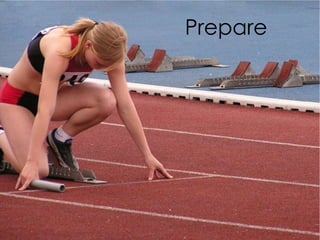
Prepare
 Practice, practice, practice.
 Know your audience.
 Know your setting – especially for AV
materials.
 The more you know your content,
the more you will be able to engage
with the audience.
Keep it Simple
 Choose or design simple template.
 Be wary of PowerPoint templates.
 There are places online where you can
experiment with more modern/sleek looking
templates than what is pre-installed on
PowerPoint.
 Use animations, transitions, etc sparingly.
 Create a snappy and clear title.
 Choose pleasing colors, but no more than 3 colors
per slide.
 Stick to your message and keep your message
clear.
 Remember SLIDE: Simplify, Lose the cliches,
Information needs emphasis, Designate elements,
and Empathy for Audience.
Limit Bullet Points & Text
 Use readable font. No cursive or hard to read
fonts should be used.
 You can download fonts from the Internet that
can make you stand out while also being simple
and easy to read.
 No more than three font sizes per slide
 Slide should not have all the information and text
for your oral presentation.
 Sometimes the best slides have little to no text.
 10/20/30 rule recommends limiting the number of
your slides to 10, your presentation time to 20
minutes, and using at least 30 point font size.
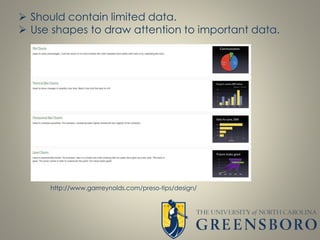
Charts & Graphs
 Should contain limited data.
 Use shapes to draw attention to important data.
http://www.garrreynolds.com/preso-tips/design/
Visual
Images
 Use high quality visual images to tell your story.
 There are websites online to get your images, such as
Getty Images (some images costs money) or
Everystockphoto.com (free with sign up).
 Don’t use cheesy images from clip art unless it fits in
with your story.
 Be sure to follow copyright rules, especially if you plan
on publishing your presentation or submitting it to a
conference. Fair use does not always apply.
Delivery
 Start Strong: first impressions are important.
 Keep it short and speak clearly.
 Make good eye contact.
 Avoid fillers: like, um, etc.
 Be passionate about what your talking about
or no one will care what you are saying.
 Be engaged with your audience.
 Confidence is key: if you prepared well
confidence should be easier.
 Do not read every word off of your slides.
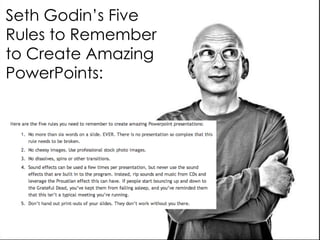
Seth Godin’s Five
Rules to Remember
to Create Amazing
PowerPoints:
How to Not do PowerPoint by Don McMillan:
http://www.youtube.com/watch?v=lpvgfmEU2Ck
Nancy Duarte’s talk at TEDx East: On the Art of Storytelling:
http://vimeo.com/20618288
Designing an Effective Presentation:
http://www.youtube.com/watch?v=HJgeF3ALl0g
How Can I Make my PowerPoint Presentations Amazing:
http://lifehacker.com/how-can-i-make-my-powerpoint-presentations-amazing-
507552122
Pecha Kucha: Get to PowerPoint in 20 Slides
http://www.youtube.com/watch?v=9NZOt6BkhUg
Presentation Zen:
http://www.presentationzen.com/
Guide to Slideshare: includes some good presentation examples
http://blog.kissmetrics.com/marketers-guide-to-slideshare/
Helpful Links:
UNCG SOE Instructional Technology Services & Website:
http://intech.uncg.edu/
UNCG Digital Media Commons:
http://library.uncg.edu/spaces/dmc/
UNCG PowerPoint Templates and Projection Images:
http://ure.uncg.edu/brandguide/?brandcat=powerpoint-
templates-and-projection-images
UNCG SOE Director of Instructional Technology:
Sandra Bates-Hart
smbatesh@uncg.edu
UNCG SOE Instructional Technology Consultant:
Samantha Harlow
slharlow@uncg.edu
How can UNCG Help?
References
Garr Reynolds,
http://www.garrreynolds.com/preso-tips/design/
Seth Godin’s Blog Post: Really Bad PowerPoint
http://sethgodin.typepad.com/seths_blog/2007/01/really_bad_powe.html
How Can I Make My PowerPoint Presentations Amazing? By Melanie Pinola on
Lifehacker
http://lifehacker.com/how-can-i-make-my-powerpoint-presentations-amazing-
507552122
Images taken from stock.xchng
http://www.sxc.hu/
University of Washington, PowerPoint Best Practices
http://www.washington.edu/research/.SITEPARTS/.documents/.osp/PowerPoint
_Best_Practices.pdf

Powerpoint Design: Best Practices

  • 1.
    Presentation Design &Delivery: Best Practices By Samantha Harlow Instructional Technology Consultant School of Education, UNC Greensboro ******This version will include more text than oral presentation version in order to stand alone on the Internet.
  • 2.
  • 3.
     Practice, practice,practice.  Know your audience.  Know your setting – especially for AV materials.  The more you know your content, the more you will be able to engage with the audience.
  • 4.
  • 5.
     Choose ordesign simple template.  Be wary of PowerPoint templates.  There are places online where you can experiment with more modern/sleek looking templates than what is pre-installed on PowerPoint.  Use animations, transitions, etc sparingly.  Create a snappy and clear title.  Choose pleasing colors, but no more than 3 colors per slide.  Stick to your message and keep your message clear.  Remember SLIDE: Simplify, Lose the cliches, Information needs emphasis, Designate elements, and Empathy for Audience.
  • 6.
  • 7.
     Use readablefont. No cursive or hard to read fonts should be used.  You can download fonts from the Internet that can make you stand out while also being simple and easy to read.  No more than three font sizes per slide  Slide should not have all the information and text for your oral presentation.  Sometimes the best slides have little to no text.  10/20/30 rule recommends limiting the number of your slides to 10, your presentation time to 20 minutes, and using at least 30 point font size.
  • 8.
  • 9.
     Should containlimited data.  Use shapes to draw attention to important data. http://www.garrreynolds.com/preso-tips/design/
  • 10.
  • 11.
     Use highquality visual images to tell your story.  There are websites online to get your images, such as Getty Images (some images costs money) or Everystockphoto.com (free with sign up).  Don’t use cheesy images from clip art unless it fits in with your story.  Be sure to follow copyright rules, especially if you plan on publishing your presentation or submitting it to a conference. Fair use does not always apply.
  • 12.
  • 13.
     Start Strong:first impressions are important.  Keep it short and speak clearly.  Make good eye contact.  Avoid fillers: like, um, etc.  Be passionate about what your talking about or no one will care what you are saying.  Be engaged with your audience.  Confidence is key: if you prepared well confidence should be easier.  Do not read every word off of your slides.
  • 14.
    Seth Godin’s Five Rulesto Remember to Create Amazing PowerPoints:
  • 15.
    How to Notdo PowerPoint by Don McMillan: http://www.youtube.com/watch?v=lpvgfmEU2Ck Nancy Duarte’s talk at TEDx East: On the Art of Storytelling: http://vimeo.com/20618288 Designing an Effective Presentation: http://www.youtube.com/watch?v=HJgeF3ALl0g How Can I Make my PowerPoint Presentations Amazing: http://lifehacker.com/how-can-i-make-my-powerpoint-presentations-amazing- 507552122 Pecha Kucha: Get to PowerPoint in 20 Slides http://www.youtube.com/watch?v=9NZOt6BkhUg Presentation Zen: http://www.presentationzen.com/ Guide to Slideshare: includes some good presentation examples http://blog.kissmetrics.com/marketers-guide-to-slideshare/ Helpful Links:
  • 16.
    UNCG SOE InstructionalTechnology Services & Website: http://intech.uncg.edu/ UNCG Digital Media Commons: http://library.uncg.edu/spaces/dmc/ UNCG PowerPoint Templates and Projection Images: http://ure.uncg.edu/brandguide/?brandcat=powerpoint- templates-and-projection-images UNCG SOE Director of Instructional Technology: Sandra Bates-Hart smbatesh@uncg.edu UNCG SOE Instructional Technology Consultant: Samantha Harlow slharlow@uncg.edu How can UNCG Help?
  • 17.
    References Garr Reynolds, http://www.garrreynolds.com/preso-tips/design/ Seth Godin’sBlog Post: Really Bad PowerPoint http://sethgodin.typepad.com/seths_blog/2007/01/really_bad_powe.html How Can I Make My PowerPoint Presentations Amazing? By Melanie Pinola on Lifehacker http://lifehacker.com/how-can-i-make-my-powerpoint-presentations-amazing- 507552122 Images taken from stock.xchng http://www.sxc.hu/ University of Washington, PowerPoint Best Practices http://www.washington.edu/research/.SITEPARTS/.documents/.osp/PowerPoint _Best_Practices.pdf

Editor's Notes

  • #7 Limit Bullet Points & Text
  • #15 Art of story telling – know your stuff