Powerpoint Best Practices Maureen Nelson, M.A. January 8, 2010 Global Career Development Facilitator Program E AST B AY W ORKS
OVERVIEW
Overview Getting Started Content Formatting Wrap-up
Getting Started Navigating in Powerpoint Adding, deleting, rearranging slides Choosing a design Working with backgrounds Using masters  (title/ slide/ note/ handout) Adding footers Bonus Tip! Exporting text to Word
Navigating with Views palette “ Normal view” (composite view) Outline view Slide sorter view Slide Show view Slide view
Navigating
But where is Notes Page?
Notes Page
Adding, Deleting, Rearranging in Slide Sorter View You can also add slides from another presentation!
Choosing a Design
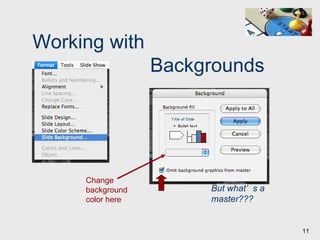
Working with   Backgrounds Change background color here But what’s a master???
How to Find the Masters Note footers
Adding Footers
Bonus Tip:  Exporting Your Text
Launch Powerpoint Create and save a file
Hands-on Activity Choose a design:  Format > Slide Design Navigate with  Views palette Add, delete, rearrange slides:  Slide Sorter View Put in dummy text to work with 15 Create a  3-slide  presentation using what you’ve learned so far: Look at the slide master: View > Masters > Slide Master Add a footer:  View > Headers & Footers If time…
CONTENT
Content Organization How much text? Graphics Handouts Reminder — Bio page
Organize Ideas
Sometimes… Less is More a la Gary Karp
disability Use Word Art to change kerning…
Ex-Felon Or opacity…
Ex-Felon Interview
Step #2: Visioning & Planning What is VIMT’s philosophy regarding career support of graduates? “ We believe that part of every student’s education at the Vocational Institute of Medical Technology includes  career service in the areas of job search training, orientation to the job market, résumé writing, interview techniques and post-placement support.  As all programs require an  externship or clinical rotations , we commit ourselves to assisting students in securing these important practical experiences. We are dedicated to producing graduates who excel not only in the technical skills and knowledge they have acquired, but who will become  model employees  for their future employers —  healthcare workers who are known for their compassion, conscientiousness and professionalism .”
Less is More
Say it with Graphics Vs. Don’t kill your audience with data Jan 2005 Jan 2006
Start with your years of experience, skills developed and knowledge gained Then tell about your accomplishments and transferrable skills End by telling what you’re looking for now “ Tell me about yourself.”
Typical first question in job interview…   “Tell me about yourself.” Foundation: Years of experience, skills developed, knowledge gained Accomplishments, transferrable skills What you’re looking for now. START HERE Make sure it aligns  with what they’re looking for in a candidate
Understand the needs and issues Create a vision and develop plans Design and implement program and components Measure and evaluate 4-Step Career Development   System Design
4-Step Career Development   System Design #1: Understand the Needs and Issues #3: Design and Implement Program and Components #2: Create a Vision  and Develop Plans #4: Measure  and Evaluate
Draw a picture of where you were, where you are and where you want to be ACTIVITY: On the Path 10
Draw a picture of where you were, where you are, and where you want to be ACTIVITY: On the Path  10
To Make Handouts View > Master > Handout Master But you can do the same thing in the Print dialog box — choose “Microsoft Powerpoint” in the  drop-down menu, then choose number of slides in “Print What” drop-down menu
Reminder Don’t forget your Presenter Bio on the last slide, including your contact info!
Hands-on Activity Eliminate background or change its color: Format > Slide Background Add a graphic:  Insert > Picture > Clip Art 5 Work a little more with your presentation: Duplicate a slide Add a footer Use drawing tools or Word Art Export text to Word Or try these…
FORMATTING
Formatting Line spacing Indents Transitions Colors Animations Themes Bonus Tip!
Line Spacing
Line Spacing Start with your years of experience, skills developed and knowledge gained Then tell about your accomplishments and transferrable skills Start with your years of experience, skills developed and knowledge gained Then tell about your accomplishments and transferrable skills
Indents Powerpoint defaults to a hanging indent (text “hangs” off the bullet) If you make something not a bulleted list, the lines will not align Better just to create a separate text box.  Dragging the indent markers on the top rule messes up the bullets you want to keep.
Transitions
Pollution & Waste
green careers
Too hard to read
Some color combinations vibrate
Hard to read on a busy background
Animations Use judiciously if at all!
Typical Resume (courtesy of College of San Mateo)
B RUNO  C. B USINESS B RUNO  B USINESS San Mateo, CA 94402    bruno@work.com   (650) 375-5555 123 Broadway Lane  San Mateo, CA 94402  bruno@work.com  (650) 375-5555
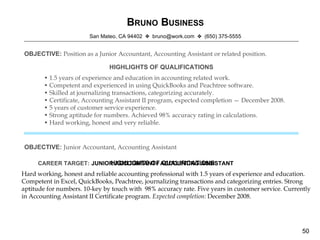
B RUNO  B USINESS San Mateo, CA 94402    bruno@work.com   (650) 375-5555 OBJECTIVE:   Position as a Junior Accountant, Accounting Assistant or related position. HIGHLIGHTS OF QUALIFICATIONS •  1.5 years of experience and education in accounting related work. •  Competent and experienced in using QuickBooks and Peachtree software. •  Skilled at journalizing transactions, categorizing accurately. •  Certificate, Accounting Assistant II program, expected completion — December 2008. •  5 years of customer service experience. •  Strong aptitude for numbers. Achieved 98% accuracy rating in calculations. •  Hard working, honest and very reliable. Hard working, honest and reliable accounting professional with 1.5 years of experience and education. Competent in Excel, QuickBooks, Peachtree, journalizing transactions and categorizing entries. Strong aptitude for numbers. 10-key by touch with  98% accuracy rate. Five years in customer service. Currently in Accounting Assistant II Certificate program.  Expected completion:  December 2008. HIGHLIGHTS OF QUALIFICATIONS OBJECTIVE:   Junior Accountant, Accounting Assistant JUNIOR ACCOUNTANT / ACCOUNTING ASSISTANT CAREER TARGET:
B RUNO  B USINESS San Mateo, CA 94402    bruno@work.com   (650) 375-5555 Hard working, honest and reliable accounting professional with 1.5 years of experience and education. Competent in Excel, QuickBooks, and Peachtree software. Experience journaling transactions and categorizing entries. Strong aptitude for numbers. 10-key by touch with  98% accuracy rate. Five years in customer service. Currently in Accounting Assistant II Certificate program.  Expected completion: December 2008. JUNIOR ACCOUNTANT / ACCOUNTING ASSISTANT  PROFESSIONAL EXPERIENCE  Used QuickBooks to set up book, including general ledger, accounts payable, accounts receivable, payroll, trial balances, financial statements and closings. Etc.
Use a Theme…
Tip:  Uncheck Auto-Fit
Hands-on Activity Adjust line spacing: Format > Line Spacing Add a transition Add an animation 10 Try some Formatting techniques
WRAP-UP
Wrap-Up Keep it simple Keep it understandable Keep it interesting Keep it fun Keep it memorable Keep your audience in mind!
Where to Learn More Tutorials:  About.com or GuidesAndTutorials.com (or just search on “free powerpoint tutorial”) Books: MS Office PowerPoint 2007 Plain & Simple Presentation Zen: Simple Ideas on Presentation Design and Delivery Classroom:  Adult education, community colleges, university extensions, private (e.g., LearnIT!) Online classes:  CBT Planet, etc.
About Your Presenter Maureen Nelson, M.A.,  is Senior Career Counselor at the One Stop run by the Oakland Private Industry Council. Before becoming a counselor, she worked in publishing as a writer, editor, layout artist, designer and webmaster.  Maureen learned Powerpoint by taking a six-week adult education class for $39 and subsequently landed a job as a $55K/year job as a  presentation specialist  at Pivotal Resources, a training and consulting firm focused on business process improvement. As  product manager  at Pivotal, she oversaw development of training materials for clients such as Accenture, BP, Cisco, Clorox, Sun, Roche, Target, United Healthcare Group and Wells Fargo — often partnering with corporate universities to customize content and branding.  Her master’s in Career Development is from John F. Kennedy University, where she was named  Outstanding Student of the School of Management.  In her spare time, she volunteers with the California Reentry Program, writing resumes for inmates paroling from San Quentin.  Website:  MaureenNelsonCareerCoach.com Blog: TakeChargeCareer.wordpress.com Contact:  mpn@dorsey.org  / 925.708.7476

Powerpoint Best Practices

  • 1.
    Powerpoint Best PracticesMaureen Nelson, M.A. January 8, 2010 Global Career Development Facilitator Program E AST B AY W ORKS
  • 2.
  • 3.
    Overview Getting StartedContent Formatting Wrap-up
  • 4.
    Getting Started Navigatingin Powerpoint Adding, deleting, rearranging slides Choosing a design Working with backgrounds Using masters (title/ slide/ note/ handout) Adding footers Bonus Tip! Exporting text to Word
  • 5.
    Navigating with Viewspalette “ Normal view” (composite view) Outline view Slide sorter view Slide Show view Slide view
  • 6.
  • 7.
    But where isNotes Page?
  • 8.
  • 9.
    Adding, Deleting, Rearrangingin Slide Sorter View You can also add slides from another presentation!
  • 10.
  • 11.
    Working with Backgrounds Change background color here But what’s a master???
  • 12.
    How to Findthe Masters Note footers
  • 13.
  • 14.
    Bonus Tip: Exporting Your Text
  • 15.
    Launch Powerpoint Createand save a file
  • 16.
    Hands-on Activity Choosea design: Format > Slide Design Navigate with Views palette Add, delete, rearrange slides: Slide Sorter View Put in dummy text to work with 15 Create a 3-slide presentation using what you’ve learned so far: Look at the slide master: View > Masters > Slide Master Add a footer: View > Headers & Footers If time…
  • 17.
  • 18.
    Content Organization Howmuch text? Graphics Handouts Reminder — Bio page
  • 19.
  • 20.
    Sometimes… Less isMore a la Gary Karp
  • 21.
    disability Use WordArt to change kerning…
  • 22.
  • 23.
  • 24.
    Step #2: Visioning& Planning What is VIMT’s philosophy regarding career support of graduates? “ We believe that part of every student’s education at the Vocational Institute of Medical Technology includes career service in the areas of job search training, orientation to the job market, résumé writing, interview techniques and post-placement support. As all programs require an externship or clinical rotations , we commit ourselves to assisting students in securing these important practical experiences. We are dedicated to producing graduates who excel not only in the technical skills and knowledge they have acquired, but who will become model employees for their future employers — healthcare workers who are known for their compassion, conscientiousness and professionalism .”
  • 25.
  • 26.
    Say it withGraphics Vs. Don’t kill your audience with data Jan 2005 Jan 2006
  • 27.
    Start with youryears of experience, skills developed and knowledge gained Then tell about your accomplishments and transferrable skills End by telling what you’re looking for now “ Tell me about yourself.”
  • 28.
    Typical first questionin job interview… “Tell me about yourself.” Foundation: Years of experience, skills developed, knowledge gained Accomplishments, transferrable skills What you’re looking for now. START HERE Make sure it aligns with what they’re looking for in a candidate
  • 29.
    Understand the needsand issues Create a vision and develop plans Design and implement program and components Measure and evaluate 4-Step Career Development System Design
  • 30.
    4-Step Career Development System Design #1: Understand the Needs and Issues #3: Design and Implement Program and Components #2: Create a Vision and Develop Plans #4: Measure and Evaluate
  • 31.
    Draw a pictureof where you were, where you are and where you want to be ACTIVITY: On the Path 10
  • 32.
    Draw a pictureof where you were, where you are, and where you want to be ACTIVITY: On the Path 10
  • 33.
    To Make HandoutsView > Master > Handout Master But you can do the same thing in the Print dialog box — choose “Microsoft Powerpoint” in the drop-down menu, then choose number of slides in “Print What” drop-down menu
  • 34.
    Reminder Don’t forgetyour Presenter Bio on the last slide, including your contact info!
  • 35.
    Hands-on Activity Eliminatebackground or change its color: Format > Slide Background Add a graphic: Insert > Picture > Clip Art 5 Work a little more with your presentation: Duplicate a slide Add a footer Use drawing tools or Word Art Export text to Word Or try these…
  • 36.
  • 37.
    Formatting Line spacingIndents Transitions Colors Animations Themes Bonus Tip!
  • 38.
  • 39.
    Line Spacing Startwith your years of experience, skills developed and knowledge gained Then tell about your accomplishments and transferrable skills Start with your years of experience, skills developed and knowledge gained Then tell about your accomplishments and transferrable skills
  • 40.
    Indents Powerpoint defaultsto a hanging indent (text “hangs” off the bullet) If you make something not a bulleted list, the lines will not align Better just to create a separate text box. Dragging the indent markers on the top rule messes up the bullets you want to keep.
  • 41.
  • 42.
  • 43.
  • 44.
  • 45.
  • 46.
    Hard to readon a busy background
  • 47.
  • 48.
    Typical Resume (courtesyof College of San Mateo)
  • 49.
    B RUNO C. B USINESS B RUNO B USINESS San Mateo, CA 94402  bruno@work.com  (650) 375-5555 123 Broadway Lane San Mateo, CA 94402 bruno@work.com (650) 375-5555
  • 50.
    B RUNO B USINESS San Mateo, CA 94402  bruno@work.com  (650) 375-5555 OBJECTIVE: Position as a Junior Accountant, Accounting Assistant or related position. HIGHLIGHTS OF QUALIFICATIONS • 1.5 years of experience and education in accounting related work. • Competent and experienced in using QuickBooks and Peachtree software. • Skilled at journalizing transactions, categorizing accurately. • Certificate, Accounting Assistant II program, expected completion — December 2008. • 5 years of customer service experience. • Strong aptitude for numbers. Achieved 98% accuracy rating in calculations. • Hard working, honest and very reliable. Hard working, honest and reliable accounting professional with 1.5 years of experience and education. Competent in Excel, QuickBooks, Peachtree, journalizing transactions and categorizing entries. Strong aptitude for numbers. 10-key by touch with 98% accuracy rate. Five years in customer service. Currently in Accounting Assistant II Certificate program. Expected completion: December 2008. HIGHLIGHTS OF QUALIFICATIONS OBJECTIVE: Junior Accountant, Accounting Assistant JUNIOR ACCOUNTANT / ACCOUNTING ASSISTANT CAREER TARGET:
  • 51.
    B RUNO B USINESS San Mateo, CA 94402  bruno@work.com  (650) 375-5555 Hard working, honest and reliable accounting professional with 1.5 years of experience and education. Competent in Excel, QuickBooks, and Peachtree software. Experience journaling transactions and categorizing entries. Strong aptitude for numbers. 10-key by touch with 98% accuracy rate. Five years in customer service. Currently in Accounting Assistant II Certificate program. Expected completion: December 2008. JUNIOR ACCOUNTANT / ACCOUNTING ASSISTANT PROFESSIONAL EXPERIENCE Used QuickBooks to set up book, including general ledger, accounts payable, accounts receivable, payroll, trial balances, financial statements and closings. Etc.
  • 53.
  • 54.
    Tip: UncheckAuto-Fit
  • 55.
    Hands-on Activity Adjustline spacing: Format > Line Spacing Add a transition Add an animation 10 Try some Formatting techniques
  • 56.
  • 57.
    Wrap-Up Keep itsimple Keep it understandable Keep it interesting Keep it fun Keep it memorable Keep your audience in mind!
  • 58.
    Where to LearnMore Tutorials: About.com or GuidesAndTutorials.com (or just search on “free powerpoint tutorial”) Books: MS Office PowerPoint 2007 Plain & Simple Presentation Zen: Simple Ideas on Presentation Design and Delivery Classroom: Adult education, community colleges, university extensions, private (e.g., LearnIT!) Online classes: CBT Planet, etc.
  • 59.
    About Your PresenterMaureen Nelson, M.A., is Senior Career Counselor at the One Stop run by the Oakland Private Industry Council. Before becoming a counselor, she worked in publishing as a writer, editor, layout artist, designer and webmaster. Maureen learned Powerpoint by taking a six-week adult education class for $39 and subsequently landed a job as a $55K/year job as a presentation specialist at Pivotal Resources, a training and consulting firm focused on business process improvement. As product manager at Pivotal, she oversaw development of training materials for clients such as Accenture, BP, Cisco, Clorox, Sun, Roche, Target, United Healthcare Group and Wells Fargo — often partnering with corporate universities to customize content and branding. Her master’s in Career Development is from John F. Kennedy University, where she was named Outstanding Student of the School of Management. In her spare time, she volunteers with the California Reentry Program, writing resumes for inmates paroling from San Quentin. Website: MaureenNelsonCareerCoach.com Blog: TakeChargeCareer.wordpress.com Contact: mpn@dorsey.org / 925.708.7476

Editor's Notes

  • #7 But remember to paste on the page numbers.
  • #20 Slides Sections Icons / Navigating Activities - colored paper for activites matched slides
  • #21 6x6 rule 10-20-30 rule 10 slides 20 min talk 30 pt font Single concept/word on a slide
  • #22 6x6 rule 10-20-30 rule 10 slides 20 min talk 30 pt font Single concept/word on a slide
  • #25 Philosophy doesn’t address student issues of lack of childcare and transportation. Need better/more flexible support.
  • #26 6x6 rule 10-20-30 rule 10 slides 20 min talk 30 pt font Single concept/word on a slide
  • #34 Whether it’s your own supplement that you write or the PPT one.