SMARTBoard Institute 2010
               SMARTBoard for ALL Content Areas – Focus on “STEM”

Christopher Polizzi
christopherpolizzi@gmail.com

Course Description: This SMARTBoard course will integrate 21st century and STEM (Science, Technology,
Engineering, and Math) skills into any content area. Teachers will learn how to use every SMARTBoard feature,
beginner to advance. Teachers will use the SMARTBoard to create a curriculum unit that incorporates multimedia,
data collection, Information Literacy, and collaboration.

Core Understandings:
SMARTboard Notebook Software Understandings

       SMARTBoard Beginner Features
         • Saving/Downloading a notebook file
         • Copying/printing into SMARTBoard
         • Changing the properties of an object
         • Infinite cloning
         • Grouping/ordering objects
         • Locking/moving objects
         • Attaching link/sound
         • Search the Gallery
         • Adding a table
       SMARTBoard Advance Features
         • Screen Capture
         • Saving Content to your Gallery
         • Importing pictures and text from the Internet
         • Adding attachments
         • Custom themes
         • Magnifier/spotlight
         • SMARTBoard Recorder
         • The Lesson Activity Toolkit

Information Literacy/Search

   •   Custom Search Engines will let teachers specify what sites students should search for materials on their unit
       of study. Sites can be added by teachers or students.
   •   Alerts send emails to teachers and students containing information, news, and articles that mention their unit
       of study.
   •   RSS feeds keep teachers and students up to date on their unit of study by pushing information on the
       internet to students or teachers.
   •   Targeted search strategies will be reviewed.

Data Collection
   • Forms and spreadsheets will let teachers and students collect, organize and present data on their unit of
      study.
   • A wiki will foster multiple students pooling data on their assigned unit.
   • Data Visualization
•   Timelines

Multimedia
  • Video and photo sites will be presented where teachers and students can find multimedia for the chosen unit
      of study.
  • Editing services will be used.
  • Searching for copyright free video and images will be discussed.

Collaboration
   • Podcasts and screencasts will be used by teachers and students to explain, analyze, and present material
      from the unit of study.
   • Voicethread will be used to reflect on understanding of units.

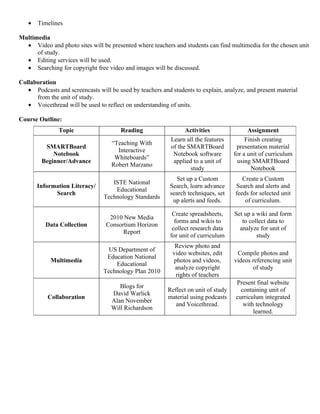
Course Outline:
               Topic                   Reading                   Activities                Assignment
                                                           Learn all the features         Finish creating
                                    “Teaching With
         SMARTBoard                                        of the SMARTBoard          presentation material
                                      Interactive
            Notebook                                        Notebook software        for a unit of curriculum
                                     Whiteboards”
        Beginner/Advance                                    applied to a unit of      using SMARTBoard
                                    Robert Marzano
                                                                   study                    Notebook
                                                              Set up a Custom           Create a Custom
                                    ISTE National
       Information Literacy/                               Search, learn advance     Search and alerts and
                                     Educational
             Search                                        search techniques, set    feeds for selected unit
                                 Technology Standards
                                                            up alerts and feeds.         of curriculum.

                                                            Create spreadsheets,     Set up a wiki and form
                                   2010 New Media
                                                             forms and wikis to         to collect data to
          Data Collection         Consortium Horizon
                                                            collect research data      analyze for unit of
                                        Report
                                                           for unit of curriculum             study
                                                             Review photo and
                                   US Department of
                                                            video websites, edit      Compile photos and
                                  Education National
            Multimedia                                      photos and videos,       videos referencing unit
                                     Educational
                                                             analyze copyright              of study
                                 Technology Plan 2010
                                                             rights of teachers
                                                                                     Present final website
                                       Blogs for
                                                          Reflect on unit of study     containing unit of
                                    David Warlick
           Collaboration                                  material using podcasts    curriculum integrated
                                    Alan November
                                                             and Voicethread.           with technology
                                    Will Richardson
                                                                                            learned.
Exit Product:
       The final product for the course will be a unit of study/curriculum that was influenced, planned, integrated,
and assessed with technology learned from the course. The unit should be classroom ready for use by students.
The unit of curriculum should include the following features.

   •   Most of the beginner/advance SMARTBoard Notebook features.
   •   Information Literacy/Search (custom search, alerts, RSS feeds)
   •   Data Collection (spreadsheets, forms, wiki)
   •   Multimedia (photos and video)
   •   Collaboration (podcast, screencast, Voicethread)

   ISTE National Educational Technology Standards

           1.   Facilitate and Inspire Student Learning and Creativity
           2.   Design and Develop Digital-Age Learning Experiences and Assessments
           3.   Model Digital-Age Work and Learning
           4.   Promote and Model Digital Citizenship and Responsibility
           5.   Engage in Professional Growth and Leadership


               Assignment - Final Presentation of Technology Influenced Curriculum Unit
Directions:
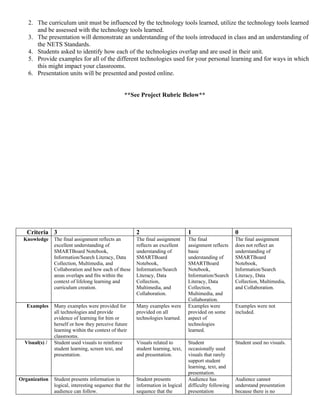
   1. Each student will create a final presentation of a curriculum unit posted on a website.
2. The curriculum unit must be influenced by the technology tools learned, utilize the technology tools learned
      and be assessed with the technology tools learned.
   3. The presentation will demonstrate an understanding of the tools introduced in class and an understanding of
      the NETS Standards.
   4. Students asked to identify how each of the technologies overlap and are used in their unit.
   5. Provide examples for all of the different technologies used for your personal learning and for ways in which
      this might impact your classrooms.
   6. Presentation units will be presented and posted online.


                                                   **See Project Rubric Below**


   Criteria 3                                            2                         1                      0
 Knowledge      The final assignment reflects an         The final assignment      The final              The final assignment
                excellent understanding of               reflects an excellent     assignment reflects    does not reflect an
                SMARTBoard Notebook,                     understanding of          basic                  understanding of
                Information/Search Literacy, Data        SMARTBoard                understanding of       SMARTBoard
                Collection, Multimedia, and              Notebook,                 SMARTBoard             Notebook,
                Collaboration and how each of these      Information/Search        Notebook,              Information/Search
                areas overlaps and fits within the       Literacy, Data            Information/Search     Literacy, Data
                context of lifelong learning and         Collection,               Literacy, Data         Collection, Multimedia,
                curriculum creation.                     Multimedia, and           Collection,            and Collaboration.
                                                         Collaboration.            Multimedia, and
                                                                                   Collaboration.
   Examples     Many examples were provided for          Many examples were        Examples were          Examples were not
                all technologies and provide             provided on all           provided on some       included.
                evidence of learning for him or          technologies learned.     aspect of
                herself or how they perceive future                                technologies
                learning within the context of their                               learned.
                classrooms.
  Visual(s) /   Student used visuals to reinforce        Visuals related to        Student                Student used no visuals.
                student learning, screen text, and       student learning, text,   occasionally used
                presentation.                            and presentation.         visuals that rarely
                                                                                   support student
                                                                                   learning, text, and
                                                                                   presentation.
Organization    Student presents information in          Student presents          Audience has           Audience cannot
                logical, interesting sequence that the   information in logical    difficulty following   understand presentation
                audience can follow.                     sequence that the         presentation           because there is no
audience can follow.   because student      sequence of information.
                                                                           jumps around.
Conventions   Presentation has no misspellings or   Presentation has no    Presentation had     Student's presentation
              grammatical errors.                   more than two          three misspellings   had four or more spelling
                                                    misspellings and/or    and/or grammatical   errors and/or
                                                    grammatical errors.    errors.              grammatical errors.


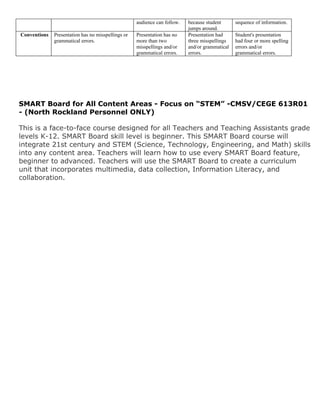
SMART Board for All Content Areas - Focus on “STEM” -CMSV/CEGE 613R01
- (North Rockland Personnel ONLY)

This is a face-to-face course designed for all Teachers and Teaching Assistants grade
levels K-12. SMART Board skill level is beginner. This SMART Board course will
integrate 21st century and STEM (Science, Technology, Engineering, and Math) skills
into any content area. Teachers will learn how to use every SMART Board feature,
beginner to advanced. Teachers will use the SMART Board to create a curriculum
unit that incorporates multimedia, data collection, Information Literacy, and
collaboration.

Polizzi SMARTboard for all content areas STEM

  • 1.
    SMARTBoard Institute 2010 SMARTBoard for ALL Content Areas – Focus on “STEM” Christopher Polizzi christopherpolizzi@gmail.com Course Description: This SMARTBoard course will integrate 21st century and STEM (Science, Technology, Engineering, and Math) skills into any content area. Teachers will learn how to use every SMARTBoard feature, beginner to advance. Teachers will use the SMARTBoard to create a curriculum unit that incorporates multimedia, data collection, Information Literacy, and collaboration. Core Understandings: SMARTboard Notebook Software Understandings SMARTBoard Beginner Features • Saving/Downloading a notebook file • Copying/printing into SMARTBoard • Changing the properties of an object • Infinite cloning • Grouping/ordering objects • Locking/moving objects • Attaching link/sound • Search the Gallery • Adding a table SMARTBoard Advance Features • Screen Capture • Saving Content to your Gallery • Importing pictures and text from the Internet • Adding attachments • Custom themes • Magnifier/spotlight • SMARTBoard Recorder • The Lesson Activity Toolkit Information Literacy/Search • Custom Search Engines will let teachers specify what sites students should search for materials on their unit of study. Sites can be added by teachers or students. • Alerts send emails to teachers and students containing information, news, and articles that mention their unit of study. • RSS feeds keep teachers and students up to date on their unit of study by pushing information on the internet to students or teachers. • Targeted search strategies will be reviewed. Data Collection • Forms and spreadsheets will let teachers and students collect, organize and present data on their unit of study. • A wiki will foster multiple students pooling data on their assigned unit. • Data Visualization
  • 2.
    Timelines Multimedia • Video and photo sites will be presented where teachers and students can find multimedia for the chosen unit of study. • Editing services will be used. • Searching for copyright free video and images will be discussed. Collaboration • Podcasts and screencasts will be used by teachers and students to explain, analyze, and present material from the unit of study. • Voicethread will be used to reflect on understanding of units. Course Outline: Topic Reading Activities Assignment Learn all the features Finish creating “Teaching With SMARTBoard of the SMARTBoard presentation material Interactive Notebook Notebook software for a unit of curriculum Whiteboards” Beginner/Advance applied to a unit of using SMARTBoard Robert Marzano study Notebook Set up a Custom Create a Custom ISTE National Information Literacy/ Search, learn advance Search and alerts and Educational Search search techniques, set feeds for selected unit Technology Standards up alerts and feeds. of curriculum. Create spreadsheets, Set up a wiki and form 2010 New Media forms and wikis to to collect data to Data Collection Consortium Horizon collect research data analyze for unit of Report for unit of curriculum study Review photo and US Department of video websites, edit Compile photos and Education National Multimedia photos and videos, videos referencing unit Educational analyze copyright of study Technology Plan 2010 rights of teachers Present final website Blogs for Reflect on unit of study containing unit of David Warlick Collaboration material using podcasts curriculum integrated Alan November and Voicethread. with technology Will Richardson learned.
  • 3.
    Exit Product: The final product for the course will be a unit of study/curriculum that was influenced, planned, integrated, and assessed with technology learned from the course. The unit should be classroom ready for use by students. The unit of curriculum should include the following features. • Most of the beginner/advance SMARTBoard Notebook features. • Information Literacy/Search (custom search, alerts, RSS feeds) • Data Collection (spreadsheets, forms, wiki) • Multimedia (photos and video) • Collaboration (podcast, screencast, Voicethread) ISTE National Educational Technology Standards 1. Facilitate and Inspire Student Learning and Creativity 2. Design and Develop Digital-Age Learning Experiences and Assessments 3. Model Digital-Age Work and Learning 4. Promote and Model Digital Citizenship and Responsibility 5. Engage in Professional Growth and Leadership Assignment - Final Presentation of Technology Influenced Curriculum Unit Directions: 1. Each student will create a final presentation of a curriculum unit posted on a website.
  • 4.
    2. The curriculumunit must be influenced by the technology tools learned, utilize the technology tools learned and be assessed with the technology tools learned. 3. The presentation will demonstrate an understanding of the tools introduced in class and an understanding of the NETS Standards. 4. Students asked to identify how each of the technologies overlap and are used in their unit. 5. Provide examples for all of the different technologies used for your personal learning and for ways in which this might impact your classrooms. 6. Presentation units will be presented and posted online. **See Project Rubric Below** Criteria 3 2 1 0 Knowledge The final assignment reflects an The final assignment The final The final assignment excellent understanding of reflects an excellent assignment reflects does not reflect an SMARTBoard Notebook, understanding of basic understanding of Information/Search Literacy, Data SMARTBoard understanding of SMARTBoard Collection, Multimedia, and Notebook, SMARTBoard Notebook, Collaboration and how each of these Information/Search Notebook, Information/Search areas overlaps and fits within the Literacy, Data Information/Search Literacy, Data context of lifelong learning and Collection, Literacy, Data Collection, Multimedia, curriculum creation. Multimedia, and Collection, and Collaboration. Collaboration. Multimedia, and Collaboration. Examples Many examples were provided for Many examples were Examples were Examples were not all technologies and provide provided on all provided on some included. evidence of learning for him or technologies learned. aspect of herself or how they perceive future technologies learning within the context of their learned. classrooms. Visual(s) / Student used visuals to reinforce Visuals related to Student Student used no visuals. student learning, screen text, and student learning, text, occasionally used presentation. and presentation. visuals that rarely support student learning, text, and presentation. Organization Student presents information in Student presents Audience has Audience cannot logical, interesting sequence that the information in logical difficulty following understand presentation audience can follow. sequence that the presentation because there is no
  • 5.
    audience can follow. because student sequence of information. jumps around. Conventions Presentation has no misspellings or Presentation has no Presentation had Student's presentation grammatical errors. more than two three misspellings had four or more spelling misspellings and/or and/or grammatical errors and/or grammatical errors. errors. grammatical errors. SMART Board for All Content Areas - Focus on “STEM” -CMSV/CEGE 613R01 - (North Rockland Personnel ONLY) This is a face-to-face course designed for all Teachers and Teaching Assistants grade levels K-12. SMART Board skill level is beginner. This SMART Board course will integrate 21st century and STEM (Science, Technology, Engineering, and Math) skills into any content area. Teachers will learn how to use every SMART Board feature, beginner to advanced. Teachers will use the SMART Board to create a curriculum unit that incorporates multimedia, data collection, Information Literacy, and collaboration.