Introduction to JavaScript for APEX Developers
Module 2: Adding JavaScript to APEX Apps
2
Dynamic Actions
Agenda
1
2
3
4
Dynamic Actions with JavaScript hooks
Page and component level attributes
Static files
3
Dynamic Actions
Agenda
1
4
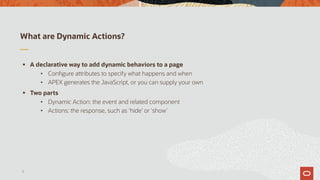
What are Dynamic Actions?
§ A declarative way to add dynamic behaviors to a page
• Configure attributes to specify what happens and when
• APEX generates the JavaScript, or you can supply your own
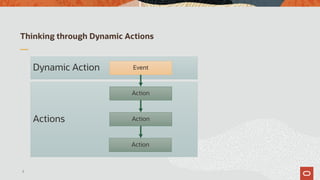
§ Two parts
• Dynamic Action: the event and related component
• Actions: the response, such as ‘hide’ or ‘show’
5
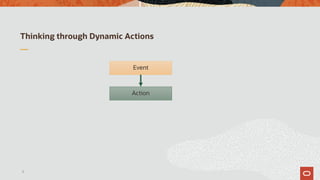
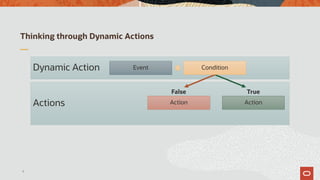
Thinking through Dynamic Actions
6
Action
Event
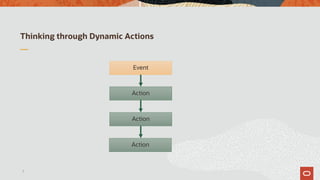
Thinking through Dynamic Actions
7
Action
Event
Action
Action
Thinking through Dynamic Actions
8
Actions
Dynamic Action
Action
Event
Action
Action
Thinking through Dynamic Actions
9
Actions
Dynamic Action
ActionAction
ConditionEvent
False True
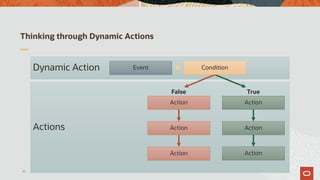
Thinking through Dynamic Actions
10
Actions
Dynamic Action
ActionAction
ConditionEvent
False True
Action
Action
Action
Action
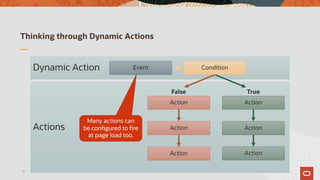
Thinking through Dynamic Actions
11
Actions
Dynamic Action
ActionAction
ConditionEvent
False True
Action
Action
Action
Action
Many actions can
be configured to fire
at page load too.
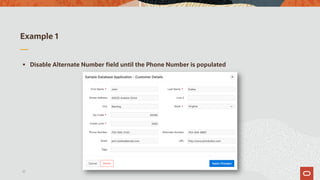
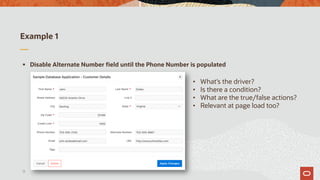
Example 1
§ Disable Alternate Number field until the Phone Number is populated
12
Example 1
§ Disable Alternate Number field until the Phone Number is populated
13
• What’s the driver?
• Is there a condition?
• What are the true/false actions?
• Relevant at page load too?
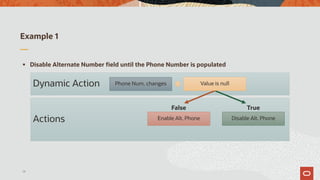
Example 1
§ Disable Alternate Number field until the Phone Number is populated
14
Actions
Dynamic Action
Disable Alt. PhoneEnable Alt. Phone
Value is nullPhone Num. changes
False True
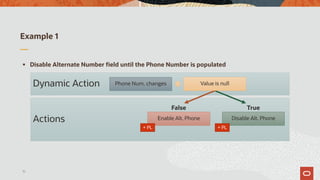
Example 1
§ Disable Alternate Number field until the Phone Number is populated
15
Actions
Dynamic Action
Disable Alt. PhoneEnable Alt. Phone
Value is nullPhone Num. changes
False True
+ PL + PL
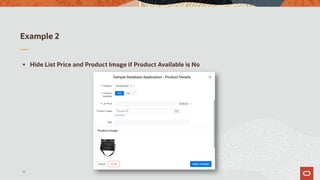
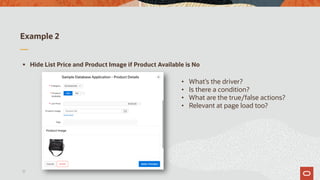
Example 2
§ Hide List Price and Product Image if Product Available is No
16
Example 2
§ Hide List Price and Product Image if Product Available is No
17
• What’s the driver?
• Is there a condition?
• What are the true/false actions?
• Relevant at page load too?
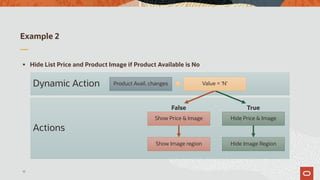
Example 2
§ Hide List Price and Product Image if Product Available is No
18
Actions
Dynamic Action
Hide Price & ImageShow Price & Image
Value = 'N'Product Avail. changes
False True
Show Image region Hide Image Region
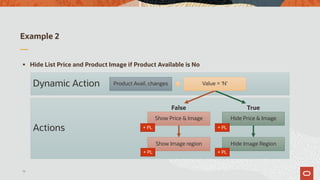
Example 2
§ Hide List Price and Product Image if Product Available is No
19
Actions
Dynamic Action
Hide Price & ImageShow Price & Image
Value = 'N'Product Avail. changes
False True
Show Image region Hide Image Region
+ PL
+ PL
+ PL
+ PL
Agenda
2 Dynamic Actions with JavaScript hooks
20
Dynamic Actions with JavaScript hooks
§ Dynamic Actions can’t cover everything
• Hooks are provided to extend capabilities
• Requires basic knowledge of JavaScript to use
§ Probably the sweet spot for most APEX developers
21
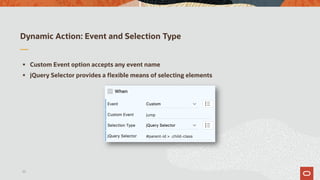
Dynamic Action: Event and Selection Type
§ Custom Event option accepts any event name
§ jQuery Selector provides a flexible means of selecting elements
22
Dynamic Action: Client-side Condition
§ Declarative conditions only work with the triggering element
§ The JavaScript Expression option provides full access to the DOM
• Must resolve to true or false
• See the “help” for additional options
23
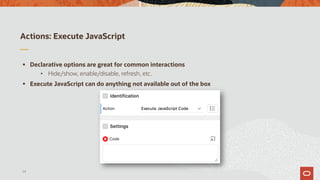
Actions: Execute JavaScript
§ Declarative options are great for common interactions
• Hide/show, enable/disable, refresh, etc.
§ Execute JavaScript can do anything not available out of the box
24
Agenda
3 Page and component level attributes
25
Page level attributes
§ Dynamic Actions may not work for every situation
• The dynamic action/actions structure can be a little rigid
• Handwritten JavaScript code may be a better solution
§ Page level attributes for JavaScript are the next step
• Provide a consistent place to put JavaScript code
§ Relatively few APEX developers will need to do this
26
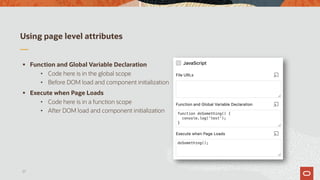
Using page level attributes
§ Function and Global Variable Declaration
• Code here is in the global scope
• Before DOM load and component initialization
§ Execute when Page Loads
• Code here is in a function scope
• After DOM load and component initialization
27
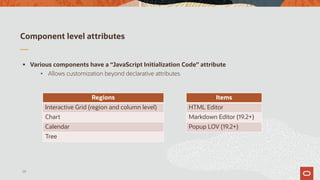
Component level attributes
§ Various components have a “JavaScript Initialization Code” attribute
• Allows customization beyond declarative attributes
28
Regions
Interactive Grid (region and column level)
Chart
Calendar
Tree
Items
HTML Editor
Markdown Editor (19.2+)
Popup LOV (19.2+)
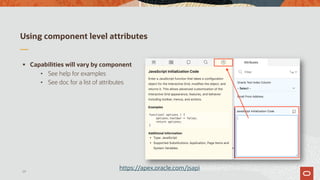
Using component level attributes
§ Capabilities will vary by component
• See help for examples
• See doc for a list of attributes
29
https://apex.oracle.com/jsapi
Agenda
4 Static files
30
Static files
§ Static files have several advantages over page level attributes
• Faster page loads via browser caching and optional minification
• Better organization; easier to reuse code between pages
§ Very few APEX developers will ever need to do this
• Consider plug-ins instead when possible
31
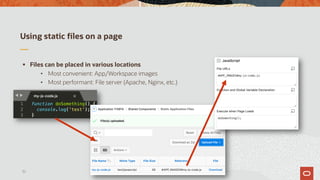
Using static files on a page
§ Files can be placed in various locations
• Most convenient: App/Workspace images
• Most performant: File server (Apache, Nginx, etc.)
32
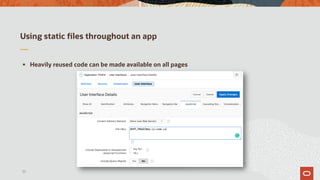
Using static files throughout an app
§ Heavily reused code can be made available on all pages
33
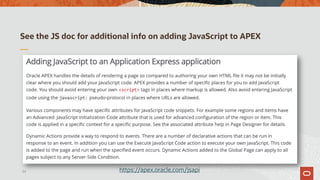
See the JS doc for additional info on adding JavaScript to APEX
34 https://apex.oracle.com/jsapi
Introduction to JavaScript for APEX Developers - Module 2: Adding JavaScript to APEX Apps

Introduction to JavaScript for APEX Developers - Module 2: Adding JavaScript to APEX Apps

  • 2.
    Introduction to JavaScriptfor APEX Developers Module 2: Adding JavaScript to APEX Apps 2
  • 3.
    Dynamic Actions Agenda 1 2 3 4 Dynamic Actionswith JavaScript hooks Page and component level attributes Static files 3
  • 4.
  • 5.
    What are DynamicActions? § A declarative way to add dynamic behaviors to a page • Configure attributes to specify what happens and when • APEX generates the JavaScript, or you can supply your own § Two parts • Dynamic Action: the event and related component • Actions: the response, such as ‘hide’ or ‘show’ 5
  • 6.
    Thinking through DynamicActions 6 Action Event
  • 7.
    Thinking through DynamicActions 7 Action Event Action Action
  • 8.
    Thinking through DynamicActions 8 Actions Dynamic Action Action Event Action Action
  • 9.
    Thinking through DynamicActions 9 Actions Dynamic Action ActionAction ConditionEvent False True
  • 10.
    Thinking through DynamicActions 10 Actions Dynamic Action ActionAction ConditionEvent False True Action Action Action Action
  • 11.
    Thinking through DynamicActions 11 Actions Dynamic Action ActionAction ConditionEvent False True Action Action Action Action Many actions can be configured to fire at page load too.
  • 12.
    Example 1 § DisableAlternate Number field until the Phone Number is populated 12
  • 13.
    Example 1 § DisableAlternate Number field until the Phone Number is populated 13 • What’s the driver? • Is there a condition? • What are the true/false actions? • Relevant at page load too?
  • 14.
    Example 1 § DisableAlternate Number field until the Phone Number is populated 14 Actions Dynamic Action Disable Alt. PhoneEnable Alt. Phone Value is nullPhone Num. changes False True
  • 15.
    Example 1 § DisableAlternate Number field until the Phone Number is populated 15 Actions Dynamic Action Disable Alt. PhoneEnable Alt. Phone Value is nullPhone Num. changes False True + PL + PL
  • 16.
    Example 2 § HideList Price and Product Image if Product Available is No 16
  • 17.
    Example 2 § HideList Price and Product Image if Product Available is No 17 • What’s the driver? • Is there a condition? • What are the true/false actions? • Relevant at page load too?
  • 18.
    Example 2 § HideList Price and Product Image if Product Available is No 18 Actions Dynamic Action Hide Price & ImageShow Price & Image Value = 'N'Product Avail. changes False True Show Image region Hide Image Region
  • 19.
    Example 2 § HideList Price and Product Image if Product Available is No 19 Actions Dynamic Action Hide Price & ImageShow Price & Image Value = 'N'Product Avail. changes False True Show Image region Hide Image Region + PL + PL + PL + PL
  • 20.
    Agenda 2 Dynamic Actionswith JavaScript hooks 20
  • 21.
    Dynamic Actions withJavaScript hooks § Dynamic Actions can’t cover everything • Hooks are provided to extend capabilities • Requires basic knowledge of JavaScript to use § Probably the sweet spot for most APEX developers 21
  • 22.
    Dynamic Action: Eventand Selection Type § Custom Event option accepts any event name § jQuery Selector provides a flexible means of selecting elements 22
  • 23.
    Dynamic Action: Client-sideCondition § Declarative conditions only work with the triggering element § The JavaScript Expression option provides full access to the DOM • Must resolve to true or false • See the “help” for additional options 23
  • 24.
    Actions: Execute JavaScript §Declarative options are great for common interactions • Hide/show, enable/disable, refresh, etc. § Execute JavaScript can do anything not available out of the box 24
  • 25.
    Agenda 3 Page andcomponent level attributes 25
  • 26.
    Page level attributes §Dynamic Actions may not work for every situation • The dynamic action/actions structure can be a little rigid • Handwritten JavaScript code may be a better solution § Page level attributes for JavaScript are the next step • Provide a consistent place to put JavaScript code § Relatively few APEX developers will need to do this 26
  • 27.
    Using page levelattributes § Function and Global Variable Declaration • Code here is in the global scope • Before DOM load and component initialization § Execute when Page Loads • Code here is in a function scope • After DOM load and component initialization 27
  • 28.
    Component level attributes §Various components have a “JavaScript Initialization Code” attribute • Allows customization beyond declarative attributes 28 Regions Interactive Grid (region and column level) Chart Calendar Tree Items HTML Editor Markdown Editor (19.2+) Popup LOV (19.2+)
  • 29.
    Using component levelattributes § Capabilities will vary by component • See help for examples • See doc for a list of attributes 29 https://apex.oracle.com/jsapi
  • 30.
  • 31.
    Static files § Staticfiles have several advantages over page level attributes • Faster page loads via browser caching and optional minification • Better organization; easier to reuse code between pages § Very few APEX developers will ever need to do this • Consider plug-ins instead when possible 31
  • 32.
    Using static fileson a page § Files can be placed in various locations • Most convenient: App/Workspace images • Most performant: File server (Apache, Nginx, etc.) 32
  • 33.
    Using static filesthroughout an app § Heavily reused code can be made available on all pages 33
  • 34.
    See the JSdoc for additional info on adding JavaScript to APEX 34 https://apex.oracle.com/jsapi