Apex Hour:
How Lightning Platform Query
Optimizer works for LDV
Kitchener, Canada User Group
Speaker
Date
Venue/Link
Jitendra Zaa, Sudipta Deb
July 28th, 2018 @ 10:00 AM EST
https://zoom.us/j/3496266413
Meeting Sponsor
Who Am I?
Sudipta Deb
● Technical Architect with Cognizant Technology Solutions
● Blogging at www.sudipta-deb.in
● Co-Organizer of Kitchener, Canada User Group
● Follow us @sudipta_1984, @ApexHours
Our Speaker
Jitendra Zaa (MVP)
Sr Tech Architect (IBM)
Agenda
● Multi Tenant Architecture
● Skinny Table
● Indexing Table & Index Statistics
● Upper Limit on
○ Standard & Custom Indexed Field
○ Limit on AND , OR and LIKE operator
● SystemModstamp vs LastModifiedDate
● Query Plan Tool
● Q&A
Can it handle load ?
Can it be fixed later ?
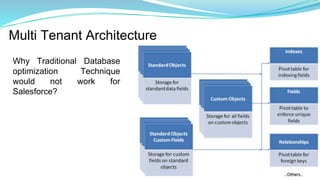
Multi Tenant Architecture
Why Traditional Database
optimization Technique
would not work for
Salesforce?
How to design -
Lightning Platform Query
Optimizer friendly Data Model
What if...
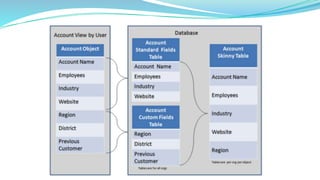
● No need to perform joins between Standard and Custom Object
● Don’t consider record in database
● There would be actual table containing data only for your Org
● Throughput would be increased
○ In same time Salesforce Query Engine can return more record, as
it has to scan less records
● Get a solution for Object bloat (Just in Case Field)
That’s what it is - Skinny Table
Considerations & Limitations - Skinny Table
● Contact Salesforce to enable it
● Can contain only 100 fields
● Change in field type used in Skinny table would make it invalid
● Skinny Table is not copied to sandbox after refresh (Except Full
Copy Sandbox)
● Useful for read operations
● Cannot contain fields from other object / Parent
Indexing
Index Table
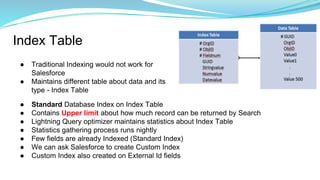
● Traditional Indexing would not work for
Salesforce
● Maintains different table about data and its
type - Index Table
● Standard Database Index on Index Table
● Contains Upper limit about how much record can be returned by Search
● Lightning Query optimizer maintains statistics about Index Table
● Statistics gathering process runs nightly
● Few fields are already Indexed (Standard Index)
● We can ask Salesforce to create Custom Index
● Custom Index also created on External Id fields
Index Table - Upper Limits
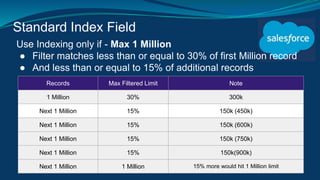
Standard Index Field
Use Indexing only if - Max 1 Million
● Filter matches less than or equal to 30% of first Million record
● And less than or equal to 15% of additional records
Records Max Filtered Limit Note
1 Million 30% 300k
Next 1 Million 15% 150k (450k)
Next 1 Million 15% 150k (600k)
Next 1 Million 15% 150k (750k)
Next 1 Million 15% 150k(900k)
Next 1 Million 1 Million 15% more would hit 1 Million limit
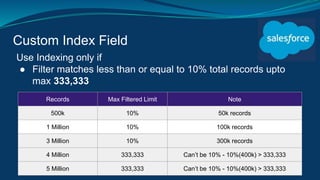
Custom Index Field
Use Indexing only if
● Filter matches less than or equal to 10% total records upto
max 333,333
Records Max Filtered Limit Note
500k 10% 50k records
1 Million 10% 100k records
3 Million 10% 300k records
4 Million 333,333 Can’t be 10% - 10%(400k) > 333,333
5 Million 333,333 Can’t be 10% - 10%(400k) > 333,333
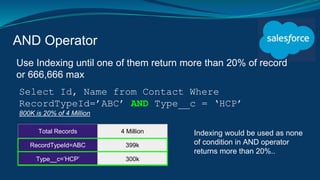
AND Operator
Use Indexing until one of them return more than 20% of record
or 666,666 max
Total Records 4 Million
RecordTypeId=ABC 399k
Type__c=’HCP’ 300k
Select Id, Name from Contact Where
RecordTypeId=’ABC’ AND Type__c = ‘HCP’
800K is 20% of 4 Million
Indexing would be used as none
of condition in AND operator
returns more than 20%..
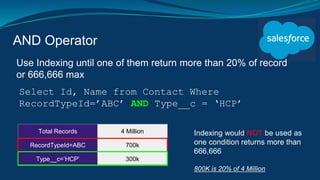
AND Operator
Use Indexing until one of them return more than 20% of record
or 666,666 max
Total Records 4 Million
RecordTypeId=ABC 700k
Type__c=’HCP’ 300k
Select Id, Name from Contact Where
RecordTypeId=’ABC’ AND Type__c = ‘HCP’
Indexing would NOT be used as
one condition returns more than
666,666
800K is 20% of 4 Million
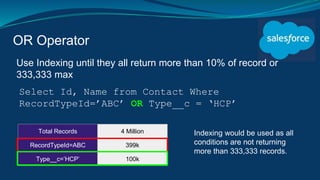
OR Operator
Use Indexing until they all return more than 10% of record or
333,333 max
Total Records 4 Million
RecordTypeId=ABC 399k
Type__c=’HCP’ 100k
Select Id, Name from Contact Where
RecordTypeId=’ABC’ OR Type__c = ‘HCP’
Indexing would be used as all
conditions are not returning
more than 333,333 records.
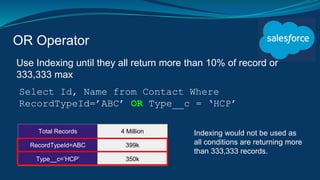
OR Operator
Use Indexing until they all return more than 10% of record or
333,333 max
Total Records 4 Million
RecordTypeId=ABC 399k
Type__c=’HCP’ 350k
Select Id, Name from Contact Where
RecordTypeId=’ABC’ OR Type__c = ‘HCP’
Indexing would not be used as
all conditions are returning more
than 333,333 records.
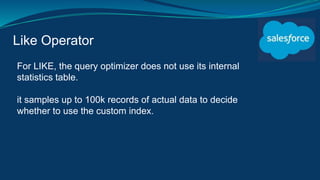
Like Operator
For LIKE, the query optimizer does not use its internal
statistics table.
it samples up to 100k records of actual data to decide
whether to use the custom index.
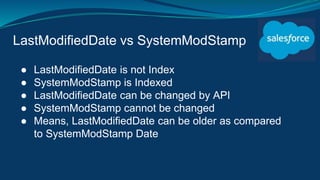
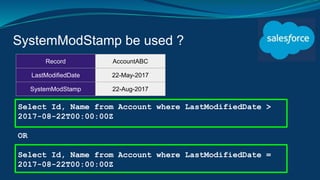
LastModifiedDate vs SystemModStamp
● LastModifiedDate is not Index
● SystemModStamp is Indexed
● LastModifiedDate can be changed by API
● SystemModStamp cannot be changed
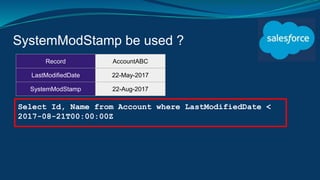
● Means, LastModifiedDate can be older as compared
to SystemModStamp Date
SystemModStamp be used ?
Select Id, Name from Account where LastModifiedDate >
2017-08-22T00:00:00Z
OR
Select Id, Name from Account where LastModifiedDate =
2017-08-22T00:00:00Z
Record AccountABC
LastModifiedDate 22-May-2017
SystemModStamp 22-Aug-2017
SystemModStamp be used ?
Select Id, Name from Account where LastModifiedDate <
2017-08-21T00:00:00Z
Record AccountABC
LastModifiedDate 22-May-2017
SystemModStamp 22-Aug-2017
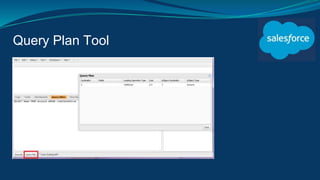
Query Plan Tool
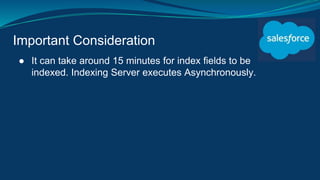
Important Consideration
● It can take around 15 minutes for index fields to be
indexed. Indexing Server executes Asynchronously.
References
● Best Practices for deploying with Large Data Volume
● Query Plan Tool
● SystemModstamp
● SystemModStamp performance Tips
Q&A

Salesforce Apex Hours : How Lightning Platform Query Optimizer works for LDV

  • 1.
    Apex Hour: How LightningPlatform Query Optimizer works for LDV Kitchener, Canada User Group Speaker Date Venue/Link Jitendra Zaa, Sudipta Deb July 28th, 2018 @ 10:00 AM EST https://zoom.us/j/3496266413
  • 2.
  • 3.
    Who Am I? SudiptaDeb ● Technical Architect with Cognizant Technology Solutions ● Blogging at www.sudipta-deb.in ● Co-Organizer of Kitchener, Canada User Group ● Follow us @sudipta_1984, @ApexHours
  • 4.
    Our Speaker Jitendra Zaa(MVP) Sr Tech Architect (IBM)
  • 5.
    Agenda ● Multi TenantArchitecture ● Skinny Table ● Indexing Table & Index Statistics ● Upper Limit on ○ Standard & Custom Indexed Field ○ Limit on AND , OR and LIKE operator ● SystemModstamp vs LastModifiedDate ● Query Plan Tool ● Q&A
  • 6.
    Can it handleload ? Can it be fixed later ?
  • 7.
    Multi Tenant Architecture WhyTraditional Database optimization Technique would not work for Salesforce?
  • 8.
    How to design- Lightning Platform Query Optimizer friendly Data Model
  • 9.
    What if... ● Noneed to perform joins between Standard and Custom Object ● Don’t consider record in database ● There would be actual table containing data only for your Org ● Throughput would be increased ○ In same time Salesforce Query Engine can return more record, as it has to scan less records ● Get a solution for Object bloat (Just in Case Field) That’s what it is - Skinny Table
  • 11.
    Considerations & Limitations- Skinny Table ● Contact Salesforce to enable it ● Can contain only 100 fields ● Change in field type used in Skinny table would make it invalid ● Skinny Table is not copied to sandbox after refresh (Except Full Copy Sandbox) ● Useful for read operations ● Cannot contain fields from other object / Parent
  • 12.
  • 13.
    Index Table ● TraditionalIndexing would not work for Salesforce ● Maintains different table about data and its type - Index Table ● Standard Database Index on Index Table ● Contains Upper limit about how much record can be returned by Search ● Lightning Query optimizer maintains statistics about Index Table ● Statistics gathering process runs nightly ● Few fields are already Indexed (Standard Index) ● We can ask Salesforce to create Custom Index ● Custom Index also created on External Id fields
  • 14.
    Index Table -Upper Limits
  • 15.
    Standard Index Field UseIndexing only if - Max 1 Million ● Filter matches less than or equal to 30% of first Million record ● And less than or equal to 15% of additional records Records Max Filtered Limit Note 1 Million 30% 300k Next 1 Million 15% 150k (450k) Next 1 Million 15% 150k (600k) Next 1 Million 15% 150k (750k) Next 1 Million 15% 150k(900k) Next 1 Million 1 Million 15% more would hit 1 Million limit
  • 16.
    Custom Index Field UseIndexing only if ● Filter matches less than or equal to 10% total records upto max 333,333 Records Max Filtered Limit Note 500k 10% 50k records 1 Million 10% 100k records 3 Million 10% 300k records 4 Million 333,333 Can’t be 10% - 10%(400k) > 333,333 5 Million 333,333 Can’t be 10% - 10%(400k) > 333,333
  • 17.
    AND Operator Use Indexinguntil one of them return more than 20% of record or 666,666 max Total Records 4 Million RecordTypeId=ABC 399k Type__c=’HCP’ 300k Select Id, Name from Contact Where RecordTypeId=’ABC’ AND Type__c = ‘HCP’ 800K is 20% of 4 Million Indexing would be used as none of condition in AND operator returns more than 20%..
  • 18.
    AND Operator Use Indexinguntil one of them return more than 20% of record or 666,666 max Total Records 4 Million RecordTypeId=ABC 700k Type__c=’HCP’ 300k Select Id, Name from Contact Where RecordTypeId=’ABC’ AND Type__c = ‘HCP’ Indexing would NOT be used as one condition returns more than 666,666 800K is 20% of 4 Million
  • 19.
    OR Operator Use Indexinguntil they all return more than 10% of record or 333,333 max Total Records 4 Million RecordTypeId=ABC 399k Type__c=’HCP’ 100k Select Id, Name from Contact Where RecordTypeId=’ABC’ OR Type__c = ‘HCP’ Indexing would be used as all conditions are not returning more than 333,333 records.
  • 20.
    OR Operator Use Indexinguntil they all return more than 10% of record or 333,333 max Total Records 4 Million RecordTypeId=ABC 399k Type__c=’HCP’ 350k Select Id, Name from Contact Where RecordTypeId=’ABC’ OR Type__c = ‘HCP’ Indexing would not be used as all conditions are returning more than 333,333 records.
  • 21.
    Like Operator For LIKE,the query optimizer does not use its internal statistics table. it samples up to 100k records of actual data to decide whether to use the custom index.
  • 22.
    LastModifiedDate vs SystemModStamp ●LastModifiedDate is not Index ● SystemModStamp is Indexed ● LastModifiedDate can be changed by API ● SystemModStamp cannot be changed ● Means, LastModifiedDate can be older as compared to SystemModStamp Date
  • 23.
    SystemModStamp be used? Select Id, Name from Account where LastModifiedDate > 2017-08-22T00:00:00Z OR Select Id, Name from Account where LastModifiedDate = 2017-08-22T00:00:00Z Record AccountABC LastModifiedDate 22-May-2017 SystemModStamp 22-Aug-2017
  • 24.
    SystemModStamp be used? Select Id, Name from Account where LastModifiedDate < 2017-08-21T00:00:00Z Record AccountABC LastModifiedDate 22-May-2017 SystemModStamp 22-Aug-2017
  • 25.
  • 26.
    Important Consideration ● Itcan take around 15 minutes for index fields to be indexed. Indexing Server executes Asynchronously.
  • 27.
    References ● Best Practicesfor deploying with Large Data Volume ● Query Plan Tool ● SystemModstamp ● SystemModStamp performance Tips
  • 28.