Author: DuyTran
Minh Doan
10,April 2012
4/3/20141
Advanced PL/SQL
Objective
4/3/20142
You should have basic knowledge about PL/SQL
and database management before reading this.
This slide will guide you through some advanced
concepts of PL/SQL like hints, execution plan, bulk
processing, …You should use this slide as reference but
remember to do testing everything before apply to your
code.
Agenda
4/3/20143
A. Flow Control
B. Bulk Processing
C. Oracle Hints
D. Resources
E. Q/A
A.1. Code optimization – LOOP & IF
4/3/2014A. Flow Control4
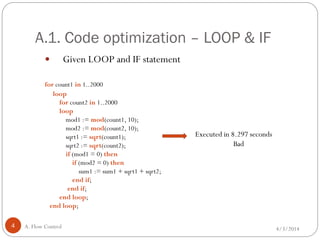
 Given LOOP and IF statement
for count1 in 1..2000
loop
for count2 in 1..2000
loop
mod1 := mod(count1, 10);
mod2 := mod(count2, 10);
sqrt1 := sqrt(count1);
sqrt2 := sqrt(count2);
if (mod1 = 0) then
if (mod2 = 0) then
sum1 := sum1 + sqrt1 + sqrt2;
end if;
end if;
end loop;
end loop;
Executed in 8.297 seconds
Bad
A.1. Code optimization – LOOP & IF(cont)
4/3/2014A. Flow Control5
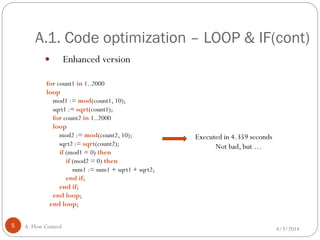
 Enhanced version
for count1 in 1..2000
loop
mod1 := mod(count1, 10);
sqrt1 := sqrt(count1);
for count2 in 1..2000
loop
mod2 := mod(count2, 10);
sqrt2 := sqrt(count2);
if (mod1 = 0) then
if (mod2 = 0) then
sum1 := sum1 + sqrt1 + sqrt2;
end if;
end if;
end loop;
end loop;
Executed in 4.359 seconds
Not bad, but …
A.1. Code optimization – LOOP & IF(cont)
4/3/2014A. Flow Control6
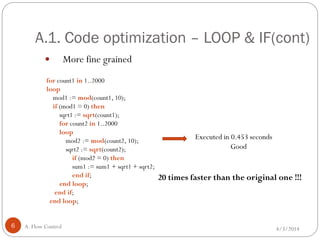
 More fine grained
for count1 in 1..2000
loop
mod1 := mod(count1, 10);
if (mod1 = 0) then
sqrt1 := sqrt(count1);
for count2 in 1..2000
loop
mod2 := mod(count2, 10);
sqrt2 := sqrt(count2);
if (mod2 = 0) then
sum1 := sum1 + sqrt1 + sqrt2;
end if;
end loop;
end if;
end loop;
Executed in 0.453 seconds
Good
20 times faster than the original one !!!
A.1. Code optimization – LOOP & IF(cont)
4/3/2014A. Flow Control7
 Conclusion
 Minimize the number of iterations: use EXIT to cease looping where
necessary.
 Remove any statements within a loop that could be processed outside
the loop, especially when you have nested loop.
 Specify the most probable condition first in a compound IF statement:
try to reduce the number of evaluations.
A.2. Code optimization - Recursion
4/3/2014A. Flow Control8
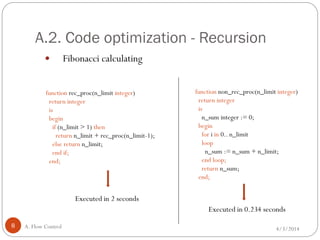
 Fibonacci calculating
function rec_proc(n_limit integer)
return integer
is
begin
if (n_limit > 1) then
return n_limit + rec_proc(n_limit-1);
else return n_limit;
end if;
end;
function non_rec_proc(n_limit integer)
return integer
is
n_sum integer := 0;
begin
for i in 0.. n_limit
loop
n_sum := n_sum + n_limit;
end loop;
return n_sum;
end;
Executed in 2 seconds
Executed in 0.234 seconds
A.2. Code optimization - Recursion(cont)
4/3/2014A. Flow Control9
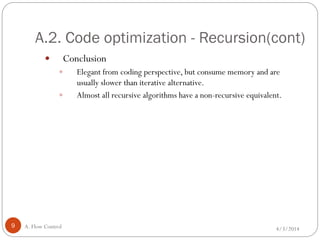
 Conclusion
 Elegant from coding perspective, but consume memory and are
usually slower than iterative alternative.
 Almost all recursive algorithms have a non-recursive equivalent.
B.1. Bulk processing in PL/SQL
4/3/2014B. Bulk Processing10
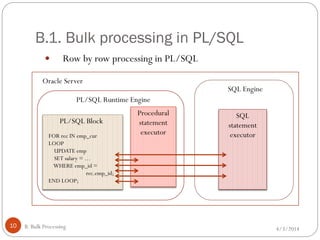
 Row by row processing in PL/SQL
SQL
statement
executor
SQL Engine
Procedural
statement
executor
PL/SQL Runtime Engine
PL/SQL Block
FOR rec IN emp_cur
LOOP
UPDATE emp
SET salary = …
WHERE emp_id =
rec.emp_id;
END LOOP;
Oracle Server
B.1. Bulk processing in PL/SQL(cont)
4/3/2014B. Bulk Processing11
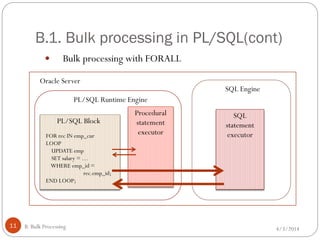
 Bulk processing with FORALL
SQL
statement
executor
SQL Engine
Procedural
statement
executor
PL/SQL Runtime Engine
PL/SQL Block
FOR rec IN emp_cur
LOOP
UPDATE emp
SET salary = …
WHERE emp_id =
rec.emp_id;
END LOOP;
Oracle Server
B.1. Bulk processing in PL/SQL(cont)
4/3/2014B. Bulk Processing12
 Bulk processing with FORALL (cont.)
 Fewer context switches.
 Same SQL behavior.
 Use with inserts, updates, deletes and merges.
 Move data from collections to tables.
B.1. Bulk processing in PL/SQL(cont)
4/3/2014B. Bulk Processing13
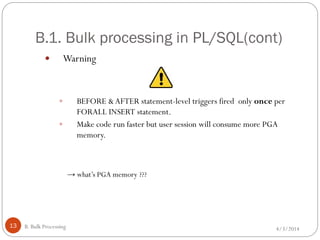
 Warning
 BEFORE &AFTER statement-level triggers fired only once per
FORALL INSERT statement.
 Make code run faster but user session will consume more PGA
memory.
→ what’s PGA memory ???
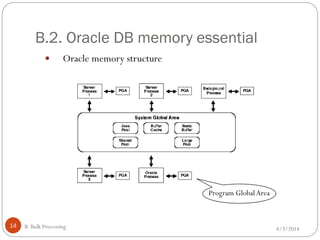
B.2. Oracle DB memory essential
4/3/2014B. Bulk Processing14
 Oracle memory structure
Program GlobalArea
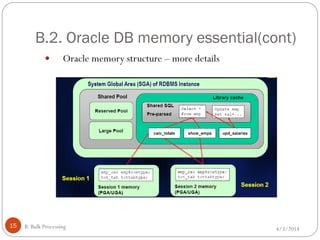
B.2. Oracle DB memory essential(cont)
4/3/2014B. Bulk Processing15
 Oracle memory structure – more details
B.2. Oracle DB memory essential(cont)
4/3/2014B. Bulk Processing16
 Memory solution
 Bulk collection with LIMIT.
CAUTION !!!
 Do not checking %NOTFOUND right after fetch.
 Do one of the following instead:
 Check %NOTFOUND at the end of the loop.
 Exit when collection.COUNT = 0 right after fetch.
 Exit when collection.COUNT < limit at the end of the loop.
B.3. Exception handling
4/3/2014B. Bulk Processing17
 Got exception in FORALL statement ?
 Add SAVE EXCEPTIONS to suppress errors at statement level.
 Exception will be handled in Exception block.
B.3. Exception handling(cont)
4/3/2014B. Bulk Processing18
 Typical errors with bulk processing
 Rollback segment too small …
 Cause: too many uncommitted changes, the rollback segment can not
handle all.
 Solution: may still need to use incremental commit.
 Snapshot is too old ...
 Cause: a cursor is held open too long, Oracle can no longer maintain the
snapshot information.
 Solution: open-close cursor.
B.3. Bulk processing conclusion
4/3/2014B. Bulk Processing19
 Conclusion
 Should always try to execute multi-row SQL operations in PL/SQL.
 Watch out for impact on PGA memory.
C.1. SQL processing
4/3/2014C. Oracle Hints20
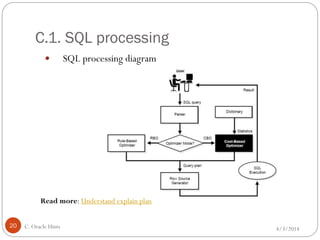
 SQL processing diagram
Read more: Understand explain plan
C.1. SQL processing(cont)
4/3/2014C. Oracle Hints21
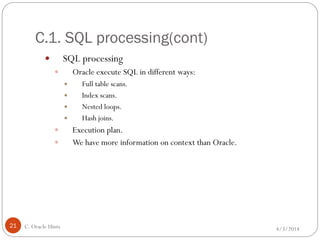
 SQL processing
 Oracle execute SQL in different ways:
 Full table scans.
 Index scans.
 Nested loops.
 Hash joins.
 Execution plan.
 We have more information on context than Oracle.
C.1. SQL processing(cont)
4/3/2014C. Oracle Hints22
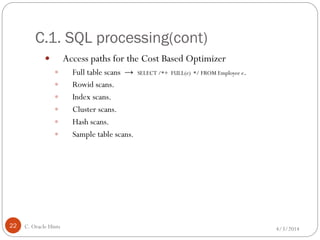
 Access paths for the Cost Based Optimizer
 Full table scans → SELECT /*+ FULL(e) */ FROM Employee e.
 Rowid scans.
 Index scans.
 Cluster scans.
 Hash scans.
 Sample table scans.
C.1. SQL processing(cont)
4/3/2014C. Oracle Hints23
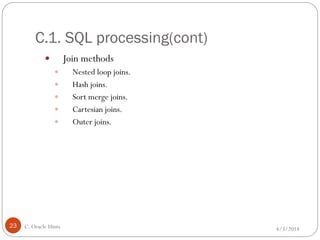
 Join methods
 Nested loop joins.
 Hash joins.
 Sort merge joins.
 Cartesian joins.
 Outer joins.
C.1. SQL processing(cont)
4/3/2014C. Oracle Hints24
 Why hints are needed ?
 Incorrect/incomplete statistics.
 Keywords that slow performance down.
 Highly volatile data changes.
 Configurations outside Optimizer knowledge scope.
C.2. Oracle hints introduction
4/3/2014C. Oracle Hints25
 What is Oracle hint?
 A code snippet that is embedded into a SQL statement.
 Suggest to Oracle how the statement should be executed.
Note: Hints should only be used as a last-resort if statistics were gathered and the query is still
following a sub-optimal execution plan.
 Hint syntax
--+RULE
/*+RULE */
Read more: http://psoug.org/reference/hints.html
C.2. Oracle hints introduction(cont)
4/3/2014C. Oracle Hints26
 Some of the most useful hints
 Global hints: rule, first_rows, first_rows_n all_rows, driving_site.
 Table join hints: use_nl, use_hash, ordered.
 Table access hints: parallel, full, cardinality.
 Index hints: index, no_index, index_combine.
C.3. Example hints
4/3/2014C. Oracle Hints27
 Example
 Example suggesting that a FULLTABLE SCAN method be used:
SELECT /*+ FULL(x) */ FROM tab1 xWHERE col1 = 10;
 Suggest that Oracle uses a specific index:
SELECT /*+ INDEX(x emp_idx1) */ ... FROM scott.emp x...
 Suggest that Oracle DOES NOT USE a specific index:
SELECT /*+ NO_INDEX(x emp_idx1) */ ... FROM scott.emp x...
C.4. Oracle Parallel Query
4/3/2014C. Oracle Hints28
 Oracle Parallel Query
 PQO allows one to break-up a given SQL statement
 Its parts can run simultaneously on different processors in a multi-
processor machine
 Typical operations that can run parallel are: full table scans, sorts, sub-
queries, data loading ,…
 Advantage: improve performance of certain types of operations
dramatically on a multi-CPU system (usually be paired with full table
scans)
C.4. Oracle Parallel Query(cont)
4/3/2014C. Oracle Hints29
 How to invoke Parallel query?
 Alter the table (or index) to indicate that Oracle should try to
parallelize operations performed against it
ALTERTABLE table_name PARALLEL (DEGREE 8);
 Put hints in SQL statements to indicate that Oracle should try to
execute them in parallel
SELECT /*+PARALLEL(table_alias, degree, nodes)*/ * FROM
table_name ...
Note:You must set all the INIT.ORA parameters necessary for Parallel Query to work
C.4. Oracle Parallel Query(cont)
4/3/2014C. Oracle Hints30
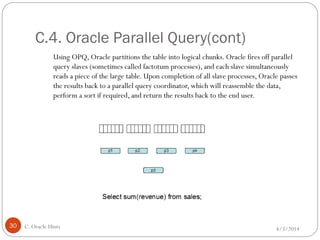
Using OPQ, Oracle partitions the table into logical chunks. Oracle fires off parallel
query slaves (sometimes called factotum processes), and each slave simultaneously
reads a piece of the large table. Upon completion of all slave processes, Oracle passes
the results back to a parallel query coordinator, which will reassemble the data,
perform a sort if required, and return the results back to the end user.
Resources
4/3/201431
 Doing SQL from PL/SQL: Best andWorst Practices – Oracle.
 Tuning Oracle Stored Procedures – Guy Harrison, Quest Software.
 Turbo-charge PL/SQL Performance with Bulk Processing Features – Steven
Feuerstein,ToadWorld.com.
 The “Top 10” Dumbest PL/SQLThings I Have Seen or Done – Steven
Feuerstein, Quest Software.
 Oracle Documentation about MemoryArchitecture
 Understanding explain plan
 When NOT EXIST should NOT EXIST
D. Resources
4/3/201432
Q/A
E. Q/A

PLSQL Advanced

  • 1.
    Author: DuyTran Minh Doan 10,April2012 4/3/20141 Advanced PL/SQL
  • 2.
    Objective 4/3/20142 You should havebasic knowledge about PL/SQL and database management before reading this. This slide will guide you through some advanced concepts of PL/SQL like hints, execution plan, bulk processing, …You should use this slide as reference but remember to do testing everything before apply to your code.
  • 3.
    Agenda 4/3/20143 A. Flow Control B.Bulk Processing C. Oracle Hints D. Resources E. Q/A
  • 4.
    A.1. Code optimization– LOOP & IF 4/3/2014A. Flow Control4  Given LOOP and IF statement for count1 in 1..2000 loop for count2 in 1..2000 loop mod1 := mod(count1, 10); mod2 := mod(count2, 10); sqrt1 := sqrt(count1); sqrt2 := sqrt(count2); if (mod1 = 0) then if (mod2 = 0) then sum1 := sum1 + sqrt1 + sqrt2; end if; end if; end loop; end loop; Executed in 8.297 seconds Bad
  • 5.
    A.1. Code optimization– LOOP & IF(cont) 4/3/2014A. Flow Control5  Enhanced version for count1 in 1..2000 loop mod1 := mod(count1, 10); sqrt1 := sqrt(count1); for count2 in 1..2000 loop mod2 := mod(count2, 10); sqrt2 := sqrt(count2); if (mod1 = 0) then if (mod2 = 0) then sum1 := sum1 + sqrt1 + sqrt2; end if; end if; end loop; end loop; Executed in 4.359 seconds Not bad, but …
  • 6.
    A.1. Code optimization– LOOP & IF(cont) 4/3/2014A. Flow Control6  More fine grained for count1 in 1..2000 loop mod1 := mod(count1, 10); if (mod1 = 0) then sqrt1 := sqrt(count1); for count2 in 1..2000 loop mod2 := mod(count2, 10); sqrt2 := sqrt(count2); if (mod2 = 0) then sum1 := sum1 + sqrt1 + sqrt2; end if; end loop; end if; end loop; Executed in 0.453 seconds Good 20 times faster than the original one !!!
  • 7.
    A.1. Code optimization– LOOP & IF(cont) 4/3/2014A. Flow Control7  Conclusion  Minimize the number of iterations: use EXIT to cease looping where necessary.  Remove any statements within a loop that could be processed outside the loop, especially when you have nested loop.  Specify the most probable condition first in a compound IF statement: try to reduce the number of evaluations.
  • 8.
    A.2. Code optimization- Recursion 4/3/2014A. Flow Control8  Fibonacci calculating function rec_proc(n_limit integer) return integer is begin if (n_limit > 1) then return n_limit + rec_proc(n_limit-1); else return n_limit; end if; end; function non_rec_proc(n_limit integer) return integer is n_sum integer := 0; begin for i in 0.. n_limit loop n_sum := n_sum + n_limit; end loop; return n_sum; end; Executed in 2 seconds Executed in 0.234 seconds
  • 9.
    A.2. Code optimization- Recursion(cont) 4/3/2014A. Flow Control9  Conclusion  Elegant from coding perspective, but consume memory and are usually slower than iterative alternative.  Almost all recursive algorithms have a non-recursive equivalent.
  • 10.
    B.1. Bulk processingin PL/SQL 4/3/2014B. Bulk Processing10  Row by row processing in PL/SQL SQL statement executor SQL Engine Procedural statement executor PL/SQL Runtime Engine PL/SQL Block FOR rec IN emp_cur LOOP UPDATE emp SET salary = … WHERE emp_id = rec.emp_id; END LOOP; Oracle Server
  • 11.
    B.1. Bulk processingin PL/SQL(cont) 4/3/2014B. Bulk Processing11  Bulk processing with FORALL SQL statement executor SQL Engine Procedural statement executor PL/SQL Runtime Engine PL/SQL Block FOR rec IN emp_cur LOOP UPDATE emp SET salary = … WHERE emp_id = rec.emp_id; END LOOP; Oracle Server
  • 12.
    B.1. Bulk processingin PL/SQL(cont) 4/3/2014B. Bulk Processing12  Bulk processing with FORALL (cont.)  Fewer context switches.  Same SQL behavior.  Use with inserts, updates, deletes and merges.  Move data from collections to tables.
  • 13.
    B.1. Bulk processingin PL/SQL(cont) 4/3/2014B. Bulk Processing13  Warning  BEFORE &AFTER statement-level triggers fired only once per FORALL INSERT statement.  Make code run faster but user session will consume more PGA memory. → what’s PGA memory ???
  • 14.
    B.2. Oracle DBmemory essential 4/3/2014B. Bulk Processing14  Oracle memory structure Program GlobalArea
  • 15.
    B.2. Oracle DBmemory essential(cont) 4/3/2014B. Bulk Processing15  Oracle memory structure – more details
  • 16.
    B.2. Oracle DBmemory essential(cont) 4/3/2014B. Bulk Processing16  Memory solution  Bulk collection with LIMIT. CAUTION !!!  Do not checking %NOTFOUND right after fetch.  Do one of the following instead:  Check %NOTFOUND at the end of the loop.  Exit when collection.COUNT = 0 right after fetch.  Exit when collection.COUNT < limit at the end of the loop.
  • 17.
    B.3. Exception handling 4/3/2014B.Bulk Processing17  Got exception in FORALL statement ?  Add SAVE EXCEPTIONS to suppress errors at statement level.  Exception will be handled in Exception block.
  • 18.
    B.3. Exception handling(cont) 4/3/2014B.Bulk Processing18  Typical errors with bulk processing  Rollback segment too small …  Cause: too many uncommitted changes, the rollback segment can not handle all.  Solution: may still need to use incremental commit.  Snapshot is too old ...  Cause: a cursor is held open too long, Oracle can no longer maintain the snapshot information.  Solution: open-close cursor.
  • 19.
    B.3. Bulk processingconclusion 4/3/2014B. Bulk Processing19  Conclusion  Should always try to execute multi-row SQL operations in PL/SQL.  Watch out for impact on PGA memory.
  • 20.
    C.1. SQL processing 4/3/2014C.Oracle Hints20  SQL processing diagram Read more: Understand explain plan
  • 21.
    C.1. SQL processing(cont) 4/3/2014C.Oracle Hints21  SQL processing  Oracle execute SQL in different ways:  Full table scans.  Index scans.  Nested loops.  Hash joins.  Execution plan.  We have more information on context than Oracle.
  • 22.
    C.1. SQL processing(cont) 4/3/2014C.Oracle Hints22  Access paths for the Cost Based Optimizer  Full table scans → SELECT /*+ FULL(e) */ FROM Employee e.  Rowid scans.  Index scans.  Cluster scans.  Hash scans.  Sample table scans.
  • 23.
    C.1. SQL processing(cont) 4/3/2014C.Oracle Hints23  Join methods  Nested loop joins.  Hash joins.  Sort merge joins.  Cartesian joins.  Outer joins.
  • 24.
    C.1. SQL processing(cont) 4/3/2014C.Oracle Hints24  Why hints are needed ?  Incorrect/incomplete statistics.  Keywords that slow performance down.  Highly volatile data changes.  Configurations outside Optimizer knowledge scope.
  • 25.
    C.2. Oracle hintsintroduction 4/3/2014C. Oracle Hints25  What is Oracle hint?  A code snippet that is embedded into a SQL statement.  Suggest to Oracle how the statement should be executed. Note: Hints should only be used as a last-resort if statistics were gathered and the query is still following a sub-optimal execution plan.  Hint syntax --+RULE /*+RULE */ Read more: http://psoug.org/reference/hints.html
  • 26.
    C.2. Oracle hintsintroduction(cont) 4/3/2014C. Oracle Hints26  Some of the most useful hints  Global hints: rule, first_rows, first_rows_n all_rows, driving_site.  Table join hints: use_nl, use_hash, ordered.  Table access hints: parallel, full, cardinality.  Index hints: index, no_index, index_combine.
  • 27.
    C.3. Example hints 4/3/2014C.Oracle Hints27  Example  Example suggesting that a FULLTABLE SCAN method be used: SELECT /*+ FULL(x) */ FROM tab1 xWHERE col1 = 10;  Suggest that Oracle uses a specific index: SELECT /*+ INDEX(x emp_idx1) */ ... FROM scott.emp x...  Suggest that Oracle DOES NOT USE a specific index: SELECT /*+ NO_INDEX(x emp_idx1) */ ... FROM scott.emp x...
  • 28.
    C.4. Oracle ParallelQuery 4/3/2014C. Oracle Hints28  Oracle Parallel Query  PQO allows one to break-up a given SQL statement  Its parts can run simultaneously on different processors in a multi- processor machine  Typical operations that can run parallel are: full table scans, sorts, sub- queries, data loading ,…  Advantage: improve performance of certain types of operations dramatically on a multi-CPU system (usually be paired with full table scans)
  • 29.
    C.4. Oracle ParallelQuery(cont) 4/3/2014C. Oracle Hints29  How to invoke Parallel query?  Alter the table (or index) to indicate that Oracle should try to parallelize operations performed against it ALTERTABLE table_name PARALLEL (DEGREE 8);  Put hints in SQL statements to indicate that Oracle should try to execute them in parallel SELECT /*+PARALLEL(table_alias, degree, nodes)*/ * FROM table_name ... Note:You must set all the INIT.ORA parameters necessary for Parallel Query to work
  • 30.
    C.4. Oracle ParallelQuery(cont) 4/3/2014C. Oracle Hints30 Using OPQ, Oracle partitions the table into logical chunks. Oracle fires off parallel query slaves (sometimes called factotum processes), and each slave simultaneously reads a piece of the large table. Upon completion of all slave processes, Oracle passes the results back to a parallel query coordinator, which will reassemble the data, perform a sort if required, and return the results back to the end user.
  • 31.
    Resources 4/3/201431  Doing SQLfrom PL/SQL: Best andWorst Practices – Oracle.  Tuning Oracle Stored Procedures – Guy Harrison, Quest Software.  Turbo-charge PL/SQL Performance with Bulk Processing Features – Steven Feuerstein,ToadWorld.com.  The “Top 10” Dumbest PL/SQLThings I Have Seen or Done – Steven Feuerstein, Quest Software.  Oracle Documentation about MemoryArchitecture  Understanding explain plan  When NOT EXIST should NOT EXIST D. Resources
  • 32.