Core Java Training
Collections – Lists, Sets
Page 1Classification: Restricted
3-February-
2003
cse403-10-Collections © 2003 University of Washington 1
Quick Recap…
• How to define a class completely
• Define a POJO
• Define private data members
• Define public getters and setters
• Override
• toString() for more meaningful logging and printing
• equals() for search in a collection
• hashCode() for providing hashing function
• Comparison logic
• java.lang.Comparable interface - DEFAULT
• java.util.Comparator interface – A Comparator class for every
comparison logic
Page 2Classification: Restricted
Agenda…
• List – ArrayList, LinkedList
• Set – HashSet, LinkedHashSet, TreeSet
Java & JEE Training
Collections
Page 4Classification: Restricted
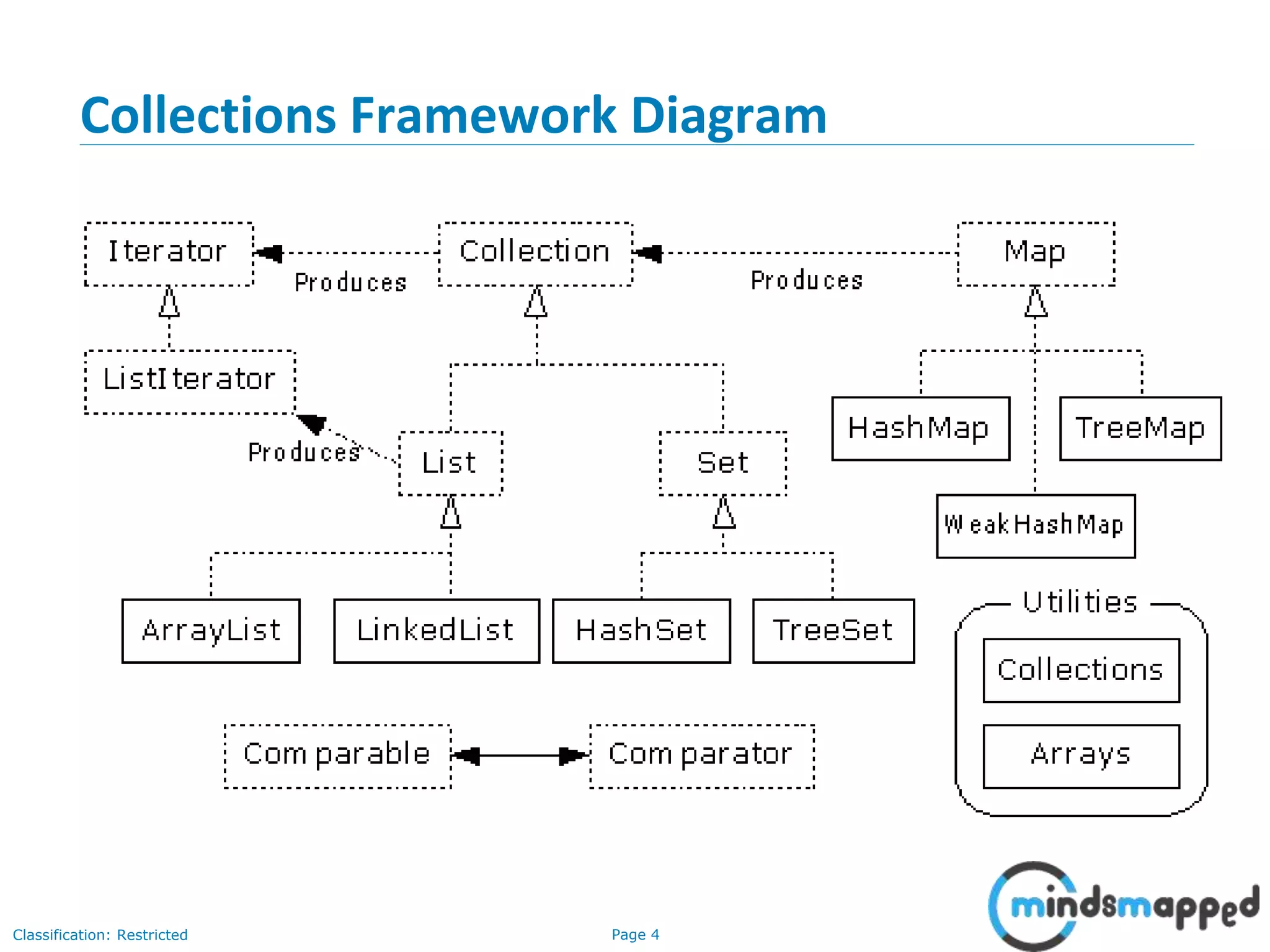
Collections Framework Diagram
Page 5Classification: Restricted
Collection Interface
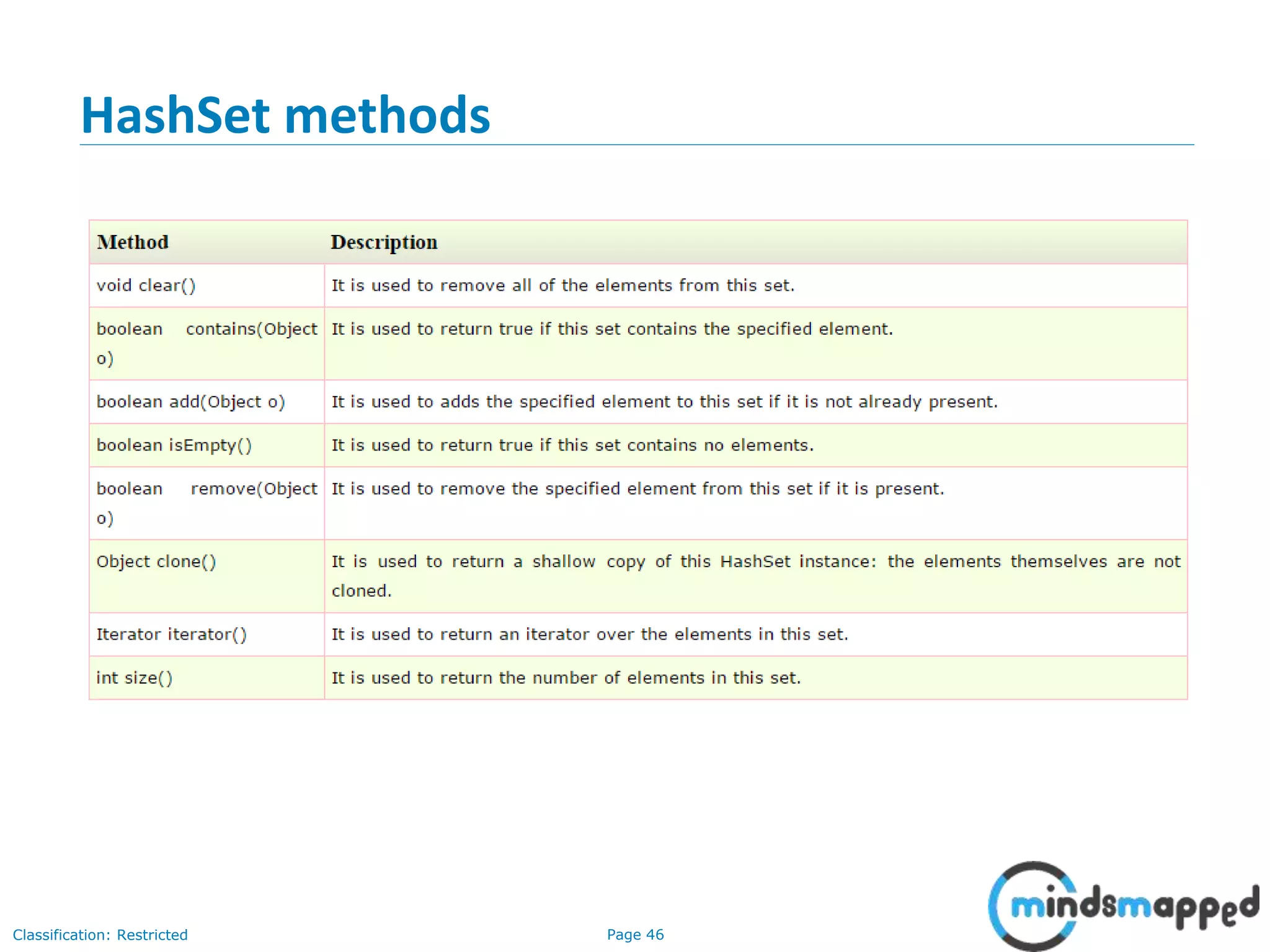
• Defines fundamental methods
• int size();
• boolean isEmpty();
• boolean contains(Object element);
• boolean add(Object element); // Optional
• boolean remove(Object element); // Optional
• Iterator iterator();
• These methods are enough to define the basic behavior of a collection
• Provides an Iterator to step through the elements in the Collection
Page 6Classification: Restricted
3-February-
2003
cse403-10-Collections © 2003 University of Washington 6
Iterator Interface
• Defines three fundamental methods
• Object next()
• boolean hasNext()
• void remove()
• These three methods provide access to the contents of the collection
• An Iterator knows position within collection
• Each call to next() “reads” an element from the collection
• Then you can use it or remove it
Page 7Classification: Restricted
3-February-
2003
cse403-10-Collections © 2003 University of Washington 7
Example - SimpleCollection
public class SimpleCollection {
public static void main(String[] args) {
Collection c;
c = new ArrayList();
System.out.println(c.getClass().getName());
for (int i=1; i <= 10; i++) {
c.add(i + " * " + i + " = "+i*i);
}
Iterator iter = c.iterator();
while (iter.hasNext())
System.out.println(iter.next());
}
}
Page 8Classification: Restricted
3-February-
2003
cse403-10-Collections © 2003 University of Washington 8
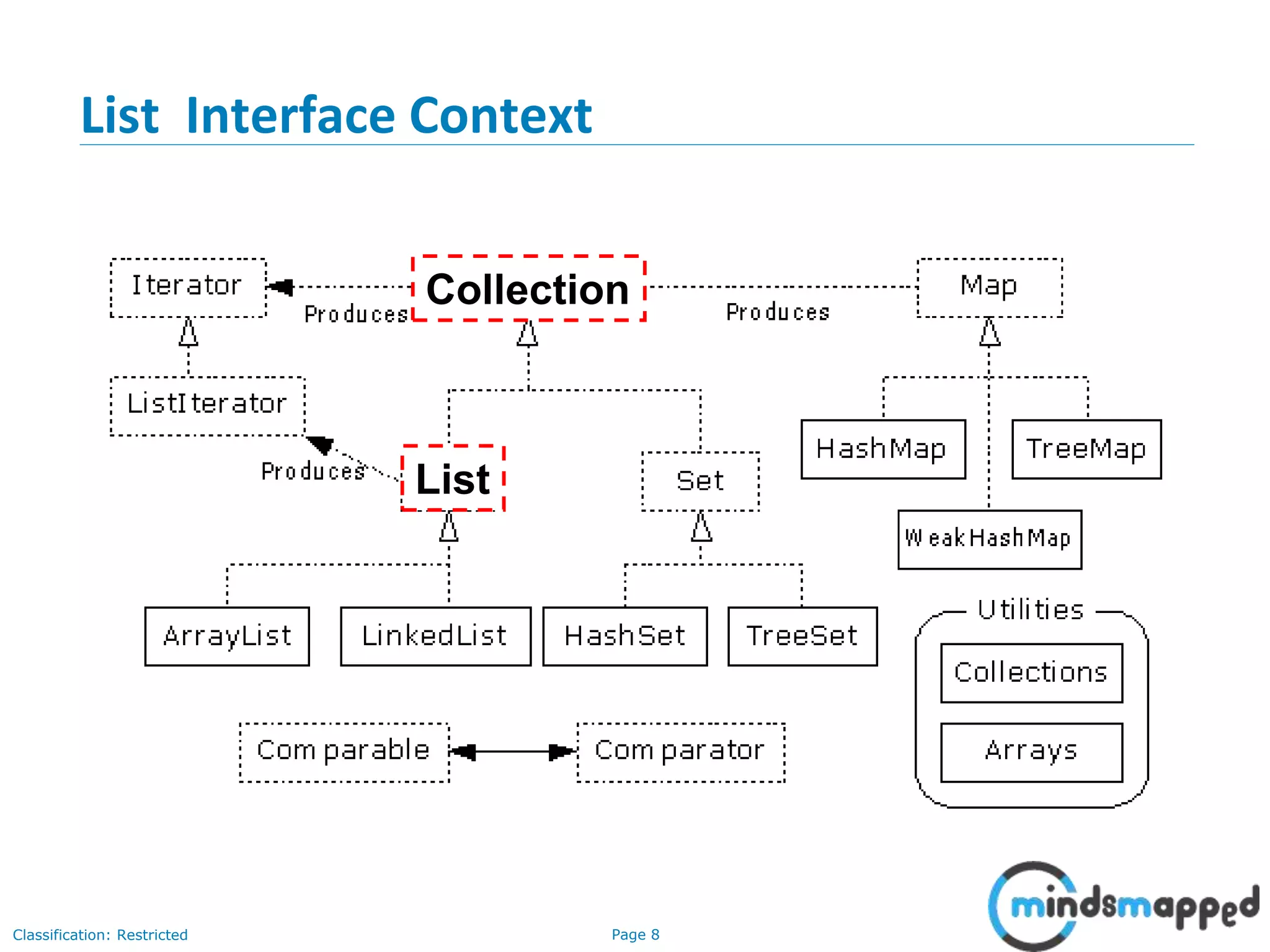
List Interface Context
Collection
List
Page 9Classification: Restricted
3-February-
2003
cse403-10-Collections © 2003 University of Washington 9
ListIterator Interface
• Extends the Iterator interface
• Defines three fundamental methods
• void add(Object o) - before current position
• boolean hasPrevious()
• Object previous()
• The addition of these three methods defines the basic behavior of an
ordered list
• A ListIterator knows position within list
Page 10Classification: Restricted
3-February-
2003
cse403-10-Collections © 2003 University of Washington 10
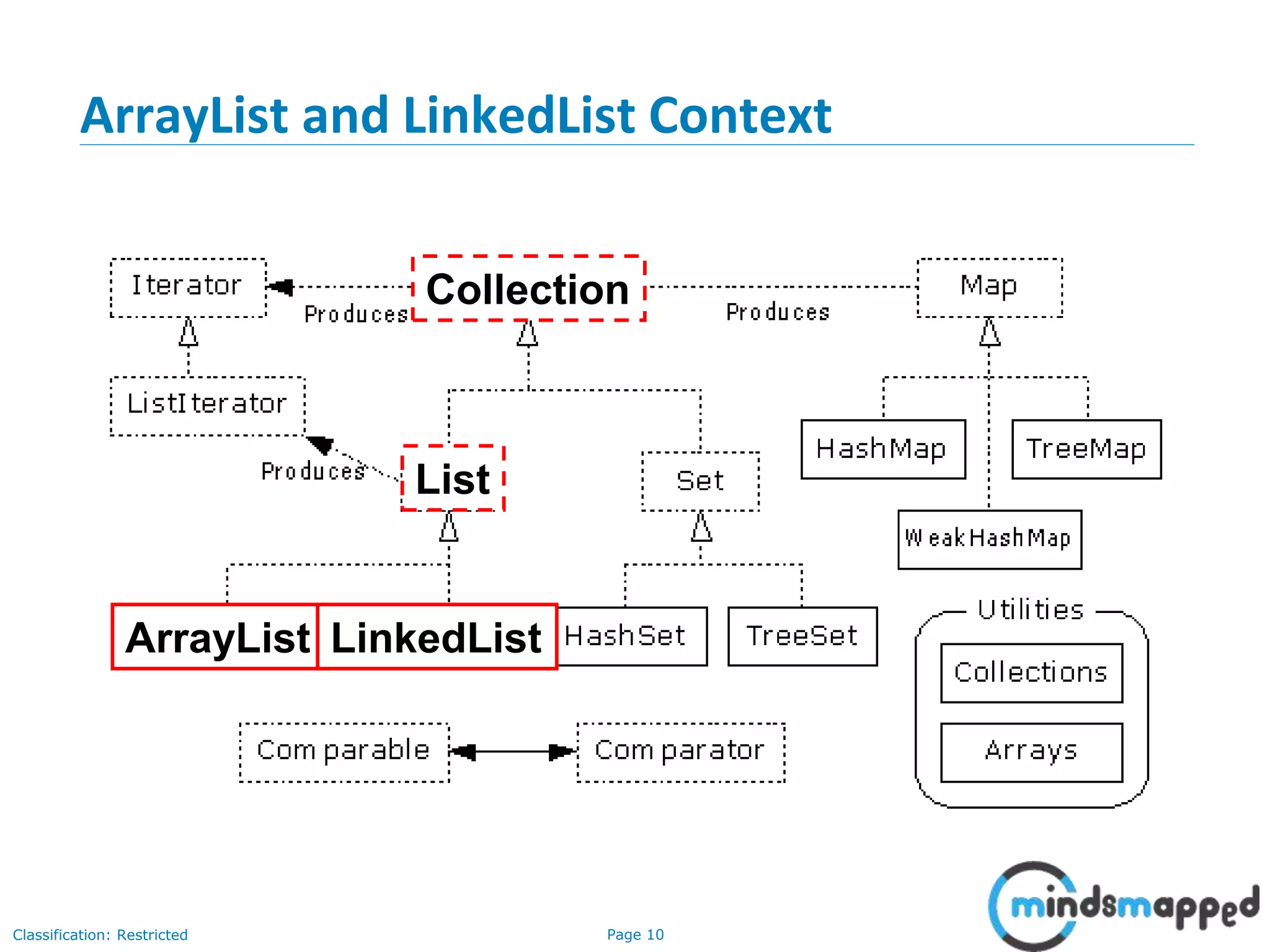
ArrayList and LinkedList Context
ArrayList LinkedList
Collection
List
Page 11Classification: Restricted
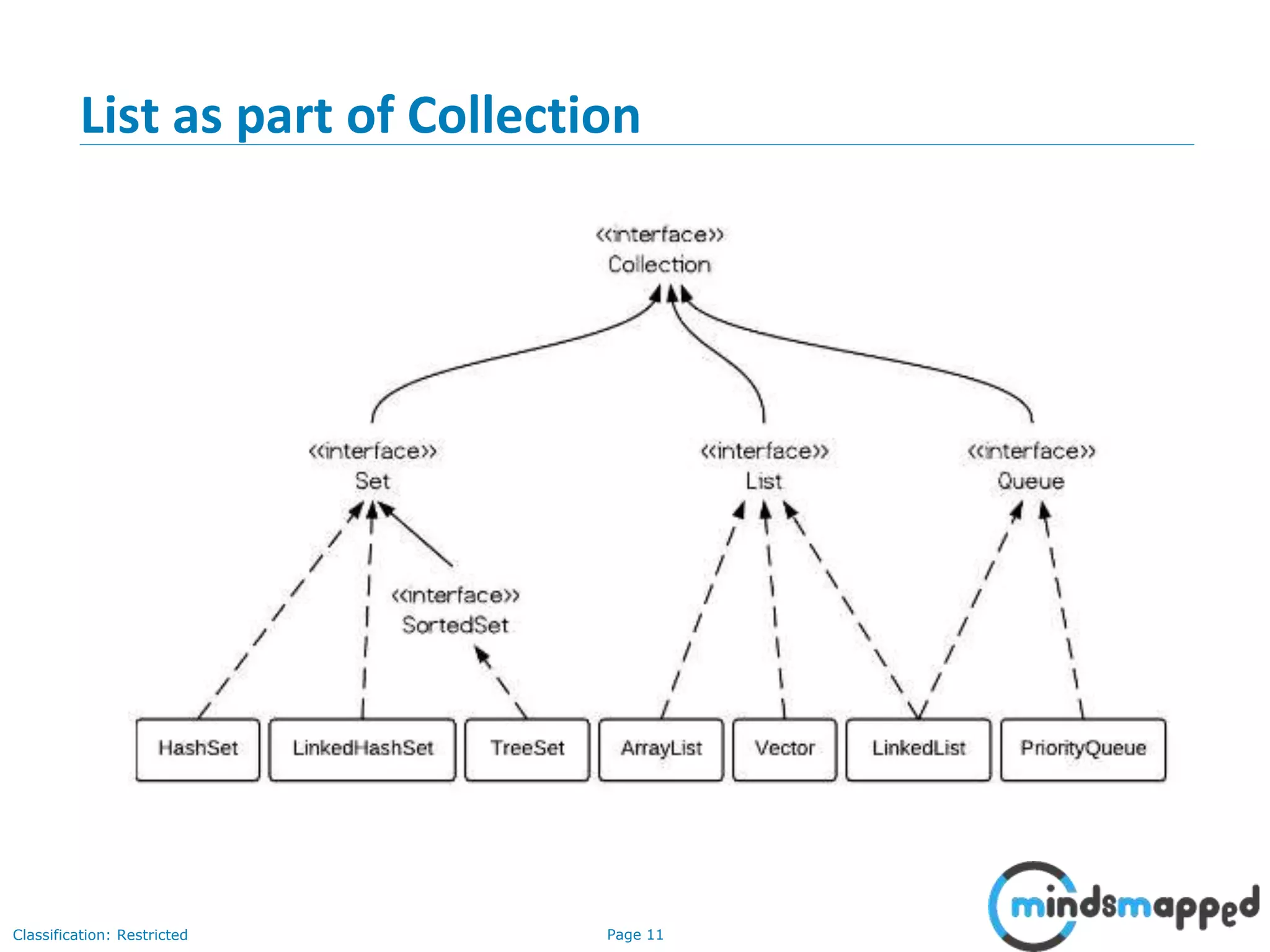
List as part of Collection
Page 12Classification: Restricted
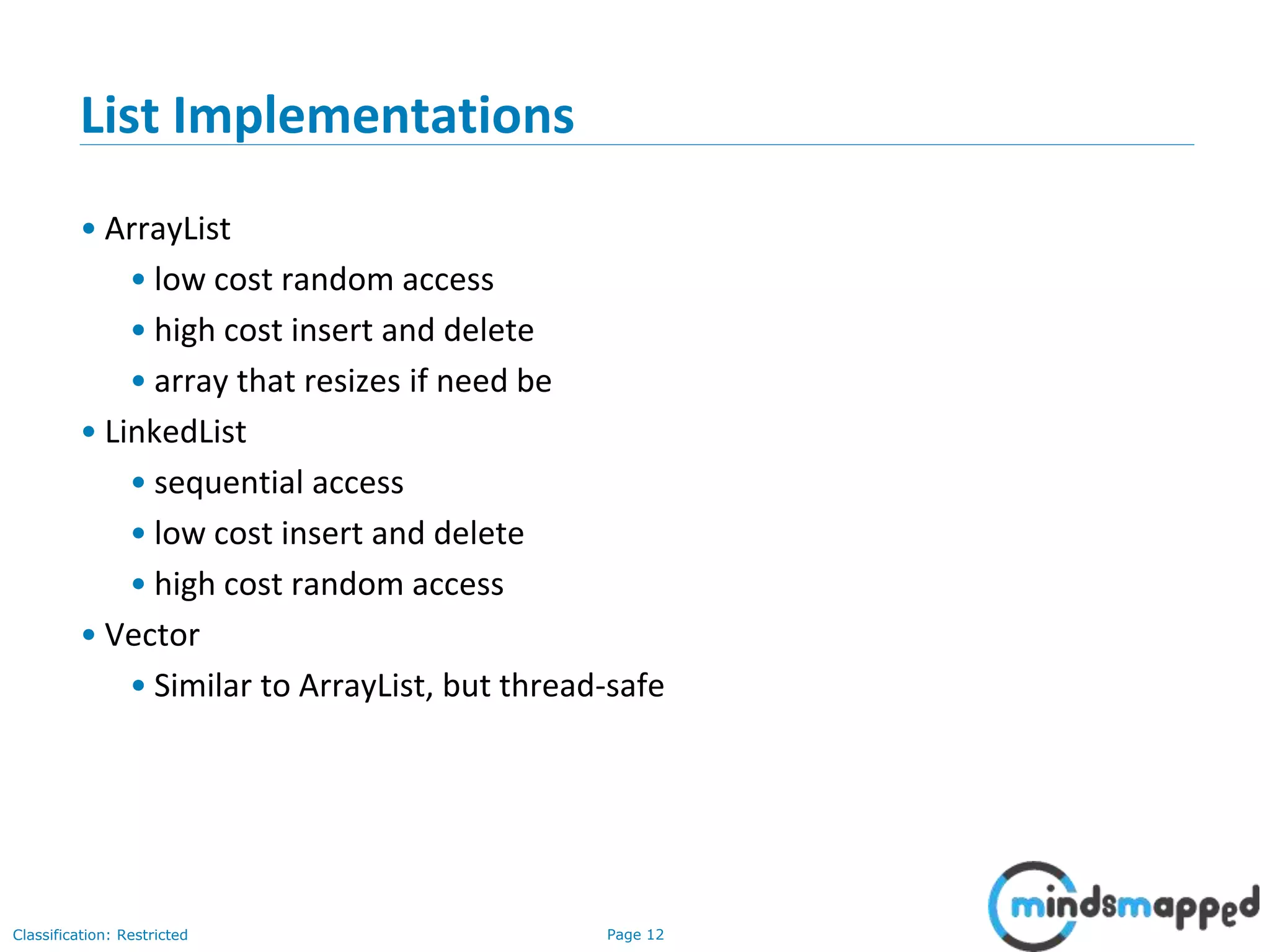
List Implementations
• ArrayList
• low cost random access
• high cost insert and delete
• array that resizes if need be
• LinkedList
• sequential access
• low cost insert and delete
• high cost random access
• Vector
• Similar to ArrayList, but thread-safe
Page 13Classification: Restricted
3-February-
2003
cse403-10-Collections © 2003 University of Washington 13
ArrayList overview
• Constant time positional access (it’s an array)
• One tuning parameter, the initial capacity
public ArrayList(int initialCapacity) {
super();
if (initialCapacity < 0)
throw new IllegalArgumentException(
"Illegal Capacity:
"+initialCapacity);
this.elementData = new Object[initialCapacity];
}
Page 14Classification: Restricted
3-February-
2003
cse403-10-Collections © 2003 University of Washington 14
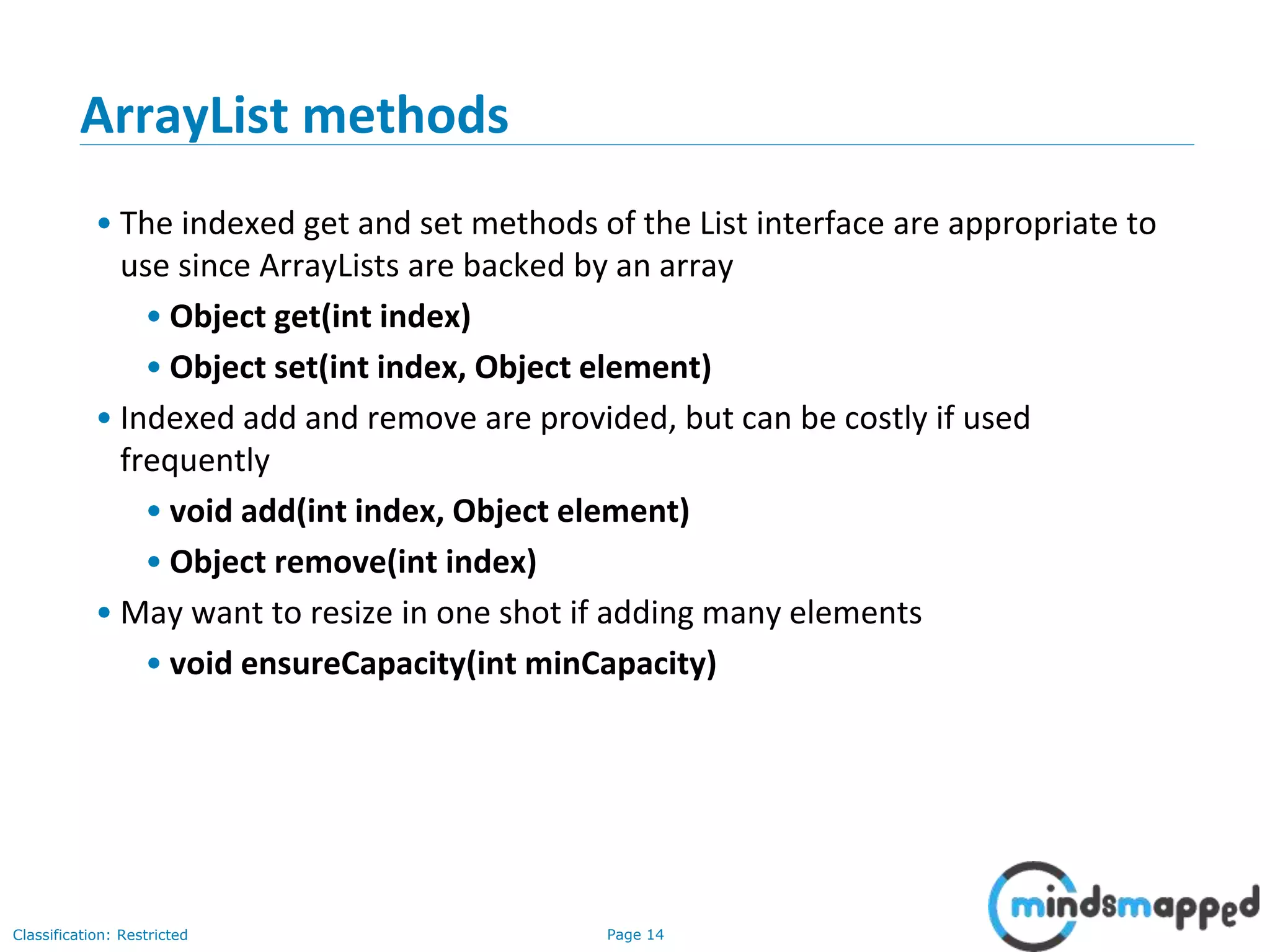
ArrayList methods
• The indexed get and set methods of the List interface are appropriate to
use since ArrayLists are backed by an array
• Object get(int index)
• Object set(int index, Object element)
• Indexed add and remove are provided, but can be costly if used
frequently
• void add(int index, Object element)
• Object remove(int index)
• May want to resize in one shot if adding many elements
• void ensureCapacity(int minCapacity)
Page 15Classification: Restricted
3-February-
2003
cse403-10-Collections © 2003 University of Washington 15
LinkedList overview
• Stores each element in a node
• Each node stores a link to the next and previous nodes
• Insertion and removal are inexpensive
• just update the links in the surrounding nodes
• Linear traversal is inexpensive
• Random access is expensive
• Start from beginning or end and traverse each node while counting
Page 16Classification: Restricted
3-February-
2003
cse403-10-Collections © 2003 University of Washington 16
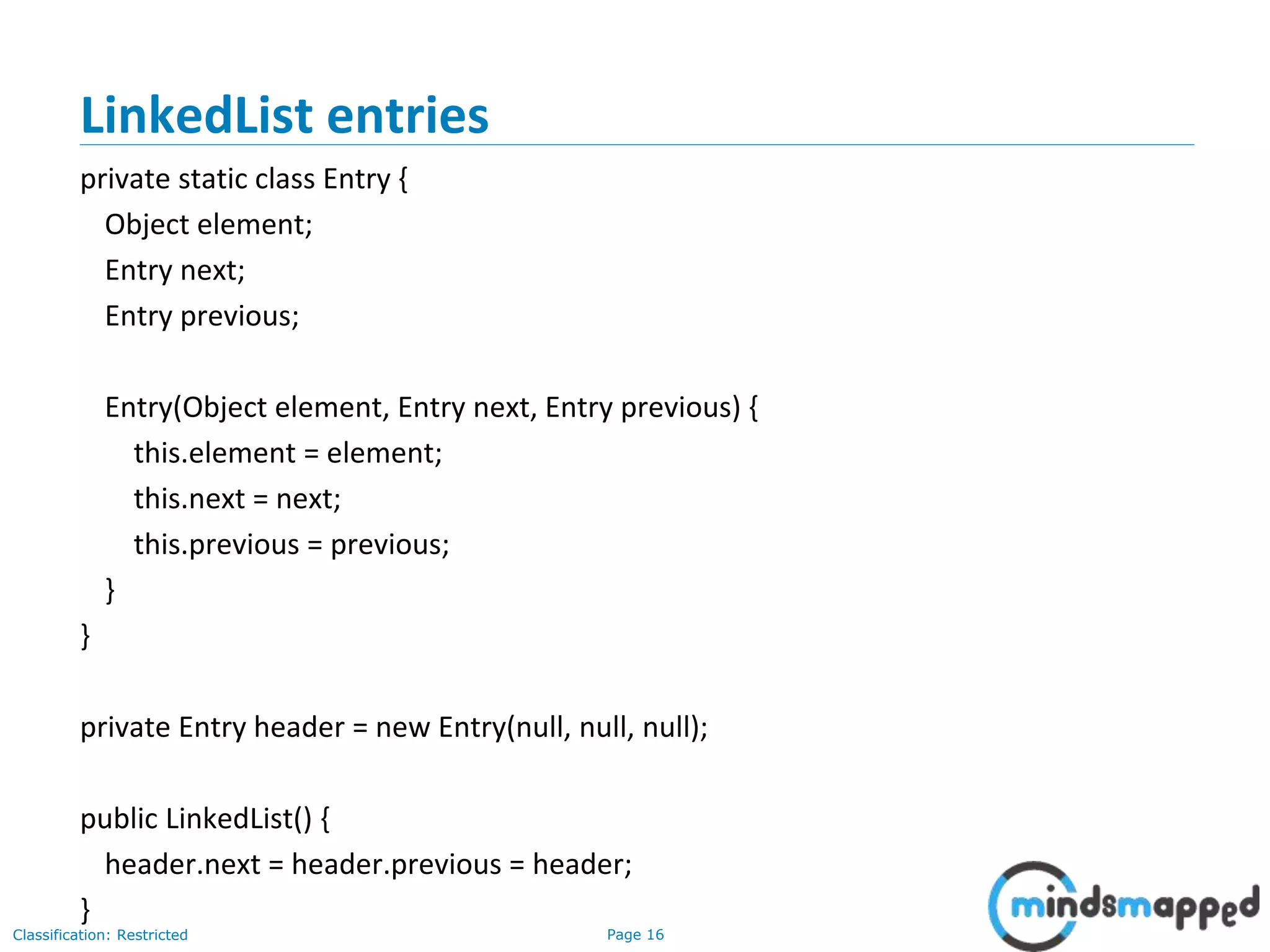
LinkedList entries
private static class Entry {
Object element;
Entry next;
Entry previous;
Entry(Object element, Entry next, Entry previous) {
this.element = element;
this.next = next;
this.previous = previous;
}
}
private Entry header = new Entry(null, null, null);
public LinkedList() {
header.next = header.previous = header;
}
Page 17Classification: Restricted
3-February-
2003
cse403-10-Collections © 2003 University of Washington 17
LinkedList methods
• The list is sequential, so access it that way
• ListIterator listIterator()
• ListIterator knows about position
• use add() from ListIterator to add at a position
• use remove() from ListIterator to remove at a position
• LinkedList knows a few things too
• void addFirst(Object o), void addLast(Object o)
• Object getFirst(), Object getLast()
• Object removeFirst(), Object removeLast()
Page 18Classification: Restricted
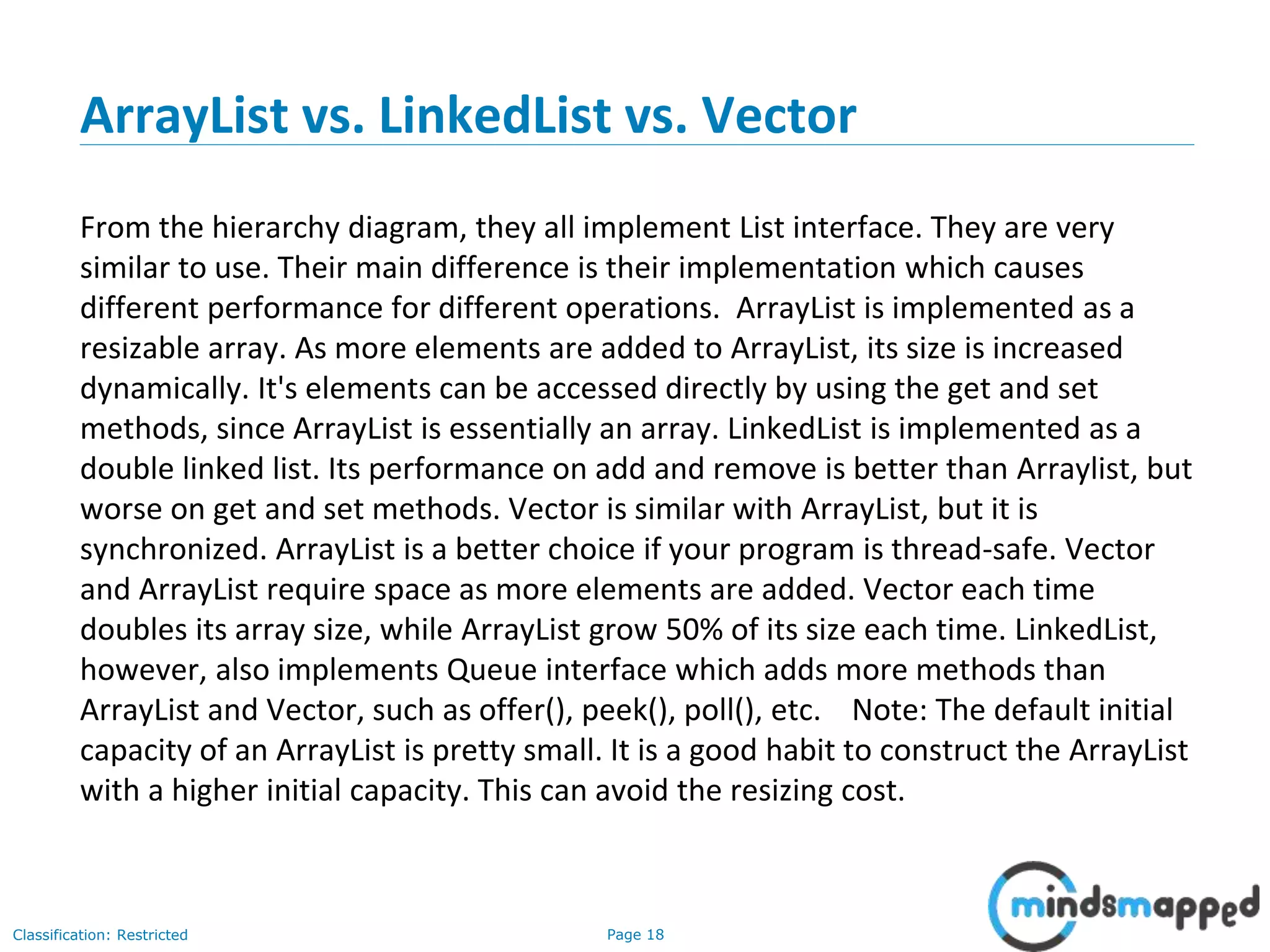
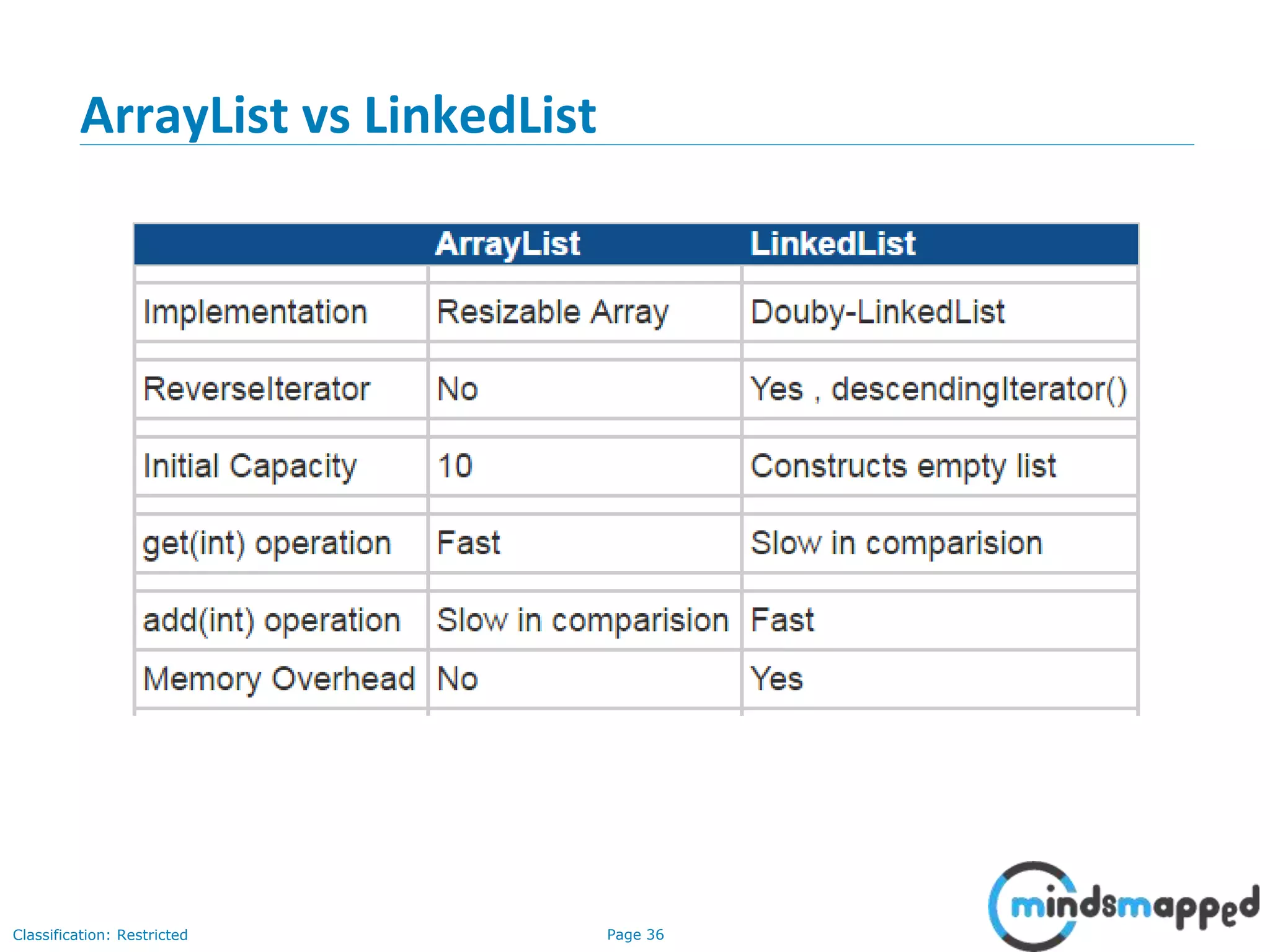
ArrayList vs. LinkedList vs. Vector
From the hierarchy diagram, they all implement List interface. They are very
similar to use. Their main difference is their implementation which causes
different performance for different operations. ArrayList is implemented as a
resizable array. As more elements are added to ArrayList, its size is increased
dynamically. It's elements can be accessed directly by using the get and set
methods, since ArrayList is essentially an array. LinkedList is implemented as a
double linked list. Its performance on add and remove is better than Arraylist, but
worse on get and set methods. Vector is similar with ArrayList, but it is
synchronized. ArrayList is a better choice if your program is thread-safe. Vector
and ArrayList require space as more elements are added. Vector each time
doubles its array size, while ArrayList grow 50% of its size each time. LinkedList,
however, also implements Queue interface which adds more methods than
ArrayList and Vector, such as offer(), peek(), poll(), etc. Note: The default initial
capacity of an ArrayList is pretty small. It is a good habit to construct the ArrayList
with a higher initial capacity. This can avoid the resizing cost.
Page 19Classification: Restricted
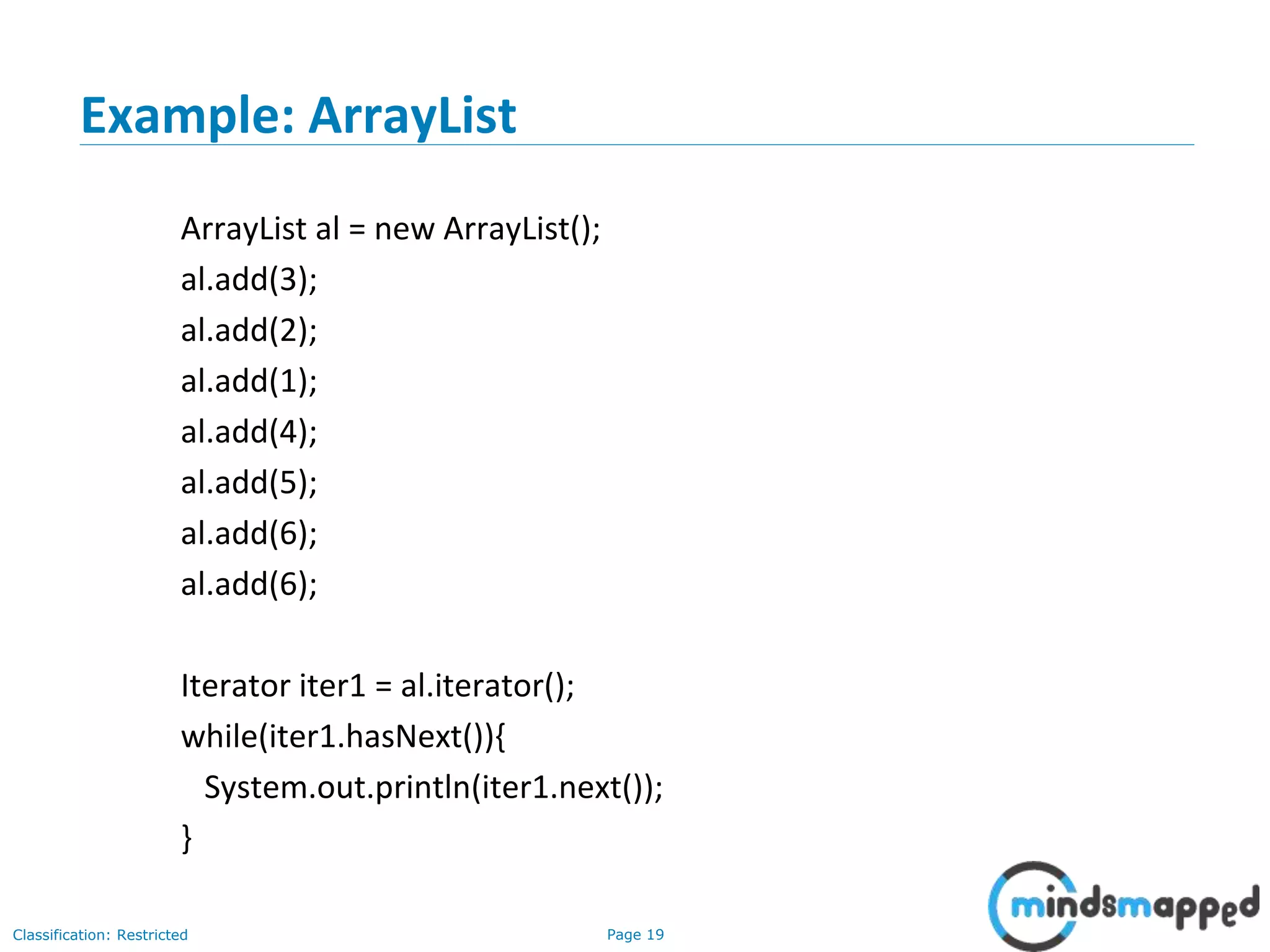
Example: ArrayList
ArrayList al = new ArrayList();
al.add(3);
al.add(2);
al.add(1);
al.add(4);
al.add(5);
al.add(6);
al.add(6);
Iterator iter1 = al.iterator();
while(iter1.hasNext()){
System.out.println(iter1.next());
}
Page 20Classification: Restricted
Example: ArrayList (Using Generics + Iterating using Iterator
and for-each loop)
import java.util.*;
class TestCollection1{
public static void main(String args[]){
ArrayList<String> list=new ArrayList<String>();//Creating arraylist
list.add("Ravi");//Adding object in arraylist
list.add("Vijay");
list.add("Ravi");
list.add("Ajay");
//Traversing list through Iterator
Iterator itr=list.iterator();
while(itr.hasNext()){
System.out.println(itr.next());
}
//Traversing using for-each loop
for(String obj:list)
System.out.println(obj);
}
}
Page 21Classification: Restricted
User-defined class objects in Java ArrayList
class Student{
int rollno;
String name;
int age;
Student(int rollno,String name,int age){
this.rollno=rollno;
this.name=name;
this.age=age;
}
}
import java.util.*;
public class TestCollection3{
public static void main(String args[]){
//Creating user-defined class objects
Student s1=new Student(101,"Sonoo",23);
Student s2=new Student(102,"Ravi",21);
Student s2=new Student(103,"Hanumat",25);
//creating arraylist
ArrayList<Student> al=new ArrayList<Student>();
al.add(s1);//adding Student class object
al.add(s2);
al.add(s3);
//Getting Iterator
Iterator itr=al.iterator();
//traversing elements of ArrayList object
while(itr.hasNext()){
Student st=(Student)itr.next();
System.out.println(st.rollno+" "+st.name+" "+st.age);
}
}
}
Page 22Classification: Restricted
ArrayList Constructors
Page 23Classification: Restricted
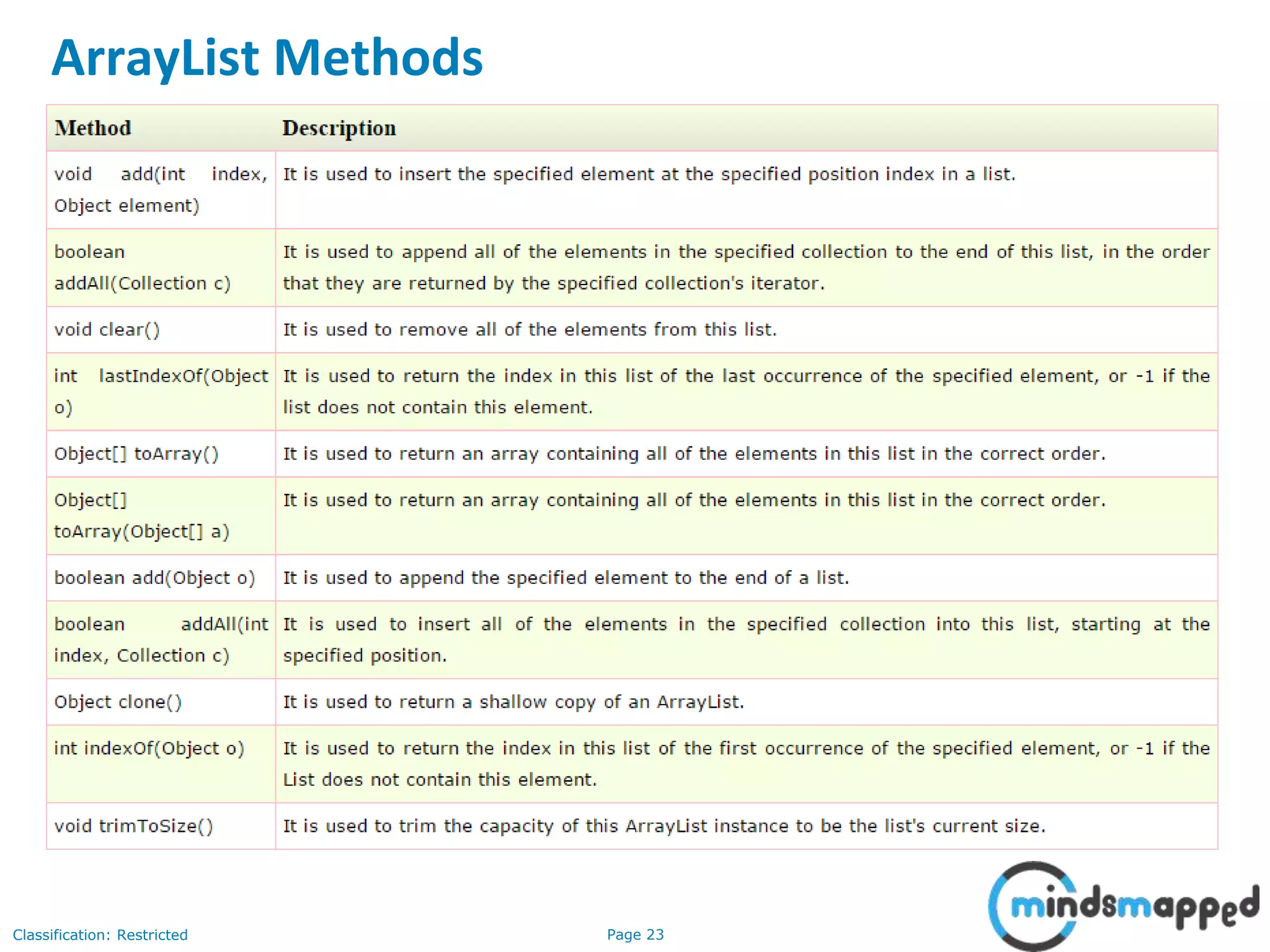
ArrayList Methods
Page 24Classification: Restricted
Example of addAll(Collection c) method
import java.util.*;
class TestCollection4{
public static void main(String args[]){
ArrayList<String> al=new ArrayList<String>();
al.add("Ravi");
al.add("Vijay");
al.add("Ajay");
ArrayList<String> al2=new ArrayList<String>();
al2.add("Sonoo");
al2.add("Hanumat");
al.addAll(al2);//adding second list in first list
Iterator itr=al.iterator();
while(itr.hasNext()){
System.out.println(itr.next());
}
}
}
Page 25Classification: Restricted
Example of removeAll() method
import java.util.*;
class TestCollection5{
public static void main(String args[]){
ArrayList<String> al=new ArrayList<String>();
al.add("Ravi");
al.add("Vijay");
al.add("Ajay");
ArrayList<String> al2=new ArrayList<String>();
al2.add("Ravi");
al2.add("Hanumat");
al.removeAll(al2);
System.out.println("iterating the elements after removing the elements of al2...");
Iterator itr=al.iterator();
while(itr.hasNext()){
System.out.println(itr.next());
}
}
}
Page 26Classification: Restricted
Example of retainAll()
import java.util.*;
class TestCollection6{
public static void main(String args[]){
ArrayList<String> al=new ArrayList<String>();
al.add("Ravi");
al.add("Vijay");
al.add("Ajay");
ArrayList<String> al2=new ArrayList<String>();
al2.add("Ravi");
al2.add("Hanumat");
al.retainAll(al2);
System.out.println("iterating the elements after retaining the elements of al2...");
Iterator itr=al.iterator();
while(itr.hasNext()){
System.out.println(itr.next());
}
}
}
Page 27Classification: Restricted
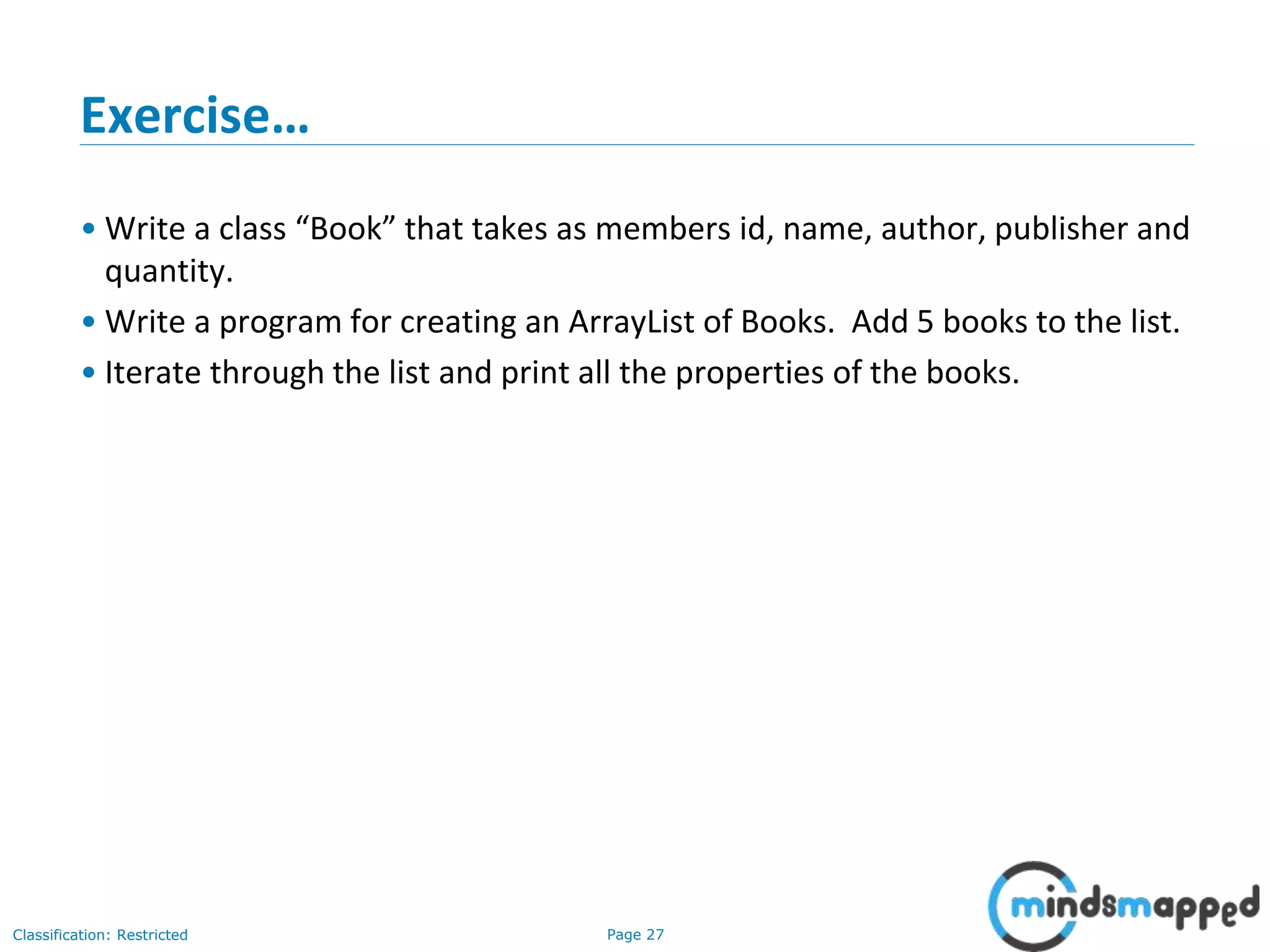
Exercise…
• Write a class “Book” that takes as members id, name, author, publisher and
quantity.
• Write a program for creating an ArrayList of Books. Add 5 books to the list.
• Iterate through the list and print all the properties of the books.
Page 28Classification: Restricted
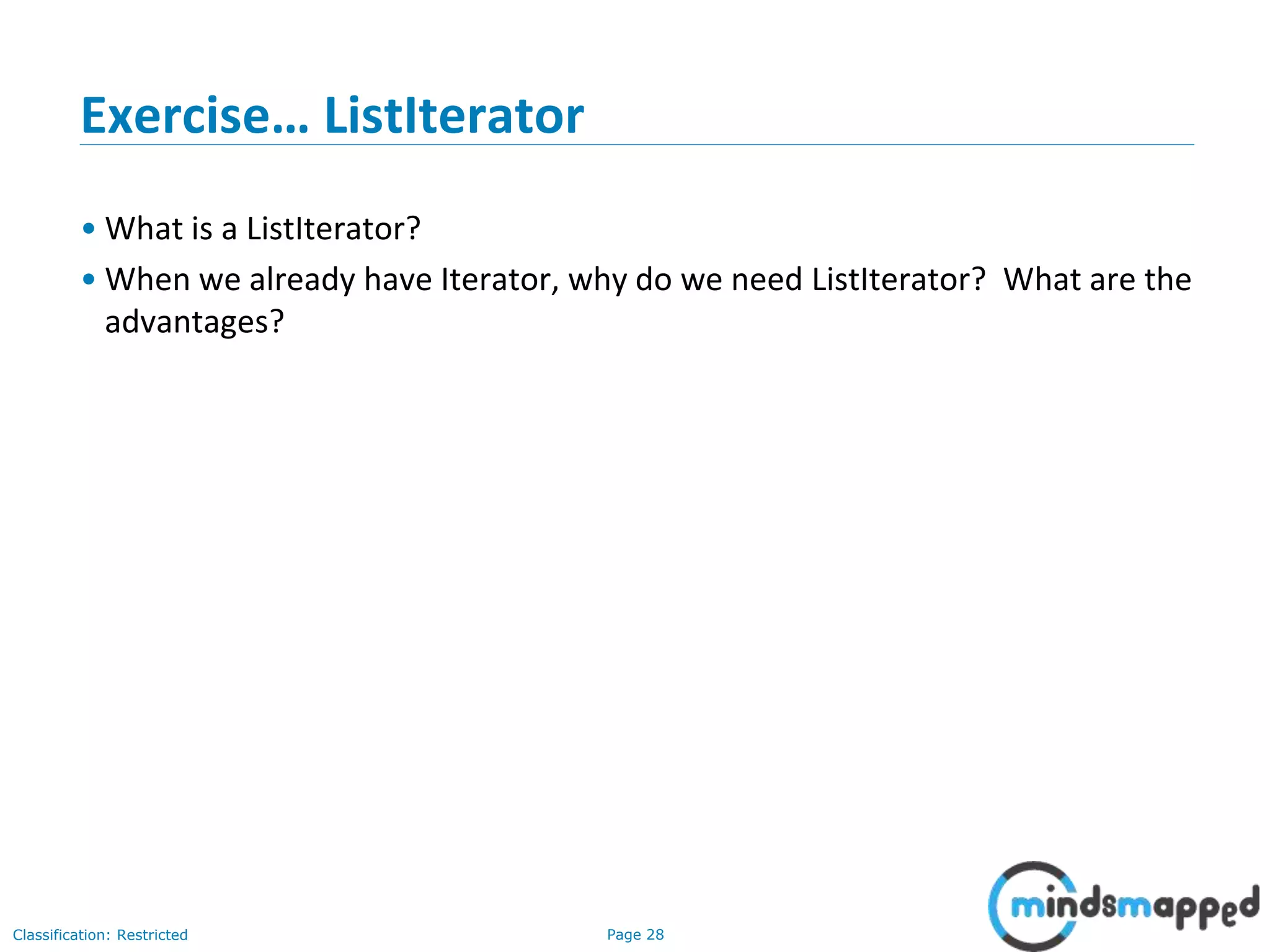
Exercise… ListIterator
• What is a ListIterator?
• When we already have Iterator, why do we need ListIterator? What are the
advantages?
Page 29Classification: Restricted
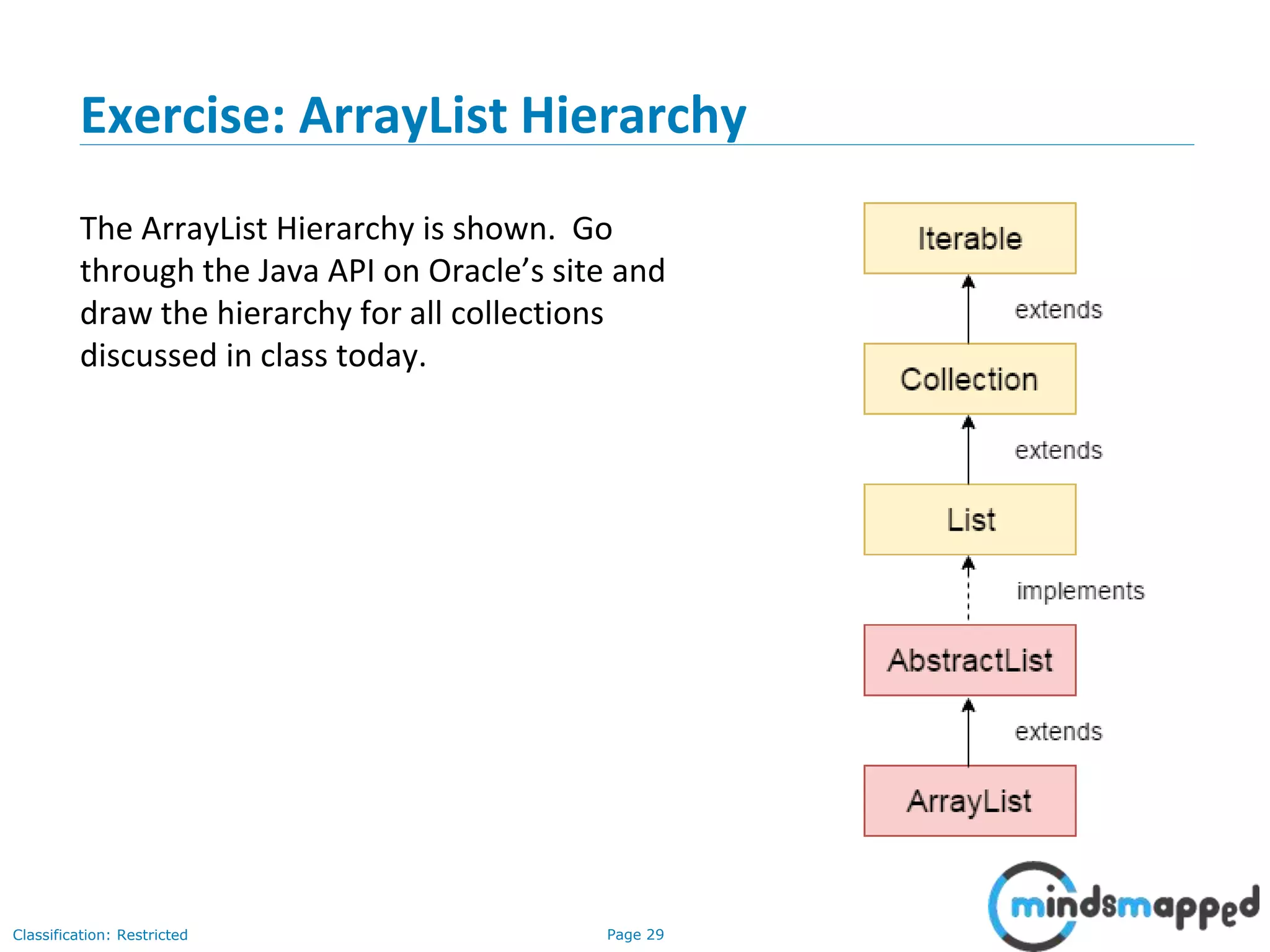
Exercise: ArrayList Hierarchy
The ArrayList Hierarchy is shown. Go
through the Java API on Oracle’s site and
draw the hierarchy for all collections
discussed in class today.
Page 30Classification: Restricted
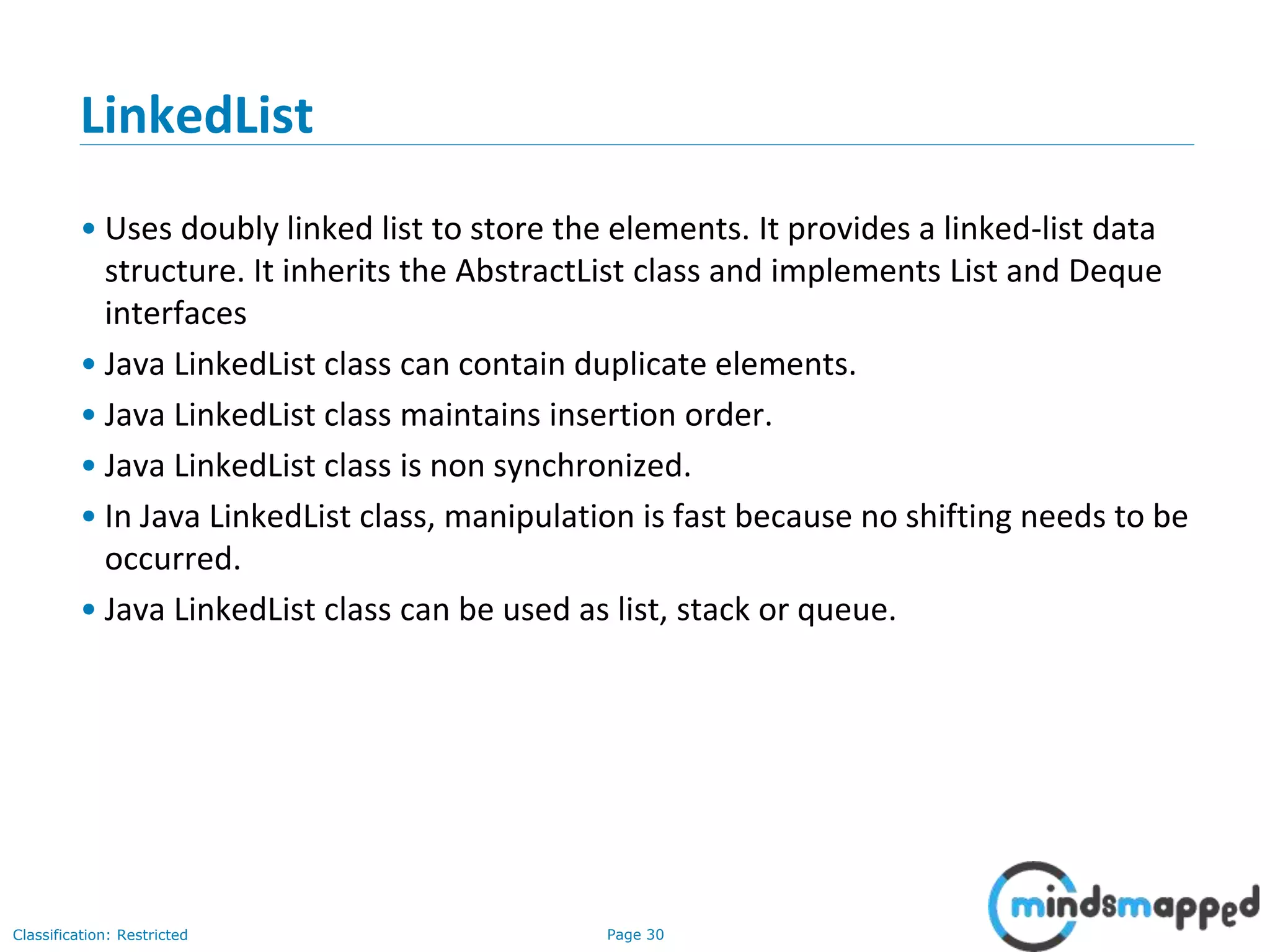
LinkedList
• Uses doubly linked list to store the elements. It provides a linked-list data
structure. It inherits the AbstractList class and implements List and Deque
interfaces
• Java LinkedList class can contain duplicate elements.
• Java LinkedList class maintains insertion order.
• Java LinkedList class is non synchronized.
• In Java LinkedList class, manipulation is fast because no shifting needs to be
occurred.
• Java LinkedList class can be used as list, stack or queue.
Page 31Classification: Restricted
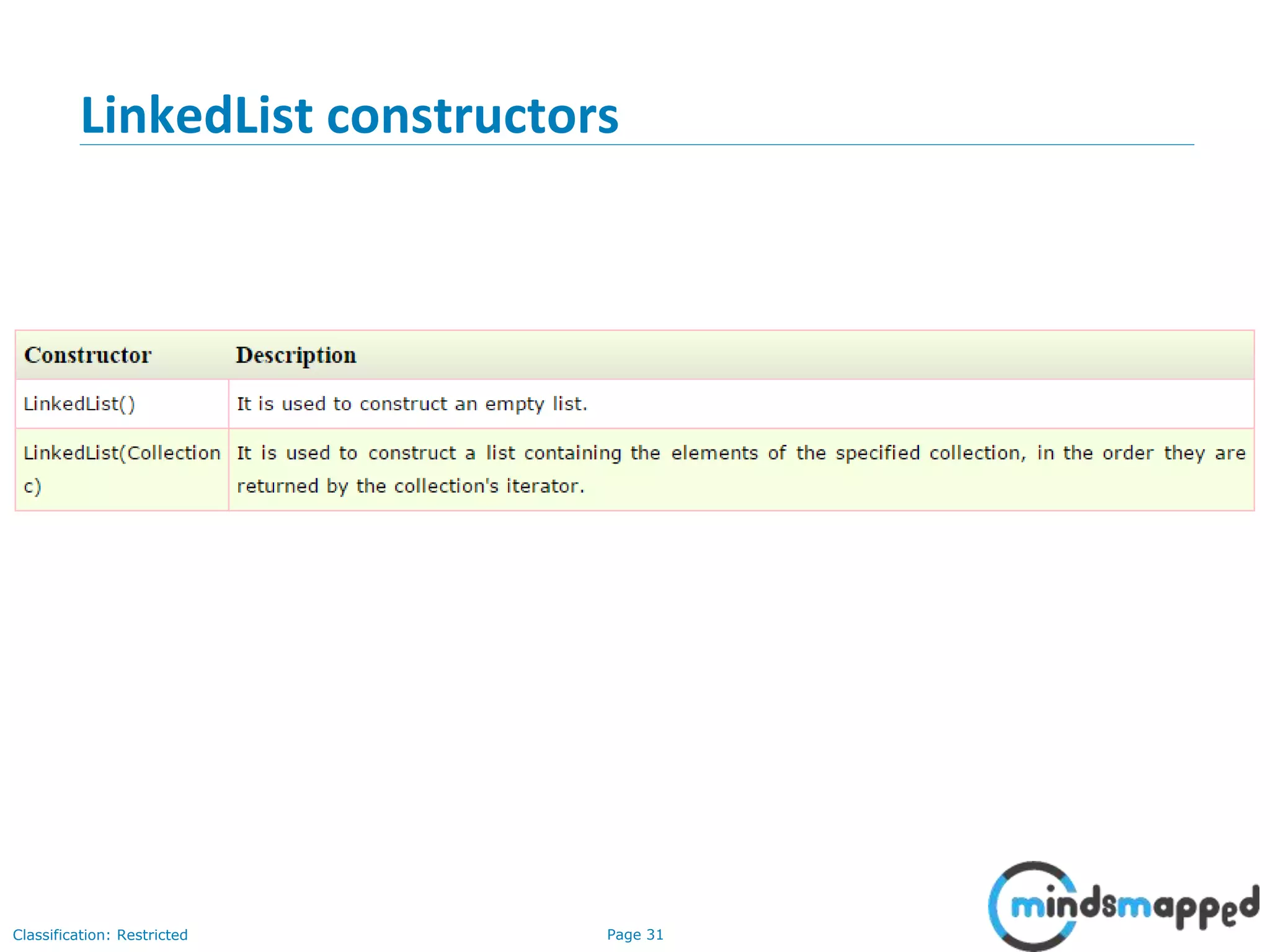
LinkedList constructors
Page 32Classification: Restricted
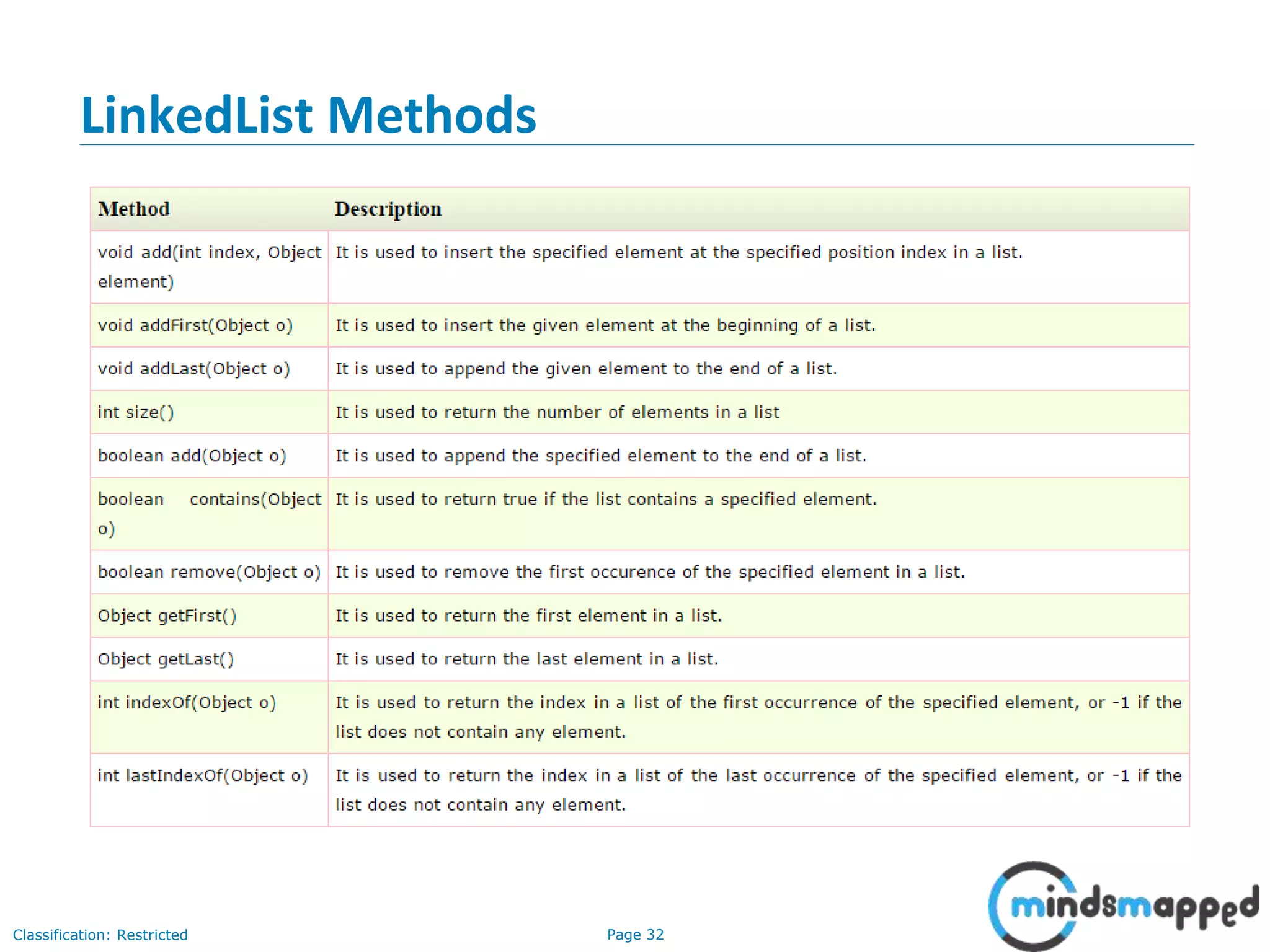
LinkedList Methods
Page 33Classification: Restricted
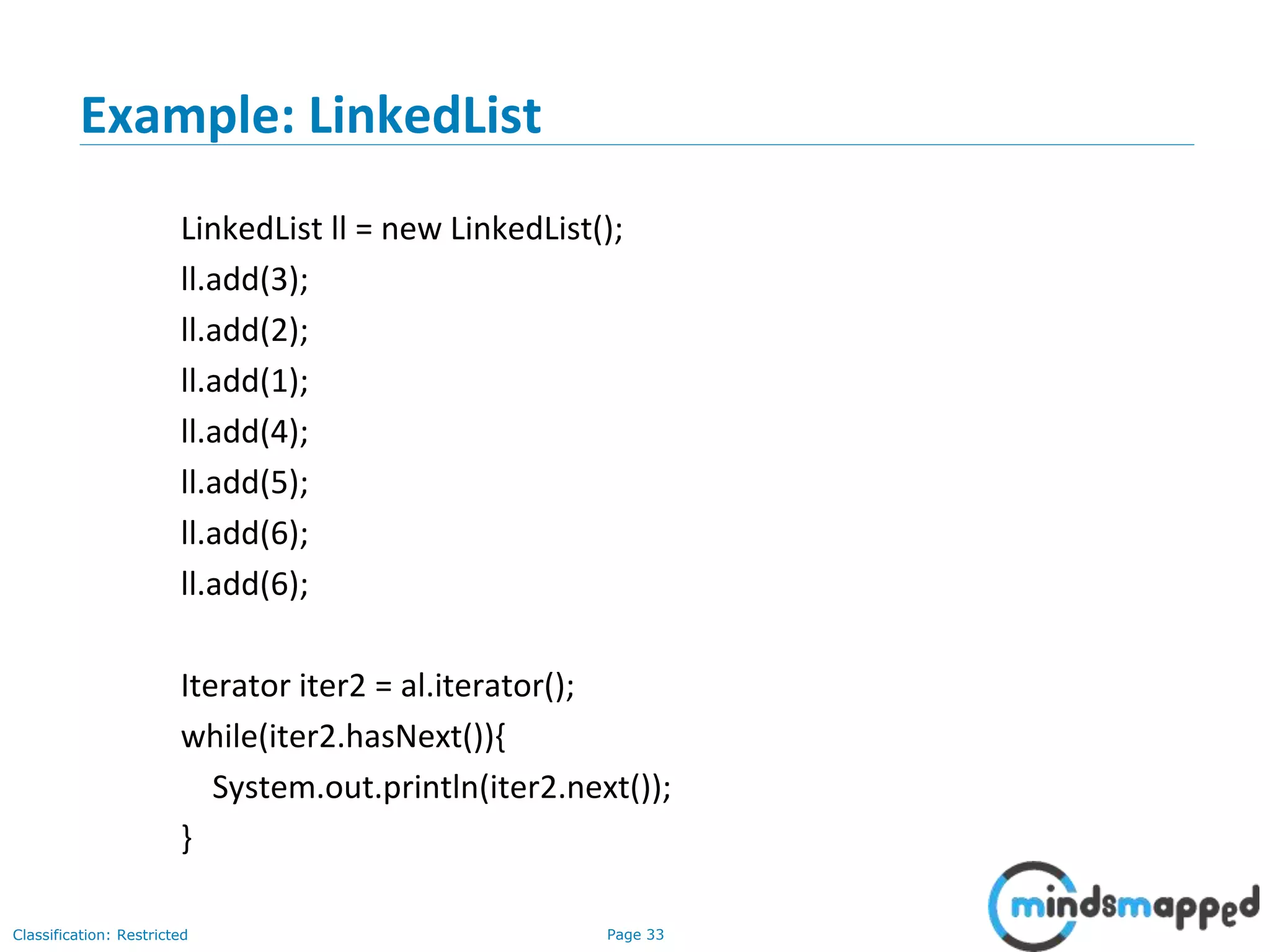
Example: LinkedList
LinkedList ll = new LinkedList();
ll.add(3);
ll.add(2);
ll.add(1);
ll.add(4);
ll.add(5);
ll.add(6);
ll.add(6);
Iterator iter2 = al.iterator();
while(iter2.hasNext()){
System.out.println(iter2.next());
}
Page 34Classification: Restricted
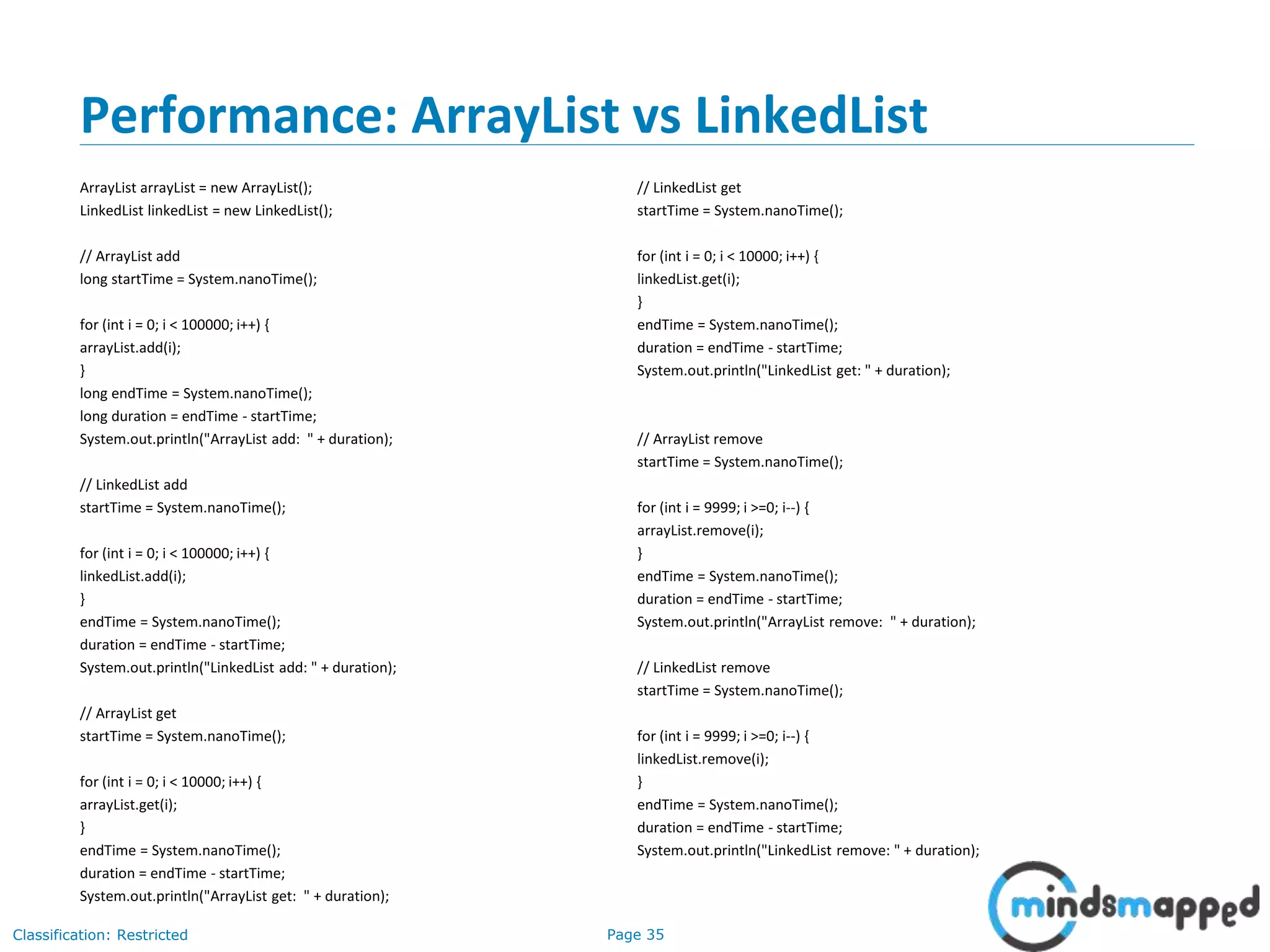
Exercise: LinkedList
Implement all the program examples written for ArrayList with LinkedList.
Page 35Classification: Restricted
Performance: ArrayList vs LinkedList
ArrayList arrayList = new ArrayList();
LinkedList linkedList = new LinkedList();
// ArrayList add
long startTime = System.nanoTime();
for (int i = 0; i < 100000; i++) {
arrayList.add(i);
}
long endTime = System.nanoTime();
long duration = endTime - startTime;
System.out.println("ArrayList add: " + duration);
// LinkedList add
startTime = System.nanoTime();
for (int i = 0; i < 100000; i++) {
linkedList.add(i);
}
endTime = System.nanoTime();
duration = endTime - startTime;
System.out.println("LinkedList add: " + duration);
// ArrayList get
startTime = System.nanoTime();
for (int i = 0; i < 10000; i++) {
arrayList.get(i);
}
endTime = System.nanoTime();
duration = endTime - startTime;
System.out.println("ArrayList get: " + duration);
// LinkedList get
startTime = System.nanoTime();
for (int i = 0; i < 10000; i++) {
linkedList.get(i);
}
endTime = System.nanoTime();
duration = endTime - startTime;
System.out.println("LinkedList get: " + duration);
// ArrayList remove
startTime = System.nanoTime();
for (int i = 9999; i >=0; i--) {
arrayList.remove(i);
}
endTime = System.nanoTime();
duration = endTime - startTime;
System.out.println("ArrayList remove: " + duration);
// LinkedList remove
startTime = System.nanoTime();
for (int i = 9999; i >=0; i--) {
linkedList.remove(i);
}
endTime = System.nanoTime();
duration = endTime - startTime;
System.out.println("LinkedList remove: " + duration);
Page 36Classification: Restricted
ArrayList vs LinkedList
Page 37Classification: Restricted
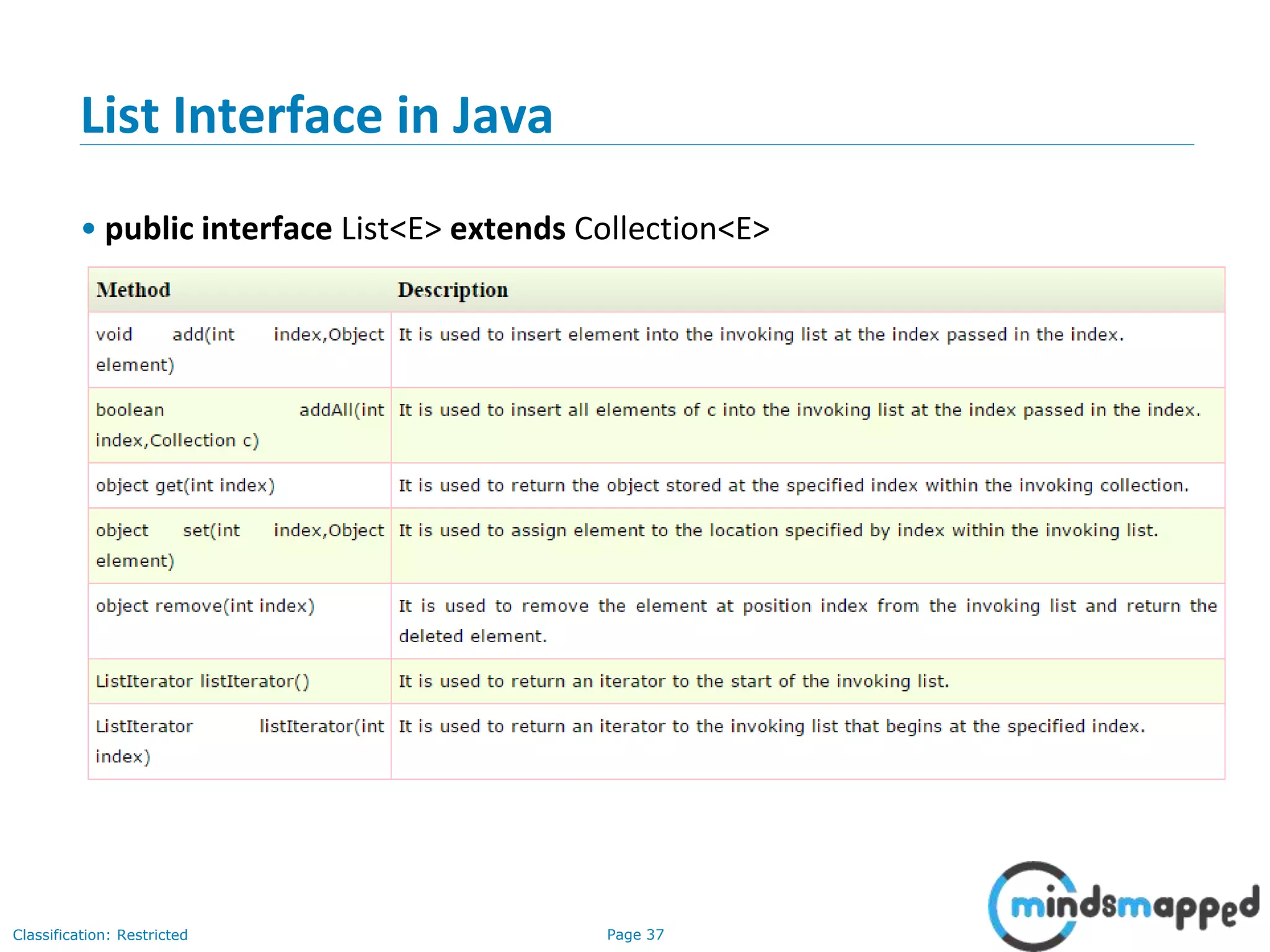
List Interface in Java
• public interface List<E> extends Collection<E>
Page 38Classification: Restricted
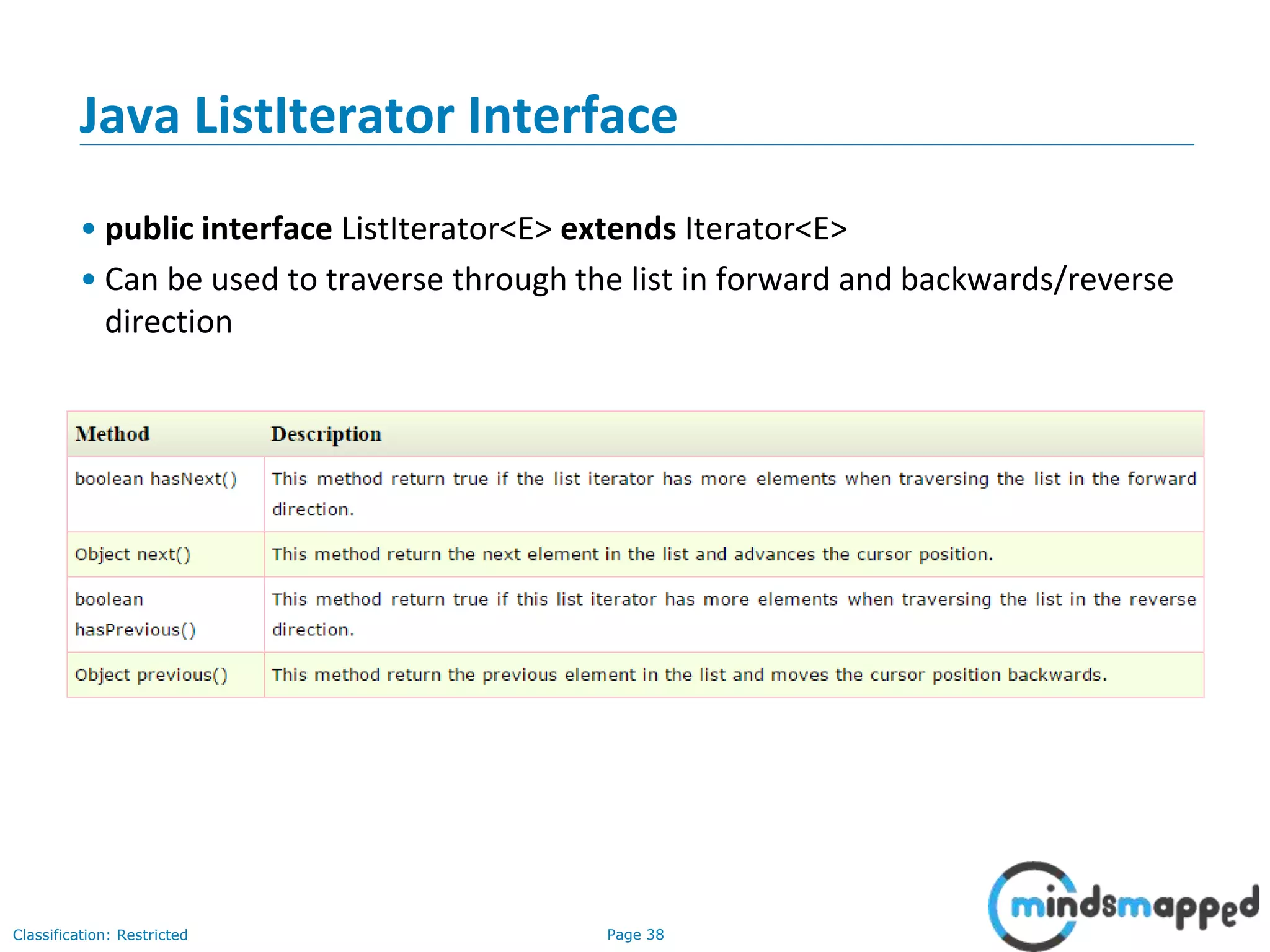
Java ListIterator Interface
• public interface ListIterator<E> extends Iterator<E>
• Can be used to traverse through the list in forward and backwards/reverse
direction
Page 39Classification: Restricted
Java ListIterator example
import java.util.*;
public class TestCollection8{
public static void main(String args[]){
ArrayList<String> al=new ArrayList<String>();
al.add("Amit");
al.add("Vijay");
al.add("Kumar");
al.add(1,"Sachin");
System.out.println("element at 2nd position: "+al.get(2));
ListIterator<String> itr=al.listIterator();
System.out.println("traversing elements in forward direction...");
while(itr.hasNext()){
System.out.println(itr.next());
}
System.out.println("traversing elements in backward direction...");
while(itr.hasPrevious()){
System.out.println(itr.previous());
}
}
}
Page 40Classification: Restricted
3-February-
2003
cse403-10-Collections © 2003 University of Washington 40
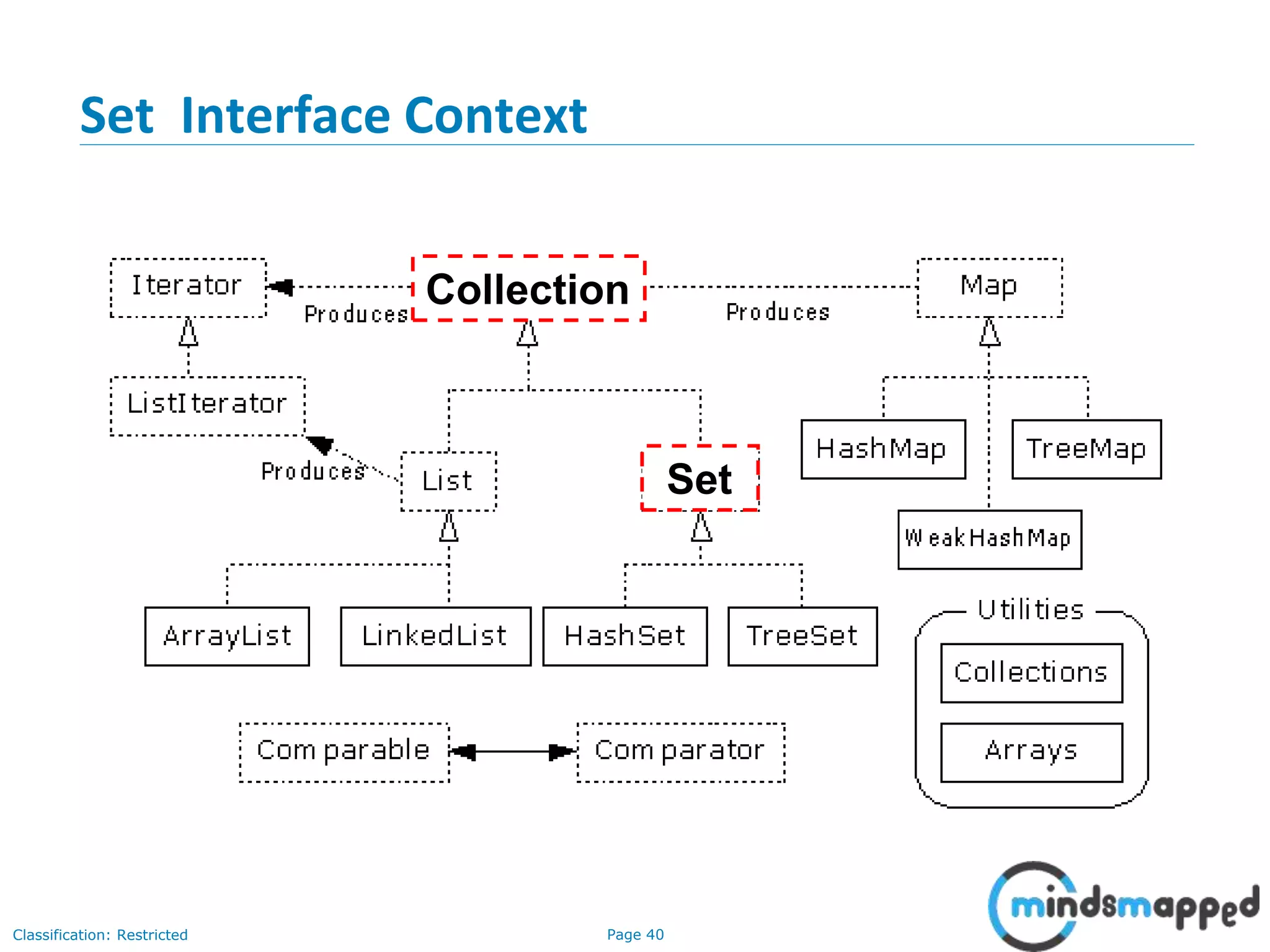
Set Interface Context
Collection
Set
Page 41Classification: Restricted
3-February-
2003
cse403-10-Collections © 2003 University of Washington 41
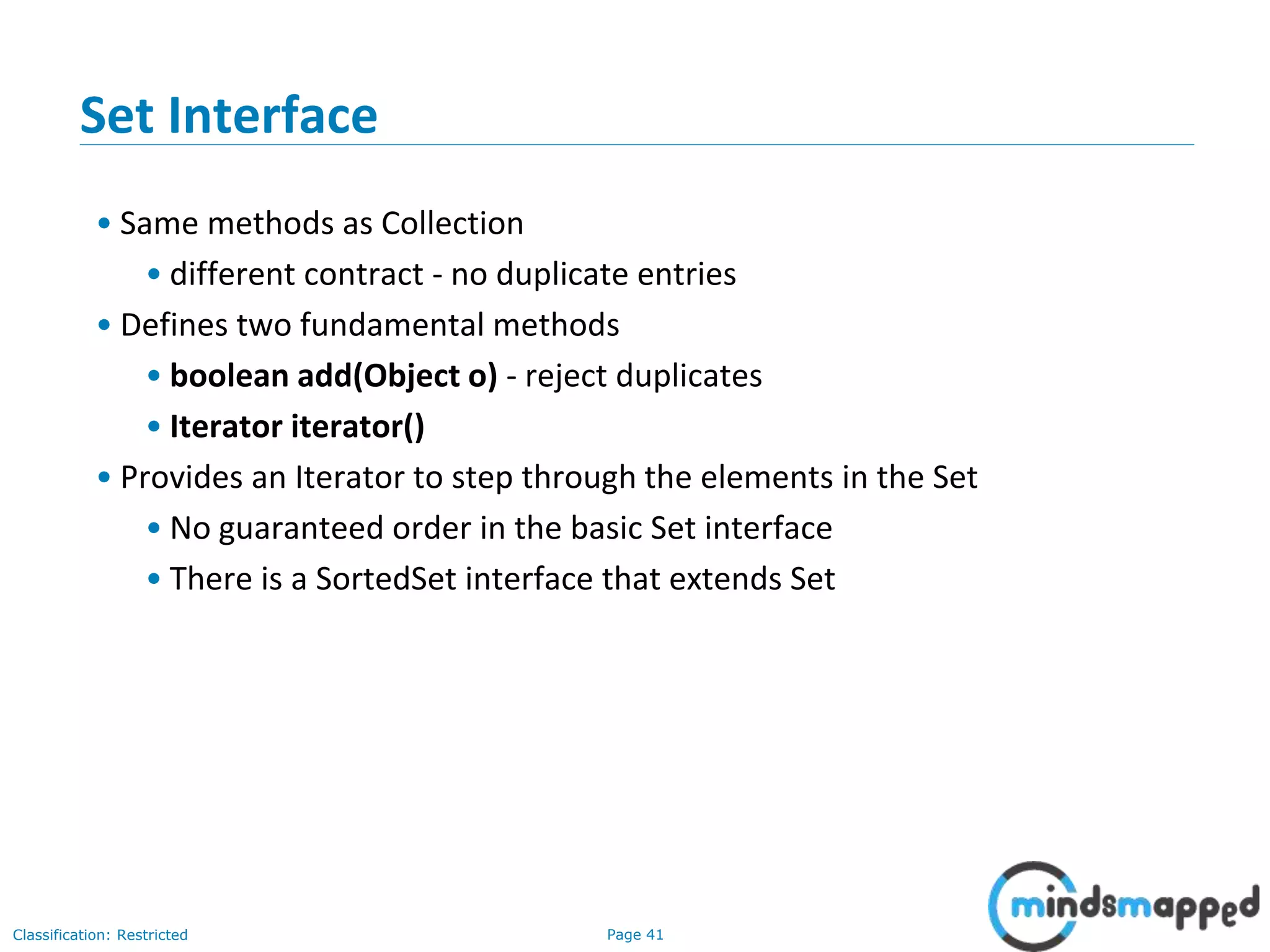
Set Interface
• Same methods as Collection
• different contract - no duplicate entries
• Defines two fundamental methods
• boolean add(Object o) - reject duplicates
• Iterator iterator()
• Provides an Iterator to step through the elements in the Set
• No guaranteed order in the basic Set interface
• There is a SortedSet interface that extends Set
Page 42Classification: Restricted
3-February-
2003
cse403-10-Collections © 2003 University of Washington 42
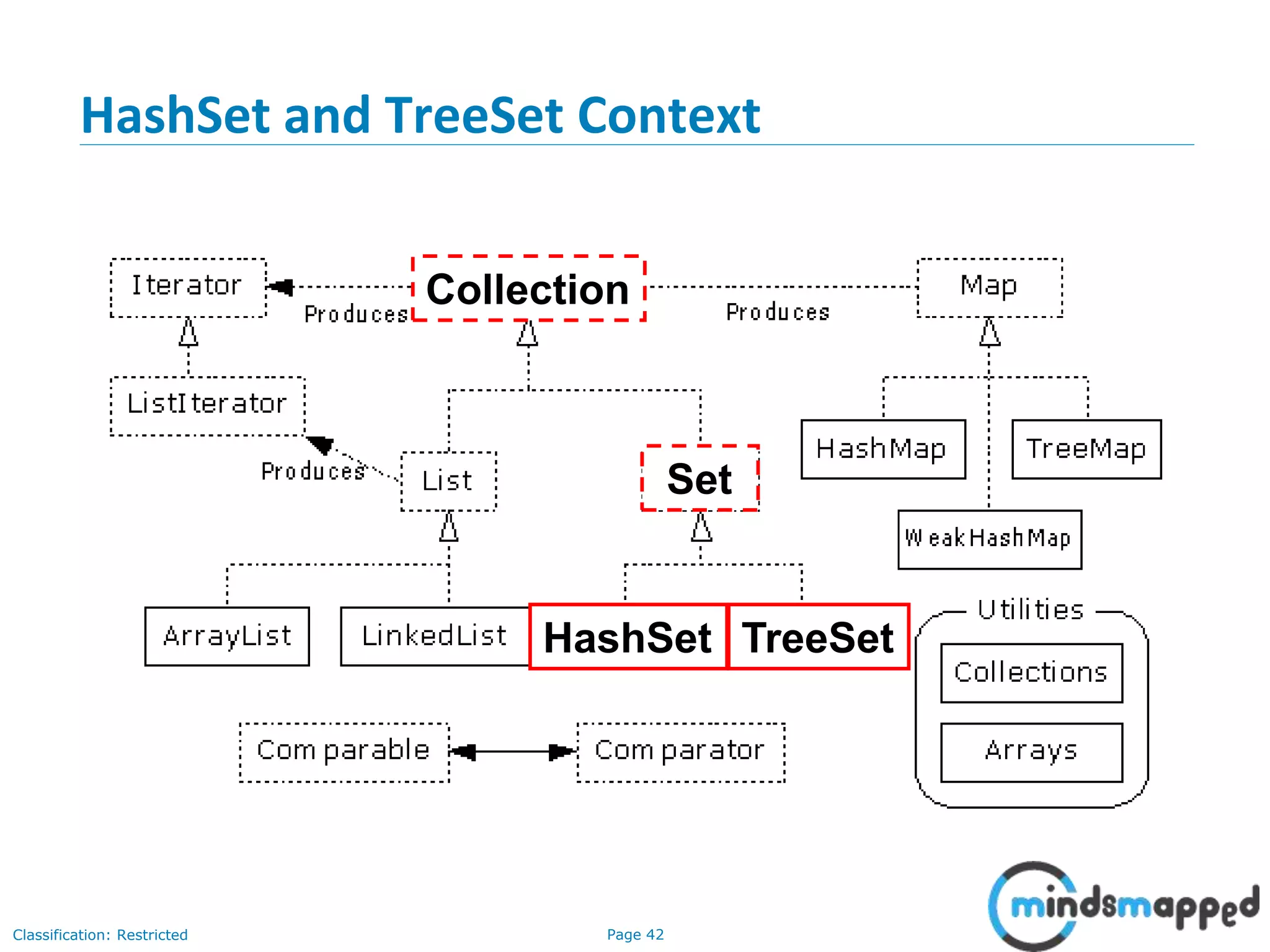
HashSet and TreeSet Context
HashSet TreeSet
Collection
Set
Page 43Classification: Restricted
List vs Set
• List can contain duplicate elements whereas Set contains unique elements
only.
Page 44Classification: Restricted
3-February-
2003
cse403-10-Collections © 2003 University of Washington 44
HashSet
• Find and add elements very quickly
• uses hashing implementation in HashMap
• Hashing uses an array of linked lists
• The hashCode() is used to index into the array
• Then equals() is used to determine if element is in the (short) list of
elements at that index
• No order imposed on elements
• The hashCode() method and the equals() method must be compatible
• if two objects are equal, they must have the same hashCode() value
Page 45Classification: Restricted
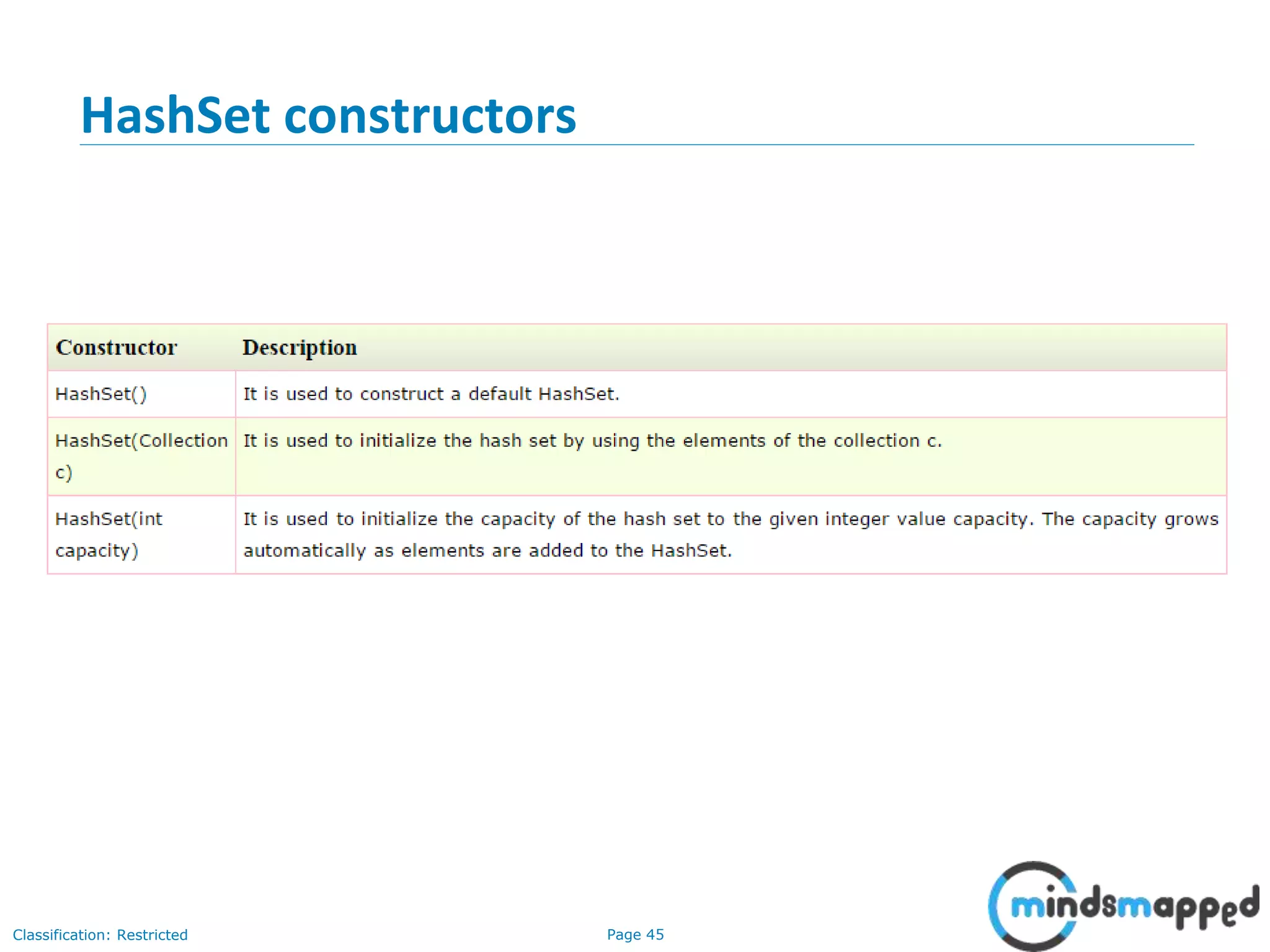
HashSet constructors
Page 46Classification: Restricted
HashSet methods
Page 47Classification: Restricted
HashSet Example
import java.util.*;
class TestCollection9{
public static void main(String args[]){
//Creating HashSet and adding elements
HashSet<String> set=new HashSet<String>();
set.add("Ravi");
set.add("Vijay");
set.add("Ravi");
set.add("Ajay");
//Traversing elements
Iterator<String> itr=set.iterator();
while(itr.hasNext()){
System.out.println(itr.next());
}
}
}
Page 48Classification: Restricted
HashSet Example : Book
import java.util.*;
class Book {
int id;
String name,author,publisher;
int quantity;
public Book(int id, String name, String author,
String publisher, int quantity) {
this.id = id;
this.name = name;
this.author = author;
this.publisher = publisher;
this.quantity = quantity;
}
}
public class HashSetExample {
public static void main(String[] args) {
HashSet<Book> set=new HashSet<Book>();
//Creating Books
Book b1=new Book(101,"Let us C","Yashwant
Kanetkar","BPB",8);
Book b2=new Book(102,"Data Communications
& Networking","Forouzan","Mc Graw Hill",4);
Book b3=new Book(103,"Operating
System","Galvin","Wiley",6);
//Adding Books to HashSet
set.add(b1);
set.add(b2);
set.add(b3);
//Traversing HashSet
for(Book b:set){
System.out.println(b.id+" "+b.name+"
"+b.author+" "+b.publisher+" "+b.quantity);
}
}
}
Page 49Classification: Restricted
Exercise…
• What is LinkedHashSet?
• When would you use LinkedHashSet?
Page 50Classification: Restricted
3-February-
2003
cse403-10-Collections © 2003 University of Washington 50
TreeSet
• Elements can be inserted in any order
• The TreeSet stores them in order
• An iterator always presents them in order
• Default order is defined by natural order
• objects implement the Comparable interface
• TreeSet uses compareTo(Object o) to sort
• Can use a different Comparator
• provide Comparator to the TreeSet constructor
Page 51Classification: Restricted
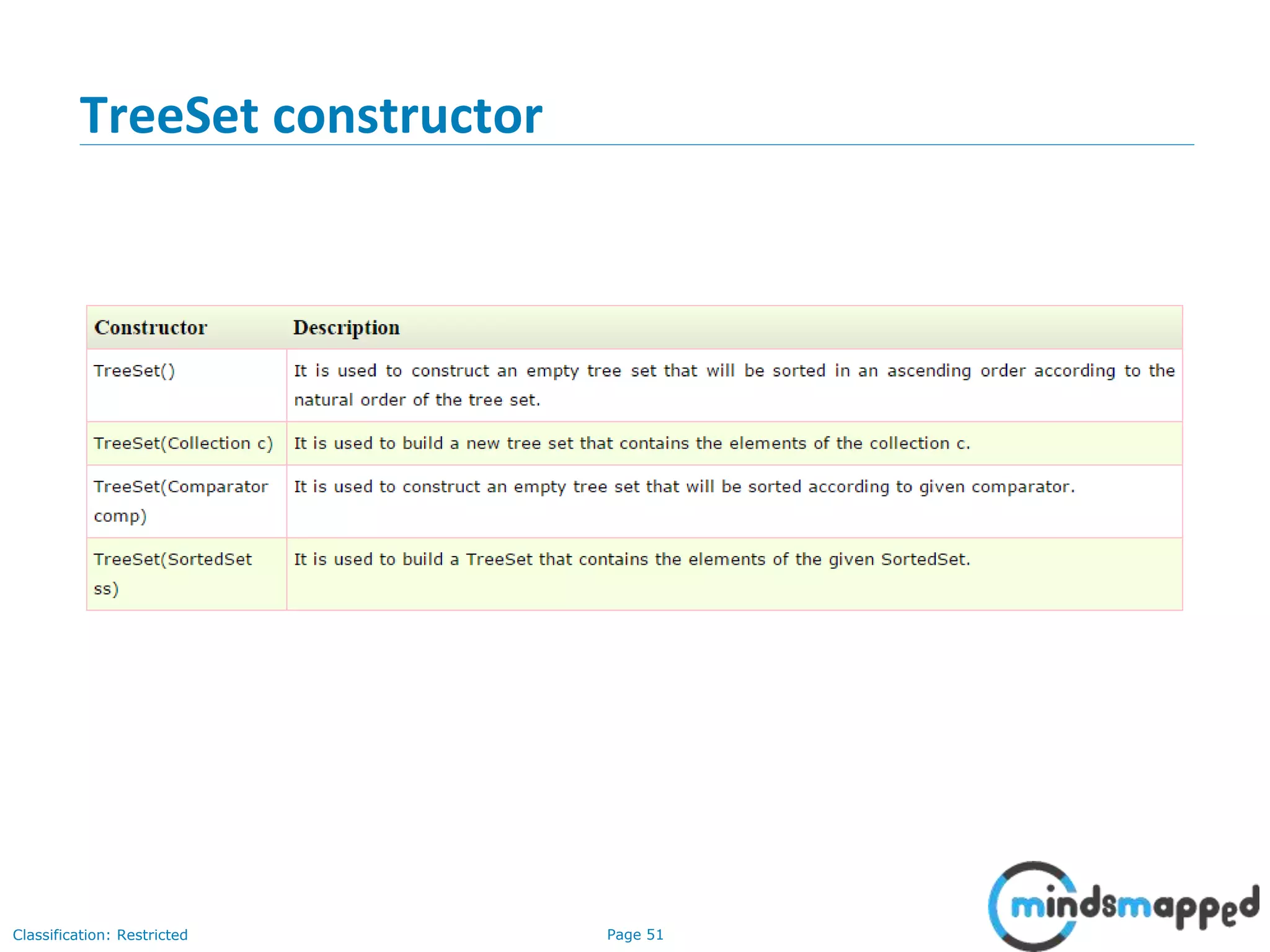
TreeSet constructor
Page 52Classification: Restricted
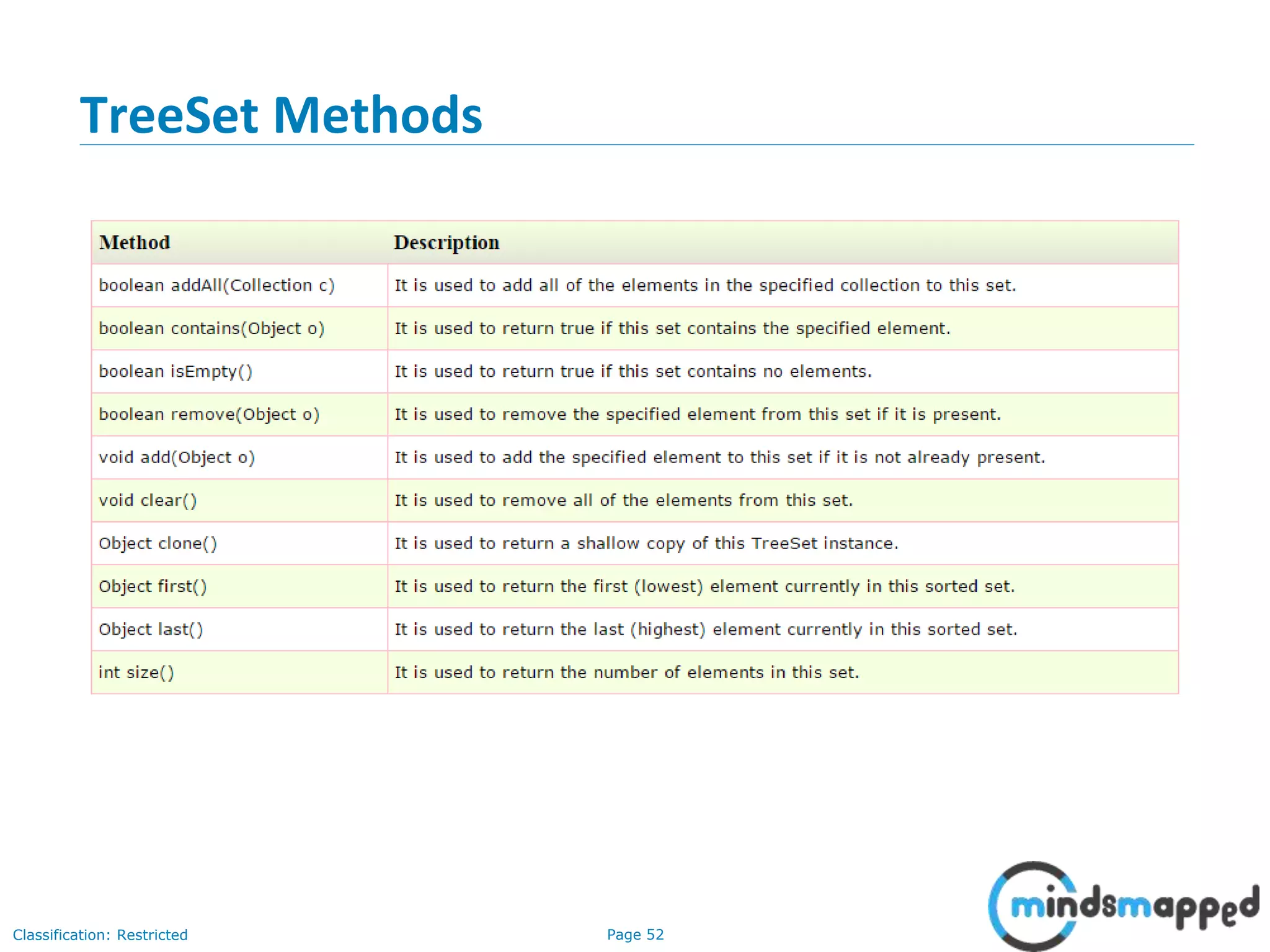
TreeSet Methods
Page 53Classification: Restricted
TreeSet Example
import java.util.*;
class TestCollection11{
public static void main(String args[]){
//Creating and adding elements
TreeSet<String> al=new TreeSet<String>();
al.add("Ravi");
al.add("Vijay");
al.add("Ravi");
al.add("Ajay");
//Traversing elements
Iterator<String> itr=al.iterator();
while(itr.hasNext()){
System.out.println(itr.next());
}
}
}
Page 54Classification: Restricted
TreeSet Example: Book
import java.util.*;
class Book implements Comparable<Book>{
int id;
String name,author,publisher;
int quantity;
public Book(int id, String name, String author, String
publisher, int quantity) {
this.id = id;
this.name = name;
this.author = author;
this.publisher = publisher;
this.quantity = quantity;
}
public int compareTo(Book b) {
if(id>b.id){
return 1;
}else if(id<b.id){
return -1;
}else{
return 0;
}
}
}
public class TreeSetExample {
public static void main(String[] args) {
Set<Book> set=new TreeSet<Book>();
//Creating Books
Book b1=new Book(121,"Let us C","Yashwant
Kanetkar","BPB",8);
Book b2=new Book(233,"Operating
System","Galvin","Wiley",6);
Book b3=new Book(101,"Data Communications &
Networking","Forouzan","Mc Graw Hill",4);
//Adding Books to TreeSet
set.add(b1);
set.add(b2);
set.add(b3);
//Traversing TreeSet
for(Book b:set){
System.out.println(b.id+" "+b.name+" "+b.author+"
"+b.publisher+" "+b.quantity);
}
}
}
Page 55Classification: Restricted
Topics to be covered in next session
• Interview preparation, tips & tricks
Page 56Classification: Restricted
Thank you!

Collections - Lists, Sets

  • 1.
  • 2.
    Page 1Classification: Restricted 3-February- 2003 cse403-10-Collections© 2003 University of Washington 1 Quick Recap… • How to define a class completely • Define a POJO • Define private data members • Define public getters and setters • Override • toString() for more meaningful logging and printing • equals() for search in a collection • hashCode() for providing hashing function • Comparison logic • java.lang.Comparable interface - DEFAULT • java.util.Comparator interface – A Comparator class for every comparison logic
  • 3.
    Page 2Classification: Restricted Agenda… •List – ArrayList, LinkedList • Set – HashSet, LinkedHashSet, TreeSet
  • 4.
    Java & JEETraining Collections
  • 5.
  • 6.
    Page 5Classification: Restricted CollectionInterface • Defines fundamental methods • int size(); • boolean isEmpty(); • boolean contains(Object element); • boolean add(Object element); // Optional • boolean remove(Object element); // Optional • Iterator iterator(); • These methods are enough to define the basic behavior of a collection • Provides an Iterator to step through the elements in the Collection
  • 7.
    Page 6Classification: Restricted 3-February- 2003 cse403-10-Collections© 2003 University of Washington 6 Iterator Interface • Defines three fundamental methods • Object next() • boolean hasNext() • void remove() • These three methods provide access to the contents of the collection • An Iterator knows position within collection • Each call to next() “reads” an element from the collection • Then you can use it or remove it
  • 8.
    Page 7Classification: Restricted 3-February- 2003 cse403-10-Collections© 2003 University of Washington 7 Example - SimpleCollection public class SimpleCollection { public static void main(String[] args) { Collection c; c = new ArrayList(); System.out.println(c.getClass().getName()); for (int i=1; i <= 10; i++) { c.add(i + " * " + i + " = "+i*i); } Iterator iter = c.iterator(); while (iter.hasNext()) System.out.println(iter.next()); } }
  • 9.
    Page 8Classification: Restricted 3-February- 2003 cse403-10-Collections© 2003 University of Washington 8 List Interface Context Collection List
  • 10.
    Page 9Classification: Restricted 3-February- 2003 cse403-10-Collections© 2003 University of Washington 9 ListIterator Interface • Extends the Iterator interface • Defines three fundamental methods • void add(Object o) - before current position • boolean hasPrevious() • Object previous() • The addition of these three methods defines the basic behavior of an ordered list • A ListIterator knows position within list
  • 11.
    Page 10Classification: Restricted 3-February- 2003 cse403-10-Collections© 2003 University of Washington 10 ArrayList and LinkedList Context ArrayList LinkedList Collection List
  • 12.
  • 13.
    Page 12Classification: Restricted ListImplementations • ArrayList • low cost random access • high cost insert and delete • array that resizes if need be • LinkedList • sequential access • low cost insert and delete • high cost random access • Vector • Similar to ArrayList, but thread-safe
  • 14.
    Page 13Classification: Restricted 3-February- 2003 cse403-10-Collections© 2003 University of Washington 13 ArrayList overview • Constant time positional access (it’s an array) • One tuning parameter, the initial capacity public ArrayList(int initialCapacity) { super(); if (initialCapacity < 0) throw new IllegalArgumentException( "Illegal Capacity: "+initialCapacity); this.elementData = new Object[initialCapacity]; }
  • 15.
    Page 14Classification: Restricted 3-February- 2003 cse403-10-Collections© 2003 University of Washington 14 ArrayList methods • The indexed get and set methods of the List interface are appropriate to use since ArrayLists are backed by an array • Object get(int index) • Object set(int index, Object element) • Indexed add and remove are provided, but can be costly if used frequently • void add(int index, Object element) • Object remove(int index) • May want to resize in one shot if adding many elements • void ensureCapacity(int minCapacity)
  • 16.
    Page 15Classification: Restricted 3-February- 2003 cse403-10-Collections© 2003 University of Washington 15 LinkedList overview • Stores each element in a node • Each node stores a link to the next and previous nodes • Insertion and removal are inexpensive • just update the links in the surrounding nodes • Linear traversal is inexpensive • Random access is expensive • Start from beginning or end and traverse each node while counting
  • 17.
    Page 16Classification: Restricted 3-February- 2003 cse403-10-Collections© 2003 University of Washington 16 LinkedList entries private static class Entry { Object element; Entry next; Entry previous; Entry(Object element, Entry next, Entry previous) { this.element = element; this.next = next; this.previous = previous; } } private Entry header = new Entry(null, null, null); public LinkedList() { header.next = header.previous = header; }
  • 18.
    Page 17Classification: Restricted 3-February- 2003 cse403-10-Collections© 2003 University of Washington 17 LinkedList methods • The list is sequential, so access it that way • ListIterator listIterator() • ListIterator knows about position • use add() from ListIterator to add at a position • use remove() from ListIterator to remove at a position • LinkedList knows a few things too • void addFirst(Object o), void addLast(Object o) • Object getFirst(), Object getLast() • Object removeFirst(), Object removeLast()
  • 19.
    Page 18Classification: Restricted ArrayListvs. LinkedList vs. Vector From the hierarchy diagram, they all implement List interface. They are very similar to use. Their main difference is their implementation which causes different performance for different operations. ArrayList is implemented as a resizable array. As more elements are added to ArrayList, its size is increased dynamically. It's elements can be accessed directly by using the get and set methods, since ArrayList is essentially an array. LinkedList is implemented as a double linked list. Its performance on add and remove is better than Arraylist, but worse on get and set methods. Vector is similar with ArrayList, but it is synchronized. ArrayList is a better choice if your program is thread-safe. Vector and ArrayList require space as more elements are added. Vector each time doubles its array size, while ArrayList grow 50% of its size each time. LinkedList, however, also implements Queue interface which adds more methods than ArrayList and Vector, such as offer(), peek(), poll(), etc. Note: The default initial capacity of an ArrayList is pretty small. It is a good habit to construct the ArrayList with a higher initial capacity. This can avoid the resizing cost.
  • 20.
    Page 19Classification: Restricted Example:ArrayList ArrayList al = new ArrayList(); al.add(3); al.add(2); al.add(1); al.add(4); al.add(5); al.add(6); al.add(6); Iterator iter1 = al.iterator(); while(iter1.hasNext()){ System.out.println(iter1.next()); }
  • 21.
    Page 20Classification: Restricted Example:ArrayList (Using Generics + Iterating using Iterator and for-each loop) import java.util.*; class TestCollection1{ public static void main(String args[]){ ArrayList<String> list=new ArrayList<String>();//Creating arraylist list.add("Ravi");//Adding object in arraylist list.add("Vijay"); list.add("Ravi"); list.add("Ajay"); //Traversing list through Iterator Iterator itr=list.iterator(); while(itr.hasNext()){ System.out.println(itr.next()); } //Traversing using for-each loop for(String obj:list) System.out.println(obj); } }
  • 22.
    Page 21Classification: Restricted User-definedclass objects in Java ArrayList class Student{ int rollno; String name; int age; Student(int rollno,String name,int age){ this.rollno=rollno; this.name=name; this.age=age; } } import java.util.*; public class TestCollection3{ public static void main(String args[]){ //Creating user-defined class objects Student s1=new Student(101,"Sonoo",23); Student s2=new Student(102,"Ravi",21); Student s2=new Student(103,"Hanumat",25); //creating arraylist ArrayList<Student> al=new ArrayList<Student>(); al.add(s1);//adding Student class object al.add(s2); al.add(s3); //Getting Iterator Iterator itr=al.iterator(); //traversing elements of ArrayList object while(itr.hasNext()){ Student st=(Student)itr.next(); System.out.println(st.rollno+" "+st.name+" "+st.age); } } }
  • 23.
  • 24.
  • 25.
    Page 24Classification: Restricted Exampleof addAll(Collection c) method import java.util.*; class TestCollection4{ public static void main(String args[]){ ArrayList<String> al=new ArrayList<String>(); al.add("Ravi"); al.add("Vijay"); al.add("Ajay"); ArrayList<String> al2=new ArrayList<String>(); al2.add("Sonoo"); al2.add("Hanumat"); al.addAll(al2);//adding second list in first list Iterator itr=al.iterator(); while(itr.hasNext()){ System.out.println(itr.next()); } } }
  • 26.
    Page 25Classification: Restricted Exampleof removeAll() method import java.util.*; class TestCollection5{ public static void main(String args[]){ ArrayList<String> al=new ArrayList<String>(); al.add("Ravi"); al.add("Vijay"); al.add("Ajay"); ArrayList<String> al2=new ArrayList<String>(); al2.add("Ravi"); al2.add("Hanumat"); al.removeAll(al2); System.out.println("iterating the elements after removing the elements of al2..."); Iterator itr=al.iterator(); while(itr.hasNext()){ System.out.println(itr.next()); } } }
  • 27.
    Page 26Classification: Restricted Exampleof retainAll() import java.util.*; class TestCollection6{ public static void main(String args[]){ ArrayList<String> al=new ArrayList<String>(); al.add("Ravi"); al.add("Vijay"); al.add("Ajay"); ArrayList<String> al2=new ArrayList<String>(); al2.add("Ravi"); al2.add("Hanumat"); al.retainAll(al2); System.out.println("iterating the elements after retaining the elements of al2..."); Iterator itr=al.iterator(); while(itr.hasNext()){ System.out.println(itr.next()); } } }
  • 28.
    Page 27Classification: Restricted Exercise… •Write a class “Book” that takes as members id, name, author, publisher and quantity. • Write a program for creating an ArrayList of Books. Add 5 books to the list. • Iterate through the list and print all the properties of the books.
  • 29.
    Page 28Classification: Restricted Exercise…ListIterator • What is a ListIterator? • When we already have Iterator, why do we need ListIterator? What are the advantages?
  • 30.
    Page 29Classification: Restricted Exercise:ArrayList Hierarchy The ArrayList Hierarchy is shown. Go through the Java API on Oracle’s site and draw the hierarchy for all collections discussed in class today.
  • 31.
    Page 30Classification: Restricted LinkedList •Uses doubly linked list to store the elements. It provides a linked-list data structure. It inherits the AbstractList class and implements List and Deque interfaces • Java LinkedList class can contain duplicate elements. • Java LinkedList class maintains insertion order. • Java LinkedList class is non synchronized. • In Java LinkedList class, manipulation is fast because no shifting needs to be occurred. • Java LinkedList class can be used as list, stack or queue.
  • 32.
  • 33.
  • 34.
    Page 33Classification: Restricted Example:LinkedList LinkedList ll = new LinkedList(); ll.add(3); ll.add(2); ll.add(1); ll.add(4); ll.add(5); ll.add(6); ll.add(6); Iterator iter2 = al.iterator(); while(iter2.hasNext()){ System.out.println(iter2.next()); }
  • 35.
    Page 34Classification: Restricted Exercise:LinkedList Implement all the program examples written for ArrayList with LinkedList.
  • 36.
    Page 35Classification: Restricted Performance:ArrayList vs LinkedList ArrayList arrayList = new ArrayList(); LinkedList linkedList = new LinkedList(); // ArrayList add long startTime = System.nanoTime(); for (int i = 0; i < 100000; i++) { arrayList.add(i); } long endTime = System.nanoTime(); long duration = endTime - startTime; System.out.println("ArrayList add: " + duration); // LinkedList add startTime = System.nanoTime(); for (int i = 0; i < 100000; i++) { linkedList.add(i); } endTime = System.nanoTime(); duration = endTime - startTime; System.out.println("LinkedList add: " + duration); // ArrayList get startTime = System.nanoTime(); for (int i = 0; i < 10000; i++) { arrayList.get(i); } endTime = System.nanoTime(); duration = endTime - startTime; System.out.println("ArrayList get: " + duration); // LinkedList get startTime = System.nanoTime(); for (int i = 0; i < 10000; i++) { linkedList.get(i); } endTime = System.nanoTime(); duration = endTime - startTime; System.out.println("LinkedList get: " + duration); // ArrayList remove startTime = System.nanoTime(); for (int i = 9999; i >=0; i--) { arrayList.remove(i); } endTime = System.nanoTime(); duration = endTime - startTime; System.out.println("ArrayList remove: " + duration); // LinkedList remove startTime = System.nanoTime(); for (int i = 9999; i >=0; i--) { linkedList.remove(i); } endTime = System.nanoTime(); duration = endTime - startTime; System.out.println("LinkedList remove: " + duration);
  • 37.
  • 38.
    Page 37Classification: Restricted ListInterface in Java • public interface List<E> extends Collection<E>
  • 39.
    Page 38Classification: Restricted JavaListIterator Interface • public interface ListIterator<E> extends Iterator<E> • Can be used to traverse through the list in forward and backwards/reverse direction
  • 40.
    Page 39Classification: Restricted JavaListIterator example import java.util.*; public class TestCollection8{ public static void main(String args[]){ ArrayList<String> al=new ArrayList<String>(); al.add("Amit"); al.add("Vijay"); al.add("Kumar"); al.add(1,"Sachin"); System.out.println("element at 2nd position: "+al.get(2)); ListIterator<String> itr=al.listIterator(); System.out.println("traversing elements in forward direction..."); while(itr.hasNext()){ System.out.println(itr.next()); } System.out.println("traversing elements in backward direction..."); while(itr.hasPrevious()){ System.out.println(itr.previous()); } } }
  • 41.
    Page 40Classification: Restricted 3-February- 2003 cse403-10-Collections© 2003 University of Washington 40 Set Interface Context Collection Set
  • 42.
    Page 41Classification: Restricted 3-February- 2003 cse403-10-Collections© 2003 University of Washington 41 Set Interface • Same methods as Collection • different contract - no duplicate entries • Defines two fundamental methods • boolean add(Object o) - reject duplicates • Iterator iterator() • Provides an Iterator to step through the elements in the Set • No guaranteed order in the basic Set interface • There is a SortedSet interface that extends Set
  • 43.
    Page 42Classification: Restricted 3-February- 2003 cse403-10-Collections© 2003 University of Washington 42 HashSet and TreeSet Context HashSet TreeSet Collection Set
  • 44.
    Page 43Classification: Restricted Listvs Set • List can contain duplicate elements whereas Set contains unique elements only.
  • 45.
    Page 44Classification: Restricted 3-February- 2003 cse403-10-Collections© 2003 University of Washington 44 HashSet • Find and add elements very quickly • uses hashing implementation in HashMap • Hashing uses an array of linked lists • The hashCode() is used to index into the array • Then equals() is used to determine if element is in the (short) list of elements at that index • No order imposed on elements • The hashCode() method and the equals() method must be compatible • if two objects are equal, they must have the same hashCode() value
  • 46.
  • 47.
  • 48.
    Page 47Classification: Restricted HashSetExample import java.util.*; class TestCollection9{ public static void main(String args[]){ //Creating HashSet and adding elements HashSet<String> set=new HashSet<String>(); set.add("Ravi"); set.add("Vijay"); set.add("Ravi"); set.add("Ajay"); //Traversing elements Iterator<String> itr=set.iterator(); while(itr.hasNext()){ System.out.println(itr.next()); } } }
  • 49.
    Page 48Classification: Restricted HashSetExample : Book import java.util.*; class Book { int id; String name,author,publisher; int quantity; public Book(int id, String name, String author, String publisher, int quantity) { this.id = id; this.name = name; this.author = author; this.publisher = publisher; this.quantity = quantity; } } public class HashSetExample { public static void main(String[] args) { HashSet<Book> set=new HashSet<Book>(); //Creating Books Book b1=new Book(101,"Let us C","Yashwant Kanetkar","BPB",8); Book b2=new Book(102,"Data Communications & Networking","Forouzan","Mc Graw Hill",4); Book b3=new Book(103,"Operating System","Galvin","Wiley",6); //Adding Books to HashSet set.add(b1); set.add(b2); set.add(b3); //Traversing HashSet for(Book b:set){ System.out.println(b.id+" "+b.name+" "+b.author+" "+b.publisher+" "+b.quantity); } } }
  • 50.
    Page 49Classification: Restricted Exercise… •What is LinkedHashSet? • When would you use LinkedHashSet?
  • 51.
    Page 50Classification: Restricted 3-February- 2003 cse403-10-Collections© 2003 University of Washington 50 TreeSet • Elements can be inserted in any order • The TreeSet stores them in order • An iterator always presents them in order • Default order is defined by natural order • objects implement the Comparable interface • TreeSet uses compareTo(Object o) to sort • Can use a different Comparator • provide Comparator to the TreeSet constructor
  • 52.
  • 53.
  • 54.
    Page 53Classification: Restricted TreeSetExample import java.util.*; class TestCollection11{ public static void main(String args[]){ //Creating and adding elements TreeSet<String> al=new TreeSet<String>(); al.add("Ravi"); al.add("Vijay"); al.add("Ravi"); al.add("Ajay"); //Traversing elements Iterator<String> itr=al.iterator(); while(itr.hasNext()){ System.out.println(itr.next()); } } }
  • 55.
    Page 54Classification: Restricted TreeSetExample: Book import java.util.*; class Book implements Comparable<Book>{ int id; String name,author,publisher; int quantity; public Book(int id, String name, String author, String publisher, int quantity) { this.id = id; this.name = name; this.author = author; this.publisher = publisher; this.quantity = quantity; } public int compareTo(Book b) { if(id>b.id){ return 1; }else if(id<b.id){ return -1; }else{ return 0; } } } public class TreeSetExample { public static void main(String[] args) { Set<Book> set=new TreeSet<Book>(); //Creating Books Book b1=new Book(121,"Let us C","Yashwant Kanetkar","BPB",8); Book b2=new Book(233,"Operating System","Galvin","Wiley",6); Book b3=new Book(101,"Data Communications & Networking","Forouzan","Mc Graw Hill",4); //Adding Books to TreeSet set.add(b1); set.add(b2); set.add(b3); //Traversing TreeSet for(Book b:set){ System.out.println(b.id+" "+b.name+" "+b.author+" "+b.publisher+" "+b.quantity); } } }
  • 56.
    Page 55Classification: Restricted Topicsto be covered in next session • Interview preparation, tips & tricks
  • 57.