INTRODUCTION TO PL/SQL
PL/SQL
Agenda
2
1. Introduction to PL/SQL
2. PL/SQL Architecture
3. Basic Syntax
4. PL/SQL – Procedures
5. PL/SQL – Functions
6. PL/SQL – Cursors
7. PL/SQL – Packages
8. Conclusion
PL/SQL 3
Introduction to PL/SQL PL/SQL Architecture Basic Syntax PL/SQL – Procedures PL/SQL – Functions PL/SQL – Cursors PL/SQL – Packages Conclusion
What is PL/SQL?
 PL SQL basically stands for "Procedural Language extensions to SQL“ . PL/SQL allows
the programmer to write code in procedural format
 It combines the data manipulation power of SQL with the processing power of
procedural language to create a super powerful SQL queries
 It allows the programmers to instruct the compiler 'what to do' through SQL and
'how to do' through its procedural way
 PL/SQL was developed Oracle’s corporation . It is a proprietary language
PL/SQL 4
Introduction to PL/SQL PL/SQL Architecture Basic Syntax PL/SQL – Procedures PL/SQL – Functions PL/SQL – Cursors PL/SQL – Packages Conclusion
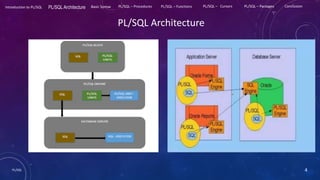
PL/SQL Architecture
PL/SQL 5
Introduction to PL/SQL PL/SQL Architecture Basic Syntax PL/SQL – Procedures PL/SQL – Functions PL/SQL – Cursors PL/SQL – Packages Conclusion
PL/SQL ENGINE
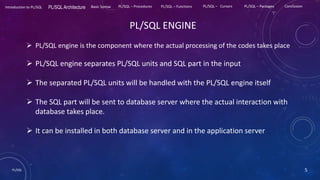
 PL/SQL engine is the component where the actual processing of the codes takes place
 PL/SQL engine separates PL/SQL units and SQL part in the input
 The separated PL/SQL units will be handled with the PL/SQL engine itself
 The SQL part will be sent to database server where the actual interaction with
database takes place.
 It can be installed in both database server and in the application server
PL/SQL 6
Introduction to PL/SQL PL/SQL Architecture Basic Syntax PL/SQL – Procedures PL/SQL – Functions PL/SQL – Cursors PL/SQL – Packages Conclusion
SQL VS PL/SQL
SQL PL/SQL
SQL is a single query that is used to perform DML and
DDL operations
PL/SQL is a block of codes that used to write the
entire program blocks/ procedure/ function, etc
It is declarative, that defines what needs to be done,
rather than how things need to be done
PL/SQL is procedural that defines how the things
needs to be done
Execute as a single statement Execute as a whole block
Mainly used to manipulate data Mainly used to create an application
Interaction with Database server No interaction with the database server
Cannot contain PL/SQL code in it It is an extension of SQL, so it can contain SQL inside
it.
PL/SQL 7
Introduction to PL/SQL PL/SQL Architecture Basic Syntax PL/SQL – Procedures PL/SQL – Functions PL/SQL – Cursors PL/SQL – Packages Conclusion
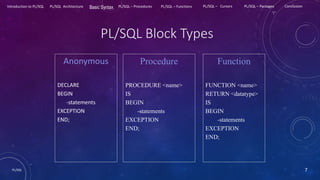
PL/SQL Block Types
Anonymous
DECLARE
BEGIN
-statements
EXCEPTION
END;
Procedure
PROCEDURE <name>
IS
BEGIN
-statements
EXCEPTION
END;
Function
FUNCTION <name>
RETURN <datatype>
IS
BEGIN
-statements
EXCEPTION
END;
PL/SQL 8
Introduction to PL/SQL PL/SQL Architecture Basic Syntax PL/SQL – Procedures PL/SQL – Functions PL/SQL – Cursors PL/SQL – Packages Conclusion
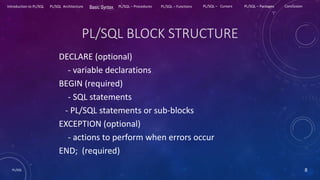
PL/SQL BLOCK STRUCTURE
DECLARE (optional)
- variable declarations
BEGIN (required)
- SQL statements
- PL/SQL statements or sub-blocks
EXCEPTION (optional)
- actions to perform when errors occur
END; (required)
PL/SQL 9
Introduction to PL/SQL PL/SQL Architecture Basic Syntax PL/SQL – Procedures PL/SQL – Functions PL/SQL – Cursors PL/SQL – Packages Conclusion
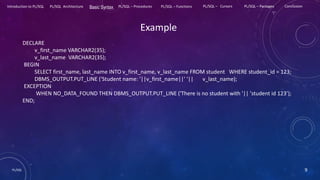
Example
DECLARE
v_first_name VARCHAR2(35);
v_last_name VARCHAR2(35);
BEGIN
SELECT first_name, last_name INTO v_first_name, v_last_name FROM student WHERE student_id = 123;
DBMS_OUTPUT.PUT_LINE ('Student name: '||v_first_name||' ‘|| v_last_name);
EXCEPTION
WHEN NO_DATA_FOUND THEN DBMS_OUTPUT.PUT_LINE ('There is no student with '|| 'student id 123’);
END;
PL/SQL 10
Introduction to PL/SQL PL/SQL Architecture Basic Syntax PL/SQL – Procedures PL/SQL – Functions PL/SQL – Cursors PL/SQL – Packages Conclusion
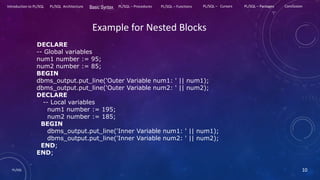
Example for Nested Blocks
DECLARE
-- Global variables
num1 number := 95;
num2 number := 85;
BEGIN
dbms_output.put_line('Outer Variable num1: ' || num1);
dbms_output.put_line('Outer Variable num2: ' || num2);
DECLARE
-- Local variables
num1 number := 195;
num2 number := 185;
BEGIN
dbms_output.put_line('Inner Variable num1: ' || num1);
dbms_output.put_line('Inner Variable num2: ' || num2);
END;
END;
PL/SQL 11
Introduction to PL/SQL PL/SQL Architecture Basic Syntax PL/SQL –
Procedures
PL/SQL – Functions PL/SQL – Cursors PL/SQL – Packages Conclusion
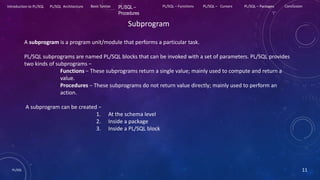
Subprogram
A subprogram is a program unit/module that performs a particular task.
PL/SQL subprograms are named PL/SQL blocks that can be invoked with a set of parameters. PL/SQL provides
two kinds of subprograms −
Functions − These subprograms return a single value; mainly used to compute and return a
value.
Procedures − These subprograms do not return value directly; mainly used to perform an
action.
A subprogram can be created −
1. At the schema level
2. Inside a package
3. Inside a PL/SQL block
PL/SQL 12
Introduction to PL/SQL PL/SQL Architecture Basic Syntax PL/SQL –
Procedures
PL/SQL – Functions PL/SQL – Cursors PL/SQL – Packages Conclusion
Syntax:
CREATE [OR REPLACE] PROCEDURE procedure_name
[(parameter_name [IN | OUT | IN OUT] type [, ...])]
{IS | AS}
BEGIN
< procedure_body >
END procedure_name;
Creating a Procedure
Executing a Procedure
A standalone procedure can be called in two ways −
1.Using the EXECUTE keyword
eg:
2.Calling the name of the procedure from a PL/SQL block
eg: BEGIN
greetings;
END;
EXECUTE
greetings;
PL/SQL 13
Introduction to PL/SQL PL/SQL Architecture Basic Syntax PL/SQL –
Procedures
PL/SQL – Functions PL/SQL – Cursors PL/SQL – Packages Conclusion
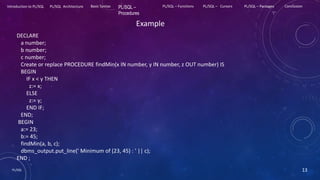
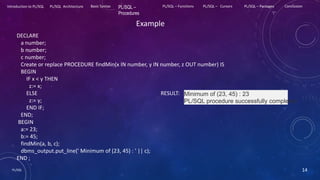
Example
DECLARE
a number;
b number;
c number;
Create or replace PROCEDURE findMin(x IN number, y IN number, z OUT number) IS
BEGIN
IF x < y THEN
z:= x;
ELSE
z:= y;
END IF;
END;
BEGIN
a:= 23;
b:= 45;
findMin(a, b, c);
dbms_output.put_line(' Minimum of (23, 45) : ' || c);
END ;
PL/SQL 14
Introduction to PL/SQL PL/SQL Architecture Basic Syntax PL/SQL –
Procedures
PL/SQL – Functions PL/SQL – Cursors PL/SQL – Packages Conclusion
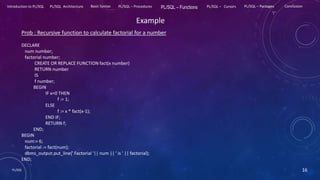
Example
DECLARE
a number;
b number;
c number;
Create or replace PROCEDURE findMin(x IN number, y IN number, z OUT number) IS
BEGIN
IF x < y THEN
z:= x;
ELSE RESULT:
z:= y;
END IF;
END;
BEGIN
a:= 23;
b:= 45;
findMin(a, b, c);
dbms_output.put_line(' Minimum of (23, 45) : ' || c);
END ;
Minimum of (23, 45) : 23
PL/SQL procedure successfully completed
PL/SQL 15
Introduction to PL/SQL PL/SQL Architecture Basic Syntax PL/SQL – Procedures PL/SQL – Functions PL/SQL – Cursors PL/SQL – Packages Conclusion
Creating a Function
Syntax:
CREATE [OR REPLACE] FUNCTION function_name
[(parameter_name [IN | OUT | IN OUT] type [, ...])]
RETURN datatype
IS
BEGIN
<body>
RETURN (return_value);
END;
PL/SQL 16
Introduction to PL/SQL PL/SQL Architecture Basic Syntax PL/SQL – Procedures PL/SQL – Functions PL/SQL – Cursors PL/SQL – Packages Conclusion
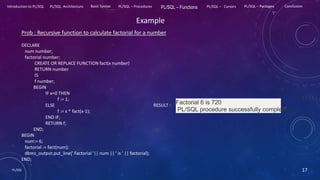
Example
Prob : Recursive function to calculate factorial for a number
DECLARE
num number;
factorial number;
CREATE OR REPLACE FUNCTION fact(x number)
RETURN number
IS
f number;
BEGIN
IF x=0 THEN
f := 1;
ELSE
f := x * fact(x-1);
END IF;
RETURN f;
END;
BEGIN
num:= 6;
factorial := fact(num);
dbms_output.put_line(' Factorial '|| num || ' is ' || factorial);
END;
PL/SQL 17
Introduction to PL/SQL PL/SQL Architecture Basic Syntax PL/SQL – Procedures PL/SQL – Functions PL/SQL – Cursors PL/SQL – Packages Conclusion
Example
Prob : Recursive function to calculate factorial for a number
DECLARE
num number;
factorial number;
CREATE OR REPLACE FUNCTION fact(x number)
RETURN number
IS
f number;
BEGIN
IF x=0 THEN
f := 1;
ELSE RESULT :
f := x * fact(x-1);
END IF;
RETURN f;
END;
BEGIN
num:= 6;
factorial := fact(num);
dbms_output.put_line(' Factorial '|| num || ' is ' || factorial);
END;
Factorial 6 is 720
PL/SQL procedure successfully completed
PL/SQL 18
Introduction to PL/SQL PL/SQL Architecture Basic Syntax PL/SQL – Procedures PL/SQL – Functions PL/SQL – Cursors PL/SQL – Packages Conclusion
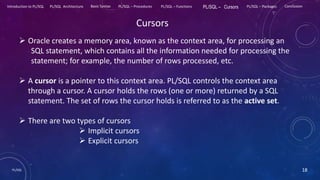
Cursors
 Oracle creates a memory area, known as the context area, for processing an
SQL statement, which contains all the information needed for processing the
statement; for example, the number of rows processed, etc.
 A cursor is a pointer to this context area. PL/SQL controls the context area
through a cursor. A cursor holds the rows (one or more) returned by a SQL
statement. The set of rows the cursor holds is referred to as the active set.
 There are two types of cursors
 Implicit cursors
 Explicit cursors
PL/SQL 19
Introduction to PL/SQL PL/SQL Architecture Basic Syntax PL/SQL – Procedures PL/SQL – Functions PL/SQL – Cursors PL/SQL – Packages Conclusion
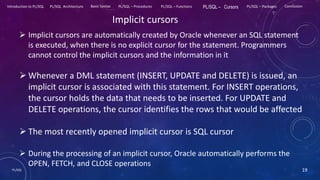
Implicit cursors
 Implicit cursors are automatically created by Oracle whenever an SQL statement
is executed, when there is no explicit cursor for the statement. Programmers
cannot control the implicit cursors and the information in it
 Whenever a DML statement (INSERT, UPDATE and DELETE) is issued, an
implicit cursor is associated with this statement. For INSERT operations,
the cursor holds the data that needs to be inserted. For UPDATE and
DELETE operations, the cursor identifies the rows that would be affected
 The most recently opened implicit cursor is SQL cursor
 During the processing of an implicit cursor, Oracle automatically performs the
OPEN, FETCH, and CLOSE operations
PL/SQL 20
Introduction to PL/SQL PL/SQL Architecture Basic Syntax PL/SQL – Procedures PL/SQL – Functions PL/SQL – Cursors PL/SQL – Packages Conclusion
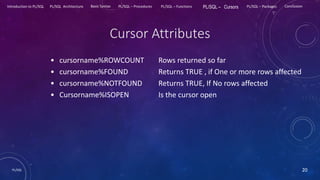
Cursor Attributes
• cursorname%ROWCOUNT Rows returned so far
• cursorname%FOUND Returns TRUE , if One or more rows affected
• cursorname%NOTFOUND Returns TRUE, If No rows affected
• Cursorname%ISOPEN Is the cursor open
PL/SQL 21
Introduction to PL/SQL PL/SQL Architecture Basic Syntax PL/SQL – Procedures PL/SQL – Functions PL/SQL – Cursors PL/SQL – Packages Conclusion
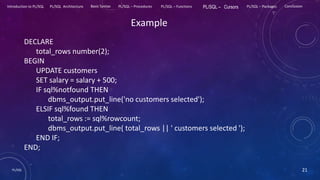
Example
DECLARE
total_rows number(2);
BEGIN
UPDATE customers
SET salary = salary + 500;
IF sql%notfound THEN
dbms_output.put_line('no customers selected');
ELSIF sql%found THEN
total_rows := sql%rowcount;
dbms_output.put_line( total_rows || ' customers selected ');
END IF;
END;
PL/SQL 22
Introduction to PL/SQL PL/SQL Architecture Basic Syntax PL/SQL – Procedures PL/SQL – Functions PL/SQL – Cursors PL/SQL – Packages Conclusion
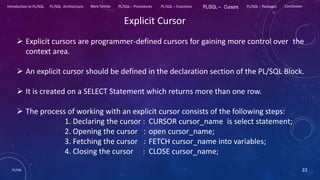
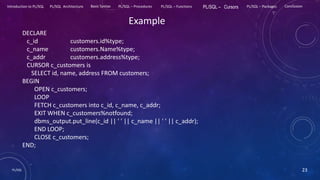
Explicit Cursor
 Explicit cursors are programmer-defined cursors for gaining more control over the
context area.
 An explicit cursor should be defined in the declaration section of the PL/SQL Block.
 It is created on a SELECT Statement which returns more than one row.
 The process of working with an explicit cursor consists of the following steps:
1. Declaring the cursor : CURSOR cursor_name is select statement;
2. Opening the cursor : open cursor_name;
3. Fetching the cursor : FETCH cursor_name into variables;
4. Closing the cursor : CLOSE cursor_name;
PL/SQL 23
Introduction to PL/SQL PL/SQL Architecture Basic Syntax PL/SQL – Procedures PL/SQL – Functions PL/SQL – Cursors PL/SQL – Packages Conclusion
Example
DECLARE
c_id customers.id%type;
c_name customers.Name%type;
c_addr customers.address%type;
CURSOR c_customers is
SELECT id, name, address FROM customers;
BEGIN
OPEN c_customers;
LOOP
FETCH c_customers into c_id, c_name, c_addr;
EXIT WHEN c_customers%notfound;
dbms_output.put_line(c_id || ' ' || c_name || ' ' || c_addr);
END LOOP;
CLOSE c_customers;
END;
PL/SQL 24
Introduction to PL/SQL PL/SQL Architecture Basic Syntax PL/SQL – Procedures PL/SQL – Functions PL/SQL – Cursors PL/SQL –
Packages
Conclusion
Packages
 A package is a collection of PL/SQL objects grouped under one package name
 Packages include procedures, functions, cursors, declarations, types, and variables
 Enables the oracle server to read multiple objects into memory simultaneously
 A package will have two mandatory parts:
1. Package specification
2. Package body or definition
PL/SQL 25
Introduction to PL/SQL PL/SQL Architecture Basic Syntax PL/SQL – Procedures PL/SQL – Functions PL/SQL – Cursors PL/SQL –
Packages
Conclusion
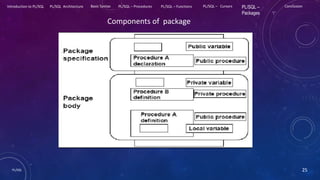
Components of package
PL/SQL 26
Introduction to PL/SQL PL/SQL Architecture Basic Syntax PL/SQL – Procedures PL/SQL – Functions PL/SQL – Cursors PL/SQL –
Packages
Conclusion
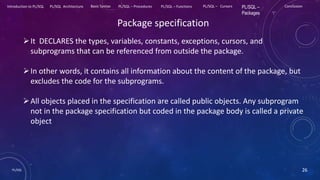
Package specification
It DECLARES the types, variables, constants, exceptions, cursors, and
subprograms that can be referenced from outside the package.
In other words, it contains all information about the content of the package, but
excludes the code for the subprograms.
All objects placed in the specification are called public objects. Any subprogram
not in the package specification but coded in the package body is called a private
object
PL/SQL 27
Introduction to PL/SQL PL/SQL Architecture Basic Syntax PL/SQL – Procedures PL/SQL – Functions PL/SQL – Cursors PL/SQL –
Packages
Conclusion
Package specification
SYNTAX:
CREATE OR REPLACE PACKAGE package_name
AS
[ declarations of variables and types ]
[ specifications of cursors ]
[ specifications of modules ]
END [ package_name ];
EG:
CREATE OR REPLACE PACKAGE cust_sal AS
PROCEDURE find_sal(c_id customers.id%type);
END cust_sal;
PL/SQL 28
Introduction to PL/SQL PL/SQL Architecture Basic Syntax PL/SQL – Procedures PL/SQL – Functions PL/SQL – Cursors PL/SQL –
Packages
Conclusion
Package body
 The package body has the codes for various methods declared in the package
specification and other private declarations, which are hidden from the code
outside the package
 SYNTAX:
CREATE OR REPLACE PACKAGE BODY package_name
IS
[ declarations of variables and types ]
[ specification and SELECT statement of cursors ]
[ specification and body of modules ]
BEGIN
executable statements
END [ package_name ];
PL/SQL 29
Introduction to PL/SQL PL/SQL Architecture Basic Syntax PL/SQL – Procedures PL/SQL – Functions PL/SQL – Cursors PL/SQL –
Packages
Conclusion
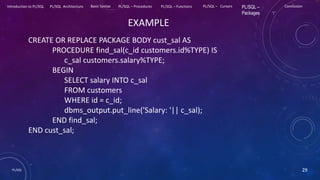
EXAMPLE
CREATE OR REPLACE PACKAGE BODY cust_sal AS
PROCEDURE find_sal(c_id customers.id%TYPE) IS
c_sal customers.salary%TYPE;
BEGIN
SELECT salary INTO c_sal
FROM customers
WHERE id = c_id;
dbms_output.put_line('Salary: '|| c_sal);
END find_sal;
END cust_sal;
Introduction to PL/SQL PL/SQL Architecture Basic Syntax PL/SQL – Procedures PL/SQL – Functions PL/SQL – Cursors PL/SQL – Packages Conclusion
PL/SQL 30
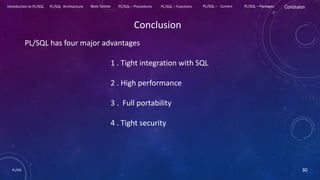
Conclusion
PL/SQL has four major advantages
1 . Tight integration with SQL
2 . High performance
3 . Full portability
4 . Tight security
dbms_output.put_line(‘THANK YOU!!!’);

Introduction to PL/SQL

  • 1.
  • 2.
    PL/SQL Agenda 2 1. Introduction toPL/SQL 2. PL/SQL Architecture 3. Basic Syntax 4. PL/SQL – Procedures 5. PL/SQL – Functions 6. PL/SQL – Cursors 7. PL/SQL – Packages 8. Conclusion
  • 3.
    PL/SQL 3 Introduction toPL/SQL PL/SQL Architecture Basic Syntax PL/SQL – Procedures PL/SQL – Functions PL/SQL – Cursors PL/SQL – Packages Conclusion What is PL/SQL?  PL SQL basically stands for "Procedural Language extensions to SQL“ . PL/SQL allows the programmer to write code in procedural format  It combines the data manipulation power of SQL with the processing power of procedural language to create a super powerful SQL queries  It allows the programmers to instruct the compiler 'what to do' through SQL and 'how to do' through its procedural way  PL/SQL was developed Oracle’s corporation . It is a proprietary language
  • 4.
    PL/SQL 4 Introduction toPL/SQL PL/SQL Architecture Basic Syntax PL/SQL – Procedures PL/SQL – Functions PL/SQL – Cursors PL/SQL – Packages Conclusion PL/SQL Architecture
  • 5.
    PL/SQL 5 Introduction toPL/SQL PL/SQL Architecture Basic Syntax PL/SQL – Procedures PL/SQL – Functions PL/SQL – Cursors PL/SQL – Packages Conclusion PL/SQL ENGINE  PL/SQL engine is the component where the actual processing of the codes takes place  PL/SQL engine separates PL/SQL units and SQL part in the input  The separated PL/SQL units will be handled with the PL/SQL engine itself  The SQL part will be sent to database server where the actual interaction with database takes place.  It can be installed in both database server and in the application server
  • 6.
    PL/SQL 6 Introduction toPL/SQL PL/SQL Architecture Basic Syntax PL/SQL – Procedures PL/SQL – Functions PL/SQL – Cursors PL/SQL – Packages Conclusion SQL VS PL/SQL SQL PL/SQL SQL is a single query that is used to perform DML and DDL operations PL/SQL is a block of codes that used to write the entire program blocks/ procedure/ function, etc It is declarative, that defines what needs to be done, rather than how things need to be done PL/SQL is procedural that defines how the things needs to be done Execute as a single statement Execute as a whole block Mainly used to manipulate data Mainly used to create an application Interaction with Database server No interaction with the database server Cannot contain PL/SQL code in it It is an extension of SQL, so it can contain SQL inside it.
  • 7.
    PL/SQL 7 Introduction toPL/SQL PL/SQL Architecture Basic Syntax PL/SQL – Procedures PL/SQL – Functions PL/SQL – Cursors PL/SQL – Packages Conclusion PL/SQL Block Types Anonymous DECLARE BEGIN -statements EXCEPTION END; Procedure PROCEDURE <name> IS BEGIN -statements EXCEPTION END; Function FUNCTION <name> RETURN <datatype> IS BEGIN -statements EXCEPTION END;
  • 8.
    PL/SQL 8 Introduction toPL/SQL PL/SQL Architecture Basic Syntax PL/SQL – Procedures PL/SQL – Functions PL/SQL – Cursors PL/SQL – Packages Conclusion PL/SQL BLOCK STRUCTURE DECLARE (optional) - variable declarations BEGIN (required) - SQL statements - PL/SQL statements or sub-blocks EXCEPTION (optional) - actions to perform when errors occur END; (required)
  • 9.
    PL/SQL 9 Introduction toPL/SQL PL/SQL Architecture Basic Syntax PL/SQL – Procedures PL/SQL – Functions PL/SQL – Cursors PL/SQL – Packages Conclusion Example DECLARE v_first_name VARCHAR2(35); v_last_name VARCHAR2(35); BEGIN SELECT first_name, last_name INTO v_first_name, v_last_name FROM student WHERE student_id = 123; DBMS_OUTPUT.PUT_LINE ('Student name: '||v_first_name||' ‘|| v_last_name); EXCEPTION WHEN NO_DATA_FOUND THEN DBMS_OUTPUT.PUT_LINE ('There is no student with '|| 'student id 123’); END;
  • 10.
    PL/SQL 10 Introduction toPL/SQL PL/SQL Architecture Basic Syntax PL/SQL – Procedures PL/SQL – Functions PL/SQL – Cursors PL/SQL – Packages Conclusion Example for Nested Blocks DECLARE -- Global variables num1 number := 95; num2 number := 85; BEGIN dbms_output.put_line('Outer Variable num1: ' || num1); dbms_output.put_line('Outer Variable num2: ' || num2); DECLARE -- Local variables num1 number := 195; num2 number := 185; BEGIN dbms_output.put_line('Inner Variable num1: ' || num1); dbms_output.put_line('Inner Variable num2: ' || num2); END; END;
  • 11.
    PL/SQL 11 Introduction toPL/SQL PL/SQL Architecture Basic Syntax PL/SQL – Procedures PL/SQL – Functions PL/SQL – Cursors PL/SQL – Packages Conclusion Subprogram A subprogram is a program unit/module that performs a particular task. PL/SQL subprograms are named PL/SQL blocks that can be invoked with a set of parameters. PL/SQL provides two kinds of subprograms − Functions − These subprograms return a single value; mainly used to compute and return a value. Procedures − These subprograms do not return value directly; mainly used to perform an action. A subprogram can be created − 1. At the schema level 2. Inside a package 3. Inside a PL/SQL block
  • 12.
    PL/SQL 12 Introduction toPL/SQL PL/SQL Architecture Basic Syntax PL/SQL – Procedures PL/SQL – Functions PL/SQL – Cursors PL/SQL – Packages Conclusion Syntax: CREATE [OR REPLACE] PROCEDURE procedure_name [(parameter_name [IN | OUT | IN OUT] type [, ...])] {IS | AS} BEGIN < procedure_body > END procedure_name; Creating a Procedure Executing a Procedure A standalone procedure can be called in two ways − 1.Using the EXECUTE keyword eg: 2.Calling the name of the procedure from a PL/SQL block eg: BEGIN greetings; END; EXECUTE greetings;
  • 13.
    PL/SQL 13 Introduction toPL/SQL PL/SQL Architecture Basic Syntax PL/SQL – Procedures PL/SQL – Functions PL/SQL – Cursors PL/SQL – Packages Conclusion Example DECLARE a number; b number; c number; Create or replace PROCEDURE findMin(x IN number, y IN number, z OUT number) IS BEGIN IF x < y THEN z:= x; ELSE z:= y; END IF; END; BEGIN a:= 23; b:= 45; findMin(a, b, c); dbms_output.put_line(' Minimum of (23, 45) : ' || c); END ;
  • 14.
    PL/SQL 14 Introduction toPL/SQL PL/SQL Architecture Basic Syntax PL/SQL – Procedures PL/SQL – Functions PL/SQL – Cursors PL/SQL – Packages Conclusion Example DECLARE a number; b number; c number; Create or replace PROCEDURE findMin(x IN number, y IN number, z OUT number) IS BEGIN IF x < y THEN z:= x; ELSE RESULT: z:= y; END IF; END; BEGIN a:= 23; b:= 45; findMin(a, b, c); dbms_output.put_line(' Minimum of (23, 45) : ' || c); END ; Minimum of (23, 45) : 23 PL/SQL procedure successfully completed
  • 15.
    PL/SQL 15 Introduction toPL/SQL PL/SQL Architecture Basic Syntax PL/SQL – Procedures PL/SQL – Functions PL/SQL – Cursors PL/SQL – Packages Conclusion Creating a Function Syntax: CREATE [OR REPLACE] FUNCTION function_name [(parameter_name [IN | OUT | IN OUT] type [, ...])] RETURN datatype IS BEGIN <body> RETURN (return_value); END;
  • 16.
    PL/SQL 16 Introduction toPL/SQL PL/SQL Architecture Basic Syntax PL/SQL – Procedures PL/SQL – Functions PL/SQL – Cursors PL/SQL – Packages Conclusion Example Prob : Recursive function to calculate factorial for a number DECLARE num number; factorial number; CREATE OR REPLACE FUNCTION fact(x number) RETURN number IS f number; BEGIN IF x=0 THEN f := 1; ELSE f := x * fact(x-1); END IF; RETURN f; END; BEGIN num:= 6; factorial := fact(num); dbms_output.put_line(' Factorial '|| num || ' is ' || factorial); END;
  • 17.
    PL/SQL 17 Introduction toPL/SQL PL/SQL Architecture Basic Syntax PL/SQL – Procedures PL/SQL – Functions PL/SQL – Cursors PL/SQL – Packages Conclusion Example Prob : Recursive function to calculate factorial for a number DECLARE num number; factorial number; CREATE OR REPLACE FUNCTION fact(x number) RETURN number IS f number; BEGIN IF x=0 THEN f := 1; ELSE RESULT : f := x * fact(x-1); END IF; RETURN f; END; BEGIN num:= 6; factorial := fact(num); dbms_output.put_line(' Factorial '|| num || ' is ' || factorial); END; Factorial 6 is 720 PL/SQL procedure successfully completed
  • 18.
    PL/SQL 18 Introduction toPL/SQL PL/SQL Architecture Basic Syntax PL/SQL – Procedures PL/SQL – Functions PL/SQL – Cursors PL/SQL – Packages Conclusion Cursors  Oracle creates a memory area, known as the context area, for processing an SQL statement, which contains all the information needed for processing the statement; for example, the number of rows processed, etc.  A cursor is a pointer to this context area. PL/SQL controls the context area through a cursor. A cursor holds the rows (one or more) returned by a SQL statement. The set of rows the cursor holds is referred to as the active set.  There are two types of cursors  Implicit cursors  Explicit cursors
  • 19.
    PL/SQL 19 Introduction toPL/SQL PL/SQL Architecture Basic Syntax PL/SQL – Procedures PL/SQL – Functions PL/SQL – Cursors PL/SQL – Packages Conclusion Implicit cursors  Implicit cursors are automatically created by Oracle whenever an SQL statement is executed, when there is no explicit cursor for the statement. Programmers cannot control the implicit cursors and the information in it  Whenever a DML statement (INSERT, UPDATE and DELETE) is issued, an implicit cursor is associated with this statement. For INSERT operations, the cursor holds the data that needs to be inserted. For UPDATE and DELETE operations, the cursor identifies the rows that would be affected  The most recently opened implicit cursor is SQL cursor  During the processing of an implicit cursor, Oracle automatically performs the OPEN, FETCH, and CLOSE operations
  • 20.
    PL/SQL 20 Introduction toPL/SQL PL/SQL Architecture Basic Syntax PL/SQL – Procedures PL/SQL – Functions PL/SQL – Cursors PL/SQL – Packages Conclusion Cursor Attributes • cursorname%ROWCOUNT Rows returned so far • cursorname%FOUND Returns TRUE , if One or more rows affected • cursorname%NOTFOUND Returns TRUE, If No rows affected • Cursorname%ISOPEN Is the cursor open
  • 21.
    PL/SQL 21 Introduction toPL/SQL PL/SQL Architecture Basic Syntax PL/SQL – Procedures PL/SQL – Functions PL/SQL – Cursors PL/SQL – Packages Conclusion Example DECLARE total_rows number(2); BEGIN UPDATE customers SET salary = salary + 500; IF sql%notfound THEN dbms_output.put_line('no customers selected'); ELSIF sql%found THEN total_rows := sql%rowcount; dbms_output.put_line( total_rows || ' customers selected '); END IF; END;
  • 22.
    PL/SQL 22 Introduction toPL/SQL PL/SQL Architecture Basic Syntax PL/SQL – Procedures PL/SQL – Functions PL/SQL – Cursors PL/SQL – Packages Conclusion Explicit Cursor  Explicit cursors are programmer-defined cursors for gaining more control over the context area.  An explicit cursor should be defined in the declaration section of the PL/SQL Block.  It is created on a SELECT Statement which returns more than one row.  The process of working with an explicit cursor consists of the following steps: 1. Declaring the cursor : CURSOR cursor_name is select statement; 2. Opening the cursor : open cursor_name; 3. Fetching the cursor : FETCH cursor_name into variables; 4. Closing the cursor : CLOSE cursor_name;
  • 23.
    PL/SQL 23 Introduction toPL/SQL PL/SQL Architecture Basic Syntax PL/SQL – Procedures PL/SQL – Functions PL/SQL – Cursors PL/SQL – Packages Conclusion Example DECLARE c_id customers.id%type; c_name customers.Name%type; c_addr customers.address%type; CURSOR c_customers is SELECT id, name, address FROM customers; BEGIN OPEN c_customers; LOOP FETCH c_customers into c_id, c_name, c_addr; EXIT WHEN c_customers%notfound; dbms_output.put_line(c_id || ' ' || c_name || ' ' || c_addr); END LOOP; CLOSE c_customers; END;
  • 24.
    PL/SQL 24 Introduction toPL/SQL PL/SQL Architecture Basic Syntax PL/SQL – Procedures PL/SQL – Functions PL/SQL – Cursors PL/SQL – Packages Conclusion Packages  A package is a collection of PL/SQL objects grouped under one package name  Packages include procedures, functions, cursors, declarations, types, and variables  Enables the oracle server to read multiple objects into memory simultaneously  A package will have two mandatory parts: 1. Package specification 2. Package body or definition
  • 25.
    PL/SQL 25 Introduction toPL/SQL PL/SQL Architecture Basic Syntax PL/SQL – Procedures PL/SQL – Functions PL/SQL – Cursors PL/SQL – Packages Conclusion Components of package
  • 26.
    PL/SQL 26 Introduction toPL/SQL PL/SQL Architecture Basic Syntax PL/SQL – Procedures PL/SQL – Functions PL/SQL – Cursors PL/SQL – Packages Conclusion Package specification It DECLARES the types, variables, constants, exceptions, cursors, and subprograms that can be referenced from outside the package. In other words, it contains all information about the content of the package, but excludes the code for the subprograms. All objects placed in the specification are called public objects. Any subprogram not in the package specification but coded in the package body is called a private object
  • 27.
    PL/SQL 27 Introduction toPL/SQL PL/SQL Architecture Basic Syntax PL/SQL – Procedures PL/SQL – Functions PL/SQL – Cursors PL/SQL – Packages Conclusion Package specification SYNTAX: CREATE OR REPLACE PACKAGE package_name AS [ declarations of variables and types ] [ specifications of cursors ] [ specifications of modules ] END [ package_name ]; EG: CREATE OR REPLACE PACKAGE cust_sal AS PROCEDURE find_sal(c_id customers.id%type); END cust_sal;
  • 28.
    PL/SQL 28 Introduction toPL/SQL PL/SQL Architecture Basic Syntax PL/SQL – Procedures PL/SQL – Functions PL/SQL – Cursors PL/SQL – Packages Conclusion Package body  The package body has the codes for various methods declared in the package specification and other private declarations, which are hidden from the code outside the package  SYNTAX: CREATE OR REPLACE PACKAGE BODY package_name IS [ declarations of variables and types ] [ specification and SELECT statement of cursors ] [ specification and body of modules ] BEGIN executable statements END [ package_name ];
  • 29.
    PL/SQL 29 Introduction toPL/SQL PL/SQL Architecture Basic Syntax PL/SQL – Procedures PL/SQL – Functions PL/SQL – Cursors PL/SQL – Packages Conclusion EXAMPLE CREATE OR REPLACE PACKAGE BODY cust_sal AS PROCEDURE find_sal(c_id customers.id%TYPE) IS c_sal customers.salary%TYPE; BEGIN SELECT salary INTO c_sal FROM customers WHERE id = c_id; dbms_output.put_line('Salary: '|| c_sal); END find_sal; END cust_sal;
  • 30.
    Introduction to PL/SQLPL/SQL Architecture Basic Syntax PL/SQL – Procedures PL/SQL – Functions PL/SQL – Cursors PL/SQL – Packages Conclusion PL/SQL 30 Conclusion PL/SQL has four major advantages 1 . Tight integration with SQL 2 . High performance 3 . Full portability 4 . Tight security
  • 31.

Editor's Notes

  • #4 This is the most important component of Pl/SQL unit which stores the data. The PL/SQL engine uses the SQL from PL/SQL units to interact with the database server. It consists of SQL executor which actually parses the input SQL statements and execute the same A procedural language is a type of computer programming language that specifies a series of well-structured steps and procedures within its programming context to compose a program. It contains a systematic order of statements, functions and commands to complete a computational task or program
  • #8 A block is the most basic unit in PL/SQL. PL/SQL blocks can be divided into two groups: named and anonymous. Named PL/SQL blocks are used when creating subroutines. These subroutines are procedures, functions, and packages. The subroutines then can be stored in the database and referenced by their names later. subroutines defined in one PL/SQL block cannot be called by another PL/SQL block or referenced by their names later. Anonymous PL/SQL blocks, as you probably can guess, do not have names. As a result, they cannot be stored in the database and referenced later.
  • #9 The declaration section is the first section of the PL/SQL block. It contains definitions of PL/SQL identifiers such as variables, constants, cursors, and so on. The executable section is the next section of the PL/SQL block. This section contains executable statements that allow you to manipulate the variables that have been declared in the declaration section. The exception-handling section is the last section of the PL/SQL block. This section contains statements that are executed when a runtime error occurs within the block. Runtime errors occur while the program is running and cannot be detected by the PL/SQL compiler. When a runtime error occurs, control is passed to the exception-handling section of the block.
  • #10 The WHEN clause evaluates which exception must be raised. In this example, there is only one exception, called NO_DATA_FOUND, and it is raised when the SELECT INTO statement does not return any rows. If there is no record for student ID 123 in the STUDENT table, control is passed to the exception-handling section, and the DBMS_ OUTPUT.PUT_LINE statement is executed.
  • #11 PL/SQL allows nesting of blocks. A program block can contain another inner block. If you declare a variable within an inner block, it is not accessible to an outer block. There are two types of variable scope: Local Variable: Local variables are the inner block variables which are not accessible to outer blocks. Global Variable: Global variables are declared in outermost block.
  • #12 These subprograms are combined to form larger programs. At the schema level, subprogram is a standalone subprogram. It is created with the CREATE PROCEDURE or the CREATE FUNCTION statement. It is stored in the database and can be deleted with the DROP PROCEDURE or DROP FUNCTION statement. A subprogram created inside a package is a packaged subprogram. It is stored in the database and can be deleted only when the package is deleted with the DROP PACKAGE statement. We will discuss packages in the chapter 'PL/SQL - Packages'.
  • #21 %FOUND Returns TRUE if an INSERT, UPDATE, or DELETE statement affected one or more rows or a SELECT INTO statement returned one or more rows. Otherwise, it returns FALSE. 2%NOTFOUND The logical opposite of %FOUND. It returns TRUE if an INSERT, UPDATE, or DELETE statement affected no rows, or a SELECT INTO statement returned no rows. Otherwise, it returns FALSE. 3%ISOPEN Always returns FALSE for implicit cursors, because Oracle closes the SQL cursor automatically after executing its associated SQL statement. 4%ROWCOUNT Returns the number of rows affected by an INSERT, UPDATE, or DELETE statement, or returned by a SELECT INTO statement.
  • #23 The process of working with an explicit cursor consists of the following steps: 1. Declaring the cursor. This initializes the cursor into memory. 2. Opening the cursor. The declared cursor is opened, and memory is allotted. 3. Fetching the cursor. The declared and opened cursor can now retrieve data. 4. Closing the cursor. The declared, opened, and fetched cursor must be closed to release the memory allocation
  • #31 PL/SQL is tightly integrated with SQL. With PL/SQL, you can use all SQL data manipulation, cursor control, and transaction control statements, and all SQL functions, operators, and pseudocolumns. PL/SQL fully supports SQL data types. You need not convert between PL/SQL and SQL data types With PL/SQL, an entire block of statements can be sent to the database at one time. This can drastically reduce network traffic between the database and an application. As Figure 1-1 shows, you can use PL/SQL blocks and subprograms (procedures and functions) to group SQL statements before sending them to the database for execution. PL/SQL also has language features to further speed up SQL statements that are issued inside a loop. PL/SQL stored subprograms are compiled once and stored in executable form, so subprogram calls are efficient. Because stored subprograms execute in the database server, a single call over the network can start a large job. This division of work reduces network traffic and improves response times. Stored subprograms are cached and shared among users, which lowers memory requirements and call overhead. Applications written in PL/SQL can run on any operating system and platform where the database runs. With PL/SQL, you can write portable program libraries and reuse them in different environments. PL/SQL stored subprograms move application code from the client to the server, where you can protect it from tampering, hide the internal details, and restrict who has access. For example, you can grant users access to a subprogram that updates a table, but not grant them access to the table itself or to the text of the UPDATE statement. Triggers written in PL/SQL can control or record changes to data, making sure that all changes obey your business rules.