IJRET: International Journal of Research in Engineering and Technology eISSN: 2319-1163 | pISSN: 2321-7308
_______________________________________________________________________________________
Volume: 04 Issue: 02 | Feb-2015, Available @ http://www.ijret.org 456
PLAYING SOUND FILES IN LabVIEW USING AUDACITY TOOLKIT
P.N.Vasantha1
, A.Abirami2
, N.Gayathri3
, G.Vijayalakshmi4
1
UG Student, Instrumentation and Control Engg., Saranathan College of Engineering, TamilNadu, India
2
UG Student, Instrumentation and Control Engg., Saranathan College of Engineering, TamilNadu, India
3
UG Student, Instrumentation and Control Engg., Saranathan College of Engineering, TamilNadu, India
4
Assistant Professor, Instrumentation and Control Engg., Saranathan College of Engineering, TamilNadu, India
Abstract
World is getting automated, where all the manual meters are being upgraded as smart meters. These are due to the effect of the
different technological developments in various spheres of engineering and sciences. This paper mainly focuses on Smart
programming using LabVIEW. LabVIEW is a virtual programming environment where we intend to play any form of music file
extensions and real time sound signals in LabVIEW. Since, LabVIEW supports only .wav file extensions, this paper provides a
solution to convert all types sound file extensions into .wav file. The toolkit called Audacity has been used for the conversion of
both real time and recorded music signal into .wav files.
Keywords: LabVIEW, Audio signal, Audacity, .wav file
--------------------------------------------------------------------***----------------------------------------------------------------------
1. INTRODUCTION
LabVIEW is the simulation software that has been widely
used to generate and acquire analog and digital signals from
both real time and virtual environment. The application of
LabVIEW has also been extended to include audio based
applications. But, LabVIEW does not support all the audio
formats. It employs only the .wav file extensions that can be
obtained from the Graphics and Sound in block diagram.
The real time audio signals can be captured from the sound
card and microphone in laptop. The recorded and real time
audio signal can be transformed into necessary conversion
format using the Audacity software.
2. SYSTEM OPERATION
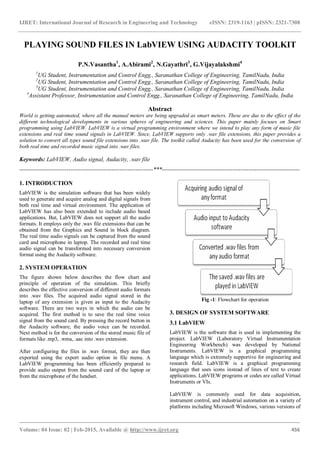
The figure shown below describes the flow chart and
principle of operation of the simulation. This briefly
describes the effective conversion of different audio formats
into .wav files. The acquired audio signal stored in the
laptop of any extension is given as input to the Audacity
software. There are two ways in which the audio can be
acquired. The first method is to save the real time voice
signal from the sound card. By pressing the record button in
the Audacity software, the audio voice can be recorded.
Next method is for the conversion of the stored music file of
formats like .mp3, .wma, .aac into .wav extension.
After configuring the files in .wav format, they are then
exported using the export audio option in file menu. A
LabVIEW programming has been efficiently prepared to
provide audio output from the sound card of the laptop or
from the microphone of the headset.
Fig -1: Flowchart for operation
3. DESIGN OF SYSTEM SOFTWARE
3.1 LabVIEW
LabVIEW is the software that is used in implementing the
project. LabVIEW (Laboratory Virtual Instrumentation
Engineering Workbench) was developed by National
Instruments. LabVIEW is a graphical programming
language which is extremely supportive for engineering and
research field. LabVIEW is a graphical programming
language that uses icons instead of lines of text to create
applications. LabVIEW programs or codes are called Virtual
Instruments or VIs.
LabVIEW is commonly used for data acquisition,
instrument control, and industrial automation on a variety of
platforms including Microsoft Windows, various versions of
IJRET: International Journal of Research in Engineering and Technology eISSN: 2319-1163 | pISSN: 2321-7308
_______________________________________________________________________________________
Volume: 04 Issue: 02 | Feb-2015, Available @ http://www.ijret.org 457
UNIX, Linux, and Mac OS X. The latest version of
LabVIEW is LabVIEW 2014. This platform is largely
helpful to resolve complex problems and also comfortable
with data flow execution. This will support to work with
data types like arrays and clusters and also the loops and
structures.
LabVIEW environment having front panel and block
diagram is used to create a program in virtual
instrumentation field. In addition to that, tools palette and
finding functions are also present in this software. This will
also support the audio input and audio output. It is a
programming language used to automate testing and data
gathering. The graphical approach also allows non-
programmers to build programs by dragging and dropping
virtual representations of lab equipment with which they are
already familiar. [1]
3.2 Audacity
Audacity is a free open source digital audio editor and
recording computer software application, available for
Windows, Mac OS X and Linux. In addition to recording
audio from multiple sources, Audacity can be used for post-
processing of all types of audio, including podcasts by
adding effects such as normalization, trimming and fading in
and out. Audacity includes importing and exporting of
WAV, AIFF, MP3, Ogg Vorbis, and all file formats
supported by libsndfile library. the version 1.3.2 and later
support Free Lossless Audio Codec(FLAC). And the version
1.3.6 and later support additional formats such as WMA,
AAC, AMR and AC3.
Fig -2: Audacity toolkit
Recording and playing back sounds editing via cut, copy
and paste, with unlimited levels of undo, and multitrack
mixing can be done. Audacity support multi-channel modes
with sampling rates up to 96 kHz with 32 bits per sample. It
can also do cross-platform operation.
In addition to English language help, Audacity software also
helps in other languages like Afrikaans, Arabic, Basque,
Bulgarian, Catalan, Chinese, Czech, Danish, Dutch, Finnish,
French, Galician, German, Greek, Hungarian, Irish, Italian,
Japanese, Lithuanian, Macedonian, Norwegian and Polish.
[2]
4. TOOLS USED IN LabVIEW
The LabVIEW tools which are implemented in this program
are as mentioned below:
4.1 Graphics and Sound
The sound tools in LabVIEW enable to read and write real
time and pre-recorded data in to the programming. It enables
to read the sound file from the stored location in the folder.
These sound toolkits are used to integrate the sound files
and the functions in VI's. LabVIEW supports only .wav
format. To convert the real time and .mp3 extension to .wav
format, in this paper we have used the Audacity toolkit.
Fig -3: Sound tools in LabVIEW
The .wav sound format has been played using the read
sound file. The Sound File Path The Play Sound File VI
reads the file specified in the Sound File Path input and
starts playing the sound through the device the Device ID
input specifies. Using this VI, it is easy to configure how the
sound file plays, such as the bit rate of the file and the
channels through which the sound plays (mono, stereo, and
so on) [3]
Fig -4: Sound files tools in LabVIEW
4.2 File I/O - File Path Control
The file path control are used enter and display the file or
folder paths. This control refers to the path in the root
directory. This path control has been used to play the .wav
file from its stored location. [3]
IJRET: International Journal of Research in Engineering and Technology eISSN: 2319-1163 | pISSN: 2321-7308
_______________________________________________________________________________________
Volume: 04 Issue: 02 | Feb-2015, Available @ http://www.ijret.org 458
Fig -5: File path control
4.3 Play Waveform
This Express VI has been used to output the music data
stored in a location in the PC. It plays data from the sound
output device using finite sampling techniques. It has 16 bits
as the default resolution bits. The play waveform
automatically configures an output task and clears the task
after the output completes. It can output the sound using two
devices - 0 represents sound card and 1 represents headset.
[3]
Fig -6: Play waveform Express VI
5. RESULT
The entire software code is tested and simulated using tools
as mentioned above in LabVIEW. This involves the use of
effective conversion of the sound files to .wav format using
the Audacity toolkit. This toolkit can convert any form of
sound file to .wav audio file that can be played in
LabVIEW. Using file input/output functions the .wav file is
played using LabVIEW.
Fig -7: Output
The overall system has been programmed to output the
music data in the form of an array of numeric values. The
sound input to the program is given to the file input path.
The LabVIEW program supports only .wav file extensions.
Thus, we have used the Audacity software to convert the
real time signal into .wav file extension. The sound output
has been viewed in the form of array values.
6. CONCLUSION
From the investigations made, we have concluded that the
sound files can be played in LabVIEW by converting any
audio format files into .wav files. This paper involves the
use of Audacity software to transform to .wav sound file.
The output data from the sound file is stored in the form of
array values and they can be used further for playing it by
reconstructing and sampling at proper instance.
REFERENCES
[1]. G. Shanmuga Priya, Shruthi Srinath, R. Vidhya, Design
of strap on cardiac peril vigilance system, Proceedings of
4th IRF International Conference, Chennai, 9th March-2014.
[2]. Audacity software for creating .wav files available at
www.audacity.com.
[3]. NI LabVIEW2014 from www.ni.com.

Playing sound files in labview using audacity toolkit

  • 1.
    IJRET: International Journalof Research in Engineering and Technology eISSN: 2319-1163 | pISSN: 2321-7308 _______________________________________________________________________________________ Volume: 04 Issue: 02 | Feb-2015, Available @ http://www.ijret.org 456 PLAYING SOUND FILES IN LabVIEW USING AUDACITY TOOLKIT P.N.Vasantha1 , A.Abirami2 , N.Gayathri3 , G.Vijayalakshmi4 1 UG Student, Instrumentation and Control Engg., Saranathan College of Engineering, TamilNadu, India 2 UG Student, Instrumentation and Control Engg., Saranathan College of Engineering, TamilNadu, India 3 UG Student, Instrumentation and Control Engg., Saranathan College of Engineering, TamilNadu, India 4 Assistant Professor, Instrumentation and Control Engg., Saranathan College of Engineering, TamilNadu, India Abstract World is getting automated, where all the manual meters are being upgraded as smart meters. These are due to the effect of the different technological developments in various spheres of engineering and sciences. This paper mainly focuses on Smart programming using LabVIEW. LabVIEW is a virtual programming environment where we intend to play any form of music file extensions and real time sound signals in LabVIEW. Since, LabVIEW supports only .wav file extensions, this paper provides a solution to convert all types sound file extensions into .wav file. The toolkit called Audacity has been used for the conversion of both real time and recorded music signal into .wav files. Keywords: LabVIEW, Audio signal, Audacity, .wav file --------------------------------------------------------------------***---------------------------------------------------------------------- 1. INTRODUCTION LabVIEW is the simulation software that has been widely used to generate and acquire analog and digital signals from both real time and virtual environment. The application of LabVIEW has also been extended to include audio based applications. But, LabVIEW does not support all the audio formats. It employs only the .wav file extensions that can be obtained from the Graphics and Sound in block diagram. The real time audio signals can be captured from the sound card and microphone in laptop. The recorded and real time audio signal can be transformed into necessary conversion format using the Audacity software. 2. SYSTEM OPERATION The figure shown below describes the flow chart and principle of operation of the simulation. This briefly describes the effective conversion of different audio formats into .wav files. The acquired audio signal stored in the laptop of any extension is given as input to the Audacity software. There are two ways in which the audio can be acquired. The first method is to save the real time voice signal from the sound card. By pressing the record button in the Audacity software, the audio voice can be recorded. Next method is for the conversion of the stored music file of formats like .mp3, .wma, .aac into .wav extension. After configuring the files in .wav format, they are then exported using the export audio option in file menu. A LabVIEW programming has been efficiently prepared to provide audio output from the sound card of the laptop or from the microphone of the headset. Fig -1: Flowchart for operation 3. DESIGN OF SYSTEM SOFTWARE 3.1 LabVIEW LabVIEW is the software that is used in implementing the project. LabVIEW (Laboratory Virtual Instrumentation Engineering Workbench) was developed by National Instruments. LabVIEW is a graphical programming language which is extremely supportive for engineering and research field. LabVIEW is a graphical programming language that uses icons instead of lines of text to create applications. LabVIEW programs or codes are called Virtual Instruments or VIs. LabVIEW is commonly used for data acquisition, instrument control, and industrial automation on a variety of platforms including Microsoft Windows, various versions of
  • 2.
    IJRET: International Journalof Research in Engineering and Technology eISSN: 2319-1163 | pISSN: 2321-7308 _______________________________________________________________________________________ Volume: 04 Issue: 02 | Feb-2015, Available @ http://www.ijret.org 457 UNIX, Linux, and Mac OS X. The latest version of LabVIEW is LabVIEW 2014. This platform is largely helpful to resolve complex problems and also comfortable with data flow execution. This will support to work with data types like arrays and clusters and also the loops and structures. LabVIEW environment having front panel and block diagram is used to create a program in virtual instrumentation field. In addition to that, tools palette and finding functions are also present in this software. This will also support the audio input and audio output. It is a programming language used to automate testing and data gathering. The graphical approach also allows non- programmers to build programs by dragging and dropping virtual representations of lab equipment with which they are already familiar. [1] 3.2 Audacity Audacity is a free open source digital audio editor and recording computer software application, available for Windows, Mac OS X and Linux. In addition to recording audio from multiple sources, Audacity can be used for post- processing of all types of audio, including podcasts by adding effects such as normalization, trimming and fading in and out. Audacity includes importing and exporting of WAV, AIFF, MP3, Ogg Vorbis, and all file formats supported by libsndfile library. the version 1.3.2 and later support Free Lossless Audio Codec(FLAC). And the version 1.3.6 and later support additional formats such as WMA, AAC, AMR and AC3. Fig -2: Audacity toolkit Recording and playing back sounds editing via cut, copy and paste, with unlimited levels of undo, and multitrack mixing can be done. Audacity support multi-channel modes with sampling rates up to 96 kHz with 32 bits per sample. It can also do cross-platform operation. In addition to English language help, Audacity software also helps in other languages like Afrikaans, Arabic, Basque, Bulgarian, Catalan, Chinese, Czech, Danish, Dutch, Finnish, French, Galician, German, Greek, Hungarian, Irish, Italian, Japanese, Lithuanian, Macedonian, Norwegian and Polish. [2] 4. TOOLS USED IN LabVIEW The LabVIEW tools which are implemented in this program are as mentioned below: 4.1 Graphics and Sound The sound tools in LabVIEW enable to read and write real time and pre-recorded data in to the programming. It enables to read the sound file from the stored location in the folder. These sound toolkits are used to integrate the sound files and the functions in VI's. LabVIEW supports only .wav format. To convert the real time and .mp3 extension to .wav format, in this paper we have used the Audacity toolkit. Fig -3: Sound tools in LabVIEW The .wav sound format has been played using the read sound file. The Sound File Path The Play Sound File VI reads the file specified in the Sound File Path input and starts playing the sound through the device the Device ID input specifies. Using this VI, it is easy to configure how the sound file plays, such as the bit rate of the file and the channels through which the sound plays (mono, stereo, and so on) [3] Fig -4: Sound files tools in LabVIEW 4.2 File I/O - File Path Control The file path control are used enter and display the file or folder paths. This control refers to the path in the root directory. This path control has been used to play the .wav file from its stored location. [3]
  • 3.
    IJRET: International Journalof Research in Engineering and Technology eISSN: 2319-1163 | pISSN: 2321-7308 _______________________________________________________________________________________ Volume: 04 Issue: 02 | Feb-2015, Available @ http://www.ijret.org 458 Fig -5: File path control 4.3 Play Waveform This Express VI has been used to output the music data stored in a location in the PC. It plays data from the sound output device using finite sampling techniques. It has 16 bits as the default resolution bits. The play waveform automatically configures an output task and clears the task after the output completes. It can output the sound using two devices - 0 represents sound card and 1 represents headset. [3] Fig -6: Play waveform Express VI 5. RESULT The entire software code is tested and simulated using tools as mentioned above in LabVIEW. This involves the use of effective conversion of the sound files to .wav format using the Audacity toolkit. This toolkit can convert any form of sound file to .wav audio file that can be played in LabVIEW. Using file input/output functions the .wav file is played using LabVIEW. Fig -7: Output The overall system has been programmed to output the music data in the form of an array of numeric values. The sound input to the program is given to the file input path. The LabVIEW program supports only .wav file extensions. Thus, we have used the Audacity software to convert the real time signal into .wav file extension. The sound output has been viewed in the form of array values. 6. CONCLUSION From the investigations made, we have concluded that the sound files can be played in LabVIEW by converting any audio format files into .wav files. This paper involves the use of Audacity software to transform to .wav sound file. The output data from the sound file is stored in the form of array values and they can be used further for playing it by reconstructing and sampling at proper instance. REFERENCES [1]. G. Shanmuga Priya, Shruthi Srinath, R. Vidhya, Design of strap on cardiac peril vigilance system, Proceedings of 4th IRF International Conference, Chennai, 9th March-2014. [2]. Audacity software for creating .wav files available at www.audacity.com. [3]. NI LabVIEW2014 from www.ni.com.