RADIOLOGY WORKFLOW SOLUTIONS
© 2015 medavis GmbH. All rights reserved.
DevOps Karlsruhe
Slawa Giterman - July 2016
Delivery Pipeline as Code
using Jenkins 2.0 Pipeline
RADIOLOGY WORKFLOW SOLUTIONS
 Slawa Giterman
 Java Developer (10+ years)
 A lot of experience with DevOps:
 Continuous Integration & Build Tools
 Delivery Pipeline
 Automated acceptance testing
About myself
RADIOLOGY WORKFLOW SOLUTIONS
 medavis GmbH - Software solutions for
radiological workflows (MRT, CT, nuclear
medicine, etc.)
 Browser clients (Java, JEE, Vaadin)
 Fat clients (Windows)
 Integration with multiple 3rd party medical
services (HIS, HL7, DICOM, etc.)
About my company
RADIOLOGY WORKFLOW SOLUTIONS
 Life before Jenkins Pipeline
 Pipeline as Code
 Jenkins Pipeline DSL
 How to use existing plug-ins in pipeline
 Lessons learned
Agenda
RADIOLOGY WORKFLOW SOLUTIONS
"Old" Jenkins Pipeline Plug-Ins
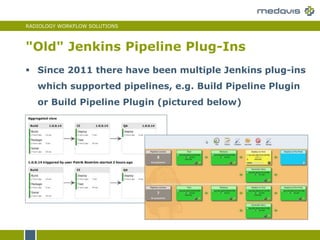
 Since 2011 there have been multiple Jenkins plug-ins
which supported pipelines, e.g. Build Pipeline Plugin
or Build Pipeline Plugin (pictured below)
RADIOLOGY WORKFLOW SOLUTIONS
"Old" Jenkins Pipeline Plug-Ins
 They presented multiple Jenkins jobs as if they were
part of the same pipeline
 From Jenkins point of view these pipelines were just
collections of jobs which triggered each other
RADIOLOGY WORKFLOW SOLUTIONS
Decision Points and Fork / Join Logic
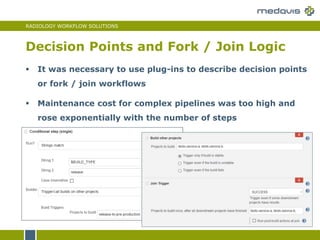
 It was necessary to use plug-ins to describe decision points
or fork / join workflows
 Maintenance cost for complex pipelines was too high and
rose exponentially with the number of steps
RADIOLOGY WORKFLOW SOLUTIONS
Jenkins Job DSL Plug-In
 A partial solution is to use Jenkins Job DSL plug-in
 It allows to create jobs using Groovy scripts instead
of complex manual configurations (see an example
on the next slide)
 But Groovy scripts can only be used during job
creation not during job executions
RADIOLOGY WORKFLOW SOLUTIONS
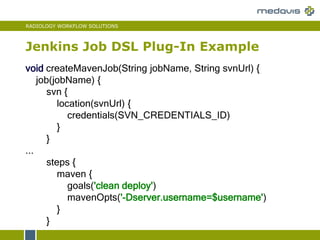
Jenkins Job DSL Plug-In Example
void createMavenJob(String jobName, String svnUrl) {
job(jobName) {
svn {
location(svnUrl) {
credentials(SVN_CREDENTIALS_ID)
}
}
...
steps {
maven {
goals('clean deploy')
mavenOpts('-Dserver.username=$username')
}
}
RADIOLOGY WORKFLOW SOLUTIONS
GoCD, Travis CI, Shippable
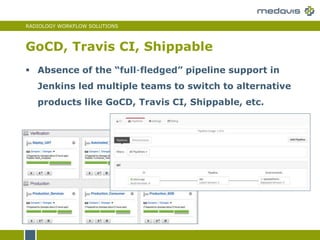
 Absence of the “full-fledged” pipeline support in
Jenkins led multiple teams to switch to alternative
products like GoCD, Travis CI, Shippable, etc.
RADIOLOGY WORKFLOW SOLUTIONS
Jenkins Pipeline
 This led Cloudbees to start working on Jenkins
Pipeline Project (Originally called Jenkins Workflow)
 Development started – May 2014
 Release 1.0 – November 2014
 Renamed to Jenkins Pipeline – January 2016
 Jenkins 2 (weekly: 2.0) – April 2016
 Jenkins 2 (LTS: 2.7.1) – July 2016
RADIOLOGY WORKFLOW SOLUTIONS
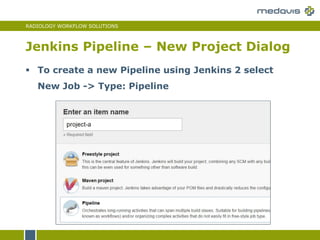
Jenkins Pipeline – New Project Dialog
 To create a new Pipeline using Jenkins 2 select
New Job -> Type: Pipeline
RADIOLOGY WORKFLOW SOLUTIONS
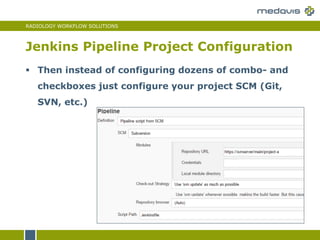
Jenkins Pipeline Project Configuration
 Then instead of configuring dozens of combo- and
checkboxes just configure your project SCM (Git,
SVN, etc.)
RADIOLOGY WORKFLOW SOLUTIONS
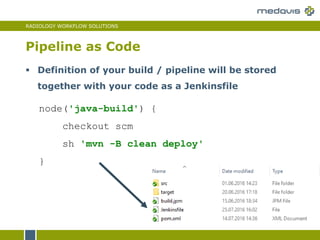
Pipeline as Code
node('java-build') {
checkout scm
sh 'mvn -B clean deploy'
}
 Definition of your build / pipeline will be stored
together with your code as a Jenkinsfile
RADIOLOGY WORKFLOW SOLUTIONS
Simple Maven Project
stage 'Compile'
node('java-build') {
checkout scm
sh 'mvn -B clean deploy'
junit testResults: 'build/test-results/*.xml'
}
stage 'Automated tests'
node('qa-environment') {
…
See step definitions
on the next slide
RADIOLOGY WORKFLOW SOLUTIONS
Jenkins Job DLS Steps
 Jenkinsfile describe pipeline using Jenkins Pipeline DSL
 Jenkins Pipeline DSL consist of steps like:
 stage: starts a new pipeline stage (see next slide)
 node: executes steps on an agent (node) with the
corresponding name / label
 checkout: checkouts code from SCM (e.g. Git or SVN)
 sh: executes command line or shell script
 bat: executes Windows command line or script
 junit: publishes JUnit test results
RADIOLOGY WORKFLOW SOLUTIONS
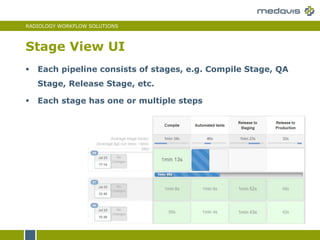
Stage View UI
 Each pipeline consists of stages, e.g. Compile Stage, QA
Stage, Release Stage, etc.
 Each stage has one or multiple steps
RADIOLOGY WORKFLOW SOLUTIONS
Pipeline DSL: Working with Files
//Write string to file
writeFile file: 'status.log', text: 'Status: OK',
encoding: 'UTF-8'
//Example: read XML file to string and then
//get artifact version using regex
pom = readFile('pom.xml')
matcher = (pom =~ '<version>(.+)</version>')
version = matcher ? matcher[0][1] : null
//Read file to string
results = readFile file: 'results.log‚
encoding: 'UTF-8
RADIOLOGY WORKFLOW SOLUTIONS
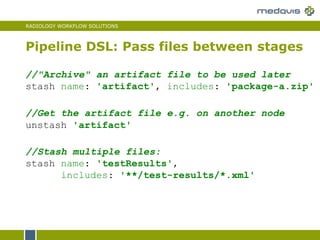
Pipeline DSL: Pass files between stages
//"Archive" an artifact file to be used later
stash name: 'artifact', includes: 'package-a.zip'
//Stash multiple files:
stash name: 'testResults',
includes: '**/test-results/*.xml'
//Get the artifact file e.g. on another node
unstash 'artifact'
RADIOLOGY WORKFLOW SOLUTIONS
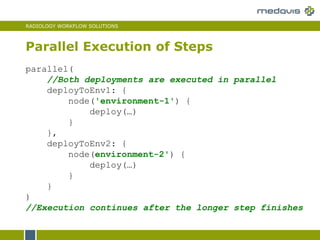
Parallel Execution of Steps
parallel(
//Both deployments are executed in parallel
deployToEnv1: {
node('environment-1') {
deploy(…)
}
},
deployToEnv2: {
node(environment-2') {
deploy(…)
}
}
)
//Execution continues after the longer step finishes
RADIOLOGY WORKFLOW SOLUTIONS
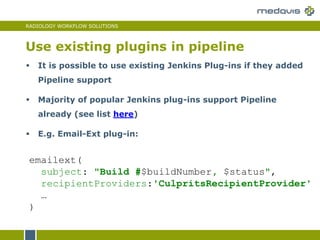
Use existing plugins in pipeline
 It is possible to use existing Jenkins Plug-ins if they added
Pipeline support
 Majority of popular Jenkins plug-ins support Pipeline
already (see list here)
 E.g. Email-Ext plug-in:
emailext(
subject: "Build #$buildNumber, $status",
recipientProviders:'CulpritsRecipientProvider'
…
)
RADIOLOGY WORKFLOW SOLUTIONS
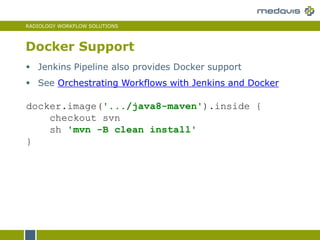
Docker Support
docker.image('.../java8-maven').inside {
checkout svn
sh 'mvn -B clean install'
}
 Jenkins Pipeline also provides Docker support
 See Orchestrating Workflows with Jenkins and Docker
RADIOLOGY WORKFLOW SOLUTIONS
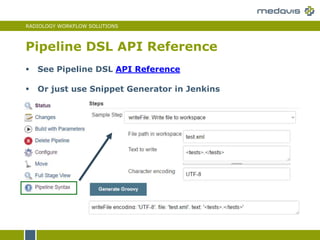
Pipeline DSL API Reference
 See Pipeline DSL API Reference
 Or just use Snippet Generator in Jenkins
RADIOLOGY WORKFLOW SOLUTIONS
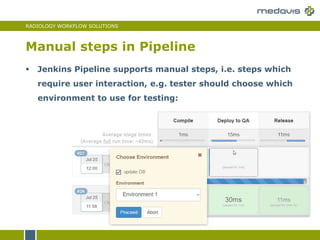
Manual steps in Pipeline
 Jenkins Pipeline supports manual steps, i.e. steps which
require user interaction, e.g. tester should choose which
environment to use for testing:
RADIOLOGY WORKFLOW SOLUTIONS
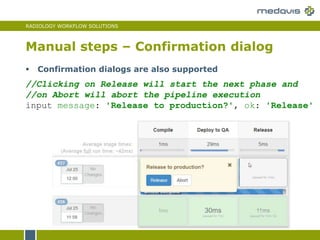
Manual steps – Confirmation dialog
//Clicking on Release will start the next phase and
//on Abort will abort the pipeline execution
input message: 'Release to production?', ok: 'Release'
 Confirmation dialogs are also supported
RADIOLOGY WORKFLOW SOLUTIONS
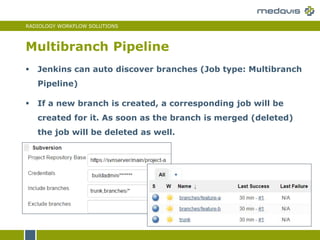
Multibranch Pipeline
 Jenkins can auto discover branches (Job type: Multibranch
Pipeline)
 If a new branch is created, a corresponding job will be
created for it. As soon as the branch is merged (deleted)
the job will be deleted as well.
RADIOLOGY WORKFLOW SOLUTIONS
 Reuse pipeline modules
 Use Scripts in other languages (e.g. Schell
script, Python, Ruby, etc.) if necessary
 How to test Pipeline scripts?
 New Jenkins GUI: Project Blue Ocean
Part 2: Lessons learned
RADIOLOGY WORKFLOW SOLUTIONS
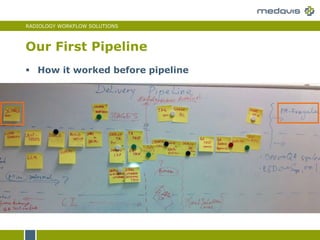
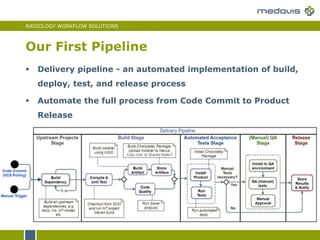
 How it worked before pipeline
Our First Pipeline
RADIOLOGY WORKFLOW SOLUTIONS
 Delivery pipeline - an automated implementation of build,
deploy, test, and release process
 Automate the full process from Code Commit to Product
Release
Our First Pipeline
RADIOLOGY WORKFLOW SOLUTIONS
Pipeline Code Reuse
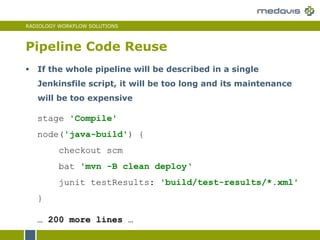
stage 'Compile'
node('java-build') {
checkout scm
bat 'mvn -B clean deploy‘
junit testResults: 'build/test-results/*.xml'
}
… 200 more lines …
 If the whole pipeline will be described in a single
Jenkinsfile script, it will be too long and its maintenance
will be too expensive
RADIOLOGY WORKFLOW SOLUTIONS
Pipeline Code Reuse
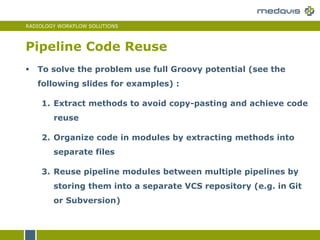
 To solve the problem use full Groovy potential (see the
following slides for examples) :
1. Extract methods to avoid copy-pasting and achieve code
reuse
2. Organize code in modules by extracting methods into
separate files
3. Reuse pipeline modules between multiple pipelines by
storing them into a separate VCS repository (e.g. in Git
or Subversion)
RADIOLOGY WORKFLOW SOLUTIONS
1. Extract Methods
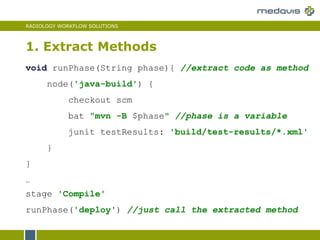
void runPhase(String phase){ //extract code as method
node('java-build') {
checkout scm
bat "mvn -B $phase" //phase is a variable
junit testResults: 'build/test-results/*.xml'
}
}
…
stage 'Compile'
runPhase('deploy') //just call the extracted method
RADIOLOGY WORKFLOW SOLUTIONS
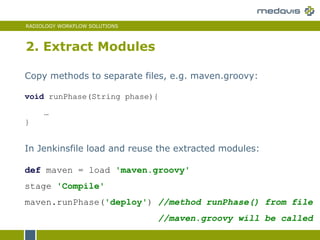
2. Extract Modules
In Jenkinsfile load and reuse the extracted modules:
def maven = load 'maven.groovy'
stage 'Compile'
maven.runPhase('deploy') //method runPhase() from file
//maven.groovy will be called
Copy methods to separate files, e.g. maven.groovy:
void runPhase(String phase){
…
}
RADIOLOGY WORKFLOW SOLUTIONS
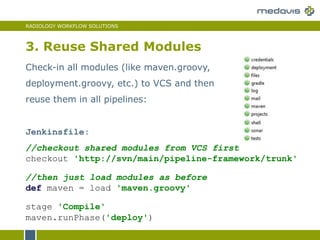
3. Reuse Shared Modules
Jenkinsfile:
//checkout shared modules from VCS first
checkout 'http://svn/main/pipeline-framework/trunk'
//then just load modules as before
def maven = load 'maven.groovy'
stage 'Compile'
maven.runPhase('deploy')
Check-in all modules (like maven.groovy,
deployment.groovy, etc.) to VCS and then
reuse them in all pipelines:
RADIOLOGY WORKFLOW SOLUTIONS
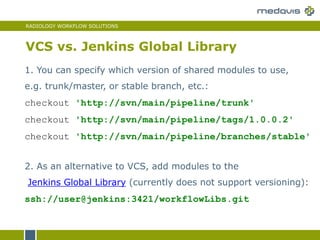
VCS vs. Jenkins Global Library
1. You can specify which version of shared modules to use,
e.g. trunk/master, or stable branch, etc.:
checkout 'http://svn/main/pipeline/trunk'
checkout 'http://svn/main/pipeline/tags/1.0.0.2'
checkout 'http://svn/main/pipeline/branches/stable'
2. As an alternative to VCS, add modules to the
Jenkins Global Library (currently does not support versioning):
ssh://user@jenkins:3421/workflowLibs.git
RADIOLOGY WORKFLOW SOLUTIONS
Reuse Existing non-Groovy scripts
 If you prefer to use a language other than Groovy (e.g.
Python, Ruby, Shell script, etc.) or already have multiple
non-Groovy scripts which implement pipeline step:
 Implement in Groovy just the Pipeline orchestration
logic (e.g. decisions, parallel execution, etc.)
 Implement steps using your preferred language
 Call these scripts from Pipeline using sh (Linux) or bat
(Windows) DSL steps (see the next slide for an
example)
RADIOLOGY WORKFLOW SOLUTIONS
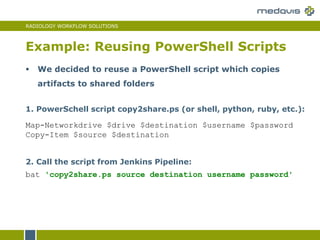
Example: Reusing PowerShell Scripts
2. Call the script from Jenkins Pipeline:
bat 'copy2share.ps source destination username password'
1. PowerSchell script copy2share.ps (or shell, python, ruby, etc.):
Map-Networkdrive $drive $destination $username $password
Copy-Item $source $destination
 We decided to reuse a PowerShell script which copies
artifacts to shared folders
RADIOLOGY WORKFLOW SOLUTIONS
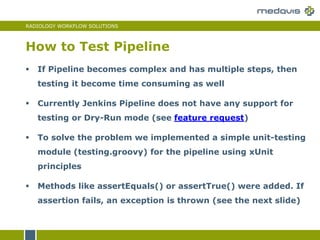
How to Test Pipeline
 If Pipeline becomes complex and has multiple steps, then
testing it become time consuming as well
 Currently Jenkins Pipeline does not have any support for
testing or Dry-Run mode (see feature request)
 To solve the problem we implemented a simple unit-testing
module (testing.groovy) for the pipeline using xUnit
principles
 Methods like assertEquals() or assertTrue() were added. If
assertion fails, an exception is thrown (see the next slide)
RADIOLOGY WORKFLOW SOLUTIONS
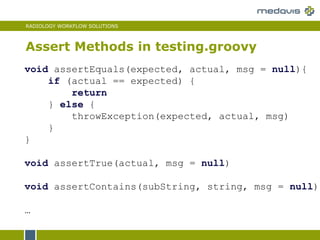
Assert Methods in testing.groovy
void assertEquals(expected, actual, msg = null){
if (actual == expected) {
return
} else {
throwException(expected, actual, msg)
}
}
void assertTrue(actual, msg = null)
void assertContains(subString, string, msg = null)
…
RADIOLOGY WORKFLOW SOLUTIONS
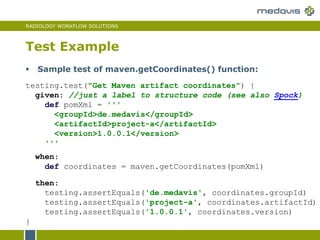
Test Example
testing.test("Get Maven artifact coordinates") {
given: //just a label to structure code (see also Spock)
def pomXml = '''
<groupId>de.medavis</groupId>
<artifactId>project-a</artifactId>
<version>1.0.0.1</version>
'''
when:
def coordinates = maven.getCoordinates(pomXml)
then:
testing.assertEquals('de.medavis', coordinates.groupId)
testing.assertEquals('project-a', coordinates.artifactId)
testing.assertEquals('1.0.0.1', coordinates.version)
}
 Sample test of maven.getCoordinates() function:
RADIOLOGY WORKFLOW SOLUTIONS
How to Test Pipeline
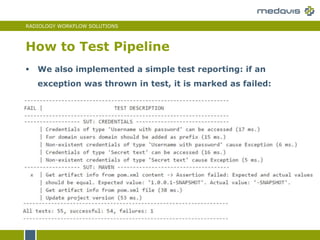
 We also implemented a simple test reporting: if an
exception was thrown in test, it is marked as failed:
RADIOLOGY WORKFLOW SOLUTIONS
New UI –Blue Ocean
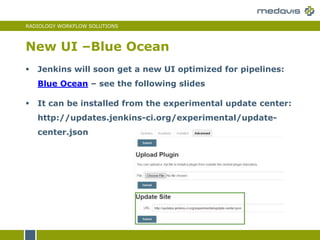
 Jenkins will soon get a new UI optimized for pipelines:
Blue Ocean – see the following slides
 It can be installed from the experimental update center:
http://updates.jenkins-ci.org/experimental/update-
center.json
RADIOLOGY WORKFLOW SOLUTIONS
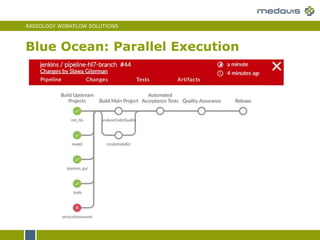
Blue Ocean: Parallel Execution
RADIOLOGY WORKFLOW SOLUTIONS
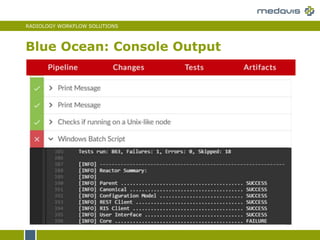
Blue Ocean: Console Output
RADIOLOGY WORKFLOW SOLUTIONS
Name des Autors
Datum der Präsentation
© 2015 medavis GmbH. All rights reserved.
Your Trusted Partner
for Workflow Management
in Radiology
medavis

Delivery Pipeline as Code: using Jenkins 2.0 Pipeline

  • 1.
    RADIOLOGY WORKFLOW SOLUTIONS ©2015 medavis GmbH. All rights reserved. DevOps Karlsruhe Slawa Giterman - July 2016 Delivery Pipeline as Code using Jenkins 2.0 Pipeline
  • 2.
    RADIOLOGY WORKFLOW SOLUTIONS Slawa Giterman  Java Developer (10+ years)  A lot of experience with DevOps:  Continuous Integration & Build Tools  Delivery Pipeline  Automated acceptance testing About myself
  • 3.
    RADIOLOGY WORKFLOW SOLUTIONS medavis GmbH - Software solutions for radiological workflows (MRT, CT, nuclear medicine, etc.)  Browser clients (Java, JEE, Vaadin)  Fat clients (Windows)  Integration with multiple 3rd party medical services (HIS, HL7, DICOM, etc.) About my company
  • 4.
    RADIOLOGY WORKFLOW SOLUTIONS Life before Jenkins Pipeline  Pipeline as Code  Jenkins Pipeline DSL  How to use existing plug-ins in pipeline  Lessons learned Agenda
  • 5.
    RADIOLOGY WORKFLOW SOLUTIONS "Old"Jenkins Pipeline Plug-Ins  Since 2011 there have been multiple Jenkins plug-ins which supported pipelines, e.g. Build Pipeline Plugin or Build Pipeline Plugin (pictured below)
  • 6.
    RADIOLOGY WORKFLOW SOLUTIONS "Old"Jenkins Pipeline Plug-Ins  They presented multiple Jenkins jobs as if they were part of the same pipeline  From Jenkins point of view these pipelines were just collections of jobs which triggered each other
  • 7.
    RADIOLOGY WORKFLOW SOLUTIONS DecisionPoints and Fork / Join Logic  It was necessary to use plug-ins to describe decision points or fork / join workflows  Maintenance cost for complex pipelines was too high and rose exponentially with the number of steps
  • 8.
    RADIOLOGY WORKFLOW SOLUTIONS JenkinsJob DSL Plug-In  A partial solution is to use Jenkins Job DSL plug-in  It allows to create jobs using Groovy scripts instead of complex manual configurations (see an example on the next slide)  But Groovy scripts can only be used during job creation not during job executions
  • 9.
    RADIOLOGY WORKFLOW SOLUTIONS JenkinsJob DSL Plug-In Example void createMavenJob(String jobName, String svnUrl) { job(jobName) { svn { location(svnUrl) { credentials(SVN_CREDENTIALS_ID) } } ... steps { maven { goals('clean deploy') mavenOpts('-Dserver.username=$username') } }
  • 10.
    RADIOLOGY WORKFLOW SOLUTIONS GoCD,Travis CI, Shippable  Absence of the “full-fledged” pipeline support in Jenkins led multiple teams to switch to alternative products like GoCD, Travis CI, Shippable, etc.
  • 11.
    RADIOLOGY WORKFLOW SOLUTIONS JenkinsPipeline  This led Cloudbees to start working on Jenkins Pipeline Project (Originally called Jenkins Workflow)  Development started – May 2014  Release 1.0 – November 2014  Renamed to Jenkins Pipeline – January 2016  Jenkins 2 (weekly: 2.0) – April 2016  Jenkins 2 (LTS: 2.7.1) – July 2016
  • 12.
    RADIOLOGY WORKFLOW SOLUTIONS JenkinsPipeline – New Project Dialog  To create a new Pipeline using Jenkins 2 select New Job -> Type: Pipeline
  • 13.
    RADIOLOGY WORKFLOW SOLUTIONS JenkinsPipeline Project Configuration  Then instead of configuring dozens of combo- and checkboxes just configure your project SCM (Git, SVN, etc.)
  • 14.
    RADIOLOGY WORKFLOW SOLUTIONS Pipelineas Code node('java-build') { checkout scm sh 'mvn -B clean deploy' }  Definition of your build / pipeline will be stored together with your code as a Jenkinsfile
  • 15.
    RADIOLOGY WORKFLOW SOLUTIONS SimpleMaven Project stage 'Compile' node('java-build') { checkout scm sh 'mvn -B clean deploy' junit testResults: 'build/test-results/*.xml' } stage 'Automated tests' node('qa-environment') { … See step definitions on the next slide
  • 16.
    RADIOLOGY WORKFLOW SOLUTIONS JenkinsJob DLS Steps  Jenkinsfile describe pipeline using Jenkins Pipeline DSL  Jenkins Pipeline DSL consist of steps like:  stage: starts a new pipeline stage (see next slide)  node: executes steps on an agent (node) with the corresponding name / label  checkout: checkouts code from SCM (e.g. Git or SVN)  sh: executes command line or shell script  bat: executes Windows command line or script  junit: publishes JUnit test results
  • 17.
    RADIOLOGY WORKFLOW SOLUTIONS StageView UI  Each pipeline consists of stages, e.g. Compile Stage, QA Stage, Release Stage, etc.  Each stage has one or multiple steps
  • 18.
    RADIOLOGY WORKFLOW SOLUTIONS PipelineDSL: Working with Files //Write string to file writeFile file: 'status.log', text: 'Status: OK', encoding: 'UTF-8' //Example: read XML file to string and then //get artifact version using regex pom = readFile('pom.xml') matcher = (pom =~ '<version>(.+)</version>') version = matcher ? matcher[0][1] : null //Read file to string results = readFile file: 'results.log‚ encoding: 'UTF-8
  • 19.
    RADIOLOGY WORKFLOW SOLUTIONS PipelineDSL: Pass files between stages //"Archive" an artifact file to be used later stash name: 'artifact', includes: 'package-a.zip' //Stash multiple files: stash name: 'testResults', includes: '**/test-results/*.xml' //Get the artifact file e.g. on another node unstash 'artifact'
  • 20.
    RADIOLOGY WORKFLOW SOLUTIONS ParallelExecution of Steps parallel( //Both deployments are executed in parallel deployToEnv1: { node('environment-1') { deploy(…) } }, deployToEnv2: { node(environment-2') { deploy(…) } } ) //Execution continues after the longer step finishes
  • 21.
    RADIOLOGY WORKFLOW SOLUTIONS Useexisting plugins in pipeline  It is possible to use existing Jenkins Plug-ins if they added Pipeline support  Majority of popular Jenkins plug-ins support Pipeline already (see list here)  E.g. Email-Ext plug-in: emailext( subject: "Build #$buildNumber, $status", recipientProviders:'CulpritsRecipientProvider' … )
  • 22.
    RADIOLOGY WORKFLOW SOLUTIONS DockerSupport docker.image('.../java8-maven').inside { checkout svn sh 'mvn -B clean install' }  Jenkins Pipeline also provides Docker support  See Orchestrating Workflows with Jenkins and Docker
  • 23.
    RADIOLOGY WORKFLOW SOLUTIONS PipelineDSL API Reference  See Pipeline DSL API Reference  Or just use Snippet Generator in Jenkins
  • 24.
    RADIOLOGY WORKFLOW SOLUTIONS Manualsteps in Pipeline  Jenkins Pipeline supports manual steps, i.e. steps which require user interaction, e.g. tester should choose which environment to use for testing:
  • 25.
    RADIOLOGY WORKFLOW SOLUTIONS Manualsteps – Confirmation dialog //Clicking on Release will start the next phase and //on Abort will abort the pipeline execution input message: 'Release to production?', ok: 'Release'  Confirmation dialogs are also supported
  • 26.
    RADIOLOGY WORKFLOW SOLUTIONS MultibranchPipeline  Jenkins can auto discover branches (Job type: Multibranch Pipeline)  If a new branch is created, a corresponding job will be created for it. As soon as the branch is merged (deleted) the job will be deleted as well.
  • 27.
    RADIOLOGY WORKFLOW SOLUTIONS Reuse pipeline modules  Use Scripts in other languages (e.g. Schell script, Python, Ruby, etc.) if necessary  How to test Pipeline scripts?  New Jenkins GUI: Project Blue Ocean Part 2: Lessons learned
  • 28.
    RADIOLOGY WORKFLOW SOLUTIONS How it worked before pipeline Our First Pipeline
  • 29.
    RADIOLOGY WORKFLOW SOLUTIONS Delivery pipeline - an automated implementation of build, deploy, test, and release process  Automate the full process from Code Commit to Product Release Our First Pipeline
  • 30.
    RADIOLOGY WORKFLOW SOLUTIONS PipelineCode Reuse stage 'Compile' node('java-build') { checkout scm bat 'mvn -B clean deploy‘ junit testResults: 'build/test-results/*.xml' } … 200 more lines …  If the whole pipeline will be described in a single Jenkinsfile script, it will be too long and its maintenance will be too expensive
  • 31.
    RADIOLOGY WORKFLOW SOLUTIONS PipelineCode Reuse  To solve the problem use full Groovy potential (see the following slides for examples) : 1. Extract methods to avoid copy-pasting and achieve code reuse 2. Organize code in modules by extracting methods into separate files 3. Reuse pipeline modules between multiple pipelines by storing them into a separate VCS repository (e.g. in Git or Subversion)
  • 32.
    RADIOLOGY WORKFLOW SOLUTIONS 1.Extract Methods void runPhase(String phase){ //extract code as method node('java-build') { checkout scm bat "mvn -B $phase" //phase is a variable junit testResults: 'build/test-results/*.xml' } } … stage 'Compile' runPhase('deploy') //just call the extracted method
  • 33.
    RADIOLOGY WORKFLOW SOLUTIONS 2.Extract Modules In Jenkinsfile load and reuse the extracted modules: def maven = load 'maven.groovy' stage 'Compile' maven.runPhase('deploy') //method runPhase() from file //maven.groovy will be called Copy methods to separate files, e.g. maven.groovy: void runPhase(String phase){ … }
  • 34.
    RADIOLOGY WORKFLOW SOLUTIONS 3.Reuse Shared Modules Jenkinsfile: //checkout shared modules from VCS first checkout 'http://svn/main/pipeline-framework/trunk' //then just load modules as before def maven = load 'maven.groovy' stage 'Compile' maven.runPhase('deploy') Check-in all modules (like maven.groovy, deployment.groovy, etc.) to VCS and then reuse them in all pipelines:
  • 35.
    RADIOLOGY WORKFLOW SOLUTIONS VCSvs. Jenkins Global Library 1. You can specify which version of shared modules to use, e.g. trunk/master, or stable branch, etc.: checkout 'http://svn/main/pipeline/trunk' checkout 'http://svn/main/pipeline/tags/1.0.0.2' checkout 'http://svn/main/pipeline/branches/stable' 2. As an alternative to VCS, add modules to the Jenkins Global Library (currently does not support versioning): ssh://user@jenkins:3421/workflowLibs.git
  • 36.
    RADIOLOGY WORKFLOW SOLUTIONS ReuseExisting non-Groovy scripts  If you prefer to use a language other than Groovy (e.g. Python, Ruby, Shell script, etc.) or already have multiple non-Groovy scripts which implement pipeline step:  Implement in Groovy just the Pipeline orchestration logic (e.g. decisions, parallel execution, etc.)  Implement steps using your preferred language  Call these scripts from Pipeline using sh (Linux) or bat (Windows) DSL steps (see the next slide for an example)
  • 37.
    RADIOLOGY WORKFLOW SOLUTIONS Example:Reusing PowerShell Scripts 2. Call the script from Jenkins Pipeline: bat 'copy2share.ps source destination username password' 1. PowerSchell script copy2share.ps (or shell, python, ruby, etc.): Map-Networkdrive $drive $destination $username $password Copy-Item $source $destination  We decided to reuse a PowerShell script which copies artifacts to shared folders
  • 38.
    RADIOLOGY WORKFLOW SOLUTIONS Howto Test Pipeline  If Pipeline becomes complex and has multiple steps, then testing it become time consuming as well  Currently Jenkins Pipeline does not have any support for testing or Dry-Run mode (see feature request)  To solve the problem we implemented a simple unit-testing module (testing.groovy) for the pipeline using xUnit principles  Methods like assertEquals() or assertTrue() were added. If assertion fails, an exception is thrown (see the next slide)
  • 39.
    RADIOLOGY WORKFLOW SOLUTIONS AssertMethods in testing.groovy void assertEquals(expected, actual, msg = null){ if (actual == expected) { return } else { throwException(expected, actual, msg) } } void assertTrue(actual, msg = null) void assertContains(subString, string, msg = null) …
  • 40.
    RADIOLOGY WORKFLOW SOLUTIONS TestExample testing.test("Get Maven artifact coordinates") { given: //just a label to structure code (see also Spock) def pomXml = ''' <groupId>de.medavis</groupId> <artifactId>project-a</artifactId> <version>1.0.0.1</version> ''' when: def coordinates = maven.getCoordinates(pomXml) then: testing.assertEquals('de.medavis', coordinates.groupId) testing.assertEquals('project-a', coordinates.artifactId) testing.assertEquals('1.0.0.1', coordinates.version) }  Sample test of maven.getCoordinates() function:
  • 41.
    RADIOLOGY WORKFLOW SOLUTIONS Howto Test Pipeline  We also implemented a simple test reporting: if an exception was thrown in test, it is marked as failed:
  • 42.
    RADIOLOGY WORKFLOW SOLUTIONS NewUI –Blue Ocean  Jenkins will soon get a new UI optimized for pipelines: Blue Ocean – see the following slides  It can be installed from the experimental update center: http://updates.jenkins-ci.org/experimental/update- center.json
  • 43.
    RADIOLOGY WORKFLOW SOLUTIONS BlueOcean: Parallel Execution
  • 44.
    RADIOLOGY WORKFLOW SOLUTIONS BlueOcean: Console Output
  • 45.
    RADIOLOGY WORKFLOW SOLUTIONS Namedes Autors Datum der Präsentation © 2015 medavis GmbH. All rights reserved. Your Trusted Partner for Workflow Management in Radiology medavis