PHOTOSHOP PROCESS
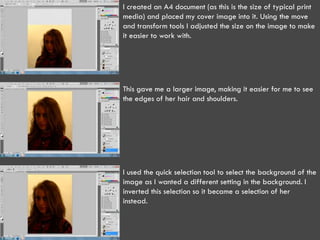
I created an A4 document (as this is the size of typical print
media) and placed my cover image into it. Using the move
and transform tools I adjusted the size on the image to make
it easier to work with.


This gave me a larger image, making it easier for me to see
the edges of her hair and shoulders.


I used the quick selection tool to select the background of the
image as I wanted a different setting in the background. I
inverted this selection so it became a selection of her
instead.
I used the refine edge tool to clean up the selection, making
her hair more defined and giving it a more professional
look.


This gave me a cut out which I could manipulate better. It
would also show the background once I put it in.


I then placed the background behind her and used the move
tool and transformations to change the part of the image
shown.
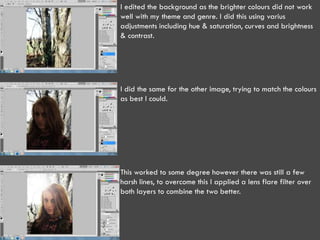
I edited the background as the brighter colours did not work
well with my theme and genre. I did this using varius
adjustments including hue & saturation, curves and brightness
& contrast.


I did the same for the other image, trying to match the colours
as best I could.


This worked to some degree however there was still a few
harsh lines, to overcome this I applied a lens flare filter over
both layers to combine the two better.
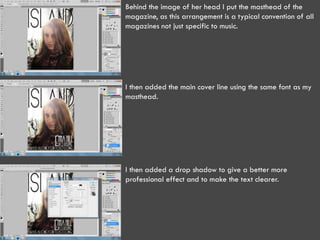
Behind the image of her head I put the masthead of the
magazine, as this arrangement is a typical convention of all
magazines not just specific to music.


I then added the main cover line using the same font as my
masthead.


I then added a drop shadow to give a better more
professional effect and to make the text clearer.
I then began to add more cover lines to fill up space and
                    give more information about the content of the magazine. I
                    mentioned that this was the first issue and was free, to
                    entice more readers, I also included the “win” to help with
                    this also.


This gave me my
final cover page
which I feel fits
my genre and
meets the
production plans
I had put
together as best
I could manage.

Photoshop process

  • 1.
  • 2.
    I created anA4 document (as this is the size of typical print media) and placed my cover image into it. Using the move and transform tools I adjusted the size on the image to make it easier to work with. This gave me a larger image, making it easier for me to see the edges of her hair and shoulders. I used the quick selection tool to select the background of the image as I wanted a different setting in the background. I inverted this selection so it became a selection of her instead.
  • 3.
    I used therefine edge tool to clean up the selection, making her hair more defined and giving it a more professional look. This gave me a cut out which I could manipulate better. It would also show the background once I put it in. I then placed the background behind her and used the move tool and transformations to change the part of the image shown.
  • 4.
    I edited thebackground as the brighter colours did not work well with my theme and genre. I did this using varius adjustments including hue & saturation, curves and brightness & contrast. I did the same for the other image, trying to match the colours as best I could. This worked to some degree however there was still a few harsh lines, to overcome this I applied a lens flare filter over both layers to combine the two better.
  • 5.
    Behind the imageof her head I put the masthead of the magazine, as this arrangement is a typical convention of all magazines not just specific to music. I then added the main cover line using the same font as my masthead. I then added a drop shadow to give a better more professional effect and to make the text clearer.
  • 6.
    I then beganto add more cover lines to fill up space and give more information about the content of the magazine. I mentioned that this was the first issue and was free, to entice more readers, I also included the “win” to help with this also. This gave me my final cover page which I feel fits my genre and meets the production plans I had put together as best I could manage.