Definition:
A photogram is a photographic image made
without a camera by placing objects directly onto
the surface of a sensitive material such as
photographic paper and then exposing it to light.
The result is a negative shadow image varying
in tone, depending on the transparency of the
objects used. Areas of the paper that have
received no light appear white; those exposed
through transparent or semi-transparent objects
appear grey.
Photograms have come through three phases in
history:
1. Phase 1: To record the shapes sizes of natural
objects
2. Phase 2: As an artistic expression
3. Phase 3: Contemporary art
1
Phase 1: To Record
Contextual studies.
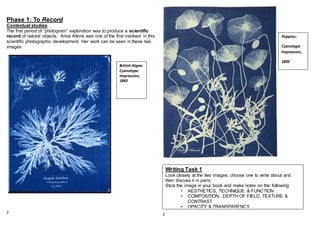
The first period of “photogram” exploration was to produce a scientific
record of natural objects. Anna Atkins was one of the first involved in this
scientific photographic development. Her work can be seen in these two
images
2 3
Poppies:
Cyanotype
Impression,
1850
British Algae:
Cyanotype
Impression,
1843
Writing Task 1
Look closely at the two images; choose one to write about and
then discuss it in pairs.
Stick the image in your book and make notes on the following
• AESTHETICS, TECHNIQUE & FUNCTION
• COMPOSITION, DEPTH OF FIELD, TEXTURE &
CONTRAST
• OPACITY & TRANSPARENCY.
Practicalactivity 1:
Creating a scientific photogram
Step one
Choose your objects wisely - remember to use a combination of opaque
and transparent, vary the details and texture. Arrange them well to create
maximum interest and show scientific detail.
Step two
arrange the objects in a transparent wallet and balance it on a sheet of
card, carry it to the darkroom; collect a sheet of light sensitive paper – at
this point you must allow NO RANDOM WHITE LIGHT NEAR THE
PAPER
Lay the wallet on top of the paper and under the enlarger – WITH THE
RED SAFETY SCREEN ON
Step three
Expose the paper for up to 5 seconds – how long depends on the density
of the objects. I will give you a smaller piece of paper to do a test run with,
before you get the final LARGE paper. Remember it costs 40p a sheet of
10x8” paper so do not waste it.
Step four.
Slide the photo paper out from under the wallet a carefully develop it in the
trays in the wet-room. When it is fully washed take it outside and have a
look
4
Glossary of key words
• Opacity (noun)/opaque (adjective)
• Transparency (noun) /transparent (adjective)
• Composition (noun)
• Framing (verb)
• Exposure (noun) / expose (verb)
• Develop (verb)/developing/ developer(noun)
• Fix (verb) / fixative (noun)
Glossary to revisit / consolidate
• Depth of field (noun)
• Focal point (noun)
• Lighting (noun)
• Technical ( adjective)
• Aesthetic (noun)
• Function (noun)
• Context (noun)
If you get stuck use the writing frame at the back of this book OR try this
site
http://dictionary.reference.com/
5
Writing Task 2
Stick the bestand the worst pieces into your journal. Make
some notes about what you have learned – keep it brief and to
the point – use the key words for this unit; LISTEDOPPOSITE
ChristianSchad,“Schadograph”1918
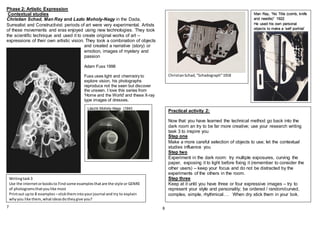
Phase 2: Artistic Expression
Contextual studies
Christian Schad, Man Ray and Lazlo Moholy-Nagy in the Dada,
Surrealist and Constructivist periods of art were very experimental. Artists
of these movements and eras enjoyed using new technologies. They took
the scientific technique and used it to create original works of art –
expressions of their own artistic vision. They took a combination of objects
and created a narrative (story) or
emotion, images of mystery and
passion
Adam Fuss 1998
Fuss uses light and chemistry to
explore vision, his photographs
reproduce not the seen but discover
the unseen. I love this series from
'Home and the World' and these X-ray
type images of dresses.
7 8
Writingtask3
Use the internetorbooksto Find some examplesthatare the style or GENRE
of photogramsthatyoulike most
Printout upto 8 examples –stickthemintoyourjournal and try to explain
whyyou like them,whatideasdotheygive you?
Man Ray, “No Title (comb, knife
and needle)” 1922
He used his own personal
objects to make a ‘self portriat’
Practical activity 2:
Now that you have learned the technical method go back into the
dark room an try to be far more creative; use your research writing
task 3 to inspire you
Step one
Make a more careful selection of objects to use; let the contextual
studies influence you
Step two
Experiment in the dark room: try multiple exposures, curving the
paper, exposing it to light before fixing it (remember to consider the
other users) – keep your focus and do not be distracted by the
experiments of the others in the room.
Step three
Keep at it until you have three or four expressive images – try to
represent your style and personality; be ordered / random/curved,
complex, simple, rhythmical…. When dry stick them in your bok.
László Moholy-Nagy (1943
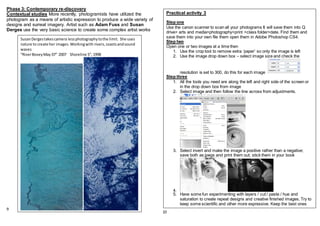
Phase 3: Contemporary re-discovery
Contextual studies More recently, photogramists have utilized the
photogram as a means of artistic expression to produce a wide variety of
designs and surreal imagery. Artist such as Adam Fuss and Susan
Derges use the very basic science to create some complex artist works
9
10
SusanDergestakescamera lessphotographytothe limit. She uses
nature to create her images.Workingwith rivers,coastsandsound
waves
“RiverBoveyMay 07” 2007 Shoreline 5”,1998
Practical activity 3
Step one
Use the canon scanner to scan all your photograms It will save them into Q
drive> arts and media>photography>print >class folder>date. Find them and
save them into your own file them open them in Adobe Photoshop CS4.
Step two
Open one or two images at a time then
1. Use the crop tool to remove extra ‘paper’ so only the image is left
2. Use the image drop down box – select image size and check the
resolution is set to 300, do this for each image
Step three
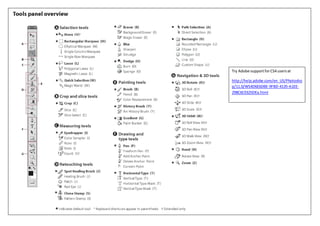
1. All the tools you need are along the left and right side of the screen or
in the drop down box from image
2. Select image and then follow the line across from adjustments.
3. Select invert and make the image a positive rather than a negative;
save both as jpegs and print them out; stick them in your book
4.
5. Have some fun experimenting with layers / cut / paste / hue and
saturation to create repeat designs and creative finished images. Try to
keep some scientific and other more expressive. Keep the best ones
http://help.adobe.com/en_US/Photoshop/11.0/WS4D6E6DBE-9FBD-4135-A1EE-298C6CE625DEa.html
Try Adobe supportforCS4 usersat
http://help.adobe.com/en_US/Photosho
p/11.0/WS4D6E6DBE-9FBD-4135-A1EE-
298C6CE625DEa.html

Photogramme teaching and learning support booklet

  • 1.
    Definition: A photogram isa photographic image made without a camera by placing objects directly onto the surface of a sensitive material such as photographic paper and then exposing it to light. The result is a negative shadow image varying in tone, depending on the transparency of the objects used. Areas of the paper that have received no light appear white; those exposed through transparent or semi-transparent objects appear grey. Photograms have come through three phases in history: 1. Phase 1: To record the shapes sizes of natural objects 2. Phase 2: As an artistic expression 3. Phase 3: Contemporary art 1
  • 2.
    Phase 1: ToRecord Contextual studies. The first period of “photogram” exploration was to produce a scientific record of natural objects. Anna Atkins was one of the first involved in this scientific photographic development. Her work can be seen in these two images 2 3 Poppies: Cyanotype Impression, 1850 British Algae: Cyanotype Impression, 1843 Writing Task 1 Look closely at the two images; choose one to write about and then discuss it in pairs. Stick the image in your book and make notes on the following • AESTHETICS, TECHNIQUE & FUNCTION • COMPOSITION, DEPTH OF FIELD, TEXTURE & CONTRAST • OPACITY & TRANSPARENCY.
  • 3.
    Practicalactivity 1: Creating ascientific photogram Step one Choose your objects wisely - remember to use a combination of opaque and transparent, vary the details and texture. Arrange them well to create maximum interest and show scientific detail. Step two arrange the objects in a transparent wallet and balance it on a sheet of card, carry it to the darkroom; collect a sheet of light sensitive paper – at this point you must allow NO RANDOM WHITE LIGHT NEAR THE PAPER Lay the wallet on top of the paper and under the enlarger – WITH THE RED SAFETY SCREEN ON Step three Expose the paper for up to 5 seconds – how long depends on the density of the objects. I will give you a smaller piece of paper to do a test run with, before you get the final LARGE paper. Remember it costs 40p a sheet of 10x8” paper so do not waste it. Step four. Slide the photo paper out from under the wallet a carefully develop it in the trays in the wet-room. When it is fully washed take it outside and have a look 4 Glossary of key words • Opacity (noun)/opaque (adjective) • Transparency (noun) /transparent (adjective) • Composition (noun) • Framing (verb) • Exposure (noun) / expose (verb) • Develop (verb)/developing/ developer(noun) • Fix (verb) / fixative (noun) Glossary to revisit / consolidate • Depth of field (noun) • Focal point (noun) • Lighting (noun) • Technical ( adjective) • Aesthetic (noun) • Function (noun) • Context (noun) If you get stuck use the writing frame at the back of this book OR try this site http://dictionary.reference.com/ 5 Writing Task 2 Stick the bestand the worst pieces into your journal. Make some notes about what you have learned – keep it brief and to the point – use the key words for this unit; LISTEDOPPOSITE
  • 4.
    ChristianSchad,“Schadograph”1918 Phase 2: ArtisticExpression Contextual studies Christian Schad, Man Ray and Lazlo Moholy-Nagy in the Dada, Surrealist and Constructivist periods of art were very experimental. Artists of these movements and eras enjoyed using new technologies. They took the scientific technique and used it to create original works of art – expressions of their own artistic vision. They took a combination of objects and created a narrative (story) or emotion, images of mystery and passion Adam Fuss 1998 Fuss uses light and chemistry to explore vision, his photographs reproduce not the seen but discover the unseen. I love this series from 'Home and the World' and these X-ray type images of dresses. 7 8 Writingtask3 Use the internetorbooksto Find some examplesthatare the style or GENRE of photogramsthatyoulike most Printout upto 8 examples –stickthemintoyourjournal and try to explain whyyou like them,whatideasdotheygive you? Man Ray, “No Title (comb, knife and needle)” 1922 He used his own personal objects to make a ‘self portriat’ Practical activity 2: Now that you have learned the technical method go back into the dark room an try to be far more creative; use your research writing task 3 to inspire you Step one Make a more careful selection of objects to use; let the contextual studies influence you Step two Experiment in the dark room: try multiple exposures, curving the paper, exposing it to light before fixing it (remember to consider the other users) – keep your focus and do not be distracted by the experiments of the others in the room. Step three Keep at it until you have three or four expressive images – try to represent your style and personality; be ordered / random/curved, complex, simple, rhythmical…. When dry stick them in your bok. László Moholy-Nagy (1943
  • 5.
    Phase 3: Contemporaryre-discovery Contextual studies More recently, photogramists have utilized the photogram as a means of artistic expression to produce a wide variety of designs and surreal imagery. Artist such as Adam Fuss and Susan Derges use the very basic science to create some complex artist works 9 10 SusanDergestakescamera lessphotographytothe limit. She uses nature to create her images.Workingwith rivers,coastsandsound waves “RiverBoveyMay 07” 2007 Shoreline 5”,1998 Practical activity 3 Step one Use the canon scanner to scan all your photograms It will save them into Q drive> arts and media>photography>print >class folder>date. Find them and save them into your own file them open them in Adobe Photoshop CS4. Step two Open one or two images at a time then 1. Use the crop tool to remove extra ‘paper’ so only the image is left 2. Use the image drop down box – select image size and check the resolution is set to 300, do this for each image Step three 1. All the tools you need are along the left and right side of the screen or in the drop down box from image 2. Select image and then follow the line across from adjustments. 3. Select invert and make the image a positive rather than a negative; save both as jpegs and print them out; stick them in your book 4. 5. Have some fun experimenting with layers / cut / paste / hue and saturation to create repeat designs and creative finished images. Try to keep some scientific and other more expressive. Keep the best ones
  • 6.
    http://help.adobe.com/en_US/Photoshop/11.0/WS4D6E6DBE-9FBD-4135-A1EE-298C6CE625DEa.html Try Adobe supportforCS4usersat http://help.adobe.com/en_US/Photosho p/11.0/WS4D6E6DBE-9FBD-4135-A1EE- 298C6CE625DEa.html