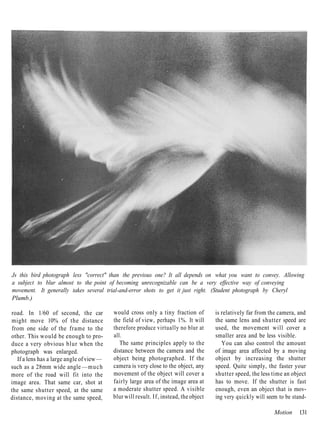
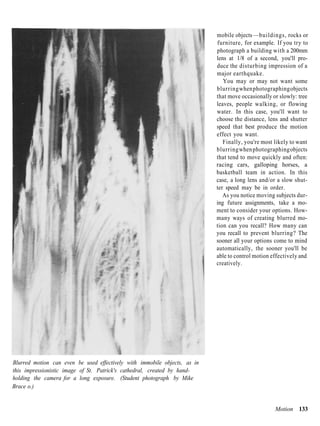
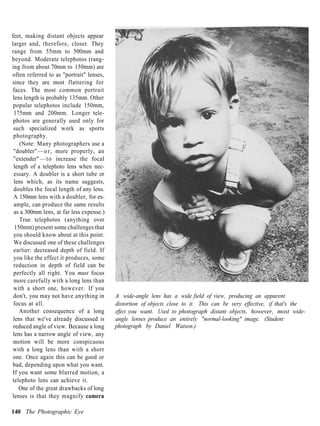
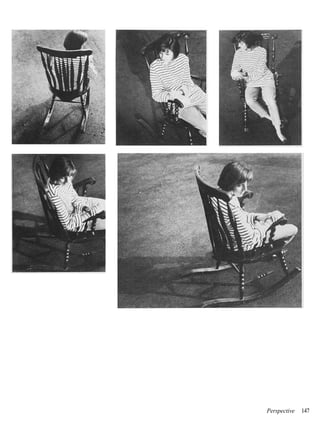
REVISED EDITION


THE PHOTOGRAPHIC EYE
   Learning to See with a Camera


 Michael F. O'Brien & Norman Sibley
THE PHOTOGRAPHIC EYE
Learning to See with a Camera


 Michael E O'Brien & Norman Sibley

   Davis Publications, Inc., Worcester, Massachusetts
Copyright 1995
                                        Davis Publications, Inc.
                                        Worcester, Massachusetts U.S.A.

                                        To the photography students of
                                        Seoul American High School, past,
                                        present and future.

                                         No part of this work may be repro-
                                        duced or transmitted in any form or
                                         by any means, electronic or mechan-
                                        ical, including photocopying and re-
                                        cording, or by any information
                                        storage or retrieval system without
                                        the prior written permission of the
                                        copyright owner, unless such copy-
                                        ing is expressly permitted by federal
                                        copyright law. Davis is not autho-
                                        rized to grant permission for further
                                        uses of copyrighted selections or im-
                                        ages reprinted in this text without the
                                        permission of their owners. Permis-
                                        sion must be obtained from the indi-
                                        vidual copyright owners as identified
                                        herein. Address requests for permis-
                                        sion to make copies of Davis mate-
                                        rial to Permissions, Davis Publi-
                                        cations, Inc., 50 Portland Street,
                                        Worcester, MA 01608.

                                        Editor: Claire Mowbray Golding
                                        Design: Greta D. Sibley
                                        Printed in the United States of
                                        America
                                        Library of Congress Catalog Card
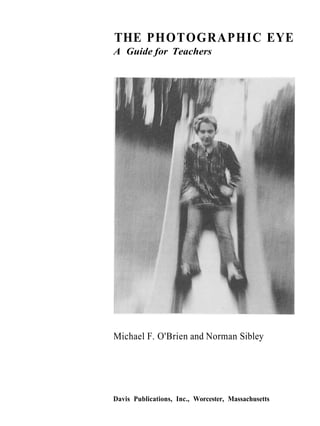
Student photograph by Gregory Conrad.   Number: 93-74644
                                        ISBN: 0-87192-283-5
                                        1098 7 6 5


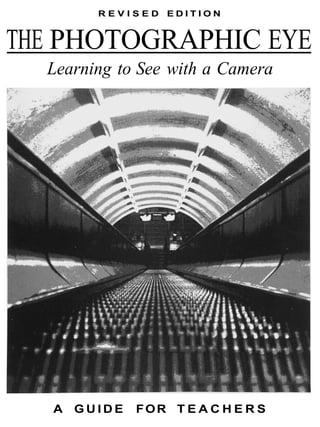
                                        Cover: Student photograph by Leah
                                        Gendler.


4 The Photographic Eye
Contents


  7      Introduction

Part 1   Getting Started
 11      Chapter 1 From Blurs to Big Business
         History • Photographic Careers

Part 2   Elements of Composition
 35      Chapter 2 Tools
         Manual or Automatic? • The Camera, Inside & Out • Exercises: Testing the Shutter & Aperture
         • Loading Film
 51      Chapter 3 What is Composition?
         Snapshots vs. Photographs • Structure, Balance, Dynamics • Exercises: Mat Frame • Cropping
 67      Chapter 4 Developing A Critical Eye
         Critique Session • Evaluating a Print • Exercise: Sample Crit
 83      Chapter 5 Point of Departure (f!6 at 1/125)
         Starting Simply • Doing it Right
 87      Chapter 6 Line
         Pattern, Structure, Direction • Exercise: Pattern
 95      Chapter 7 Texture
         Expressing the "Feel" • Exercise: Leaves
103      Chapter 8 Shape
         Mass, Proportion & Relation • Using Negative Space * Exercise: Circles & Ovals
113      Chapter 9 Light
         Controlling Exposure • Information & Mood • Using a Light Meter • Other Functions of Light
         • Depth of Field * Exercise: Bracketing
129      Chapter 10 Motion
         The Science of Blurs • Stop and Co • Exercise: Blurred Movement
137      Chapter 11 Perspective
         Lenses • Different Ways of Seeing • A Point of View • Exercise: A Point of View
Part 3    People, Places & Things: Exercises & Examples
151       Chapter 12 Things
          Exercises: Bicycle • Hubcaps & Taillights • Eggs • Object & Its Shadow • Bottles & Classes • Water
          • Old Things
167       Chapter 13 Places
          Exercises: Landscape • Architecture & Environment • Neighborhoods • Zoo/Farm • Store Windows
          * Construction Sites
181       Chapter 14 People
          Exercises: Hands • Elders • Children • Soft-Light Portrait • Side-Lit Portrait • Prop Portrait • Detail
          Portrait • Mood Portrait
197       Chapter 15 Putting It All Together
          Exercises: Fairs • Open Markets • Rain • Playgrounds • Sports Events
209       Chapter 16 Breaking the Rules
          Exercises: Night • Monotone • Silhouettes • Grain and Diffusion • Double Exposure • Photo-Copy
          Photos • Panel Panorama • Text and Image

Appendixes
227       Appendix 1 Processing
          Processing Film • Printing • Manipulation
243       Appendix 2 Color
          From B&W to Color • Technical Considerations
253       Appendix 3 Manipulation & Presentation
          Presentation * Manipulation
265       Appendix 4       Advanced Techniques
          Tools
272        Mat Frame (template)
273        Cropping L's (template)
275        Bibliography
279        Glossary
281        Index
287        Acknowledgments


6 The Photographic Eye
Introduction


          hotography is both an art        dimensional scene. The process by           control each of these factors to

 P        and a science. As an art, it
          expresses a personal vision.
 As a science, it relies on technology.
                                           which this is done may seem like
                                           magic. (In fact, when cameras were
                                           first introduced, many people all over
                                                                                       achieve the effect you want. But it
                                                                                       will take time. As you may already
                                                                                       know, it's often hard to keep all of
 This double nature is not unique to       the world thought that they were            them in mind every time you take a
 photography. Every kind of creative       magic.) Fundamentally, however,             picture.
 expression —such as music, dance or       there's no magic in the camera. It's           Fortunately, it is possible to begin
 painting —has both a purely artistic      just a box with a hole in it. You           more simply. This book is designed
 side and a more scientific or tech-       supply the magic. When you, the             to help you do that. It begins with a
 ological side as well. For example,       photographer, use a camera creative-        brief summary of photography's
 paints are a kind of technology, and      ly, it changes from a simple,               past, present and future, including a
 using them well involves a consid-        mechanical machine into an artist's         discussion of photography careers.
 rable amount of technical skill. The      tool. Instead of making random              This is followed by an introduction
 main difference between photogaphy        copies of things, it begins to say          to the camera itself. Chapters 3 and
 and more traditional visual arts, such    something about them.                       4 provide a set of guidelines for com-
as painting, is the complexity of its         Here are some of the technical           posing and evaluating photographs.
 technology.                               questions a photographer must               Chapter 5 explains a simple way to
    In any of the arts, the first step     answer for every photograph: How            start producing correctly exposed
 toward excellence is mastering tech-      will the lighting affect the clarity and    photographs. As soon as you get that
 ique — learning to use a specific tech-   mood of the photograph? How fast            basic background behind you, you
 ology skillfully and effectively. In      should the shutter speed be? How            will begin your first photograph
 photography, this means that you          large a lens opening should be used?        assignments. Chapters 6 through 11
 must learn to control the camera and      What should be in focus? What               deal with specific "elements" of
darkroom equipment, rather than let-       belongs in the frame, and what              photography. At the end of these
ting them control you.                     doesn't? What lens should be used?          chapters are exercises that will help
    No artist, however creative, can          All these factors influence each         you learn to recognize and use each
produce a masterpiece without a            other, and they all affect the final        element discussed.
sound basis in technique. On the           photograph. A photograph is "suc-              The remainder of the book is com-
other hand, no amount of technical         cessful"—in the technical sense —           posed of additional exercises (with
skill can make up for a lack of artistic   when these factors all work well            examples) and an Appendix, cover-
vision. Both are essential. The goal       together and are combined with cor-         ing most of the technical information
of any artist is to use good technique     rect darkroom procedures. When a            (including a section on color photog-
creatively.                                creative composition is added, the          raphy). Finally, there's a glossary to
   Simply speaking, a camera is a          photograph becomes aesthetically            clarify any confusing terminology
machine that produces a two-               successfully as well.                       and a bibliography to help you locate
dimensional (flat) copy of a three-           Eventually, you will learn how to        more detailed information.

                                                                                                                            7
part 1                                 Getting Started


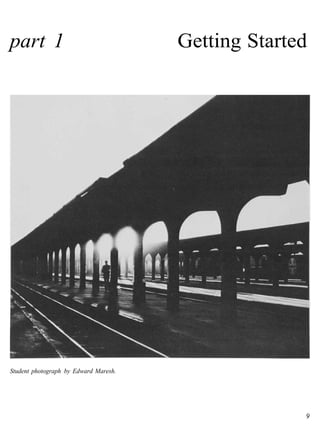
Student photograph by Edward Maresh.


                                                     9
Dorothea Lange, Migrant Mother, Nipomo, California, 1936. Gelatin silver print. Library of Congress,
Washington, D.C.
chapter 1                                                                    From Blurs to
                                                                               Big Business


            urprisingly few new art        made between 1816 and 1840. The     rhe   cent stone (one that would glow in the

IS          forms have been invented in
            the course of recorded his-
  tory. Depending on how such terms
                                           first recorded discovery that certain
                                           chemicals turned black when exposed
                                           to light was made in 1725. The basic
                                                                               ain   dark). He mixed powdered chalk into
                                                                                     a nitric acid solution and was sur-
                                                                                     prised to discover that the mixture
  as "art" and "new" are defined, the      design of the cameras we use today        turned purple in sunlight. After in-
  novel as a form of literature may        has been in use since the 1500s. The      vestigating, he discovered that his ex-
  qualify, as may rock 'n' roll and        Chinese figured it out even longer ago    periment had been contaminated with
  other kinds of electric and electronic   than that — as early as the fourth cen-   silver salt (silver chloride) and that
  music. More recent candidates in-        tury. So, photography is between          this was causing the reaction to light.
  clude computer graphics and the          1,500 and 150 years old.                     Schulze was curious enough about
  current wave of digital creations                                                  this phenomenon to experiment with
  known as multi-media.                    Prelude                                   it. He covered bottles of his mixture
     One form that certainly qualifies     The first stage of photography's          with stencils so the light would
  is photography. From its beginnings      evolution in Europe was the camera        "print" letters onto it, but the letters
  as a technological curiosity, it has     obscura, which is Latin for "dark         would disintegrate as soon as the mix-
  grown into one of the most impor-        chamber" (camera = chamber or             ture was disturbed. Evidently, he
  tant influences in our society and       room; obscura = dark). The camera         never thought that his discovery
  culture. Every day, we encounter         obscura was a room, or a small build-     might have any practical application.
  hundreds of images produced with         ing, with no windows. One tiny hole,
  cameras and film. We learn about         fitted with a lens, projected images      Early Prints
  the latest fashion trends from photo-    from outside the room onto the far        In 1777, a Swedish chemist, Carl
  graphs — and about the latest war or     wall inside it.                           Wilhelm Scheele, repeated Schulze's
  famine. We also learn about the re-         The image was upside down and          experiments. He also discovered that
  markable planet on which we live         not generally very clear, but it was      ammonia would dissolve the silver
  and about the people with whom we        good enough to become a useful tool       chloride and leave the image intact.
  share it.                                for artists. The projected image could    With this second discovery, the basic
                                           be traced, providing an accurate          chemistry of photography (exposing
 HISTORY                                   sketch, which might then be devel-        silver chloride to produce an image
                                           oped into a painting. Portable ver-       and "fixing" it with ammonia) was
There is no single correct answer to       sions of the camera obscura were          established, but —again —what it
the question of how and when pho-          developed by the 1660s. The camera        might lead to was not recognized.
tography began. No one person can          existed, but photography hadn't even         Forty years later, the plot began to
be credited with inventing it. In-         been imagined yet.                        thicken. A number of people began
stead, it emerged through centuries           In 1725, a German professor of         trying to produce a photographic
of tinkering.                              anatomy, Johann Heinrich Schulze,         image on paper. In France, Joseph
   The first printed photographs were      attempted to produce a phosphores-        Nicephore Niepce developed an

                                                                                                                          11
Joseph Nicephore Niepce, world's first permanent camera image. Courtesy Gernsheim Collection, Harry Ransom
Humanities Research Center, The University of Texas at Austin.

emulsion (a light-sensitive varnish)      named Louis Jacques Mande Da-            vapor, and finally "fixed" with a salt
out of bitumen of Judea, a kind of        guerre was also trying to produce a      solution, then a visible, permanent
asphalt. Instead of turning black, this   camera image. He got in touch with       image would result. This discovery
material is hardened by light. So, to     Niepce and the two worked together       formed the basis for the first photo-
produce an image, Niepce coated a         on the problem. Niepce died, poor        graphic process to be used outside of
glass or pewter plate with his emul-      and discouraged, a few years later,      a laboratory: the daguerreotype.
sion, exposed it to light and then        but Daguerre continued (with                In England, William Henry Fox
washed the plate with solvents. The       Niepce's son Isadore as his new          Talbot was also experimenting with
solvents dissolved the unexposed (and     partner).                                camera images. By 1835 he too had
still soft) emulsion, producing a            Daguerre was convinced that silver    succeeded in producing a number of
print: the world's first permanent        was the key to producing a better im-    photographs. With his process, the
camera image. It was only some blurs      age than Niepce's asphalt prints. In     first exposure produced a negative
of light and dark, and the exposure        1835, his conviction paid off. He       image on paper treated with silver
reportedly took eight hours, but it       discovered that if a silver plate were   compounds. The exposed paper was
was a real image.                         iodized (treated with iodine), exposed   then placed over a second sheet of
   Meanwhile, a painter in Paris          first to light and then to mercury       treated paper and exposed to a bright

12 The Photographic Eye
light, producing a positive image on
the second sheet.
   Thus, Talbot's process —called a
calotype or talbotype —enabled
photographers to make multiple
copies of a single image. This was not
possible with a daguerreotype, which
produced a positive image directly on
a metal plate. Because the calotype's
 image was transferred through a
 paper negative, however, it was not
 as clear as the daguerreotype.
    In 1851, another Englishman,
 Frederick Scott Archer, introduced
 the collodian wet-plate process,
 which offered the best of both
 worlds: a high-quality image and
 multiple copies. Talbot tried to claim
 credit and licensing rights for this new
 process as well. In 1854, the courts
 overruled him and followed Archer's
 wishes by making the process freely
 available to everyone.
    The collodian process, like the
 daguerreotype, was difficult to use.
 First, a clean glass plate had to be
 evenly coated with collodian (a sub-
 stance similar to plastic and contain-
 ing potassium iodide). While still
 damp, the plate had to be dipped into
 a silver nitrate solution, inserted into
 the camera and exposed. It was then
 developed immediately, and finally         thousands. The stereoscopic camera       Julia Margaret Cameron, Alfred
 allowed to dry. If the plate dried         (which produced a three-dimensional      Tennyson with his sons Hallam
 before the process was complete, the       effect by combining two images) was      and Lionel, 1865-69. Albumen
 emulsion would harden and the pho-         introduced in 1849. By the 1860s, no     print, W/2 x 8>/4" (27 x 22 cm).
 tograph would be ruined. It wasn't         parlor in America was considered         Gift of David Bakalar, 1977.
 easy, but it worked.                       complete without a stereo viewer and     Courtesy Museum of Fine Arts,
                                            a stack of slides to entertain guests.   Boston.
Photography Goes Public                        Photography had more serious
Photography, dominated by the col-          uses as well. As early as the 1850s,
lodian and daguerreotype processes,         books of photographs were published
began to take off. Cameras were set         showing the harsh conditions of life
up in studios and loaded onto carts         in the streets, factories, mines and
to photograph portraits, landscapes         slums of England and the United
and battles. Tourists collected inex-       States. Lewis Mine, a sociologist,
pensive prints of local attractions,        produced powerful photographs of
called cartes-de-visite, by the             children who worked long hours in

                                                                                        From Blurs to Big Business 13
Lewis Mine, Doffer Girl in New   textile mills and other industries. His    that he did so to settle a bet as to
England Mill, c 1910.            work helped to bring about new laws        whether or not running horses lifted
                                 to protect children's rights.              all four hooves off the ground at one
                                    At the start of the Civil War, a suc-   time. By photographing a horse with
                                 cessful portrait photographer named        his device, he proved that they do. He
                                 Mathew Brady asked President Lin-          also contributed tremendously to our
                                 coln for permission to carry his           understanding of how animals (and
                                 cameras onto the battlefields. Per-        humans) move.
                                 mission was granted, and Brady and            These and other similar uses of
                                 his staff compiled a remarkable            photography often achieved a high
                                 record of that tragic period of            degree of aesthetic quality —a high
                                 American history. Like many of pho-        degree of art. Their primary pur-
                                 tography's pioneers, he paid for the       poses, however, were practical: to
                                 project almost entirely by himself and     promote social reform, record his-
                                 died penniless as a result.                torical events and aid scientific
                                    In the 1880s, Eadweard Muybridge        investigations.
                                 invented a device called a zooprax-
                                 iscope which produced a series of im-
                                 ages of a moving subject. It is said

14 The Photographic Eye
Mathew Brady, Magazine in
Battery Rodgers, 1863. Library of
Congress, Washington, D.C.


                                    From Blurs to Big Business 15
Eadweard Muybridge, Attitudes of Animals in Motion, c 1881.

But Is It Art?                           what a painting should look like was      with their cameras, specializing in
At the same time, another group of       heavily influenced by the Romanticist     peaceful scenes of country life. They
photographers were dealing with the      painters (such as Delacroix). The Pic-    were also increasingly fond of using
purely aesthetic issue of how photog-    torialist photographers, like the         soft focus (blurred edges) in their
raphy relates to the traditional arts,   Romanticist painters, believed that an    photographs.
particularly painting. Is photography    artist should improve upon nature by           Despite the differences between
an art at all? If so, how should it be   using it to express noble ideas. Both     them, both the Pictorialists and the
used? What should "art photog-           favored elaborate illustrations of        Naturalists believed that a work of
raphy" look like? These same ques-       scenes from ancient mythology.            art ought to express a "correct senti-
tions continue to provoke discussion        The other faction called themselves    ment" and that it ought to be decora-
and argument even today. Photog-         Naturalists. They were led by Peter       t i v e — p r e t t y . This is what most set
raphy is still defining itself.          Henry Emerson and George Davison.         them apart from the "practical" pho-
   By the 1850s, two opposing fac-       The Naturalists believed that a           tographers, like Brady and Muy-
tions of artist-photographers had        photograph should capture nature's        bridge, whose work showed the hard
been established. The Pictorialists,     own truth. They preferred the Bar-        edges of reality, with all its flaws.
led by Oscar Rejlander and Henry         bizon painters, who took their easels
Peach Robinson, believed that a          out to the forests, fields and streams,
photograph should look as much like      and painted them directly. The Nat-
a painting as possible. Their idea of    uralist photographers did the same

16 The Photographic Eye
Peter Henry Emerson, Gunner Working Up to Fowl, c 1886.

 New Tools & Processes                  another 100 photos. Eastman's             Autochrome produced transparencies
 In the late 1880s, flexible film ap-   slogan was "You press the button; we      (slides) that could not be enlarged
peared for the first time, replacing    do the rest." (The name "Kodak," in-      very much without showing the grain
clumsy and heavy glass plates. By the   cidentally, doesn't mean anything.        of the starch dyes used to create the
 1890s, George Eastman had intro-       Eastman selected it because he felt it    image. It also took fifty times as long
duced the Kodak camera, the first       w o u l d be easy for people to           to expose as black-and-white film.
that was reasonably easy to use. The    remember.)                                   Then, in 1935, Kodak introduced
camera itself was simple: a box with       In 1925, Leica introduced its "mini-   Kodachrome, an improved slide film,
a lens, a cord to cock the shutter, a   ature" camera, the first to use 35mm      followed in 1941 by Kodacolor, for
button to release it and a crank to     film. Though not quite as simple to       making color prints. The family
wind the film. What made this           use as the earlier Kodak model, it was    photograph album, which had existed
camera special was that it came         technically more sophisticated and        for only 100 years, was now both
loaded with enough film for 100         quite a bit smaller As a result,          widespread and increasingly in full
photographs. When the film was          amateur photography became an in-         color.
used up, the entire camera was          ternational passion.
returned to the Eastman Kodak              Other technical advances con-
Company. The film was then devel-       tinued to appear all t h e time. The
oped and printed, and the camera        first commercial color film, Auto-
was reloaded and returned, ready for    chrome, hit the market in 1907.

                                                                                      From Blurs to Big Business 17
FOCAL POINT: Alfred Stieglitz, 1864-1946

Alfred Stieglitz was in many ways the
first "modern" photographer.
Though his early photographs were
carefully manipulated to imitate
paintings, he soon recognized that
photography was an art in its own
right —and deserved to be treated as
one. He saw the need to free photog-
raphy from the conventions and lim-
itations of painting. Consequently,
Stieglitz promoted what came to be
known as "straight" photography —
making prints with little or no crop-
ping, retouching or other alteration.
   He was a founding member and
leader of the "Photo Secession," a
group of photographers who were
determined to break away from pho-
tography's past and to chart its
future. Stieglitz was editor and
publisher of the group's magazine,
Camera Work, the first publication
to deal seriously with photography as
an independent art form. He work-
ed with Edward Steichen to establish
"Gallery 291" in New York City,
which exhibited contemporary pho-
tographs along with paintings by
Picasso, Matisse and Georgia
O'Keefe (whom Stieglitz later
married).                                  Alfred Stieglitz, The Rag Picker, New York, 1895.
   When photography was first in-
vented, it was a scientific novelty.       record. He returned to the straight-        we use it today —as a familiar tool for
Soon, it evolved into an excellent         forward approach of the early               exploring reality.
record-keeping tool. Photographers         photographers, but he did so with the          The attitudes and interests that
could be hired to make a lasting           insight and confidence of a true            Stieglitz brought to photography can
record of a person, place or event. By     artist.                                     be traced to his upbringing. He was
the late 1800s, photographers were            Stieglitz was among the first            born in Hoboken, New Jersey, the
striving to elevate their craft into a     photographers to produce work that,         son of German immigrants. He orig-
recognized art. They did this by im-       even today, does not look "dated."          inally intended to become a mechan-
itating the content and visual effects     Though clothing and architectural           ical engineer. While in Berlin study-
of paintings. Stieglitz'great achieve-     styles have changed considerably            ing for this purpose, he happened to
ment was to bring photography full         since his time, his best work still looks   see a camera in a store window. He
circle: he merged its artistic potential   thoroughly modern. The main reason          bought it and soon decided it was
with its ability to produce a factual      for this is that he used the camera as      more interesting than engineering.

18 The Photographic Eye
Alfred Stieglitz, The 'Flat Iron', 1902.

When he returned to the U.S. at the
age of 26, he was delighted to find
that photography was extremely pop-
ular. But he was also dismayed by the
lack of publications and galleries pro-
moting it as an art. For the next 56
years, he devoted himself to correct-
ing this situation. Along the way, he      Alfred Stieglitz, Sun Rays-Paula-Berlin, 1889.
produced some of the finest photo-
graphs in history.
FOCAL POINT: James Van Der Zee, 1886-1983


     James Van Der Zee, Couple in Raccoon Coats, 1932. Courtesy Donna Van Der Zee.

     James Van Der Zee was unique in         "straight" prints in the style of the   studio, and produce a double-
     many ways. First and foremost, he       Photo Secessionists (Stieglitz,         exposed print showing their yet-to-be-
     was perhaps the most accomplished       Weston, Steichen, etc.) as well as      born child as a ghost beside them.
     black photographer in history, and is   heavily manipulated images, which         Van Der Zee's photographic career
     certainly the best known today. His     the Photo Secessionists had rejected.   was far from easy. Though he
     record of Harlem in the 1920s is un-    Moreover, he used both approaches       became interested in photography at
     surpassed, in both quantity and         interchangeably, according to his in-   the age of 14 (when he purchased a
     quality. But he was unique in other     terpretation of a particular scene.     mail-order camera and darkroom
     ways as well.                           One day he might do a straight out-     kit), he was 30 before he was able to
        Stylistically, he employed both      door portrait of someone on the         earn a living at it. In between, he
     stark realism and dreamy roman-         street. And the next day he might       worked as a waiter, elevator operator
     ticism. Technically, he produced        pose a newly-wed couple in his          and even as a violinist in a dance or-
v.


 20 The Photographic Eye
chestra. His first photographic job,
in 1914, was as a darkroom assistant
in a department store in New York
City. Two years later, he opened his
own studio in Harlem. Though he
often had to change its location, Van
Der Zee kept his studio in business
until 1969.
   In addition to skill and creativity,
 he was blessed with good timing.
 Black culture was flourishing in
 Harlem during the 1920s. Duke Ell-
 ington and others were redefining
 American music. Adam Clayton
 Powell, Langston Hughes, Countee
 Cullen and Marcus Garvey were help-
 ing to build a new black identity. And
 James Van Der Zee was the official
 and unofficial photographer for all
 of it. He photographed proud black
 couples in the streets of Harlem and
 in elegant clubs. Celebrities and "or-
 dinary people" posed in his studio.
 He photographed weddings and
 funerals. All together, he compiled
 some 75,000 glass plates, negatives
 and prints. All of it revealing a world
 that was all but ignored by the better-
 known photographers of that time.
    Van Der Zee received virtually no
 recognition outside of Harlem until       Eugene Atget, L'Escalier de L'Hotel Charron, 7900.
 1967. At that time, he was featured
 in an exhibit, entitled "Harlem on My     A New Breed                              proaches to photography.
 Mind," at New York's Metropolitan         Photography was coming into its             In Europe, Andre Kertesz, Eugene
 Museum of Art. For the last 14 years      own, both as an art and as a business.   Atget, Brassai, and Henri Carder-
 of his life, his photography was          Alfred Steiglitz united photography      Bresson were among the most not-
 widely exhibited, published and           and painting by opening "Gallery         able of the new wave of artist
 praised. He died at the age of 97,        291," which exhibited new work in        photographers. They each devoted
 while in Washington, D.C. to receive      either medium. In his own photog-        themselves to capturing life as it
 an honorary degree from Howard            raphy and in his critical judgment       really was, in the boulevards and
 University.                               Steiglitz promoted a lively realism      back alleys and country lanes of
                                           that eventually became the standard      Europe. Yet each did so with a
                                           for art photography. From 1902 to        distinct and original style, a unique
                                           1917, he published Camera Work, the      "way of seeing." They saw that
                                           first magazine devoted to artistic ap-   photography was a new and indepen-

                                                                                        From Blurs to Big Business 21
Edward Steichen, Gloria Swanson,
1924.


dent art, not merely a cheap imitation
of painting. Because of this, they —
along with Steiglitz and other
American peers — may be thought of
as the first modern photographers.
    More practical applications of
photography also continued. One of
the most notable examples was a
photographic survey, begun in 1935,
of conditions during the Great
Depression. Dorothea Lange, Walk-
er Evans and other first-rate pho-
tographers were hired by this pro-
ject by the U.S. government's Farm
Security Administration and com-
piled hundreds of photographs that
rank among the best ever produced.
    The use of photographs in publica-
tions, a novelty as recently as 1900,
was expanding rapidly. Life magazine
started in 1936 and began a whole
new kind of publishing: photo-
j o u r n a l i s m . Alfred Eisenstat,
Margaret Bourke-White and other
photographers on Life's staff quickly
became famous as they recorded the
world's events with their cameras.
    By the end of the 1930s, all the
basic ingredients that continue to
define photography were in place:
Photography was increasingly ac-


      1937                        1938          1939           1947           1954
    The SLR                   Automatic       Electronic        First          First
   (single lens                exposure          flash        Polaroid     high-speed
      reflex)                 initiated by   developed by     camera       film, Tri-X,
     camera                   Kodak with      Dr. Harold    developed by   comes onto
 introduced to                  its 6-20      Edgerton.     Edwin Land.       market.
  the U.S. by                   camera.
     Exacta.


22 The Photographic Eye
Yousef Karsh, Ethiopian Bride,
                                                        1963. Courtesy Woodfin Camp
                                                        and Associates.


                                                        cepted as an art in its own right.
                                                        Photojournalists were a major source
                                                        of information and insight for the
                                                        general public (a role that has since
                                                        been largely taken over by television
                                                        reporters). Advertising had begun
                                                        using photography to catch attention
                                                        or communicate a message. Portable
                                                        cameras had made snapshots a na-
                                                        tional hobby.

                                                         Where Now?
                                                         The list of technical advances in
                                                         photography continues to get longer
                                                         and longer (see the photographic time
                                                         line), and the ranks of great
                                                         photographers has expanded steadily
                                                         as well. Edward Steichen, Minor
                                                         White, Sebastiao Salgado, Edward
                                                         Weston, Ansel Adams, Diane Arbus,
                                                         Ernst Haas, Eugene Richards...the list
                                                         is long and subject to fierce debate.
                                                            Photography is still a young art.
                                                        Painting, sculpture, writing, dance,
                                                        acting and music have all been
                                                        around for thousands of years. Even
                                                        they continue to change at an often
                                                        alarming rate. This is all the more
                                                        true of photography, which has


   1959          1966         1972          1985              1987                 1991
Development      Konica      Polaroid      Minolta           Canon                Kodak
   of first    introduces      adds       introduces      debuts first          launches
 zoom lens,        first       color        the first    "Commercial            Photo CD
the Zoomar    professional     toils     professional     Still Video"         system and
   36-82.        quality      instant       quality         system.               digital
               automatic     cameras.     automatic                              camera.
                exposure                focus camera,
                camera.                 the Maxxum.


                                                           From Blurs to Big Business 23
FOCAL POINT: Manuel Alvarez Bravo, 1902-

Throughout the world, photog-
raphers have used the camera to
observe, interpret and record their
own cultures and environments. In
the process, some have also achiev-
ed unique styles that are particularly
appropriate to specific times and
 places. Manuel Alvarez Bravo is
 among a select group of photog-
 raphers who have gone a step
 further —discovering a way of seeing
 that seems to express the spirit of an
 entire culture.
    Great works of art are rarely
 created in a vacuum. Instead, even
 the most gifted artist draws on a
 lifetime of experiences and impres-
 sions. The work of other artists is
 almost always an important in-
 fluence. Additional influences may
 include one's level of wealth or
 poverty; the personalities and values
 of friends and family; the climate,
 colors, sounds and rituals that are
 part of daily life. By combining a
 variety of local and international in-
 fluences, some artists are able to
 create art t h a t breaks t h r o u g h
 cultural barriers without losing a        Manuel Alvarez Bravo, Retrato de lo Eterno (Portrait of the Eternal),
 sense of cultural roots. Bravo is one     1935. Courtesy The Witkin Gallery, New York.
 photographer who has done this.
    In his case, the culture is that of    leaders of a creative surge in Mexican        In his best work, Bravo combines
Mexico. He was born in Mexico City,        art.                                       the technical skill and confidence of
and has continued to be based there           His first solo exhibit was held in      photographers like Strand and
throughout his life. His father and        Mexico City in 1932. Soon after, he        Evans; the ability to capture a
grandfather were both artists, one a       became acquainted with Paul Strand,        "decisive moment" that is char-
painter and the other a photographer.      Henri Carder-Bresson, Walker Evans         acteristic of Carder-Bresson; and the
Before becoming interested in pho-         and other photographers who were           often disturbing dreamlike qualities
tography, Bravo studied literature,        gaining international attention.           of Surrealist paintings. To this mix of
music and painting, beginning in           Bravo also met Andre Breton, who           artistic influences, he adds a deep and
1917. In 1922, he began experimen-         is credited with creating the Surrealist   proud understanding of Mexican cul-
ting with photography. By 1926, he         style of painting. Surrealism, which       ture and a keen awareness of light
was using a camera to produce              employs the symbols and imagery of         and mood. The result is a vision that
abstract images of folded paper. By        dreams, became a major influence on        is both highly private and universally
the early 1930's he was among the          Bravo's photographic style.                accessible.

24 The Photographic Eye
Minor White, Moon and Wall Encrustations, 1964.

 barely passed its first century of wide-   and how it works) is in the midst of       The old distinctions between one
 spread use.                                radical transformation — a techno-      form of art and another are breaking
    With most of the traditional arts,      logical revolution. Photography it-     down. Words, images and music are
change has primarily been a matter          self is mutating into something new     all beginning to merge. The music
of style. Michaelangelo and Picasso         and strange and unpredictable.          videos on MTV are one typical ex-
 used essentially the same materials        Compared to that, stylistic changes     ample of this trend. They aren't sim-
and techniques to produce vastly dif-       hardly seem to matter.                  ply songs and they aren't quite
 ferent results. Writers may use com-          What is actually happening is that   movies. They are a new hybrid: mu-
puters now, rather than quill pens, but     photography (along with computer        sic and film merging into a new form
the process of writing hasn't really        graphics, electronic music and other    of creative expression. Some of them
changed very much since Shake-              technology-based arts) is moving        tell stories. Some are more like mini-
speare's day. Writing styles, however,      away from the traditional, "manual"     documentaries. Some resemble the
have changed enormously.                    arts (such as painting or classical     song-and-dance numbers of a
    In the case of photography, al-         music). As a result, we are discover-   Broadway musical. Similarly, it is in-
most the opposite is now true: Pho-         ing entirely new ideas of how art may   creasingly difficult to define the dif-
tography's essential nature (what it is     be created and experienced.             ference between a painting and a

                                                                                       From Blurs to Big Business 25
photograph, or even between a pho-
tograph and a poem.
    In addition, all of the arts are be-
coming more participatory. In the
very near future, it may no longer be
standard procedure for an artist to
create some specific "thing" - a
 photograph or a symphony — which
 others simply receive by looking or
 listening. Instead, each individual
 viewer or listener will have the power
 to edit, combine and transform an
 enormous array of images and
 sounds. Your photograph will be raw
 material which you may manipulate
 in any way you please, and to which
 others may then add their own inter-
 pretations — and it will all be done
 by computer. It is far too early to tell
 if all of this is actually an improve-
 ment, but it is certainly a change.
     That is what's coming. But it isn't
 quite here yet.
     We are standing on the bridge be-
 tween photography's past and its fu-
 ture. And so we are able to move
 back and forth between them. We
 can shoot a roll of film on Uncle
 Frank's old Pentax, make a print in a
 traditional darkroom and then re-
 interpret it on a copy machine — or
 scan it into a Mac and make it all
 look really weird. There is still a se-
 cure place for conventional art pho-
 tography, and a wide open field for
 experimentation.
     We are at the end of an era — and       Wedding photography requires technical accuracy, good social skills and and
 at the start of a new one. This is a       the ability to quickly arrange natural poses for individuals and large groups.
 privileged place to be. Enjoy it.          Photograph by Donald Butler.

 PHOTOGRAPHIC                               pictures for pleasure. Even many of      photographers have died penniless.
 CAREERS                                    the best-known art photographers         At least a few have made good liv-
                                            pay their bills by doing commer-         ings without having much skill or
The number of people who earn a             cial photography or other work on        creativity. That's the way of all art —
"living wage" from any art is always        the side.                                timing, luck and who you know are
relatively small. Photography is cer-          Unfortunately, being "good" or        at least as important as mastering
tainly a case in point. Most pho-           even "the best" won't necessarily        your craft.
tographers are hobbyists who take           make any difference. Many excellent

26 The Photographic Eye
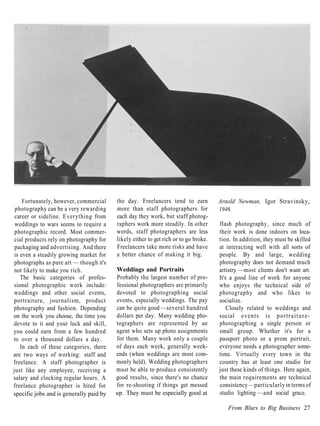
Fortunately, however, commercial    the day. Freelancers tend to earn           Arnold Newman, Igor Stravinsky,
 photography can be a very rewarding     more than staff photographers for           1946.
 career or sideline. Everything from     each day they work, but staff photog-
 weddings to wars seems to require a     raphers work more steadily. In other        flash photography, since much of
 photographic record. Most commer-       words, staff photographers are less         their work is done indoors on loca-
 cial products rely on photography for   likely either to get rich or to go broke.   tion. In addition, they must be skilled
 packaging and advertising. And there    Freelancers take more risks and have        at interacting well with all sorts of
 is even a steadily growing market for   a better chance of making it big.           people. By and large, wedding
 photographs as pure art — though it's                                               photography does not demand much
 not likely to make you rich.            Weddings and Portraits                      artistry —most clients don't want art.
    The basic categories of profes-      Probably the largest number of pro-         It's a good line of work for anyone
sional photographic work include:        fessional photographers are primarily       who enjoys the technical side of
weddings and other social events,        devoted to photographing social             photography and who likes to
portraiture, journalism, product         events, especially weddings. The pay        socialize.
photography and fashion. Depending       can be quite good —several hundred              Closely related to weddings and
on the work you choose, the time you     dollars per day. Many wedding pho-          social events is p o r t r a i t u r e -
devote to it and your luck and skill,    tographers are represented by an            photographing a single person or
you could earn from a few hundred        agent who sets up photo assignments         small group. Whether it's for a
to over a thousand dollars a day.        for them. Many work only a couple           passport photo or a prom portrait,
    In each of these categories, there   of days each week, generally week-          everyone needs a photographer some-
are two ways of working: staff and       ends (when weddings are most com-           time. Virtually every town in the
freelance. A staff photographer is       monly held). Wedding photographers          country has at least one studio for
just like any employee, receiving a      must be able to produce consistently        just these kinds of things. Here again,
salary and clocking regular hours. A     good results, since there's no chance       the main requirements are technical
freelance photographer is hired for      for re-shooting if things get messed        consistency —particularly in terms of
specific jobs and is generally paid by   up. They must be especially good at         studio lighting —and social grace.

                                                                                        From Blurs to Big Business 27
Photojournalism
Journalistic photography ranges
                                           FOCAL POINT: Margaret Bourke-White
from covering a fire on Elm Street for
the local newspaper to traveling to        Today we take photojournalism for             After becoming a staff photog-
Tahiti for a major magazine. Photo-        granted. We expect our magazine ar-        rapher for Life magazine in 1936,
journalists must possess good in-          ticles to be illustrated with photo-       Bourke-White continued to cover
stincts above all else. Sensing when       graphs that add insights and impact        both technological progress and
a photo opportunity is about to oc-        of their own. But, like photography        human suffering. The very first issue
cur and knowing how to handle it are       itself, photojournalism had to be in-      of Life featured one of her photo-
of vital importance. Being a first-rate    vented. One of the people who played       graphs on the cover: a dramatic
photo-technician is helpful . . . but      a major role in inventing it was           image of a massive dam construction
not strictly essential.                    Margaret Bourke-White.                     project. She provided extensive
    A more commercial field related to        While in college, Bourke-White          coverage of World War II, most
 photojournalism is freelance location     discovered that she excelled at pho-       notably the horrors discovered when
 photography. Corporate annual             tography. After graduating from            the Allies liberated the concentration
 reports, slide presentations, promo-      Cornell, she began working as a pro-       camps. She photographed the gran-
 tional brochures, in-house publica-       fessional photographer. She was            deur and starvation of India in the
 tions, trade magazines (Plumbers'         especially intrigued by the surge of       late 1940s, black South African
 Digest or New England Beverage            technological developments at that         Miners in 1950, and the Korean War
 Retailer, for example) all require        time and used her camera to convey         in 1952.
 professional-quality photography.         the power and beauty she saw in               By the mid-1950s, Bourke-White
 Being able to handle any lighting or      everything from clock parts to steel       was suffering from Parkinson's
 composition challenge quickly and         mills. From 1929 to 1933, she was an       Disease, which progressively reduces
 accurately is the critical factor here.   industrial photographer for Fortune        the body's ability to control its move-
 An ability to blend into the corporate    magazine. Her work there was not           ments. She left the staff of Life in
 environment is also essential.            limited to machine parts and con-          1969 and died two years later.
Razzle Dazzle                              struction projects, however. In 1934,         Though she was neither a master
At the top of the career heap finan-       she covered the drought known as the       stylist nor an exceptional technician,
cially are illustration, product, food     "Dust Bowl" that swept through the         Bourke-White was among the first to
and fashion photography. This is           Great Plains, showing how that trag-       clearly understand the camera's
where knowing the right people and         edy affected the lives of farmers and      power to record "history in the mak-
being in the right place at the right      their families. This article was a mile-   ing." She helped establish standards
time are of critical importance. A         stone in photojournalism. Though           for commitment, concern and sheer
flair for style helps too. You also        other photographers, such as Lewis         energy that photojournalists have
have to be very good if you expect to      Hine, had done similar reporting on        struggled to live up to ever since.
have more than a brief career. The         social issues, none had done so for a
competition is stiff because the           major magazine.
rewards are high. A top-notch pro-
duct, food or fashion photographer
will charge $2,000 or more per day.
A comparable illustration photog-
rapher might earn the same amount
for a single photograph. Nice work
if you can get it.


28 The Photographic Eye
1904-71


Margaret Bourke-White, Airship Akron, Winner Goodyear Zeppelin Race, 1931.


                                                                             From Blurs to Big Business 29
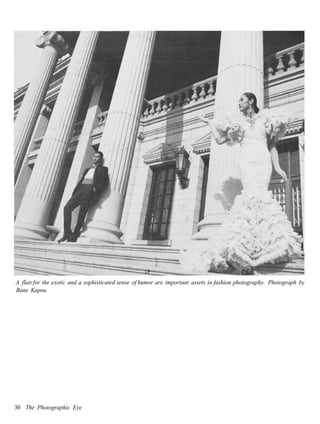
A flair for the exotic and a sophisticated sense of humor are important assets in fashion photography. Photograph by
Bane Kapsu.


30 The Photographic Eye
Variations                                  services to other photographers.          prints, but be sure to include the run-
Mixed in with these general categories      Retouchers, for example, are paid         ning head or foot that indicates the
are numerous photographic special-          handsomely to fix mistakes or other-      name and date of the publication.)
ties: scientific, sports, underwater,       wise alter a photo's appearance.              Your portfolio should also be tai-
travel, architectural, art reproduc-        Skilled darkroom techicians, special-     lored to the kind of work you're
tion, etc. Matching your skills and in-     izing in black and white or color, are    seeking. If you hope to be hired as a
terests to one of these niches may be       highly regarded and well paid.             lab technician, emphasize print
the most satisfying career path of all.        Finally, there are many other jobs      quality. If you want to cover local
By specializing in one particular           that don't require regular use of a        news events, include some good
aspect of photography, rather than          camera or darkroom but can, none-         action shots. If advertising interests
competing in a broader category, you        theless, keep a photographer "in          you, try to create some still-life pho-
have a good chance of establishing a        touch." These include selling and         tographs that have the "look-and-
clear identity and of focusing in on        repairing cameras, maintaining            feel" of studio composition and
a steady market. Word-of-mouth rec-         photographic libraries or stock-          lighting. If you'd like to pursue fash-
 ommendation is always a photog-            agency files, curating in photography     ion photography, you might team up
 rapher's best advertising. You stand       galleries or museums, or even help-       with a friend who aspires to a career
 to benefit most from it if you earn a      ing to develop new designs, formulas      in modeling — working together to
 good reputation for a specific set of      and processes for cameras or film.        produce some fashion shots that you
 skills.                                                                              both can use. And, of course, if you
    If you enjoy photographing build-       Looking Ahead                             hope to sell your work as art, then
 ings, for example, you can make a          In virtually any photography-related      your portfolio must show that you've
 career of it, hiring yourself out to ar-   field, the key to getting started is to   attained a high level of skill and crea-
 chitectural and construction firms or      put together a winning portfolio —        tivity.
 to design magazines. If you're very        an elegant, professional collection of        As you progress through this
 precise and detail oriented, you might     your best work. Your portfolio will       course, it is a good idea to keep your
 get into photographing art for             tell a prospective employer or client     long-range goals in mind. It's never
 museums. If you like flying, you           what you can do, so it should be of a     too early to begin preparing for
 might consider aerial photography. If      consistently high standard — right        them. Even if you have no interest in
  you prefer swimming, consider             down to the details of excellent print    a photographic career, your portfo-
  underwater photography.                   quality, good mounting technique          lio is your own record of achieve-
    There are career opportunities in       and slick presentation. If you are        ment. And you never know when it
 photographic processing as well.           fortunate enough to have some of          may come in handy, so you may as
  Here again, developing a specific set     your photographs published (by a lo-      well do it right.
  of skills is recommended. Some pho-       cal newspaper, for example, or even           Effective presentation (and atten-
 tographers specialize in a photo-          in a school publication) these -          tion to detail) is vitally important in
 graphic style that requires certain        called tear sheets (as in a torn-out      any line of work. Mastering photo-
 processes, such as antique style sepia-    page) — should be included as well:       graphic technique and preparing a
 toned or hand-tinted prints. When          Cut out the full page on which your       good portfolio will teach you valu-
 someone needs that particular style        photograph appears and mount it as        able skills which will serve you well,
 for a magazine illustration or cor-        you would a standard print, or slip it    no matter what career you ultimately
 porate annual report, a specialist will    into a plastic sheet. (Use part of a      choose.
 generally be selected. The same rule       page if the whole thing is too big to
 applies to those who offer processing      fit the size mat you're using for your


                                                                                          From Blurs to Big Business 31
part 2                     Elements of Composition


Student photograph by Michael Grassia.


                                                 33
Student photograph.


34 The Photographic Eye
chapter 2                                                                                                   Tools


            hotographic technology is

IP          changing so fast that it is ut-
             terly impossible to define
  the standard tools-of-the-trade with
  any degree of precision. Cameras
  now in use range from clumsy boxes
  with lots of knobs and dials to the
  latest high-tech whiz-bang contrap-
  tions which look like props from Star
   Trek. Photographic images can now
  be stored on an astonishing array of
   films — plus CDs, computer disks
  and video tape. By the time you read
  this, it is likely other new technolo-
  gies will have appeared, promising
  even greater ease, efficiency and op-
  portunities.
      This is all well and good, but there
   is also real value in understanding
  the basic principles of photography
   — and that is much easier to do with
   the old fashioned, manual ap-              If you choose your camera carefully and practice with it often, you'll soon
   proach. True, it does take more time       learn to use it with very little effort or conscious thought. It will become
   to produce a photograph in this way.       simply an extension of eyes and hands—responsive, accurate and
  And potentially great shots can be          comfortable. (Student photograph by Trevor Bredenkamp.)
  missed while you fiddle with those
  knobs and dials. But there is a             writing with an antique fountain pen       full of clever attachments and acces-
  unique satisfaction in knowing ex-          is infinitely preferable to tapping at a   sories. In fact, odds are that you will
  actly what your camera is doing and         computer keyboard, there are bene-         become a better photographer if you
  why, controlling it to achieve the ef-      fits to cameras that lack the latest       begin with a second-hand, second-
  fect you choose rather than merely          automation.                                rate old clunker that looks like an
  pointing and shooting.                          The essential point to all this is     artifact from the Stone Age.
      So, it is perhaps fortunate that        that there's no need to worry if you           Not everyone needs the same kind
  technological advances take some            can't afford to buy a slick new cam-        of tool —whether that tool is a
  time to settle in and push aside the        era with all the bells and whistles, a     camera or a musical instrument. A
  past. Just as there are times when          stash of fancy lenses and a suitcase       concert violinist may require the best
                                                                                                                            35
violin money can buy, but a blues
singer may make fine music with an
old beat-up guitar. Similarly, some of
the world's best photographers use
the latest "high-tech" cameras; others
use antiques held together with rub-
ber bands and tape. The right choice
for most of us is somewhere between
these extremes.
   Like any tool, each camera has a
"personality" —a mixture of oppor-
tunities and limitations that you con-
trol to express your personal vision.
The goal in selecting a camera is to
find one that does what you need it
to do, no more and no less. In other
words, the right camera for you is
one with a "personality" that matches
your own.
    So, the first rule for choosing a     Manual cameras provide a greater amount of creative control, especially
 camera is to make the best of what       with lighting. This photograph would have been virtually impossible with
 you already have or can easily afford.   most purely automatic cameras, since the lighting effect is not "normal."
 After you become more experienced,       (Student photograph.)
 you'll be more able to decide exactly
 what features you need. That's the       used to make distant objects appear     want to try other lenses, so it is a
 time to invest in your particular        closer.                                 good idea to use a camera that will
 dream machine. For now, however,            The most popular and inexpensive     allow you to do this. Once again,
 use what you have. If you don't yet      cameras have a fixed lens. A fixed      however, it is not essential. If your
 own a camera, buy the least expen-       lens cannot be removed and, there-      budget restricts you to a fixed-lens
 sive one that meets your basic needs.    fore, cannot be changed. Though not     camera, you will still be able to take
 The money you save can be spent on       essential, interchangeable lenses can   perfectly good photographs.
 film and chemicals, which are far        be a great asset.
 more important at this stage than the        Some modern cameras offer a         Manual or Automatic
 quality of your camera.                  compromise between fixed and inter-     If you are buying a camera, you have
    One thing that is important, no       changeable lenses: permanently at-      two basic choices: manual or
matter which camera you buy, is           tached zooms. Others allow you to       automatic. Manual cameras have
durability. No matter how careful         switch from a wide-angle to a tele-     been in use far longer than automatic
you are, your camera is likely to get     photo lens, both of which are at-       cameras, and they are still preferred
 knocked around a bit. Get one that is    tached to the camera body.              by many professionals. They require
strong enough to take abuse.              Generally, these kinds of lenses are    you to load and wind the film, select
    One of the most important dif-        too limited to be very useful, but      the shutter speed, set the aperture,
ferences among cameras is the lenses      they'll do in a pinch.                  and focus. Automatic cameras will
that can be used with them. An inter-         There is no need to rush out and    do some or all of these things for you.
changeable lens can be removed from       buy a telephoto or any other non-          The big advantage of a manual
the camera body and replaced with         standard lens immediately. For your     camera is that you always control
another lens that produces a different    first assignments, you will be using    what it is doing. You make the deci-
effect. For example, a telephoto lens,    only the standard 50mm lens. Even-      sions, and the camera does what you
which works like a telescope, may be      tually, however, you will probably

36 The Photographic Eye
what the camera is doing, you can use
                                                                                       the automatic light meter most of the
                                                                                       time and still learn how to use light
                                                                                       effectively. If you don't make that ef-
                                                                                       fort you won't learn much, and you'll
                                                                                       end up taking a lot of "normal" and
                                                                                       probably boring pictures.
                                                                                          If you are shooting a lot of "can-
                                                                                       dids" (quick, unposed photographs),
                                                                                       like most photojournalists, the
                                                                                       automatic option can be a big help —
                                                                                       since you won't miss a good shot or
                                                                                       annoy your subject while you fumble
                                                                                       with knobs and dials. If you're doing
                                                                                       a lot of still-life or nature photog-
                                                                                       raphy, or if you prefer to take your
                                                                                       time, as most art photographers do,
                                                                                       a manual camera will do just as well,
                                                                                       and will teach you more.
                                                                                          All the other automatic features
Automatic cameras are especially useful for "grab shots," when there's no              are far less important. Loading and
time to fiddle with knobs and dials. By letting the camera make the                    winding the film manually will soon
technical decisions, the photographer is able to concentrate on getting the            become second nature to you, so hav-
timing just right. (Student photograph by Lauren McDermott.)                           ing it done automatically is not much
                                                                                       of an advantage (unless you have
tell it to do. As a result, you will learn   this may sound very appealing, there      reason to be in a real hurry). Auto-
what works and what doesn't. You             is a problem — and that problem is the    focus is another asset for the "grab-
will also make mistakes (which is how        "probably."                               shooter," though focusing shouldn't
you learn). The main disadvantage of            As you become a more experienced       take more than a split second once
a manual camera is the amount of             photographer, you will sometimes          you get the hang of it.
time required to set up a shot.              disagree with your camera's choice.
   Most manual cameras now avail-            You may want a picture to be a bit        What Format?
able in the 35mm format have a built-        darker or lighter for effect, or the      Most modern cameras use 35mm
in light meter. The meter informs you        camera may be "confused" by a com-        film. This is a relatively small format
of the lighting conditions, and you set      plex lighting situation. With full        that allows many frames to fit on a
the speed and aperture accordingly.          automatic, there's not much you can       single roll. As a result, it costs less per
Older cameras, and many studio               do to change the camera's decision.       shot than larger formats. In addition,
models, require you to use a hand-           This is a poor choice for anyone          the smaller format means the camera
held light meter to "read" the light,        who really wants to learn about           can be smaller and lighter, so it's
before you set the camera.                   photography.                              easier to carry and use.
   Cameras with automatic light                 Manual-override offers a solution.        There is one advantage to larger
metering also fall into two categories:      When you're sure the camera will          formats: the grain of the film. All
full automatic and manual-override.          make the right decisions (i.e. when       film stores images in tiny dots. When
A full automatic chooses the aperture        you want a normal photograph in a         the film is enlarged, the dots begin to
or shutter speed, or both, according         normal lighting situation), you let the   show. This is grain. If you are mak-
to a built-in computer that is pro-          camera decide. When you disagree,         ing a large print (such as for an ex-
grammed to make the decision you             you set the camera manually. If you       hibit or a full page in a magazine),
would probably make anyway. While            make an effort to pay attention to        grain can be a problem. Too much

                                                                                                                      Tools 37
Each kind of lens has its own characteristics and uses. The wide-angle lens used for this photograph produced a
slightly surreal effect. Much of the photograph's impact would have been lost with either a normal or a telephoto
lens. (Student photograph by John Berringer.)


grain reduces the image quality. It      Choosing a Lens                           look the same as what you see with
begins to look "grainy."                 In many ways, choosing the right lens     your own eyes. Whatever lenses you
   For most uses, including most ex-     or lenses is even more important than     eventually buy, you will want to in-
hibit formats, the ease of using         choosing the right camera.                clude the 50mm range. (By the way,
35mm outweighs the drawbacks of             Once you've selected some brand        if you find 50mm lenses and 35mm
grain. And, as films continue to im-     names you trust and can afford, you       film confusing, don't worry. These
prove, grain is becoming less and less   face another choice: which lenses to      and other terms will gradually
of a problem. After you've devel-        buy. Most cameras come equipped           become familiar to you as you use
oped your skill and style, you may       with a 50mm lens. This is the stan-       them.)
want to move up to larger formats,       dard lens for 35mm photography,              If you have a choice (and you often
but you can decide that later.           because it is closest to normal vision.   won't) you might consider buying the
                                         What you see through the camera will      camera body and lens separately.

38 The Photographic Eye
This will enable you to choose a           your photo career with only a wide-        camera manufacturers make lenses
variable focal-length, or "zoom," lens     angle or only a telephoto. It's per-       for their cameras that you can trust
instead of a "fixed focal-length" lens.    fectly all right to start it with only a   to be as well-made as the cameras. In
    As explained in Chapter 11, the        50mm. Once again, the best pro-            addition, cameras with automatic
 focal-length of a lens determines how     cedure is probably to start simply,        features may require that you stay
wide an area you can see through it.       with just a standard lens, and add         with the same brand when buying
 In effect, the 50mm lens draws a box      others as you decide you need them.        lenses. However, many companies
 within which objects are normal in        If you are thinking of investing in        produce lenses designed for use with
 size and proportion. A shorter lens,      more than one lens, review Chapter         a variety of cameras. These may be
 such as a 35mm, draws a larger box,       11 before making any decisions.            as good as or better than the camera
 and makes objects appear smaller                                                     manufacturer's own lenses and often
 and somewhat "bent" or distorted. A       What Price?                                cost less. Read the reviews in camera
 longer lens, such as a 135mm, draws       How much should you pay for a              magazines and ask for the advice of
 a smaller box, making objects appear      camera? Well, it really depends on         experienced photographers before
 larger and more compressed (with          what you can easily afford. Good           you decide.
 less space between them). With each       cameras are available for as little as        One final note on lenses: Buy a UV
 fixed focal-length lens you have only     $50. Top professional models can           (ultraviolet) or a "skylight" filter for
 one choice.                               cost several thousand dollars.             each lens, attach it and leave it on at
    With a zoom (variable focal-              If your budget limits you to under      all times. Either of these filters will
 length) lens, you have many choices.      $100, buy the best manual camera           help a little to reduce haze under
 A zoom lens is essentially several        you can f i n d —perhaps a good            some lighting conditions, but their
 lenses in one. For example, if a zoom     second-hand model. If you can af-          real use is to protect the lens itself
 lens ranges from 35mm to 135mm,           ford more, take a careful look at the      from damage. Should you acciden-
 you will have the same choices as you     $100 to $500 range, keeping in mind        tally scratch the filter, it can be inex-
 would if you bought the three focal-      the features you care most about           pensively replaced. Replacing the lens
 lengths just mentioned (35mm,             (automatic features, manual features,      would of course be far more costly.
 50mm and 135mm), plus all the             durability, lenses), and buy the one
 focal-lengths in between.                 that best suits you. A fully profes-       Summary
    Any good modern zoom lens will         sional camera system —which you ab-        There are only three key points you
 match the image quality of a typical      solutely do not need at this stage — i s   need to understand at this point:
 fixed focal-length lens. (Early zooms     likely to cost over $1,000, depending      First, start with the basics —a simple,
 produced poor image quality at "in-       on your choice of lenses.                  relatively inexpensive camera with a
 between" focal-lengths, such as              Before buying any camera, read          50mm lens. Ideally, your camera will
 42mm. This problem has been cor-          reviews of several in camera               permit you to use other ("inter-
 rected on most modern models.) You        magazines (see the Bibliography for        changeable") lenses as well. You
 will, however, almost certainly lose      names of some good ones). Ask              should have at least one lens that
some of the lower (larger) apertures       someone you know who does a lot of         opens up to f/2.8, and all lenses
offered by fixed focal-length lenses.      photography to give you some               should have UV or skylight filters at-
Since a large aperture lets in more        recommendations. Then make an in-          tached. Second, choose a camera that
light than a small one, a zoom lens        formed decision.                           includes manual controls for aperture
may limit your ability to photograph          Selecting a lens may be more dif-       and shutter-speed. Full manual is
in low-light situations or at high shut-   ficult. The quality of the glass and       fine; automatic features are nice ex-
ter speeds.                                construction varies considerably. A        tras, but they are not necessary.
    If your budget permits, it is useful   cheap lens may result in photographs       Third, make sure that both your
to have the three basic lens ranges:       that are always out of focus, blurry       camera and lens are manufactured by
wide-angle, "normal" (50mm), and           around the edges or grainy.                a reliable company. If you begin with
telephoto. However, the normal lens           A good rule of thumb is to stick        these essentials, you'll be well
is the most important. Do not start        with the brand names you know. All         equipped to learn photography.

                                                                                                                    Tools 39
Additional Tools                            tions for your camera available at all    mini-computers. Many are utterly
Once you've selected a camera and           times. If you are buying a new            unlike the traditional models. Some
lens (or lenses), you have taken care       camera, this will be easy. If not, you    new ones, for example, come with a
of the big decisions. Later, you may        may have to search a bit, or buy one      built-in auto-winder and don't have
want to add other tools, such as a          of the many books available describ-      a film advance lever at all.
tripod and flash, but they can wait.        ing different camera models. If you          So, the following pages are not in-
Refer to Appendix 4 for more infor-         can't locate instructions, have some-     tended as a substitute for your
mation on them when the time                one who knows the camera well show        camera's manual. No one list can be
comes. There are, however, a few            you how it works —and be sure to          correct and complete for all camera
other inexpensive tools you'll need in      take notes.                               brands and models. You may have to
order to get started.                                                                 hunt a bit to locate some of the com-
    As soon as you begin producing          Basic Tools Checklist                     ponents on your camera, since each
 photographs, you'll want to store          The following tools are all you will      model tends to have its little quirks.
 your negatives and prints, to keep         need to get started. Check to see that    Check your own manual to be sure
 them clean and organized. Plastic          you have them, and that your camera       that you know where each compo-
 sheets specially designed for storing      and lens meet the key requirements        nent is located on your camera and
 negatives are available that fit into a    listed here:                              how it works.
 standard three-ring binder. Buy a box                                                   The following pages are intended
                                            Camera Requirements
 of these and a binder to file them in.                                               as a summary of the basic com-
                                                 Durability
    Immediately after developing and                                                  ponents of a typical, traditional
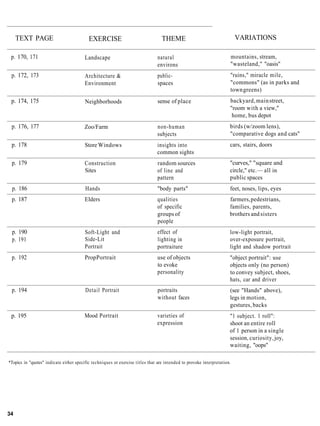
                                                 Manual Aperture & Shutter-
 drying each roll of film, you will cut                                               camera. This will give you an idea of
                                                 Speed Controls
 the roll into shorter lengths (five                                                  how your camera compares to most
                                                 Reliable Manufacturer
 frames each) and slip them into the                                                  others.
                                                 Interchangeable Lens
 negative file. The next step is to place                                                You may not find all of the com-
                                                 Capability
 the film directly onto a piece of                                                    ponents that are listed here, either
 photographic paper to make a con-          Lens Requirements                         because they are not included in your
 tact print (see Appendix 1 for ex-               Standard Focal-Length               camera or because they have been
 planation). With a plastic negative              (50mm)                              replaced by an automatic feature. It
 file, this can be done directly. Paper           172.8                               is still a good idea to become familiar
 files are also available. They require           Reliable Manufacturer               with all of them. Understanding each
 you to remove the film to make a              _ UV Filter                            component of a traditional camera
 contact print, however, so are not as                                                will help you understand how even
                                            Additional Tools
 easy to use as plastic sheets.                                                       the simplest or most automatic
                                                  Plastic Negative Files
    Similar sheets are available for                                                  camera works. And knowing how a
                                                  Plastic Print Sheets
 storing prints. If your photo store                                                  camera works is vital to using it well.
                                                  Grease Pencil
 doesn't carry them, you can probably                                                    As you read this section, compare
 find them in an office supply store.             Operations Manual or Other
                                                                                      each description with your own
 Any plastic sheet that will hold                 Instructions for Camera
                                                                                      camera. Be sure to have your own
 8'/2" x 11" paper, with holes for a        THE CAMERA, INSIDE                        camera's manual on hand to clarify
 three-ring binder, will do fine.           & OUT                                     any questions. Look for each compo-
    You will also want an ordinary                                                    nent as it is described, and try it out.
grease pencil (yellow or white) to          Most 35mm cameras are fairly similar      Do not put film into the camera un-
mark your contacts when you're              in the design and placement of key        til instructed to do so.
deciding which frames to print.             controls. For example, the film ad-
Grease pencil marks show up well            vance lever (the "winder") is generally
in the darkroom, and they can be            on the top right, next to the shutter
rubbed off if you change your mind.         release. Advances in electronics,
    Finally, be sure to have the instruc-   however, are turning cameras into

40 The Photographic Eye
The Camera Body: Outside
 • Viewfinder
The first thing to look at on your
camera is the part that allows you to
look through it. The viewfinder, in
simplest terms, is just a rectangular
window that shows you what will be
in your photograph when you click
the shutter. (Actually, viewfinders
generally show you a bit less than
you'll actually get. This is usually an
advantage, as it gives you a little
"slack" when you're making a print.)
   Your viewfinder is probably quite
a bit more than just a window,
however. It certainly will include
some kind of focusing aid. One com-
mon focusing aid is a split circle
(called a split-image focusing screen)
in which out-of-focus objects do not
line up correctly. Another common
kind is a series of circles (called a
ground-glass focusing screen) that go
in and out of focus as you turn the
focusing ring on the lens.
   The split-image screen is especially
helpful if you're at all nearsighted. To
use it, you simply adjust the focus-
ing ring until both sides of the circle
line up. It works best when the split
is placed across a line of some kind,
such as an eyelid or a branch, so you
can see what you're lining up.
   In addition, most modern cameras
use the sides of the viewfinder to
show you important information.
This may include the aperture of your
lens, the camera's shutter-speed,

                             Tools 41
whether the camera is in manual or              You must remember to change the
automatic mode, whether your flash           ISO setting every time you use a dif-
has recharged, etc.                          ferent kind of film. If you are using
  Take some time to explore your             any automatic exposure system, your
viewfinder. If you aren't certain what       camera will base its decisions on the
everything in it means, consult the          ISO setting you've selected. If it's
user's manual for your camera or ask         wrong, all your photos will be incor-
an experienced photographer.                 rectly exposed.
                                                The same holds true for the cam-
                                             era's internal light meter. If you're     • Shutter-Speed Control
                                             setting the shutter speed or aperture     The shutter-speed control is almost
                                             according to the meter, your ex-          always on the top right of the camera.
                                             posures will only be correct if the ISO   It determines how long the shutter
                                             setting is correct. Even if you're do-    will remain open for each photo-
                                             ing everything manually, the ISO set-     graph. It is simply a timer. When you
                                             ting is an important reminder of what     press the shutter release, the shutter
                                             kind of film you're using.                opens, light enters through the lens,
                                                To change the ISO setting, you         and the timer begins counting. When
                                             generally turn a knob that moves the      the shutter has been open for the
 • ASA/ISO                                   numbers through the indicator win-        amount of time you have selected, it
 The first step of any photo assign-         dow. You may first need to press a        closes again. The numbers on the
 ment is to set the correct film speed.      button, lift the knob or otherwise        shutter-speed control indicate frac-
 This will be listed on the film carton,     release a lock designed to prevent you    tions of a second (60 = 1760 of a sec-
 or box, (and also on the canister, the      from changing the setting acciden-        ond, and so on), so the timer has to
 metal container holding the film) as        tally. On many modern cameras,            count very quickly.
 ASA or ISO. These two terms are             you'll change the ISO by pressing a          The most commonly used shutter
 used to describe the same thing: the        button until the right number comes       speeds are probably 60 and 125. Both
 film's sensitivity to light. In fact they   up in a display panel. Some cameras       are fast enough to stop most action
often appear together, as ASA/ISO.           will set the ISO for you automat-         with a 50mm lens, while allowing for
 ISO is becoming the more common             ically, reading the proper setting from   a fairly small aperture in most
 term, however, so we'll be using it         a code on the film canister. (Film that   lighting conditions.
 throughout this book. (Both "ASA"           has been coded for this purpose is           Notice that 125 (or 1/125 of a sec-
 and "ISO" are the initials of               labeled "DX.")                            ond) is almost exactly twice as fast as
 organizations —the American Stan-              Locate the ISO indicator on your       60 (or 1/60 of a second). The next
 dards Association and the Interna-          camera. Adjust the setting to see how     speed above 125 is 250— twice as fast
tional Standards Organization —that          low and high it goes. Professional        again. Depending on your camera,
establish scientific measurements.)          cameras will provide ISO settings as      the highest speed may be 1000 or even
    The ISO indicator is generally built     low as 6 and as high as 6400. Many        higher, fast enough to "freeze" a bird
into the rewind knob, on the left side       popular models have a range of 12 to      in flight or a race car at the Indy 500.
of the top of the camera. The ISO            3200. Don't worry if yours doesn't go        Moving down from 60, the next
numbers are usually visible through          as high or as low as that. Most films     speed is 30. Again depending on your
a little window in the rewind knob.          fall between ISO 25 and 1200.             camera, the shutter speeds may go as
Each number is usually double the               Once you've checked out the limits     low as 1, for 1 second. Some cameras
preceding number: 25, 50, 100, 200,          of your camera's ISO indicator, set       provide even longer automatically
400, 800, etc. Dots between the              it to ISO 125. This is the speed for      timed exposures, even as long as a
numbers indicate settings in between         Kodak's Plus-X film, which you will       minute or more.
these numbers. So, for example, ISO          be using in your first assignment.           The last indicator on the shutter-
125 is one dot above ISO 100.                                                          speed control should be a "B." This
stands for "bulb." In the early days
of photography, the shutter was
released by squeezing a rubber bulb,
and it stayed open as long as the bulb
was squeezed. The photographer had
to decide when enough light had
entered the camera, and then let go
of the bulb to close the shutter. Since
film was very slow in those days, that
wasn't as hard as it sounds.               • Film Advance Lever                       • Rewinder
   Today, although everything about        The film-advance lever (or winder) is      Once you've released the film lock,
the cameras we use is far more com-        generally located directly behind the      you'll need to crank the film back in-
plex, this term remains the same. The      shutter release, making it easy to         to its canister, using the rewind knob
"B" simply means that the shutter will     click-and-wind quickly.                    on the left side of the camera's top.
remain open as long as the release is         Try turning the winder (counter-        Generally, a small crank is lifted out
held down. This is useful for very         clockwise). If it doesn't move more        of the rewind knob for this purpose.
long exposures, primarily at night.        than an inch, press the shutter            There should be an arrow indicating
To use the "B" setting, you will           release. You should hear a sharp           that the crank turns clockwise, in case
almost certainly need to use a tripod      click. Then try the winder again. It       you get confused. As you rewind the
and a cable release, which (like the       should swing easily out to the side of     film, it is a good idea to keep your
old-fashioned bulbs) is used to avoid      the camera and snap back into place        finger on the rewind release button so
shaking the camera.                        when you let go of it. If you had film     it doesn't lock again and tear the
                                           in the camera, you would have just         film's sprocket holes.
                                           taken a photograph and advanced the        • Battery Compartment
                                           film to the next frame.                    Another important component is
                                           • Rewind Release                           generally located on the bottom of
                                           As you wind film through the               the camera: the battery compart-
                                           camera, it travels from its canister (on   ment. If yours is there, it will prob-
                                           the left) to the "take-up reel" below      ably have a round metal cover with
                                           the advance lever (on the right).          a slit in it. To open the compartment,
                                           When you reach the end of a roll, the      you place the edge of a coin (a penny
                                           lever will jam. You will no longer be      works well) into the slit and turn it
                                           able to turn it easily. The next step      counter-clockwise. When the cover is
• Shutter Release                          is to rewind the film back into the        removed, a small packet with one or
Next to the shutter-speed control (top     canister.                                  two coin-shaped batteries should slide
right of the camera) you should find          Before you can do that, you'll need     out. These batteries are very sensitive
the shutter release. It is simply a but-   to release the lock that keeps the film    and may not work if you get dust or
ton which, when pressed, triggers the      from slipping backwards by acci-           fingerprints on them. So treat them
shutter mechanism. (Note: On some          dent. Remove the camera from its           carefully. Fortunately, your batteries
cameras, the shutter release is pressed    case and look on the bottom of the         rarely need changing.
part-way down to measure the light         camera body. You should find a                If you found a round metal cover
or "freeze" the aperture setting.)         small button directly below the film       with a slit in it, but did not find any
                                           advance lever.                             batteries under it, then you've prob-
                                              Pressing this button will release the   ably just discovered your camera's
                                           lock, so you can rewind the film.          motor-drive connector. This is a gear
                                           (Until there is film in the camera,        that connects a separate motor-drive
                                           however, it won't have any effect, so      unit to your camera's film advance
                                           don't bother testing it yet.)              mechanism. (To learn more about

                                                                                                                  Tools 43
motor-drives, see Appendix 4.) In         mounted. It establishes an electronic     frame of film. If you want to play
this case, your camera's battery is       link between the flash and the            with multiple images, "ghosts" and
located elsewhere. Most likely it's in    camera. This link enables the camera      related special effects, this mech-
a compartment on the front of the         to "trigger" the flash while the shut-    anism will allow you to do so.
camera body, on the right side. If so,    ter is fully open. It may also enable        Depth of Field Preview Button
it's likely that your camera uses bat-    the flash and camera to "communi-         Normally, your lens will stay open to
teries to run both the light meter and    cate," so the flash can "tell" the        the largest aperture available until
 a variety of automatic features. The     camera what aperture to use, or the       you click the shutter. This gives you
 more automatic features your camera      camera can "tell" the flash when it has   as much light in the viewfinder as
 has, the more power it requires, and     received enough light. (See Appendix      possible to help you focus precisely.
 the more frequently you'll need fresh    4 for more information on flashes.)       The depth of field preview button
 batteries. Check your manual to find      • Accessories                            temporarily closes the lens down to
 out how to change them.                  The next three components are not         the aperture you've selected, so you
 • Battery Check                          essential and are not included in all     see exactly what the film will see. As
 The placement and operation of the       models. If your camera has them,          explained in Chapter 9, the smaller
 battery check varies considerably         however, they can be useful.             the aperture, the greater the range of
 from one camera model to the next.                                                 distance that will be in focus. This
  It may be activated by a button on                                                range is known as depth of field.
 the top or on the front of the body.                                                   If you have selected a small aper-
  It may cause a needle in the view-                                                ture (say, f/16) pressing the depth of
  finder to move to an assigned spot,                                               field preview button will cause the
  or light up an indicator lamp. Or it                                              viewfinder to become dark (due to
  may be fully automatic, activating an                                             the small aperture). If you look
  indicator only when the battery is                                                carefully, you'll see that nearly
  low. Take a moment to locate the                                                  everything is in crisp focus. If you've
  battery-check function on your                                                    selected a moderate aperture (say,
  camera, using the manual, and be                                                   f/5.6), the background will be out of
  sure you know how it works. Few           Self-Timer The primary purpose           focus when the foreground is in
  things are more depressing in           of the self-timer is to permit you to      focus, and vice versa. If you've
  photography than discovering too        take a picture of yourself. It usually     selected your largest aperture, the
  late that your camera has dead          consists of a lever that you turn          depth of field preview button won't
  batteries.                              before pressing the shutter release.       have any effect at all, since the depth
                                          The timer starts counting as soon as       of field stays the same.
                                          the shutter release is pressed, gen-          The primary function of the depth
                                          erally giving you a few seconds to         of field preview button is to help you
                                          position yourself in front of the          select the correct aperture when depth
                                          camera and work on your smile.             of field is of critical importance.
                                          Most self-timers also include a little     You'll find it especially useful when
                                          light that blinks to tell you it's         shooting close-ups.
                                          working.                                   • Camera Back Release
                                             Multiple-Exposure Control      This     Now comes the tricky part. Because
                                          feature stops the film advance             you don't want your camera to open
                                          mechanism from working, so you can         itself accidentally, the latch that
 • Hot Shoe                               move the lever without moving the          keeps the back shut is often cleverly
 Nearly all modern cameras come           film. This enables you to cock the         hidden. In addition, releasing it tends
 equipped with a "hot shoe." This is      shutter for a new shot, while the film     to require several steps. Generally,
 a small clamp right above the            stays where it is. You can then put        the release is connected in some way
 eyepiece, onto which a flash can be      more than a single shot onto a single      to pulling up the rewind knob (which

44 The Photographic Eye
second.
                                                                                            The metal plate attached to the
                                                                                         camera back (see it?) presses the film
                                                                                         fiat. (This is another of the camera's
                                                                                         "don't touch" parts.) The shutter
                                                                                         opens and closes, letting a very
                                                                                         precise amount of light in through the
                                                                                         lens. The light exposes one piece (or
                                                                                         frame) of film, initiating the chemical
                                                                                         reaction that produces a negative im-
                                                                                         age. The film is advanced to a fresh
                                                                                         (unexposed) frame and the process is
                                                                                         repeated until the film has all been ex-
                                                                                         posed. That, in very simplified form,
                                                                                         is how a camera works.


also frees the film canister from its
sprocket). If in doubt, once again,
consult your manual.

The Camera Body: Inside
Before we explore the internal work-
ings of your camera, a few general
words of caution are in order.
Though the outside of most cameras
can stand a fair amount of abuse, the      • Shutter
inside can't. Once you've opened the       The first thing you're likely to notice
camera back, you have exposed some         once you open the camera back is
very delicate machinery. This is one       also the most fragile and important:
time that strict rules do apply: Don't     the shutter. This is a piece of cloth
poke around with your fingers until        or a series of small metal plates cover-
you know what you're poking. Don't         ing the rectangular space directly
try to "fix" things, even if they appear   below the viewfinder. It is as delicate       • Film Spool
to be broken. If you think some-           as it looks, so do not touch it.              To the left of the shutter screen is the
thing's wrong, take the camera to an          When you click the shutter, three          film spool. This is where you'll insert
authorized repair shop. Open the           things happen. The lens closes down           a film canister. Notice the prongs that
camera back only when absolutely           to the aperture you've selected. A            protrude from the end of the spool.
necessary (to change film), and close      mirror between the lens and the shut-         These must be fitted to matching
it again as quickly as possible. Pro-      ter (which you'll see a little later) lifts   openings in the film canister. Notice
tect the interior from dust and            up out of the way. Then the shutter           also that the entire spool slides up out
moisture. If you're shooting in dusty      slides open, stays open for the dura-         of the way when you pull the rewind
or wet conditions, aim your back in-       tion of the shutter speed you've              knob. This provides just enough
to the wind and cover the camera as        selected, and slides shut.                    space for you to slip in the canister.
much as possible. In short, be                Sound simple? In a sense it is, ex-        You then push the knob back down,
careful!                                   cept that all this has to happen with         fiddling with it, as needed, to slip the
                                           absolute precision in a fraction of a         prongs into their respective openings.

                                                                                                                      Tools 45
• Film-Advance Sprocket
 Just to the right of the shutter screen
 there are two sets of sprockets (gears)
 on a reel. This is the next step in
 loading film. The small rectangular
 holes along the upper and lower edges
 of the film must be positioned over
 these sprockets. Each knob of the
 sprocket should slide easily into a
 hole in the film as they turn together.


                                           at the far right, just past the film-      amount of light it is "seeing"
                                           advance sprocket. This is the take-up      decreases and increases. Also like a
                                           reel. In most cameras, this reel is        human eye, it focuses on some things
                                           simply a tube with slits in it. Your job   and not on others. Unlike the human
                                           is to insert the end of the film in one    eye, however, a camera lens requires
                                           of the slits and then wind the reel un-    help to do these things. With most
                                           til the film catches and holds tight.      cameras, that help must come from
                                              On some newer cameras, the take-        you, the photographer.
                                           up reel is equipped with a special            You expand and contract the open-
                                           mechanism to make it easier to insert      ing of the lens by adjusting the aper-
                                           the film. Some even load the film          ture ring. You use the focusing ring
                                           automatically. Once again, if you          to select what is in and out of focus.
                                           have any questions, consult your           The aperture and focusing rings are
                                           manual.                                    used together to determine how much
                                                                                      is in focus. By decreasing the aper-
                                           The Lens                                   ture, you increase the depth of field.
                                           The lens is a camera's eye. Like a         In other words, a smaller lens open-
• Take-Up Reel                             human eye, its opening expands and         ing means that more of your photo-
The final step in loading film occurs      contracts (opens and closes) as the        graph will be in focus.

46 The Photographic Eye
through the lens. The main use of the
                                                                                        numbers is to give you the option of
                                                                                        guessing at the correct focal distance.
                                                                                        This can come in very handy if you
                                                                                        want to sneak a shot of someone
                                                                                        without being noticed.


• Aperture Ring                             • Depth of Field Scale
Let's start with the ring that is usually   Generally, there is another ring with
closest to the camera body and move         the same numbers (usually smaller
outwards. On most cameras, this will        and sometimes colored) right next to
be the aperture ring.                       the aperture ring. This one does not
   The aperture ring consists of a          turn. It is the depth of field scale, and
series of numbers —4, 5.6, 8, 11,           is there only to give information. The
etc.-that can be turned to line up          scale tells you what range of distance
with a marker. The lowest number            will be in focus at each f-stop. For        • Lens Release & Mount
will probably be 1.8, 2.8, or 3.5,          example, at f/16 everything from 7          Now that you know how the lens
depending on your lens. The highest         to 30 feet away from you will be in         works, let's take it off. On most
is likely to be 16 or 22.                   focus. At f/4, the depth of field is        cameras, you'll find a button
   Each of these numbers stands for         much smaller: from 7 to about 9 feet.       somewhere that you must press as
an aperture or f-stop, a different size        Basically, the depth of field scale      you turn the lens (and some turn one
lens opening. The lower numbers             gives you the same information as the       way, some the other). Absolutely,
represent larger openings; the higher       depth of field preview button. The          positively, with no exceptions, do not
numbers represent smaller ones.             difference is that one tells and the        attempt to remove a lens from any
   On cameras with automatic meter-         other shows you.                            camera until you're sure you know
ing, you're likely to see an "A" or                                                     how. This goes double for trying to
some other symbol i n d i c a t i n g                                                   put the lens back on. (One of the best
"automatic." If so, you may need to                                                     ways to ruin a camera, outside of
press a button to release the ring so                                                   dropping it on concrete, is to force
you can turn it. In this case, the ring                                                 a lens on the wrong way —and there
locks itself on automatic, so you                                                       are lots of wrong ways.) Always
don't accidentally bump it into                                                         check the manual first.
manual mode (which can result in a                                                         Once you have studied the manual
lot of ruined photos.)                                                                  carefully, practice removing the lens
                                                                                        and putting it back on again until you
                                                                                        can do it quickly and effortlessly.
                                            • Focusing Ring                             Before you do, make sure you have
                                            If you've been checking out the depth       everything correctly lined up, and
                                            of field scale, you've probably             that you have a clean, safe place to
                                            already figured out the focusing ring.      put the lens when you take it off.
                                            The focusing ring is marked with            Finally, never leave a lens lying
                                            distances, virtually always in both         around off the camera and out of its
                                            feet ("ft") and meters ("m"). You           case, or a camera lying around with
                                            turn the ring to adjust the focus.          no lens on it. Either way, you're just
                                               Normally, of course, you won't see       asking for trouble.
                                            the numbers, since you'll be looking

                                                                                                                     Tools 47
EXERCISE
                                                                                       dial to get a sense of how the speeds
Testing the Shutter & Aperture                                                         differ.
                                                                                          Do the same thing with all the dif-
                                                                                       ferent apertures with the shutter set
                                                                                       at "B," so you can see the different
                                                                                       sized openings.
                                                                                          Now close the back of the camera
                                                                                      and remove the lens. Set it aside
                                                                                      where it will be safe. Look into the
                                                                                      camera from the front. If you have
                                                                                      an SLR (or Single-Lens Reflex)
                                                                                      camera, you should see a mirror set
                                                                                      at an angle. Above the mirror you'll
                                                                                      see the focusing screen. If you look
                                                                                      very carefully, you may also be able
                                                                                      to make out some of the other
                                                                                      displays you saw in the viewfinder.
                                                                                      The triangle on the camera's top is a
                                                                                      prism that "bends" the image of the
                                                                                      focusing screen around to the view-
                                                                                      finder so you can see it.
 By now you should be familiar with            Let the shutter close and then cock       Aim the back of the camera
 all the components that have an ef-       it again. Set your lens to its smallest    toward a light source and look into
 fect on the shutter. Let's take a look    aperture (the highest number). Look        the mirror. You should be able to see
at them all in action.                     through again and press the shutter        out through the viewfinder, though
    Set your shutter speed to "B" and      release.                                   most everything will be blurry.
your lens to its largest aperture             This time you should see a much             With the shutter speed still set at
(remember, that's the lowest               smaller hole, with five or more sides.     "B," cock the shutter. Press the shut-
number). Make sure the film advance        The hole gets its shape from overlap-      ter release and notice how the mirror
lever has been wound, to cock the          ping metal plates in the lens. The         swings up out of sight. The black rec-
shutter. Open your camera back.            plates come closer together as the         tangle you see at the back is the metal
Aim the lens at any convenient light       aperture decreases, and they spread        plate that holds the film in place. Let
source. While looking at the shutter       f u r t h e r apart as the aperture        go of the shutter release and you'll see
screen, press the shutter release but-     increases.                                 that the mirror drops right back into
ton and hold it down.                          Set the lens to its largest aperture   place. Now try the same thing at your
    You should find yourself looking       again. Cock the shutter and set the        camera's fastest shutter speed.
through a hole about the size of a         shutter speed to 60. Click and watch          That concludes the testing exer-
quarter, through which you'll be able      again. Try the same thing at 125. Try      cises. Now it's time to do it all for
to see whatever's in front of your         it at 30. Can you tell them apart?         real.
lens . . . except everything will be up-   Move up and down the shutter speed
side down and probably out of focus.


48 The Photographic Eye
Loading Film
To start, open a box of film and
remove the canister from its plastic
case. It's a good idea to save the case
to protect the film once you've fin-
ished shooting it. It's also a good idea
to read over the instructions in the
box if this is the first time you've used
this kind of film.
   Set the ISO as indicated on the film
box or canister. (Always do this first,
so you don't forget — and before you
lose the box and hide the film inside
the camera.)
   Hold the camera securely in one
hand, pin it between your knees or
place it on a flat, clean surface. The
lens should be pointing down and the
top of the camera aimed away from
you. Open the back. The film spool
should be pulled all the way up and
out of the way. Place the film canister
into the compartment on the left side,
so the film runs straight out of the
canister across the shutter screen.
Slide the film spool back down into
place.
   Tuck the end of the film into a slit
on the take-up reel. Click the shutter
and advance the film until it begins
to stretch tightly across the shutter
screen area. Check to be sure the
sprockets are correctly aligned with
the openings along the edges of the
film. Click and wind once more to
tighten the film, holding it tight with
one finger at the canister's opening if
necessary.
   Close the camera back and check
to be sure it is securely locked. Click
and wind twice to advance to an un-
exposed frame.
   Congratulations. You're ready to
shoot.
Is a plastic hose interesting? It is if it is photographed well. Notice how composition and lighting can add impact
to what could have been a very dull image. The hose is positioned slightly left of center, which accentuates its
looping curves. The shadow that nearly touches the upper right-hand corner promotes a sense of balance. The
"negative space" between the hose and the frame of the photograph creates unusual and intriguing shapes. What
else makes this photograph "work"? (Student photograph by James Schmid.J


50   The Photographic Eye
chapter 3                                              What is Composition ?


           photograph is a rectangular      You'll need a considerable amount of      know what a snapshot is and what it
           frame with something in it.      trial-and-error experience before you     generally looks like: Aunt Molly sit-
          That, in essence, is all it is.   can expect to reach this goal, but it's   ting by the pool, grinning at the
 Yet, within that simple definition,        a good idea to keep it in mind from       camera. A snapshot is a casual record
 there are countless possibilities.         the very beginning.                       of some event or person or object.
 Before you can begin to achieve some          A good photographer is like a             When you look at a snapshot, the
 of those possibilities, you will need to   master chef who mixes a certain           main thing you're looking at is a
 learn how to make certain decisions        number of ingredients (or elements)       memory: "Oh, so that's what Aunt
with precision and creativity.              together in just the right proportions    Molly used to look like." It doesn't
    First of all, you'll need to decide     to create a memorable dish (or com-       matter if part of her head got cut off
what to place within that rectangular       position). In both cases, following       or if she's slightly out of focus. All
 frame. Then you'll need to decide          recipes is a useful way to get started,   that matters is that the picture is clear
how to place it. Should it fill the         but soon you'll want to be more           enough to preserve some memories.
whole frame or just a part of it?           creative and try new things. A true          A lot more matters in a true
Should it be placed toward the top or       master breaks the rules a bit and         photograph. A photograph is, or
bottom of the frame, to one side, or        creates something unique. Before the      should be, an artistic interpretation
in the center? Should the frame con-        rules can be broken creatively,           of an event or person or object. Its
tain a single object or several? These      however, they must be understood.         purpose is to tell the viewer —any
questions, and others like them, are           Understanding is very different        viewer —something about its subject.
questions of composition.                   from memorizing. You've memorized         It should show not just what the sub-
    Composition is the arrangement of       something when you can repeat it.         ject is, but what it is like. And it
visual elements within the frame of         You've understood it when you can         should do so with impact and style.
a photograph. In photography as in          apply it.                                    To accomplish this, a photograph
chemistry, elements are basic units of         You already know that composi-         must be composed. All its elements
composition which cannot be broken          tion is the arrangement of elements       must be selected and arranged to
down into smaller parts. They are           within the frame of a photograph.         work together toward some unified
composition's raw materials.                Now let's poke at the idea of com-        effect.
   The most important elements in           position to see if we can achieve a          The main difference between a
photography are line, texture, shape,       genuine understanding of it.              snapshot and a photograph is the care
light, motion and perspective. In vir-                                                with which each is produced. Taking
tually all photographs, several of          SNAPSHOTS vs.                             a snapshot involves little more than
these elements combine to achieve a         PHOTOGRAPHS                               pointing the camera in the right direc-
specific e f f e c t . A photograph                                                   tion and clicking the shutter. Taking
achieves greatness when every single        Perhaps the best way to do this is to     a photograph requires paying atten-
element in it contributes to one            consider the difference between a         tion to every detail within the frame,
overall effect, and none is wasted.         "snapshot" and a "photograph." You        and getting all of them just right,

                                                                                                                           51
before the shutter is clicked. That's
                                       what composition is basically all
                                       about: paying attention.
                                          No matter how interesting your
                                       subject may be, you have not really
                                       photographed it until you have
                                       placed it carefully within the frame,
                                       gotten rid of anything that distracts
                                       attention from it, made sure that all
                                       the various elements are working
                                       together, and set the camera to the
                                       correct aperture and shutter speed for
                                       the effect you want. In a broad sense,
                                       the subject of a photograph is far less
                                       important than its composition. Ab-
                                       solutely anything can be photo-
                                       graphed well —or poorly.
                                          This in itself is a valuable lesson.
                                       Once you've begun seeing with a
                                       photographer's eye, you'll discover
                                       that there are wonderful images all
Attention to detail is the primary     around you —far more than you
difference between a snapshot and      could ever hope to capture on film.
a photograph. In the snapshot          Whether you continue to practice
(right) the head and feet of the       photography or not, the way you
taller girl are poorly cropped and     look at the world around you will
the background is distracting. The     probably be changed forever.
girls' expressions are stiff and un-      Photography is an art of discovery.
natural and the composition            It is an exploration of the endless
doesn't "do" anything. In the          variety of line, texture, shape, light,
photograph (above) the same two        motion and perspective — a l l the fun-
girls have been posed in a more in-    damental elements of composition.
teresting way. Their expressions       Not many people have an oppor-
convey a real mood, the back-          tunity to learn to explore the world
ground is less distracting, and the    in this way. You have now become
composition is much stronger.          one of the lucky few who do. Enjoy
Snapshot and photograph by Mike        the exploration.
Wiley.                                    Before focusing in on each
                                       separate element, it's important to
                                       develop a sense of how they all work
                                       together. So, though each element
                                       will have its turn, we're beginning
                                       with the "big picture": composition.
                                       We've already discussed what it is,
                                       and provided some clues as to why it
                                       is important. Now let's look at how
                                       it works.


52 The Photographic Eye
As an example of the fact that a
                                                                                   photograph can be "about"
                                                                                   absolutely anything, here's one that
                                                                                   is pure structure. Notice how the
                                                                                   three structural elements—position,
                                                                                   line and shape —can make even the
                                                                                   simplest image come alive. (Student
                                                                                   photograph by Augustine Go.)

                                                                                   texture, light, motion and per-
                                                                                   spective—are added to complete the
                                                                                   image, altering its appearance
                                                                                   and effect.
                                                                                      In a building, the design may re-
                                                                                   quire a generally non-structural ele-
                                                                                   ment, such as an interior wall, to
                                                                                   become structural. In this case, some
                                                                                   other part of the building, such as the
                                                                                   floor above it, depends on that wall
                                                                                   for support. If the wall were
                                                                                   removed, the building would prob-
                                                                                   ably collapse.
                                                                                      It's the same with photography.
                                                                                   Occasionally, texture or light (or any
                                                                                   of the other elements that are gener-
                                                                                   ally "non-structural") become so im-
                                                                                   portant to the composition that it,
                                                                                   too, would collapse if they were
                                                                                   removed.
                                                                                      In practical terms, this means that
                                                                                   a photograph may, for example, be
                                                                                   "about" texture, so much so that line
                                                                                   and shape are irrelevant. This is,
STRUCTURE, BALANCE,                        Structure                               however, an exception. By and large,
DYNAMICS                                   Structure in photography works in       composition is determined by line,
                                           much the same way as it works in        shape and position.
These three things — s t r u c t u r e ,   architecture. The structural elements      How do they do this? Primarily by
balance and dynamics —define the           in a building are the posts and beams   breaking the photograph up into
composition of a photograph as a           that hold it together. Non-structural   smaller frames within the main one.
whole. They provide a visual frame-        elements are the walls, doors and       Each of these smaller frames, which
work, a context, within which the          windows that determine how the          we'll call zones, is in effect a picture
various elements of the photograph         building looks and what it is for.      within a picture. Ideally, each zone
find their proper places. Without             In a photograph, the basic struc-    will produce some particular effect
structure, balance and dynamics, a         tural elements are line, shape and      on its own, as well as producing with
photograph would only be a jumble          position (the placement of an object    all the others one overall effect.
of random objects. It would have lit-      within a composition). These three
tle impact and might not make much         elements hold the photograph
sense.                                     together. Non-structural elements —

                                                                                             What is Composition? 53
Weighting this photograph over to the left side is one element that makes
                          it interesting. What other elements contribute to its impact? (Student
                          photograph by Renee Adsitt.)

                          • The Nine-Zone Grid                      each one in its own zone.
                          Examine the composition grid                 However you decide to use each
                          diagram. It contains nine zones.          zone, it's good to check all of them
                          These zones are produced by dividing      to be sure they are all doing
                          the frame into thirds vertically (the     something. If a zone is not adding to
                          two gray lines) and horizontally (the     the effect you want, it should be cor-
                          two dotted lines). By thinking about      rected or cropped out. Usually, cor-
                          composition in terms of these zones,      recting a zone involves nothing more
                          you may find it easier to get a sense     than shifting your angle, moving
                          of how it works.                          around a bit or waiting patiently for
                             Each zone need not produce a dif-      the composition to change on its
                          ferent effect in order to be doing its    own. Waiting for —and catching —
                          job. Most of the zones may be exactly     just the right moment is especially im-
                          alike, with only one or two doing         portant when you're photographing
                          something different. When that is the     people. When you're photographing
                          case, the zones that are different        a small object, of course, you can
                          stand out more clearly in contrast to     always move it to improve the
                          their surroundings: a lighted area in     composition.
                          a photograph that is mostly dark, for     • Position
                          example, or a figure standing in the      If you examine the grid, you'll see
                          midst of blank space.                     that you have three choices for posi-
                             Sometimes, on the other hand,          tioning a subject vertically: top,
                          there's so much happening in a            center and bottom. You also have
                          photograph that it's hard to decide       three choices horizontally: right,
                          what to look at first. In this case, it   center and left. This gives you a total
                          helps tremendously to "anchor" the        of nine choices ( 3 x 3 = 9).
                          most important objects by placing            Most photographs have a domi-

54 The Photographic Eye
                                                                                                              J
In this example of bottom-
                                                                                  weighting, notice how the buildings
                                                                                  seem to press down on the two
                                                                                  cars at the focal point. Also notice
                                                                                  how line is used to draw your eye
                                                                                  to the focal point. How many lines
                                                                                  point at the two cars? (Student
                                                                                  photograph by Charles Chinas.)

                                                                                  photograph will generally seem to
                                                                                  press down on the subject. The feel-
                                                                                  ing this may convey ranges from
                                                                                  heavy and trapped to free and
                                                                                  liberating, depending on how the
                                                                                  other elements are employed. For ex-
                                                                                  ample, if the upper part of the photo-
                                                                                  graph is filled with massive, dark
                                                                                  buildings, the feeling is likely to be
                                                                                  heavy and oppressive. If, instead, the
                                                                                  photo is dominated by clear sky, the
                                                                                  feeling will be quite different.
                                                                                     A photograph that is strongly
                                                                                  center-weighted tends to look static,
                                                                                  as if the subject is "frozen" in place.
                                                                                  Placing a subject in the exact center
                                                                                  of the frame is against the "official
                                                                                  rules" of composition. It can,
                                                                                  however, be very effective.
                                                                                     Finally, strongly weighting a
                                                                                  photograph to either side tends to
                                                                                  suggest movement. If a subject faces
                                                                                  the same side it is weighted toward,
                                                                                  it will seem to be moving out of the
nant subject: an object or person that   of these directions —for example, the    frame. This is especially true if it is
attracts the most attention. Usually,    upper right-hand corner.                 weighted toward a corner as well. If
but not always, the dominant subject        If the subject of a photograph is     the subject is facing the opposite side,
is the largest object in the frame.      strongly weighted toward the top of      it will seem to be moving into the
Sometimes it is a relatively small ob-   the frame, it will appear far away and   frame. In most cases, moving into the
ject that is carefully placed to com-    may, as you might expect, appear         frame is preferable.
mand the most attention. It may also     top-heavy. Though this can be very          In most of your photographs,
be a cluster of several objects or       effective, it produces an unusual and    you'll probably want to place the
people.                                  often disturbing effect. It should be    main subject near where the lines
   Positioning the dominant subject      used sparingly and only with good        dividing the zones cross each other.
of a photograph in a zone is called      reason.                                  In other words, you will usually want
weighting. A photograph may be              A photograph that is strongly         your subject to be a little off-center,
weighted toward the top, bottom,         weighted toward the bottom tends to      slightly weighted toward the top, bot-
center or to either side. It may also    appear very firmly grounded. What-       tom or one side. This produces a
be weighted toward any combination       ever is in the upper part of the         more subtle effect. The subject will

                                                                                            What is Composition? 55
still seem to be interestingly distant,
grounded, static or mobile, but not
too much so. Later on, you will be
encouraged to test the extremes. Even
though you probably won't use them
much, it's good to understand the ef-
fects they produce. This will allow
you to use them skillfully if and when
you want one of those effects.
    One thing you may have noticed is
 that the "rules" of composition sound
 more like suggestions. That is entirely
 intentional. Some photographers
 employ these rules very strictly. Most,
 however, bend and break them as
 they please. You should feel abso-
 lutely free to do the same —once
 you've understood what the "rules"
 are, why they exist and how they
 work. After you've reached that
 point, they are indeed only sugges-
 tions, or guidelines.
 • Line
 Weighting is generally achieved by
 positioning. It is often reinforced
 with line. For example, if you decide
 to weight a photograph strongly by
 positioning the dominant subject
 near the top of the frame, the impres-
 sion of distance you create will be
 strengthened if lines starting in the
 foreground converge (get closer to-
 gether) as they get nearer to the sub-
ject. One example is a photograph of
 a person walking along a sidewalk.
 The person will seem more distant if      In this photograph, weighted toward the upper left-hand corner, the empty
 the receding lines of the sidewalk are    space of the window contributes to the dreamy quality of the image.
 emphasized. Fortunately, you don't        (Student photograph by Kristin McCauley.)
 have to do anything to the sidewalk
to achieve this effect; the lines will
converge naturally as a result of
perspective. (Perspective will be ex-
amined in greater detail later.) All
you need to do is to keep your eyes
open for the effect when it may be
useful.


56 The Photographic Eye
How does line affect this centered,
                                                                           top-weighted photograph? Where
                                                                           do the perspective lines converge?
                                                                           Does that tell you what the
                                                                           photograph is about? What is the
                                                                           photograph about? (Student
                                                                           photograph by Kenneth Griggs.)


How does this photograph's composition fit on the 9-zone grid? How is it
weighted? How do the shapes in it work together? (Student photograph.)


                                                                                    What is Composition? 57
FOCAL POINT: Composition Tips
As you continue to practice photog-
raphy and begin discovering your
own style, you'll also begin defining
your own approach to composition.
The guidelines that follow will,
however, help you get off to a good
start. If you pay close attention to
these guidelines, many of the photo-
graphs you produce now will look
pretty good even after you become a
master photographer.
    Get in close. The most common
 mistake made by beginning photog-
 raphers is staying too far away from
 the subject. Admittedly, a distant
 shot can sometimes be very effective.
 As a general rule, however, the closer
 you are to your subject, the more in-
 teresting your photograph will be.
    Why? Well, first of all, the larger
 the subject is within the frame, the
 more detail it will have. Detail tends
 to add interest. Making your primary
 subject large also helps the viewer
 understand that it is the primary sub-
ject. (It's very frustrating to "wander
 around" in a photograph trying to
 figure out what the photographer           Student photograph by Janice Pata.
 wanted you to look at first.) Finally,
 getting in close reduces the size of the   exciting.                                 ing closer or to one side, or by shif-
 negative space, making it more               Get into the habit of scanning the      ting your camera angle until every-
 interesting.                               edges of the frame —before you click      thing that should be in is in and
    A good way to practice this tip is      the shutter — t o see what the negative   everything that should be out is out.
 to shoot a subject several times, mov-     space looks like. If it doesn't excite    Never let yourself mutter, "That
 ing in closer with each shot. See how      you, change your position or camera       thing just got in the way." It's up to
 close you can get and still produce an     angle until it does. This will get        you to get it out of the way.
 understandable image. You may be           easier, even automatic, with practice.       Watch your edges. While you're
surprised.                                    Edit your image. You don't score        shooting, printing or critiquing a
   Pay attention to negative space.         points as a photographer merely by        photograph, look carefully at the
Keeping negative space relatively           being present for a photograph. You       borders, especially the corners. Lines
small is half the battle, but not all of    have to work at it. Anything within       that cut through the corners, random
it. In addition, it's important to ex-      the frame that doesn't contribute to      flecks of light or shadow and little
periment with the placement of your         the whole image doesn't belong in it.     bits of confusing detail along the
subjects until you achieve an effect        Edit it out.                              edges will draw the viewer's eye away
that is not merely interesting, but           Once again, this is done by mov-        from the point of interest.

58 The Photographic Eye
Keep verticals vertical and horizon-
tals horizontal. Buildings that appear
to lean or horizon lines that tilt are
likely to make your viewers nervous
or queasy. Avoid them by holding
your camera level, or correct the print
by cropping. Receding lines in the
background are rarely a problem, but
be sure the central image looks
steady, unless you have a good reason
to do otherwise.
   Place your subject in its environ-
ment. As another general rule, it is
helpful to give the viewer some sense
of the subject's surroundings. This
does not mean, for example, that you
need to pull away to show the entire
neighborhood where a person is stan-
ding. A little bit of background detail   Here's an excellent example of a highly structured photograph. Notice how
may be all that's needed to provide       the lower hand forms a downward triangle with the two girls' heads. The
a suitable context. Even clothing can     hands of the girl on the right form a second triangle (pointing up). What
provide an environment for a per-         lines emphasize the triangles? How does the sweater of the girl on the left
son's face.                               relate to the background pattern of the jungle-gym bars? How does the
                                          position of the girls relate to the vertical lines of the 9-zone grid? How do
                                          the bars relate to the horizontal lines? (Student photograph by Jun Hwang.)

                                             Line can also contribute to the          quite accurately to the best placement
                                          structure of a photograph without be-       of the most important lines in the
                                          ing directly involved in the position       frame. For example, horizon lines are
                                          of its subject. The most common way         generally most pleasing, and seem
                                          it does this is by literally dividing the   most natural, when they are placed
                                          frame up in some kind of grid pat-          very near one of the two horizontal
                                          tern. The grid produced by lines in a       lines in the compositional grid.
                                          photo may or may not be the same            Similarly, a key vertical line, such as
                                          as the compositional grid we have           the edge of a wall, will generally work
                                          just been looking at. The lines may         best when it is placed near either of
                                          make a different grid of their own.         the two vertical lines of the grid. This
                                          In this case, the grid produced by the      observation leads to another: in most
                                          lines is added to the basic composi-        photographs that employ lines, the
                                          tional grid. The rules concerning the       lines have merely weighted the pho-
                                          compositional grid, however, remain         tograph in one or another direction,
                                          the same.                                   depending on how they have been
                                             In fact, as you experiment with          placed within the compositional grid.
                                          line, you will probably discover that       In other words, lines work within the
                                          the compositional grid corresponds          grid just as any other objects do.

                                                                                                What is Composition? 59
An unusual kind of balance is produced by composing a photograph so                     how it fits within the frame. Does it
that it "pulls" in opposite directions. This photograph is weighted toward              do something interesting in relation
both the upper-right-hand and lower-left-hand corners. What effect does                 to the other objects and the frame?
that have on its impact and mood? (Student photograph by Brian                          If not, you probably need to move
MacMillan.)                                                                             the object or move your camera.

 • Shape                                   of a photograph is surrounded by too         Balance
 Shape affecls structure in two ways:      much negative space, the overall ef-         Balance is an equal relationship be-
 by where it is . . . and by where it      fect may be weakened. In this case,          tween two or more things. If you
isn't. Though the idea may be hard         the borders of the frame may be too          place two objects on a balancing
to grasp until we explore it further (in   far away from the object to interact         scale, they are balanced when both
the chapter on Shape), every object        with it in an interesting way.               sides of the scale are of the same
in a photograph actually has two              So, when you position a shape             weight. It's no different in photog-
shapes. The first shape is the obvious     within the frame of a photograph,            raphy. A photograph is balanced
one: the space an object takes up          you need to pay attention to two             when the various elements "weigh"
within the frame, known as positive        things:                                      the same. This does not mean that
space. The second is less obvious: the        First, is the shape itself interesting?   they must take up the same amount
space that surrounds an object. This       If not, you can usually improve upon         of room. What it does mean is a good
second shape is called negative space.     it by either altering the shape (asking      deal more complex.
Because careful composition is re-         a model to change position, for ex-             Let's say you are taking a
quired to make negative space in-          ample) or by changing the angle from         photograph of a tree. You can
teresting, it is one of the main dif-      which you are photographing it. It is        balance the photograph in several
ferences between photographs and           not enough simply to find an in-             ways, depending on the tree's sur-
snapshots.                                 teresting subject; anyone who takes          roundings and on the effect you
   Negative space is defined by            a snapshot does that. The photog-            want. If the tree stands alone against
borders —the borders of an object          rapher's job is to make an interesting       a blank sky, you'll probably want it
and the borders of the photograph's        photograph of an interesting subject,        to nearly fill the frame-in which
frame. The closer those borders are        which is quite a different thing.            case the negative space will interact
to each other, the more effective the         The second point you need to think        well with the frame. In this case, the
negative space will be. If the subject     about when you position a shape is           photograph has a single subject: the

60 The Photographic Eye
tree.                                       tree is small and weighted toward the
   If the sky is interesting, you may       bottom, what happens? First, the tree
choose to weight the tree toward the        itself loses interest simply because it
bottom of the frame. In this case,          is small. Second, the sky loses interest
there are actually two subjects in the      because it is too big to create much
photograph: the tree and the sky. If        negative space. There's so much neg-
the ground under the tree is interest-      ative space that the eye gets lost in it.
ing, you might weight the tree toward       This effect, which is almost always
the top of the frame. Again, you have       undesirable, is called dead space.
two main subjects: the tree and the         Space that doesn't do anything is
ground.                                     dead.
    If there is a person standing off to       The photograph we've just de-
the right side of the tree and if the sky   scribed is uninteresting because its
behind is interesting, you might            subject is not balanced with the
weight the tree to the lower left of the    negative space. Make the tree larger
 frame. You now have three subjects:        and move it further up into the
the tree, the sky and the person.           frame, and the photo begins to
    In all these examples, you achieve      generate interest.
balance by making sure that the sub-
ject or subjects are placed in an in-       Dynamics
teresting relationship to each other        Dynamics are about movement,
and to the frame of the photograph.         specifically the movement of a
Each should take up exactly the right       viewer's eye as it explores a photo-
amount of room it needs to achieve          graph. When you look at a photo-
this relationship.                          graph, your eye naturally moves from
    To make things clearer, let's see       one object within the frame to
what happens when a photograph is           another. Ideally, that movement
unbalanced. Go back to the photo-           begins with the most important ob-
graph of the tree isolated against a        ject, the primary subject, and then
blank sky. If you photograph it so the      proceeds to less important ones,

                                                                                        What is Composition? 61
Two kinds of dynamics are at
work in this photograph. First, the
viewer's eye naturally follows the
eyes of the subject, to see what
he's looking at (which, in this case,
is beyond the frame). Second, the
curved lines of the subject's jacket
collar and hair create a sort of
"funnel" that reinforces the
dynamic flow. (Student photograph
byJeffFrye.)

secondary subjects. Finally, it comes
 full circle back to the primary subject
again.
    In a poorly composed photograph,
 on the other hand, one of several
 things can happen to the dynamics.
 The viewer's eye may get stuck on one
 of the secondary subjects, which
 weakens the impact of the primary
 one. It may get distracted by some-
 thing that wasn't supposed to be a
 subject at all (such as an annoying
 white space near one corner), in
 which case it may not really "see" the
 photo at all. Or it may find so many
 secondary subjects competing for at-
tention that it just bounces around
the frame until it gets tired and looks
away.
    Part of your job as a photographer
 is to arrange the objects in a photo-
graph so the eye naturally moves
 around it in a way that strengthens
the photograph's impact. Generally,        terest by directing the eye around the
this means that the objects are ar-        photograph.
ranged so the eye first notices the           Dynamics can be enhanced
primary subject, then begins to ex-        through the use of lines. Actual lines,
plore how it relates to the secondary      as in the sidewalk mentioned above,
subjects, and finally comes back to        may connect two or more subjects.
the primary subject before going           This creates a sort of road map of the
around one more time. The more             photograph. The eye finds its way
interesting these relationships are, the   around by following the lines.
more often the viewer's eye will              Implied lines can achieve the same
repeaX its path around the photo-          effect. If, for example, a person in a
graph. This is what dynamics are all       photograph is looking at another sub-
about —generating and holding in-          ject in it, the viewer's eye will nat-

62 The Photographic Eye
At its best, the dynamics of a
                                           photograph bind all of the various
                                           elements together. Notice how the
                                           tuft of grass beneath the subject
                                           rises to the scarf, which then runs
                                           straight up to the face. The line
                                           continues, through the subject's
                                           hair, around the face and (back to
                                           the scarf again) spills over the
                                           subject's left shoulder. The
                                           similarity between the tuft of grass
                                           and the subject's bangs is a nice
                                           added touch. (Student photograph
                                           by Indira Suganda.)

                                              Take a few moments to test the
                                           theory of dynamics we've just out-
                                           lined. Look at any photograph in this
                                           book and pay careful attention to
                                           how your eye moves about within the
                                           frame. Try this with several photo-
                                           graphs. Which ones are most dy-
                                           namic? Which hold your interest
                                           longest? Which contain distracting
                                           elements that interfere with the
                                           dynamics?
                                              While they may work alone, bal-
                                           ance and dynamics often work
                                           together. A photograph conveys
                                           static balance when its subjects are of
                                           equal weight and appear immobile,
                                           "frozen." Static balance is essentially
                                           balance without strong dynamics. In
                                           a statically balanced photograph, the
                                           viewer's eye tends to take in every-
urally look to see what that other sub-    thing all at once, without moving
ject is. There is an implied line          around the frame. This can be effec-
between the person's eye and the sub-      tive if the subject and composition so
ject it is looking at. Similarly, many     interesting that they hold the viewer's
objects can, in effect, point at others.   interest on their own. Portraits of
A fence, for example can point at a        people with especially interesting
tree, even if the fence doesn't actually   faces or expressions often employ
touch the tree. The viewer's eye will      static balance.
naturally tend to follow the line of          A photograph achieves dynamic
the fence. When the fence ends, the        balance when its subjects are posi-
eye will keep on going until it reaches    tioned to encourage the eye to move
the tree. This is another implied line,    around within the frame.
and another example of dynamics.

                                                     What is Composition? 63
EXERCISE
Mat Frame
Turn to the back of the book and
locate the "Mat Template." Trace the
template onto sturdy paper and dry-
mount it onto a piece of dark mat
board. (See Appendix for instruc-
tions on mounting.) Then carefully
cut through both the mat and the
template along the dotted lines. For
best results, use a sharp knife
 (such as an X-acto) and a metal
 straight-edge.
    You have now constructed a mat
 frame with roughly the same propor-
 tions as your camera's viewfinder.
 Hold the frame an arm's length away,
 with the dark side toward you, and
 look through it. Wherever you hap-
 pen to look, you'll have some kind of      Student photograph by Han June
 composition within the frame. Eval-        Bae.
 uate it. Is the composition inter-
 esting? Is it well-balanced? What             This exercise is, in a sense, a
 kind of dynamics does it have?             photographer's "warm-up" exercise.
    Next, shift the frame to either side,   Its purpose is to loosen up your
 up or down, and observe how that           photographic "muscles" before you
 changes the composition. Move it           actually go out to shoot photographs.
 closer to you to fit more into it, or      By exercising with just a frame, you
 further away to crop more out of it.       may find that you notice things that
 Rotate the frame so it goes from           you might miss with all the complica-
 horizontal to vertical and back again.     tions of a real camera. This is likely
Try as many adjustments as you can          to be true whether you've already
 think of until you've made the best        used a camera for years, or are just
 composition you can. Then turn             getting started. It's a good exercise to
 around and try the same process in         come back to at regular intervals, just
 another direction. Select an object        to "freshen up" your eye— so keep the
 near you and experiment with it.           template handy and use it often.
 How many interesting compositions
can you produce with a single object?
Can you make an interesting com-
position out of absolutely anything,
or do only certain kinds of things
work well?


64 The Photographic Eye
EXERCISE
Cropping
This exercise begins much like the
previous one. First, locate the "Crop-
ping L's" template at the back of this
book. Trace it, dry-mount it onto
mat board and cut out the L's. (They
are called L's because they're shaped
like L's.)
   Place the L's on top of the photo-
graph on this page. See if you can
find a better or at least different com-
position within that photograph by
adjusting the L's.
   Try cropping in on one small
detail. Try trimming out any un-
necessary details or background. Try
shifting the balance to one side, up
or down. See how many good photo-
graphs you can find in this one.
   Then turn to any other photograph
in the book (the larger the better) and
try the same t h i n g . Continue
experimenting with a variety of
photographs.
   Try working with a partner, taking
turns cropping the same photograph.
   Is there only one good composition
within each photograph? Is there one
best composition in each? Does
everyone tend to agree on which is
best?
   Keep your cropping L's handy, and
use them often to evaluate composi-
tions. Try using them during critique
sessions (see the next section) to show
the class how you would crop a pho-
tograph differently. Locate or obtain
some magazines with a lot of large
photographs (Life, National Geo-
graphic, Smithsonian, fashion
magazines, etc.) and see how many
of the photographs you can improve         Student photograph by Frank
by cropping.                               Hal!.


                                                   What is Composition? 65
Student photograph by Jay Le Claire.

66 The Photographic Eye
chapter 4                                  Developing a Critical Eye


           efore you begin doing           Though a crit session does usually in-    a photograph, will start by saying
           something, it is generally      volve ranking the photographs, its        whether they like it or not. People
           helpful to establish some       primary purpose is group analysis.        tend to like a photograph when they
goals. If you have some idea of where         There are three basic questions to     like what's in it, and to dislike a
you're headed —or where you should         ask yourself about each photograph        photograph when they don't like
be headed —you're likely to arrive         you critique: What is good about it?      what's in it. And many will stop
more quickly. You'll also be able          What is not good? How could it be         there.
to measure your progress more              better? The primary goal is to train         Your first goal, as a photographer,
accurately.                                your eye —to learn to see clearly as a    is to move beyond your own likes and
   The best way to start setting your      photographer, when looking at             dislikes; to identify the technical, ob-
own photographic goals is to critique      others' photographs and when taking       jective factors that define a photo-
the work of other photographers.           your own.                                 graph and to evaluate them. The
Once you begin begin producing your           You'll probably find that it's a bit   essential distinction here is between
own photographs, you'll progress           less threatening to critique someone      style and standards.
more rapidly if you let others critique    else's work, rather than your own.           Style is largely a personal matter.
your work as well. When a photo-           You won't be so close to it and,          In time, every photographer develops
graph is critiqued, all the various        therefore, will be able to spot its       an individual style, a unique way of
elements of it —good, bad or indif-        strengths and weaknesses more objec-      seeing things and expressing them —
ferent—are evaluated. Critiquing is        tively. This is one benefit of a group    just as a singer or a writer develops
no! the same as criticizing, which only    crit. Another benefit is that you can     an individual "voice." This does not
involves pointing out flaws. In a true     learn from each other's comments.         mean that all of that photographer's
critique, positive and negative com-                                                 work will look the same —far from
ments are balanced. This is an essen-      EVALUATING A PRINT                        it — b u t there will be certain stylistic
tial skill that every photographer                                                   themes that connect all the images in
must develop.                              Take a look at the photograph to the      that photographer's portfolio.
                                           left which we will use as an "exam-          Similarly, each photograph has a
CRITIQUE SESSIONS                          ple photograph" for the next few          style of its own, a mood or an inter-
                                           pages. Like most of the photographs       pretation of the subject. In the best
The critique session — o r "crit," as it   in this book, it was taken by a stu-      photographs, that style is con-
is popularly called — i s one of the       dent. Ask yourself the three questions    sistent — everything in the photograph
most valuable tools for developing         mentioned above: What's good about        contributes to the overall impact. The
skill as a photographer. In simple         it? What's not good? What could be        result is a single clear image, rather
terms, a crit involves a group of peo-     better?                                   than a collection of random details.
ple looking carefully at a selection of       As you ask these questions, a             Liking or disliking that style is a
photographs, such as those you will        fourth one may come to mind: Where        matter of opinion — a subjective judg-
be producing for the exercises in this     do you start?                             ment. It has very little to do with
book, and analyzing or judging them.         Most people, when asked to judge        whether the photograph is skillfully

                                                                                                                            67
produced. Skill is the key ingredient
of standards, and standards can be
judged objectively. They are, by and
large, matters of fact, not opinion.
   The place to start in your critique
is to determine the facts about a
photo. Once you've done this, you
have a good basis for determining
your opinions about it.
   Four basic factors determine a
photograph's standards: value,
clarity, composition and presenta-
tion. Ideally, a photograph will score
well on each of these factors, but one
 or another factor may be so well rep-
 resented—or the image so striking —
 that the photograph will be successful
 as a whole even if one (or more) of
 the other factors is lacking.

Value
Value, in a photograph, concerns
light —not price. Specifically, it refers
to the range of light in the photo-
graph: from black through shades of
gray to white.
   As a general rule, the more con-
trast a photograph has — or the wider
the range between its darkest and
lightest elements —the greater its
visual impact will be. (As with any
rules, there are exceptions; a photo-       A photograph of normal value contains black blacks, white whites and a
graph that is all grays, with no whites     variety of grays. (Student photograph.)
or blacks, can be very effective. But,
in general, it's good to aim for
contrast.)                                   between good and bad grays. The         about contrast. There is not much
   If, however, everything in a photo-       former are consistent and clear; the    range between the photograph's
graph is either black or white, with         latter are best described as "muddy."   lightest and darkest elements, yet the
no grays, it may have a lot of impact,       Muddy grays may result from under-      man's face is so expressive that the
but will generally lack interest. Once      exposing when shooting, under-           photograph works. If you look
the eye has taken in the bold image,        developing the film, using an incor-     closely, you'll also notice that the one
there is not much reason to keep             rect paper grade, over-exposing the     area with good contrast is the eyes —
looking. So, in addition to a good          print or removing it from the            and the eyes are what grab your at-
balance of black and white, it's            developer too soon.                      tention when you look at the photo-
desirable to have a range of grays to          Take another look at the "example     graph. So, while value in the overall
define shapes and provide shading.          photograph." Evaluate its values.        image is limited, it is strong at the
   When evaluating a photograph's           You'll probably notice right away        most critical point —the eyes. In fact,
value, it's important to distinguish        that this is an exception to the rule    it is largely because the rest of the

68 The Photographic Eye
A high contrast photograph
                                                                       contains predominantly blacks and
                                                                       whites, with few grays in between.
                                                                       (Student photograph by Jon
                                                                       Port is.)

                                                                       image is so subdued that the eyes are
                                                                       so penetrating.

                                                                       Improving Value
                                                                       When you have determined that the
                                                                       value of a photograph is weak, the
                                                                       next question is: How could it be
                                                                       better?
                                                                          Assuming the subject was reason-
                                                                       ably contrasty to begin with, there are
                                                                       many possible causes for poor value.
                                                                       The most common is incorrect expo-
                                                                       sure when taking the photograph.
                                                                       Too little light will result in a dark,
                                                                       "muddy" print. Too much will cause
Student photograph.                                                    highlights (white areas) to be
                                                                       "washed-out" or "burned out"—so
                                                                       white that no details are visible in
                                                                       them. (The upper corners of the "ex-
                                                                       ample photograph" are an example of
                                                                       this —though, again, the image works
                                                                       despite this flaw.)
                                                                          How the film is processed will also
                                                                       affect its values. The longer the film
                                                                       stays in the developer, the more con-
                                                                       trasty it gets. Gray areas continue
                                                                       developing, getting blacker and
                                                                       blacker on the negative and, there-
                                                                       fore, lighter and lighter on the print.
                                                                       If the film is removed from the devel-
                                                                       oper too soon, its contrast will be
                                                                       low; the resulting prints will be weak
                                                                       and gray. Special chemicals are avail-
                                                                       able with which you can re-develop
                                                                       film to increase or reduce the
                                                                       contrast.
                                                                          Additionally, the kind of paper
                                                                       used to make the print has con-
A low-contrast or "monotone" photograph has a very narrow range of     siderable effect on its contrast. Paper
value. And notice how this one is dominated by mid-range grays and     grades, which range from low to high
contains virtually no white or black. (Student photograph by Charles   contrast (generally numbered 1
Stuart Kennedy HI.)                                                    through 5) allow considerable oppor-

                                                                             Developing a Critical Eye 69
Another "rule breaker"—this time
without any real whiles and few
blacks. Notice how the grays are
crisp and varied—not muddy.
(Student photograph by Michele
Dearing.)

tunity to adjust the contrast up or
down when making a print.
   Other causes include paper that is
accidentally exposed to the light, ex-
hausted chemicals and improper
developing of the print. Even slight
amounts of light leaking into a
darkroom can "fog" the paper,
resulting in an overall gray tone.
Chemicals that have been over-used
or left out too long can become ex-
hausted (or weak), resulting in un-
predictable results. Too much or too
little exposure of the paper under the
enlarger and too long or too short a
developing time will also distort the
values of the final print. In all these
cases, careful and consistent dark-
 room habits are the cure.

 Clarity
The second key factor is clarity. The
 primary key to clarity is focus —not
just whether or not the photograph
 is in focus, but whether it is correctly
 focused. There is a difference.
    In a correctly focused photograph,
a subject may be either sharp or soft.      will be sharp, leaving others in softer       Then look at what is not in focus.
With sharp focus, all edges are very        focus so they are less distracting. This   Why is it not?
clearly defined. With soft focus, the       helps direct the viewer's eye to the          Soft focus throughout a photo-
edges blur a bit. When something is         focal point of the photograph, and it      graph may be effective, especially in
out of focus, the edges blur more           also makes your photograph more            portraits (to obscure blemishes or
than they should. Here's another case       closely resemble normal sight. (Test       enhance the mood) or in landscapes
in which personal style varies con-         this yourself: look at an object close     (to achieve a dreamy effect). Special
siderably. For some photographers,          to you and notice how the back-            filters are available for this purpose,
any blurring at all is unacceptable;        ground goes out of focus.)                 which work better than shooting out
others deliberately shoot with ex-             So, the questions to ask are:           of focus.
tremely soft focus to achieve a par-        What's in focus? What should be in            In addition to appropriate focus,
ticular effect.                             focus? Generally it is the center of       clarity depends on an appropriate
    Often, the best way to treat an im-     interest-what the photograph is            shutter speed and an appropriate
age is to choose some elements that         about —that should be in focus.            degree of contrast between the sub-

70 The Photographic Eye
"What to leave in, what to leave
out . . . " is the critical decision
regarding focus. Notice that the
helicopter in the background is just
clear enough to be recognizable.
 This helps to keep our attention
focused on the man in the
foreground. (Student photograph
 by Trevor Bredenkamp.)

ject and background. If the shutter
speed is too slow, the subject will be
blurred —either because it moved or
because the photographer did. Blurs
can be effective . . . if they are done
on purpose. If the shutter speed is too
fast, it may reduce the photograph's
impact. For example, a race car that
should look like it's zipping past may
instead look like it's standing still.
   The relation between the subject
 and background in a photograph has
something to do with light and value,
with line and with composition.
Common mistakes include photo-
graphing a dark subject against a
dark background (causing the subject
to vanish mysteriously), composing a
photograph so trees are growing out
of the subject's head, and placing a
complex subject in front of a complex
background (causing another vanish-
ing act).
   Returning to the "example photo-
graph," the lines on the face, the
mouth and, especially, the eyes are
quite sharp. This reinforces their im-
pact. The fur hood, zipper and but-
ton of the jacket are softer. They are
clear enough to provide a context, or
setting, for the face, but not so sharp
as to compete with it for the viewer's
attention. The nose is also a little      Selective focus works again in this photo, in which the crowd is reduced
soft, adding depth to the face. The       to a suggestive blur—keeping our eyes on the quarterback. (Student
shutter speed was fast enough to pre-     photograph by Jerry Wisler.)
vent any blurring, and the white
background (what there is of it) sets
the whole figure off nicely.

                                                                                       Developing a Critical Eye 71
Placing everything in sharp focus
helps to accentuate shapes and
patterns, as well as giving the
viewer's eye "permission" to wander
about the composition. (Student
photograph by Lena Aiken.)

Occasionally — very occasionally — a
poorly focused photograph can
work just fine . . . even better than
if it were focused "correctly."
Notice how the soft focus on this
woman affects the photograph's
mood and meaning. What does the
photograph seem to be about?
 What feelings does it convey to
you? (Student photograph by
Jonathan Serenius.)


72 The Photographic Eye
Wide depth of field can provide
                                                                                    the viewer's eye with plenty of
                                                                                    entertainment after a photograph's
                                                                                    initial impact (in this case, the
                                                                                    visual joke of the balloon) has
                                                                                    worn off. How does this
                                                                                    photograph make use of the 9-zone
                                                                                    grid? Of weighting? Of value?
                                                                                    (Student photograph by David
                                                                                    Chmielewski.)

                                                                                    always be in focus . . . but it may not
                                                                                    be in the frame of the camera. The
                                                                                    trick is to focus more carefully as you
                                                                                    use larger apertures. After focusing,
                                                                                    do not move forward or backward.
                                                                                    When the subject is relatively close
                                                                                    and the depth of field is very shallow,
                                                                                    this can be crucial. (Depth of field
                                                                                    will be covered in Chapter 9.)
                                                                                       A third cause of poor clarity con-
                                                                                    cerns the other half of the shutter-
                                                                                    aperture equation: As the shutter
                                                                                    speed decreases, the chances of blur-
                                                                                    ring a picture increase. This may be
                                                                                    caused by a subject that moves, or by
                                                                                    "camera shake," particularly in low-
                                                                                    light situations.
                                                                                       You have little control over the
                                                                                    movement of a subject (other than
                                                                                    asking it to sit still), but you can con-
                                                                                    trol camera shake. Try pressing the
                                                                                    camera tight against your forehead
                                                                                    and cheekbone, holding your breath
                                                                                    while you shoot, or bracing yourself
                                                                                    against a wall — o r all three at once.
                                                                                    Another good technique is to prop
                                                                                    your elbows on a solid surface or, in
                                                                                    a pinch, on your knees.
Improving Clarity                        photographer can make up for this             You will soon learn how slow a
There are, again, a number of causes     lack of light in two ways (assuming        shutter speed you can safely use,
for poor clarity. Focus is the most      no flash is being used). The shutter       which (as we'll discuss in Chapter 10)
common problem. It is generally          speed can be decreased, or the aper-       will vary according to the length of
caused by a failure to set the correct   ture can be increased. As the aperture     the lens you're using. For
distance on the focusing ring. A less    is increased — as the lens opening gets    photographs that require a lower
obvious, and slightly less common,       larger — t h e depth of field, or range    speed, use a tripod (see Appendix 4).
cause is using too large an aperture.    of distance that will be in focus at any      In addition, a print may be fuzzy
  As the available light decreases, a    time, decreases. Something will            because the enlarger was incorrectly

                                                                                          Developing a Critical Eye 73
focused. Use a focusing aid (see Ap-
pendix 1) to correct this. If the prob-
lem persists, have your eyes and your
lens checked. Your eyesight may be
poor or your lens may be either faulty
or dirty.

Presentation
The third factor to look for is the care
and skill with which the final print
has been produced. In addition to the
contrast and focus already men-
tioned, one telltale indication of a
print's quality (and, therefore, of the
photographer's commitment to stan-
dards) is how clean it is. Look for
white flecks, variously known as
satellites, glitches, scuzz, hickies or    Where is the point of interest in this photograph? Is it cropped effectively? Is
glop — s t u f f on the negative that      there wasted space in it? What would happen to the mood and impact of the
shouldn't be there. Other categories       photograph if it were cropped more tightly? Student photograph.
include fingerprints on the negative
or print (keep your fingers out of the
chemicals!), scratches, and dark           • Point of Interest                        and simple. The frame should narrow
circles caused by poor agitation when      First and foremost, is there a point       in on what's important, leaving out
developing the film. In general,           of interest? Does it stand out or is it    unnecessary details.
following instructions carefully, us-      lost in the surrounding confusion?            What about the overall balance of
ing anti-static brushes and other          With rare exceptions (and there are        the composition? Is it top-heavy, lop-
cleaning tools and keeping the             always exceptions), a photograph           sided, boring? A composition may be
darkroom as dust-free as possible will     should have one clear point of             balanced in two ways: static or
do the trick. It is possible to produce    interest —a single dominant element.       dynamic.
flawless prints, though at first it may    Generally, the point of interest              Static balance just sits there, but
not seem to be.                            should be near the middle of the           that can be quite effective. The most
   Other aspects of presentation to        frame, though not usually right at the     common way of achieving static bal-
look for include neatly trimmed edges      center.                                    ance is to weight the composition, or
(use a good sharp cutter), squared         • Cropping                                 concentrate its point of interest, near
corners and proper adhesion to the         Once you've identified the structure       the center.
mat board.                                 of the photograph, consider its crop-         Dynamic balance suggests move-
                                           ping, or the way it is framed. Is it       ment. Generally, this is achieved by
Composition                                "tight" — i s the frame filled with im-    weighting the composition away from
You already know something about           portant elements, or is there wasted       the center, toward one side or the
composition. Of the four basic fac-        space? Blank areas, or negative            other, or toward the corners.
tors of "standards," it is the trickiest   space, can enhance a photograph's          • Lines
to define, because it is the closest to    impact, but should interact with the       Lines and curves within a composi-
"style." There are, however, a num-        central image in some way or the           tion often have a tremendous effect
ber of aspects of composition that         photograph will instead have less          on its impact. Sometimes this will be
you can evaluate objectively. We'll        impact.                                    obvious, as in a photograph with a
review them quickly to refresh your           As a general rule, it is good to keep   crisscross pattern in the background.
memory.                                    the "idea" of the photograph "clean"       Often, however, you'll need to look

74 The Photographic Eye
more closely to locate the straight and
curved lines.
   Even a single line can "pull" or
"point," drawing the viewer's eye
toward or away from the point of in-
terest, increasing or reducing the
photograph's drama.
   Examine the lines of the "example
photograph." Look for curves: the
hood, the lines on the man's face, the
circles under his eyes, the button, the
slope of the right shoulder. All these
add to the visual impact of the com-
position, creating a complex pattern
which, in turn, creates an appealing
"visual tension" in contrast to the
eyes. In addition, the curves of the
zipper help to anchor the composi-
tion, giving it a base and opening up
into the face.

Aesthetics
 Finally, we come to "style" — t h a t
 elusive something that makes the dif-
 ference between a skillful photograph
 and genuine art. Often, a photograph
will have all the right elements but
 still not work. Sometimes, however,
 a photograph will lack many critically
 important elements, yet work very
 well. And, of course, all the right
 elements may combine to achieve an
effect that is greater than the sum of
its parts. Something special happens,
a certain spark ignites, and the result
is . . . magic.
    It's difficult to pinpoint what
makes this difference, but it is          How does the presentation of this photograph (using lith film to produce a
precisely what all photographers          high-contrast print) affect its impact? Do you think it probably improves the
strive to achieve. As you progress,       photograph? Is the presentation appropriate? Student photograph by
you'll become increasingly aware of       Christopher Moiles.
which photographs have that some-
thing, and which don't, and why.          graphs, and to train your eye to
And you'll begin to make it happen        recognize the great ones when they
in your own photographs. A very           come along. Eventually, they will.
good way to start, probably the only
way, is to master the techniques of
producing consistently good photo-

                                                                                        Developing a Critical Eye 75
EXERCISE
Sample Crit


Describe the dynamics of this photograph. What elements contribute to them? Assess the value of the photograph.
The composition (9-zone grid anyone?). How does it make you feel? What sort of person do you suppose the
subject is? What sort of person do you suppose the photographer is? (Student photograph by Alison Sheehy.)

Now it's your turn. Evaluate each of    questions, try to determine why each        Take some notes as you evaluate
the photographs on the following        element of the photograph does or        each photograph. Jot down what you
pages, applying the criteria we've      doesn't work. Ask yourself how you       like about each photograph and what
discussed in this chapter: value,       might improve each element. Would        you think could be improved: "Good
clarity and composition. (Presenta-     the photograph be equally or more        value range and mood; negative space
tion is a bit hard to apply to photo-   effective if it were shot from a dif-    could be enhanced by cropping in
graphs in a book.) Notice the use of    ferent angle? What changes in            closer to face"; etc. Discuss your
negative space in each photograph.      lighting might increase the photo-       observations to see how others res-
Can the cropping be improved? Is the    graph's impact? In some cases you're     pond to the same photographs. Keep
primary subject well placed on the      likely to see a number of possible       your notes on file and check them
nine-zone grid? Is the photograph       alternatives or improvements. In         again in a few months to see if your
well balanced? How about its            others you may decide that the           perceptions change.
dynamics? Does it work?                 photograph is close to an ideal treat-
   As you explore these and other       ment of its subject.

76 The Photographic Eye
How does this photograph fit on the 9-zone grid? How would you rate its value? What about the cropping (i.e
the missing head)? Is it annoying? What, if anything, does the photograph say to you? What sort of person do
you suppose the subject is? (Student photograph by Jeff Frye.)


                                                                                  Developing a Critical Eye 77
The value of this photograph is restricted to black and a very narrow range of grays. Is it appropriate and
effective? How is the composition structured? Do you suppose the starfish was found where it is or placed there
by the photographer? Does it matter to you? What elements do you consider most important in it? How does the
photograph make you feel? What thoughts or memories does it provoke? (Student photograph by Amy Christine
Zorovich.)


78 The Photographic Eye
Does this photograph have any composition? (Look carefully and remember the grid.) What do you think of it?
How about its values? Its focus? What, if anything, is it about? (Student photograph by Jon Portis.)

                                                                                Developing a Critical Eye 79
How would you evaluate this photograph? (Student photograph.)


80 The Photographic Eye
How would you evaluate this one? (Student photograph by Chong Street.)

                                                                         Developing a Critical Eye 81
Used correctly, the "point of departure" setting will produce consistently good results in bright sunlight. (Student
photograph.)


82 The Photographic Eye
chapter 5                                                     Point of Departure
                                                                    (f/16 at 1/125)


          ov that you are familiar with   ing how to "see" with a camera. In          reason is that your light meter is not
N         your camera, and have
          begun to evaluate composi-
                                           addition, starting with this setting will
                                           help you learn how the camera
                                                                                       always accurate. Light meters assume
                                                                                       you want the average value in your
tion, it's time to start putting your      works. This, in turn, will provide a        photograph to be gray. Usually you
knowledge to work — b y actually tak-      basis for all your future photog-           do. But when you don't, or when
ing some photographs. In order to          raphy. Once you've had some ex-             unusual lighting conditions "confuse"
help you begin taking good photo-          perience with the standard setting,         the light meter, then it's vital that you
graphs immediately, technical con-         you'll be able to make informed deci-       know how to work without it.
cerns will initially be kept to a          sions about how to handle a variety            When you start shooting your first
minimum. At first, you will be doing       of other lighting situations.               assignments, you will need to pay at-
little more than aiming your camera,          You will be using black-and-white        tention to only one technical concern:
focusing and shooting. As you pro-         film with an ISO of 125, such as            make sure your subject is well lit.
ceed through the various exercises,        Kodak's Plus-X. Your shutter will be        This means that you will need to
however, you will gradually add on         set at 1/125 of a second, fast enough       shoot outdoors in sunny weather. A
new techniques, learning new ways to       to "freeze" most action. Your aper-         day with some clouds is okay, but a
express your own vision. By the time       ture will be small — f / 1 6 —so almost     heavily overcast or rainy day is not.
you reach the end of this book, you        everything will be in focus. After          It also means that you will generally
will have a solid foundation of skill      loading the film, you'll adjust your        want the sun to be behind you —so
and the beginnings of a personal           camera controls to these settings —         it is shining on your subject, not in
style. Later, as you continue to pro-      and leave them there.                       your lens.
gress on your own, you'll be able to          You may find yourself tempted to            So long as your subject is well lit,
push your skill and style to the limit.    change the settings if your light meter     and you stick to f/16 at 125, you will
But for now, we'll stick to the basics.    disagrees with them. (After all, that's     produce correctly exposed photo-
                                           what the light meter is for, right?)        graphs. That's a promise. Try it.
STARTING SIMPLY                            But for now, just pretend the light
                                           meter isn't there.                          DOING IT RIGHT
Your first assignments will be based          There are several good reasons not
on a "point of departure" that will        to rely on your light meter at the          The need for good light brings up
enable you to produce technically          beginning. First, if you learn to shoot     another important point: Don't wait
successful photographs without get-        without it, you'll be better equipped       till the last minute. For each of your
ting bogged down in details. You will      to do so when necessary —such as            assignments, take the time to locate
be using a standard aperture and           when your batteries die on you, 100         interesting subjects and to shoot them
shutter-speed setting: f/16 at 1/125       miles from the nearest camera shop.         well. Keep an eye on the weather, and
of a second.                               (Many cameras can be used manually          be ready to make use of it when it's
   By using one standard setting,          without batteries, though some              good. (Bear in mind that overcast
you'll be able to concentrate on learn-    modern ones cannot.) A second good          skies, rain and snow can be "good,"

                                                                                                                             83
Student photograph          by Linda
Raymond.

once you've learned how to use
them.) Do some exploring before you
start shooting. Don't just step into
your back yard and grab a few quick
shots. Sometimes you will find a
great subject there, but even so, give
yourself enough time to really see it.
    Every time you photograph a sub-
ject, try to take several shots of it
from several completely different
angles. Use your camera to explore
the subject, to learn about it, to
discover how it interacts with other
objects, with light, with space. Never
allow yourself to take just one shot
 and call it quits. Who knows what
 you might have missed?
    Though it is important to reserve
 time to devote to your photography
 assignments, try to keep them in
 mind at other times as well. When
 you're out walking, shopping in
 town, travelling —anytime you're do-
 ing anything —keep your eyes open
 for photographic possibilities. Even
 if you don't have a camera with you,
 or never go back to make use of those
 possibilities, it's good practice to look
 for them. Photography is essentially
 a way of seeing, a way of sorting
 through all the images that rush past       around in search of something to         of its theme. It's easy to get so caught
 you every day and noticing the special      photograph.                              up in a subject that you forget to look
 ones. The more you train yourself to           Great shots are very rarely quick     for line or texture or whatever else the
 see in this way, the better you'll do       and easy. Usually, they require pa-      assignment is supposed to be about.
 when you set out to capture some of         tience and imagination. The more         While such enthusiasm is commend-
 those special images on film.               time you devote to each assignment,      able, it is important to stick to the
    On a more practical level, you'll        the more you will learn — and the bet-   themes of the assignments, and to
 find that you enjoy your assignments        ter your results will be. There's a      seek out subjects that are specifically
 more if you've already compiled a           special sense of accomplishment that     appropriate to them. Once you've
 mental list of interesting places to ex-    only comes from working slowly,          done that, you can always take a lit-
plore with your camera. You may              carefully and creatively. Making that    tle more time to just shoot whatever
even want to write that list down, so        your goal, from the very beginning,      interests you.
you'll have a ready source of inspira-       is well worth the effort.
tion when you need it. If you do, you           Finally, as you're shooting each
won't waste time later wandering             assignment, keep reminding yourself

84 The Photographic Eye
Student photograph by Jon
Ginsberg.

Student photograph by Kenneth
Griggs.


           Point of Departure 85
There are three basic line effects in this photograph. What are they? (Student photograph by Wendy O'Connel.)


86 The Photographic Eye
chapter 6                                                                                                     Line


        he "point of departure"
T       camera setting (f/16 at 125
        of a second) provides an un-
complicated introduction to the
mechanics of photography. We'll
now do the same thing with composi-
tion. The first subject in photo-
graphic theory is, quite simply,
line.

PATTERN, STRUCTURE,
DIRECTION

 You may recall that in geometry a
 line is a one-dimensional series of
 points. Several lines are required to
 define a three-dimensional shape.
    You could say that a line is an
 edge, a border between one thing and
 another. It can also be the connection
 between two things, like a clothesline
tied between two trees. Straight,         How do your eyes react to this highly linear shot? Does it hold their
curved, bent or zig-zagged, it goes       interest? If so, why? (Student photograph by Jean Ann Hall.)
 from one place to another.
    Understanding lines is one of the        Line is not passive. Instead, it is a      Line may be a subject in itself (as
primary requirements of photog-           strong visual force that pulls the         it will be in your first assignment), or
raphy. Virtually every photograph,        viewer's eye around in a picture. Used     it can play a supporting role for
of course, has lines in it. Some of       well, it suggests movement, conveys        another subject. Lines may be con-
these lines do more than merely           impact and helps to focus attention        nected in a larger pattern or isolated
divide or connect objects. They may       on the key points of the composition.      from each other, evenly distributed
also suggest moods and rhythm,            Used poorly, it distracts attention and    across the frame in an orderly man-
create patterns, indicate directions      weakens the composition's effect. It       ner, or scattered at random. A photo-
and structure. The various qualities      may be simple, but is also powerful.       graph may be dominated by just one
of the lines in a photograph combine      It is a bit like electricity. And like     line or packed with many. A line need
to produce an overall impression,         electricity, it must be controlled to be   not be "real" to have its effect. Ob-
called line.                              useful.                                    jects of the same height (such as a

                                                                                                                   Line 87
lull I ill   11J   111 ll   II Hill 111 Illll 111


How many basic line effects are in
this photograph? (Student
photograph by Robert Muller.)

How many basic line effects are
there in this photograph? Notice
how the lampshades and the
several open windows add
"punctuation" to the overall
pattern. (Student photograph by
John Pang.)


88 The Photographic Eye
row of fence posts) and the border
                                                                         between a building and the sky both
                                                                         produce an implied line that works
                                                                         just as well.
                                                                             All of these possibilities boil down
                                                                         to three basic functions: pattern,
                                                                         direction and structure.
                                                                             As pattern, line is often a photo-
                                                                         graph's primary element. The lines
                                                                         themselves interact in some in-
                                                                         teresting way that is more important
                                                                         than any other elements within the
                                                                         frame. A photograph of buildings or
                                                                         cornfields or blades of grass is likely
                                                                         to emphasize pattern.
                                                                             As direction, line helps the viewer's
                                                                         eye travel around the picture. Vis-
                                                                         ually, the lines say, "Go here. Look
                                                                         at that. Stop. Move on." A photo-
                                                                         graph with many different kinds of
                                                                         objects especially needs strong direc-
                                                                         tions to help the viewer understand
                                                                         it. Without directing lines, the overall
                                                                         image can simply seem like chaos
                                                                         (which, of course, may be the pho-
                                                                         tographer's intention).
                                                                            As structure, line divides a
                                                                         photograph into smaller areas, pro-
                                                                         viding a skeleton to support the other
                                                                         elements and link them together. A
                                                                         strongly structured photograph will
                                                                         often seem to be several photographs
                                                                         in one. A photograph of several faces
                                                                         peeking out of windows is one exam-
                                                                         ple of this.
                                                                             Line also conveys movement, or
                                                                         the lack of it. A rigid grid of straight
                                                                         lines tends to make an image appear
                                                                         static, flat, immobile. Lines that con-
                                                                         verge (that are closer together at one
What "instructions" do these lines give to your eye? How does your eye   end than at the other) or that shoot
move around the photograph? Where, if anywhere, does your eye come to    off toward the corners of the frame
rest? (Student photograph by William Roche.)                             tend to suggest motion. Straight lines
                                                                         suggest the full-speed-ahead motion
                                                                         of a train, or the up-and-down of a
                                                                         piston. Curves tend to suggest move-
                                                                         ment that is more like dance.
                                                                             Similarly, lines can increase or

                                                                                                        Line 89
Notice the soft-focus lines behind
the tennis player. What instructions
do they give to your eye? What
effect do they have on the
photograph's composition? On its
 impact? (Student photograph by
 Jon Portis.)


                                       decrease the apparent depth of an im-       appear flat by shooting it straight on,
                                       age. If you shoot a flat surface from       right at its exact center, and using a
                                       an angle, the lines in it will be closest   small aperture. Any lines that would
                                       together at the point where the sub-        normally indicate its roundness will
                                       ject is furthest away from you.             appear straight and flat. This ap-
                                       This creates the illusion of three-         pearance will be strengthened by the
                                       dimensional space, or depth. If you         extreme depth of field (almost every-
                                       shoot it straight on, so the lines re-      thing in focus) provided by the small
                                       main parallel, you reinforce the im-        aperture.
                                       pression of flatness. You decide               Finally, different kinds of lines ex-
                                       which effect you want.                      press different moods or emotions.
                                          You can even make a round object         Straight lines tend to seem rigid,

 90 The Photographic Eye
What sort of musical sounds do
                                                                                      the bent lines in each of the glasses
What's the "tune" of this woodpile? (Student photograph by Frank Hall.)               suggest? What about the
                                                                                      background lines? What instrument
harsh, intense. Curved lines and           telephone poles, buildings, bowls,         might play them? (Student
circles are more inviting, calm and        wheels, trees, grass, rivers, forks and    photograph by Tyler Smith.)
soothing. Zig-zags seem busy, con-         spoons, cracks, mountains, pencils,
veying excitement or confusion.            curtains, clothing, hands, arms,
Thick lines seem imposing. Thin ones       chairs, fields, tennis courts, bleachers
seem delicate.                             and jungle-gyms.
   To get a sense of how these effects        Once you start noticing lines, you'll
work, look at different kinds of lines     find them everywhere. And that is ex-
and see what sounds and rhythms            actly the point. It is because they are
they suggest to you. What sort of          everywhere that lines are so fun-
musical instrument or tune reminds         damental to photography. They are
you of wavy lines? Zig-zags? Circles?      the basic vocabulary of the photo-
Straight lines in a row? It may seem       graphic language.
odd to think of listening to lines, but       It may seem odd to think of pho-
with a little experimentation you'll       tography as a language. But that's ex-
probably discover that it comes very       actly what it is. Both a sentence and
naturally. Different kinds of lines do     a photograph ought to have a sub-
have different characters.                 ject. And just as a sentence may have
   The key point is that lines are ex-     verbs, adverbs, objectives and prep-
pressive tools. As a photographer,         ositions, a photograph may have
you'll need to learn to use them           movement, mood, perspective and
effectively.                               relation. Understanding line is the
   Before you can use them, however,       first step toward learning to ex-
you have to find them. Where should        press yourself in the photographic
you look? Well, just about anywhere.       language.
Here's a short list: sidewalks, streets,

                                                                                                                  Line 91
EXERCISE
Pattern
Your assignment is to find and shoot
patterns. Any series of lines creates
a pattern.
   Look above your head, down at
the ground, as well as straight ahead.
Try to find subjects that are primarily
patterns, not just ones that have some
pattern in them. So far as possible,
have the pattern fill the frame of the
photograph. Try to have nothing in
the photograph except pattern.
   Though your assignment is to
shoot pattern, you may want to con-
sider some of the other qualities of
line as well, such as direction or struc-
ture. See if you can add them into a
photograph without losing sight of
your primary goal. Use these other
qualities to strengthen the pattern,
not to detract from it. For example,
you may want to use perspective so
your pattern recedes into the dis-
tance, suggesting direction. Or you
may find a series of small patterns
contained in a large one, creating
structure.
   Remember to keep your camera on
the point of departure setting (f!6 at
 1/125 of a second), and to shoot in
open sunlight. The rest is up to you.

                                            Student photograph by Allison Page.


92 The Photographic Eye
...
Experience the illusion of motion in this vivid image, created by the vertical lines of fences and their horizontal
shadows. Do you get a sense of overlapping fences pumping up and down ? Can you feel how the shadows and stairs
produce a nearly circular sweep, up to our left and back down on the right? (Student photograph.)


                                                                                                          Line 93
Can you distinguish line from texture in this shot? (Student photograph by Han June Bae.)


94 The Photographic Eye
chapter 7                                                                                          Texture


          ow that you've begun to
          develop an eye for line, it's
          time to complicate things a
bit by adding texture. Actually,
you've probably already done this on
your own. The photographs you shot
 for the pattern exercise almost cer-
 tainly included texture as well. Like
line, texture is hard to avoid. Almost
 everything has some texture: rough or
 smooth, patterned or irregular, dra-
 matic or subtle.
    One thing you'll begin to notice is
that the various elements of photog-
raphy tend to overlap. Though you
will be exploring them separately, it
is often difficult, even impossible, to
separate one element from another.
You may not always be able to say,
for example, "This is line; that is tex-
ture."
    Don't worry about this lack of
precise categories. The important            Many photographs have more than one "level" of texture. The undulating
point is to recognize and understand         surface of the cloth is one level of texture. The smaller variations in the
all the different elements. It is far less   weave of the cloth is another. (Student photograph by Evelyn Wight.)
important to always be able to tell
them apart. Learning to notice them          suggesting depth or height. Texture      rapher, like a painter, has to employ
separately, however, will help you           strengthens that impression by pro-      visual "tricks." These tricks create the
learn to combine them effectively.           viding visual clues to the "feel" of a   illusion of three-dimensional space.
                                             subject. In a sense, texture enables        Depending on the angle from
EXPRESSING THE "FEEL"                        the eye to "touch" the subject.          which you take a photograph, you
                                                A photograph, like a painting, is     can use line to represent an object
Texture mainly concerns the surfaces         two-dimensional. It reproduces a         three-dimensionally, or to flatten it.
of things. In the previous section, we       three-dimensional image on a flat        With texture, however, you are
saw how line can convey the impres-          surface. To break through the limita-    always working in three dimensions.
sion of three-dimensional realism by         tions of that flat surface, a photog-    Flattened texture is simply pattern,

                                                                                                                           95
and pattern is simply a combination
                             of lines.
                                Look at the photographs of a brick
                             wall on this page. The first thing
                             you're likely to observe is the pattern
                             produced by the lines between the
                             bricks. If you look more closely,
                             however, you'll see that the bricks
                             stick out beyond the lines. This
                             creates one kind of texture. If you
                             look even more closely, you'll notice
                             variations in the surface of the bricks.
                             That's another texture.
                                If the wall is evenly lit from the
                             front, the strongest element will be
                             line. The wall will look like a flat sur-
                             face, divided into a grid pattern.
                             Variations in the surface of the wall
                             will not show as much.
                                If, however, the wall is lit from one
                             side, the element of texture will be
                             strongest. The most noticeable thing
                             about the wall will be the variations
                             in its surface. The line grid will still
                             be there, of course, but it won't stand
                             out as much.
                                Once again, you'll notice that line
                             and texture are similar. The dif-
                             ference between them depends
                             primarily on the angle of light.
                                Texture is far more sensitive than
                             line to shifts in lighting. If you con-
                             tinued to look at that brick wall
                             throughout the day, you would see
                             the texture constantly changing as the
                             sun passed over it. It would be most
                             dramatic early and late in the day,
                             when the sunlight strikes it at a low
                             angle. This has the effect of stretch-
                             ing out all the small shadows created
                             by variations in the surface of the
                             wall. As the shadows get longer and
Student photograph by Man-   more exaggerated, they appear more
McCoy.                       dramatic.
                                One of the most important tasks
                             for a photographer is to observe and
                             make use of changing light. This is
                             especially vital when shooting for

96 The Photographic Eye
texture, which depends on light.          texture, and of how they can be com-       Contrasting patterns of white snow
     In addition to enhancing the im-      bined to increase impact. The first        against dark steps creates a sort of
 pression of reality in a photograph,      thing you're likely to notice about this   zigzag motion aimed at the upper
 texture adds visual interest. Pure line   photograph is the strong lines of the      left corner of the image. Notice how
 or pattern can be very impressive, but    building. As you look more closely,        your eyes move as they look at this
may fail to hold the viewer's interest.    however, your eye will probably be         picture. Do they settle at any one
Texture, particularly if it is irregular   caught by the complex texture of the       point? How does this feel? (Student
or complex, gives the viewer's eye         foreground. Finally, you might             photograph by Amy Ferrais.)
more to play with. It creates little       notice how the glass distorts the
nooks and crannies for the eye to ex-      reflection of another building, in the
plore. It invites the viewer to linger     center of the frame.
a while and look around. It also pro-        The first impression, then, is line.
vides information about the subject —      The second is texture. The third is
its age, condition and other qualities.    shape, which we'll cover in greater
   The photograph of a building on         depth in the next section. Each pro-
this page is a good example of the dif-    vokes a different kind of interest.
ferent effects produced by line and          As you continue to examine the

                                                                                                              Texture 97
photograph, your attention may also
focus on the small wedge in the lower
lefthand corner: line again. By com-
bining several elements, and con-
trasting two linear effects, the
photograph gains interest that would
be lost if it had concentrated only on
line.
    You can test this idea yourself, by
covering up the foreground so only
the lines are visible. How does that
 affect your interest in the image?
 How does it change your impression
 of the building?
    This does not mean that texture
 necessarily improves a photograph.
 How you use it, and whether you use
 it at all, is strictly a personal choice.
 It is, however, one of your basic tools
 as a photographer. Learning to notice
 it is one step toward mastering
 technique.


                                             Used creatively, texture can provide enough information so that even a
                                             very abstract photograph makes perfect sense. Do you have any trouble
                                             recognizing the subject of this one? (Student photograph by Lynne
                                             Mattielli.)


98 The Photographic Eye
Texture itself can be an effective
subject for a photograph. (Student
photograph by Bjorn Goldis.)

Texture can be very effective as a
context for another subject. Notice
how the highly textured vegetation
sets off the shape and the soft fur
of the rabbit. (Student photograph
by Craig Hurst.)


                        Texture 99
EXERCISE
Leaves
Your next assignment is to shoot
leaves. Not just any leaves, but leaves
with texture. As noted previously, it
is important to keep the theme of the
assignment in mind, as well as the
subject.
    Look for as many kinds of leaves
as you can find. Leaves on trees, or
 on the ground. Even pine needles are
 officially acceptable, though they are
 not strictly leaves.
    In order to fulfill the texture
 requirement, you'll want a good
 amount of contrast. This means that
 the leaves should be in open sunlight.
 Try to do your shooting in the morn-
 ing or afternoon, not in the middle
 of the day. That will ensure that the
 light is striking your leaves at an
 angle, enhancing their texture. Once
 again, use the point of departure set-
 ting f/16 at 125.
    Keep an eye out for interesting ef-
 fects of light and shadow: one leaf
 casting a shadow on another, or on
 the ground or branch beneath it.
 Finally, unless you're lucky enough
 to find a single leaf of extraordinary
 interest, you'll probably do better
 shooting several together. Notice how
 they interact with each other and with   Student photograph by David Kleinfelt.
 the frame of the picture. Crop in
 close enough so there's no wasted
 space, but don't forget that space can
 be a useful compositional tool.


100 The Photographic Eye
Student photograph by Alexandra
                                       Berg.


Student photograph by William Roche.

                                                           Texture   101
A series of similar curves, an interesting juxtaposition of two objects (the sunglasses and the BMW hood
ornament) and effective use of negative space all lend impact to this simple still life. (Student photograph by
Trevor Bredenkamp.)


102   The Photographic Eye
chapter 8                                                                                               Shape


          n the two previous exercises,    familiar. If someone asks you to          which is dominant, whether they
          you've begun training your      describe something, you would prob-        seem to belong together, and so on.
          eye to see line and texture.    ably start with its shape.                    Relation tends to require some
Both are vital, but relatively simple,       For a photographer, however,            degree of judgment. For a relation to
compositional elements. The next          shape is something more than a             be clear, somebody usually has to
one, shape, is more complex. To           means of recognition. Shape helps          decide what that relation is. You, as
apply it well, you will have to pay       convey the nature of a subject; not        the photographer, for example, may
particular attention to the relation-     just what it is, but what it is like. Is   make value judgments. You may de-
ships between objects within the          it heavy, light, big, small, beautiful,    cide that object "A" is more attrac-
frame of each photograph.                 ugly, interesting, plain? Shape            tive or interesting or important than
   You've already done a "test run" on    answers questions like these. It also      object "B," and you may compose a
this in the framing exercise. The next    answers questions about the way an         photograph to indicate that relation.
step is to take the lessons learned in    object interacts with its surroundings:    Or someone in your photograph may
that exercise and translate them effec-   Which object is biggest, closest, most     be making the decision, by looking at
tively and consistently into actual       important?                                 an object in a certain way, or touch-
photographs.                                 So, the functions of space in a         ing it, or using it. Even the physical
   As we've mentioned earlier, the        photograph can be grouped into three       relationships of objects in a photo-
photos you produce in the exercise on     categories: mass, proportion and           graph often depend on how one is
shape will probably contain line and      relation. Mass has to do with the          looking at them. Two objects
texture as well. That's precisely what    amount of space an object fills up,        photographed from a distance may
should be happening. While each ele-      how big and heavy it is. Proportion        appear close together. The same ob-
ment can be effective by itself, it's     has to do with how the mass of one         jects shot close up may appear far
likely to be most effective in com-       object compares to that of another,        apart.
bination with others. The goal of this    and how the various parts of a single         Like the relation between two peo-
entire section is to provide composi-     object "hang together."                    ple, the relation between two shapes
tional "building blocks" that you will       Relation is probably the most com-      (called a spatial relation) tells us more
assemble in new and interesting ways.     plicated aspect of space, and the most     than just that they happen to be
                                          important. Relation is primarily con-      together. It asks us to consider why
MASS, PROPORTION                          cerned with how objects interact.          they're together.
& RELATION                                This can mean physical factors, such          Imagine two people you've never
                                          as whether they are close, touching,       seen before, walking into a room.
When we look at something, its shape      far apart, similar, different, etc. In-    What do you notice about them?
tells us what it is. There are, of        teraction between objects can also be      What do you want to know? You're
course, other ways of figuring this       extended to include interpretive fac-      likely to observe them first as in-
out —by smell or touch or sound —         tors, such as which object is more at-     dividuals, noticing each of their
but shape is the way that is most         tractive, which is more important,         faces, clothes, mannerisms, etc. Then

                                                                                                                         103
In this high-contrast print, shape is all there is . . . but it's enough. The chair shape is clearly a chair and the
person shape is clearly a person's shadow. The spatial relation between the two is a/so clear. The shapes in the
photograph don't just convey information, however, they also convey a mood. This photograph is "about" more
than its graphic impact. (Student photograph by Amy Thomas.}

you'll probably start wondering why       holds true for spatial relationships. If      Perhaps the best way to summarize
they're together. If they seem to be      two objects are seen together that         this is to say that spatial relationships
an obvious pair, like two business-       don't normally belong together, they       (and, therefore, shapes) are rarely
men or two athletes, you may not          are likely to catch our attention and      without meaning. What that mean-
wonder very long. If, on the other        interest. In addition, they may tell us    ing is —and who decides— is an open
hand, you notice something odd            something —about themselves, about         question. It is perhaps the question
about them, you might keep wonder-        space, about relation —that we didn't      that photographers are most con-
ing. What if the businessmen were         know before.                               cerned with answering. You can use
both dressed like circus clowns, or the      In the best photographs, spatial        your camera to express your own in-
athletes were singing an opera?           relations are used to tap us on the        terpretation of objects and events.
Wouldn't your next question be:           shoulder and say "Look, isn't that in-     You can use it simply to explore rela-
"What's going on here?"                   teresting!" We may be entertained,         tionships, without imposing any spe-
  These are examples of how people        amused or saddened, but we will have       cific interpretation. You cannot,
tend to respond to seeing odd per-        learned something new about the            however, avoid interpretation al-
sonal relationships. The same thing       world.                                     together. As soon as you make the

104 The Photographic Eye
At its simplest and deepest level, a
                                                                              circle is a symbol of fullness. That
                                                                              works perfectly in this shot of
                                                                              plump sacks of beans and grain.
                                                                               Would the photograph have the
                                                                              same effect if the beans and grain
                                                                              were stored in square boxes?
                                                                              (Student photograph by Michael
                                                                              Rodgers.)

                                                                              decision to include one thing and not
                                                                              another, you are interpreting. That's
                                                                              what photography is all about.

                                                                              USING NEGATIVE SPACE

                                                                              As mentioned in the chapter on com-
                                                                              position, a photograph is simply an
                                                                              image of something within a frame.
                                                                              That thing actually has two shapes.
                                                                              The first is the contours (the outer
                                                                              shape) of the thing itself. The second
                                                                              shape is the effect that those contours
                                                                              have on the surrounding space, in-
                                                                              cluding the rectangular box of the
                                                                              frame. This kind of shape is called
                                                                              negative space. For a photographer,
                                                                              it is every bit as important as the first
                                                                              kind of shape.
                                                                                  Think of an apple. In your mind's
                                                                              eye, draw a box around it. Then draw
                                                                              a line around the apple, tracing its
                                                                              contours. Finally, erase the apple,
                                                                              leaving the line. Negative space is
                                                                              what you have left. It is everything
                                                                              except the apple.
                                                                                  In this case, because there's
                                                                              nothing but the apple in the picture,
                                                                              the negative space is everything be-
                                                                              tween the apple and the frame. If
                                                                              there were other objects in the pic-
                                                                              ture, like a banana, the negative
Notice how the large expanse of negative space in this photograph of a        space would be everything between
stadium establishes the visual "theme" of semi-circles (semi-ellipses to be   the apple and the banana and
precise). How many times is that theme re-stated in the photograph?           everything between them and the
(Student photograph by Michael Rodgers.)                                      frame.
                                                                                  To make things a little clearer, let's
                                                                              look at an actual picture, the photo-

                                                                                                          Shape     105
106 The Photographic Eye
Student photograph by Michael
Grassia.

graph of a teakettle. Where's the
negative space? If you're not sure,
draw an imaginary line around the
teakettle and imagine that the tea-
kettle has been erased. Everything
else is negative space.
   Now, look more closely and pick
out areas where the negative space is
interesting. You might notice the area
between the handle and the top of the
kettle. It creates a circular shape that
resembles the opening in the tea-
kettle, just below it. This kind of
recurring (repeating) shape is often
used to create visual harmony in a
photograph. It makes the photograph
interesting because the human eye           Negative space can be black (or gray) as well as white. This photograph of
automatically looks for such                a construction site would be very bland without the dramatic angular
similarities.                              frame of black space. (Student photograph by Mina Murphy.)
   As you continue to look for shapes
and to point them out in critique ses-      frame of the photograph. Like visual     to study it. Compare it to the effect
sions, you will become increasingly        harmonies, this also generates visual     of the protruding spout. The spout
aware of these visual harmonies.           interest. Anytime an object comes         creates tension. The placement of the
Your brain will decide that they are       near another or comes near the frame      teakettle within the frame has the op-
worthy of notice and, as a result,         of a photograph, it creates visual ten-   posite effect. It centers the teakettle.
you'll begin to see them directly.         sion. It's almost as if the object is     This conveys a static sensation. The
Most people only sense visual har-         pressing against the space between.       teakettle "feels" like it is sitting very
monies vaguely, because they don't         Oddly enough, the tension is              solidly on the ground. It appears to
need to do more than that. As a            strongest when objects almost, but        be firmly placed, or grounded, within
photographer, however, your job is         don't quite, touch. Michelangelo's        the frame.
to use these and other composition         painting of the hand of God reaching         If you've been looking closely, you
tools, so you must learn to recognize      out to the hand of Adam is a famous       might have observed that the top of
them.                                      example of this effect. The effect        the handle is also about the same
   At first you may need to make an        would be weakened if their fingertips     distance from the frame as the bot-
effort to train your brain to take note    actually met.                             tom and sides are. This increases the
of visual harmonies. The way to do            Where else in the teakettle photo-     sense of stability.
this is to ask yourself questions. For     graph is a similar effect achieved?          The main part of the teakettle is
example, how many circular shapes             Now, what about the rest of the        closer to the bottom of the photo-
do you see in the photograph? There        negative space? You may notice that       graph than it is to the top. It is
are at least five. Can you pick out all    the sides and bottom of the teakettle     weighted toward the bottom. Once
of them?                                   (not counting the spout) are all just     again, this reinforces the sense of
   What other areas of negative space      about the same distance from the          stability. If it were weighted toward
are interesting in the teakettle photo-    edge of the frame. What effect does       the top, it would appear "top heavy,"
graph? Look at the tip of the spout.       this produce?                             and would tend to convey the impres-
Notice how it almost touches the              If you're not sure, take a moment      sion that it might roll right out of the

                                                                                                                 Shape    107
As with line and texture, a photograph can simply be "about" shape. Here, a nicely balanced series of irregular
shapes creates a satisfying landscape. (Student photograph by Mark Pry.)

frame. In this case, weighting toward    suspect that a photographer goes         Developing that inner sense of pro-
the bottom helps to promote the im-      around measuring everything and          portion and relation is one of the keys
pression of realism. The teakettle       making all sorts of mental diagrams      to learning to see as a photographer.
looks like it "should" look, and the     before taking any pictures. In prac-     Don't worry if it takes awhile. It will
tension produced by the spout adds       tice, most photographers work far        come to you if you just keep at it.
vitality and, therefore, interest.       more subjectively (relying on intui-        Before we leave the teakettle pho-
   Welcome to the world of negative      tion). Once they understand the          tograph behind, take a minute to
space. Learn to use it effectively and   various elements of composition,         notice how line and texture work in
you'll be well on your way to master-    they stop thinking about them. They      it. As indicated above, elements can
ing photography.                         see a subject and intuitively arrange    be combined to produce an effect
   One more thing should be said at      the elements into an effective image.    that is greater than the sum of its
this point. In order to explain com-        In essence, the purpose of discuss-   parts. For line, look at the step
positional elements like shape and       ing these elements objectively is to     behind the teakettle. Notice the cor-
negative space, we are discussing        train your intuition. Once that is ac-   ner of the doorway above it and the
them as if a photographer must be        complished, you will be free to shoot    subtle lines of the bricks below. For
objectively (consciously) aware of       what you see without a lot of calcula-   texture, look at the surface of the
them before taking a photograph.         tion. The math will become auto-         teakettle, the step, the ground, the
Photography may seem like some           matic. You won't have to think too       wall, the grip of the handle. What ef-
kind of visual mathematics. You may      much about it, because you'll feel it.   fects do these elements have on the

108 The Photographic Eye
whole image? What do they tell you      of several basic shapes. Others in-    In certain cases, the negative space
about the objects? How do they work     clude squares and triangles, plus a    can be larger than the subject of a
together?                               variety of polygons (which literally   photo without losing its impact.
   Now let's get back to the usual      means "many sided shapes"). Then        While the wall behind this woman
meaning of shape — t h e contours of    there are the less regular shapes,     has some texture to it, it functions
objects. In the discussion of the       from oblongs to "blobs." Creative      essentially as negative space,
teakettle photograph you may have       use of any of these can enhance your   surrounding her and providing a
noticed that circles kept showing up.   photographs — if you remember to       dramatic setting that seems fully
As you probably know, a circle is one   look for them.                         appropriate. (Student photograph.)

                                                                                                       Shape    109
EXERCISE
Circles & Ovals
Use at least one roll of film to shoot
only circles and ovals. You may have
other shapes in the photographs as
well, but be sure that each frame is
dominated by one or more circular
shapes. You may want to set up some
of the shots (try experimenting with
a cup and saucer, with spoons, plates
or bowls), but at least half of your
shots should be of "found" circles or
ellipses (i.e. ones that you just hap-
pen to see in your yard, neighbor-
hood or town).
   Try to find a variety of composi-
tions using circles or ovals. Try some
with just one circular shape, some
with lots and some with a few. Try
some shots in which one or more cir-
cular shapes interact with squares or
other shapes. Shoot in bright sunlight
at the point of departure setting.
   Keep in mind the various functions
of shape and spatial relation as you
do this assignment. Without losing
sight of your primary theme (circles
and ovals), see if you can use shape
to indicate mass, such as the "big-
ness" of a pumpkin or a boulder. Try
to produce interesting examples of
proportion and compelling spatial
relations. In addition, try to come up
with a few shots that express what        Student photograph by Scott Olson.
you think or feel about a subject.
   All these shapes are available to      those shapes may repeat themselves      "something" that you learn and want
you as a photographer, just as they       and establish visual harmonies.         to pass on can't be expressed in
are available to any artist. You just     Finally, allow interpretations to       words. If it could be, you could just
have to find them.                        emerge as you experiment with dif-      say it or write about it, and you
   This is not as hard as it may sound.   ferent compositions, different com-     wouldn't need to photograph it. The
Once you begin keeping an eye out         binations of objects, different view-   best photographs present an image or
for interesting shapes, you'll probably   ing angles. Allow space and spatial     idea or feeling in a way that only a
be amazed at how many are out             relation to tell you something about    photograph can. Strive to notice
there, just waiting for you to capture    your subjects . . . and then try to     those things t h a t need to be
them on film.                             pass that "something" on to others      photographed, rather than spending
   Start by looking for individual        through your photographs.               time on those that simply can be.
shapes. Then pay attention to how            Don't be at all surprised if the

110 The Photographic Eye
Student photograph by Charles
                                     Gibbs.


(Student photograph by John Pang.)


                                                          Shape      111
Student photograph by Bruce Cakebread.

112 The Photographic Eye
chapter 9                                                                                                   Light


           ou don't really have much
           control over the composi-
           tional elements we've dis-
 cussed so far: line, texture and shape.
 For the most part, they're just "out
 there" in the world, waiting for you
 to notice them. You can change their
 positions within the frame of your
 viewfinder, by moving forward or
 back, or to one side or the other. You
 can make one element more domi-
 nant than the others, and you can edit
 out distractions. Outside of that,
 however, you don't generally have
 any real control over them.
    The next three elements (light, mo-
 tion and perspective) are more "in-
 teractive"—they allow (and may re-
 quire) more choice on your part.            The soft, indirect light of open shade is more subtle and moody than
 They are, of course, also "out there"       straight sunlight. It tends to convey a pleasant, rather dreamy, thoughtful
 waiting for you, just like line, texture    or wistful quality. This is the sort of neutral gray tone a light meter
 and shape. But there's an important         assumes you want. (Student photograph.)
 difference.
    You can choose whether to accept         CONTROLLING                                have missed some good shots because
 the light that's "given" to you — o r you   EXPOSURE                                   the light wasn't bright enough. It's
can change it. You can, if you                                                          time to start putting your camera's
choose, make daylight look like mid-         You have now used the "point of            aperture ring to work.
night, and vice versa. More subtly,          departure" setting for several photo          Before we do that, we'll need to
you can choose whether an object             assignments. If you've followed in-        review shutter speed as well, to gain
that's in shadow will simply be darker       structions carefully, you should           an understanding of how aperture
than its surroundings or utterly invisi-     already be producing consistently          and shutter speed work together.
ble. In fact, you have to choose.            good results. It has probably oc-             Set your camera at the point of
Following the recommendation of              curred to you, however, that you           departure setting. Your aperture ring
your light meter is a choice, especially     can't count on the sun to provide          will be on f/16, and your shutter
since you must decide what source of         enough light for this setting to be cor-   speed dial will be set at 125.
light the meter is reading.                  rect all the time. You may already            Change the aperture setting to

                                                                                                                         113
Bright sunlight is best suited to
cheerful "ordinary life"
photographs . . . though it can be
used to suggest that ordinary life is
pretty strange. (Student photograph
by Dick Waghorne.)


                                        f/11. You have just doubled the         as much time as 1/125, the amount
                                        amount of light that would enter the    of light reaching the film has just
                                        camera if you clicked the shutter.      been cut in half. So you're back at the
                                        Remember that increasing the aper-      point of departure exposure again. In
                                        ture by one "stop" always doubles the   other words, so far as the amount of
                                        size of the lens opening. (Also         light is concerned, f/11 at 250 will
                                        remember that a lower number in-        produce the same exposure as f/16 at
                                        dicates a larger opening.)              125.
                                           Now change the shutter speed to         These two settings will not produce
                                        250. Since 1/250 of a second is half    exactly the same photograph. Both

 114 The Photographic Eye
Indirect light also tends to be the
                                                                                      most flattering for portraits. It
                                                                                      minimizes blemishes and
                                                                                      encourages a relaxed, open
                                                                                      expression. (Student photograph
                                                                                      by Marciano Pitargue, Jr.)

                                                                                      time you moved from one aperture to
                                                                                      another. If so, the first click indicates
                                                                                      a half-stop, a lens opening halfway
                                                                                      between two standard apertures.
                                                                                         If, for example, you started at f/16
                                                                                      at 125 and opened the lens half a
                                                                                      stop, you would be letting 50 percent
                                                                                      more light into the camera. The
                                                                                      resulting photograph would be
                                                                                      lighter, but not twice as light. Half-
                                                                                      stops are very useful for fine tuning
                                                                                      an exposure.


the depth of field and the visible mo-     adjust the aperture ring to this f-stop.
tion in the photograph will be slight-        What aperture will give you half as
ly different, as will be explained later   much light as f/16 at 125? If you've
on. The amount of light in each pho-       ended up with your aperture ring at
tograph, however, will be the same.        f/11 (with your shutter speed still at
   Set your camera on the point of         500), then you're getting the idea. An
departure setting again: f/16 at 125.      aperture of f/8 and a shutter speed
Now change your shutter speed to           of 1/500 of a second will match f/16
500. What aperture will give you an        at 125. An aperture of f/5.6 at 500
exposure that matches f/16 at 125?         will give twice as much light, and f/11
Adjust the aperture ring to this           will give half as much.
f-stop.                                      As you've been going through this
   What aperture will give you twice       exercise, you may have noticed that
as much light as f/16 at 125? Again,       the aperture ring clicked twice every

                                                                                                                  Light 115
An unlighted subject against a light background produces a very graphic silhouette. With luck and skill, the shape
of the figure will convey all the basic information needed to make sense of the image. (Student photograph by
Mark Bissel.)


116   The Photographic Eye
INFORMATION & MOOD

                                                                              By now you know that light is what
                                                                              makes a photograph possible. With-
                                                                              out light bouncing off of objects and
                                                                              into your lens, you wouldn't be able
                                                                              to photograph anything — or see any-
                                                                              thing. Beyond this, though, light has
                                                                              two primary photographic functions:
                                                                              It provides information and it in-
                                                                              fluences mood.
                                                                                 Information is facts. Your eyes
                                                                              convey facts to your brain, which the
                                                                              brain then translates into understand-
                                                                              ing. "That is a building." "That is a
                                                                              person." "The person looks larger
                                                                              than the building." "Aha!" says the
                                                                              brain. "The person is standing in
                                                                              front of the building." That, more or
                                                                             less, is how visual information works.
                                                                                 But it gets more complicated than
                                                                             that. Variations in brightness and
                                                                             shadow, the intensity of textures, the
                                                                             way in which shading may exaggerate
                                                                             shape, and other factors all con-
                                                                             tribute to our visual perceptions of
                                                                             things. And they are all influenced by
                                                                             light.
                                                                                For example, compare the two
                                                                             photographs of a person kicking at
                                                                             the camera. The first is a silhouette.
                                                                             Because there is far less light on the
                                                                             subject than on the background, the
                                                                             subject appears black. How much in-
                                                                             formation does the photograph pro-
                                                                             vide about the person in it?
A well-lit subject conveys additional information —in this case, primarily      Now look at the second "kick"
facial expression and three-dimensional shape. (Student photograph by        photograph. How much information
Melanie Fernandez.)                                                          does this photograph provide? As
                                                                             you can see, the two photographs are
                                                                             similar in content and composition —
                                                                             but very different in lighting.
                                                                                In extreme cases, light may deter-
                                                                             mine whether a photograph is con-
                                                                             fusing or clear. More commonly, the
                                                                             way you handle light may make the
                                                                             difference between immediate and
                                                                             delayed recognition of what some-

                                                                                                        Light 117
Low-light tends to be very somber,
even sinister. It is difficult to use,
since the subject must be placed in
exactly the right spot in order to
be visible. Used well, however, it
can be highly dramatic. (Student
photograph by Chris Jacobs.)

thing is or what it means. This, in
turn, may make the difference be-
tween a strong emotional response or
none, between sustained interest or
boredom.
    Mood is another vital ingredient
provided by light. We tend to res-
pond to lighting in much the same
way as we respond to weather. Bright
light, like a sunny day, tends to make
us feel cheerful, relaxed. If the light
 is harsh, however, as it is on a bright
 hazy day, the mood will tend to be
stark and unfriendly. Soft light, like
 mist, tends to make us nostalgic,
wistful, dreamy. Darkness, like night
or an approaching storm, makes us
 feel worried, frightened, serious.
    You can use these natural reactions
to heighten the effect of a photo-
graph. By filling a photograph with
a lot of darkness and shadows, you'll
increase the impact of such "dark"
emotions as fear and foreboding. By
 filling it with bright light, you'll in-
crease the sense of well-being.
    Sometimes, however, you'll want
contradictions in your photographs:
a sad face or scene in bright light, or     ance with each other. If you concen-       tends to be annoying.
a cheerful one in shadows. This is          trate too much on information and             Fortunately, you have two chances
another way that light can be useful,       choose l i g h t i n g t h a t is bright   to modify the light in a photograph:
by "playing against" the prevailing         throughout the frame, your photo-          when you shoot it and when you print
tone of a subject. Though such con-         graph may lack emotional impact.           it. While you're shooting, you may
tradictory impressions may create              On the other hand, it is equally        choose an exposure that is based on
confusion, if they are handled well         possible to emphasize mood so much         either the highlights (brightest areas)
that confusion itself will be in-           that the photograph loses its ability      or shadows (darkest areas), or for a
teresting. The viewer will want to          to convey information. You've prob-        mid-range of grays ("average" areas).
figure out what's going on.                 ably seen photographs in which, for           Imagine that you are photograph-
    To apply light effectively you must     example, people's faces are lost in        ing someone who's wearing a white
keep information and mood in bal-           shadow. It may be moody, but it also       shirt and a dark jacket. If you expose

118 The Photographic Eye
By intentionally reducing the light entering the camera, dramatic climatic effects can be enhanced, adding mood
and impact. (Student photograph.)

 for the highlights, then all the details   of grays. If the lightest and darkest    by the film, there's nothing you can
 in the white shirt will be clear, but      grays are so different in value that     do to bring it back.
 some shadow detail —such as the tex-       they exceed the film's range, or            The safest approach to exposure,
 ture of the jacket —may be lost. If,       latitude, then you have to com-          therefore, is to aim for the middle:
on the other hand, you expose for the       promise. (Review value, if necessary,    average gray. This is exactly what a
shadows, the jacket will look great,        in Chapter 4.)                           light meter does. Any light meter,
but the white shirt may disappear.             This is where the second chance to    whether built into a camera or hand-
   The reason for this is film latitude.    modify light comes in. When you          held, assumes that the average light
Every kind of film is sensitive to a        shoot, the photograph, you can           in any scene is predominantly gray.
specific range of light. Very few films     choose to stress one part of the value   (Note: If you're using a hand-held
can handle all the variations in            range. Then, when you print it, you      light meter, refer to the Appendix.
lighting that our eyes can see. In          can re-adjust the balance — b u t only   The rest of this section deals with in-
black-and-white photography, this           to a certain extent. If certain infor-   camera meters.)
limitation is most evident when             mation (such as the texture of the
you're trying to capture a wide range       shirt or jacket) did not get recorded

                                                                                                                Light 119
FOCAL POINT: Light Meters
If your camera is less than 15 years
old, then you will almost certainly be
using a light meter that is built into
your camera (internal). If your cam-
era is not equipped with a built-in
meter, then you will need to use a
hand-held model.
   Depending on the brand and
model, you may be informed of the
light reading by a needle that moves
up and down, a series of lights, or a
numerical display showing the cur-
rent recommended aperture. With
only a little practice, you should be
able to respond to your camera's light
meter and achieve the effect you want
quickly and accurately.
   Before you can do this, however,
you'll need to know what the light
meter is actually trying to tell you. A
light meter may "read" either incident
or reflected light. Incident light is the
light that is generally available in a
given lighting situation. Imagine, for
example, a black cat sitting in a white
chair in an evenly lit room. The inci-
dent light reading will be the same for
both. That means the amount of light
on the cat is the same as the amount
on the chair. Reflected light is the
light that actually enters the camera.
This is the light that is reflected by a
given subject. If your meter is
measuring reflected light, it will give
a much higher reading for the white         for a large area. A spot meter focuses     some kind.) If the image area is
chair than for the black cat. This is       in on a small area. Some cameras are       generally bright, but dark at the
because the chair, being brighter, will     equipped with a switch that lets you       center of the frame, a center-
reflect far more light.                     choose either kind of meter. Most,         weighted averaging meter will in-
   Light meters that are built into         however, compromise by giving you          dicate a larger aperture than an or-
cameras measure only reflected              a "center-weighted average" reading.       dinary averaging meter would. If you
light — t h e light that enters the         This means that the light meter            aimed a spot meter at the dark area
camera's lens. There are two kinds of       averages the light throughout the          at the center of the frame, the reading
reflectance meters: averaging meters        image area, but pays special attention     would be lower still.
and spot meters. An averaging meter         to the center of the frame. (The              Most of the time, an averaging
gives you the average light reading         center is often indicated by a circle of   meter works adequately, since high-

120 The Photographic Eye
USING A LIGHT METER

                                                                                       The specific gray that a light meter
lights and shadows tend to balance          incident reading from the sun.             assumes you want is one that re-
each other out. A center-weighted              Hand-held meters have one addi-         flects only about 18% of the light it
meter usually works better, because         tional advantage. If you attempt to        receives from the sun. (Pure white
the main subject tends to be near the       take any photographs in very low           reflects close to 100%; pure black
center of the frame. A spot meter can       light (at night, for example), you may     close to 0%.) This figure-"18%
be very useful, however, when you           discover that your camera's light          gray" — h a s been scientifically cal-
are photographing a scene in which          meter doesn't work at all shutter          culated to represent average light-
the light is quite different in different   speeds. It may shut off when you get       ing for most scenes.
parts of the picture. It can be espe-       down to 1 /8 of a second, perhaps, or         So, if the average light reaching
cially useful when large areas of the       2 seconds. A decent hand-held meter,       the light meter is darker than an
picture are either very bright or very      by contrast, will give you a reading        18% gray, the light meter will recom-
dark. When the sun is behind your           for shutter speeds of 4 minutes or         mend a larger aperture or a slower
subject, for example, making the sky        more (depending on the ISO of your         shutter speed, to let more light i n .
very bright and leaving your subject        film).                                     If the average light reaching the
in shadow, you will need to make a             One final point: as noted in this       meter is brighter than an 18% gray,
spot reading of the subject to be sure      chapter, reflectance light meters          the meter will call for a smaller
that it is correctly exposed.               assume that your subject is neutral        aperture or faster speed, to let less
   Fortunately, there's an easy way to      gray in tone. If you want to photo-        light in.
do this, even without a spot-meter.         graph a subject that is brighter overall      Nine times out of ten, this is
Simply move close enough so your            (such as a snowy field) or darker          precisely the kind of advice you want.
subject fills most of the frame. Then       overall (such as a black cat), you'll      The light meter will recommend the
step back and compose your shot,            need to change the aperture accord-        camera setting you'd choose your-
setting the exposure as indicated by        ingly. If you don't, both the snowy        self, if you took the time to figure
your close-up reading. Some cameras         field and the black cat will turn out      it out.
permit you to "lock" the exposure           gray . . . which is probably not what         Ah, but what about that one time
where you want it by pressing a             you want. For the snow scene, you'll       out of ten when the light meter's ad-
special button. When you use this           need to use a larger aperture than in-     vice is not what you want? Suppose
technique, be sure that you don't           dicated, and for the cat you'll need       you're photographing someone who
create any shadows on your subject          to use a smaller one.                      is standing between you and the sun.
when you move in for the close-up                                                      Because the sunlight is coming right
reading.                                                                               at you, it is very bright. Unless the
   Hand-held meters read both re-                                                      person is filling up most of the frame,
flected and incident light. For the                                                    your light meter will react to the
reflected light reading, you aim the                                                   bright sunlight and tirge you to select
meter's lens at your subject, just as                                                  a very small aperture or a very
you would with a built-in meter. For                                                   fast speed. What will it do to your
the incident reading, you place a                                                      photograph?
translucent cover over the meter's                                                        By letting only a little light into the
lens, stand near your subject and aim                                                  camera (just enough so the sunlight
the meter toward your camera or                                                        shows up as a nice gray), the person
toward the light source. If you're                                                     you intended to photograph will look
shooting outdoors in even light                                                        like a black blob. This is probably not
(either all sunny or all cloudy, for ex-                                               the effect you hoped for.
ample), you can obtain an all-                                                            Here's another example: You're
purpose average reading by taking an                                                   photographing a black cat on a black

                                                                                                                    Light 121
couch. The average light in the scene
is quite a bit darker than an 18%
gray. Your light meter will tell you to
use a very large aperture, or a slow
shutter speed, or both. The result? A
washed-out looking gray cat on a
gray couch.
    None of this means that a light
meter is a bad thing. A light meter is
a great tool. Its primary drawback is
that it wants to make everything gray.
 Knowing this can help you use it
 more effectively. If you're shooting
 under tricky lighting conditions (any
 conditions in which precision is im-
 portant), take a meter reading off
 something that is close to an 18%
 gray, and set your camera accord-
 ingly. Your blacks will be black, and
 your whites will be white. If you want
 to make the photograph darker or
 lighter than "normal," you can then
 adjust your aperture or shutter speed
 accordingly. If, for example, you
 decide that you'd like the whole scene
 to appear darker than it actually is,
 you can take a reading for an 18%
 gray and then decrease the aperture
 by one or two stops.
    Fine, but how are you supposed
to find a sample of 18% gray when
you need it? You can buy a 18%
gray card that is scientifically pro-
duced to be exactly 18% gray.
Or you can use the gray card you          By metering off the subject's face, rather than averaging the entire scene, a
already have: the palm of your            rich black context was produced for this striking portrait. (Student
hand. Whether you're black, white,        photograph.)
hispanic or oriental, you can ob-
tain an acceptably accurate mid-          your subject. Don't let the camera      reading at the center. Therefore, your
range reading simply by holding           cast a shadow on your palm. Also be     palm should fill most of the image
the palm of your hand in the light        sure to hold your camera close          area, and should especially cover the
and aiming a meter at it.                 enough to ensure that other light is    center.
    When you do this, be sure that the    not confusing the reading. Most           (Note: To increase the precision of
lighting on your palm is the same as      modern cameras have center-             your "palm readings," compare
the lighting on the subject of your       weighted averaging meters. This         them to readings from a gray card.
photograph. Your hand should be           means that they read light from         Place it in open shade and take a light
held so that the light strikes your       several points around the image area,   meter reading from it. Be sure that
palm at the same angle as it strikes      but give more importance to the         the card fills your view-finder. Then

122 The Photographic Eye
If you don't want a silhouette
                                                                         when shooting a subject against a
                                                                         bright sky, it is essential to meter
                                                                         the subject . . . not the sky. This is
                                                                         the sort of shot that automatic
                                                                         cameras tend to mess up. (Student
                                                                         photograph by Steve Gates.)
                                                                         take a reading from your palm in the
                                                                         same light. The difference between
                                                                         the two readings indicates how far
                                                                         your palm varies from an 18% gray.
                                                                         You should add or subtract this
                                                                         amount whenever you take a reading
                                                                         off your palm. For example, if the
                                                                         gray card reading was f/5.6 and the
                                                                         reading for your palm was f/4, then
                                                                         you should always open your lens up
                                                                         one stop more than indicated by a
                                                                         "palm reading.")
                                                                             There are more sophisticated
                                                                         theories and techniques for obtaining
                                                                         ideal lighting, but this one is certainly
                                                                         the easiest. Most of the time, it'll do
                                                                         just fine.
                                                                             Another common way to avoid the
                                                                         pitfalls of a faulty light reading is
                                                                         called bracketing. When you bracket
                                                                         a shot, you shoot several frames at
                                                                         different exposures. By doing this,
                                                                         you are simply improving the chances
                                                                         of getting a correctly exposed image.
                                                                         If, for example, your light meter
                                                                         called for f/8 at 125, you might
                                                                         bracket by shooting one frame at that
                                                                         setting, plus one at f/5.6 and one at
                                                                         f / 1 1 . Or you might shoot five frames
                                                                         within that three-stop range, using
                                                                         the half-stop settings on your aper-
                                                                         ture ring. You can also bracket by ad-
                                                                         justing the shutter speed. For exam-
                                                                         ple, f/8 at 60, 125 and 250.

                                                                         OTHER FUNCTIONS OF
Shadows, produced by angled light, help to "anchor" objects so/idly as   LIGHT
well as adding visual interest. (Student photograph by Joshua Noble.)
                                                                         Light has some additional functions
                                                                         that it shares with other composi-
                                                                         tional elements. Like line, light can

                                                                                                     Light 123
promote rhythm. Alternating bands
of light and shadow, for example, or
isolated spots of light surrounded by
darkness may create very strong and
interesting visual rhythms.
    Similarly, light and shadow can
reproduce or enhance many of the ef-
fects of shape. Even a small object
can appear quite massive if it pro-
duces a large shadow.
     In addition, the shadow of an ob-
ject often indicates how that object
 relates to its environment. Test this
 yourself. Close one eye and look
 down at your foot. (By closing one
 eye, you're losing depth perception,
 and seeing things the way the camera
 sees them.) Now lift your foot off the
 floor. Can you convince yourself that
 it is still touching the floor? If you
 can't, it's probably because the
 shadow cast by your foot is providing
 clear relational information: it is
 showing you the relative positions of
 your foot and the floor.
     Try this in several lighting situa-
 tions, viewing your lifted foot from
 several angles. (You can alter the
 lighting without moving by using a
 notebook to shade your whole foot.)
 Experiment until your foot looks like
 it is still touching the floor. Then con-
 tinue experimenting until no amount
 of imagination can fool you —until
 the relation between your foot and
 the floor is unmistakable.

DEPTH OF FIELD

There's one other way that light af-
fects relation: depth of field. As we
discussed in Chapter 2, depth of field        The depth of field in this photograph is sufficient to provide a clear visual
is the range of distance that is in ac-       context for the elderly farmer. Notice how the old tin cans in the
ceptable focus at one time. If you           foreground and the woodstove in the background contribute to the
have small, or "narrow," depth of            photograph's effectiveness. (Student photograph by Robert Lewis.)
field, whatever you have focused on
(the focal point) may be the only
thing in focus. If, instead, you have

124 The Photographic Eye
FOCAL POINT: Depth of Field
To understand how depth of field                When you focus the lens, you are          point of unfocused light will be
works, it is important to understand         increasing and decreasing the size of        larger. With the smallest apertures,
how focusing works. What deter-              these circles on the film plane. Light       a considerable range of focal error
mines whether or not a subject is            from one point of the apple spreads          will still convey a crisp image. If you
clearly focused?                             out to fill the lens and then tapers         examine the diagram carefully, you'll
   Let's say you're photographing an         back to a point (see diagram), mak-          see how narrowing the cone of light
apple. Rays of light from the sun are        ing the shape of a cone. When the            produces this result.
constantly bouncing off that apple in        subject is in focus, the tip of that            So, if you have focused accurately
all directions. When you click the           cone is right at the film plane. When        on the apple and are using a small
shutter of your camera, you allow            the subject is out of focus, the cone        aperture, the cone of light will prob-
some of those rays to travel through         comes to a point in front of or behind       ably be narrow enough for the ba-
the lens to the film inside the camera.      the film plane.                              nana behind the apple and the orange
The rays of light react with the film            Now, how does depth of field fit         in front of it to also appear to be in
to produce an image of the apple             in with all this? Since the light spreads    focus. If you are using a large aper-
composed of a series of "points" —           to the edges of the lens opening, the        ture, both the banana and the orange
or dots of light. Ideally, a point of        base of the cone of light is as wide as      are likely to be represented by over-
light striking the apple would repro-        the aperture. The width of the base          sized circles and, therefore, to appear
duce as an identical point of light on        of the cone determines the angle at         fuzzy.
the film. In reality, it is more of a cir-    which the light will travel toward the         That, in essence, is how depth of
cle. If this circle is 1/200 of an inch       film plane. If the aperture is large, the   field works. (Aren't you glad you
in diameter, it will appear to be a           light will come to a point more grad-       asked?)
sharply focused point to the human            ually than it will if the aperture is
eye. If most of the circles that make         small. The same degree of error in
up the image of an apple are larger           focus will produce a more out-of-
than that, the image will appear              focus image with the large aperture
fuzzy.                                        because the circle produced by each


                                                                                                                     Light 125
long, or "wide," depth of field, then
objects behind and in front of the
focal point will also be in focus.
    Depth of field is primarily deter-
mined by two factors: the aperture
and the focal length of the lens. Since
aperture concerns light, we'll deal
with its effect on depth of field in this
 section. Focal length is discussed in
 more detail in Chapter 11.
    For now, just bear in mind that           6 feet will have a depth of field from      ferent objects apart. You've probably
 depth of field decreases as focal            5 to 7 feet. The same lens at the same      seen photographs in which a tree
 length increases. In other words, if         aperture, focused at 20 feet, will also     seems to be growing out of someone's
 you set a 50mm and a 100mm lens at           have a depth of field from 10 to 30         head. That's one common result of
 the same aperture and focus them on          feet. In the first case, relatively close   too much depth of field.
 a subject at the same distance, the          to the camera, the depth of field ex-          Used creatively, limited depth of
 depth of field will be greater with the      tends only 2 feet. In the second case,      field helps to single out one object or
  50mm lens. Objects in the foreground        at a greater distance, it extends 20        one part of an object. The viewer's
 and background will be in focus for          feet. If you focus on something 2 feet      eye automatically aims for what is in
 the 50mm lens that are out of focus          away, the depth of field will only be       focus. If that also happens to be the
  for the 100mm lens.                         about 1 inch.                               primary subject of the photograph —
    Aperture, as you'll recall, is the size      You may, of course, want less            the thing the photographer wanted us
 of the opening through which light           depth of field. This brings us to           all to notice — then the photograph is
 enters the camera. A smaller aper-           how depth of field "works" in a             likely to attract interest and attention.
 ture, like a shorter lens, increases         photograph.                                    Too much depth of field can have
 depth of field. For a partial explana-          Two objects in a photograph that         another undesirable effect. By bring-
 tion of why this is so, consult "Focal       are both in focus will seem close           ing too many images to the viewer's
 Point: Depth of Field." Fortunately,         together, because that's the way            attention, the emotional or aesthetic
 you don't really need to understand          you're used to seeing things. Your          impact of the primary subject may be
 the reasons for this fact in order to        eyes provide you with very selective        watered down or destroyed. Instead
 make use of it.                              focusing, so two objects that aren't        of concentrating on one subject, the
    With a small aperture, therefore,         close together are not both in focus        eye will get busy checking out all the
 the range of acceptable focus will ex-       at the same time. Your brain expects        others.
 tend beyond whatever is in precise           a photograph to work the same way.             Sometimes, of course, that's
 focus. Only one exact distance will be          Depth of field; therefore, can do        precisely the response you want. A
  100% focused. (This distance is             two useful things in a photograph.          photograph of a bustling city, for ex-
 called the focal point.) However, ob-        First, it can convey the impression of      ample, may best capture the bustle by
 jects in the f o r e g r o u n d and         depth. As you may recall, a photo-          having many details in focus. With a
 background will seem to be in focus          graph is a two-dimensional image of         photograph of a single rosebud, on
 as well. As the aperture of the lens         three-dimensional objects. It needs all     the other hand, you'll probably want
 increases, this range of acceptable          the help it can get to seem three-          to be more selective.
 focus (depth of field) decreases.            dimensional. By reproducing some
    The distance between the focal            objects in focus and some out of
 point and the camera also affects             focus (imitating normal vision),
 depth of field. The greater this             depth of field helps to create the il-
 distance is, the greater the depth of        lusion of a three-dimensional image.
 field will be. For example, a standard          Depth of field can also tell the eye
 50mm lens set at f/8 and focused at          where to look, and help it tell dif-

126 The Photographic Eye
EXERCISE
Bracketing
Select a subject with a wide range of    Then shoot one frame at each f-stop       several subjects to find one that pro-
values —from black through various       below the one selected by the light       duces the most interesting variations.
grays to white —and shoot it several     meter.                                    If you use only one subject, try to
times, at one shutter speed, but sev-       For the most interesting range of      find several angles to shoot it from,
eral apertures.                          lighting effects, try to shoot in         so you can compare effects. Different
  Before shooting, take a light          lighting that is just a bit less than     angles will produce the most variety
reading of some part of the subject      broad daylight. Your meter reading        when the subject is dramatically lit.
that is in the mid-range of grays (or    should be around f/8 at a shutter         This means that your subject needs
meter off your palm).                    speed between 250 and 60.                 to receive some direct light, and that
  Shoot one frame at the setting            You should produce at least two        you'll want to shoot early or late in
recommended by your meter, then          different exposures of a single subject   the day.
shoot another at each f-stop above it,   to be critiqued. However, you may
while keeping the same shutter speed.    want to try the same procedure on


Student photographs by Marc
McCoy.


                                                                                                             Light 127
A skillfully handled blurred motion shot can convey a sense of being caught up in the action. (Student photograph
by Sheri Allen.)


128 The Photographic Eye
chapter 10                                                                                   Motion


         ust as variations in depth of
          field can make a photograph
          look more or less three-
dimensional, motion can be used to
assert or disguise the fact that a
photograph captures only a tiny slice
of time. Allowing a moving subject
to blur during an exposure "stretches"
time a bit, emphasizing the subject's
movement. "Freezing" the subject
emphasizes the camera's ability to
"grab" an instant of time and hold it
still. Each approach can be very ef-
fective. Neither is exactly lifelike,
however, because your eyes record
movement as a series of instants (the
way a motion picture does).

THE SCIENCE OF BLURS

An object in a photograph will
appear blurred if it moves while
the shutter is open. If the object
moves across only a very small por-
tion of the image area, it will seem
only slightly blurred. If it moves
over a large portion, it will blur
considerably.
   How far an object moves through
the image area depends on three
things: its speed, the speed of the
shutter, and the angle of view.
   The angle of view can be imagined     A limited amount of blur can add sparkle to a simple gesture, making a
as a triangular or funnel-shaped         photograph more lively and expressive. (Student photograph by Sonja
wedge extending from inside the          Gray.)
camera out into space. The edges of

                                                                                                              129
A fast shutter speed (or flash) will "freeze" a subject. Some flash set-ups can even freeze a bullet in mid-flight.
In this photograph of a dove, the wings are allowed to blur just enough to suggest movement. (Student
photograph by Darrel Miers.)

                                        this wedge are the boundaries of the       with a narrow angle of view —a
                                        camera's "sight." Whatever is inside       200mm telephoto, for instance-
                                        the boundaries will show up on the         selects only a small part of the total
                                        film. Whatever is outside won't.           image in front of it. It effectively
                                           The longer a lens is, the smaller its   crops in on a small fraction of the
                                        angle of view will be. (This will be ex-   total scene, just as you might do
                                        plained in more detail in the next         when editing a print. The narrow
                                        chapter, when we discuss perspective       angle of view enlarges that fraction
                                        and interchangeable lenses.) If a lens     to fill the image area.
                                        has a narrow angle of view, an ob-            Let's say you're photographing a
                                        ject won't have to move very far to        car driving along a road that crosses
                                        create a blur.                             your field of view. A 200mm lens
                                           The reason for this is that a lens      might cover only a few feet of the

130 The Photographic Eye
Js this bird photograph less "correct" than the previous one? It all depends on what you want to convey. Allowing
a subject to blur almost to the point of becoming unrecognizable can be a very effective way of conveying
movement. It generally takes several trial-and-error shots to get it just right. (Student photograph by Cheryl
Plumb.)

road. In 1/60 of second, the car           would cross only a tiny fraction of         is relatively far from the camera, and
might move 10% of the distance             the field of view, perhaps 1%. It will      the same lens and shutter speed are
from one side of the frame to the          therefore produce virtually no blur at      used, the movement will cover a
other. This would be enough to pro-        all.                                        smaller area and be less visible.
duce a very obvious blur when the             The same principles apply to the            You can also control the amount
photograph was enlarged.                   distance between the camera and the         of image area affected by a moving
   If a lens has a large angle of view —   object being photographed. If the           object by increasing the shutter
such as a 28mm wide angle — m u c h        camera is very close to the object, any     speed. Quite simply, the faster your
more of the road will fit into the         movement of the object will cover a         shutter speed, the less time an object
image area. That same car, shot at         fairly large area of the image area at      has to move. If the shutter is fast
the same shutter speed, at the same        a moderate shutter speed. A visible         enough, even an object that is mov-
distance, moving at the same speed,        blur will result. If, instead, the object   ing very quickly will seem to be stand-

                                                                                                                Motion    131
Panning will at least slow down a moving subject. Used with a slow shutter speed it will blur the background,
producing an effective impression of motion while retaining the subject's clarity. (Student photograph.)

ing still. This is often referred to as   using a fairly fast shutter speed, you    STOP AND GO
"freezing."                               may be able to freeze even a quickly
   There are other ways to avoid          moving subject by panning.                Once again, there is no "right way"
blurred movement. You can choose             If you're using a relatively slow      to shoot everything. Sometimes you'll
subjects that aren't moving, of           shutter speed, however, the subject       want a subject to be very blurred.
course, or wait for a moving one to       may blur less or not at all, but the      Sometimes a slight blur is best.
stop. You can also make a subject         background may blur considerably.         Sometimes you'll want no blur at all.
slow down by moving with it. The          This will result in a fairly crisp im-    The important thing to recognize is
most common way to do this is called      age of the subject, but it will seem to   that this is an aesthetic decision, and
panning. To pan, you stand in one         be moving very quickly, due to the        that you have several ways of putting
place and swing your camera to            streaks of the background.                your decision into effect.
follow the movement of your subject                                                    In most cases, you don't want any
while you click the shutter. If you're                                              blur when you're photographing im-

132 The Photographic Eye
mobile objects —buildings, rocks or
                                                                           furniture, for example. If you try to
                                                                           photograph a building with a 200mm
                                                                           lens at 1/8 of a second, you'll pro-
                                                                           duce the disturbing impression of a
                                                                           major earthquake.
                                                                              You may or may not want some
                                                                           blurring when photographing objects
                                                                           that move occasionally or slowly: tree
                                                                           leaves, people walking, or flowing
                                                                           water. In this case, you'll want to
                                                                           choose the distance, lens and shutter
                                                                           speed that best produce the motion
                                                                           effect you want.
                                                                              Finally, you're most likely to want
                                                                           blurring when photographing objects
                                                                           that tend to move quickly and often:
                                                                           racing cars, galloping horses, a
                                                                           basketball team in action. In this
                                                                           case, a long lens and/or a slow shut-
                                                                           ter speed may be in order.
                                                                              As you notice moving subjects dur-
                                                                           ing future assignments, take a mo-
                                                                           ment to consider your options. How-
                                                                           many ways of creating blurred mo-
                                                                           tion can you recall? How many can
                                                                           you recall to prevent blurring? The
                                                                           sooner all your options come to mind
                                                                           automatically, the sooner you'll be
                                                                           able to control motion effectively and
                                                                           creatively.


Blurred motion can even be used effectively with immobile objects, as in
this impressionistic image of St. Patrick's cathedral, created by hand-
holding the camera for a long exposure. (Student photograph by Mike
Brace o.)


                                                                                                   Motion 133
EXERCISE -
Blurred
Movement
Assignment: Experiment with various
ways of illustrating motion by using
slow shutter speeds.

Goal: Use blurred motion with a clear
purpose and with a clear result. In
other words, try to get a shot in which
the blur really expresses motion.

Tips: Set your camera at f/16 and
 1 /15 to start .Once you get going, ex-
 periment with shutter speeds as low-
as 1/8. You'll find the assignment
easiest on a gray, overcast day, since
 you don't want too much light. Alter-
 natively, you might use a neutral
 density filter, which cuts down the
 amount of light entering the camera.
    You may shoot in one of three
 ways:
    1 > Aim your camera so your sub-
ject is moving into the frame. Begin
 following your subject's movement
and then release the shutter. Keep
moving with the subject as the shut-
ter opens and closes. This will pro-
duce a blurred background with your
subject more or less "frozen."
   2> Mount your camera on a               Student photograph by Jeffrey Parker.
tripod or find some other way to hold
it very steady. Aim so your subject        of lines radiating out from your         on light). If it already blends in, the
is moving into the frame and release       subject.                                 blur will make it blend even more.
the shutter. This will produce a             Note that you'll have to find            (Note: If you are doing your own
steady background with your subject        something to focus on, or guess the      processing at this stage, you can in-
moving across the frame as a blur.         distance, before your subject moves      crease contrast by overdeveloping
   3> Attach a zoom lens to your           through the frame.                       your film for 2 minutes and/or using
camera, then mount it on a tripod or         Possible subjects include runners;     a high-contrast paper — g r a d e 4 or
find some other way to hold it steady.     almost any sports activity; motor-       5 — for printing.)
Focus on the subject with the zoom         cycles, bicycles and other vehicles; a
at its maximum focal-length (i.e. 200      person or a group of people jumping,
on a 75-200 zoom). P u l l back on the     twirling, swinging, dancing, etc.
zoom lens and immediately release            Your subject should contrast with
the shutter. This produces a pattern       the background (light on dark, dark

134 The Photographic Eye
Student photograph by Charles Stuart
                                               Kennedy III.


Student photograph by Marciano Pitargue, Jr.


                                                                      Motion    135
Converging lines and an appropriate point of view are the two key ingredients of perspective. (Student photograph
by Kenneth Griggs.)

136
136   The Photographic Eye
chapter 11                                                                         Perspective


          erspective is the one com-
           positional element that is
           almost entirely in your cont-
 rol. The word "perspective" means
 "point of view," both literally and
 figuratively. In its literal sense, it
 means where you stand in relation to
 your subject and how that influences
 the appearance of your subject. In
 the figurative sense, it means how
 you feel about your subject.
   The literal aspect of perspective is
 essentially practical. If from your
 point of view the sides of your sub-
ject are visible as they recede into the
 background, then your perspective
 will enhance the perspective of the
subject. You can tell where it starts
 and how far back it goes.
    If, on the other hand, the sides of
the subject are invisible from your
point of view (as, for example, when       This photograph is an example of what is called "two-point" perspective.
you photograph a low building              The dominant perspective lines run along the vertical axis to the right of
straight-on from the front), you           center. A second, less evident, perspective runs out of the left side of the
diminish its perspective. The building     photograph. Try using your cropping L's to determine if the photograph is
will appear flat as a pancake.             stronger with both perspective points, or with just one. In addition, notice
   When we talk about perspective          how the shadows play off of the other structural elements of the
figuratively, it means how you             photograph. (Student photograph by Kimberly DeMarco.)
perceive a subject, not just spatially,
but aesthetically, emotionally, even
morally. This kind of perspective re-
quires that you understand your sub-
ject enough to have an opinion or
idea about it . . . and that you have
the technical skill and creativity to
convey that opinion or idea to others.

                                                                                                                    137
For now, let's stick with the literal   FOCAL POINT: Lenses
kind of perspective. No matter where
you stand and where you look
(straight ahead, to one side, up or        Long & Short                                   Imagine that you are photograph-
down) objects are receding away            The primary factor that makes one           ing a house from a distance of about
from you. That's how space works.          lens different from another is its focal    50 feet. The focal length of your lens
   Much of the time you aren't par-        length. When a photographer speaks          determines how much of the house
ticularly aware of this fact.              of "a 50-millimeter lens," he or she        will be recorded on the film in the
Everything just looks normal. But          means that the focal length of the lens     camera. With a wide-angle lens (such
when you start drawing rectangles          measures 50 millimeters (50mm). One         as a 28mm), you would probably be
 around things with the frame of a         millimeter is a bit smaller than 1/32       able to fit the whole house into one
 photograph, all lines become much         of an inch. A 50mm lens, therefore,         frame of film. With a normal lens
 more obvious. The lines and angles        has a focal length of about 2 inches.       (50mm) you might be able to fit in
 of the frame provide a point of           The focal length of a 200mm lens is         only the front door and two win-
 reference with which to compare           about 7 7/8 inches.                         dows. With a telephoto (such as a
 other lines within the frame. So, a          So, what is "focal length" and why       200mm) you might be limited to a
 building receding into the sky above      is it so important? Technically, focal      single window or less.
 you, or into the distance in front of     length is the distance from the optical        Making the lens longer reduces the
 you, may seem distorted, strange or       center of a lens to the film plane. This    angle at which light can enter the
 dramatic depending on the lens            distance is four times as long within       lens. In other words, as focal length
 you're using.                             a 200mm lens as it is within a 50mm.        increases, the angle of view decreases.
                                           Until recently, this would have been        (The angle of view is measured
LENSES                                     fairly obvious, because the 200mm           diagonally across the image area,
                                           lens would have been just about four        from corner to corner.)
 First let's take a look at the various    times as long. Modern techniques of            Decreasing the angle of view also
 kinds of lenses available, all of which   "bouncing" (or, more precisely, re-         decreases the field of view. The field
 fit into three basic categories: wide-    flecting) light back and forth within      .of view is what you see in the view-
 angle, normal and telephoto.              a lens, however, permit one that ac-        finder (and what you capture on
    Wide-angle lenses have a wide          tually measures less than 100mm (or         film). It is the image area.
 angle of view. They allow a large         about 3 7/8 inches) to have a focal            With a 28mm lens, the angle of
 amount of any scene to be included        length of 200mm.                            view is 75°. The borders of the field
 within the frame of a photograph.            A 50mm lens is generally con-            of view create a 75° angle (like a thick
 They have the shortest focal lengths,     sidered to be "normal" for a 35mm           slice of pie) that starts at your camera
 ranging from 15mm or less to 45mm.        camera. However, any lens with a            and stretches out to infinity.
 Extreme wide-angle lenses (18mm           focal length between 45mm and               Anything that can be seen within that
 and below) are called "fish-eyes,"        55mm falls within the normal range.         angle will show up in your photo-
 because they produce a very dis-          A normal lens comes nearest to the          graph. The angle of view for a
torted, circular image. The most           vision of a human eye. Though you           200mm lens is only 12° (like a very
common wide-angle focal lengths are        can't see as much through the lens as       thin slice of pie). In simple terms: the
28mm and 35mm.                             you can with your eyes, the size,           longer your lens, the less you will see
    The next category of lenses is "nor-   distance and proportion of what you         through it, and the less will appear in
mal." These are the lenses that most       do see appears to be the same.              your photograph. Because fewer ob-
closely match the normal vision of the        Any lens with a focal length over        jects will fit into a single frame, look-
human eye. They range from 45mm            55mm is in the telephoto range. Any         ing through a long lens is a little like
to 55mm. The most common normal            lens with a focal length under 45mm         looking through a telescope: distant
lens is 50mm.                              is in the wide-angle range. Telephoto       objects appear closer, small objects
    The third category is telephoto        lenses, then, are casually referred to      appear larger.
lenses. These produce a telescopic ef-     as "long" and wide-angles as "short."

138
138 The Photographic Eye
Fast & Slow                                is particularly true for telephoto         a depth of field as possible, since it
 Besides being available in different       lenses.                                    is difficult to hold telephotos steady
 lengths, lenses also differ in terms of       The aperture number is calculated       and focus them accurately. There-
 the apertures they can accommodate.        by dividing the focal length of the        fore, you can get by just fine with a
 You might hear a lens referred to as,      lens by the diameter of the lens open-     fairly small maximum aperture (f/4
 for example, a 50mm f/2.8 ("fifty          ing. The actual lens opening of a          and f/3.5 are common and afford-
 millimeter, f two eight"). The first       200mm lens would therefore have to         able). With normal and wide angle
 number refers to the focal length of       be four times as wide as that of a         lenses, large apertures become far
the lens and the second number refers       50mm lens to achieve the same max-         more useful and, fortunately, less ex-
to its largest aperture.                    imum aperture:                             pensive. It's a good idea (though by
    As you know, larger apertures let                                                  no means necessary) to have at least
 in more light. If an image is correctly    200mm    focal length                      one short lens with a maximum aper-
 exposed in 1/60 of a second with an            4-   71.4mm diameter = f/2.8           ture of f/2 or f/1.4.
 aperture of f/4, it will take only          50mm    focal length
 1/125 of a second to be correctly              ^    17.8mm diameter = f/2.8
 exposed at f/2.8. With a larger
 aperture, the film is exposed more         17.8mm x 4.01 = 71.4mm
 quickly.
    So, a lens with a very large maxi-
mum aperture (f/2 or f/1.4, for ex-            As you might guess, increasing the
ample) is called a fast lens. One w i t h   amount of optical-quality glass and
a relatively small maximum aperture         other materials also increases the cost
(say, f/4) is called slow. Fast lenses      of producing a lens. However, a tele-
allow you to shoot at faster speeds or      photo lens —even a fast one — i s rarely
in lower light than slow lenses do.         useful in low light. To get the best
Unfortunately, increasing the speed         results, a telephoto needs a fairly fast
of a lens also increases its price. This    shutter speed. It also needs as wide

                                                                                                           Perspective 139
feet, making distant objects appear
larger and, therefore, closer. They
range from 55mm to 500mm and
beyond. Moderate telephotos (rang-
ing from about 70mm to 150mm) are
often referred to as "portrait" lenses,
since they are most flattering for
faces. The most common portrait
lens length is probably 135mm. Other
 popular telephotos include 150mm,
 175mm and 200mm. Longer tele-
 photos are generally used only for
 such specialized work as sports
 photography.
    (Note: Many photographers use a
 "doubler" — o r , more properly, an
 "extender" — t o increase the focal
 length of a telephoto lens when nec-
 essary. A doubler is a short tube or
 lens which, as its name suggests,
 doubles the focal length of any lens.
 A 150mm lens with a doubler, for ex-
 ample, can produce the same results
 as a 300mm lens, at far less expense.)
    True telephotos (anything over
  150mm) present some challenges that
 you should know about at this point.
 We discussed one of these challenges
 earlier: decreased depth of field. If
 you like the effect it produces, some
 reduction in depth of field can be
 perfectly all right. You must focus
 more carefully with a long lens than
 with a short one, however. If you
 don't, you may not have anything in      A wide-angle lens has a wide field of view, producing an apparent
 focus at all.                            distortion of objects close to it. This can be very effective, if that's the
    Another consequence of a long         effect you want. Used to photograph distant objects, however, most wide-
 lens that we've already discussed is     angle lenses produce an entirely "normal-looking" image. (Student
 reduced angle of view. Because a long    photograph by Daniel Watson.)
 lens has a narrow angle of view, any
 motion will be more conspicuous
 with a long lens than with a short
 one. Once again this can be good or
bad, depending upon what you want.
If you want some blurred motion, a
telephoto lens can achieve it.
   One of the great drawbacks of long
lenses is that they magnify camera

140 The Photographic Eye
shake. Unless your camera is on a
                                                                             tripod, it will shake somewhat as you
                                                                             click the shutter. With a normal or
                                                                             wide-angle lens at a normal shutter
                                                                             speed (1/60 of a second or faster),
                                                                             this presents no problem. With a long
                                                                             lens, especially one over 200mm, the
                                                                             problem gets quite serious.
                                                                                Because the lens is longer and
                                                                             heavier than normal, it is more dif-
                                                                              ficult to hold steady. Because its
                                                                             angle of view is narrower, even slight
                                                                             movement is more likely to show up
                                                                             when you print an enlargement. You
                                                                             can offset some of the camera-shake
                                                                             problem by increasing the shutter
                                                                             speed. If you use a shutter speed that
                                                                             is roughly double the focal length of
                                                                             the lens you should have no camera-
                                                                             shake problem. In other words, you
                                                                             should be able to hand-hold a 135mm
                                                                             lens at a shutter speed of 250, or a
                                                                             200mm lens at 500. With practice,
                                                                             however, you'll be able to do con-
                                                                             siderably better than that.
                                                                                Increasing the shutter speed further
                                                                             reduces the depth of field, because
                                                                             you'll need a larger aperture to com-
                                                                             pensate for the faster speed. Further-
                                                                             more, most telephotos don't open up
                                                                             to very large apertures. This means
                                                                             that in less than ideal light, you may
                                                                             have to choose between risking a blur
                                                                             or missing the shot altogether. An ex-
A telephoto lens allows you to "get close" to a subject without actually     ample would be a shot that requires
moving, which is particularly helpful when the subject is inaccessible. In   you to set the aperture on f/2.8 at 125
addition, it will tend to "compress" distances, adding emphasis to the       with a 200mm lens. If your lens only
patterns created by layers of lines or shapes. (Student photograph by        opens up to f/3.5, then you'll just
Michael Grassia.)                                                            have to shoot at that aperture, with
                                                                             a shuttter speed of 60, and hold your
                                                                             breath.
                                                                                As mentioned earlier, a zoom lens
                                                                             is essentially several lenses in one,
                                                                             since a single zoom will provide a
                                                                             wide range of focal lengths. Like any
                                                                             other lens, however, a zoom also has
                                                                             limitations. If you're using a wide-to-
                                                                             tele zoom (say, 28mm to 80mm),

                                                                                                  Perspective 141
you'll have many focal lengths to
choose from. But you will probably
have at least one less f-stop than a
plain 28mm or 80mm lens would give
you. That's not a huge sacrifice under
most conditions, but it is something
to be aware of. (This is the reason we
previously suggested that you should
have at least one fixed-focal-length
lens. You never know when you'll
 need to shoot something at f/2.8.)
   Every lens involves a similar trade-
 off. They are all good for some kinds
 of shots and not good for others. A
 wide-angle, for example, would be a
 poor choice for shooting a football
 game. You might get some nice im-
 ages of the stadium, but the action of
 the game would be utterly lost.

DIFFERENT WAYS OF
SEEING

 With a 50mm lens, as we've men-
 tioned, things appear much as they
 do through a human eye. Receding
 objects will generally appear quite
 normal.
    With a wide angle lens, the lines of
 perspective will be exaggerated, so a
 building will seem taller or longer as
 it recedes from you. The lens does not
 actually change those lines. It only
 seems to because of the wide angle of
 view.                                     A zoom lens not only offers the benefits of several lenses in one, it vill
    What effect do you get if you shoot    also make some interesting special effects possible. This shot was made by
the same building, from the same           zooming the lens during a long exposure. (Student photograph by Charles
position, with both a wide angle and       Cibbs.)
a telephoto lens? The wide angle shot
will seem to distort the image to em-      the telephoto shot, you would have        angle print with your face as close as
phasize depth, so objects will seem        two virtually identical photographs.      possible to it. The nearer you come
farther away. The telephoto will seem         But what about the way a wide-         to matching the original viewing posi-
to distort it in the other direction, so   angle lens bends people's faces at the    tion for the scene, the more normal
objects seem flatter and closer than       edges of the frame? This is also just     the photograph will look. When you
they actually are. The important           an apparent distortion. The lens is ac-   stand back from a wide-angle print,
word here is seem. If you crop out of      curately recording an image from a        you are simply compressing a broad
the wide-angle photograph the por-         certain perspective. The best way to      viewing angle into a smaller space, so
tion of the entire scene that fit into     test this is to look at a large wide      things look weird.

142 The Photographic Eye
The combination of height and distance enhance the perspective of this photograph. Notice how other lines in the
photograph reinforce it. (Student photograph by Lynne Mattielli.)

                                                                                                 Perspective   143
Student photograph by Russell Wells.

144 The Photographic Eye
Student photograph by Laurie
                                                                                   McMillen.

                                                                                   50mm lens, the relation between the
                                                                                   person and the building will seem to
                                                                                   be "normal." With a 200mm lens, the
                                                                                   person may seem to be right next to
                                                                                   the building.
                                                                                      So, different lenses make different
                                                                                   points of view available to you. In a
                                                                                   sense, the only "honest" lens is a
                                                                                   50mm. It's the only one that repro-
                                                                                   duces your actual point of view.
                                                                                   Longer and shorter lenses create the
                                                                                   impression of other points of view,
                                                                                   by allowing you to expand or crop in-
                                                                                   to an image. As a result, you appear
                                                                                   to be closer to or farther from it than
                                                                                   you actually are.

                                                                                   A POINT OF VIEW

                                                                                   How do you apply perspective?
                                                                                   There are two ways, both of which
                                                                                   involve establishing a point of view.
                                                                                   One point of view (the literal kind)
                                                                                   is physical — where you place yourself
                                                                                   in relation to your subject.
                                                                                      The second kind of point of view
                                                                                   is harder to describe. It too depends
                                                                                   on where you stand in relation to
                                                                                   your subject . . . but not just
                                                                                   physically. It also depends on where
                                                                                   you stand aesthetically (is the subject
                                                                                   beautiful, plain, ugly?), emotionally
                                                                                   (does it make you happy, amused,
                                                                                   worried, sad?) and ethically or
   So, if you actually get the same       need to take the shot from where you     spiritually (do you believe the subject
image with each lens, why not just        are.                                     itself is good, indifferent or bad?).
stick to one and move closer to or           But there's another reason too.          Sooner or later, you'll want to do
further from your subject? There are      While the subject itself may look the    more with your camera than just
two reasons. First, you can't always      same, its relation to other objects in   make copies of things. You'll want to
do that. If your subject happens to       the frame will change. Imagine that      explore them, find out what makes
be a pro football lineman in the mid-     you want to photograph a person          them "tick." You'll want to reach an
dle of a game, you're much better off     standing 50 feet in front of a build-    understanding of them and express
sticking to the sidelines. If your sub-   ing. With a wide-angle lens, the per-    that to others. That's when you'll
ject is a bird flying over a lake, you    son may seem to be standing 100 feet     begin to be an artist with a camera.
really don't have much choice. You        away from the building. With a

                                                                                                        Perspective 145
EXERCISE
Point of View
Assignment: Photograph a single
subject from several different angles.
At least two final prints should be
produced.

Goal: See how many good composi-
tions you can produce by looking at
your subject from all sides: front,
back, right side, left side, top, bot-
tom, even up close and far away.

Tips: Use lighting as well as position
to add variety and interest to this
assignment. Try shooting early or late
in the day to make use of dramatic
light and long shadows. Alterna-
tively, you might want to set up some
kind of light source (such as a
spotlight) to produce ypur own
lighting effects. Most importantly,
shoot a lot of film, at least one en-
tire roll.


                                         Student photographs for this exercise by Jeff Frye.


146 The Photographic Eye
Perspective   147
part 3    People, Places & Things:
            Exercises & Examples


         Student photograph by Jim Piazza.

                                             149
Student photograph.
chapter 12                                                        Things


            y now, you should have a
            good grasp of the basic ele-
            ments of photography.
 You may even have the beginnings of
 a personal style. The most important
 thing at this stage is practice. So, with
 the exception of the Appendix, the re-
 mainder of this book is devoted solely
 to exercises.
    Each exercise assignment promotes
 specific skills and insights. The
 assignments can be as challenging (or
 as easy) as you choose to make them.
 Almost all of them can be accom-
 plished with the knowledge you have
 already acquired. (If and when you
 feel the need for more information,
 the Bibliography will give some ideas
 of where to start looking.)
    For the first category of exercises,
 you will be photographing "things" -
 isolated objects. Things are generally
easier to photograph than places or
people (the next two categories).
However, it's not necessarily easy to
do it well. Before you set out to cap-
ture your bicycle (or any other sub-
ject) on film, it's a good idea to set
some objectives for yourself, beyond
those required just to complete the
assignment. In fact, this a good habit
for photographing anything.
   Clearly it is not enough merely to
produce an accurate image of your            Student photograph.
subject. A photocopying machine ac-
complishes that objective quite well.

                                                                       151
But what is "enough"? While the             FOCAL POINT: Edward Weston
ultimate answer to that question is up
to you (and to those who critique
your photos), here are a few hints.            By the 1920s, photography had be-      photography. The Pictorialists be-
    A good first objective for any          come an accepted part of American         lieved that photography should im-
photo is to generate visual interest.       culture. Photographers were busily        itate painting, and they strove to
Obviously, a photograph must pro-           producing images of people, places        reproduce painterly effects with their
voke interest to hold a viewer's atten-     and events that they or their clients     cameras. Weston's early photo-
tion. Before you can make the rest of       considered significant. Presidents,       graphs, true to Pictorialist style, tend-
us understand your intentions, you          boulevards, buildings, newlywed           ed to use soft-focus and dreamy
 must make us want to understand            couples, battles and factory workers      lighting.
 them.                                      were all being faithfully recorded and       After encountering the work of
    There are many ways of achieving        preserved for posterity. Edward           Steiglitz, Paul Strand and other
 visual interest. First is composition.     Weston helped promote a whole new         Realists, Weston changed his mind
 A skillful composition can generate        way of seeing. He photographed both       and his style. He began using large
 interest all by itself. Light is another   soaring mountains and a handful of        format cameras to produce "straight"
 important factor. Others include           pebbles, the "great themes" and           photographs of exceptional precision
 depth of field, shutter speed effects      relative trivia. He was interested in     and clarity. Along with Ansel
 and printing technique.                    pure aesthetics, in anything that had     Adams, he was a founding member
    A second objective is mood.             compelling line, texture, shape or        of "Group f.64," an association of
 Though it is often hard to define, vir-    lighting.                                 photographers who all believed in us-
 tually every effective photograph has         Other photographers, as far back       ing small apertures to achieve ex-
 a mood of some kind. It needn't be         as Daguerre and Talbot, had photo-        treme depth of field.
 a familiar one like "happy" or "sad."      graphed small objects or details of          Weston was born in 1886 in High-
 If a photograph emphasizes shape           large ones. However, Weston was           land Park, Illinois, but spent most of
 and texture, the mood may be "sen-         among the first to consistently elevate   his life in California and other
 suous." If it suggests a scientific        the ordinary into fine art. He pho-       western states. He opened his own
 examination, the mood may be "clin-        tographed weathered doorways, eggs,       photographic studio at the age of 18,
 ical" or "detached." If it's not clear     fruit, rocks, eyeglasses and cabbages,    specializing in portraits. Nearly 20
 what the photographer is intending,        striving to capture the essence of        years later, in 1923, he suspended his
 the mood may be "confused" or              each. Weston's subjects became im-        commercial work and spent three
 "playful." A photograph that is ap-        portant because they had been pho-        years in Mexico. Upon his return to
 parently concerned only with line, or      tographed. Absolutely anything was        the U.S., Weston began concen-
 light and shadow, may have a mood          appropriate, if it could be compell-      trating on the nature studies for
 that is simply "aesthetic."                ingly presented.                          which he became famous. From
    A third objective is expression.           Curiously, Weston began his            the mid-1930s until his death in
This one is optional, though recom-         career heavily influenced by the Pic-     1958, Weston was widely regarded
mended. A photograph is expressive          torialists, one of the most conser-       as one of America's foremost
 when it "says" something. You can          vative of the various "schools" of        photographers.
 use almost any subject to express
your own feelings about the world.
Or you can try to stand back and let
each subject (whether it be a bicycle
or a person) speak for itself. You can
even do both: combining your own
moods and perceptions with the in-
herent qualities of your subject.
Decide for yourself.

152 The Photographic Eye
1886-1958


Edward Weston, Pepper, 1930. c Sotheby's Inc. 1987.


                                                      Things   153
EXERCISE
Bicycle
Assignment: Photograph a bicycle
from various angles.

Goal: Explore the idea that there is
more than one way to look at any ob-
ject. Once you start really looking, the
possibilities are endless.

Tips: Get in close and shoot parts of
the bicycle: pedals, spokes, handle-
bars, seat, light, kickstand, gears, etc.
Get even closer and shoot details of the
parts: a portion of the gears, the hand-
grip of the handlebars, the joint of the
kickstand.
   Then pull back a bit and look for
patterns: the various lines and circles
and curves and angles of the frame,
wheels and mechanism of the bicycle.
Pull further back and shoot the entire
bicycle in an interesting environment.
Alternatively, shoot it in a very plain
environment, so the shapes of the bi-
cycle stand out clearly.
   Approach the bicycle from the
front, back, top and either side. Get
down under it and shoot upwards. Lay
it down and shoot it on the ground.
Get in close again. Step back. Move
around. Try to find as many ways as
you can to look at this one object.         Student photograph by Charles Bell.
   (Note: You don't have to restrict
yourself to one bicycle. Look for varia-
tions in different ones. Find or place
several bikes together and shoot them
as a group. Do, however, get at least
a half-dozen shots of one bicycle, to
see how many variations you can find
in a single object.)


154 The Photographic Eye
Student photograph by Charles Stuart
Kennedy III.

Student photograph by Bruce Wiles.


                        Things   155
EXERCISE
Hubcaps &
Taillights
Assignment: Photograph auto-
mobile hubcaps and taillights (head-
lights are acceptable as well).

Goal: Concentrate on cropping in
on your subject. Explore various
ways of composing circular and other
shapes within the rectangular frame
of a photograph.

Tips: Choose y o u r subjects
carefully; the more intricate the bet-
ter. For example, a very plain hub-
cap will generally be less interest-
ing than one with spokes or other          Student photograph by Stephen Griggs.
decoration.
   Shoot pieces, details. It's a good
idea, for instance, not to get the
whole hubcap into the frame. Crop
in on an interesting part of it. Look
for patterns. In this exercise, patterns
are more important than the object
being photographed.
   Notice how light interacts with
chrome and glass. Pay particular at-
tention to precise focusing. Experi-
ment with different angles for in-
teresting effects. Move around.


                                           Student photograph by Marciano Pitargue, Jr.


156 The Photographic Eye
Student photograph by David
                                      Kleinfelt.


Student photograph by Han June Bae.


                                                           Things 157
EXERCISE
Eggs
Assignment: Arrange several eggs on
a white background and photograph
them.

Goal: Explore the possibilities of a
repeated simple shape, of light and
shadow, of a white subject on a white
background, and of a "set-up"
shot —all at once. Try to produce a
photograph in which the eggs are ar-
ranged in a pleasing composition
which is enhanced by their shadows.

Tips: Try using a large (i.e.
32" x 40") piece of white mat
board, so you can experiment freely
with composition and viewing angle.
Shoot in bright sunlight and rely on
the point of departure camera setting
(f/16 at 1/125 of a second). This is
another case in which your light
meter will only be confusing.
   Don't settle for the first shot that
comes to mind —explore! Try various
arrangements and various angles
until you get something that's
exciting.


                                          Student photograph by Jun Hwang.


158 The Photographic Eye
Student photograph    by   Cliff
                                       Blaskowsky.


Student photograph by William Roche.


                                                            Things 159
EXERCISE
Object &
Its Shadow
Assignment: Photograph an object
(or part of it) along with its shadow.

Goal: Explore how an object's
shadow can add visual interest to a
photograph.
   In addition, learn to place both an
object (or part of an object) and its
shadow effectively into a rectangular
frame.

Tips: You'll get the best results
early or late in the day (from dawn
to mid-morning or mid-afternoon till
sunset), when shadows will be nice
and long. Be sure your subject is well-
placed to cast an interesting shadow.
It's best if the shadow is cast on a
fairly simple surface —a complicated
surface tends to reduce a shadow's
impact.
   Pay particular attention to negative
space. Try to achieve visual tension
between the object and the shadow.
This can be done by placing the ob-
ject over to one side of the frame and
letting the shadow stretch to the far
side (a corner to corner stretch can be
especially effective).


                                          Student photograph by Charles Stuart Kennedy HI.


160 The Photographic Eye
Student photograph      by Lynne
Mattielli.

Student photograph by Evelyn Wight.


                       Things   161
EXERCISE
Bottles &
Glasses
Assignment: Photograph an ar-
rangement of bottles and/or glasses
on a white background. (32 x 40"
white mat board is recommended).
Photograph the arrangement from
various angles to explore the com-
positional possibilities in it.

Goal: Achieve the best possible
white, gray and black tones, using the
correct aperture and shutter speed
combination (f/16 at 125 in bright
sunlight).
   Produce an interesting composi-
tion that makes good use of these
tones.
                                            Student photograph by Jeff Frye.
 Tips: Don't rely on your light
 meter. Stick to the "point of depar-
 ture" setting and you will get the cor-
 rect effect. The background should
 be a true white, but with texture visi-
 ble. Black lines (where glass is thick
 or is touching something) should be
 clear and dark enough to contrast
 strongly with the white. Gray tones
 should be varied and delicate, not
 muddy.
    Notice how the shapes of the bot-
 tles or glasses interact with each
 other, and how their shadows interact
 as well.
    Do not let the edge of the white sur-
face show in the frame! A telephoto
 or, better still, a zoom lens is helpful
 for an assignment like this. If you
have one, use it. If you don't, just get
in close.

                                            Student photograph by Bill Backus.


162 The Photographic Eye
Student photograph by Lynne
     Mattielli,
,-
     Student photograph    by      Cliff
     Blaskowsky.


                          Things 163
EXERCISE
Water
Assignment: Photograph water-
any kind of water, from a puddle to
an ocean.

Goal: Capture some of water's dif-
ferent qualities: calm and still, rip-
pling, splashing, falling, cascading,
moody, etc.

Tips: Watch for interesting reflec-
tions on calm water; for water in-
teracting with other objects (people,
animals, rocks); for how water af-
fects and is affected by its environ-
ment; for water as an environment;
for drops of water on leaves, glass,
metal, etc. Try looking into the water
for fish, pebbles, discarded bottles or
whatever else you might find.
   Photograph a landscape or a city
street through a wet window in a
home, apartment or car. Keep an eye
out for floating leaves, sticks or
boats, anything half in and half out
of the water. Look for things grow-
ing in water: lilies, grass, algae.
   You may want to photograph an
object and its reflection, or just the
reflection. Try shooting a calm reflec-   Student photograph by A! Webb.
tion first, and then tossing in a peb-
ble to see what effect that has.
   Finally, you might catch people
playing in water — a t a fire hydrant,
in a swimming pool, along a river or
at the ocean.

Student photograph by Greg Garre.


164 The Photographic Eye
EXERCISE
Old Things
Assignment: Photograph a variety
of old objects, things that are worn
from age or use —houses, tools, toys,
furniture, etc.

Goal: Show how the age of an ob-
ject influences its character.

Tips: People in our society tend to
think that a thing has to be new and
glossy to be good. Few people ap-
preciate things that have earned their
character through age and lots of use.
That's what this exercise is about.
   Look for peeled paint, rust,
broken glass, things that have been
abandoned, used up, worn out. They
have a statement of their own, a
special mood. That mood may be sad       Student photograph by Mark Mealey.
("This thing is all worn out"), or
happy ("This thing has been useful
for years").
   Try to capture t h e object's
character. Notice how light and tex-
ture may help to portray that
character.
   Possible subjects include old
houses, cars, tools, bridges, train
tracks, machinery, abandoned build-
ings, an old can, discarded toys, a
chipped plate, teacup, fork.
   (Note: If you find something in-
doors that you want to photograph
outdoors, be very careful that it
doesn't look set up. Adjust the ar-
rangement until it looks natural.)


                                         Student photograph by Thomas A. Perez.


                                                                                  Things 165
Student photograph by Richard Greenstone.


166 The Photographic Eye
chapter 13                                                                                         Places


            s you progress from
            "things" to "places," the
            number of variables you
 must control will increase. Now, in
 addition to placing your subject
 carefully within the frame and wor-
 rying about the effect of light and
 shadow on it, you have to pay atten-
 tion to all kinds of potential com-
 plications and distractions. People,
 animals, cars, trucks and weather can
 get in your way just as you're about
 to click the shutter. Buildings, trees
 and telephone poles can make it im-
 possible for you get the composition
 you want.
    In addition, you'll have to be very
concerned with perspective: should
you be close to a building or far         Student photograph by Debbie Taggart.
away? How big should a tree look
next to the building? How much sky         either have to stick to fast shutter    very aware of you. Some of them
should be included? Should you crop        speeds or learn to like the blurs.      may prefer not to be in your photo-
in on a small part of the scene or try     Lighting will become more com-          graph. For the assignments in this
to fit it all into the frame? Mean-       plicated as you enlarge your field of    section, you should be able to avoid
while, your subject is likely to be       view from particular objects to          this problem either by leaving people
changing all the time. If you think       general scenes. While you will still     out of your photographs or by ask-
too long, it may no longer be worth       need to pay particular attention to      ing permission in advance (e.g. for
the bother. If you get impatient, you     how the light affects your primary       the "Construction Site" exercise).
may miss out on a new and unex-           subject, its affect on the surrounding   However, if you feel that some ad-
pected opportunity.                       environment will be important as         vice on photographing people is ap-
   There are other challenges as well.    well.                                    propriate at this stage, you might
For example, if your subject has any         You will also begin to face the       want to read the introduction to the
moving parts (people, animals,            challenge of dealing with people. If     "people" category of exercises.
machines, running water, trees in the     you're photographing a crowd, you          Overall, controlling composition is
wind, etc.), long exposures will pro-     may not be aware of all the individual   the greatest challenge you'll face as
duce blurs. This means that you will      people in it. They, however, may be      you begin photographing places. It's

                                                                                                           Places 167
you photograph. Try to crop in on        FOCAL POINT: Ansel Adams
them, cutting out anything that just
adds confusion (unless of course con-
fusion is what you want to express).        Widely admired both for his elo-        The photographer is then in suitable
Don't forget to move around — f r o m    quent landscapes and his technical         control of the photographic process
side to side and up and down. You've     skill, Ansel Adams was among the           according to the Zone System's ad-
probably seen other photographers        most influential photographers in          vocates. Critics say that the resulting
crawling on the ground, climbing up      history. Through his exhibitions,          photos may seem to be about little
trees and generally looking foolish.     books and classes, he inspired thou-       more than technique itself. In any
Here's your chance to do it too. When    sands of aspiring photographers to         case, Adams and his use of the
you're photographing a place, creative   adopt his philosophy and techniques.       Zone System must be given credit for
solutions may be required to resolve        Adams specialized in photograph-        producing some extraordinary
compositional problems.                  ing the natural environment of the         photographs.
                                         American West. His photographs are            Adams was born in San Francisco
                                         typically vast panoramas of moun-          on February 20, 1902. His early in-
                                         tains and sky, with highly dramatic        terest in music led him to become a
                                         composition and lighting. Extreme          professional (self-taught) pianist by
                                         clarity was a key element of his style.    his early 20s. Photography, however,
                                         To achieve that goal, he used large-       would soon demand his full atten-
                                         format cameras, very small apertures       tion. He obtained his first camera at
                                         (such as f/64) and long exposures          14 and promptly traveled to Yosemite
                                         (sometimes over an hour).                  to experiment with it. For the next
                                            His technique is based on the           decade, he photographed there every
                                         "Zone System," a set of procedures         year. In 1927 his first collection of
                                         that provide very precise control over     photographs was published —and
                                         the range of values in a photograph.       very favorably received. By 1930,
                                         By adjusting both exposure and de-         friends and admirers had convinced
                                         velopment times (with the appropri-        him to shift his career from music to
                                         ate burning and dodging), a photog-        photography. From then until his
                                         rapher using the Zone System can           death in 1984, Adams remained one
                                         lighten the shadow areas and/or            of the most respected and widely ex-
                                         darken the highlights to achieve finely    hibited photographers in the world.
                                         balanced tones. The final image is
                                         often utterly unlike the original scene.


                                                                                    Ansel Adams, Moon and Halfdome,
                                                                                    Yosemite Valley, c 1955.

168 The Photographic Eye
1902-1984


            Places 169
EXERCISE
Landscape
Assignment: Photograph a large
expanse of any "natural" environ-
ment. Depending on where you live,
"natural"    may mean virgin
wilderness, agricultural land, a
seashore or an inner city park. Do
your best, however, to avoid build-
ings, roads or other indications of
human influence.

Goal: Capture something of the
character of the landscape you pho-
tograph. Is it lush, wild, domesti-
cated, barren, pleasant, forbidding,
calm, awesome? Take time to find
out, and then express your conclu-
sions in your photographs.

Tips: Don't just go out and point
your camera at the view and call it a
landscape because it has land and
trees and sky in it. Make the com-
position work. Look for visual har-
monies: recurring patterns in trees,
rocks, the contours of the land,
water, clouds.
   Shoot in snow, rain, mist, bright
sunlight, any weather. Notice how at-
mospheric conditions change the en-
vironment: How does rain affect an
open field, a pond or river, a forest?   (see Appendix). If it's raining, or the    Student photograph   by Clark
How does bright sunlight affect          sky is heavily overcast, you may want      Peterson.
them? Notice how clouds relate to the    to use a larger aperture (or slower
shape of the land.                       shutter speed) to brighten the photo-
   Patience is important. For exam-      graph. If the whole scene seems too
ple, once you decide what to photo-      bright, you may want to darken it by
graph, you may have to wait until the    using a smaller aperture (or faster
clouds do just the right thing.          speed). Be aware of your position in
   Pay particular attention to tech-     relation to the sun, and the effect that
nique. Landscapes are very demand-       has on your results. Experiment, and
ing subjects. For example, you may       take notes on what you're doing, so
want to use a filter to make clouds      you'll know what worked and what
more distinct, to darken the sky or      didn't.
otherwise achieve the effect you want


170 The Photographic Eye
Student photograph by Patrick Stout.


Student photograph by Al Webb.


                                                         Places   171
EXERCISE
Architecture
& Environment
Assignment: Photograph a building
(or buildings), showing how it relates
to its environment.

Goal: Before you start shooting,
ask yourself some questions about
the relation between the building (or
buildings) and environment. Are they
in harmony with each other? Do they
clash? Does one have a negative ef-
fect on the other? Do you like one
and dislike the other? Do you like or
dislike them both? Use your camera
to help you answer these questions.
Decide what you'd like to say about
what you see, and say it with your
photographs.

Tips: Pay attention to the sur-
 rounding natural environment, land-
scaping, streets, other buildings, etc.
Any kind of buildings are acceptable:
suburban homes, row houses, apart-
ments, high-rise offices, barns and
silos, trailer homes, buildings shaped
to fit an odd piece of land, etc.
   Don't restrict yourself to an eye-
level perspective. Get up high and
look down. Lie flat on the ground         Student photograph by Jeffrey Richter.
and look up. Go off to one side or
another. Step back into an alley or
side street. Get in close. Move far
away. If you have more than one
                                                                                   
lens, use them. Try a wide angle lens
up close, a telephoto from a distance.


172 The Photographic Eye
Student photograph by Mark Crew.

Student photograph by Derek Leath.


                      Places 173
EXERCISE
Neighborhoods
Assignment: Photograph a neigh-
borhood—any place where people
live.

Goal: Try to express a "sense of
place": What is it about this neigh-
borhood that makes it special? Don't
just shoot a collection of buildings.

Tips: You may or may not want to
 include people in your photographs.
 Make that decision on the basis of
 what you want to express about the
 neighborhood. If it seems like a
 friendly community, a place where
 people are important, then you'll
 probably want them included. If it
 seems cold and empty, a bunch of
 buildings where people just happen
 to live, then you may want to express
 that feeling by not showing any peo-
 ple in your photographs.
    Notice how light affects the mood
of a neighborhood. Use the light to
help express your feelings: dark and
solemn, bright and cheerful, pale and
sad, etc.
    Also notice that neighborhoods,
like people, tend to show their age.
Is the neighborhood itself young,
middle-aged, old? What about the          spend time outside, or stay indoors?     Student photograph by Bruce Wiles.
people in it? Are many of them            Learn as much as you can by just
similar in age and character to their     looking around. Then see how much
neighborhood?                             of what you've learned can be ex-
   Look for clues about how people        pressed in a single photograph.
live: tree-lined avenues, people water-      Most of the rules that apply to ar-
ing lawns, trash cans in the morning,     chitectural photography also apply to
similarities and differences among the    this assignment. You may want to get
various houses or apartments. What        down low and look up, get up above
kind of cars are in the driveways or      and look down for patterns, shoot
parking lots? What kind of decora-        from a third story window, through
tions do you see? Do people hang out      trees or gates, or from down an alley.
their wash on clotheslines? Do they


174 The Photographic Eye
Student photograph by Gerald Allen Conway.

                                             Places 175
EXERCISE
Zoo/Farm
Assignment: Go to a zoo or a farm
and photograph animals.
  If you can't get to a zoo or farm,
find some pets to photograph.
Photograph only animals, not people
on horseback, for instance, or an
animal with a trainer.

Goal: Try to get more than just a
photograph of an elephant or cow or
dog. See if you can capture
something special about one par-
ticular animal.

Tips: Animals, like people, are
highly expressive and mobile. To
photograph them well, you'll have to
catch them in action or wait till one
stops in an interesting pose.
   Experiment with perspective. Get
in close enough to crop out the
background completely. Step back
and show the animal in its environ-
ment. Show the whole animal, just a
part of it — a n ear, eye, tail, foot-
er several animals together. Look for
texture (such as an elephant's hide)
and pattern (a zebra's stripes).
   In addition to zoos and farms, you
might find good subjects at a coun-
try fair, a cattle auction, a dog show,
or in a park. Even in the middle of       you use a large aperture. Try to open     Student photograph by Sam Tipton.
a city, you should be able to find dogs   up to about f/2.8, but remember that
and cats; you might find horses; and      you'll need to focus very carefully. If
you will certainly find pigeons.          your subject is also fairly far away,
   If there is a cage between you and     the cage may disappear entirely.
your subject, get as close to the bars    Alternatively, if you're at a zoo, an
or wire as possible (assuming you         outdoor show may give you an op-
can't shoot between them). The cage       portunity to photograph animals out-
will then just be a blur, especially if   side of their cages.


176 The Photographic Eye
The placement of the cat, combined
with light spilling in through the
window, makes this photograph
more than a portrait of a particular
cat. It evokes a mood, conveys a
sense of place and time, artel si irs our
memories — even though we have
never experienced this particular
scene. (Student photograph by Lynn
Miller.)


Student photograph         by David
Krumlauf.

                            Places   111
EXERCISE
Store Windows
Assignment: As you photograph
store windows, look for two things:
merchandise on display and reflec-
tions in the glass.
   Be careful to keep yourself out of
the photograph as much as possible.
It is not acceptable for you to be
clcarlv visible.

Goal: Try to catch something
unusual, especially something hu-
morous. Don't just show a window
with things in it. Make sure your
photographs say something about
those things.

Tips: Look for patterns and in-
teresting juxtapositions (or combina-
tions) of objects. Notice how the
reflection interacts with what's inside
the window. Watch for signs (inside
the window or reflected in it). Keep
an eye out for interesting manne-
quins, or displays being rearranged.
Consider getting two windows to-
gether in one photograph.
   Be conscious of your cropping. As
a general rule, only the window
should in the photograph, not the rest
of the building. But if the building
relates to what's in the window, then
include both. Pay particular attention
to converging lines caused by per-         thing dark (a shadow, for example,        Student photograph   by   John
spective. Make sure they work with         or a building) is behind you, or by       Pretty man.
the composition, not against it.           lining yourself up with some dark ob-
   Several tricks will help keep you       ject inside the window. Experiment
out of the photograph. Stand at an         with these techniques and they'll soon
angle to the window so it isn't reflect-   become automatic. (Note: It is
ing things from your direction. Or get     acceptable, and often unavoidable,
down low, so the reflection passes         for part of you to be visible. Just try
over you. Position yourself so that        not to produce a photograph that
you line up with the frame of the win-     looks like a self-portrait in a win-
dow. Or stand so your reflection is        dow.) It is perfectly acceptable for
in a dark part of the window. This         other people to be visible, either in-
can be achieved by standing so some-       side the window or reflected in it.

178 The Photographic Eye
EXERCISE
Construction
Sites
Assignment: Find any kind of
building under construction (from a
glass and steel skyscraper to a
wooden shed) and photograph it.

Goal: Look for more than posts
and beams-people; bulldozers;
machinery; tools; heaps of dirt, stone
and metal, etc. Make sure, however,
that you stick to the construction
theme (no portraits of people who
just happen to be near a building site,
for example).

Tips: Don't just stand back and
shoot a distant building project. If      Student photograph by Lynne Mattielli.
you do shoot from a distance, make
the foreground and background
work together. Try to find visual har-
monies between them. Make sure
that something ties them together.
For example, locate lines leading to
the point of interest, and emphasize
them.
  Try a combination of overview and
detail shots: the silhouette of a
building's frame against the sky, a
bulldozer pushing a mound of earth,
a hand holding a hammer, a nail or
screw in a piece of wood or metal.
How do the construction workers (or
carpenters, etc.) relate to the build-
ing? How does the building relate to
them and to its environment?


                                          Student photograph.


                                                                                   Places 179
Several distinctive features make this image unusually compelling: juxtaposition of the leaf over the face (which is both
unexpected and slightly disturbing), interplay of the textures of leaf and skin, and the penetrating eye peering at us
through the shadows. (Student photograph by Mia Lobel.)


180   The Photographic Eye
chapter 14                                                                      People


           oving from photographing
           objects and places to photo-
           graphing people is likely to
be a bit unsettling. Not only must you
think about composition and ex-
posure, but you must also interact with
your subject. A true portrait is far
more than just a photograph of a per-
son staring into a camera — i t should
reveal something about that person's
character, experiences, feelings.
   How do you achieve that? Basically,
you find ways to make the camera less
obvious, and ways to help the subject
feel and look as natural as possible.
Since you can't actually make your
camera invisible, it will always have
some effect on the subject. That effect
can, however, be good. Once they are
relaxed, people tend to "show off" for
the camera, becoming more expressive
and energetic. But people who aren't
relaxed just tend to get more and more
nervous. So, your first task is to make
your subject as comfortable as
possible.
   There are two ways of doing this.
The first, which is especially useful
when you're photographing people
you don't know, is to set the proper
exposure and then keep the camera
out of the way until you see the shot
you want. Then you swing the cam-
era up, focus it and "grab" the shot.     Student photograph by Robert Bielk.
You may even be able to focus before-
hand as well.

                                                                                    181
You'll get [he best results in bright
                                     light, when an aperture of f/8 or
                                     higher will give you enough depth of
                                     field so you won't have to focus too
                                     carefully. In this case, you can rely
                                     on zone focusing, focusing your lens
                                     in advance on the general area in
                                     which your subject is located. With
                                     a wide-angle lens at f/8, for example,
                                     everything between 5 and 10 feet (or
                                     between 10 feet and infinity) will be
                                     in focus.
                                        If you use this technique with
                                     strangers, be as sure as you can that
                                     you won't regret it. The best way to
                                     do that is either to ask permission or
                                     be sure you aren't noticed. For exam-
                                     ple, it is not a good idea to grab a
                                     shot of a motorcycle gang without
                                     asking permission first. (It may not
                                     even be a good idea to ask permis-
                                     sion!) You should always be aware
                                     of the other person's right to privacy.
                                     A beggar on the street is not likely to
                                     consider himself a good subject for
                                     a photograph. If you can't get the
                                     shot without disturbing his self-
                                     respect, then leave him alone. Pho-
                                     tographers have earned a bad name
                                     all around the world by insulting their
                                     subjects; don't add to it.
                                        Until you develop your own in-
                                     stincts for when it is and isn't ap-
                                     propriate to grab a shot or to request
                                     permission, photograph people with
                                     whom you are comfortable, people
                                     you know, or who at least recognize
                                     you. Then you may want to try pho-
                                     tographing people you don't know,
                                     but who are from the same social
Student photograph by Susan Hodge.   background as you. Continue to
                                     move further from your cultural
                                     "home base" as your confidence and
                                     instincts improve. A camera is a
                                     wonderful tool for making contact
                                     with people you wouldn't ordinarily
                                     meet . . . but take it slowly.
                                        Although the grab shot approach

182 The Photographic Eye
is especially useful on location, it can   Don't hold back, waiting for the one       the "right" expression occurs.
also work very well in a portrait ses-     perfect shot, or you'll both become        Shooting several frames in quick suc-
sion. The main difference is that the      nervous wrecks. Just start talking and     cession can help, but that's no sub-
subject of a portrait session (in which    shooting, like it's the most natural       stitute for the true photographer's in-
you take many photographs of a             thing in the world.                        stinct for what Carder-Bresson
single person) knows that you intend          The most effective pace will vary       named the "decisive moment." Like
to use your camera. Nonetheless, by        depending on your subject and the          fishermen, photographers are con-
bringing the camera between you            mood you want to capture. If you           tinually lamenting the "one that got
only when necessary, you can keep          want a solemn, soulful expression,         away." With consistent practice and
the mood relaxed and casual. Chat          try to speak slowly, softly and allow      a bit of luck, however, they will
awhile, grab a few shots, chat some        for some long pauses. Remember             become few and far between.
more, grab a few more shots, etc.          that you may be asking your subject           Lighting is of critical importance
   The second approach, which is           to be very emotionally revealing . . .     in portraits. For most purposes, the
especially useful in a photograph ses-     and it's only fair that you reveal         best light is open shade. This may be
sion setting, is to place the camera on    something about yourself as well. A        obtained outdoors on the shady side
a tripod. Set the exposure and focal       genuine exchange should be expected        of a tree or building, or inside near
range and then peek out from behind        from both of you.                          a window.
it to talk with your subject. Stay close      If, on the other hand, you want a          For more dramatic effects, you
to the camera if you want your sub-        cheerful expression, then talk fast        may want your subject to be lit more
ject's eyes to be looking straight         and furiously until your subject gets      directly. If so, pay particular atten-
ahead. You may want to use a cable         so caught up in your great sense of        tion to the eyes. Many otherwise
release so you won't have to try to        humor (or bumbling mistakes) that          good photographs are ruined because
find the shutter while you're talking.     he or she forgets about your camera.       a subject's eyes were lost in harsh,
   A variation on this technique,          (By the way, don't be afraid to make       black shadows. Careful positioning
which is probably the most com-            mistakes and admit them. This can be       will usually correct the problem. If
monly used of all, is to hold the          a very effective way to loosen up a        not, you may want to use a reflector
camera in your hands the whole time.       subject. You may even want to make         (any white or metallic surface will do
You compose, set aperture and focus        a few on purpose. Just be sure you         the trick) to throw some light back
and then look through the viewfinder       stop making them after the first few       into the shadows.
and click your photos (conversing as       shots, so your subject doesn't begin
normally as possible) until your sub-      to think the whole session will be a
ject begins to look nervous. Then you      waste of time.)
poke your head up, make eye con-              One other trick: If you can't get
tact, tell a few jokes or whatever else    your subject to relax and just talk, try
it takes to get your subject to relax.     asking him or her to recite the alpha-
   The main thing to strive for in a       bet. This has two useful results. First,
portrait session is a comfortable pace     it gets the lips moving and produces
for both you and your subject. If the      a variety of expressions. Second,
camera keeps clicking at regular in-       everyone asked to do this starts
tervals, and conversation proceeds in      laughing sooner or later.
a steady flow, most subjects will             As you practice shooting portraits,
relax. Your instructions ("Move over       you will begin to learn when your
there. Look into the camera. Mow-          subject's expressions will change.
about a smile?") will gradually fade       This is necessary if you intend to
into the background. The other per-        catch them on film. Once you've seen
son's character will begin to surface.     the expression you want, it's too late
 You should expect to "waste" 10 or        to click the shutter. You have to do
 more exposures before this occurs.        that just a fraction of a second before

                                                                                                               People    183
FOCAL POINT: Edward Steichen, 1879-1973

    Photography was initially used        with clearly etched faces surrounded     to study photography and modern
simply to record visual facts. A          by darkness. However, very little of     painting for two years. Upon his
photograph of a tree was successful       Steichen's work displays the nostalgic   return to the U.S, he set up a photo
if the tree was immediately recogniz-     sentiments of the Pictorialists, who     studio in New York City, earning a
able. A landscape was successful if all   also strove for a painterly quality in   reputation for his skillful portraits of
the important features were visible.      their photographs. He was in fact        the rich and famous. In 1905, he and
A portrait was successful if it was in    among the first to recognize that        Alfred Stieglitz established "Gallery
focus and the subject's expression        photography was a new art form,          291" in an effort to promote photog-
was reasonably pleasant. Gradually,       with rules, possibilities and limita-    raphy as an art.
photographers and the public began        tions all its own.                          With the outbreak of World War
to demand more from this new and             Steichen's best photographs —such     I, Steichen directed the photographic
still mysterious medium.                  as his portrait of Greta Garbo —are      team of the Army Air Service, coor-
    One of the first to demonstrate       images that would be unimaginable        dinating an ambitious photographic
photography's full potential for ex-      in any other medium. He comple-          record of the war. In 1923 he re-
pressive portraiture was Edward           mented the starkness of black and        turned to commercial photography,
Steichen. The key to his achievement      white photography with equally stark     doing a wide range of work for many
was light. Before Steichen, portraits     poses. He encouraged his subjects to     leading magazines. He again applied
were straightforward. Photographers       interact directly with the camera.       his photographic and management
generally employed soft, even light       And he watched for just the right mo-    skills to help record World War II,
and a plain gray background. The          ment to capture something of his sub-    this time serving with the Navy. From
main goal was produce a clear, well-      ject's essential character. His por-     1947 to 1962, Steichen was the direc-
lit likeness of the subject. Steichen     traits still seem very "modern." They    tor of photography for the Museum
changed all that. He posed his sub-       are dramatic, confident, even con-       of Modern Art in New York City. In
jects against black walls and used        frontational. Each one is distinct and   that role, he organized "The Family
dramatic lighting, often allowing part    memorable.                               of Man," a traveling exhibit designed
of the face to be in shadow or other-        Steichen was born in 1879 in Lux-     to promote understanding and tol-
wise obscured. His portraits were not     embourg, one of the smallest coun-       erance among the many cultures of
mere records of a person's appear-        tries in Europe. One year later, he      the world. Steichen died in 1973, in
ance, they were strong statements         emigrated to the United States with      Connecticut.
about who that person was.                his family, living first in Michigan
    In part, Steichen's success in por-   and later in Wisconsin. In 1900, at
traiture was due to his training in       the age of 21, he travelled to Paris
painting. Much of his earlier work
suggests paintings by Rembrandt,


                                                                                   Edward Steichen, Greta Garbo,
                                                                                   1928. c Sotheby's Inc., 1987.

184 The Photographic Eye
People 185
EXERCISE
Hands
Assignment: Photograph hands in
expressive postures or engaged in in-
teresting activities.
   You may photograph one hand by
itself, both hands of one person, or the
hands of several people together. Do
not include a full face with the hands,
though part of a face is acceptable.

Goal: Hands have attitudes, moods,
habits. Look for hands that say some-
thing about a person or what that per-
son is doing, thinking or feeling.

Tips: Look for people you know
who have a particular gesture that is
their "signature." Alternatively, look
for the various attitudes of hands
(resigned, strong, casual, engaged in      Student photograph.
some task, at rest, tense) or for their
position in relation to the body
(behind the back, part way in a
pocket, scratching the head, holding
up the chin). Look also for how
hands relate to their surroundings:
hands reaching for something; in-
teracting with someone else's hands;
placed on somebody's shoulder;
holding a baseball bat, a steering
wheel, a chess piece; opening a car
door.
   In general, unless the context is im-
portant, the hands should be large
within the frame.


                                           Student photograph by Esther Suarez.


186 The Photographic Eye
EXERCISE
Elders
Assignment: Do a series of portraits
of old people: grandmothers, uncles,
aunts, neighbors, etc.

Goal: Notice that faces get very ex-
pressive as they grow older. You can
often tell what kind of life a person
has led just by looking at his or her
face. Try to capture something of
your subject's whole life in your
photographs.

Tips: With the elderly, it is even
more important than usual to get
clear permission. Depending on how
old and how healthy your subject is,
the idea of being photographed may
seem fine, strange or unpleasant.
Help your subject feel comfortable
about being photographed, before          Student photograph by Kimberly S. Kosiba.
you take a single shot. If this doesn't
seem possible, go find another sub-
ject. Don't just walk up to strangers
and start photographing them. It is
your job to make the experience plea-
sant and relaxing. Work at it.


                                          Student photograph by Neill Bevill.


                                                                                      People   187
EXERCISE -
Children
Assignment: Photograph children
doing things that come naturally to
them: playing, talking, sleeping,
perhaps reading or daydreaming.
  Any child between infancy and
about 8 years old qualifies.

Goal: Capture particularly childlike
qualities, not just a person who hap-
pens to be young.

Tips: Be aware of how children res-
pond to their surroundings. Where
they are, what they're doing, who
they're with may be important . . .
or may not. You decide.
   You'll probably get the best results
with children you already know, so
they can go about their business
without being aware of the camera.
Try your younger brothers and sis-
ters, cousins, family friends, neigh-
bors. If none of them is available or
willing, look for children out on the
street, at school, in parks, etc.
   Never photograph children without
getting permission from a parent.
This is especially true if you don't
know the child, but it's a good idea       Student photograph by Charles Stuart Kennedy III.
even if you do.
   The main challenge is to keep the
child interested and interesting. If the
child is playing a game, encourage
him or her to tell you about it. Try
to talk to the child while you're
shooting, even while you're behind
camera. You may want a parent or
another child to keep conversation
going if it's hard to talk and shoot at
same time.


188 The Photographic Eye
Student photograph.


Student photograph bv Chris Lombardo

                                       People   189
EXERCISE
Soft-Light
Portrait
Assignment: Do a series of head-
and-shoulders photographs in which
the light source is behind the subject.

Goal: Produce an expressive por-
trait, with soft light and no shadows
on the face.

Tips: In bright sunlight, have your
subject face away from the sun. The
face will thus be in open shadow,
with little variation in the lighting.
Keep the background out of focus by
using a fairly large aperture. (Try
f/5.6 at 1/125 of a second as a point
of departure for this exercise.)
   Be careful of "burn out": white
areas that are so bright they lose all
detail. Though you'll probably do
best if your subject does not wear
white, with proper exposure this
should not be a problem.                  Student photograph.
   Get in close. Frame the subject
carefully. Stick to the head and
shoulders for the most part, though
an expressive hand is a perfectly ac-
ceptable addition.

Student photograph by           Vinny
Rodziewicz.


190 The Photographic Eye
EXERCISE
Side-Lit
Portrait
Assignment: Do a series of portraits
in which the subject is strongly lit
from one side.

Goal: Side-lighting tends to be
dramatic, and is often harsh, espe-
cially in very "contrasty" lighting.
However, it can produce a particular
mood and can be subtle when either
the contrast or the overall light value
is low. Control the lighting and ex-
posure to get the effect you want.

Tips: For best results, use early
 morning or late afternoon light. You
 may want to shoot indoors near a
 window, so the light comes in a single     Student photograph by Don Ho Fuller.
 shaft. You can then place your sub-
ject so the light strikes precisely where
you want it to. Bracket your ex-
posures to get the effect you want.
    You may want the sidelit area to
be the highlight of otherwise bal-
anced lighting, or to have the
sidelighting be the only source. In ad-
dition, experiment with placing the
subject so the lighted side faces the
camera, and so the shaded side does.
    Be careful of losing texture in high-
lighted areas. In the final print, you
should be able to see pores on the
brightest part of the face. Expose for
the highlights.
   In rare cases it can be very effec-
tive to have the whole face in shadow,
;/the background is adequately lit so
features are clear.


                                            Student photograph   by Kristen McCauley.


                                                                                        People 191
EXERCISE
Prop Portrait
Assignment: Photograph people
with "props" —tools, sports equip-
ment, musical instruments or any
other object with which they can
interact.

Goal: Props have two uses for the
photographer. First, they can help a
subject relax. Second, they can tell
the viewer something about the sub-
ject. Try to select props that are
useful in both of these ways.

 Tips: People who are uncomfor-
 table just standing and looking at a
 camera, even if you get them talking,
 tend to relax quite a bit if you give
 them something to hold or look at.
 Similarly, you can often produce a
 very revealing portrait by placing
 your subject in a familiar environ-
 ment: in his or her own room, with
 personal possessions around, at a
 desk or workplace, in the locker
 room or gym, etc.
    While it is often helpful if the sub-
ject can actually be using the prop in
 some way, be aware of how that af-
 fects the face. If it's obscured, you
may have to get the subject to look         Simple elements, potent image - a fine example of "less is more." What does
up when you actually click the shut-        this photograph say to you? What is it about? (Student photograph by
ter. You may, of course, be able to         Christina Faiella.)
position the subject (or yourself) so
this isn't necessary.
   Anything familiar to the subject is
acceptable: a scarf, telephone, guitar,
book or baseball bat. Something as
simple as a chair may do the trick.
Use your imagination, and don't
forget to ask your subject for ideas.
   (Note: Try to t h i n k of more
creative props than cameras. One or
two shots of someone holding a
camera are fine, but no more.)


 92 The Photographic Eye
Student photograph by Scott Hughes.


Student photograph by Michael Cothran

                                                              People 193
EXERCISE
Detail Portrait
Assignment: Do a series of "por-
traits" in which the subject's face is
not shown. Instead, crop in on ex-
pressive details of objects that relate
in some way to the subject. (Part of
the face may be shown, but not all
of it.)

Goal: As in the prop portrait
assignments, you will be using objects
to help convey a person's character.
The only rule is that you must not in-
clude the full face.
   You'll probably want to photo-
graph an object the subject is either
wearing or holding. This is not re-
quired, however.

Tips: Crop in on something that
typifies the person you're photo-
graphing: patches on a favorite pair
of jeans, a piece of jewelry, glasses,
track shoes slung over a shoulder, a
purse or handbag, a baseball, a book.
   Keep in mind that an empty pair
of shoes, for example, or a notebook
by itself, or a wallet, or a coffee mug
are all perfectly acceptable. The sub-
ject does not have to be in the
photograph at all.


                                          Student photograph.


194 The Photographic Eye
EXERCISE
Mood Portrait
Assignment: Produce a series of
portraits that clearly express moods.

Goal: Get more than just a picture
of somebody. Capture a particular
facial expression or posture to con-
vey something of what your subject
is feeling. Try to make the viewer feel
the same way.

Tips: There are a lot of moods to
choose from. Here are a few: hap-
piness, sadness, curiosity, contempla-
tion, boredom, excitement, friendli-
ness, hostility, arrogance, delight,
fear, satisfaction, a n t i c i p a t i o n ,
anger, patience, concentration,
uncertainty, frustration.
   Most of us have certain expressions
or gestures that are unique, some par-          Student photograph by John Shearer.
ticular way of saying who we are. If
you think of someone as being jolly,
how do you express that? What
about solemn? Frazzled? Calm?
Excited?
   You might try getting several peo-
ple to interact together. Or go
someplace where they're likely to do
that on their own, such as a football
game. People in groups often don't
react the same way at the same time,
so you may get several moods in one
shot. Alternatively, you might crop
in on one person in the group and let
the viewer imagine the rest of the
scene.
   Be selective. Surroundings may be
helpful or distracting. Often, just a
subject's face w i l l be e n o u g h .
However, part of the subject's body
may also be expressing the mood. If
that helps make a better photograph,
put it in. If it doesn't, leave it out.
                                                Student photograph.


                                                                                      People   195
Student photograph by Monte Paulsen.


196 The Photographic Eye
chapter 15                                     Putting It All Together


          hotographers may be divided
P         into two or more sides on
          any n u m b e r of issues:
manual vs. automatic cameras;
35mm vs. large format film; B&W vs.
color; darkroom manipulation vs.
"straight" prints. One of the most
divisive issues concerns the "ultimate
test" of a photographer's skill. Ansel
Adams, not surprisingly, believed
that landscapes deserved that title.
Others have argued that the ultimate
test is portraiture, photojournalism
or advertising. Still others have sug-
gested that plain old "street
photography" —any photography of
strangers in public spaces-tests a
photographer like nothing else.
   After all, landscape photographers
can spend days taking a shot. Portrait   essentially variations on "street           Student photograph         by   Sheri
photographers are helped along by        photography." They will require you         McHenry.
their subjects. Photojournalists can     to apply aspects of all three previous
count on automatic viewer interest.      sets of exercises —things, places and       the environment or an object in it.
And advertising photographers have       people —all at once. As you attempt         Some random grouping of people
crowds of assistants and a small for-    to do so, you may be dismayed at            and things that is aesthetically pleas-
tune in lighting equipment at their      your lack of control. People moving         ing, emotionally powerful or intellec-
disposal.                                this way and that, backgrounds that         tually interesting. The second trick is
   The street photographer must          only distract from your intended sub-       to be ready to catch that magic on
make do with an instantaneous            j e c t , self-consciousness about          film. There are two essential rules for
response to an unpredictable oppor-      photographing strangers may all in-         achieving that objective.
tunity, must depend on subjects who      terfere with your artistic vision. If so,      Rule #1: Adjust as many camera
may be violently opposed to being        relax. Part of the fun of this kind of      settings in advance as possible. First,
photographed, cannot assume any          photography is being out of control.        decide on a shutter speed that will
viewer interest, and must work solo,         The trick is to remain alert and        produce the effect you want: stop ac-
generally with inadequate equipment.     watch for the "magic." Two people           tion or blur. Second, check out the
  The exercises in this section are      interacting. Someone interacting with       light with your meter before you

                                                                                                                        197
begin photographing. If the light is        FOCAL POINT: Henri Cartier-Bresson
fairly consistent, then set your aper-
ture for an average reading. Adjust
it for a particular shot only if you           H e n r i Cartier-Bresson (pro-            Though not the first to break
have time. (More often than not,            nounced kar-tiay brays-son) devoted        through this stylistic barrier, Cartier-
you'll be able to produce an accep-         himself to the challenge of preserv-       Bresson unquestionably did so with
table print, even if the negative is        ing "life in the act of living" — and he   the most flair and passion. Recogniz-
darker or lighter than it should be.)       succeeded. In the process, he virtually    ing that a small camera permitted him
If your subject is likely to be difficult   invented what has since come to be         to be unnoticed, he learned to "grab"
for any reason (such as being shy or        the defining characteristic of             events as they happened. What he
nervous), then try to focus your lens       photography: its ability to capture a      lost in image quality and composi-
in advance as well. Simply guess at         fleeting instant.                          tion, he gained in the startling emo-
the distance and use the distance scale        From its beginnings, photography        tional impact of the image. Rather
 on the focusing ring or aim at             was limited by its technical require-      than viewing the world as a detached
 something near the subject and focus       ments. Equipment was large and             observer, Cartier-Bresson seemed to
 on that. Using a small aperture will       bulky. Film reacted slowly to light,       throw himself into the midst of
 help ensure accuracy. Finally be sure      requiring subjects to remain sta-          things. And, through his photo-
 to advance your film before you try        tionary for exposures of 15 minutes        graphs that experience could be
 to grab the shot. (You'd be amazed         or more. Unless they confined them-        shared by anyone.
 at how often photographers forget to       selves to panoramic street scenes and         Cartier-Bresson coined the term
 do this.)                                  were content with blurs in place of        "decisive moment" to describe what
    Rule #2: Scan the entire frame for      people, early photographers were           he looked for as he explored the
"interference." The most common             simply unable to pursue their craft        world with his camera. Rather than
 flaw in "street" photographs is a tree     without attracting (or requiring) at-      projecting his ideas or interpretations
growing out of someone's head . . .         tention. As a result, photographing        onto his subjects —as Ansel Adams,
 or some variation on that theme. A         people, from portraiture to news           Edward Weston and others would
 face that disappears into a matching       coverage, tended to be a rather            advocate — C a r t i e r - B r e s s o n and
background, legs and arms poking in         solemn affair. Subjects would be           others in his "school" of photography
 from the borders of the frame and ex-      strapped into their chairs, braced         watched for that split second when all
tra heads in odd places are additional      upright from behind or asked to            the elements of a scene fell into place
examples of common interference             stand very still.                          on their own and "clicked." It was a
problems. These problems can almost            The technology of photography           radical departure, and one that is still
always be avoided with one quick            gradually began to change. Cameras         hotly debated. Without question,
glance around the frame and, if             became smaller and films became            however, the "decisive moment" ap-
necessary, a slight shift in viewing        faster. Despite these developments,        proach has resulted in many remark-
angle before clicking the shutter. This     the approach of photographers to           able images and profoundly affected
procedure should become just as             their craft remained slow and solemn.      our understanding both of photog-
automatic as checking the light meter       Portraits still involved sitting up        raphy and of the world that it
or focusing the lens. In fact, it is the    straight and staring into the un-          records.
one thing you should be doing all the       friendly eye of the camera. Group             Cartier-Bresson was born in
time you're looking through the             photographs tended to convey the           France in 1908. He studied in Paris
viewfinder. Once you have your shot         impression of actors posing patient-       and Cambridge, England. He con-
all lined up, you'll almost always have     ly on stage. Street scenes seemed          centrated on painting until 1931,
time (it only takes a fraction of a se-     more concerned with buildings,             when he began working as a freelance
cond) to check out the edges of your        weather and vehicles than with peo-        photographer in Europe, Africa and
subject and the borders of your frame       ple. A technical requirement had           Mexico. He later worked with Jean
just before you click the shutter.          evolved into a style.                      Renoir, making motion pictures.


198 The Photographic Eye
1908-


During World War II he served in the    Henri Cartier-Bresson, Brussels, 1937.
French army, was captured by the
Germans, escaped and joined the
Resistance. In 1946, Carder-Bresson
travelled to New York City for an ex-
hibit of his photographs at the
Museum of Modern Art. While
there, he helped establish Magnum,
which has long been one of the most
prestigious photo agencies.


                                                                                 Putting It AII Together   199
EXERCISE
Fairs
Assignment: Photograph a public
gathering that fits the general idea of
a "fair" — any event where people get
together for festivities, entertain-
ment, games and/or food.

Goal: People tend to go to in-
teresting extremes at fairs: dressing
up as clowns; wearing costumes from
different countries or periods in
history; dancing, eating, playing
games and generally having a good
time with exceptional enthusiasm.
Try to capture this spirit in your
photographs.

Tips: You may interpret "fair" to
include festivals, amusement parks,
carnivals, parades, cattle auctions,
folk dances, craft shows, circuses,
horse shows and any other similar
events.
   Try to take your photographs out-
doors, rather than indoors. (Shooting
an indoor crowd scene with even
sophisticated flash equipment is no
easy job.)
   Think of ways to get right in the
midst of the action. For example, you
might get out on a ride, such as a
roller coaster, and photograph peo-       Student photograph by Bruce Senior.
ple on it. Try shooting at slow shut-
ter speeds, for blurs. Get up in a fer-
ris wheel and shoot down.


200 The Photographic Eye
Student photograph by Amy Walsh.


                                   Putting It All Together 201
EXERCISE
Open Markets
Assignment Photograph any kind
of outdoor market, from a large
"flea market" to a single vendor with
a cart.

Goal: Look for photo opportuni-
ties among the merchandise itself,
and among the people selling it.
   Try to catch people in relation to
merchandise, rather than j u s t a
straight portrait of someone who
happens to be selling (or buying)
something. Look for monev or mer-
chandise passing between people.

Tips: Notice the sizes and shapes
of various vegetables, fruits or other
merchandise, the way they are ar-
ranged, the patterns they create.
Watch how the vendors interact with
their customers. Are they bored?
Energetic? Friendly?
   This is another broad category, so
use your imagination. The corner
grocer is okay, so is a street vendor, a
yard or garage sale, a fish market, a
flea market, anywhere someone is
offering a service for sale (a shoeshine
stall, for example), a sidewalk art
show, a newspaper stand or someone
selling souvenir T-shirts from a cart.
   Once again, remember to ask             Student photograph by Dennis Martin.
permission.


202 The Photographic Eye
EXERCISE
Rain
Assignment: Do a series                of
photographs of a rainy day.

Goal: Explore how objects, people
and the earth interact with rain. What
moods does rain provoke? How does
it change the way people and things
look and act?

Tips: A light drizzle is generally bet-
ter than a heavy downpour. Look for
how the light is striking the rain itself.
Especially if it's raining and sunny at
same time, the results can be stun-
ning. (You might try using a flash to
highlight the rain. Just be sure to
keep it dry!)
   You can shoot from under cover:
standing under an awning or in a
doorway, sitting in your house or in
a car and shooting out a window
(open or shut, wiped clean or
streaked).
   If you do choose to go right into
the rain, be sure to protect your
camera. You can use a laundry bag,
for example, with holes cut for the
lens and viewfinder, taped to the
camera. Or, if it's not too windy, you
can just keep your camera under an           Student photograph by Steve Whiteside.
umbrella. It's a good idea to use a
lens hood, to keep the lens dry.
Moisture on the lens can be a good
effect, but use it thoughtfully.
   Keep shooting after it stops rain-
ing. Look for puddles, objects and
people dripping droplets clinging to
leaves, etc.


                                                                                      Breaking the Rules 203
EXERCISE
Playgrounds
Assignment: Photograph children
in action at a playground.

Goal: Try to get children actually
playing — h i t t i n g a ball, upside down
on a jungle-gym, using the swings or
slide, etc. Avoid straight portraits of
children who just happen to be at a
playground.

Tips: Stay around long enough so
the children get used to you. It is
perfectly acceptable to ask a child (or
several) to pose for you — j u s t try to
make sure the photograph doesn't
look posed. Encourage the child to
move around in the general area
you've selected. Offer suggestions,
but let the child come up with some
ideas too.


                                              Student photograph by Matthew Scerbak.


204 The Photographic Eye
Student photograph by Vinnie
Rodziewicz.


                               Putting It A/1 Together 205
EXERCISE
Sports Events
Assignment: Photograph             any
sports event, outdoors if at all possi-
ble (so you won't need to use a flash).

Goal: P h o t o g r a p h s of sports
events are very common. Unfor-
tunately, most of them are pretty
bad. Your job is to get some good
ones.

Tips: Be sure the center of interest
is clearly isolated, either by cropping
 or by using shallow depth-of-field, or
 both. You'll generally get the best
results by moving in close and/or
 shooting from a low or high point of
view. Be very aware of what's going
on in the background.
    In group sports, such as football,
try to get a mixture of individual and
group shots. Alternate among one
player, the team, one fan, the sideline
crowd, etc.
    Look at faces. Look at what bodies
are doing: the strain of a weight-
lifter's arms, for example. The most
important information and expres-
sion is not necessarily in the face.
   Try to give particular attention to
a specific quality of each sport. With      Student photograph by Janes Sernovitz.
football, it might be the impact of
collision. With running, the solitude       tension before a player goes in, the     want to do a distant shot of the game
or tension of the final yards. With         elation or disappointment after-         and spectators. Remember to turn
tennis, concentration or stretching         wards. Play with stop-action and         around and photograph people.
for a difficult return. Try to get a feel   blurs. This is a good opportunity to     Catch the game in their expressions.
for what is special about the sport         use a telephoto or zoom lens, if you     Finally, look for objects of the
even before you start shooting. It          have one. You might also get some        sport lying around (helmets, rackets,
may help if you've had experience in        interesting effects with a wide-angle    shoes, etc.).
the sport. If you haven't, try talking      lens. (Just be careful not to get run      (Note: If you do photograph an in-
to someone who has.                         over!)                                   door event, refer to the Appendix for
   Also look for the endless waiting           Notice atmospheric conditions. If     information on "pushing" film and
around on the bench, the building           the weather is interesting, you may      using a flash.)


206 The Photographic Eye
Student photograph    by   Anne
                                      Thorstvedt.


Student photograph by Karen Demuth.

                                           Putting It All Together 207
A wonderful hodgepodge like this is one of the effects that can be produced by photomontage. (Student photograph
 by Kira Deyss.)


208 The Photographic Eye
chapter 16                                                   Breaking the Rules


          hroughout this book, you
          have been urged, at every
          possible opportunity, to
bend and break the "rules." There is
a very simple reason for that.
Photography, like any art, must
evolve to remain healthy. And all
evolution requires m u t a t i o n s —
experiments that break away from
"business as usual."
   For your own photographic style
and insights to evolve, you must be
free to record the world as you see it.
If you see some aspect of the world
differently than the rest of us, then
our rules won't be of much use to
you. If some aspect of the world has
changed, then the rules of the past
won't be of much use to any of us.
   As each of us breaks the rules to       Student photograph by Helario Reyna.
suit our own inclinations and needs,
most of those same rules are likely to     break rules just to break them, the        if you make a point of challenging
remain at the center. They will con-       thrill isn't likely to last very long.     yourself as you go along. Be espe-
tinue to guide future generations of       Sooner or later, it all begins to seem     cially careful to challenge any habits
photographers, with slight shifts over     like random shots in the dark. Stick       you develop. Are they productive?
long periods of time. You are now          to the rules until you have a good         Are they causing you to miss oppor-
part of that process, so it's time for     reason not to, and your results will       tunities? Do other people respond
you to take your turn at breaking a        probably be more interesting. For ex-      well to them? While you can't always
few rules. The exercises in this section   ample, one common mistake made             judge your work by the response of
will get you started. After that, the      by both photographers and other ar-        others (many great artists were re-
only limit is your imagination.            tists is to confuse novelty for insight.   jected at first), it can be helpful to
   Naturally there are rules for break-       Fortunately, time tends to sort         compare notes with them from time
ing rules, too. (You may feel free to      things out quite nicely. The pure          to time. If you can't make any sense
break these as well, of course.)           novelties get tossed aside, and the        of their response, you may have a
   Rule #1: Break a rule for a good        true insights become lasting treasures.    problem.
reason. While it can feel liberating to    You can simplify the sorting process

                                                                                                                       209
Rule #2: Break as few rules as         FOCAL POINT: Diane Arbus, 1923-71
possible. For any photograph, try to
stick to as many of the established
rules as you can. If you decide to           Though not the most experimental        "voyeur" —a peeping-tom using her
break a compositional rule, try to        of photographers, Diane Arbus was          camera to pry into other people's sad
follow the rules for correct exposure.    most noted, and often criticized, for      lives. She, however, believed that
If you want to break an exposure          breaking the rules of what is and          "there are things which nobody
rule, use conventional composition.       is not an appropriate subject. For         would see unless I photographed
If you can't get the results you want,    Arbus, the camera was a tool for ex-       them." To her credit, she worked
then — and only then — break another      ploring "the forbidden" —especially        long and hard to earn the trust and
rule. If that doesn't work, try break-    people who, for various reasons,           cooperation of her subjects before
ing one more. If, instead, you break      were not "normal." She sought out          she aimed her camera at them.
all the rules at once, you're likely to   twins, giants, midgets, outcasts and          Arbus was born in New York City
end up with chaos that no one else        eccentrics, and photographed them          in 1923. After studying painting and
will understand, or want to under-        just as they were. Her photographs         fashion illustration, Arbus became
stand. Don't forget that photography      tend to be profoundly disturbing, to       interested in photography. Beginning
is a language. If you want to be          raise questions and doubts, perhaps        in the early 1940s, she and her hus-
understood, you can't make up all         even to provoke fear.                      band ran a fashion photography
your own words and grammar.                  Arbus also broke many rules of          studio, which began by doing promo-
                                          composition and technique. Her pho-        tional photographs for her father's
 Variations: Another way of break-        tographs tend to be very stark, with       fur and women's clothing store. In
 ing the rules is to combine several      few of the comforting distractions of      1957, after years of increasing
 photographs into a single image, or      conventional composition. Her sub-         frustration with the world of com-
merge photos and text. You could          jects often stand right at the center      mercial photography, she quit. Over
manipulate a photographic image by        of an otherwise empty frame and            the next decade, she devoted herself
distorting it or by adding color with     simply stare at the viewer. Legs and       to photographing people on the
paints or markers. (See Appendix 3        arms are often "cut off by the             fringes of American society. After an
for additional ideas along this line.)    borders, so they look unnatural or         exhibit at the Museum of Modern Art
    In recent years, traditional no-      awkward. If the available light was        in 1967, she became something of a
tions of what constitutes a "correct"     lacking, she would often use a sim-        celebrity and inspired many im-
photograph have been largely aban-        ple camera-mounted flash, making           itators. She continued to photograph
doned. Though there is real value in      no effort to disguise the light from it.   people who didn't "fit" into main-
the purity and integrity of a             Though her work may at first seem          stream society. However, the temper-
"straight" print, photographers (like     sloppy, her admirers argue that it is      ament that enabled her to communi-
all artists) must be free to experiment   perfectly suited to the unusual sub-       cate so well with them eventually
and expand their horizons. Without        jects she chose to photograph.             took its toll. Arbus committed suicide
this freedom, any art will become            Because her style and subject mat-      in 1971, at the age of 48. Her last
stagnant and lifeless. In the follow-     ter were such a radical departure          project was a series of portraits of
ing exercise, you will be invited to      from established photographic tradi-       the mentally retarded whom she de-
expand your horizons a bit, to break      tions, Arbus was extremely contro-         scribed as "enveloped in innocence."
a few rules and see what happens. It      versial. Her critics considered her a
is up to you to decide if this process
offers fresh insights and new possi-
bilities.


 210 The Photographic Eye
Diane Arbus, Identical Twins, 1966. c Sotheby's Inc., 1987.


                                                              Breaking the Rules 211
EXERCISE
Night
Assignment: Do a series of photo-
graphs outdoors at night.

Goal: By now you should have a
good idea of how the camera re-
sponds to variations in daylight. How
does it respond to the night? Your
task is to find this out.

Tips: For best results, select a loca-
tion with some artificial source of
light. Streetlights, car headlights,
lighted windows of a house or other
building will ail work well. The moon
can work, but it requires good tim-
ing, luck and patience.
   Take some time to find a subject
that is interesting enough to deserve
a lot of your time. Unless you're very
lucky, you'll need to do a consider-
able amount of experimenting to get
a single photograph that is "just
right." Be patient and creative.
   This is one situation in which a
hand-held meter can be very helpful.
If you don't own one (or can't bor-
row one), try shooting at f/5.6 for
about 1 minute to start. (Use a stop
watch to keep track of your time.)
Then bracket in both directions: 2
minutes, 30 seconds, 15 seconds, etc.
   Remember that doubling the time       camera up on a tripod. Place your         Student photograph by Trevor
(from 1 minute to 2 minutes) will        subject carefully within the frame.       Bredenkamp.
have basically the same effect as        Open the shutter, using the "B" set-
opening the lens one stop (from f/5.6    ting and a fairly small aperture (try
to f/4). However, at very slow shut-     178). Stand behind the subject and
ter speeds, the ratio is not accurate,   t u r n on the flashlight. Move the
due to what is called "reciprocity       flashlight quickly along the edges of
failure." Basically, this means that     the subject, aiming it so the light is
you'll have to guess a lot. So be sure   visible to the camera. After a few
to experiment with a wide range of       seconds (try 15 to start), turn off the
exposures.                               flashlight and close the shutter.
   You might also try using a small      Repeat the same procedure at dif-
("penlight") flashlight to "draw" your   ferent shutter speeds.
subject. Here's how to do it: Set your

212 The Photographic Eye
Student photograph by John Dean.

Student photograph by Trevor
Bredenkamp.


          Breaking the Rules 213
EXERCISE
Monotone
Assignment: Do a series of
photographs with a very limited
range of values: black on black, white
on white, or gray on gray.
  This assignment is similar to the
"eggs" assignment, with two impor-
tant differences: 1) variations in value
caused by shadows, highlights, etc.
should be avoided as much as possi-
ble, and 2) any tone is acceptable (not
just white). In addition, you are not
required to photograph your subject
against a background. You may
prefer to crop in so the subject fills
the frame. The only rule is that the
overall tone of the photograph
should be white, black or one shade
of gray.
                                             Student photograph by Helario Reyna.
Goal: A contrasty print, with a full
value range (from black, through
various grays, to white) is generally
desirable. However, limiting value to
only one tone (black, gray or white)
can sometimes be very effective. Find
a subject that lends itself to this treat-
ment and make it work.

Tips: Proper exposure is vital,
especially if the main tone is black or
white. Meter off your hand or a gray
card. Remember to bracket your
shots, just to be on the safe side.
   Possible subjects include a black
cat on a black chair, an arrangement
of plain white paper, a white chair on
a white porch, a black car on a black-
top road, a pear on a wooden table
top (both of which would show up as
gray), a straw hat on a beach, etc.          Student photograph by Jack Backus.
   For white on white, you may want
to overexpose a bit, which will lighten      your subject doesn't just disappear.   what kind of gray is dominant and
any gray or black areas. For black on        With gray on gray, you may want a      what else is in the photograph.
black, you may want to underexpose           normal exposure, or one that is        Experiment.
(to darken gray areas), but be sure          slightly light or dark, depending on

214 The Photographic Eye
Student photograph by Dave Hornback.


                                       Breaking the Rules 215
EXERCISE
Silhouettes
Assignment: Photograph an object or
person as a silhouette.

Goal: Make sure that the silhouetted
figure makes sense as a silhouette,
that it's clear and distinct. In addi-
tion, be very aware of negative space,
especially if the figure is entirely
within the frame of your photograph.

Tips: This assignment is difficult
because you'll be shooting an object
against the sky. As a result, your light
meter will get very confused. The
"point of departure" setting is no help
because you don't want a normally
exposed image: the figure should be
black against a white sky.
   So, take a meter reading off the
sky and then open your lens up two
stops wider than indicated by the
meter. For example, if the meter in-
dicates f/16, shoot at f/8 instead.
(Remember, the meter will want the
sky to be gray, which is not what you
want.) Bracket a few stops in both
directions to see what effect that has.
   Try to clearly isolate your subject,
unless other details work well with it.
Good subjects include trees, people,
playground equipment, machinery,           Student photograph by Darrell Converse.
objects with holes in them that allow
some light to show through. Avoid
plain rectangular shapes like a
building or door, since they don't
tend to produce interesting
silhouettes.


216 The Photographic Eye
Student photograph by Lynne
Mattielli.

Student photograph by Jay David
Blumenfeld.


          Breaking the Rules 217
EXERCISE
Grain &
Diffusion
Assignment: Use ISO 3200 film
(for enhanced grain) with some form
of diffuser over your lens to produce
a very "soft" image.

Goal: To experiment with the ef-
fects produced by deliberately avoid-
ing crisp focus and lighting.

Tips: There are a number of ways
to diffuse the light (and with it the
image) coming through your lens.
You can use a conventional fog filter,
available at modest cost at many
camera stores. Or you can shoot
through textured glass — such as a
shower door, an antique window, or
a crystal serving dish (ask your mom
for permission). If there's a store in
town that sells glass, you might have
an interesting piece cut to a usable
size. (Tape the edges and handle with
care!) Another option is to stretch a
piece of plastic wrap over your lens,
possibly smearing it with petroleum
jelly or spraying it with water. Try
using a nylon stocking or a piece of
lace in the same way (without the
petroleum jelly). Or you might squirt
some dishwashing liquid on a nor-
mal window and shoot through that.
   Focus on your subject, measuring        This photograph combines grain and blurred motion to produce a very
the distance to it if necessary. Bear in   moody effect. Student photograph.
mind that larger apertures will in-
crease the diffusion effect and are        Variations: You might try using a
therefore preferable. Also, be sure no     very slow shutter speed (between 15
direct light is striking your diffuser,    and 4) and either enticing your sub-
as that will bring out the screen tex-     ject to move or hand-holding the
ture and obscure your subject.             camera to blur the image a bit and
                                           further soften it.


218 The Photographic Eye
As this photograph demonstrates, grain can be a highly effective tool for conveying certain kinds of emotions or
moods. How would you describe the mood in this image? (Student photograph by Amy Shafer.)


                                                                                       Breaking the Rules 219
EXERCISE
Double
Exposure
Assignment: Combine two images
into a single photograph either by
double-exposing a single frame of
film or by using two separate nega-
tives to produce one p r i n t .

Goal: Strive for a unified effect.
The trick to a double-exposed photo-
graph is to achieve visual coherence
 — an image that makes sense to the
viewer. This does not mean that the
image needs to be entirely clear, but
it should be more than a chaotic
jumble of lines, light and shadow
(unless, of course, that's the effect
you want).

Tips: If you are creating your im-
age in the camera, the simplest way
to proceed is to shoot one frame as
usual, making a mental note or, pref-
erably, a rough sketch of the image,
noting light and dark areas. If your
camera has a double-exposure fea-
ture, use it. Otherwise, hold in the
film-release button while you cock
the shutter (i.e., wind the film as
usual, though it shouldn't actually      The ghostly figure in this photograph is one of the intriguing effects possible
move). Experiment with various ex-       with double-exposure. (Student photograph by Anne Nowak.)
posure combinations. If your second
image is in a very dark area of your     negative holder or print them sepa-      posure, and then cover the other half
first image, you may get a good          rately. Again, you will have to exper-   for your second shot — but skill and
result by using a normal exposure for    iment to get the right exposure          practice are required to blend the two
both. Otherwise, try under-exposing      combination. With the second ap-         images successfully. (This works bet-
both by one stop (or doubling the        proach, you must remember that any       ter on larger format cameras.)
ISO number). As always, bracketing       white areas of the first negative will      A "ghost" effect can be produced
is the safest way to ensure a success-   print black and nothing from the         by setting the camera on a tripod,
ful result. After completing one dou-    second negative can be printed in        shooting one shot of a model (or
ble-exposure, wind the film forward      those areas.                             other subject) at half the normal ex-
as usual and try another.                                                         posure, and then removing the
    To produce a double exposure in      Variations: It is also possible to use   model and shooting a second image
the darkroom, you may either sand-       a piece of black mat to cover half of    (at the same exposure).
wich two negatives together in the       the lens while making your first ex-

220 The Photographic Eye
EXERCISE
Photo-Copy
Photos
Assignment: Select a print you
have already made and "interpret" it
with a photo-copy machine.

Goal: This is an experiment in
print manipulation — breaking down
the clarity of an image to create a
more impressionistic effect.

Tips: The basic procedure is very
simple: place the print face-down in
a photo-copy machine and run off
one copy. Then copy the copy. Then
copy the copy of the copy, and so on,
until you get an effect you like. How-
ever, not all prints will work well for
this process. Generally, a fairly "con-
trasty" original will yield better
results than one that is either very
dark or predominantly gray. You
may also have to tinker with the
darkness control on the copier to
produce the effect you want. In addi-
tion, higher quality paper will give
you a cleaner image.
    If you have access to a high-tech
copier, you can experiment with the
exposure settings (try "photo," if
available) to see how they affect the
final result. One other experimental
procedure, which works on any cop-
ier, is to slip your hand in under the
cover and move your "original"
(which may be a copy of a copy)
around on the glass — just slightly!
 - while it is being copied. (Do not
open the cover for this procedure, as
the bright light is hard on the eyes.)


                                          Student photographs.

                                                                 Breaking The Rules 221
EXERCISE
Panel
Panorama
Assignment Produce a series of            Tips: Unless otherwise instructed           Line up your shots carefully so they
prints, shot sequentially, in a line or   by your teacher, you w i l l have to de-    all connect at the edges. Your final
circle from t h e same spot, and          cide how many images to combine in          prints should be fairly small (i.e.,
mount them together to form a sin-        your panorama (between three and            3'/2" x 5"), so the final result won't
gle composite image.                      five are recommended). Before you           be utterly enormous. Take care that
                                          begin shooting, check each area of          the density of all your final prints is
Goal: Select a location that will en-     your location to be sure that a single      consistent.
sure each frame will be visually inter-   aperture (preferably small, for good
esting. None should simply f i l l        depth of field) can be used through-
space. Each image should contribute       out the sequence. The basic proce-
some impression or visual informa-        dure is to shoot, t u r n slightly, shoot
tion to the whole sequence.               again, and so on — ideally without
                                          moving from your starting point.


222 The Photographic Eye
Variations: Shoot a sequence at            quilt. Follow David Hockncy's ex-
different times of day, making a note      ample (see Appendix 2) and shoot
of where each image ends, so you           lots of separate images. Have some-
can later begin your next image at         one model for you in a different pose
that point. (A street scene offers in-     in each image. Include a word in
teresting possibilities for this ap-       each frame so the whole sequence
proach.) Break the pattern by              contains a phrase or sentence. Stand
moving forward and back, shifting          in one place and shoot forward, back
your point of view as you proceed          and to each side. (The possibilities
through the sequence. Combine ver-         are endless.)
tical and horizontal formats. Over-
lap the edges of your panels and
mount them as a sort of patchwork


                                         There's a person in this mom, though no one is in sight. Every object, from
                                         the rumpled bed to the ragged posters, not only tells us whose room this is
                                         but also allows us to feel that person's presence. Is this somebody you know?
                                         (Student photograph by Aindrea Brennan.)


                                                                                                 Breaking The Rules 223
EXERCISE
Text& Image
Assignment: Combine one or
more photographs w i t h words — a
poem, song, quotation, excerpt from
a book, h a n d w r i t t e n note, etc.

Goal: Photography and the written
word have enjoyed a long partner-
ship, especially in magazines and ad-
vertising. Photographs may illustrate
a text, or text may be employed to
clarify or comment on a photo-
graphic image. The goal of this exer-
cise is to explore the various ways in
which these two forms of expression
can be used together to produce a
meaningful combined effect.

 Tips: Try to avoid an overly literal
 result, with the photograph and text
 merely saying the same thing in dif-
 ferent ways. Ideally, each will en-
 hance and expand the impression
 conveyed by the other.
    Just as some song writers begin
 with a lyric and others first compose
 a melody, you may choose to select
(or write) your text first and then cre-
ate an image to go w i t h it — or the
other way around. Keeping the text
short will usually (but not always)
enhance the overall effect. (Haiku, a
style of short poems developed in Ja-
pan, are an excellent choice.) What-
ever form of text you choose, be sure
                                                                                        Student photograph by Amy Toensiiig.
it will actually work well with a pho-
tographic image. (Your favorite song       p r i n t , or to place it on the mat or a    make a very effective exhibit.) Or
will not necessarily give you much to      separate sheet of paper.                      you might want to work together to
work w i t h . )                                                                         illustrate a long poem, a song, a
    Unless otherwise instructed by         Variations: You may wish to try               short-story, or a portion of a book
your teacher, you will have to decide      various forms of collaboration. For           you all admire. Alternatively, you
if the text is to be typed or handwrit-    example, t h e entire class might select      might collaborate individually with
ten — and whether to place it in the       a topic of shared interest and pro-           students in a w r i t i n g course —
image area of the photograph, to           duce a series of text/image combina-          matching your photographs w i t h
leave white space for it below t h e       tions to explore together. (This could        their poetry, for example.


224 The Photographic Eye
In this example, an excerpt from a poem by Rumi (a medieval Sufi) is written directly on the print. Notice
how the two play off each other, suggesting deeper meanings and hidden connections. (Student photo by
Laura Mitchell.)                            .       .                                            .
                                                                                  Breaking The Rules 225
Student photograph by Marc McCoy.


226 The Photographic Eye
appendix 1                                                                                      Processing

                                            SAFETY NOTE: Many chemicals used in photographic processing can cause skin irritation and
                                            possible lung problems. Gloves and longs should be used (o protect the skin from direct contact
                                            with chemicals during mixing and working w i t h photographic chemicals. Proper darkroom
                                            ventilation (from 10-20 room-air changes per hour) is essential to safeguard the lungs against
                                            chemical dusts and vapors.

PROCESSING FILM

Tools
• Canister Opener
The first step in processing film is to
pry open the canister to remove the
film. There are special tools designed
for this, but a common can opener
will do just fine.

• Developing Tank
The developing tank is a container
that is light-light (i.e., that no light
can enter). It is equipped with a reel
that prevents the film from sticking
to itself during processing. Develop-
ing tanks come in a variety of sizes,
materials, and styles. The most com-
mon version is the traditional metal
tank with a metal reel. With this ver-      Second, the stop bath "freezes"' the              of the grain each produces — t h e
sion, you must slide the film into the      developing action. Then the fixer                 degree to which the silver compounds
reel prior to processing it. More           changes the chemical compounds, so                cluster together to form black lumps.
modern versions are made of plastic         they will no longer be sensitive to               Other factors, such as developing
and offer innovative design features,       light. Finally, water washes away all             time and contrast may also be
such as a mechanism for cranking the        traces of the active chemicals, so they           affected.
film in, a wider mouth for pouring          can no longer react with each other.                 Any crystals that received light
chemicals in and out, etc. Any tank            Film Developer: There are many                 during an exposure begin turning
will work well, once you learn how          different kinds of film developers,               black when immersed in the develop-
to use it properly.                         though the basic chemistry remains                ing solution. This produces a negative
                                            the same. Developing agents (with                 image of the photographed subject.
• Chemicals                                 names like metol, phenidone and hy-               The longer the crystals are immersed,
There are four stages to processing         droquinone) intensify the reaction                the blacker they become.
B&W film: developing, stopping, fix-        caused by light, producing black                     Thus, lengthening the developing
ing and washing. First, the developer       metallic silver within exposed silver             time will increase a negative's con-
activates light-sensitive silver crystals   crystals. The main difference between             trast, since the crystals that received
in the emulsion (a gelatin coating).        two developers is usually the quality             a lot of light will get very black. The

                                                                                                                                      227
crystals that received no light will not     more quickly. The key differences
  be affected. Those that received a lit-      between the two is speed and, of
  tle light will become increasingly dark      course, price.
  as the developing continues, produc-             Wash: Film must be thoroughly
  ing a lighter print. If the developing       washed. Chemical traces left on the
  goes on too long, the result will be a       film by improper washing will inter-
  print in which the contrast will be ex-      fere with the quality of your prints
  tremely high and everything will look       and may damage the negative as well.        • Negative Clips
  overexposed.                                The quality of the water you use is        When you've finished processing
     Shortening the developing time will      also important. Most water that is         your film, you'll need to hang it up
  reduce contrast, since even the             safe to drink should be fine for           to dry. Once again, there are special
  crystals that received the most light       washing films (as well as for diluting     metal clips made for this purpose . . .
  will only have time to become gray.         chemicals and washing prints).             and, once again, you don't need
     Stop Bath: Since virtually all               I f , however, you repeatedly          them. Plain old wooden clothespins
  developers only work well in an             discover streaks, smears, speckles or      work just as well. Whichever you use,
  alkaline (non-acidic) solution, the         other curiosities on the film's surface,   place one clip on each end of the film,
  developing process will be halted if        try washing a few rolls in bottled or      using one to hang the top up, and the
  the solution becomes acidic. That's         distilled water. If the curiosities go     other to weight the bottom down so
  precisely what stop bath does.              away, then your tap water is probably      the film doesn't curl.
     Stop bath is simply diluted acetic       the problem. It's likely to be fine for
 acid. When the film, with developer          diluting chemicals and may be okay          Processing Tips
 on its surface, is immersed in the stop      for washing prints, but keep a bottle       The golden rule of processing is BE
 bath, this acid halts the development       of "good" water on hand for washing          CONSISTENT. Once you have
 process. If you were to rinse off the        film.                                       established the chemicals, procedures
 stop bath and place the film back in             Wetting Agent: A final step that        and times that work for you, stick
 the developer, the development pro-         is highly recommended, but not              with them. Change nothing without
 cess would continue.                        strictly essential, is coating the film      a good reason. You will then always
     Indicator stop bath also contains       with a wetting agent. The wetting           be able to identify and correct any
 a dye that turns purple when the acid       agent covers the film with a slippery       problems quickly. I f , on the other
 is no longer active enough to be use-       surface, so any impurities in the           hand, you never do the same thing in
 ful. If you are using an indicator stop     water will tend to slide off rather than    the same way twice, you're far more
 bath, you can safely recycle it until       stick. If you don't use a wetting           likely to encounter some unpleasant
 the dye begins to change color (to a        agent, there's always a risk that           surprises . . . and far less likely to
 brownish gray). Most photographers,         something (mineral deposits, dust in        know what caused them or how to
 however, simply discard it after each       the air, or even just bubbles in the        correct them.
 use when processing film. (The in-          water) will leave a permanent mark             The trickiest part of film process-
 dicator dye is more helpful when            on the emulsion.                            ing is getting the film loaded into the
you're processing prints.)                                                               developing tank. After that, all you
    Fixer: "Fixing" film does two            • Interval Timer                            need to worry about is correctly tim-
things: It dissolves all the silver          An interval timer is a device that          ing each step.
crystals that have not been activated        measures the time between the begin-           Before you risk ruining a roll of ac-
by the developer, and it hardens the         ning of a process and its end. Any          tual photographs, practice loading
emulsion. In essence, -it "locks" the        timer (such as a clock, wristwatch or       the tank with a blank roll until you're
image.                                       stopwatch) with a second-hand will          sure you have it down pat. There's
    There are two basic kinds of fixer:      do fine. There are of course a variety      nothing quite like the panic caused by
the regular variety (sodium thiosul-         of very nice timers specifically de-        discovering that a roll of precious
phate) and "rapid fixer" (aluminum           signed for darkroom use . . . but you       film is not loading correctly. With
thiosulphate), which simply reacts           don't need one.                             practice, you can avoid that ex-

228 The Photographic Eye
perience. Start by loading your prac-              oper you'll need already poured           out, making sure the film is rolled
tice roll in normal light, so you can              into a measuring cup. You can            fairly lightly, so it won't catch on
see how it works. Then practice in                measure the other chemicals dur-           the edges of the canister. Discard
the dark.                                          ing processing.                           the canister and cap.
   Always be sure that your hands,                    Always be sure your chemicals             Keep the film rolled up after it
opener, scissors, and developing tank             are at the correct temperature             has been removed. Never set the
are clean and dry — before you begin.              before you begin processing.             film down between removing it
Hands and tools that are wet or have               There are two ways to accomplish         from the canister and loading it
traces of chemicals on them are a                  this.                                     into the tank. (If you do, you
common cause of ruined film. A lit-                   If a chemical is to be diluted         may forget where it is or acciden-
tle planning can help you avoid a lot              with water, check the temperature         tally contaminate it by setting it
of regret.                                         before you add the water. You            down in some moist chemical
   F i n a l l y , d a r k r o o m chemicals       can then adjust the temperature          residue.)
deteriorate over time. Some become                 by using warmer or colder water              It's perfectly all right to touch
useless quite rapidly (once they've                to produce the working solution.          the first 6 inches or so of the film
been mixed with water) if they are ex-             This approach is most useful if           (including the leader), since there
posed to air. Therefore, they should              your chemicals are still warm             aren't any photographs on it.
all be stored in airtight containers,             from mixing (some powdered                 Once you start loading the film,
and the containers should be reason-              chemicals require hot water to            however, you will have to be
ably full. If you have only a small               dissolve properly) or if they're          more careful.
amount of a chemical left, pour it in-            cold from sitting in a storage
to into a smaller container. Flexible             room. In other words, this ap-         3. Trim the leader off the film.
plastic containers are available with             proach can be used to quickly             Always use scissors for this; don't
an accordion grid design which                    produce a major change in                 tear the film. (If you try tearing
allows all excess air to be squeezed               temperature.                             the film, you're likely to bend or
out. These are a useful option if you                 The second and more common            stretch it, which will interfere
tend to store irregular amounts of                 way to adjust the temperature is          with loading.)
chemicals for fairly long periods of               to prepare a "temperature bath."             Cut straight across the film,
time (a month is a long time for some             Fill a sink or basin with warm or         not at an angle. Try to cut be-
chemicals).                                        cool water. Place the containers         tween sprocket holes, so the end
                                                   of chemicals in the bath and let         of the film is completely straight
Procedures                                         them soak until they are at the          (which will make loading easier).
• Preparation                                      correct temperature. Add warmer           With practice, you should be able
 /. Have all your chemicals mixed                  or cooler water to the bath as            to do this in the dark: With your
    and ready to use before you                    needed.                                 fingertips, feel for the sprocket
    begin.                                            Bear in mind that the tempera-        holes on one side, and hold on to
    The developer is frequently                    ture will change more quickly for         one. Begin cutting just beyond
    diluted with water to produce a                a small amount of a solution than        your fingertips. As you cut, feel
    working solution appropriate to               for a large one. Therefore, you           for the corresponding sprocket
    a specific film or effect. The stop            may want to put only the                  hole on the other side and aim the
    bath is generally prepared by mix-             amounts you actually need into           scissors just past it.
    ing a very concentrated liquid                 the temperature bath.
    with water. The fixer may be                                                         4. Insert the end of the film into the
    prepared in the same way. In all           2. In total darkness, open the               developing reel.
    these cases, be sure you have the             film canister and slide the film out       The exact procedure for loading
    right mixtures set aside and ready             of it.                                   film varies according to the type
    to use. It is even a good idea to             Pry the cap off of the flat end of         of reel and tank you're using. For
    have the exact amount of devel-                the canister. Gently slide the film       most plastic reels you 'II need on-

                                                                                                              Processing     229
ly to feel along the outer edge of        and arm as you slide the film in-       air bubbles clinging to the film.
       the reel for the opening and in-          to the reel, draw back to unwind
       sert the film into it. For a metal        it from the spool, and slide it in   3. Agitate the tank for specified
       spiral reel, feel on the inside for       again.                                  periods of time, at specified
       the center clip or spike. Holding             With the crank-equipped reels,       intervals.
       the film loosely in one hand and          you'll have to experiment to find        Read the instructions packaged
       the reel in the other, engage the         the technique that works best for        with the developer and/or film
      film end into the clip.                    you. You can unwind and load             and follow them exactly. Both
                                                 the film in sections, or you might       too much and too little agitation
  5. Load the film into the reel.                prefer to let the whole roll drop        can ruin your photographs. Use
      Once the film is inserted, you will        and hang free from between your         a stopwatch or a clock with a
      continue to slide it in, or you'll         thumb and index finger as you           second-hand to ensure precise
      crank the reel or loader, which            crank it up into the reel.              timing.
      will slide the film in for you.                                                        Generally, you will be in-
        As you load the film, loosen          6. Place the reel into the tank and        structed to agitate the tank for 5
     the film on the spool so it moves           securely attach the top.                seconds at 30-second intervals. If
     smoothly. Hold the film by its              Once the film is in the tank and        so, then do exactly that. Do not,
     edges— try not to touch the image           securely covered, the hard part is     for example, agitate it for 10
     area. The emulsion is on the inner          over. You may now turn on the           seconds at 20-second intervals, or
     surface of the film, so it is less          lights. Processing should begin        for 3 seconds whenever you feel
     risky to touch the outer sur-               immediately (to reduce the              like it. The most common cause
    face . . . but it's still not a good         chances of the film being harmed        of ruined film is incorrect or
     idea.                                       by left-over chemicals).                careless processing. Follow the
        As you load the film, contin-                                                    instructions.
     ually check to be certain that it is    • Processing                                   Once you have established a
     not bending or catching. You             /. Pour the developer (already             method of agitation that seems to
     may need to touch the outer sur-            diluted to the proper strength, if      work, stick with it. Unless specif-
    face to do this. If so, do it as             necessary) into the mouth of the        ically instructed to do otherwise
    lightly and briefly as possible.             developing tank and cap it.             (i.e. for a special kind of film or
        With a metal reels, you'll need                                                 processing) use the exact same
    to squeeze the edges of the film         2. Immediately after pouring,               method every time you process
    slightly so they slide into the             shake the tank to ensure that the       film. If you alter your method
    grooves of the reel. Try to                film is evenly covered. Then             significantly, you may cause
    develop a smooth and gentle                 bang the tank down a few                problems in the processing that
    movement with your hand, wrist              times—hard!—to dislodge any              will seem to be caused by other

230   The Photographic Eye
influences, such as incorrect ex-     8. Pour out the fixer.                           has dust on it after drying, try to
   posure or exhausted chemicals.            You may want to re-use your                  think of ways to correct the prob-
      Try this method, counting             fixer. Do not, however, mix used              lem, or locate a better drying
   slowly from 1 to 5: On 1, twist           and fresh fixer unless specifically          space.
   the tank clockwise. On 2, twist it        instructed to do so. (It's a/I right
   counter-clockwise. On 3, turn it          to do this if all the fixer will be      12. Cut the film into strips and in-
   upside down. On 4, turn it right          used and disposed of within a rel-           sert them into a negative file.
   side up. On 5, bang it down on            atively short period of time. It's           You have not finished processing
   a hard surface.                           not all right if it will be stored for       your film until this vital step is
                                             a while.)                                    complete. Never leave processed
4. Begin pouring the developer out                                                       film hanging or rolled up or lying
   of the tank 15 seconds before the      9. Wash the film for the specified              around any longer than abso-
   end of the processing time.               time.                                        lutely necessary. (The dust wars
   Unless instructed to do otherwise,        The simplest way to do this is to            require constant vigilance.)
   pour the developer down the               remove the lop and place the tank
   drain. You generally will not             under running water, draining it         Using the Negative File
   want to use it again.                     at regular intervals to ensure a         Negative files generally hold either 5
                                             complete wash.                           or 6 frames per row and have 7 rows
5. Immediately after pouring all the                                                  per sheet. The 5-frame-per-row
   developer out, fill the tank with     10. Soak the film in the wetting             variety with holes to fit a standard
   the pre-mixed stop bath, cap the          agent.                                   3-ring binder is very handy. Unfor-
   tank and agitate it once.                 Do not remove the film from the          tunately, it holds only 35 exposures,
                                              reel yet. Just pour the wetting         so you'll probably want to limit
6. Leave the film in the stop bath            agent into the developing tank          yourself to 35 shots per roll of film,
  for about 30 seconds, with some             after pouring out the water.            so you don't have one too many
   agitation. Then pour it down the          Plunge the reel up and down a            frames for the file. The easiest way
   drain.                                    few times to ensure that the film        to do this is to advance the film until
                                              is evenly coated. Lift the reel out     the frame-counter reads "2" before
7. Fill the tank with fixer and               of the tank and shake it gently.        you take your first shot. You can
  follow the timing and agitation             Pour the wetting agent back into        then trim off the excess leader after
   instructions.                              its container if you plan to use it     processing, and you won't have to
    The same rules apply to fixing as         again soon; otherwise discard it.       remember to stop at your 35th shot.
   to developing: Follow the instruc-                                                    To use the file, fill in the label area
   tions exactly. Though precise tim-    11. Remove the film from the reel            with the date, assignment and file
   ing is less important with the            and hang it up to dry in a dust-         number, using a ball-point pen.
  fixer, you should not a/low your-          free space.                                 While the film is still hanging, cut
   self to get careless. Poorly fixed        Hang the film so the last frame          off the leader (which should be at the
  film will be just as ruined as              is at the top (which will make it       bottom). Then count the number of
  poorly developed film.                     easier to file once it's dry). Let the   frames that your file holds per row
      Generally, you will fix the film      film dry overnight, and do not            (5 or 6) and cut them off. Take care
  for about 5 minutes, agitating for          touch it again until it is dry.         to cut precisely along the narrow
   10 seconds at I-minute intervals.              The "dust wars" begin as soon       band between frames, so you don't
      You may open the film canister         as you hang your film up to dry.         trim off part of the image area.
   in dim light during fixing. How-           If the drying area is kept abso-           With the label of the file facing
  ever, try to resist the urge to            lutely clean, you'll have a good         you, slip the film into the first row
   "peek." If you've messed up the            head start. If, on the other hand,      with the "hump" up (i.e., with the
  processing, there's nothing you             it's even slightly dusty, you'll        emulsion side down). Repeat until the
   can do about it now.                      probably never win. If your film         whole roll has been placed in the file.

                                                                                                             Processing     231
To avoid confusion, do not add
pieces of other rolls to the file even
if you have plenty of extra space
in it. Don't mark the file to indi-
cate which frames to print or how to
crop them. That's what the contact
sheet is for.

PRINTING

Tools
• Photographic Paper
Photographic paper is functionally
the same as film, except it has opaque
paper instead of clear film for its
backing. Like film, it is coated with
silver crystals which turn black when
they are exposed to light and pro-
cessed. However, the coating on
photo paper reacts far more slowly
than that on film.
   Photo paper is graded according to
its contrast. Contrast grades are
generally numbered from 0 to 5 —the
higher the number, the higher the
contrast. In some cases, descriptive
words, such as soft (low contrast) and
hard (high contrast) may be used to
indicate contrast grades. Or you can
use a variable contrast paper with
filters to yield a range of contrasts.
   In addition, the surface texture,
image tone, base tints and weight
may be indicated either with a code
or a few descriptive words. Surface
texture descriptions include glossy       "single-weight" (S) or "double-          surfaces. To begin with, however, a
(smooth and shiny), matte (textured       weight" (D). (Resin coated paper,        glossy and moderate-to-high contrast
and dull) and lustre (in between          described later, comes only in           (#3 or #4) paper should suit your pur-
glossy and matte). Image tone             "medium weight.")                        poses well. (#2 is considered "normal"
depends on the chemistry of the              Most of this information may be       contrast.)
emulsion, and ranges from "cold"          compressed into a single code, such
blue-black to "warm" brown. Base          as F3 (in the Kodak code). In this       • Enlarger
tints, produced by dyes that affect the   case, the "F" stands for glossy and      The enlarger is essentially a camera
color of the paper, are described         the "3" stands for moderate contrast.    in reverse. It projects light back
as white, warm-white, cream, etc.           Whatever brand of paper you use,       through the negative and focuses it
Finally, the weight of a paper in-        familiarize yourself with its code. As   onto a sheet of light-sensitive paper
dicates its thickness. For photo          time and money permit, experiment        which, when processed, produces a
paper, this is generally expressed as     with a variety of contrast grades and    positive image.

232 The Photographic Eye
The enlarge: can be raised or            force air down the tube of the brush.            Scratch is a great help when you
lowered to alter the size of the printed    The brush itself should have very soft           really need it, use it only as a last
image. It may have one or two focus-        bristles, so it can be used to "sweep"           resort. It is very messy to work with
ing controls. If there are two, one will    dust off film without scratching.                and hard to clean off the film.
be for coarse focus (getting in the              A more sophisticated variety of
right general range) and the other will     brush is the anti-static brush (such as          • Timer
be for fine-tuning. The lens is cal-        the Staticmaster™). It contains a                You will need a fairly sophisticated
ibrated like t h e lens on a camera, in     t i n y amount of radioactive material           timer to obtain the best possible
f-stops. Under the lens there should        that neutralizes the electrical charge           results with an enlarger. Because
be a red filter which, when it covers       of static, which helps to actually get           you'll be measuring time in seconds
the lens, blocks any light that might       rid of dust, rather than just move it            (and maybe even fractions of a sec-
expose the paper (most photo paper          around. An anti-static brush is a very           ond), rather than minutes, it is not
is not sensitive to red light). In addi-    effective and useful tool. It is slightly        practical to turn the enlarger on and
tion, a set of filters may be attached      radioactive, however, so use it                  off by hand.
to the enlarger for controlling con-        cautiously.                                         With a proper timer, you simply
trast, when using variable contrast              A somewhat tamer tool for                   set the amount of time you want the
paper. (Variable contrast paper used        fighting static is an anti-static cloth,         light to be on and click a switch. The
with no filter will print as #2 grade.)     such as Ilford's A n t i s t a t i c u m I M .   timer turns the light on, keeps it on
                                            Provided that the cloth is sufficiently          for precisely the amount of time you
• Safelight                                 soft, smooth and lint-free, you can              selected, then turns it o f f .
Because photo paper is coated with          use it to very gently wipe dust off
a light-sensitive emulsion, just like       of film.                                         • Developing Trays
film, it will turn black if fully exposed        You can also use canned com-                Since photo paper can be safely ex-
to light and processed. Unlike film,        pressed air (such as D u s t - O f f I M ) to    posed to some light, it is processed in
however, photo paper has limited            clean film. However, some of the                 trays instead of tanks. The trays,
sensitivity. It will generally react only   gases used in the compression process            made of plastic, come in a variety of
to the blue end of the spectrum.            can do more harm than good. Hold-                sizes, designs and colors. White is
Therefore, most photo papers can            ing the can perfectly upright will               recommended, since it clearly shows
safely be exposed to a quite bright red     minimize the escape of these gases.              chemical discoloration (which could
or orange light. This is the reason         Test the product (and your technique)            be a sign of trouble). However, you
that a safelight is safe. Nevertheless,     on film you don't care about first. If           may prefer to use different colors for
it's a good idea not to leave un-           you see smudges or other signs of                each chemical, so you can easily tell
covered photo paper near a safelight        damage, use something else instead.              them apart. Be sure your trays are
for extended periods of time, as some            Another option is Edwal's Anti-             large enough to easily accommodate
safelights will eventually cause the        Static Film, Glass and Chrome                    your paper. A tray that is too large
paper to fog (turn gray) when               Cleaner™. Though not especially                  is better than one that is too small.
processed.                                  recommended for everyday use, this               On the other hand, a tray that is
   (Most films can also be exposed to       is a useful tool for cleaning up film            much too large will only waste
very dim light in certain ranges of the     that has gotten out of control. Use it           chemicals.
spectrum — Plus-X, for example can          very carefully to avoid scratching the
tolerate some green light — b u t it is     film.                                            • Tongs
generally not worth the bother and               Finally, if you do scratch some             Tongs, made of plastic or bamboo
risk.)                                      film (and, sooner or later, you will),           with rubber tips, are used to move the
                                            Edwal also makes a product called                paper from one tray to the next. They
• Film Cleaners, Etc.                       No-Scratch IM . It covers the film               also come in a variety of colors. Use
The simplest dust-fighting tool is a        with a coating that fills in scratches,          one color for each chemical (blue for
blower-brush. The blower is simply          making them less evident (and even               developer, red for stop bath, etc.).
a rubber bulb that you squeeze to           invisible) in the print. While No-               This will help you avoid accidentally

                                                                                                                  Processing 233
contaminating your chemicals. Al-                                                        • Procedures
 ways use your tongs . . -. do not use                                                     1. Turn the enlarger on and open
 your fingers.                                                                                 the lens to its largest aperture.
                                                                                           2. Adjust the enlarger's height as
 • Chemicals                                                                                  needed until the light is covering
 The chemicals used for processing                                                            an area slightly larger than the
 prints are essentially the same as                                                           negative file.
 those used for processing film. Some                                                         It's a good idea to focus the
 of them, in fact, can be used for                                                            enlarger when you do this, so
 either purpose. In both cases, you                                                           you'll always be setting it at
 develop the image, "stop" it, fix it             To use a lupe, place it directly on         roughly the same height. The rea-
 and, finally, wash and dry it.                the contact sheet over the frame you           son for this is that the amount of
                                               want to inspect. Bring your eye down           light reaching the paper decreases
 Contact Prints                                to the lupe (don't lift the lupe) and          as the distance to the light source
 • Additional Tools                            look through it. It's important that           (the enlarger bulb) increases. You
    Glass: To make a contact print,            your head does not block the light.            can focus the enlarger without
 the negative must be pressed flat             Do not place the contact on a light            putting a negative in it: simply
 against — o r in contact with — t h e        box or hold it up to the window, as             adjust the focusing knob until the
 photo paper. The simplest way to             this will only make all the                     edges of the lighted area are crisp
 achieve this is to place a piece of glass     photographs look over-exposed and              and clear.
 on top of the negative. (Though              out of focus.
 special contact printing frames are             Grease Pencil: As you inspect            3. Set the enlarger lens two stops
 sold for this purpose, they are not          each contact sheet, you'll want to             down.
 necessary.) The glass should be heavy        make notes regarding which photo-
 enough to hold the negatives flat and        graphs to enlarge and how to enlarge        4. Cover the lens with the safelight
 slightly larger than the photo paper         them. The best tool for this is a white       filter.
 (generally 8x10").                           grease pencil. A grease pencil writes          At this point, check to be sure
    It is essential that the glass be clean   easily on photo paper, and can also            that all lights except safelights
 and unscratched, since any flaws in          be erased with a fingertip or tissue.          are turned off, and that there
 the glass will show up on your con-          A while grease pencil will show up             are no light leaks around doors,
 tacts. You should have a dry and pro-         fairly well even under a safelight . . .      window, etc. Leave the enlarger
 tected place in which to store the           so your notes will be legible in the           light on.
glass, and always put it away im-             darkroom, where you need them
 mediately after using it. Wipe the           most.                                       5. Center a sheet of photo paper in
glass clean with a dry, lint-free cloth          What sort of notes should you put           the lighted area.
(using a glass-cleaning spray if              on your contacts? First, mark each             Remove one sheet of photo paper
necessary) prior to each use.                 frame that you want to enlarge. The            from its container. Always close
   Lupe: The primary function of              usual way of doing this is simply to            the container immediately. Do
a contact sheet is to enable you to in-       draw a box around it. You may also              not leave photo paper uncovered,
spect your photographs before you             want to cross out any frames that are           no matter how light-tight you
enlarge them. To avoid disappointing          out of focus. If you see a good way             think your darkroom is. There's
results, you need to know more than           to crop a photograph, mark that as              always the chance that you or
just what's in each photograph. Is it         well. Finally, you may want to jot              someone else will turn the lights
in focus? Is the lighting exactly right?      down suggestions on how to print a              on before you've put the paper
Are the subject's eyes open? Is the           photograph, so you'll remember your             away. Learn good habits from
facial expression good? These are             intentions when the time comes.                 the outset and stick with them.
some of the questions you can only
answer with a lupe or magnifying lens.

234 The Photographic Eye
6. Place the negative file over the      want to use an entire sheet of       2. Cover all but one narrow band
     photo paper.                         photo paper. Later, you'll be able       of the test strip with an opaque
     Be sure that all the negatives and   to save paper (and money) by us-         card.
     the label area are within the        ing a smaller piece (such as 1/3
     paper's borders.                     of a sheet). Always be sure that      3. Make a 2-second exposure.
                                          the test strip area covers a rep-
  7. Place the glass over the negative    resentative sampling of the pho-      4. Move the card to uncover
     file.                                tograph's contrast. In addition,         another narrow band of the test
     Hold the glass by the edges to       be sure that the most important          strip.
     avoid finger-printing the image      elements of the photograph are
     area. Gently press the glass down    represented (for example, the face    5. Make      another      2-second
     against the paper to ensure full     in a portrait). Generally, this can      exposure.
     contact. You may want to use a       be accomplished by placing the
     cloth for this, to keep your         test strip diagonally across the      6. Repeat until you have made a
    fingers off the glass.                center of the image area.                total of at least 8 exposures and
                                                                                   the entire test strip has been
 8. Turn off the enlarger.                                                         exposed.

 9. Swing the safelight filter out of
    the way of the enlarger lens.

10. Expose the contact sheet.
    For your first contact, follow the
   procedures for making test strips
    (see below). Later, once you
    know the exposure that works for
   you, you probably won't need a
   test strip except for film shot in
   tricky lighting situations.

Test Strip
 /. With the enlarger light on and
    covered by the safelight filter,
    place a piece of photo paper in
    the image area.
     When you make your very first
    test strip (of a contact), you may

                                                                                                   Processing    235
Enlargements
• Additional Tools
    Easel: The easel is simply an ad-
justable tool for holding photo paper
in place and keeping it flat. Most
easels have two blades which slide
along a slot marked in inches. To
move the blades, you press a lever
which unlocks them. When you have
set the blades at the correct
measurements, you release the lever,
locking the blades in place. Other
easel designs provide standardized
 openings (4x5", 5x7", 8x 10") or
 have 4 adjustable (often magnetic)
 blades. Here again, which tools you
 use is of far less importance than how
 you use them.
    Grain Focuser: An enlargement
 is correctly focused only when the
 grain (the pattern of silver dots that
 compose the image) is in focus. With
 most films, you need a grain focuscr
 to see the grain well enough to
 achieve this degree of precision. It
 enlarges a very small portion of the
 image area and reflects it up through
 a lens so you can see the grain clearly
 enough to focus it.
    Before using a grain focuser, ad-
 just the enlarger until the photograph
 is fairly well focused. Then place the    focus more accurately, in the darker      and out of focus. To use this type of
 focuser on your easel within the          areas of the image. Looking through       focuser, keep your eye on the target
 image area. Look through the lens,        the focuser, adjust the focusing con-     and then adjust the enlarger until the
  making sure your head jsn't blocking     trols of your enlarger until the grain    grain lines up with it.)
 the light from the enlarger. .Move the    is nice and crisp.
  focuser around within the image area        (Note: If your grain focuser is        • Procedures
  until you can see clusters of black      equipped with a "target" like the sight    /. Insert the negative into the
 dots. That's grain. You'll be able to     of a gun, the grain will appear to            negative holder, emulsion-side
  see more grain, and therefore to         move up and down, rather than in              down.

236 The Photographic Eye
The easiest way to identify the           mind that the darkroom safelight          have enough light to focus ac-
   emulsion side of a negative is to          is not bright enough to reveal            curately. Remember to open the
   set it on a flat surface, with its         dust. Turn the enlarger or room           lens and re-focus every time you
    edges touching the surface. The           light on for this purpose.                raise or lower the enlarger head.
   film should look like a tunnel.                                                      For best results, use a grain
    The underside (or ceiling) of the      3. Place the negative holder into the       focuser.
    tunnel is the emulsion.                   enlarger and turn the enlarger
       The reason this works is that          light on.                             8. Close the lens down two stops.
    the emulsion tends to contract (or        Generally, you will turn a lever to      This is a point-oj'-departure set-
    shrink) as it dries. This is because      lift the lighting unit out of the        ting. Once you have acquired
    it absorbs (and later evaporates)         way, slide the holder into place         some darkroom experience, you'll
    more liquid than the plastic              and lower the lighting unit back         learn to use other f-stops to
    backing.                                  into place.                              achieve the effects you want.
       You can also tell the emulsion             Be careful not to dislodge more
   side of film by looking at it in           dust when you do this. In other        9. Cover the lens with the safelight
   fairly bright light. The emulsion          words, be gentle. If you suspect          filter.
   side is the dull side (the plastic         that dust is hiding in your en-
    backing is shiny). In addition, if        larger, then clean it.                10. Place a piece of photo paper on
   you carefully examine it, you                                                        the easel.
   should be able to see layers in the     4. Place the easel under the lens.
    emulsion side (the backing is                                                   11. Expose the paper for the correct
   smooth).                                5. Adjust the height of the enlarger         amount of time.
                                              and the position of the easel un-         Follow the instructions for mak-
2. Be sure the negative is free of            til the image is cropped the way          ing a test strip if you don't know
   dust.                                      you want it to be.                        what the "correct" time is.
    This is the hard part, but it is
   essential. For best results, use an     6. Turn off all room lights at this      12. Slide the paper into the devel-
   anti-static brush before and after         point, leaving only one or two            oper, face-up.
   placing the negative in the holder.        safelights on.
   Hold the negative up against a                                                   13. Immediately turn the paper face-
   light and check for any remain-         7. Open the enlarger lens to its             down and let it sit for 30 seconds.
   ing dust spots. Use the brush or           largest aperture and focus it.
   compressed air until the negative          A/ways focus at the largest aper-
   is perfectly dust-free. Bear in            ture. This will ensure that you

                                                                                                         Processing    237
14. While continuously agitating the    20. Dry the paper.
     tray, turn the paper over at            RC (or resin coated) papers have
     30-second intervals until it has        a layer of plastic between the
     been in the developer for the           emulsion and the paper, and a
    specified amount of time.                second coat on the back of the
     Two minutes of developing, for          paper, to prevent the paper from
     example, would be face-down for         absorbing water during process-
    30 seconds, face-up for 30 sec-          ing. As a result, they dry very
     onds, face-down for 30 seconds          quickly. Special drying racks are        • Dodging
     and face-up for 30 seconds. This        available to ensure that they dry           Dodgers: These are simply small
    procedure will ensure that the          flat, but you can achieve the same        pieces of opaque material on sticks.
    print is evenly developed and may        result by laying your prints face-       You can make your own quite easily
     help to reduce curling.                 up on towels until they dry and          (with cardboard, wire and tape) or
        Follow the timing instructions       then pressing them under some            purchase a set at any camera store.
    packaged with the developer or           heavy books.                             The edges of a dodger are generally
    paper. Do not attempt to correct            More traditional fiber-base           irregular to help the dodged area
    a poor exposure by changing the         papers absorb much more water.            blend with the rest of the print.
    developing time!                         They should be dried in a glazer            Raise or lower the dodger to make
                                             (a specially designed heater that        its shadow the right size for the area
 15. Lift the paper out of the               effectively   "irons"photographs).      you want to dodge (generally a bit
     developer with tongs and gently         Fiber-base papers may also be           smaller).
     shake excess liquid from it.            dried with blotters (rolls or sheets)       It is very important to wiggle the
                                             or electric dryers.                     dodger during the exposure so the
 16. Place the paper in the stop bath                                                edges of the area being dodged will
     for IS to 30 seconds with occa-     Dodging and Burning                         fade into their surroundings.
     sional agitation.                   Occasionally, you will discover that            If one part of the image is too dark
                                         there is no "correct" exposure for the      when the rest is correctly exposed,
17. Lift the paper from the stop bath    entire image area of a single photo-        then you'll want to dodge it. There
    with tongs and gently shake ex-      graph. If you expose for the dark           are two approaches to this. The first
    cess liquid from it.                 areas, the light areas will look washed     is to dodge out the dark area (or
                                         out. If you expose for the light areas,     areas) while making a normal ex-
18. Place the paper in the fixer for     the dark areas will look dense and          posure for the print. The second ap-
    the specified time, with occa-       "lumpy." Fortunately, you can alter         proach, which will produce more
    sional agitation.                    the exposure of selected areas by           accurate results, is to make a series
    Once again, read the instructions    dodging and burning.                        of short exposures rather than one
   packaged with your fixer or film         Dodging (or dodging out) a photo-        long one.
    to determine the fixing time.        graph involves covering up part of             For example, let's say the normal
                                         the image so it will receive less light     exposure is 20 seconds and the dark
19. Place the paper in the washing       during an exposure. Burning (or             area should receive only about half
    tank and wash for the specified      burning in) involves using an opaque        as much light as the rest of the photo-
    time.                                card with a hole in it to expose part       graph. Set the timer for 10 seconds
                                         of the image to more light.                 and expose the entire image once for


238   The Photographic Eye
that amount of time. Then cover the
lens with the safelight filter and turn
on the enlarger so you can get your
dodger in position. With your free
hand, turn the enlarger off and swing
the filter away. Begin wiggling the
dodger and activate the timer. Con-
tinue wiggling throughout the second
10-second exposure.
   If, instead, you needed to dodge
two areas for 5 seconds each, then
you might make three separate ex-
posures: 10 seconds for the entire
print, 5 seconds to dodge one area,
and 5 seconds to dodge the other
area. Most of the print would still
receive a total of 20 seconds of
exposure.
                                          A face in deep shadow can often be
                                          "rescued" with careful dodging. Stu-
                                          dent photograph by Mike Wiley.

                                             If one area (or several) of a photo-   and in just the right place for your
                                          graph is too light when the rest is       specific needs. The black cardboard
                                          correctly exposed, then burning is the    of photo paper boxes works per-
                                          answer. As with dodging, you may          fectly, and its a good idea to save
                                          either slide the burner into place and    them for this purpose.
                                          wiggle it over the area while making        As with dodging, raise or lower the
• Burning                                 a single exposure, or you may make        burner to get the size right, and be
  Burner: The burner is simply a          a series of exposures for greater         sure to wiggle it so the edges blend.
piece of cardboard or other material      control.
that is thick and dark enough to pre-        Though you may want to keep a
vent light from going through it. A       few commercially available burners
hole (ideally with irregular or rough     on hand, you'll probably discover
edges) cut in the center allows a nar-    that it's often useful to make your
row beam of light to reach the print,     own, with the hole just the right size
so only that area is exposed while the
burner is in use.


                                                                                                         Processing 239
FOCAL POINT: Common Disasters
Your camera, as we've noted, is a        carefully. If the sprocket holes are       if it has chlorine or salt in it), dust,
machine. Like any machine, it won't      torn, cut off the damaged part of the      and other environmental hazards un-
always produce the results you           film. Trim the new end of the film to      til you try to make enlargements. If
expect.                                  create a new leader, and reload.           you make a habit of inspecting your
                                            So much for finding and correcting      lens before you shoot, you'll avoid a
Blank Film                               the problem. How do you avoid it?          lot of frustration. Always carry lens
One of the most upsetting unexpected     The key is being careful to load film      tissue or a soft, lint-free cloth
results is an entire roll of film that   properly. Always advance the film at       (or wear a thoroughly "broken-in"
comes out blank. Unless something        least one frame with the camera back       cotton shirt) to wipe the lens as
went very wrong during processing        open, so you can check to be sure it       necessary.
(such as using the wrong chemicals),     is "catching" correctly on the take-up        It is a good idea to use a UV or
this means that the film did not ad-     reel. Then close the back and ad-          skylight filter at all times. The main
vance correctly. (The old problem of     vance it two more frames, checking         reason for this is that it is far less
leaving the lens cap on while shooting   to be sure the rewind knob is turn-        painful to replace a scratched filter
has been eliminated with through-        ing as well.                               than a scratched lens. In addition,
the-lens cameras.) Film does not ad-        To avoid tearing the sprocket           a filter can be removed for more
vance for one of two reasons: either     holes, be certain as you load the film     thorough inspection than is possible
it was incorrectly threaded into the     that they fit the sprocket reel prop-      with a lens. You'll be surprised by the
take-up reel, or the sprocket holes      erly. In addition, avoid advancing the     amount of dirt that can hide on a
were torn.                               film with abrupt, jerky movements.         filter and be invisible until you hold
   Both problems are fairly easy to      Instead, move the film advance lever       it up to the light.
discover and avoid. Each time you        in one gentle, steady sweep.                   If your photographs are con-
advance the film, the rewind knob                                                   sistently blurred, especially around
should turn slightly. If it doesn't,     Double Exposures                           the edges, the lens itself may be caus-
crank it counter-clockwise until the     If some frames of a roll of film are       ing the problem. Some inexpensive
film in the canister is tightly wound.   double exposed (and you don't know         zoom lenses, for example, produce
Release the shutter and advance the      why), torn sprocket holes may again        distortion at large apertures or at cer-
film again. If the rewind knob still     be the problem —especially if the two      tain focal lengths. The only solutions
doesn't turn, you have a problem.        exposures don't line up exactly. Often     are to avoid using the lens under con-
Take the camera into a darkroom or       the problem will correct itself after      ditions that cause the undesirable
use a light-tight changing bag to        ruining a few frames, but only if you      results . . . or to replace it with a bet-
remove the film in total darkness. (If   stop jerking the film forward and ex-      ter (and probably more expensive)
you don't, you'll probably lose any      tending the tear. If the problem hap-      model. Before you do that, however,
photographs you've taken so far.)        pens again and again even though           take the lens back to where you
   If the film is partially advanced     you are being careful, take the            bought it. It's possible that the lens
(and therefore has been exposed), cut    camera to a camera shop for possi-         was improperly assembled by the
the exposed part away from the can-      ble repairs.                               manufacturer and can be repaired.
ister. Store it in a light-tight con-                                               (For this reason, you should always
tainer, such as the black plastic con-   Blurs                                      test any new camera equipment ex-
tainers that come with Kodak film.       If your photos display blurs or poor       haustively while it is still under
Develop it as usual when you can.        focus, always in the same area of the      warranty.)
   If no more than the first "lip" of    frame, your lens may be flawed. The
the film (called the "leader) is ex-     most common "flaw" that produces           Scratches
tended, check the sprocket holes. If     this result is a dirty lens. You may not   If your film shows long horizontal
they are not damaged, reload the film    notice fingerprints, water (especially     scratches, you either have dust in the

240 The Photographic Eye
camera or are being careless during        chicken pox, you probably are hav-        with blank rolls until you can load
processing. It's a good idea to blow       ing trouble with air bubbles. When an     correctly every time.
and brush the camera's interior from       air bubble attaches itself to the film,
time to time. Be especially careful not    it blocks out the developer. As a         Scratches
to load or unload film in a strong         result, the film under the bubble         You have many opportunities to
dusty wind.                                doesn't develop. To avoid this,           scratch your film. The first is when
                                           remember to bang the developing           you remove it from the canister. Be
IN PROCESSING                              tank good and hard after each             sure the film is wound tightly enough
                                           agitation.                                to slide out all together. The outside
If you're at all prone to anxiety, then                                              of the roll (the leader) is not being
processing film is likely to be a          Fogging                                   developed, so be sure it is protecting
nightmare for you. All those precious      If large patches of your negative, in-    the rest of the roll. Your second
images sit soaking inside a little metal   cluding the narrow band between           scratch opportunity is when you
or plastic tank. You can't see what's      frames, are cloudy (i.e. dark gray        transfer the roll onto the developing
going on and any mistake may result        even in the lightest areas), you almost   spool. Good ways to scratch the film
in utter disaster. Rest assured that,      certainly have a light leak. Check out    at this stage include bumping or
sooner or later, you will ruin a roll.     your darkroom by closing the door         sliding it against a table or other sur-
Try to accept it as a learning ex-         and turning off all the lights. After     face, letting one part of the film edge
perience, as your photographic dues.       three minutes, stretch your hand out.     scrape along another portion of the
It happens to all of us.                   You should not be able to see it. If      emulsion, or running your fingers
                                           you can see it, try to find out where     along the emulsion (inner) surface.
Streaks                                    the light is coming from. Look along      Once the film is in the developing
The most common cause of streak-           the edges of any doors and windows.       tank, it is relatively impossible to
ing in a negative is incorrect agita-      Check to see if any darkroom equip-       scratch. Your next big chance comes
tion. If you agitate the film too little   ment is glowing too brightly (in-         when you hang it up to dry. Squee-
during processing, you're likely to get    dicator lights on your enlarger timer?    gees are the best tool for scratching.
vertical streaks (running across each      a glowing radio dial?). Also examine      Just squeeze good and hard and
frame) that line up with the sprocket      your processing tank to be sure it        you're certain to destroy the entire
holes. If you agitate too much, you're     hasn't developed any light leaks.         roll. Finally, any time the film is out
likely to get horizontal streaks (run-     Have any portions of the light trap       of its negative file it stands an ex-
ning along the edge of the film            inside the tank broken off? Is the        cellent chance of being scratched.
lengthwise). Both are caused by in-        cover not sealing properly?               Particularly effective techniques in-
consistencies in the rate at which                                                   clude dropping it on the floor (step-
bromide in the developer is refreshed.     White Blotches                            ping on it just about guarantees com-
The solution is simple: once you           If your negative comes out looking        plete destruction), sliding it through
establish an agitation pattern that        like irrefutable proof of UFOs, you       a closed negative holder, leaving it
works for you, stick to it.                probably failed to load the film prop-    unprotected while you go out for a
   If you are quite certain that you are   erly onto the developing reel. If the     snack, and trying to rub dust off with
agitating the film correctly, you have     film is stuck together during loading,    a cloth that could pass for sandpaper.
been using old or contaminated             it can produce an airtight seal which,
chemicals. Replace them.                   like air bubbles, prevents develop-
                                           ment. Little crescent moons are
Polka Dots                                 caused by bending the film. The only
If your film comes out of processing       solution is to be as careful as possi-
looking like it has a bad case of          ble when loading, and to practice

                                                                                                           Processing 241
Ernst Haas, City Lights. Courtesy Magnum Photos, Inc., New York.


242 The Photographic Eye
appendix 2                                                                                     Color


           t's a good idea to spend at
           least a year concentrating
           on black-and-white pho-
tography, before adding any other
complications. As you become fluent
in black and white, however, you will
probably want to explore color
photography as well. It is an equal,
though not necessarily greater, source
of discovery and expression. It is no
more difficult and no easier; no more
or less important, "artistic," or ex-
pressive than black-and-white. It's
simply different.
   Certainly every photographer
should learn to work in both black-
and-white and color. You may
choose to use one more than the
other, but you should get to know
both.
   This chapter is intended solely as
an introduction. Full coverage of all
the various aspects of color photog-
raphy would require a book in itself.
Color imposes a new layer of possi-
bilities and decisions. The skills and
insights you've already developed in
black-and-white, however, will give
you a head start.

FROM B&W TO COLOR

What changes when you move into
color? What stays the same? Let's        David Hockney, Studio, L.A., Sept. 1982. Photographic collage, ©
deal with the second question—and        David Hockney. If Hackney's intention here is to simulate human sight,
shorter answer —first.                   in what ways would you say he has succeeded?


                                                                                                           243
One key to effective color                   The basic photographic process         change is that colors will be recorded
photography is including an ap-           stays the same. Light enters the          as colors, instead of black, white or
propriate number of colors in any         camera and exposes silver crystals on     gray. As a result, you'll need to be
single photograph. Though lots of         film. The main difference is that the     aware of whether those colors com-
splashy colors may be perfect for         film has four layers, each of which       plement each other or clash. You'll
some subjects, others—such as this        captures one color of light. When         have to pay attention to the ability of
winter detail— achieve greater impact     these layers are dyed the right colors,   some colors to "steal" attention away
with a limitedpallette. Notice how the    they produce overlapping dots which       from what you've chosen as the sub-
green leaves stand out clearly from the   produce a wide range of tints and         ject. You'll also have to learn to con-
more neutral brown and white back-        shades. The result is a color image.      trol the range of colors in a photo-
ground. Student photograph by Mark           The equipment also stays the same,     graph: how many colors are in it, and
Harrington.                               for the most part. You use the same       how bright or dark they are.
                                          camera and same lenses. If you do            Finally, you'll have to choose be-
                                          your own processing, temperature          tween negative (print) or reversal
                                          control becomes more important due        (slide) film. Each has its benefits and
                                          to more sensitive chemicals. The          drawbacks and is suited to a specific
                                          enlarger must be equipped with filters    kind of work. You'll also have to
                                          for color printing. Outside of that,      spend more money.
                                          and a number of additional steps, the        The following sections will provide
                                          procedures remain similar.                a brief discussion of each of these
                                             What changes? The most obvious         issues.

244 The Photographic Eye
Complicated Imagery
The first thing you're likely to notice
when you first start working in color
is that there's suddenly a lot more to
think about. Color tends to make in-
dividual objects more noticeable.
What was pattern in a black and
white may be a chaotic mess of sep-
arate things in color, each one trying
to be the dominant subject. If the
background colors are too strong,
they'll overpower your subject. If
 they're too weak, they'll decrease its
 impact.
    The best way to begin with color,
 therefore, is probably to stick to a
strict "diet." At first, try to have one
color theme t h r o u g h o u t each
photograph.
    Look for images in which a single
color, or a group of similar colors,
appears in various places. A blue car
in front of a blue house, for exam-
 ple, or someone in a purple coat with
 a pink umbrella, standing next to a
stop sign. This is equivalent to a
 painter's selection of a palette, a set
of related colors to use throughout a
picture. You might also look for
lighting situations that give a color
cast to an entire scene, such as the
orange light of late afternoon, or the
pale blues of a morning mist.
    Once you get a feel for color
themes like these, try introducing one     All of the basic compositional elements of black and white photography also
"discordant note," a color that con-       apply to color. Notice how the repeating shapes of the bowls and peppers pro-
trasts or even conflicts with the          duce interesting visual harmonies in this photograph. The bright colors add
prevailing color theme. For example,       impact, but do not alter the essential composition. Would this photograph work
you might photograph someone in a          equally well in black and white? Why or why not? Student photograph by Josh
bright red shirt sitting in the blue car   Noble.
in front of the blue house.
   A second way to keep color under
control is to use the relative sizes of
objects to structure a photo. For ex-
ample, if that blue car is the subject
of your photo, but the house behind
it is brown and the person sitting in
it is wearing a light green shirt, you

                                                                                                             Color 245
Joel Meyerowitz, Red Interior,     can't get a color theme. You can,           Similarly, if you want to single out
Provincetown, 1977. Crisp focus    however, move in close on that car,      one subject from among a clutter of
and intensity of color give this   possibly shooting it from the front      shapes and patterns, move in close to
scene a surreal air. Does there    rather than the side, so it fills the    it. Make it as large as your com-
seem to be an unfinished story     frame as much as possible. The car       position will allow, and position it
here?                              should almost certainly cover the        over one or more of the key points
                                   four key points of the composition       of the grid.
                                   grid. By doing this, you will ensure        Another good way to single out a
                                   that the blue car is clearly dominant,   subject is to "spotlight" it. If the light
                                   and that the less important features     is brighter on your subject than on its
                                   (the person and the house) are less      surroundings, then the subject will
                                   conspicuous.                             naturally "pop." It will stand out
                                      What can you do to emphasize the      clearly. If the natural light doesn't
                                   person in the car? How would you         provide an opportunity for this ef-
                                   compose the photo to emphasize the       fect, you can "fake" it by using a
                                   house?                                   reflector (such as a mirror or a piece

246 The Photographic Eye
of white mat board) or flash fill (see
Appendix) to throw some additional
light onto your subject.
   How do you achieve this? One way
is to be patient and hope that either
your subject moves or the light does.
Another way is to make sure that the
sun is behind you, so it is likely to be
shining on your subject. If you do
that and get up close, your subject
will generally appear brighter than
the background.
   Sometimes you'll want to do just
the opposite of "spotlighting." A
shadowed or silhouetted subject can
occasionally stand out beautifully
from a brightly colored background.
   The main thing you need to keep
in mind is that a color photograph is
almost always "about" color before
it is about anything else. The color
makes its impact first, and other
elements emerge more gradually. If
you don't control the color by de-
ciding how much of it gets into the
photo, then it will probably compete
with your subject, rather than en-
hancing it.

 Pow! or Subtle?
 As you begin playing with color
 themes and different palettes, you'll
 also want to begin making decisions
 about value. Value, as you may
 recall, is the darkness or lightness of
color tones. In black-and-white             Eliot Porter. Frostbitten Apples, Tesuque, New Mexico, November 21,
photography, value concerns the             1966. Dye-transfer photograph. The Metropolitan Museum of Art, New
range of grays. In color photography,       York (Gift of Eliot Porter in honor of David H. McAlpin, 1979).
it essentially concerns the density of
color. If you underexpose a color
photo, you will intensify and darken
the values in it. You will increase their
density. If you overexpose it, you will
lighten and possibly weaken them,
reducing their density.
   Most color photographers settle on
a value level that expresses the way
they see things, and then tend to stick

                                                                                                       Color 241
One way to produce a color photo-       close to this level in most of their     shadows on people's faces and other
graph is to add the color yourself,     work. Before you decide on a con-        potential lighting problems.
using paints, markers or other media    sistent value level, however, be sure       If you want to get a lighter effect,
on a black-and-white print. This cre-   to experiment. The best way to do        you can try lowering the ISO to 50.
ates a somewhat surreal image,          that is to bracket your shots. Make      Most color films are rated fairly low
which can be very effective. (Student   it a habit to shoot one normal ex-       already, so it's unlikely that you'll
photograph by Eric Babbitt.)            posure first, and then to try several    want to set them lower, but don't be
                                        darker and lighter variations.           afraid to try it. Sometimes even a
                                           After a while, you'll probably find   very pale, washed-out look is just
                                        that you generally want to set your      right.
                                        camera a half or full stop above or         The main point here is that you
                                        below what your light meter indi-        should be aware of the effect that ex-
                                        cates. If so, you might want to ad-      posure has on color. Some photog-
                                        just the ISO accordingly. For exam-      raphers prefer a dark, or color
                                        ple, let's say you want to underexpose   saturated, style. Others prefer a very
                                        Kodachrome 64 by about half a stop.      light, delicate one. Most probably
                                        To do that, set the ISO at 80. If you    prefer to stay right in the middle,
                                        want to go even darker most of the       with "normal" exposures most of the
                                        time, set it at 100. Bear in mind,       time. Take some time to sort out your
                                        however, that you will be darkening      own preferences.
                                        everything. This means that you'll
                                        have to be especially careful to avoid

248 The Photographic Eye
TECHNICAL                                  offers one distinct advantage: After        Don't forget to look for photographs
CONSIDERATIONS                             it is developed, you can look at what       in unlikely places. This reflection of
                                           you've got before making prints.            a neon sign is almost certainly more
In addition to all the various aesthetic   With color negatives, you pretty well       interesting than a straight shot of the
decisions that color photography re-       have to have prints made of an en-         sign would have been. Also notice
quires, there are some technical ones      tire roll before you can choose the         how the deep "saturated" colors add
as well. As is usually the case, these     ones you like. Transparencies are also      impact. With color slide film, this ef-
technical decisions have aesthetic         virtually required if you hope to have     fect is achieved by slightly underex-
implications.                              your color photographs published.          posing. With print film, color satura-
                                              On the other hand, if you know           tion can be controlled during exposure
Prints or Slides?                          that you will always want just prints,      or printing. Student photograph by
The first decision you'll need to make     then print film is what you should          Jeff Frye.
is whether to use film that produces       use. This is especially true if you plan
color prints or transparencies (slides).   to do your own developing and print-
Both kinds can produce prints of           ing. To get a print from a trans-
roughly equal quality, but you can-        parency, you'll probably need to
not easily produce good transparen-        make an interneg (by copying it onto
cies from negative film.                   another film) to use in the enlarger.
   Transparency film (technically          If you have no use for the original
called color reversal, since the           transparency, then this merely adds
negative is chemically "reversed" to       an unnecessary step.
produce a transparent positive image)         Finally, transparencies impose one

                                                                                                                 Color 249
High-speed films (some rated as high as ISO 3200), can be used in very low
                           light. Though they are grainer than slower films, most produce quite good
                           results. Many photographers even find the grain of high-speed films to be an
                           asset, since it conveys a soft, moody quality. Photograph by Michael F. O'Brien.


250 The Photographic Eye
more important consideration: crop-           The grain structure of Ektachrome      Money
ping. Unless you plan to make your         is not as good as Kodachrome's, giv-      One last technical issue is money.
own prints from your transparencies,       ing it a "soft" quality. It also has      Color film costs more than black
or are willing to pay for custom print-    relatively low contrast and a green       and white. It also costs more to de-
ing at a lab, you must do all your         bias. All these factors make it a good    velop and print. While shooting
cropping when you take a photo-            choice for nature photography. It is      many photographs of a single sub-
graph. Is your eye good enough so          less good for some skin tones.            ject is just as good an idea in color as
you never need to make corrections            Fujichrome is a very bright film       in black and white, it is expensive.
after, a shot is taken? Shooting           with a yellow bias. The brightness is     So, experiment to your heart's con-
transparencies is a good way to find       the result of an unusually thin emul-     tent at the start. Later, once your ex-
out. It's also a good way to work          sion. Its grain structure is comparable   perience grows (and your wallet
toward that goal.                          to Kodachrome's, though it has            shrinks), you'll probably want to be
                                           somewhat less contrast. Fujichrome        more conservative. Try to make every
Films                                      tends to make things look rather          shot count. Don't stop bracketing,
Deciding between negative and rever-       cheerful because of its brightness and    but be careful not to waste color film
sal film narrows your choices              yellow bias.                              on subjects that are only moderately
down . . . but not by much. Both              You also need to choose a film         interesting. Hold out for the really
kinds of film offer a wide range of        speed that is appropriate to specific     good stuff.
choices in speed and other factors.        subjects and lighting conditions. In
The following examples of trans-           most cases, you want the slowest film
parency films will give you an idea of     that will work in the light you have
your choices.                              at the shutter speed you need. For ex-
   Kodachrome has been the reigning        ample, on a bright, sunny day on
professional standard for several          which you plan to photograph peo-
decades. It has a good grain struc-        ple walking in a park, you might
ture, which means that the dots that       choose a fairly slow film, such as ISO
produce the colored image are small        50 or 64. For darker lighting or faster
and densely packed. It also has good       subjects, you'll probably want a
contrast, so objects look razor sharp.     faster film, such as ISO 200 or
These two factors are especially im-       higher.
portant if you hope to have your              You can get higher ISO ratings by
photographs published.                     pushing the film, achieving faster
   Kodachrome reacts particularly          speed by altering the development
strongly to red, so anything red is        time. The film that works best for
likely to seem dominant. It's impor-       this is Ektachrome 400. Many labs
tant to be aware of this, especially if    will push it to ISO 1600 or 3200. Be
your primary subject is not red. All       sure to point out that you want it
color films have a similar bias or cast.   pushed, and how high, when you
Kodachrome is not especially good at       drop off the film.
rendering bright greens, so if you're
photographing springtime in the
park, for example, you might do bet-
ter with some other film.


                                                                                                                 Color 251
Student photograph by John Strange, Jr.


252 The Photographic Eye
appendix 3                                                             Manipulation &
                                                                         Presentation


PRESENTATION                              cardboard, however, will work
                                          almost as well.
Mounting Prints                              Dry Mount Tissue: This is a kind
Any photograph that is to be              of tissue paper that contains a special
displayed, even just for a class crit,    glue. The glue is activated by heat
should be mounted. This will prevent      and tends to be very permanent. You
the photograph from curling and help      will place a sheet of dry mount tissue
to protect it from accidental damage.     between a print and a mounting
   There are several ways to mount a      board, like a sandwich, then heat it
phonograph. The most common is to         and press it to stick the whole thing
use Jr; mount (issue in a heated          together.                                 equipped with a thermostat and a
mounting press. This procedure is            Paper Cutter: The first step in        light to indicate when it is at the cor-
explained below. Another, more            mounting a print is to trim off the       rect temperature for mounting.
sophisticated technique is to use a       white borders around the edges. You
vacuum press, in which a special          will probably also need to trim your      • Dry Mounting: Procedures
spray is used instead of the dry mount    mounting board, so a fairly heavy-         /. Place the photograph face-down
tissue. The simplest technique is to      duty paper cutter is recommended.             on a clean surface.
use spray mount, a rubber cement             Always be mindful that a paper
spray that produces an even gluing        cutter is a very dangerous tool. Use       2. Place a sheet of dry mount tissue
surface. This is an acceptable (and in-   it carelessly and you could lose a            on top of the photograph.
expensive) alternative if you don't       finger. Never leave the blade up after        Be sure the tissue is large enough
have access to a press.                   use. Always look before you cut, to           to cover the entire image area.
   When you are ready to hang a           be sure no part of you, your clothing
show (and probably not before then),      or anything else you don't want to cut     3. With the tacking iron, attach the
you will want to put your prints in       is in the path of the blade.                  tissue to the photograph, at the
some kind of frame. This is called           Tacking Iron: Before going into            center.
matting. We'll get to that after we       the press, a photograph must be an-           Lightly "iron" the tissue so it
discuss mounting.                         chored in place with a tacking iron.          sticks to the center of the photo-
                                          This is exactly like the sort of iron         graph. Confine the tacking iron
• Dry-Mounting: Tools                     used to press your clothes, except it's       to the smallest area possible, just
   Mounting Board: Y o u can              smaller and has a long handle.                enough to hold the tissue in place.
mount a photograph on virtually any          Mounting Press: A mounting
stiff fiber-board. One of the best        press provides two things: heat and        4. Trim all borders off the photo-
materials is Bainbridge Board I M , a     weight. The heat activates the dry            graph (and, of course, off the
thin mat board with a smooth sur-         mount tissue's glue. The weight               tissue as well).
face. Any other non-corrugated, stiff     presses everything flat. The press is

                                                                                                                       253
• Spray Mounting: Tools                   9. Carefully set the photograph in
                                            Spray Mount                                place on the mounting board.
                                            Mounting Board
                                            Paper Cutter and/or Mat Knife          10. Cover the photograph with trac-
                                            Newspaper                                  ing paper (or any clean paper or
                                                                                       cloth).
                                          • Spray Mounting: Procedures
                                           /. Select a work area that has          11. Gently but firmly rub (or burn-
                                              plenty of ventilation.                   ish) the photograph to ensure
                                                                                       that it is firmly stuck to the
 5. Place the photograph face-up on       2. Spread an ample supply of news-           mounting board.
    a piece of mounting board.               papers on the floor (or other
                                              working surface) to protect it       12. Trim the mounting board and
 6. Lift one corner of the photo-            from the spray mount glue.               photograph with a mat knife or
    graph (keeping the tissue flat                                                    paper cutter.
    against the mounting board) and       3.    Trim all borders       off the
    tack the tissue to the board.              photograph.                         Matting
                                                                                   • Procedures
 7. Cover the print with a clean          4. Place piece of scrap paper             /. Select or prepare a mat with an
    cover sheet (ordinary tracing            slightly larger than the photo-           opening slightly smaller than the
    paper will do fine) and slide it,        graph in the center of the                print. There should be at least 2
    with the attached mounting               newspaper.                                inches of border on all sides.
    board, into the press.
                                          5. Place the photograph face-down            Again, cutting mats is risky
 8. Close the press and let it "cook"        on top of the scrap paper.                work. Do it carefully and, if
    for 5-10 seconds.                                                                  necessary, with assistance.
                                          6. Hold the spray mount can about
 9. Check to be sure the print is            12" away from the print and           2. Mount the print in the exact
    firmly mounted.                          spray an even coat of glue.              center of a mounting board that
     The best way to do this is to                                                    has been cut to the same size as
    gently curve the mounting board.       7. Let the glue "set" for at least 1       (or slightly smaller than) the mat.
    A well mounted print will curve           minute.                                 Do not trim the mounting board.
     with it. A poorly mounted one                                                    Follow the steps listed above to
     will begin to peel away. If this     8. Dispose of the scrap paper.              mount the print. If you're using
    happens, press it again.                 The purpose of the scrap paper           spray mount, center the print on
                                             is to protect one print while you        the mounting board before spray-
10. Trim the edges of the mounting           spray it. Don't re-use it. Don't         ing it, and mark the correct posi-
    board flush with edges of the            leave it lying around. You'll soon       tion for each corner. This will
   photograph.                               discover that spray mount tends          enable you to position it correctly
    The easiest way to do this is to         to get all over everything if you        without smearing spray mount all
    trim a fraction of an inch (say          aren't careful. If you do get spray      over the mounting board.
    1/8") off all 4 sides of the print.      mount on your print, hands or
    Use a mat knife if you have one          clothing, wipe it off with cotton     3. Place the mounted print face-up
    and know how to use it safely, or        or soft cloth dipped in rubber           on a clean surface.
   just chop the sides off with the          cement solvent or thinner.
   paper cutter.                                                                   4. Set the mat face-down along the
                                                                                      top of the mounting board. The
                                                                                      edges should be touching.

254   The Photographic Eye
5. Use an 8" strip of masking tape            However you choose to arrange
     to attach the mat to the moun-          them, it is a good idea to mix verticals
     ting board.                             and horizontals as evenly as possible.
     This step is not strictly necessary.    You will probably want to separate
     If you are placing your prints in       black-and-white and color prints, but
    frames, there's really no need to        not necessarily.
     tape the mat to the mounting               Before you make your selection,
     board. It's up to you.                  decide where the show will be hung
                                             and calculate how many prints will fit
  6. Fold the mat over the top of the        well in the space available. They
     mounting board.                         should be at least a foot apart,
     Don't worry if the tape shows a         preferably further. Generally, it's a
     bit, it will be covered by the          good idea to hang the photographs in
    frame.                                   a single row at average eye level. If
                                             you do hang all the prints at one
  7. Sign your name on the mat just          level, be sure it is exactly the same
     under the lower right-hand cor-         level. This may require considerable
     ner of the print.                       adjustment, so leave yourself plenty
                                             of time for it.
  8.     Write the title of the photograph       Be sure you have a good method
       (if it has one) on the mat to the     of hanging the prints . . . and one        Slide Presentations
       left of your signature (slightly to   that won't destroy the walls. One          Once you've begun to experiment
       the right of the print's center).     method that is often successful is to      with color photography, you may
                                             suspend the prints from wires              want to produce a slide presentation.
  9. If you are producing a numbered         attached to the moulding along the         This can be done as a solo project or
     series (such as limited edition),       edges of the ceiling.                      as a group venture.
     write the print number on the               Each photograph should be ac-             To be effective, a slide show vir-
     mat under the lower left corner         companied by a small placard with          tually has to have an identifiable se-
     of the print.                           the name of the photographer, the          quence. That sequence may be chron-
                                             title of the photograph, the date it       ological (the "how I spent my sum-
 10. Insert the matted print in a frame      was taken (month and year are suf-         mer vacation" sort of thing); it may
     (generally under glass) and show         ficient) and where it was taken.          be thematic (shifting moods, lighting,
     it off.                                     In addition, there should be some      a linked series of subjects, etc.);
                                             kind of sign at the entrance, to attract   or it may follow some narrative
Hanging a Show                               attention and suggest the show's           structure.
 There are basically three approaches        theme. The theme may be nothing               You might want to make your own
to selecting and arranging prints for        more than "recent work by the              equivalent of a rock video by illus-
 a show. The first is to group the           photography class." It may be as           trating a favorite song. This is espe-
prints by theme (subject matter, style,      vague and suggestive as "light and         cially effective if the song is about
tone, mood, etc.). The second is to          shadow." Or it may be as specific as       some issue you care about (love songs
group them by photographer (assum-           "views of main street." Be certain,        can be tricky). You might illustrate
ing there's more than one). The third        however, that the theme is represen-       a piece of jazz, folk, classical or con-
approach is not to group the prints          tative of the show as a whole.             temporary instrumental music. You
at all; just put them up in the order             In general, a show is an excellent    might combine music and narration,
they come. Each approach can be               opportunity to work as a team. By         perhaps using poetry to suggest the
quite effective. Base your decision on        cooperating and working together,         themes of your photographs. You
what feels right for all or most of the       you can produce something that is         might even team up with a musician
participants.                                 "greater than the sum of its parts."

                                                                                        Manipulation and Presentation 255
friend and compose something en-            it is not worth showing. Test your         • Procedures
tirely original.                            show on some trusted friends before        /. Place the photograph you have
   With any of these approaches,            you inflict it on an unsuspecting             selected in the enlarger and
don't feel tied to a literal expression.    public. Do whatever you must to               turn the enlarger light on.
Instead, try to combine sounds and          make it interesting, even if that
images that evoke the same mood.            means cutting out all your prized          2. Set your easel up for a
You might select a piece of music that      slides of your parakeet.                      2x3 "print and posit ion it so the
suggests a certain environment to you                                                     photograph is cropped the way
(a forest, mountains, a river, city         MANIPULATION                                  you want it.
streets, etc.) and shoot a series of
photographs of that environment.            Sometimes you can increase a photo-        3. Place a sheet of tracing paper in
   However you structure your slide         graph's impact and effectiveness by           the easel.
show, a few basic rules will apply.         producing a non-standard print of it.
First, remember that your primary           There are many ways of altering a          4. Draw an outline of objects in the
purpose must be to entertain . . . or       print's appearance, some of which are         photograph, carefully marking
at least to hold your viewers' interest.    explained in this section. One word           the exact location of key
Even if you're sure everyone would          of warning: It is very easy to get car-       elements. Outline the frame of
love to watch your show till dooms-         ried away with these special effects          the photograph as well by run-
day, don't let it run for more than 20      processes. If you're not careful, you         ning your pencil around the
minutes. Five minutes is a perfectly        may fool yourself into believing that         edges of the easel's blades.
good length. Three minutes is not           you're producing great art when
necessarily too short.                      you're only playing visual games. Try      5. After you have determined the
   Avoid abrupt shifts of light value       to discipline yourself to not indulge         proper exposure, expose 22x3"
from one image to the next. Don't go        in a special effect without a good            sheets of photo paper in the
from a very dark slide to a bright          reason.                                       usual way.
white one if you can possibly avoid
it. Certainly don't do this often. The      Kaleidoscope Composite Print               6. Reverse the negative.
strain on viewers' eyes will seriously      By combining 4 2 x 3 " prints of a            This is where the outline drawing
reduce your show's impact.                  single photograph into one composite          comes in handy. Place it back in
   Look for color harmonies in your         print you can produce startling and           the easel (upside down) and line
slides and try to arrange them so the       intriguing images with a kaleidoscope         up the projected image with it.
harmonies are evident. For example,         effect. It's important to be as precise       Bear in mind that you may need
you might have one slide of someone         and neat as possible in assembling the        to re-adjust your focus. If so, do
holding a red flower. The next slide        composite print, so it will appear to         this before you line up the image
could have someone in a red shirt           be a single image, rather than 4 pieces       with the drawing.
standing in the same general area of        glued together.                                  For best results, simply turn
the frame as the flower. If that per-          You'll generally get better results        the negative holder upside down,
son is also wearing black pants, your       with a photograph that has diagonal           without removing the negative.
next slide might show a blacktop road       lines, rather then just vertical and           With some enlargers, however,
in the same general area as the pants.      horizontal lines. Curves, especially if       this is not possible. In this case,
Establishing these kinds of patterns        they run out of the frame, also work          you'll have to remove the
can help provide a sense of flow.           well. The subject mater is virtually ir-      negative, turn it upside down,
   Finally, be a critical editor. There     relevant. Any subject can produce an          and re-position it in the negative
are few things as dull as a slide show      interesting effect . . . if the composi-      holder. Some adjustment may be
full of photographs that "got               tion makes an interesting pattern.            required to get everything lined
away" —overexposed, underexposed,                                                         up just right.
poorly focused, poorly composed
shots. If a slide isn't technically good,

256 The Photographic Eye
7. Expose 2 more 2x3" sheets.

 8. Develop all 4 prints at one time,
    to ensure that they all come out
    exactly the same.
    It's a good idea to hold on to the
    black plastic bags in which photo
    paper is usually packaged. Keep
    them on hand for temporary stor-
    age of exposed photo paper any-
    time you want to do this sort of
    batch processing.
       As you expose each sheet of
    photo paper, simply slide it into
    the bag. When your whole batch
    is ready for processing, you can
    then load it into the developer as
    a group. You will, of course,
    place each sheet of paper into the
    developing tray separately, but      Student photograph by William Roche.
    you should be able to immerse
    the whole batch within a few                The second approach, which          with relatively high contrast. At the
    seconds.                                 will probably be easier and            very least, be sure that the subject
                                             neater, is to cut the dry mount        stands out clearly from the back-
 9. When your prints are processed           tissue to fit each print. Then tack    ground, or the final strip print will
    and dried, experiment to see             each print to its own piece of dry     just look like mush.
    which arrangement of them is             mount, tack them onto the
   most effective.                           mounting board, and press them.         • Procedure
    Notice that you have 4 possible             Whichever approach you fol-           /. Make 2 prints using exactly the
    arrangements. Try them all and           low, neatness counts. Be sure that          same exposure and development
    decide which produces the most           all lines at the edges of the prints        time.
    interesting composition.                 that are supposed to connect, do
       If you happen to notice that          connect.                                 2. Attach dry mount tissue to the
   your prints don't match in ex-                                                        back of each photograph with
   posure or cropping, then do them      Strip Composition                               the tacking iron.
   over until you get them exactly       Another technique for producing sur-
   right.                                prising images is to combine 2 prints        3. Trim 1/16" off of one end of one
                                         of a single photograph into a single            of the prints.
10. Mount the prints together onto       strip print by cutting the prints into           Whether your photograph is ver-
    a mat board.                         narrow strips and re-assembling them            tical or horizontal, you'll gen-
    This is the tricky part. There are   as a single image.                              erally get the best results by cut-
    two ways of doing it. The first is      Select a photograph that will gain           ting it the long way (i.e. cut a ver-
    to arrange all 4 prints on one       impact or expressiveness from the               tical print vertically, and a hor-
    large sheet of dry mount tissue      "choppy" look of a strip print. Any             izontal print horizontally). So,
    and anchor them in place with the    action photograph is likely to be a            for vertical prints, trim 1/16" off
    tacking iron. Then tack the com-     good choice. Faces tend to produce              the bottom or top of one of
   posite print onto a piece of          humorous results. Experiment.                   them. This is to ensure that the
    mounting board and press it.            It is important to use a photograph          2 prints are not quite identical,

                                                                                    Manipulation and Presentation         257
which improves the effect.
       Leave the rest of the trim edge
    intact for now. Do not cut it off.
     You'll need some space to num-
    ber the strips, and it's handy to
    have some blank area to work
    with when you assemble the
    composite.

 4. Cut each print into narrow
    strips.
    All the strips (for both prints)
    should be the same width, about
    3/8". Narrower strips work well
    too (down to about 1/4"). Wider
    strips are generally less effective.
       It is very important to keep
    track of the sequence of the strips        (Note: Do not place uncovered          • Tools
    as you cut them. You can either            dry mounting tissue in the press.)        Lith Film: Normally used to
    number them in the borders as                                                     prepare photographs for printing, lith
    you go, or measure where your          High Contrast                              film has a very narrow contrast range
    cuts will be and number the strips     A high contrast print (often referred      (essentially black-and-white, with no
    before you cut them.                   to as a line print) is simply a photo-     gray tones) and fine grain structure.
       It is also important to keep the    graph that is all black or white, with        Lith Developer: Though a high
    strips from each print separate.       no gray tones at all. A photograph of      contrast print can be produced with-
     You may want to use different         this kind has a very dramatic, graphic     out using any special chemicals, lith
    colored pens; or use "A "for one       quality. Special "lith" film and           developer is specially formulated to
    print and "B" for the other (i.e.      developer are used that are not at all     accentuate the high-contrast tenden-
    Al, A2, A3, etc. and Bl, B2, B3,       responsive to gray.                        cies of lith film. It will convert a nor-
    etc.); or use numbers for one and         For best results, select a negative     mal negative to a high contrast pos-
    letters for the other; or number       that will still make sense when all the    itive in one step or "generation." With
    one along the top and the other        grays turn either white or black.          ordinary film developer, you will
    along the bottom . . . whatever        (Light grays will turn white, dark         have to make several "generations"
    works for you.                         ones will t u r n black.) It should be     (positive and negative copies) of a
                                           fairly contrasty to begin with, so the     photograph to achieve the same
 5. Re-assemble the strips on a mat        lith film won't get "confused."            effect.
    board, alternating one strip from      Generally, a simple image (one sub-           Most lith developers come in two
    one print with one from the            ject against a plain background)           parts (A and B). Once they are mixed
    other.                                 works better than a complicated one.       together, the resulting solution tends
    The easiest way to do this is to use   Elaborate patterns can, however,           to deteriorate quickly. So, be sure
    the tacking iron on the borders of     make very effective high contrast          that you have set aside enough time
    the strips to stick them to the        prints.                                    (and negatives) to make good use of
    mounting board. Get a bunch of            (Note: You can save a few steps if      the entire batch before you mix it up.
    strips (about 1/4 of the total)        you have a suitable color slide to            Opaquing Compound:          Once you
    tacked in place, press them, tack      work from. In this case, your first lith   make copies of the original negative
    another bunch, press them, and         film will be a negative. If the contrast   on lith film, you can paint out
    so on until the whole composite        looks right, you can then go directly      undesirable effects. The "paint" you'll
   print is assembled and pressed.         to your final print.)                      use is opaquing compound (generally

258 The Photographic Eye
So what's this about? ft hardly mat-
                                                                                 ters. The point is that it makes you
                                                                                 wonder, which gets your brain go-
                                                                                 ing. The high contrast helps by strip-
                                                                                 ping the image down to pure
                                                                                 essentials. Would this image work as
                                                                                 well with a full range of gray tones?
                                                                                 (Student photograph by David
                                                                                 RiotteJ


just called opaque), a sticky red goo   Be sure that your enlarger can ac-            the entire 4x5" of standard lith
that effectively blocks all light and   commodate a negative of this                 film is ideal, since that will give
dries quite rapidly.                    size. If not, then use whatever size         you more room to work in and
  Brushes: You'll of course need        you can. If 35mm is your only                produce a more detailed print.
some brushes to paint on the opaque.    option, then simply contact print
Any ordinary watercolor brushes will    the negative onto the lith film.          2. Stop the enlarger lens down to
work, but a relatively fine tip is       You may then contact print one              f/16.
desirable.                              lith film onto another . . . pro-
                                        ducing a final negative that is still     3. Instead of photo paper, place a
• Procedures                            35mm.                                        piece of lith film on the easel.
/. Place the negative in the enlarger      If, on the other hand, your en-           To save on film, which is quite
   and prepare to make an enlarge-      larger can accommodate a neg-                expensive, cut each sheet into
   ment measuring 2 '/>" X P/," (the    ative larger than the 120 size, then         about three pieces. Use these for
   size of a 120 roll-film negative).   use the largest size you can. Using          your test strips.


                                                                                Manipulation and Presentation       259
4. Make a test strip of at least 10,    Solarization                                /. Start as you normally would to
    1-second exposures.                  A solarized print is produced by mak-          make a normal 8x10" print:
                                         ing a normal print on film or paper            Place the negative in the
 5. Develop the test strip in lith       and fogging it (exposing it to light)          enlarger, crop, focus, determine
    developer and ordinary stop bath     during development. The effect this            timing and expose.
    and fixer.                           produces is a result of the chemistry
                                         of the photographic process.                2. Place the print in the developer
 6. Select the shortest exposure that       As you know, the developer causes           and agitate normally for 1
    produces a deep black in the         a chemical reaction converting silver          minute.
    darkest shadow areas.                crystals to silver metal. The waste
                                         material (bromide) of this reaction         3. Let the print sit with no agitation
 7. Expose and process a full sheet      collects around the edges of the               for 1 minute.
    of lith film.                        image, forming a wall. In addition,
                                         once the normally exposed image has         4. Expose the print to light until it
 8. Use the opaquing compound to         been developing for awhile, the                begins to produce an interesting
    block out areas that you want to     chemical reactions in its area will be         result.
    appear as solid blacks on the        slowing down. Therefore, fogging the           The print will begin turning gray
   final print.                          image causes a greater reaction in the         and black at a rapid rate. Let it
                                         unexposcd areas. This part turns               go for a few seconds, then turn
 9. Remove the negative from the         black very quickly. Only the wall of           off the light. Watch how the print
    enlarger.                            bromide remains white. That is what            develops and move it into the
                                         causes solarization, or (as it is of-          stop bath as soon as you like
10. Raise the enlarger and make a        ficially known) the Sabbatier effect.          what you've got.
    contact test strip of at least 8,
    2-second exposures onto a third      • Solarizing a Print: Procedures            5. Fix, wash and dry the print
    piece of lith film (with the aper-   This is a very simple process. In fact,        normally.
    ture still set at f/16).             if you happen to dig through your
                                         darkroom trash, you'll probably find       • Solarizing a Negative:
11. Make a full contact print at the     that some prints have solarized            Procedure
    shortest exposure that produces      themselves without any help from           This process is a bit more compli-
    a deep black.                        you. Any print that is exposed to light    cated. However, it produces supe-
                                         before being fixed will solarize . . .     r i o r — a n d more controllable-
12. Use the opaquing compound to         including any that you throw away          results. Since it employs lith film,
    block out any areas that you         without fixing. You can achieve more       you'll need the same tools as for high
    want to appear as clear white in     aesthetically pleasing results, how-       contrast printing.
    the final print.                     ever, by playing a more active role.
                                            Solarization is a very fluid process:    1. Set up the enlarger to make a
13. Cut the the final negative out of    one that produces highly varied                2 }/4 " x I 'A" negative.
    the lith film, place it in the       results with slight variations in tim-
    enlarger, and focus it as usual.     ing. So, once again, experiment by          2. Make a test strip on a piece of
                                         changing the timing of each step-              lith film.
14. Make a test strip on apiece of or-   but change them one at a time, so
    dinary photo paper (#4 or US for     you'll know what caused the resulting       3. Select the shortest exposure that
    best results).                       effect.                                        produces a deep black and ex-
                                                                                        pose the image onto a full sheet
15. Make your final print at the                                                        of lith film.
    shortest exposure that produces
    a deep black.

260 The Photographic Eye
Student photograph by Ray Shaw.

4. Process the resulting positive im-     7. Contact print the image onto a        12. Turn the enlarger on and expose
   age normally.                            full sheet of lith film.                   the film for the same amount of
   Ideally, you should let the film                                                    time as you used for your initial
   dry overnight. If you're in a          8. Place the lith film in lith               print (at the same f-stop).
   hurry, however, you can use a             developer and agitate normally            The film will turn black. Don'!
   blow dryer to speed things up.           for 40 seconds.                            panic. This is what it's supposed
                                                                                       to do.
5. Raise the enlarger as you would        9. Place the developer tray (with the
   to make an 8x10" print and                film in it) under the enlarger.       13. Agitate the film normally to the
   remove the negative from it.                                                        end of the development time.
                                         10. Stop agitating immediately.
6. Make a contact test strip on a                                                  14. Stop and fix the film normally.
   piece of lith film, again selecting   11. Let the film settle for about 15          After a minute affixing, you may
   the shortest exposure that pro-           seconds (for a total of I minute          turn on the room light and ex-
   duces deep black.                         of development).                          amine the film. It should be

                                                                                  Manipulation and Presentation 261
predominantly black, with a          toner is to buy a kit that contains      variety of sizes on hand, including at
      white outline of the image. If the   them both. If you can't find the right   least one small brush for details.
      negative has a lot of gray in it,    kind of k i t , buy the toner and read
      double the second exposure.          its label to find out what kind of        /. For best results, begin with a
                                           bleach to use. Toners are available in       sepia-toned and mounted print.
 15. Cut out the image area and place      sepia, blue, red and other colors.           A normally exposed black-and-
     it in the enlarger.                                                                 white print is likely to be too dark
                                            /. Expose and process a print as             in the shadow areas to be suitable
16. Set the lens to its largest aperture        normal.                                 for tinting. If you aren't able to
    and make a test strip with at least         The print should be fully fixed          use a sepia-toned print, make a
     10 30-second exposures.                    and washed, but need not be              lighter-than-normal black-and-
     Depending on how fully solarized           dried. If, however, you want to          white print and use that.
    your negative is, you may need a            tone an already dry print, that's           Do mount the print before you
     very long exposure to make your           fine too.                                begin, as the dyes may be sen-
    final print.                                  Once your original print is           sitive to heat.
                                               ready, you may work entirely in
 17. Make your final print at the ex-          normal room light.                   2. Wipe the print with a damp cot-
    posure that produces crisp and                                                     ton ball or lint-free cloth or
     solid black lines (not gray from       2. Soak the print in the bleach solu-      sponge.
     under-exposure or blurred from            tion for the specified period of        This will enable the surface of the
     over-exposure).                           time or until the blacks are re-        print to absorb the tints more
                                               duced to pale browns (usually 2         evenly.
   Note: You can make a negative               to 3 minutes).
image (white lines on a black ground)                                               3. Dip a cotton ball into water and
by making a third lith film copy. This      3. Place the print in the toner            then add some dye to it. Use this
version will be far easier to print,           solution.                               to fill in any large areas, such as
since most of the negative will be             The image should become clear           the sky, a building, foliage, etc.
clear. If you have trouble getting a           again within a few seconds.
good positive print, you're almost                                                  4. Dip a brush into water and add
certain to succeed with a negative          4. Soak the print in the toner, with       dye to it. Paint in the smaller
one.                                           some agitation, for the specified       areas.
                                               period of time or until the image
Toning and Tinting                             returns to full strength (about 5    5. Use several layers of thin dye,
B&W photographs don't necessarily              minutes).                               rather than a single heavy layer,
have to remain black and white. You                                                    to achieve dark colors.
may want to give the whole image a          5. Wash and dry          the print
color tone, such as the warm, brown,           normally.                            6. When the print is colored to your
"old-fashioned" look of sepia. Alter-                                                  satisfaction, simply set it aside to
natively, you may want to add real         • Tinting: Tools and Procedure              dry for awhile.
or imagined colors to a print by              Photographic Dyes: Several
painting it with photographic tints.       manufacturers produce dyes specially
                                           formulated for tinting photographs.
• Toning: Tools and Procedures             Ask at your local camera store.
   Chemicals: Toning is a two-step            Cotton Balls: These will be used
process. First you bleach the print.       to dampen and paint large areas of
Then you re-develop it in a toning         the print.
solution. The easiest method of ob-          Brushes: Any good watercolor
taining the right kind of bleach and       brushes will do fine. Try to have a

262   The Photographic Eye
Retouching
Even if you are extraordinarily
careful, sooner or later you're likely
to need to hide a few blemishes on a
print. That bit of dust that just
wouldn't go away, a development
flaw or scratch on the negative, a
highlight that won't quite burn in . . .
these are example of situations that
require retouching.

• Tools and Procedures
The simplest, least expensive and (in
most cases) least effective retouching
tool is a set of paints (usually black,
white and sepia) sold at most photo
stores. While these can be very useful
for fixing minor, small flaws, their
utility is very limited. To use the
paints (generally known as spotting
colors), simply rub the tip of a
moistened brush in the color you
need, adding water until you have the
appropriate shade or tint. Then paint
the color on the print as needed.
   A more sophisticated alternative is
spotting dyes. These actually change
the pigment of the photographic
image, rather then merely covering it
up. Use a very finely tipped paint-
brush to apply the dye in dots. Never
paint in lines or strokes, just tap out    water so it is a bit lighter than the    tled in.
a series of small dots until you have      area on which you plan to use it.           With all dyes, you may need to
achieved the result you want.              Then blot it almost dry on a lint-free   dampen the surface of the print so it
   Always practice on a print you          cloth before starting to work on the     will absorb the color well. This is
don't care about, to warm up and           print. Let it build up slowly to the     especially true for RC prints.
select just the right tone of dye. Some    shade you need.                             Major corrective surgery for a
prints will need a warm gray; some            Some dyes (such as Spotone™)          badly damaged negative or print can
will need a cold gray. Once you feel       actually get darker as they soak into    be done with airbrushing. If you need
ready, start working on the actual         the print surface. Be especially sure    this kind of retouching, get help from
print, beginning with the lightest         to start out light with these, as you    someone who already knows how to
grays and proceeding to any darker         can't remove the dye once it has set-    do it.
tones you need. Dilute the dye with


                                                                                    Manipulation and Presentation 263
Photograph by Ron Schloerb. Courtesy The Cape Cod Times.


264 The Photographic Eye
appendix 4                                 Advanced Techniques


TOOLS
 Tripod
 Any time you need to hold your
 camera very still, either during or be-
 tween exposures, you need a tripod.
 For example, you can probably hand-
 hold your camera (with a 50mm lens)
 at 1730 of a second without blurring
 the shot. With a tripod, the shutter
 can stay open for as long as needed
 without blurring. You can also use a
 tripod to support a long telephoto
 lens (if the lens needs support, it
 should come with a tripod mount on
 the barrel), to pan for action shots,
 to make accurate multiple-exposures
 or to make a series of exposures of
 exactly the same area.
    There's no such thing as a good
cheap tripod. There's also no such
thing as a good small tripod. If a
tripod is cheap enough to be bought
without a second thought, it's almost
certainly too flimsy to be useful. If
it's small enough to be carried
without a second thought, then it's
certainly too flimsy.
    Plan to spend close to $100 for a
good tripod. Also plan to complain
a lot about how heavy your tripod is.
Don't carry it around unless you ex-
pect to need it.
   A good tripod is, above all, sturdy.
When extended to its full height, it
should not wobble, wiggle or shake

                                                            265
in the wind. Its full height, for most         For very long exposures (i.e., over     glare on glass, water or other partially
purposes, should bring the camera at        1 /8 of a second), use a cable release     reflective surfaces. It can darken col-
least up to your eye level, preferably      to avoid camera shake. Unfortu-            ors dramatically. And it can make
higher. The tripod's head (the              nately, some shutters will still pro-      clouds far more vivid in contrast to
platform on which the camera is             duce a considerable amount of cam-         the sky. Though most useful for color
mounted) should move through all            era shake, especially if the camera is     photography, a polarizer can help for
conceivable angles (up, down,               fairly light and the tripod is unsteady.   black-and-white as well. To use one,
around, and side to side). It .iliould      If your tripod does wobble despite         focus on the subject and then turn the
lock tight and loosen quickly and           your best efforts to make it stand         outer rim of the filter. This shifts the
easily.                                     still, you may do better by pressing       polarization, often substantially
    As for options, one hotly debated       down hard on top of the camera and         altering the image quality.
choice concerns the leg releases,           pressing the camera's own shutter             Color filters have very different ef-
which either clip or screw opsn and         release. Just be sure you don't wig-       fects in black-and-white and in color.
shut to unlock and lock the leg exten-      gle during the exposure. (This only        When used with black-and-white
sions. Clip releases tend to be faster      works for exposures down to about          film, they can compensate for the
to operate and are less likely to           2 seconds.)                                film's limited responsiveness to cer-
 "freeze up."                                  A short, inexpensive tripod can be      tain ranges of the spectrum. A color
    One option that is unquestionably       very useful in emergencies. It will        filter lightens the black-and-white
desirable is a removable or releasable      cover your needs for steadiness under      rendition of its own color and
camera mount. On the simplest tri-          most conditions . . . so long as you       darkens its complementary color.
 pods, the camera screws directly on-       can set the tripod on a table or can       Red, for example, lightens red and
 to the tripod head. Unfortunately it       get the shot you want from a very low      darkens blue.
can often be exceedingly difficult to       angle. Do not extend the legs if they         When used with color film, colored
 unscrew it. The solution is to have a      are at all wobbly.                         filters can produce subtle or dramatic
 mount that can be removed or                  For sports photography requiring        shifts in a subject's appearance. A
released by flipping a lever.               long telephoto lenses and other situa-     subtle shift might be produced by
    Additional options that come in         tions in which a moderate degree of        using a light orange filter to enhance
handy but are not necessary include         steadiness will suffice, you might try     a sunset, for example, or by using a
metal prongs that screw out of the          using a monopod, which has one leg         light magenta filter to "warm up" the
rubber tips on the ends of the legs (to     instead of three. Since you have to        bluish tones of twilight. A dramatic
anchor the tripod in soil); a level (to     provide the other two legs to hold the     shift might be to use a green filter to
help in aligning the tripod on uneven       thing up, it won't be much help for        make your friends look like Mar-
ground); and a circular scale (for          very long exposures.                       tians. Used carefully and for specific
measuring off camera positions for                                                     purposes, color filters can be very
a panoramic series of shots).               Filters                                    useful expressive tools.
    When you use a tripod, first adjust     There are essentially three kinds of          Finally, special effects filters do all
the legs so the head is just below the      filters: atmospheric, colored and          sorts of things. Some play tricks with
height you need. Be sure the legs are       special effects. Each kind has very        light, some play tricks with color,
spread out fully. Plant the feet firmly     specific uses.                             some play tricks with your vision. A
in the ground if you're outside. Check         The basic atmospheric filters are       defraction filter may make every
to be sure that the tripod is sturdy.       UV, skylight and polarizing. The first     point of light into a starburst or a
If it isn't, adjust it. Attach the camera   two have very mild effects on the          mini-rainbow or a repeating pattern.
body (or lens) and crank the head up        quality of the sunlight. Their greatest    A multi-color or split-field filter com-
to the desired position. Aim the            utility is in protecting the lenses from   bines two or more colors, such as
camera at your subject. Adjust the          accidental damage.                         purple and yellow, to produce a sur-
head (or the legs if necessary) until          The polarizing filter is more in-       real lighting effect. A multiple image
the camera is level —line it up with the    teresting. Under certain lighting con-     or prism filter scatters a series of
horizon if possible. Shoot away.            ditions, it can reduce or eliminate        "ghosts" of a subject all around the

266 The Photographic Eye
image area. Special effects filters (like
print manipulation) should be used
very sparingly and only for good
reasons. Used too frequently, they
quickly become boring cliches.

Motor Drive
If you need to make several exposures
fairly quickly-as in sports photog-
raphy—then a motor drive or auto
winder may be a good investment.
   An auto winder, the less expensive
choice, automatically advances the
film after each exposure. This is all
the winding assistance that most pho-
tographers actually need.
   A motor drive does the same thing,
but does more as well. Generally, a
motor drive will trigger 5 exposures,
for example, every time you release
the shutter . . . or 2, or 10, or
whatever number you select. It may
also have a delay and/or interval
timer, which will release the shutter
after a specified time or at specified
intervals. Unless you have a clear
need for these features, a motor drive
is primarily an excellent way to waste
film. Stick with the auto winder
unless you have a good reason not to.

Flash
A modern electronic flash emits a
very short (often 1/500 of a second
or less) burst of light that is essen-
tially the same color as midday sun-
light. To work properly, the shutter
must be in sync with the flash, which
means that it must be wide open at
the exact instant that the flash fires.
If it isn't, only part of the frame will
be correctly exposed. The traditional
standard setting for electronic flash
sync is 1/60 of a second. Recently,
however, there's been a trend toward
faster flash sync speeds (from 1/125
of a second all the way to 1/1000),
which can more effectively freeze

                                            Advanced Techniques 267
motion.
   The flash sync speed should be in-
dicated on your shutter speed dial. It
may appear in a different color than
the other shutter-speed numbers, or
it may be marked with a lightning
bolt. Any shutter speed lower than
the sync speed will work fine with the
flash. You may get a flash-and-blur
effect at a slower speed, with the
flash producing a crisp, bright image
and the rest of exposure producing a
darker blur. This can be very effec-
tive or disastrous, depending on your
intentions.
    Most camera-mounted flashes (i.e.
non-studio models) offer one or a few
 f-stop options. If you have a choice,   Flash fill can be used to add light to undesirable shadows.
you select the f-stop that will work
best for the range you need to cover     • Using a Flash                              you set your flash for f/5.6 (assum-
(the approximate distance between        The basic rule for using a flash is this:    ing you can) and expose the film at
the flash and the subject). The flash    A flash has been used well when it           f/8, the subject's face will still be
then sends out an appropriate            doesn't appear to have been used at          slightly darker than the surrounding
amount of light.                         all. There should be no black ghosts         area, but all the features should be
    More recently designed flashes       around your subject, no bleached out         clearly visible. With luck and prac-
 allow you to shoot at any aperture      faces, no red dots in the eyes. Unfor-       tice, no one will know that you used
(with some distance limitations) and     tunately, this is a lot easier said than     a flash.
 will pass your instructions along to    done.                                            If you set the flash for f/8, the sub-
the camera for you (automatically           There are two basic applications          ject's face would be just as well lit as
 setting the aperture and even the       for a flash. One is flash fill, in which     anything else in the photograph. This
shutter speed). Though these models      the flash simply adds to the existing        tends to produce "flat" effect and is
cost over $100, they are very useful     light. The other application is con-         generally not desirable.
if you need a flash often.               trolled lighting, in which the flash is          What happens if you continue to
    A camera-mounted flash is trig-      the dominant, or only, light source.         raise the flash's power? It begins to
gered through a hot shoe, the little        Flash Fill: Often, even when              "take over" and control the lighting.
clamp above the viewfinder. This         you're shooting outside in bright            Let's say you set both the flash and
sends an electrical impulse to the       sunlight, you won't have the right           the camera lens at f/16. The back-
 flash when the shutter opens, so the    amount of light in some critical area        ground will still be receiving only an
flash knows when to fire. Some           of your composition. A subject's face        f/8 amount of light (assuming the
 flashes can also be connected to the    may be in shadow, for example, or             flash doesn't reach far enough to light
camera by a cord attached to the X-      the background may be too bright.            everything up). So, the subject will
sync outlet on the camera body. This     Situations like these call for flash fill.    now be brighter than the surrounding
permits you to place the flash              In the first case (a subject's face in    area. The effect will be a bit odd, but
somewhere other than on top of the       shadow) you can use the flash to             may be very dramatic and interesting
camera, which often produces a more      balance the lighting. Let's say the           as well.
natural lighting effect.                 overall light of your image area calls           Depending on the flexibility of
                                         for an exposure of f/8 at 60 (remem-         your flash, and how well you learn
                                         ber to use the flash sync speed!). If        to use it, you can gain a tremendous

268 The Photographic Eye
amount of control over everyday
lighting situations.
    Controlled Lighting: But what
about the non-everyday situations?
Perhaps you need to shoot indoors or
at night. You will then have to rely
on your flash as the primary or sole
light source. This is a good deal more
difficult than flash fill.
    While you can get good fill results
with virtually any flash, controlled
 lighting pretty well requires a flash
 with an adjustable head. At the very
 least, it should swivel sideways.
 Ideally it will swivel up and down as
 well. In addition, a flash equipped
 with its own light meter (which tells
it when to stop firing) will produce            Attaching a white card enhances the effectiveness of "bouncing" the flash off
 far more consistent results with far           a ceiling indoors.
less hassle than one that you must
control manually. But, here again,              very commonly used.                        Shooting for Publication
 make do with what you have.                        Wrap a rubber band around the          If you hope to have some of your
    The first rule for controlled                flash head and slip the card in under     photographs published (don't we
 lighting with a flash is never point the        it, with most of the card sticking out    all?), you'll have a head start if you're
 flash directly at your subject. There          beyond the head. Angle the flash so        familiar with some basic guidelines.
 are, of course, exceptions to this             it is aimed above the subject (bounc-         First of all, it is a very good idea
 rule . . . but not many. Direct flash          ing off the ceiling if possible). As       to obtain releases from everyone you
 tends to produce stark and un-                 most of the light from the flash           photograph. It is required for vir-
 pleasantly artificial lighting. Instead,       shoots upwards, part of it will be         tually all journalistic photography. A
 try to bounce the flash's light off            reflected from the white card directly     release is a signed contract giving you
 something, which will soften it and            into the subject. The light that hits      permission to use a person's photo-
 spread it around more naturally.               the ceiling will help to illuminate the    graph in certain ways. If you have a
    Indoors, the ceiling often works            surrounding space. With luck and           photograph published without a
 perfectly for this purpose, if it is           skill, you can produce very adequate       release, there's always a chance you'll
 fairly low and light in color. Angle           and natural lighting with this tech-       be sued for invasion of privacy,
 your flash head (assuming it is ad-            nique, indoors or out. (Look closely       misusing a person's image or causing
justable) so its light will shoot up to         at the next press conference you see       them some kind of damage (finan-
the ceiling and bounce down right on            on TV and you're certain to spot a         cial, emotional, etc.). Here's a sam-
the primary subject of your photo-              few photographers using this trick.)       ple release:
graph. If your angle is too low, the                You can often find or concoct
light will end up behind the subject.           other reflecting surfaces as well: a
If it's too high, it will light a little pool   white wall, a window (which can
at your subject's feet.                         reflect light from the inside as well as
    If you don't have access to a nice          let it in from the outside), a large
white ceiling (or even if you do), you          sheet of white paper or mat board,
can steal a trick from photo-                   etc. Keep your eyes open and you'll
journalists: the white card. Any card           generally find what you need.
will do; a standard 3 x 5 note card is

                                                                                                    Advanced Techniques 269
Use only the release portion (the first        On a more technical note, it's im-      produces the dots. This process has
part) for anyone over 18 years of age.      portant to know how publication will       two effects.
Have a parent or adult sign the con-        affect the quality of your photo-             First, it increases the photograph's
sent form for anyone younger.               graphs. An offset printing press can't     mid-range contrast. All the subtle
   Don't panic every time you               generally print gray. Instead, it          grays get separated out into a few
photograph someone without getting          reduces the gray tones in a photo-         basic values. The lightest grays
a release. First of all, as an artist you   graph to varying densities of black        become white (or almost white) and
have considerable protection. It is         dots. The dots are close together in       the darkest ones become black (or
only when you begin pursuing pho-           the dark areas and far apart in the        almost black). Second, the screening
tography as a business that releases        light areas. This creates the impres-      process decreases the photograph's
really become necessary. The laws           sion of a continuous tone photograph       overall latitude —the total range of
vary from state to state, so it would       (which is what your original is called).   tones from black, through gray, to
be a good idea to check things out             A photograph prepared for publi-        white. This is because a halftone nor-
with a knowledgeable editor or              cation is called a halftone. It has been   mally cannot produce either pure
lawyer if you plan to sell your photo-      screened —copied onto high-contrast        black or pure white. There are always
graphs for publication.                     (lith) film through a screen, which         some white spaces in the black areas

270 The Photographic Eye
and some black dots in the white
areas.
   Both these effects are most extreme
when the photograph is printed on
newsprint, which requires very large
dots. Good quality magazine paper
is more responsive, but still a far cry
from photo paper. Some art books
come quite close to matching the
quality of the original print . . . but
you're probably a few years from
that yet.
    In essence, this means that in most
cases your photograph won't look
nearly as good in a magazine as it
does on your wall. A contrasty
print —with clear blacks and whites —
will look fairly similar, though the      Photographs that are reproduced by standard publishing techniques, such as
contrast will increase. A low-contrast    all of the photographs in this book, are first "screened." This reduces all tones-
print may turn into a smudge, espe-       white, gray and black—to dots of varying sizes. This is an enlargement of a
cially when printed on newsprint.         photograph used elsewhere in this book.
    You can minimize the damage by
shooting with publishing's constraints    duce much more accurately in a pub-           Finally, before you abandon your
in mind. Always try to have your cen-     lication than black-and-white. In          most prized transparency into the
tral subject fill the frame (so it gets   general, bright and saturated (strong)     hands of a stranger (or a friend, for
as many dots as possible). Try to         colors will work best. Good contrast       that matter) it's a very good idea to
photograph your subject against a         will help make the focus seem nice         get a signed contract stating what
contrasting background. A white wall      and crisp. The problem area generally      rights you have if the original is dam-
will set off someone's face and hair      is shadows, which tend to become           aged. Generally, you should expect to
better than a gray or black one.          murky and blotchy. For this reason,        receive some extra payment if the
    The standard format for black-        it is especially important that faces      transparency cannot be printed
and-white is an 8x 10" glossy print       and other key features be well lit.        again. Anything from $50 to $200 is
( 5 x 7 " for newspapers). The print         For color work, most publishers         a reasonable starting point. A pub-
should have a label taped or glued to     prefer to receive 35mm transparen-         lisher who values your photograph
the back with your name, copyright        cies. The films that produce the best      enough to use it should be prepared
(i.e. © 1988), when and where the         results are Kodachrome (ISO 25 or          to guarantee its safekeeping.
photograph was taken, the name(s)         64) and Fujichrome (especially ISO
of any identifiable person(s) in it and   50), both of which have very fine
a note indicating that you have a         grain and good contrast. Ektachrome
release if you do (i.e., Release on       is weak on both counts (grain and
File).                                    contrast) and is not recommended for
   With color, the rules change a bit.    general publication work.
The photograph is still reduced to           On the slide mount you should
dots, but this time the dots are in the   write your name, copyright, when
4 primary colors (yellow, magenta,        and where the photograph was taken,
blue and black) and they overlap in       the name(s) of any identifiable per-
a sort of daisy-shaped pattern. Color     son^) and a note about a release if
photographs actually tend to repro-       you have one.

                                                                                            Advanced Techniques         271
Cropping L's. Trace these templates onto paper, then mount on card-
board to make your own cropping "tools." (See page 65.)
Mat frame. Trace this frame, cut it out, mount it on cardboard, and use
it to select strong photographic compositions. (See page 64.)


                                                                   273
Bibliography


Books                                         graphic topics. Some (notably The         Photographer's Handbook, The Book
                                              Joy of Photography, published by          of Photography, The Art of Color
Books on photography move in and              Addison-Wesley, and The Complete          Photography and John Hedgecoe's
out of bookstores at a rapid rate.            Kodak Book of Photography,                Pocket Guide to Practical Photog-
Many of this year's books will be             published by Crown) are essentially       raphy) should be included in every
replaced by new ones next year, if not        "idea" books, containing a mix of in-     photographic library. All of them
sooner. Any list of specific titles,          formation and photographs. They           provide brief and precise answers to
therefore, is likely to be only briefly       won't answer all your questions, but      a host of "How do I . . . ?"
valid and unlikely to be very helpful.        they will make you want to get out        questions.
Fortunately, several excellent writers        and try new things. Others (such as
and important topics find their way           the DATAGUIDE series and a                ICP The International Center of
into print year after year. As points         variety of how-to manuals) provide        Photography, based in New York,
of reference, they're likely to be more       more detailed information than            produces one of the most impressive
useful than specific titles.                  you're ever likely to need. Kodak         photographic reference books, the
   The following list, then, is intended      books are sold in many camera             Encyclopedia of Photography (pub-
as a general guide. Though some               stores, as well as in bookstores.         lished by Pound Press). Everything
titles are mentioned, the authors and                                                   from biographies of major
topics are more important. Check              Equipment Manuals These are               photographers to explanations of
your local bookstore or library for           published by the manufacturers of         photographic theory and practice is
new or old books by these authors or          cameras and accessories, as well as by    covered in this enormous (and expen-
about these topics:                           independent publishers. They include      sive) book. In addition, ICP is
                                              specialized guides to the use of brand-   responsible for numerous collections
Davis, Phil Author of several ex-             name cameras (such as Canon SLR           of photographs published in conjunc-
cellent instruction manuals. His              Cameras and Nikon SLR Cameras,            tion with museum exhibits.
college-level textbook, Photography           both published by HP Books) and
(published by Wm. C. Brown Pub-               more general summaries of important       Inspiration The list of books that
lishers), is a detailed introduction to       accessories      (such     as     Flash   contain collections of photographs is
photographic theory and practice. It          Photography, also by HP Books).           virtually endless. Every photographer
is highly recommended for anyone              For publications of this kind, check      should regularly spend time admir-
with an interest in the technical side        in camera stores as well as bookstores    ing, critiquing and learning from
of photography.                               and libraries.                            books like these. Fortunately, almost
                                                                                        any bookstore or library will provide
Eastman Kodak The                "editorial   Hedgecoe, John One of the most            ample opportunity to do so. Some
team" of this renowned           film and     prolific and competent authors of all-    noteworthy publishers of photo-
camera m a n u f a c t u r e r   produces     purpose "how-to" guides. At least one     graphic collections include The New
books on a wide range            of photo-    of Hedgecoe's books (including The        York Graphic Society, Aperture, and

                                                                                                                        275
The Museum of Modern Art (of New         the more specific titles, however, will     System Manual, by Minor White,
York).                                   ever show up in your local bookstore,       Richard Zakia and Peter Lorenz
                                         or even in the library. If you want         (published by Morgan and Morgan).
Processing If you spend much time        more information than you can find
working in the darkroom, especially      in the usual general interest books,        Magazines
if you want to explore advanced tech-    try looking in Books in Print, a stan-
niques, you'll probably want more        dard reference available for use in         There are many magazines and other
guidance than we've offered in the       both bookstores and libraries. Most         periodicals devoted to photography,
 Appendix. There are essentially three   bookstores will be happy to place an        from glossy, mass-market monthlies
kinds of books for this purpose:         order for you, and may even be able         to simple camera club newsletters.
general manuals, special technique       to convince a library to do so as well.     The following list covers those that
manuals and standard reference           Examples of the kinds of books you          are most commonly available. The
books.                                   might find include John Shaw's              best way to make your selection is to
   A good general manual will help       Closeups in Nature (Amphoto) and            find a bookstore or drugstore with an
you select and use equipment, explain    Frame It: A Complete Do-It- Yourself        extensive magazine rack and browse.
 both basic and advanced procedures      Guide to Picture Framing by Lista
 and offer helpful tips. Examples in-    Duren (Houghton Mifflin).                   American Photographer If you
clude The Basic Darkroom Book by                                                     consider advertising photography to
Tom Grimm (Plum Books), Basic            Time-Life Another editorial team.           be as important as traditional land-
 Guide to B& W Darkroom Techniques       The Time-Life Library of Photog-            scapes (as many contemporary pho-
(part of the "Learn Photography          raphy is an extensive (and expensive)       tographers do) then you'll probably
Series" published by HP Books) and       series of books whose titles include        like American Photographer. If you
Beginner's Guide to Color Darkroom       Color, Photojournalism and The              enjoy a slick and occasionally flip-
 Techniques by Ralph Hattersley          Great Themes. They are all good             pant style, then you'll probably love
(Doubleday/Dolphin). A special           reference books, though you'll prob-        it. At the very least, American
technique manual may cover any-          ably want to check them out of your         Photographer is more enthusiastic
thing from high-contrast processing      local library, rather than buy them.        than most photography magazines.
to the production of museum-quality                                                  In terms of content, it is primarily
prints. Examples include Darkroom                                                    devoted to discussing photographers
Magic by Otto Litzel (Amphoto) and,      Vestal, David The author of                 and showing their work, rather than
for advanced Zone System work,           numerous instruction books stressing        to explaining how their results were
Ansel Adams' The Negative and The        black-and-white photography and             achieved or what tools they used.
Print (New York Graphic Society).        processing. His books (especially The
Darkroom reference books provide         Craft of Photography) are excellent         Aperture This is the classic
very detailed information on films,      resources for anyone wishing to             photography magazine: a very serious
papers, chemicals and procedures.        achieve a high level of technical skill.    publication, almost solely devoted to
Examples include The Photographic                                                    presenting the work of art photog-
Lab Handbook by John Carrol              Zone System The exposure control            raphers. It is elegantly designed and
(published by Amphoto) and such          technique of Ansel Adams and his            beautifully printed. Every photog-
Kodak publications as How to Pro-        disciples. If you're interested in pro-     rapher should own at least one issue.
cess Ektachrome Slides Using Process     ducing exquisite prints of subjects
E-6 and Kodak Black-and-White            that will sit still for a long time (like   Darkroom        Photography For
Photographic Papers.                     buildings and rocks), then the Zone         anyone wishing to master the dark-
                                         System is an essential tool. It has         room, Darkroom Photography is an
Special Techniques If you're in-         been explained in numerous books by         important resource. It contains a
terested in some particular aspect of    numerous authors, including Adams           good mix of detailed "how-to"
photography, odds are that someone       himself. Probably the best known            guides, equipment reviews and collec-
has written a book about it. Few of      book on this subject is The New Zone        tions of inspirational photographs.

276 The Photographic Eye
Modern Photography Both Mod-             Popular Photography See Modern
ern Photography and its near-twin,       Photography.
Popular Photography, are utterly
practical. Both are primarily about      Zoom Rather aggressively off-beat,
photographic tools. Most articles        Zoom is the main forum for what
either evaluate a new product            might be described as new-wave pho-
(camera, film, lens, etc.) or compare    tography. Stylistically, it favors bold,
several that are similar. Collections    gritty imagery with a strong urban
of photographs illustrating a specific   flavor. It is primarily devoted to col-
technique are another common fea-        lections of work by contemporary
ture. At least half of the reason to     photographers. (Parental discretion is
read either magazine is the ads, both    advised.)
the manufacturers' own and the mail-
order listings in the back.              Manufacturers' Magazines Several
                                         leading camera manufacturers pub-
Peterson's Photographic This one is      lish magazines to show off the
something of an oddball. Despite a       photographs produced with their
style of writing and photography that    cameras. These magazines are equally
are notably outdated, Peterson's         useful for inspiration and critiquing,
Photographic is one of the most          even if you happen to own a com-
useful photography magazines avail-      petitors' camera. Minolta's is par-
able. It is filled with very practical   ticularly good.
step-by-step instructions on every-
thing from studio lighting to building
a homemade synchronizing flash trig-
ger. The photographs are rarely
better than mediocre, but the infor-
mation is great.


                                                                                    Bibliography   277
Glossary


Aperture Ring The ring on the lens       compresses all colors into a narrow       Film Speed The rate at which film
of a manual camera which controls        range of grays. High contrast             reacts to light. A fast film reacts more
the size of the aperture.                separates the colors so the darkest       quickly than a slow one. Film speed
                                         tones are very black and the lightest     is measured as ISO and/or ASA
Aperture The size of the lens open-
                                         tones are very white, often with little   numbers. ISO 400 is twice as fast as
ing. Apertures are measured by
                                         or no gray in between. Normal con-        ISO 200.
dividing the focal length of the lens
                                         trast provides black blacks, white
by the diameter of the opening. For                                                Fixed Focal-Length Lens Any lens
                                         whites and a wide range of grays as
example a lens with a focal length of                                              for which the angle-of-view is not ad-
                                         well.
50mm opened to a diameter of 6mm                                                   justable (since extending the length of
would produce an aperture (or f-stop)    Critique The process, usually con-        the lens narrows the angle at which
of f/8, or 1/8 the focal length.         ducted in groups, of evaluating the       light can enter it). For example, a
                                         strengths and weaknesses of one or        50mm fixed focal-length lens will
ASA/ISO Standard numbers indi-
                                         more photographs.                         always have a 55-degree angle-of-
cating film speed.
                                                                                   view. Any lens that does not have a
                                         Cropping Trimming the borders of          fixed focal-length is a zoom. (See
Cable Release A flexible cable
which takes the place of a camera's      a photograph, generally to improve        focal length and zoom.)
shutter release button, allowing a       composition. Though the term
                                         usually refers to trimming done on a      Fixed Lens A lens that is per-
photographer to "click" the shutter                                                manently attached to a camera body.
                                         finished print, cropping may be done
without shaking the camera. Used
                                         by moving the camera before taking
primarily for photography in low                                                   Focal Length In a general sense,
                                         a photo, or by raising the enlarger so
light, when long exposures are                                                     focal length refers to the distance that
                                         that less than the full photograph ap-
required.                                                                          light travels between entering the lens
                                         pears in the print. It is generally
                                                                                   and arriving at the film. Longer focal
Composition The arrangement of           preferable to crop before the print is
                                                                                   lengths produce a telescope effect,
objects within the frame of a            completed.
                                                                                   shorter focal lengths produce a wide-
photograph.
                                         Dynamic Balance A composition in          angle effect.
Contact Print A photograph pro-          which the visual elements are
                                                                                   Focal Point The point at which all
duced by placing the negative in con-    arranged to produce a sense of har-
                                                                                   the rays of light from a single object
tact with the photo paper under a        mony and to suggest motion of some
                                                                                   converge, causing the object to be in
light. For 35mm film, a contact print    kind.
                                                                                   focus. By extension, the focal point
is almost exclusively used to test the
                                         F-Stop N u m b e r indicating a           of a photograph is the object on
negative's quality and provide a
                                         specific aperture (or lens opening),      which the lens is focused. Other ob-
record of the photographs on it.
                                         such as f/16. Higher numbers in-          jects may of course be in focus as
Contrast The range of values in a        dicate smaller apertures (f/16 is         well.
photograph or subject. Low contrast      smaller then f/11). See Aperture.

                                                                                                                       279
Focusing Ring The ring on a lens             Proportion The relative sizes of two      Value The range of dark and light
which moves the lens forward and             or more objects within the frame of       tones in a photograph.
back, causing objects to go in and out       a photograph. (Proportion may also        Viewfinder The camera's "win-
of focus at the film plane.                  refer to the contours of a single sub-    dow," which shows the photographer
                                             ject which, if distorted, may appear      the image that will appear on the
Ground-Glass Focusing Screen A
                                             to be "out of proportion.")               film. Many viewfinders also indicate
piece of glass with a matte finish on-
to which t h e camera projects the           Relation Anything that links two or       the amount of light entering the lens,
same image as it is projecting at the        more objects together, such as a          the shutter speed and other technical
film plane, permitting the photog-           similarity, contrast or contact bet-      data.
rapher to compose and focus.                 ween them.
                                                                                       Visual Elements All the basic com-
H i g h l i g h t s B r i g h t areas of a   Shutter A mechanical device which         ponents of an image. An element is
photograph or subject.                       uncovers a single frame of film for       a fundamental unit, such as line,
                                             a specified period of time so light       which cannot be broken down into
Interchangeable Lens Any lens that
                                             traveling through a lens can produce      smaller parts.
may be removed from the camera
                                             an image.
body and, therefore, exchanged for                                                     Visual Harmony Any repeating
another.                                     Shutter Release A mechanical or           visual element, such as a line or cir-
                                             electrical button which causes the        cle or a larger pattern of shapes and
Mass The apparent weight of an ob-
                                             shutter to open.                          values. Visual harmonies are used to
ject in a photograph, as indicated by
                                                                                       add i n t e r e s t a n d s t r u c t u r e to
its size, tone (dark objects generally       Shutter Speed The time that a shut-
                                                                                       photographs.
appear more massive), position and           ter remains open, expressed in frac-
shadow.                                      tions of a second (i.e. 1/125 of a sec-   Weighting Positioning key subjects
                                             ond, commonly referred to simply as       toward one side or the top or bottom
Negative Space The space between
                                             125).                                     of a photograph.
one object and the frame of a pho-
tograph, or between two or more ob-          Split-Image Focusing Screen A             Zoom Lens Any lens of variable
jects within the frame.                      piece of glass (generally a small cir-    focal length, i.e. with an adjustable
                                             cle in the viewfinder) onto which two     angle-of-view. A 35-150mm zoom
Objective (adjective) Factual; not
                                             fragments of an image are projected       lens, for example, provides the same
influenced by a person's feelings or
                                             by the camera's lens (or lenses). When    focal-lengths as a 35mm, a 50mm and
opinions.
                                             the two fragments are aligned, the        a 150mm lens, plus all the focal
Point of Interest The object in a            image is in focus.                        lengths in between.
photograph that attracts the most at-
                                             Static Balance A composition in
tention. Ideally the point of interest       which the visual elements are
is also the primary subject (what the        arranged to produce a sense of har-
photograph is "about"), but this is          mony with no suggestion of motion.
not always the case.
                                             Subjective (adjective) Dependent
Positioning Placing an object                on a person's values, tastes or
within the frame of a photograph.            opinions.
Generally this is done by moving the
camera rather than by moving the             Telephoto Lens Any lens that
object.                                      reproduces a smaller than normal
                                             portion of a given scene, so objects
Positive Space The space filled by           seem closer and larger than they ac-
an object.                                   tually are.


280 The Photographic Eye
Index


Adams, Ansel, 23, 152, 168, 197          black-and-white film:                                cameras:
advanced techniques, tools, 265-269          chemicals for, 227-228                             accessories for, 44
aesthetics, 75                               and filters, 266                                   body of, inside, 45-47
agitation, during processing, 230-231,       p r i n t i n g , 232-239                          choosing, 35-36
         238, 241, 261                       processing, 227-232                                early, 17, 22
angle of view. 129- 131, 138                 values and, 247                                    types of, 12, 17, 22-23, 36-37
a n t i - s t a t i c brush, 233, 237    b l a c k - a n d - w h i t e photos, 119, 270-271   camera shake, 73, 140-141
aperture, 44, 113-115, 125, 126, 139,    black-and-white p r i n t s , t o n i n g and        Cameron, J u l i a Margaret, 13
         198, 212                                t i n t i n g , 262                          cartes-de-visite, 13
   and clarity, 73                       Blacks, and photography. See Van                     Cartier-Bresson, Henri, 21, 24,
  and portraits, 182                             Dcr Zee, James                                    198-199
  standard, 83-84                        bleach, 262                                          center of interest, 206
  testing, 48                            blower-brush, 233                                    center-weighted averaging meters, 122
aperture ring, 46-47, 113, 115, 139      blurs, 71, 73-74, 129-134, 167, 206,                 changing bag, 240
Arbus, Diane, 23, 210                            240                                          chemicals:
Archer, Frederick Scott, 13                  avoiding,132                                       for b l a c k - a n d - w h i t e f i l m , 227-229,
architecture and environment                 exercise on, 134                                      234
     (exercise), 172                         u n w a n t e d , 240                               for toning, 262
art, photography as, 16, 18-19,21,       bottles (exercise), 162                              children:
  23, 184, 209                           bounce (Hash's light), 269                              exercise, 190
ASA/ISO, 42. See also ISO                Bourke-White, Margaret, 22, 28-29                       as subjects, 204
Atget, Eugene, 21                        bracketing, 123, 127, 191,214,248                    circles, 107, 109
atmospheric filters, 266                     and color, 248                                      exercise, 110
a u t o m a t i c cameras, 36-37             exercise on, 127                                 Civil War, photography of, 14
autowindcr, 267                              portraits, 191                                   clarity, 70-71, 73-74, 168
average gray, 119, 121                   Brady, Mat hew, 14-16                                collodian process, 13
                                         brassai, 21                                          color cast, 245
balance, 74, 76                          Bravo, Manuel Alvare, 24                             color f i l m , 17, 243-244
  and composition, 60-63                 brushes, 23, 259, 262                                   bracketing, 248
  dynamic, 63, 74                        b u r n e r s , 238-239                                 complexity of, 245-247
  of information and mood, 118           b u r n i n g ( i n ) , 238-239                         contrast in, 257
  of l i g h t , 268                                                                             cropping, 251
  static, 63                             cable release, 43, 183,266                              expense and, 251
base tints, 232                          calotype, 13                                            technical considerations, 249 251
battery, 43-44                           camera back release, 44-45                              value and,247-248
bicycle (exercise), 154                  camera obscnra, 11


                                                                                                                                     Index        281
color harmonies, 256                   dead space, 61                          enlargements:
   color photos, 22, 23                "decisive moment," 198                    procedures, 236-238
   and publication, 271                detraction filter, 266                    tools for, 236
color reversal film, 249               depth, line and, 90                     enlarger, 232-237, 256, 259, 261-262
color saturated style, 248             depth of field, 44, 73, 115, 124-126,   environment, 59, 154, 164, 179
color theme, 245-247                         140, 206                            architecture and (exercise), 172
composition, 158                          decreased, 140                         familiar 192
   aspects of, 74-75                   depth of field preview button, 44         natural, 168, 170, 172
   and balance, 60-62                  depth of field scale, 47                evaluation, of prints, 67-75
   controlling, 167-168, 170           density (of color), 247                 Evans, Walker, 22, 24
   and dynamics, 62-63                 detail portrait (exercise), 194         expenses, photography, 36, 39, 235,
   elements of, 51                     developer, 227,229-231                       244,251,265
   and portraits, 181                  developer tray, 261                     exposures, 113-115, 119
   and structure, 53-56, 59-60         developing reel, 229-230                  double, 240
   tips on, 58-59                      developing tank, 227-231                  and portraits, 181
   and visual interest, 152            developing trays, 233, 261              expression, as objective, 152
compressed air, 233                    direction, and line, 87-89              "extender," 140
computers:                             disasters, with film, processing,
   camera and, 25                           240-241                            faces, 187, 190, 206, See also Portraits
   in cameras, 35                      distance, and blurring, 131, 133        fairs (exercise), 200
consent (permission), 270              dodgers, 238-239                        farm (exercise), 176
construction sites (exercise), 179     dodging (out), 239-239                  fiber-based paper, 238
contact print, 40                      double exposures, 240                   field of view, 138
   procedures, 234-235                 "doubler," 140                          50 mm lens, 38-39
   tools for, 234-235                  dry mounting:                           film:
contact printing frames, 234              procedures, 253-254                     black-and-white. See black-and-
contact sheet, 235                        tools, 253                                 white film
containers, airtight, 229              dry mount tissue, 253-254, 257             color. See color film
context, 71                            dust, 240                                  disasters with, 240-241
continuous tone, 270                      and film, 231-233                       early, 17
contours, 105, 109                        on negative, 237                        grain of, 37-38
contract, 271                          dynamic balance, 63, 74                    loading, 49
contrast, 68-71, 98, 100, 134, 214     dynamics, 62-64, 76                        printing, 232-239
      251,271                                                                     processing, 227-232
   in color film, 257                  easel, 237,256, 259                        sensitivity of to light, 119
controlled lighting, 268-269           Eastman, George, 17                        speed of, 22, 42, 251
critique, sample (exercise), 76        Edgerton, Harold, 22                    film advance lever, 43
critique sessions, 67-68, 76           edges, of photo, 58, 60                 film-advance sprocket, 46
cropping, 65, 74, 75, 156, 176, 178,   eggs (exercise), 158                    film canister, 228-229
      256                              eighteen percent gray, 119, 121         film carton, 42
  and color film, 251                  Eisenstat, Alfred, 22                   film cleaners, 233
  exercise, 65                         ektachrome (color film), 251            film developer, 227, 229-231
  and portraits, 194                   elders (exercise), 187                  film latitude, 119
                                       electronic flash, 267                   film plane, 138
Daguerre, Louis Jacques Mande,         Emerson, Peter Henry, 16                film spool, 45
    12-13                              emulsion, 12,227-228,230                filters, 240, 266-267
daguerreotype, 12-13                      on color film, 251                   fixed-focal length lens, 39, 142
Davison, George, 16                       on negative, 236-237
                                          on paper, 233
282   The Photographic Eye
fixed lens, 36                          hot shoe, 43                               lens (enlarger), 262
fixer, 228-229, 231,238                 hubcaps (exercise), 156                    lens release and mount, 47
flash, 22, 203,267-269
                                                                                   Life magazine, 22, 28
   using, 268-269                       imagery, and color f i l m , 245-247      light, 113-127, 165, 167-168,203
flash-and-blur effect, 268              image tone, 232                                 artificial, 212
flash fill, 247, 268                    implied lines, 62-63                            controlled, 268-269
flashlight, as light source, 212        incident light, 120-121                         and film, 119
focal length, of lens, 126, 138, 140    indicator stop b a t h , 228                    and information, 117
   increasing, 140                      interchangeable lens, 36                        low, 139
focal point, 124, 126                   interneg, 249                                   metering, 120-121
focus, 23,70, 73                        interval timer, 228                             modifying, 118-119
focusing, 125-126, 176                  ISO, 83-84                                      and mood,d 118, 174
   in advance, 198                        and color, 248                               and portraits, 182 184, 190, 191
   and portraits, 181                                                                   range of, 68, 127
focusing ring, 46-47, 73                journalistic photography, 269. See also        reflected, 120-121
fog:                                      photojournalism                              texture and, 96, 100
   on negative, 241                                                                    value and, 68
   on paper, 283                        kaleidoscope composite print,                  and visual interest, 152
foreground, elongated (exercise), 224     procedures, 256-257                     light meter, 119. 120-123, 197-198
frame, mat, 64                          Karsh, Yousef, 23                              hand-held, 212
freezing, 129, 132                      Kertesz, Andre, 21                             internal, 42
f/stop, 44, 47. See also aperture       kodachrome (color film), 251, 271              not relying on, 83
fujichrome (color film), 251, 271       kodak camera, 17                               using, 121-123
                                                                                  light-tight, 227
glasses, bottles and (exercise), 162    Land, Edwin, 22                           line, 56, 62-63, 74-75, 97, 108
glazer, 238                             landscape, 197                                 as subject in photogrphic theory,
grab shots, 181-182, 198                   exercise, 170                                  87-91
gray card , 1 2 2                       Lange, Dorothea, 22                            curved,91
grain (of film), 37-38, 227, 236, 271   latitude (of photo), 270-271                   horizontal, 59
grain focuser, 236-237                  leader, film, 229                              implied, 62-63
grain structure (color film), 251       leaves (exercise), 100                         straight, 90-91
grease pencil, 40, 234                  leg releases (tripod), 266                     vertical, 59
great depression, photographic survey   leica camera, 17                          line p r i n t , 258-260
  of, 22                                lens, lenses (camera), 46, 73             l i t h developer, 258, 260-261
group f.64, 152                            and angle of view, 130 131             lith film, 258-261
                                           choosing, 38-39                        lupe, 234
Haas, Ernst, 23                            fast, 139                              lustre, 232
half-stop, 115                             fixed focal length, 36, 142
halftone, 270                              focal length of, 126                   manipulation, procedures, 256-257
hand-held light meter, 121, 220            function of, 46                        manual cameras, 36-37. 39
hands (exercise), 186                      interchangeable, 36                    manual-override, 37
harmony, visual, 107                       normal, 138                            mass, 103
head (of tripod), 266                      and perspective, 138-140               mat board, 257-258
high contrast print:                       and point of view, 145-146             mat frame (exercise), 64
  procedures, 259-260                      portrait, 140                          matte texture, 232
  tools, 258-259                           ranges of, 39                          matting, procedures, 253-255
                                           slow, 139                              Meyerowitz, Joel, 244
Hine, Lewis, 13-14,28
                                           telcphoto, 138-142                     monopod, 266
Hockney, David, 25
                                           zoom, 23, 39, 141-142
                                                                                                                Index      283
monotone (exercise), 214                     panning, 132                              portraits, 26-28,63, 181-195, 197
mood, 117-118, 165                           paper, photographic, 40, 69-70, 232,         exercises, 188-195
  light and, 174                                  235, 238                             portrait session, 183
  line and, 90-91                              surface texture of, 232                 positive session, 183
  as objective, 152                            weight of, 232                          positive space, 60
  and portraits, 183, 186, 191, 195          paper cutter, 263                         presentation, 74, 253-256
mood portrait (exercise), 195                patterns, 95-96, 154, 156, 174, 178,      primary subject, 62
motion, 129-133                                   202, 256                             printing, tools of, 232-235
  blurred (exercise), 134                      exercise, 92                            prints:
  visible, 115                                 and line, 87-89                            color, 244, 249
motor drive, 43-44, 267                        recurring, 170                            evaluation of, 67-75
mounting board, 253-255, 257                 people, photographing, 181-195. See          mounting, 256-257
mounting press, 253                            also portraits                            non-standard, 256-262
movement, line and, 87-89                    permission (for subjects), 182, 187         screened, 270-271
multi-color filter, 266                            188,202,269-271                       sepia-toned, 262
multiple-exposure control, 44                perspective, 56, 137-145, 167, 172,         solarizing, 260
m u l t i p l e image filter, 266-267              176, 178                              strip, 237
Muybridge, Eadweard, 14, 16                     lenses and, 138-140                    prism filter, 266-267
                                             photographers, famous, 11-16, 18-24,      privacy, and portraits, 182
naturalists, 16                                    28, 152, 168, 184, 197-199,214      procedures:
negative, 228, 238                           photographic dyes, 262                      contact prints, 234-235
   reversing, 256                            photography:                                dry mounting,m 253-254
   solarizing, 260-261                         as art, 16, 18-19,21,23, 184,209          enlargements, 236-238
negative clips, 228                            careers in, 26-28                         high contrast print, 259-260
negative file, 231-232,235                     and computer, 25                           kaleidoscope composite print,
negative image, 262                            defined, 51-52, 84                           256-257
negative space, 58, 60, 74, 76, 160,            freelance, 26-28, 31                     manipulation, 256-257
     216                                        history of, 11-31, 152, 168, 184,210     matting, 254-255
   using, 105-109                              issues in, 197                            processing film, 229-231
neighborhoods (exercise), 174                   for p u b l i c a t i o n , 269-271      retouching, 263
Newman, Arnold, 27                             as seeing, 84                             solarizing, 260-262
Niepce, Isadore, 12                            staff, 27                                 sirip composition, 257-258
Niepce, Joseph Nicephore, 11-12              photography show, hanging, 255              tinting, 262
night (exercise), 212                        photojournalism, 22-23, 27, 28, 197         toning, 262
nine-zone grid, 54, 59, 75                   "photo secession," 18, 20                 processing, film, 227-241
normal lens, 39, 138. See also 50 mm         pictorialists, 16, 152, 184                 disasters in, 240-241
  lens                                       places, photographing, 167-179              history, 17
                                             plastic sheets (for storage), 40            negative file, using, 231-232
object and shadow (exercise), 160            playgrounds (exercise), 204                 printing, 232-239
old things (exercise), 160                   point of departure setting, 83-84, 87,      procedures, 229-231
opaquing compound, 258-259                      113-115, 158, 162                        tips for, 228-229
open markets (exercise), 202                 point of interest, 74                       tools of, 227-228
optical center, 138                          point of view, 145                        proportion, 103, 108
ovals (exercise), 110                          exercise, 146                           prop portrait (exercise), 192
overdeveloping, for contrast, 134            polarizing filter, 266                    props, 192
                                             polka dots, on film, 241                  publication, shooting for, 269-271
palette, 245,247                             Porter, Eliot, 23, 245                    pushing (the film), 251
palm reading (of l i g h t ) , 122-123,222   portrait lens, 140

284 The Photographic Eye
rain (exercise), 203                   silhouette, 117, 179                      primary, 62
range of light, 68                        exercise, 216                          secondary, 62
"rapid fixer," 228                     slide presentation, 255-256
realists, 152                          slides, color, 244, 249                 lacking iron, 253, 257, 258
reflected light, 120-121               SLR (single lens reflex), 22            taillights (exercise), 156
Rejlander, Oscar, 16                   snapshots, vs. photographs, 51          take-up reel, 46
relation, 103-105, 124                 soft focus, 70                          Talbot, William Henry Fox, 12
release (permission), 269-270          soft-light portrait, (exercise), 190    telephoto lens, 39, 138-142, 162, 206
retouching, 31                         solarization:                           temperature bath, 229
   tools and procedures, 263              of negative, 260-262                 temperature control, and color film,
rewinder, 43                              of print, 260                              244
rewind release, 43                     spatial relation, 103-105, 110          tension, 206
rhythm:                                special effects, and prints, 256-262       visual, 107
   and light, 123-124                  split-field filter, 266                 test strip, 235,259-261
   line and, 91                        sports, photographing, 206, 266-267     texture, 95-98, 108, 117, 165, 232
Robinson, Henry Peach, 16                 exercise, 206                        things, photographing, 151-165
rules:                                 spotlight, on subject, 246-247             objectives of, 151-152
   for achieving objectives, 197-198   spot meter, 120-121                     35 mm lens, 38-39
   breaking, 209-214                   spotting colors, 263                    timer, 253
                                       spotting dyes, 263                      liming:
sabbatier effect, 260                  spray mount, 253                           of processing, 230, 237-238
safelight, 233-235, 237                spray mounting, 254                        of solarization, 261
saturated colors, 271                  stability, 107                          tinting, tools and procedures, 262
Scheele, Carl Wilhelm, 11              standards, 67-75                        tones, 162
Schloerb, Ron, 262                     static balance, 63, 74                  tongs, 233-234, 238
Schulze, Johann Heinrich, 11-12        Steichen, Edward, 18, 23, 184           toning, tools and procedures, 262
scratches, 240-241                     stereoscopic camera, 13                 toning solution, 262
screened print, 270-271                Stieglitz, Alfred, 18-19,21-22, 184     tools:
secondary subject, 62                  stop-action, 206                           for advanced techniques, 165-169
self-timer, camera, 44                 stop bath, 228-229, 231,238                of contact prints, 234-235
sepia-toned print, 161                 stop watch, 220, 230                       dry-mounting, 253
shadow, 158                            store windows (exercise), 178              high contrast print, 258-259
   object and (exercise), 160          Strand, Paul, 23                           history, 17
shape, 97, 103-110, 117                streaks, 241                               of manipulation, 256-263
   and composition, 60                 street photography, 197                    photography, 35-40
   exercise, 110                          rules for, 197-198                      of printing, 232-235
   and light, 124                      strip composition, procedure, 257-258      for processing film, 227-228
   repeated, 158                       strip print, 257                           retouching, 263
shutter, 45                            structure:                                 spray mounting, 254
   and flasK7267-268                      and composition, 53-56, 59-60           tinting, 262
   testing, 48                            and line, 87-89                         toning, 262
shutter speed, 113-115, 197, 198,212   style, 67,74-75                         transparency film, 249
   and clarity, 70-71, 73              subject:                                tripod, 43, 73, 212, 265-266
   and motion, 131, 133, 134              and color f i l m , 246                 for portraits, 183
   standard, 83-84                        and contrast, 134
shutter-speed control, 42-43              exploring, 84                        vacuum press, 253
side-lit portrait (exercise), 191         interacting w i t h , 181-183, 196   value, 68-70, 232, 247
                                          positioning, 54, 58                    and black-and-white film, 247


                                                                                                           Index 285
and color film, 247
  improving, 69-70
Van Der Zee, James, 20 21
variable focal-length lens, 39
variables, 167
vertical lines, 59
viewfinder, 41-42
viewing angle, 165-168
visual harmony, 107, 170, 179
visual interest, 160
   as objective, 152
visual tension, 107, 160

wash, 231,238
water (exercise), 164
weddings, photographing, 26-27
weighting, 55-56, 74
Weston, Edward, 23, 152
wetting agent, 229, 231
White, Minor, 23, 24, 25
wide-angle lens, 39, 138, 206
  and distortion, 142
winder. See film advance lever

zone focusing, and portraits, 182
zones, 53-54
zone system, 168
zoo (exercise), 176
zoom lens, 23,39, 141-142, 162,206
zoopraxiscope, 14


286 The Photographic Eye
Acknowledgments


The authors wish to thank Scholas-       Sotheby's Inc. provided photographs
tic, Inc., especially Eudora Groh and    that appear on pages 14, 16-19, 21,
Mimi Sanchez, for generous assist-       22, 25, 27, 29, 153, 169, 185, 201,
ance in providing student photo-         213.
graphs. We also wish to thank the
individual teachers and students at      The following high schools also pro-
Seoul American High School who           vided student photographs (page
responded to our request for samples     numbers in parentheses): Dowling
of their work, especially Jeff Frye,     H.S., West Des Moines, Iowa (56,
Trevor Bredenkamp and other stu-         149, 175, 193, 203); James W. Riley
dents who undertook special assign-      H.S., South Bend, Indiana (195);
ments for us. Exercises on pages         Wagner American H.S., Phillipines
218-219 and 222-223 provided by Jo-      (70); Largo H.S., Florida (137); Colo
lecn Mahoney Roe (Bethlehem Cen-         Community H.S., Iowa (164, 171,
tral High School, Dehnar, New-           209); Central Visual and Performing
York). We are grateful, too, to          Arts H.S., St. Louis, Missouri (165);
Tommy Clark (Lamar High School,          East H.S., Waterloo, Iowa (192);
Houston, Texas), William Jerdon          Bethlehem Central H.S., Delmar,
(Cleveland Heights High School,          New York (97, 177, 180, 192, 208,
Cleveland Heights, Ohio) and Shir-       219,222-223,248).
ley Rosicke (John Jay High School,
Hopewell Junction, New York) for
carefully reviewing the manuscript
before publication.

Scholastic Inc. provided photographs
that appear on the following pages:
4, 9, 36-38, 50, 53, 57, 60, 63, 68,
71-73, 75, 76, 80, 84, 85, 88, 91, 99,
109, 112-114, 118, 119, 122-124,
129-131, 133, 134, 140, 145, 164-167,
170-173, 177, 181, 182, 187, 189,
190, 192, 195-198, 202, 209, 210,
219, 220, 221-223.


                                                                                 Acknowledgments 287
REVISED EDITION


THE PHOTOGRAPHIC EYE
  Learning to See with a Camera


   A   GUIDE   FOR T E A C H E R S
ESSENTIAL ELEMENTS
The following is a listing of the Essential Elements for Art Education prescribed by the Texas Education Agency.


                1. Awareness and sensitivity to natural and human-made environments.
                   A. examining a variety of objects
                   B. exploring art elements (line, value, texture, color, form and space)
                   C. applying art principles (unity, emphasis, balance, variety, movement and proportion)

                2. Inventive and imaginative expression through art materials and tools.
                   A. designing, developing and creating original artworks
                   B. working in art areas (ceramics, design, drawing, painting, photography, printmaking and sculpture)

                3. Understanding and appreciation of self and others through art, culture and heritage.
                   A. appreciating art (contemporary and past artworks)
                   B. exploring art and artists through visuals and visitations

                4. Aesthetic growth through visual discrimination and judgment.
                   A. evaluating artwork (students and major artists)
                   B. applying aesthetic judgments


TEXAS ASSESSMENT OF ACADEMIC SKILLS
DOMAIN: READING COMPREHENSION                                                    Instructional Targets, English Language Arts (Exit Level)


R1 Objective 1: The student will              R3 Objectives: The student will                 • Make generalizations
determine the meaning of words in a           summarize a variety of written texts.           • Evaluate and make judgments
variety of written texts.                     • Identify the stated main idea                 • Describe plot, setting and mood
• Use of context clues to choose the            of a selection                                  in literary selections
  appropriate meaning of multiple-            • Identify the implied main idea
  meaning words                                 of a selection                                R6 Objectives: The student will
• Use knowledge of the meanings of            • Identify the best summary                     recognize points of view, propaganda
  prefixes and suffixes to determine            of a selection                                and/or statements of fact and nonfact
  word meanings                                                                               in a variety of written texts.
• Use context clues (e.g., synonym,           R4 Objective 4: The student will                • Recognize the author's point of view
  antonym, definition and explanation,        perceive relationships and recognize              and purpose
  description or example) to determine        outcomes in a variety of written texts.         • Recognize forms of propaganda
  the meaning of an unfamiliar work           • Perceive cause and effect relationships       • Distinguish between fact and nonfact
• Use context clues to determine the          • Predict probable future actions and
  meanings of specialized/technical             outcomes                                      Note: The wording of the instructional
  terms
                                                                                              targets was taken for the most part
                                              R5 Objective 5: The student will                directly from the Essential Elements as
R2 Objective 2: The student will              analyze information in a variety of             delineated in the State Board of Education
identify supporting ideas in a variety        written texts in order to make                  Rules for Curriculum. Each target is
of written texts.
                                              inferences and generalizations.                 defined in behavioral terms appropriate
• Recognize supporting facts and details      • Interpret graphs, charts, diagrams            for pencil-and-paper testing in the section
• Arrange events in sequential order            and tables                                    entitled Description of Test Questions.
• Follow complex written directions           • Make inferences and draw conclusions

                                                                                                            Continued on Inside Back Cover
THE PHOTOGRAPHIC EYE
A Guide for Teachers


Michael F. O'Brien and Norman Sibley


Davis Publications, Inc., Worcester, Massachusetts
Copyright 1445
Da is Publications. Inc.
Worcesicr. Massachusetts. U.S.A.


Coordinating Editor:
  Claire Moubray Guiding
Production Editor: Nancy Wood Bedau
Design: J a n i s Owens
Production Artist: Tricia Def'orge
Manufacturing Coordinator:
  Steven Vogelsang

No part of this work may be reproduced
or transmitted in any form or by any
means, electronic or mechanical, i n c l u d i n g
photocopying and recording, or by any
i n f o r m a t i o n storage or retrieval sy stem
w i t h o u t the prior w r i t t e n permission of the
copyright owner, unless such copying is
expressly permitted by federal copyright
law. Davis is not aulhori/ed to grant
permission for lurther uses of copyrighted
selections or images reprinted in t h i s text
w i t h o u t the permission of their owners.
Permission must be obtained from the
i n d i v i d u a l copyright owners as identified
herein. Address requests for permission
to make copies of Davis material to
Permissions, Davis Publications Inc..
50 Portland Street. Worcester. MA 01608.

Printed in the United States of America


ISBN: S7192-2S4-3

109876543
Contents
Introduction                                    5
Technique vs. Creative Expression               5

Part 1    Teaching with The Photographic Eye   7
Editorial Philosophy and Structure
     Special Features
     Application
     Community Resources                        9
Preparing the Classroom                        15
     Basic Set-Up                              15
     The Darkroom                              18
     Defraying Expenses                        22

Part 2 Planning the Course                     24
Student Role                                   24
Critiquing                                     24
Teacher Evaluation                             26
Student Portfolio                              27
Class Variations                               28
Research Projects                              28
Exercise Variations                            34
Reteaching Options and Productive Play         35

Part 3 Useful Information                      39
Health and Safety Guidelines                   39
     Tools and Equipment                       39
      Chemicals                                40
18-Week Curriculum                             43
36-Week Curriculum                             45
Additional Sources                             50
Evaluation and Study Aids                      53
     Critique Form (for use by students)       55
     Photograph Evaluation Form                56
     Reading Worksheet for Chapter 1           57
     Quiz for Chapter 2                        63
     Quiz on Film Developing (Appendix 1)      67
     Final Examination Study Sheet             69
Correlations to Essential Elements and TAAS    70

                                                3
Introduction


TECHNIQUE vs. CREATIVE EXPRESSION
                       Like any form of art or craft, photography employs technical skills to facil-
                       itate creative expression. Because it requires the use of a sophisticated
                       machine (rather than brushes and paint or other simple tools), the technical
                       aspect of photography is especially important. However, once the basic
                       mechanics have been mastered, photographers are exceptionally free to
                       explore the creative potential of their craft, because the camera does much
                       of the work that painters, for example, must continually strive to refine.
                           Ultimately, these two concerns — technique and creative expression —
                       are complementary. Each enhances the other. In practice, however, anyone
                       who teaches photography must make some choices about which approach
                       will be given primary attention, take precedence as a criterion for grading
                       purposes and promote the most productive learning experience.
                           Successful development of technical skills will enable students to pro-
                       duce photographs that are well composed, exposed and printed. For students
                       who already possess a clear sense of visual acuity, this approach may also
                       result in creative discovery and the depth of expression which genuine art
                       requires. In addition, acquiring precise and systematic work habits are poten-
                       tially beneficial in other kinds of endeavors. On the other hand, technique
                       can readily become too dominant, producing results that are precise but ster-
                       ile, "correct" but uninspired and flawlessly dull.
                           An emphasis on creative expression may result in photographs that
                       are technically less than perfect, but it has one distinct advantage: a
                       capacity to foster deep and lasting enthusiasm for the joy of looking, seeing
                       and creating.
The Photographic Eye is devoted, first and foremost, to the goal of teach-
ing photography as a medium for creative expression. The technical aspects
are of course covered in considerable detail, but they are not the primary
theme. Instead, seeing — specifically "learning to see with a camera" — is
the core concern. In our experience, students who first learn to do this will
quickly move on to the next step — effectively expressing what they see —
and this, in turn, will give them the incentive to improve on technique. We
believe that proceeding in the opposite direction, from technique to creativ-
ity, is both more difficult and less likely to be of lasting benefit.
    The lessons learned through the "creative" approach extend to every facet
of life, regardless of whether or not a student continues to apply them in the
field of photography. Those who pursue other visual arts will do so with
enhanced perception and acuity. Even if the visual arts are abandoned, stu-
dents who have learned to look and see (and express what they have seen)
will be enriched throughout life, trained to experience the world as a con-
stant source of stimulating and instructive images and insights.
     In addition, many of the skills and experiences gained through a course
of this kind are of direct practical benefit in virtually any pursuit. Specific
examples include the ability to notice and utilize detail, pattern and relation;
the conceptual skills required to compose a photograph; experience in
problem-solving; and exposure to the creative application of complex
technology.
    Photography — like any art — is both technically and creatively bound-
less. No one, not even a teacher, can be expected to master it all. We believe
the text contains all the basic information required to get students off to a
good start in photography, even if the teacher is just starting in it as well. If
you already have some experience in photography, so much the better, but
little or none is strictly necessary. We've attempted to make the learning
process as painless — for everyone — as possible. And we urge teachers to
learn with their students. The key to doing so is to provide clear, consistent
structure, leaving ample room for individual tangents and discoveries.
port 1                Teaching with The Photographic Eye


EDITORIAL PHILOSOPHY AND STRUCTURE
                      The Photographic Eye is essentially intended to serve as a catalyst. Solemn
                      pronouncements about "right" and "wrong" ways of doing things have been
                      studiously avoided, in the hope of stimulating discussion, exploration and
                      discovery. Both the content and style of the text are designed to support the
                      teacher's and students' insights and experience, so each class can define its
                      own orientation, priorities, preferences and goals.
                          In keeping with this approach, the bulk of the technical data (including a
                      chapter on color photography) has been placed in the appendices — not
                      because it is unimportant, but so each teacher may decide when to introduce
                      specific skills. A historical survey and the basic workings of the camera are
                      at the front, to provide a foundation. Both are deliberately brief, so students
                      may begin producing photographs as quickly as possible.
                          This is very much a hands-on course, for the simple reason that infor-
                      mation is far more likely to "stick" when learned through practical applica-
                      tion, rather than through abstract theorizing. Depending on class structure
                      and available resources, teachers may wish to augment the assignments pro-
                      vided in the text with research projects and other activities which do not
                      require the use of a camera or darkroom. However, we believe the knowl-
                      edge gained in these ways will be more meaningful (and therefore be more
                      effectively retained) if integrated with a regular routine in which students
                      are challenged to fulfill specific photographic tasks.
Special Features      As a glance through the table of contents will indicate, one key compo-
                   nent of The Photographic Eye is the sequence of exercises, each of which
                   is designed to achieve three essential goals:

                   1. reinforce concepts discussed in the text;
                   2. provide a gradual progression into more advanced use of the camera;
                   3. introduce students to the perspectives of other photographers (generally
                      other students undertaking the same exercise).

                       Another essential ingredient is the series of focal points — special sec-
                   tions providing in-depth coverage of a concept or photographer mentioned
                   in (or relevant to) the main text. Focal points offer an opportunity for enrich-
                   ment or advanced study of some very specific topics, such as depth of field
                   or light meters. They may also contain biographies of outstanding photog-
                   raphers: Alfred Steiglitz, Margaret Bourke-White and many others. Often
                   these featured photographers are especially illustrative of the concept(s) dis-
                   cussed in the chapter with which they appear. For example, Margaret Bourke-
                   White is profiled next to the text discussing photojournalism. Diane Arbus
                   appears in the chapter entitled ''Breaking the Rules."
                       It is important to note — and point out to students — that the vast major-
                   ity of photographs in this book were taken by high school students. While
                   many are of exceptional quality, they are largely the work of peers — not
                   daunting masterpieces by famous artists. Some masterpieces have been
                   included, to establish standards and provide a challenge, but the overall mes-
                   sage of the photographic illustrations is "you too can do this."

Application
                   Though it is highly recommended to proceed through chapters sequentially
                   in "Part 2 — The Elements of Photography," teachers are encouraged to vary
                   the sequence of exercises in "Part 3 — People, Places and Things" to capi-
                   talize on local and seasonal opportunities and on the students' developing
                   interests and needs. For example, a town fair in October should not be missed
                   simply because it is "ahead of schedule" (see the exercise on "Fairs," pages
                   200 and 201). Conversely, if a number of students are having difficulty grasp-
                   ing a particular concept, you may wish to devote more time to it than indi-
                   cated by the text (or return to it later).
                      Any number of variations on the exercises may, of course, be added as
                   well. The basic framework — succinct assignment description, explanation,
                   examples and tips — is infinitely expandable. (Some ideas along this line
                   are included in Part II of this manual.)
Similarly, a teacher who has darkroom or other technical experience may
                      well wish to expand coverage of these topics, possibly adding exercises
                      specifically tailored to this purpose. Also, a number of excellent books and
                      periodicals are available which explore topics that are beyond the scope of
                      this textbook (see the Sources section on page 50 of this manual).
                         Finally, The Photographic Ee (as a catalyst) will ideally be integrated
                      with whatever community resources may be locally available, in addition to
                      a growing "library" of student work from previous years, other sources of
                      photographs, field trips, research projects and additional activities.


Community Resources   One distinct advantage of photography as a course of study is that it has
                      many applications in the daily life of virtually any community. As a result,
                      there are certain to be a number of local resources that can significantly
                      enhance your students' educational experience.


                      Local Newspapers
                      Any local newspaper (or other periodical publication) is a potential gold
                      mine of opportunities for photography students. To begin with, you might
                      arrange for a tour of a newspaper's production facilities, enabling students
                      to observe firsthand how photographs are converted to the printed page. A
                      tour might also include an introduction to the wire-service computer, show-
                      ing how photographs from around the world are received and edited for local
                      use. In addition, a photo-editor or staff photographer might be invited to
                      explain the process of illustrating local stories and discuss how newspapers
                      approach lighting, contrast, composition, etc. One extension of this idea
                      would be for students to accompany a staff photographer to the scene of an
                      actual news event. (Even something as tame as a town council meeting could
                      be highly educational and quite exciting.)
                          It may also be possible to interact with a local paper on a continuing basis,
                      providing students with an opportunity to get their photographs published
                      and obtain invaluable on-the-job training. For example, the feature editor
                      might be willing to assign a story to your class, explaining what kind of pho-
                      tographs would be appropriate, selecting the best entries and using them to
                      illustrate the story. If successful, this kind of collaboration could evolve into
                      a mutually beneficial, ongoing relationship, with student work illustrating
                      perhaps one story each month. In t h i s case, you might wish to divide the
                      class into teams, with several students working together on a single story.
                      One alternative would be for the newspaper to reserve a full page (again,
                      perhaps once a month) for student photographs of the local community or
                      to run a single student photograph as an occasional highlight.
                                                                                                      9
Studio Photographers
     Virtually any town (and all cities) have professional studio photographers
     whose services may include portraiture, advertising, print restoration or cor-
     porate promotions. The first step to taking advantage of this resource would
     be to arrange a presentation or field trip, inviting one or more photographers
     to visit the class and discuss their work or to host the class in the studio or
     on location.
        Additional variations might include arranging for small groups of stu-
     dents to spend an extended period of time observing a professional pho-
     tographer at work. It may also be possible to set up workshops in which
     students can refine their darkroom skills, learn about studio lighting
     or receive specialized instruction in some other aspect of professional
     photography.
        Local photographers may also be w i l l i n g to serve as judges for photo-
     graphic competitions or as a panel to critique student work on a regular basis.
     Depending on the size of your class and the number of professional pho-
     tographers in your area, you may be able to organize "mentor sessions," in
     which several students meet with a local photographer for specialized instruc-
     tion, critiques and advice. One advantage of this kind of activity is that it
     would expose students to a variety of perspectives, promoting a broad aware-
     ness of photographic opinion and stimulating discussion.
        Finally, don't forget the wedding photographers, nature photographers,
     technical photographers, print retouchers, lab technicians, camera repair
     shops, antique dealers and others who may have specialized skills or infor-
     mation to offer your class. A close inspection of the Yellow Pages may be
     the best place to start a busy year of informative presentations and field trips.


     Galleries and Exhibits
     Though the number of art galleries and exhibits featuring photography will
     vary according to your region and the size of your community, there is an
     excellent chance that you will have access to some resources along this line.
     If not, you may be able to create them.
         One emerging trend is for restaurants to use the work of local artists and
     photographers to decorate their walls. If this is common in your community,
     it is yet another way of locating photographers who might be willing to assist
     you in some of the ways outlined above. A nature photographer, for exam-
     ple, would be another good choice for a class presentation and may also be
     open to escorting your class on a field trip to a local scenic area.
         If none of the restaurants in your community currently include pho-
     tographs in their decor, perhaps you can persuade them to start — using the


10
work of your students in a rotating display. One recommendation that applies
to any proposal of this kind is that you should first prepare an impressive
portfolio of your students' best work, so you are clearly offering a service
and not merely asking a favor. In addition, be sure that the work you present
is appropriate: landscapes or appealing portraits (possibly in color) are likely
to be of greater interest to a restaurant than shots of the latest football game,
though again this will vary according to local taste.
    Any gallery or other exhibit that includes a substantial number of pho-
tographs is a fabulous opportunity for students to be exposed to the work of
other photographers. Plan a field trip and follow it up with a critique ses-
sion, encouraging students to voice their responses to the work they have
seen. Better still, you might be able to arrange for a private viewing (at a
time when the gallery or exhibit is officially closed or expecting low atten-
dance) and do the critique right then and there. (This is of course preferable
to having to remember what the photographs looked like.) Perhaps the
photographer!s) featured in the exhibit would be willing to meet with your
students and explain the work on display, both in terms of artistic intent and
technical considerations.
    When visiting a gallery or exhibit with your class, don't forget to raise
practical questions as well as exploring aesthetics. For example, how are
the photographs mounted and arranged? How might certain effects have been
produced? What ideas, techniques or locations might students try to emu-
late?


Advertising Agencies
Any local advertising agency is yet another potential resource, regardless of
its size or prestige. A large, "flashy" agency (the sort that produces full-color
advertising spreads or sales literature for major corporations) should be will-
ing and able to provide an exciting and highly instructive classroom pre-
sentation or tour. A smaller and more modest operation can demonstrate how
photography is employed in newspaper ads or simple brochures.
    There is a better chance that smaller-scale agencies will be open to more
substantial (and ultimately more rewarding) collaboration as well. For exam-
ple, you might be able to arrange for your class (again, possibly in teams)
to assist with the photography for some advertising projects. (It may also be
possible to arrange this directly with your local newspaper.) Alternatively,
perhaps your class could attend some of the planning and design sessions in
which agency staff decide how to approach an ad and which photographs to
include in it.
    If there are no advertising agencies in your community, you have an excel-
lent opportunity to make an offer to local merchants. Ask them if they'd like
                                                                              11
to assign an ad to your class, either for publication in the local paper or as
     a hypothetical experiment. This is one area in which you may wish to work
     together with a writing and/or art class as well — arranging for one class to
     produce the copy (or text) and another to handle the design and layout to
     accompany photographs produced by your students.


     Camera Stores
     Any place where cameras are sold or f i l m is processed is a resource you
     should not neglect. The educational opportunities range from demonstra-
     tions of equipment to in-depth training in specialized skills.
        For example, one great way to augment the "Tools" chapter of the text
     (page 35) is to plan a field trip to a local camera store and ask the proprietor
     to explain the workings of a selection of the cameras and other equipment
     sold there. If the store also has a darkroom (or a computerized processor)
     then this would be an excellent destination for a second field trip when your
     course progresses to that point. The camera store staff is also likely to include
     some accomplished photographers and to be a great source of tips regard-
     ing other photographers in your area (they are likely to know who is really
     good and most likely to give you a cordial reception).


     Local Clubs and Organizations
     There are two categories to be considered here: clubs and organizations
     specifically concerned with photography and others that may employ pho-
     tography as an adjunct to their main activities or interests.
         The first category is fairly straightforward. Many towns and cities have
     camera clubs whose members would be more than willing to offer advice,
     tutoring, slide presentations, photographs for critiques or display, or to host
     field trips, serve as judges or provide other valuable services. At the very
     least, they should be an excellent source of back issues of photography mag-
     azines. If you're unable to locate a local camera club, contact the Photo-
     graphic Society of America, 3000 United Founders Boulevard, Suite 103.
     Oklahoma City, OK 73112, tel: 405-843-1437.
         One word of caution: some camera clubs are highly conservative in their
     photographic tastes and quite dogmatic in their views regarding composi-
     tion. They may still be very useful resources, but — as always — we rec-
     ommend that you encourage your students to question and challenge any
     aesthetic opinions that may be presented as absolute "rules."
         The second category of clubs and organizations — those for which pho-
     tography is not a primary concern — invites more creativity and imagina-
     tion. If your community is blessed with a local historical society, it may have
12
a wealth of old photographs of interest to your students — which they might
help restore by doing copy-photography and making new prints. (Once again,
an exhibit is certainly possible for this, and the local newspaper might want
to run some of them.) There may be a performing arts school that would be
grateful for the assistance of student photographers. A bird-watchers' club
might be a good source of ideas and information on nature photography. A
gardening club could ensure that your students have some splendid subjects
for still-lifes. (By the way, vegetable gardens are excellent locations for
exploring light, line, shape and texture.)
    If you're looking for a good place for students to practice candids, con-
sider the local Bingo hall, the annual Shriners' parade, the Elk's weekly
barbecue or whatever local events draw a diverse mix of people. (Be aware
of the possible need for flashes in these settings.) Pay attention to local events
calendars, bulletin boards and other sources of news on upcoming events
and be sure everyone knows of your interest. With any luck, people will soon
be seeking you out with ideas on new projects and events that may benefit
your class and enable them to become active participants in your commu-
nity's life. That is one way in which a course in photography can be expanded
into a rich and multidimensional educational experience.


                                                                                13
Etceteras
     No list of this kind can cover all the educational opportunities that may be
     available in your own community. Some novel ideas will certainly present
     themselves once you begin exploring.
         For example, if a college, technical school or university is within reach,
     you might be able to establish an ongoing relationship with its photography
     department, making arrangements for your students to sit in on classes, join
     in critique sessions and tour (or use) the darkroom facilities. Some recre-
     ational facilities are equipped with darkrooms and may be willing to make
     special arrangements for students to take advantage of them. There may be
     a local crafts cooperative or other similarly equipped organization that would
     rent darkroom space to your class at a modest rate.
         If you're located near the offices of camera, film or accessory manufac-
     turers — or custom labs, publishing companies and related businesses —
     then additional field trips and classroom presentations should not be diffi-
     cult to arrange. Perhaps a printing company would provide a tour of its color-
     separation facilities (if it's big enough to have one), showing students how
     a photograph is prepared for printing. A television studio might offer a sim-
     ilar tour, showing how images are broadcast on TV.
         If no such resources are close at hand, you might write to some manu-
     facturers and request stock slide presentations or promotional literature.
     Tiffcn, for example, offers an excellent presentation — free of charge — on
     their line of filters. The presentation (which runs about 30 minutes) comes
     with a loaned dissolve unit and tape player and even a filter "door prize."
     All you would need to provide is a Kodak or compatible slide projector and
     a screen. Call 800-645-2522 or write to Tiffen, 90 Oser Ave., Hauppauge,
     NY 11788 to make arrangements.
         Kodak also offers an extensive range of promotional literature on their
     films, cameras, CD and computer imaging systems, etc. Use a touch-tone
     phone to call Kodak's product information line, 800-242-2424 and hit the
     appropriate buttons to find what you need.
         You may also be able to join forces with other classes or groups in your
     own school. One obvious example is for your class to be actively engaged
     in producing the school yearbook. Another is to help produce promotional
     materials for a school play by photographing the actors in appropriate poses
     for a poster or hallway display. Don't forget the local newspaper as an out-
     let for this kind of work!
         Some of the exercises in The Photographic Eye may suggest additional
     avenues for this kind of collaboration. (One specific example is the "Text &
     Image" exercise on pages 224 and 225 of the text.) A writing or English
     class might work with your photography students to develop an exhibit or

14
slide show on some topic of shared concern or interest. You might produce
                      a similar presentation about your town with a history class, photographing
                      buildings that are historically significant or doing copy photography of
                      antique prints. A social studies class might be a good partner for a presen-
                      tation on your community as it is today, possibly illustrating the various gov-
                      ernment offices and civic groups that are active in its daily affairs.
                         In short, once you start looking and asking, odds are you'll find more
                      potential resources than you can possibly use.


PREPARING THE CLASSROOM
                      The ideal classroom for teaching photography is one that is reasonably spa-
                      cious, well-lit and abundantly stocked with photographs. With a modest
                      investment of time, money and imagination, virtually any room can be con-
                      verted into a space that will facilitate the learning process and promote effi-
                      cient working habits.


Basic Set-Up          Arranging the Furniture
                      A well-designed photography classroom will of course contain the usual
                      desks and chairs, though you may wish to cluster them together (especially
                      if their tops are flat and of uniform height) to create additional surfaces for
                      spreading out photographs or supplies and to encourage students to interact
                      in smaller groups. Off to one side, it is a good idea to clear a space for cut-
                      ting mats and mounting prints. This area will ideally include a good paper
                      cutter, a mat cutter and dry-mount press (if available), plus a large table to
                      work on. Some surrounding floor-space will also come in handy, since many
                      tasks can be done on that level.
                          The next major concern is preparing a suitable arrangement for critique
                      sessions. The goal here is to devise an effective way of displaying pho-
                      tographs in full view of the entire class. This is often done by simply tack-
                      ing photographs directly into the wall (assuming its surface is receptive and
                      no one minds having it poked full of holes). Another method is to attach nar-
                      row strips of wood along one wall, on which mounted prints can be placed.
                      An advantage to this approach is that the photographs can be easily
                      rearranged. This permits exploration of the ways various individual images
                      relate to others and produces interesting and instructive combined effects.
                          Whatever system you employ, it is very important that the crit area be
                      free of additional clutter— an otherwise blank wall will help focus students'
                      attention on the photographs and promote visual clarity. You will also want

                                                                                                   15
to arrange the classroom furniture so there is a clear passage along the whole
                                          length of the crit area, so everyone can get up close and observe details. One
                                          final consideration: the crit area should be set up out of reach of direct sun-
                                          light, as this will hamper visibility.


                                          Light
                                          Lighting is a matter of critical importance in any classroom devoted to the
                                          visual arts, especially for work done in color. If at all possible, avoid stan-
                                          dard fluorescent lights (or low-wattage incandescent bulbs) as these will
                                          impede clear vision and impose an unfortunate "color-cast." (Fluorescent
                                          light produces a flickering greenish-blue effect that is especially hard on the
                                          eyes. Incandescent light tends to be orange, which is not much better.) Excel-
                                          lent full-spectrum bulbs are available for either kind of lighting. They are
                                          fairly expensive and may be difficult to locate, but are certainly worth the
Ample space, effective light traps and
                                          trouble. (Check at your nearest health food store if all else fails.) No other
fastidious cleanliness are essential      single expenditure is likely to have as much impact on the educational qual-
ingredients of any shared darkroom        ity of your classroom as obtaining good lighting. It is very hard to learn to
space. (Photograph hy Doric I'ar.miix.)
                                          see well when one must struggle to see at all.


                                          Decor
                                          With the sole exception of the crit area, it is entirely appropriate to cover all
                                          available walls with photographs. One key to developing critical judgment
                                          in photography is to look at a large number of examples of other photogra-
                                          phers' work.
                                             Constant exposure to photographic excellence provides students with a
                                          standard for which they might strive. It heightens their expectations. Even
                                          less-than-excellent photographs are useful aids in developing visual acuity,
                                          though it is not productive to be surrounded by outright mediocrity. Chang-
                                          ing the collection of photographs on your walls at regular intervals is one
                                          simple way of ensuring that your classroom is a dynamic environment, one
                                          that promotes interest, creativity and high aspirations.
                                             Whatever other resources may be lacking, a collection of photographs is
                                          one resource that is absolutely vital and well within anyone's reach. Since
                                          budget limitations usually prohibit the purchase of exhibition prints, the pri-
                                          mary source w i l l be magazines and books. While it is highly recommended
                                          that teachers subscribe to one or more of the better photography magazines
                                          for class use, that is just the beginning. National Geographic, Sports lllux-
                                          imied, Islands. People, Time and Newsweek, fashion magazines and a host
                                          of other periodicals contain numerous photographs that are well worth cri-
                                          tiquing. Similarly, coffee table books on foreign countries, cooking, archi-

16
lecture and many other subjects are packed with striking photographs, as are
                                           travel brochures, annual reports, calendars (less expensive after January 1),
                                           posters and catalogs.
                                               One good early assignment is to ask each student to scour the basement
                                           or attic at home tor magazines and books with photographs that can be cut
                                           out and displayed. This exercise in itself is certain to prove highly educa-
                                           tional and may provide a basis for fruitful discussion of the various branches
                                           of photography (scientific, sports, cultural, fashion, product, portraiture, pho-
                                           tojournalism) and of photography's role in our culture.
                                               In the unlikely event that this assignment fails to produce an adequate
                                           stock file, local civic groups, libraries, doctors' offices and other sources in
                                           the community might also be approached for their discarded books and mag-
                                           azines. This same approach could be a good way to obtain additional, if
                                           somewhat outdated, camera equipment. Virtually every photographer has an
                                           old lens, light meter or tripods gathering dust somewhere.
                                               If some budget is available, inexpensive books may be found in the
                                           remainders bins at bookstores and even at yard sales. Barnes & Noble and
                                           other discount book distribution companies have mail-order catalogs offer-
                                           ing suitable books at discount prices.


A well-equipped (and carefully designed)
darkroom will enable a sizeable number
of students to work together, without
generating chaos or tedium. (Photograph
by Doric. Famous.)


                                                                                                                         17
The Darkroom                     Every photographer dreams of the perfect darkroom, and most of us man-
                                     age to make do with a merely adequate substitute. The main reason for this
                                     is that a first-rate darkroom is very expensive to build, equip and maintain.
                                          Ultimately, however, there's only one thing that really matters: dust. If
                                     you can't keep dust under control, it will consistently sabotage your ability
                                     to teach good darkroom skills and undermine your students' efforts to pro-
                                     duce high-quality prints. Nothing is more frustrating (and more damaging
                                     to a student's desire to learn) than spending hours in the darkroom laboring
                                     with painstaking care over a single print, only to discover a motley collec-
                                     tion of white specks all over it once it's brought into the full light of day.
                                          Knowing the importance of effective dust-control is one thing; achieving
                                      it is another. Here again (unless you are very lucky or endowed with a lux-
                                     urious budget) you will probably have to accept some compromises. But you
                                     w i l l have a distinct advantage if you recognize dust as your sworn enemy
                                     and vigilantly pursue it.
                                          Begin by limiting the surfaces and nooks and crannies where dust can
                                     collect. Install no more shelving than you actually need (or remove what-
                                     ever excess may already be in place). A good basic darkroom requires only
                                     a single counter top to support the enlarger(s), a large sink and enough space
                                     for processing trays (in the sink if it's big enough). Reduce clutter to a strict
                                      minimum. Store papers and all non-essential equipment (extra enlarger
                                      lenses, etc.) in file cabinets or any other available containers. Keep nothing
                                      in the actual darkroom space that doesn't absolutely belong there; cram the
                                      overflow into a closet somewhere else. It is perilously easy to let odds and
                                     ends begin to collect in a darkroom, so a periodic "spring cleaning" is highly
                                     recommended.
                                          All surfaces should be non-porous, to ensure that chemicals — and dust
                                       — can be wiped away. (Uncovered concrete and wood are especially unde-
                                      sirable.) All cracks should be carefully caulked. This will also assist in con-
                                      trolling culprit number two: light leaks.
                                          Light and dust traps should be installed along the edges of all doors (insu-
                                      lation kits available in any hardware store work fine). Any windows should
                                     of course be thoroughly blacked out and sealed shut. Linoleum is probably
                                     the best surface for the floor (again, avoid exposed concrete). Ideally, walls
                                     will be painted white (enamel or other easily cleaned paint is best), as this
                                      w i l l make any residue more visible.
                          BLACK
                          VINYL-COATED If the size and layout of your darkroom space permit, it is a good idea to
                                     construct a light baffle, so students can come and go without letting light
                                     slip in (disastrous for prints in progress and opened boxes of photo-paper).
                                     One reasonably simple procedure is to hang three or more floor-to-ceiling
Light Baffles, top view              strips of black, opaque fabric (coated with plastic if possible) in overlapping

    18
rows, creating a passageway through which people can pass without bring-
                     ing in light. If you must resort to a generic doorway, hang at least one light-
                     trap strip about three feet into the darkroom, parallel to the door, attached
                     to the wall on the side where the door opens (opposite the hinge). This will
                     at least ensure that no blasts of full daylight spill in unannounced.
                         One common misconception is that a darkroom must be. . .well, dark.
                     While it is true that prolonged exposure to even red or yellow "safe" lights
                     can fog papers (and will certainly ruin film), a well-designed darkroom will
                     have enough of these (carefully placed to provide illumination where it's
                     actually needed) to ensure that it is not difficult to see once the eyes adjust.
                     The desired effect is suggestive of twilight. There's no need to fumble about
                     in true darkness, increasing the risk of mistakes and accidents.
                         At a minimum, each enlarger should be equipped with its own safe-light,
                     and there should be two or three at intervals above the developing trays and
                     sink, plus a general source of illumination for the rest of the room if it's large
                     enough to need it. Be sure all switches are readily accessible, so lights can
                     be turned on and off as appropriate.
                         You will also need to devise an entirely "light-tight" space for handling
                     film. A closet can work fine for this. Just be sure the door, when shut, is fully
                     sealed against light-leaks and you're in business. As an alternative, you can
                     use part of your main darkroom when it is not otherwise in use.
                         An enclosure for drying film is another virtual necessity — and it must
                     be both ventilated and impregnable to dust. Once dust lodges into the emul-
                     sion of wet film, it is maddeningly difficult to get rid of it. Prevention is the
                     only real cure. One simple technique for constructing an effective film-dryer
Film drying closet   is to build a "box" out of plywood into which an array of holes has been
                     drilled. It should be tall enough to accommodate the full length of a 36-
                     exposure roll of film and sufficiently spacious to hold a day's output for the
                     entire class without crowding. (Rolls of wet film will stick to each other if
                     they touch, often with tragic results.)
                         The front can be a simple latched door. Cover the inside with some kind
                     of fine-mesh cloth to keep dust from entering.
                         One option is to drill a larger hole (also mesh-covered) near the bottom
                     into which the nozzle of a standard hairdryer can be inserted to speed things
                     up. Finally, install a few rows of wire or string near the top onto which film
                     clips (or clothes pins) can be clamped to attach the film.


                                                                                                    19
Efficient use of affordable technology
(such as this print-drying rack) can
make the critical difference between
frustration and enthusiasm.
(Photograph by Done Parsons.)


                                            One other piece of standard equipment (which may not be immediately
                                         apparent in a school environment) is a radio. There's certainly nothing wrong
                                         with providing some entertainment to promote the idea of the darkroom as
                                         a fun place to work, but there is an additional benefit to musical accompa-
                                         niment. Much of the time spent in a darkroom is devoted to waiting (for the
                                         chemicals to do their stuff, for a turn at the enlarger, for instruction or assis-
                                         tance, etc.) and boredom is always a factor that must be considered. The time
                                         passes very slowly in dead silence and this can lead to hasty work, which in
                                         turn produces sloppy results. If you prefer not to promote rock-and-roll, tune
                                         in to a good classical station and introduce your students to some serious
                                         culture. Or perhaps you have an all-news station in your area which can keep
                                         your students abreast of world events. (This is one small way in which pho-
                                         tography can be linked to other areas of education.)
                                            As for equipment, a reasonable wish-list will include the following:

                                         1. As many serviceable enlargers as you can afford or otherwise obtain,
                                            within reason. Two or three should be adequate for most class sizes. More
                                            than that may simply invite pandemonium. One may be enough if you
                                            structure your class accordingly, but this will reduce opportunities for
                                            convivial co-learning. (However, with a bit of patience, two students
                                            should be able to share a single enlarger without undue difficulty.) Plan
                                            to allow about four square feet of surface space for each enlarger, which
                                            leaves room for contact sheets, negatives and other paraphernalia.


20
2. One full array of developing trays for every two enlargers. Anything less
   is likely to result in bottle-necks and/or confusion. Bear in mind that
   exposed prints can be stored (save the black plastic liners from photo-
   paper packaging for this purpose) and batch-processed to assist in con-
   trolling the flow of darkroom activities.
3. Two timers for each enlarger — one for exposure and one for keeping
   track of processing times. Inexpensive stop-watches are perfectly accept-
   able for the latter.

    Additional equipment and supplies are outlined in Appendix 1 ("Pro-
cessing") in the text. These include developing tanks for film processing,
tongs, film cleaners, tools for dodging and burning (which can be handmade),
spotting inks and an ample stock of chemicals and paper. In addition, be sure
to have extra enlarger bulbs on hand to replace any that burn out.
    If you're on a tight budget, keep your eyes open for bargains in newspa-
per classifieds, bulletin boards and yard sales. Enlargers, especially, tend to
last a long time and there's an excellent chance that you'll find a trusty old
model just waiting for a new home. (One note: avoid glass negative carriers
 — they're very hard to keep clean and tend to scratch film if not used prop-
erly.) You might want to run an ad yourself or post billboard notices to alert
local photographers to your needs. And, as always, check out any stores deal-
ing in second-hand photography equipment — let the proprietors know what
you're looking for so they can help you find it.
    You might also be able to work out a favorable deal with a photo lab for
slightly out-dated paper. With luck, it will still be fully usable and could save
a substantial sum of scarce money.


Ventilation
Professional photographers recommend general ventilation with ten air
changes per hour for the darkroom. In other word, to dilute the contamina-
tion from chemicals normally in use, fresh air must be brought into the room
to replace the old air ten times during every hour. Some ventilation experts
feel this "rule of thumb" is inappropriate in many uses and is a difficult con-
cept for a teacher to use. Three steps should be taken to determine what con-
stitutes effective ventilation. First, gather all possible information about the
chemicals used in the darkroom, including the amount to be used at any one
time. Second, collect information on appropriate ventilation systems and
recommended standards. Third, take that information to the school's per-
sonnel responsible for maintaining school ventilation systems. Get that per-
son to apply the information to your specific room. This is not a job for the
teacher alone.
                                                                               21
Defraying Expenses
Defraying Expenses   No matter how one approaches it, photography is a relatively expensive art
                     medium. If students can all afford or otherwise obtain cameras, one major
                     hurdle will be cleared. If not, it may be necessary to provide one or more
                     "class cameras." The same might apply to a tripod and a few other acces-
                     sories. In addition, there are the costs of darkroom equipment, film, paper
                     and chemicals. Depending on circumstances, the school may underwrite all
                     of these expenses, the students may be expected to cover the full amount
                     themselves or something in between.
                        Fortunately, if funds are limited, photography offers a number of fund-
                     raising possibilities.

                     • A local camera club or civic group might be approached for contributions
                       of money or equipment.
                     • Exhibits might be held — perhaps in a private gallery, civic center, town
                       hall, store, museum, church, Y or library — with a modest fee.
                     • Prints, especially those in an exhibit, can be offered for sale. A standard
                       minimum for pricing prints is to triple the total cost of supplies.
                     • The class might produce an annual calendar to sell in the community, per-
                       haps featuring local highlights. (The Chamber of Commerce might be
                       persuaded to buy copies in bulk.)
                     • Greeting or note cards, postcards or posters might be produced and sold,
                       perhaps with the assistance of a local printer willing to print them at cost.
                       (This is especially feasible if the printer uses excess paper from other
                       printing jobs.) Perhaps the school has a print shop that can handle the job,
                       or an art class that can produce silk screen prints.
                     • Perhaps a black-and-white book of student work can be published and
                       marketed in conjunction with an art class.
                     • A camera might be raffled at some community function.
                     • A portrait booth might be set up at a school carnival or town fair or on
                       the street at any time. (Lights could be set up if needed, portraits pho-
                       tographed, prints delivered later.)
                     • Advanced students might even hire out on behalf of the class to cover
                       weddings or parties for a fee. (Legalities and local sentiment should be
                       checked first.)


22
part 2   Planning the Course


         Naturally, how you structure your course will vary according to resources,
         class schedule and other factors. The course on which this text is based meets
         once a week. Each class begins with an explanation and discussion of the
         next assignment, followed by a critique session. Students are expected to
         complete the assignment, including darkroom work, on their own.
             Early in the fall, give each student a list of all assignments for the year.
         This offers students a sense of the structure of the course and enables them
         to keep an eye out for future assignment subjects. Naturally, some flexibil-
         ity is maintained to accommodate unforeseen opportunities or obstacles,
         such as an exceptionally photogenic snowfall or a long stretch of rainy
         weather that forces students to work indoors.
            Prior to each class session, relevant samples are displayed to stimulate
         ideas. (As mentioned earlier, a simple rack consisting of wooden strips
         attached to the walls would facilitate this and the critique sessions.) Once
         the class is in session, the teacher summarizes the exercise, covers any logis-
         tical details (field trip schedule, for example, if one is planned for the assign-
         ment), discusses the displayed samples, and notes any "idiosyncrasies"
         (lighting considerations, possible locations, potential problem areas, special
         equipment, etc.).


                                                                                         23
STUDENT ROLE
               Students are required to shoot one roll of 36 exposures — entirely devoted
               to the assignment — per week. A general rule for assignments is: the more
               specific, the better. Most students will want very clear guidelines, at least at
               first. The more creative students won't need that — they'll be creative any-
               way. The primary goal of the assignments is to focus students' attention on
               subjects they might otherwise overlook. This trains their photographic vision
               and gets the process of "learning to see with a camera" going much more
               quickly than with a more laissezfaire approach. In addition, having students
               work on the same assignment at the same time makes critique, or "crit," ses-
               sions easier and more beneficial. It's very important, therefore, that students
               do shoot what is assigned. (You might point out that if an assignment were
               from a client, they'd have to get the right shot or lose the job.)
                   Once the next assignment has been clearly presented, the students turn in
               their finished prints from the previous assignment. All prints are required to
               conform to a standard format. First and foremost, they must be a full 8" x
                10" (20.3 c m x 25.4cm), no elongated shapes, which imposes a healthy com-
               positional discipline. They must be mounted on some appropriate cardboard
               stock, so they won't curl or fall over during crits, and trimmed flush with the
               edges of the print (no borders). You may settle on a different standard, such
               as white, 1-inch (2.5 cm) borders on all sides, but it is important that a clear
               standard be established. This is both good training and an important means
               of equalizing factors that might influence judging (such as the presence or
               absence of borders).


CRITIQUING
               The prints are arranged — anonymously — at random along the wall, in full
               view of the entire class. Students are then called on to discuss value, focus,
               presentation and other technical issues (one photo for each student).
                  Once each has been discussed, students take turns arranging the pho-
               tographs from most successful to least successful, as follows:

               • The first student called on selects what he or she considers the most suc-
                 cessful print and places it at the head of the line.
               • The second student selects the second-most successful print and places
                 it next in line. Each student may overrule any previous selection as well.
               • This continues until all the prints have been ranked.

24
Crit sessions offer an opportunity for
students to express their perceptions
of each others' work — promoting
clarity, objectivity and camaraderie.
(Photograph by Doric Parsons.)


                                             An alternate approach is to approach both ends of the line at once, with
                                         the first student selecting the most successful, the second student selecting
                                         the least successful and so on. Either way, discussion is encouraged at all
                                         times, so the final sequence reflects the class consensus.
                                             One good rule is that each opinion must be substantiated (citing compo-
                                         sition, presentation and so forth, not merely "1 like it"). It is very important
                                         that students understand early that liking or disliking the subject matter is
                                         not an acceptable basis for a critique — each photograph must be judged on
                                         its photographic merits. It is equally important, though more difficult, that
                                         students understand that the purpose of the crit is to learn — the criticism is
                                         not a personal attack. All students should be learning from total crit: getting
                                         ideas on what to do and not do in the future, rather than merely waiting for
                                         judgment on their own efforts.
                                             Anonymity is essential. At first, students generally have a hard time crit-
                                         icizing their own work or that of their friends. Most will find it much easier
                                         to do this if they don't know whose work they are discussing.
                                             Once the students have determined a sequence, the teacher goes through
                                         the same procedure. (The same rules should apply: substantiate on photo-
                                         graphic grounds.) This may result in a very similar arrangement or in a sub-
                                         stantial re-ordering. The grades are then determined and written on the back
                                         of each. Though grades are not generally announced, students will have some
                                         idea of how they've fared by their position in the final sequence.


                                                                                                                       25
TEACHER EVALUATION
                     The authors feel that grading is very important. Done wisely, it promotes a
                     healthy degree of competitiveness and competition fuels effort. In order for
                     grading to be fair and productive, it is vital that the teacher be clear about
                     what the criteria will be for each assignment, as well as what criteria apply
                     to all assignments. Grading should, we feel, be reasonably strict. Be direct
                     and honest.
                         Photography, like any art, easily degenerates into self-indulgence, if
                     allowed to do so. If high standards are not set, they won't be achieved. No
                     student benefits from the false comfort of being graded higher than his or
                     work deserves. This is especially true for any student who hopes to pursue
                     photography professionally. The people who pay for photography are not
                     noted for their gentleness.
                        Though some intuition will of course come into play in making your final
                     judgment, each grade should be largely based on objective criteria: quality
                     of the print, accuracy of focus and exposure, care in composition, inclusion
                     of important elements and exclusion of distractions, appropriateness to
                     assignment and so on. Teachers are urged to be on guard against the inher-
                     ent dangers of imposing one's own tastes on the class. It's a difficult trap to
                     avoid. One key is to remain mindful of the distinction between style (what
                     one likes) and standards (what is well executed). Standards are the proper
                     domain of teaching and judging, a personal style cannot be taught and ought
                     not be penalized.


26
Our recommended guidelines for grading are as follows: any photograph
                    that meets all the basic requirements should rate a "B'.' A few shortcomings
                    might drop it to a "C"' A disaster, especially a sloppy print, might deserve
                    a "D" A photograph showing no serious effort should be stuck with an "F."
                    A grade of "A" should be reserved for that extra margin of inventiveness,
                    insight or impact. An "A+" should be reserved for a really special achieve-
                    ment. In practice, not every crit will yield an "A'.' Sometimes there will be
                    two or three. Use them sparingly so they mean something.
                       Students who do poorly on a given assignment are entitled to redo it
                    at any time during the term, to improve the grade. This provides valuable
                    incentive and helps to correct for the risk of teacher misjudgment. Periodic
                    "make-up" crit sessions are scheduled, in which all the redone assignments
                    are critiqued together. When transferred from the photos to the grade record,
                    grades are recorded in pencil to they can easily be changed. In addition, stu-
                    dents are encouraged, though not required, to submit more than one print
                    for each assignment. Only the highest grade received for that assignment is
                    recorded.
                       Prior to each crit session, the teacher reviews each student's contact
                    sheet(s) to help select frames to enlarge. When a print is turned for a crit, it
                    must be accompanied by contacts and test strips, so the teacher can talk about
                    what has been done well, what might have been done differently and go
                    through all possibilities of what went wrong (assuming something did).
                       At the end of the term, the teacher selects a set of, say, six photographs
                    by each student for the class "library." This builds stock files for future use.


STUDENT PORTFOLIO
                    At the end of the year, each student is required to produce a portfolio of his
                    or her best work as a final project, which may or may not be graded. Thus,
                    each student retains a permanent record of his or her photographic accom-
                    plishments, which in some cases will lead to the start of professional work.
                    (An impressive portfolio is an absolute requirement for anyone wishing to
                    launch a photographic career.)
                       As the class progresses, students may be given a looser rein on assign-
                    ments. We recommend against settling into a "do what you want" mode,
                    however. One essential for competent photography is the ability to go out
                    and find what one is looking for. Without some structure, it is all too easy
                    to fall back on one's lazier predilections, doing what comes easily, rather


                                                                                                 27
than continually striving to break new ground. One alternative to assign-
                   ments from the teacher is to let each student commit in advance to a topic
                   or theme and then go out to photograph it. This leaves considerable room
                   for individual interests, while preserving a coherent structure and clear
                   expectations.


CLASS VARIATIONS
                   There are a number of ways to adjust this core class structure according to
                   your particular circumstances. If your class meets five days a week, you
                   might "double up" with two assignments and two crits per week — though
                   this may be too demanding. Alternatively, you might schedule, say, crit ses-
                   sions for Monday, an assignment shooting session (many can be conducted
                   in or around the school building) for Tuesday, research projects for Wednes-
                   day, darkroom work for Thursday and critiques of other photographers' work
                   for Friday.
                      If your darkroom facilities are limited, you might organize the class into
                   several groups, having one group use the darkroom while another is doing
                   research or crits. If so, we recommend re-organizing the groups at intervals,
                   so more advanced students can help others. If you also teach other art classes,
                   you might arrange for groups of two or three students to use the darkroom,
                   during other periods. If you don't have access to a darkroom at all, you can
                   make do without one, thought this will add to the expense and diminish the
                   learning experience. Perhaps raising money to purchase darkroom equip-
                   ment — through exhibits and sales of class photographs — could become a
                   collective project.
                      Other possible variations include:

                   • using class time to mount prints, making extensive use of the "cropping
                     exercise" (in Chapter 3 , page 65), either privately or in front of the class.
                   • arranging for a drama class to provide models (perhaps in stage dress).
                   • concentrating on playground activities if the photography class coincides
                     with an elementary recess.
                   • having photography students take an active role in producing the year-
                     book (as already noted), perhaps doing senior portraits as well as candids
                     and sports photography.
                   • mounting periodic exhibits, possibly on an exchange basis with other
                     schools.
                   • taking field trips on foot in the school vicinity during class periods.

28
You may want to make extensive use of exercises which can be under-
                    taken in the classroom without requiring additional photography, such as
                    "Photo-Copy Photos" (page 221 of the text) or "Text & Image" (pages 224
                    and 225). You can develop your own exercises for print manipulation, using
                    markers, photo-tints or other media to embellish existing photos. Or, try
                    photo-collage, mounting fragments of several prints together to produce a
                    composite image.


RESEARCH PROJECTS
                    The amount of information students learn independently and from each other
                    can be vastly increased through creative use of research projects. Rather than
                    merely assigning topics for papers that serve no function other than to effect
                    a student's grade, use this work to benefit the entire class.
                       For example, students might be asked to research various topics (perhaps
                    selected from a list of options) and then to take turns sharing what they've
                    learned by presenting their findings to the class as a whole. They might then
                    move on to another topic, report on it, and so on throughout the year.
                       Here is a brief list of possible topics:

                    • profiles of important past and present photographers or periods in pho-
                      tographic history (refer to chapter 1 for ideas)
                    • styles: the "decisive moment!' pictorialism, landscape, photo-montage.
                    • specialties: photojournalism, portraiture, sports, advertising, fine arts, sci-
                      ence (again, refer to chapter 1).
                    • technology: stages in the evolution of cameras; film and other tools; film
                      processing; the future of photography; the mechanics of the camera or
                      lens; flash; how light reacts with film; reciprocity failure; auto-focus.
                    • technique: the Zone System; studio lighting; flash fill; action photogra-
                      phy; night photography; infra-red: special effects.
                    • interviews with local photographers
                    • product research on different brands of cameras, lenses, flashes, filters,
                      tripods.
                    • reviews of books and magazine articles on photographic techniques, com-
                      pilations of work by individual photographers or thematic collections
                      such as the A Day in the Life of. . . (Hawaii, Spain, Canada, Japan, etc.)
                      series by David Cohen and Rick Smolan, published by Collins SF.


                                                                                                  29
• ''rainy-day" activities, such as constructing a pin-hole camera, produc-
       ing photograms or manipulating Polaroid prints (which produce inter-
       esting effects if scored with a stylus during the development process).
     • the specific chemical processes that produce an image on photographic
        (ilm and paper. What is the developer actually doing? The stop-bath? The
        fixer? What happens, on a molecular level, when light strikes the f i l m ?
       What are the components of color film and how do they work? This can
       also lead to such basic questions as how our eyes enable us to see and
       how our brains translate a two-dimensional image into a perception of a
       three-dimensional scene. (There are actually some cultures in which a
       photograph is incomprehensible, because their brains have not been
       trained to process images in this way.)

        Some topics will lend themselves to a traditional essay or book report
     format, which may be read aloud or photocopied to serve as the basis for
     discussion. Others, such as specialized or advanced photographic techniques,
     will open opportunities for more interactive demonstrations.
        For example, one or more students might be given an assignment to
     research infrared photography, compiling basic information on films and fil-
     ters, locating some samples and, ideally, producing some examples of their
     own. They might then provide basic instruction to the rest of the class in
     preparation for an infrared exercise in which everyone participates.
        Something similar might be undertaken for studio lighting. Arrange for
     a group of students to spend some time in the studios of local photographers,
     learning the basics. They might then present a demonstration that could lead
     directly into a new exercise (again with full class participation), possibly
     using equipment borrowed from (and supervised by) their sources.
        An exciting further development of this concept is for one or more stu-
     dents to prepare a "briefing" on a controversial topic, which would then be
     discussed by the entire class.
        Suggested topics for this purpose include the following:

     • environmental concerns regarding the production and disposal of photo-
       graphic chemicals
     • social issues such as the invasion of the privacy of celebrities (i.e., the
       notorious paparazzi)
     • the use of photography in generating public awareness or shaping per-
       ceptions of wars and other world events
     • the evolution of presidential "photo-ops" and their effect on the quality
       of news reporting


30
• the moral and ethical implications of using photography to investigate
  indigenous cultures (some of whom have objected strenuously, regard-
  ing the camera as a "soul stealer")
• other moral and ethical dilemmas that photographers may confront, such
  us: "You are a photojournalist covering a war (or a presidential campaign,
  a celebrity wedding or a crime scene); is there any situation in which you
  would not do your job, even if it meant missing a major scoop? How far
  would you go (in terms of invading privacy, for example) to get the shot
  you want?"
• the conflicting aesthetic views and methods of, say, Ansel Adams and
  Diane Arbus or any other pair of photographic "schools of thought." (Pho-
  tographers are a wonderfully opinionated lot!) You might even assign
  each student to research the views of a single noteworthy photographer
  and then have them assume this persona (like characters in a play) for a
  debate or panel discussion. ("Mr. Adams, how would you evaluate the
  work of Cartier-Bresson?" "Ms. Arbus, would you care to comment on
  last week's cover of Time magazine?")

   A similar approach (minus the specific characters) could be applied to
the "moral and ethical dilemma" questions as well.

• What is the "right" kind of camera? automatic vs. manual?
• Is there a future for photography? If so, what will it be like?
• Is photography an art?
• Is a photograph a true record of a scene or event? Can photographs lie?
  Can they distort the truth?
• Is it true (as the singer Paul Simon once observed) that "everything looks
  worse in black-and-white," and (if so) why? Does everything look better
  in color? Again, what might cause this impression? Does this have an
  effect on the truthfulness of photographs? Does it matter?

    Once you begin exploring these dimensions of photography, you will no
doubt discover that the list of possible topics meriting discussion is virtu-
ally endless. By challenging students to actively consider the implications
of photography (and its potential for misuse) you may vastly expand the
horizons of their awareness — transforming a course in photography into a
wide-ranging exploration of the nature of life and the hard choices we all
encounter. More practically, you can also use photography as a framework
for a host of related activities bearing on subjects as diverse as writing, pub-
lic speaking, science, social studies, history and even drama.


                                                                             31
EXERCISE VARIATIONS
                      As already noted, virtually all of the exercises in The Photographic Eye can
                      be expanded and revised with any number of variations. This may serve
                      at least three useful functions. First, it will enable you to pace the course
                      according to your own design and your students' aptitudes and interests. If
                      one area of activity proves to be especially engaging or troublesome, you
                      can increase the amount of time devoted to it by employing some of these
                      potential variations. Second, you may wish to broaden the scope of any par-
                      ticular exercise by offering variations as additional options. This will allow
                      more experienced or gifted students to forge ahead to new levels of chal-
                      lenge and fulfillment, while allowing novices (or those to whom photogra-
                      phy poses special difficulties) time to catch up. Finally, in some instances
                      variations can be employed to narrow the focus of an exercise, either to pro-
                      vide more detailed instructions or to demonstrate the range of possibilities
                      contained within any single theme.
                          It is vitally important in any course of this nature to provide plateaus at
                      which students can experience a sense of competence and savor the rewards
                      of mastering a set of skills before proceeding into the dark waters of renewed
                      uncertainty. A constant barrage of daunting assignments will only result in
                      emotional fatigue and discouragement — and too long a respite may induce
                      boredom. Naturally, students will experience these two extremes at differ-
                      ent times. Incorporating a degree of flexibility within your course structure
                      will help them establish a productive rhythm of challenge and accomplish-
                      ment, ensuring that each student's individual "learning curve" is neither too
                      abrupt to be manageable nor too gradual to be consistently engaging.
                          The chart on the following pages suggests a number of possible varia-
                      tions on exercises contained in The Photographic Eye. You will no doubt
                      discover others that are specific to your situation, skills, experience and
                      priorities.
                          These examples convey the general idea of the "variations" concept. Some
                      exercises in the textbook also include additional variations or present a num-
                      ber of options. You may wish to adjust these when you discuss actual assign-
                      ments with your class, adding or subtracting as appropriate.
TEXT PAGE                              EXERCISE                               THEME                                   VARIATIONS

 p. 100, 101                            Leaves                                 texture                                rocks, building materials,
                                                                                                                      tree trunks, vegetables
 p.l 10, 111                            Circles & Ovals                        shape                                  rectangles, tools,
                                                                                                                      branches, fences, windows
 p. 127                                  Bracketing                            lighting                               deliberate over- or under-
                                                                                                                      exposure (shoot a roll of
                                                                                                                      film at half or double the
                                                                                                                      recommended ISO and see if
                                                                                                                      any desirable effects
                                                                                                                      are produced as a result.)
 p. 134, 135                             Blurred Motion                        shutter speed                          "slow-speed/low-light"*:
                                                                                                                      shoot at 1/15 of a second
                                                                                                                      or slower in low-light
                                                                                                                      situations with a hand-
                                                                                                                      held camera, deliberately
                                                                                                                      using "camera-shake" as
                                                                                                                      an asset.
 p. 146, 147                             Point of View                         perspective                            "random shots": shoot a
                                                                                                                      roll without looking
                                                                                                                      through the viewfinder
 p. 154, 155                             Bicycle                               multiple views                         chair, house, tree, TV,
                                                                               of a single                            door, cardboard box,
                                                                               object                                 fire hydrant
 p. 156. 157                            Hubcaps &                              details                                architectural close-ups,
                                        Taillights                                                                    houseplant (w/macro lens),
                                                                                                                      sidewalk, train tracks
 p. 158, 159                             Eggs                                  light and form                         a handful of pebbles,
                                                                                                                      marbles, apples and oranges,
                                                                                                                      chessboard
 p. 160, 161                            Object &                               compositional                          shadows only
                                        Shadow                                 use of shadows
 p. 162, 163                            Bottles &                              translucence                           glass of water, prism
                                        Glasses
 p. 164                                 Water                                  moods in                               clouds, sunlight, weather,
                                                                               nature                                 wind, fog, dawn
 p. 165                                 Old Things                             character                              high-tech, toys,
                                                                               in objects                             "favorite things"

"Topics in "quotes" indicate either specific techniques or exercise lilies lhat are intended to provoke interpretation.


                                                                                                                                                     33
TEXT PAGE                             EXERCISE                               THEME                                   VARIATIONS

 p. 170, 171                            Landscape                              natural                                mountains, stream,
                                                                               environs                               "wasteland," "oasis"
 p. 172, 173                            Architecture &                         public-                                "ruins," miracle mile,
                                        Environment                            spaces                                 "commons" (as in parks and
                                                                                                                      town greens)
 p. 174, 175                            Neighborhoods                          sense of place                         backyard, main street,
                                                                                                                      "room with a view,"
                                                                                                                       home, bus depot
 p. 176, 177                            Zoo/Farm                               non-human                              birds (w/zoom lens),
                                                                               subjects                               "comparative dogs and cats"
 p. 178                                 Store Windows                          insights into                          cars, stairs, doors
                                                                               common sights
 p. 179                                 Construction                           random sources                         "curves," "square and
                                        Sites                                  of line and                            circle," etc. — all in
                                                                               pattern                                public spaces
 p. 186                                  Hands                                 "body parts"                           feet, noses, lips, eyes
 p. 187                                 Elders                                 qualities                              farmers, pedestrians,
                                                                               of specific                            families, parents,
                                                                               groups of                              brothers and sisters
                                                                               people
 p. 190                                 Soft-Light and                         effect of                              low-light portrait,
 p. 191                                 Side-Lit                               lighting in                            over-exposure portrait,
                                        Portrait                               portraiture                            light and shadow portrait
 p. 192                                 Prop Portrait                          use of objects                         "object portrait": use
                                                                               to evoke                               objects only (no person)
                                                                               personality                            to convey subject, shoes,
                                                                                                                      hats, car and driver
 p. 194                                  Detail Portrait                       portraits                              (see "Hands" above),
                                                                               without faces                          legs in motion,
                                                                                                                      gestures, backs
 p. 195                                 Mood Portrait                          varieties of                           "1 subject. 1 roll":
                                                                               expression                             shoot an entire roll
                                                                                                                      of 1 person in a single
                                                                                                                      session, curiosity, joy,
                                                                                                                      waiting, "oops"

*Topics in "quotes" indicate either specific techniques or exercise titles that are intended to provoke interpretation.


34
RETEACHING OPTIONS AND PRODUCTIVE PLAY
                      For those students who encounter difficulties with any aspect of photogra-
                      phy, you may find it helpful to consider alternate approaches to teaching the
                      requisite skills. One way to start is to look beneath the surface and strive to
                      locate any underlying causes which may not be immediately apparent.
                          For example, one potential problem area that all photographers must con-
                      front to some degree is a high level of interaction with others (often total
                      strangers) which can be extremely uncomfortable and — until identified —
                      may be the source of an otherwise inexplicable inability to capture effective
                      "people pictures." Creating a safe environment, such as encouraging the use
                      of friends and family members for "set-up" shots, may be all that is neces-
                      sary to solve this dilemma. Extensive use of self-portraiture may be another
                      useful approach to try, especially for highly introspective students who may
                      lack effective social skills.
                          Others may have a hard time grasping the core concepts of composition.
                      In this case, you might try some special exercises in which you work with
                      the student (or class if this is a generalized obstacle), experimenting with a
                      collection of visually interesting objects (an assortment of fruit, blocks of
                      wood or odds and ends gathered in the classroom). Using a combination of
                      addition, subtraction and rearrangement, discuss the way each change affects
                      the "image" (which may be viewed through the mat frame explained in chap-
                      ter 3), as you seek to draw out the student's responses. With creativity and
                      patience, this process can often stimulate an exciting "click" of recognition,
                      when a student suddenly sees how composition works. If the use of three-
                      dimensional objects proves unproductive, try the same approach using cut-
                      out shapes of black paper (with a bit of Spray Mount™ on the back of each)
                      to produce various compositional effects on a white mat board. (For best
                      results, enclose the image area in some kind of frame.)
                          For a more dynamic approach, consider creating a "virtual camera," con-
                      sisting of a cardboard box set on its side on a table, with the top and bottom
                      removed to produce a limited field of vision (approximating the frame of a
                      viewfinder or print). One or more students may be asked to arrange objects
                      within this frame, then step behind it and observe the results. Alternatively,
                      students could take turns being the "photographer" with the "camera" aimed
                      at three or more other students who act as models by moving, standing and
                      sitting as instructed. Or you might begin with a random grouping and then
                      ask a student to change the position of only one of the subjects. The next
                      student in turn might then be called upon to make one more change, and so
                      on until an effective composition has been achieved. Yet another alternative


                                                                                                  35
is to have students take turns shifting the position of the camera. In all cases,
     the effect of every change should be explained and discussed.
         The goal of this sort of creative play is to promote an appreciation of the
     inherent fun of looking at the world through a camera, while freeing stu-
     dents of the burden of producing an actual photograph.
         If you feel that some students consistently "freeze" when confronted with
     this daunting prospect, you may be able to loosen them up with a number
     of exercises designed to prevent "over-thinking" their photographs. These
     are similar in purpose to the timed sketching drills (or gesture drawings)
     often used in conventional art classes.
         For example, have each student load a roll of film into a camera, assign
     each of them a subject (either another student or an object that is large enough
     to allow for a wide-range of angles). Then tell them they must shoot the
     entire roll in, say, two minutes — and begin counting. In their haste to meet
     this imposed deadline they are likely to forget their inhibitions and they may
     very well produce their first exceptional photographs as a result. At the very
     least, they will have a roll of film to process and will probably be curious to
     see the results, which is an excellent first step.
         A variation on this theme (included in the "variations" chart) is to have
     students shoot randomly, without looking through the viewfinder. A time
     limit may again be useful. Or you can play a version of "Red Light, Green
     Light," instructing students to run around some visually interesting location
     (the classroom, if there is sufficient light or a nearby park or some area of
     town where there is no risk of encountering traffic). At your command, they
     must stop and take a photograph before you count to three.
         A more elaborate extension of this theme is for you to set up a sort of
     photographic obstacle course: a series of casually arranged objects at some
     distance from each other, which students must race against the clock to pho-
     tograph (possibly being required to rearrange each set of objects prior to
     shooting). The student who completes the circuit in the shortest time wins.
         With any of these drills, by distracting attention away from the formal
     concerns of composing an impressive photograph, you will facilitate an
     uncontrived immediate response that can break up the mental logjams that
     inhibit free expression. In addition, this kind of kinesthetic activity involves
     a student's whole body in the photographic experience and introduces a vital
     spirit of play, both of which may help to overcome inhibitions and perfor-
     mance anxieties.
         An altogether different and complementary approach is to slow the
     process down and simplify it so extremely that the tendency to see only the
     obvious cannot be sustained, which can also serve to open the doors of cre-
     ativity. For example, select an open space outdoors and place your students

36
far enough away from each other to avoid distractions. Tell them they must
stay where they are for 36 minutes, shooting one entire roll of film during
that time at one-minute intervals (which you signal for them). They may
stand, sit and turn around, but must not otherwise move. They may not pho-
tograph the same view twice. The goal is to produce as many different kinds
of photographs as possible and they will be graded only on this basis: three
points for each frame on a contact sheet (there's no need to make prints of
them a l l ) which does not repeat any other frame on the roll. The same
approach can be applied to a single object, in which case students may move
about freely but must shoot every frame of that one object from a different
perspective.
    Yet another playful option is a variation on "treasure hunts." Draw up a
list of common objects or sketch various shapes and instruct students to
locate and photograph each one within a specified time. This may be refined
in any number of ways specific to any stage of the course. For example, you
might simply instruct students to photograph as many different shapes (or
textures or lines) as possible within a specified time on a single roll of film.
Or you might assign a list of photographic categories: black-on-white, gray-
on-gray, motion, detail, shadow, texture, etc. This last exercise is an espe-
cially efficient means of conducting a capsule review, which can serve as a
useful reminder of photographic elements which students may have begun
to neglect.
    By using any of these methods to "circle back" to previously covered
ground, you can accomplish the goals of reteaching students in need of spe-
cial assistance without separating them from the rest of the class, as all stu-
dents should find these exercises entertaining (at least) and possibly highly
instructive. Returning to basics in this manner can provide a reassuring sense
of progress, provide the sort of plateau experience mentioned above and pro-
mote awareness of the ways in which the various elements of photography
are integrated and interwoven. At the same time, students who have lagged
behind in certain areas can painlessly reprise them and may, in the process,
come to understand concepts or develop skills that were previously missed.


                                                                             37
parts                                 Useful Information


HEALTH AND SAFETY GUIDELINES

Tools and Equipment                   Fortunately, photographic hardware is generally quite benign, posing few
                                      safety hazards. The only truly dangerous piece of equipment likely to be
                                      used with some frequency is the paper cutter. The note at left, which appears
                                      in the textbook in regard to paper-cutter use, should be strongly emphasized.
                                         Outside of that, the most likely risk to health and safety is carelessness
                                      while photographing. Any photographer with one eye glued to the viewfinder
 Always be mindful that a paper
 cutter is a very dangerous tool.     and the other shut tight is at best half-blind. It is not uncommon for one to
 Use it carelessly and you could      be so intent on getting the composition just right that a ditch or step or cliff
 lose a finger. Never leave the       or passing truck is blithely ignored until too late. (Those jokes about "one
 blade up after use. Always look      more step, one more step, splash!" have a serious side.) Students should be
 before you cut, to be sure no part
 of you, your clothing or anything    encouraged to learn good habits in this as in other aspects of photography.
 else you don't want to cut is in     An advisable basic rule is: look around with both eyes before you peek
 the path of the blade.               through the shutter. This is as helpful for good composition as it is for avoid-
                                      ing bruised and broken limbs: scanning the environment without the cam-
                                      era gives a photographer a sense of bearings that will produce better
                                      photographs as well as prevent accidents. Under no circumstances should
                                      one walk in any direction without first checking to ensure that the coast is
                                      clear.


                                                                                                                    39
Chemicals                              The necessary use of chemicals in photographic processing does present
                                       some potential health and safety concerns. However, by taking proper pre-
                                       cautions and promoting careful work habits, these concerns can be effec-
                                       tively minimized.
                                           The fumes of many photographic chemicals may irritate the eyes, nose
                                       or lungs, cause headaches and other symptoms, and ultimately pose serious
                                       health risks. The most important preventative step is to ensure that the dark-
                                       room space is adequately ventilated (see "Ventilation" on page 21). In addi-
                                       tion, all spilled chemicals should be cleaned up immediately and students
                                       should be prohibited from spending more than one hour in the darkroom
                                       without a "fresh-air-break." Splashing chemicals into the eyes is the most
                                       common potentially hazardous darkroom accident. Encouraging students to
                                       move slowly and deliberately when processing will aid in prevention. Should
                                       such an accident occur, the eyes should be immediately and thoroughly
                                       flushed with clean water and/or a sterile eye wash solution. It's a good idea
                                       to have a well-stocked first aid kit, just in case.
                                           Prolonged contact with some chemicals (especially those used in sepia
                                       toning and other advanced procedures) may irritate the skin and/or result in
A student examines a newly processed
                                       rashes or discoloration. Though the most circumspect solution to this poten-
roll of film, f Photograph by          tial problem would be to insist that students wear gloves at all times in the
Doric Parsons.)                        darkroom, many teachers deem this unnecessarily cautious. At the very least,
                                       students should be strictly required to wash their hands thoroughly (with
                                       industrial-strength soap) after every darkroom session—and to use tongs
                                       (not fingers!) to transfer prints in and out of developing trays. (You should,
                                       however, have at least one back-up pair of gloves for students with allergies
                                       or sensitive skin.)
                                           Other general precautions that should be strictly adhered to include the
                                       following:

                                       1. Do not heat chemicals. Re-mix with hot water (or place container in a
                                          hot-water bath) if you need to raise the temperature.
                                       2. Store chemicals in tightly sealed containers. In addition to reducing the
                                          risk of accidental spills and unnecessary fumes, this will significantly pro-
                                          long the life of your chemicals. The use of specially designed, flexible
                                          plastic containers that can be compressed to expel excess air is highly
                                          recommended. Glass jars are not recommended: They can become very
                                          slippery in the darkroom, increasing the ever-present risk of breakage.
                                       3. Do not use old chemicals. Unlike other supplies, such as paper and film,
                                          chemicals should not be used beyond their listed expiration dates. Doing
                                          so merely invites increased health and safety risks.


40
4. Carefully read and follow all safety guidelines provided by a chemical's
                           manufacturer. Some photographic chemicals pose particular health risks
                           that will be fully explained on the packaging. Make a habit of reading all
                           the fine print before using any new chemical—and discuss all relevant
                              information with your class.


                            Chemical                                            Hazard
Toxic Chemicals to be
Avoided in the School   Developers
Photo Program12
                        Catechin                                               Difficulty in breathing:
                          catechol                                              cyanosis, liver-kidney
                          pyrocatechol                                          damage; ingestion may be fatal
                          o-dihydroxybenzene
                        Pyrogallic acid                                        Cyanosis, anemia, liver-kidney
                          pyrogallol                                            damage; ingestion can be fatal
                        Diaminophenol hydrochloride                            Severe skin irritation,
                                                                                bronchial asthma, gastritis,
                                                                                convulsions, coma.

                        Intensifiers

                        Mercuric chloride                                      Chronic mercury poisoning.
                        Mercuric iodide                                        Chronic mercury poisoning.
                        Potassium cyanide                                      Rashes, chemical asphyxia;
                                                                                ingestion can be fatal.
                        Uranium nitrate                                        Skin corrosion, liver-kidney
                                                                                damage, radioactive.

                        Toner

                        Thiourea                                               Causes cancer in rats;
                                                                                suspected carcinogen.

                        Miscellaneous

                        Formaldehyde                                           Scnsiti/.er causing respiratory
                                                                                and skin allergies;
                                                                                suspected carcinogen.
                        Freons                                                 Respiratory irritations;
                         (fluorocarbons)                                        heating may produce poison gases.

                        1
                            Secger, A Photographer's Guide to the Safe Use of Materials, pp. 29-40.
                        :
                            McCann, Artist Beware, pp. 310-324.


                                                                                                                    41
Process                                                Rationale for Avoidance
Photo Processes to be
Avoided in the Schools12
                                        Color processing                                       Many of the chemicals used in
Teachers must individually                                                                     color processing are highly toxic
make decisions concerning these                                                                and require local exhaust and very
processes, but their use is not                                                                careful control methods. It is a
recommended because the poten-                                                                 complex, difficult process and
tial hazards are so serious that                                                               should only be undertaken in the
controlling them is expensive. If a                                                            most advanced classes under the
teacher has a special interest in one                                                          direction of extremely well
of the processes, it is suggested                                                              qualified instructors.
that after becoming fully aware of
the potential hazards, the use of the   Cibachrome                                             Highly toxic chemicals used in this
process be kept the teacher's own                                                              process are suspected especially of
personal creative work and not                                                                 affecting the female reproductive
attempted with students.                                                                       system, possibly resulting in birth
                                                                                               defects and miscarriages.

Material Safety Data Sheets             Gum printing                                           Requires local ventilation; dust
                                                                                               masks must be worn when using
Some manufacturers provide
                                                                                               powders. Results probably do not
Material Safety Data Sheets                                                                    warrant the precautions necessary.
(MSDS) for some or all of their
products. The MSDS provides
                                        Cyanotype                                              Exposure by carbon arc light on
important safety information, such
                                                                                               potassium ferricyanide can release
as a listing of all standardized
                                                                                               hydrogen cyanide gas. Eyes and
ingredients and warnings regarding
                                                                                               skin are especially sensitive to UV
potential fire, chemical and
                                                                                               radiation. Can be done safely if
personal injury hazards.
                                                                                               exposure is by sunlight and water
You should request a MSDS for                                                                  is used for developing.
any art material whose uses or
characteristics are unfamiliar to       Daguerreotype                                          Exposure to highly toxic mercury
you, any unlabeled material whose                                                              vapor is possible; educational
label does not provide warning                                                                 results do not seem to warrant
information.                                                                                   the risk.
                                        1
                                           Sceger, A Photographer 'v Guide lo ihe Safe Use of Maierittls.
                                        '• McCann, Artist Beware.


42
IB-WEEK CURRICULUM

                                    Note: Items in parentheses are options that may be added to (or substituted
                                    for) basic objectives and schedule, or covered incrementally throughout the
                                    course (i.e., chapter 1 might be assigned for reading over a week or two pos-
                                    sibly followed by independent research by each student on a selected topic).


WEEK1                                WEEK 2                                  WEEK 3

 Topic: Introduction                 Topic: Composilion                       Goal: Begin taking and
                                                                              processing photos
 Goal: Orientation                   Goal: Establish fundamentals of
                                     good composition                         Objective(s): Apply "point of
 Objective(s): Outline schedule
                                                                              departure" settings
 and procedures                      Objective(s): Introduce standards
                                     and vocabulary of composition            Expose and process a roll of H i m
 Review basic camera functions
 (Survey history and applications    Practice crit procedures                 Chapter(s): 5, Appendix 1:
 of photography)                                                              Processing Film & Prints (B&W)
                                      Chapter(s): 3, 4
 Chapter(s): ( I ) . 2                                                        Class: Demonstration of
                                      Class: Mat & Cropping
                                                                              processing (Field trip to shoot
 Class: Camera Demonstration          Exercises, Sample Crit
                                                                              1st roll)
                                      Topic: Shooting & Processing


WEEK 4                               WEEKS                                    WEEK 6

 Topic: Line                          Topic: Texture                          Topic: Shape
 Goal: Explore use of line in         Goal: Explore use of texture            Goal: Explore use of shape
 photography                          Objective(s): Shoot/process             Objective(s): Shoot/process
 Objective(s): Shoot/process          1 roll of "texture" subjects            1 roll of "shape" subjects
 1 roll of "line" subjects            Chapter(s): 7                           Chapter(s): 8
 Chapter(s): 6                        Class: Crit, shooting session,          Class: Crit. shooting session,
 Class: Crit, shooting session,       lab work                                lab work
 lab work


                                                                                                                   43
WEEK?                                WEEKS                             WEEK 9

     Topic: Light                     Topic: Motion                     Topic: Perspective

     Goal: Explore use of light       Goal: Explore use of motion       Goal: Explore use of perspective

     Objective(s): Shoot/process 1    Object!ve(s): Shoot/process 1     Objective(s): Shoot/process 1
     roll of "light" subjects         roll of "motion" subjects         roll of "perspective" subjects
     Chapter(s): 9                    Chapter(s): 10                    Chapter(s): 1 I
     Class: Crit, shooting session,   Class: Crit. shooting session,    Class: Crit, shooting session,
     lab work                         lab work                          lab work


 WEEK 10                              WEEK 11                           WEEK 12

     Topic: Things                    Topic: Places                     Topic: People
     Goal: Practice photographing     Goal: Practice photographing      Goal: Practice photographing
     objects                          places                            people
     Objective(s): Shoot 1 roll of    Objective(s): Shoot 1 roll of     Objective(s): Shoot/process
     still life subjects              location subjects                 1 roll of portraits
     Chapter(s): 12                   Chaptcr(s): 13                    Chapter(s): 14
     Class: Crit. shooting session,   Class: Crit, shooting session,    Class: Crit, shooting session,
     lab work                         lab work                          lab work


 WEEK 13                              WEEK 14                           WEEK 15

     Topic: Putting It All Together   Topic: Breaking the Rules         Topic: Color
     Goal: Practice photographing     Goal: Explore non-standard        Goal: Explore color photography
     events                           subjects and composition
                                                                        Objcctive(s): Experiment w i t h
     Objective(s): Shoot/process      Objective(s): Shoot/process       "color themes"
     1 roll of events                 1 roll of experimental subjects
                                                                        Chapter(s): Appendix 2
     Chapter(s): 15                   Chapter(s): 16
                                                                        Class: crit, shooting session,
     Class: Crit, shooting session,   Class: crit, shooting session,    lab work
     lab work                         lab work


44
WEEK 16                            WEEK 17                                  WEEK 18

Topic: Presentation                Topic: Final Project Presentation        & Portfolio Review
Goal: Develop matting and/or       The final project might be a             Goal: Evaluate progress
exhibition skills                  report on independent research, a
                                   finished portfolio by each student,      Objective(s): Assess each
Objective(s): Mat sample prints    a class exhibit or other group           student's progress
for portfolio                      project, etc.                            Class: Final project
Produce an exhibit                                                          presentations, portfolio review
                                   Goal: Consolidate progress
Chapter(s): Appendix 3
                                   Objective(s): Submit final project
Class: Lab work
                                   Class: Final project presentations
(Exhibit/portfolio preparation)
                                   (Exhibit/portfolio preparation)
                                   Topic: Final Project Presentation


36-WEEK CURRICULUM
                                  Note: Items in parentheses are options that may be added to (or substituted
                                  for) basic objectives and schedule or covered incrementally throughout the
                                  course (i.e., chapter 1 might be assigned for reading over a week or two pos-
                                  sibly followed by independent research by each student on a selected topic).


                                   WEEK1                                    WEEK 2

                                    Topic: Introduction                     Topic: Composition
                                    Goal: Orientation                       Goal: Establish fundamentals of
                                                                            good composition
                                    Objective(s): Outline schedule
                                    and procedures                          Objective(s): Introduce standards
                                    Review basic camera functions           and vocabulary of composition
                                    Survey history and applications of      Practice crit procedures
                                    photography                             Chapter(s): 3, 4
                                    Chapter(s): ( I ) . 2                    Class: Mat & Cropping
                                    Class: Camera Demonstration              Exercises, Sample Cril
                                                                             Topic: Shooting & Processing


                                                                                                                45
WEEK 3                                 WEEK 4                                WEEKS

 Goal: Begin taking and                 Topic: Line                           Topic: Texture
 processing photos                                                            Goal: Explore use of texture
                                        Goal: Explore use of line in
 Objective(s): Apply "point of          photography                           Objcctive(s): Shoot/proeess
 departure" settings                                                          I roll of "texture" subjects
                                        Objective(s): Shoot/process
 Expose and process a roll of f i l m   1 roll of "line" subjects             Chapter(s): 7
 Chapter(s): 5, Appendix 1:             Chapter(s): 6                         Class: Crit, shooting session,
 Processing Film & Prints (B&W)
                                        Class: Crit. shooting session,        lab work
     Class: Demonstration of            lab work
     processing (Field trip to shoot
     1st roll)


 WEEK 6                                 WEEK?                                 WEEKS

     Topic: Shape                       Topic: Light                          Topic: Motion
     Goal: Explore use of shape         Goal: Explore use of light            Goal: Explore use of motion
     Objective(s): Shoot/process        Objective(s): Shoot/process 1         Objective(s): Shoot/process 1
     1 roll of "shape" subjects         roll of "light" subjects              roll of "motion" subjects
     Chapter(s): 8                      Chapter(s): 9                         Chapter(s): 10
     Class: Crit. shooting session,     Class: Crit. shooting session,        Class: Crit. shooting session,
     lab work                           lab work                              lab work


 WEEK 9                                 WEEK 10                               WEEK 11

     Topic: Perspective                 Topic: Things                         Topic: Things
     Goal: Explore use of perspective   Goal: Practice photographing          Goal: Practice photographing
                                        objects                               objects
     Objective(s): Shoot/process 1
     roll of "perspective" subjects     Objectivc(s): Shoot I roll of still   Objective(s): Shoot 1 roll of st
                                        life subjects                         life subjects
     Chapter(s): I 1
                                        Chapter(s): 12                        Chapter(s): 12
     Class: Crit. shooting session,
     lab work                           Class: Crit. shooting session,        Class: Crit. shooting session,
                                        lab work                              lab work


46
WEEK 12                               WEEK 13                          WEEK 14

Topic: Things                         Topic: Places                    Topic: Places
Goal: Practice photographing          Goal: Practice photographing     Goal: Practice photographing
objects                               places                           places
Objective(s): Shoot 1 roll of still   Objective(s): Shoot 1 roll of    Objective(s): Shoot 1 roll of
life subjects                         location subjects                location subjects
Chapter(s): 12                        Chapter(s): 13                   Chapter(s): 13
Class: Crit, shooting session,        Class: Crit. shooting session,   Class: Crit, shooting session,
lab work                              lab work                         lab work


WEEK 15                               WEEK 16                          WEEK 17

Topic: Places                         Topic: People                    Topic: People
Goal: Practice photographing          Goal: Practice photographing     Goal: Practice photographing
places                                people                           people
Objective(s): Shoot 1 roll of         Objective(s): Shoot 1 roll of    Objective(s): Shoot 1 roll of
location subjects                     location portraits               location portraits
Chapter(s): 13                        Chapter(s): 14                   Chapter(s): 14
Class: Crit, shooting session,        Class: Crit, shooting session.   Class: Crit, shooting session.
lab work                              lab work                         lab work


WEEK 18                               WEEK 19                          WEEK 20

Topic: People                         Topic: People                    Topic: Putting It All Together

Goal: Practice photographing          Goal: Practice photographing     Goal: Practice photographing
people                                people                           events

Objective(s): Shoot 1 roll of         Ob.jective(s): Shoot I roll of   Objective(s): Shoot/process
location portraits                    location portraits               1 roll of events

Chapter(s): 14                        Chapter (s): 14                  Chapter(s): 15

Class: Crit, shooting session,        Class: Crit. shooting session.   Class: Crit, shooting session,
lab work                              lab work                         lab work


                                                                                                        47
WEEK 21                               WEEK 22                             WEEK 23

 Topic: Putting It All Together        Topic: Putting It All Together      Topic: Breaking the Rules

 Goal: Practice photographing          Goal: Practice photographing        Goal: Explore non-standard
 events                                events                              subjects and composition

 Objective(s): Shoot/process           Objcctive(s): Shoot/process         Objective(s): Shoot/process 1
 1 roll of events                      1 roll of events                    roll of experimental subjects

 Chapter(s): 15                        Chapter(s): 15                      Chapter(s): 16

 Class: Crit. shooting session,        Class: Crit, shooting session,      Class: Crit, shooting session,
 lah work                              lab work                            lab work


 WEEK 24                               WEEK 25                             WEEK 26

     Topic: Breaking the Rules         Topic: Breaking the Rules           Topic: Color
     Goal: Explore non-standard        Goal: Explore non-standard          Goal: Explore color photography
     subjects and composition          subjects and composition
                                                                           Objective(s): Experiment with
     Objective(s): Shoot/process 1     Objective(s): Shoot/process 1       "color themes"
     roll ot experimental subjects     roll of experimental subjects
                                                                           Chapter(s): Appendix 2
     Chapter(s): 16                    Chapter(s): 16
                                                                           Class: Crit, shooting session,
     Class: Crit, shooting session,    Class: Crit, shooting session,      lah work
     lab work                          lab work


 WEEK 27                               WEEK 28                             WEEK 29

     Topic: Color                      Topic: Color                        Topic: Color
     Goal: Explore color photography   Goal: Explore color photography     Goal: Explore color photography
     Objective(s): Experiment with     Objective(s): Select any exercise   Objcctive(s): Select any exercise
     color density                     and apply to color                  and apply to color
     Class: Crit, shooting session,    Class: Cril, shooting session,      Experiment with different
     lab work                          lab work                            films — high speed; various
                                                                           brands; prints & transparencies
                                                                           Class: Crit, shooting session,
                                                                           lab work


48
WEEK 30

 In the remaining weeks, one possibility is to generate an independent or        Topic: Independent/Class Project
 class project. Tin's might be collective work on the yearbook, an exhibit,
 a publication; independent or group research on various topics; or each         Class: Lab work, projects
 student developing an individual portfolio (either employing exercises in
 the textbook or committing to a specific topic/technique). Alternativeh',
 the four weeks set aside for "projects " could cover special effects printing
 (Appendix 3: "Manipulation "), flash photography, etc. Goals and
 objectives will vary according to how projects are defined, but the
 underlying purpose of this portion of the curriculum is to encourage
 students to refine their own special interests and aptitudes, either
 independently or as a group, and to consolidate the progress thev have
 made in the course.


WEEK 31                                    WEEK 32                               WEEK 33

Topic: Independent/Class Project            Topic: IndependentyClass Project     Topic: Independent/Class Project
Class: Lab work, projects                   Class: Lab work, projects            Class: Lab work, projects


WEEK 34                                    WEEK 35                               WEEK 36

Topic: Completion/Presentation              Topic: Review & Revision             Topic: Review & Revision
of Projects                                 Class: Reporting on Research         Class: Reporting on Research
Class: Mounting an exhibit                  Exercises on weak points             Exercises on weak points
Reporting on research                       Addition to portfolios               Addition to portfolios
Reviewing portfolios


                                                                                                                    49
ADDITIONAL SOURCES
Films                Write to the following sources for catalogs of films on area artists. For a
                     complete listing of available films, see Films on An, compiled by the Amer-
                     ican Federation of Arts, published by Watson-Guptill Publications, New
                     York, 1977. Look for revised and updated editions.
                        Not all of the companies listed here produce materials specifically on
                     photography. In some cases, films, filmstrips, etc. would be used for enrich-
                     ment/motivation ideas. Check with the suppliers as to specific listings or to
                     obtain catalogs.

                     American Institute of Architects         FACSEA
                     1735 New York Ave, NW                    972 Fifth Ave.
                     Washington, DC 20006                     New York, NY 10021
                     Association Films, Inc.                  Film Images
                     866 Third Ave.                           1034 Lake St.
                     New York, NY 10022                       Oak Park, IL 60301
                     BBC-TV Enterprises                       Films Incorporated
                     Manulife Center                          1144 Wilmette Ave.
                     55BloorSt. W., Suite 510                 Wilmette, IL 60091
                     Toronto. Ontario M4W1A5
                                                              Indiana University
                     BFA Educational Media                      Audiovisual Center
                     2211 Michigan Ave.                       Bloomington, IN 47401
                     Santa Monica. CA 90404
                                                              International Film Bureau
                     Carousel Films, Inc.                     332 S. Michigan Ave.
                     1501 Broadway. Suite 1503                Chicago, IL 60640
                     New York, NY 10036
                                                             Learning Corp of America
                     Castelli-Sonnabend Tapes                1350 Ave. of the Americas
                       and Films                             New York, NY 10019
                     420 W. Broadway
                                                              Leland Auslander Films
                     New York, NY 10012
                                                              6036 Comey Ave.
                     Canadian Film Institute                  Los Angeles. CA 90034
                     303 Richmond Rd.
                                                              Macmillan Films, Inc.
                     Ottawa, Ontario K1Z6X3
                                                              34 MacQueston Pkwy S.
                     Embassy of Japan                         Mount Vernon, NY 10550
                     2520 Massachusetts Ave, NW
                                                              Modern Talking Picture Service
                     Washington, DC 20008
                                                              2323 Hyde Park Rd.
                                                              New Hyde Park, NY 11040


50
Museum at Large                         Phoenix/BFA Films and Video
                      157 West 54th St.                       468 Park Ave. S.
                      New York, NY 10019                      New York, NY 10016
                      Museum of Modern Art                    Pyramid Films
                      11 West 53rd St.                        P.O.Box 1048
                      New York, NY 10019                      Santa Monica, CA 90406
                      National Gallery of Art                 RJM Productions
                      Extension Service                       7012 LaPresa Dr.
                      Washington, DC 20565                    Hollywood, CA 90028
                      New York University                     Time-Life Films
                        Film Library                          100 Eisenhower Dr.
                      26 Washington PI.                       Paramus, NJ 07652
                      New York, NY 10003
                                                             University of California
                      Ohio State University                  Extension Media Center
                      Dept. of Photography                   Berkeley, CA 94720
                       and Cinema
                      156 West 19th Ave.
                      Columbus, OH 43210


Slides, Filmstrips,   Many of the companies listed below produce films. Their catalogs will be of
Videotapes            help to you in many areas.

                      Centre Productions                      International Film Bureau
                      1800 30th St., Suite 207                332 S. Michigan Ave.
                      Boulder, CO 80301                       Chicago, 1L 60640
                      Crystal Productions                     Son-A-Vision
                      Box 12317                               110 Washington Ave.
                      Aspen, CO 81612                         Pleasantville. NY 10570
                      Educational Audiovisual Inc.            Video-Ed Productions
                      17 Marie Ave.                           4301 East-West Hwy.
                      Pleasantville, NY 10570                 Hyattsville, MD 20782
                      Educational Dimensions Group            Warner Educational Productions
                      P.O.Box 126                             Box 8791
                      Stamford, CT 06904                      Fountain Valley, CA 97208
                      Helvey Productions
                      P.O.Box 1691
                      Columbia, MO 65205


                                                                                               51
Books   Davis, Phil. Photography. Dubuque, IA: William C. Brown Co., 1986. A
          college-level text with detailed technical information on photographic
          theory and practice. Highly recommended for anyone interested in this
          aspect of photography.
        Eastman Kodak. Complete Kodak Book of Photography. Rochester, N.Y.
          Distributed by Crown Publishers, New York. 1982.
                      Joy of Photography, The. Rochester, N.Y. Distributed by
          Addison-Wesley Publishing Co., Reading, MA 1983. Both these books
          are "idea" sources. Excellent photographs, limited information. May
          inspire students to "try" new things.
        Hedgecoe, John. Pocket Guide to Practical Photography. New York, Simon
          & Schuster, 1979. A "must" for all photographic libraries. Contains brief
          and precise answers to "How do I. . . ?" questions.
        Vestal. David. The Craft of Photography. New York: Harper & Row. 1978.
          Recommended for those who wish to achieve a high level of technical
          skill. Emphasizes black-and-white photography and processing.

        There are numerous titles on specialized photographic subjects. For those
        wishing to pursue this topic, one should consult a library with an extensive
        photography section. Several titles one might explore are:

        The Negative and the Print by Ansel Adams (Amphoto).
        The New Zone System Manual by Minor White et al. (Morgan & Morgan)
        Close-ups in Nature by John Shaw (Amphoto).
        The Photographic Lab Handbook by John Carrol (Amphoto).


52
EVALUATION AND STUDY AIDS
                                         The following pages contain a selection of sample evaluation forms that you
                                         may apply as models or templates, altering them as you wish to suit your
                                         own needs and preferences.
                                            The Critique Form is designed to serve as a written alternative or addi-
                                         tion to verbal crit sessions. Before proceeding to the verbal crit, students
                                         might be instructed to fill out a form like this one for each photograph under
                                         review. In addition to providing substantial documentation of responses to
                                         a given photograph (which may be easier to absorb and assimilate than a
                                         barrage of spoken opinions), this procedure will also help train students to
                                         organize their perceptions and articulate them clearly and carefully.
                                            The Photograph Evaluation Form is intended for use by the teacher,
                                         providing a clear and consistent framework for noting key aspects of pho-
A simple "till-in-the-blanks" quiz can   tographic quality and assignment fulfillment. Once again, students are far
be a useful study aid, challenging
students to read assigned textbook
                                         more likely to "process" information and criticisms which are presented in
passages with care and precison.         this kind of formalized structure, as opposed to casual conversation or hand-
(Photograph b Doric Parsons.)           written notes. Over time, students will also be able to track their progress
                                         by looking back at the evaluations they have received.
                                            The Reading Worksheet for chapter 1 is an example of a type of study
                                         aid which may significantly enhance students' comprehension of textbook
                                         reading assignments. Students fill in the missing words as they read — either
                                         on the first "run-through" or as a review exercise (which may be done in the
                                         classroom). By turning the reading exercise into a kind of game (find the
                                         missing word), a worksheet like this provides motivation and momentum
                                         which may otherwise be lacking, especially for students who have not devel-
                                         oped good reading skills.
                                            The procedure for producing "fill-in-the-blank" quizzes of this kind is
                                         relatively straightforward: Simply select sentences at regular intervals from
                                         the text and type them out, replacing one key word in each sentence with a
                                         blank space (large enough to be filled in by hand!). In the provided sample,
                                         the missing word is generally (though not always) the "key" word of the sen-
                                         tence. Emphasizing new vocabulary terms specific to photography (such as
                                         "Daguerreotype") will make the quiz more challenging and help students
                                         become familiar with these terms by prompting them to notice the correct
                                         spelling and definition.
                                            The Quiz for Chapter 2 is an example of a more "conceptual" exercise,
                                         which requires students to demonstrate comprehension of core ideas in the
                                         text. Again, students may be encouraged to refer to the text for answers (or
                                         the quiz may be used as a test of acquired knowledge, without reference to
                                         the text). The provided answers are (in most cases) intended as general guide-


                                                                                                                    53
lines. A reasonable amount of leeway is necessary in a quiz of this kind, as
     the exact wording of most answers is likely to vary considerably.
         Additional quizzes like this one may be derived from the text by noting
     bold-faced terms or selecting key concepts and devising questions pertain-
     ing to them. Note that some questions (such as 13: "Define 'depth of field'")
     are not easily answered in a few words. Though these have the benefit
     of being especially challenging — provoking substantial thought — it is
     important to ensure that the majority of the answers to a quiz of this kind be
     reasonably simple (lists, single-word answers, etc.), so students do not feel
     overwhelmed. If students will be permitted to refer to the text, you may wish
     to provide page number citations (included in parentheses in this sample) to
     assist with this.
        The Quiz on Film Developing suggests a useful format for focusing
     attention on specific procedures. The answers to any of the sample questions
     may vary, depending the film, chemicals, etc., used in your class. You may
     also wish to alter the questions (and add others) depending on your own pref-
     erences and procedures. (For example, if you include a hypo clearing agent
     in film processing, then one or more questions pertaining to that should be
     added.)
        Toward the end of the course, you may wish to provide the class with a
     Final Examination Study Sheet, indicating topics with which they should
     be familiar. The sample provided summarizes key points raised in the text
     (with parenthetical page references to assist in locating each topic). Once
     again, you are encouraged to add, subtract and revise to suit your own pref-
     erences and needs.
        We wish to thank Dorie Parsons (Kubasaki High School; Okinawa) and
     Joleen Roe (Bethlehem Central High School; Delmar, New York) for con-
     tributing evaluation forms on which these samples are based.


54
Critique Form

What technical aspects of this photograph (such as lighting, focus, print quality, etc.) do you feel are good or excellent?


What technical aspects do you feel detract from the q u a l i t y or effectiveness of the photograph?


What artistic qualities (such as composition, impact, mood, etc.) do you see in this photograph?


In what ways do you feel this photograph is artistically flawed?


What might the photographer have done to make this photograph better?
Photograph Evaluation

  Name                                                                       Period
  Assignment

 Assignment Requirements
 Print Size                                  Choice of Subject
    correct                                    meets assignment
    incorrect                                  does not meet assignment

 Printing Technique
 Contrast                                    Print Quality
    good                                         good, clean print                     C fingerprints
   I highlights/whites not light enough      D dust on negative                        D tong marks
 1 J highlights/whites too light             G scratches on negative                   D uneven developing
 . i shadows/blacks not dark enough          D air bubbles in processing               D incomplete fixing
    shadows/blacks too dark                  . i water spots on negative               D etc:
                                             [ . dented emulsion
 Print Exposure                              D negative reversed                          Reprint and submit again
 D good                                      D paper is fogged
 D over-exposed (too dark)                       chemical stains
 LJ under-exposed (too light)
 D needs dodging:
 LJ needs burning:

 Composition

 Center of Interest                  Depth of Field                                   Focus
 D adequate                              effective                                    i ] sharp
   strong                            i~l acceptable                                   ' almost sharp
   missing                           D too shallow:                                   [ poorly focused
                                                      . should be in focus            D effective use of selective or soft focus
  Cropping                           D too deep:                                      D camera shake
 LJ effective                                           should not be in focus          , moving subject
 LJ reposition to correct tilted                                                      IH effective use of blurred motion
     horizon l i n e
 iZ crop tighter:
 :
   I cropped too tight:
 L3 change to vertical format
 D change to horizontal format

 Originality

Choice of Subject                              Point of View                                Comments:
    compelling                                 LJ common
D interesting                                  D unusual                                     Work on:
L~J adequate
:'.". dllll


Grade                        D                 Please mount this print                      Extra Credit
Early Photography — Reading Worksheet for Chapter 1

                                                                               Period


Please read pages 10-15 in The Photographic Eye: Learning to See with a Camera. Fill in this worksheet as you read.
You are responsible for the material to be read. Be sure to spend some time looking at the pictures.

 1. Photography began as a curiosity and has grown into a                                     . influence on our society.


2. We encounter hundreds of photographs every day, some with tremendous impact, some with


 3. How long has photography been around? Any guess over                         years would be reasonably correct.


4. There isn't any one                                    answer.


 5.   No one person can be credited with                                  . photography.


 6. The first printed photographs were made between 1816 and


 7. The first recorded discovery that a certain chemical turned black when exposed to light was made in


 8. The basic design of the camera has been in use since the .


 9. The.                                  figured it out even longer ago than that—as early as the fourth century.


10. Photography is between .                                   and 150 years old.


1 1. The first stage of photography's .                                in Europe was the camera obscura.


12. Camera is Latin for chamber; obscura means.


13. The camera obscura was a room with one tiny hole fitted with a .


14. The image was upside down and not very _                                    . but it could be traced.


15. Portable versions of the camera obscura were developed by the .


16. In 1725 Johann Heinrich Schulze discovered a m i x t u r e that turned .                                . in sunlight.


17. Silver salt was causing the reaction to .
Early Photography — Reading Worksheet for Chapter 1

Name                                                                        Period


18. Schulze never thought that his discovery might have any .                                 application.


19. In 1777 Carl Wilhelm Scheele discovered that ammonia would dissolve the silver chloride and
    leave the imaae

20. The basic chemistry of photography (exposing silver chloride to produce an image and.
    it with ammonia) was established.

21. In France, Joseph Niepce developed an emulsion or                                    -sensitive varnish.


22. Instead of t u r n i n a black, this material is                       . by light.

23. To produce an image, emulsion on glass or pewter was exposed to light and then
    with solvents.

24. The solvents dissolved the unexposed emulsion, producing the world's first.
    camera image.

25. It was only some blurs of light and dark and the exposure took.                                  hours.

26. In Paris. Louis Jacques Mande Daguerre discovered that if a silver plate were iodized, exposed first to light and
    then to mercury vapor, and finally fixed with a salt solution, then a                            , permanent image
    would result.

27. This was the first photographic process to be used outside of a laboratory: the                                     .

28. In England, William Henry Fox Talbot succeeded in producing photographs. The first exposure produced a negative
    image on                            .

29. The exposed paper was placed over a second sheet of treated paper and exposed to a bright light, producina a
                                 image.

30. Talbot's process—called a calotype—enabled photographers to make                                         . copies
    of a single image.

31. Because the calotype's image was transferred through a paper negative it was not as
    as the daguerreotype.
Early Photography — Reading Worksheet for Chapter 1

Name                                                                          Period


32. In 1851, Frederick Scott Archer introduced the collodian wet-plate process which produced a high
                                  _ image and multiple copies.


33. The collodian process was                                  .to use.


34. A clean glass plate had to be coated with collodian and while still damp, the plate had to be dipped into silver nitrate,
      inserted into the camera and exposed, then developed                                .


35. Photography, dominated by the collodian and daguerreotype processes, began to.                                        off.


36. Cameras were used to photograph portraits, landscapes and


37.                                 collected inexpensive prints of local attractions.


38. The stereoscopic camera that produced a.                                  . image was introduced in 1849.


39. As early as 1850 .                                of photographs were published showing the harsh conditions
      of life in England and the U.S.


40. Lewis Hine produced powerful photographs that helped to bring about new .                                       .to protect
      children's rights.


41. At the start of the Civil War, Mathew .                               . asked for permission to carry his cameras
      onto the battlefields.


42. In the 1880s. Eadweard Muybridge invented the zoopraxiscope that produced a series of images of a
                                        subject.


43. Though early photographers often achieved a high degree of aesthetic quality, their primary purposes were


44. They were to promote social reform, record events and aid .                                 . investigations.
Early Photography — Reading Worksheet for Chapter 1 — Answers

Name                                                                                   Period


Please read pages 10-15 in The Photographic Eye: Learning to See with a Camera. Fill in this worksheet as you read.
You are responsible for the material to be read. Be sure to spend some time looking at the pictures.

 1. Photography began as a curiosity and has grown into a               major           influence on our society.

 2. We encounter hundreds of photographs every day, some with tremendous impact, some with
        none        .

 3. How long has photography been around? Any guess over                  150          years would be reasonably correct.

 4. There isn't any one       correct      answer.

 5. No one person can be credited with        inventing          photography.

 6. The first printed photographs were made between 1816 and              1840

 7. The first recorded discovery that a certain chemical turned black when exposed to light was made in 1725

 8. The basic design of the camera has been in use since the            1500s

 9. The    Chinese        figured it out even longer ago than that—as early as the fourth century.

10. Photography is between        1.500       and 150 years old.

1 1 . The first stage of photography's    evolution           in Europe was the camera obscura.

12. Camera is Latin for chamber; obscura mean           dark        .

13. The camera obscura was a room with one tiny hole fitted with a              lens

14. The image was upside down and not very            clear      but it could be traced.

15. Portable versions of the camera obscura were developed by the               1660s           .

16. In 1725 Johann Heinrich Schulze discovered a mixture that turned              purple            in sunlight.

17. Silver salt was causing the reaction to     light
Early Photography — Reading Worksheet for Chapter 1 — Answers

Name                                                                             Period


18. Schulze never thought that his discovery might have any      practical        application.


19. In 1777 Carl Wilhelm Scheele discovered that ammonia would dissolve the silver chloride and
    leave the image       intact


20. The basic chemistry of photography (exposing silver chloride to produce an image and              fixing
    it with ammonia) was established.


2 1 . In France, Joseph Niepce developed an emulsion or     light      -sensitive varnish.


22. Instead of turning black, this material is   hardened       by light.


23. To produce an image, emulsion on glass or pewter was exposed to light and then             washed
    with solvents.


24. The solvents dissolved the unexposed emulsion, producing the world's first            permanent
    camera image.


25. It was only some blurs of light and dark and the exposure took          8        hours.


26. In Paris, Louis Jacques Mande Daguerre discovered that if a silver plate were iodized, exposed first to light and
    then to mercury vapor, and finally fixed with a salt solution, then a       visible       permanent image would result.


27. This was the first photographic process to be used outside of a laboratory: the          daguerreotype


28. In England, William Henry Fox Talbot succeeded in producing photographs. The first exposure produced a negative
    image on      paper            .


29. The exposed paper was placed over a second sheet of treated paper and exposed to a bright light, producing a
       positive       image.


30. Talbot's process—called a calotype—enabled photographers to make              multiple       copies
    of a single image.

31. Because the calotype's image was transferred through a paper negative it was not as          clear
    as the daguerreotype.
Early Photography — Photography Reading Worksheet for Chapter 1 — Answers

Name                                                                             Period


32. In 1851, Frederick Scott Archer introduced the collodian wet-plate process which produced a high-
         quality      image and multiple copies.


33. The collodian process was      difficult       to use.

34. A clean glass plate had to be coated with collodian and while still damp, the plate had to be dipped into silver nitrate,
      inserted into the camera and exposed, then developed      immediately


35. Photography, dominated by the collodian and daguerreotype processes, began to                take— oil.


36. Cameras were used to photograph portraits, landscapes and          battles      .


37.      Tourists      collected inexpensive prints of local attractions.
                                                                                                                       *


38. The stereoscopic camera that produced a        three-dimensional        image was introduced in 1849.


39. As early as 1850       books        of photographs were published showing the harsh conditions
      of life in England and the U.S.


40. Lewis Hine produced powerful photographs that helped to bring about new               laws       to protect
    children's rights.


41. At the start of the Civil War, Mathew        Brady       asked for permission to carry his cameras
    onto the battlefields.


42. In the 1880s, Eadweard Muybridge invented the zoopraxiscope that produced a series of images of a
       moving      subject.


43. Though early photographers often achieved a high degree of aesthetic quality, their primary purposes were
      practical    .


44. They were to promote social reform, record events and aid       scientific    invpsfiontin n g
Quiz for Chapter 2 — Tools
1. List two important choices you should consider before buying a new camera.


2. What is an interchangeable lens?


3. What is a fixed lens?


4. What is a "fixed focal-length" lens?


5. What is a "zoom" lens?


6. What does "manual override" allow you to do?


7. What does "grain" mean in photography?


8. What is the most important benefit of using a "UV" or "skylight" filter?
Quiz for Chapter 2 — Tools
9. What is a contact sheet'.'


10. Describe a situation in which you micht choose ISO 400 film instead of ISO 64 f i l m ?


1 1. What does "aperture" mean?


12. Which aperture is larger: ['4.5 or I'S?


 13. Define "depth of field."


 14. What aperture might you choose for shallow (or narrow) depth of field and what effect might you achieve with it?


 15. List three conditions in which a fast shutter speed is useful.


 16. Which lens most closely matches human vision:

    _200mm          75mm        50mm          28mm


17. What happens if you change lenses while there is film in your camera?
Quiz for Chapter 2 — Tools — Answers
1. List two important choices you should consider before buying a new camera, (page 36)
   A. fixed or interchangeable lens(es)
   B. manual or automatic exposure


2. What is an interchangeable lens? (page 36)
  One that can be removed from the camera body


3. What is a fixed lens? (page 36)
  One that cannot be removed


4. What is a "fixed focal-length" lens? (page 39)
   One in which the angle of view or "length" (the distance between the optical center and the
   film plane) cannot be adjusted.


5. What is a "zoom" lens? (page 39)
   One in which the length can be adjusted


6. What does "manual override" allow you to do? (page 37)
   Select a different exposure than recommended by the light meter


7. What does "grain" mean in photography? (page 37)
   The size of the "dots" which create a photographic image


8. What is the most important benefit of using a "UV" or "skylight" filter? (page 39)
  It protects the lens from being scratched
Quiz for Chapter 2 — Tools — Answers
9. What is a contact sheet? (page 40)
   A same-size print of all the frames on a single roll of f i l m , used for evaluating the images
   and decidine which to enlarge


10. Describe a situation in which you might choose ISO 400 film instead of ISO 64 film?
   Any situation in which the light is low, the subject or photographer is in motion, or a "soft" or grainy effect is desired


11. What does "aperture" mean? (page 47)
   The size of the lens opening


12. Which aperture is larger: f'4.5 or f8? (page 47)
   (4.5


13. Define "depth of field." (page 47)
   The range of distances from the camera which will be in sharp focus at any one time


14. What aperture might you choose for shallow (or narrow) depth of field and what effect might you achieve with it?
    (page 47)
   Example: t'4.5 — To achieve the effect of a subject in focus with a blurred background.


15. List three conditions in which a fast shutter speed is useful, (page 36)
    A. subject is in motion
    B. shooting in low light
    C. using a long lens

16. Which lens most closely matches human vision: (page 39)
      200mm       75mm        50mm      28mm

   50mm

17. What happens if you change lenses while there is film in your camera? (page .

   You must figure out this one on your own — it depends on your camera.
Film Developing — Photography

Choose the most correct answer.

1. The type of developer we use is
   A. Dektol
   B. Microdol-X
   C.Microdol-X(l:3)
   D. Photo-flo

2. The best temperature for the developer is
   A. 55"
   B. 68"
   C. 75"
  D. 100"

3. At this temperature, film should remain in the developer for
   A. 1 minute.
   B. 5 minutes.
   C. 15 minutes
   D. 30 minutes.

4. After pouring developer into the processing tank, you should
   A. agitate the tank continuously for the entire developing time.
   B. set the tank on a flat surface without shaking it and leave it there for the entire developing time.
   C. agitate the tank for 5 seconds at 30-second intervals.
   D. agitate the tank occasionally for what feels like the "right" amount of time.

5. At the end of the developing time, you should
   A. open the developing tank and check to be sure the film has been developed correctly.
   B. pour the developer back into its container.
   C. leave the developer in the tank and pour in a small amount of stop bath.
   D. pour the developer down the drain.

6. Film should remain in the stop bath for
   A. 5 minutes.
   B. 30 seconds.
   C. I minute.
   D. between 1 and 5 minutes, depending on the type of film.

7. After completing the stop bath, film should be
   A. washed for 30 minutes, then fixed.
   B. fixed for 30 minutes, then washed.
  C. fixed for 5 minutes, then washed.
   D. washed for 5 minutes (fixing is optional, but not necessary).
Film Developing — Photography

  8. To focus the negative in an enlarger, you should
     A. use the largest aperture.
     B. use the smallest aperature.
     C. use whatever aperture looks best.

  9. The correct exposure for printing a negative is
     A. 5 seconds at f8.
     B. 10 seconds at f4.5.
     C. determined by making a test strip.
     D. determined by trail and error.

 10. To develop the print normally, you should
     A. allow the paper to sit in the tray with no agitation for the entire developing time.
     B. agitate the paper occasionally while it is developing.
     C. turn the paper over at 30-second intervals while continually agitating the tray.
     D. agitate continually and remove the print as soon as it looks right.
     E. agitate continually and remove the print when it looks slightly underexposed.

 11. The best way to increase the contrast of a print is to
     A. use a large aperture and then remove the print from the developer as soon as it looks right.
     B. use a small aperture and develop the print for at least 15 minutes.
     C. use higher-contrast paper.
     D. agitate the paper continually while it is developing.
     E. rub the paper with your hands while it is developing.

 12. After the print has been properly developed, you should:
     A. place it in the stop bath for 15-30 seconds.
     B. place it in the stop bath for 5 minutes.
     C. rinse it off in the stop bath and place it in the fixer.
     D. rinse it with running water.

 13. The print should remain in the fixer for
     A. I minute with continual agitation.
     B. 5 minutes with agitation for 5 seconds at 1 -minute intervals.
     C. 10 minutes with agitation for 5 seconds at 30-second intervals.
     D. 10 minutes with no agitation.

 14. After fixing, the print should be
     A. washed for 1 minute
     B. washed for 10 minutes
     C. washed for 20 minutes
     D. returned to the stop bath for 1 minute, then washed for 5 minutes.


Answers:
1, 2, 3, 13, 14: Answers to these questions will depend on your own procedures.
4:C, 5:D. 6: B. 7: C, 8: B, 9: C, 10: C, 11:C, 12: A
Final Exam Study Sheet

As part of your preparation for the photography final exam, you may want to review the topics
included in this list. You should be familiar with all of them — understanding not merely what the
words mean, but how they apply to photography in practice. The numbers (in parentheses) indicate
pages of The Photographic Eye where you will find information on each topic.


Cameras                            Composition & Technique            Darkroom

camera obscura ( 1 1 )             line (56-59)                       working solution (229)
daguerreotype (12)                 shape (60)                         grain focuser (236)
interchangeable lens (36, 280)     balance (60-61)                    contrast grades (232)
manual override (37)               dynamics (61-63)                   surface texture (232)
ASA/ISO (42, 279)                  weighting (55, 280)                emulsion (12, 227)
shutter speed (42-43, 48, 280)     cropping (65, 74)                  test strip (235)
aperture (47, 48, 279)             value (68-70)                      dodging and burning (238-
single-lens reflex (48)            negative space (60, 280)           239)
fast and slow lenses (139)         bracketting(123, 127)              fogging (233, 241)
focal length (39, 138,279)         panning (132)
depth-of-field(124-126)            flash fill (268)
angle-of-view (129-131, 138)       zone focusing (182)
The Photographic Eye
                                  Correlations to Essential
                                    Elements and TAAS

                                                           Essential
     Contents             Page                             Elements          TAAS

     Chapter 1:           11-31                            1A.2B             R1.R2.R3.HB
     From Blurs to        21-23,29                         1B
     Big Business         9-31                             3A.3B
                                                           4A, 4B
                                                                            mmmmm
                          9-27,29,30
                          31                               2A               • H H H
                                                                             H H H
                          11-14,16,21-23,                                    B4, R5
                          26, 27, 31
                          Focal Point: 1Q-21. 24. 2B, 29   3A.3B


     Chapter 2:           35-49                            1A.2B             R1,R3,R5,R6
     Elements of          33, 36, 38, 39                   1B
     Composition          37,38                            1C
                          40, 48, 49                       2A
                          34-38                            3A, 4A, 4B
                          41-47                                              R2, B4, B5
                          Exercise: 48, 49                 2A                R2, R4, R5

     Chapter 3:           50-65                            1A.2B             R1.R3
     What is              50-63                            1B.1C
     Composition?         54-63                            2A                R2, R4, R5
                          50-60, 62-65                     4A, 4B
                          Exercise: 64, 65                 2A                R2, R4, R5

     Chapter 4:           67-81                            1A, 2B, 4A, 4B    R1.R2, R3, R4.R5, R6
     Developing a         68-70, 74                        1B
     Critical Eye         66, 68-81                        3A.3B
                          Exercise: 76-81                  1B, 1C,4A,4B      R2, R3, R5, W5, W6, W7

     Chapters:            82-85                            1A.2A             R3, R4, R5, R6
     Point of Departure   84,85                            1B, 1C
     (f/16@1/25)          82, 84, 85                       3B, 4A, 4B
                          82-84                                             •R1.R2^
                                                                             • •   ^ •
                                                                                    • i


70
Essential
Contents      Page                          Elements         TAAS
ChapterG:     86-93                         1A,1B,3B,4A,4B   R1.R3. R5.R6
Line          87,89                         1C
              90,91                                          R2
              86,88-91                                       W5, W6, W7
              Exercise: 92, 93              2A               R2, R4


Chapter 7.    94-101                        1A, 1B.2B.3B,    R1.R5, R6
Texture                                     4A, 4B
              95, 96, 98                   M HH
                                            M ^ H            R4
              Exercise: 100-1 01            2A               R2, R4


ChapterS:     102-111                       1A, 1B.2B        R1.R3, R6
Shape         103,108                       1C
              102,104-111                   3B, 4A, 4B
              105-108                                        R5
              Exercise. 110-111             2B               R2, R4


Chapter 9:    112-127                       1A.2B            R1.R3, R6
Light         116, 117, 124                 1B
              116,117                       1C
              112-119,122-124,              4A, 4B
              126,127
              Focal Point: 120-1 21, 125                     R2, R4, R5
              Exercise: 1 27                2A               R2, R4, R5


Chapter 10:   128-135                       1A, 1C, 2B.3B,   R1.R5. R6
Motion                                      4A, 4B
              129-133                                        R3, R4
              133                           2A               W5, W6, W7
              Exercise: 134-1 35                             R2

Chapter 11:   136-147                       1A.1B.2B         R3, R6
Perspective   140,142                       1C
              136,137,140-147               3B, 4A, 4B
              136-146                                        R1
              137-142,145,146                                R2
              Focal Point: 138-1 39         1C               R1.R2, R4, R5
              Fxerc/se: 146-1 47            2B


                                                                             71
Essential
     Contents             Page                          Elements            TAAS
     Chapter 12:          150-165                       1A.2B               R1.R3
     Things               150,152-165                   1B.1C
                          150,151,154-165               3B, 4A, 4B
                          Focal Point: 152, 153         3A, 3B, 4A, 4B
                          Exercise: 154-1 65            2A                  R2, R4, R5, R6


     Chapter 13:          166-179                       1A.2B               R1.R3.R6
     Places               Focal Point: ~BS, 169        1B, 1C, 3A, 3B,     R1.R3
                                                        4A, 4B              R1
                          Exercise: 170-1 79            1B, 1C, 3B, 4A.4B   R2, R4, R5

     Chapter 14:          180-195                       1A,2B,3B,4A,4B      R3, R6
     People               181-183                                           R1.R2, R4, R5
                          Focal Point: 184, 185         1B, 1C.3A
                          Everc/se: 186-1 95            2A, 4A, 4B          R2, R1.R4, R5
                          Exercise: m. 190, 191,194     1B, 1C

     Chapter 15:          197,198,200,202-204,206       1A, 1B, 1C.2B       R1.R3, R4, R5, R6
     Putting it all       Focal Point: 198, 199         1A, 3A
     Together             Exercise: 202-207             2A, 3B, 4A, 4B      R2

     Chapter 16:          208-225                       1A.2B.4B            R1.R3
     Breaking the Rules   209                           4B
                          210                           18, 1C
                          Focal Point: 21 0-211         1B, 1C, 3A, 3B      R1.R3
                          Exercise: 2W. 222, 224, 225                       W5, W6, W7
                          Exercise: 21 8-225            1B, 1C, 2A, 4B      R2, R4, R5, R6


72
TEXAS ASSESSMENT OF ACADEMIC SKILLS
DOMAIN: WRITTEN COMMUNICATION                                                  Instructional Targets, English Language Arts (Exit Level)


W1 Objective 1: The student will             W3 Objectives: The student will                W6 Objective 6: The student will
respond appropriately in a written           demonstrate control of the English             recognize appropriate English usage
composition to the purpose/audience          language in a written composition on           within the context of a written
specified in a given topic.                  a given topic.                                 passage.
• Vary word and sentence choice for          •    Evaluate appropriate transition,          • Use common affixes to change words
  purpose and audience                           clarity of language and appropriate          from one part of speech to another
• Write compositions incorporating               word and sentence choice                   • Use correct subject-verb agreement
  information from sources other than        • Use the forms and conventions of               with nouns, personal pronouns,
  personal experience                          written language appropriately                 indefinite pronouns and compound
• Write informative discourse of a           • Use parts of speech effectively                subjects, and use correct pronoun-
  variety of types                             in sentences                                   antecedent agreement
• Write persuasive discourse of a            • Use the fundamentals of grammar              • Recognize correct verb tense and
  variety of types                           W4 Objective 4: The student will                 avoid faulty shifts intense
• Use various composition models             generate a written composition that            • Use the appropriate forms of adjectives
   as aids in developing writing skills      develops/supports/elaborates the                 and adverbs and the correct case of
                                             central idea stated in a given topic.            pronouns, and avoid the use of double
• Use formal and informal language
                                                                                              negatives.
  appropriately                              • Demonstrate clear and logical thinking
• Use aural and visual stimuli for writing     in support and development of a
                                                                                            W7 Objective?: The student will
• Evaluate content                             central idea
                                                                                            recognize appropriate spelling,
                                             • Evaluate topic development                   capitalization and punctuation within
W2 Objective 2: The student                  W5 Objectives: The student will                the context of a written passage.
will organize ideas in a written             recognize appropriate sentence
                                                                                            • Use the fundamentals of spelling
composition on a given topic.                construction within the context
                                             of a written passage.                          • Use appropriate capitalization
• Use the composing process to plan
                                                                                            • Use the fundamentals of punctuation
  and generate writing                       • Recognize complete sentences and
• Evaluate organization of writing             avoid fragments and run-ons
                                                                                            Note: The wording of the instructional
• Write descriptive, narrative and           • Combine sentence parts and sentences         targets was taken for the most part
  expository paragraphs                        to produce a variety of sentence             directly from the Essential Elements as
                                               structures including simple,                 delineated in the State Board of Education
                                               compound and complex                         Rules for Curriculum. Each target is
                                                                                            defined in behavioral terms appropriate
                                                                                            for pencil-and-paper testing in the section
                                                                                            entitled Description of Test Questions.
Photo-eye

Photo-eye

  • 1.
    REVISED EDITION THE PHOTOGRAPHICEYE Learning to See with a Camera Michael F. O'Brien & Norman Sibley
  • 3.
    THE PHOTOGRAPHIC EYE Learningto See with a Camera Michael E O'Brien & Norman Sibley Davis Publications, Inc., Worcester, Massachusetts
  • 4.
    Copyright 1995 Davis Publications, Inc. Worcester, Massachusetts U.S.A. To the photography students of Seoul American High School, past, present and future. No part of this work may be repro- duced or transmitted in any form or by any means, electronic or mechan- ical, including photocopying and re- cording, or by any information storage or retrieval system without the prior written permission of the copyright owner, unless such copy- ing is expressly permitted by federal copyright law. Davis is not autho- rized to grant permission for further uses of copyrighted selections or im- ages reprinted in this text without the permission of their owners. Permis- sion must be obtained from the indi- vidual copyright owners as identified herein. Address requests for permis- sion to make copies of Davis mate- rial to Permissions, Davis Publi- cations, Inc., 50 Portland Street, Worcester, MA 01608. Editor: Claire Mowbray Golding Design: Greta D. Sibley Printed in the United States of America Library of Congress Catalog Card Student photograph by Gregory Conrad. Number: 93-74644 ISBN: 0-87192-283-5 1098 7 6 5 Cover: Student photograph by Leah Gendler. 4 The Photographic Eye
  • 5.
    Contents 7 Introduction Part 1 Getting Started 11 Chapter 1 From Blurs to Big Business History • Photographic Careers Part 2 Elements of Composition 35 Chapter 2 Tools Manual or Automatic? • The Camera, Inside & Out • Exercises: Testing the Shutter & Aperture • Loading Film 51 Chapter 3 What is Composition? Snapshots vs. Photographs • Structure, Balance, Dynamics • Exercises: Mat Frame • Cropping 67 Chapter 4 Developing A Critical Eye Critique Session • Evaluating a Print • Exercise: Sample Crit 83 Chapter 5 Point of Departure (f!6 at 1/125) Starting Simply • Doing it Right 87 Chapter 6 Line Pattern, Structure, Direction • Exercise: Pattern 95 Chapter 7 Texture Expressing the "Feel" • Exercise: Leaves 103 Chapter 8 Shape Mass, Proportion & Relation • Using Negative Space * Exercise: Circles & Ovals 113 Chapter 9 Light Controlling Exposure • Information & Mood • Using a Light Meter • Other Functions of Light • Depth of Field * Exercise: Bracketing 129 Chapter 10 Motion The Science of Blurs • Stop and Co • Exercise: Blurred Movement 137 Chapter 11 Perspective Lenses • Different Ways of Seeing • A Point of View • Exercise: A Point of View
  • 6.
    Part 3 People, Places & Things: Exercises & Examples 151 Chapter 12 Things Exercises: Bicycle • Hubcaps & Taillights • Eggs • Object & Its Shadow • Bottles & Classes • Water • Old Things 167 Chapter 13 Places Exercises: Landscape • Architecture & Environment • Neighborhoods • Zoo/Farm • Store Windows * Construction Sites 181 Chapter 14 People Exercises: Hands • Elders • Children • Soft-Light Portrait • Side-Lit Portrait • Prop Portrait • Detail Portrait • Mood Portrait 197 Chapter 15 Putting It All Together Exercises: Fairs • Open Markets • Rain • Playgrounds • Sports Events 209 Chapter 16 Breaking the Rules Exercises: Night • Monotone • Silhouettes • Grain and Diffusion • Double Exposure • Photo-Copy Photos • Panel Panorama • Text and Image Appendixes 227 Appendix 1 Processing Processing Film • Printing • Manipulation 243 Appendix 2 Color From B&W to Color • Technical Considerations 253 Appendix 3 Manipulation & Presentation Presentation * Manipulation 265 Appendix 4 Advanced Techniques Tools 272 Mat Frame (template) 273 Cropping L's (template) 275 Bibliography 279 Glossary 281 Index 287 Acknowledgments 6 The Photographic Eye
  • 7.
    Introduction hotography is both an art dimensional scene. The process by control each of these factors to P and a science. As an art, it expresses a personal vision. As a science, it relies on technology. which this is done may seem like magic. (In fact, when cameras were first introduced, many people all over achieve the effect you want. But it will take time. As you may already know, it's often hard to keep all of This double nature is not unique to the world thought that they were them in mind every time you take a photography. Every kind of creative magic.) Fundamentally, however, picture. expression —such as music, dance or there's no magic in the camera. It's Fortunately, it is possible to begin painting —has both a purely artistic just a box with a hole in it. You more simply. This book is designed side and a more scientific or tech- supply the magic. When you, the to help you do that. It begins with a ological side as well. For example, photographer, use a camera creative- brief summary of photography's paints are a kind of technology, and ly, it changes from a simple, past, present and future, including a using them well involves a consid- mechanical machine into an artist's discussion of photography careers. rable amount of technical skill. The tool. Instead of making random This is followed by an introduction main difference between photogaphy copies of things, it begins to say to the camera itself. Chapters 3 and and more traditional visual arts, such something about them. 4 provide a set of guidelines for com- as painting, is the complexity of its Here are some of the technical posing and evaluating photographs. technology. questions a photographer must Chapter 5 explains a simple way to In any of the arts, the first step answer for every photograph: How start producing correctly exposed toward excellence is mastering tech- will the lighting affect the clarity and photographs. As soon as you get that ique — learning to use a specific tech- mood of the photograph? How fast basic background behind you, you ology skillfully and effectively. In should the shutter speed be? How will begin your first photograph photography, this means that you large a lens opening should be used? assignments. Chapters 6 through 11 must learn to control the camera and What should be in focus? What deal with specific "elements" of darkroom equipment, rather than let- belongs in the frame, and what photography. At the end of these ting them control you. doesn't? What lens should be used? chapters are exercises that will help No artist, however creative, can All these factors influence each you learn to recognize and use each produce a masterpiece without a other, and they all affect the final element discussed. sound basis in technique. On the photograph. A photograph is "suc- The remainder of the book is com- other hand, no amount of technical cessful"—in the technical sense — posed of additional exercises (with skill can make up for a lack of artistic when these factors all work well examples) and an Appendix, cover- vision. Both are essential. The goal together and are combined with cor- ing most of the technical information of any artist is to use good technique rect darkroom procedures. When a (including a section on color photog- creatively. creative composition is added, the raphy). Finally, there's a glossary to Simply speaking, a camera is a photograph becomes aesthetically clarify any confusing terminology machine that produces a two- successfully as well. and a bibliography to help you locate dimensional (flat) copy of a three- Eventually, you will learn how to more detailed information. 7
  • 8.
    part 1 Getting Started Student photograph by Edward Maresh. 9
  • 9.
    Dorothea Lange, MigrantMother, Nipomo, California, 1936. Gelatin silver print. Library of Congress, Washington, D.C.
  • 10.
    chapter 1 From Blurs to Big Business urprisingly few new art made between 1816 and 1840. The rhe cent stone (one that would glow in the IS forms have been invented in the course of recorded his- tory. Depending on how such terms first recorded discovery that certain chemicals turned black when exposed to light was made in 1725. The basic ain dark). He mixed powdered chalk into a nitric acid solution and was sur- prised to discover that the mixture as "art" and "new" are defined, the design of the cameras we use today turned purple in sunlight. After in- novel as a form of literature may has been in use since the 1500s. The vestigating, he discovered that his ex- qualify, as may rock 'n' roll and Chinese figured it out even longer ago periment had been contaminated with other kinds of electric and electronic than that — as early as the fourth cen- silver salt (silver chloride) and that music. More recent candidates in- tury. So, photography is between this was causing the reaction to light. clude computer graphics and the 1,500 and 150 years old. Schulze was curious enough about current wave of digital creations this phenomenon to experiment with known as multi-media. Prelude it. He covered bottles of his mixture One form that certainly qualifies The first stage of photography's with stencils so the light would is photography. From its beginnings evolution in Europe was the camera "print" letters onto it, but the letters as a technological curiosity, it has obscura, which is Latin for "dark would disintegrate as soon as the mix- grown into one of the most impor- chamber" (camera = chamber or ture was disturbed. Evidently, he tant influences in our society and room; obscura = dark). The camera never thought that his discovery culture. Every day, we encounter obscura was a room, or a small build- might have any practical application. hundreds of images produced with ing, with no windows. One tiny hole, cameras and film. We learn about fitted with a lens, projected images Early Prints the latest fashion trends from photo- from outside the room onto the far In 1777, a Swedish chemist, Carl graphs — and about the latest war or wall inside it. Wilhelm Scheele, repeated Schulze's famine. We also learn about the re- The image was upside down and experiments. He also discovered that markable planet on which we live not generally very clear, but it was ammonia would dissolve the silver and about the people with whom we good enough to become a useful tool chloride and leave the image intact. share it. for artists. The projected image could With this second discovery, the basic be traced, providing an accurate chemistry of photography (exposing HISTORY sketch, which might then be devel- silver chloride to produce an image oped into a painting. Portable ver- and "fixing" it with ammonia) was There is no single correct answer to sions of the camera obscura were established, but —again —what it the question of how and when pho- developed by the 1660s. The camera might lead to was not recognized. tography began. No one person can existed, but photography hadn't even Forty years later, the plot began to be credited with inventing it. In- been imagined yet. thicken. A number of people began stead, it emerged through centuries In 1725, a German professor of trying to produce a photographic of tinkering. anatomy, Johann Heinrich Schulze, image on paper. In France, Joseph The first printed photographs were attempted to produce a phosphores- Nicephore Niepce developed an 11
  • 11.
    Joseph Nicephore Niepce,world's first permanent camera image. Courtesy Gernsheim Collection, Harry Ransom Humanities Research Center, The University of Texas at Austin. emulsion (a light-sensitive varnish) named Louis Jacques Mande Da- vapor, and finally "fixed" with a salt out of bitumen of Judea, a kind of guerre was also trying to produce a solution, then a visible, permanent asphalt. Instead of turning black, this camera image. He got in touch with image would result. This discovery material is hardened by light. So, to Niepce and the two worked together formed the basis for the first photo- produce an image, Niepce coated a on the problem. Niepce died, poor graphic process to be used outside of glass or pewter plate with his emul- and discouraged, a few years later, a laboratory: the daguerreotype. sion, exposed it to light and then but Daguerre continued (with In England, William Henry Fox washed the plate with solvents. The Niepce's son Isadore as his new Talbot was also experimenting with solvents dissolved the unexposed (and partner). camera images. By 1835 he too had still soft) emulsion, producing a Daguerre was convinced that silver succeeded in producing a number of print: the world's first permanent was the key to producing a better im- photographs. With his process, the camera image. It was only some blurs age than Niepce's asphalt prints. In first exposure produced a negative of light and dark, and the exposure 1835, his conviction paid off. He image on paper treated with silver reportedly took eight hours, but it discovered that if a silver plate were compounds. The exposed paper was was a real image. iodized (treated with iodine), exposed then placed over a second sheet of Meanwhile, a painter in Paris first to light and then to mercury treated paper and exposed to a bright 12 The Photographic Eye
  • 12.
    light, producing apositive image on the second sheet. Thus, Talbot's process —called a calotype or talbotype —enabled photographers to make multiple copies of a single image. This was not possible with a daguerreotype, which produced a positive image directly on a metal plate. Because the calotype's image was transferred through a paper negative, however, it was not as clear as the daguerreotype. In 1851, another Englishman, Frederick Scott Archer, introduced the collodian wet-plate process, which offered the best of both worlds: a high-quality image and multiple copies. Talbot tried to claim credit and licensing rights for this new process as well. In 1854, the courts overruled him and followed Archer's wishes by making the process freely available to everyone. The collodian process, like the daguerreotype, was difficult to use. First, a clean glass plate had to be evenly coated with collodian (a sub- stance similar to plastic and contain- ing potassium iodide). While still damp, the plate had to be dipped into a silver nitrate solution, inserted into the camera and exposed. It was then developed immediately, and finally thousands. The stereoscopic camera Julia Margaret Cameron, Alfred allowed to dry. If the plate dried (which produced a three-dimensional Tennyson with his sons Hallam before the process was complete, the effect by combining two images) was and Lionel, 1865-69. Albumen emulsion would harden and the pho- introduced in 1849. By the 1860s, no print, W/2 x 8>/4" (27 x 22 cm). tograph would be ruined. It wasn't parlor in America was considered Gift of David Bakalar, 1977. easy, but it worked. complete without a stereo viewer and Courtesy Museum of Fine Arts, a stack of slides to entertain guests. Boston. Photography Goes Public Photography had more serious Photography, dominated by the col- uses as well. As early as the 1850s, lodian and daguerreotype processes, books of photographs were published began to take off. Cameras were set showing the harsh conditions of life up in studios and loaded onto carts in the streets, factories, mines and to photograph portraits, landscapes slums of England and the United and battles. Tourists collected inex- States. Lewis Mine, a sociologist, pensive prints of local attractions, produced powerful photographs of called cartes-de-visite, by the children who worked long hours in From Blurs to Big Business 13
  • 13.
    Lewis Mine, DofferGirl in New textile mills and other industries. His that he did so to settle a bet as to England Mill, c 1910. work helped to bring about new laws whether or not running horses lifted to protect children's rights. all four hooves off the ground at one At the start of the Civil War, a suc- time. By photographing a horse with cessful portrait photographer named his device, he proved that they do. He Mathew Brady asked President Lin- also contributed tremendously to our coln for permission to carry his understanding of how animals (and cameras onto the battlefields. Per- humans) move. mission was granted, and Brady and These and other similar uses of his staff compiled a remarkable photography often achieved a high record of that tragic period of degree of aesthetic quality —a high American history. Like many of pho- degree of art. Their primary pur- tography's pioneers, he paid for the poses, however, were practical: to project almost entirely by himself and promote social reform, record his- died penniless as a result. torical events and aid scientific In the 1880s, Eadweard Muybridge investigations. invented a device called a zooprax- iscope which produced a series of im- ages of a moving subject. It is said 14 The Photographic Eye
  • 14.
    Mathew Brady, Magazinein Battery Rodgers, 1863. Library of Congress, Washington, D.C. From Blurs to Big Business 15
  • 15.
    Eadweard Muybridge, Attitudesof Animals in Motion, c 1881. But Is It Art? what a painting should look like was with their cameras, specializing in At the same time, another group of heavily influenced by the Romanticist peaceful scenes of country life. They photographers were dealing with the painters (such as Delacroix). The Pic- were also increasingly fond of using purely aesthetic issue of how photog- torialist photographers, like the soft focus (blurred edges) in their raphy relates to the traditional arts, Romanticist painters, believed that an photographs. particularly painting. Is photography artist should improve upon nature by Despite the differences between an art at all? If so, how should it be using it to express noble ideas. Both them, both the Pictorialists and the used? What should "art photog- favored elaborate illustrations of Naturalists believed that a work of raphy" look like? These same ques- scenes from ancient mythology. art ought to express a "correct senti- tions continue to provoke discussion The other faction called themselves ment" and that it ought to be decora- and argument even today. Photog- Naturalists. They were led by Peter t i v e — p r e t t y . This is what most set raphy is still defining itself. Henry Emerson and George Davison. them apart from the "practical" pho- By the 1850s, two opposing fac- The Naturalists believed that a tographers, like Brady and Muy- tions of artist-photographers had photograph should capture nature's bridge, whose work showed the hard been established. The Pictorialists, own truth. They preferred the Bar- edges of reality, with all its flaws. led by Oscar Rejlander and Henry bizon painters, who took their easels Peach Robinson, believed that a out to the forests, fields and streams, photograph should look as much like and painted them directly. The Nat- a painting as possible. Their idea of uralist photographers did the same 16 The Photographic Eye
  • 16.
    Peter Henry Emerson,Gunner Working Up to Fowl, c 1886. New Tools & Processes another 100 photos. Eastman's Autochrome produced transparencies In the late 1880s, flexible film ap- slogan was "You press the button; we (slides) that could not be enlarged peared for the first time, replacing do the rest." (The name "Kodak," in- very much without showing the grain clumsy and heavy glass plates. By the cidentally, doesn't mean anything. of the starch dyes used to create the 1890s, George Eastman had intro- Eastman selected it because he felt it image. It also took fifty times as long duced the Kodak camera, the first w o u l d be easy for people to to expose as black-and-white film. that was reasonably easy to use. The remember.) Then, in 1935, Kodak introduced camera itself was simple: a box with In 1925, Leica introduced its "mini- Kodachrome, an improved slide film, a lens, a cord to cock the shutter, a ature" camera, the first to use 35mm followed in 1941 by Kodacolor, for button to release it and a crank to film. Though not quite as simple to making color prints. The family wind the film. What made this use as the earlier Kodak model, it was photograph album, which had existed camera special was that it came technically more sophisticated and for only 100 years, was now both loaded with enough film for 100 quite a bit smaller As a result, widespread and increasingly in full photographs. When the film was amateur photography became an in- color. used up, the entire camera was ternational passion. returned to the Eastman Kodak Other technical advances con- Company. The film was then devel- tinued to appear all t h e time. The oped and printed, and the camera first commercial color film, Auto- was reloaded and returned, ready for chrome, hit the market in 1907. From Blurs to Big Business 17
  • 17.
    FOCAL POINT: AlfredStieglitz, 1864-1946 Alfred Stieglitz was in many ways the first "modern" photographer. Though his early photographs were carefully manipulated to imitate paintings, he soon recognized that photography was an art in its own right —and deserved to be treated as one. He saw the need to free photog- raphy from the conventions and lim- itations of painting. Consequently, Stieglitz promoted what came to be known as "straight" photography — making prints with little or no crop- ping, retouching or other alteration. He was a founding member and leader of the "Photo Secession," a group of photographers who were determined to break away from pho- tography's past and to chart its future. Stieglitz was editor and publisher of the group's magazine, Camera Work, the first publication to deal seriously with photography as an independent art form. He work- ed with Edward Steichen to establish "Gallery 291" in New York City, which exhibited contemporary pho- tographs along with paintings by Picasso, Matisse and Georgia O'Keefe (whom Stieglitz later married). Alfred Stieglitz, The Rag Picker, New York, 1895. When photography was first in- vented, it was a scientific novelty. record. He returned to the straight- we use it today —as a familiar tool for Soon, it evolved into an excellent forward approach of the early exploring reality. record-keeping tool. Photographers photographers, but he did so with the The attitudes and interests that could be hired to make a lasting insight and confidence of a true Stieglitz brought to photography can record of a person, place or event. By artist. be traced to his upbringing. He was the late 1800s, photographers were Stieglitz was among the first born in Hoboken, New Jersey, the striving to elevate their craft into a photographers to produce work that, son of German immigrants. He orig- recognized art. They did this by im- even today, does not look "dated." inally intended to become a mechan- itating the content and visual effects Though clothing and architectural ical engineer. While in Berlin study- of paintings. Stieglitz'great achieve- styles have changed considerably ing for this purpose, he happened to ment was to bring photography full since his time, his best work still looks see a camera in a store window. He circle: he merged its artistic potential thoroughly modern. The main reason bought it and soon decided it was with its ability to produce a factual for this is that he used the camera as more interesting than engineering. 18 The Photographic Eye
  • 18.
    Alfred Stieglitz, The'Flat Iron', 1902. When he returned to the U.S. at the age of 26, he was delighted to find that photography was extremely pop- ular. But he was also dismayed by the lack of publications and galleries pro- moting it as an art. For the next 56 years, he devoted himself to correct- ing this situation. Along the way, he Alfred Stieglitz, Sun Rays-Paula-Berlin, 1889. produced some of the finest photo- graphs in history.
  • 19.
    FOCAL POINT: JamesVan Der Zee, 1886-1983 James Van Der Zee, Couple in Raccoon Coats, 1932. Courtesy Donna Van Der Zee. James Van Der Zee was unique in "straight" prints in the style of the studio, and produce a double- many ways. First and foremost, he Photo Secessionists (Stieglitz, exposed print showing their yet-to-be- was perhaps the most accomplished Weston, Steichen, etc.) as well as born child as a ghost beside them. black photographer in history, and is heavily manipulated images, which Van Der Zee's photographic career certainly the best known today. His the Photo Secessionists had rejected. was far from easy. Though he record of Harlem in the 1920s is un- Moreover, he used both approaches became interested in photography at surpassed, in both quantity and interchangeably, according to his in- the age of 14 (when he purchased a quality. But he was unique in other terpretation of a particular scene. mail-order camera and darkroom ways as well. One day he might do a straight out- kit), he was 30 before he was able to Stylistically, he employed both door portrait of someone on the earn a living at it. In between, he stark realism and dreamy roman- street. And the next day he might worked as a waiter, elevator operator ticism. Technically, he produced pose a newly-wed couple in his and even as a violinist in a dance or- v. 20 The Photographic Eye
  • 20.
    chestra. His firstphotographic job, in 1914, was as a darkroom assistant in a department store in New York City. Two years later, he opened his own studio in Harlem. Though he often had to change its location, Van Der Zee kept his studio in business until 1969. In addition to skill and creativity, he was blessed with good timing. Black culture was flourishing in Harlem during the 1920s. Duke Ell- ington and others were redefining American music. Adam Clayton Powell, Langston Hughes, Countee Cullen and Marcus Garvey were help- ing to build a new black identity. And James Van Der Zee was the official and unofficial photographer for all of it. He photographed proud black couples in the streets of Harlem and in elegant clubs. Celebrities and "or- dinary people" posed in his studio. He photographed weddings and funerals. All together, he compiled some 75,000 glass plates, negatives and prints. All of it revealing a world that was all but ignored by the better- known photographers of that time. Van Der Zee received virtually no recognition outside of Harlem until Eugene Atget, L'Escalier de L'Hotel Charron, 7900. 1967. At that time, he was featured in an exhibit, entitled "Harlem on My A New Breed proaches to photography. Mind," at New York's Metropolitan Photography was coming into its In Europe, Andre Kertesz, Eugene Museum of Art. For the last 14 years own, both as an art and as a business. Atget, Brassai, and Henri Carder- of his life, his photography was Alfred Steiglitz united photography Bresson were among the most not- widely exhibited, published and and painting by opening "Gallery able of the new wave of artist praised. He died at the age of 97, 291," which exhibited new work in photographers. They each devoted while in Washington, D.C. to receive either medium. In his own photog- themselves to capturing life as it an honorary degree from Howard raphy and in his critical judgment really was, in the boulevards and University. Steiglitz promoted a lively realism back alleys and country lanes of that eventually became the standard Europe. Yet each did so with a for art photography. From 1902 to distinct and original style, a unique 1917, he published Camera Work, the "way of seeing." They saw that first magazine devoted to artistic ap- photography was a new and indepen- From Blurs to Big Business 21
  • 21.
    Edward Steichen, GloriaSwanson, 1924. dent art, not merely a cheap imitation of painting. Because of this, they — along with Steiglitz and other American peers — may be thought of as the first modern photographers. More practical applications of photography also continued. One of the most notable examples was a photographic survey, begun in 1935, of conditions during the Great Depression. Dorothea Lange, Walk- er Evans and other first-rate pho- tographers were hired by this pro- ject by the U.S. government's Farm Security Administration and com- piled hundreds of photographs that rank among the best ever produced. The use of photographs in publica- tions, a novelty as recently as 1900, was expanding rapidly. Life magazine started in 1936 and began a whole new kind of publishing: photo- j o u r n a l i s m . Alfred Eisenstat, Margaret Bourke-White and other photographers on Life's staff quickly became famous as they recorded the world's events with their cameras. By the end of the 1930s, all the basic ingredients that continue to define photography were in place: Photography was increasingly ac- 1937 1938 1939 1947 1954 The SLR Automatic Electronic First First (single lens exposure flash Polaroid high-speed reflex) initiated by developed by camera film, Tri-X, camera Kodak with Dr. Harold developed by comes onto introduced to its 6-20 Edgerton. Edwin Land. market. the U.S. by camera. Exacta. 22 The Photographic Eye
  • 22.
    Yousef Karsh, EthiopianBride, 1963. Courtesy Woodfin Camp and Associates. cepted as an art in its own right. Photojournalists were a major source of information and insight for the general public (a role that has since been largely taken over by television reporters). Advertising had begun using photography to catch attention or communicate a message. Portable cameras had made snapshots a na- tional hobby. Where Now? The list of technical advances in photography continues to get longer and longer (see the photographic time line), and the ranks of great photographers has expanded steadily as well. Edward Steichen, Minor White, Sebastiao Salgado, Edward Weston, Ansel Adams, Diane Arbus, Ernst Haas, Eugene Richards...the list is long and subject to fierce debate. Photography is still a young art. Painting, sculpture, writing, dance, acting and music have all been around for thousands of years. Even they continue to change at an often alarming rate. This is all the more true of photography, which has 1959 1966 1972 1985 1987 1991 Development Konica Polaroid Minolta Canon Kodak of first introduces adds introduces debuts first launches zoom lens, first color the first "Commercial Photo CD the Zoomar professional toils professional Still Video" system and 36-82. quality instant quality system. digital automatic cameras. automatic camera. exposure focus camera, camera. the Maxxum. From Blurs to Big Business 23
  • 23.
    FOCAL POINT: ManuelAlvarez Bravo, 1902- Throughout the world, photog- raphers have used the camera to observe, interpret and record their own cultures and environments. In the process, some have also achiev- ed unique styles that are particularly appropriate to specific times and places. Manuel Alvarez Bravo is among a select group of photog- raphers who have gone a step further —discovering a way of seeing that seems to express the spirit of an entire culture. Great works of art are rarely created in a vacuum. Instead, even the most gifted artist draws on a lifetime of experiences and impres- sions. The work of other artists is almost always an important in- fluence. Additional influences may include one's level of wealth or poverty; the personalities and values of friends and family; the climate, colors, sounds and rituals that are part of daily life. By combining a variety of local and international in- fluences, some artists are able to create art t h a t breaks t h r o u g h cultural barriers without losing a Manuel Alvarez Bravo, Retrato de lo Eterno (Portrait of the Eternal), sense of cultural roots. Bravo is one 1935. Courtesy The Witkin Gallery, New York. photographer who has done this. In his case, the culture is that of leaders of a creative surge in Mexican In his best work, Bravo combines Mexico. He was born in Mexico City, art. the technical skill and confidence of and has continued to be based there His first solo exhibit was held in photographers like Strand and throughout his life. His father and Mexico City in 1932. Soon after, he Evans; the ability to capture a grandfather were both artists, one a became acquainted with Paul Strand, "decisive moment" that is char- painter and the other a photographer. Henri Carder-Bresson, Walker Evans acteristic of Carder-Bresson; and the Before becoming interested in pho- and other photographers who were often disturbing dreamlike qualities tography, Bravo studied literature, gaining international attention. of Surrealist paintings. To this mix of music and painting, beginning in Bravo also met Andre Breton, who artistic influences, he adds a deep and 1917. In 1922, he began experimen- is credited with creating the Surrealist proud understanding of Mexican cul- ting with photography. By 1926, he style of painting. Surrealism, which ture and a keen awareness of light was using a camera to produce employs the symbols and imagery of and mood. The result is a vision that abstract images of folded paper. By dreams, became a major influence on is both highly private and universally the early 1930's he was among the Bravo's photographic style. accessible. 24 The Photographic Eye
  • 24.
    Minor White, Moonand Wall Encrustations, 1964. barely passed its first century of wide- and how it works) is in the midst of The old distinctions between one spread use. radical transformation — a techno- form of art and another are breaking With most of the traditional arts, logical revolution. Photography it- down. Words, images and music are change has primarily been a matter self is mutating into something new all beginning to merge. The music of style. Michaelangelo and Picasso and strange and unpredictable. videos on MTV are one typical ex- used essentially the same materials Compared to that, stylistic changes ample of this trend. They aren't sim- and techniques to produce vastly dif- hardly seem to matter. ply songs and they aren't quite ferent results. Writers may use com- What is actually happening is that movies. They are a new hybrid: mu- puters now, rather than quill pens, but photography (along with computer sic and film merging into a new form the process of writing hasn't really graphics, electronic music and other of creative expression. Some of them changed very much since Shake- technology-based arts) is moving tell stories. Some are more like mini- speare's day. Writing styles, however, away from the traditional, "manual" documentaries. Some resemble the have changed enormously. arts (such as painting or classical song-and-dance numbers of a In the case of photography, al- music). As a result, we are discover- Broadway musical. Similarly, it is in- most the opposite is now true: Pho- ing entirely new ideas of how art may creasingly difficult to define the dif- tography's essential nature (what it is be created and experienced. ference between a painting and a From Blurs to Big Business 25
  • 25.
    photograph, or evenbetween a pho- tograph and a poem. In addition, all of the arts are be- coming more participatory. In the very near future, it may no longer be standard procedure for an artist to create some specific "thing" - a photograph or a symphony — which others simply receive by looking or listening. Instead, each individual viewer or listener will have the power to edit, combine and transform an enormous array of images and sounds. Your photograph will be raw material which you may manipulate in any way you please, and to which others may then add their own inter- pretations — and it will all be done by computer. It is far too early to tell if all of this is actually an improve- ment, but it is certainly a change. That is what's coming. But it isn't quite here yet. We are standing on the bridge be- tween photography's past and its fu- ture. And so we are able to move back and forth between them. We can shoot a roll of film on Uncle Frank's old Pentax, make a print in a traditional darkroom and then re- interpret it on a copy machine — or scan it into a Mac and make it all look really weird. There is still a se- cure place for conventional art pho- tography, and a wide open field for experimentation. We are at the end of an era — and Wedding photography requires technical accuracy, good social skills and and at the start of a new one. This is a the ability to quickly arrange natural poses for individuals and large groups. privileged place to be. Enjoy it. Photograph by Donald Butler. PHOTOGRAPHIC pictures for pleasure. Even many of photographers have died penniless. CAREERS the best-known art photographers At least a few have made good liv- pay their bills by doing commer- ings without having much skill or The number of people who earn a cial photography or other work on creativity. That's the way of all art — "living wage" from any art is always the side. timing, luck and who you know are relatively small. Photography is cer- Unfortunately, being "good" or at least as important as mastering tainly a case in point. Most pho- even "the best" won't necessarily your craft. tographers are hobbyists who take make any difference. Many excellent 26 The Photographic Eye
  • 26.
    Fortunately, however, commercial the day. Freelancers tend to earn Arnold Newman, Igor Stravinsky, photography can be a very rewarding more than staff photographers for 1946. career or sideline. Everything from each day they work, but staff photog- weddings to wars seems to require a raphers work more steadily. In other flash photography, since much of photographic record. Most commer- words, staff photographers are less their work is done indoors on loca- cial products rely on photography for likely either to get rich or to go broke. tion. In addition, they must be skilled packaging and advertising. And there Freelancers take more risks and have at interacting well with all sorts of is even a steadily growing market for a better chance of making it big. people. By and large, wedding photographs as pure art — though it's photography does not demand much not likely to make you rich. Weddings and Portraits artistry —most clients don't want art. The basic categories of profes- Probably the largest number of pro- It's a good line of work for anyone sional photographic work include: fessional photographers are primarily who enjoys the technical side of weddings and other social events, devoted to photographing social photography and who likes to portraiture, journalism, product events, especially weddings. The pay socialize. photography and fashion. Depending can be quite good —several hundred Closely related to weddings and on the work you choose, the time you dollars per day. Many wedding pho- social events is p o r t r a i t u r e - devote to it and your luck and skill, tographers are represented by an photographing a single person or you could earn from a few hundred agent who sets up photo assignments small group. Whether it's for a to over a thousand dollars a day. for them. Many work only a couple passport photo or a prom portrait, In each of these categories, there of days each week, generally week- everyone needs a photographer some- are two ways of working: staff and ends (when weddings are most com- time. Virtually every town in the freelance. A staff photographer is monly held). Wedding photographers country has at least one studio for just like any employee, receiving a must be able to produce consistently just these kinds of things. Here again, salary and clocking regular hours. A good results, since there's no chance the main requirements are technical freelance photographer is hired for for re-shooting if things get messed consistency —particularly in terms of specific jobs and is generally paid by up. They must be especially good at studio lighting —and social grace. From Blurs to Big Business 27
  • 27.
    Photojournalism Journalistic photography ranges FOCAL POINT: Margaret Bourke-White from covering a fire on Elm Street for the local newspaper to traveling to Today we take photojournalism for After becoming a staff photog- Tahiti for a major magazine. Photo- granted. We expect our magazine ar- rapher for Life magazine in 1936, journalists must possess good in- ticles to be illustrated with photo- Bourke-White continued to cover stincts above all else. Sensing when graphs that add insights and impact both technological progress and a photo opportunity is about to oc- of their own. But, like photography human suffering. The very first issue cur and knowing how to handle it are itself, photojournalism had to be in- of Life featured one of her photo- of vital importance. Being a first-rate vented. One of the people who played graphs on the cover: a dramatic photo-technician is helpful . . . but a major role in inventing it was image of a massive dam construction not strictly essential. Margaret Bourke-White. project. She provided extensive A more commercial field related to While in college, Bourke-White coverage of World War II, most photojournalism is freelance location discovered that she excelled at pho- notably the horrors discovered when photography. Corporate annual tography. After graduating from the Allies liberated the concentration reports, slide presentations, promo- Cornell, she began working as a pro- camps. She photographed the gran- tional brochures, in-house publica- fessional photographer. She was deur and starvation of India in the tions, trade magazines (Plumbers' especially intrigued by the surge of late 1940s, black South African Digest or New England Beverage technological developments at that Miners in 1950, and the Korean War Retailer, for example) all require time and used her camera to convey in 1952. professional-quality photography. the power and beauty she saw in By the mid-1950s, Bourke-White Being able to handle any lighting or everything from clock parts to steel was suffering from Parkinson's composition challenge quickly and mills. From 1929 to 1933, she was an Disease, which progressively reduces accurately is the critical factor here. industrial photographer for Fortune the body's ability to control its move- An ability to blend into the corporate magazine. Her work there was not ments. She left the staff of Life in environment is also essential. limited to machine parts and con- 1969 and died two years later. Razzle Dazzle struction projects, however. In 1934, Though she was neither a master At the top of the career heap finan- she covered the drought known as the stylist nor an exceptional technician, cially are illustration, product, food "Dust Bowl" that swept through the Bourke-White was among the first to and fashion photography. This is Great Plains, showing how that trag- clearly understand the camera's where knowing the right people and edy affected the lives of farmers and power to record "history in the mak- being in the right place at the right their families. This article was a mile- ing." She helped establish standards time are of critical importance. A stone in photojournalism. Though for commitment, concern and sheer flair for style helps too. You also other photographers, such as Lewis energy that photojournalists have have to be very good if you expect to Hine, had done similar reporting on struggled to live up to ever since. have more than a brief career. The social issues, none had done so for a competition is stiff because the major magazine. rewards are high. A top-notch pro- duct, food or fashion photographer will charge $2,000 or more per day. A comparable illustration photog- rapher might earn the same amount for a single photograph. Nice work if you can get it. 28 The Photographic Eye
  • 28.
    1904-71 Margaret Bourke-White, AirshipAkron, Winner Goodyear Zeppelin Race, 1931. From Blurs to Big Business 29
  • 29.
    A flair forthe exotic and a sophisticated sense of humor are important assets in fashion photography. Photograph by Bane Kapsu. 30 The Photographic Eye
  • 30.
    Variations services to other photographers. prints, but be sure to include the run- Mixed in with these general categories Retouchers, for example, are paid ning head or foot that indicates the are numerous photographic special- handsomely to fix mistakes or other- name and date of the publication.) ties: scientific, sports, underwater, wise alter a photo's appearance. Your portfolio should also be tai- travel, architectural, art reproduc- Skilled darkroom techicians, special- lored to the kind of work you're tion, etc. Matching your skills and in- izing in black and white or color, are seeking. If you hope to be hired as a terests to one of these niches may be highly regarded and well paid. lab technician, emphasize print the most satisfying career path of all. Finally, there are many other jobs quality. If you want to cover local By specializing in one particular that don't require regular use of a news events, include some good aspect of photography, rather than camera or darkroom but can, none- action shots. If advertising interests competing in a broader category, you theless, keep a photographer "in you, try to create some still-life pho- have a good chance of establishing a touch." These include selling and tographs that have the "look-and- clear identity and of focusing in on repairing cameras, maintaining feel" of studio composition and a steady market. Word-of-mouth rec- photographic libraries or stock- lighting. If you'd like to pursue fash- ommendation is always a photog- agency files, curating in photography ion photography, you might team up rapher's best advertising. You stand galleries or museums, or even help- with a friend who aspires to a career to benefit most from it if you earn a ing to develop new designs, formulas in modeling — working together to good reputation for a specific set of and processes for cameras or film. produce some fashion shots that you skills. both can use. And, of course, if you If you enjoy photographing build- Looking Ahead hope to sell your work as art, then ings, for example, you can make a In virtually any photography-related your portfolio must show that you've career of it, hiring yourself out to ar- field, the key to getting started is to attained a high level of skill and crea- chitectural and construction firms or put together a winning portfolio — tivity. to design magazines. If you're very an elegant, professional collection of As you progress through this precise and detail oriented, you might your best work. Your portfolio will course, it is a good idea to keep your get into photographing art for tell a prospective employer or client long-range goals in mind. It's never museums. If you like flying, you what you can do, so it should be of a too early to begin preparing for might consider aerial photography. If consistently high standard — right them. Even if you have no interest in you prefer swimming, consider down to the details of excellent print a photographic career, your portfo- underwater photography. quality, good mounting technique lio is your own record of achieve- There are career opportunities in and slick presentation. If you are ment. And you never know when it photographic processing as well. fortunate enough to have some of may come in handy, so you may as Here again, developing a specific set your photographs published (by a lo- well do it right. of skills is recommended. Some pho- cal newspaper, for example, or even Effective presentation (and atten- tographers specialize in a photo- in a school publication) these - tion to detail) is vitally important in graphic style that requires certain called tear sheets (as in a torn-out any line of work. Mastering photo- processes, such as antique style sepia- page) — should be included as well: graphic technique and preparing a toned or hand-tinted prints. When Cut out the full page on which your good portfolio will teach you valu- someone needs that particular style photograph appears and mount it as able skills which will serve you well, for a magazine illustration or cor- you would a standard print, or slip it no matter what career you ultimately porate annual report, a specialist will into a plastic sheet. (Use part of a choose. generally be selected. The same rule page if the whole thing is too big to applies to those who offer processing fit the size mat you're using for your From Blurs to Big Business 31
  • 31.
    part 2 Elements of Composition Student photograph by Michael Grassia. 33
  • 32.
  • 33.
    chapter 2 Tools hotographic technology is IP changing so fast that it is ut- terly impossible to define the standard tools-of-the-trade with any degree of precision. Cameras now in use range from clumsy boxes with lots of knobs and dials to the latest high-tech whiz-bang contrap- tions which look like props from Star Trek. Photographic images can now be stored on an astonishing array of films — plus CDs, computer disks and video tape. By the time you read this, it is likely other new technolo- gies will have appeared, promising even greater ease, efficiency and op- portunities. This is all well and good, but there is also real value in understanding the basic principles of photography — and that is much easier to do with the old fashioned, manual ap- If you choose your camera carefully and practice with it often, you'll soon proach. True, it does take more time learn to use it with very little effort or conscious thought. It will become to produce a photograph in this way. simply an extension of eyes and hands—responsive, accurate and And potentially great shots can be comfortable. (Student photograph by Trevor Bredenkamp.) missed while you fiddle with those knobs and dials. But there is a writing with an antique fountain pen full of clever attachments and acces- unique satisfaction in knowing ex- is infinitely preferable to tapping at a sories. In fact, odds are that you will actly what your camera is doing and computer keyboard, there are bene- become a better photographer if you why, controlling it to achieve the ef- fits to cameras that lack the latest begin with a second-hand, second- fect you choose rather than merely automation. rate old clunker that looks like an pointing and shooting. The essential point to all this is artifact from the Stone Age. So, it is perhaps fortunate that that there's no need to worry if you Not everyone needs the same kind technological advances take some can't afford to buy a slick new cam- of tool —whether that tool is a time to settle in and push aside the era with all the bells and whistles, a camera or a musical instrument. A past. Just as there are times when stash of fancy lenses and a suitcase concert violinist may require the best 35
  • 34.
    violin money canbuy, but a blues singer may make fine music with an old beat-up guitar. Similarly, some of the world's best photographers use the latest "high-tech" cameras; others use antiques held together with rub- ber bands and tape. The right choice for most of us is somewhere between these extremes. Like any tool, each camera has a "personality" —a mixture of oppor- tunities and limitations that you con- trol to express your personal vision. The goal in selecting a camera is to find one that does what you need it to do, no more and no less. In other words, the right camera for you is one with a "personality" that matches your own. So, the first rule for choosing a Manual cameras provide a greater amount of creative control, especially camera is to make the best of what with lighting. This photograph would have been virtually impossible with you already have or can easily afford. most purely automatic cameras, since the lighting effect is not "normal." After you become more experienced, (Student photograph.) you'll be more able to decide exactly what features you need. That's the used to make distant objects appear want to try other lenses, so it is a time to invest in your particular closer. good idea to use a camera that will dream machine. For now, however, The most popular and inexpensive allow you to do this. Once again, use what you have. If you don't yet cameras have a fixed lens. A fixed however, it is not essential. If your own a camera, buy the least expen- lens cannot be removed and, there- budget restricts you to a fixed-lens sive one that meets your basic needs. fore, cannot be changed. Though not camera, you will still be able to take The money you save can be spent on essential, interchangeable lenses can perfectly good photographs. film and chemicals, which are far be a great asset. more important at this stage than the Some modern cameras offer a Manual or Automatic quality of your camera. compromise between fixed and inter- If you are buying a camera, you have One thing that is important, no changeable lenses: permanently at- two basic choices: manual or matter which camera you buy, is tached zooms. Others allow you to automatic. Manual cameras have durability. No matter how careful switch from a wide-angle to a tele- been in use far longer than automatic you are, your camera is likely to get photo lens, both of which are at- cameras, and they are still preferred knocked around a bit. Get one that is tached to the camera body. by many professionals. They require strong enough to take abuse. Generally, these kinds of lenses are you to load and wind the film, select One of the most important dif- too limited to be very useful, but the shutter speed, set the aperture, ferences among cameras is the lenses they'll do in a pinch. and focus. Automatic cameras will that can be used with them. An inter- There is no need to rush out and do some or all of these things for you. changeable lens can be removed from buy a telephoto or any other non- The big advantage of a manual the camera body and replaced with standard lens immediately. For your camera is that you always control another lens that produces a different first assignments, you will be using what it is doing. You make the deci- effect. For example, a telephoto lens, only the standard 50mm lens. Even- sions, and the camera does what you which works like a telescope, may be tually, however, you will probably 36 The Photographic Eye
  • 35.
    what the camerais doing, you can use the automatic light meter most of the time and still learn how to use light effectively. If you don't make that ef- fort you won't learn much, and you'll end up taking a lot of "normal" and probably boring pictures. If you are shooting a lot of "can- dids" (quick, unposed photographs), like most photojournalists, the automatic option can be a big help — since you won't miss a good shot or annoy your subject while you fumble with knobs and dials. If you're doing a lot of still-life or nature photog- raphy, or if you prefer to take your time, as most art photographers do, a manual camera will do just as well, and will teach you more. All the other automatic features Automatic cameras are especially useful for "grab shots," when there's no are far less important. Loading and time to fiddle with knobs and dials. By letting the camera make the winding the film manually will soon technical decisions, the photographer is able to concentrate on getting the become second nature to you, so hav- timing just right. (Student photograph by Lauren McDermott.) ing it done automatically is not much of an advantage (unless you have tell it to do. As a result, you will learn this may sound very appealing, there reason to be in a real hurry). Auto- what works and what doesn't. You is a problem — and that problem is the focus is another asset for the "grab- will also make mistakes (which is how "probably." shooter," though focusing shouldn't you learn). The main disadvantage of As you become a more experienced take more than a split second once a manual camera is the amount of photographer, you will sometimes you get the hang of it. time required to set up a shot. disagree with your camera's choice. Most manual cameras now avail- You may want a picture to be a bit What Format? able in the 35mm format have a built- darker or lighter for effect, or the Most modern cameras use 35mm in light meter. The meter informs you camera may be "confused" by a com- film. This is a relatively small format of the lighting conditions, and you set plex lighting situation. With full that allows many frames to fit on a the speed and aperture accordingly. automatic, there's not much you can single roll. As a result, it costs less per Older cameras, and many studio do to change the camera's decision. shot than larger formats. In addition, models, require you to use a hand- This is a poor choice for anyone the smaller format means the camera held light meter to "read" the light, who really wants to learn about can be smaller and lighter, so it's before you set the camera. photography. easier to carry and use. Cameras with automatic light Manual-override offers a solution. There is one advantage to larger metering also fall into two categories: When you're sure the camera will formats: the grain of the film. All full automatic and manual-override. make the right decisions (i.e. when film stores images in tiny dots. When A full automatic chooses the aperture you want a normal photograph in a the film is enlarged, the dots begin to or shutter speed, or both, according normal lighting situation), you let the show. This is grain. If you are mak- to a built-in computer that is pro- camera decide. When you disagree, ing a large print (such as for an ex- grammed to make the decision you you set the camera manually. If you hibit or a full page in a magazine), would probably make anyway. While make an effort to pay attention to grain can be a problem. Too much Tools 37
  • 36.
    Each kind oflens has its own characteristics and uses. The wide-angle lens used for this photograph produced a slightly surreal effect. Much of the photograph's impact would have been lost with either a normal or a telephoto lens. (Student photograph by John Berringer.) grain reduces the image quality. It Choosing a Lens look the same as what you see with begins to look "grainy." In many ways, choosing the right lens your own eyes. Whatever lenses you For most uses, including most ex- or lenses is even more important than eventually buy, you will want to in- hibit formats, the ease of using choosing the right camera. clude the 50mm range. (By the way, 35mm outweighs the drawbacks of Once you've selected some brand if you find 50mm lenses and 35mm grain. And, as films continue to im- names you trust and can afford, you film confusing, don't worry. These prove, grain is becoming less and less face another choice: which lenses to and other terms will gradually of a problem. After you've devel- buy. Most cameras come equipped become familiar to you as you use oped your skill and style, you may with a 50mm lens. This is the stan- them.) want to move up to larger formats, dard lens for 35mm photography, If you have a choice (and you often but you can decide that later. because it is closest to normal vision. won't) you might consider buying the What you see through the camera will camera body and lens separately. 38 The Photographic Eye
  • 37.
    This will enableyou to choose a your photo career with only a wide- camera manufacturers make lenses variable focal-length, or "zoom," lens angle or only a telephoto. It's per- for their cameras that you can trust instead of a "fixed focal-length" lens. fectly all right to start it with only a to be as well-made as the cameras. In As explained in Chapter 11, the 50mm. Once again, the best pro- addition, cameras with automatic focal-length of a lens determines how cedure is probably to start simply, features may require that you stay wide an area you can see through it. with just a standard lens, and add with the same brand when buying In effect, the 50mm lens draws a box others as you decide you need them. lenses. However, many companies within which objects are normal in If you are thinking of investing in produce lenses designed for use with size and proportion. A shorter lens, more than one lens, review Chapter a variety of cameras. These may be such as a 35mm, draws a larger box, 11 before making any decisions. as good as or better than the camera and makes objects appear smaller manufacturer's own lenses and often and somewhat "bent" or distorted. A What Price? cost less. Read the reviews in camera longer lens, such as a 135mm, draws How much should you pay for a magazines and ask for the advice of a smaller box, making objects appear camera? Well, it really depends on experienced photographers before larger and more compressed (with what you can easily afford. Good you decide. less space between them). With each cameras are available for as little as One final note on lenses: Buy a UV fixed focal-length lens you have only $50. Top professional models can (ultraviolet) or a "skylight" filter for one choice. cost several thousand dollars. each lens, attach it and leave it on at With a zoom (variable focal- If your budget limits you to under all times. Either of these filters will length) lens, you have many choices. $100, buy the best manual camera help a little to reduce haze under A zoom lens is essentially several you can f i n d —perhaps a good some lighting conditions, but their lenses in one. For example, if a zoom second-hand model. If you can af- real use is to protect the lens itself lens ranges from 35mm to 135mm, ford more, take a careful look at the from damage. Should you acciden- you will have the same choices as you $100 to $500 range, keeping in mind tally scratch the filter, it can be inex- would if you bought the three focal- the features you care most about pensively replaced. Replacing the lens lengths just mentioned (35mm, (automatic features, manual features, would of course be far more costly. 50mm and 135mm), plus all the durability, lenses), and buy the one focal-lengths in between. that best suits you. A fully profes- Summary Any good modern zoom lens will sional camera system —which you ab- There are only three key points you match the image quality of a typical solutely do not need at this stage — i s need to understand at this point: fixed focal-length lens. (Early zooms likely to cost over $1,000, depending First, start with the basics —a simple, produced poor image quality at "in- on your choice of lenses. relatively inexpensive camera with a between" focal-lengths, such as Before buying any camera, read 50mm lens. Ideally, your camera will 42mm. This problem has been cor- reviews of several in camera permit you to use other ("inter- rected on most modern models.) You magazines (see the Bibliography for changeable") lenses as well. You will, however, almost certainly lose names of some good ones). Ask should have at least one lens that some of the lower (larger) apertures someone you know who does a lot of opens up to f/2.8, and all lenses offered by fixed focal-length lenses. photography to give you some should have UV or skylight filters at- Since a large aperture lets in more recommendations. Then make an in- tached. Second, choose a camera that light than a small one, a zoom lens formed decision. includes manual controls for aperture may limit your ability to photograph Selecting a lens may be more dif- and shutter-speed. Full manual is in low-light situations or at high shut- ficult. The quality of the glass and fine; automatic features are nice ex- ter speeds. construction varies considerably. A tras, but they are not necessary. If your budget permits, it is useful cheap lens may result in photographs Third, make sure that both your to have the three basic lens ranges: that are always out of focus, blurry camera and lens are manufactured by wide-angle, "normal" (50mm), and around the edges or grainy. a reliable company. If you begin with telephoto. However, the normal lens A good rule of thumb is to stick these essentials, you'll be well is the most important. Do not start with the brand names you know. All equipped to learn photography. Tools 39
  • 38.
    Additional Tools tions for your camera available at all mini-computers. Many are utterly Once you've selected a camera and times. If you are buying a new unlike the traditional models. Some lens (or lenses), you have taken care camera, this will be easy. If not, you new ones, for example, come with a of the big decisions. Later, you may may have to search a bit, or buy one built-in auto-winder and don't have want to add other tools, such as a of the many books available describ- a film advance lever at all. tripod and flash, but they can wait. ing different camera models. If you So, the following pages are not in- Refer to Appendix 4 for more infor- can't locate instructions, have some- tended as a substitute for your mation on them when the time one who knows the camera well show camera's manual. No one list can be comes. There are, however, a few you how it works —and be sure to correct and complete for all camera other inexpensive tools you'll need in take notes. brands and models. You may have to order to get started. hunt a bit to locate some of the com- As soon as you begin producing Basic Tools Checklist ponents on your camera, since each photographs, you'll want to store The following tools are all you will model tends to have its little quirks. your negatives and prints, to keep need to get started. Check to see that Check your own manual to be sure them clean and organized. Plastic you have them, and that your camera that you know where each compo- sheets specially designed for storing and lens meet the key requirements nent is located on your camera and negatives are available that fit into a listed here: how it works. standard three-ring binder. Buy a box The following pages are intended Camera Requirements of these and a binder to file them in. as a summary of the basic com- Durability Immediately after developing and ponents of a typical, traditional Manual Aperture & Shutter- drying each roll of film, you will cut camera. This will give you an idea of Speed Controls the roll into shorter lengths (five how your camera compares to most Reliable Manufacturer frames each) and slip them into the others. Interchangeable Lens negative file. The next step is to place You may not find all of the com- Capability the film directly onto a piece of ponents that are listed here, either photographic paper to make a con- Lens Requirements because they are not included in your tact print (see Appendix 1 for ex- Standard Focal-Length camera or because they have been planation). With a plastic negative (50mm) replaced by an automatic feature. It file, this can be done directly. Paper 172.8 is still a good idea to become familiar files are also available. They require Reliable Manufacturer with all of them. Understanding each you to remove the film to make a _ UV Filter component of a traditional camera contact print, however, so are not as will help you understand how even Additional Tools easy to use as plastic sheets. the simplest or most automatic Plastic Negative Files Similar sheets are available for camera works. And knowing how a Plastic Print Sheets storing prints. If your photo store camera works is vital to using it well. Grease Pencil doesn't carry them, you can probably As you read this section, compare find them in an office supply store. Operations Manual or Other each description with your own Any plastic sheet that will hold Instructions for Camera camera. Be sure to have your own 8'/2" x 11" paper, with holes for a THE CAMERA, INSIDE camera's manual on hand to clarify three-ring binder, will do fine. & OUT any questions. Look for each compo- You will also want an ordinary nent as it is described, and try it out. grease pencil (yellow or white) to Most 35mm cameras are fairly similar Do not put film into the camera un- mark your contacts when you're in the design and placement of key til instructed to do so. deciding which frames to print. controls. For example, the film ad- Grease pencil marks show up well vance lever (the "winder") is generally in the darkroom, and they can be on the top right, next to the shutter rubbed off if you change your mind. release. Advances in electronics, Finally, be sure to have the instruc- however, are turning cameras into 40 The Photographic Eye
  • 39.
    The Camera Body:Outside • Viewfinder The first thing to look at on your camera is the part that allows you to look through it. The viewfinder, in simplest terms, is just a rectangular window that shows you what will be in your photograph when you click the shutter. (Actually, viewfinders generally show you a bit less than you'll actually get. This is usually an advantage, as it gives you a little "slack" when you're making a print.) Your viewfinder is probably quite a bit more than just a window, however. It certainly will include some kind of focusing aid. One com- mon focusing aid is a split circle (called a split-image focusing screen) in which out-of-focus objects do not line up correctly. Another common kind is a series of circles (called a ground-glass focusing screen) that go in and out of focus as you turn the focusing ring on the lens. The split-image screen is especially helpful if you're at all nearsighted. To use it, you simply adjust the focus- ing ring until both sides of the circle line up. It works best when the split is placed across a line of some kind, such as an eyelid or a branch, so you can see what you're lining up. In addition, most modern cameras use the sides of the viewfinder to show you important information. This may include the aperture of your lens, the camera's shutter-speed, Tools 41
  • 40.
    whether the camerais in manual or You must remember to change the automatic mode, whether your flash ISO setting every time you use a dif- has recharged, etc. ferent kind of film. If you are using Take some time to explore your any automatic exposure system, your viewfinder. If you aren't certain what camera will base its decisions on the everything in it means, consult the ISO setting you've selected. If it's user's manual for your camera or ask wrong, all your photos will be incor- an experienced photographer. rectly exposed. The same holds true for the cam- era's internal light meter. If you're • Shutter-Speed Control setting the shutter speed or aperture The shutter-speed control is almost according to the meter, your ex- always on the top right of the camera. posures will only be correct if the ISO It determines how long the shutter setting is correct. Even if you're do- will remain open for each photo- ing everything manually, the ISO set- graph. It is simply a timer. When you ting is an important reminder of what press the shutter release, the shutter kind of film you're using. opens, light enters through the lens, To change the ISO setting, you and the timer begins counting. When generally turn a knob that moves the the shutter has been open for the • ASA/ISO numbers through the indicator win- amount of time you have selected, it The first step of any photo assign- dow. You may first need to press a closes again. The numbers on the ment is to set the correct film speed. button, lift the knob or otherwise shutter-speed control indicate frac- This will be listed on the film carton, release a lock designed to prevent you tions of a second (60 = 1760 of a sec- or box, (and also on the canister, the from changing the setting acciden- ond, and so on), so the timer has to metal container holding the film) as tally. On many modern cameras, count very quickly. ASA or ISO. These two terms are you'll change the ISO by pressing a The most commonly used shutter used to describe the same thing: the button until the right number comes speeds are probably 60 and 125. Both film's sensitivity to light. In fact they up in a display panel. Some cameras are fast enough to stop most action often appear together, as ASA/ISO. will set the ISO for you automat- with a 50mm lens, while allowing for ISO is becoming the more common ically, reading the proper setting from a fairly small aperture in most term, however, so we'll be using it a code on the film canister. (Film that lighting conditions. throughout this book. (Both "ASA" has been coded for this purpose is Notice that 125 (or 1/125 of a sec- and "ISO" are the initials of labeled "DX.") ond) is almost exactly twice as fast as organizations —the American Stan- Locate the ISO indicator on your 60 (or 1/60 of a second). The next dards Association and the Interna- camera. Adjust the setting to see how speed above 125 is 250— twice as fast tional Standards Organization —that low and high it goes. Professional again. Depending on your camera, establish scientific measurements.) cameras will provide ISO settings as the highest speed may be 1000 or even The ISO indicator is generally built low as 6 and as high as 6400. Many higher, fast enough to "freeze" a bird into the rewind knob, on the left side popular models have a range of 12 to in flight or a race car at the Indy 500. of the top of the camera. The ISO 3200. Don't worry if yours doesn't go Moving down from 60, the next numbers are usually visible through as high or as low as that. Most films speed is 30. Again depending on your a little window in the rewind knob. fall between ISO 25 and 1200. camera, the shutter speeds may go as Each number is usually double the Once you've checked out the limits low as 1, for 1 second. Some cameras preceding number: 25, 50, 100, 200, of your camera's ISO indicator, set provide even longer automatically 400, 800, etc. Dots between the it to ISO 125. This is the speed for timed exposures, even as long as a numbers indicate settings in between Kodak's Plus-X film, which you will minute or more. these numbers. So, for example, ISO be using in your first assignment. The last indicator on the shutter- 125 is one dot above ISO 100. speed control should be a "B." This
  • 41.
    stands for "bulb."In the early days of photography, the shutter was released by squeezing a rubber bulb, and it stayed open as long as the bulb was squeezed. The photographer had to decide when enough light had entered the camera, and then let go of the bulb to close the shutter. Since film was very slow in those days, that wasn't as hard as it sounds. • Film Advance Lever • Rewinder Today, although everything about The film-advance lever (or winder) is Once you've released the film lock, the cameras we use is far more com- generally located directly behind the you'll need to crank the film back in- plex, this term remains the same. The shutter release, making it easy to to its canister, using the rewind knob "B" simply means that the shutter will click-and-wind quickly. on the left side of the camera's top. remain open as long as the release is Try turning the winder (counter- Generally, a small crank is lifted out held down. This is useful for very clockwise). If it doesn't move more of the rewind knob for this purpose. long exposures, primarily at night. than an inch, press the shutter There should be an arrow indicating To use the "B" setting, you will release. You should hear a sharp that the crank turns clockwise, in case almost certainly need to use a tripod click. Then try the winder again. It you get confused. As you rewind the and a cable release, which (like the should swing easily out to the side of film, it is a good idea to keep your old-fashioned bulbs) is used to avoid the camera and snap back into place finger on the rewind release button so shaking the camera. when you let go of it. If you had film it doesn't lock again and tear the in the camera, you would have just film's sprocket holes. taken a photograph and advanced the • Battery Compartment film to the next frame. Another important component is • Rewind Release generally located on the bottom of As you wind film through the the camera: the battery compart- camera, it travels from its canister (on ment. If yours is there, it will prob- the left) to the "take-up reel" below ably have a round metal cover with the advance lever (on the right). a slit in it. To open the compartment, When you reach the end of a roll, the you place the edge of a coin (a penny lever will jam. You will no longer be works well) into the slit and turn it able to turn it easily. The next step counter-clockwise. When the cover is • Shutter Release is to rewind the film back into the removed, a small packet with one or Next to the shutter-speed control (top canister. two coin-shaped batteries should slide right of the camera) you should find Before you can do that, you'll need out. These batteries are very sensitive the shutter release. It is simply a but- to release the lock that keeps the film and may not work if you get dust or ton which, when pressed, triggers the from slipping backwards by acci- fingerprints on them. So treat them shutter mechanism. (Note: On some dent. Remove the camera from its carefully. Fortunately, your batteries cameras, the shutter release is pressed case and look on the bottom of the rarely need changing. part-way down to measure the light camera body. You should find a If you found a round metal cover or "freeze" the aperture setting.) small button directly below the film with a slit in it, but did not find any advance lever. batteries under it, then you've prob- Pressing this button will release the ably just discovered your camera's lock, so you can rewind the film. motor-drive connector. This is a gear (Until there is film in the camera, that connects a separate motor-drive however, it won't have any effect, so unit to your camera's film advance don't bother testing it yet.) mechanism. (To learn more about Tools 43
  • 42.
    motor-drives, see Appendix4.) In mounted. It establishes an electronic frame of film. If you want to play this case, your camera's battery is link between the flash and the with multiple images, "ghosts" and located elsewhere. Most likely it's in camera. This link enables the camera related special effects, this mech- a compartment on the front of the to "trigger" the flash while the shut- anism will allow you to do so. camera body, on the right side. If so, ter is fully open. It may also enable Depth of Field Preview Button it's likely that your camera uses bat- the flash and camera to "communi- Normally, your lens will stay open to teries to run both the light meter and cate," so the flash can "tell" the the largest aperture available until a variety of automatic features. The camera what aperture to use, or the you click the shutter. This gives you more automatic features your camera camera can "tell" the flash when it has as much light in the viewfinder as has, the more power it requires, and received enough light. (See Appendix possible to help you focus precisely. the more frequently you'll need fresh 4 for more information on flashes.) The depth of field preview button batteries. Check your manual to find • Accessories temporarily closes the lens down to out how to change them. The next three components are not the aperture you've selected, so you • Battery Check essential and are not included in all see exactly what the film will see. As The placement and operation of the models. If your camera has them, explained in Chapter 9, the smaller battery check varies considerably however, they can be useful. the aperture, the greater the range of from one camera model to the next. distance that will be in focus. This It may be activated by a button on range is known as depth of field. the top or on the front of the body. If you have selected a small aper- It may cause a needle in the view- ture (say, f/16) pressing the depth of finder to move to an assigned spot, field preview button will cause the or light up an indicator lamp. Or it viewfinder to become dark (due to may be fully automatic, activating an the small aperture). If you look indicator only when the battery is carefully, you'll see that nearly low. Take a moment to locate the everything is in crisp focus. If you've battery-check function on your selected a moderate aperture (say, camera, using the manual, and be f/5.6), the background will be out of sure you know how it works. Few Self-Timer The primary purpose focus when the foreground is in things are more depressing in of the self-timer is to permit you to focus, and vice versa. If you've photography than discovering too take a picture of yourself. It usually selected your largest aperture, the late that your camera has dead consists of a lever that you turn depth of field preview button won't batteries. before pressing the shutter release. have any effect at all, since the depth The timer starts counting as soon as of field stays the same. the shutter release is pressed, gen- The primary function of the depth erally giving you a few seconds to of field preview button is to help you position yourself in front of the select the correct aperture when depth camera and work on your smile. of field is of critical importance. Most self-timers also include a little You'll find it especially useful when light that blinks to tell you it's shooting close-ups. working. • Camera Back Release Multiple-Exposure Control This Now comes the tricky part. Because feature stops the film advance you don't want your camera to open mechanism from working, so you can itself accidentally, the latch that • Hot Shoe move the lever without moving the keeps the back shut is often cleverly Nearly all modern cameras come film. This enables you to cock the hidden. In addition, releasing it tends equipped with a "hot shoe." This is shutter for a new shot, while the film to require several steps. Generally, a small clamp right above the stays where it is. You can then put the release is connected in some way eyepiece, onto which a flash can be more than a single shot onto a single to pulling up the rewind knob (which 44 The Photographic Eye
  • 43.
    second. The metal plate attached to the camera back (see it?) presses the film fiat. (This is another of the camera's "don't touch" parts.) The shutter opens and closes, letting a very precise amount of light in through the lens. The light exposes one piece (or frame) of film, initiating the chemical reaction that produces a negative im- age. The film is advanced to a fresh (unexposed) frame and the process is repeated until the film has all been ex- posed. That, in very simplified form, is how a camera works. also frees the film canister from its sprocket). If in doubt, once again, consult your manual. The Camera Body: Inside Before we explore the internal work- ings of your camera, a few general words of caution are in order. Though the outside of most cameras can stand a fair amount of abuse, the • Shutter inside can't. Once you've opened the The first thing you're likely to notice camera back, you have exposed some once you open the camera back is very delicate machinery. This is one also the most fragile and important: time that strict rules do apply: Don't the shutter. This is a piece of cloth poke around with your fingers until or a series of small metal plates cover- you know what you're poking. Don't ing the rectangular space directly try to "fix" things, even if they appear below the viewfinder. It is as delicate • Film Spool to be broken. If you think some- as it looks, so do not touch it. To the left of the shutter screen is the thing's wrong, take the camera to an When you click the shutter, three film spool. This is where you'll insert authorized repair shop. Open the things happen. The lens closes down a film canister. Notice the prongs that camera back only when absolutely to the aperture you've selected. A protrude from the end of the spool. necessary (to change film), and close mirror between the lens and the shut- These must be fitted to matching it again as quickly as possible. Pro- ter (which you'll see a little later) lifts openings in the film canister. Notice tect the interior from dust and up out of the way. Then the shutter also that the entire spool slides up out moisture. If you're shooting in dusty slides open, stays open for the dura- of the way when you pull the rewind or wet conditions, aim your back in- tion of the shutter speed you've knob. This provides just enough to the wind and cover the camera as selected, and slides shut. space for you to slip in the canister. much as possible. In short, be Sound simple? In a sense it is, ex- You then push the knob back down, careful! cept that all this has to happen with fiddling with it, as needed, to slip the absolute precision in a fraction of a prongs into their respective openings. Tools 45
  • 44.
    • Film-Advance Sprocket Just to the right of the shutter screen there are two sets of sprockets (gears) on a reel. This is the next step in loading film. The small rectangular holes along the upper and lower edges of the film must be positioned over these sprockets. Each knob of the sprocket should slide easily into a hole in the film as they turn together. at the far right, just past the film- amount of light it is "seeing" advance sprocket. This is the take-up decreases and increases. Also like a reel. In most cameras, this reel is human eye, it focuses on some things simply a tube with slits in it. Your job and not on others. Unlike the human is to insert the end of the film in one eye, however, a camera lens requires of the slits and then wind the reel un- help to do these things. With most til the film catches and holds tight. cameras, that help must come from On some newer cameras, the take- you, the photographer. up reel is equipped with a special You expand and contract the open- mechanism to make it easier to insert ing of the lens by adjusting the aper- the film. Some even load the film ture ring. You use the focusing ring automatically. Once again, if you to select what is in and out of focus. have any questions, consult your The aperture and focusing rings are manual. used together to determine how much is in focus. By decreasing the aper- The Lens ture, you increase the depth of field. The lens is a camera's eye. Like a In other words, a smaller lens open- • Take-Up Reel human eye, its opening expands and ing means that more of your photo- The final step in loading film occurs contracts (opens and closes) as the graph will be in focus. 46 The Photographic Eye
  • 45.
    through the lens.The main use of the numbers is to give you the option of guessing at the correct focal distance. This can come in very handy if you want to sneak a shot of someone without being noticed. • Aperture Ring • Depth of Field Scale Let's start with the ring that is usually Generally, there is another ring with closest to the camera body and move the same numbers (usually smaller outwards. On most cameras, this will and sometimes colored) right next to be the aperture ring. the aperture ring. This one does not The aperture ring consists of a turn. It is the depth of field scale, and series of numbers —4, 5.6, 8, 11, is there only to give information. The etc.-that can be turned to line up scale tells you what range of distance with a marker. The lowest number will be in focus at each f-stop. For • Lens Release & Mount will probably be 1.8, 2.8, or 3.5, example, at f/16 everything from 7 Now that you know how the lens depending on your lens. The highest to 30 feet away from you will be in works, let's take it off. On most is likely to be 16 or 22. focus. At f/4, the depth of field is cameras, you'll find a button Each of these numbers stands for much smaller: from 7 to about 9 feet. somewhere that you must press as an aperture or f-stop, a different size Basically, the depth of field scale you turn the lens (and some turn one lens opening. The lower numbers gives you the same information as the way, some the other). Absolutely, represent larger openings; the higher depth of field preview button. The positively, with no exceptions, do not numbers represent smaller ones. difference is that one tells and the attempt to remove a lens from any On cameras with automatic meter- other shows you. camera until you're sure you know ing, you're likely to see an "A" or how. This goes double for trying to some other symbol i n d i c a t i n g put the lens back on. (One of the best "automatic." If so, you may need to ways to ruin a camera, outside of press a button to release the ring so dropping it on concrete, is to force you can turn it. In this case, the ring a lens on the wrong way —and there locks itself on automatic, so you are lots of wrong ways.) Always don't accidentally bump it into check the manual first. manual mode (which can result in a Once you have studied the manual lot of ruined photos.) carefully, practice removing the lens and putting it back on again until you can do it quickly and effortlessly. • Focusing Ring Before you do, make sure you have If you've been checking out the depth everything correctly lined up, and of field scale, you've probably that you have a clean, safe place to already figured out the focusing ring. put the lens when you take it off. The focusing ring is marked with Finally, never leave a lens lying distances, virtually always in both around off the camera and out of its feet ("ft") and meters ("m"). You case, or a camera lying around with turn the ring to adjust the focus. no lens on it. Either way, you're just Normally, of course, you won't see asking for trouble. the numbers, since you'll be looking Tools 47
  • 46.
    EXERCISE dial to get a sense of how the speeds Testing the Shutter & Aperture differ. Do the same thing with all the dif- ferent apertures with the shutter set at "B," so you can see the different sized openings. Now close the back of the camera and remove the lens. Set it aside where it will be safe. Look into the camera from the front. If you have an SLR (or Single-Lens Reflex) camera, you should see a mirror set at an angle. Above the mirror you'll see the focusing screen. If you look very carefully, you may also be able to make out some of the other displays you saw in the viewfinder. The triangle on the camera's top is a prism that "bends" the image of the focusing screen around to the view- finder so you can see it. By now you should be familiar with Let the shutter close and then cock Aim the back of the camera all the components that have an ef- it again. Set your lens to its smallest toward a light source and look into fect on the shutter. Let's take a look aperture (the highest number). Look the mirror. You should be able to see at them all in action. through again and press the shutter out through the viewfinder, though Set your shutter speed to "B" and release. most everything will be blurry. your lens to its largest aperture This time you should see a much With the shutter speed still set at (remember, that's the lowest smaller hole, with five or more sides. "B," cock the shutter. Press the shut- number). Make sure the film advance The hole gets its shape from overlap- ter release and notice how the mirror lever has been wound, to cock the ping metal plates in the lens. The swings up out of sight. The black rec- shutter. Open your camera back. plates come closer together as the tangle you see at the back is the metal Aim the lens at any convenient light aperture decreases, and they spread plate that holds the film in place. Let source. While looking at the shutter f u r t h e r apart as the aperture go of the shutter release and you'll see screen, press the shutter release but- increases. that the mirror drops right back into ton and hold it down. Set the lens to its largest aperture place. Now try the same thing at your You should find yourself looking again. Cock the shutter and set the camera's fastest shutter speed. through a hole about the size of a shutter speed to 60. Click and watch That concludes the testing exer- quarter, through which you'll be able again. Try the same thing at 125. Try cises. Now it's time to do it all for to see whatever's in front of your it at 30. Can you tell them apart? real. lens . . . except everything will be up- Move up and down the shutter speed side down and probably out of focus. 48 The Photographic Eye
  • 47.
    Loading Film To start,open a box of film and remove the canister from its plastic case. It's a good idea to save the case to protect the film once you've fin- ished shooting it. It's also a good idea to read over the instructions in the box if this is the first time you've used this kind of film. Set the ISO as indicated on the film box or canister. (Always do this first, so you don't forget — and before you lose the box and hide the film inside the camera.) Hold the camera securely in one hand, pin it between your knees or place it on a flat, clean surface. The lens should be pointing down and the top of the camera aimed away from you. Open the back. The film spool should be pulled all the way up and out of the way. Place the film canister into the compartment on the left side, so the film runs straight out of the canister across the shutter screen. Slide the film spool back down into place. Tuck the end of the film into a slit on the take-up reel. Click the shutter and advance the film until it begins to stretch tightly across the shutter screen area. Check to be sure the sprockets are correctly aligned with the openings along the edges of the film. Click and wind once more to tighten the film, holding it tight with one finger at the canister's opening if necessary. Close the camera back and check to be sure it is securely locked. Click and wind twice to advance to an un- exposed frame. Congratulations. You're ready to shoot.
  • 48.
    Is a plastichose interesting? It is if it is photographed well. Notice how composition and lighting can add impact to what could have been a very dull image. The hose is positioned slightly left of center, which accentuates its looping curves. The shadow that nearly touches the upper right-hand corner promotes a sense of balance. The "negative space" between the hose and the frame of the photograph creates unusual and intriguing shapes. What else makes this photograph "work"? (Student photograph by James Schmid.J 50 The Photographic Eye
  • 49.
    chapter 3 What is Composition ? photograph is a rectangular You'll need a considerable amount of know what a snapshot is and what it frame with something in it. trial-and-error experience before you generally looks like: Aunt Molly sit- That, in essence, is all it is. can expect to reach this goal, but it's ting by the pool, grinning at the Yet, within that simple definition, a good idea to keep it in mind from camera. A snapshot is a casual record there are countless possibilities. the very beginning. of some event or person or object. Before you can begin to achieve some A good photographer is like a When you look at a snapshot, the of those possibilities, you will need to master chef who mixes a certain main thing you're looking at is a learn how to make certain decisions number of ingredients (or elements) memory: "Oh, so that's what Aunt with precision and creativity. together in just the right proportions Molly used to look like." It doesn't First of all, you'll need to decide to create a memorable dish (or com- matter if part of her head got cut off what to place within that rectangular position). In both cases, following or if she's slightly out of focus. All frame. Then you'll need to decide recipes is a useful way to get started, that matters is that the picture is clear how to place it. Should it fill the but soon you'll want to be more enough to preserve some memories. whole frame or just a part of it? creative and try new things. A true A lot more matters in a true Should it be placed toward the top or master breaks the rules a bit and photograph. A photograph is, or bottom of the frame, to one side, or creates something unique. Before the should be, an artistic interpretation in the center? Should the frame con- rules can be broken creatively, of an event or person or object. Its tain a single object or several? These however, they must be understood. purpose is to tell the viewer —any questions, and others like them, are Understanding is very different viewer —something about its subject. questions of composition. from memorizing. You've memorized It should show not just what the sub- Composition is the arrangement of something when you can repeat it. ject is, but what it is like. And it visual elements within the frame of You've understood it when you can should do so with impact and style. a photograph. In photography as in apply it. To accomplish this, a photograph chemistry, elements are basic units of You already know that composi- must be composed. All its elements composition which cannot be broken tion is the arrangement of elements must be selected and arranged to down into smaller parts. They are within the frame of a photograph. work together toward some unified composition's raw materials. Now let's poke at the idea of com- effect. The most important elements in position to see if we can achieve a The main difference between a photography are line, texture, shape, genuine understanding of it. snapshot and a photograph is the care light, motion and perspective. In vir- with which each is produced. Taking tually all photographs, several of SNAPSHOTS vs. a snapshot involves little more than these elements combine to achieve a PHOTOGRAPHS pointing the camera in the right direc- specific e f f e c t . A photograph tion and clicking the shutter. Taking achieves greatness when every single Perhaps the best way to do this is to a photograph requires paying atten- element in it contributes to one consider the difference between a tion to every detail within the frame, overall effect, and none is wasted. "snapshot" and a "photograph." You and getting all of them just right, 51
  • 50.
    before the shutteris clicked. That's what composition is basically all about: paying attention. No matter how interesting your subject may be, you have not really photographed it until you have placed it carefully within the frame, gotten rid of anything that distracts attention from it, made sure that all the various elements are working together, and set the camera to the correct aperture and shutter speed for the effect you want. In a broad sense, the subject of a photograph is far less important than its composition. Ab- solutely anything can be photo- graphed well —or poorly. This in itself is a valuable lesson. Once you've begun seeing with a photographer's eye, you'll discover that there are wonderful images all Attention to detail is the primary around you —far more than you difference between a snapshot and could ever hope to capture on film. a photograph. In the snapshot Whether you continue to practice (right) the head and feet of the photography or not, the way you taller girl are poorly cropped and look at the world around you will the background is distracting. The probably be changed forever. girls' expressions are stiff and un- Photography is an art of discovery. natural and the composition It is an exploration of the endless doesn't "do" anything. In the variety of line, texture, shape, light, photograph (above) the same two motion and perspective — a l l the fun- girls have been posed in a more in- damental elements of composition. teresting way. Their expressions Not many people have an oppor- convey a real mood, the back- tunity to learn to explore the world ground is less distracting, and the in this way. You have now become composition is much stronger. one of the lucky few who do. Enjoy Snapshot and photograph by Mike the exploration. Wiley. Before focusing in on each separate element, it's important to develop a sense of how they all work together. So, though each element will have its turn, we're beginning with the "big picture": composition. We've already discussed what it is, and provided some clues as to why it is important. Now let's look at how it works. 52 The Photographic Eye
  • 51.
    As an exampleof the fact that a photograph can be "about" absolutely anything, here's one that is pure structure. Notice how the three structural elements—position, line and shape —can make even the simplest image come alive. (Student photograph by Augustine Go.) texture, light, motion and per- spective—are added to complete the image, altering its appearance and effect. In a building, the design may re- quire a generally non-structural ele- ment, such as an interior wall, to become structural. In this case, some other part of the building, such as the floor above it, depends on that wall for support. If the wall were removed, the building would prob- ably collapse. It's the same with photography. Occasionally, texture or light (or any of the other elements that are gener- ally "non-structural") become so im- portant to the composition that it, too, would collapse if they were removed. In practical terms, this means that a photograph may, for example, be "about" texture, so much so that line and shape are irrelevant. This is, STRUCTURE, BALANCE, Structure however, an exception. By and large, DYNAMICS Structure in photography works in composition is determined by line, much the same way as it works in shape and position. These three things — s t r u c t u r e , architecture. The structural elements How do they do this? Primarily by balance and dynamics —define the in a building are the posts and beams breaking the photograph up into composition of a photograph as a that hold it together. Non-structural smaller frames within the main one. whole. They provide a visual frame- elements are the walls, doors and Each of these smaller frames, which work, a context, within which the windows that determine how the we'll call zones, is in effect a picture various elements of the photograph building looks and what it is for. within a picture. Ideally, each zone find their proper places. Without In a photograph, the basic struc- will produce some particular effect structure, balance and dynamics, a tural elements are line, shape and on its own, as well as producing with photograph would only be a jumble position (the placement of an object all the others one overall effect. of random objects. It would have lit- within a composition). These three tle impact and might not make much elements hold the photograph sense. together. Non-structural elements — What is Composition? 53
  • 52.
    Weighting this photographover to the left side is one element that makes it interesting. What other elements contribute to its impact? (Student photograph by Renee Adsitt.) • The Nine-Zone Grid each one in its own zone. Examine the composition grid However you decide to use each diagram. It contains nine zones. zone, it's good to check all of them These zones are produced by dividing to be sure they are all doing the frame into thirds vertically (the something. If a zone is not adding to two gray lines) and horizontally (the the effect you want, it should be cor- two dotted lines). By thinking about rected or cropped out. Usually, cor- composition in terms of these zones, recting a zone involves nothing more you may find it easier to get a sense than shifting your angle, moving of how it works. around a bit or waiting patiently for Each zone need not produce a dif- the composition to change on its ferent effect in order to be doing its own. Waiting for —and catching — job. Most of the zones may be exactly just the right moment is especially im- alike, with only one or two doing portant when you're photographing something different. When that is the people. When you're photographing case, the zones that are different a small object, of course, you can stand out more clearly in contrast to always move it to improve the their surroundings: a lighted area in composition. a photograph that is mostly dark, for • Position example, or a figure standing in the If you examine the grid, you'll see midst of blank space. that you have three choices for posi- Sometimes, on the other hand, tioning a subject vertically: top, there's so much happening in a center and bottom. You also have photograph that it's hard to decide three choices horizontally: right, what to look at first. In this case, it center and left. This gives you a total helps tremendously to "anchor" the of nine choices ( 3 x 3 = 9). most important objects by placing Most photographs have a domi- 54 The Photographic Eye J
  • 53.
    In this exampleof bottom- weighting, notice how the buildings seem to press down on the two cars at the focal point. Also notice how line is used to draw your eye to the focal point. How many lines point at the two cars? (Student photograph by Charles Chinas.) photograph will generally seem to press down on the subject. The feel- ing this may convey ranges from heavy and trapped to free and liberating, depending on how the other elements are employed. For ex- ample, if the upper part of the photo- graph is filled with massive, dark buildings, the feeling is likely to be heavy and oppressive. If, instead, the photo is dominated by clear sky, the feeling will be quite different. A photograph that is strongly center-weighted tends to look static, as if the subject is "frozen" in place. Placing a subject in the exact center of the frame is against the "official rules" of composition. It can, however, be very effective. Finally, strongly weighting a photograph to either side tends to suggest movement. If a subject faces the same side it is weighted toward, it will seem to be moving out of the nant subject: an object or person that of these directions —for example, the frame. This is especially true if it is attracts the most attention. Usually, upper right-hand corner. weighted toward a corner as well. If but not always, the dominant subject If the subject of a photograph is the subject is facing the opposite side, is the largest object in the frame. strongly weighted toward the top of it will seem to be moving into the Sometimes it is a relatively small ob- the frame, it will appear far away and frame. In most cases, moving into the ject that is carefully placed to com- may, as you might expect, appear frame is preferable. mand the most attention. It may also top-heavy. Though this can be very In most of your photographs, be a cluster of several objects or effective, it produces an unusual and you'll probably want to place the people. often disturbing effect. It should be main subject near where the lines Positioning the dominant subject used sparingly and only with good dividing the zones cross each other. of a photograph in a zone is called reason. In other words, you will usually want weighting. A photograph may be A photograph that is strongly your subject to be a little off-center, weighted toward the top, bottom, weighted toward the bottom tends to slightly weighted toward the top, bot- center or to either side. It may also appear very firmly grounded. What- tom or one side. This produces a be weighted toward any combination ever is in the upper part of the more subtle effect. The subject will What is Composition? 55
  • 54.
    still seem tobe interestingly distant, grounded, static or mobile, but not too much so. Later on, you will be encouraged to test the extremes. Even though you probably won't use them much, it's good to understand the ef- fects they produce. This will allow you to use them skillfully if and when you want one of those effects. One thing you may have noticed is that the "rules" of composition sound more like suggestions. That is entirely intentional. Some photographers employ these rules very strictly. Most, however, bend and break them as they please. You should feel abso- lutely free to do the same —once you've understood what the "rules" are, why they exist and how they work. After you've reached that point, they are indeed only sugges- tions, or guidelines. • Line Weighting is generally achieved by positioning. It is often reinforced with line. For example, if you decide to weight a photograph strongly by positioning the dominant subject near the top of the frame, the impres- sion of distance you create will be strengthened if lines starting in the foreground converge (get closer to- gether) as they get nearer to the sub- ject. One example is a photograph of a person walking along a sidewalk. The person will seem more distant if In this photograph, weighted toward the upper left-hand corner, the empty the receding lines of the sidewalk are space of the window contributes to the dreamy quality of the image. emphasized. Fortunately, you don't (Student photograph by Kristin McCauley.) have to do anything to the sidewalk to achieve this effect; the lines will converge naturally as a result of perspective. (Perspective will be ex- amined in greater detail later.) All you need to do is to keep your eyes open for the effect when it may be useful. 56 The Photographic Eye
  • 55.
    How does lineaffect this centered, top-weighted photograph? Where do the perspective lines converge? Does that tell you what the photograph is about? What is the photograph about? (Student photograph by Kenneth Griggs.) How does this photograph's composition fit on the 9-zone grid? How is it weighted? How do the shapes in it work together? (Student photograph.) What is Composition? 57
  • 56.
    FOCAL POINT: CompositionTips As you continue to practice photog- raphy and begin discovering your own style, you'll also begin defining your own approach to composition. The guidelines that follow will, however, help you get off to a good start. If you pay close attention to these guidelines, many of the photo- graphs you produce now will look pretty good even after you become a master photographer. Get in close. The most common mistake made by beginning photog- raphers is staying too far away from the subject. Admittedly, a distant shot can sometimes be very effective. As a general rule, however, the closer you are to your subject, the more in- teresting your photograph will be. Why? Well, first of all, the larger the subject is within the frame, the more detail it will have. Detail tends to add interest. Making your primary subject large also helps the viewer understand that it is the primary sub- ject. (It's very frustrating to "wander around" in a photograph trying to figure out what the photographer Student photograph by Janice Pata. wanted you to look at first.) Finally, getting in close reduces the size of the exciting. ing closer or to one side, or by shif- negative space, making it more Get into the habit of scanning the ting your camera angle until every- interesting. edges of the frame —before you click thing that should be in is in and A good way to practice this tip is the shutter — t o see what the negative everything that should be out is out. to shoot a subject several times, mov- space looks like. If it doesn't excite Never let yourself mutter, "That ing in closer with each shot. See how you, change your position or camera thing just got in the way." It's up to close you can get and still produce an angle until it does. This will get you to get it out of the way. understandable image. You may be easier, even automatic, with practice. Watch your edges. While you're surprised. Edit your image. You don't score shooting, printing or critiquing a Pay attention to negative space. points as a photographer merely by photograph, look carefully at the Keeping negative space relatively being present for a photograph. You borders, especially the corners. Lines small is half the battle, but not all of have to work at it. Anything within that cut through the corners, random it. In addition, it's important to ex- the frame that doesn't contribute to flecks of light or shadow and little periment with the placement of your the whole image doesn't belong in it. bits of confusing detail along the subjects until you achieve an effect Edit it out. edges will draw the viewer's eye away that is not merely interesting, but Once again, this is done by mov- from the point of interest. 58 The Photographic Eye
  • 57.
    Keep verticals verticaland horizon- tals horizontal. Buildings that appear to lean or horizon lines that tilt are likely to make your viewers nervous or queasy. Avoid them by holding your camera level, or correct the print by cropping. Receding lines in the background are rarely a problem, but be sure the central image looks steady, unless you have a good reason to do otherwise. Place your subject in its environ- ment. As another general rule, it is helpful to give the viewer some sense of the subject's surroundings. This does not mean, for example, that you need to pull away to show the entire neighborhood where a person is stan- ding. A little bit of background detail Here's an excellent example of a highly structured photograph. Notice how may be all that's needed to provide the lower hand forms a downward triangle with the two girls' heads. The a suitable context. Even clothing can hands of the girl on the right form a second triangle (pointing up). What provide an environment for a per- lines emphasize the triangles? How does the sweater of the girl on the left son's face. relate to the background pattern of the jungle-gym bars? How does the position of the girls relate to the vertical lines of the 9-zone grid? How do the bars relate to the horizontal lines? (Student photograph by Jun Hwang.) Line can also contribute to the quite accurately to the best placement structure of a photograph without be- of the most important lines in the ing directly involved in the position frame. For example, horizon lines are of its subject. The most common way generally most pleasing, and seem it does this is by literally dividing the most natural, when they are placed frame up in some kind of grid pat- very near one of the two horizontal tern. The grid produced by lines in a lines in the compositional grid. photo may or may not be the same Similarly, a key vertical line, such as as the compositional grid we have the edge of a wall, will generally work just been looking at. The lines may best when it is placed near either of make a different grid of their own. the two vertical lines of the grid. This In this case, the grid produced by the observation leads to another: in most lines is added to the basic composi- photographs that employ lines, the tional grid. The rules concerning the lines have merely weighted the pho- compositional grid, however, remain tograph in one or another direction, the same. depending on how they have been In fact, as you experiment with placed within the compositional grid. line, you will probably discover that In other words, lines work within the the compositional grid corresponds grid just as any other objects do. What is Composition? 59
  • 58.
    An unusual kindof balance is produced by composing a photograph so how it fits within the frame. Does it that it "pulls" in opposite directions. This photograph is weighted toward do something interesting in relation both the upper-right-hand and lower-left-hand corners. What effect does to the other objects and the frame? that have on its impact and mood? (Student photograph by Brian If not, you probably need to move MacMillan.) the object or move your camera. • Shape of a photograph is surrounded by too Balance Shape affecls structure in two ways: much negative space, the overall ef- Balance is an equal relationship be- by where it is . . . and by where it fect may be weakened. In this case, tween two or more things. If you isn't. Though the idea may be hard the borders of the frame may be too place two objects on a balancing to grasp until we explore it further (in far away from the object to interact scale, they are balanced when both the chapter on Shape), every object with it in an interesting way. sides of the scale are of the same in a photograph actually has two So, when you position a shape weight. It's no different in photog- shapes. The first shape is the obvious within the frame of a photograph, raphy. A photograph is balanced one: the space an object takes up you need to pay attention to two when the various elements "weigh" within the frame, known as positive things: the same. This does not mean that space. The second is less obvious: the First, is the shape itself interesting? they must take up the same amount space that surrounds an object. This If not, you can usually improve upon of room. What it does mean is a good second shape is called negative space. it by either altering the shape (asking deal more complex. Because careful composition is re- a model to change position, for ex- Let's say you are taking a quired to make negative space in- ample) or by changing the angle from photograph of a tree. You can teresting, it is one of the main dif- which you are photographing it. It is balance the photograph in several ferences between photographs and not enough simply to find an in- ways, depending on the tree's sur- snapshots. teresting subject; anyone who takes roundings and on the effect you Negative space is defined by a snapshot does that. The photog- want. If the tree stands alone against borders —the borders of an object rapher's job is to make an interesting a blank sky, you'll probably want it and the borders of the photograph's photograph of an interesting subject, to nearly fill the frame-in which frame. The closer those borders are which is quite a different thing. case the negative space will interact to each other, the more effective the The second point you need to think well with the frame. In this case, the negative space will be. If the subject about when you position a shape is photograph has a single subject: the 60 The Photographic Eye
  • 59.
    tree. tree is small and weighted toward the If the sky is interesting, you may bottom, what happens? First, the tree choose to weight the tree toward the itself loses interest simply because it bottom of the frame. In this case, is small. Second, the sky loses interest there are actually two subjects in the because it is too big to create much photograph: the tree and the sky. If negative space. There's so much neg- the ground under the tree is interest- ative space that the eye gets lost in it. ing, you might weight the tree toward This effect, which is almost always the top of the frame. Again, you have undesirable, is called dead space. two main subjects: the tree and the Space that doesn't do anything is ground. dead. If there is a person standing off to The photograph we've just de- the right side of the tree and if the sky scribed is uninteresting because its behind is interesting, you might subject is not balanced with the weight the tree to the lower left of the negative space. Make the tree larger frame. You now have three subjects: and move it further up into the the tree, the sky and the person. frame, and the photo begins to In all these examples, you achieve generate interest. balance by making sure that the sub- ject or subjects are placed in an in- Dynamics teresting relationship to each other Dynamics are about movement, and to the frame of the photograph. specifically the movement of a Each should take up exactly the right viewer's eye as it explores a photo- amount of room it needs to achieve graph. When you look at a photo- this relationship. graph, your eye naturally moves from To make things clearer, let's see one object within the frame to what happens when a photograph is another. Ideally, that movement unbalanced. Go back to the photo- begins with the most important ob- graph of the tree isolated against a ject, the primary subject, and then blank sky. If you photograph it so the proceeds to less important ones, What is Composition? 61
  • 60.
    Two kinds ofdynamics are at work in this photograph. First, the viewer's eye naturally follows the eyes of the subject, to see what he's looking at (which, in this case, is beyond the frame). Second, the curved lines of the subject's jacket collar and hair create a sort of "funnel" that reinforces the dynamic flow. (Student photograph byJeffFrye.) secondary subjects. Finally, it comes full circle back to the primary subject again. In a poorly composed photograph, on the other hand, one of several things can happen to the dynamics. The viewer's eye may get stuck on one of the secondary subjects, which weakens the impact of the primary one. It may get distracted by some- thing that wasn't supposed to be a subject at all (such as an annoying white space near one corner), in which case it may not really "see" the photo at all. Or it may find so many secondary subjects competing for at- tention that it just bounces around the frame until it gets tired and looks away. Part of your job as a photographer is to arrange the objects in a photo- graph so the eye naturally moves around it in a way that strengthens the photograph's impact. Generally, terest by directing the eye around the this means that the objects are ar- photograph. ranged so the eye first notices the Dynamics can be enhanced primary subject, then begins to ex- through the use of lines. Actual lines, plore how it relates to the secondary as in the sidewalk mentioned above, subjects, and finally comes back to may connect two or more subjects. the primary subject before going This creates a sort of road map of the around one more time. The more photograph. The eye finds its way interesting these relationships are, the around by following the lines. more often the viewer's eye will Implied lines can achieve the same repeaX its path around the photo- effect. If, for example, a person in a graph. This is what dynamics are all photograph is looking at another sub- about —generating and holding in- ject in it, the viewer's eye will nat- 62 The Photographic Eye
  • 61.
    At its best,the dynamics of a photograph bind all of the various elements together. Notice how the tuft of grass beneath the subject rises to the scarf, which then runs straight up to the face. The line continues, through the subject's hair, around the face and (back to the scarf again) spills over the subject's left shoulder. The similarity between the tuft of grass and the subject's bangs is a nice added touch. (Student photograph by Indira Suganda.) Take a few moments to test the theory of dynamics we've just out- lined. Look at any photograph in this book and pay careful attention to how your eye moves about within the frame. Try this with several photo- graphs. Which ones are most dy- namic? Which hold your interest longest? Which contain distracting elements that interfere with the dynamics? While they may work alone, bal- ance and dynamics often work together. A photograph conveys static balance when its subjects are of equal weight and appear immobile, "frozen." Static balance is essentially balance without strong dynamics. In a statically balanced photograph, the viewer's eye tends to take in every- urally look to see what that other sub- thing all at once, without moving ject is. There is an implied line around the frame. This can be effec- between the person's eye and the sub- tive if the subject and composition so ject it is looking at. Similarly, many interesting that they hold the viewer's objects can, in effect, point at others. interest on their own. Portraits of A fence, for example can point at a people with especially interesting tree, even if the fence doesn't actually faces or expressions often employ touch the tree. The viewer's eye will static balance. naturally tend to follow the line of A photograph achieves dynamic the fence. When the fence ends, the balance when its subjects are posi- eye will keep on going until it reaches tioned to encourage the eye to move the tree. This is another implied line, around within the frame. and another example of dynamics. What is Composition? 63
  • 62.
    EXERCISE Mat Frame Turn tothe back of the book and locate the "Mat Template." Trace the template onto sturdy paper and dry- mount it onto a piece of dark mat board. (See Appendix for instruc- tions on mounting.) Then carefully cut through both the mat and the template along the dotted lines. For best results, use a sharp knife (such as an X-acto) and a metal straight-edge. You have now constructed a mat frame with roughly the same propor- tions as your camera's viewfinder. Hold the frame an arm's length away, with the dark side toward you, and look through it. Wherever you hap- pen to look, you'll have some kind of Student photograph by Han June composition within the frame. Eval- Bae. uate it. Is the composition inter- esting? Is it well-balanced? What This exercise is, in a sense, a kind of dynamics does it have? photographer's "warm-up" exercise. Next, shift the frame to either side, Its purpose is to loosen up your up or down, and observe how that photographic "muscles" before you changes the composition. Move it actually go out to shoot photographs. closer to you to fit more into it, or By exercising with just a frame, you further away to crop more out of it. may find that you notice things that Rotate the frame so it goes from you might miss with all the complica- horizontal to vertical and back again. tions of a real camera. This is likely Try as many adjustments as you can to be true whether you've already think of until you've made the best used a camera for years, or are just composition you can. Then turn getting started. It's a good exercise to around and try the same process in come back to at regular intervals, just another direction. Select an object to "freshen up" your eye— so keep the near you and experiment with it. template handy and use it often. How many interesting compositions can you produce with a single object? Can you make an interesting com- position out of absolutely anything, or do only certain kinds of things work well? 64 The Photographic Eye
  • 63.
    EXERCISE Cropping This exercise beginsmuch like the previous one. First, locate the "Crop- ping L's" template at the back of this book. Trace it, dry-mount it onto mat board and cut out the L's. (They are called L's because they're shaped like L's.) Place the L's on top of the photo- graph on this page. See if you can find a better or at least different com- position within that photograph by adjusting the L's. Try cropping in on one small detail. Try trimming out any un- necessary details or background. Try shifting the balance to one side, up or down. See how many good photo- graphs you can find in this one. Then turn to any other photograph in the book (the larger the better) and try the same t h i n g . Continue experimenting with a variety of photographs. Try working with a partner, taking turns cropping the same photograph. Is there only one good composition within each photograph? Is there one best composition in each? Does everyone tend to agree on which is best? Keep your cropping L's handy, and use them often to evaluate composi- tions. Try using them during critique sessions (see the next section) to show the class how you would crop a pho- tograph differently. Locate or obtain some magazines with a lot of large photographs (Life, National Geo- graphic, Smithsonian, fashion magazines, etc.) and see how many of the photographs you can improve Student photograph by Frank by cropping. Hal!. What is Composition? 65
  • 64.
    Student photograph byJay Le Claire. 66 The Photographic Eye
  • 65.
    chapter 4 Developing a Critical Eye efore you begin doing Though a crit session does usually in- a photograph, will start by saying something, it is generally volve ranking the photographs, its whether they like it or not. People helpful to establish some primary purpose is group analysis. tend to like a photograph when they goals. If you have some idea of where There are three basic questions to like what's in it, and to dislike a you're headed —or where you should ask yourself about each photograph photograph when they don't like be headed —you're likely to arrive you critique: What is good about it? what's in it. And many will stop more quickly. You'll also be able What is not good? How could it be there. to measure your progress more better? The primary goal is to train Your first goal, as a photographer, accurately. your eye —to learn to see clearly as a is to move beyond your own likes and The best way to start setting your photographer, when looking at dislikes; to identify the technical, ob- own photographic goals is to critique others' photographs and when taking jective factors that define a photo- the work of other photographers. your own. graph and to evaluate them. The Once you begin begin producing your You'll probably find that it's a bit essential distinction here is between own photographs, you'll progress less threatening to critique someone style and standards. more rapidly if you let others critique else's work, rather than your own. Style is largely a personal matter. your work as well. When a photo- You won't be so close to it and, In time, every photographer develops graph is critiqued, all the various therefore, will be able to spot its an individual style, a unique way of elements of it —good, bad or indif- strengths and weaknesses more objec- seeing things and expressing them — ferent—are evaluated. Critiquing is tively. This is one benefit of a group just as a singer or a writer develops no! the same as criticizing, which only crit. Another benefit is that you can an individual "voice." This does not involves pointing out flaws. In a true learn from each other's comments. mean that all of that photographer's critique, positive and negative com- work will look the same —far from ments are balanced. This is an essen- EVALUATING A PRINT it — b u t there will be certain stylistic tial skill that every photographer themes that connect all the images in must develop. Take a look at the photograph to the that photographer's portfolio. left which we will use as an "exam- Similarly, each photograph has a CRITIQUE SESSIONS ple photograph" for the next few style of its own, a mood or an inter- pages. Like most of the photographs pretation of the subject. In the best The critique session — o r "crit," as it in this book, it was taken by a stu- photographs, that style is con- is popularly called — i s one of the dent. Ask yourself the three questions sistent — everything in the photograph most valuable tools for developing mentioned above: What's good about contributes to the overall impact. The skill as a photographer. In simple it? What's not good? What could be result is a single clear image, rather terms, a crit involves a group of peo- better? than a collection of random details. ple looking carefully at a selection of As you ask these questions, a Liking or disliking that style is a photographs, such as those you will fourth one may come to mind: Where matter of opinion — a subjective judg- be producing for the exercises in this do you start? ment. It has very little to do with book, and analyzing or judging them. Most people, when asked to judge whether the photograph is skillfully 67
  • 66.
    produced. Skill isthe key ingredient of standards, and standards can be judged objectively. They are, by and large, matters of fact, not opinion. The place to start in your critique is to determine the facts about a photo. Once you've done this, you have a good basis for determining your opinions about it. Four basic factors determine a photograph's standards: value, clarity, composition and presenta- tion. Ideally, a photograph will score well on each of these factors, but one or another factor may be so well rep- resented—or the image so striking — that the photograph will be successful as a whole even if one (or more) of the other factors is lacking. Value Value, in a photograph, concerns light —not price. Specifically, it refers to the range of light in the photo- graph: from black through shades of gray to white. As a general rule, the more con- trast a photograph has — or the wider the range between its darkest and lightest elements —the greater its visual impact will be. (As with any rules, there are exceptions; a photo- A photograph of normal value contains black blacks, white whites and a graph that is all grays, with no whites variety of grays. (Student photograph.) or blacks, can be very effective. But, in general, it's good to aim for contrast.) between good and bad grays. The about contrast. There is not much If, however, everything in a photo- former are consistent and clear; the range between the photograph's graph is either black or white, with latter are best described as "muddy." lightest and darkest elements, yet the no grays, it may have a lot of impact, Muddy grays may result from under- man's face is so expressive that the but will generally lack interest. Once exposing when shooting, under- photograph works. If you look the eye has taken in the bold image, developing the film, using an incor- closely, you'll also notice that the one there is not much reason to keep rect paper grade, over-exposing the area with good contrast is the eyes — looking. So, in addition to a good print or removing it from the and the eyes are what grab your at- balance of black and white, it's developer too soon. tention when you look at the photo- desirable to have a range of grays to Take another look at the "example graph. So, while value in the overall define shapes and provide shading. photograph." Evaluate its values. image is limited, it is strong at the When evaluating a photograph's You'll probably notice right away most critical point —the eyes. In fact, value, it's important to distinguish that this is an exception to the rule it is largely because the rest of the 68 The Photographic Eye
  • 67.
    A high contrastphotograph contains predominantly blacks and whites, with few grays in between. (Student photograph by Jon Port is.) image is so subdued that the eyes are so penetrating. Improving Value When you have determined that the value of a photograph is weak, the next question is: How could it be better? Assuming the subject was reason- ably contrasty to begin with, there are many possible causes for poor value. The most common is incorrect expo- sure when taking the photograph. Too little light will result in a dark, "muddy" print. Too much will cause Student photograph. highlights (white areas) to be "washed-out" or "burned out"—so white that no details are visible in them. (The upper corners of the "ex- ample photograph" are an example of this —though, again, the image works despite this flaw.) How the film is processed will also affect its values. The longer the film stays in the developer, the more con- trasty it gets. Gray areas continue developing, getting blacker and blacker on the negative and, there- fore, lighter and lighter on the print. If the film is removed from the devel- oper too soon, its contrast will be low; the resulting prints will be weak and gray. Special chemicals are avail- able with which you can re-develop film to increase or reduce the contrast. Additionally, the kind of paper used to make the print has con- A low-contrast or "monotone" photograph has a very narrow range of siderable effect on its contrast. Paper value. And notice how this one is dominated by mid-range grays and grades, which range from low to high contains virtually no white or black. (Student photograph by Charles contrast (generally numbered 1 Stuart Kennedy HI.) through 5) allow considerable oppor- Developing a Critical Eye 69
  • 68.
    Another "rule breaker"—thistime without any real whiles and few blacks. Notice how the grays are crisp and varied—not muddy. (Student photograph by Michele Dearing.) tunity to adjust the contrast up or down when making a print. Other causes include paper that is accidentally exposed to the light, ex- hausted chemicals and improper developing of the print. Even slight amounts of light leaking into a darkroom can "fog" the paper, resulting in an overall gray tone. Chemicals that have been over-used or left out too long can become ex- hausted (or weak), resulting in un- predictable results. Too much or too little exposure of the paper under the enlarger and too long or too short a developing time will also distort the values of the final print. In all these cases, careful and consistent dark- room habits are the cure. Clarity The second key factor is clarity. The primary key to clarity is focus —not just whether or not the photograph is in focus, but whether it is correctly focused. There is a difference. In a correctly focused photograph, a subject may be either sharp or soft. will be sharp, leaving others in softer Then look at what is not in focus. With sharp focus, all edges are very focus so they are less distracting. This Why is it not? clearly defined. With soft focus, the helps direct the viewer's eye to the Soft focus throughout a photo- edges blur a bit. When something is focal point of the photograph, and it graph may be effective, especially in out of focus, the edges blur more also makes your photograph more portraits (to obscure blemishes or than they should. Here's another case closely resemble normal sight. (Test enhance the mood) or in landscapes in which personal style varies con- this yourself: look at an object close (to achieve a dreamy effect). Special siderably. For some photographers, to you and notice how the back- filters are available for this purpose, any blurring at all is unacceptable; ground goes out of focus.) which work better than shooting out others deliberately shoot with ex- So, the questions to ask are: of focus. tremely soft focus to achieve a par- What's in focus? What should be in In addition to appropriate focus, ticular effect. focus? Generally it is the center of clarity depends on an appropriate Often, the best way to treat an im- interest-what the photograph is shutter speed and an appropriate age is to choose some elements that about —that should be in focus. degree of contrast between the sub- 70 The Photographic Eye
  • 69.
    "What to leavein, what to leave out . . . " is the critical decision regarding focus. Notice that the helicopter in the background is just clear enough to be recognizable. This helps to keep our attention focused on the man in the foreground. (Student photograph by Trevor Bredenkamp.) ject and background. If the shutter speed is too slow, the subject will be blurred —either because it moved or because the photographer did. Blurs can be effective . . . if they are done on purpose. If the shutter speed is too fast, it may reduce the photograph's impact. For example, a race car that should look like it's zipping past may instead look like it's standing still. The relation between the subject and background in a photograph has something to do with light and value, with line and with composition. Common mistakes include photo- graphing a dark subject against a dark background (causing the subject to vanish mysteriously), composing a photograph so trees are growing out of the subject's head, and placing a complex subject in front of a complex background (causing another vanish- ing act). Returning to the "example photo- graph," the lines on the face, the mouth and, especially, the eyes are quite sharp. This reinforces their im- pact. The fur hood, zipper and but- ton of the jacket are softer. They are clear enough to provide a context, or setting, for the face, but not so sharp as to compete with it for the viewer's attention. The nose is also a little Selective focus works again in this photo, in which the crowd is reduced soft, adding depth to the face. The to a suggestive blur—keeping our eyes on the quarterback. (Student shutter speed was fast enough to pre- photograph by Jerry Wisler.) vent any blurring, and the white background (what there is of it) sets the whole figure off nicely. Developing a Critical Eye 71
  • 70.
    Placing everything insharp focus helps to accentuate shapes and patterns, as well as giving the viewer's eye "permission" to wander about the composition. (Student photograph by Lena Aiken.) Occasionally — very occasionally — a poorly focused photograph can work just fine . . . even better than if it were focused "correctly." Notice how the soft focus on this woman affects the photograph's mood and meaning. What does the photograph seem to be about? What feelings does it convey to you? (Student photograph by Jonathan Serenius.) 72 The Photographic Eye
  • 71.
    Wide depth offield can provide the viewer's eye with plenty of entertainment after a photograph's initial impact (in this case, the visual joke of the balloon) has worn off. How does this photograph make use of the 9-zone grid? Of weighting? Of value? (Student photograph by David Chmielewski.) always be in focus . . . but it may not be in the frame of the camera. The trick is to focus more carefully as you use larger apertures. After focusing, do not move forward or backward. When the subject is relatively close and the depth of field is very shallow, this can be crucial. (Depth of field will be covered in Chapter 9.) A third cause of poor clarity con- cerns the other half of the shutter- aperture equation: As the shutter speed decreases, the chances of blur- ring a picture increase. This may be caused by a subject that moves, or by "camera shake," particularly in low- light situations. You have little control over the movement of a subject (other than asking it to sit still), but you can con- trol camera shake. Try pressing the camera tight against your forehead and cheekbone, holding your breath while you shoot, or bracing yourself against a wall — o r all three at once. Another good technique is to prop your elbows on a solid surface or, in a pinch, on your knees. Improving Clarity photographer can make up for this You will soon learn how slow a There are, again, a number of causes lack of light in two ways (assuming shutter speed you can safely use, for poor clarity. Focus is the most no flash is being used). The shutter which (as we'll discuss in Chapter 10) common problem. It is generally speed can be decreased, or the aper- will vary according to the length of caused by a failure to set the correct ture can be increased. As the aperture the lens you're using. For distance on the focusing ring. A less is increased — as the lens opening gets photographs that require a lower obvious, and slightly less common, larger — t h e depth of field, or range speed, use a tripod (see Appendix 4). cause is using too large an aperture. of distance that will be in focus at any In addition, a print may be fuzzy As the available light decreases, a time, decreases. Something will because the enlarger was incorrectly Developing a Critical Eye 73
  • 72.
    focused. Use afocusing aid (see Ap- pendix 1) to correct this. If the prob- lem persists, have your eyes and your lens checked. Your eyesight may be poor or your lens may be either faulty or dirty. Presentation The third factor to look for is the care and skill with which the final print has been produced. In addition to the contrast and focus already men- tioned, one telltale indication of a print's quality (and, therefore, of the photographer's commitment to stan- dards) is how clean it is. Look for white flecks, variously known as satellites, glitches, scuzz, hickies or Where is the point of interest in this photograph? Is it cropped effectively? Is glop — s t u f f on the negative that there wasted space in it? What would happen to the mood and impact of the shouldn't be there. Other categories photograph if it were cropped more tightly? Student photograph. include fingerprints on the negative or print (keep your fingers out of the chemicals!), scratches, and dark • Point of Interest and simple. The frame should narrow circles caused by poor agitation when First and foremost, is there a point in on what's important, leaving out developing the film. In general, of interest? Does it stand out or is it unnecessary details. following instructions carefully, us- lost in the surrounding confusion? What about the overall balance of ing anti-static brushes and other With rare exceptions (and there are the composition? Is it top-heavy, lop- cleaning tools and keeping the always exceptions), a photograph sided, boring? A composition may be darkroom as dust-free as possible will should have one clear point of balanced in two ways: static or do the trick. It is possible to produce interest —a single dominant element. dynamic. flawless prints, though at first it may Generally, the point of interest Static balance just sits there, but not seem to be. should be near the middle of the that can be quite effective. The most Other aspects of presentation to frame, though not usually right at the common way of achieving static bal- look for include neatly trimmed edges center. ance is to weight the composition, or (use a good sharp cutter), squared • Cropping concentrate its point of interest, near corners and proper adhesion to the Once you've identified the structure the center. mat board. of the photograph, consider its crop- Dynamic balance suggests move- ping, or the way it is framed. Is it ment. Generally, this is achieved by Composition "tight" — i s the frame filled with im- weighting the composition away from You already know something about portant elements, or is there wasted the center, toward one side or the composition. Of the four basic fac- space? Blank areas, or negative other, or toward the corners. tors of "standards," it is the trickiest space, can enhance a photograph's • Lines to define, because it is the closest to impact, but should interact with the Lines and curves within a composi- "style." There are, however, a num- central image in some way or the tion often have a tremendous effect ber of aspects of composition that photograph will instead have less on its impact. Sometimes this will be you can evaluate objectively. We'll impact. obvious, as in a photograph with a review them quickly to refresh your As a general rule, it is good to keep crisscross pattern in the background. memory. the "idea" of the photograph "clean" Often, however, you'll need to look 74 The Photographic Eye
  • 73.
    more closely tolocate the straight and curved lines. Even a single line can "pull" or "point," drawing the viewer's eye toward or away from the point of in- terest, increasing or reducing the photograph's drama. Examine the lines of the "example photograph." Look for curves: the hood, the lines on the man's face, the circles under his eyes, the button, the slope of the right shoulder. All these add to the visual impact of the com- position, creating a complex pattern which, in turn, creates an appealing "visual tension" in contrast to the eyes. In addition, the curves of the zipper help to anchor the composi- tion, giving it a base and opening up into the face. Aesthetics Finally, we come to "style" — t h a t elusive something that makes the dif- ference between a skillful photograph and genuine art. Often, a photograph will have all the right elements but still not work. Sometimes, however, a photograph will lack many critically important elements, yet work very well. And, of course, all the right elements may combine to achieve an effect that is greater than the sum of its parts. Something special happens, a certain spark ignites, and the result is . . . magic. It's difficult to pinpoint what makes this difference, but it is How does the presentation of this photograph (using lith film to produce a precisely what all photographers high-contrast print) affect its impact? Do you think it probably improves the strive to achieve. As you progress, photograph? Is the presentation appropriate? Student photograph by you'll become increasingly aware of Christopher Moiles. which photographs have that some- thing, and which don't, and why. graphs, and to train your eye to And you'll begin to make it happen recognize the great ones when they in your own photographs. A very come along. Eventually, they will. good way to start, probably the only way, is to master the techniques of producing consistently good photo- Developing a Critical Eye 75
  • 74.
    EXERCISE Sample Crit Describe thedynamics of this photograph. What elements contribute to them? Assess the value of the photograph. The composition (9-zone grid anyone?). How does it make you feel? What sort of person do you suppose the subject is? What sort of person do you suppose the photographer is? (Student photograph by Alison Sheehy.) Now it's your turn. Evaluate each of questions, try to determine why each Take some notes as you evaluate the photographs on the following element of the photograph does or each photograph. Jot down what you pages, applying the criteria we've doesn't work. Ask yourself how you like about each photograph and what discussed in this chapter: value, might improve each element. Would you think could be improved: "Good clarity and composition. (Presenta- the photograph be equally or more value range and mood; negative space tion is a bit hard to apply to photo- effective if it were shot from a dif- could be enhanced by cropping in graphs in a book.) Notice the use of ferent angle? What changes in closer to face"; etc. Discuss your negative space in each photograph. lighting might increase the photo- observations to see how others res- Can the cropping be improved? Is the graph's impact? In some cases you're pond to the same photographs. Keep primary subject well placed on the likely to see a number of possible your notes on file and check them nine-zone grid? Is the photograph alternatives or improvements. In again in a few months to see if your well balanced? How about its others you may decide that the perceptions change. dynamics? Does it work? photograph is close to an ideal treat- As you explore these and other ment of its subject. 76 The Photographic Eye
  • 75.
    How does thisphotograph fit on the 9-zone grid? How would you rate its value? What about the cropping (i.e the missing head)? Is it annoying? What, if anything, does the photograph say to you? What sort of person do you suppose the subject is? (Student photograph by Jeff Frye.) Developing a Critical Eye 77
  • 76.
    The value ofthis photograph is restricted to black and a very narrow range of grays. Is it appropriate and effective? How is the composition structured? Do you suppose the starfish was found where it is or placed there by the photographer? Does it matter to you? What elements do you consider most important in it? How does the photograph make you feel? What thoughts or memories does it provoke? (Student photograph by Amy Christine Zorovich.) 78 The Photographic Eye
  • 77.
    Does this photographhave any composition? (Look carefully and remember the grid.) What do you think of it? How about its values? Its focus? What, if anything, is it about? (Student photograph by Jon Portis.) Developing a Critical Eye 79
  • 78.
    How would youevaluate this photograph? (Student photograph.) 80 The Photographic Eye
  • 79.
    How would youevaluate this one? (Student photograph by Chong Street.) Developing a Critical Eye 81
  • 80.
    Used correctly, the"point of departure" setting will produce consistently good results in bright sunlight. (Student photograph.) 82 The Photographic Eye
  • 81.
    chapter 5 Point of Departure (f/16 at 1/125) ov that you are familiar with ing how to "see" with a camera. In reason is that your light meter is not N your camera, and have begun to evaluate composi- addition, starting with this setting will help you learn how the camera always accurate. Light meters assume you want the average value in your tion, it's time to start putting your works. This, in turn, will provide a photograph to be gray. Usually you knowledge to work — b y actually tak- basis for all your future photog- do. But when you don't, or when ing some photographs. In order to raphy. Once you've had some ex- unusual lighting conditions "confuse" help you begin taking good photo- perience with the standard setting, the light meter, then it's vital that you graphs immediately, technical con- you'll be able to make informed deci- know how to work without it. cerns will initially be kept to a sions about how to handle a variety When you start shooting your first minimum. At first, you will be doing of other lighting situations. assignments, you will need to pay at- little more than aiming your camera, You will be using black-and-white tention to only one technical concern: focusing and shooting. As you pro- film with an ISO of 125, such as make sure your subject is well lit. ceed through the various exercises, Kodak's Plus-X. Your shutter will be This means that you will need to however, you will gradually add on set at 1/125 of a second, fast enough shoot outdoors in sunny weather. A new techniques, learning new ways to to "freeze" most action. Your aper- day with some clouds is okay, but a express your own vision. By the time ture will be small — f / 1 6 —so almost heavily overcast or rainy day is not. you reach the end of this book, you everything will be in focus. After It also means that you will generally will have a solid foundation of skill loading the film, you'll adjust your want the sun to be behind you —so and the beginnings of a personal camera controls to these settings — it is shining on your subject, not in style. Later, as you continue to pro- and leave them there. your lens. gress on your own, you'll be able to You may find yourself tempted to So long as your subject is well lit, push your skill and style to the limit. change the settings if your light meter and you stick to f/16 at 125, you will But for now, we'll stick to the basics. disagrees with them. (After all, that's produce correctly exposed photo- what the light meter is for, right?) graphs. That's a promise. Try it. STARTING SIMPLY But for now, just pretend the light meter isn't there. DOING IT RIGHT Your first assignments will be based There are several good reasons not on a "point of departure" that will to rely on your light meter at the The need for good light brings up enable you to produce technically beginning. First, if you learn to shoot another important point: Don't wait successful photographs without get- without it, you'll be better equipped till the last minute. For each of your ting bogged down in details. You will to do so when necessary —such as assignments, take the time to locate be using a standard aperture and when your batteries die on you, 100 interesting subjects and to shoot them shutter-speed setting: f/16 at 1/125 miles from the nearest camera shop. well. Keep an eye on the weather, and of a second. (Many cameras can be used manually be ready to make use of it when it's By using one standard setting, without batteries, though some good. (Bear in mind that overcast you'll be able to concentrate on learn- modern ones cannot.) A second good skies, rain and snow can be "good," 83
  • 82.
    Student photograph by Linda Raymond. once you've learned how to use them.) Do some exploring before you start shooting. Don't just step into your back yard and grab a few quick shots. Sometimes you will find a great subject there, but even so, give yourself enough time to really see it. Every time you photograph a sub- ject, try to take several shots of it from several completely different angles. Use your camera to explore the subject, to learn about it, to discover how it interacts with other objects, with light, with space. Never allow yourself to take just one shot and call it quits. Who knows what you might have missed? Though it is important to reserve time to devote to your photography assignments, try to keep them in mind at other times as well. When you're out walking, shopping in town, travelling —anytime you're do- ing anything —keep your eyes open for photographic possibilities. Even if you don't have a camera with you, or never go back to make use of those possibilities, it's good practice to look for them. Photography is essentially a way of seeing, a way of sorting through all the images that rush past around in search of something to of its theme. It's easy to get so caught you every day and noticing the special photograph. up in a subject that you forget to look ones. The more you train yourself to Great shots are very rarely quick for line or texture or whatever else the see in this way, the better you'll do and easy. Usually, they require pa- assignment is supposed to be about. when you set out to capture some of tience and imagination. The more While such enthusiasm is commend- those special images on film. time you devote to each assignment, able, it is important to stick to the On a more practical level, you'll the more you will learn — and the bet- themes of the assignments, and to find that you enjoy your assignments ter your results will be. There's a seek out subjects that are specifically more if you've already compiled a special sense of accomplishment that appropriate to them. Once you've mental list of interesting places to ex- only comes from working slowly, done that, you can always take a lit- plore with your camera. You may carefully and creatively. Making that tle more time to just shoot whatever even want to write that list down, so your goal, from the very beginning, interests you. you'll have a ready source of inspira- is well worth the effort. tion when you need it. If you do, you Finally, as you're shooting each won't waste time later wandering assignment, keep reminding yourself 84 The Photographic Eye
  • 83.
    Student photograph byJon Ginsberg. Student photograph by Kenneth Griggs. Point of Departure 85
  • 84.
    There are threebasic line effects in this photograph. What are they? (Student photograph by Wendy O'Connel.) 86 The Photographic Eye
  • 85.
    chapter 6 Line he "point of departure" T camera setting (f/16 at 125 of a second) provides an un- complicated introduction to the mechanics of photography. We'll now do the same thing with composi- tion. The first subject in photo- graphic theory is, quite simply, line. PATTERN, STRUCTURE, DIRECTION You may recall that in geometry a line is a one-dimensional series of points. Several lines are required to define a three-dimensional shape. You could say that a line is an edge, a border between one thing and another. It can also be the connection between two things, like a clothesline tied between two trees. Straight, How do your eyes react to this highly linear shot? Does it hold their curved, bent or zig-zagged, it goes interest? If so, why? (Student photograph by Jean Ann Hall.) from one place to another. Understanding lines is one of the Line is not passive. Instead, it is a Line may be a subject in itself (as primary requirements of photog- strong visual force that pulls the it will be in your first assignment), or raphy. Virtually every photograph, viewer's eye around in a picture. Used it can play a supporting role for of course, has lines in it. Some of well, it suggests movement, conveys another subject. Lines may be con- these lines do more than merely impact and helps to focus attention nected in a larger pattern or isolated divide or connect objects. They may on the key points of the composition. from each other, evenly distributed also suggest moods and rhythm, Used poorly, it distracts attention and across the frame in an orderly man- create patterns, indicate directions weakens the composition's effect. It ner, or scattered at random. A photo- and structure. The various qualities may be simple, but is also powerful. graph may be dominated by just one of the lines in a photograph combine It is a bit like electricity. And like line or packed with many. A line need to produce an overall impression, electricity, it must be controlled to be not be "real" to have its effect. Ob- called line. useful. jects of the same height (such as a Line 87
  • 86.
    lull I ill 11J 111 ll II Hill 111 Illll 111 How many basic line effects are in this photograph? (Student photograph by Robert Muller.) How many basic line effects are there in this photograph? Notice how the lampshades and the several open windows add "punctuation" to the overall pattern. (Student photograph by John Pang.) 88 The Photographic Eye
  • 87.
    row of fenceposts) and the border between a building and the sky both produce an implied line that works just as well. All of these possibilities boil down to three basic functions: pattern, direction and structure. As pattern, line is often a photo- graph's primary element. The lines themselves interact in some in- teresting way that is more important than any other elements within the frame. A photograph of buildings or cornfields or blades of grass is likely to emphasize pattern. As direction, line helps the viewer's eye travel around the picture. Vis- ually, the lines say, "Go here. Look at that. Stop. Move on." A photo- graph with many different kinds of objects especially needs strong direc- tions to help the viewer understand it. Without directing lines, the overall image can simply seem like chaos (which, of course, may be the pho- tographer's intention). As structure, line divides a photograph into smaller areas, pro- viding a skeleton to support the other elements and link them together. A strongly structured photograph will often seem to be several photographs in one. A photograph of several faces peeking out of windows is one exam- ple of this. Line also conveys movement, or the lack of it. A rigid grid of straight lines tends to make an image appear static, flat, immobile. Lines that con- verge (that are closer together at one What "instructions" do these lines give to your eye? How does your eye end than at the other) or that shoot move around the photograph? Where, if anywhere, does your eye come to off toward the corners of the frame rest? (Student photograph by William Roche.) tend to suggest motion. Straight lines suggest the full-speed-ahead motion of a train, or the up-and-down of a piston. Curves tend to suggest move- ment that is more like dance. Similarly, lines can increase or Line 89
  • 88.
    Notice the soft-focuslines behind the tennis player. What instructions do they give to your eye? What effect do they have on the photograph's composition? On its impact? (Student photograph by Jon Portis.) decrease the apparent depth of an im- appear flat by shooting it straight on, age. If you shoot a flat surface from right at its exact center, and using a an angle, the lines in it will be closest small aperture. Any lines that would together at the point where the sub- normally indicate its roundness will ject is furthest away from you. appear straight and flat. This ap- This creates the illusion of three- pearance will be strengthened by the dimensional space, or depth. If you extreme depth of field (almost every- shoot it straight on, so the lines re- thing in focus) provided by the small main parallel, you reinforce the im- aperture. pression of flatness. You decide Finally, different kinds of lines ex- which effect you want. press different moods or emotions. You can even make a round object Straight lines tend to seem rigid, 90 The Photographic Eye
  • 89.
    What sort ofmusical sounds do the bent lines in each of the glasses What's the "tune" of this woodpile? (Student photograph by Frank Hall.) suggest? What about the background lines? What instrument harsh, intense. Curved lines and telephone poles, buildings, bowls, might play them? (Student circles are more inviting, calm and wheels, trees, grass, rivers, forks and photograph by Tyler Smith.) soothing. Zig-zags seem busy, con- spoons, cracks, mountains, pencils, veying excitement or confusion. curtains, clothing, hands, arms, Thick lines seem imposing. Thin ones chairs, fields, tennis courts, bleachers seem delicate. and jungle-gyms. To get a sense of how these effects Once you start noticing lines, you'll work, look at different kinds of lines find them everywhere. And that is ex- and see what sounds and rhythms actly the point. It is because they are they suggest to you. What sort of everywhere that lines are so fun- musical instrument or tune reminds damental to photography. They are you of wavy lines? Zig-zags? Circles? the basic vocabulary of the photo- Straight lines in a row? It may seem graphic language. odd to think of listening to lines, but It may seem odd to think of pho- with a little experimentation you'll tography as a language. But that's ex- probably discover that it comes very actly what it is. Both a sentence and naturally. Different kinds of lines do a photograph ought to have a sub- have different characters. ject. And just as a sentence may have The key point is that lines are ex- verbs, adverbs, objectives and prep- pressive tools. As a photographer, ositions, a photograph may have you'll need to learn to use them movement, mood, perspective and effectively. relation. Understanding line is the Before you can use them, however, first step toward learning to ex- you have to find them. Where should press yourself in the photographic you look? Well, just about anywhere. language. Here's a short list: sidewalks, streets, Line 91
  • 90.
    EXERCISE Pattern Your assignment isto find and shoot patterns. Any series of lines creates a pattern. Look above your head, down at the ground, as well as straight ahead. Try to find subjects that are primarily patterns, not just ones that have some pattern in them. So far as possible, have the pattern fill the frame of the photograph. Try to have nothing in the photograph except pattern. Though your assignment is to shoot pattern, you may want to con- sider some of the other qualities of line as well, such as direction or struc- ture. See if you can add them into a photograph without losing sight of your primary goal. Use these other qualities to strengthen the pattern, not to detract from it. For example, you may want to use perspective so your pattern recedes into the dis- tance, suggesting direction. Or you may find a series of small patterns contained in a large one, creating structure. Remember to keep your camera on the point of departure setting (f!6 at 1/125 of a second), and to shoot in open sunlight. The rest is up to you. Student photograph by Allison Page. 92 The Photographic Eye
  • 91.
    ... Experience the illusionof motion in this vivid image, created by the vertical lines of fences and their horizontal shadows. Do you get a sense of overlapping fences pumping up and down ? Can you feel how the shadows and stairs produce a nearly circular sweep, up to our left and back down on the right? (Student photograph.) Line 93
  • 92.
    Can you distinguishline from texture in this shot? (Student photograph by Han June Bae.) 94 The Photographic Eye
  • 93.
    chapter 7 Texture ow that you've begun to develop an eye for line, it's time to complicate things a bit by adding texture. Actually, you've probably already done this on your own. The photographs you shot for the pattern exercise almost cer- tainly included texture as well. Like line, texture is hard to avoid. Almost everything has some texture: rough or smooth, patterned or irregular, dra- matic or subtle. One thing you'll begin to notice is that the various elements of photog- raphy tend to overlap. Though you will be exploring them separately, it is often difficult, even impossible, to separate one element from another. You may not always be able to say, for example, "This is line; that is tex- ture." Don't worry about this lack of precise categories. The important Many photographs have more than one "level" of texture. The undulating point is to recognize and understand surface of the cloth is one level of texture. The smaller variations in the all the different elements. It is far less weave of the cloth is another. (Student photograph by Evelyn Wight.) important to always be able to tell them apart. Learning to notice them suggesting depth or height. Texture rapher, like a painter, has to employ separately, however, will help you strengthens that impression by pro- visual "tricks." These tricks create the learn to combine them effectively. viding visual clues to the "feel" of a illusion of three-dimensional space. subject. In a sense, texture enables Depending on the angle from EXPRESSING THE "FEEL" the eye to "touch" the subject. which you take a photograph, you A photograph, like a painting, is can use line to represent an object Texture mainly concerns the surfaces two-dimensional. It reproduces a three-dimensionally, or to flatten it. of things. In the previous section, we three-dimensional image on a flat With texture, however, you are saw how line can convey the impres- surface. To break through the limita- always working in three dimensions. sion of three-dimensional realism by tions of that flat surface, a photog- Flattened texture is simply pattern, 95
  • 94.
    and pattern issimply a combination of lines. Look at the photographs of a brick wall on this page. The first thing you're likely to observe is the pattern produced by the lines between the bricks. If you look more closely, however, you'll see that the bricks stick out beyond the lines. This creates one kind of texture. If you look even more closely, you'll notice variations in the surface of the bricks. That's another texture. If the wall is evenly lit from the front, the strongest element will be line. The wall will look like a flat sur- face, divided into a grid pattern. Variations in the surface of the wall will not show as much. If, however, the wall is lit from one side, the element of texture will be strongest. The most noticeable thing about the wall will be the variations in its surface. The line grid will still be there, of course, but it won't stand out as much. Once again, you'll notice that line and texture are similar. The dif- ference between them depends primarily on the angle of light. Texture is far more sensitive than line to shifts in lighting. If you con- tinued to look at that brick wall throughout the day, you would see the texture constantly changing as the sun passed over it. It would be most dramatic early and late in the day, when the sunlight strikes it at a low angle. This has the effect of stretch- ing out all the small shadows created by variations in the surface of the wall. As the shadows get longer and Student photograph by Man- more exaggerated, they appear more McCoy. dramatic. One of the most important tasks for a photographer is to observe and make use of changing light. This is especially vital when shooting for 96 The Photographic Eye
  • 95.
    texture, which dependson light. texture, and of how they can be com- Contrasting patterns of white snow In addition to enhancing the im- bined to increase impact. The first against dark steps creates a sort of pression of reality in a photograph, thing you're likely to notice about this zigzag motion aimed at the upper texture adds visual interest. Pure line photograph is the strong lines of the left corner of the image. Notice how or pattern can be very impressive, but building. As you look more closely, your eyes move as they look at this may fail to hold the viewer's interest. however, your eye will probably be picture. Do they settle at any one Texture, particularly if it is irregular caught by the complex texture of the point? How does this feel? (Student or complex, gives the viewer's eye foreground. Finally, you might photograph by Amy Ferrais.) more to play with. It creates little notice how the glass distorts the nooks and crannies for the eye to ex- reflection of another building, in the plore. It invites the viewer to linger center of the frame. a while and look around. It also pro- The first impression, then, is line. vides information about the subject — The second is texture. The third is its age, condition and other qualities. shape, which we'll cover in greater The photograph of a building on depth in the next section. Each pro- this page is a good example of the dif- vokes a different kind of interest. ferent effects produced by line and As you continue to examine the Texture 97
  • 96.
    photograph, your attentionmay also focus on the small wedge in the lower lefthand corner: line again. By com- bining several elements, and con- trasting two linear effects, the photograph gains interest that would be lost if it had concentrated only on line. You can test this idea yourself, by covering up the foreground so only the lines are visible. How does that affect your interest in the image? How does it change your impression of the building? This does not mean that texture necessarily improves a photograph. How you use it, and whether you use it at all, is strictly a personal choice. It is, however, one of your basic tools as a photographer. Learning to notice it is one step toward mastering technique. Used creatively, texture can provide enough information so that even a very abstract photograph makes perfect sense. Do you have any trouble recognizing the subject of this one? (Student photograph by Lynne Mattielli.) 98 The Photographic Eye
  • 97.
    Texture itself canbe an effective subject for a photograph. (Student photograph by Bjorn Goldis.) Texture can be very effective as a context for another subject. Notice how the highly textured vegetation sets off the shape and the soft fur of the rabbit. (Student photograph by Craig Hurst.) Texture 99
  • 98.
    EXERCISE Leaves Your next assignmentis to shoot leaves. Not just any leaves, but leaves with texture. As noted previously, it is important to keep the theme of the assignment in mind, as well as the subject. Look for as many kinds of leaves as you can find. Leaves on trees, or on the ground. Even pine needles are officially acceptable, though they are not strictly leaves. In order to fulfill the texture requirement, you'll want a good amount of contrast. This means that the leaves should be in open sunlight. Try to do your shooting in the morn- ing or afternoon, not in the middle of the day. That will ensure that the light is striking your leaves at an angle, enhancing their texture. Once again, use the point of departure set- ting f/16 at 125. Keep an eye out for interesting ef- fects of light and shadow: one leaf casting a shadow on another, or on the ground or branch beneath it. Finally, unless you're lucky enough to find a single leaf of extraordinary interest, you'll probably do better shooting several together. Notice how they interact with each other and with Student photograph by David Kleinfelt. the frame of the picture. Crop in close enough so there's no wasted space, but don't forget that space can be a useful compositional tool. 100 The Photographic Eye
  • 99.
    Student photograph byAlexandra Berg. Student photograph by William Roche. Texture 101
  • 100.
    A series ofsimilar curves, an interesting juxtaposition of two objects (the sunglasses and the BMW hood ornament) and effective use of negative space all lend impact to this simple still life. (Student photograph by Trevor Bredenkamp.) 102 The Photographic Eye
  • 101.
    chapter 8 Shape n the two previous exercises, familiar. If someone asks you to which is dominant, whether they you've begun training your describe something, you would prob- seem to belong together, and so on. eye to see line and texture. ably start with its shape. Relation tends to require some Both are vital, but relatively simple, For a photographer, however, degree of judgment. For a relation to compositional elements. The next shape is something more than a be clear, somebody usually has to one, shape, is more complex. To means of recognition. Shape helps decide what that relation is. You, as apply it well, you will have to pay convey the nature of a subject; not the photographer, for example, may particular attention to the relation- just what it is, but what it is like. Is make value judgments. You may de- ships between objects within the it heavy, light, big, small, beautiful, cide that object "A" is more attrac- frame of each photograph. ugly, interesting, plain? Shape tive or interesting or important than You've already done a "test run" on answers questions like these. It also object "B," and you may compose a this in the framing exercise. The next answers questions about the way an photograph to indicate that relation. step is to take the lessons learned in object interacts with its surroundings: Or someone in your photograph may that exercise and translate them effec- Which object is biggest, closest, most be making the decision, by looking at tively and consistently into actual important? an object in a certain way, or touch- photographs. So, the functions of space in a ing it, or using it. Even the physical As we've mentioned earlier, the photograph can be grouped into three relationships of objects in a photo- photos you produce in the exercise on categories: mass, proportion and graph often depend on how one is shape will probably contain line and relation. Mass has to do with the looking at them. Two objects texture as well. That's precisely what amount of space an object fills up, photographed from a distance may should be happening. While each ele- how big and heavy it is. Proportion appear close together. The same ob- ment can be effective by itself, it's has to do with how the mass of one jects shot close up may appear far likely to be most effective in com- object compares to that of another, apart. bination with others. The goal of this and how the various parts of a single Like the relation between two peo- entire section is to provide composi- object "hang together." ple, the relation between two shapes tional "building blocks" that you will Relation is probably the most com- (called a spatial relation) tells us more assemble in new and interesting ways. plicated aspect of space, and the most than just that they happen to be important. Relation is primarily con- together. It asks us to consider why MASS, PROPORTION cerned with how objects interact. they're together. & RELATION This can mean physical factors, such Imagine two people you've never as whether they are close, touching, seen before, walking into a room. When we look at something, its shape far apart, similar, different, etc. In- What do you notice about them? tells us what it is. There are, of teraction between objects can also be What do you want to know? You're course, other ways of figuring this extended to include interpretive fac- likely to observe them first as in- out —by smell or touch or sound — tors, such as which object is more at- dividuals, noticing each of their but shape is the way that is most tractive, which is more important, faces, clothes, mannerisms, etc. Then 103
  • 102.
    In this high-contrastprint, shape is all there is . . . but it's enough. The chair shape is clearly a chair and the person shape is clearly a person's shadow. The spatial relation between the two is a/so clear. The shapes in the photograph don't just convey information, however, they also convey a mood. This photograph is "about" more than its graphic impact. (Student photograph by Amy Thomas.} you'll probably start wondering why holds true for spatial relationships. If Perhaps the best way to summarize they're together. If they seem to be two objects are seen together that this is to say that spatial relationships an obvious pair, like two business- don't normally belong together, they (and, therefore, shapes) are rarely men or two athletes, you may not are likely to catch our attention and without meaning. What that mean- wonder very long. If, on the other interest. In addition, they may tell us ing is —and who decides— is an open hand, you notice something odd something —about themselves, about question. It is perhaps the question about them, you might keep wonder- space, about relation —that we didn't that photographers are most con- ing. What if the businessmen were know before. cerned with answering. You can use both dressed like circus clowns, or the In the best photographs, spatial your camera to express your own in- athletes were singing an opera? relations are used to tap us on the terpretation of objects and events. Wouldn't your next question be: shoulder and say "Look, isn't that in- You can use it simply to explore rela- "What's going on here?" teresting!" We may be entertained, tionships, without imposing any spe- These are examples of how people amused or saddened, but we will have cific interpretation. You cannot, tend to respond to seeing odd per- learned something new about the however, avoid interpretation al- sonal relationships. The same thing world. together. As soon as you make the 104 The Photographic Eye
  • 103.
    At its simplestand deepest level, a circle is a symbol of fullness. That works perfectly in this shot of plump sacks of beans and grain. Would the photograph have the same effect if the beans and grain were stored in square boxes? (Student photograph by Michael Rodgers.) decision to include one thing and not another, you are interpreting. That's what photography is all about. USING NEGATIVE SPACE As mentioned in the chapter on com- position, a photograph is simply an image of something within a frame. That thing actually has two shapes. The first is the contours (the outer shape) of the thing itself. The second shape is the effect that those contours have on the surrounding space, in- cluding the rectangular box of the frame. This kind of shape is called negative space. For a photographer, it is every bit as important as the first kind of shape. Think of an apple. In your mind's eye, draw a box around it. Then draw a line around the apple, tracing its contours. Finally, erase the apple, leaving the line. Negative space is what you have left. It is everything except the apple. In this case, because there's nothing but the apple in the picture, the negative space is everything be- tween the apple and the frame. If there were other objects in the pic- ture, like a banana, the negative Notice how the large expanse of negative space in this photograph of a space would be everything between stadium establishes the visual "theme" of semi-circles (semi-ellipses to be the apple and the banana and precise). How many times is that theme re-stated in the photograph? everything between them and the (Student photograph by Michael Rodgers.) frame. To make things a little clearer, let's look at an actual picture, the photo- Shape 105
  • 104.
  • 105.
    Student photograph byMichael Grassia. graph of a teakettle. Where's the negative space? If you're not sure, draw an imaginary line around the teakettle and imagine that the tea- kettle has been erased. Everything else is negative space. Now, look more closely and pick out areas where the negative space is interesting. You might notice the area between the handle and the top of the kettle. It creates a circular shape that resembles the opening in the tea- kettle, just below it. This kind of recurring (repeating) shape is often used to create visual harmony in a photograph. It makes the photograph interesting because the human eye Negative space can be black (or gray) as well as white. This photograph of automatically looks for such a construction site would be very bland without the dramatic angular similarities. frame of black space. (Student photograph by Mina Murphy.) As you continue to look for shapes and to point them out in critique ses- frame of the photograph. Like visual to study it. Compare it to the effect sions, you will become increasingly harmonies, this also generates visual of the protruding spout. The spout aware of these visual harmonies. interest. Anytime an object comes creates tension. The placement of the Your brain will decide that they are near another or comes near the frame teakettle within the frame has the op- worthy of notice and, as a result, of a photograph, it creates visual ten- posite effect. It centers the teakettle. you'll begin to see them directly. sion. It's almost as if the object is This conveys a static sensation. The Most people only sense visual har- pressing against the space between. teakettle "feels" like it is sitting very monies vaguely, because they don't Oddly enough, the tension is solidly on the ground. It appears to need to do more than that. As a strongest when objects almost, but be firmly placed, or grounded, within photographer, however, your job is don't quite, touch. Michelangelo's the frame. to use these and other composition painting of the hand of God reaching If you've been looking closely, you tools, so you must learn to recognize out to the hand of Adam is a famous might have observed that the top of them. example of this effect. The effect the handle is also about the same At first you may need to make an would be weakened if their fingertips distance from the frame as the bot- effort to train your brain to take note actually met. tom and sides are. This increases the of visual harmonies. The way to do Where else in the teakettle photo- sense of stability. this is to ask yourself questions. For graph is a similar effect achieved? The main part of the teakettle is example, how many circular shapes Now, what about the rest of the closer to the bottom of the photo- do you see in the photograph? There negative space? You may notice that graph than it is to the top. It is are at least five. Can you pick out all the sides and bottom of the teakettle weighted toward the bottom. Once of them? (not counting the spout) are all just again, this reinforces the sense of What other areas of negative space about the same distance from the stability. If it were weighted toward are interesting in the teakettle photo- edge of the frame. What effect does the top, it would appear "top heavy," graph? Look at the tip of the spout. this produce? and would tend to convey the impres- Notice how it almost touches the If you're not sure, take a moment sion that it might roll right out of the Shape 107
  • 106.
    As with lineand texture, a photograph can simply be "about" shape. Here, a nicely balanced series of irregular shapes creates a satisfying landscape. (Student photograph by Mark Pry.) frame. In this case, weighting toward suspect that a photographer goes Developing that inner sense of pro- the bottom helps to promote the im- around measuring everything and portion and relation is one of the keys pression of realism. The teakettle making all sorts of mental diagrams to learning to see as a photographer. looks like it "should" look, and the before taking any pictures. In prac- Don't worry if it takes awhile. It will tension produced by the spout adds tice, most photographers work far come to you if you just keep at it. vitality and, therefore, interest. more subjectively (relying on intui- Before we leave the teakettle pho- Welcome to the world of negative tion). Once they understand the tograph behind, take a minute to space. Learn to use it effectively and various elements of composition, notice how line and texture work in you'll be well on your way to master- they stop thinking about them. They it. As indicated above, elements can ing photography. see a subject and intuitively arrange be combined to produce an effect One more thing should be said at the elements into an effective image. that is greater than the sum of its this point. In order to explain com- In essence, the purpose of discuss- parts. For line, look at the step positional elements like shape and ing these elements objectively is to behind the teakettle. Notice the cor- negative space, we are discussing train your intuition. Once that is ac- ner of the doorway above it and the them as if a photographer must be complished, you will be free to shoot subtle lines of the bricks below. For objectively (consciously) aware of what you see without a lot of calcula- texture, look at the surface of the them before taking a photograph. tion. The math will become auto- teakettle, the step, the ground, the Photography may seem like some matic. You won't have to think too wall, the grip of the handle. What ef- kind of visual mathematics. You may much about it, because you'll feel it. fects do these elements have on the 108 The Photographic Eye
  • 107.
    whole image? Whatdo they tell you of several basic shapes. Others in- In certain cases, the negative space about the objects? How do they work clude squares and triangles, plus a can be larger than the subject of a together? variety of polygons (which literally photo without losing its impact. Now let's get back to the usual means "many sided shapes"). Then While the wall behind this woman meaning of shape — t h e contours of there are the less regular shapes, has some texture to it, it functions objects. In the discussion of the from oblongs to "blobs." Creative essentially as negative space, teakettle photograph you may have use of any of these can enhance your surrounding her and providing a noticed that circles kept showing up. photographs — if you remember to dramatic setting that seems fully As you probably know, a circle is one look for them. appropriate. (Student photograph.) Shape 109
  • 108.
    EXERCISE Circles & Ovals Useat least one roll of film to shoot only circles and ovals. You may have other shapes in the photographs as well, but be sure that each frame is dominated by one or more circular shapes. You may want to set up some of the shots (try experimenting with a cup and saucer, with spoons, plates or bowls), but at least half of your shots should be of "found" circles or ellipses (i.e. ones that you just hap- pen to see in your yard, neighbor- hood or town). Try to find a variety of composi- tions using circles or ovals. Try some with just one circular shape, some with lots and some with a few. Try some shots in which one or more cir- cular shapes interact with squares or other shapes. Shoot in bright sunlight at the point of departure setting. Keep in mind the various functions of shape and spatial relation as you do this assignment. Without losing sight of your primary theme (circles and ovals), see if you can use shape to indicate mass, such as the "big- ness" of a pumpkin or a boulder. Try to produce interesting examples of proportion and compelling spatial relations. In addition, try to come up with a few shots that express what Student photograph by Scott Olson. you think or feel about a subject. All these shapes are available to those shapes may repeat themselves "something" that you learn and want you as a photographer, just as they and establish visual harmonies. to pass on can't be expressed in are available to any artist. You just Finally, allow interpretations to words. If it could be, you could just have to find them. emerge as you experiment with dif- say it or write about it, and you This is not as hard as it may sound. ferent compositions, different com- wouldn't need to photograph it. The Once you begin keeping an eye out binations of objects, different view- best photographs present an image or for interesting shapes, you'll probably ing angles. Allow space and spatial idea or feeling in a way that only a be amazed at how many are out relation to tell you something about photograph can. Strive to notice there, just waiting for you to capture your subjects . . . and then try to those things t h a t need to be them on film. pass that "something" on to others photographed, rather than spending Start by looking for individual through your photographs. time on those that simply can be. shapes. Then pay attention to how Don't be at all surprised if the 110 The Photographic Eye
  • 109.
    Student photograph byCharles Gibbs. (Student photograph by John Pang.) Shape 111
  • 110.
    Student photograph byBruce Cakebread. 112 The Photographic Eye
  • 111.
    chapter 9 Light ou don't really have much control over the composi- tional elements we've dis- cussed so far: line, texture and shape. For the most part, they're just "out there" in the world, waiting for you to notice them. You can change their positions within the frame of your viewfinder, by moving forward or back, or to one side or the other. You can make one element more domi- nant than the others, and you can edit out distractions. Outside of that, however, you don't generally have any real control over them. The next three elements (light, mo- tion and perspective) are more "in- teractive"—they allow (and may re- quire) more choice on your part. The soft, indirect light of open shade is more subtle and moody than They are, of course, also "out there" straight sunlight. It tends to convey a pleasant, rather dreamy, thoughtful waiting for you, just like line, texture or wistful quality. This is the sort of neutral gray tone a light meter and shape. But there's an important assumes you want. (Student photograph.) difference. You can choose whether to accept CONTROLLING have missed some good shots because the light that's "given" to you — o r you EXPOSURE the light wasn't bright enough. It's can change it. You can, if you time to start putting your camera's choose, make daylight look like mid- You have now used the "point of aperture ring to work. night, and vice versa. More subtly, departure" setting for several photo Before we do that, we'll need to you can choose whether an object assignments. If you've followed in- review shutter speed as well, to gain that's in shadow will simply be darker structions carefully, you should an understanding of how aperture than its surroundings or utterly invisi- already be producing consistently and shutter speed work together. ble. In fact, you have to choose. good results. It has probably oc- Set your camera at the point of Following the recommendation of curred to you, however, that you departure setting. Your aperture ring your light meter is a choice, especially can't count on the sun to provide will be on f/16, and your shutter since you must decide what source of enough light for this setting to be cor- speed dial will be set at 125. light the meter is reading. rect all the time. You may already Change the aperture setting to 113
  • 112.
    Bright sunlight isbest suited to cheerful "ordinary life" photographs . . . though it can be used to suggest that ordinary life is pretty strange. (Student photograph by Dick Waghorne.) f/11. You have just doubled the as much time as 1/125, the amount amount of light that would enter the of light reaching the film has just camera if you clicked the shutter. been cut in half. So you're back at the Remember that increasing the aper- point of departure exposure again. In ture by one "stop" always doubles the other words, so far as the amount of size of the lens opening. (Also light is concerned, f/11 at 250 will remember that a lower number in- produce the same exposure as f/16 at dicates a larger opening.) 125. Now change the shutter speed to These two settings will not produce 250. Since 1/250 of a second is half exactly the same photograph. Both 114 The Photographic Eye
  • 113.
    Indirect light alsotends to be the most flattering for portraits. It minimizes blemishes and encourages a relaxed, open expression. (Student photograph by Marciano Pitargue, Jr.) time you moved from one aperture to another. If so, the first click indicates a half-stop, a lens opening halfway between two standard apertures. If, for example, you started at f/16 at 125 and opened the lens half a stop, you would be letting 50 percent more light into the camera. The resulting photograph would be lighter, but not twice as light. Half- stops are very useful for fine tuning an exposure. the depth of field and the visible mo- adjust the aperture ring to this f-stop. tion in the photograph will be slight- What aperture will give you half as ly different, as will be explained later much light as f/16 at 125? If you've on. The amount of light in each pho- ended up with your aperture ring at tograph, however, will be the same. f/11 (with your shutter speed still at Set your camera on the point of 500), then you're getting the idea. An departure setting again: f/16 at 125. aperture of f/8 and a shutter speed Now change your shutter speed to of 1/500 of a second will match f/16 500. What aperture will give you an at 125. An aperture of f/5.6 at 500 exposure that matches f/16 at 125? will give twice as much light, and f/11 Adjust the aperture ring to this will give half as much. f-stop. As you've been going through this What aperture will give you twice exercise, you may have noticed that as much light as f/16 at 125? Again, the aperture ring clicked twice every Light 115
  • 114.
    An unlighted subjectagainst a light background produces a very graphic silhouette. With luck and skill, the shape of the figure will convey all the basic information needed to make sense of the image. (Student photograph by Mark Bissel.) 116 The Photographic Eye
  • 115.
    INFORMATION & MOOD By now you know that light is what makes a photograph possible. With- out light bouncing off of objects and into your lens, you wouldn't be able to photograph anything — or see any- thing. Beyond this, though, light has two primary photographic functions: It provides information and it in- fluences mood. Information is facts. Your eyes convey facts to your brain, which the brain then translates into understand- ing. "That is a building." "That is a person." "The person looks larger than the building." "Aha!" says the brain. "The person is standing in front of the building." That, more or less, is how visual information works. But it gets more complicated than that. Variations in brightness and shadow, the intensity of textures, the way in which shading may exaggerate shape, and other factors all con- tribute to our visual perceptions of things. And they are all influenced by light. For example, compare the two photographs of a person kicking at the camera. The first is a silhouette. Because there is far less light on the subject than on the background, the subject appears black. How much in- formation does the photograph pro- vide about the person in it? A well-lit subject conveys additional information —in this case, primarily Now look at the second "kick" facial expression and three-dimensional shape. (Student photograph by photograph. How much information Melanie Fernandez.) does this photograph provide? As you can see, the two photographs are similar in content and composition — but very different in lighting. In extreme cases, light may deter- mine whether a photograph is con- fusing or clear. More commonly, the way you handle light may make the difference between immediate and delayed recognition of what some- Light 117
  • 116.
    Low-light tends tobe very somber, even sinister. It is difficult to use, since the subject must be placed in exactly the right spot in order to be visible. Used well, however, it can be highly dramatic. (Student photograph by Chris Jacobs.) thing is or what it means. This, in turn, may make the difference be- tween a strong emotional response or none, between sustained interest or boredom. Mood is another vital ingredient provided by light. We tend to res- pond to lighting in much the same way as we respond to weather. Bright light, like a sunny day, tends to make us feel cheerful, relaxed. If the light is harsh, however, as it is on a bright hazy day, the mood will tend to be stark and unfriendly. Soft light, like mist, tends to make us nostalgic, wistful, dreamy. Darkness, like night or an approaching storm, makes us feel worried, frightened, serious. You can use these natural reactions to heighten the effect of a photo- graph. By filling a photograph with a lot of darkness and shadows, you'll increase the impact of such "dark" emotions as fear and foreboding. By filling it with bright light, you'll in- crease the sense of well-being. Sometimes, however, you'll want contradictions in your photographs: a sad face or scene in bright light, or ance with each other. If you concen- tends to be annoying. a cheerful one in shadows. This is trate too much on information and Fortunately, you have two chances another way that light can be useful, choose l i g h t i n g t h a t is bright to modify the light in a photograph: by "playing against" the prevailing throughout the frame, your photo- when you shoot it and when you print tone of a subject. Though such con- graph may lack emotional impact. it. While you're shooting, you may tradictory impressions may create On the other hand, it is equally choose an exposure that is based on confusion, if they are handled well possible to emphasize mood so much either the highlights (brightest areas) that confusion itself will be in- that the photograph loses its ability or shadows (darkest areas), or for a teresting. The viewer will want to to convey information. You've prob- mid-range of grays ("average" areas). figure out what's going on. ably seen photographs in which, for Imagine that you are photograph- To apply light effectively you must example, people's faces are lost in ing someone who's wearing a white keep information and mood in bal- shadow. It may be moody, but it also shirt and a dark jacket. If you expose 118 The Photographic Eye
  • 117.
    By intentionally reducingthe light entering the camera, dramatic climatic effects can be enhanced, adding mood and impact. (Student photograph.) for the highlights, then all the details of grays. If the lightest and darkest by the film, there's nothing you can in the white shirt will be clear, but grays are so different in value that do to bring it back. some shadow detail —such as the tex- they exceed the film's range, or The safest approach to exposure, ture of the jacket —may be lost. If, latitude, then you have to com- therefore, is to aim for the middle: on the other hand, you expose for the promise. (Review value, if necessary, average gray. This is exactly what a shadows, the jacket will look great, in Chapter 4.) light meter does. Any light meter, but the white shirt may disappear. This is where the second chance to whether built into a camera or hand- The reason for this is film latitude. modify light comes in. When you held, assumes that the average light Every kind of film is sensitive to a shoot, the photograph, you can in any scene is predominantly gray. specific range of light. Very few films choose to stress one part of the value (Note: If you're using a hand-held can handle all the variations in range. Then, when you print it, you light meter, refer to the Appendix. lighting that our eyes can see. In can re-adjust the balance — b u t only The rest of this section deals with in- black-and-white photography, this to a certain extent. If certain infor- camera meters.) limitation is most evident when mation (such as the texture of the you're trying to capture a wide range shirt or jacket) did not get recorded Light 119
  • 118.
    FOCAL POINT: LightMeters If your camera is less than 15 years old, then you will almost certainly be using a light meter that is built into your camera (internal). If your cam- era is not equipped with a built-in meter, then you will need to use a hand-held model. Depending on the brand and model, you may be informed of the light reading by a needle that moves up and down, a series of lights, or a numerical display showing the cur- rent recommended aperture. With only a little practice, you should be able to respond to your camera's light meter and achieve the effect you want quickly and accurately. Before you can do this, however, you'll need to know what the light meter is actually trying to tell you. A light meter may "read" either incident or reflected light. Incident light is the light that is generally available in a given lighting situation. Imagine, for example, a black cat sitting in a white chair in an evenly lit room. The inci- dent light reading will be the same for both. That means the amount of light on the cat is the same as the amount on the chair. Reflected light is the light that actually enters the camera. This is the light that is reflected by a given subject. If your meter is measuring reflected light, it will give a much higher reading for the white for a large area. A spot meter focuses some kind.) If the image area is chair than for the black cat. This is in on a small area. Some cameras are generally bright, but dark at the because the chair, being brighter, will equipped with a switch that lets you center of the frame, a center- reflect far more light. choose either kind of meter. Most, weighted averaging meter will in- Light meters that are built into however, compromise by giving you dicate a larger aperture than an or- cameras measure only reflected a "center-weighted average" reading. dinary averaging meter would. If you light — t h e light that enters the This means that the light meter aimed a spot meter at the dark area camera's lens. There are two kinds of averages the light throughout the at the center of the frame, the reading reflectance meters: averaging meters image area, but pays special attention would be lower still. and spot meters. An averaging meter to the center of the frame. (The Most of the time, an averaging gives you the average light reading center is often indicated by a circle of meter works adequately, since high- 120 The Photographic Eye
  • 119.
    USING A LIGHTMETER The specific gray that a light meter lights and shadows tend to balance incident reading from the sun. assumes you want is one that re- each other out. A center-weighted Hand-held meters have one addi- flects only about 18% of the light it meter usually works better, because tional advantage. If you attempt to receives from the sun. (Pure white the main subject tends to be near the take any photographs in very low reflects close to 100%; pure black center of the frame. A spot meter can light (at night, for example), you may close to 0%.) This figure-"18% be very useful, however, when you discover that your camera's light gray" — h a s been scientifically cal- are photographing a scene in which meter doesn't work at all shutter culated to represent average light- the light is quite different in different speeds. It may shut off when you get ing for most scenes. parts of the picture. It can be espe- down to 1 /8 of a second, perhaps, or So, if the average light reaching cially useful when large areas of the 2 seconds. A decent hand-held meter, the light meter is darker than an picture are either very bright or very by contrast, will give you a reading 18% gray, the light meter will recom- dark. When the sun is behind your for shutter speeds of 4 minutes or mend a larger aperture or a slower subject, for example, making the sky more (depending on the ISO of your shutter speed, to let more light i n . very bright and leaving your subject film). If the average light reaching the in shadow, you will need to make a One final point: as noted in this meter is brighter than an 18% gray, spot reading of the subject to be sure chapter, reflectance light meters the meter will call for a smaller that it is correctly exposed. assume that your subject is neutral aperture or faster speed, to let less Fortunately, there's an easy way to gray in tone. If you want to photo- light in. do this, even without a spot-meter. graph a subject that is brighter overall Nine times out of ten, this is Simply move close enough so your (such as a snowy field) or darker precisely the kind of advice you want. subject fills most of the frame. Then overall (such as a black cat), you'll The light meter will recommend the step back and compose your shot, need to change the aperture accord- camera setting you'd choose your- setting the exposure as indicated by ingly. If you don't, both the snowy self, if you took the time to figure your close-up reading. Some cameras field and the black cat will turn out it out. permit you to "lock" the exposure gray . . . which is probably not what Ah, but what about that one time where you want it by pressing a you want. For the snow scene, you'll out of ten when the light meter's ad- special button. When you use this need to use a larger aperture than in- vice is not what you want? Suppose technique, be sure that you don't dicated, and for the cat you'll need you're photographing someone who create any shadows on your subject to use a smaller one. is standing between you and the sun. when you move in for the close-up Because the sunlight is coming right reading. at you, it is very bright. Unless the Hand-held meters read both re- person is filling up most of the frame, flected and incident light. For the your light meter will react to the reflected light reading, you aim the bright sunlight and tirge you to select meter's lens at your subject, just as a very small aperture or a very you would with a built-in meter. For fast speed. What will it do to your the incident reading, you place a photograph? translucent cover over the meter's By letting only a little light into the lens, stand near your subject and aim camera (just enough so the sunlight the meter toward your camera or shows up as a nice gray), the person toward the light source. If you're you intended to photograph will look shooting outdoors in even light like a black blob. This is probably not (either all sunny or all cloudy, for ex- the effect you hoped for. ample), you can obtain an all- Here's another example: You're purpose average reading by taking an photographing a black cat on a black Light 121
  • 120.
    couch. The averagelight in the scene is quite a bit darker than an 18% gray. Your light meter will tell you to use a very large aperture, or a slow shutter speed, or both. The result? A washed-out looking gray cat on a gray couch. None of this means that a light meter is a bad thing. A light meter is a great tool. Its primary drawback is that it wants to make everything gray. Knowing this can help you use it more effectively. If you're shooting under tricky lighting conditions (any conditions in which precision is im- portant), take a meter reading off something that is close to an 18% gray, and set your camera accord- ingly. Your blacks will be black, and your whites will be white. If you want to make the photograph darker or lighter than "normal," you can then adjust your aperture or shutter speed accordingly. If, for example, you decide that you'd like the whole scene to appear darker than it actually is, you can take a reading for an 18% gray and then decrease the aperture by one or two stops. Fine, but how are you supposed to find a sample of 18% gray when you need it? You can buy a 18% gray card that is scientifically pro- duced to be exactly 18% gray. Or you can use the gray card you By metering off the subject's face, rather than averaging the entire scene, a already have: the palm of your rich black context was produced for this striking portrait. (Student hand. Whether you're black, white, photograph.) hispanic or oriental, you can ob- tain an acceptably accurate mid- your subject. Don't let the camera reading at the center. Therefore, your range reading simply by holding cast a shadow on your palm. Also be palm should fill most of the image the palm of your hand in the light sure to hold your camera close area, and should especially cover the and aiming a meter at it. enough to ensure that other light is center. When you do this, be sure that the not confusing the reading. Most (Note: To increase the precision of lighting on your palm is the same as modern cameras have center- your "palm readings," compare the lighting on the subject of your weighted averaging meters. This them to readings from a gray card. photograph. Your hand should be means that they read light from Place it in open shade and take a light held so that the light strikes your several points around the image area, meter reading from it. Be sure that palm at the same angle as it strikes but give more importance to the the card fills your view-finder. Then 122 The Photographic Eye
  • 121.
    If you don'twant a silhouette when shooting a subject against a bright sky, it is essential to meter the subject . . . not the sky. This is the sort of shot that automatic cameras tend to mess up. (Student photograph by Steve Gates.) take a reading from your palm in the same light. The difference between the two readings indicates how far your palm varies from an 18% gray. You should add or subtract this amount whenever you take a reading off your palm. For example, if the gray card reading was f/5.6 and the reading for your palm was f/4, then you should always open your lens up one stop more than indicated by a "palm reading.") There are more sophisticated theories and techniques for obtaining ideal lighting, but this one is certainly the easiest. Most of the time, it'll do just fine. Another common way to avoid the pitfalls of a faulty light reading is called bracketing. When you bracket a shot, you shoot several frames at different exposures. By doing this, you are simply improving the chances of getting a correctly exposed image. If, for example, your light meter called for f/8 at 125, you might bracket by shooting one frame at that setting, plus one at f/5.6 and one at f / 1 1 . Or you might shoot five frames within that three-stop range, using the half-stop settings on your aper- ture ring. You can also bracket by ad- justing the shutter speed. For exam- ple, f/8 at 60, 125 and 250. OTHER FUNCTIONS OF Shadows, produced by angled light, help to "anchor" objects so/idly as LIGHT well as adding visual interest. (Student photograph by Joshua Noble.) Light has some additional functions that it shares with other composi- tional elements. Like line, light can Light 123
  • 122.
    promote rhythm. Alternatingbands of light and shadow, for example, or isolated spots of light surrounded by darkness may create very strong and interesting visual rhythms. Similarly, light and shadow can reproduce or enhance many of the ef- fects of shape. Even a small object can appear quite massive if it pro- duces a large shadow. In addition, the shadow of an ob- ject often indicates how that object relates to its environment. Test this yourself. Close one eye and look down at your foot. (By closing one eye, you're losing depth perception, and seeing things the way the camera sees them.) Now lift your foot off the floor. Can you convince yourself that it is still touching the floor? If you can't, it's probably because the shadow cast by your foot is providing clear relational information: it is showing you the relative positions of your foot and the floor. Try this in several lighting situa- tions, viewing your lifted foot from several angles. (You can alter the lighting without moving by using a notebook to shade your whole foot.) Experiment until your foot looks like it is still touching the floor. Then con- tinue experimenting until no amount of imagination can fool you —until the relation between your foot and the floor is unmistakable. DEPTH OF FIELD There's one other way that light af- fects relation: depth of field. As we discussed in Chapter 2, depth of field The depth of field in this photograph is sufficient to provide a clear visual is the range of distance that is in ac- context for the elderly farmer. Notice how the old tin cans in the ceptable focus at one time. If you foreground and the woodstove in the background contribute to the have small, or "narrow," depth of photograph's effectiveness. (Student photograph by Robert Lewis.) field, whatever you have focused on (the focal point) may be the only thing in focus. If, instead, you have 124 The Photographic Eye
  • 123.
    FOCAL POINT: Depthof Field To understand how depth of field When you focus the lens, you are point of unfocused light will be works, it is important to understand increasing and decreasing the size of larger. With the smallest apertures, how focusing works. What deter- these circles on the film plane. Light a considerable range of focal error mines whether or not a subject is from one point of the apple spreads will still convey a crisp image. If you clearly focused? out to fill the lens and then tapers examine the diagram carefully, you'll Let's say you're photographing an back to a point (see diagram), mak- see how narrowing the cone of light apple. Rays of light from the sun are ing the shape of a cone. When the produces this result. constantly bouncing off that apple in subject is in focus, the tip of that So, if you have focused accurately all directions. When you click the cone is right at the film plane. When on the apple and are using a small shutter of your camera, you allow the subject is out of focus, the cone aperture, the cone of light will prob- some of those rays to travel through comes to a point in front of or behind ably be narrow enough for the ba- the lens to the film inside the camera. the film plane. nana behind the apple and the orange The rays of light react with the film Now, how does depth of field fit in front of it to also appear to be in to produce an image of the apple in with all this? Since the light spreads focus. If you are using a large aper- composed of a series of "points" — to the edges of the lens opening, the ture, both the banana and the orange or dots of light. Ideally, a point of base of the cone of light is as wide as are likely to be represented by over- light striking the apple would repro- the aperture. The width of the base sized circles and, therefore, to appear duce as an identical point of light on of the cone determines the angle at fuzzy. the film. In reality, it is more of a cir- which the light will travel toward the That, in essence, is how depth of cle. If this circle is 1/200 of an inch film plane. If the aperture is large, the field works. (Aren't you glad you in diameter, it will appear to be a light will come to a point more grad- asked?) sharply focused point to the human ually than it will if the aperture is eye. If most of the circles that make small. The same degree of error in up the image of an apple are larger focus will produce a more out-of- than that, the image will appear focus image with the large aperture fuzzy. because the circle produced by each Light 125
  • 124.
    long, or "wide,"depth of field, then objects behind and in front of the focal point will also be in focus. Depth of field is primarily deter- mined by two factors: the aperture and the focal length of the lens. Since aperture concerns light, we'll deal with its effect on depth of field in this section. Focal length is discussed in more detail in Chapter 11. For now, just bear in mind that 6 feet will have a depth of field from ferent objects apart. You've probably depth of field decreases as focal 5 to 7 feet. The same lens at the same seen photographs in which a tree length increases. In other words, if aperture, focused at 20 feet, will also seems to be growing out of someone's you set a 50mm and a 100mm lens at have a depth of field from 10 to 30 head. That's one common result of the same aperture and focus them on feet. In the first case, relatively close too much depth of field. a subject at the same distance, the to the camera, the depth of field ex- Used creatively, limited depth of depth of field will be greater with the tends only 2 feet. In the second case, field helps to single out one object or 50mm lens. Objects in the foreground at a greater distance, it extends 20 one part of an object. The viewer's and background will be in focus for feet. If you focus on something 2 feet eye automatically aims for what is in the 50mm lens that are out of focus away, the depth of field will only be focus. If that also happens to be the for the 100mm lens. about 1 inch. primary subject of the photograph — Aperture, as you'll recall, is the size You may, of course, want less the thing the photographer wanted us of the opening through which light depth of field. This brings us to all to notice — then the photograph is enters the camera. A smaller aper- how depth of field "works" in a likely to attract interest and attention. ture, like a shorter lens, increases photograph. Too much depth of field can have depth of field. For a partial explana- Two objects in a photograph that another undesirable effect. By bring- tion of why this is so, consult "Focal are both in focus will seem close ing too many images to the viewer's Point: Depth of Field." Fortunately, together, because that's the way attention, the emotional or aesthetic you don't really need to understand you're used to seeing things. Your impact of the primary subject may be the reasons for this fact in order to eyes provide you with very selective watered down or destroyed. Instead make use of it. focusing, so two objects that aren't of concentrating on one subject, the With a small aperture, therefore, close together are not both in focus eye will get busy checking out all the the range of acceptable focus will ex- at the same time. Your brain expects others. tend beyond whatever is in precise a photograph to work the same way. Sometimes, of course, that's focus. Only one exact distance will be Depth of field; therefore, can do precisely the response you want. A 100% focused. (This distance is two useful things in a photograph. photograph of a bustling city, for ex- called the focal point.) However, ob- First, it can convey the impression of ample, may best capture the bustle by jects in the f o r e g r o u n d and depth. As you may recall, a photo- having many details in focus. With a background will seem to be in focus graph is a two-dimensional image of photograph of a single rosebud, on as well. As the aperture of the lens three-dimensional objects. It needs all the other hand, you'll probably want increases, this range of acceptable the help it can get to seem three- to be more selective. focus (depth of field) decreases. dimensional. By reproducing some The distance between the focal objects in focus and some out of point and the camera also affects focus (imitating normal vision), depth of field. The greater this depth of field helps to create the il- distance is, the greater the depth of lusion of a three-dimensional image. field will be. For example, a standard Depth of field can also tell the eye 50mm lens set at f/8 and focused at where to look, and help it tell dif- 126 The Photographic Eye
  • 125.
    EXERCISE Bracketing Select a subjectwith a wide range of Then shoot one frame at each f-stop several subjects to find one that pro- values —from black through various below the one selected by the light duces the most interesting variations. grays to white —and shoot it several meter. If you use only one subject, try to times, at one shutter speed, but sev- For the most interesting range of find several angles to shoot it from, eral apertures. lighting effects, try to shoot in so you can compare effects. Different Before shooting, take a light lighting that is just a bit less than angles will produce the most variety reading of some part of the subject broad daylight. Your meter reading when the subject is dramatically lit. that is in the mid-range of grays (or should be around f/8 at a shutter This means that your subject needs meter off your palm). speed between 250 and 60. to receive some direct light, and that Shoot one frame at the setting You should produce at least two you'll want to shoot early or late in recommended by your meter, then different exposures of a single subject the day. shoot another at each f-stop above it, to be critiqued. However, you may while keeping the same shutter speed. want to try the same procedure on Student photographs by Marc McCoy. Light 127
  • 126.
    A skillfully handledblurred motion shot can convey a sense of being caught up in the action. (Student photograph by Sheri Allen.) 128 The Photographic Eye
  • 127.
    chapter 10 Motion ust as variations in depth of field can make a photograph look more or less three- dimensional, motion can be used to assert or disguise the fact that a photograph captures only a tiny slice of time. Allowing a moving subject to blur during an exposure "stretches" time a bit, emphasizing the subject's movement. "Freezing" the subject emphasizes the camera's ability to "grab" an instant of time and hold it still. Each approach can be very ef- fective. Neither is exactly lifelike, however, because your eyes record movement as a series of instants (the way a motion picture does). THE SCIENCE OF BLURS An object in a photograph will appear blurred if it moves while the shutter is open. If the object moves across only a very small por- tion of the image area, it will seem only slightly blurred. If it moves over a large portion, it will blur considerably. How far an object moves through the image area depends on three things: its speed, the speed of the shutter, and the angle of view. The angle of view can be imagined A limited amount of blur can add sparkle to a simple gesture, making a as a triangular or funnel-shaped photograph more lively and expressive. (Student photograph by Sonja wedge extending from inside the Gray.) camera out into space. The edges of 129
  • 128.
    A fast shutterspeed (or flash) will "freeze" a subject. Some flash set-ups can even freeze a bullet in mid-flight. In this photograph of a dove, the wings are allowed to blur just enough to suggest movement. (Student photograph by Darrel Miers.) this wedge are the boundaries of the with a narrow angle of view —a camera's "sight." Whatever is inside 200mm telephoto, for instance- the boundaries will show up on the selects only a small part of the total film. Whatever is outside won't. image in front of it. It effectively The longer a lens is, the smaller its crops in on a small fraction of the angle of view will be. (This will be ex- total scene, just as you might do plained in more detail in the next when editing a print. The narrow chapter, when we discuss perspective angle of view enlarges that fraction and interchangeable lenses.) If a lens to fill the image area. has a narrow angle of view, an ob- Let's say you're photographing a ject won't have to move very far to car driving along a road that crosses create a blur. your field of view. A 200mm lens The reason for this is that a lens might cover only a few feet of the 130 The Photographic Eye
  • 129.
    Js this birdphotograph less "correct" than the previous one? It all depends on what you want to convey. Allowing a subject to blur almost to the point of becoming unrecognizable can be a very effective way of conveying movement. It generally takes several trial-and-error shots to get it just right. (Student photograph by Cheryl Plumb.) road. In 1/60 of second, the car would cross only a tiny fraction of is relatively far from the camera, and might move 10% of the distance the field of view, perhaps 1%. It will the same lens and shutter speed are from one side of the frame to the therefore produce virtually no blur at used, the movement will cover a other. This would be enough to pro- all. smaller area and be less visible. duce a very obvious blur when the The same principles apply to the You can also control the amount photograph was enlarged. distance between the camera and the of image area affected by a moving If a lens has a large angle of view — object being photographed. If the object by increasing the shutter such as a 28mm wide angle — m u c h camera is very close to the object, any speed. Quite simply, the faster your more of the road will fit into the movement of the object will cover a shutter speed, the less time an object image area. That same car, shot at fairly large area of the image area at has to move. If the shutter is fast the same shutter speed, at the same a moderate shutter speed. A visible enough, even an object that is mov- distance, moving at the same speed, blur will result. If, instead, the object ing very quickly will seem to be stand- Motion 131
  • 130.
    Panning will atleast slow down a moving subject. Used with a slow shutter speed it will blur the background, producing an effective impression of motion while retaining the subject's clarity. (Student photograph.) ing still. This is often referred to as using a fairly fast shutter speed, you STOP AND GO "freezing." may be able to freeze even a quickly There are other ways to avoid moving subject by panning. Once again, there is no "right way" blurred movement. You can choose If you're using a relatively slow to shoot everything. Sometimes you'll subjects that aren't moving, of shutter speed, however, the subject want a subject to be very blurred. course, or wait for a moving one to may blur less or not at all, but the Sometimes a slight blur is best. stop. You can also make a subject background may blur considerably. Sometimes you'll want no blur at all. slow down by moving with it. The This will result in a fairly crisp im- The important thing to recognize is most common way to do this is called age of the subject, but it will seem to that this is an aesthetic decision, and panning. To pan, you stand in one be moving very quickly, due to the that you have several ways of putting place and swing your camera to streaks of the background. your decision into effect. follow the movement of your subject In most cases, you don't want any while you click the shutter. If you're blur when you're photographing im- 132 The Photographic Eye
  • 131.
    mobile objects —buildings,rocks or furniture, for example. If you try to photograph a building with a 200mm lens at 1/8 of a second, you'll pro- duce the disturbing impression of a major earthquake. You may or may not want some blurring when photographing objects that move occasionally or slowly: tree leaves, people walking, or flowing water. In this case, you'll want to choose the distance, lens and shutter speed that best produce the motion effect you want. Finally, you're most likely to want blurring when photographing objects that tend to move quickly and often: racing cars, galloping horses, a basketball team in action. In this case, a long lens and/or a slow shut- ter speed may be in order. As you notice moving subjects dur- ing future assignments, take a mo- ment to consider your options. How- many ways of creating blurred mo- tion can you recall? How many can you recall to prevent blurring? The sooner all your options come to mind automatically, the sooner you'll be able to control motion effectively and creatively. Blurred motion can even be used effectively with immobile objects, as in this impressionistic image of St. Patrick's cathedral, created by hand- holding the camera for a long exposure. (Student photograph by Mike Brace o.) Motion 133
  • 132.
    EXERCISE - Blurred Movement Assignment: Experimentwith various ways of illustrating motion by using slow shutter speeds. Goal: Use blurred motion with a clear purpose and with a clear result. In other words, try to get a shot in which the blur really expresses motion. Tips: Set your camera at f/16 and 1 /15 to start .Once you get going, ex- periment with shutter speeds as low- as 1/8. You'll find the assignment easiest on a gray, overcast day, since you don't want too much light. Alter- natively, you might use a neutral density filter, which cuts down the amount of light entering the camera. You may shoot in one of three ways: 1 > Aim your camera so your sub- ject is moving into the frame. Begin following your subject's movement and then release the shutter. Keep moving with the subject as the shut- ter opens and closes. This will pro- duce a blurred background with your subject more or less "frozen." 2> Mount your camera on a Student photograph by Jeffrey Parker. tripod or find some other way to hold it very steady. Aim so your subject of lines radiating out from your on light). If it already blends in, the is moving into the frame and release subject. blur will make it blend even more. the shutter. This will produce a Note that you'll have to find (Note: If you are doing your own steady background with your subject something to focus on, or guess the processing at this stage, you can in- moving across the frame as a blur. distance, before your subject moves crease contrast by overdeveloping 3> Attach a zoom lens to your through the frame. your film for 2 minutes and/or using camera, then mount it on a tripod or Possible subjects include runners; a high-contrast paper — g r a d e 4 or find some other way to hold it steady. almost any sports activity; motor- 5 — for printing.) Focus on the subject with the zoom cycles, bicycles and other vehicles; a at its maximum focal-length (i.e. 200 person or a group of people jumping, on a 75-200 zoom). P u l l back on the twirling, swinging, dancing, etc. zoom lens and immediately release Your subject should contrast with the shutter. This produces a pattern the background (light on dark, dark 134 The Photographic Eye
  • 133.
    Student photograph byCharles Stuart Kennedy III. Student photograph by Marciano Pitargue, Jr. Motion 135
  • 134.
    Converging lines andan appropriate point of view are the two key ingredients of perspective. (Student photograph by Kenneth Griggs.) 136 136 The Photographic Eye
  • 135.
    chapter 11 Perspective erspective is the one com- positional element that is almost entirely in your cont- rol. The word "perspective" means "point of view," both literally and figuratively. In its literal sense, it means where you stand in relation to your subject and how that influences the appearance of your subject. In the figurative sense, it means how you feel about your subject. The literal aspect of perspective is essentially practical. If from your point of view the sides of your sub- ject are visible as they recede into the background, then your perspective will enhance the perspective of the subject. You can tell where it starts and how far back it goes. If, on the other hand, the sides of the subject are invisible from your point of view (as, for example, when This photograph is an example of what is called "two-point" perspective. you photograph a low building The dominant perspective lines run along the vertical axis to the right of straight-on from the front), you center. A second, less evident, perspective runs out of the left side of the diminish its perspective. The building photograph. Try using your cropping L's to determine if the photograph is will appear flat as a pancake. stronger with both perspective points, or with just one. In addition, notice When we talk about perspective how the shadows play off of the other structural elements of the figuratively, it means how you photograph. (Student photograph by Kimberly DeMarco.) perceive a subject, not just spatially, but aesthetically, emotionally, even morally. This kind of perspective re- quires that you understand your sub- ject enough to have an opinion or idea about it . . . and that you have the technical skill and creativity to convey that opinion or idea to others. 137
  • 136.
    For now, let'sstick with the literal FOCAL POINT: Lenses kind of perspective. No matter where you stand and where you look (straight ahead, to one side, up or Long & Short Imagine that you are photograph- down) objects are receding away The primary factor that makes one ing a house from a distance of about from you. That's how space works. lens different from another is its focal 50 feet. The focal length of your lens Much of the time you aren't par- length. When a photographer speaks determines how much of the house ticularly aware of this fact. of "a 50-millimeter lens," he or she will be recorded on the film in the Everything just looks normal. But means that the focal length of the lens camera. With a wide-angle lens (such when you start drawing rectangles measures 50 millimeters (50mm). One as a 28mm), you would probably be around things with the frame of a millimeter is a bit smaller than 1/32 able to fit the whole house into one photograph, all lines become much of an inch. A 50mm lens, therefore, frame of film. With a normal lens more obvious. The lines and angles has a focal length of about 2 inches. (50mm) you might be able to fit in of the frame provide a point of The focal length of a 200mm lens is only the front door and two win- reference with which to compare about 7 7/8 inches. dows. With a telephoto (such as a other lines within the frame. So, a So, what is "focal length" and why 200mm) you might be limited to a building receding into the sky above is it so important? Technically, focal single window or less. you, or into the distance in front of length is the distance from the optical Making the lens longer reduces the you, may seem distorted, strange or center of a lens to the film plane. This angle at which light can enter the dramatic depending on the lens distance is four times as long within lens. In other words, as focal length you're using. a 200mm lens as it is within a 50mm. increases, the angle of view decreases. Until recently, this would have been (The angle of view is measured LENSES fairly obvious, because the 200mm diagonally across the image area, lens would have been just about four from corner to corner.) First let's take a look at the various times as long. Modern techniques of Decreasing the angle of view also kinds of lenses available, all of which "bouncing" (or, more precisely, re- decreases the field of view. The field fit into three basic categories: wide- flecting) light back and forth within .of view is what you see in the view- angle, normal and telephoto. a lens, however, permit one that ac- finder (and what you capture on Wide-angle lenses have a wide tually measures less than 100mm (or film). It is the image area. angle of view. They allow a large about 3 7/8 inches) to have a focal With a 28mm lens, the angle of amount of any scene to be included length of 200mm. view is 75°. The borders of the field within the frame of a photograph. A 50mm lens is generally con- of view create a 75° angle (like a thick They have the shortest focal lengths, sidered to be "normal" for a 35mm slice of pie) that starts at your camera ranging from 15mm or less to 45mm. camera. However, any lens with a and stretches out to infinity. Extreme wide-angle lenses (18mm focal length between 45mm and Anything that can be seen within that and below) are called "fish-eyes," 55mm falls within the normal range. angle will show up in your photo- because they produce a very dis- A normal lens comes nearest to the graph. The angle of view for a torted, circular image. The most vision of a human eye. Though you 200mm lens is only 12° (like a very common wide-angle focal lengths are can't see as much through the lens as thin slice of pie). In simple terms: the 28mm and 35mm. you can with your eyes, the size, longer your lens, the less you will see The next category of lenses is "nor- distance and proportion of what you through it, and the less will appear in mal." These are the lenses that most do see appears to be the same. your photograph. Because fewer ob- closely match the normal vision of the Any lens with a focal length over jects will fit into a single frame, look- human eye. They range from 45mm 55mm is in the telephoto range. Any ing through a long lens is a little like to 55mm. The most common normal lens with a focal length under 45mm looking through a telescope: distant lens is 50mm. is in the wide-angle range. Telephoto objects appear closer, small objects The third category is telephoto lenses, then, are casually referred to appear larger. lenses. These produce a telescopic ef- as "long" and wide-angles as "short." 138 138 The Photographic Eye
  • 137.
    Fast & Slow is particularly true for telephoto a depth of field as possible, since it Besides being available in different lenses. is difficult to hold telephotos steady lengths, lenses also differ in terms of The aperture number is calculated and focus them accurately. There- the apertures they can accommodate. by dividing the focal length of the fore, you can get by just fine with a You might hear a lens referred to as, lens by the diameter of the lens open- fairly small maximum aperture (f/4 for example, a 50mm f/2.8 ("fifty ing. The actual lens opening of a and f/3.5 are common and afford- millimeter, f two eight"). The first 200mm lens would therefore have to able). With normal and wide angle number refers to the focal length of be four times as wide as that of a lenses, large apertures become far the lens and the second number refers 50mm lens to achieve the same max- more useful and, fortunately, less ex- to its largest aperture. imum aperture: pensive. It's a good idea (though by As you know, larger apertures let no means necessary) to have at least in more light. If an image is correctly 200mm focal length one short lens with a maximum aper- exposed in 1/60 of a second with an 4- 71.4mm diameter = f/2.8 ture of f/2 or f/1.4. aperture of f/4, it will take only 50mm focal length 1/125 of a second to be correctly ^ 17.8mm diameter = f/2.8 exposed at f/2.8. With a larger aperture, the film is exposed more 17.8mm x 4.01 = 71.4mm quickly. So, a lens with a very large maxi- mum aperture (f/2 or f/1.4, for ex- As you might guess, increasing the ample) is called a fast lens. One w i t h amount of optical-quality glass and a relatively small maximum aperture other materials also increases the cost (say, f/4) is called slow. Fast lenses of producing a lens. However, a tele- allow you to shoot at faster speeds or photo lens —even a fast one — i s rarely in lower light than slow lenses do. useful in low light. To get the best Unfortunately, increasing the speed results, a telephoto needs a fairly fast of a lens also increases its price. This shutter speed. It also needs as wide Perspective 139
  • 138.
    feet, making distantobjects appear larger and, therefore, closer. They range from 55mm to 500mm and beyond. Moderate telephotos (rang- ing from about 70mm to 150mm) are often referred to as "portrait" lenses, since they are most flattering for faces. The most common portrait lens length is probably 135mm. Other popular telephotos include 150mm, 175mm and 200mm. Longer tele- photos are generally used only for such specialized work as sports photography. (Note: Many photographers use a "doubler" — o r , more properly, an "extender" — t o increase the focal length of a telephoto lens when nec- essary. A doubler is a short tube or lens which, as its name suggests, doubles the focal length of any lens. A 150mm lens with a doubler, for ex- ample, can produce the same results as a 300mm lens, at far less expense.) True telephotos (anything over 150mm) present some challenges that you should know about at this point. We discussed one of these challenges earlier: decreased depth of field. If you like the effect it produces, some reduction in depth of field can be perfectly all right. You must focus more carefully with a long lens than with a short one, however. If you don't, you may not have anything in A wide-angle lens has a wide field of view, producing an apparent focus at all. distortion of objects close to it. This can be very effective, if that's the Another consequence of a long effect you want. Used to photograph distant objects, however, most wide- lens that we've already discussed is angle lenses produce an entirely "normal-looking" image. (Student reduced angle of view. Because a long photograph by Daniel Watson.) lens has a narrow angle of view, any motion will be more conspicuous with a long lens than with a short one. Once again this can be good or bad, depending upon what you want. If you want some blurred motion, a telephoto lens can achieve it. One of the great drawbacks of long lenses is that they magnify camera 140 The Photographic Eye
  • 139.
    shake. Unless yourcamera is on a tripod, it will shake somewhat as you click the shutter. With a normal or wide-angle lens at a normal shutter speed (1/60 of a second or faster), this presents no problem. With a long lens, especially one over 200mm, the problem gets quite serious. Because the lens is longer and heavier than normal, it is more dif- ficult to hold steady. Because its angle of view is narrower, even slight movement is more likely to show up when you print an enlargement. You can offset some of the camera-shake problem by increasing the shutter speed. If you use a shutter speed that is roughly double the focal length of the lens you should have no camera- shake problem. In other words, you should be able to hand-hold a 135mm lens at a shutter speed of 250, or a 200mm lens at 500. With practice, however, you'll be able to do con- siderably better than that. Increasing the shutter speed further reduces the depth of field, because you'll need a larger aperture to com- pensate for the faster speed. Further- more, most telephotos don't open up to very large apertures. This means that in less than ideal light, you may have to choose between risking a blur or missing the shot altogether. An ex- A telephoto lens allows you to "get close" to a subject without actually ample would be a shot that requires moving, which is particularly helpful when the subject is inaccessible. In you to set the aperture on f/2.8 at 125 addition, it will tend to "compress" distances, adding emphasis to the with a 200mm lens. If your lens only patterns created by layers of lines or shapes. (Student photograph by opens up to f/3.5, then you'll just Michael Grassia.) have to shoot at that aperture, with a shuttter speed of 60, and hold your breath. As mentioned earlier, a zoom lens is essentially several lenses in one, since a single zoom will provide a wide range of focal lengths. Like any other lens, however, a zoom also has limitations. If you're using a wide-to- tele zoom (say, 28mm to 80mm), Perspective 141
  • 140.
    you'll have manyfocal lengths to choose from. But you will probably have at least one less f-stop than a plain 28mm or 80mm lens would give you. That's not a huge sacrifice under most conditions, but it is something to be aware of. (This is the reason we previously suggested that you should have at least one fixed-focal-length lens. You never know when you'll need to shoot something at f/2.8.) Every lens involves a similar trade- off. They are all good for some kinds of shots and not good for others. A wide-angle, for example, would be a poor choice for shooting a football game. You might get some nice im- ages of the stadium, but the action of the game would be utterly lost. DIFFERENT WAYS OF SEEING With a 50mm lens, as we've men- tioned, things appear much as they do through a human eye. Receding objects will generally appear quite normal. With a wide angle lens, the lines of perspective will be exaggerated, so a building will seem taller or longer as it recedes from you. The lens does not actually change those lines. It only seems to because of the wide angle of view. A zoom lens not only offers the benefits of several lenses in one, it vill What effect do you get if you shoot also make some interesting special effects possible. This shot was made by the same building, from the same zooming the lens during a long exposure. (Student photograph by Charles position, with both a wide angle and Cibbs.) a telephoto lens? The wide angle shot will seem to distort the image to em- the telephoto shot, you would have angle print with your face as close as phasize depth, so objects will seem two virtually identical photographs. possible to it. The nearer you come farther away. The telephoto will seem But what about the way a wide- to matching the original viewing posi- to distort it in the other direction, so angle lens bends people's faces at the tion for the scene, the more normal objects seem flatter and closer than edges of the frame? This is also just the photograph will look. When you they actually are. The important an apparent distortion. The lens is ac- stand back from a wide-angle print, word here is seem. If you crop out of curately recording an image from a you are simply compressing a broad the wide-angle photograph the por- certain perspective. The best way to viewing angle into a smaller space, so tion of the entire scene that fit into test this is to look at a large wide things look weird. 142 The Photographic Eye
  • 141.
    The combination ofheight and distance enhance the perspective of this photograph. Notice how other lines in the photograph reinforce it. (Student photograph by Lynne Mattielli.) Perspective 143
  • 142.
    Student photograph byRussell Wells. 144 The Photographic Eye
  • 143.
    Student photograph byLaurie McMillen. 50mm lens, the relation between the person and the building will seem to be "normal." With a 200mm lens, the person may seem to be right next to the building. So, different lenses make different points of view available to you. In a sense, the only "honest" lens is a 50mm. It's the only one that repro- duces your actual point of view. Longer and shorter lenses create the impression of other points of view, by allowing you to expand or crop in- to an image. As a result, you appear to be closer to or farther from it than you actually are. A POINT OF VIEW How do you apply perspective? There are two ways, both of which involve establishing a point of view. One point of view (the literal kind) is physical — where you place yourself in relation to your subject. The second kind of point of view is harder to describe. It too depends on where you stand in relation to your subject . . . but not just physically. It also depends on where you stand aesthetically (is the subject beautiful, plain, ugly?), emotionally (does it make you happy, amused, worried, sad?) and ethically or So, if you actually get the same need to take the shot from where you spiritually (do you believe the subject image with each lens, why not just are. itself is good, indifferent or bad?). stick to one and move closer to or But there's another reason too. Sooner or later, you'll want to do further from your subject? There are While the subject itself may look the more with your camera than just two reasons. First, you can't always same, its relation to other objects in make copies of things. You'll want to do that. If your subject happens to the frame will change. Imagine that explore them, find out what makes be a pro football lineman in the mid- you want to photograph a person them "tick." You'll want to reach an dle of a game, you're much better off standing 50 feet in front of a build- understanding of them and express sticking to the sidelines. If your sub- ing. With a wide-angle lens, the per- that to others. That's when you'll ject is a bird flying over a lake, you son may seem to be standing 100 feet begin to be an artist with a camera. really don't have much choice. You away from the building. With a Perspective 145
  • 144.
    EXERCISE Point of View Assignment:Photograph a single subject from several different angles. At least two final prints should be produced. Goal: See how many good composi- tions you can produce by looking at your subject from all sides: front, back, right side, left side, top, bot- tom, even up close and far away. Tips: Use lighting as well as position to add variety and interest to this assignment. Try shooting early or late in the day to make use of dramatic light and long shadows. Alterna- tively, you might want to set up some kind of light source (such as a spotlight) to produce ypur own lighting effects. Most importantly, shoot a lot of film, at least one en- tire roll. Student photographs for this exercise by Jeff Frye. 146 The Photographic Eye
  • 145.
  • 146.
    part 3 People, Places & Things: Exercises & Examples Student photograph by Jim Piazza. 149
  • 147.
  • 148.
    chapter 12 Things y now, you should have a good grasp of the basic ele- ments of photography. You may even have the beginnings of a personal style. The most important thing at this stage is practice. So, with the exception of the Appendix, the re- mainder of this book is devoted solely to exercises. Each exercise assignment promotes specific skills and insights. The assignments can be as challenging (or as easy) as you choose to make them. Almost all of them can be accom- plished with the knowledge you have already acquired. (If and when you feel the need for more information, the Bibliography will give some ideas of where to start looking.) For the first category of exercises, you will be photographing "things" - isolated objects. Things are generally easier to photograph than places or people (the next two categories). However, it's not necessarily easy to do it well. Before you set out to cap- ture your bicycle (or any other sub- ject) on film, it's a good idea to set some objectives for yourself, beyond those required just to complete the assignment. In fact, this a good habit for photographing anything. Clearly it is not enough merely to produce an accurate image of your Student photograph. subject. A photocopying machine ac- complishes that objective quite well. 151
  • 149.
    But what is"enough"? While the FOCAL POINT: Edward Weston ultimate answer to that question is up to you (and to those who critique your photos), here are a few hints. By the 1920s, photography had be- photography. The Pictorialists be- A good first objective for any come an accepted part of American lieved that photography should im- photo is to generate visual interest. culture. Photographers were busily itate painting, and they strove to Obviously, a photograph must pro- producing images of people, places reproduce painterly effects with their voke interest to hold a viewer's atten- and events that they or their clients cameras. Weston's early photo- tion. Before you can make the rest of considered significant. Presidents, graphs, true to Pictorialist style, tend- us understand your intentions, you boulevards, buildings, newlywed ed to use soft-focus and dreamy must make us want to understand couples, battles and factory workers lighting. them. were all being faithfully recorded and After encountering the work of There are many ways of achieving preserved for posterity. Edward Steiglitz, Paul Strand and other visual interest. First is composition. Weston helped promote a whole new Realists, Weston changed his mind A skillful composition can generate way of seeing. He photographed both and his style. He began using large interest all by itself. Light is another soaring mountains and a handful of format cameras to produce "straight" important factor. Others include pebbles, the "great themes" and photographs of exceptional precision depth of field, shutter speed effects relative trivia. He was interested in and clarity. Along with Ansel and printing technique. pure aesthetics, in anything that had Adams, he was a founding member A second objective is mood. compelling line, texture, shape or of "Group f.64," an association of Though it is often hard to define, vir- lighting. photographers who all believed in us- tually every effective photograph has Other photographers, as far back ing small apertures to achieve ex- a mood of some kind. It needn't be as Daguerre and Talbot, had photo- treme depth of field. a familiar one like "happy" or "sad." graphed small objects or details of Weston was born in 1886 in High- If a photograph emphasizes shape large ones. However, Weston was land Park, Illinois, but spent most of and texture, the mood may be "sen- among the first to consistently elevate his life in California and other suous." If it suggests a scientific the ordinary into fine art. He pho- western states. He opened his own examination, the mood may be "clin- tographed weathered doorways, eggs, photographic studio at the age of 18, ical" or "detached." If it's not clear fruit, rocks, eyeglasses and cabbages, specializing in portraits. Nearly 20 what the photographer is intending, striving to capture the essence of years later, in 1923, he suspended his the mood may be "confused" or each. Weston's subjects became im- commercial work and spent three "playful." A photograph that is ap- portant because they had been pho- years in Mexico. Upon his return to parently concerned only with line, or tographed. Absolutely anything was the U.S., Weston began concen- light and shadow, may have a mood appropriate, if it could be compell- trating on the nature studies for that is simply "aesthetic." ingly presented. which he became famous. From A third objective is expression. Curiously, Weston began his the mid-1930s until his death in This one is optional, though recom- career heavily influenced by the Pic- 1958, Weston was widely regarded mended. A photograph is expressive torialists, one of the most conser- as one of America's foremost when it "says" something. You can vative of the various "schools" of photographers. use almost any subject to express your own feelings about the world. Or you can try to stand back and let each subject (whether it be a bicycle or a person) speak for itself. You can even do both: combining your own moods and perceptions with the in- herent qualities of your subject. Decide for yourself. 152 The Photographic Eye
  • 150.
    1886-1958 Edward Weston, Pepper,1930. c Sotheby's Inc. 1987. Things 153
  • 151.
    EXERCISE Bicycle Assignment: Photograph abicycle from various angles. Goal: Explore the idea that there is more than one way to look at any ob- ject. Once you start really looking, the possibilities are endless. Tips: Get in close and shoot parts of the bicycle: pedals, spokes, handle- bars, seat, light, kickstand, gears, etc. Get even closer and shoot details of the parts: a portion of the gears, the hand- grip of the handlebars, the joint of the kickstand. Then pull back a bit and look for patterns: the various lines and circles and curves and angles of the frame, wheels and mechanism of the bicycle. Pull further back and shoot the entire bicycle in an interesting environment. Alternatively, shoot it in a very plain environment, so the shapes of the bi- cycle stand out clearly. Approach the bicycle from the front, back, top and either side. Get down under it and shoot upwards. Lay it down and shoot it on the ground. Get in close again. Step back. Move around. Try to find as many ways as you can to look at this one object. Student photograph by Charles Bell. (Note: You don't have to restrict yourself to one bicycle. Look for varia- tions in different ones. Find or place several bikes together and shoot them as a group. Do, however, get at least a half-dozen shots of one bicycle, to see how many variations you can find in a single object.) 154 The Photographic Eye
  • 152.
    Student photograph byCharles Stuart Kennedy III. Student photograph by Bruce Wiles. Things 155
  • 153.
    EXERCISE Hubcaps & Taillights Assignment: Photographauto- mobile hubcaps and taillights (head- lights are acceptable as well). Goal: Concentrate on cropping in on your subject. Explore various ways of composing circular and other shapes within the rectangular frame of a photograph. Tips: Choose y o u r subjects carefully; the more intricate the bet- ter. For example, a very plain hub- cap will generally be less interest- ing than one with spokes or other Student photograph by Stephen Griggs. decoration. Shoot pieces, details. It's a good idea, for instance, not to get the whole hubcap into the frame. Crop in on an interesting part of it. Look for patterns. In this exercise, patterns are more important than the object being photographed. Notice how light interacts with chrome and glass. Pay particular at- tention to precise focusing. Experi- ment with different angles for in- teresting effects. Move around. Student photograph by Marciano Pitargue, Jr. 156 The Photographic Eye
  • 154.
    Student photograph byDavid Kleinfelt. Student photograph by Han June Bae. Things 157
  • 155.
    EXERCISE Eggs Assignment: Arrange severaleggs on a white background and photograph them. Goal: Explore the possibilities of a repeated simple shape, of light and shadow, of a white subject on a white background, and of a "set-up" shot —all at once. Try to produce a photograph in which the eggs are ar- ranged in a pleasing composition which is enhanced by their shadows. Tips: Try using a large (i.e. 32" x 40") piece of white mat board, so you can experiment freely with composition and viewing angle. Shoot in bright sunlight and rely on the point of departure camera setting (f/16 at 1/125 of a second). This is another case in which your light meter will only be confusing. Don't settle for the first shot that comes to mind —explore! Try various arrangements and various angles until you get something that's exciting. Student photograph by Jun Hwang. 158 The Photographic Eye
  • 156.
    Student photograph by Cliff Blaskowsky. Student photograph by William Roche. Things 159
  • 157.
    EXERCISE Object & Its Shadow Assignment:Photograph an object (or part of it) along with its shadow. Goal: Explore how an object's shadow can add visual interest to a photograph. In addition, learn to place both an object (or part of an object) and its shadow effectively into a rectangular frame. Tips: You'll get the best results early or late in the day (from dawn to mid-morning or mid-afternoon till sunset), when shadows will be nice and long. Be sure your subject is well- placed to cast an interesting shadow. It's best if the shadow is cast on a fairly simple surface —a complicated surface tends to reduce a shadow's impact. Pay particular attention to negative space. Try to achieve visual tension between the object and the shadow. This can be done by placing the ob- ject over to one side of the frame and letting the shadow stretch to the far side (a corner to corner stretch can be especially effective). Student photograph by Charles Stuart Kennedy HI. 160 The Photographic Eye
  • 158.
    Student photograph by Lynne Mattielli. Student photograph by Evelyn Wight. Things 161
  • 159.
    EXERCISE Bottles & Glasses Assignment: Photographan ar- rangement of bottles and/or glasses on a white background. (32 x 40" white mat board is recommended). Photograph the arrangement from various angles to explore the com- positional possibilities in it. Goal: Achieve the best possible white, gray and black tones, using the correct aperture and shutter speed combination (f/16 at 125 in bright sunlight). Produce an interesting composi- tion that makes good use of these tones. Student photograph by Jeff Frye. Tips: Don't rely on your light meter. Stick to the "point of depar- ture" setting and you will get the cor- rect effect. The background should be a true white, but with texture visi- ble. Black lines (where glass is thick or is touching something) should be clear and dark enough to contrast strongly with the white. Gray tones should be varied and delicate, not muddy. Notice how the shapes of the bot- tles or glasses interact with each other, and how their shadows interact as well. Do not let the edge of the white sur- face show in the frame! A telephoto or, better still, a zoom lens is helpful for an assignment like this. If you have one, use it. If you don't, just get in close. Student photograph by Bill Backus. 162 The Photographic Eye
  • 160.
    Student photograph byLynne Mattielli, ,- Student photograph by Cliff Blaskowsky. Things 163
  • 161.
    EXERCISE Water Assignment: Photograph water- anykind of water, from a puddle to an ocean. Goal: Capture some of water's dif- ferent qualities: calm and still, rip- pling, splashing, falling, cascading, moody, etc. Tips: Watch for interesting reflec- tions on calm water; for water in- teracting with other objects (people, animals, rocks); for how water af- fects and is affected by its environ- ment; for water as an environment; for drops of water on leaves, glass, metal, etc. Try looking into the water for fish, pebbles, discarded bottles or whatever else you might find. Photograph a landscape or a city street through a wet window in a home, apartment or car. Keep an eye out for floating leaves, sticks or boats, anything half in and half out of the water. Look for things grow- ing in water: lilies, grass, algae. You may want to photograph an object and its reflection, or just the reflection. Try shooting a calm reflec- Student photograph by A! Webb. tion first, and then tossing in a peb- ble to see what effect that has. Finally, you might catch people playing in water — a t a fire hydrant, in a swimming pool, along a river or at the ocean. Student photograph by Greg Garre. 164 The Photographic Eye
  • 162.
    EXERCISE Old Things Assignment: Photographa variety of old objects, things that are worn from age or use —houses, tools, toys, furniture, etc. Goal: Show how the age of an ob- ject influences its character. Tips: People in our society tend to think that a thing has to be new and glossy to be good. Few people ap- preciate things that have earned their character through age and lots of use. That's what this exercise is about. Look for peeled paint, rust, broken glass, things that have been abandoned, used up, worn out. They have a statement of their own, a special mood. That mood may be sad Student photograph by Mark Mealey. ("This thing is all worn out"), or happy ("This thing has been useful for years"). Try to capture t h e object's character. Notice how light and tex- ture may help to portray that character. Possible subjects include old houses, cars, tools, bridges, train tracks, machinery, abandoned build- ings, an old can, discarded toys, a chipped plate, teacup, fork. (Note: If you find something in- doors that you want to photograph outdoors, be very careful that it doesn't look set up. Adjust the ar- rangement until it looks natural.) Student photograph by Thomas A. Perez. Things 165
  • 163.
    Student photograph byRichard Greenstone. 166 The Photographic Eye
  • 164.
    chapter 13 Places s you progress from "things" to "places," the number of variables you must control will increase. Now, in addition to placing your subject carefully within the frame and wor- rying about the effect of light and shadow on it, you have to pay atten- tion to all kinds of potential com- plications and distractions. People, animals, cars, trucks and weather can get in your way just as you're about to click the shutter. Buildings, trees and telephone poles can make it im- possible for you get the composition you want. In addition, you'll have to be very concerned with perspective: should you be close to a building or far Student photograph by Debbie Taggart. away? How big should a tree look next to the building? How much sky either have to stick to fast shutter very aware of you. Some of them should be included? Should you crop speeds or learn to like the blurs. may prefer not to be in your photo- in on a small part of the scene or try Lighting will become more com- graph. For the assignments in this to fit it all into the frame? Mean- plicated as you enlarge your field of section, you should be able to avoid while, your subject is likely to be view from particular objects to this problem either by leaving people changing all the time. If you think general scenes. While you will still out of your photographs or by ask- too long, it may no longer be worth need to pay particular attention to ing permission in advance (e.g. for the bother. If you get impatient, you how the light affects your primary the "Construction Site" exercise). may miss out on a new and unex- subject, its affect on the surrounding However, if you feel that some ad- pected opportunity. environment will be important as vice on photographing people is ap- There are other challenges as well. well. propriate at this stage, you might For example, if your subject has any You will also begin to face the want to read the introduction to the moving parts (people, animals, challenge of dealing with people. If "people" category of exercises. machines, running water, trees in the you're photographing a crowd, you Overall, controlling composition is wind, etc.), long exposures will pro- may not be aware of all the individual the greatest challenge you'll face as duce blurs. This means that you will people in it. They, however, may be you begin photographing places. It's Places 167
  • 165.
    you photograph. Tryto crop in on FOCAL POINT: Ansel Adams them, cutting out anything that just adds confusion (unless of course con- fusion is what you want to express). Widely admired both for his elo- The photographer is then in suitable Don't forget to move around — f r o m quent landscapes and his technical control of the photographic process side to side and up and down. You've skill, Ansel Adams was among the according to the Zone System's ad- probably seen other photographers most influential photographers in vocates. Critics say that the resulting crawling on the ground, climbing up history. Through his exhibitions, photos may seem to be about little trees and generally looking foolish. books and classes, he inspired thou- more than technique itself. In any Here's your chance to do it too. When sands of aspiring photographers to case, Adams and his use of the you're photographing a place, creative adopt his philosophy and techniques. Zone System must be given credit for solutions may be required to resolve Adams specialized in photograph- producing some extraordinary compositional problems. ing the natural environment of the photographs. American West. His photographs are Adams was born in San Francisco typically vast panoramas of moun- on February 20, 1902. His early in- tains and sky, with highly dramatic terest in music led him to become a composition and lighting. Extreme professional (self-taught) pianist by clarity was a key element of his style. his early 20s. Photography, however, To achieve that goal, he used large- would soon demand his full atten- format cameras, very small apertures tion. He obtained his first camera at (such as f/64) and long exposures 14 and promptly traveled to Yosemite (sometimes over an hour). to experiment with it. For the next His technique is based on the decade, he photographed there every "Zone System," a set of procedures year. In 1927 his first collection of that provide very precise control over photographs was published —and the range of values in a photograph. very favorably received. By 1930, By adjusting both exposure and de- friends and admirers had convinced velopment times (with the appropri- him to shift his career from music to ate burning and dodging), a photog- photography. From then until his rapher using the Zone System can death in 1984, Adams remained one lighten the shadow areas and/or of the most respected and widely ex- darken the highlights to achieve finely hibited photographers in the world. balanced tones. The final image is often utterly unlike the original scene. Ansel Adams, Moon and Halfdome, Yosemite Valley, c 1955. 168 The Photographic Eye
  • 166.
    1902-1984 Places 169
  • 167.
    EXERCISE Landscape Assignment: Photograph alarge expanse of any "natural" environ- ment. Depending on where you live, "natural" may mean virgin wilderness, agricultural land, a seashore or an inner city park. Do your best, however, to avoid build- ings, roads or other indications of human influence. Goal: Capture something of the character of the landscape you pho- tograph. Is it lush, wild, domesti- cated, barren, pleasant, forbidding, calm, awesome? Take time to find out, and then express your conclu- sions in your photographs. Tips: Don't just go out and point your camera at the view and call it a landscape because it has land and trees and sky in it. Make the com- position work. Look for visual har- monies: recurring patterns in trees, rocks, the contours of the land, water, clouds. Shoot in snow, rain, mist, bright sunlight, any weather. Notice how at- mospheric conditions change the en- vironment: How does rain affect an open field, a pond or river, a forest? (see Appendix). If it's raining, or the Student photograph by Clark How does bright sunlight affect sky is heavily overcast, you may want Peterson. them? Notice how clouds relate to the to use a larger aperture (or slower shape of the land. shutter speed) to brighten the photo- Patience is important. For exam- graph. If the whole scene seems too ple, once you decide what to photo- bright, you may want to darken it by graph, you may have to wait until the using a smaller aperture (or faster clouds do just the right thing. speed). Be aware of your position in Pay particular attention to tech- relation to the sun, and the effect that nique. Landscapes are very demand- has on your results. Experiment, and ing subjects. For example, you may take notes on what you're doing, so want to use a filter to make clouds you'll know what worked and what more distinct, to darken the sky or didn't. otherwise achieve the effect you want 170 The Photographic Eye
  • 168.
    Student photograph byPatrick Stout. Student photograph by Al Webb. Places 171
  • 169.
    EXERCISE Architecture & Environment Assignment: Photographa building (or buildings), showing how it relates to its environment. Goal: Before you start shooting, ask yourself some questions about the relation between the building (or buildings) and environment. Are they in harmony with each other? Do they clash? Does one have a negative ef- fect on the other? Do you like one and dislike the other? Do you like or dislike them both? Use your camera to help you answer these questions. Decide what you'd like to say about what you see, and say it with your photographs. Tips: Pay attention to the sur- rounding natural environment, land- scaping, streets, other buildings, etc. Any kind of buildings are acceptable: suburban homes, row houses, apart- ments, high-rise offices, barns and silos, trailer homes, buildings shaped to fit an odd piece of land, etc. Don't restrict yourself to an eye- level perspective. Get up high and look down. Lie flat on the ground Student photograph by Jeffrey Richter. and look up. Go off to one side or another. Step back into an alley or side street. Get in close. Move far away. If you have more than one lens, use them. Try a wide angle lens up close, a telephoto from a distance. 172 The Photographic Eye
  • 170.
    Student photograph byMark Crew. Student photograph by Derek Leath. Places 173
  • 171.
    EXERCISE Neighborhoods Assignment: Photograph aneigh- borhood—any place where people live. Goal: Try to express a "sense of place": What is it about this neigh- borhood that makes it special? Don't just shoot a collection of buildings. Tips: You may or may not want to include people in your photographs. Make that decision on the basis of what you want to express about the neighborhood. If it seems like a friendly community, a place where people are important, then you'll probably want them included. If it seems cold and empty, a bunch of buildings where people just happen to live, then you may want to express that feeling by not showing any peo- ple in your photographs. Notice how light affects the mood of a neighborhood. Use the light to help express your feelings: dark and solemn, bright and cheerful, pale and sad, etc. Also notice that neighborhoods, like people, tend to show their age. Is the neighborhood itself young, middle-aged, old? What about the spend time outside, or stay indoors? Student photograph by Bruce Wiles. people in it? Are many of them Learn as much as you can by just similar in age and character to their looking around. Then see how much neighborhood? of what you've learned can be ex- Look for clues about how people pressed in a single photograph. live: tree-lined avenues, people water- Most of the rules that apply to ar- ing lawns, trash cans in the morning, chitectural photography also apply to similarities and differences among the this assignment. You may want to get various houses or apartments. What down low and look up, get up above kind of cars are in the driveways or and look down for patterns, shoot parking lots? What kind of decora- from a third story window, through tions do you see? Do people hang out trees or gates, or from down an alley. their wash on clotheslines? Do they 174 The Photographic Eye
  • 172.
    Student photograph byGerald Allen Conway. Places 175
  • 173.
    EXERCISE Zoo/Farm Assignment: Go toa zoo or a farm and photograph animals. If you can't get to a zoo or farm, find some pets to photograph. Photograph only animals, not people on horseback, for instance, or an animal with a trainer. Goal: Try to get more than just a photograph of an elephant or cow or dog. See if you can capture something special about one par- ticular animal. Tips: Animals, like people, are highly expressive and mobile. To photograph them well, you'll have to catch them in action or wait till one stops in an interesting pose. Experiment with perspective. Get in close enough to crop out the background completely. Step back and show the animal in its environ- ment. Show the whole animal, just a part of it — a n ear, eye, tail, foot- er several animals together. Look for texture (such as an elephant's hide) and pattern (a zebra's stripes). In addition to zoos and farms, you might find good subjects at a coun- try fair, a cattle auction, a dog show, or in a park. Even in the middle of you use a large aperture. Try to open Student photograph by Sam Tipton. a city, you should be able to find dogs up to about f/2.8, but remember that and cats; you might find horses; and you'll need to focus very carefully. If you will certainly find pigeons. your subject is also fairly far away, If there is a cage between you and the cage may disappear entirely. your subject, get as close to the bars Alternatively, if you're at a zoo, an or wire as possible (assuming you outdoor show may give you an op- can't shoot between them). The cage portunity to photograph animals out- will then just be a blur, especially if side of their cages. 176 The Photographic Eye
  • 174.
    The placement ofthe cat, combined with light spilling in through the window, makes this photograph more than a portrait of a particular cat. It evokes a mood, conveys a sense of place and time, artel si irs our memories — even though we have never experienced this particular scene. (Student photograph by Lynn Miller.) Student photograph by David Krumlauf. Places 111
  • 175.
    EXERCISE Store Windows Assignment: Asyou photograph store windows, look for two things: merchandise on display and reflec- tions in the glass. Be careful to keep yourself out of the photograph as much as possible. It is not acceptable for you to be clcarlv visible. Goal: Try to catch something unusual, especially something hu- morous. Don't just show a window with things in it. Make sure your photographs say something about those things. Tips: Look for patterns and in- teresting juxtapositions (or combina- tions) of objects. Notice how the reflection interacts with what's inside the window. Watch for signs (inside the window or reflected in it). Keep an eye out for interesting manne- quins, or displays being rearranged. Consider getting two windows to- gether in one photograph. Be conscious of your cropping. As a general rule, only the window should in the photograph, not the rest of the building. But if the building relates to what's in the window, then include both. Pay particular attention to converging lines caused by per- thing dark (a shadow, for example, Student photograph by John spective. Make sure they work with or a building) is behind you, or by Pretty man. the composition, not against it. lining yourself up with some dark ob- Several tricks will help keep you ject inside the window. Experiment out of the photograph. Stand at an with these techniques and they'll soon angle to the window so it isn't reflect- become automatic. (Note: It is ing things from your direction. Or get acceptable, and often unavoidable, down low, so the reflection passes for part of you to be visible. Just try over you. Position yourself so that not to produce a photograph that you line up with the frame of the win- looks like a self-portrait in a win- dow. Or stand so your reflection is dow.) It is perfectly acceptable for in a dark part of the window. This other people to be visible, either in- can be achieved by standing so some- side the window or reflected in it. 178 The Photographic Eye
  • 176.
    EXERCISE Construction Sites Assignment: Find anykind of building under construction (from a glass and steel skyscraper to a wooden shed) and photograph it. Goal: Look for more than posts and beams-people; bulldozers; machinery; tools; heaps of dirt, stone and metal, etc. Make sure, however, that you stick to the construction theme (no portraits of people who just happen to be near a building site, for example). Tips: Don't just stand back and shoot a distant building project. If Student photograph by Lynne Mattielli. you do shoot from a distance, make the foreground and background work together. Try to find visual har- monies between them. Make sure that something ties them together. For example, locate lines leading to the point of interest, and emphasize them. Try a combination of overview and detail shots: the silhouette of a building's frame against the sky, a bulldozer pushing a mound of earth, a hand holding a hammer, a nail or screw in a piece of wood or metal. How do the construction workers (or carpenters, etc.) relate to the build- ing? How does the building relate to them and to its environment? Student photograph. Places 179
  • 177.
    Several distinctive featuresmake this image unusually compelling: juxtaposition of the leaf over the face (which is both unexpected and slightly disturbing), interplay of the textures of leaf and skin, and the penetrating eye peering at us through the shadows. (Student photograph by Mia Lobel.) 180 The Photographic Eye
  • 178.
    chapter 14 People oving from photographing objects and places to photo- graphing people is likely to be a bit unsettling. Not only must you think about composition and ex- posure, but you must also interact with your subject. A true portrait is far more than just a photograph of a per- son staring into a camera — i t should reveal something about that person's character, experiences, feelings. How do you achieve that? Basically, you find ways to make the camera less obvious, and ways to help the subject feel and look as natural as possible. Since you can't actually make your camera invisible, it will always have some effect on the subject. That effect can, however, be good. Once they are relaxed, people tend to "show off" for the camera, becoming more expressive and energetic. But people who aren't relaxed just tend to get more and more nervous. So, your first task is to make your subject as comfortable as possible. There are two ways of doing this. The first, which is especially useful when you're photographing people you don't know, is to set the proper exposure and then keep the camera out of the way until you see the shot you want. Then you swing the cam- era up, focus it and "grab" the shot. Student photograph by Robert Bielk. You may even be able to focus before- hand as well. 181
  • 179.
    You'll get [hebest results in bright light, when an aperture of f/8 or higher will give you enough depth of field so you won't have to focus too carefully. In this case, you can rely on zone focusing, focusing your lens in advance on the general area in which your subject is located. With a wide-angle lens at f/8, for example, everything between 5 and 10 feet (or between 10 feet and infinity) will be in focus. If you use this technique with strangers, be as sure as you can that you won't regret it. The best way to do that is either to ask permission or be sure you aren't noticed. For exam- ple, it is not a good idea to grab a shot of a motorcycle gang without asking permission first. (It may not even be a good idea to ask permis- sion!) You should always be aware of the other person's right to privacy. A beggar on the street is not likely to consider himself a good subject for a photograph. If you can't get the shot without disturbing his self- respect, then leave him alone. Pho- tographers have earned a bad name all around the world by insulting their subjects; don't add to it. Until you develop your own in- stincts for when it is and isn't ap- propriate to grab a shot or to request permission, photograph people with whom you are comfortable, people you know, or who at least recognize you. Then you may want to try pho- tographing people you don't know, but who are from the same social Student photograph by Susan Hodge. background as you. Continue to move further from your cultural "home base" as your confidence and instincts improve. A camera is a wonderful tool for making contact with people you wouldn't ordinarily meet . . . but take it slowly. Although the grab shot approach 182 The Photographic Eye
  • 180.
    is especially usefulon location, it can Don't hold back, waiting for the one the "right" expression occurs. also work very well in a portrait ses- perfect shot, or you'll both become Shooting several frames in quick suc- sion. The main difference is that the nervous wrecks. Just start talking and cession can help, but that's no sub- subject of a portrait session (in which shooting, like it's the most natural stitute for the true photographer's in- you take many photographs of a thing in the world. stinct for what Carder-Bresson single person) knows that you intend The most effective pace will vary named the "decisive moment." Like to use your camera. Nonetheless, by depending on your subject and the fishermen, photographers are con- bringing the camera between you mood you want to capture. If you tinually lamenting the "one that got only when necessary, you can keep want a solemn, soulful expression, away." With consistent practice and the mood relaxed and casual. Chat try to speak slowly, softly and allow a bit of luck, however, they will awhile, grab a few shots, chat some for some long pauses. Remember become few and far between. more, grab a few more shots, etc. that you may be asking your subject Lighting is of critical importance The second approach, which is to be very emotionally revealing . . . in portraits. For most purposes, the especially useful in a photograph ses- and it's only fair that you reveal best light is open shade. This may be sion setting, is to place the camera on something about yourself as well. A obtained outdoors on the shady side a tripod. Set the exposure and focal genuine exchange should be expected of a tree or building, or inside near range and then peek out from behind from both of you. a window. it to talk with your subject. Stay close If, on the other hand, you want a For more dramatic effects, you to the camera if you want your sub- cheerful expression, then talk fast may want your subject to be lit more ject's eyes to be looking straight and furiously until your subject gets directly. If so, pay particular atten- ahead. You may want to use a cable so caught up in your great sense of tion to the eyes. Many otherwise release so you won't have to try to humor (or bumbling mistakes) that good photographs are ruined because find the shutter while you're talking. he or she forgets about your camera. a subject's eyes were lost in harsh, A variation on this technique, (By the way, don't be afraid to make black shadows. Careful positioning which is probably the most com- mistakes and admit them. This can be will usually correct the problem. If monly used of all, is to hold the a very effective way to loosen up a not, you may want to use a reflector camera in your hands the whole time. subject. You may even want to make (any white or metallic surface will do You compose, set aperture and focus a few on purpose. Just be sure you the trick) to throw some light back and then look through the viewfinder stop making them after the first few into the shadows. and click your photos (conversing as shots, so your subject doesn't begin normally as possible) until your sub- to think the whole session will be a ject begins to look nervous. Then you waste of time.) poke your head up, make eye con- One other trick: If you can't get tact, tell a few jokes or whatever else your subject to relax and just talk, try it takes to get your subject to relax. asking him or her to recite the alpha- The main thing to strive for in a bet. This has two useful results. First, portrait session is a comfortable pace it gets the lips moving and produces for both you and your subject. If the a variety of expressions. Second, camera keeps clicking at regular in- everyone asked to do this starts tervals, and conversation proceeds in laughing sooner or later. a steady flow, most subjects will As you practice shooting portraits, relax. Your instructions ("Move over you will begin to learn when your there. Look into the camera. Mow- subject's expressions will change. about a smile?") will gradually fade This is necessary if you intend to into the background. The other per- catch them on film. Once you've seen son's character will begin to surface. the expression you want, it's too late You should expect to "waste" 10 or to click the shutter. You have to do more exposures before this occurs. that just a fraction of a second before People 183
  • 181.
    FOCAL POINT: EdwardSteichen, 1879-1973 Photography was initially used with clearly etched faces surrounded to study photography and modern simply to record visual facts. A by darkness. However, very little of painting for two years. Upon his photograph of a tree was successful Steichen's work displays the nostalgic return to the U.S, he set up a photo if the tree was immediately recogniz- sentiments of the Pictorialists, who studio in New York City, earning a able. A landscape was successful if all also strove for a painterly quality in reputation for his skillful portraits of the important features were visible. their photographs. He was in fact the rich and famous. In 1905, he and A portrait was successful if it was in among the first to recognize that Alfred Stieglitz established "Gallery focus and the subject's expression photography was a new art form, 291" in an effort to promote photog- was reasonably pleasant. Gradually, with rules, possibilities and limita- raphy as an art. photographers and the public began tions all its own. With the outbreak of World War to demand more from this new and Steichen's best photographs —such I, Steichen directed the photographic still mysterious medium. as his portrait of Greta Garbo —are team of the Army Air Service, coor- One of the first to demonstrate images that would be unimaginable dinating an ambitious photographic photography's full potential for ex- in any other medium. He comple- record of the war. In 1923 he re- pressive portraiture was Edward mented the starkness of black and turned to commercial photography, Steichen. The key to his achievement white photography with equally stark doing a wide range of work for many was light. Before Steichen, portraits poses. He encouraged his subjects to leading magazines. He again applied were straightforward. Photographers interact directly with the camera. his photographic and management generally employed soft, even light And he watched for just the right mo- skills to help record World War II, and a plain gray background. The ment to capture something of his sub- this time serving with the Navy. From main goal was produce a clear, well- ject's essential character. His por- 1947 to 1962, Steichen was the direc- lit likeness of the subject. Steichen traits still seem very "modern." They tor of photography for the Museum changed all that. He posed his sub- are dramatic, confident, even con- of Modern Art in New York City. In jects against black walls and used frontational. Each one is distinct and that role, he organized "The Family dramatic lighting, often allowing part memorable. of Man," a traveling exhibit designed of the face to be in shadow or other- Steichen was born in 1879 in Lux- to promote understanding and tol- wise obscured. His portraits were not embourg, one of the smallest coun- erance among the many cultures of mere records of a person's appear- tries in Europe. One year later, he the world. Steichen died in 1973, in ance, they were strong statements emigrated to the United States with Connecticut. about who that person was. his family, living first in Michigan In part, Steichen's success in por- and later in Wisconsin. In 1900, at traiture was due to his training in the age of 21, he travelled to Paris painting. Much of his earlier work suggests paintings by Rembrandt, Edward Steichen, Greta Garbo, 1928. c Sotheby's Inc., 1987. 184 The Photographic Eye
  • 182.
  • 183.
    EXERCISE Hands Assignment: Photograph handsin expressive postures or engaged in in- teresting activities. You may photograph one hand by itself, both hands of one person, or the hands of several people together. Do not include a full face with the hands, though part of a face is acceptable. Goal: Hands have attitudes, moods, habits. Look for hands that say some- thing about a person or what that per- son is doing, thinking or feeling. Tips: Look for people you know who have a particular gesture that is their "signature." Alternatively, look for the various attitudes of hands (resigned, strong, casual, engaged in Student photograph. some task, at rest, tense) or for their position in relation to the body (behind the back, part way in a pocket, scratching the head, holding up the chin). Look also for how hands relate to their surroundings: hands reaching for something; in- teracting with someone else's hands; placed on somebody's shoulder; holding a baseball bat, a steering wheel, a chess piece; opening a car door. In general, unless the context is im- portant, the hands should be large within the frame. Student photograph by Esther Suarez. 186 The Photographic Eye
  • 184.
    EXERCISE Elders Assignment: Do aseries of portraits of old people: grandmothers, uncles, aunts, neighbors, etc. Goal: Notice that faces get very ex- pressive as they grow older. You can often tell what kind of life a person has led just by looking at his or her face. Try to capture something of your subject's whole life in your photographs. Tips: With the elderly, it is even more important than usual to get clear permission. Depending on how old and how healthy your subject is, the idea of being photographed may seem fine, strange or unpleasant. Help your subject feel comfortable about being photographed, before Student photograph by Kimberly S. Kosiba. you take a single shot. If this doesn't seem possible, go find another sub- ject. Don't just walk up to strangers and start photographing them. It is your job to make the experience plea- sant and relaxing. Work at it. Student photograph by Neill Bevill. People 187
  • 185.
    EXERCISE - Children Assignment: Photographchildren doing things that come naturally to them: playing, talking, sleeping, perhaps reading or daydreaming. Any child between infancy and about 8 years old qualifies. Goal: Capture particularly childlike qualities, not just a person who hap- pens to be young. Tips: Be aware of how children res- pond to their surroundings. Where they are, what they're doing, who they're with may be important . . . or may not. You decide. You'll probably get the best results with children you already know, so they can go about their business without being aware of the camera. Try your younger brothers and sis- ters, cousins, family friends, neigh- bors. If none of them is available or willing, look for children out on the street, at school, in parks, etc. Never photograph children without getting permission from a parent. This is especially true if you don't know the child, but it's a good idea Student photograph by Charles Stuart Kennedy III. even if you do. The main challenge is to keep the child interested and interesting. If the child is playing a game, encourage him or her to tell you about it. Try to talk to the child while you're shooting, even while you're behind camera. You may want a parent or another child to keep conversation going if it's hard to talk and shoot at same time. 188 The Photographic Eye
  • 186.
    Student photograph. Student photographbv Chris Lombardo People 189
  • 187.
    EXERCISE Soft-Light Portrait Assignment: Do aseries of head- and-shoulders photographs in which the light source is behind the subject. Goal: Produce an expressive por- trait, with soft light and no shadows on the face. Tips: In bright sunlight, have your subject face away from the sun. The face will thus be in open shadow, with little variation in the lighting. Keep the background out of focus by using a fairly large aperture. (Try f/5.6 at 1/125 of a second as a point of departure for this exercise.) Be careful of "burn out": white areas that are so bright they lose all detail. Though you'll probably do best if your subject does not wear white, with proper exposure this should not be a problem. Student photograph. Get in close. Frame the subject carefully. Stick to the head and shoulders for the most part, though an expressive hand is a perfectly ac- ceptable addition. Student photograph by Vinny Rodziewicz. 190 The Photographic Eye
  • 188.
    EXERCISE Side-Lit Portrait Assignment: Do aseries of portraits in which the subject is strongly lit from one side. Goal: Side-lighting tends to be dramatic, and is often harsh, espe- cially in very "contrasty" lighting. However, it can produce a particular mood and can be subtle when either the contrast or the overall light value is low. Control the lighting and ex- posure to get the effect you want. Tips: For best results, use early morning or late afternoon light. You may want to shoot indoors near a window, so the light comes in a single Student photograph by Don Ho Fuller. shaft. You can then place your sub- ject so the light strikes precisely where you want it to. Bracket your ex- posures to get the effect you want. You may want the sidelit area to be the highlight of otherwise bal- anced lighting, or to have the sidelighting be the only source. In ad- dition, experiment with placing the subject so the lighted side faces the camera, and so the shaded side does. Be careful of losing texture in high- lighted areas. In the final print, you should be able to see pores on the brightest part of the face. Expose for the highlights. In rare cases it can be very effec- tive to have the whole face in shadow, ;/the background is adequately lit so features are clear. Student photograph by Kristen McCauley. People 191
  • 189.
    EXERCISE Prop Portrait Assignment: Photographpeople with "props" —tools, sports equip- ment, musical instruments or any other object with which they can interact. Goal: Props have two uses for the photographer. First, they can help a subject relax. Second, they can tell the viewer something about the sub- ject. Try to select props that are useful in both of these ways. Tips: People who are uncomfor- table just standing and looking at a camera, even if you get them talking, tend to relax quite a bit if you give them something to hold or look at. Similarly, you can often produce a very revealing portrait by placing your subject in a familiar environ- ment: in his or her own room, with personal possessions around, at a desk or workplace, in the locker room or gym, etc. While it is often helpful if the sub- ject can actually be using the prop in some way, be aware of how that af- fects the face. If it's obscured, you may have to get the subject to look Simple elements, potent image - a fine example of "less is more." What does up when you actually click the shut- this photograph say to you? What is it about? (Student photograph by ter. You may, of course, be able to Christina Faiella.) position the subject (or yourself) so this isn't necessary. Anything familiar to the subject is acceptable: a scarf, telephone, guitar, book or baseball bat. Something as simple as a chair may do the trick. Use your imagination, and don't forget to ask your subject for ideas. (Note: Try to t h i n k of more creative props than cameras. One or two shots of someone holding a camera are fine, but no more.) 92 The Photographic Eye
  • 190.
    Student photograph byScott Hughes. Student photograph by Michael Cothran People 193
  • 191.
    EXERCISE Detail Portrait Assignment: Doa series of "por- traits" in which the subject's face is not shown. Instead, crop in on ex- pressive details of objects that relate in some way to the subject. (Part of the face may be shown, but not all of it.) Goal: As in the prop portrait assignments, you will be using objects to help convey a person's character. The only rule is that you must not in- clude the full face. You'll probably want to photo- graph an object the subject is either wearing or holding. This is not re- quired, however. Tips: Crop in on something that typifies the person you're photo- graphing: patches on a favorite pair of jeans, a piece of jewelry, glasses, track shoes slung over a shoulder, a purse or handbag, a baseball, a book. Keep in mind that an empty pair of shoes, for example, or a notebook by itself, or a wallet, or a coffee mug are all perfectly acceptable. The sub- ject does not have to be in the photograph at all. Student photograph. 194 The Photographic Eye
  • 192.
    EXERCISE Mood Portrait Assignment: Producea series of portraits that clearly express moods. Goal: Get more than just a picture of somebody. Capture a particular facial expression or posture to con- vey something of what your subject is feeling. Try to make the viewer feel the same way. Tips: There are a lot of moods to choose from. Here are a few: hap- piness, sadness, curiosity, contempla- tion, boredom, excitement, friendli- ness, hostility, arrogance, delight, fear, satisfaction, a n t i c i p a t i o n , anger, patience, concentration, uncertainty, frustration. Most of us have certain expressions or gestures that are unique, some par- Student photograph by John Shearer. ticular way of saying who we are. If you think of someone as being jolly, how do you express that? What about solemn? Frazzled? Calm? Excited? You might try getting several peo- ple to interact together. Or go someplace where they're likely to do that on their own, such as a football game. People in groups often don't react the same way at the same time, so you may get several moods in one shot. Alternatively, you might crop in on one person in the group and let the viewer imagine the rest of the scene. Be selective. Surroundings may be helpful or distracting. Often, just a subject's face w i l l be e n o u g h . However, part of the subject's body may also be expressing the mood. If that helps make a better photograph, put it in. If it doesn't, leave it out. Student photograph. People 195
  • 193.
    Student photograph byMonte Paulsen. 196 The Photographic Eye
  • 194.
    chapter 15 Putting It All Together hotographers may be divided P into two or more sides on any n u m b e r of issues: manual vs. automatic cameras; 35mm vs. large format film; B&W vs. color; darkroom manipulation vs. "straight" prints. One of the most divisive issues concerns the "ultimate test" of a photographer's skill. Ansel Adams, not surprisingly, believed that landscapes deserved that title. Others have argued that the ultimate test is portraiture, photojournalism or advertising. Still others have sug- gested that plain old "street photography" —any photography of strangers in public spaces-tests a photographer like nothing else. After all, landscape photographers can spend days taking a shot. Portrait essentially variations on "street Student photograph by Sheri photographers are helped along by photography." They will require you McHenry. their subjects. Photojournalists can to apply aspects of all three previous count on automatic viewer interest. sets of exercises —things, places and the environment or an object in it. And advertising photographers have people —all at once. As you attempt Some random grouping of people crowds of assistants and a small for- to do so, you may be dismayed at and things that is aesthetically pleas- tune in lighting equipment at their your lack of control. People moving ing, emotionally powerful or intellec- disposal. this way and that, backgrounds that tually interesting. The second trick is The street photographer must only distract from your intended sub- to be ready to catch that magic on make do with an instantaneous j e c t , self-consciousness about film. There are two essential rules for response to an unpredictable oppor- photographing strangers may all in- achieving that objective. tunity, must depend on subjects who terfere with your artistic vision. If so, Rule #1: Adjust as many camera may be violently opposed to being relax. Part of the fun of this kind of settings in advance as possible. First, photographed, cannot assume any photography is being out of control. decide on a shutter speed that will viewer interest, and must work solo, The trick is to remain alert and produce the effect you want: stop ac- generally with inadequate equipment. watch for the "magic." Two people tion or blur. Second, check out the The exercises in this section are interacting. Someone interacting with light with your meter before you 197
  • 195.
    begin photographing. Ifthe light is FOCAL POINT: Henri Cartier-Bresson fairly consistent, then set your aper- ture for an average reading. Adjust it for a particular shot only if you H e n r i Cartier-Bresson (pro- Though not the first to break have time. (More often than not, nounced kar-tiay brays-son) devoted through this stylistic barrier, Cartier- you'll be able to produce an accep- himself to the challenge of preserv- Bresson unquestionably did so with table print, even if the negative is ing "life in the act of living" — and he the most flair and passion. Recogniz- darker or lighter than it should be.) succeeded. In the process, he virtually ing that a small camera permitted him If your subject is likely to be difficult invented what has since come to be to be unnoticed, he learned to "grab" for any reason (such as being shy or the defining characteristic of events as they happened. What he nervous), then try to focus your lens photography: its ability to capture a lost in image quality and composi- in advance as well. Simply guess at fleeting instant. tion, he gained in the startling emo- the distance and use the distance scale From its beginnings, photography tional impact of the image. Rather on the focusing ring or aim at was limited by its technical require- than viewing the world as a detached something near the subject and focus ments. Equipment was large and observer, Cartier-Bresson seemed to on that. Using a small aperture will bulky. Film reacted slowly to light, throw himself into the midst of help ensure accuracy. Finally be sure requiring subjects to remain sta- things. And, through his photo- to advance your film before you try tionary for exposures of 15 minutes graphs that experience could be to grab the shot. (You'd be amazed or more. Unless they confined them- shared by anyone. at how often photographers forget to selves to panoramic street scenes and Cartier-Bresson coined the term do this.) were content with blurs in place of "decisive moment" to describe what Rule #2: Scan the entire frame for people, early photographers were he looked for as he explored the "interference." The most common simply unable to pursue their craft world with his camera. Rather than flaw in "street" photographs is a tree without attracting (or requiring) at- projecting his ideas or interpretations growing out of someone's head . . . tention. As a result, photographing onto his subjects —as Ansel Adams, or some variation on that theme. A people, from portraiture to news Edward Weston and others would face that disappears into a matching coverage, tended to be a rather advocate — C a r t i e r - B r e s s o n and background, legs and arms poking in solemn affair. Subjects would be others in his "school" of photography from the borders of the frame and ex- strapped into their chairs, braced watched for that split second when all tra heads in odd places are additional upright from behind or asked to the elements of a scene fell into place examples of common interference stand very still. on their own and "clicked." It was a problems. These problems can almost The technology of photography radical departure, and one that is still always be avoided with one quick gradually began to change. Cameras hotly debated. Without question, glance around the frame and, if became smaller and films became however, the "decisive moment" ap- necessary, a slight shift in viewing faster. Despite these developments, proach has resulted in many remark- angle before clicking the shutter. This the approach of photographers to able images and profoundly affected procedure should become just as their craft remained slow and solemn. our understanding both of photog- automatic as checking the light meter Portraits still involved sitting up raphy and of the world that it or focusing the lens. In fact, it is the straight and staring into the un- records. one thing you should be doing all the friendly eye of the camera. Group Cartier-Bresson was born in time you're looking through the photographs tended to convey the France in 1908. He studied in Paris viewfinder. Once you have your shot impression of actors posing patient- and Cambridge, England. He con- all lined up, you'll almost always have ly on stage. Street scenes seemed centrated on painting until 1931, time (it only takes a fraction of a se- more concerned with buildings, when he began working as a freelance cond) to check out the edges of your weather and vehicles than with peo- photographer in Europe, Africa and subject and the borders of your frame ple. A technical requirement had Mexico. He later worked with Jean just before you click the shutter. evolved into a style. Renoir, making motion pictures. 198 The Photographic Eye
  • 196.
    1908- During World WarII he served in the Henri Cartier-Bresson, Brussels, 1937. French army, was captured by the Germans, escaped and joined the Resistance. In 1946, Carder-Bresson travelled to New York City for an ex- hibit of his photographs at the Museum of Modern Art. While there, he helped establish Magnum, which has long been one of the most prestigious photo agencies. Putting It AII Together 199
  • 197.
    EXERCISE Fairs Assignment: Photograph apublic gathering that fits the general idea of a "fair" — any event where people get together for festivities, entertain- ment, games and/or food. Goal: People tend to go to in- teresting extremes at fairs: dressing up as clowns; wearing costumes from different countries or periods in history; dancing, eating, playing games and generally having a good time with exceptional enthusiasm. Try to capture this spirit in your photographs. Tips: You may interpret "fair" to include festivals, amusement parks, carnivals, parades, cattle auctions, folk dances, craft shows, circuses, horse shows and any other similar events. Try to take your photographs out- doors, rather than indoors. (Shooting an indoor crowd scene with even sophisticated flash equipment is no easy job.) Think of ways to get right in the midst of the action. For example, you might get out on a ride, such as a roller coaster, and photograph peo- Student photograph by Bruce Senior. ple on it. Try shooting at slow shut- ter speeds, for blurs. Get up in a fer- ris wheel and shoot down. 200 The Photographic Eye
  • 198.
    Student photograph byAmy Walsh. Putting It All Together 201
  • 199.
    EXERCISE Open Markets Assignment Photographany kind of outdoor market, from a large "flea market" to a single vendor with a cart. Goal: Look for photo opportuni- ties among the merchandise itself, and among the people selling it. Try to catch people in relation to merchandise, rather than j u s t a straight portrait of someone who happens to be selling (or buying) something. Look for monev or mer- chandise passing between people. Tips: Notice the sizes and shapes of various vegetables, fruits or other merchandise, the way they are ar- ranged, the patterns they create. Watch how the vendors interact with their customers. Are they bored? Energetic? Friendly? This is another broad category, so use your imagination. The corner grocer is okay, so is a street vendor, a yard or garage sale, a fish market, a flea market, anywhere someone is offering a service for sale (a shoeshine stall, for example), a sidewalk art show, a newspaper stand or someone selling souvenir T-shirts from a cart. Once again, remember to ask Student photograph by Dennis Martin. permission. 202 The Photographic Eye
  • 200.
    EXERCISE Rain Assignment: Do aseries of photographs of a rainy day. Goal: Explore how objects, people and the earth interact with rain. What moods does rain provoke? How does it change the way people and things look and act? Tips: A light drizzle is generally bet- ter than a heavy downpour. Look for how the light is striking the rain itself. Especially if it's raining and sunny at same time, the results can be stun- ning. (You might try using a flash to highlight the rain. Just be sure to keep it dry!) You can shoot from under cover: standing under an awning or in a doorway, sitting in your house or in a car and shooting out a window (open or shut, wiped clean or streaked). If you do choose to go right into the rain, be sure to protect your camera. You can use a laundry bag, for example, with holes cut for the lens and viewfinder, taped to the camera. Or, if it's not too windy, you can just keep your camera under an Student photograph by Steve Whiteside. umbrella. It's a good idea to use a lens hood, to keep the lens dry. Moisture on the lens can be a good effect, but use it thoughtfully. Keep shooting after it stops rain- ing. Look for puddles, objects and people dripping droplets clinging to leaves, etc. Breaking the Rules 203
  • 201.
    EXERCISE Playgrounds Assignment: Photograph children inaction at a playground. Goal: Try to get children actually playing — h i t t i n g a ball, upside down on a jungle-gym, using the swings or slide, etc. Avoid straight portraits of children who just happen to be at a playground. Tips: Stay around long enough so the children get used to you. It is perfectly acceptable to ask a child (or several) to pose for you — j u s t try to make sure the photograph doesn't look posed. Encourage the child to move around in the general area you've selected. Offer suggestions, but let the child come up with some ideas too. Student photograph by Matthew Scerbak. 204 The Photographic Eye
  • 202.
    Student photograph byVinnie Rodziewicz. Putting It A/1 Together 205
  • 203.
    EXERCISE Sports Events Assignment: Photograph any sports event, outdoors if at all possi- ble (so you won't need to use a flash). Goal: P h o t o g r a p h s of sports events are very common. Unfor- tunately, most of them are pretty bad. Your job is to get some good ones. Tips: Be sure the center of interest is clearly isolated, either by cropping or by using shallow depth-of-field, or both. You'll generally get the best results by moving in close and/or shooting from a low or high point of view. Be very aware of what's going on in the background. In group sports, such as football, try to get a mixture of individual and group shots. Alternate among one player, the team, one fan, the sideline crowd, etc. Look at faces. Look at what bodies are doing: the strain of a weight- lifter's arms, for example. The most important information and expres- sion is not necessarily in the face. Try to give particular attention to a specific quality of each sport. With Student photograph by Janes Sernovitz. football, it might be the impact of collision. With running, the solitude tension before a player goes in, the want to do a distant shot of the game or tension of the final yards. With elation or disappointment after- and spectators. Remember to turn tennis, concentration or stretching wards. Play with stop-action and around and photograph people. for a difficult return. Try to get a feel blurs. This is a good opportunity to Catch the game in their expressions. for what is special about the sport use a telephoto or zoom lens, if you Finally, look for objects of the even before you start shooting. It have one. You might also get some sport lying around (helmets, rackets, may help if you've had experience in interesting effects with a wide-angle shoes, etc.). the sport. If you haven't, try talking lens. (Just be careful not to get run (Note: If you do photograph an in- to someone who has. over!) door event, refer to the Appendix for Also look for the endless waiting Notice atmospheric conditions. If information on "pushing" film and around on the bench, the building the weather is interesting, you may using a flash.) 206 The Photographic Eye
  • 204.
    Student photograph by Anne Thorstvedt. Student photograph by Karen Demuth. Putting It All Together 207
  • 205.
    A wonderful hodgepodgelike this is one of the effects that can be produced by photomontage. (Student photograph by Kira Deyss.) 208 The Photographic Eye
  • 206.
    chapter 16 Breaking the Rules hroughout this book, you have been urged, at every possible opportunity, to bend and break the "rules." There is a very simple reason for that. Photography, like any art, must evolve to remain healthy. And all evolution requires m u t a t i o n s — experiments that break away from "business as usual." For your own photographic style and insights to evolve, you must be free to record the world as you see it. If you see some aspect of the world differently than the rest of us, then our rules won't be of much use to you. If some aspect of the world has changed, then the rules of the past won't be of much use to any of us. As each of us breaks the rules to Student photograph by Helario Reyna. suit our own inclinations and needs, most of those same rules are likely to break rules just to break them, the if you make a point of challenging remain at the center. They will con- thrill isn't likely to last very long. yourself as you go along. Be espe- tinue to guide future generations of Sooner or later, it all begins to seem cially careful to challenge any habits photographers, with slight shifts over like random shots in the dark. Stick you develop. Are they productive? long periods of time. You are now to the rules until you have a good Are they causing you to miss oppor- part of that process, so it's time for reason not to, and your results will tunities? Do other people respond you to take your turn at breaking a probably be more interesting. For ex- well to them? While you can't always few rules. The exercises in this section ample, one common mistake made judge your work by the response of will get you started. After that, the by both photographers and other ar- others (many great artists were re- only limit is your imagination. tists is to confuse novelty for insight. jected at first), it can be helpful to Naturally there are rules for break- Fortunately, time tends to sort compare notes with them from time ing rules, too. (You may feel free to things out quite nicely. The pure to time. If you can't make any sense break these as well, of course.) novelties get tossed aside, and the of their response, you may have a Rule #1: Break a rule for a good true insights become lasting treasures. problem. reason. While it can feel liberating to You can simplify the sorting process 209
  • 207.
    Rule #2: Breakas few rules as FOCAL POINT: Diane Arbus, 1923-71 possible. For any photograph, try to stick to as many of the established rules as you can. If you decide to Though not the most experimental "voyeur" —a peeping-tom using her break a compositional rule, try to of photographers, Diane Arbus was camera to pry into other people's sad follow the rules for correct exposure. most noted, and often criticized, for lives. She, however, believed that If you want to break an exposure breaking the rules of what is and "there are things which nobody rule, use conventional composition. is not an appropriate subject. For would see unless I photographed If you can't get the results you want, Arbus, the camera was a tool for ex- them." To her credit, she worked then — and only then — break another ploring "the forbidden" —especially long and hard to earn the trust and rule. If that doesn't work, try break- people who, for various reasons, cooperation of her subjects before ing one more. If, instead, you break were not "normal." She sought out she aimed her camera at them. all the rules at once, you're likely to twins, giants, midgets, outcasts and Arbus was born in New York City end up with chaos that no one else eccentrics, and photographed them in 1923. After studying painting and will understand, or want to under- just as they were. Her photographs fashion illustration, Arbus became stand. Don't forget that photography tend to be profoundly disturbing, to interested in photography. Beginning is a language. If you want to be raise questions and doubts, perhaps in the early 1940s, she and her hus- understood, you can't make up all even to provoke fear. band ran a fashion photography your own words and grammar. Arbus also broke many rules of studio, which began by doing promo- composition and technique. Her pho- tional photographs for her father's Variations: Another way of break- tographs tend to be very stark, with fur and women's clothing store. In ing the rules is to combine several few of the comforting distractions of 1957, after years of increasing photographs into a single image, or conventional composition. Her sub- frustration with the world of com- merge photos and text. You could jects often stand right at the center mercial photography, she quit. Over manipulate a photographic image by of an otherwise empty frame and the next decade, she devoted herself distorting it or by adding color with simply stare at the viewer. Legs and to photographing people on the paints or markers. (See Appendix 3 arms are often "cut off by the fringes of American society. After an for additional ideas along this line.) borders, so they look unnatural or exhibit at the Museum of Modern Art In recent years, traditional no- awkward. If the available light was in 1967, she became something of a tions of what constitutes a "correct" lacking, she would often use a sim- celebrity and inspired many im- photograph have been largely aban- ple camera-mounted flash, making itators. She continued to photograph doned. Though there is real value in no effort to disguise the light from it. people who didn't "fit" into main- the purity and integrity of a Though her work may at first seem stream society. However, the temper- "straight" print, photographers (like sloppy, her admirers argue that it is ament that enabled her to communi- all artists) must be free to experiment perfectly suited to the unusual sub- cate so well with them eventually and expand their horizons. Without jects she chose to photograph. took its toll. Arbus committed suicide this freedom, any art will become Because her style and subject mat- in 1971, at the age of 48. Her last stagnant and lifeless. In the follow- ter were such a radical departure project was a series of portraits of ing exercise, you will be invited to from established photographic tradi- the mentally retarded whom she de- expand your horizons a bit, to break tions, Arbus was extremely contro- scribed as "enveloped in innocence." a few rules and see what happens. It versial. Her critics considered her a is up to you to decide if this process offers fresh insights and new possi- bilities. 210 The Photographic Eye
  • 208.
    Diane Arbus, IdenticalTwins, 1966. c Sotheby's Inc., 1987. Breaking the Rules 211
  • 209.
    EXERCISE Night Assignment: Do aseries of photo- graphs outdoors at night. Goal: By now you should have a good idea of how the camera re- sponds to variations in daylight. How does it respond to the night? Your task is to find this out. Tips: For best results, select a loca- tion with some artificial source of light. Streetlights, car headlights, lighted windows of a house or other building will ail work well. The moon can work, but it requires good tim- ing, luck and patience. Take some time to find a subject that is interesting enough to deserve a lot of your time. Unless you're very lucky, you'll need to do a consider- able amount of experimenting to get a single photograph that is "just right." Be patient and creative. This is one situation in which a hand-held meter can be very helpful. If you don't own one (or can't bor- row one), try shooting at f/5.6 for about 1 minute to start. (Use a stop watch to keep track of your time.) Then bracket in both directions: 2 minutes, 30 seconds, 15 seconds, etc. Remember that doubling the time camera up on a tripod. Place your Student photograph by Trevor (from 1 minute to 2 minutes) will subject carefully within the frame. Bredenkamp. have basically the same effect as Open the shutter, using the "B" set- opening the lens one stop (from f/5.6 ting and a fairly small aperture (try to f/4). However, at very slow shut- 178). Stand behind the subject and ter speeds, the ratio is not accurate, t u r n on the flashlight. Move the due to what is called "reciprocity flashlight quickly along the edges of failure." Basically, this means that the subject, aiming it so the light is you'll have to guess a lot. So be sure visible to the camera. After a few to experiment with a wide range of seconds (try 15 to start), turn off the exposures. flashlight and close the shutter. You might also try using a small Repeat the same procedure at dif- ("penlight") flashlight to "draw" your ferent shutter speeds. subject. Here's how to do it: Set your 212 The Photographic Eye
  • 210.
    Student photograph byJohn Dean. Student photograph by Trevor Bredenkamp. Breaking the Rules 213
  • 211.
    EXERCISE Monotone Assignment: Do aseries of photographs with a very limited range of values: black on black, white on white, or gray on gray. This assignment is similar to the "eggs" assignment, with two impor- tant differences: 1) variations in value caused by shadows, highlights, etc. should be avoided as much as possi- ble, and 2) any tone is acceptable (not just white). In addition, you are not required to photograph your subject against a background. You may prefer to crop in so the subject fills the frame. The only rule is that the overall tone of the photograph should be white, black or one shade of gray. Student photograph by Helario Reyna. Goal: A contrasty print, with a full value range (from black, through various grays, to white) is generally desirable. However, limiting value to only one tone (black, gray or white) can sometimes be very effective. Find a subject that lends itself to this treat- ment and make it work. Tips: Proper exposure is vital, especially if the main tone is black or white. Meter off your hand or a gray card. Remember to bracket your shots, just to be on the safe side. Possible subjects include a black cat on a black chair, an arrangement of plain white paper, a white chair on a white porch, a black car on a black- top road, a pear on a wooden table top (both of which would show up as gray), a straw hat on a beach, etc. Student photograph by Jack Backus. For white on white, you may want to overexpose a bit, which will lighten your subject doesn't just disappear. what kind of gray is dominant and any gray or black areas. For black on With gray on gray, you may want a what else is in the photograph. black, you may want to underexpose normal exposure, or one that is Experiment. (to darken gray areas), but be sure slightly light or dark, depending on 214 The Photographic Eye
  • 212.
    Student photograph byDave Hornback. Breaking the Rules 215
  • 213.
    EXERCISE Silhouettes Assignment: Photograph anobject or person as a silhouette. Goal: Make sure that the silhouetted figure makes sense as a silhouette, that it's clear and distinct. In addi- tion, be very aware of negative space, especially if the figure is entirely within the frame of your photograph. Tips: This assignment is difficult because you'll be shooting an object against the sky. As a result, your light meter will get very confused. The "point of departure" setting is no help because you don't want a normally exposed image: the figure should be black against a white sky. So, take a meter reading off the sky and then open your lens up two stops wider than indicated by the meter. For example, if the meter in- dicates f/16, shoot at f/8 instead. (Remember, the meter will want the sky to be gray, which is not what you want.) Bracket a few stops in both directions to see what effect that has. Try to clearly isolate your subject, unless other details work well with it. Good subjects include trees, people, playground equipment, machinery, Student photograph by Darrell Converse. objects with holes in them that allow some light to show through. Avoid plain rectangular shapes like a building or door, since they don't tend to produce interesting silhouettes. 216 The Photographic Eye
  • 214.
    Student photograph byLynne Mattielli. Student photograph by Jay David Blumenfeld. Breaking the Rules 217
  • 215.
    EXERCISE Grain & Diffusion Assignment: UseISO 3200 film (for enhanced grain) with some form of diffuser over your lens to produce a very "soft" image. Goal: To experiment with the ef- fects produced by deliberately avoid- ing crisp focus and lighting. Tips: There are a number of ways to diffuse the light (and with it the image) coming through your lens. You can use a conventional fog filter, available at modest cost at many camera stores. Or you can shoot through textured glass — such as a shower door, an antique window, or a crystal serving dish (ask your mom for permission). If there's a store in town that sells glass, you might have an interesting piece cut to a usable size. (Tape the edges and handle with care!) Another option is to stretch a piece of plastic wrap over your lens, possibly smearing it with petroleum jelly or spraying it with water. Try using a nylon stocking or a piece of lace in the same way (without the petroleum jelly). Or you might squirt some dishwashing liquid on a nor- mal window and shoot through that. Focus on your subject, measuring This photograph combines grain and blurred motion to produce a very the distance to it if necessary. Bear in moody effect. Student photograph. mind that larger apertures will in- crease the diffusion effect and are Variations: You might try using a therefore preferable. Also, be sure no very slow shutter speed (between 15 direct light is striking your diffuser, and 4) and either enticing your sub- as that will bring out the screen tex- ject to move or hand-holding the ture and obscure your subject. camera to blur the image a bit and further soften it. 218 The Photographic Eye
  • 216.
    As this photographdemonstrates, grain can be a highly effective tool for conveying certain kinds of emotions or moods. How would you describe the mood in this image? (Student photograph by Amy Shafer.) Breaking the Rules 219
  • 217.
    EXERCISE Double Exposure Assignment: Combine twoimages into a single photograph either by double-exposing a single frame of film or by using two separate nega- tives to produce one p r i n t . Goal: Strive for a unified effect. The trick to a double-exposed photo- graph is to achieve visual coherence — an image that makes sense to the viewer. This does not mean that the image needs to be entirely clear, but it should be more than a chaotic jumble of lines, light and shadow (unless, of course, that's the effect you want). Tips: If you are creating your im- age in the camera, the simplest way to proceed is to shoot one frame as usual, making a mental note or, pref- erably, a rough sketch of the image, noting light and dark areas. If your camera has a double-exposure fea- ture, use it. Otherwise, hold in the film-release button while you cock the shutter (i.e., wind the film as usual, though it shouldn't actually The ghostly figure in this photograph is one of the intriguing effects possible move). Experiment with various ex- with double-exposure. (Student photograph by Anne Nowak.) posure combinations. If your second image is in a very dark area of your negative holder or print them sepa- posure, and then cover the other half first image, you may get a good rately. Again, you will have to exper- for your second shot — but skill and result by using a normal exposure for iment to get the right exposure practice are required to blend the two both. Otherwise, try under-exposing combination. With the second ap- images successfully. (This works bet- both by one stop (or doubling the proach, you must remember that any ter on larger format cameras.) ISO number). As always, bracketing white areas of the first negative will A "ghost" effect can be produced is the safest way to ensure a success- print black and nothing from the by setting the camera on a tripod, ful result. After completing one dou- second negative can be printed in shooting one shot of a model (or ble-exposure, wind the film forward those areas. other subject) at half the normal ex- as usual and try another. posure, and then removing the To produce a double exposure in Variations: It is also possible to use model and shooting a second image the darkroom, you may either sand- a piece of black mat to cover half of (at the same exposure). wich two negatives together in the the lens while making your first ex- 220 The Photographic Eye
  • 218.
    EXERCISE Photo-Copy Photos Assignment: Select aprint you have already made and "interpret" it with a photo-copy machine. Goal: This is an experiment in print manipulation — breaking down the clarity of an image to create a more impressionistic effect. Tips: The basic procedure is very simple: place the print face-down in a photo-copy machine and run off one copy. Then copy the copy. Then copy the copy of the copy, and so on, until you get an effect you like. How- ever, not all prints will work well for this process. Generally, a fairly "con- trasty" original will yield better results than one that is either very dark or predominantly gray. You may also have to tinker with the darkness control on the copier to produce the effect you want. In addi- tion, higher quality paper will give you a cleaner image. If you have access to a high-tech copier, you can experiment with the exposure settings (try "photo," if available) to see how they affect the final result. One other experimental procedure, which works on any cop- ier, is to slip your hand in under the cover and move your "original" (which may be a copy of a copy) around on the glass — just slightly! - while it is being copied. (Do not open the cover for this procedure, as the bright light is hard on the eyes.) Student photographs. Breaking The Rules 221
  • 219.
    EXERCISE Panel Panorama Assignment Produce aseries of Tips: Unless otherwise instructed Line up your shots carefully so they prints, shot sequentially, in a line or by your teacher, you w i l l have to de- all connect at the edges. Your final circle from t h e same spot, and cide how many images to combine in prints should be fairly small (i.e., mount them together to form a sin- your panorama (between three and 3'/2" x 5"), so the final result won't gle composite image. five are recommended). Before you be utterly enormous. Take care that begin shooting, check each area of the density of all your final prints is Goal: Select a location that will en- your location to be sure that a single consistent. sure each frame will be visually inter- aperture (preferably small, for good esting. None should simply f i l l depth of field) can be used through- space. Each image should contribute out the sequence. The basic proce- some impression or visual informa- dure is to shoot, t u r n slightly, shoot tion to the whole sequence. again, and so on — ideally without moving from your starting point. 222 The Photographic Eye
  • 220.
    Variations: Shoot asequence at quilt. Follow David Hockncy's ex- different times of day, making a note ample (see Appendix 2) and shoot of where each image ends, so you lots of separate images. Have some- can later begin your next image at one model for you in a different pose that point. (A street scene offers in- in each image. Include a word in teresting possibilities for this ap- each frame so the whole sequence proach.) Break the pattern by contains a phrase or sentence. Stand moving forward and back, shifting in one place and shoot forward, back your point of view as you proceed and to each side. (The possibilities through the sequence. Combine ver- are endless.) tical and horizontal formats. Over- lap the edges of your panels and mount them as a sort of patchwork There's a person in this mom, though no one is in sight. Every object, from the rumpled bed to the ragged posters, not only tells us whose room this is but also allows us to feel that person's presence. Is this somebody you know? (Student photograph by Aindrea Brennan.) Breaking The Rules 223
  • 221.
    EXERCISE Text& Image Assignment: Combineone or more photographs w i t h words — a poem, song, quotation, excerpt from a book, h a n d w r i t t e n note, etc. Goal: Photography and the written word have enjoyed a long partner- ship, especially in magazines and ad- vertising. Photographs may illustrate a text, or text may be employed to clarify or comment on a photo- graphic image. The goal of this exer- cise is to explore the various ways in which these two forms of expression can be used together to produce a meaningful combined effect. Tips: Try to avoid an overly literal result, with the photograph and text merely saying the same thing in dif- ferent ways. Ideally, each will en- hance and expand the impression conveyed by the other. Just as some song writers begin with a lyric and others first compose a melody, you may choose to select (or write) your text first and then cre- ate an image to go w i t h it — or the other way around. Keeping the text short will usually (but not always) enhance the overall effect. (Haiku, a style of short poems developed in Ja- pan, are an excellent choice.) What- ever form of text you choose, be sure Student photograph by Amy Toensiiig. it will actually work well with a pho- tographic image. (Your favorite song p r i n t , or to place it on the mat or a make a very effective exhibit.) Or will not necessarily give you much to separate sheet of paper. you might want to work together to work w i t h . ) illustrate a long poem, a song, a Unless otherwise instructed by Variations: You may wish to try short-story, or a portion of a book your teacher, you will have to decide various forms of collaboration. For you all admire. Alternatively, you if the text is to be typed or handwrit- example, t h e entire class might select might collaborate individually with ten — and whether to place it in the a topic of shared interest and pro- students in a w r i t i n g course — image area of the photograph, to duce a series of text/image combina- matching your photographs w i t h leave white space for it below t h e tions to explore together. (This could their poetry, for example. 224 The Photographic Eye
  • 222.
    In this example,an excerpt from a poem by Rumi (a medieval Sufi) is written directly on the print. Notice how the two play off each other, suggesting deeper meanings and hidden connections. (Student photo by Laura Mitchell.) . . . Breaking The Rules 225
  • 223.
    Student photograph byMarc McCoy. 226 The Photographic Eye
  • 224.
    appendix 1 Processing SAFETY NOTE: Many chemicals used in photographic processing can cause skin irritation and possible lung problems. Gloves and longs should be used (o protect the skin from direct contact with chemicals during mixing and working w i t h photographic chemicals. Proper darkroom ventilation (from 10-20 room-air changes per hour) is essential to safeguard the lungs against chemical dusts and vapors. PROCESSING FILM Tools • Canister Opener The first step in processing film is to pry open the canister to remove the film. There are special tools designed for this, but a common can opener will do just fine. • Developing Tank The developing tank is a container that is light-light (i.e., that no light can enter). It is equipped with a reel that prevents the film from sticking to itself during processing. Develop- ing tanks come in a variety of sizes, materials, and styles. The most com- mon version is the traditional metal tank with a metal reel. With this ver- Second, the stop bath "freezes"' the of the grain each produces — t h e sion, you must slide the film into the developing action. Then the fixer degree to which the silver compounds reel prior to processing it. More changes the chemical compounds, so cluster together to form black lumps. modern versions are made of plastic they will no longer be sensitive to Other factors, such as developing and offer innovative design features, light. Finally, water washes away all time and contrast may also be such as a mechanism for cranking the traces of the active chemicals, so they affected. film in, a wider mouth for pouring can no longer react with each other. Any crystals that received light chemicals in and out, etc. Any tank Film Developer: There are many during an exposure begin turning will work well, once you learn how different kinds of film developers, black when immersed in the develop- to use it properly. though the basic chemistry remains ing solution. This produces a negative the same. Developing agents (with image of the photographed subject. • Chemicals names like metol, phenidone and hy- The longer the crystals are immersed, There are four stages to processing droquinone) intensify the reaction the blacker they become. B&W film: developing, stopping, fix- caused by light, producing black Thus, lengthening the developing ing and washing. First, the developer metallic silver within exposed silver time will increase a negative's con- activates light-sensitive silver crystals crystals. The main difference between trast, since the crystals that received in the emulsion (a gelatin coating). two developers is usually the quality a lot of light will get very black. The 227
  • 225.
    crystals that receivedno light will not more quickly. The key differences be affected. Those that received a lit- between the two is speed and, of tle light will become increasingly dark course, price. as the developing continues, produc- Wash: Film must be thoroughly ing a lighter print. If the developing washed. Chemical traces left on the goes on too long, the result will be a film by improper washing will inter- print in which the contrast will be ex- fere with the quality of your prints tremely high and everything will look and may damage the negative as well. • Negative Clips overexposed. The quality of the water you use is When you've finished processing Shortening the developing time will also important. Most water that is your film, you'll need to hang it up reduce contrast, since even the safe to drink should be fine for to dry. Once again, there are special crystals that received the most light washing films (as well as for diluting metal clips made for this purpose . . . will only have time to become gray. chemicals and washing prints). and, once again, you don't need Stop Bath: Since virtually all I f , however, you repeatedly them. Plain old wooden clothespins developers only work well in an discover streaks, smears, speckles or work just as well. Whichever you use, alkaline (non-acidic) solution, the other curiosities on the film's surface, place one clip on each end of the film, developing process will be halted if try washing a few rolls in bottled or using one to hang the top up, and the the solution becomes acidic. That's distilled water. If the curiosities go other to weight the bottom down so precisely what stop bath does. away, then your tap water is probably the film doesn't curl. Stop bath is simply diluted acetic the problem. It's likely to be fine for acid. When the film, with developer diluting chemicals and may be okay Processing Tips on its surface, is immersed in the stop for washing prints, but keep a bottle The golden rule of processing is BE bath, this acid halts the development of "good" water on hand for washing CONSISTENT. Once you have process. If you were to rinse off the film. established the chemicals, procedures stop bath and place the film back in Wetting Agent: A final step that and times that work for you, stick the developer, the development pro- is highly recommended, but not with them. Change nothing without cess would continue. strictly essential, is coating the film a good reason. You will then always Indicator stop bath also contains with a wetting agent. The wetting be able to identify and correct any a dye that turns purple when the acid agent covers the film with a slippery problems quickly. I f , on the other is no longer active enough to be use- surface, so any impurities in the hand, you never do the same thing in ful. If you are using an indicator stop water will tend to slide off rather than the same way twice, you're far more bath, you can safely recycle it until stick. If you don't use a wetting likely to encounter some unpleasant the dye begins to change color (to a agent, there's always a risk that surprises . . . and far less likely to brownish gray). Most photographers, something (mineral deposits, dust in know what caused them or how to however, simply discard it after each the air, or even just bubbles in the correct them. use when processing film. (The in- water) will leave a permanent mark The trickiest part of film process- dicator dye is more helpful when on the emulsion. ing is getting the film loaded into the you're processing prints.) developing tank. After that, all you Fixer: "Fixing" film does two • Interval Timer need to worry about is correctly tim- things: It dissolves all the silver An interval timer is a device that ing each step. crystals that have not been activated measures the time between the begin- Before you risk ruining a roll of ac- by the developer, and it hardens the ning of a process and its end. Any tual photographs, practice loading emulsion. In essence, -it "locks" the timer (such as a clock, wristwatch or the tank with a blank roll until you're image. stopwatch) with a second-hand will sure you have it down pat. There's There are two basic kinds of fixer: do fine. There are of course a variety nothing quite like the panic caused by the regular variety (sodium thiosul- of very nice timers specifically de- discovering that a roll of precious phate) and "rapid fixer" (aluminum signed for darkroom use . . . but you film is not loading correctly. With thiosulphate), which simply reacts don't need one. practice, you can avoid that ex- 228 The Photographic Eye
  • 226.
    perience. Start byloading your prac- oper you'll need already poured out, making sure the film is rolled tice roll in normal light, so you can into a measuring cup. You can fairly lightly, so it won't catch on see how it works. Then practice in measure the other chemicals dur- the edges of the canister. Discard the dark. ing processing. the canister and cap. Always be sure that your hands, Always be sure your chemicals Keep the film rolled up after it opener, scissors, and developing tank are at the correct temperature has been removed. Never set the are clean and dry — before you begin. before you begin processing. film down between removing it Hands and tools that are wet or have There are two ways to accomplish from the canister and loading it traces of chemicals on them are a this. into the tank. (If you do, you common cause of ruined film. A lit- If a chemical is to be diluted may forget where it is or acciden- tle planning can help you avoid a lot with water, check the temperature tally contaminate it by setting it of regret. before you add the water. You down in some moist chemical F i n a l l y , d a r k r o o m chemicals can then adjust the temperature residue.) deteriorate over time. Some become by using warmer or colder water It's perfectly all right to touch useless quite rapidly (once they've to produce the working solution. the first 6 inches or so of the film been mixed with water) if they are ex- This approach is most useful if (including the leader), since there posed to air. Therefore, they should your chemicals are still warm aren't any photographs on it. all be stored in airtight containers, from mixing (some powdered Once you start loading the film, and the containers should be reason- chemicals require hot water to however, you will have to be ably full. If you have only a small dissolve properly) or if they're more careful. amount of a chemical left, pour it in- cold from sitting in a storage to into a smaller container. Flexible room. In other words, this ap- 3. Trim the leader off the film. plastic containers are available with proach can be used to quickly Always use scissors for this; don't an accordion grid design which produce a major change in tear the film. (If you try tearing allows all excess air to be squeezed temperature. the film, you're likely to bend or out. These are a useful option if you The second and more common stretch it, which will interfere tend to store irregular amounts of way to adjust the temperature is with loading.) chemicals for fairly long periods of to prepare a "temperature bath." Cut straight across the film, time (a month is a long time for some Fill a sink or basin with warm or not at an angle. Try to cut be- chemicals). cool water. Place the containers tween sprocket holes, so the end of chemicals in the bath and let of the film is completely straight Procedures them soak until they are at the (which will make loading easier). • Preparation correct temperature. Add warmer With practice, you should be able /. Have all your chemicals mixed or cooler water to the bath as to do this in the dark: With your and ready to use before you needed. fingertips, feel for the sprocket begin. Bear in mind that the tempera- holes on one side, and hold on to The developer is frequently ture will change more quickly for one. Begin cutting just beyond diluted with water to produce a a small amount of a solution than your fingertips. As you cut, feel working solution appropriate to for a large one. Therefore, you for the corresponding sprocket a specific film or effect. The stop may want to put only the hole on the other side and aim the bath is generally prepared by mix- amounts you actually need into scissors just past it. ing a very concentrated liquid the temperature bath. with water. The fixer may be 4. Insert the end of the film into the prepared in the same way. In all 2. In total darkness, open the developing reel. these cases, be sure you have the film canister and slide the film out The exact procedure for loading right mixtures set aside and ready of it. film varies according to the type to use. It is even a good idea to Pry the cap off of the flat end of of reel and tank you're using. For have the exact amount of devel- the canister. Gently slide the film most plastic reels you 'II need on- Processing 229
  • 227.
    ly to feelalong the outer edge of and arm as you slide the film in- air bubbles clinging to the film. the reel for the opening and in- to the reel, draw back to unwind sert the film into it. For a metal it from the spool, and slide it in 3. Agitate the tank for specified spiral reel, feel on the inside for again. periods of time, at specified the center clip or spike. Holding With the crank-equipped reels, intervals. the film loosely in one hand and you'll have to experiment to find Read the instructions packaged the reel in the other, engage the the technique that works best for with the developer and/or film film end into the clip. you. You can unwind and load and follow them exactly. Both the film in sections, or you might too much and too little agitation 5. Load the film into the reel. prefer to let the whole roll drop can ruin your photographs. Use Once the film is inserted, you will and hang free from between your a stopwatch or a clock with a continue to slide it in, or you'll thumb and index finger as you second-hand to ensure precise crank the reel or loader, which crank it up into the reel. timing. will slide the film in for you. Generally, you will be in- As you load the film, loosen 6. Place the reel into the tank and structed to agitate the tank for 5 the film on the spool so it moves securely attach the top. seconds at 30-second intervals. If smoothly. Hold the film by its Once the film is in the tank and so, then do exactly that. Do not, edges— try not to touch the image securely covered, the hard part is for example, agitate it for 10 area. The emulsion is on the inner over. You may now turn on the seconds at 20-second intervals, or surface of the film, so it is less lights. Processing should begin for 3 seconds whenever you feel risky to touch the outer sur- immediately (to reduce the like it. The most common cause face . . . but it's still not a good chances of the film being harmed of ruined film is incorrect or idea. by left-over chemicals). careless processing. Follow the As you load the film, contin- instructions. ually check to be certain that it is • Processing Once you have established a not bending or catching. You /. Pour the developer (already method of agitation that seems to may need to touch the outer sur- diluted to the proper strength, if work, stick with it. Unless specif- face to do this. If so, do it as necessary) into the mouth of the ically instructed to do otherwise lightly and briefly as possible. developing tank and cap it. (i.e. for a special kind of film or With a metal reels, you'll need processing) use the exact same to squeeze the edges of the film 2. Immediately after pouring, method every time you process slightly so they slide into the shake the tank to ensure that the film. If you alter your method grooves of the reel. Try to film is evenly covered. Then significantly, you may cause develop a smooth and gentle bang the tank down a few problems in the processing that movement with your hand, wrist times—hard!—to dislodge any will seem to be caused by other 230 The Photographic Eye
  • 228.
    influences, such asincorrect ex- 8. Pour out the fixer. has dust on it after drying, try to posure or exhausted chemicals. You may want to re-use your think of ways to correct the prob- Try this method, counting fixer. Do not, however, mix used lem, or locate a better drying slowly from 1 to 5: On 1, twist and fresh fixer unless specifically space. the tank clockwise. On 2, twist it instructed to do so. (It's a/I right counter-clockwise. On 3, turn it to do this if all the fixer will be 12. Cut the film into strips and in- upside down. On 4, turn it right used and disposed of within a rel- sert them into a negative file. side up. On 5, bang it down on atively short period of time. It's You have not finished processing a hard surface. not all right if it will be stored for your film until this vital step is a while.) complete. Never leave processed 4. Begin pouring the developer out film hanging or rolled up or lying of the tank 15 seconds before the 9. Wash the film for the specified around any longer than abso- end of the processing time. time. lutely necessary. (The dust wars Unless instructed to do otherwise, The simplest way to do this is to require constant vigilance.) pour the developer down the remove the lop and place the tank drain. You generally will not under running water, draining it Using the Negative File want to use it again. at regular intervals to ensure a Negative files generally hold either 5 complete wash. or 6 frames per row and have 7 rows 5. Immediately after pouring all the per sheet. The 5-frame-per-row developer out, fill the tank with 10. Soak the film in the wetting variety with holes to fit a standard the pre-mixed stop bath, cap the agent. 3-ring binder is very handy. Unfor- tank and agitate it once. Do not remove the film from the tunately, it holds only 35 exposures, reel yet. Just pour the wetting so you'll probably want to limit 6. Leave the film in the stop bath agent into the developing tank yourself to 35 shots per roll of film, for about 30 seconds, with some after pouring out the water. so you don't have one too many agitation. Then pour it down the Plunge the reel up and down a frames for the file. The easiest way drain. few times to ensure that the film to do this is to advance the film until is evenly coated. Lift the reel out the frame-counter reads "2" before 7. Fill the tank with fixer and of the tank and shake it gently. you take your first shot. You can follow the timing and agitation Pour the wetting agent back into then trim off the excess leader after instructions. its container if you plan to use it processing, and you won't have to The same rules apply to fixing as again soon; otherwise discard it. remember to stop at your 35th shot. to developing: Follow the instruc- To use the file, fill in the label area tions exactly. Though precise tim- 11. Remove the film from the reel with the date, assignment and file ing is less important with the and hang it up to dry in a dust- number, using a ball-point pen. fixer, you should not a/low your- free space. While the film is still hanging, cut self to get careless. Poorly fixed Hang the film so the last frame off the leader (which should be at the film will be just as ruined as is at the top (which will make it bottom). Then count the number of poorly developed film. easier to file once it's dry). Let the frames that your file holds per row Generally, you will fix the film film dry overnight, and do not (5 or 6) and cut them off. Take care for about 5 minutes, agitating for touch it again until it is dry. to cut precisely along the narrow 10 seconds at I-minute intervals. The "dust wars" begin as soon band between frames, so you don't You may open the film canister as you hang your film up to dry. trim off part of the image area. in dim light during fixing. How- If the drying area is kept abso- With the label of the file facing ever, try to resist the urge to lutely clean, you'll have a good you, slip the film into the first row "peek." If you've messed up the head start. If, on the other hand, with the "hump" up (i.e., with the processing, there's nothing you it's even slightly dusty, you'll emulsion side down). Repeat until the can do about it now. probably never win. If your film whole roll has been placed in the file. Processing 231
  • 229.
    To avoid confusion,do not add pieces of other rolls to the file even if you have plenty of extra space in it. Don't mark the file to indi- cate which frames to print or how to crop them. That's what the contact sheet is for. PRINTING Tools • Photographic Paper Photographic paper is functionally the same as film, except it has opaque paper instead of clear film for its backing. Like film, it is coated with silver crystals which turn black when they are exposed to light and pro- cessed. However, the coating on photo paper reacts far more slowly than that on film. Photo paper is graded according to its contrast. Contrast grades are generally numbered from 0 to 5 —the higher the number, the higher the contrast. In some cases, descriptive words, such as soft (low contrast) and hard (high contrast) may be used to indicate contrast grades. Or you can use a variable contrast paper with filters to yield a range of contrasts. In addition, the surface texture, image tone, base tints and weight may be indicated either with a code or a few descriptive words. Surface texture descriptions include glossy "single-weight" (S) or "double- surfaces. To begin with, however, a (smooth and shiny), matte (textured weight" (D). (Resin coated paper, glossy and moderate-to-high contrast and dull) and lustre (in between described later, comes only in (#3 or #4) paper should suit your pur- glossy and matte). Image tone "medium weight.") poses well. (#2 is considered "normal" depends on the chemistry of the Most of this information may be contrast.) emulsion, and ranges from "cold" compressed into a single code, such blue-black to "warm" brown. Base as F3 (in the Kodak code). In this • Enlarger tints, produced by dyes that affect the case, the "F" stands for glossy and The enlarger is essentially a camera color of the paper, are described the "3" stands for moderate contrast. in reverse. It projects light back as white, warm-white, cream, etc. Whatever brand of paper you use, through the negative and focuses it Finally, the weight of a paper in- familiarize yourself with its code. As onto a sheet of light-sensitive paper dicates its thickness. For photo time and money permit, experiment which, when processed, produces a paper, this is generally expressed as with a variety of contrast grades and positive image. 232 The Photographic Eye
  • 230.
    The enlarge: canbe raised or force air down the tube of the brush. Scratch is a great help when you lowered to alter the size of the printed The brush itself should have very soft really need it, use it only as a last image. It may have one or two focus- bristles, so it can be used to "sweep" resort. It is very messy to work with ing controls. If there are two, one will dust off film without scratching. and hard to clean off the film. be for coarse focus (getting in the A more sophisticated variety of right general range) and the other will brush is the anti-static brush (such as • Timer be for fine-tuning. The lens is cal- the Staticmaster™). It contains a You will need a fairly sophisticated ibrated like t h e lens on a camera, in t i n y amount of radioactive material timer to obtain the best possible f-stops. Under the lens there should that neutralizes the electrical charge results with an enlarger. Because be a red filter which, when it covers of static, which helps to actually get you'll be measuring time in seconds the lens, blocks any light that might rid of dust, rather than just move it (and maybe even fractions of a sec- expose the paper (most photo paper around. An anti-static brush is a very ond), rather than minutes, it is not is not sensitive to red light). In addi- effective and useful tool. It is slightly practical to turn the enlarger on and tion, a set of filters may be attached radioactive, however, so use it off by hand. to the enlarger for controlling con- cautiously. With a proper timer, you simply trast, when using variable contrast A somewhat tamer tool for set the amount of time you want the paper. (Variable contrast paper used fighting static is an anti-static cloth, light to be on and click a switch. The with no filter will print as #2 grade.) such as Ilford's A n t i s t a t i c u m I M . timer turns the light on, keeps it on Provided that the cloth is sufficiently for precisely the amount of time you • Safelight soft, smooth and lint-free, you can selected, then turns it o f f . Because photo paper is coated with use it to very gently wipe dust off a light-sensitive emulsion, just like of film. • Developing Trays film, it will turn black if fully exposed You can also use canned com- Since photo paper can be safely ex- to light and processed. Unlike film, pressed air (such as D u s t - O f f I M ) to posed to some light, it is processed in however, photo paper has limited clean film. However, some of the trays instead of tanks. The trays, sensitivity. It will generally react only gases used in the compression process made of plastic, come in a variety of to the blue end of the spectrum. can do more harm than good. Hold- sizes, designs and colors. White is Therefore, most photo papers can ing the can perfectly upright will recommended, since it clearly shows safely be exposed to a quite bright red minimize the escape of these gases. chemical discoloration (which could or orange light. This is the reason Test the product (and your technique) be a sign of trouble). However, you that a safelight is safe. Nevertheless, on film you don't care about first. If may prefer to use different colors for it's a good idea not to leave un- you see smudges or other signs of each chemical, so you can easily tell covered photo paper near a safelight damage, use something else instead. them apart. Be sure your trays are for extended periods of time, as some Another option is Edwal's Anti- large enough to easily accommodate safelights will eventually cause the Static Film, Glass and Chrome your paper. A tray that is too large paper to fog (turn gray) when Cleaner™. Though not especially is better than one that is too small. processed. recommended for everyday use, this On the other hand, a tray that is (Most films can also be exposed to is a useful tool for cleaning up film much too large will only waste very dim light in certain ranges of the that has gotten out of control. Use it chemicals. spectrum — Plus-X, for example can very carefully to avoid scratching the tolerate some green light — b u t it is film. • Tongs generally not worth the bother and Finally, if you do scratch some Tongs, made of plastic or bamboo risk.) film (and, sooner or later, you will), with rubber tips, are used to move the Edwal also makes a product called paper from one tray to the next. They • Film Cleaners, Etc. No-Scratch IM . It covers the film also come in a variety of colors. Use The simplest dust-fighting tool is a with a coating that fills in scratches, one color for each chemical (blue for blower-brush. The blower is simply making them less evident (and even developer, red for stop bath, etc.). a rubber bulb that you squeeze to invisible) in the print. While No- This will help you avoid accidentally Processing 233
  • 231.
    contaminating your chemicals.Al- • Procedures ways use your tongs . . -. do not use 1. Turn the enlarger on and open your fingers. the lens to its largest aperture. 2. Adjust the enlarger's height as • Chemicals needed until the light is covering The chemicals used for processing an area slightly larger than the prints are essentially the same as negative file. those used for processing film. Some It's a good idea to focus the of them, in fact, can be used for enlarger when you do this, so either purpose. In both cases, you you'll always be setting it at develop the image, "stop" it, fix it To use a lupe, place it directly on roughly the same height. The rea- and, finally, wash and dry it. the contact sheet over the frame you son for this is that the amount of want to inspect. Bring your eye down light reaching the paper decreases Contact Prints to the lupe (don't lift the lupe) and as the distance to the light source • Additional Tools look through it. It's important that (the enlarger bulb) increases. You Glass: To make a contact print, your head does not block the light. can focus the enlarger without the negative must be pressed flat Do not place the contact on a light putting a negative in it: simply against — o r in contact with — t h e box or hold it up to the window, as adjust the focusing knob until the photo paper. The simplest way to this will only make all the edges of the lighted area are crisp achieve this is to place a piece of glass photographs look over-exposed and and clear. on top of the negative. (Though out of focus. special contact printing frames are Grease Pencil: As you inspect 3. Set the enlarger lens two stops sold for this purpose, they are not each contact sheet, you'll want to down. necessary.) The glass should be heavy make notes regarding which photo- enough to hold the negatives flat and graphs to enlarge and how to enlarge 4. Cover the lens with the safelight slightly larger than the photo paper them. The best tool for this is a white filter. (generally 8x10"). grease pencil. A grease pencil writes At this point, check to be sure It is essential that the glass be clean easily on photo paper, and can also that all lights except safelights and unscratched, since any flaws in be erased with a fingertip or tissue. are turned off, and that there the glass will show up on your con- A while grease pencil will show up are no light leaks around doors, tacts. You should have a dry and pro- fairly well even under a safelight . . . window, etc. Leave the enlarger tected place in which to store the so your notes will be legible in the light on. glass, and always put it away im- darkroom, where you need them mediately after using it. Wipe the most. 5. Center a sheet of photo paper in glass clean with a dry, lint-free cloth What sort of notes should you put the lighted area. (using a glass-cleaning spray if on your contacts? First, mark each Remove one sheet of photo paper necessary) prior to each use. frame that you want to enlarge. The from its container. Always close Lupe: The primary function of usual way of doing this is simply to the container immediately. Do a contact sheet is to enable you to in- draw a box around it. You may also not leave photo paper uncovered, spect your photographs before you want to cross out any frames that are no matter how light-tight you enlarge them. To avoid disappointing out of focus. If you see a good way think your darkroom is. There's results, you need to know more than to crop a photograph, mark that as always the chance that you or just what's in each photograph. Is it well. Finally, you may want to jot someone else will turn the lights in focus? Is the lighting exactly right? down suggestions on how to print a on before you've put the paper Are the subject's eyes open? Is the photograph, so you'll remember your away. Learn good habits from facial expression good? These are intentions when the time comes. the outset and stick with them. some of the questions you can only answer with a lupe or magnifying lens. 234 The Photographic Eye
  • 232.
    6. Place thenegative file over the want to use an entire sheet of 2. Cover all but one narrow band photo paper. photo paper. Later, you'll be able of the test strip with an opaque Be sure that all the negatives and to save paper (and money) by us- card. the label area are within the ing a smaller piece (such as 1/3 paper's borders. of a sheet). Always be sure that 3. Make a 2-second exposure. the test strip area covers a rep- 7. Place the glass over the negative resentative sampling of the pho- 4. Move the card to uncover file. tograph's contrast. In addition, another narrow band of the test Hold the glass by the edges to be sure that the most important strip. avoid finger-printing the image elements of the photograph are area. Gently press the glass down represented (for example, the face 5. Make another 2-second against the paper to ensure full in a portrait). Generally, this can exposure. contact. You may want to use a be accomplished by placing the cloth for this, to keep your test strip diagonally across the 6. Repeat until you have made a fingers off the glass. center of the image area. total of at least 8 exposures and the entire test strip has been 8. Turn off the enlarger. exposed. 9. Swing the safelight filter out of the way of the enlarger lens. 10. Expose the contact sheet. For your first contact, follow the procedures for making test strips (see below). Later, once you know the exposure that works for you, you probably won't need a test strip except for film shot in tricky lighting situations. Test Strip /. With the enlarger light on and covered by the safelight filter, place a piece of photo paper in the image area. When you make your very first test strip (of a contact), you may Processing 235
  • 233.
    Enlargements • Additional Tools Easel: The easel is simply an ad- justable tool for holding photo paper in place and keeping it flat. Most easels have two blades which slide along a slot marked in inches. To move the blades, you press a lever which unlocks them. When you have set the blades at the correct measurements, you release the lever, locking the blades in place. Other easel designs provide standardized openings (4x5", 5x7", 8x 10") or have 4 adjustable (often magnetic) blades. Here again, which tools you use is of far less importance than how you use them. Grain Focuser: An enlargement is correctly focused only when the grain (the pattern of silver dots that compose the image) is in focus. With most films, you need a grain focuscr to see the grain well enough to achieve this degree of precision. It enlarges a very small portion of the image area and reflects it up through a lens so you can see the grain clearly enough to focus it. Before using a grain focuser, ad- just the enlarger until the photograph is fairly well focused. Then place the focus more accurately, in the darker and out of focus. To use this type of focuser on your easel within the areas of the image. Looking through focuser, keep your eye on the target image area. Look through the lens, the focuser, adjust the focusing con- and then adjust the enlarger until the making sure your head jsn't blocking trols of your enlarger until the grain grain lines up with it.) the light from the enlarger. .Move the is nice and crisp. focuser around within the image area (Note: If your grain focuser is • Procedures until you can see clusters of black equipped with a "target" like the sight /. Insert the negative into the dots. That's grain. You'll be able to of a gun, the grain will appear to negative holder, emulsion-side see more grain, and therefore to move up and down, rather than in down. 236 The Photographic Eye
  • 234.
    The easiest wayto identify the mind that the darkroom safelight have enough light to focus ac- emulsion side of a negative is to is not bright enough to reveal curately. Remember to open the set it on a flat surface, with its dust. Turn the enlarger or room lens and re-focus every time you edges touching the surface. The light on for this purpose. raise or lower the enlarger head. film should look like a tunnel. For best results, use a grain The underside (or ceiling) of the 3. Place the negative holder into the focuser. tunnel is the emulsion. enlarger and turn the enlarger The reason this works is that light on. 8. Close the lens down two stops. the emulsion tends to contract (or Generally, you will turn a lever to This is a point-oj'-departure set- shrink) as it dries. This is because lift the lighting unit out of the ting. Once you have acquired it absorbs (and later evaporates) way, slide the holder into place some darkroom experience, you'll more liquid than the plastic and lower the lighting unit back learn to use other f-stops to backing. into place. achieve the effects you want. You can also tell the emulsion Be careful not to dislodge more side of film by looking at it in dust when you do this. In other 9. Cover the lens with the safelight fairly bright light. The emulsion words, be gentle. If you suspect filter. side is the dull side (the plastic that dust is hiding in your en- backing is shiny). In addition, if larger, then clean it. 10. Place a piece of photo paper on you carefully examine it, you the easel. should be able to see layers in the 4. Place the easel under the lens. emulsion side (the backing is 11. Expose the paper for the correct smooth). 5. Adjust the height of the enlarger amount of time. and the position of the easel un- Follow the instructions for mak- 2. Be sure the negative is free of til the image is cropped the way ing a test strip if you don't know dust. you want it to be. what the "correct" time is. This is the hard part, but it is essential. For best results, use an 6. Turn off all room lights at this 12. Slide the paper into the devel- anti-static brush before and after point, leaving only one or two oper, face-up. placing the negative in the holder. safelights on. Hold the negative up against a 13. Immediately turn the paper face- light and check for any remain- 7. Open the enlarger lens to its down and let it sit for 30 seconds. ing dust spots. Use the brush or largest aperture and focus it. compressed air until the negative A/ways focus at the largest aper- is perfectly dust-free. Bear in ture. This will ensure that you Processing 237
  • 235.
    14. While continuouslyagitating the 20. Dry the paper. tray, turn the paper over at RC (or resin coated) papers have 30-second intervals until it has a layer of plastic between the been in the developer for the emulsion and the paper, and a specified amount of time. second coat on the back of the Two minutes of developing, for paper, to prevent the paper from example, would be face-down for absorbing water during process- 30 seconds, face-up for 30 sec- ing. As a result, they dry very onds, face-down for 30 seconds quickly. Special drying racks are • Dodging and face-up for 30 seconds. This available to ensure that they dry Dodgers: These are simply small procedure will ensure that the flat, but you can achieve the same pieces of opaque material on sticks. print is evenly developed and may result by laying your prints face- You can make your own quite easily help to reduce curling. up on towels until they dry and (with cardboard, wire and tape) or Follow the timing instructions then pressing them under some purchase a set at any camera store. packaged with the developer or heavy books. The edges of a dodger are generally paper. Do not attempt to correct More traditional fiber-base irregular to help the dodged area a poor exposure by changing the papers absorb much more water. blend with the rest of the print. developing time! They should be dried in a glazer Raise or lower the dodger to make (a specially designed heater that its shadow the right size for the area 15. Lift the paper out of the effectively "irons"photographs). you want to dodge (generally a bit developer with tongs and gently Fiber-base papers may also be smaller). shake excess liquid from it. dried with blotters (rolls or sheets) It is very important to wiggle the or electric dryers. dodger during the exposure so the 16. Place the paper in the stop bath edges of the area being dodged will for IS to 30 seconds with occa- Dodging and Burning fade into their surroundings. sional agitation. Occasionally, you will discover that If one part of the image is too dark there is no "correct" exposure for the when the rest is correctly exposed, 17. Lift the paper from the stop bath entire image area of a single photo- then you'll want to dodge it. There with tongs and gently shake ex- graph. If you expose for the dark are two approaches to this. The first cess liquid from it. areas, the light areas will look washed is to dodge out the dark area (or out. If you expose for the light areas, areas) while making a normal ex- 18. Place the paper in the fixer for the dark areas will look dense and posure for the print. The second ap- the specified time, with occa- "lumpy." Fortunately, you can alter proach, which will produce more sional agitation. the exposure of selected areas by accurate results, is to make a series Once again, read the instructions dodging and burning. of short exposures rather than one packaged with your fixer or film Dodging (or dodging out) a photo- long one. to determine the fixing time. graph involves covering up part of For example, let's say the normal the image so it will receive less light exposure is 20 seconds and the dark 19. Place the paper in the washing during an exposure. Burning (or area should receive only about half tank and wash for the specified burning in) involves using an opaque as much light as the rest of the photo- time. card with a hole in it to expose part graph. Set the timer for 10 seconds of the image to more light. and expose the entire image once for 238 The Photographic Eye
  • 236.
    that amount oftime. Then cover the lens with the safelight filter and turn on the enlarger so you can get your dodger in position. With your free hand, turn the enlarger off and swing the filter away. Begin wiggling the dodger and activate the timer. Con- tinue wiggling throughout the second 10-second exposure. If, instead, you needed to dodge two areas for 5 seconds each, then you might make three separate ex- posures: 10 seconds for the entire print, 5 seconds to dodge one area, and 5 seconds to dodge the other area. Most of the print would still receive a total of 20 seconds of exposure. A face in deep shadow can often be "rescued" with careful dodging. Stu- dent photograph by Mike Wiley. If one area (or several) of a photo- and in just the right place for your graph is too light when the rest is specific needs. The black cardboard correctly exposed, then burning is the of photo paper boxes works per- answer. As with dodging, you may fectly, and its a good idea to save either slide the burner into place and them for this purpose. wiggle it over the area while making As with dodging, raise or lower the • Burning a single exposure, or you may make burner to get the size right, and be Burner: The burner is simply a a series of exposures for greater sure to wiggle it so the edges blend. piece of cardboard or other material control. that is thick and dark enough to pre- Though you may want to keep a vent light from going through it. A few commercially available burners hole (ideally with irregular or rough on hand, you'll probably discover edges) cut in the center allows a nar- that it's often useful to make your row beam of light to reach the print, own, with the hole just the right size so only that area is exposed while the burner is in use. Processing 239
  • 237.
    FOCAL POINT: CommonDisasters Your camera, as we've noted, is a carefully. If the sprocket holes are if it has chlorine or salt in it), dust, machine. Like any machine, it won't torn, cut off the damaged part of the and other environmental hazards un- always produce the results you film. Trim the new end of the film to til you try to make enlargements. If expect. create a new leader, and reload. you make a habit of inspecting your So much for finding and correcting lens before you shoot, you'll avoid a Blank Film the problem. How do you avoid it? lot of frustration. Always carry lens One of the most upsetting unexpected The key is being careful to load film tissue or a soft, lint-free cloth results is an entire roll of film that properly. Always advance the film at (or wear a thoroughly "broken-in" comes out blank. Unless something least one frame with the camera back cotton shirt) to wipe the lens as went very wrong during processing open, so you can check to be sure it necessary. (such as using the wrong chemicals), is "catching" correctly on the take-up It is a good idea to use a UV or this means that the film did not ad- reel. Then close the back and ad- skylight filter at all times. The main vance correctly. (The old problem of vance it two more frames, checking reason for this is that it is far less leaving the lens cap on while shooting to be sure the rewind knob is turn- painful to replace a scratched filter has been eliminated with through- ing as well. than a scratched lens. In addition, the-lens cameras.) Film does not ad- To avoid tearing the sprocket a filter can be removed for more vance for one of two reasons: either holes, be certain as you load the film thorough inspection than is possible it was incorrectly threaded into the that they fit the sprocket reel prop- with a lens. You'll be surprised by the take-up reel, or the sprocket holes erly. In addition, avoid advancing the amount of dirt that can hide on a were torn. film with abrupt, jerky movements. filter and be invisible until you hold Both problems are fairly easy to Instead, move the film advance lever it up to the light. discover and avoid. Each time you in one gentle, steady sweep. If your photographs are con- advance the film, the rewind knob sistently blurred, especially around should turn slightly. If it doesn't, Double Exposures the edges, the lens itself may be caus- crank it counter-clockwise until the If some frames of a roll of film are ing the problem. Some inexpensive film in the canister is tightly wound. double exposed (and you don't know zoom lenses, for example, produce Release the shutter and advance the why), torn sprocket holes may again distortion at large apertures or at cer- film again. If the rewind knob still be the problem —especially if the two tain focal lengths. The only solutions doesn't turn, you have a problem. exposures don't line up exactly. Often are to avoid using the lens under con- Take the camera into a darkroom or the problem will correct itself after ditions that cause the undesirable use a light-tight changing bag to ruining a few frames, but only if you results . . . or to replace it with a bet- remove the film in total darkness. (If stop jerking the film forward and ex- ter (and probably more expensive) you don't, you'll probably lose any tending the tear. If the problem hap- model. Before you do that, however, photographs you've taken so far.) pens again and again even though take the lens back to where you If the film is partially advanced you are being careful, take the bought it. It's possible that the lens (and therefore has been exposed), cut camera to a camera shop for possi- was improperly assembled by the the exposed part away from the can- ble repairs. manufacturer and can be repaired. ister. Store it in a light-tight con- (For this reason, you should always tainer, such as the black plastic con- Blurs test any new camera equipment ex- tainers that come with Kodak film. If your photos display blurs or poor haustively while it is still under Develop it as usual when you can. focus, always in the same area of the warranty.) If no more than the first "lip" of frame, your lens may be flawed. The the film (called the "leader) is ex- most common "flaw" that produces Scratches tended, check the sprocket holes. If this result is a dirty lens. You may not If your film shows long horizontal they are not damaged, reload the film notice fingerprints, water (especially scratches, you either have dust in the 240 The Photographic Eye
  • 238.
    camera or arebeing careless during chicken pox, you probably are hav- with blank rolls until you can load processing. It's a good idea to blow ing trouble with air bubbles. When an correctly every time. and brush the camera's interior from air bubble attaches itself to the film, time to time. Be especially careful not it blocks out the developer. As a Scratches to load or unload film in a strong result, the film under the bubble You have many opportunities to dusty wind. doesn't develop. To avoid this, scratch your film. The first is when remember to bang the developing you remove it from the canister. Be IN PROCESSING tank good and hard after each sure the film is wound tightly enough agitation. to slide out all together. The outside If you're at all prone to anxiety, then of the roll (the leader) is not being processing film is likely to be a Fogging developed, so be sure it is protecting nightmare for you. All those precious If large patches of your negative, in- the rest of the roll. Your second images sit soaking inside a little metal cluding the narrow band between scratch opportunity is when you or plastic tank. You can't see what's frames, are cloudy (i.e. dark gray transfer the roll onto the developing going on and any mistake may result even in the lightest areas), you almost spool. Good ways to scratch the film in utter disaster. Rest assured that, certainly have a light leak. Check out at this stage include bumping or sooner or later, you will ruin a roll. your darkroom by closing the door sliding it against a table or other sur- Try to accept it as a learning ex- and turning off all the lights. After face, letting one part of the film edge perience, as your photographic dues. three minutes, stretch your hand out. scrape along another portion of the It happens to all of us. You should not be able to see it. If emulsion, or running your fingers you can see it, try to find out where along the emulsion (inner) surface. Streaks the light is coming from. Look along Once the film is in the developing The most common cause of streak- the edges of any doors and windows. tank, it is relatively impossible to ing in a negative is incorrect agita- Check to see if any darkroom equip- scratch. Your next big chance comes tion. If you agitate the film too little ment is glowing too brightly (in- when you hang it up to dry. Squee- during processing, you're likely to get dicator lights on your enlarger timer? gees are the best tool for scratching. vertical streaks (running across each a glowing radio dial?). Also examine Just squeeze good and hard and frame) that line up with the sprocket your processing tank to be sure it you're certain to destroy the entire holes. If you agitate too much, you're hasn't developed any light leaks. roll. Finally, any time the film is out likely to get horizontal streaks (run- Have any portions of the light trap of its negative file it stands an ex- ning along the edge of the film inside the tank broken off? Is the cellent chance of being scratched. lengthwise). Both are caused by in- cover not sealing properly? Particularly effective techniques in- consistencies in the rate at which clude dropping it on the floor (step- bromide in the developer is refreshed. White Blotches ping on it just about guarantees com- The solution is simple: once you If your negative comes out looking plete destruction), sliding it through establish an agitation pattern that like irrefutable proof of UFOs, you a closed negative holder, leaving it works for you, stick to it. probably failed to load the film prop- unprotected while you go out for a If you are quite certain that you are erly onto the developing reel. If the snack, and trying to rub dust off with agitating the film correctly, you have film is stuck together during loading, a cloth that could pass for sandpaper. been using old or contaminated it can produce an airtight seal which, chemicals. Replace them. like air bubbles, prevents develop- ment. Little crescent moons are Polka Dots caused by bending the film. The only If your film comes out of processing solution is to be as careful as possi- looking like it has a bad case of ble when loading, and to practice Processing 241
  • 239.
    Ernst Haas, CityLights. Courtesy Magnum Photos, Inc., New York. 242 The Photographic Eye
  • 240.
    appendix 2 Color t's a good idea to spend at least a year concentrating on black-and-white pho- tography, before adding any other complications. As you become fluent in black and white, however, you will probably want to explore color photography as well. It is an equal, though not necessarily greater, source of discovery and expression. It is no more difficult and no easier; no more or less important, "artistic," or ex- pressive than black-and-white. It's simply different. Certainly every photographer should learn to work in both black- and-white and color. You may choose to use one more than the other, but you should get to know both. This chapter is intended solely as an introduction. Full coverage of all the various aspects of color photog- raphy would require a book in itself. Color imposes a new layer of possi- bilities and decisions. The skills and insights you've already developed in black-and-white, however, will give you a head start. FROM B&W TO COLOR What changes when you move into color? What stays the same? Let's David Hockney, Studio, L.A., Sept. 1982. Photographic collage, © deal with the second question—and David Hockney. If Hackney's intention here is to simulate human sight, shorter answer —first. in what ways would you say he has succeeded? 243
  • 241.
    One key toeffective color The basic photographic process change is that colors will be recorded photography is including an ap- stays the same. Light enters the as colors, instead of black, white or propriate number of colors in any camera and exposes silver crystals on gray. As a result, you'll need to be single photograph. Though lots of film. The main difference is that the aware of whether those colors com- splashy colors may be perfect for film has four layers, each of which plement each other or clash. You'll some subjects, others—such as this captures one color of light. When have to pay attention to the ability of winter detail— achieve greater impact these layers are dyed the right colors, some colors to "steal" attention away with a limitedpallette. Notice how the they produce overlapping dots which from what you've chosen as the sub- green leaves stand out clearly from the produce a wide range of tints and ject. You'll also have to learn to con- more neutral brown and white back- shades. The result is a color image. trol the range of colors in a photo- ground. Student photograph by Mark The equipment also stays the same, graph: how many colors are in it, and Harrington. for the most part. You use the same how bright or dark they are. camera and same lenses. If you do Finally, you'll have to choose be- your own processing, temperature tween negative (print) or reversal control becomes more important due (slide) film. Each has its benefits and to more sensitive chemicals. The drawbacks and is suited to a specific enlarger must be equipped with filters kind of work. You'll also have to for color printing. Outside of that, spend more money. and a number of additional steps, the The following sections will provide procedures remain similar. a brief discussion of each of these What changes? The most obvious issues. 244 The Photographic Eye
  • 242.
    Complicated Imagery The firstthing you're likely to notice when you first start working in color is that there's suddenly a lot more to think about. Color tends to make in- dividual objects more noticeable. What was pattern in a black and white may be a chaotic mess of sep- arate things in color, each one trying to be the dominant subject. If the background colors are too strong, they'll overpower your subject. If they're too weak, they'll decrease its impact. The best way to begin with color, therefore, is probably to stick to a strict "diet." At first, try to have one color theme t h r o u g h o u t each photograph. Look for images in which a single color, or a group of similar colors, appears in various places. A blue car in front of a blue house, for exam- ple, or someone in a purple coat with a pink umbrella, standing next to a stop sign. This is equivalent to a painter's selection of a palette, a set of related colors to use throughout a picture. You might also look for lighting situations that give a color cast to an entire scene, such as the orange light of late afternoon, or the pale blues of a morning mist. Once you get a feel for color themes like these, try introducing one All of the basic compositional elements of black and white photography also "discordant note," a color that con- apply to color. Notice how the repeating shapes of the bowls and peppers pro- trasts or even conflicts with the duce interesting visual harmonies in this photograph. The bright colors add prevailing color theme. For example, impact, but do not alter the essential composition. Would this photograph work you might photograph someone in a equally well in black and white? Why or why not? Student photograph by Josh bright red shirt sitting in the blue car Noble. in front of the blue house. A second way to keep color under control is to use the relative sizes of objects to structure a photo. For ex- ample, if that blue car is the subject of your photo, but the house behind it is brown and the person sitting in it is wearing a light green shirt, you Color 245
  • 243.
    Joel Meyerowitz, RedInterior, can't get a color theme. You can, Similarly, if you want to single out Provincetown, 1977. Crisp focus however, move in close on that car, one subject from among a clutter of and intensity of color give this possibly shooting it from the front shapes and patterns, move in close to scene a surreal air. Does there rather than the side, so it fills the it. Make it as large as your com- seem to be an unfinished story frame as much as possible. The car position will allow, and position it here? should almost certainly cover the over one or more of the key points four key points of the composition of the grid. grid. By doing this, you will ensure Another good way to single out a that the blue car is clearly dominant, subject is to "spotlight" it. If the light and that the less important features is brighter on your subject than on its (the person and the house) are less surroundings, then the subject will conspicuous. naturally "pop." It will stand out What can you do to emphasize the clearly. If the natural light doesn't person in the car? How would you provide an opportunity for this ef- compose the photo to emphasize the fect, you can "fake" it by using a house? reflector (such as a mirror or a piece 246 The Photographic Eye
  • 244.
    of white matboard) or flash fill (see Appendix) to throw some additional light onto your subject. How do you achieve this? One way is to be patient and hope that either your subject moves or the light does. Another way is to make sure that the sun is behind you, so it is likely to be shining on your subject. If you do that and get up close, your subject will generally appear brighter than the background. Sometimes you'll want to do just the opposite of "spotlighting." A shadowed or silhouetted subject can occasionally stand out beautifully from a brightly colored background. The main thing you need to keep in mind is that a color photograph is almost always "about" color before it is about anything else. The color makes its impact first, and other elements emerge more gradually. If you don't control the color by de- ciding how much of it gets into the photo, then it will probably compete with your subject, rather than en- hancing it. Pow! or Subtle? As you begin playing with color themes and different palettes, you'll also want to begin making decisions about value. Value, as you may recall, is the darkness or lightness of color tones. In black-and-white Eliot Porter. Frostbitten Apples, Tesuque, New Mexico, November 21, photography, value concerns the 1966. Dye-transfer photograph. The Metropolitan Museum of Art, New range of grays. In color photography, York (Gift of Eliot Porter in honor of David H. McAlpin, 1979). it essentially concerns the density of color. If you underexpose a color photo, you will intensify and darken the values in it. You will increase their density. If you overexpose it, you will lighten and possibly weaken them, reducing their density. Most color photographers settle on a value level that expresses the way they see things, and then tend to stick Color 241
  • 245.
    One way toproduce a color photo- close to this level in most of their shadows on people's faces and other graph is to add the color yourself, work. Before you decide on a con- potential lighting problems. using paints, markers or other media sistent value level, however, be sure If you want to get a lighter effect, on a black-and-white print. This cre- to experiment. The best way to do you can try lowering the ISO to 50. ates a somewhat surreal image, that is to bracket your shots. Make Most color films are rated fairly low which can be very effective. (Student it a habit to shoot one normal ex- already, so it's unlikely that you'll photograph by Eric Babbitt.) posure first, and then to try several want to set them lower, but don't be darker and lighter variations. afraid to try it. Sometimes even a After a while, you'll probably find very pale, washed-out look is just that you generally want to set your right. camera a half or full stop above or The main point here is that you below what your light meter indi- should be aware of the effect that ex- cates. If so, you might want to ad- posure has on color. Some photog- just the ISO accordingly. For exam- raphers prefer a dark, or color ple, let's say you want to underexpose saturated, style. Others prefer a very Kodachrome 64 by about half a stop. light, delicate one. Most probably To do that, set the ISO at 80. If you prefer to stay right in the middle, want to go even darker most of the with "normal" exposures most of the time, set it at 100. Bear in mind, time. Take some time to sort out your however, that you will be darkening own preferences. everything. This means that you'll have to be especially careful to avoid 248 The Photographic Eye
  • 246.
    TECHNICAL offers one distinct advantage: After Don't forget to look for photographs CONSIDERATIONS it is developed, you can look at what in unlikely places. This reflection of you've got before making prints. a neon sign is almost certainly more In addition to all the various aesthetic With color negatives, you pretty well interesting than a straight shot of the decisions that color photography re- have to have prints made of an en- sign would have been. Also notice quires, there are some technical ones tire roll before you can choose the how the deep "saturated" colors add as well. As is usually the case, these ones you like. Transparencies are also impact. With color slide film, this ef- technical decisions have aesthetic virtually required if you hope to have fect is achieved by slightly underex- implications. your color photographs published. posing. With print film, color satura- On the other hand, if you know tion can be controlled during exposure Prints or Slides? that you will always want just prints, or printing. Student photograph by The first decision you'll need to make then print film is what you should Jeff Frye. is whether to use film that produces use. This is especially true if you plan color prints or transparencies (slides). to do your own developing and print- Both kinds can produce prints of ing. To get a print from a trans- roughly equal quality, but you can- parency, you'll probably need to not easily produce good transparen- make an interneg (by copying it onto cies from negative film. another film) to use in the enlarger. Transparency film (technically If you have no use for the original called color reversal, since the transparency, then this merely adds negative is chemically "reversed" to an unnecessary step. produce a transparent positive image) Finally, transparencies impose one Color 249
  • 247.
    High-speed films (somerated as high as ISO 3200), can be used in very low light. Though they are grainer than slower films, most produce quite good results. Many photographers even find the grain of high-speed films to be an asset, since it conveys a soft, moody quality. Photograph by Michael F. O'Brien. 250 The Photographic Eye
  • 248.
    more important consideration:crop- The grain structure of Ektachrome Money ping. Unless you plan to make your is not as good as Kodachrome's, giv- One last technical issue is money. own prints from your transparencies, ing it a "soft" quality. It also has Color film costs more than black or are willing to pay for custom print- relatively low contrast and a green and white. It also costs more to de- ing at a lab, you must do all your bias. All these factors make it a good velop and print. While shooting cropping when you take a photo- choice for nature photography. It is many photographs of a single sub- graph. Is your eye good enough so less good for some skin tones. ject is just as good an idea in color as you never need to make corrections Fujichrome is a very bright film in black and white, it is expensive. after, a shot is taken? Shooting with a yellow bias. The brightness is So, experiment to your heart's con- transparencies is a good way to find the result of an unusually thin emul- tent at the start. Later, once your ex- out. It's also a good way to work sion. Its grain structure is comparable perience grows (and your wallet toward that goal. to Kodachrome's, though it has shrinks), you'll probably want to be somewhat less contrast. Fujichrome more conservative. Try to make every Films tends to make things look rather shot count. Don't stop bracketing, Deciding between negative and rever- cheerful because of its brightness and but be careful not to waste color film sal film narrows your choices yellow bias. on subjects that are only moderately down . . . but not by much. Both You also need to choose a film interesting. Hold out for the really kinds of film offer a wide range of speed that is appropriate to specific good stuff. choices in speed and other factors. subjects and lighting conditions. In The following examples of trans- most cases, you want the slowest film parency films will give you an idea of that will work in the light you have your choices. at the shutter speed you need. For ex- Kodachrome has been the reigning ample, on a bright, sunny day on professional standard for several which you plan to photograph peo- decades. It has a good grain struc- ple walking in a park, you might ture, which means that the dots that choose a fairly slow film, such as ISO produce the colored image are small 50 or 64. For darker lighting or faster and densely packed. It also has good subjects, you'll probably want a contrast, so objects look razor sharp. faster film, such as ISO 200 or These two factors are especially im- higher. portant if you hope to have your You can get higher ISO ratings by photographs published. pushing the film, achieving faster Kodachrome reacts particularly speed by altering the development strongly to red, so anything red is time. The film that works best for likely to seem dominant. It's impor- this is Ektachrome 400. Many labs tant to be aware of this, especially if will push it to ISO 1600 or 3200. Be your primary subject is not red. All sure to point out that you want it color films have a similar bias or cast. pushed, and how high, when you Kodachrome is not especially good at drop off the film. rendering bright greens, so if you're photographing springtime in the park, for example, you might do bet- ter with some other film. Color 251
  • 249.
    Student photograph byJohn Strange, Jr. 252 The Photographic Eye
  • 250.
    appendix 3 Manipulation & Presentation PRESENTATION cardboard, however, will work almost as well. Mounting Prints Dry Mount Tissue: This is a kind Any photograph that is to be of tissue paper that contains a special displayed, even just for a class crit, glue. The glue is activated by heat should be mounted. This will prevent and tends to be very permanent. You the photograph from curling and help will place a sheet of dry mount tissue to protect it from accidental damage. between a print and a mounting There are several ways to mount a board, like a sandwich, then heat it phonograph. The most common is to and press it to stick the whole thing use Jr; mount (issue in a heated together. equipped with a thermostat and a mounting press. This procedure is Paper Cutter: The first step in light to indicate when it is at the cor- explained below. Another, more mounting a print is to trim off the rect temperature for mounting. sophisticated technique is to use a white borders around the edges. You vacuum press, in which a special will probably also need to trim your • Dry Mounting: Procedures spray is used instead of the dry mount mounting board, so a fairly heavy- /. Place the photograph face-down tissue. The simplest technique is to duty paper cutter is recommended. on a clean surface. use spray mount, a rubber cement Always be mindful that a paper spray that produces an even gluing cutter is a very dangerous tool. Use 2. Place a sheet of dry mount tissue surface. This is an acceptable (and in- it carelessly and you could lose a on top of the photograph. expensive) alternative if you don't finger. Never leave the blade up after Be sure the tissue is large enough have access to a press. use. Always look before you cut, to to cover the entire image area. When you are ready to hang a be sure no part of you, your clothing show (and probably not before then), or anything else you don't want to cut 3. With the tacking iron, attach the you will want to put your prints in is in the path of the blade. tissue to the photograph, at the some kind of frame. This is called Tacking Iron: Before going into center. matting. We'll get to that after we the press, a photograph must be an- Lightly "iron" the tissue so it discuss mounting. chored in place with a tacking iron. sticks to the center of the photo- This is exactly like the sort of iron graph. Confine the tacking iron • Dry-Mounting: Tools used to press your clothes, except it's to the smallest area possible, just Mounting Board: Y o u can smaller and has a long handle. enough to hold the tissue in place. mount a photograph on virtually any Mounting Press: A mounting stiff fiber-board. One of the best press provides two things: heat and 4. Trim all borders off the photo- materials is Bainbridge Board I M , a weight. The heat activates the dry graph (and, of course, off the thin mat board with a smooth sur- mount tissue's glue. The weight tissue as well). face. Any other non-corrugated, stiff presses everything flat. The press is 253
  • 251.
    • Spray Mounting:Tools 9. Carefully set the photograph in Spray Mount place on the mounting board. Mounting Board Paper Cutter and/or Mat Knife 10. Cover the photograph with trac- Newspaper ing paper (or any clean paper or cloth). • Spray Mounting: Procedures /. Select a work area that has 11. Gently but firmly rub (or burn- plenty of ventilation. ish) the photograph to ensure that it is firmly stuck to the 5. Place the photograph face-up on 2. Spread an ample supply of news- mounting board. a piece of mounting board. papers on the floor (or other working surface) to protect it 12. Trim the mounting board and 6. Lift one corner of the photo- from the spray mount glue. photograph with a mat knife or graph (keeping the tissue flat paper cutter. against the mounting board) and 3. Trim all borders off the tack the tissue to the board. photograph. Matting • Procedures 7. Cover the print with a clean 4. Place piece of scrap paper /. Select or prepare a mat with an cover sheet (ordinary tracing slightly larger than the photo- opening slightly smaller than the paper will do fine) and slide it, graph in the center of the print. There should be at least 2 with the attached mounting newspaper. inches of border on all sides. board, into the press. 5. Place the photograph face-down Again, cutting mats is risky 8. Close the press and let it "cook" on top of the scrap paper. work. Do it carefully and, if for 5-10 seconds. necessary, with assistance. 6. Hold the spray mount can about 9. Check to be sure the print is 12" away from the print and 2. Mount the print in the exact firmly mounted. spray an even coat of glue. center of a mounting board that The best way to do this is to has been cut to the same size as gently curve the mounting board. 7. Let the glue "set" for at least 1 (or slightly smaller than) the mat. A well mounted print will curve minute. Do not trim the mounting board. with it. A poorly mounted one Follow the steps listed above to will begin to peel away. If this 8. Dispose of the scrap paper. mount the print. If you're using happens, press it again. The purpose of the scrap paper spray mount, center the print on is to protect one print while you the mounting board before spray- 10. Trim the edges of the mounting spray it. Don't re-use it. Don't ing it, and mark the correct posi- board flush with edges of the leave it lying around. You'll soon tion for each corner. This will photograph. discover that spray mount tends enable you to position it correctly The easiest way to do this is to to get all over everything if you without smearing spray mount all trim a fraction of an inch (say aren't careful. If you do get spray over the mounting board. 1/8") off all 4 sides of the print. mount on your print, hands or Use a mat knife if you have one clothing, wipe it off with cotton 3. Place the mounted print face-up and know how to use it safely, or or soft cloth dipped in rubber on a clean surface. just chop the sides off with the cement solvent or thinner. paper cutter. 4. Set the mat face-down along the top of the mounting board. The edges should be touching. 254 The Photographic Eye
  • 252.
    5. Use an8" strip of masking tape However you choose to arrange to attach the mat to the moun- them, it is a good idea to mix verticals ting board. and horizontals as evenly as possible. This step is not strictly necessary. You will probably want to separate If you are placing your prints in black-and-white and color prints, but frames, there's really no need to not necessarily. tape the mat to the mounting Before you make your selection, board. It's up to you. decide where the show will be hung and calculate how many prints will fit 6. Fold the mat over the top of the well in the space available. They mounting board. should be at least a foot apart, Don't worry if the tape shows a preferably further. Generally, it's a bit, it will be covered by the good idea to hang the photographs in frame. a single row at average eye level. If you do hang all the prints at one 7. Sign your name on the mat just level, be sure it is exactly the same under the lower right-hand cor- level. This may require considerable ner of the print. adjustment, so leave yourself plenty of time for it. 8. Write the title of the photograph Be sure you have a good method (if it has one) on the mat to the of hanging the prints . . . and one Slide Presentations left of your signature (slightly to that won't destroy the walls. One Once you've begun to experiment the right of the print's center). method that is often successful is to with color photography, you may suspend the prints from wires want to produce a slide presentation. 9. If you are producing a numbered attached to the moulding along the This can be done as a solo project or series (such as limited edition), edges of the ceiling. as a group venture. write the print number on the Each photograph should be ac- To be effective, a slide show vir- mat under the lower left corner companied by a small placard with tually has to have an identifiable se- of the print. the name of the photographer, the quence. That sequence may be chron- title of the photograph, the date it ological (the "how I spent my sum- 10. Insert the matted print in a frame was taken (month and year are suf- mer vacation" sort of thing); it may (generally under glass) and show ficient) and where it was taken. be thematic (shifting moods, lighting, it off. In addition, there should be some a linked series of subjects, etc.); kind of sign at the entrance, to attract or it may follow some narrative Hanging a Show attention and suggest the show's structure. There are basically three approaches theme. The theme may be nothing You might want to make your own to selecting and arranging prints for more than "recent work by the equivalent of a rock video by illus- a show. The first is to group the photography class." It may be as trating a favorite song. This is espe- prints by theme (subject matter, style, vague and suggestive as "light and cially effective if the song is about tone, mood, etc.). The second is to shadow." Or it may be as specific as some issue you care about (love songs group them by photographer (assum- "views of main street." Be certain, can be tricky). You might illustrate ing there's more than one). The third however, that the theme is represen- a piece of jazz, folk, classical or con- approach is not to group the prints tative of the show as a whole. temporary instrumental music. You at all; just put them up in the order In general, a show is an excellent might combine music and narration, they come. Each approach can be opportunity to work as a team. By perhaps using poetry to suggest the quite effective. Base your decision on cooperating and working together, themes of your photographs. You what feels right for all or most of the you can produce something that is might even team up with a musician participants. "greater than the sum of its parts." Manipulation and Presentation 255
  • 253.
    friend and composesomething en- it is not worth showing. Test your • Procedures tirely original. show on some trusted friends before /. Place the photograph you have With any of these approaches, you inflict it on an unsuspecting selected in the enlarger and don't feel tied to a literal expression. public. Do whatever you must to turn the enlarger light on. Instead, try to combine sounds and make it interesting, even if that images that evoke the same mood. means cutting out all your prized 2. Set your easel up for a You might select a piece of music that slides of your parakeet. 2x3 "print and posit ion it so the suggests a certain environment to you photograph is cropped the way (a forest, mountains, a river, city MANIPULATION you want it. streets, etc.) and shoot a series of photographs of that environment. Sometimes you can increase a photo- 3. Place a sheet of tracing paper in However you structure your slide graph's impact and effectiveness by the easel. show, a few basic rules will apply. producing a non-standard print of it. First, remember that your primary There are many ways of altering a 4. Draw an outline of objects in the purpose must be to entertain . . . or print's appearance, some of which are photograph, carefully marking at least to hold your viewers' interest. explained in this section. One word the exact location of key Even if you're sure everyone would of warning: It is very easy to get car- elements. Outline the frame of love to watch your show till dooms- ried away with these special effects the photograph as well by run- day, don't let it run for more than 20 processes. If you're not careful, you ning your pencil around the minutes. Five minutes is a perfectly may fool yourself into believing that edges of the easel's blades. good length. Three minutes is not you're producing great art when necessarily too short. you're only playing visual games. Try 5. After you have determined the Avoid abrupt shifts of light value to discipline yourself to not indulge proper exposure, expose 22x3" from one image to the next. Don't go in a special effect without a good sheets of photo paper in the from a very dark slide to a bright reason. usual way. white one if you can possibly avoid it. Certainly don't do this often. The Kaleidoscope Composite Print 6. Reverse the negative. strain on viewers' eyes will seriously By combining 4 2 x 3 " prints of a This is where the outline drawing reduce your show's impact. single photograph into one composite comes in handy. Place it back in Look for color harmonies in your print you can produce startling and the easel (upside down) and line slides and try to arrange them so the intriguing images with a kaleidoscope up the projected image with it. harmonies are evident. For example, effect. It's important to be as precise Bear in mind that you may need you might have one slide of someone and neat as possible in assembling the to re-adjust your focus. If so, do holding a red flower. The next slide composite print, so it will appear to this before you line up the image could have someone in a red shirt be a single image, rather than 4 pieces with the drawing. standing in the same general area of glued together. For best results, simply turn the frame as the flower. If that per- You'll generally get better results the negative holder upside down, son is also wearing black pants, your with a photograph that has diagonal without removing the negative. next slide might show a blacktop road lines, rather then just vertical and With some enlargers, however, in the same general area as the pants. horizontal lines. Curves, especially if this is not possible. In this case, Establishing these kinds of patterns they run out of the frame, also work you'll have to remove the can help provide a sense of flow. well. The subject mater is virtually ir- negative, turn it upside down, Finally, be a critical editor. There relevant. Any subject can produce an and re-position it in the negative are few things as dull as a slide show interesting effect . . . if the composi- holder. Some adjustment may be full of photographs that "got tion makes an interesting pattern. required to get everything lined away" —overexposed, underexposed, up just right. poorly focused, poorly composed shots. If a slide isn't technically good, 256 The Photographic Eye
  • 254.
    7. Expose 2more 2x3" sheets. 8. Develop all 4 prints at one time, to ensure that they all come out exactly the same. It's a good idea to hold on to the black plastic bags in which photo paper is usually packaged. Keep them on hand for temporary stor- age of exposed photo paper any- time you want to do this sort of batch processing. As you expose each sheet of photo paper, simply slide it into the bag. When your whole batch is ready for processing, you can then load it into the developer as a group. You will, of course, place each sheet of paper into the developing tray separately, but Student photograph by William Roche. you should be able to immerse the whole batch within a few The second approach, which with relatively high contrast. At the seconds. will probably be easier and very least, be sure that the subject neater, is to cut the dry mount stands out clearly from the back- 9. When your prints are processed tissue to fit each print. Then tack ground, or the final strip print will and dried, experiment to see each print to its own piece of dry just look like mush. which arrangement of them is mount, tack them onto the most effective. mounting board, and press them. • Procedure Notice that you have 4 possible Whichever approach you fol- /. Make 2 prints using exactly the arrangements. Try them all and low, neatness counts. Be sure that same exposure and development decide which produces the most all lines at the edges of the prints time. interesting composition. that are supposed to connect, do If you happen to notice that connect. 2. Attach dry mount tissue to the your prints don't match in ex- back of each photograph with posure or cropping, then do them Strip Composition the tacking iron. over until you get them exactly Another technique for producing sur- right. prising images is to combine 2 prints 3. Trim 1/16" off of one end of one of a single photograph into a single of the prints. 10. Mount the prints together onto strip print by cutting the prints into Whether your photograph is ver- a mat board. narrow strips and re-assembling them tical or horizontal, you'll gen- This is the tricky part. There are as a single image. erally get the best results by cut- two ways of doing it. The first is Select a photograph that will gain ting it the long way (i.e. cut a ver- to arrange all 4 prints on one impact or expressiveness from the tical print vertically, and a hor- large sheet of dry mount tissue "choppy" look of a strip print. Any izontal print horizontally). So, and anchor them in place with the action photograph is likely to be a for vertical prints, trim 1/16" off tacking iron. Then tack the com- good choice. Faces tend to produce the bottom or top of one of posite print onto a piece of humorous results. Experiment. them. This is to ensure that the mounting board and press it. It is important to use a photograph 2 prints are not quite identical, Manipulation and Presentation 257
  • 255.
    which improves theeffect. Leave the rest of the trim edge intact for now. Do not cut it off. You'll need some space to num- ber the strips, and it's handy to have some blank area to work with when you assemble the composite. 4. Cut each print into narrow strips. All the strips (for both prints) should be the same width, about 3/8". Narrower strips work well too (down to about 1/4"). Wider strips are generally less effective. It is very important to keep track of the sequence of the strips (Note: Do not place uncovered • Tools as you cut them. You can either dry mounting tissue in the press.) Lith Film: Normally used to number them in the borders as prepare photographs for printing, lith you go, or measure where your High Contrast film has a very narrow contrast range cuts will be and number the strips A high contrast print (often referred (essentially black-and-white, with no before you cut them. to as a line print) is simply a photo- gray tones) and fine grain structure. It is also important to keep the graph that is all black or white, with Lith Developer: Though a high strips from each print separate. no gray tones at all. A photograph of contrast print can be produced with- You may want to use different this kind has a very dramatic, graphic out using any special chemicals, lith colored pens; or use "A "for one quality. Special "lith" film and developer is specially formulated to print and "B" for the other (i.e. developer are used that are not at all accentuate the high-contrast tenden- Al, A2, A3, etc. and Bl, B2, B3, responsive to gray. cies of lith film. It will convert a nor- etc.); or use numbers for one and For best results, select a negative mal negative to a high contrast pos- letters for the other; or number that will still make sense when all the itive in one step or "generation." With one along the top and the other grays turn either white or black. ordinary film developer, you will along the bottom . . . whatever (Light grays will turn white, dark have to make several "generations" works for you. ones will t u r n black.) It should be (positive and negative copies) of a fairly contrasty to begin with, so the photograph to achieve the same 5. Re-assemble the strips on a mat lith film won't get "confused." effect. board, alternating one strip from Generally, a simple image (one sub- Most lith developers come in two one print with one from the ject against a plain background) parts (A and B). Once they are mixed other. works better than a complicated one. together, the resulting solution tends The easiest way to do this is to use Elaborate patterns can, however, to deteriorate quickly. So, be sure the tacking iron on the borders of make very effective high contrast that you have set aside enough time the strips to stick them to the prints. (and negatives) to make good use of mounting board. Get a bunch of (Note: You can save a few steps if the entire batch before you mix it up. strips (about 1/4 of the total) you have a suitable color slide to Opaquing Compound: Once you tacked in place, press them, tack work from. In this case, your first lith make copies of the original negative another bunch, press them, and film will be a negative. If the contrast on lith film, you can paint out so on until the whole composite looks right, you can then go directly undesirable effects. The "paint" you'll print is assembled and pressed. to your final print.) use is opaquing compound (generally 258 The Photographic Eye
  • 256.
    So what's thisabout? ft hardly mat- ters. The point is that it makes you wonder, which gets your brain go- ing. The high contrast helps by strip- ping the image down to pure essentials. Would this image work as well with a full range of gray tones? (Student photograph by David RiotteJ just called opaque), a sticky red goo Be sure that your enlarger can ac- the entire 4x5" of standard lith that effectively blocks all light and commodate a negative of this film is ideal, since that will give dries quite rapidly. size. If not, then use whatever size you more room to work in and Brushes: You'll of course need you can. If 35mm is your only produce a more detailed print. some brushes to paint on the opaque. option, then simply contact print Any ordinary watercolor brushes will the negative onto the lith film. 2. Stop the enlarger lens down to work, but a relatively fine tip is You may then contact print one f/16. desirable. lith film onto another . . . pro- ducing a final negative that is still 3. Instead of photo paper, place a • Procedures 35mm. piece of lith film on the easel. /. Place the negative in the enlarger If, on the other hand, your en- To save on film, which is quite and prepare to make an enlarge- larger can accommodate a neg- expensive, cut each sheet into ment measuring 2 '/>" X P/," (the ative larger than the 120 size, then about three pieces. Use these for size of a 120 roll-film negative). use the largest size you can. Using your test strips. Manipulation and Presentation 259
  • 257.
    4. Make atest strip of at least 10, Solarization /. Start as you normally would to 1-second exposures. A solarized print is produced by mak- make a normal 8x10" print: ing a normal print on film or paper Place the negative in the 5. Develop the test strip in lith and fogging it (exposing it to light) enlarger, crop, focus, determine developer and ordinary stop bath during development. The effect this timing and expose. and fixer. produces is a result of the chemistry of the photographic process. 2. Place the print in the developer 6. Select the shortest exposure that As you know, the developer causes and agitate normally for 1 produces a deep black in the a chemical reaction converting silver minute. darkest shadow areas. crystals to silver metal. The waste material (bromide) of this reaction 3. Let the print sit with no agitation 7. Expose and process a full sheet collects around the edges of the for 1 minute. of lith film. image, forming a wall. In addition, once the normally exposed image has 4. Expose the print to light until it 8. Use the opaquing compound to been developing for awhile, the begins to produce an interesting block out areas that you want to chemical reactions in its area will be result. appear as solid blacks on the slowing down. Therefore, fogging the The print will begin turning gray final print. image causes a greater reaction in the and black at a rapid rate. Let it unexposcd areas. This part turns go for a few seconds, then turn 9. Remove the negative from the black very quickly. Only the wall of off the light. Watch how the print enlarger. bromide remains white. That is what develops and move it into the causes solarization, or (as it is of- stop bath as soon as you like 10. Raise the enlarger and make a ficially known) the Sabbatier effect. what you've got. contact test strip of at least 8, 2-second exposures onto a third • Solarizing a Print: Procedures 5. Fix, wash and dry the print piece of lith film (with the aper- This is a very simple process. In fact, normally. ture still set at f/16). if you happen to dig through your darkroom trash, you'll probably find • Solarizing a Negative: 11. Make a full contact print at the that some prints have solarized Procedure shortest exposure that produces themselves without any help from This process is a bit more compli- a deep black. you. Any print that is exposed to light cated. However, it produces supe- before being fixed will solarize . . . r i o r — a n d more controllable- 12. Use the opaquing compound to including any that you throw away results. Since it employs lith film, block out any areas that you without fixing. You can achieve more you'll need the same tools as for high want to appear as clear white in aesthetically pleasing results, how- contrast printing. the final print. ever, by playing a more active role. Solarization is a very fluid process: 1. Set up the enlarger to make a 13. Cut the the final negative out of one that produces highly varied 2 }/4 " x I 'A" negative. the lith film, place it in the results with slight variations in tim- enlarger, and focus it as usual. ing. So, once again, experiment by 2. Make a test strip on a piece of changing the timing of each step- lith film. 14. Make a test strip on apiece of or- but change them one at a time, so dinary photo paper (#4 or US for you'll know what caused the resulting 3. Select the shortest exposure that best results). effect. produces a deep black and ex- pose the image onto a full sheet 15. Make your final print at the of lith film. shortest exposure that produces a deep black. 260 The Photographic Eye
  • 258.
    Student photograph byRay Shaw. 4. Process the resulting positive im- 7. Contact print the image onto a 12. Turn the enlarger on and expose age normally. full sheet of lith film. the film for the same amount of Ideally, you should let the film time as you used for your initial dry overnight. If you're in a 8. Place the lith film in lith print (at the same f-stop). hurry, however, you can use a developer and agitate normally The film will turn black. Don'! blow dryer to speed things up. for 40 seconds. panic. This is what it's supposed to do. 5. Raise the enlarger as you would 9. Place the developer tray (with the to make an 8x10" print and film in it) under the enlarger. 13. Agitate the film normally to the remove the negative from it. end of the development time. 10. Stop agitating immediately. 6. Make a contact test strip on a 14. Stop and fix the film normally. piece of lith film, again selecting 11. Let the film settle for about 15 After a minute affixing, you may the shortest exposure that pro- seconds (for a total of I minute turn on the room light and ex- duces deep black. of development). amine the film. It should be Manipulation and Presentation 261
  • 259.
    predominantly black, witha toner is to buy a kit that contains variety of sizes on hand, including at white outline of the image. If the them both. If you can't find the right least one small brush for details. negative has a lot of gray in it, kind of k i t , buy the toner and read double the second exposure. its label to find out what kind of /. For best results, begin with a bleach to use. Toners are available in sepia-toned and mounted print. 15. Cut out the image area and place sepia, blue, red and other colors. A normally exposed black-and- it in the enlarger. white print is likely to be too dark /. Expose and process a print as in the shadow areas to be suitable 16. Set the lens to its largest aperture normal. for tinting. If you aren't able to and make a test strip with at least The print should be fully fixed use a sepia-toned print, make a 10 30-second exposures. and washed, but need not be lighter-than-normal black-and- Depending on how fully solarized dried. If, however, you want to white print and use that. your negative is, you may need a tone an already dry print, that's Do mount the print before you very long exposure to make your fine too. begin, as the dyes may be sen- final print. Once your original print is sitive to heat. ready, you may work entirely in 17. Make your final print at the ex- normal room light. 2. Wipe the print with a damp cot- posure that produces crisp and ton ball or lint-free cloth or solid black lines (not gray from 2. Soak the print in the bleach solu- sponge. under-exposure or blurred from tion for the specified period of This will enable the surface of the over-exposure). time or until the blacks are re- print to absorb the tints more duced to pale browns (usually 2 evenly. Note: You can make a negative to 3 minutes). image (white lines on a black ground) 3. Dip a cotton ball into water and by making a third lith film copy. This 3. Place the print in the toner then add some dye to it. Use this version will be far easier to print, solution. to fill in any large areas, such as since most of the negative will be The image should become clear the sky, a building, foliage, etc. clear. If you have trouble getting a again within a few seconds. good positive print, you're almost 4. Dip a brush into water and add certain to succeed with a negative 4. Soak the print in the toner, with dye to it. Paint in the smaller one. some agitation, for the specified areas. period of time or until the image Toning and Tinting returns to full strength (about 5 5. Use several layers of thin dye, B&W photographs don't necessarily minutes). rather than a single heavy layer, have to remain black and white. You to achieve dark colors. may want to give the whole image a 5. Wash and dry the print color tone, such as the warm, brown, normally. 6. When the print is colored to your "old-fashioned" look of sepia. Alter- satisfaction, simply set it aside to natively, you may want to add real • Tinting: Tools and Procedure dry for awhile. or imagined colors to a print by Photographic Dyes: Several painting it with photographic tints. manufacturers produce dyes specially formulated for tinting photographs. • Toning: Tools and Procedures Ask at your local camera store. Chemicals: Toning is a two-step Cotton Balls: These will be used process. First you bleach the print. to dampen and paint large areas of Then you re-develop it in a toning the print. solution. The easiest method of ob- Brushes: Any good watercolor taining the right kind of bleach and brushes will do fine. Try to have a 262 The Photographic Eye
  • 260.
    Retouching Even if youare extraordinarily careful, sooner or later you're likely to need to hide a few blemishes on a print. That bit of dust that just wouldn't go away, a development flaw or scratch on the negative, a highlight that won't quite burn in . . . these are example of situations that require retouching. • Tools and Procedures The simplest, least expensive and (in most cases) least effective retouching tool is a set of paints (usually black, white and sepia) sold at most photo stores. While these can be very useful for fixing minor, small flaws, their utility is very limited. To use the paints (generally known as spotting colors), simply rub the tip of a moistened brush in the color you need, adding water until you have the appropriate shade or tint. Then paint the color on the print as needed. A more sophisticated alternative is spotting dyes. These actually change the pigment of the photographic image, rather then merely covering it up. Use a very finely tipped paint- brush to apply the dye in dots. Never paint in lines or strokes, just tap out water so it is a bit lighter than the tled in. a series of small dots until you have area on which you plan to use it. With all dyes, you may need to achieved the result you want. Then blot it almost dry on a lint-free dampen the surface of the print so it Always practice on a print you cloth before starting to work on the will absorb the color well. This is don't care about, to warm up and print. Let it build up slowly to the especially true for RC prints. select just the right tone of dye. Some shade you need. Major corrective surgery for a prints will need a warm gray; some Some dyes (such as Spotone™) badly damaged negative or print can will need a cold gray. Once you feel actually get darker as they soak into be done with airbrushing. If you need ready, start working on the actual the print surface. Be especially sure this kind of retouching, get help from print, beginning with the lightest to start out light with these, as you someone who already knows how to grays and proceeding to any darker can't remove the dye once it has set- do it. tones you need. Dilute the dye with Manipulation and Presentation 263
  • 261.
    Photograph by RonSchloerb. Courtesy The Cape Cod Times. 264 The Photographic Eye
  • 262.
    appendix 4 Advanced Techniques TOOLS Tripod Any time you need to hold your camera very still, either during or be- tween exposures, you need a tripod. For example, you can probably hand- hold your camera (with a 50mm lens) at 1730 of a second without blurring the shot. With a tripod, the shutter can stay open for as long as needed without blurring. You can also use a tripod to support a long telephoto lens (if the lens needs support, it should come with a tripod mount on the barrel), to pan for action shots, to make accurate multiple-exposures or to make a series of exposures of exactly the same area. There's no such thing as a good cheap tripod. There's also no such thing as a good small tripod. If a tripod is cheap enough to be bought without a second thought, it's almost certainly too flimsy to be useful. If it's small enough to be carried without a second thought, then it's certainly too flimsy. Plan to spend close to $100 for a good tripod. Also plan to complain a lot about how heavy your tripod is. Don't carry it around unless you ex- pect to need it. A good tripod is, above all, sturdy. When extended to its full height, it should not wobble, wiggle or shake 265
  • 263.
    in the wind.Its full height, for most For very long exposures (i.e., over glare on glass, water or other partially purposes, should bring the camera at 1 /8 of a second), use a cable release reflective surfaces. It can darken col- least up to your eye level, preferably to avoid camera shake. Unfortu- ors dramatically. And it can make higher. The tripod's head (the nately, some shutters will still pro- clouds far more vivid in contrast to platform on which the camera is duce a considerable amount of cam- the sky. Though most useful for color mounted) should move through all era shake, especially if the camera is photography, a polarizer can help for conceivable angles (up, down, fairly light and the tripod is unsteady. black-and-white as well. To use one, around, and side to side). It .iliould If your tripod does wobble despite focus on the subject and then turn the lock tight and loosen quickly and your best efforts to make it stand outer rim of the filter. This shifts the easily. still, you may do better by pressing polarization, often substantially As for options, one hotly debated down hard on top of the camera and altering the image quality. choice concerns the leg releases, pressing the camera's own shutter Color filters have very different ef- which either clip or screw opsn and release. Just be sure you don't wig- fects in black-and-white and in color. shut to unlock and lock the leg exten- gle during the exposure. (This only When used with black-and-white sions. Clip releases tend to be faster works for exposures down to about film, they can compensate for the to operate and are less likely to 2 seconds.) film's limited responsiveness to cer- "freeze up." A short, inexpensive tripod can be tain ranges of the spectrum. A color One option that is unquestionably very useful in emergencies. It will filter lightens the black-and-white desirable is a removable or releasable cover your needs for steadiness under rendition of its own color and camera mount. On the simplest tri- most conditions . . . so long as you darkens its complementary color. pods, the camera screws directly on- can set the tripod on a table or can Red, for example, lightens red and to the tripod head. Unfortunately it get the shot you want from a very low darkens blue. can often be exceedingly difficult to angle. Do not extend the legs if they When used with color film, colored unscrew it. The solution is to have a are at all wobbly. filters can produce subtle or dramatic mount that can be removed or For sports photography requiring shifts in a subject's appearance. A released by flipping a lever. long telephoto lenses and other situa- subtle shift might be produced by Additional options that come in tions in which a moderate degree of using a light orange filter to enhance handy but are not necessary include steadiness will suffice, you might try a sunset, for example, or by using a metal prongs that screw out of the using a monopod, which has one leg light magenta filter to "warm up" the rubber tips on the ends of the legs (to instead of three. Since you have to bluish tones of twilight. A dramatic anchor the tripod in soil); a level (to provide the other two legs to hold the shift might be to use a green filter to help in aligning the tripod on uneven thing up, it won't be much help for make your friends look like Mar- ground); and a circular scale (for very long exposures. tians. Used carefully and for specific measuring off camera positions for purposes, color filters can be very a panoramic series of shots). Filters useful expressive tools. When you use a tripod, first adjust There are essentially three kinds of Finally, special effects filters do all the legs so the head is just below the filters: atmospheric, colored and sorts of things. Some play tricks with height you need. Be sure the legs are special effects. Each kind has very light, some play tricks with color, spread out fully. Plant the feet firmly specific uses. some play tricks with your vision. A in the ground if you're outside. Check The basic atmospheric filters are defraction filter may make every to be sure that the tripod is sturdy. UV, skylight and polarizing. The first point of light into a starburst or a If it isn't, adjust it. Attach the camera two have very mild effects on the mini-rainbow or a repeating pattern. body (or lens) and crank the head up quality of the sunlight. Their greatest A multi-color or split-field filter com- to the desired position. Aim the utility is in protecting the lenses from bines two or more colors, such as camera at your subject. Adjust the accidental damage. purple and yellow, to produce a sur- head (or the legs if necessary) until The polarizing filter is more in- real lighting effect. A multiple image the camera is level —line it up with the teresting. Under certain lighting con- or prism filter scatters a series of horizon if possible. Shoot away. ditions, it can reduce or eliminate "ghosts" of a subject all around the 266 The Photographic Eye
  • 264.
    image area. Specialeffects filters (like print manipulation) should be used very sparingly and only for good reasons. Used too frequently, they quickly become boring cliches. Motor Drive If you need to make several exposures fairly quickly-as in sports photog- raphy—then a motor drive or auto winder may be a good investment. An auto winder, the less expensive choice, automatically advances the film after each exposure. This is all the winding assistance that most pho- tographers actually need. A motor drive does the same thing, but does more as well. Generally, a motor drive will trigger 5 exposures, for example, every time you release the shutter . . . or 2, or 10, or whatever number you select. It may also have a delay and/or interval timer, which will release the shutter after a specified time or at specified intervals. Unless you have a clear need for these features, a motor drive is primarily an excellent way to waste film. Stick with the auto winder unless you have a good reason not to. Flash A modern electronic flash emits a very short (often 1/500 of a second or less) burst of light that is essen- tially the same color as midday sun- light. To work properly, the shutter must be in sync with the flash, which means that it must be wide open at the exact instant that the flash fires. If it isn't, only part of the frame will be correctly exposed. The traditional standard setting for electronic flash sync is 1/60 of a second. Recently, however, there's been a trend toward faster flash sync speeds (from 1/125 of a second all the way to 1/1000), which can more effectively freeze Advanced Techniques 267
  • 265.
    motion. The flash sync speed should be in- dicated on your shutter speed dial. It may appear in a different color than the other shutter-speed numbers, or it may be marked with a lightning bolt. Any shutter speed lower than the sync speed will work fine with the flash. You may get a flash-and-blur effect at a slower speed, with the flash producing a crisp, bright image and the rest of exposure producing a darker blur. This can be very effec- tive or disastrous, depending on your intentions. Most camera-mounted flashes (i.e. non-studio models) offer one or a few f-stop options. If you have a choice, Flash fill can be used to add light to undesirable shadows. you select the f-stop that will work best for the range you need to cover • Using a Flash you set your flash for f/5.6 (assum- (the approximate distance between The basic rule for using a flash is this: ing you can) and expose the film at the flash and the subject). The flash A flash has been used well when it f/8, the subject's face will still be then sends out an appropriate doesn't appear to have been used at slightly darker than the surrounding amount of light. all. There should be no black ghosts area, but all the features should be More recently designed flashes around your subject, no bleached out clearly visible. With luck and prac- allow you to shoot at any aperture faces, no red dots in the eyes. Unfor- tice, no one will know that you used (with some distance limitations) and tunately, this is a lot easier said than a flash. will pass your instructions along to done. If you set the flash for f/8, the sub- the camera for you (automatically There are two basic applications ject's face would be just as well lit as setting the aperture and even the for a flash. One is flash fill, in which anything else in the photograph. This shutter speed). Though these models the flash simply adds to the existing tends to produce "flat" effect and is cost over $100, they are very useful light. The other application is con- generally not desirable. if you need a flash often. trolled lighting, in which the flash is What happens if you continue to A camera-mounted flash is trig- the dominant, or only, light source. raise the flash's power? It begins to gered through a hot shoe, the little Flash Fill: Often, even when "take over" and control the lighting. clamp above the viewfinder. This you're shooting outside in bright Let's say you set both the flash and sends an electrical impulse to the sunlight, you won't have the right the camera lens at f/16. The back- flash when the shutter opens, so the amount of light in some critical area ground will still be receiving only an flash knows when to fire. Some of your composition. A subject's face f/8 amount of light (assuming the flashes can also be connected to the may be in shadow, for example, or flash doesn't reach far enough to light camera by a cord attached to the X- the background may be too bright. everything up). So, the subject will sync outlet on the camera body. This Situations like these call for flash fill. now be brighter than the surrounding permits you to place the flash In the first case (a subject's face in area. The effect will be a bit odd, but somewhere other than on top of the shadow) you can use the flash to may be very dramatic and interesting camera, which often produces a more balance the lighting. Let's say the as well. natural lighting effect. overall light of your image area calls Depending on the flexibility of for an exposure of f/8 at 60 (remem- your flash, and how well you learn ber to use the flash sync speed!). If to use it, you can gain a tremendous 268 The Photographic Eye
  • 266.
    amount of controlover everyday lighting situations. Controlled Lighting: But what about the non-everyday situations? Perhaps you need to shoot indoors or at night. You will then have to rely on your flash as the primary or sole light source. This is a good deal more difficult than flash fill. While you can get good fill results with virtually any flash, controlled lighting pretty well requires a flash with an adjustable head. At the very least, it should swivel sideways. Ideally it will swivel up and down as well. In addition, a flash equipped with its own light meter (which tells it when to stop firing) will produce Attaching a white card enhances the effectiveness of "bouncing" the flash off far more consistent results with far a ceiling indoors. less hassle than one that you must control manually. But, here again, very commonly used. Shooting for Publication make do with what you have. Wrap a rubber band around the If you hope to have some of your The first rule for controlled flash head and slip the card in under photographs published (don't we lighting with a flash is never point the it, with most of the card sticking out all?), you'll have a head start if you're flash directly at your subject. There beyond the head. Angle the flash so familiar with some basic guidelines. are, of course, exceptions to this it is aimed above the subject (bounc- First of all, it is a very good idea rule . . . but not many. Direct flash ing off the ceiling if possible). As to obtain releases from everyone you tends to produce stark and un- most of the light from the flash photograph. It is required for vir- pleasantly artificial lighting. Instead, shoots upwards, part of it will be tually all journalistic photography. A try to bounce the flash's light off reflected from the white card directly release is a signed contract giving you something, which will soften it and into the subject. The light that hits permission to use a person's photo- spread it around more naturally. the ceiling will help to illuminate the graph in certain ways. If you have a Indoors, the ceiling often works surrounding space. With luck and photograph published without a perfectly for this purpose, if it is skill, you can produce very adequate release, there's always a chance you'll fairly low and light in color. Angle and natural lighting with this tech- be sued for invasion of privacy, your flash head (assuming it is ad- nique, indoors or out. (Look closely misusing a person's image or causing justable) so its light will shoot up to at the next press conference you see them some kind of damage (finan- the ceiling and bounce down right on on TV and you're certain to spot a cial, emotional, etc.). Here's a sam- the primary subject of your photo- few photographers using this trick.) ple release: graph. If your angle is too low, the You can often find or concoct light will end up behind the subject. other reflecting surfaces as well: a If it's too high, it will light a little pool white wall, a window (which can at your subject's feet. reflect light from the inside as well as If you don't have access to a nice let it in from the outside), a large white ceiling (or even if you do), you sheet of white paper or mat board, can steal a trick from photo- etc. Keep your eyes open and you'll journalists: the white card. Any card generally find what you need. will do; a standard 3 x 5 note card is Advanced Techniques 269
  • 267.
    Use only therelease portion (the first On a more technical note, it's im- produces the dots. This process has part) for anyone over 18 years of age. portant to know how publication will two effects. Have a parent or adult sign the con- affect the quality of your photo- First, it increases the photograph's sent form for anyone younger. graphs. An offset printing press can't mid-range contrast. All the subtle Don't panic every time you generally print gray. Instead, it grays get separated out into a few photograph someone without getting reduces the gray tones in a photo- basic values. The lightest grays a release. First of all, as an artist you graph to varying densities of black become white (or almost white) and have considerable protection. It is dots. The dots are close together in the darkest ones become black (or only when you begin pursuing pho- the dark areas and far apart in the almost black). Second, the screening tography as a business that releases light areas. This creates the impres- process decreases the photograph's really become necessary. The laws sion of a continuous tone photograph overall latitude —the total range of vary from state to state, so it would (which is what your original is called). tones from black, through gray, to be a good idea to check things out A photograph prepared for publi- white. This is because a halftone nor- with a knowledgeable editor or cation is called a halftone. It has been mally cannot produce either pure lawyer if you plan to sell your photo- screened —copied onto high-contrast black or pure white. There are always graphs for publication. (lith) film through a screen, which some white spaces in the black areas 270 The Photographic Eye
  • 268.
    and some blackdots in the white areas. Both these effects are most extreme when the photograph is printed on newsprint, which requires very large dots. Good quality magazine paper is more responsive, but still a far cry from photo paper. Some art books come quite close to matching the quality of the original print . . . but you're probably a few years from that yet. In essence, this means that in most cases your photograph won't look nearly as good in a magazine as it does on your wall. A contrasty print —with clear blacks and whites — will look fairly similar, though the Photographs that are reproduced by standard publishing techniques, such as contrast will increase. A low-contrast all of the photographs in this book, are first "screened." This reduces all tones- print may turn into a smudge, espe- white, gray and black—to dots of varying sizes. This is an enlargement of a cially when printed on newsprint. photograph used elsewhere in this book. You can minimize the damage by shooting with publishing's constraints duce much more accurately in a pub- Finally, before you abandon your in mind. Always try to have your cen- lication than black-and-white. In most prized transparency into the tral subject fill the frame (so it gets general, bright and saturated (strong) hands of a stranger (or a friend, for as many dots as possible). Try to colors will work best. Good contrast that matter) it's a very good idea to photograph your subject against a will help make the focus seem nice get a signed contract stating what contrasting background. A white wall and crisp. The problem area generally rights you have if the original is dam- will set off someone's face and hair is shadows, which tend to become aged. Generally, you should expect to better than a gray or black one. murky and blotchy. For this reason, receive some extra payment if the The standard format for black- it is especially important that faces transparency cannot be printed and-white is an 8x 10" glossy print and other key features be well lit. again. Anything from $50 to $200 is ( 5 x 7 " for newspapers). The print For color work, most publishers a reasonable starting point. A pub- should have a label taped or glued to prefer to receive 35mm transparen- lisher who values your photograph the back with your name, copyright cies. The films that produce the best enough to use it should be prepared (i.e. © 1988), when and where the results are Kodachrome (ISO 25 or to guarantee its safekeeping. photograph was taken, the name(s) 64) and Fujichrome (especially ISO of any identifiable person(s) in it and 50), both of which have very fine a note indicating that you have a grain and good contrast. Ektachrome release if you do (i.e., Release on is weak on both counts (grain and File). contrast) and is not recommended for With color, the rules change a bit. general publication work. The photograph is still reduced to On the slide mount you should dots, but this time the dots are in the write your name, copyright, when 4 primary colors (yellow, magenta, and where the photograph was taken, blue and black) and they overlap in the name(s) of any identifiable per- a sort of daisy-shaped pattern. Color son^) and a note about a release if photographs actually tend to repro- you have one. Advanced Techniques 271
  • 269.
    Cropping L's. Tracethese templates onto paper, then mount on card- board to make your own cropping "tools." (See page 65.)
  • 270.
    Mat frame. Tracethis frame, cut it out, mount it on cardboard, and use it to select strong photographic compositions. (See page 64.) 273
  • 271.
    Bibliography Books graphic topics. Some (notably The Photographer's Handbook, The Book Joy of Photography, published by of Photography, The Art of Color Books on photography move in and Addison-Wesley, and The Complete Photography and John Hedgecoe's out of bookstores at a rapid rate. Kodak Book of Photography, Pocket Guide to Practical Photog- Many of this year's books will be published by Crown) are essentially raphy) should be included in every replaced by new ones next year, if not "idea" books, containing a mix of in- photographic library. All of them sooner. Any list of specific titles, formation and photographs. They provide brief and precise answers to therefore, is likely to be only briefly won't answer all your questions, but a host of "How do I . . . ?" valid and unlikely to be very helpful. they will make you want to get out questions. Fortunately, several excellent writers and try new things. Others (such as and important topics find their way the DATAGUIDE series and a ICP The International Center of into print year after year. As points variety of how-to manuals) provide Photography, based in New York, of reference, they're likely to be more more detailed information than produces one of the most impressive useful than specific titles. you're ever likely to need. Kodak photographic reference books, the The following list, then, is intended books are sold in many camera Encyclopedia of Photography (pub- as a general guide. Though some stores, as well as in bookstores. lished by Pound Press). Everything titles are mentioned, the authors and from biographies of major topics are more important. Check Equipment Manuals These are photographers to explanations of your local bookstore or library for published by the manufacturers of photographic theory and practice is new or old books by these authors or cameras and accessories, as well as by covered in this enormous (and expen- about these topics: independent publishers. They include sive) book. In addition, ICP is specialized guides to the use of brand- responsible for numerous collections Davis, Phil Author of several ex- name cameras (such as Canon SLR of photographs published in conjunc- cellent instruction manuals. His Cameras and Nikon SLR Cameras, tion with museum exhibits. college-level textbook, Photography both published by HP Books) and (published by Wm. C. Brown Pub- more general summaries of important Inspiration The list of books that lishers), is a detailed introduction to accessories (such as Flash contain collections of photographs is photographic theory and practice. It Photography, also by HP Books). virtually endless. Every photographer is highly recommended for anyone For publications of this kind, check should regularly spend time admir- with an interest in the technical side in camera stores as well as bookstores ing, critiquing and learning from of photography. and libraries. books like these. Fortunately, almost any bookstore or library will provide Eastman Kodak The "editorial Hedgecoe, John One of the most ample opportunity to do so. Some team" of this renowned film and prolific and competent authors of all- noteworthy publishers of photo- camera m a n u f a c t u r e r produces purpose "how-to" guides. At least one graphic collections include The New books on a wide range of photo- of Hedgecoe's books (including The York Graphic Society, Aperture, and 275
  • 272.
    The Museum ofModern Art (of New the more specific titles, however, will System Manual, by Minor White, York). ever show up in your local bookstore, Richard Zakia and Peter Lorenz or even in the library. If you want (published by Morgan and Morgan). Processing If you spend much time more information than you can find working in the darkroom, especially in the usual general interest books, Magazines if you want to explore advanced tech- try looking in Books in Print, a stan- niques, you'll probably want more dard reference available for use in There are many magazines and other guidance than we've offered in the both bookstores and libraries. Most periodicals devoted to photography, Appendix. There are essentially three bookstores will be happy to place an from glossy, mass-market monthlies kinds of books for this purpose: order for you, and may even be able to simple camera club newsletters. general manuals, special technique to convince a library to do so as well. The following list covers those that manuals and standard reference Examples of the kinds of books you are most commonly available. The books. might find include John Shaw's best way to make your selection is to A good general manual will help Closeups in Nature (Amphoto) and find a bookstore or drugstore with an you select and use equipment, explain Frame It: A Complete Do-It- Yourself extensive magazine rack and browse. both basic and advanced procedures Guide to Picture Framing by Lista and offer helpful tips. Examples in- Duren (Houghton Mifflin). American Photographer If you clude The Basic Darkroom Book by consider advertising photography to Tom Grimm (Plum Books), Basic Time-Life Another editorial team. be as important as traditional land- Guide to B& W Darkroom Techniques The Time-Life Library of Photog- scapes (as many contemporary pho- (part of the "Learn Photography raphy is an extensive (and expensive) tographers do) then you'll probably Series" published by HP Books) and series of books whose titles include like American Photographer. If you Beginner's Guide to Color Darkroom Color, Photojournalism and The enjoy a slick and occasionally flip- Techniques by Ralph Hattersley Great Themes. They are all good pant style, then you'll probably love (Doubleday/Dolphin). A special reference books, though you'll prob- it. At the very least, American technique manual may cover any- ably want to check them out of your Photographer is more enthusiastic thing from high-contrast processing local library, rather than buy them. than most photography magazines. to the production of museum-quality In terms of content, it is primarily prints. Examples include Darkroom devoted to discussing photographers Magic by Otto Litzel (Amphoto) and, Vestal, David The author of and showing their work, rather than for advanced Zone System work, numerous instruction books stressing to explaining how their results were Ansel Adams' The Negative and The black-and-white photography and achieved or what tools they used. Print (New York Graphic Society). processing. His books (especially The Darkroom reference books provide Craft of Photography) are excellent Aperture This is the classic very detailed information on films, resources for anyone wishing to photography magazine: a very serious papers, chemicals and procedures. achieve a high level of technical skill. publication, almost solely devoted to Examples include The Photographic presenting the work of art photog- Lab Handbook by John Carrol Zone System The exposure control raphers. It is elegantly designed and (published by Amphoto) and such technique of Ansel Adams and his beautifully printed. Every photog- Kodak publications as How to Pro- disciples. If you're interested in pro- rapher should own at least one issue. cess Ektachrome Slides Using Process ducing exquisite prints of subjects E-6 and Kodak Black-and-White that will sit still for a long time (like Darkroom Photography For Photographic Papers. buildings and rocks), then the Zone anyone wishing to master the dark- System is an essential tool. It has room, Darkroom Photography is an Special Techniques If you're in- been explained in numerous books by important resource. It contains a terested in some particular aspect of numerous authors, including Adams good mix of detailed "how-to" photography, odds are that someone himself. Probably the best known guides, equipment reviews and collec- has written a book about it. Few of book on this subject is The New Zone tions of inspirational photographs. 276 The Photographic Eye
  • 273.
    Modern Photography BothMod- Popular Photography See Modern ern Photography and its near-twin, Photography. Popular Photography, are utterly practical. Both are primarily about Zoom Rather aggressively off-beat, photographic tools. Most articles Zoom is the main forum for what either evaluate a new product might be described as new-wave pho- (camera, film, lens, etc.) or compare tography. Stylistically, it favors bold, several that are similar. Collections gritty imagery with a strong urban of photographs illustrating a specific flavor. It is primarily devoted to col- technique are another common fea- lections of work by contemporary ture. At least half of the reason to photographers. (Parental discretion is read either magazine is the ads, both advised.) the manufacturers' own and the mail- order listings in the back. Manufacturers' Magazines Several leading camera manufacturers pub- Peterson's Photographic This one is lish magazines to show off the something of an oddball. Despite a photographs produced with their style of writing and photography that cameras. These magazines are equally are notably outdated, Peterson's useful for inspiration and critiquing, Photographic is one of the most even if you happen to own a com- useful photography magazines avail- petitors' camera. Minolta's is par- able. It is filled with very practical ticularly good. step-by-step instructions on every- thing from studio lighting to building a homemade synchronizing flash trig- ger. The photographs are rarely better than mediocre, but the infor- mation is great. Bibliography 277
  • 274.
    Glossary Aperture Ring Thering on the lens compresses all colors into a narrow Film Speed The rate at which film of a manual camera which controls range of grays. High contrast reacts to light. A fast film reacts more the size of the aperture. separates the colors so the darkest quickly than a slow one. Film speed tones are very black and the lightest is measured as ISO and/or ASA Aperture The size of the lens open- tones are very white, often with little numbers. ISO 400 is twice as fast as ing. Apertures are measured by or no gray in between. Normal con- ISO 200. dividing the focal length of the lens trast provides black blacks, white by the diameter of the opening. For Fixed Focal-Length Lens Any lens whites and a wide range of grays as example a lens with a focal length of for which the angle-of-view is not ad- well. 50mm opened to a diameter of 6mm justable (since extending the length of would produce an aperture (or f-stop) Critique The process, usually con- the lens narrows the angle at which of f/8, or 1/8 the focal length. ducted in groups, of evaluating the light can enter it). For example, a strengths and weaknesses of one or 50mm fixed focal-length lens will ASA/ISO Standard numbers indi- more photographs. always have a 55-degree angle-of- cating film speed. view. Any lens that does not have a Cropping Trimming the borders of fixed focal-length is a zoom. (See Cable Release A flexible cable which takes the place of a camera's a photograph, generally to improve focal length and zoom.) shutter release button, allowing a composition. Though the term usually refers to trimming done on a Fixed Lens A lens that is per- photographer to "click" the shutter manently attached to a camera body. finished print, cropping may be done without shaking the camera. Used by moving the camera before taking primarily for photography in low Focal Length In a general sense, a photo, or by raising the enlarger so light, when long exposures are focal length refers to the distance that that less than the full photograph ap- required. light travels between entering the lens pears in the print. It is generally and arriving at the film. Longer focal Composition The arrangement of preferable to crop before the print is lengths produce a telescope effect, objects within the frame of a completed. shorter focal lengths produce a wide- photograph. Dynamic Balance A composition in angle effect. Contact Print A photograph pro- which the visual elements are Focal Point The point at which all duced by placing the negative in con- arranged to produce a sense of har- the rays of light from a single object tact with the photo paper under a mony and to suggest motion of some converge, causing the object to be in light. For 35mm film, a contact print kind. focus. By extension, the focal point is almost exclusively used to test the F-Stop N u m b e r indicating a of a photograph is the object on negative's quality and provide a specific aperture (or lens opening), which the lens is focused. Other ob- record of the photographs on it. such as f/16. Higher numbers in- jects may of course be in focus as Contrast The range of values in a dicate smaller apertures (f/16 is well. photograph or subject. Low contrast smaller then f/11). See Aperture. 279
  • 275.
    Focusing Ring Thering on a lens Proportion The relative sizes of two Value The range of dark and light which moves the lens forward and or more objects within the frame of tones in a photograph. back, causing objects to go in and out a photograph. (Proportion may also Viewfinder The camera's "win- of focus at the film plane. refer to the contours of a single sub- dow," which shows the photographer ject which, if distorted, may appear the image that will appear on the Ground-Glass Focusing Screen A to be "out of proportion.") film. Many viewfinders also indicate piece of glass with a matte finish on- to which t h e camera projects the Relation Anything that links two or the amount of light entering the lens, same image as it is projecting at the more objects together, such as a the shutter speed and other technical film plane, permitting the photog- similarity, contrast or contact bet- data. rapher to compose and focus. ween them. Visual Elements All the basic com- H i g h l i g h t s B r i g h t areas of a Shutter A mechanical device which ponents of an image. An element is photograph or subject. uncovers a single frame of film for a fundamental unit, such as line, a specified period of time so light which cannot be broken down into Interchangeable Lens Any lens that traveling through a lens can produce smaller parts. may be removed from the camera an image. body and, therefore, exchanged for Visual Harmony Any repeating another. Shutter Release A mechanical or visual element, such as a line or cir- electrical button which causes the cle or a larger pattern of shapes and Mass The apparent weight of an ob- shutter to open. values. Visual harmonies are used to ject in a photograph, as indicated by add i n t e r e s t a n d s t r u c t u r e to its size, tone (dark objects generally Shutter Speed The time that a shut- photographs. appear more massive), position and ter remains open, expressed in frac- shadow. tions of a second (i.e. 1/125 of a sec- Weighting Positioning key subjects ond, commonly referred to simply as toward one side or the top or bottom Negative Space The space between 125). of a photograph. one object and the frame of a pho- tograph, or between two or more ob- Split-Image Focusing Screen A Zoom Lens Any lens of variable jects within the frame. piece of glass (generally a small cir- focal length, i.e. with an adjustable cle in the viewfinder) onto which two angle-of-view. A 35-150mm zoom Objective (adjective) Factual; not fragments of an image are projected lens, for example, provides the same influenced by a person's feelings or by the camera's lens (or lenses). When focal-lengths as a 35mm, a 50mm and opinions. the two fragments are aligned, the a 150mm lens, plus all the focal Point of Interest The object in a image is in focus. lengths in between. photograph that attracts the most at- Static Balance A composition in tention. Ideally the point of interest which the visual elements are is also the primary subject (what the arranged to produce a sense of har- photograph is "about"), but this is mony with no suggestion of motion. not always the case. Subjective (adjective) Dependent Positioning Placing an object on a person's values, tastes or within the frame of a photograph. opinions. Generally this is done by moving the camera rather than by moving the Telephoto Lens Any lens that object. reproduces a smaller than normal portion of a given scene, so objects Positive Space The space filled by seem closer and larger than they ac- an object. tually are. 280 The Photographic Eye
  • 276.
    Index Adams, Ansel, 23,152, 168, 197 black-and-white film: cameras: advanced techniques, tools, 265-269 chemicals for, 227-228 accessories for, 44 aesthetics, 75 and filters, 266 body of, inside, 45-47 agitation, during processing, 230-231, p r i n t i n g , 232-239 choosing, 35-36 238, 241, 261 processing, 227-232 early, 17, 22 angle of view. 129- 131, 138 values and, 247 types of, 12, 17, 22-23, 36-37 a n t i - s t a t i c brush, 233, 237 b l a c k - a n d - w h i t e photos, 119, 270-271 camera shake, 73, 140-141 aperture, 44, 113-115, 125, 126, 139, black-and-white p r i n t s , t o n i n g and Cameron, J u l i a Margaret, 13 198, 212 t i n t i n g , 262 cartes-de-visite, 13 and clarity, 73 Blacks, and photography. See Van Cartier-Bresson, Henri, 21, 24, and portraits, 182 Dcr Zee, James 198-199 standard, 83-84 bleach, 262 center of interest, 206 testing, 48 blower-brush, 233 center-weighted averaging meters, 122 aperture ring, 46-47, 113, 115, 139 blurs, 71, 73-74, 129-134, 167, 206, changing bag, 240 Arbus, Diane, 23, 210 240 chemicals: Archer, Frederick Scott, 13 avoiding,132 for b l a c k - a n d - w h i t e f i l m , 227-229, architecture and environment exercise on, 134 234 (exercise), 172 u n w a n t e d , 240 for toning, 262 art, photography as, 16, 18-19,21, bottles (exercise), 162 children: 23, 184, 209 bounce (Hash's light), 269 exercise, 190 ASA/ISO, 42. See also ISO Bourke-White, Margaret, 22, 28-29 as subjects, 204 Atget, Eugene, 21 bracketing, 123, 127, 191,214,248 circles, 107, 109 atmospheric filters, 266 and color, 248 exercise, 110 a u t o m a t i c cameras, 36-37 exercise on, 127 Civil War, photography of, 14 autowindcr, 267 portraits, 191 clarity, 70-71, 73-74, 168 average gray, 119, 121 Brady, Mat hew, 14-16 collodian process, 13 brassai, 21 color cast, 245 balance, 74, 76 Bravo, Manuel Alvare, 24 color f i l m , 17, 243-244 and composition, 60-63 brushes, 23, 259, 262 bracketing, 248 dynamic, 63, 74 b u r n e r s , 238-239 complexity of, 245-247 of information and mood, 118 b u r n i n g ( i n ) , 238-239 contrast in, 257 of l i g h t , 268 cropping, 251 static, 63 cable release, 43, 183,266 expense and, 251 base tints, 232 calotype, 13 technical considerations, 249 251 battery, 43-44 camera back release, 44-45 value and,247-248 bicycle (exercise), 154 camera obscnra, 11 Index 281
  • 277.
    color harmonies, 256 dead space, 61 enlargements: color photos, 22, 23 "decisive moment," 198 procedures, 236-238 and publication, 271 detraction filter, 266 tools for, 236 color reversal film, 249 depth, line and, 90 enlarger, 232-237, 256, 259, 261-262 color saturated style, 248 depth of field, 44, 73, 115, 124-126, environment, 59, 154, 164, 179 color theme, 245-247 140, 206 architecture and (exercise), 172 composition, 158 decreased, 140 familiar 192 aspects of, 74-75 depth of field preview button, 44 natural, 168, 170, 172 and balance, 60-62 depth of field scale, 47 evaluation, of prints, 67-75 controlling, 167-168, 170 density (of color), 247 Evans, Walker, 22, 24 and dynamics, 62-63 detail portrait (exercise), 194 expenses, photography, 36, 39, 235, elements of, 51 developer, 227,229-231 244,251,265 and portraits, 181 developer tray, 261 exposures, 113-115, 119 and structure, 53-56, 59-60 developing reel, 229-230 double, 240 tips on, 58-59 developing tank, 227-231 and portraits, 181 and visual interest, 152 developing trays, 233, 261 expression, as objective, 152 compressed air, 233 direction, and line, 87-89 "extender," 140 computers: disasters, with film, processing, camera and, 25 240-241 faces, 187, 190, 206, See also Portraits in cameras, 35 distance, and blurring, 131, 133 fairs (exercise), 200 consent (permission), 270 dodgers, 238-239 farm (exercise), 176 construction sites (exercise), 179 dodging (out), 239-239 fiber-based paper, 238 contact print, 40 double exposures, 240 field of view, 138 procedures, 234-235 "doubler," 140 50 mm lens, 38-39 tools for, 234-235 dry mounting: film: contact printing frames, 234 procedures, 253-254 black-and-white. See black-and- contact sheet, 235 tools, 253 white film containers, airtight, 229 dry mount tissue, 253-254, 257 color. See color film context, 71 dust, 240 disasters with, 240-241 continuous tone, 270 and film, 231-233 early, 17 contours, 105, 109 on negative, 237 grain of, 37-38 contract, 271 dynamic balance, 63, 74 loading, 49 contrast, 68-71, 98, 100, 134, 214 dynamics, 62-64, 76 printing, 232-239 251,271 processing, 227-232 in color film, 257 easel, 237,256, 259 sensitivity of to light, 119 controlled lighting, 268-269 Eastman, George, 17 speed of, 22, 42, 251 critique, sample (exercise), 76 Edgerton, Harold, 22 film advance lever, 43 critique sessions, 67-68, 76 edges, of photo, 58, 60 film-advance sprocket, 46 cropping, 65, 74, 75, 156, 176, 178, eggs (exercise), 158 film canister, 228-229 256 eighteen percent gray, 119, 121 film carton, 42 and color film, 251 Eisenstat, Alfred, 22 film cleaners, 233 exercise, 65 ektachrome (color film), 251 film developer, 227, 229-231 and portraits, 194 elders (exercise), 187 film latitude, 119 electronic flash, 267 film plane, 138 Daguerre, Louis Jacques Mande, Emerson, Peter Henry, 16 film spool, 45 12-13 emulsion, 12,227-228,230 filters, 240, 266-267 daguerreotype, 12-13 on color film, 251 fixed-focal length lens, 39, 142 Davison, George, 16 on negative, 236-237 on paper, 233 282 The Photographic Eye
  • 278.
    fixed lens, 36 hot shoe, 43 lens (enlarger), 262 fixer, 228-229, 231,238 hubcaps (exercise), 156 lens release and mount, 47 flash, 22, 203,267-269 Life magazine, 22, 28 using, 268-269 imagery, and color f i l m , 245-247 light, 113-127, 165, 167-168,203 flash-and-blur effect, 268 image tone, 232 artificial, 212 flash fill, 247, 268 implied lines, 62-63 controlled, 268-269 flashlight, as light source, 212 incident light, 120-121 and film, 119 focal length, of lens, 126, 138, 140 indicator stop b a t h , 228 and information, 117 increasing, 140 interchangeable lens, 36 low, 139 focal point, 124, 126 interneg, 249 metering, 120-121 focus, 23,70, 73 interval timer, 228 modifying, 118-119 focusing, 125-126, 176 ISO, 83-84 and mood,d 118, 174 in advance, 198 and color, 248 and portraits, 182 184, 190, 191 and portraits, 181 range of, 68, 127 focusing ring, 46-47, 73 journalistic photography, 269. See also reflected, 120-121 fog: photojournalism texture and, 96, 100 on negative, 241 value and, 68 on paper, 283 kaleidoscope composite print, and visual interest, 152 foreground, elongated (exercise), 224 procedures, 256-257 light meter, 119. 120-123, 197-198 frame, mat, 64 Karsh, Yousef, 23 hand-held, 212 freezing, 129, 132 Kertesz, Andre, 21 internal, 42 f/stop, 44, 47. See also aperture kodachrome (color film), 251, 271 not relying on, 83 fujichrome (color film), 251, 271 kodak camera, 17 using, 121-123 light-tight, 227 glasses, bottles and (exercise), 162 Land, Edwin, 22 line, 56, 62-63, 74-75, 97, 108 glazer, 238 landscape, 197 as subject in photogrphic theory, grab shots, 181-182, 198 exercise, 170 87-91 gray card , 1 2 2 Lange, Dorothea, 22 curved,91 grain (of film), 37-38, 227, 236, 271 latitude (of photo), 270-271 horizontal, 59 grain focuser, 236-237 leader, film, 229 implied, 62-63 grain structure (color film), 251 leaves (exercise), 100 straight, 90-91 grease pencil, 40, 234 leg releases (tripod), 266 vertical, 59 great depression, photographic survey leica camera, 17 line p r i n t , 258-260 of, 22 lens, lenses (camera), 46, 73 l i t h developer, 258, 260-261 group f.64, 152 and angle of view, 130 131 lith film, 258-261 choosing, 38-39 lupe, 234 Haas, Ernst, 23 fast, 139 lustre, 232 half-stop, 115 fixed focal length, 36, 142 halftone, 270 focal length of, 126 manipulation, procedures, 256-257 hand-held light meter, 121, 220 function of, 46 manual cameras, 36-37. 39 hands (exercise), 186 interchangeable, 36 manual-override, 37 harmony, visual, 107 normal, 138 mass, 103 head (of tripod), 266 and perspective, 138-140 mat board, 257-258 high contrast print: and point of view, 145-146 mat frame (exercise), 64 procedures, 259-260 portrait, 140 matte texture, 232 tools, 258-259 ranges of, 39 matting, procedures, 253-255 slow, 139 Meyerowitz, Joel, 244 Hine, Lewis, 13-14,28 telcphoto, 138-142 monopod, 266 Hockney, David, 25 zoom, 23, 39, 141-142 Index 283
  • 279.
    monotone (exercise), 214 panning, 132 portraits, 26-28,63, 181-195, 197 mood, 117-118, 165 paper, photographic, 40, 69-70, 232, exercises, 188-195 light and, 174 235, 238 portrait session, 183 line and, 90-91 surface texture of, 232 positive session, 183 as objective, 152 weight of, 232 positive space, 60 and portraits, 183, 186, 191, 195 paper cutter, 263 presentation, 74, 253-256 mood portrait (exercise), 195 patterns, 95-96, 154, 156, 174, 178, primary subject, 62 motion, 129-133 202, 256 printing, tools of, 232-235 blurred (exercise), 134 exercise, 92 prints: visible, 115 and line, 87-89 color, 244, 249 motor drive, 43-44, 267 recurring, 170 evaluation of, 67-75 mounting board, 253-255, 257 people, photographing, 181-195. See mounting, 256-257 mounting press, 253 also portraits non-standard, 256-262 movement, line and, 87-89 permission (for subjects), 182, 187 screened, 270-271 multi-color filter, 266 188,202,269-271 sepia-toned, 262 multiple-exposure control, 44 perspective, 56, 137-145, 167, 172, solarizing, 260 m u l t i p l e image filter, 266-267 176, 178 strip, 237 Muybridge, Eadweard, 14, 16 lenses and, 138-140 prism filter, 266-267 photographers, famous, 11-16, 18-24, privacy, and portraits, 182 naturalists, 16 28, 152, 168, 184, 197-199,214 procedures: negative, 228, 238 photographic dyes, 262 contact prints, 234-235 reversing, 256 photography: dry mounting,m 253-254 solarizing, 260-261 as art, 16, 18-19,21,23, 184,209 enlargements, 236-238 negative clips, 228 careers in, 26-28 high contrast print, 259-260 negative file, 231-232,235 and computer, 25 kaleidoscope composite print, negative image, 262 defined, 51-52, 84 256-257 negative space, 58, 60, 74, 76, 160, freelance, 26-28, 31 manipulation, 256-257 216 history of, 11-31, 152, 168, 184,210 matting, 254-255 using, 105-109 issues in, 197 processing film, 229-231 neighborhoods (exercise), 174 for p u b l i c a t i o n , 269-271 retouching, 263 Newman, Arnold, 27 as seeing, 84 solarizing, 260-262 Niepce, Isadore, 12 staff, 27 sirip composition, 257-258 Niepce, Joseph Nicephore, 11-12 photography show, hanging, 255 tinting, 262 night (exercise), 212 photojournalism, 22-23, 27, 28, 197 toning, 262 nine-zone grid, 54, 59, 75 "photo secession," 18, 20 processing, film, 227-241 normal lens, 39, 138. See also 50 mm pictorialists, 16, 152, 184 disasters in, 240-241 lens places, photographing, 167-179 history, 17 plastic sheets (for storage), 40 negative file, using, 231-232 object and shadow (exercise), 160 playgrounds (exercise), 204 printing, 232-239 old things (exercise), 160 point of departure setting, 83-84, 87, procedures, 229-231 opaquing compound, 258-259 113-115, 158, 162 tips for, 228-229 open markets (exercise), 202 point of interest, 74 tools of, 227-228 optical center, 138 point of view, 145 proportion, 103, 108 ovals (exercise), 110 exercise, 146 prop portrait (exercise), 192 overdeveloping, for contrast, 134 polarizing filter, 266 props, 192 polka dots, on film, 241 publication, shooting for, 269-271 palette, 245,247 Porter, Eliot, 23, 245 pushing (the film), 251 palm reading (of l i g h t ) , 122-123,222 portrait lens, 140 284 The Photographic Eye
  • 280.
    rain (exercise), 203 silhouette, 117, 179 primary, 62 range of light, 68 exercise, 216 secondary, 62 "rapid fixer," 228 slide presentation, 255-256 realists, 152 slides, color, 244, 249 lacking iron, 253, 257, 258 reflected light, 120-121 SLR (single lens reflex), 22 taillights (exercise), 156 Rejlander, Oscar, 16 snapshots, vs. photographs, 51 take-up reel, 46 relation, 103-105, 124 soft focus, 70 Talbot, William Henry Fox, 12 release (permission), 269-270 soft-light portrait, (exercise), 190 telephoto lens, 39, 138-142, 162, 206 retouching, 31 solarization: temperature bath, 229 tools and procedures, 263 of negative, 260-262 temperature control, and color film, rewinder, 43 of print, 260 244 rewind release, 43 spatial relation, 103-105, 110 tension, 206 rhythm: special effects, and prints, 256-262 visual, 107 and light, 123-124 split-field filter, 266 test strip, 235,259-261 line and, 91 sports, photographing, 206, 266-267 texture, 95-98, 108, 117, 165, 232 Robinson, Henry Peach, 16 exercise, 206 things, photographing, 151-165 rules: spotlight, on subject, 246-247 objectives of, 151-152 for achieving objectives, 197-198 spot meter, 120-121 35 mm lens, 38-39 breaking, 209-214 spotting colors, 263 timer, 253 spotting dyes, 263 liming: sabbatier effect, 260 spray mount, 253 of processing, 230, 237-238 safelight, 233-235, 237 spray mounting, 254 of solarization, 261 saturated colors, 271 stability, 107 tinting, tools and procedures, 262 Scheele, Carl Wilhelm, 11 standards, 67-75 tones, 162 Schloerb, Ron, 262 static balance, 63, 74 tongs, 233-234, 238 Schulze, Johann Heinrich, 11-12 Steichen, Edward, 18, 23, 184 toning, tools and procedures, 262 scratches, 240-241 stereoscopic camera, 13 toning solution, 262 screened print, 270-271 Stieglitz, Alfred, 18-19,21-22, 184 tools: secondary subject, 62 stop-action, 206 for advanced techniques, 165-169 self-timer, camera, 44 stop bath, 228-229, 231,238 of contact prints, 234-235 sepia-toned print, 161 stop watch, 220, 230 dry-mounting, 253 shadow, 158 store windows (exercise), 178 high contrast print, 258-259 object and (exercise), 160 Strand, Paul, 23 history, 17 shape, 97, 103-110, 117 streaks, 241 of manipulation, 256-263 and composition, 60 street photography, 197 photography, 35-40 exercise, 110 rules for, 197-198 of printing, 232-235 and light, 124 strip composition, procedure, 257-258 for processing film, 227-228 repeated, 158 strip print, 257 retouching, 263 shutter, 45 structure: spray mounting, 254 and flasK7267-268 and composition, 53-56, 59-60 tinting, 262 testing, 48 and line, 87-89 toning, 262 shutter speed, 113-115, 197, 198,212 style, 67,74-75 transparency film, 249 and clarity, 70-71, 73 subject: tripod, 43, 73, 212, 265-266 and motion, 131, 133, 134 and color f i l m , 246 for portraits, 183 standard, 83-84 and contrast, 134 shutter-speed control, 42-43 exploring, 84 vacuum press, 253 side-lit portrait (exercise), 191 interacting w i t h , 181-183, 196 value, 68-70, 232, 247 positioning, 54, 58 and black-and-white film, 247 Index 285
  • 281.
    and color film,247 improving, 69-70 Van Der Zee, James, 20 21 variable focal-length lens, 39 variables, 167 vertical lines, 59 viewfinder, 41-42 viewing angle, 165-168 visual harmony, 107, 170, 179 visual interest, 160 as objective, 152 visual tension, 107, 160 wash, 231,238 water (exercise), 164 weddings, photographing, 26-27 weighting, 55-56, 74 Weston, Edward, 23, 152 wetting agent, 229, 231 White, Minor, 23, 24, 25 wide-angle lens, 39, 138, 206 and distortion, 142 winder. See film advance lever zone focusing, and portraits, 182 zones, 53-54 zone system, 168 zoo (exercise), 176 zoom lens, 23,39, 141-142, 162,206 zoopraxiscope, 14 286 The Photographic Eye
  • 282.
    Acknowledgments The authors wishto thank Scholas- Sotheby's Inc. provided photographs tic, Inc., especially Eudora Groh and that appear on pages 14, 16-19, 21, Mimi Sanchez, for generous assist- 22, 25, 27, 29, 153, 169, 185, 201, ance in providing student photo- 213. graphs. We also wish to thank the individual teachers and students at The following high schools also pro- Seoul American High School who vided student photographs (page responded to our request for samples numbers in parentheses): Dowling of their work, especially Jeff Frye, H.S., West Des Moines, Iowa (56, Trevor Bredenkamp and other stu- 149, 175, 193, 203); James W. Riley dents who undertook special assign- H.S., South Bend, Indiana (195); ments for us. Exercises on pages Wagner American H.S., Phillipines 218-219 and 222-223 provided by Jo- (70); Largo H.S., Florida (137); Colo lecn Mahoney Roe (Bethlehem Cen- Community H.S., Iowa (164, 171, tral High School, Dehnar, New- 209); Central Visual and Performing York). We are grateful, too, to Arts H.S., St. Louis, Missouri (165); Tommy Clark (Lamar High School, East H.S., Waterloo, Iowa (192); Houston, Texas), William Jerdon Bethlehem Central H.S., Delmar, (Cleveland Heights High School, New York (97, 177, 180, 192, 208, Cleveland Heights, Ohio) and Shir- 219,222-223,248). ley Rosicke (John Jay High School, Hopewell Junction, New York) for carefully reviewing the manuscript before publication. Scholastic Inc. provided photographs that appear on the following pages: 4, 9, 36-38, 50, 53, 57, 60, 63, 68, 71-73, 75, 76, 80, 84, 85, 88, 91, 99, 109, 112-114, 118, 119, 122-124, 129-131, 133, 134, 140, 145, 164-167, 170-173, 177, 181, 182, 187, 189, 190, 192, 195-198, 202, 209, 210, 219, 220, 221-223. Acknowledgments 287
  • 284.
    REVISED EDITION THE PHOTOGRAPHICEYE Learning to See with a Camera A GUIDE FOR T E A C H E R S
  • 285.
    ESSENTIAL ELEMENTS The followingis a listing of the Essential Elements for Art Education prescribed by the Texas Education Agency. 1. Awareness and sensitivity to natural and human-made environments. A. examining a variety of objects B. exploring art elements (line, value, texture, color, form and space) C. applying art principles (unity, emphasis, balance, variety, movement and proportion) 2. Inventive and imaginative expression through art materials and tools. A. designing, developing and creating original artworks B. working in art areas (ceramics, design, drawing, painting, photography, printmaking and sculpture) 3. Understanding and appreciation of self and others through art, culture and heritage. A. appreciating art (contemporary and past artworks) B. exploring art and artists through visuals and visitations 4. Aesthetic growth through visual discrimination and judgment. A. evaluating artwork (students and major artists) B. applying aesthetic judgments TEXAS ASSESSMENT OF ACADEMIC SKILLS DOMAIN: READING COMPREHENSION Instructional Targets, English Language Arts (Exit Level) R1 Objective 1: The student will R3 Objectives: The student will • Make generalizations determine the meaning of words in a summarize a variety of written texts. • Evaluate and make judgments variety of written texts. • Identify the stated main idea • Describe plot, setting and mood • Use of context clues to choose the of a selection in literary selections appropriate meaning of multiple- • Identify the implied main idea meaning words of a selection R6 Objectives: The student will • Use knowledge of the meanings of • Identify the best summary recognize points of view, propaganda prefixes and suffixes to determine of a selection and/or statements of fact and nonfact word meanings in a variety of written texts. • Use context clues (e.g., synonym, R4 Objective 4: The student will • Recognize the author's point of view antonym, definition and explanation, perceive relationships and recognize and purpose description or example) to determine outcomes in a variety of written texts. • Recognize forms of propaganda the meaning of an unfamiliar work • Perceive cause and effect relationships • Distinguish between fact and nonfact • Use context clues to determine the • Predict probable future actions and meanings of specialized/technical outcomes Note: The wording of the instructional terms targets was taken for the most part R5 Objective 5: The student will directly from the Essential Elements as R2 Objective 2: The student will analyze information in a variety of delineated in the State Board of Education identify supporting ideas in a variety written texts in order to make Rules for Curriculum. Each target is of written texts. inferences and generalizations. defined in behavioral terms appropriate • Recognize supporting facts and details • Interpret graphs, charts, diagrams for pencil-and-paper testing in the section • Arrange events in sequential order and tables entitled Description of Test Questions. • Follow complex written directions • Make inferences and draw conclusions Continued on Inside Back Cover
  • 286.
    THE PHOTOGRAPHIC EYE AGuide for Teachers Michael F. O'Brien and Norman Sibley Davis Publications, Inc., Worcester, Massachusetts
  • 287.
    Copyright 1445 Da isPublications. Inc. Worcesicr. Massachusetts. U.S.A. Coordinating Editor: Claire Moubray Guiding Production Editor: Nancy Wood Bedau Design: J a n i s Owens Production Artist: Tricia Def'orge Manufacturing Coordinator: Steven Vogelsang No part of this work may be reproduced or transmitted in any form or by any means, electronic or mechanical, i n c l u d i n g photocopying and recording, or by any i n f o r m a t i o n storage or retrieval sy stem w i t h o u t the prior w r i t t e n permission of the copyright owner, unless such copying is expressly permitted by federal copyright law. Davis is not aulhori/ed to grant permission for lurther uses of copyrighted selections or images reprinted in t h i s text w i t h o u t the permission of their owners. Permission must be obtained from the i n d i v i d u a l copyright owners as identified herein. Address requests for permission to make copies of Davis material to Permissions, Davis Publications Inc.. 50 Portland Street. Worcester. MA 01608. Printed in the United States of America ISBN: S7192-2S4-3 109876543
  • 288.
    Contents Introduction 5 Technique vs. Creative Expression 5 Part 1 Teaching with The Photographic Eye 7 Editorial Philosophy and Structure Special Features Application Community Resources 9 Preparing the Classroom 15 Basic Set-Up 15 The Darkroom 18 Defraying Expenses 22 Part 2 Planning the Course 24 Student Role 24 Critiquing 24 Teacher Evaluation 26 Student Portfolio 27 Class Variations 28 Research Projects 28 Exercise Variations 34 Reteaching Options and Productive Play 35 Part 3 Useful Information 39 Health and Safety Guidelines 39 Tools and Equipment 39 Chemicals 40 18-Week Curriculum 43 36-Week Curriculum 45 Additional Sources 50 Evaluation and Study Aids 53 Critique Form (for use by students) 55 Photograph Evaluation Form 56 Reading Worksheet for Chapter 1 57 Quiz for Chapter 2 63 Quiz on Film Developing (Appendix 1) 67 Final Examination Study Sheet 69 Correlations to Essential Elements and TAAS 70 3
  • 289.
    Introduction TECHNIQUE vs. CREATIVEEXPRESSION Like any form of art or craft, photography employs technical skills to facil- itate creative expression. Because it requires the use of a sophisticated machine (rather than brushes and paint or other simple tools), the technical aspect of photography is especially important. However, once the basic mechanics have been mastered, photographers are exceptionally free to explore the creative potential of their craft, because the camera does much of the work that painters, for example, must continually strive to refine. Ultimately, these two concerns — technique and creative expression — are complementary. Each enhances the other. In practice, however, anyone who teaches photography must make some choices about which approach will be given primary attention, take precedence as a criterion for grading purposes and promote the most productive learning experience. Successful development of technical skills will enable students to pro- duce photographs that are well composed, exposed and printed. For students who already possess a clear sense of visual acuity, this approach may also result in creative discovery and the depth of expression which genuine art requires. In addition, acquiring precise and systematic work habits are poten- tially beneficial in other kinds of endeavors. On the other hand, technique can readily become too dominant, producing results that are precise but ster- ile, "correct" but uninspired and flawlessly dull. An emphasis on creative expression may result in photographs that are technically less than perfect, but it has one distinct advantage: a capacity to foster deep and lasting enthusiasm for the joy of looking, seeing and creating.
  • 290.
    The Photographic Eyeis devoted, first and foremost, to the goal of teach- ing photography as a medium for creative expression. The technical aspects are of course covered in considerable detail, but they are not the primary theme. Instead, seeing — specifically "learning to see with a camera" — is the core concern. In our experience, students who first learn to do this will quickly move on to the next step — effectively expressing what they see — and this, in turn, will give them the incentive to improve on technique. We believe that proceeding in the opposite direction, from technique to creativ- ity, is both more difficult and less likely to be of lasting benefit. The lessons learned through the "creative" approach extend to every facet of life, regardless of whether or not a student continues to apply them in the field of photography. Those who pursue other visual arts will do so with enhanced perception and acuity. Even if the visual arts are abandoned, stu- dents who have learned to look and see (and express what they have seen) will be enriched throughout life, trained to experience the world as a con- stant source of stimulating and instructive images and insights. In addition, many of the skills and experiences gained through a course of this kind are of direct practical benefit in virtually any pursuit. Specific examples include the ability to notice and utilize detail, pattern and relation; the conceptual skills required to compose a photograph; experience in problem-solving; and exposure to the creative application of complex technology. Photography — like any art — is both technically and creatively bound- less. No one, not even a teacher, can be expected to master it all. We believe the text contains all the basic information required to get students off to a good start in photography, even if the teacher is just starting in it as well. If you already have some experience in photography, so much the better, but little or none is strictly necessary. We've attempted to make the learning process as painless — for everyone — as possible. And we urge teachers to learn with their students. The key to doing so is to provide clear, consistent structure, leaving ample room for individual tangents and discoveries.
  • 291.
    port 1 Teaching with The Photographic Eye EDITORIAL PHILOSOPHY AND STRUCTURE The Photographic Eye is essentially intended to serve as a catalyst. Solemn pronouncements about "right" and "wrong" ways of doing things have been studiously avoided, in the hope of stimulating discussion, exploration and discovery. Both the content and style of the text are designed to support the teacher's and students' insights and experience, so each class can define its own orientation, priorities, preferences and goals. In keeping with this approach, the bulk of the technical data (including a chapter on color photography) has been placed in the appendices — not because it is unimportant, but so each teacher may decide when to introduce specific skills. A historical survey and the basic workings of the camera are at the front, to provide a foundation. Both are deliberately brief, so students may begin producing photographs as quickly as possible. This is very much a hands-on course, for the simple reason that infor- mation is far more likely to "stick" when learned through practical applica- tion, rather than through abstract theorizing. Depending on class structure and available resources, teachers may wish to augment the assignments pro- vided in the text with research projects and other activities which do not require the use of a camera or darkroom. However, we believe the knowl- edge gained in these ways will be more meaningful (and therefore be more effectively retained) if integrated with a regular routine in which students are challenged to fulfill specific photographic tasks.
  • 292.
    Special Features As a glance through the table of contents will indicate, one key compo- nent of The Photographic Eye is the sequence of exercises, each of which is designed to achieve three essential goals: 1. reinforce concepts discussed in the text; 2. provide a gradual progression into more advanced use of the camera; 3. introduce students to the perspectives of other photographers (generally other students undertaking the same exercise). Another essential ingredient is the series of focal points — special sec- tions providing in-depth coverage of a concept or photographer mentioned in (or relevant to) the main text. Focal points offer an opportunity for enrich- ment or advanced study of some very specific topics, such as depth of field or light meters. They may also contain biographies of outstanding photog- raphers: Alfred Steiglitz, Margaret Bourke-White and many others. Often these featured photographers are especially illustrative of the concept(s) dis- cussed in the chapter with which they appear. For example, Margaret Bourke- White is profiled next to the text discussing photojournalism. Diane Arbus appears in the chapter entitled ''Breaking the Rules." It is important to note — and point out to students — that the vast major- ity of photographs in this book were taken by high school students. While many are of exceptional quality, they are largely the work of peers — not daunting masterpieces by famous artists. Some masterpieces have been included, to establish standards and provide a challenge, but the overall mes- sage of the photographic illustrations is "you too can do this." Application Though it is highly recommended to proceed through chapters sequentially in "Part 2 — The Elements of Photography," teachers are encouraged to vary the sequence of exercises in "Part 3 — People, Places and Things" to capi- talize on local and seasonal opportunities and on the students' developing interests and needs. For example, a town fair in October should not be missed simply because it is "ahead of schedule" (see the exercise on "Fairs," pages 200 and 201). Conversely, if a number of students are having difficulty grasp- ing a particular concept, you may wish to devote more time to it than indi- cated by the text (or return to it later). Any number of variations on the exercises may, of course, be added as well. The basic framework — succinct assignment description, explanation, examples and tips — is infinitely expandable. (Some ideas along this line are included in Part II of this manual.)
  • 293.
    Similarly, a teacherwho has darkroom or other technical experience may well wish to expand coverage of these topics, possibly adding exercises specifically tailored to this purpose. Also, a number of excellent books and periodicals are available which explore topics that are beyond the scope of this textbook (see the Sources section on page 50 of this manual). Finally, The Photographic Ee (as a catalyst) will ideally be integrated with whatever community resources may be locally available, in addition to a growing "library" of student work from previous years, other sources of photographs, field trips, research projects and additional activities. Community Resources One distinct advantage of photography as a course of study is that it has many applications in the daily life of virtually any community. As a result, there are certain to be a number of local resources that can significantly enhance your students' educational experience. Local Newspapers Any local newspaper (or other periodical publication) is a potential gold mine of opportunities for photography students. To begin with, you might arrange for a tour of a newspaper's production facilities, enabling students to observe firsthand how photographs are converted to the printed page. A tour might also include an introduction to the wire-service computer, show- ing how photographs from around the world are received and edited for local use. In addition, a photo-editor or staff photographer might be invited to explain the process of illustrating local stories and discuss how newspapers approach lighting, contrast, composition, etc. One extension of this idea would be for students to accompany a staff photographer to the scene of an actual news event. (Even something as tame as a town council meeting could be highly educational and quite exciting.) It may also be possible to interact with a local paper on a continuing basis, providing students with an opportunity to get their photographs published and obtain invaluable on-the-job training. For example, the feature editor might be willing to assign a story to your class, explaining what kind of pho- tographs would be appropriate, selecting the best entries and using them to illustrate the story. If successful, this kind of collaboration could evolve into a mutually beneficial, ongoing relationship, with student work illustrating perhaps one story each month. In t h i s case, you might wish to divide the class into teams, with several students working together on a single story. One alternative would be for the newspaper to reserve a full page (again, perhaps once a month) for student photographs of the local community or to run a single student photograph as an occasional highlight. 9
  • 294.
    Studio Photographers Virtually any town (and all cities) have professional studio photographers whose services may include portraiture, advertising, print restoration or cor- porate promotions. The first step to taking advantage of this resource would be to arrange a presentation or field trip, inviting one or more photographers to visit the class and discuss their work or to host the class in the studio or on location. Additional variations might include arranging for small groups of stu- dents to spend an extended period of time observing a professional pho- tographer at work. It may also be possible to set up workshops in which students can refine their darkroom skills, learn about studio lighting or receive specialized instruction in some other aspect of professional photography. Local photographers may also be w i l l i n g to serve as judges for photo- graphic competitions or as a panel to critique student work on a regular basis. Depending on the size of your class and the number of professional pho- tographers in your area, you may be able to organize "mentor sessions," in which several students meet with a local photographer for specialized instruc- tion, critiques and advice. One advantage of this kind of activity is that it would expose students to a variety of perspectives, promoting a broad aware- ness of photographic opinion and stimulating discussion. Finally, don't forget the wedding photographers, nature photographers, technical photographers, print retouchers, lab technicians, camera repair shops, antique dealers and others who may have specialized skills or infor- mation to offer your class. A close inspection of the Yellow Pages may be the best place to start a busy year of informative presentations and field trips. Galleries and Exhibits Though the number of art galleries and exhibits featuring photography will vary according to your region and the size of your community, there is an excellent chance that you will have access to some resources along this line. If not, you may be able to create them. One emerging trend is for restaurants to use the work of local artists and photographers to decorate their walls. If this is common in your community, it is yet another way of locating photographers who might be willing to assist you in some of the ways outlined above. A nature photographer, for exam- ple, would be another good choice for a class presentation and may also be open to escorting your class on a field trip to a local scenic area. If none of the restaurants in your community currently include pho- tographs in their decor, perhaps you can persuade them to start — using the 10
  • 295.
    work of yourstudents in a rotating display. One recommendation that applies to any proposal of this kind is that you should first prepare an impressive portfolio of your students' best work, so you are clearly offering a service and not merely asking a favor. In addition, be sure that the work you present is appropriate: landscapes or appealing portraits (possibly in color) are likely to be of greater interest to a restaurant than shots of the latest football game, though again this will vary according to local taste. Any gallery or other exhibit that includes a substantial number of pho- tographs is a fabulous opportunity for students to be exposed to the work of other photographers. Plan a field trip and follow it up with a critique ses- sion, encouraging students to voice their responses to the work they have seen. Better still, you might be able to arrange for a private viewing (at a time when the gallery or exhibit is officially closed or expecting low atten- dance) and do the critique right then and there. (This is of course preferable to having to remember what the photographs looked like.) Perhaps the photographer!s) featured in the exhibit would be willing to meet with your students and explain the work on display, both in terms of artistic intent and technical considerations. When visiting a gallery or exhibit with your class, don't forget to raise practical questions as well as exploring aesthetics. For example, how are the photographs mounted and arranged? How might certain effects have been produced? What ideas, techniques or locations might students try to emu- late? Advertising Agencies Any local advertising agency is yet another potential resource, regardless of its size or prestige. A large, "flashy" agency (the sort that produces full-color advertising spreads or sales literature for major corporations) should be will- ing and able to provide an exciting and highly instructive classroom pre- sentation or tour. A smaller and more modest operation can demonstrate how photography is employed in newspaper ads or simple brochures. There is a better chance that smaller-scale agencies will be open to more substantial (and ultimately more rewarding) collaboration as well. For exam- ple, you might be able to arrange for your class (again, possibly in teams) to assist with the photography for some advertising projects. (It may also be possible to arrange this directly with your local newspaper.) Alternatively, perhaps your class could attend some of the planning and design sessions in which agency staff decide how to approach an ad and which photographs to include in it. If there are no advertising agencies in your community, you have an excel- lent opportunity to make an offer to local merchants. Ask them if they'd like 11
  • 296.
    to assign anad to your class, either for publication in the local paper or as a hypothetical experiment. This is one area in which you may wish to work together with a writing and/or art class as well — arranging for one class to produce the copy (or text) and another to handle the design and layout to accompany photographs produced by your students. Camera Stores Any place where cameras are sold or f i l m is processed is a resource you should not neglect. The educational opportunities range from demonstra- tions of equipment to in-depth training in specialized skills. For example, one great way to augment the "Tools" chapter of the text (page 35) is to plan a field trip to a local camera store and ask the proprietor to explain the workings of a selection of the cameras and other equipment sold there. If the store also has a darkroom (or a computerized processor) then this would be an excellent destination for a second field trip when your course progresses to that point. The camera store staff is also likely to include some accomplished photographers and to be a great source of tips regard- ing other photographers in your area (they are likely to know who is really good and most likely to give you a cordial reception). Local Clubs and Organizations There are two categories to be considered here: clubs and organizations specifically concerned with photography and others that may employ pho- tography as an adjunct to their main activities or interests. The first category is fairly straightforward. Many towns and cities have camera clubs whose members would be more than willing to offer advice, tutoring, slide presentations, photographs for critiques or display, or to host field trips, serve as judges or provide other valuable services. At the very least, they should be an excellent source of back issues of photography mag- azines. If you're unable to locate a local camera club, contact the Photo- graphic Society of America, 3000 United Founders Boulevard, Suite 103. Oklahoma City, OK 73112, tel: 405-843-1437. One word of caution: some camera clubs are highly conservative in their photographic tastes and quite dogmatic in their views regarding composi- tion. They may still be very useful resources, but — as always — we rec- ommend that you encourage your students to question and challenge any aesthetic opinions that may be presented as absolute "rules." The second category of clubs and organizations — those for which pho- tography is not a primary concern — invites more creativity and imagina- tion. If your community is blessed with a local historical society, it may have 12
  • 297.
    a wealth ofold photographs of interest to your students — which they might help restore by doing copy-photography and making new prints. (Once again, an exhibit is certainly possible for this, and the local newspaper might want to run some of them.) There may be a performing arts school that would be grateful for the assistance of student photographers. A bird-watchers' club might be a good source of ideas and information on nature photography. A gardening club could ensure that your students have some splendid subjects for still-lifes. (By the way, vegetable gardens are excellent locations for exploring light, line, shape and texture.) If you're looking for a good place for students to practice candids, con- sider the local Bingo hall, the annual Shriners' parade, the Elk's weekly barbecue or whatever local events draw a diverse mix of people. (Be aware of the possible need for flashes in these settings.) Pay attention to local events calendars, bulletin boards and other sources of news on upcoming events and be sure everyone knows of your interest. With any luck, people will soon be seeking you out with ideas on new projects and events that may benefit your class and enable them to become active participants in your commu- nity's life. That is one way in which a course in photography can be expanded into a rich and multidimensional educational experience. 13
  • 298.
    Etceteras No list of this kind can cover all the educational opportunities that may be available in your own community. Some novel ideas will certainly present themselves once you begin exploring. For example, if a college, technical school or university is within reach, you might be able to establish an ongoing relationship with its photography department, making arrangements for your students to sit in on classes, join in critique sessions and tour (or use) the darkroom facilities. Some recre- ational facilities are equipped with darkrooms and may be willing to make special arrangements for students to take advantage of them. There may be a local crafts cooperative or other similarly equipped organization that would rent darkroom space to your class at a modest rate. If you're located near the offices of camera, film or accessory manufac- turers — or custom labs, publishing companies and related businesses — then additional field trips and classroom presentations should not be diffi- cult to arrange. Perhaps a printing company would provide a tour of its color- separation facilities (if it's big enough to have one), showing students how a photograph is prepared for printing. A television studio might offer a sim- ilar tour, showing how images are broadcast on TV. If no such resources are close at hand, you might write to some manu- facturers and request stock slide presentations or promotional literature. Tiffcn, for example, offers an excellent presentation — free of charge — on their line of filters. The presentation (which runs about 30 minutes) comes with a loaned dissolve unit and tape player and even a filter "door prize." All you would need to provide is a Kodak or compatible slide projector and a screen. Call 800-645-2522 or write to Tiffen, 90 Oser Ave., Hauppauge, NY 11788 to make arrangements. Kodak also offers an extensive range of promotional literature on their films, cameras, CD and computer imaging systems, etc. Use a touch-tone phone to call Kodak's product information line, 800-242-2424 and hit the appropriate buttons to find what you need. You may also be able to join forces with other classes or groups in your own school. One obvious example is for your class to be actively engaged in producing the school yearbook. Another is to help produce promotional materials for a school play by photographing the actors in appropriate poses for a poster or hallway display. Don't forget the local newspaper as an out- let for this kind of work! Some of the exercises in The Photographic Eye may suggest additional avenues for this kind of collaboration. (One specific example is the "Text & Image" exercise on pages 224 and 225 of the text.) A writing or English class might work with your photography students to develop an exhibit or 14
  • 299.
    slide show onsome topic of shared concern or interest. You might produce a similar presentation about your town with a history class, photographing buildings that are historically significant or doing copy photography of antique prints. A social studies class might be a good partner for a presen- tation on your community as it is today, possibly illustrating the various gov- ernment offices and civic groups that are active in its daily affairs. In short, once you start looking and asking, odds are you'll find more potential resources than you can possibly use. PREPARING THE CLASSROOM The ideal classroom for teaching photography is one that is reasonably spa- cious, well-lit and abundantly stocked with photographs. With a modest investment of time, money and imagination, virtually any room can be con- verted into a space that will facilitate the learning process and promote effi- cient working habits. Basic Set-Up Arranging the Furniture A well-designed photography classroom will of course contain the usual desks and chairs, though you may wish to cluster them together (especially if their tops are flat and of uniform height) to create additional surfaces for spreading out photographs or supplies and to encourage students to interact in smaller groups. Off to one side, it is a good idea to clear a space for cut- ting mats and mounting prints. This area will ideally include a good paper cutter, a mat cutter and dry-mount press (if available), plus a large table to work on. Some surrounding floor-space will also come in handy, since many tasks can be done on that level. The next major concern is preparing a suitable arrangement for critique sessions. The goal here is to devise an effective way of displaying pho- tographs in full view of the entire class. This is often done by simply tack- ing photographs directly into the wall (assuming its surface is receptive and no one minds having it poked full of holes). Another method is to attach nar- row strips of wood along one wall, on which mounted prints can be placed. An advantage to this approach is that the photographs can be easily rearranged. This permits exploration of the ways various individual images relate to others and produces interesting and instructive combined effects. Whatever system you employ, it is very important that the crit area be free of additional clutter— an otherwise blank wall will help focus students' attention on the photographs and promote visual clarity. You will also want 15
  • 300.
    to arrange theclassroom furniture so there is a clear passage along the whole length of the crit area, so everyone can get up close and observe details. One final consideration: the crit area should be set up out of reach of direct sun- light, as this will hamper visibility. Light Lighting is a matter of critical importance in any classroom devoted to the visual arts, especially for work done in color. If at all possible, avoid stan- dard fluorescent lights (or low-wattage incandescent bulbs) as these will impede clear vision and impose an unfortunate "color-cast." (Fluorescent light produces a flickering greenish-blue effect that is especially hard on the eyes. Incandescent light tends to be orange, which is not much better.) Excel- lent full-spectrum bulbs are available for either kind of lighting. They are fairly expensive and may be difficult to locate, but are certainly worth the Ample space, effective light traps and trouble. (Check at your nearest health food store if all else fails.) No other fastidious cleanliness are essential single expenditure is likely to have as much impact on the educational qual- ingredients of any shared darkroom ity of your classroom as obtaining good lighting. It is very hard to learn to space. (Photograph hy Doric I'ar.miix.) see well when one must struggle to see at all. Decor With the sole exception of the crit area, it is entirely appropriate to cover all available walls with photographs. One key to developing critical judgment in photography is to look at a large number of examples of other photogra- phers' work. Constant exposure to photographic excellence provides students with a standard for which they might strive. It heightens their expectations. Even less-than-excellent photographs are useful aids in developing visual acuity, though it is not productive to be surrounded by outright mediocrity. Chang- ing the collection of photographs on your walls at regular intervals is one simple way of ensuring that your classroom is a dynamic environment, one that promotes interest, creativity and high aspirations. Whatever other resources may be lacking, a collection of photographs is one resource that is absolutely vital and well within anyone's reach. Since budget limitations usually prohibit the purchase of exhibition prints, the pri- mary source w i l l be magazines and books. While it is highly recommended that teachers subscribe to one or more of the better photography magazines for class use, that is just the beginning. National Geographic, Sports lllux- imied, Islands. People, Time and Newsweek, fashion magazines and a host of other periodicals contain numerous photographs that are well worth cri- tiquing. Similarly, coffee table books on foreign countries, cooking, archi- 16
  • 301.
    lecture and manyother subjects are packed with striking photographs, as are travel brochures, annual reports, calendars (less expensive after January 1), posters and catalogs. One good early assignment is to ask each student to scour the basement or attic at home tor magazines and books with photographs that can be cut out and displayed. This exercise in itself is certain to prove highly educa- tional and may provide a basis for fruitful discussion of the various branches of photography (scientific, sports, cultural, fashion, product, portraiture, pho- tojournalism) and of photography's role in our culture. In the unlikely event that this assignment fails to produce an adequate stock file, local civic groups, libraries, doctors' offices and other sources in the community might also be approached for their discarded books and mag- azines. This same approach could be a good way to obtain additional, if somewhat outdated, camera equipment. Virtually every photographer has an old lens, light meter or tripods gathering dust somewhere. If some budget is available, inexpensive books may be found in the remainders bins at bookstores and even at yard sales. Barnes & Noble and other discount book distribution companies have mail-order catalogs offer- ing suitable books at discount prices. A well-equipped (and carefully designed) darkroom will enable a sizeable number of students to work together, without generating chaos or tedium. (Photograph by Doric. Famous.) 17
  • 302.
    The Darkroom Every photographer dreams of the perfect darkroom, and most of us man- age to make do with a merely adequate substitute. The main reason for this is that a first-rate darkroom is very expensive to build, equip and maintain. Ultimately, however, there's only one thing that really matters: dust. If you can't keep dust under control, it will consistently sabotage your ability to teach good darkroom skills and undermine your students' efforts to pro- duce high-quality prints. Nothing is more frustrating (and more damaging to a student's desire to learn) than spending hours in the darkroom laboring with painstaking care over a single print, only to discover a motley collec- tion of white specks all over it once it's brought into the full light of day. Knowing the importance of effective dust-control is one thing; achieving it is another. Here again (unless you are very lucky or endowed with a lux- urious budget) you will probably have to accept some compromises. But you w i l l have a distinct advantage if you recognize dust as your sworn enemy and vigilantly pursue it. Begin by limiting the surfaces and nooks and crannies where dust can collect. Install no more shelving than you actually need (or remove what- ever excess may already be in place). A good basic darkroom requires only a single counter top to support the enlarger(s), a large sink and enough space for processing trays (in the sink if it's big enough). Reduce clutter to a strict minimum. Store papers and all non-essential equipment (extra enlarger lenses, etc.) in file cabinets or any other available containers. Keep nothing in the actual darkroom space that doesn't absolutely belong there; cram the overflow into a closet somewhere else. It is perilously easy to let odds and ends begin to collect in a darkroom, so a periodic "spring cleaning" is highly recommended. All surfaces should be non-porous, to ensure that chemicals — and dust — can be wiped away. (Uncovered concrete and wood are especially unde- sirable.) All cracks should be carefully caulked. This will also assist in con- trolling culprit number two: light leaks. Light and dust traps should be installed along the edges of all doors (insu- lation kits available in any hardware store work fine). Any windows should of course be thoroughly blacked out and sealed shut. Linoleum is probably the best surface for the floor (again, avoid exposed concrete). Ideally, walls will be painted white (enamel or other easily cleaned paint is best), as this w i l l make any residue more visible. BLACK VINYL-COATED If the size and layout of your darkroom space permit, it is a good idea to construct a light baffle, so students can come and go without letting light slip in (disastrous for prints in progress and opened boxes of photo-paper). One reasonably simple procedure is to hang three or more floor-to-ceiling Light Baffles, top view strips of black, opaque fabric (coated with plastic if possible) in overlapping 18
  • 303.
    rows, creating apassageway through which people can pass without bring- ing in light. If you must resort to a generic doorway, hang at least one light- trap strip about three feet into the darkroom, parallel to the door, attached to the wall on the side where the door opens (opposite the hinge). This will at least ensure that no blasts of full daylight spill in unannounced. One common misconception is that a darkroom must be. . .well, dark. While it is true that prolonged exposure to even red or yellow "safe" lights can fog papers (and will certainly ruin film), a well-designed darkroom will have enough of these (carefully placed to provide illumination where it's actually needed) to ensure that it is not difficult to see once the eyes adjust. The desired effect is suggestive of twilight. There's no need to fumble about in true darkness, increasing the risk of mistakes and accidents. At a minimum, each enlarger should be equipped with its own safe-light, and there should be two or three at intervals above the developing trays and sink, plus a general source of illumination for the rest of the room if it's large enough to need it. Be sure all switches are readily accessible, so lights can be turned on and off as appropriate. You will also need to devise an entirely "light-tight" space for handling film. A closet can work fine for this. Just be sure the door, when shut, is fully sealed against light-leaks and you're in business. As an alternative, you can use part of your main darkroom when it is not otherwise in use. An enclosure for drying film is another virtual necessity — and it must be both ventilated and impregnable to dust. Once dust lodges into the emul- sion of wet film, it is maddeningly difficult to get rid of it. Prevention is the only real cure. One simple technique for constructing an effective film-dryer Film drying closet is to build a "box" out of plywood into which an array of holes has been drilled. It should be tall enough to accommodate the full length of a 36- exposure roll of film and sufficiently spacious to hold a day's output for the entire class without crowding. (Rolls of wet film will stick to each other if they touch, often with tragic results.) The front can be a simple latched door. Cover the inside with some kind of fine-mesh cloth to keep dust from entering. One option is to drill a larger hole (also mesh-covered) near the bottom into which the nozzle of a standard hairdryer can be inserted to speed things up. Finally, install a few rows of wire or string near the top onto which film clips (or clothes pins) can be clamped to attach the film. 19
  • 304.
    Efficient use ofaffordable technology (such as this print-drying rack) can make the critical difference between frustration and enthusiasm. (Photograph by Done Parsons.) One other piece of standard equipment (which may not be immediately apparent in a school environment) is a radio. There's certainly nothing wrong with providing some entertainment to promote the idea of the darkroom as a fun place to work, but there is an additional benefit to musical accompa- niment. Much of the time spent in a darkroom is devoted to waiting (for the chemicals to do their stuff, for a turn at the enlarger, for instruction or assis- tance, etc.) and boredom is always a factor that must be considered. The time passes very slowly in dead silence and this can lead to hasty work, which in turn produces sloppy results. If you prefer not to promote rock-and-roll, tune in to a good classical station and introduce your students to some serious culture. Or perhaps you have an all-news station in your area which can keep your students abreast of world events. (This is one small way in which pho- tography can be linked to other areas of education.) As for equipment, a reasonable wish-list will include the following: 1. As many serviceable enlargers as you can afford or otherwise obtain, within reason. Two or three should be adequate for most class sizes. More than that may simply invite pandemonium. One may be enough if you structure your class accordingly, but this will reduce opportunities for convivial co-learning. (However, with a bit of patience, two students should be able to share a single enlarger without undue difficulty.) Plan to allow about four square feet of surface space for each enlarger, which leaves room for contact sheets, negatives and other paraphernalia. 20
  • 305.
    2. One fullarray of developing trays for every two enlargers. Anything less is likely to result in bottle-necks and/or confusion. Bear in mind that exposed prints can be stored (save the black plastic liners from photo- paper packaging for this purpose) and batch-processed to assist in con- trolling the flow of darkroom activities. 3. Two timers for each enlarger — one for exposure and one for keeping track of processing times. Inexpensive stop-watches are perfectly accept- able for the latter. Additional equipment and supplies are outlined in Appendix 1 ("Pro- cessing") in the text. These include developing tanks for film processing, tongs, film cleaners, tools for dodging and burning (which can be handmade), spotting inks and an ample stock of chemicals and paper. In addition, be sure to have extra enlarger bulbs on hand to replace any that burn out. If you're on a tight budget, keep your eyes open for bargains in newspa- per classifieds, bulletin boards and yard sales. Enlargers, especially, tend to last a long time and there's an excellent chance that you'll find a trusty old model just waiting for a new home. (One note: avoid glass negative carriers — they're very hard to keep clean and tend to scratch film if not used prop- erly.) You might want to run an ad yourself or post billboard notices to alert local photographers to your needs. And, as always, check out any stores deal- ing in second-hand photography equipment — let the proprietors know what you're looking for so they can help you find it. You might also be able to work out a favorable deal with a photo lab for slightly out-dated paper. With luck, it will still be fully usable and could save a substantial sum of scarce money. Ventilation Professional photographers recommend general ventilation with ten air changes per hour for the darkroom. In other word, to dilute the contamina- tion from chemicals normally in use, fresh air must be brought into the room to replace the old air ten times during every hour. Some ventilation experts feel this "rule of thumb" is inappropriate in many uses and is a difficult con- cept for a teacher to use. Three steps should be taken to determine what con- stitutes effective ventilation. First, gather all possible information about the chemicals used in the darkroom, including the amount to be used at any one time. Second, collect information on appropriate ventilation systems and recommended standards. Third, take that information to the school's per- sonnel responsible for maintaining school ventilation systems. Get that per- son to apply the information to your specific room. This is not a job for the teacher alone. 21
  • 306.
    Defraying Expenses Defraying Expenses No matter how one approaches it, photography is a relatively expensive art medium. If students can all afford or otherwise obtain cameras, one major hurdle will be cleared. If not, it may be necessary to provide one or more "class cameras." The same might apply to a tripod and a few other acces- sories. In addition, there are the costs of darkroom equipment, film, paper and chemicals. Depending on circumstances, the school may underwrite all of these expenses, the students may be expected to cover the full amount themselves or something in between. Fortunately, if funds are limited, photography offers a number of fund- raising possibilities. • A local camera club or civic group might be approached for contributions of money or equipment. • Exhibits might be held — perhaps in a private gallery, civic center, town hall, store, museum, church, Y or library — with a modest fee. • Prints, especially those in an exhibit, can be offered for sale. A standard minimum for pricing prints is to triple the total cost of supplies. • The class might produce an annual calendar to sell in the community, per- haps featuring local highlights. (The Chamber of Commerce might be persuaded to buy copies in bulk.) • Greeting or note cards, postcards or posters might be produced and sold, perhaps with the assistance of a local printer willing to print them at cost. (This is especially feasible if the printer uses excess paper from other printing jobs.) Perhaps the school has a print shop that can handle the job, or an art class that can produce silk screen prints. • Perhaps a black-and-white book of student work can be published and marketed in conjunction with an art class. • A camera might be raffled at some community function. • A portrait booth might be set up at a school carnival or town fair or on the street at any time. (Lights could be set up if needed, portraits pho- tographed, prints delivered later.) • Advanced students might even hire out on behalf of the class to cover weddings or parties for a fee. (Legalities and local sentiment should be checked first.) 22
  • 307.
    part 2 Planning the Course Naturally, how you structure your course will vary according to resources, class schedule and other factors. The course on which this text is based meets once a week. Each class begins with an explanation and discussion of the next assignment, followed by a critique session. Students are expected to complete the assignment, including darkroom work, on their own. Early in the fall, give each student a list of all assignments for the year. This offers students a sense of the structure of the course and enables them to keep an eye out for future assignment subjects. Naturally, some flexibil- ity is maintained to accommodate unforeseen opportunities or obstacles, such as an exceptionally photogenic snowfall or a long stretch of rainy weather that forces students to work indoors. Prior to each class session, relevant samples are displayed to stimulate ideas. (As mentioned earlier, a simple rack consisting of wooden strips attached to the walls would facilitate this and the critique sessions.) Once the class is in session, the teacher summarizes the exercise, covers any logis- tical details (field trip schedule, for example, if one is planned for the assign- ment), discusses the displayed samples, and notes any "idiosyncrasies" (lighting considerations, possible locations, potential problem areas, special equipment, etc.). 23
  • 308.
    STUDENT ROLE Students are required to shoot one roll of 36 exposures — entirely devoted to the assignment — per week. A general rule for assignments is: the more specific, the better. Most students will want very clear guidelines, at least at first. The more creative students won't need that — they'll be creative any- way. The primary goal of the assignments is to focus students' attention on subjects they might otherwise overlook. This trains their photographic vision and gets the process of "learning to see with a camera" going much more quickly than with a more laissezfaire approach. In addition, having students work on the same assignment at the same time makes critique, or "crit," ses- sions easier and more beneficial. It's very important, therefore, that students do shoot what is assigned. (You might point out that if an assignment were from a client, they'd have to get the right shot or lose the job.) Once the next assignment has been clearly presented, the students turn in their finished prints from the previous assignment. All prints are required to conform to a standard format. First and foremost, they must be a full 8" x 10" (20.3 c m x 25.4cm), no elongated shapes, which imposes a healthy com- positional discipline. They must be mounted on some appropriate cardboard stock, so they won't curl or fall over during crits, and trimmed flush with the edges of the print (no borders). You may settle on a different standard, such as white, 1-inch (2.5 cm) borders on all sides, but it is important that a clear standard be established. This is both good training and an important means of equalizing factors that might influence judging (such as the presence or absence of borders). CRITIQUING The prints are arranged — anonymously — at random along the wall, in full view of the entire class. Students are then called on to discuss value, focus, presentation and other technical issues (one photo for each student). Once each has been discussed, students take turns arranging the pho- tographs from most successful to least successful, as follows: • The first student called on selects what he or she considers the most suc- cessful print and places it at the head of the line. • The second student selects the second-most successful print and places it next in line. Each student may overrule any previous selection as well. • This continues until all the prints have been ranked. 24
  • 309.
    Crit sessions offeran opportunity for students to express their perceptions of each others' work — promoting clarity, objectivity and camaraderie. (Photograph by Doric Parsons.) An alternate approach is to approach both ends of the line at once, with the first student selecting the most successful, the second student selecting the least successful and so on. Either way, discussion is encouraged at all times, so the final sequence reflects the class consensus. One good rule is that each opinion must be substantiated (citing compo- sition, presentation and so forth, not merely "1 like it"). It is very important that students understand early that liking or disliking the subject matter is not an acceptable basis for a critique — each photograph must be judged on its photographic merits. It is equally important, though more difficult, that students understand that the purpose of the crit is to learn — the criticism is not a personal attack. All students should be learning from total crit: getting ideas on what to do and not do in the future, rather than merely waiting for judgment on their own efforts. Anonymity is essential. At first, students generally have a hard time crit- icizing their own work or that of their friends. Most will find it much easier to do this if they don't know whose work they are discussing. Once the students have determined a sequence, the teacher goes through the same procedure. (The same rules should apply: substantiate on photo- graphic grounds.) This may result in a very similar arrangement or in a sub- stantial re-ordering. The grades are then determined and written on the back of each. Though grades are not generally announced, students will have some idea of how they've fared by their position in the final sequence. 25
  • 310.
    TEACHER EVALUATION The authors feel that grading is very important. Done wisely, it promotes a healthy degree of competitiveness and competition fuels effort. In order for grading to be fair and productive, it is vital that the teacher be clear about what the criteria will be for each assignment, as well as what criteria apply to all assignments. Grading should, we feel, be reasonably strict. Be direct and honest. Photography, like any art, easily degenerates into self-indulgence, if allowed to do so. If high standards are not set, they won't be achieved. No student benefits from the false comfort of being graded higher than his or work deserves. This is especially true for any student who hopes to pursue photography professionally. The people who pay for photography are not noted for their gentleness. Though some intuition will of course come into play in making your final judgment, each grade should be largely based on objective criteria: quality of the print, accuracy of focus and exposure, care in composition, inclusion of important elements and exclusion of distractions, appropriateness to assignment and so on. Teachers are urged to be on guard against the inher- ent dangers of imposing one's own tastes on the class. It's a difficult trap to avoid. One key is to remain mindful of the distinction between style (what one likes) and standards (what is well executed). Standards are the proper domain of teaching and judging, a personal style cannot be taught and ought not be penalized. 26
  • 311.
    Our recommended guidelinesfor grading are as follows: any photograph that meets all the basic requirements should rate a "B'.' A few shortcomings might drop it to a "C"' A disaster, especially a sloppy print, might deserve a "D" A photograph showing no serious effort should be stuck with an "F." A grade of "A" should be reserved for that extra margin of inventiveness, insight or impact. An "A+" should be reserved for a really special achieve- ment. In practice, not every crit will yield an "A'.' Sometimes there will be two or three. Use them sparingly so they mean something. Students who do poorly on a given assignment are entitled to redo it at any time during the term, to improve the grade. This provides valuable incentive and helps to correct for the risk of teacher misjudgment. Periodic "make-up" crit sessions are scheduled, in which all the redone assignments are critiqued together. When transferred from the photos to the grade record, grades are recorded in pencil to they can easily be changed. In addition, stu- dents are encouraged, though not required, to submit more than one print for each assignment. Only the highest grade received for that assignment is recorded. Prior to each crit session, the teacher reviews each student's contact sheet(s) to help select frames to enlarge. When a print is turned for a crit, it must be accompanied by contacts and test strips, so the teacher can talk about what has been done well, what might have been done differently and go through all possibilities of what went wrong (assuming something did). At the end of the term, the teacher selects a set of, say, six photographs by each student for the class "library." This builds stock files for future use. STUDENT PORTFOLIO At the end of the year, each student is required to produce a portfolio of his or her best work as a final project, which may or may not be graded. Thus, each student retains a permanent record of his or her photographic accom- plishments, which in some cases will lead to the start of professional work. (An impressive portfolio is an absolute requirement for anyone wishing to launch a photographic career.) As the class progresses, students may be given a looser rein on assign- ments. We recommend against settling into a "do what you want" mode, however. One essential for competent photography is the ability to go out and find what one is looking for. Without some structure, it is all too easy to fall back on one's lazier predilections, doing what comes easily, rather 27
  • 312.
    than continually strivingto break new ground. One alternative to assign- ments from the teacher is to let each student commit in advance to a topic or theme and then go out to photograph it. This leaves considerable room for individual interests, while preserving a coherent structure and clear expectations. CLASS VARIATIONS There are a number of ways to adjust this core class structure according to your particular circumstances. If your class meets five days a week, you might "double up" with two assignments and two crits per week — though this may be too demanding. Alternatively, you might schedule, say, crit ses- sions for Monday, an assignment shooting session (many can be conducted in or around the school building) for Tuesday, research projects for Wednes- day, darkroom work for Thursday and critiques of other photographers' work for Friday. If your darkroom facilities are limited, you might organize the class into several groups, having one group use the darkroom while another is doing research or crits. If so, we recommend re-organizing the groups at intervals, so more advanced students can help others. If you also teach other art classes, you might arrange for groups of two or three students to use the darkroom, during other periods. If you don't have access to a darkroom at all, you can make do without one, thought this will add to the expense and diminish the learning experience. Perhaps raising money to purchase darkroom equip- ment — through exhibits and sales of class photographs — could become a collective project. Other possible variations include: • using class time to mount prints, making extensive use of the "cropping exercise" (in Chapter 3 , page 65), either privately or in front of the class. • arranging for a drama class to provide models (perhaps in stage dress). • concentrating on playground activities if the photography class coincides with an elementary recess. • having photography students take an active role in producing the year- book (as already noted), perhaps doing senior portraits as well as candids and sports photography. • mounting periodic exhibits, possibly on an exchange basis with other schools. • taking field trips on foot in the school vicinity during class periods. 28
  • 313.
    You may wantto make extensive use of exercises which can be under- taken in the classroom without requiring additional photography, such as "Photo-Copy Photos" (page 221 of the text) or "Text & Image" (pages 224 and 225). You can develop your own exercises for print manipulation, using markers, photo-tints or other media to embellish existing photos. Or, try photo-collage, mounting fragments of several prints together to produce a composite image. RESEARCH PROJECTS The amount of information students learn independently and from each other can be vastly increased through creative use of research projects. Rather than merely assigning topics for papers that serve no function other than to effect a student's grade, use this work to benefit the entire class. For example, students might be asked to research various topics (perhaps selected from a list of options) and then to take turns sharing what they've learned by presenting their findings to the class as a whole. They might then move on to another topic, report on it, and so on throughout the year. Here is a brief list of possible topics: • profiles of important past and present photographers or periods in pho- tographic history (refer to chapter 1 for ideas) • styles: the "decisive moment!' pictorialism, landscape, photo-montage. • specialties: photojournalism, portraiture, sports, advertising, fine arts, sci- ence (again, refer to chapter 1). • technology: stages in the evolution of cameras; film and other tools; film processing; the future of photography; the mechanics of the camera or lens; flash; how light reacts with film; reciprocity failure; auto-focus. • technique: the Zone System; studio lighting; flash fill; action photogra- phy; night photography; infra-red: special effects. • interviews with local photographers • product research on different brands of cameras, lenses, flashes, filters, tripods. • reviews of books and magazine articles on photographic techniques, com- pilations of work by individual photographers or thematic collections such as the A Day in the Life of. . . (Hawaii, Spain, Canada, Japan, etc.) series by David Cohen and Rick Smolan, published by Collins SF. 29
  • 314.
    • ''rainy-day" activities,such as constructing a pin-hole camera, produc- ing photograms or manipulating Polaroid prints (which produce inter- esting effects if scored with a stylus during the development process). • the specific chemical processes that produce an image on photographic (ilm and paper. What is the developer actually doing? The stop-bath? The fixer? What happens, on a molecular level, when light strikes the f i l m ? What are the components of color film and how do they work? This can also lead to such basic questions as how our eyes enable us to see and how our brains translate a two-dimensional image into a perception of a three-dimensional scene. (There are actually some cultures in which a photograph is incomprehensible, because their brains have not been trained to process images in this way.) Some topics will lend themselves to a traditional essay or book report format, which may be read aloud or photocopied to serve as the basis for discussion. Others, such as specialized or advanced photographic techniques, will open opportunities for more interactive demonstrations. For example, one or more students might be given an assignment to research infrared photography, compiling basic information on films and fil- ters, locating some samples and, ideally, producing some examples of their own. They might then provide basic instruction to the rest of the class in preparation for an infrared exercise in which everyone participates. Something similar might be undertaken for studio lighting. Arrange for a group of students to spend some time in the studios of local photographers, learning the basics. They might then present a demonstration that could lead directly into a new exercise (again with full class participation), possibly using equipment borrowed from (and supervised by) their sources. An exciting further development of this concept is for one or more stu- dents to prepare a "briefing" on a controversial topic, which would then be discussed by the entire class. Suggested topics for this purpose include the following: • environmental concerns regarding the production and disposal of photo- graphic chemicals • social issues such as the invasion of the privacy of celebrities (i.e., the notorious paparazzi) • the use of photography in generating public awareness or shaping per- ceptions of wars and other world events • the evolution of presidential "photo-ops" and their effect on the quality of news reporting 30
  • 315.
    • the moraland ethical implications of using photography to investigate indigenous cultures (some of whom have objected strenuously, regard- ing the camera as a "soul stealer") • other moral and ethical dilemmas that photographers may confront, such us: "You are a photojournalist covering a war (or a presidential campaign, a celebrity wedding or a crime scene); is there any situation in which you would not do your job, even if it meant missing a major scoop? How far would you go (in terms of invading privacy, for example) to get the shot you want?" • the conflicting aesthetic views and methods of, say, Ansel Adams and Diane Arbus or any other pair of photographic "schools of thought." (Pho- tographers are a wonderfully opinionated lot!) You might even assign each student to research the views of a single noteworthy photographer and then have them assume this persona (like characters in a play) for a debate or panel discussion. ("Mr. Adams, how would you evaluate the work of Cartier-Bresson?" "Ms. Arbus, would you care to comment on last week's cover of Time magazine?") A similar approach (minus the specific characters) could be applied to the "moral and ethical dilemma" questions as well. • What is the "right" kind of camera? automatic vs. manual? • Is there a future for photography? If so, what will it be like? • Is photography an art? • Is a photograph a true record of a scene or event? Can photographs lie? Can they distort the truth? • Is it true (as the singer Paul Simon once observed) that "everything looks worse in black-and-white," and (if so) why? Does everything look better in color? Again, what might cause this impression? Does this have an effect on the truthfulness of photographs? Does it matter? Once you begin exploring these dimensions of photography, you will no doubt discover that the list of possible topics meriting discussion is virtu- ally endless. By challenging students to actively consider the implications of photography (and its potential for misuse) you may vastly expand the horizons of their awareness — transforming a course in photography into a wide-ranging exploration of the nature of life and the hard choices we all encounter. More practically, you can also use photography as a framework for a host of related activities bearing on subjects as diverse as writing, pub- lic speaking, science, social studies, history and even drama. 31
  • 316.
    EXERCISE VARIATIONS As already noted, virtually all of the exercises in The Photographic Eye can be expanded and revised with any number of variations. This may serve at least three useful functions. First, it will enable you to pace the course according to your own design and your students' aptitudes and interests. If one area of activity proves to be especially engaging or troublesome, you can increase the amount of time devoted to it by employing some of these potential variations. Second, you may wish to broaden the scope of any par- ticular exercise by offering variations as additional options. This will allow more experienced or gifted students to forge ahead to new levels of chal- lenge and fulfillment, while allowing novices (or those to whom photogra- phy poses special difficulties) time to catch up. Finally, in some instances variations can be employed to narrow the focus of an exercise, either to pro- vide more detailed instructions or to demonstrate the range of possibilities contained within any single theme. It is vitally important in any course of this nature to provide plateaus at which students can experience a sense of competence and savor the rewards of mastering a set of skills before proceeding into the dark waters of renewed uncertainty. A constant barrage of daunting assignments will only result in emotional fatigue and discouragement — and too long a respite may induce boredom. Naturally, students will experience these two extremes at differ- ent times. Incorporating a degree of flexibility within your course structure will help them establish a productive rhythm of challenge and accomplish- ment, ensuring that each student's individual "learning curve" is neither too abrupt to be manageable nor too gradual to be consistently engaging. The chart on the following pages suggests a number of possible varia- tions on exercises contained in The Photographic Eye. You will no doubt discover others that are specific to your situation, skills, experience and priorities. These examples convey the general idea of the "variations" concept. Some exercises in the textbook also include additional variations or present a num- ber of options. You may wish to adjust these when you discuss actual assign- ments with your class, adding or subtracting as appropriate.
  • 317.
    TEXT PAGE EXERCISE THEME VARIATIONS p. 100, 101 Leaves texture rocks, building materials, tree trunks, vegetables p.l 10, 111 Circles & Ovals shape rectangles, tools, branches, fences, windows p. 127 Bracketing lighting deliberate over- or under- exposure (shoot a roll of film at half or double the recommended ISO and see if any desirable effects are produced as a result.) p. 134, 135 Blurred Motion shutter speed "slow-speed/low-light"*: shoot at 1/15 of a second or slower in low-light situations with a hand- held camera, deliberately using "camera-shake" as an asset. p. 146, 147 Point of View perspective "random shots": shoot a roll without looking through the viewfinder p. 154, 155 Bicycle multiple views chair, house, tree, TV, of a single door, cardboard box, object fire hydrant p. 156. 157 Hubcaps & details architectural close-ups, Taillights houseplant (w/macro lens), sidewalk, train tracks p. 158, 159 Eggs light and form a handful of pebbles, marbles, apples and oranges, chessboard p. 160, 161 Object & compositional shadows only Shadow use of shadows p. 162, 163 Bottles & translucence glass of water, prism Glasses p. 164 Water moods in clouds, sunlight, weather, nature wind, fog, dawn p. 165 Old Things character high-tech, toys, in objects "favorite things" "Topics in "quotes" indicate either specific techniques or exercise lilies lhat are intended to provoke interpretation. 33
  • 318.
    TEXT PAGE EXERCISE THEME VARIATIONS p. 170, 171 Landscape natural mountains, stream, environs "wasteland," "oasis" p. 172, 173 Architecture & public- "ruins," miracle mile, Environment spaces "commons" (as in parks and town greens) p. 174, 175 Neighborhoods sense of place backyard, main street, "room with a view," home, bus depot p. 176, 177 Zoo/Farm non-human birds (w/zoom lens), subjects "comparative dogs and cats" p. 178 Store Windows insights into cars, stairs, doors common sights p. 179 Construction random sources "curves," "square and Sites of line and circle," etc. — all in pattern public spaces p. 186 Hands "body parts" feet, noses, lips, eyes p. 187 Elders qualities farmers, pedestrians, of specific families, parents, groups of brothers and sisters people p. 190 Soft-Light and effect of low-light portrait, p. 191 Side-Lit lighting in over-exposure portrait, Portrait portraiture light and shadow portrait p. 192 Prop Portrait use of objects "object portrait": use to evoke objects only (no person) personality to convey subject, shoes, hats, car and driver p. 194 Detail Portrait portraits (see "Hands" above), without faces legs in motion, gestures, backs p. 195 Mood Portrait varieties of "1 subject. 1 roll": expression shoot an entire roll of 1 person in a single session, curiosity, joy, waiting, "oops" *Topics in "quotes" indicate either specific techniques or exercise titles that are intended to provoke interpretation. 34
  • 319.
    RETEACHING OPTIONS ANDPRODUCTIVE PLAY For those students who encounter difficulties with any aspect of photogra- phy, you may find it helpful to consider alternate approaches to teaching the requisite skills. One way to start is to look beneath the surface and strive to locate any underlying causes which may not be immediately apparent. For example, one potential problem area that all photographers must con- front to some degree is a high level of interaction with others (often total strangers) which can be extremely uncomfortable and — until identified — may be the source of an otherwise inexplicable inability to capture effective "people pictures." Creating a safe environment, such as encouraging the use of friends and family members for "set-up" shots, may be all that is neces- sary to solve this dilemma. Extensive use of self-portraiture may be another useful approach to try, especially for highly introspective students who may lack effective social skills. Others may have a hard time grasping the core concepts of composition. In this case, you might try some special exercises in which you work with the student (or class if this is a generalized obstacle), experimenting with a collection of visually interesting objects (an assortment of fruit, blocks of wood or odds and ends gathered in the classroom). Using a combination of addition, subtraction and rearrangement, discuss the way each change affects the "image" (which may be viewed through the mat frame explained in chap- ter 3), as you seek to draw out the student's responses. With creativity and patience, this process can often stimulate an exciting "click" of recognition, when a student suddenly sees how composition works. If the use of three- dimensional objects proves unproductive, try the same approach using cut- out shapes of black paper (with a bit of Spray Mount™ on the back of each) to produce various compositional effects on a white mat board. (For best results, enclose the image area in some kind of frame.) For a more dynamic approach, consider creating a "virtual camera," con- sisting of a cardboard box set on its side on a table, with the top and bottom removed to produce a limited field of vision (approximating the frame of a viewfinder or print). One or more students may be asked to arrange objects within this frame, then step behind it and observe the results. Alternatively, students could take turns being the "photographer" with the "camera" aimed at three or more other students who act as models by moving, standing and sitting as instructed. Or you might begin with a random grouping and then ask a student to change the position of only one of the subjects. The next student in turn might then be called upon to make one more change, and so on until an effective composition has been achieved. Yet another alternative 35
  • 320.
    is to havestudents take turns shifting the position of the camera. In all cases, the effect of every change should be explained and discussed. The goal of this sort of creative play is to promote an appreciation of the inherent fun of looking at the world through a camera, while freeing stu- dents of the burden of producing an actual photograph. If you feel that some students consistently "freeze" when confronted with this daunting prospect, you may be able to loosen them up with a number of exercises designed to prevent "over-thinking" their photographs. These are similar in purpose to the timed sketching drills (or gesture drawings) often used in conventional art classes. For example, have each student load a roll of film into a camera, assign each of them a subject (either another student or an object that is large enough to allow for a wide-range of angles). Then tell them they must shoot the entire roll in, say, two minutes — and begin counting. In their haste to meet this imposed deadline they are likely to forget their inhibitions and they may very well produce their first exceptional photographs as a result. At the very least, they will have a roll of film to process and will probably be curious to see the results, which is an excellent first step. A variation on this theme (included in the "variations" chart) is to have students shoot randomly, without looking through the viewfinder. A time limit may again be useful. Or you can play a version of "Red Light, Green Light," instructing students to run around some visually interesting location (the classroom, if there is sufficient light or a nearby park or some area of town where there is no risk of encountering traffic). At your command, they must stop and take a photograph before you count to three. A more elaborate extension of this theme is for you to set up a sort of photographic obstacle course: a series of casually arranged objects at some distance from each other, which students must race against the clock to pho- tograph (possibly being required to rearrange each set of objects prior to shooting). The student who completes the circuit in the shortest time wins. With any of these drills, by distracting attention away from the formal concerns of composing an impressive photograph, you will facilitate an uncontrived immediate response that can break up the mental logjams that inhibit free expression. In addition, this kind of kinesthetic activity involves a student's whole body in the photographic experience and introduces a vital spirit of play, both of which may help to overcome inhibitions and perfor- mance anxieties. An altogether different and complementary approach is to slow the process down and simplify it so extremely that the tendency to see only the obvious cannot be sustained, which can also serve to open the doors of cre- ativity. For example, select an open space outdoors and place your students 36
  • 321.
    far enough awayfrom each other to avoid distractions. Tell them they must stay where they are for 36 minutes, shooting one entire roll of film during that time at one-minute intervals (which you signal for them). They may stand, sit and turn around, but must not otherwise move. They may not pho- tograph the same view twice. The goal is to produce as many different kinds of photographs as possible and they will be graded only on this basis: three points for each frame on a contact sheet (there's no need to make prints of them a l l ) which does not repeat any other frame on the roll. The same approach can be applied to a single object, in which case students may move about freely but must shoot every frame of that one object from a different perspective. Yet another playful option is a variation on "treasure hunts." Draw up a list of common objects or sketch various shapes and instruct students to locate and photograph each one within a specified time. This may be refined in any number of ways specific to any stage of the course. For example, you might simply instruct students to photograph as many different shapes (or textures or lines) as possible within a specified time on a single roll of film. Or you might assign a list of photographic categories: black-on-white, gray- on-gray, motion, detail, shadow, texture, etc. This last exercise is an espe- cially efficient means of conducting a capsule review, which can serve as a useful reminder of photographic elements which students may have begun to neglect. By using any of these methods to "circle back" to previously covered ground, you can accomplish the goals of reteaching students in need of spe- cial assistance without separating them from the rest of the class, as all stu- dents should find these exercises entertaining (at least) and possibly highly instructive. Returning to basics in this manner can provide a reassuring sense of progress, provide the sort of plateau experience mentioned above and pro- mote awareness of the ways in which the various elements of photography are integrated and interwoven. At the same time, students who have lagged behind in certain areas can painlessly reprise them and may, in the process, come to understand concepts or develop skills that were previously missed. 37
  • 322.
    parts Useful Information HEALTH AND SAFETY GUIDELINES Tools and Equipment Fortunately, photographic hardware is generally quite benign, posing few safety hazards. The only truly dangerous piece of equipment likely to be used with some frequency is the paper cutter. The note at left, which appears in the textbook in regard to paper-cutter use, should be strongly emphasized. Outside of that, the most likely risk to health and safety is carelessness while photographing. Any photographer with one eye glued to the viewfinder Always be mindful that a paper cutter is a very dangerous tool. and the other shut tight is at best half-blind. It is not uncommon for one to Use it carelessly and you could be so intent on getting the composition just right that a ditch or step or cliff lose a finger. Never leave the or passing truck is blithely ignored until too late. (Those jokes about "one blade up after use. Always look more step, one more step, splash!" have a serious side.) Students should be before you cut, to be sure no part of you, your clothing or anything encouraged to learn good habits in this as in other aspects of photography. else you don't want to cut is in An advisable basic rule is: look around with both eyes before you peek the path of the blade. through the shutter. This is as helpful for good composition as it is for avoid- ing bruised and broken limbs: scanning the environment without the cam- era gives a photographer a sense of bearings that will produce better photographs as well as prevent accidents. Under no circumstances should one walk in any direction without first checking to ensure that the coast is clear. 39
  • 323.
    Chemicals The necessary use of chemicals in photographic processing does present some potential health and safety concerns. However, by taking proper pre- cautions and promoting careful work habits, these concerns can be effec- tively minimized. The fumes of many photographic chemicals may irritate the eyes, nose or lungs, cause headaches and other symptoms, and ultimately pose serious health risks. The most important preventative step is to ensure that the dark- room space is adequately ventilated (see "Ventilation" on page 21). In addi- tion, all spilled chemicals should be cleaned up immediately and students should be prohibited from spending more than one hour in the darkroom without a "fresh-air-break." Splashing chemicals into the eyes is the most common potentially hazardous darkroom accident. Encouraging students to move slowly and deliberately when processing will aid in prevention. Should such an accident occur, the eyes should be immediately and thoroughly flushed with clean water and/or a sterile eye wash solution. It's a good idea to have a well-stocked first aid kit, just in case. Prolonged contact with some chemicals (especially those used in sepia toning and other advanced procedures) may irritate the skin and/or result in A student examines a newly processed rashes or discoloration. Though the most circumspect solution to this poten- roll of film, f Photograph by tial problem would be to insist that students wear gloves at all times in the Doric Parsons.) darkroom, many teachers deem this unnecessarily cautious. At the very least, students should be strictly required to wash their hands thoroughly (with industrial-strength soap) after every darkroom session—and to use tongs (not fingers!) to transfer prints in and out of developing trays. (You should, however, have at least one back-up pair of gloves for students with allergies or sensitive skin.) Other general precautions that should be strictly adhered to include the following: 1. Do not heat chemicals. Re-mix with hot water (or place container in a hot-water bath) if you need to raise the temperature. 2. Store chemicals in tightly sealed containers. In addition to reducing the risk of accidental spills and unnecessary fumes, this will significantly pro- long the life of your chemicals. The use of specially designed, flexible plastic containers that can be compressed to expel excess air is highly recommended. Glass jars are not recommended: They can become very slippery in the darkroom, increasing the ever-present risk of breakage. 3. Do not use old chemicals. Unlike other supplies, such as paper and film, chemicals should not be used beyond their listed expiration dates. Doing so merely invites increased health and safety risks. 40
  • 324.
    4. Carefully readand follow all safety guidelines provided by a chemical's manufacturer. Some photographic chemicals pose particular health risks that will be fully explained on the packaging. Make a habit of reading all the fine print before using any new chemical—and discuss all relevant information with your class. Chemical Hazard Toxic Chemicals to be Avoided in the School Developers Photo Program12 Catechin Difficulty in breathing: catechol cyanosis, liver-kidney pyrocatechol damage; ingestion may be fatal o-dihydroxybenzene Pyrogallic acid Cyanosis, anemia, liver-kidney pyrogallol damage; ingestion can be fatal Diaminophenol hydrochloride Severe skin irritation, bronchial asthma, gastritis, convulsions, coma. Intensifiers Mercuric chloride Chronic mercury poisoning. Mercuric iodide Chronic mercury poisoning. Potassium cyanide Rashes, chemical asphyxia; ingestion can be fatal. Uranium nitrate Skin corrosion, liver-kidney damage, radioactive. Toner Thiourea Causes cancer in rats; suspected carcinogen. Miscellaneous Formaldehyde Scnsiti/.er causing respiratory and skin allergies; suspected carcinogen. Freons Respiratory irritations; (fluorocarbons) heating may produce poison gases. 1 Secger, A Photographer's Guide to the Safe Use of Materials, pp. 29-40. : McCann, Artist Beware, pp. 310-324. 41
  • 325.
    Process Rationale for Avoidance Photo Processes to be Avoided in the Schools12 Color processing Many of the chemicals used in Teachers must individually color processing are highly toxic make decisions concerning these and require local exhaust and very processes, but their use is not careful control methods. It is a recommended because the poten- complex, difficult process and tial hazards are so serious that should only be undertaken in the controlling them is expensive. If a most advanced classes under the teacher has a special interest in one direction of extremely well of the processes, it is suggested qualified instructors. that after becoming fully aware of the potential hazards, the use of the Cibachrome Highly toxic chemicals used in this process be kept the teacher's own process are suspected especially of personal creative work and not affecting the female reproductive attempted with students. system, possibly resulting in birth defects and miscarriages. Material Safety Data Sheets Gum printing Requires local ventilation; dust masks must be worn when using Some manufacturers provide powders. Results probably do not Material Safety Data Sheets warrant the precautions necessary. (MSDS) for some or all of their products. The MSDS provides Cyanotype Exposure by carbon arc light on important safety information, such potassium ferricyanide can release as a listing of all standardized hydrogen cyanide gas. Eyes and ingredients and warnings regarding skin are especially sensitive to UV potential fire, chemical and radiation. Can be done safely if personal injury hazards. exposure is by sunlight and water You should request a MSDS for is used for developing. any art material whose uses or characteristics are unfamiliar to Daguerreotype Exposure to highly toxic mercury you, any unlabeled material whose vapor is possible; educational label does not provide warning results do not seem to warrant information. the risk. 1 Sceger, A Photographer 'v Guide lo ihe Safe Use of Maierittls. '• McCann, Artist Beware. 42
  • 326.
    IB-WEEK CURRICULUM Note: Items in parentheses are options that may be added to (or substituted for) basic objectives and schedule, or covered incrementally throughout the course (i.e., chapter 1 might be assigned for reading over a week or two pos- sibly followed by independent research by each student on a selected topic). WEEK1 WEEK 2 WEEK 3 Topic: Introduction Topic: Composilion Goal: Begin taking and processing photos Goal: Orientation Goal: Establish fundamentals of good composition Objective(s): Apply "point of Objective(s): Outline schedule departure" settings and procedures Objective(s): Introduce standards and vocabulary of composition Expose and process a roll of H i m Review basic camera functions (Survey history and applications Practice crit procedures Chapter(s): 5, Appendix 1: of photography) Processing Film & Prints (B&W) Chapter(s): 3, 4 Chapter(s): ( I ) . 2 Class: Demonstration of Class: Mat & Cropping processing (Field trip to shoot Class: Camera Demonstration Exercises, Sample Crit 1st roll) Topic: Shooting & Processing WEEK 4 WEEKS WEEK 6 Topic: Line Topic: Texture Topic: Shape Goal: Explore use of line in Goal: Explore use of texture Goal: Explore use of shape photography Objective(s): Shoot/process Objective(s): Shoot/process Objective(s): Shoot/process 1 roll of "texture" subjects 1 roll of "shape" subjects 1 roll of "line" subjects Chapter(s): 7 Chapter(s): 8 Chapter(s): 6 Class: Crit, shooting session, Class: Crit. shooting session, Class: Crit, shooting session, lab work lab work lab work 43
  • 327.
    WEEK? WEEKS WEEK 9 Topic: Light Topic: Motion Topic: Perspective Goal: Explore use of light Goal: Explore use of motion Goal: Explore use of perspective Objective(s): Shoot/process 1 Object!ve(s): Shoot/process 1 Objective(s): Shoot/process 1 roll of "light" subjects roll of "motion" subjects roll of "perspective" subjects Chapter(s): 9 Chapter(s): 10 Chapter(s): 1 I Class: Crit, shooting session, Class: Crit. shooting session, Class: Crit, shooting session, lab work lab work lab work WEEK 10 WEEK 11 WEEK 12 Topic: Things Topic: Places Topic: People Goal: Practice photographing Goal: Practice photographing Goal: Practice photographing objects places people Objective(s): Shoot 1 roll of Objective(s): Shoot 1 roll of Objective(s): Shoot/process still life subjects location subjects 1 roll of portraits Chapter(s): 12 Chaptcr(s): 13 Chapter(s): 14 Class: Crit. shooting session, Class: Crit, shooting session, Class: Crit, shooting session, lab work lab work lab work WEEK 13 WEEK 14 WEEK 15 Topic: Putting It All Together Topic: Breaking the Rules Topic: Color Goal: Practice photographing Goal: Explore non-standard Goal: Explore color photography events subjects and composition Objcctive(s): Experiment w i t h Objective(s): Shoot/process Objective(s): Shoot/process "color themes" 1 roll of events 1 roll of experimental subjects Chapter(s): Appendix 2 Chapter(s): 15 Chapter(s): 16 Class: crit, shooting session, Class: Crit, shooting session, Class: crit, shooting session, lab work lab work lab work 44
  • 328.
    WEEK 16 WEEK 17 WEEK 18 Topic: Presentation Topic: Final Project Presentation & Portfolio Review Goal: Develop matting and/or The final project might be a Goal: Evaluate progress exhibition skills report on independent research, a finished portfolio by each student, Objective(s): Assess each Objective(s): Mat sample prints a class exhibit or other group student's progress for portfolio project, etc. Class: Final project Produce an exhibit presentations, portfolio review Goal: Consolidate progress Chapter(s): Appendix 3 Objective(s): Submit final project Class: Lab work Class: Final project presentations (Exhibit/portfolio preparation) (Exhibit/portfolio preparation) Topic: Final Project Presentation 36-WEEK CURRICULUM Note: Items in parentheses are options that may be added to (or substituted for) basic objectives and schedule or covered incrementally throughout the course (i.e., chapter 1 might be assigned for reading over a week or two pos- sibly followed by independent research by each student on a selected topic). WEEK1 WEEK 2 Topic: Introduction Topic: Composition Goal: Orientation Goal: Establish fundamentals of good composition Objective(s): Outline schedule and procedures Objective(s): Introduce standards Review basic camera functions and vocabulary of composition Survey history and applications of Practice crit procedures photography Chapter(s): 3, 4 Chapter(s): ( I ) . 2 Class: Mat & Cropping Class: Camera Demonstration Exercises, Sample Cril Topic: Shooting & Processing 45
  • 329.
    WEEK 3 WEEK 4 WEEKS Goal: Begin taking and Topic: Line Topic: Texture processing photos Goal: Explore use of texture Goal: Explore use of line in Objective(s): Apply "point of photography Objcctive(s): Shoot/proeess departure" settings I roll of "texture" subjects Objective(s): Shoot/process Expose and process a roll of f i l m 1 roll of "line" subjects Chapter(s): 7 Chapter(s): 5, Appendix 1: Chapter(s): 6 Class: Crit, shooting session, Processing Film & Prints (B&W) Class: Crit. shooting session, lab work Class: Demonstration of lab work processing (Field trip to shoot 1st roll) WEEK 6 WEEK? WEEKS Topic: Shape Topic: Light Topic: Motion Goal: Explore use of shape Goal: Explore use of light Goal: Explore use of motion Objective(s): Shoot/process Objective(s): Shoot/process 1 Objective(s): Shoot/process 1 1 roll of "shape" subjects roll of "light" subjects roll of "motion" subjects Chapter(s): 8 Chapter(s): 9 Chapter(s): 10 Class: Crit. shooting session, Class: Crit. shooting session, Class: Crit. shooting session, lab work lab work lab work WEEK 9 WEEK 10 WEEK 11 Topic: Perspective Topic: Things Topic: Things Goal: Explore use of perspective Goal: Practice photographing Goal: Practice photographing objects objects Objective(s): Shoot/process 1 roll of "perspective" subjects Objectivc(s): Shoot I roll of still Objective(s): Shoot 1 roll of st life subjects life subjects Chapter(s): I 1 Chapter(s): 12 Chapter(s): 12 Class: Crit. shooting session, lab work Class: Crit. shooting session, Class: Crit. shooting session, lab work lab work 46
  • 330.
    WEEK 12 WEEK 13 WEEK 14 Topic: Things Topic: Places Topic: Places Goal: Practice photographing Goal: Practice photographing Goal: Practice photographing objects places places Objective(s): Shoot 1 roll of still Objective(s): Shoot 1 roll of Objective(s): Shoot 1 roll of life subjects location subjects location subjects Chapter(s): 12 Chapter(s): 13 Chapter(s): 13 Class: Crit, shooting session, Class: Crit. shooting session, Class: Crit, shooting session, lab work lab work lab work WEEK 15 WEEK 16 WEEK 17 Topic: Places Topic: People Topic: People Goal: Practice photographing Goal: Practice photographing Goal: Practice photographing places people people Objective(s): Shoot 1 roll of Objective(s): Shoot 1 roll of Objective(s): Shoot 1 roll of location subjects location portraits location portraits Chapter(s): 13 Chapter(s): 14 Chapter(s): 14 Class: Crit, shooting session, Class: Crit, shooting session. Class: Crit, shooting session. lab work lab work lab work WEEK 18 WEEK 19 WEEK 20 Topic: People Topic: People Topic: Putting It All Together Goal: Practice photographing Goal: Practice photographing Goal: Practice photographing people people events Objective(s): Shoot 1 roll of Ob.jective(s): Shoot I roll of Objective(s): Shoot/process location portraits location portraits 1 roll of events Chapter(s): 14 Chapter (s): 14 Chapter(s): 15 Class: Crit, shooting session, Class: Crit. shooting session. Class: Crit, shooting session, lab work lab work lab work 47
  • 331.
    WEEK 21 WEEK 22 WEEK 23 Topic: Putting It All Together Topic: Putting It All Together Topic: Breaking the Rules Goal: Practice photographing Goal: Practice photographing Goal: Explore non-standard events events subjects and composition Objective(s): Shoot/process Objcctive(s): Shoot/process Objective(s): Shoot/process 1 1 roll of events 1 roll of events roll of experimental subjects Chapter(s): 15 Chapter(s): 15 Chapter(s): 16 Class: Crit. shooting session, Class: Crit, shooting session, Class: Crit, shooting session, lah work lab work lab work WEEK 24 WEEK 25 WEEK 26 Topic: Breaking the Rules Topic: Breaking the Rules Topic: Color Goal: Explore non-standard Goal: Explore non-standard Goal: Explore color photography subjects and composition subjects and composition Objective(s): Experiment with Objective(s): Shoot/process 1 Objective(s): Shoot/process 1 "color themes" roll ot experimental subjects roll of experimental subjects Chapter(s): Appendix 2 Chapter(s): 16 Chapter(s): 16 Class: Crit, shooting session, Class: Crit, shooting session, Class: Crit, shooting session, lah work lab work lab work WEEK 27 WEEK 28 WEEK 29 Topic: Color Topic: Color Topic: Color Goal: Explore color photography Goal: Explore color photography Goal: Explore color photography Objective(s): Experiment with Objective(s): Select any exercise Objcctive(s): Select any exercise color density and apply to color and apply to color Class: Crit, shooting session, Class: Cril, shooting session, Experiment with different lab work lab work films — high speed; various brands; prints & transparencies Class: Crit, shooting session, lab work 48
  • 332.
    WEEK 30 Inthe remaining weeks, one possibility is to generate an independent or Topic: Independent/Class Project class project. Tin's might be collective work on the yearbook, an exhibit, a publication; independent or group research on various topics; or each Class: Lab work, projects student developing an individual portfolio (either employing exercises in the textbook or committing to a specific topic/technique). Alternativeh', the four weeks set aside for "projects " could cover special effects printing (Appendix 3: "Manipulation "), flash photography, etc. Goals and objectives will vary according to how projects are defined, but the underlying purpose of this portion of the curriculum is to encourage students to refine their own special interests and aptitudes, either independently or as a group, and to consolidate the progress thev have made in the course. WEEK 31 WEEK 32 WEEK 33 Topic: Independent/Class Project Topic: IndependentyClass Project Topic: Independent/Class Project Class: Lab work, projects Class: Lab work, projects Class: Lab work, projects WEEK 34 WEEK 35 WEEK 36 Topic: Completion/Presentation Topic: Review & Revision Topic: Review & Revision of Projects Class: Reporting on Research Class: Reporting on Research Class: Mounting an exhibit Exercises on weak points Exercises on weak points Reporting on research Addition to portfolios Addition to portfolios Reviewing portfolios 49
  • 333.
    ADDITIONAL SOURCES Films Write to the following sources for catalogs of films on area artists. For a complete listing of available films, see Films on An, compiled by the Amer- ican Federation of Arts, published by Watson-Guptill Publications, New York, 1977. Look for revised and updated editions. Not all of the companies listed here produce materials specifically on photography. In some cases, films, filmstrips, etc. would be used for enrich- ment/motivation ideas. Check with the suppliers as to specific listings or to obtain catalogs. American Institute of Architects FACSEA 1735 New York Ave, NW 972 Fifth Ave. Washington, DC 20006 New York, NY 10021 Association Films, Inc. Film Images 866 Third Ave. 1034 Lake St. New York, NY 10022 Oak Park, IL 60301 BBC-TV Enterprises Films Incorporated Manulife Center 1144 Wilmette Ave. 55BloorSt. W., Suite 510 Wilmette, IL 60091 Toronto. Ontario M4W1A5 Indiana University BFA Educational Media Audiovisual Center 2211 Michigan Ave. Bloomington, IN 47401 Santa Monica. CA 90404 International Film Bureau Carousel Films, Inc. 332 S. Michigan Ave. 1501 Broadway. Suite 1503 Chicago, IL 60640 New York, NY 10036 Learning Corp of America Castelli-Sonnabend Tapes 1350 Ave. of the Americas and Films New York, NY 10019 420 W. Broadway Leland Auslander Films New York, NY 10012 6036 Comey Ave. Canadian Film Institute Los Angeles. CA 90034 303 Richmond Rd. Macmillan Films, Inc. Ottawa, Ontario K1Z6X3 34 MacQueston Pkwy S. Embassy of Japan Mount Vernon, NY 10550 2520 Massachusetts Ave, NW Modern Talking Picture Service Washington, DC 20008 2323 Hyde Park Rd. New Hyde Park, NY 11040 50
  • 334.
    Museum at Large Phoenix/BFA Films and Video 157 West 54th St. 468 Park Ave. S. New York, NY 10019 New York, NY 10016 Museum of Modern Art Pyramid Films 11 West 53rd St. P.O.Box 1048 New York, NY 10019 Santa Monica, CA 90406 National Gallery of Art RJM Productions Extension Service 7012 LaPresa Dr. Washington, DC 20565 Hollywood, CA 90028 New York University Time-Life Films Film Library 100 Eisenhower Dr. 26 Washington PI. Paramus, NJ 07652 New York, NY 10003 University of California Ohio State University Extension Media Center Dept. of Photography Berkeley, CA 94720 and Cinema 156 West 19th Ave. Columbus, OH 43210 Slides, Filmstrips, Many of the companies listed below produce films. Their catalogs will be of Videotapes help to you in many areas. Centre Productions International Film Bureau 1800 30th St., Suite 207 332 S. Michigan Ave. Boulder, CO 80301 Chicago, 1L 60640 Crystal Productions Son-A-Vision Box 12317 110 Washington Ave. Aspen, CO 81612 Pleasantville. NY 10570 Educational Audiovisual Inc. Video-Ed Productions 17 Marie Ave. 4301 East-West Hwy. Pleasantville, NY 10570 Hyattsville, MD 20782 Educational Dimensions Group Warner Educational Productions P.O.Box 126 Box 8791 Stamford, CT 06904 Fountain Valley, CA 97208 Helvey Productions P.O.Box 1691 Columbia, MO 65205 51
  • 335.
    Books Davis, Phil. Photography. Dubuque, IA: William C. Brown Co., 1986. A college-level text with detailed technical information on photographic theory and practice. Highly recommended for anyone interested in this aspect of photography. Eastman Kodak. Complete Kodak Book of Photography. Rochester, N.Y. Distributed by Crown Publishers, New York. 1982. Joy of Photography, The. Rochester, N.Y. Distributed by Addison-Wesley Publishing Co., Reading, MA 1983. Both these books are "idea" sources. Excellent photographs, limited information. May inspire students to "try" new things. Hedgecoe, John. Pocket Guide to Practical Photography. New York, Simon & Schuster, 1979. A "must" for all photographic libraries. Contains brief and precise answers to "How do I. . . ?" questions. Vestal. David. The Craft of Photography. New York: Harper & Row. 1978. Recommended for those who wish to achieve a high level of technical skill. Emphasizes black-and-white photography and processing. There are numerous titles on specialized photographic subjects. For those wishing to pursue this topic, one should consult a library with an extensive photography section. Several titles one might explore are: The Negative and the Print by Ansel Adams (Amphoto). The New Zone System Manual by Minor White et al. (Morgan & Morgan) Close-ups in Nature by John Shaw (Amphoto). The Photographic Lab Handbook by John Carrol (Amphoto). 52
  • 336.
    EVALUATION AND STUDYAIDS The following pages contain a selection of sample evaluation forms that you may apply as models or templates, altering them as you wish to suit your own needs and preferences. The Critique Form is designed to serve as a written alternative or addi- tion to verbal crit sessions. Before proceeding to the verbal crit, students might be instructed to fill out a form like this one for each photograph under review. In addition to providing substantial documentation of responses to a given photograph (which may be easier to absorb and assimilate than a barrage of spoken opinions), this procedure will also help train students to organize their perceptions and articulate them clearly and carefully. The Photograph Evaluation Form is intended for use by the teacher, providing a clear and consistent framework for noting key aspects of pho- A simple "till-in-the-blanks" quiz can tographic quality and assignment fulfillment. Once again, students are far be a useful study aid, challenging students to read assigned textbook more likely to "process" information and criticisms which are presented in passages with care and precison. this kind of formalized structure, as opposed to casual conversation or hand- (Photograph b Doric Parsons.) written notes. Over time, students will also be able to track their progress by looking back at the evaluations they have received. The Reading Worksheet for chapter 1 is an example of a type of study aid which may significantly enhance students' comprehension of textbook reading assignments. Students fill in the missing words as they read — either on the first "run-through" or as a review exercise (which may be done in the classroom). By turning the reading exercise into a kind of game (find the missing word), a worksheet like this provides motivation and momentum which may otherwise be lacking, especially for students who have not devel- oped good reading skills. The procedure for producing "fill-in-the-blank" quizzes of this kind is relatively straightforward: Simply select sentences at regular intervals from the text and type them out, replacing one key word in each sentence with a blank space (large enough to be filled in by hand!). In the provided sample, the missing word is generally (though not always) the "key" word of the sen- tence. Emphasizing new vocabulary terms specific to photography (such as "Daguerreotype") will make the quiz more challenging and help students become familiar with these terms by prompting them to notice the correct spelling and definition. The Quiz for Chapter 2 is an example of a more "conceptual" exercise, which requires students to demonstrate comprehension of core ideas in the text. Again, students may be encouraged to refer to the text for answers (or the quiz may be used as a test of acquired knowledge, without reference to the text). The provided answers are (in most cases) intended as general guide- 53
  • 337.
    lines. A reasonableamount of leeway is necessary in a quiz of this kind, as the exact wording of most answers is likely to vary considerably. Additional quizzes like this one may be derived from the text by noting bold-faced terms or selecting key concepts and devising questions pertain- ing to them. Note that some questions (such as 13: "Define 'depth of field'") are not easily answered in a few words. Though these have the benefit of being especially challenging — provoking substantial thought — it is important to ensure that the majority of the answers to a quiz of this kind be reasonably simple (lists, single-word answers, etc.), so students do not feel overwhelmed. If students will be permitted to refer to the text, you may wish to provide page number citations (included in parentheses in this sample) to assist with this. The Quiz on Film Developing suggests a useful format for focusing attention on specific procedures. The answers to any of the sample questions may vary, depending the film, chemicals, etc., used in your class. You may also wish to alter the questions (and add others) depending on your own pref- erences and procedures. (For example, if you include a hypo clearing agent in film processing, then one or more questions pertaining to that should be added.) Toward the end of the course, you may wish to provide the class with a Final Examination Study Sheet, indicating topics with which they should be familiar. The sample provided summarizes key points raised in the text (with parenthetical page references to assist in locating each topic). Once again, you are encouraged to add, subtract and revise to suit your own pref- erences and needs. We wish to thank Dorie Parsons (Kubasaki High School; Okinawa) and Joleen Roe (Bethlehem Central High School; Delmar, New York) for con- tributing evaluation forms on which these samples are based. 54
  • 338.
    Critique Form What technicalaspects of this photograph (such as lighting, focus, print quality, etc.) do you feel are good or excellent? What technical aspects do you feel detract from the q u a l i t y or effectiveness of the photograph? What artistic qualities (such as composition, impact, mood, etc.) do you see in this photograph? In what ways do you feel this photograph is artistically flawed? What might the photographer have done to make this photograph better?
  • 339.
    Photograph Evaluation Name Period Assignment Assignment Requirements Print Size Choice of Subject correct meets assignment incorrect does not meet assignment Printing Technique Contrast Print Quality good good, clean print C fingerprints I highlights/whites not light enough D dust on negative D tong marks 1 J highlights/whites too light G scratches on negative D uneven developing . i shadows/blacks not dark enough D air bubbles in processing D incomplete fixing shadows/blacks too dark . i water spots on negative D etc: [ . dented emulsion Print Exposure D negative reversed Reprint and submit again D good D paper is fogged D over-exposed (too dark) chemical stains LJ under-exposed (too light) D needs dodging: LJ needs burning: Composition Center of Interest Depth of Field Focus D adequate effective i ] sharp strong i~l acceptable ' almost sharp missing D too shallow: [ poorly focused . should be in focus D effective use of selective or soft focus Cropping D too deep: D camera shake LJ effective should not be in focus , moving subject LJ reposition to correct tilted IH effective use of blurred motion horizon l i n e iZ crop tighter: : I cropped too tight: L3 change to vertical format D change to horizontal format Originality Choice of Subject Point of View Comments: compelling LJ common D interesting D unusual Work on: L~J adequate :'.". dllll Grade D Please mount this print Extra Credit
  • 340.
    Early Photography —Reading Worksheet for Chapter 1 Period Please read pages 10-15 in The Photographic Eye: Learning to See with a Camera. Fill in this worksheet as you read. You are responsible for the material to be read. Be sure to spend some time looking at the pictures. 1. Photography began as a curiosity and has grown into a . influence on our society. 2. We encounter hundreds of photographs every day, some with tremendous impact, some with 3. How long has photography been around? Any guess over years would be reasonably correct. 4. There isn't any one answer. 5. No one person can be credited with . photography. 6. The first printed photographs were made between 1816 and 7. The first recorded discovery that a certain chemical turned black when exposed to light was made in 8. The basic design of the camera has been in use since the . 9. The. figured it out even longer ago than that—as early as the fourth century. 10. Photography is between . and 150 years old. 1 1. The first stage of photography's . in Europe was the camera obscura. 12. Camera is Latin for chamber; obscura means. 13. The camera obscura was a room with one tiny hole fitted with a . 14. The image was upside down and not very _ . but it could be traced. 15. Portable versions of the camera obscura were developed by the . 16. In 1725 Johann Heinrich Schulze discovered a m i x t u r e that turned . . in sunlight. 17. Silver salt was causing the reaction to .
  • 341.
    Early Photography —Reading Worksheet for Chapter 1 Name Period 18. Schulze never thought that his discovery might have any . application. 19. In 1777 Carl Wilhelm Scheele discovered that ammonia would dissolve the silver chloride and leave the imaae 20. The basic chemistry of photography (exposing silver chloride to produce an image and. it with ammonia) was established. 21. In France, Joseph Niepce developed an emulsion or -sensitive varnish. 22. Instead of t u r n i n a black, this material is . by light. 23. To produce an image, emulsion on glass or pewter was exposed to light and then with solvents. 24. The solvents dissolved the unexposed emulsion, producing the world's first. camera image. 25. It was only some blurs of light and dark and the exposure took. hours. 26. In Paris. Louis Jacques Mande Daguerre discovered that if a silver plate were iodized, exposed first to light and then to mercury vapor, and finally fixed with a salt solution, then a , permanent image would result. 27. This was the first photographic process to be used outside of a laboratory: the . 28. In England, William Henry Fox Talbot succeeded in producing photographs. The first exposure produced a negative image on . 29. The exposed paper was placed over a second sheet of treated paper and exposed to a bright light, producina a image. 30. Talbot's process—called a calotype—enabled photographers to make . copies of a single image. 31. Because the calotype's image was transferred through a paper negative it was not as as the daguerreotype.
  • 342.
    Early Photography —Reading Worksheet for Chapter 1 Name Period 32. In 1851, Frederick Scott Archer introduced the collodian wet-plate process which produced a high _ image and multiple copies. 33. The collodian process was .to use. 34. A clean glass plate had to be coated with collodian and while still damp, the plate had to be dipped into silver nitrate, inserted into the camera and exposed, then developed . 35. Photography, dominated by the collodian and daguerreotype processes, began to. off. 36. Cameras were used to photograph portraits, landscapes and 37. collected inexpensive prints of local attractions. 38. The stereoscopic camera that produced a. . image was introduced in 1849. 39. As early as 1850 . of photographs were published showing the harsh conditions of life in England and the U.S. 40. Lewis Hine produced powerful photographs that helped to bring about new . .to protect children's rights. 41. At the start of the Civil War, Mathew . . asked for permission to carry his cameras onto the battlefields. 42. In the 1880s. Eadweard Muybridge invented the zoopraxiscope that produced a series of images of a subject. 43. Though early photographers often achieved a high degree of aesthetic quality, their primary purposes were 44. They were to promote social reform, record events and aid . . investigations.
  • 343.
    Early Photography —Reading Worksheet for Chapter 1 — Answers Name Period Please read pages 10-15 in The Photographic Eye: Learning to See with a Camera. Fill in this worksheet as you read. You are responsible for the material to be read. Be sure to spend some time looking at the pictures. 1. Photography began as a curiosity and has grown into a major influence on our society. 2. We encounter hundreds of photographs every day, some with tremendous impact, some with none . 3. How long has photography been around? Any guess over 150 years would be reasonably correct. 4. There isn't any one correct answer. 5. No one person can be credited with inventing photography. 6. The first printed photographs were made between 1816 and 1840 7. The first recorded discovery that a certain chemical turned black when exposed to light was made in 1725 8. The basic design of the camera has been in use since the 1500s 9. The Chinese figured it out even longer ago than that—as early as the fourth century. 10. Photography is between 1.500 and 150 years old. 1 1 . The first stage of photography's evolution in Europe was the camera obscura. 12. Camera is Latin for chamber; obscura mean dark . 13. The camera obscura was a room with one tiny hole fitted with a lens 14. The image was upside down and not very clear but it could be traced. 15. Portable versions of the camera obscura were developed by the 1660s . 16. In 1725 Johann Heinrich Schulze discovered a mixture that turned purple in sunlight. 17. Silver salt was causing the reaction to light
  • 344.
    Early Photography —Reading Worksheet for Chapter 1 — Answers Name Period 18. Schulze never thought that his discovery might have any practical application. 19. In 1777 Carl Wilhelm Scheele discovered that ammonia would dissolve the silver chloride and leave the image intact 20. The basic chemistry of photography (exposing silver chloride to produce an image and fixing it with ammonia) was established. 2 1 . In France, Joseph Niepce developed an emulsion or light -sensitive varnish. 22. Instead of turning black, this material is hardened by light. 23. To produce an image, emulsion on glass or pewter was exposed to light and then washed with solvents. 24. The solvents dissolved the unexposed emulsion, producing the world's first permanent camera image. 25. It was only some blurs of light and dark and the exposure took 8 hours. 26. In Paris, Louis Jacques Mande Daguerre discovered that if a silver plate were iodized, exposed first to light and then to mercury vapor, and finally fixed with a salt solution, then a visible permanent image would result. 27. This was the first photographic process to be used outside of a laboratory: the daguerreotype 28. In England, William Henry Fox Talbot succeeded in producing photographs. The first exposure produced a negative image on paper . 29. The exposed paper was placed over a second sheet of treated paper and exposed to a bright light, producing a positive image. 30. Talbot's process—called a calotype—enabled photographers to make multiple copies of a single image. 31. Because the calotype's image was transferred through a paper negative it was not as clear as the daguerreotype.
  • 345.
    Early Photography —Photography Reading Worksheet for Chapter 1 — Answers Name Period 32. In 1851, Frederick Scott Archer introduced the collodian wet-plate process which produced a high- quality image and multiple copies. 33. The collodian process was difficult to use. 34. A clean glass plate had to be coated with collodian and while still damp, the plate had to be dipped into silver nitrate, inserted into the camera and exposed, then developed immediately 35. Photography, dominated by the collodian and daguerreotype processes, began to take— oil. 36. Cameras were used to photograph portraits, landscapes and battles . 37. Tourists collected inexpensive prints of local attractions. * 38. The stereoscopic camera that produced a three-dimensional image was introduced in 1849. 39. As early as 1850 books of photographs were published showing the harsh conditions of life in England and the U.S. 40. Lewis Hine produced powerful photographs that helped to bring about new laws to protect children's rights. 41. At the start of the Civil War, Mathew Brady asked for permission to carry his cameras onto the battlefields. 42. In the 1880s, Eadweard Muybridge invented the zoopraxiscope that produced a series of images of a moving subject. 43. Though early photographers often achieved a high degree of aesthetic quality, their primary purposes were practical . 44. They were to promote social reform, record events and aid scientific invpsfiontin n g
  • 346.
    Quiz for Chapter2 — Tools 1. List two important choices you should consider before buying a new camera. 2. What is an interchangeable lens? 3. What is a fixed lens? 4. What is a "fixed focal-length" lens? 5. What is a "zoom" lens? 6. What does "manual override" allow you to do? 7. What does "grain" mean in photography? 8. What is the most important benefit of using a "UV" or "skylight" filter?
  • 347.
    Quiz for Chapter2 — Tools 9. What is a contact sheet'.' 10. Describe a situation in which you micht choose ISO 400 film instead of ISO 64 f i l m ? 1 1. What does "aperture" mean? 12. Which aperture is larger: ['4.5 or I'S? 13. Define "depth of field." 14. What aperture might you choose for shallow (or narrow) depth of field and what effect might you achieve with it? 15. List three conditions in which a fast shutter speed is useful. 16. Which lens most closely matches human vision: _200mm 75mm 50mm 28mm 17. What happens if you change lenses while there is film in your camera?
  • 348.
    Quiz for Chapter2 — Tools — Answers 1. List two important choices you should consider before buying a new camera, (page 36) A. fixed or interchangeable lens(es) B. manual or automatic exposure 2. What is an interchangeable lens? (page 36) One that can be removed from the camera body 3. What is a fixed lens? (page 36) One that cannot be removed 4. What is a "fixed focal-length" lens? (page 39) One in which the angle of view or "length" (the distance between the optical center and the film plane) cannot be adjusted. 5. What is a "zoom" lens? (page 39) One in which the length can be adjusted 6. What does "manual override" allow you to do? (page 37) Select a different exposure than recommended by the light meter 7. What does "grain" mean in photography? (page 37) The size of the "dots" which create a photographic image 8. What is the most important benefit of using a "UV" or "skylight" filter? (page 39) It protects the lens from being scratched
  • 349.
    Quiz for Chapter2 — Tools — Answers 9. What is a contact sheet? (page 40) A same-size print of all the frames on a single roll of f i l m , used for evaluating the images and decidine which to enlarge 10. Describe a situation in which you might choose ISO 400 film instead of ISO 64 film? Any situation in which the light is low, the subject or photographer is in motion, or a "soft" or grainy effect is desired 11. What does "aperture" mean? (page 47) The size of the lens opening 12. Which aperture is larger: f'4.5 or f8? (page 47) (4.5 13. Define "depth of field." (page 47) The range of distances from the camera which will be in sharp focus at any one time 14. What aperture might you choose for shallow (or narrow) depth of field and what effect might you achieve with it? (page 47) Example: t'4.5 — To achieve the effect of a subject in focus with a blurred background. 15. List three conditions in which a fast shutter speed is useful, (page 36) A. subject is in motion B. shooting in low light C. using a long lens 16. Which lens most closely matches human vision: (page 39) 200mm 75mm 50mm 28mm 50mm 17. What happens if you change lenses while there is film in your camera? (page . You must figure out this one on your own — it depends on your camera.
  • 350.
    Film Developing —Photography Choose the most correct answer. 1. The type of developer we use is A. Dektol B. Microdol-X C.Microdol-X(l:3) D. Photo-flo 2. The best temperature for the developer is A. 55" B. 68" C. 75" D. 100" 3. At this temperature, film should remain in the developer for A. 1 minute. B. 5 minutes. C. 15 minutes D. 30 minutes. 4. After pouring developer into the processing tank, you should A. agitate the tank continuously for the entire developing time. B. set the tank on a flat surface without shaking it and leave it there for the entire developing time. C. agitate the tank for 5 seconds at 30-second intervals. D. agitate the tank occasionally for what feels like the "right" amount of time. 5. At the end of the developing time, you should A. open the developing tank and check to be sure the film has been developed correctly. B. pour the developer back into its container. C. leave the developer in the tank and pour in a small amount of stop bath. D. pour the developer down the drain. 6. Film should remain in the stop bath for A. 5 minutes. B. 30 seconds. C. I minute. D. between 1 and 5 minutes, depending on the type of film. 7. After completing the stop bath, film should be A. washed for 30 minutes, then fixed. B. fixed for 30 minutes, then washed. C. fixed for 5 minutes, then washed. D. washed for 5 minutes (fixing is optional, but not necessary).
  • 351.
    Film Developing —Photography 8. To focus the negative in an enlarger, you should A. use the largest aperture. B. use the smallest aperature. C. use whatever aperture looks best. 9. The correct exposure for printing a negative is A. 5 seconds at f8. B. 10 seconds at f4.5. C. determined by making a test strip. D. determined by trail and error. 10. To develop the print normally, you should A. allow the paper to sit in the tray with no agitation for the entire developing time. B. agitate the paper occasionally while it is developing. C. turn the paper over at 30-second intervals while continually agitating the tray. D. agitate continually and remove the print as soon as it looks right. E. agitate continually and remove the print when it looks slightly underexposed. 11. The best way to increase the contrast of a print is to A. use a large aperture and then remove the print from the developer as soon as it looks right. B. use a small aperture and develop the print for at least 15 minutes. C. use higher-contrast paper. D. agitate the paper continually while it is developing. E. rub the paper with your hands while it is developing. 12. After the print has been properly developed, you should: A. place it in the stop bath for 15-30 seconds. B. place it in the stop bath for 5 minutes. C. rinse it off in the stop bath and place it in the fixer. D. rinse it with running water. 13. The print should remain in the fixer for A. I minute with continual agitation. B. 5 minutes with agitation for 5 seconds at 1 -minute intervals. C. 10 minutes with agitation for 5 seconds at 30-second intervals. D. 10 minutes with no agitation. 14. After fixing, the print should be A. washed for 1 minute B. washed for 10 minutes C. washed for 20 minutes D. returned to the stop bath for 1 minute, then washed for 5 minutes. Answers: 1, 2, 3, 13, 14: Answers to these questions will depend on your own procedures. 4:C, 5:D. 6: B. 7: C, 8: B, 9: C, 10: C, 11:C, 12: A
  • 352.
    Final Exam StudySheet As part of your preparation for the photography final exam, you may want to review the topics included in this list. You should be familiar with all of them — understanding not merely what the words mean, but how they apply to photography in practice. The numbers (in parentheses) indicate pages of The Photographic Eye where you will find information on each topic. Cameras Composition & Technique Darkroom camera obscura ( 1 1 ) line (56-59) working solution (229) daguerreotype (12) shape (60) grain focuser (236) interchangeable lens (36, 280) balance (60-61) contrast grades (232) manual override (37) dynamics (61-63) surface texture (232) ASA/ISO (42, 279) weighting (55, 280) emulsion (12, 227) shutter speed (42-43, 48, 280) cropping (65, 74) test strip (235) aperture (47, 48, 279) value (68-70) dodging and burning (238- single-lens reflex (48) negative space (60, 280) 239) fast and slow lenses (139) bracketting(123, 127) fogging (233, 241) focal length (39, 138,279) panning (132) depth-of-field(124-126) flash fill (268) angle-of-view (129-131, 138) zone focusing (182)
  • 353.
    The Photographic Eye Correlations to Essential Elements and TAAS Essential Contents Page Elements TAAS Chapter 1: 11-31 1A.2B R1.R2.R3.HB From Blurs to 21-23,29 1B Big Business 9-31 3A.3B 4A, 4B mmmmm 9-27,29,30 31 2A • H H H H H H 11-14,16,21-23, B4, R5 26, 27, 31 Focal Point: 1Q-21. 24. 2B, 29 3A.3B Chapter 2: 35-49 1A.2B R1,R3,R5,R6 Elements of 33, 36, 38, 39 1B Composition 37,38 1C 40, 48, 49 2A 34-38 3A, 4A, 4B 41-47 R2, B4, B5 Exercise: 48, 49 2A R2, R4, R5 Chapter 3: 50-65 1A.2B R1.R3 What is 50-63 1B.1C Composition? 54-63 2A R2, R4, R5 50-60, 62-65 4A, 4B Exercise: 64, 65 2A R2, R4, R5 Chapter 4: 67-81 1A, 2B, 4A, 4B R1.R2, R3, R4.R5, R6 Developing a 68-70, 74 1B Critical Eye 66, 68-81 3A.3B Exercise: 76-81 1B, 1C,4A,4B R2, R3, R5, W5, W6, W7 Chapters: 82-85 1A.2A R3, R4, R5, R6 Point of Departure 84,85 1B, 1C (f/16@1/25) 82, 84, 85 3B, 4A, 4B 82-84 •R1.R2^ • • ^ • • i 70
  • 354.
    Essential Contents Page Elements TAAS ChapterG: 86-93 1A,1B,3B,4A,4B R1.R3. R5.R6 Line 87,89 1C 90,91 R2 86,88-91 W5, W6, W7 Exercise: 92, 93 2A R2, R4 Chapter 7. 94-101 1A, 1B.2B.3B, R1.R5, R6 Texture 4A, 4B 95, 96, 98 M HH M ^ H R4 Exercise: 100-1 01 2A R2, R4 ChapterS: 102-111 1A, 1B.2B R1.R3, R6 Shape 103,108 1C 102,104-111 3B, 4A, 4B 105-108 R5 Exercise. 110-111 2B R2, R4 Chapter 9: 112-127 1A.2B R1.R3, R6 Light 116, 117, 124 1B 116,117 1C 112-119,122-124, 4A, 4B 126,127 Focal Point: 120-1 21, 125 R2, R4, R5 Exercise: 1 27 2A R2, R4, R5 Chapter 10: 128-135 1A, 1C, 2B.3B, R1.R5. R6 Motion 4A, 4B 129-133 R3, R4 133 2A W5, W6, W7 Exercise: 134-1 35 R2 Chapter 11: 136-147 1A.1B.2B R3, R6 Perspective 140,142 1C 136,137,140-147 3B, 4A, 4B 136-146 R1 137-142,145,146 R2 Focal Point: 138-1 39 1C R1.R2, R4, R5 Fxerc/se: 146-1 47 2B 71
  • 355.
    Essential Contents Page Elements TAAS Chapter 12: 150-165 1A.2B R1.R3 Things 150,152-165 1B.1C 150,151,154-165 3B, 4A, 4B Focal Point: 152, 153 3A, 3B, 4A, 4B Exercise: 154-1 65 2A R2, R4, R5, R6 Chapter 13: 166-179 1A.2B R1.R3.R6 Places Focal Point: ~BS, 169 1B, 1C, 3A, 3B, R1.R3 4A, 4B R1 Exercise: 170-1 79 1B, 1C, 3B, 4A.4B R2, R4, R5 Chapter 14: 180-195 1A,2B,3B,4A,4B R3, R6 People 181-183 R1.R2, R4, R5 Focal Point: 184, 185 1B, 1C.3A Everc/se: 186-1 95 2A, 4A, 4B R2, R1.R4, R5 Exercise: m. 190, 191,194 1B, 1C Chapter 15: 197,198,200,202-204,206 1A, 1B, 1C.2B R1.R3, R4, R5, R6 Putting it all Focal Point: 198, 199 1A, 3A Together Exercise: 202-207 2A, 3B, 4A, 4B R2 Chapter 16: 208-225 1A.2B.4B R1.R3 Breaking the Rules 209 4B 210 18, 1C Focal Point: 21 0-211 1B, 1C, 3A, 3B R1.R3 Exercise: 2W. 222, 224, 225 W5, W6, W7 Exercise: 21 8-225 1B, 1C, 2A, 4B R2, R4, R5, R6 72
  • 356.
    TEXAS ASSESSMENT OFACADEMIC SKILLS DOMAIN: WRITTEN COMMUNICATION Instructional Targets, English Language Arts (Exit Level) W1 Objective 1: The student will W3 Objectives: The student will W6 Objective 6: The student will respond appropriately in a written demonstrate control of the English recognize appropriate English usage composition to the purpose/audience language in a written composition on within the context of a written specified in a given topic. a given topic. passage. • Vary word and sentence choice for • Evaluate appropriate transition, • Use common affixes to change words purpose and audience clarity of language and appropriate from one part of speech to another • Write compositions incorporating word and sentence choice • Use correct subject-verb agreement information from sources other than • Use the forms and conventions of with nouns, personal pronouns, personal experience written language appropriately indefinite pronouns and compound • Write informative discourse of a • Use parts of speech effectively subjects, and use correct pronoun- variety of types in sentences antecedent agreement • Write persuasive discourse of a • Use the fundamentals of grammar • Recognize correct verb tense and variety of types W4 Objective 4: The student will avoid faulty shifts intense • Use various composition models generate a written composition that • Use the appropriate forms of adjectives as aids in developing writing skills develops/supports/elaborates the and adverbs and the correct case of central idea stated in a given topic. pronouns, and avoid the use of double • Use formal and informal language negatives. appropriately • Demonstrate clear and logical thinking • Use aural and visual stimuli for writing in support and development of a W7 Objective?: The student will • Evaluate content central idea recognize appropriate spelling, • Evaluate topic development capitalization and punctuation within W2 Objective 2: The student W5 Objectives: The student will the context of a written passage. will organize ideas in a written recognize appropriate sentence • Use the fundamentals of spelling composition on a given topic. construction within the context of a written passage. • Use appropriate capitalization • Use the composing process to plan • Use the fundamentals of punctuation and generate writing • Recognize complete sentences and • Evaluate organization of writing avoid fragments and run-ons Note: The wording of the instructional • Write descriptive, narrative and • Combine sentence parts and sentences targets was taken for the most part expository paragraphs to produce a variety of sentence directly from the Essential Elements as structures including simple, delineated in the State Board of Education compound and complex Rules for Curriculum. Each target is defined in behavioral terms appropriate for pencil-and-paper testing in the section entitled Description of Test Questions.