NJ WING CADET
CYBER ACADEMY
24-25 June 2023
Phishing, Whaling & Hacking Case
Studies
Stephen Martin, Zero Trust Cyber Leader, Big 4 Advisory firm
• What is it?
• Why is it relevant?
• How can you be and keep others secure?
• Discussion
Phishing, Whaling & Hacking
Case Studies
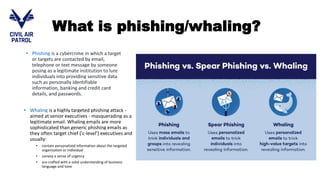
• Phishing is a cybercrime in which a target
or targets are contacted by email,
telephone or text message by someone
posing as a legitimate institution to lure
individuals into providing sensitive data
such as personally identifiable
information, banking and credit card
details, and passwords.
• Whaling is a highly targeted phishing attack -
aimed at senior executives - masquerading as a
legitimate email. Whaling emails are more
sophisticated than generic phishing emails as
they often target chief ('c-level') executives and
usually:
• contain personalized information about the targeted
organization or individual
• convey a sense of urgency
• are crafted with a solid understanding of business
language and tone
What is phishing/whaling?
Other common methods of
phishing
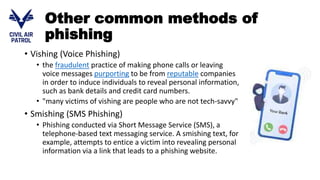
• Vishing (Voice Phishing)
• the fraudulent practice of making phone calls or leaving
voice messages purporting to be from reputable companies
in order to induce individuals to reveal personal information,
such as bank details and credit card numbers.
• "many victims of vishing are people who are not tech-savvy"
• Smishing (SMS Phishing)
• Phishing conducted via Short Message Service (SMS), a
telephone-based text messaging service. A smishing text, for
example, attempts to entice a victim into revealing personal
information via a link that leads to a phishing website.
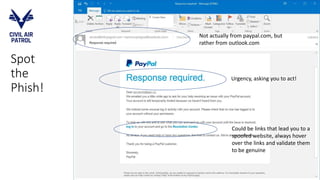
Spot
the
Phish!
Not actually from paypal.com, but
rather from outlook.com
Urgency, asking you to act!
Could be links that lead you to a
spoofed website, always hover
over the links and validate them
to be genuine
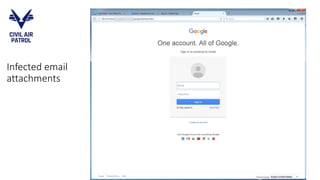
Infected email
attachments
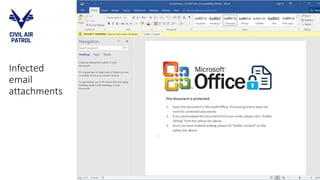
Infected
email
attachments
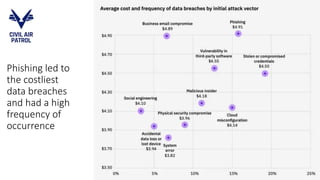
Phishing led to
the costliest
data breaches
and had a high
frequency of
occurrence
How to protect yourself against
phishing?
1. Keep Informed About Phishing Techniques
2. Think Before You Click!
3. Verify a Site’s Security - Check for https, lock symbol and certificates
4. Check Your Online Accounts Regularly – change passwords, verify bank statements
5. Keep Your Browser Up to Date
6. Use firewalls – host/network
7. Be wary of pop-ups
8. Never give out personal information
9. Use antimalware software
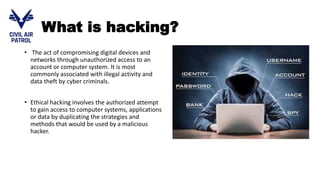
What is hacking?
• The act of compromising digital devices and
networks through unauthorized access to an
account or computer system. It is most
commonly associated with illegal activity and
data theft by cyber criminals.
• Ethical hacking involves the authorized attempt
to gain access to computer systems, applications
or data by duplicating the strategies and
methods that would be used by a malicious
hacker.
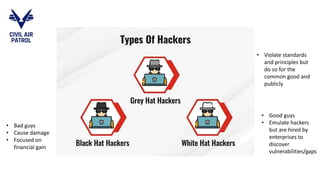
• Bad guys
• Cause damage
• Focused on
financial gain
• Good guys
• Emulate hackers
but are hired by
enterprises to
discover
vulnerabilities/gaps
• Violate standards
and principles but
do so for the
common good and
publicly
Methods of hacking
• Social engineering (phishing scams, spam emails or instant messages,
or even fake websites to achieve this)
• Hacking passwords (brute force attack, dictionary attacks)
• Infecting devices with malware
• Exploiting insecure wireless networks
• Gaining backdoor access (e.g.: Trojans)
• Logging keystrokes
• Intercepting communication (man in the middle attacks)
• Creating zombie computers (DoS, DDoS attacks)
The impact of hacking
For Individuals
• Steal your money and open credit card and bank
accounts in your name
• Destroy your credit rating
• Request new account Personal Identification Numbers
(PINs) or additional credit cards
• Make purchases on your behalf
• Add themselves or an alias that they control as an
authorized user so it’s easier to use your credit
• Obtain cash advances
• Use and abuse your Social Security number
• Sell your information to others who will use it for
malicious purposes
• Delete or damage important files on your computer
• Obtain sensitive personal information and share it, or
threaten to share it, publicly
For Corporations
• Reputation loss
• Financial loss
• IP theft
• Personal & health info theft
• Business downtime
• Stock price impact
• Employee morale
• Liabilities
• Regulatory fines
• Victims reparations
How to protect against
hacking threats?
1. Having a security plan for your organization
2. Software Updates & Patch Management
3. Password Hygiene (strength, not sharing, unique passwords, no default passwords)
4. Effective Network Security Controls (Firewalls, Intrusion Prevention, Anti-DDoS etc)
5. Creating secure applications (web/mobile apps etc.)
6. Phishing awareness
7. Securing your sensitive information
8. Using encryption to secure files and communication (eg: https, secure wireless, VPN)
9. Effective malware defense for endpoints, email, internet access)
10. Having a recovery plan from cyber attacks
• Definition of phishing, whaling & hacking
• The different types of phishing & hacking attacks
• The impact of phishing & hacking attacks
• How to safeguard against such attacks
Summary
• https://www.phishing.org/
• https://www.darkreading.com/risk/most-companies-pass-on-
breach-costs-to-customers
• https://www.fortinet.com/resources/cyberglossary/what-is-
hacking
• Hacking for dummies:
https://ia802905.us.archive.org/9/items/Wiley.Hacking.5th.Edition.Jan.2016.ISBN.111915
4685.Profescience.blogspot.com/Wiley.Hacking.5th.Edition.Jan.2016.ISBN.1119154685.
Profescience.blogspot.com.pdf
References and Further
Reading Suggestions

Phishing Whaling and Hacking Case Studies.pptx

  • 1.
    NJ WING CADET CYBERACADEMY 24-25 June 2023 Phishing, Whaling & Hacking Case Studies Stephen Martin, Zero Trust Cyber Leader, Big 4 Advisory firm
  • 2.
    • What isit? • Why is it relevant? • How can you be and keep others secure? • Discussion Phishing, Whaling & Hacking Case Studies
  • 3.
    • Phishing isa cybercrime in which a target or targets are contacted by email, telephone or text message by someone posing as a legitimate institution to lure individuals into providing sensitive data such as personally identifiable information, banking and credit card details, and passwords. • Whaling is a highly targeted phishing attack - aimed at senior executives - masquerading as a legitimate email. Whaling emails are more sophisticated than generic phishing emails as they often target chief ('c-level') executives and usually: • contain personalized information about the targeted organization or individual • convey a sense of urgency • are crafted with a solid understanding of business language and tone What is phishing/whaling?
  • 4.
    Other common methodsof phishing • Vishing (Voice Phishing) • the fraudulent practice of making phone calls or leaving voice messages purporting to be from reputable companies in order to induce individuals to reveal personal information, such as bank details and credit card numbers. • "many victims of vishing are people who are not tech-savvy" • Smishing (SMS Phishing) • Phishing conducted via Short Message Service (SMS), a telephone-based text messaging service. A smishing text, for example, attempts to entice a victim into revealing personal information via a link that leads to a phishing website.
  • 5.
    Spot the Phish! Not actually frompaypal.com, but rather from outlook.com Urgency, asking you to act! Could be links that lead you to a spoofed website, always hover over the links and validate them to be genuine
  • 6.
  • 7.
  • 8.
    Phishing led to thecostliest data breaches and had a high frequency of occurrence
  • 9.
    How to protectyourself against phishing? 1. Keep Informed About Phishing Techniques 2. Think Before You Click! 3. Verify a Site’s Security - Check for https, lock symbol and certificates 4. Check Your Online Accounts Regularly – change passwords, verify bank statements 5. Keep Your Browser Up to Date 6. Use firewalls – host/network 7. Be wary of pop-ups 8. Never give out personal information 9. Use antimalware software
  • 10.
    What is hacking? •The act of compromising digital devices and networks through unauthorized access to an account or computer system. It is most commonly associated with illegal activity and data theft by cyber criminals. • Ethical hacking involves the authorized attempt to gain access to computer systems, applications or data by duplicating the strategies and methods that would be used by a malicious hacker.
  • 11.
    • Bad guys •Cause damage • Focused on financial gain • Good guys • Emulate hackers but are hired by enterprises to discover vulnerabilities/gaps • Violate standards and principles but do so for the common good and publicly
  • 12.
    Methods of hacking •Social engineering (phishing scams, spam emails or instant messages, or even fake websites to achieve this) • Hacking passwords (brute force attack, dictionary attacks) • Infecting devices with malware • Exploiting insecure wireless networks • Gaining backdoor access (e.g.: Trojans) • Logging keystrokes • Intercepting communication (man in the middle attacks) • Creating zombie computers (DoS, DDoS attacks)
  • 13.
    The impact ofhacking For Individuals • Steal your money and open credit card and bank accounts in your name • Destroy your credit rating • Request new account Personal Identification Numbers (PINs) or additional credit cards • Make purchases on your behalf • Add themselves or an alias that they control as an authorized user so it’s easier to use your credit • Obtain cash advances • Use and abuse your Social Security number • Sell your information to others who will use it for malicious purposes • Delete or damage important files on your computer • Obtain sensitive personal information and share it, or threaten to share it, publicly For Corporations • Reputation loss • Financial loss • IP theft • Personal & health info theft • Business downtime • Stock price impact • Employee morale • Liabilities • Regulatory fines • Victims reparations
  • 14.
    How to protectagainst hacking threats? 1. Having a security plan for your organization 2. Software Updates & Patch Management 3. Password Hygiene (strength, not sharing, unique passwords, no default passwords) 4. Effective Network Security Controls (Firewalls, Intrusion Prevention, Anti-DDoS etc) 5. Creating secure applications (web/mobile apps etc.) 6. Phishing awareness 7. Securing your sensitive information 8. Using encryption to secure files and communication (eg: https, secure wireless, VPN) 9. Effective malware defense for endpoints, email, internet access) 10. Having a recovery plan from cyber attacks
  • 15.
    • Definition ofphishing, whaling & hacking • The different types of phishing & hacking attacks • The impact of phishing & hacking attacks • How to safeguard against such attacks Summary
  • 16.
    • https://www.phishing.org/ • https://www.darkreading.com/risk/most-companies-pass-on- breach-costs-to-customers •https://www.fortinet.com/resources/cyberglossary/what-is- hacking • Hacking for dummies: https://ia802905.us.archive.org/9/items/Wiley.Hacking.5th.Edition.Jan.2016.ISBN.111915 4685.Profescience.blogspot.com/Wiley.Hacking.5th.Edition.Jan.2016.ISBN.1119154685. Profescience.blogspot.com.pdf References and Further Reading Suggestions