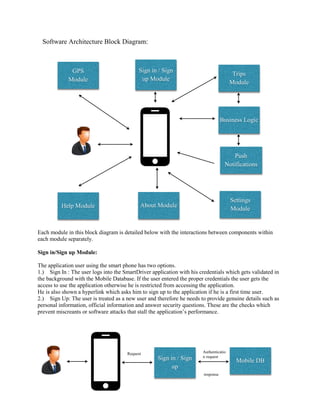
Software Architecture Block Diagram: 
Each module in this block diagram is detailed below with the interactions between components within each module separately. 
Sign in/Sign up Module: 
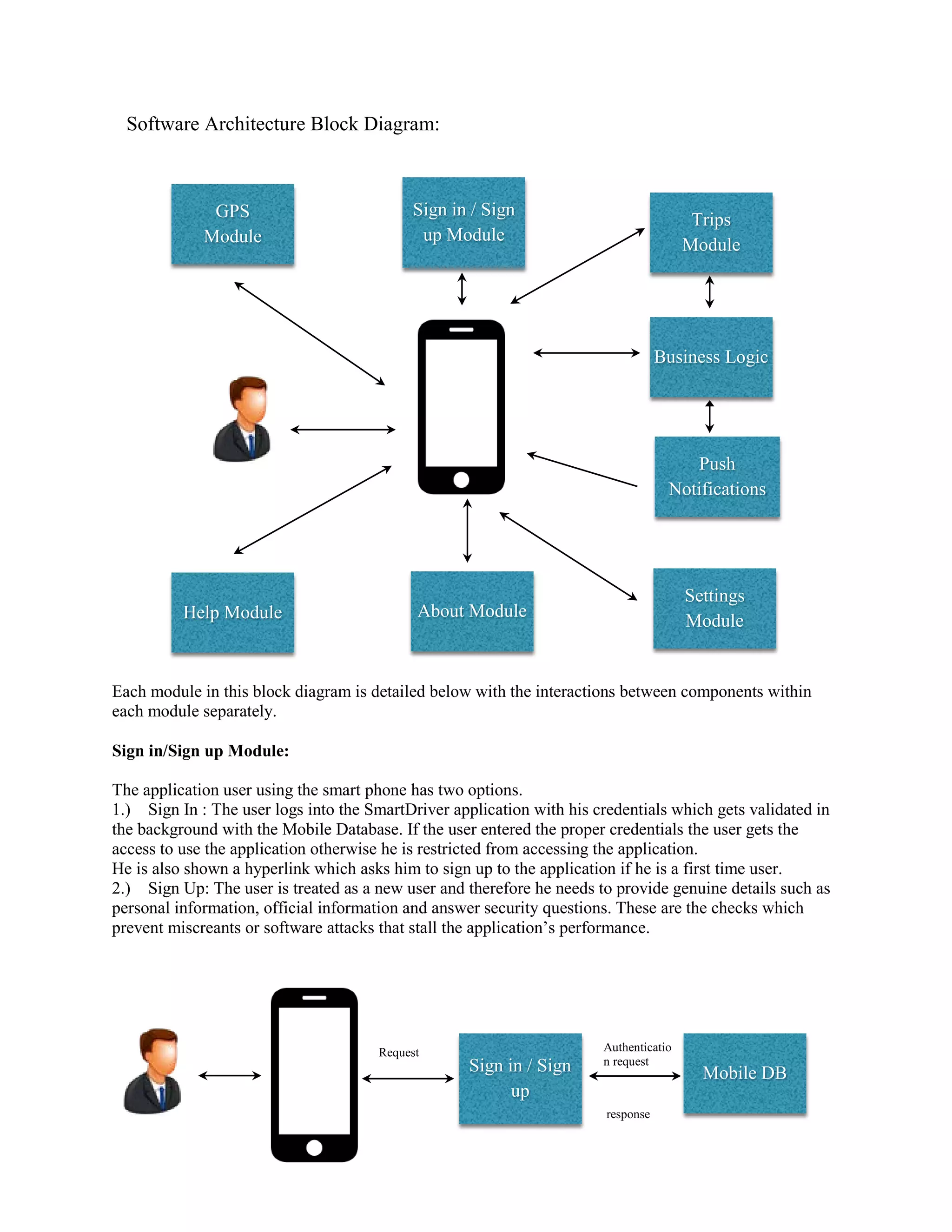
The application user using the smart phone has two options. 
1.) Sign In : The user logs into the SmartDriver application with his credentials which gets validated in the background with the Mobile Database. If the user entered the proper credentials the user gets the access to use the application otherwise he is restricted from accessing the application. 
He is also shown a hyperlink which asks him to sign up to the application if he is a first time user. 
2.) Sign Up: The user is treated as a new user and therefore he needs to provide genuine details such as personal information, official information and answer security questions. These are the checks which prevent miscreants or software attacks that stall the application’s performance. 
Sign in / Sign up Module 
Business Logic 
Push Notifications 
About Module 
Help Module 
Settings Module 
GPS 
Module 
Trips 
Module 
Mobile DB 
Request 
Authentication request 
response 
Sign in / Sign up
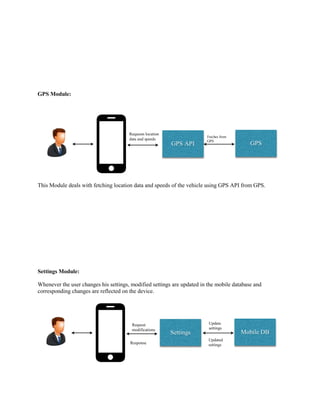
GPS Module: 
This Module deals with fetching location data and speeds of the vehicle using GPS API from GPS. 
Settings Module: 
Whenever the user changes his settings, modified settings are updated in the mobile database and corresponding changes are reflected on the device. 
GPS API 
GPS 
Requests location data and speeds 
Fetches from GPS 
Settings 
Mobile DB 
Request modifications 
Update settings 
Updated settings 
Response
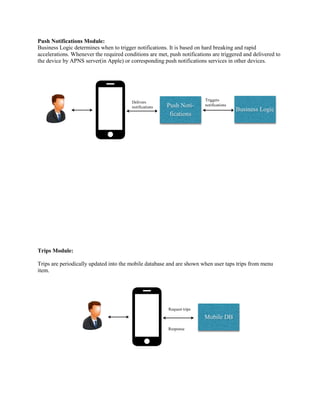
Push Notifications Module: 
Business Logic determines when to trigger notifications. It is based on hard breaking and rapid accelerations. Whenever the required conditions are met, push notifications are triggered and delivered to the device by APNS server(in Apple) or corresponding push notifications services in other devices. 
Trips Module: 
Trips are periodically updated into the mobile database and are shown when user taps trips from menu item. 
Push Noti- fications 
Business Logic 
Delivers notifications 
Triggers notifications 
Mobile DB 
Request trips 
Response
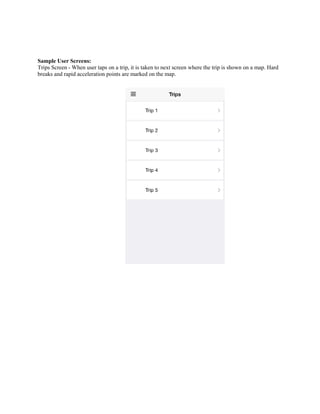
Sample User Screens: 
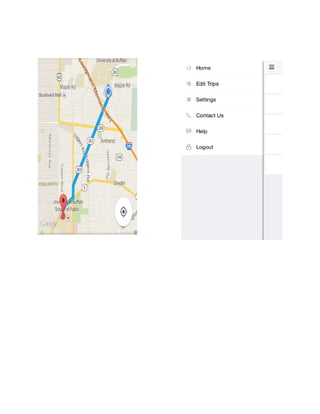
Trips Screen - When user taps on a trip, it is taken to next screen where the trip is shown on a map. Hard breaks and rapid acceleration points are marked on the map.
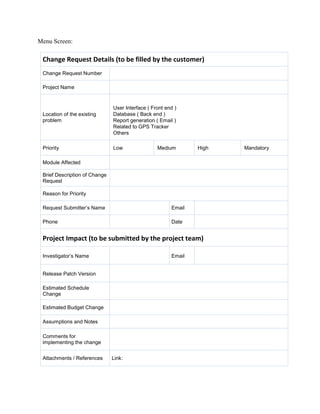
Menu Screen: 
Change Request Details (to be filled by the customer) 
Change Request Number 
Project Name 
Location of the existing problem 
User Interface ( Front end ) 
Database ( Back end ) 
Report generation ( Email ) 
Related to GPS Tracker 
Others 
Priority 
Low 
Medium 
High 
Mandatory 
Module Affected 
Brief Description of Change Request 
Reason for Priority 
Request Submitter’s Name 
Email 
Phone 
Date 
Project Impact (to be submitted by the project team) 
Investigator’s Name 
Email 
Release Patch Version 
Estimated Schedule Change 
Estimated Budget Change 
Assumptions and Notes 
Comments for implementing the change 
Attachments / References 
Link:
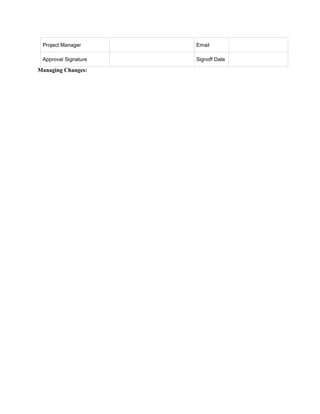
Project Manager 
Email 
Approval Signature 
Signoff Date 
Managing Changes:
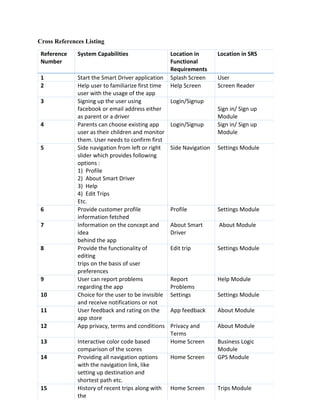
Cross References Listing Reference Number System Capabilities Location in Functional Requirements Location in SRS 1 Start the Smart Driver application Splash Screen User 2 Help user to familiarize first time user with the usage of the app Help Screen Screen Reader 3 Signing up the user using facebook or email address either as parent or a driver Login/Signup Sign in/ Sign up Module 4 Parents can choose existing app user as their children and monitor them. User needs to confirm first Login/Signup Sign in/ Sign up Module 5 Side navigation from left or right slider which provides following options : 1) Profile 2) About Smart Driver 3) Help 4) Edit Trips Etc. Side Navigation Settings Module 6 Provide customer profile information fetched Profile Settings Module 7 Information on the concept and idea behind the app About Smart Driver About Module 8 Provide the functionality of editing trips on the basis of user preferences Edit trip Settings Module 9 User can report problems regarding the app Report Problems Help Module 10 Choice for the user to be invisible and receive notifications or not Settings Settings Module 11 User feedback and rating on the app store App feedback About Module 12 App privacy, terms and conditions Privacy and Terms About Module 13 Interactive color code based comparison of the scores Home Screen Business Logic Module 14 Providing all navigation options with the navigation link, like setting up destination and shortest path etc. Home Screen GPS Module 15 History of recent trips along with the Home Screen Trips Module
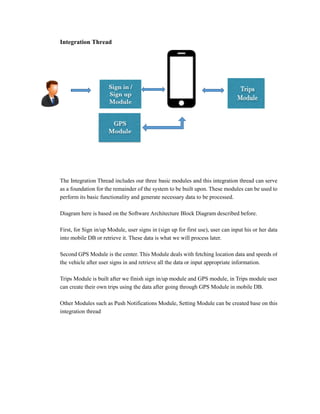
Integration Thread The Integration Thread includes our three basic modules and this integration thread can serve as a foundation for the remainder of the system to be built upon. These modules can be used to perform its basic functionality and generate necessary data to be processed. Diagram here is based on the Software Architecture Block Diagram described before. First, for Sign in/up Module, user signs in (sign up for first use), user can input his or her data into mobile DB or retrieve it. These data is what we will process later. Second GPS Module is the center. This Module deals with fetching location data and speeds of the vehicle after user signs in and retrieve all the data or input appropriate information. Trips Module is built after we finish sign in/up module and GPS module, in Trips module user can create their own trips using the data after going through GPS Module in mobile DB. Other Modules such as Push Notifications Module, Setting Module can be created base on this integration thread

Phase3 (2)

  • 1.
    Software Architecture BlockDiagram: Each module in this block diagram is detailed below with the interactions between components within each module separately. Sign in/Sign up Module: The application user using the smart phone has two options. 1.) Sign In : The user logs into the SmartDriver application with his credentials which gets validated in the background with the Mobile Database. If the user entered the proper credentials the user gets the access to use the application otherwise he is restricted from accessing the application. He is also shown a hyperlink which asks him to sign up to the application if he is a first time user. 2.) Sign Up: The user is treated as a new user and therefore he needs to provide genuine details such as personal information, official information and answer security questions. These are the checks which prevent miscreants or software attacks that stall the application’s performance. Sign in / Sign up Module Business Logic Push Notifications About Module Help Module Settings Module GPS Module Trips Module Mobile DB Request Authentication request response Sign in / Sign up
  • 2.
    GPS Module: ThisModule deals with fetching location data and speeds of the vehicle using GPS API from GPS. Settings Module: Whenever the user changes his settings, modified settings are updated in the mobile database and corresponding changes are reflected on the device. GPS API GPS Requests location data and speeds Fetches from GPS Settings Mobile DB Request modifications Update settings Updated settings Response
  • 3.
    Push Notifications Module: Business Logic determines when to trigger notifications. It is based on hard breaking and rapid accelerations. Whenever the required conditions are met, push notifications are triggered and delivered to the device by APNS server(in Apple) or corresponding push notifications services in other devices. Trips Module: Trips are periodically updated into the mobile database and are shown when user taps trips from menu item. Push Noti- fications Business Logic Delivers notifications Triggers notifications Mobile DB Request trips Response
  • 4.
    Sample User Screens: Trips Screen - When user taps on a trip, it is taken to next screen where the trip is shown on a map. Hard breaks and rapid acceleration points are marked on the map.
  • 6.
    Menu Screen: ChangeRequest Details (to be filled by the customer) Change Request Number Project Name Location of the existing problem User Interface ( Front end ) Database ( Back end ) Report generation ( Email ) Related to GPS Tracker Others Priority Low Medium High Mandatory Module Affected Brief Description of Change Request Reason for Priority Request Submitter’s Name Email Phone Date Project Impact (to be submitted by the project team) Investigator’s Name Email Release Patch Version Estimated Schedule Change Estimated Budget Change Assumptions and Notes Comments for implementing the change Attachments / References Link:
  • 7.
    Project Manager Email Approval Signature Signoff Date Managing Changes:
  • 8.
    Cross References ListingReference Number System Capabilities Location in Functional Requirements Location in SRS 1 Start the Smart Driver application Splash Screen User 2 Help user to familiarize first time user with the usage of the app Help Screen Screen Reader 3 Signing up the user using facebook or email address either as parent or a driver Login/Signup Sign in/ Sign up Module 4 Parents can choose existing app user as their children and monitor them. User needs to confirm first Login/Signup Sign in/ Sign up Module 5 Side navigation from left or right slider which provides following options : 1) Profile 2) About Smart Driver 3) Help 4) Edit Trips Etc. Side Navigation Settings Module 6 Provide customer profile information fetched Profile Settings Module 7 Information on the concept and idea behind the app About Smart Driver About Module 8 Provide the functionality of editing trips on the basis of user preferences Edit trip Settings Module 9 User can report problems regarding the app Report Problems Help Module 10 Choice for the user to be invisible and receive notifications or not Settings Settings Module 11 User feedback and rating on the app store App feedback About Module 12 App privacy, terms and conditions Privacy and Terms About Module 13 Interactive color code based comparison of the scores Home Screen Business Logic Module 14 Providing all navigation options with the navigation link, like setting up destination and shortest path etc. Home Screen GPS Module 15 History of recent trips along with the Home Screen Trips Module
  • 9.
    Integration Thread TheIntegration Thread includes our three basic modules and this integration thread can serve as a foundation for the remainder of the system to be built upon. These modules can be used to perform its basic functionality and generate necessary data to be processed. Diagram here is based on the Software Architecture Block Diagram described before. First, for Sign in/up Module, user signs in (sign up for first use), user can input his or her data into mobile DB or retrieve it. These data is what we will process later. Second GPS Module is the center. This Module deals with fetching location data and speeds of the vehicle after user signs in and retrieve all the data or input appropriate information. Trips Module is built after we finish sign in/up module and GPS module, in Trips module user can create their own trips using the data after going through GPS Module in mobile DB. Other Modules such as Push Notifications Module, Setting Module can be created base on this integration thread