1
Swami Vivekanand University Sagar(MP)
CHAPTER 1:
INTRODUCTION
In the fast changing world, information technology and information management are going to
play an important role. We are living in the computer age during past some year .The computer
has gaining popularity. Computer revolution found its way into almost every aspect of human
life and living. A computer is admirably suited to handle any information and hence is an
information processor that is, it can receive data, perform some basic operations on that data
and produces results according to a predetermined program.
is a web based application in which the whole records of the passenger in the vehicle
would be manage the details about different students which have received the books would be
kept. The students would be able to know the books availability status on the basis of proper
login which would be provided to them. The management would be able to know the whole
library status on a single click and customized reports would be generated.
1.1BACKGROUND
In the background of Vehical Sanagement System all the manual and paper work which
was done in the past would be removed by the use the web technology different huge size
register were use to maintain. The records of books and details about books issues etc. All
these things would be software based and customize report would be generated paper work
would be lesser. This project of “VEHICLE MANAGEMENT SYSTEM” of gives us
the complete information about the library. We can enter the record of new books and
retrieve the details of books available in the library. We can issue the books to the students
and maintain their records and can also check how many books are issued and stock available
in the library. In this project we can maintain the late fine of students who returns the issued
books after the due date. Throughout the project the focus has been on presenting
2
Swami Vivekanand University Sagar(MP)
information and comments in an easy and intelligible manner. The project is very useful for
those who want to know about VEHICLE MANAGEMENT SYSTEM.
1.1.1 System Objective
Today’s world is computer world because most of work is doing with the help of
computer. Dependency on computer is behind the few reasons. We cannot easily manage
to store large number of data or information single handle. If we will be need some
information or data in urgency then we cannot manage in manually these works are very
difficult if we cannot use computer.
1.1.2 SystemContext:
This section clearly depicts the environment and boundaries of the LMS and the entities with
which it interacts. it helps us see how the system fits into the existing scheme of things. What the
system will do by itself and what it expects other entities to do is clearly delineated.
1.1.1 Functional Requirement
In the background of Vehicle Management System was all the manual and paper work
which was done in the past would be removed by the use the web technology different huge
size register were use to maintain. The records of books and details about books issues etc.
All these things would be software based and customize report would be generated paper
work would be lesser. This project of “VEHICLE MANAGEMENT SYSTEM” of gives us
the complete information about the Vehicle. We can enter the record of new books and
retrieve the details of books available in the library. We can issue the books to the students
and maintain their records and can also check how many books are issued and stock available
in the library. In this project we can maintain the late fine of students who returns the issued
books after the due date. Throughout the project the focus has been on presenting
information and comments in an easy and intelligible manner. The project is very useful for
those who want to know about Vehicle Management System.
3
Swami Vivekanand University Sagar(MP)
1.1.2Non-Functional Requirement
These are quality requirement that stipulate the performance levels required of the system for
various kind of activate. Numerical lower and upper limits set conditions on the response times,
access times etc of the system. Sometimes tradeoffs are necessary among various non-functional
requirements.
1.1.3 Future Requirement
These are the specifications which are not provided for now in the current version of
LMS but which could be incorporated into future versions. Some of these need advanced
technologies and interface with other system. The LMS could be designed in future to
enhance the existing capabilities or add entirely new ones.
1.2 OBJECTIVES
Today’s world is computer world because most of work is doing with the help of computer.
Dependency on computer is behind the few reasons. We cannot easily manage to store large
number of data or information single handily. If we will be need some information or data in
urgency then we cannot manage in manually these works are very difficult if we cannot use
computer.
So the objective of this project is to overcome the limitation of the manual approach.
This project is started towards systematically automating all the work that is done manually at
present. Their aim is to focus following aspects:
o The main objective is to automate non computer environment
o To save manpower.
o It will speed the processing of data and transaction.
o It will provide all the error reporting and handling features, so that the user is warned and
made aware of any foreseen errors. Thus it will reduce the error rate.
o It will provide various ways through which we generate various types of report.
o It will provide best security features such as provisions of passwords.
4
Swami Vivekanand University Sagar(MP)
1.3 PROBLEM DEFINATION
System and their relationships within and outside of the system. Here the key question is- what
all problems exist in the present system? What must be done to solve the problem? Analysis
begins when a user or manager begins a study of the System Analysis is a detailed study of the
various operations performed by a program using existing system.
During analysis, data collected on the various files, decision points and
transactions handled by the present system. The success of the system depends largely on how
clearly the problem is defined, thoroughly investigated and properly carried out through the
choice of solution. A good analysis model should provide not only the mechanisms of problem
understanding but also the frame work of the solution. Thus it should be studied thoroughly by
collecting data about the system. Then the proposed system should be analyzed thoroughly in
accordance with the needs
1.4 PURPOSE
The purpose of this application is to keep the record of text in the editor properly and the
different text which is issues to the activities. The availability of content can be easily
managed and tex thaving different system of library .
1.5 SCOPE
The scope of this project is to enhance the facilities available in the current notepad
system and different security measures would be applicable in the future for the student point
of view and management point of view. The application would be fruitful.
The different areas where we can use this application are:
o Any education institute can make use of it for providing information about user, content
of the available notepad Feature.
5
Swami Vivekanand University Sagar(MP)
CHAPTER 2 :
Problem Formulation
Introduction
Problem introduction or problem starting is the starting point of the software development
activity. The objective of this statement is to answer: Exactly what must the system do? The
software project is initiated by the client’s need. In the beginning, these needs are on the minds
of various people in the client’s organization. The analyst has to identify the requirements by
talking to the people and understanding to their needs. It goes without saying that an accurate
and through understanding of software requirement are essentials to the success of software
development effort. All further development like system analysis. System design and coding will
depends on how accurate and well understood the requirements are poorly analyzed and
specified software will disappoint the user and will bring brief to the developer. No matter how
well designed and well appearances are often deceiving. Chances of misinterpretation are very
high, ambiguity is probable and communication gap between customer and developer is bound to
bring confusions. Requirements understanding begin with a clear and concise heading stating in
sentence the task to be performed. Then requirements are describe in a technical manner precise
statement.
2.1 Feasibility study
All projects are feasible given unlimited resources and infinite time! Unfortunately, the
development of computer based system is more likely to be plagued by a scarcity of resources
and difficult delivery dates. It is both necessary and prudent to evaluate the feasibility of the
project at the earliest possible time. Months or years of effort, Money loss and untold
professional embarrassment can be averted I few better understand the project at its study time.
This type of study determines if an application can and should be developed. Once it has
been determining that, application is feasible. After that analyst can go ahead and prepares the
project specification, which finalizes project requirements. Feasibility studies are undertaken
within tight time constraints.
6
Swami Vivekanand University Sagar(MP)
1. Technical Feasibility
2. Operational Feasibility
3. Economic Feasibility
4. Legal Feasibility
2.2 Technical Feasibility
As we know the technical feasibility is concerned with specifying equipment and software
that will successfully satisfy the user requirement. The technical needs of the system may vary
considerably, but might include:
 The facility to produce outputs of advertisements, shopping and mailing in a given time for
ease of use.
 Response time under certain condition is minimal.
 Ability to process a certain volume of transaction at a particular speed.
 Facility to communicate data to distinct location.
In examining the technical feasibility, configuration of the system is given more importance
than the actual make of hardware. The configuration should give the complete picture about the
system’s requirements- how many workstations are required, how these units are interconnected
so that they could operate and communicate smoothly.
2.3 Operational Feasibility
Proposed projects are beneficial only if they can be turned into information system that will
meet the financial management requirements of the business/organization. This test of feasibility
asks if the system will work when it developed and installed. Are there major barriers to
implementation?
Some of the important questions that are useful to test the operational feasibility of a project are
given below:
7
Swami Vivekanand University Sagar(MP)
 Is there sufficient support for the project from the implementation? From user? If the present
system is well liked and used to the extent that persons will not be able to see reasons for
change, there may be resistance.
 Are current business methods acceptable to the user? If they are not, user may welcome a
change that will bring about a more operational and useful system
 Have the user been involved in the planning and development of the Project? If they are
involved at the earliest stage of project development, the chances of resistance can be possibly
reduced.
 Will the proposed system cause harm? Will it produce poorer result in any case or area?
 Will the performance of staff member fall down after implementation? Issue that
 Appears to be quite minor at the early stage can grow into major problem after
Implementation.
2. 4 Economical Feasibility
Economic analysis is the most frequently used technique for evaluating the effectiveness of
the proposed system. More commonly known as cost/benefits analysis, the procedure is to
determine the benefits and savings that are expected from the purposed system and compared
with costs.
If benefits outweigh cost, a decision is taken to design and implement the system. Otherwise,
further justification or alternative of the proposed system will have to be made if it has a chance
of being approved. This is an ongoing effort that improves in accuracy at each phase of the
system life cycle. The analysis part also clears the doubt of economic problems which could be
possible in developing the system. As already mentioned that the company has to just pay the
developed software cost and not other investment is needed at the time of implementation of the
new system as the preliminary requirements already exist in the company.
2.5 Legal Feasibility
In the legal feasibility is necessary to check that the software we are going to develop is legally
correct which means that the ideas which we have taken for the proposed system will be legally
implemented or not so , it is also an important step in feasibility study.
8
Swami Vivekanand University Sagar(MP)
2.6 PROBLEM SPECIFICATION
The definition of our problem lies in manual system and a fully automated system.
2.6.1 Manual System
The system is very time consuming and lazy. This system is more prone to error and sometimes
the approach to various problems is unstructured.
2.6.2 Technical System
With the advent of latest technology if we do not update our system then our business result in
losses gradually with time. The technical system contains the tools of latest trend i.e. computers,
printers, FAX, Internet etc the system with the technology are very fast, accurate, user friendly
and reliable.
2.6.3 Need of Vehicle Management System Software
A Vehicle Management System is a person or a company who can texting and
formating data are distinguished from ordinary mail services by features such as speed,
security, tracking, signature, specialization and individualization of express services, and
swift bidding times, which are optional for most everyday auction services. As a
premium service, library are usually more expensive than usual mail services, and their
use is typically restricted to issuing where one or more of these features are considered
important enough to warrant the cost.
2.7 The ProposedVehicle Management SystemS/w
It will be able to manage inforrmation about writing data in more user friendly way. This system
will manage text and Return result at various colleges.. Various reports based on the data entered
by employee at branches are generated at Main Branch or Head office. These report are helpful
in Manpower Management Decision.
2.8 Existing System
The Existing system comprises of a system in which details are to be manually handled this is
not use friend.
9
Swami Vivekanand University Sagar(MP)
CHAPTER 3
System Architecture and Design
3.1 DEFINING A SYSTEM
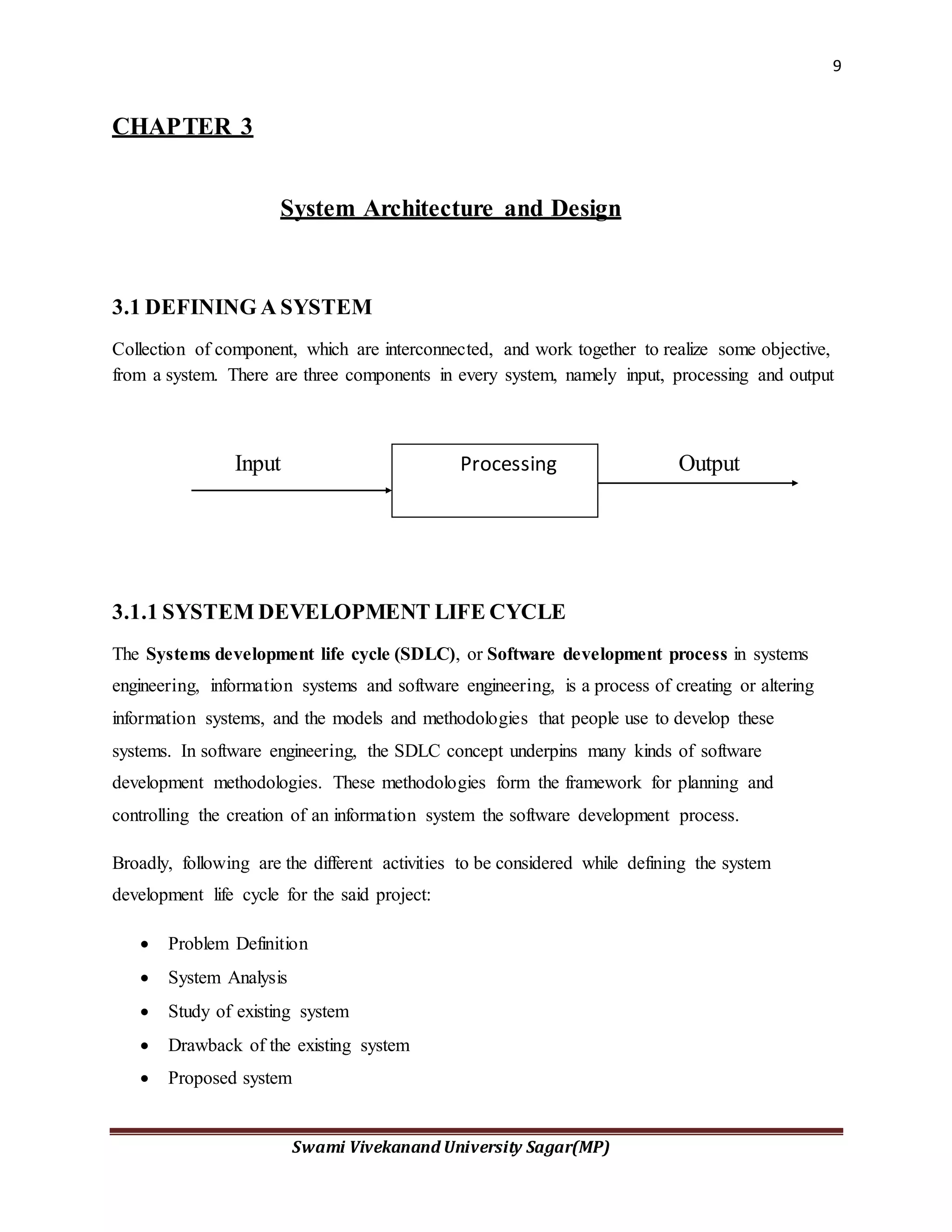
Collection of component, which are interconnected, and work together to realize some objective,
from a system. There are three components in every system, namely input, processing and output
Input Output
3.1.1 SYSTEM DEVELOPMENT LIFE CYCLE
The Systems development life cycle (SDLC), or Software development process in systems
engineering, information systems and software engineering, is a process of creating or altering
information systems, and the models and methodologies that people use to develop these
systems. In software engineering, the SDLC concept underpins many kinds of software
development methodologies. These methodologies form the framework for planning and
controlling the creation of an information system the software development process.
Broadly, following are the different activities to be considered while defining the system
development life cycle for the said project:
 Problem Definition
 System Analysis
 Study of existing system
 Drawback of the existing system
 Proposed system
Processing
10
Swami Vivekanand University Sagar(MP)
 System Requirement study
 Data flow analysis
 Feasibility study
 System design
 Input Design (Database & Forms)
 Updating
 Report design
 Administration
 Testing
 Implementation
 Maintenance
3.1.2 SYSTEM ANALYSIS
Systems analysis is the study of sets of interacting entities, including computer systems analysis.
This field is closely related to requirements analysis or operations research. It is also "an explicit
formal inquiry carried out to help someone (referred to as the decision maker) identify a better
course of action and make a better decision than he might otherwise have made.
System development can generally be thought of having two major components: systems
analysis and systems design. In System Analysis more emphasis is given to understanding the
details of an existing system or a proposed one and then deciding whether the proposed system is
desirable or not and whether the existing system needs improvements. Thus, system analysis is
the process of investigating a system, identifying problems, and using the information to
recommend improvements to the system.
11
Swami Vivekanand University Sagar(MP)
3.1.3 SYSTEM DESIGN
Systems design is the process of defining the architecture, components, modules, interfaces, and
data for a system to satisfy specified requirements. One could see it as the application of systems
theory to product development. There is some overlap with the disciplines of systems analysis,
systems architecture and systems engineering. If the broader topic of product development
"blends the perspective of marketing, design, and manufacturing into a single approach to
product development," then design is the act of taking the marketing information and creating the
design of the product to be manufactured. Systems design is therefore the process of defining and
developing systems to satisfy specified requirements of the user. Until the 1990s systems design
had a crucial and respected role in the data processing industry. In the 1990s standardization of
hardware and software resulted in the ability to build modular systems. The increasing
importance of software running on generic platforms has enhanced the discipline of software
engineering.
Object-oriented analysis and design methods are becoming the most widely used methods for
computer systems design. The UML has become the standard language in object-oriented
analysis and design. It is widely used for modeling software systems and is increasingly used for
high designing non-software systems and organizations
3.2 Reports GeneratedBy the System
1) List of Total Passenger detail
2) A lot Car different type
3) Tour and Trip
4) Travelling pass
5) Fare per K/m
12
Swami Vivekanand University Sagar(MP)
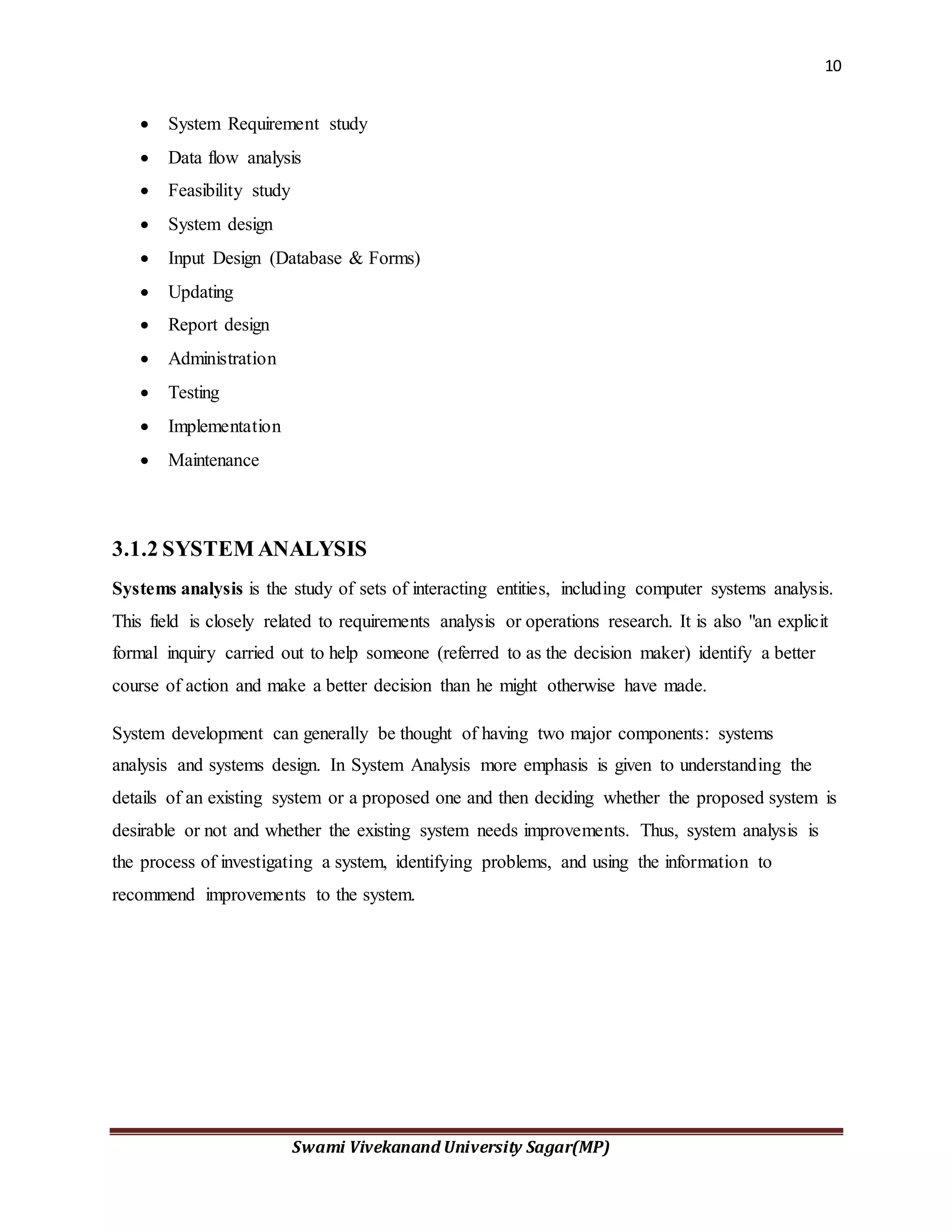
ER DIAGRAM
n
User Section
Vehicle
Management
System
Admin Section
Car Trip Map
Home
Vehicle
Detail
Welcome home
Status
Driver Detail
Vehicleluxury Editdetail
Travelling
Bookingdetail
Fuel
excutive
Economy
Oil change
Bookings
Logout
Help
ViewHelp
AboutCompany
Startingpoint
Endingpoint
13
Swami Vivekanand University Sagar(MP)
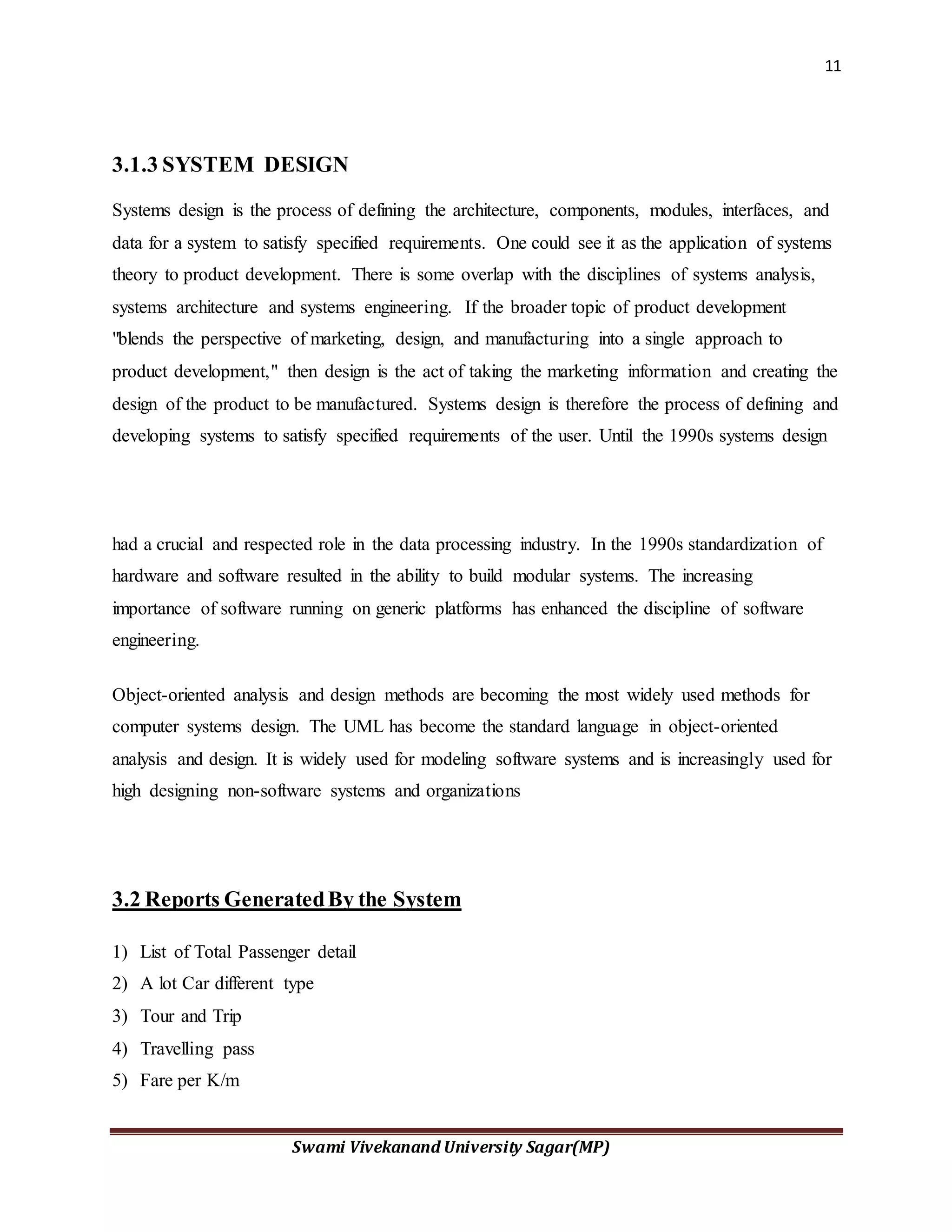
Context LevelDiagram
Vehicle
Vehicle
Management
System
Admin
Travelling
User
14
Swami Vivekanand University Sagar(MP)
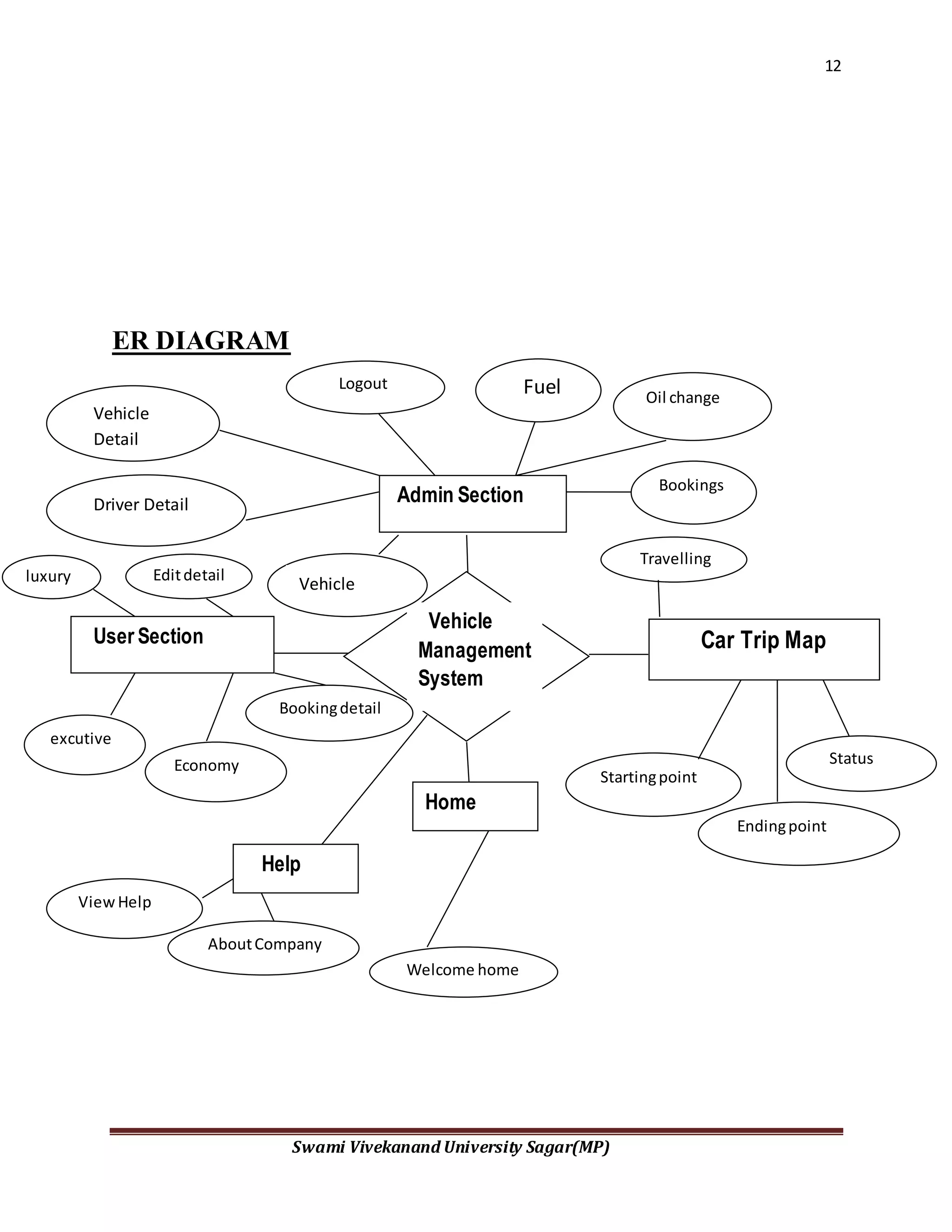
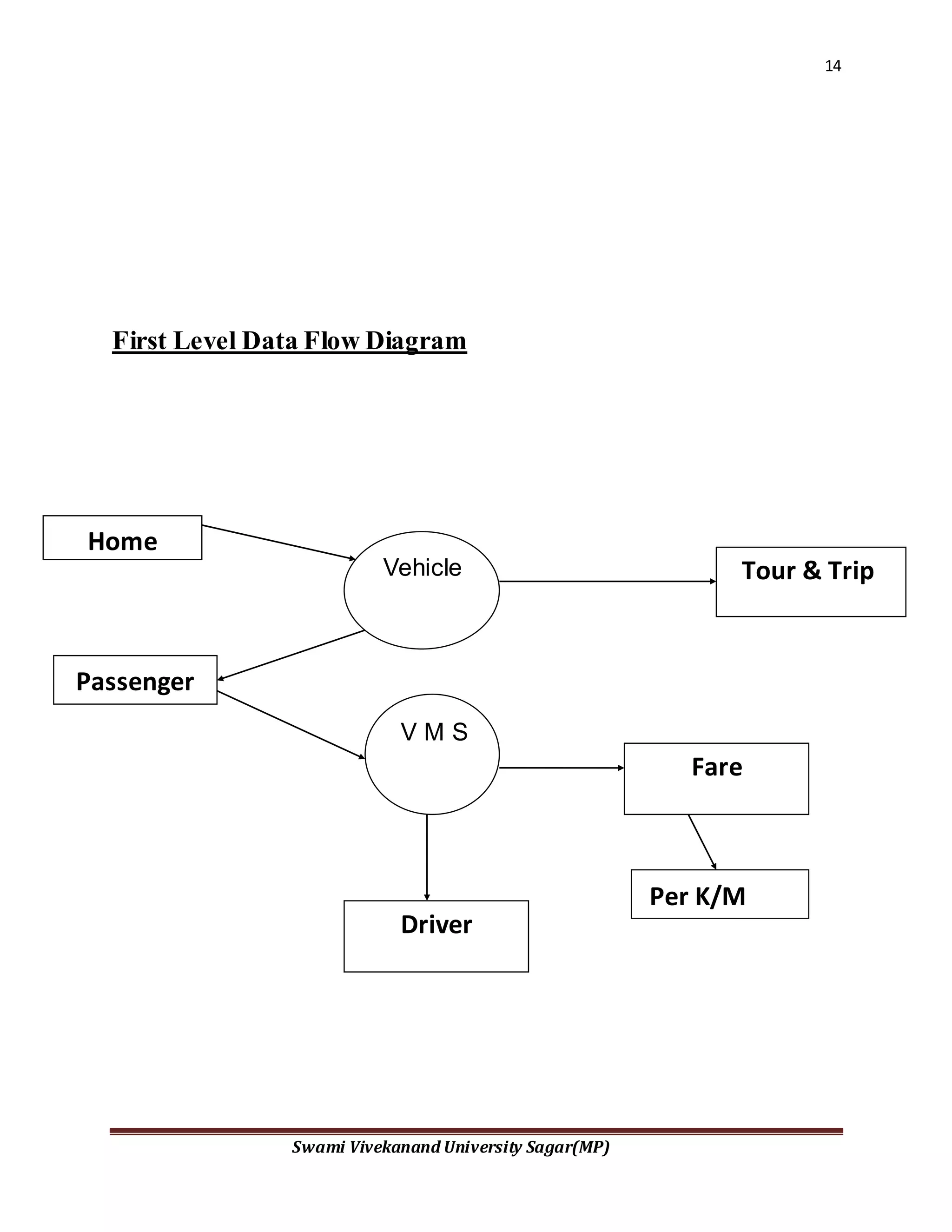
First Level Data Flow Diagram
Passenger
Home
Fare
Tour & TripVehicle
V M S
Per K/M
Driver
15
Swami Vivekanand University Sagar(MP)
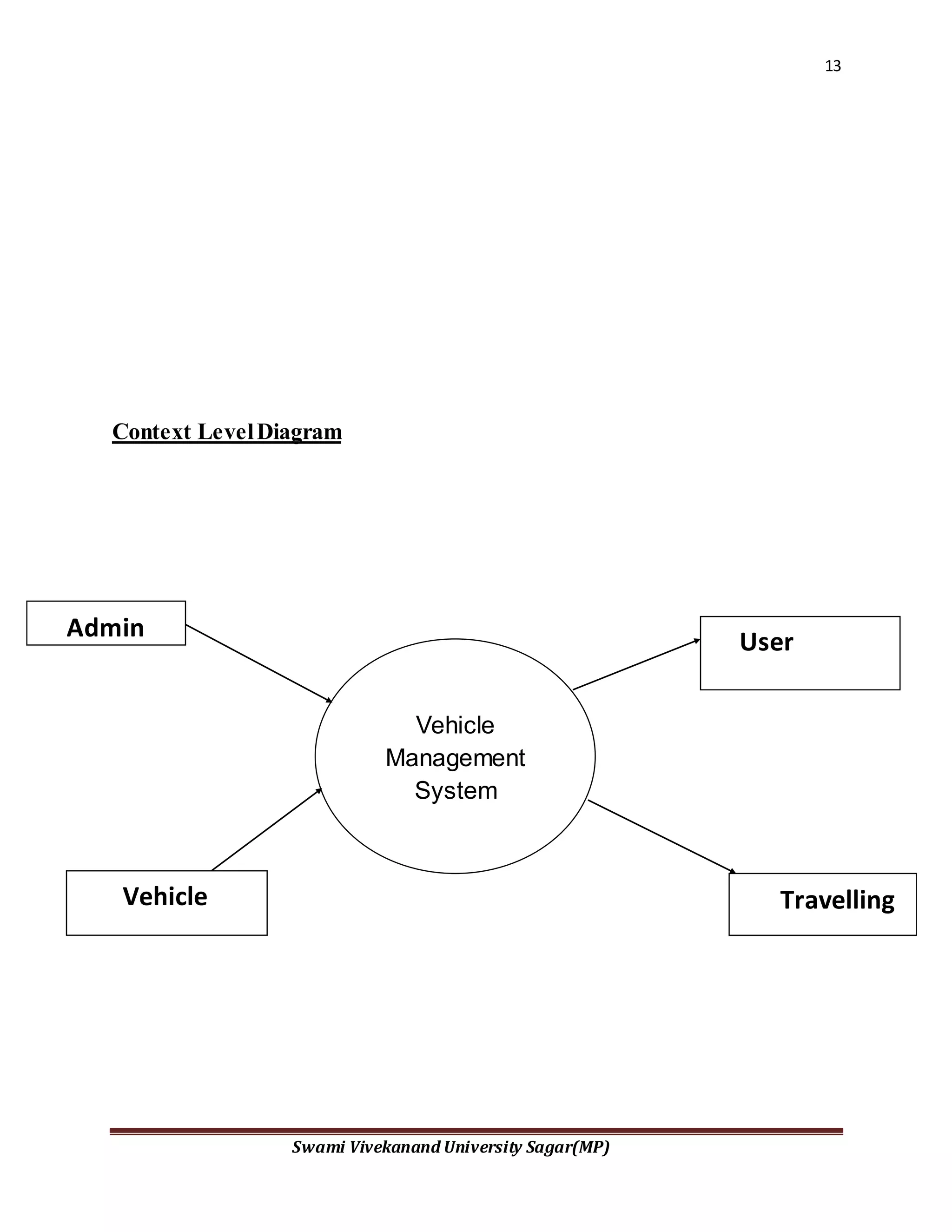
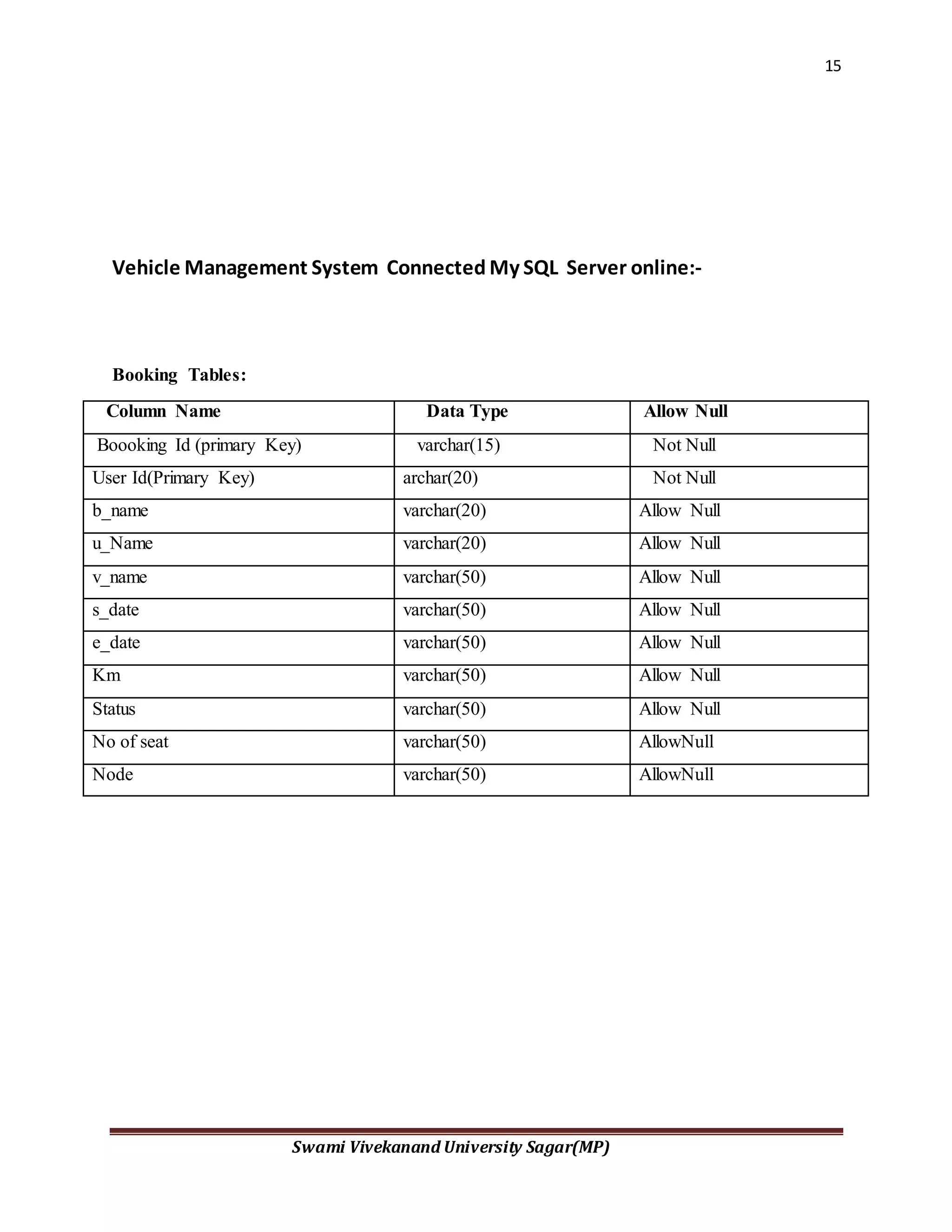
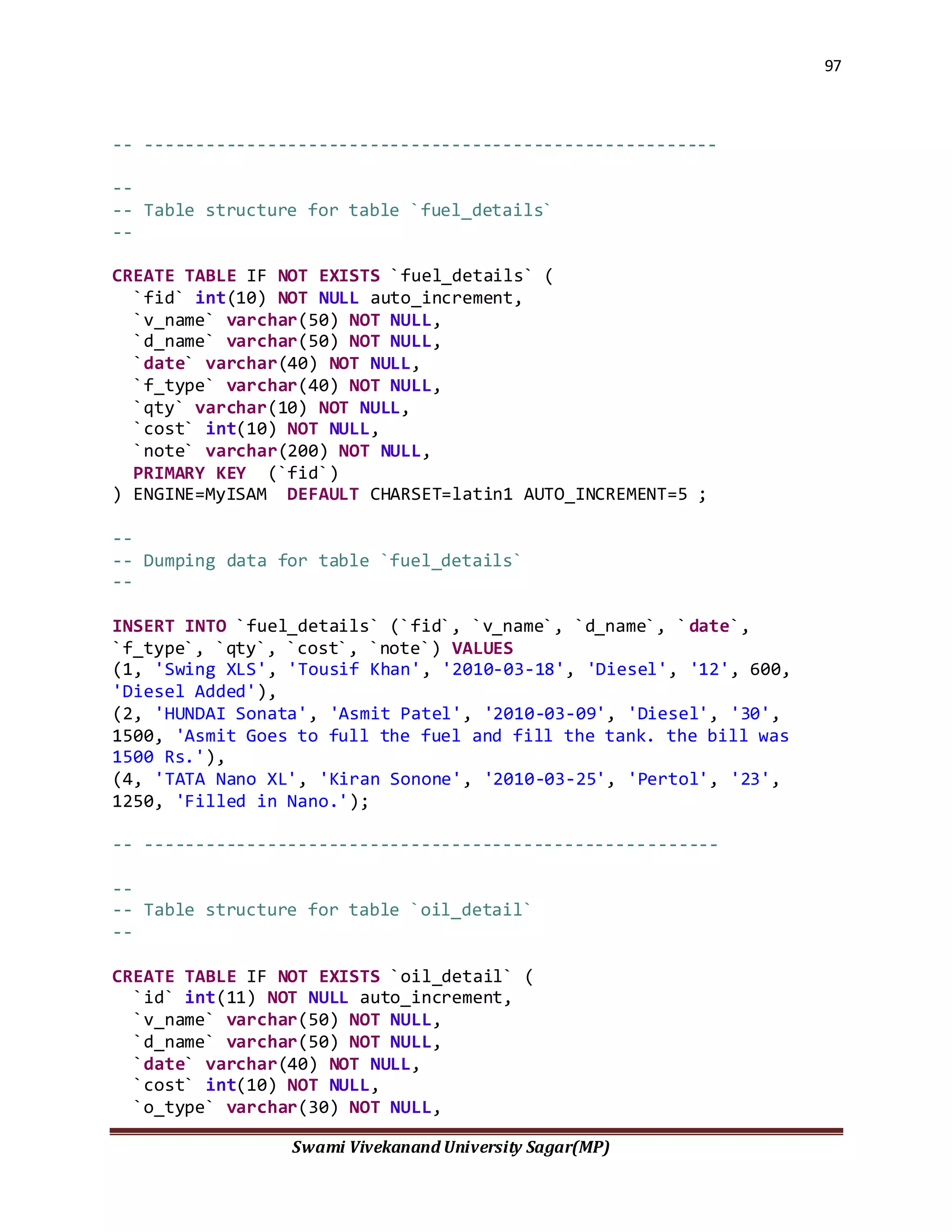
Vehicle Management System Connected My SQL Server online:-
Booking Tables:
Column Name Data Type Allow Null
Boooking Id (primary Key) varchar(15) Not Null
User Id(Primary Key) archar(20) Not Null
b_name varchar(20) Allow Null
u_Name varchar(20) Allow Null
v_name varchar(50) Allow Null
s_date varchar(50) Allow Null
e_date varchar(50) Allow Null
Km varchar(50) Allow Null
Status varchar(50) Allow Null
No of seat varchar(50) AllowNull
Node varchar(50) AllowNull
16
Swami Vivekanand University Sagar(MP)
Admin User
Driver Details
Column Name Data Type Allow Null
id (primary Key) nchar(15) Not Null
u_name varchar(20) Allow Null
u_pass varchar(20) Allow Null
Login Nchar(20) Allow Null
Logout Nchar(20) Allow Null
Column Name Data Type Allow Null
id (primary Key) nchar(15) Not Null
Name varchar(20) Allow Null
Address varchar(40) Allow Null
Image varchar(50) Allow Null
City varchar(20) Allow Null
lic_no Varchar(30) Not Null
Experience Int[4] Allow Null
17
Swami Vivekanand University Sagar(MP)
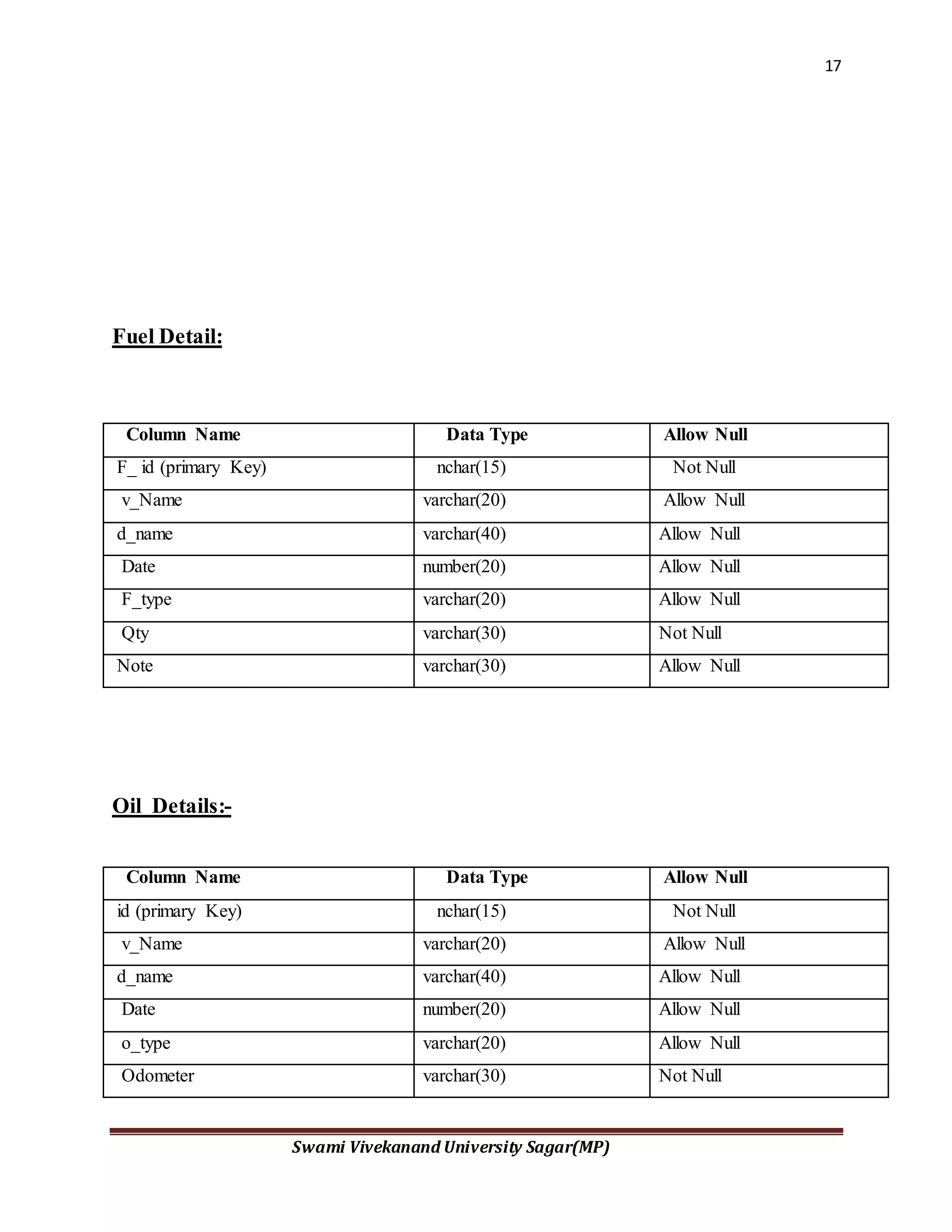
Fuel Detail:
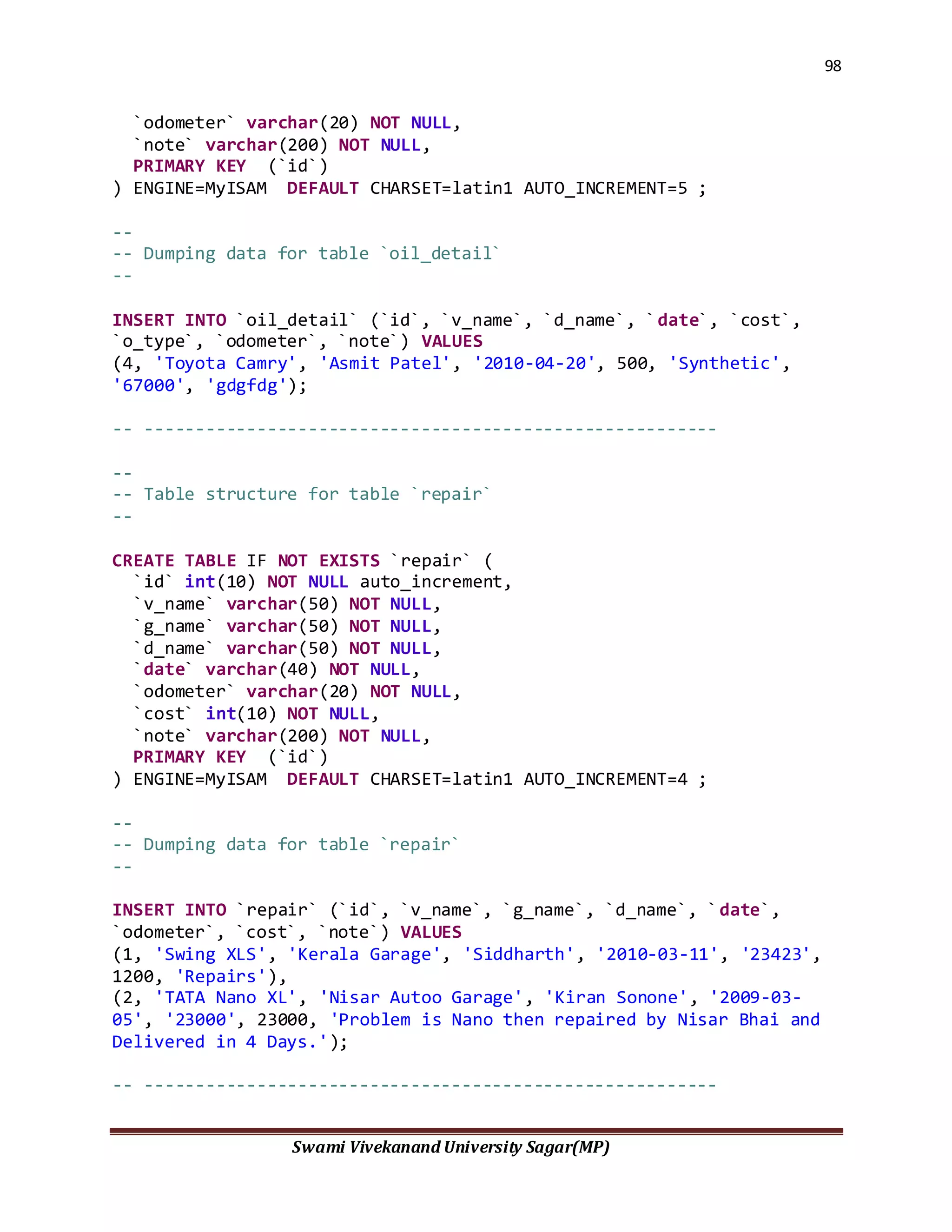
Oil Details:-
Column Name Data Type Allow Null
F_ id (primary Key) nchar(15) Not Null
v_Name varchar(20) Allow Null
d_name varchar(40) Allow Null
Date number(20) Allow Null
F_type varchar(20) Allow Null
Qty varchar(30) Not Null
Note varchar(30) Allow Null
Column Name Data Type Allow Null
id (primary Key) nchar(15) Not Null
v_Name varchar(20) Allow Null
d_name varchar(40) Allow Null
Date number(20) Allow Null
o_type varchar(20) Allow Null
Odometer varchar(30) Not Null
18
Swami Vivekanand University Sagar(MP)
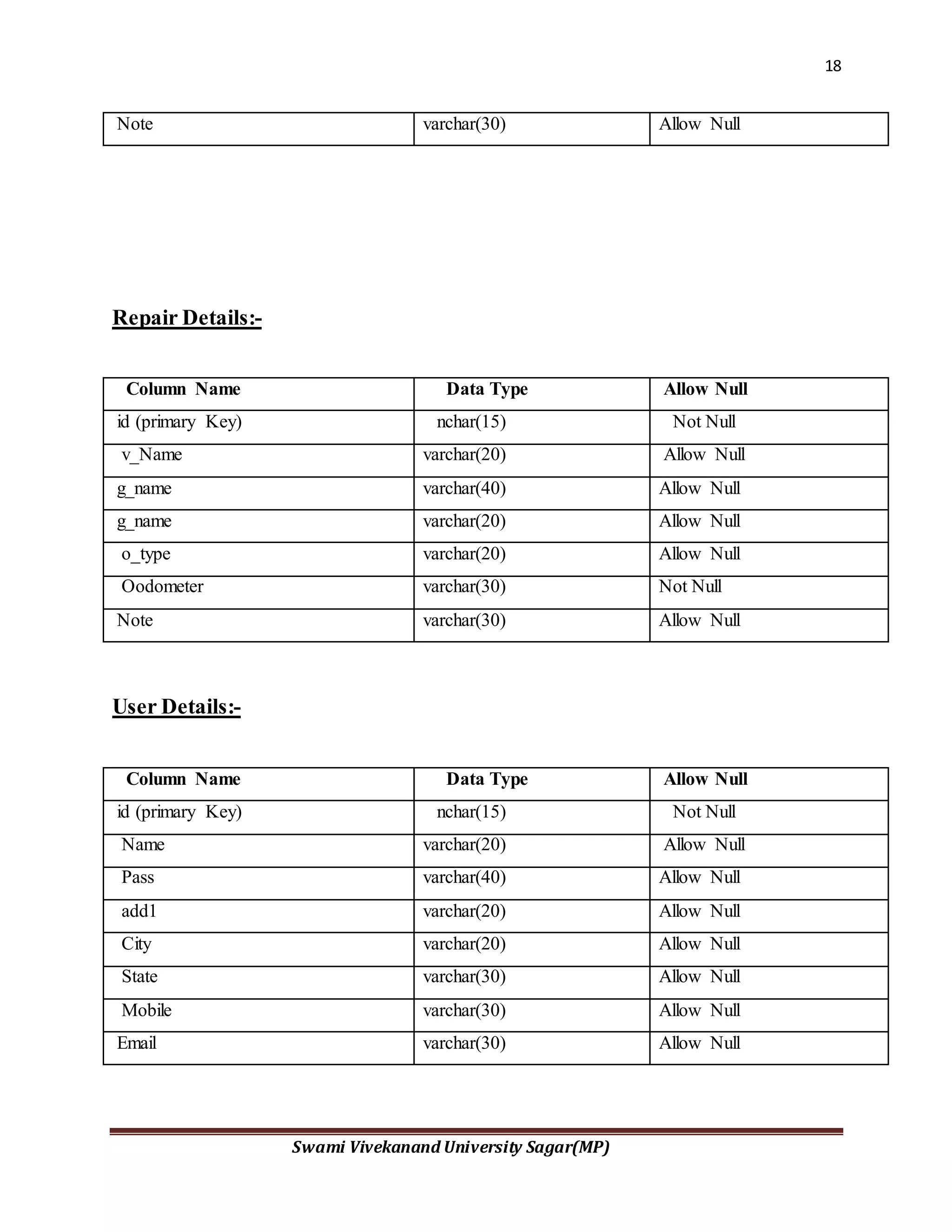
Repair Details:-
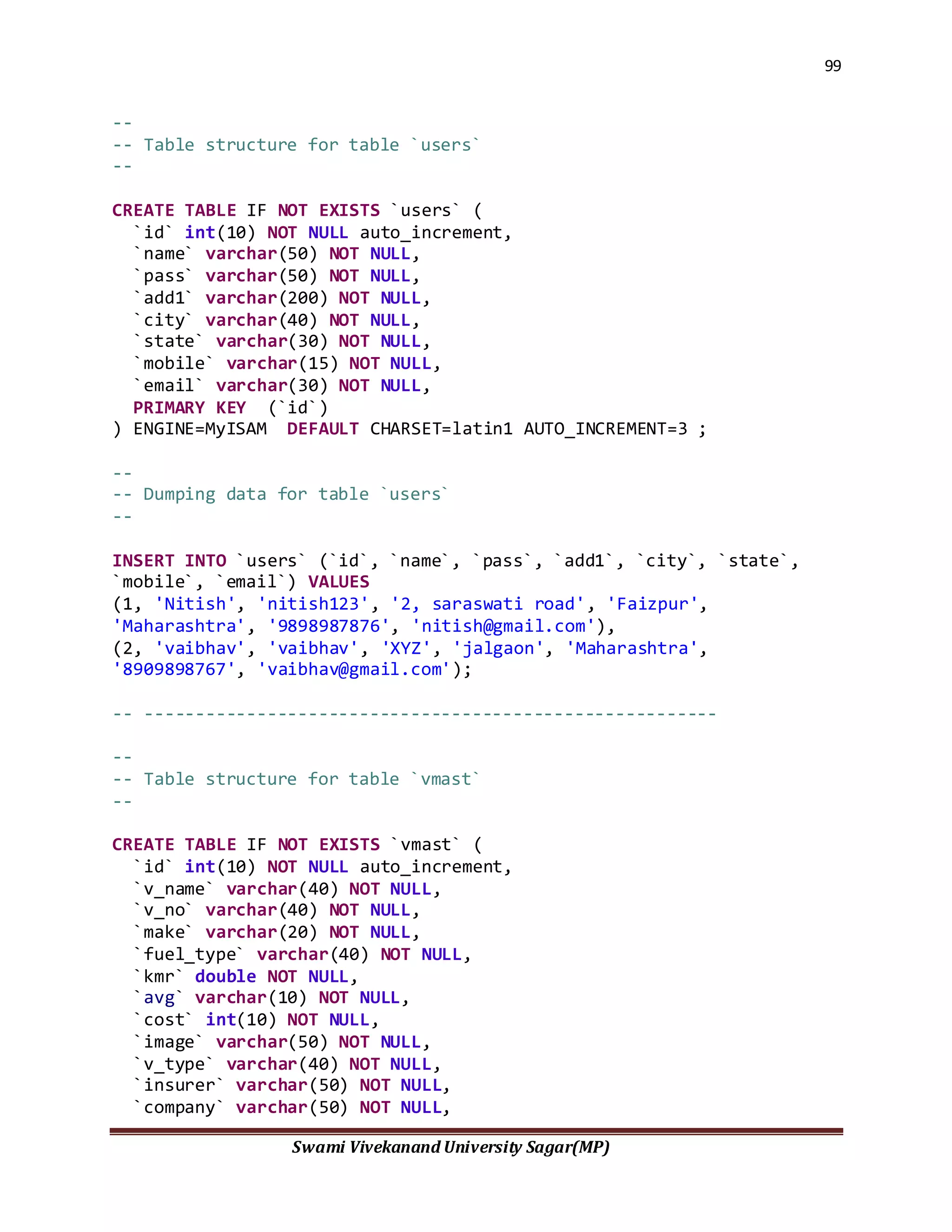
User Details:-
Note varchar(30) Allow Null
Column Name Data Type Allow Null
id (primary Key) nchar(15) Not Null
v_Name varchar(20) Allow Null
g_name varchar(40) Allow Null
g_name varchar(20) Allow Null
o_type varchar(20) Allow Null
Oodometer varchar(30) Not Null
Note varchar(30) Allow Null
Column Name Data Type Allow Null
id (primary Key) nchar(15) Not Null
Name varchar(20) Allow Null
Pass varchar(40) Allow Null
add1 varchar(20) Allow Null
City varchar(20) Allow Null
State varchar(30) Allow Null
Mobile varchar(30) Allow Null
Email varchar(30) Allow Null
19
Swami Vivekanand University Sagar(MP)
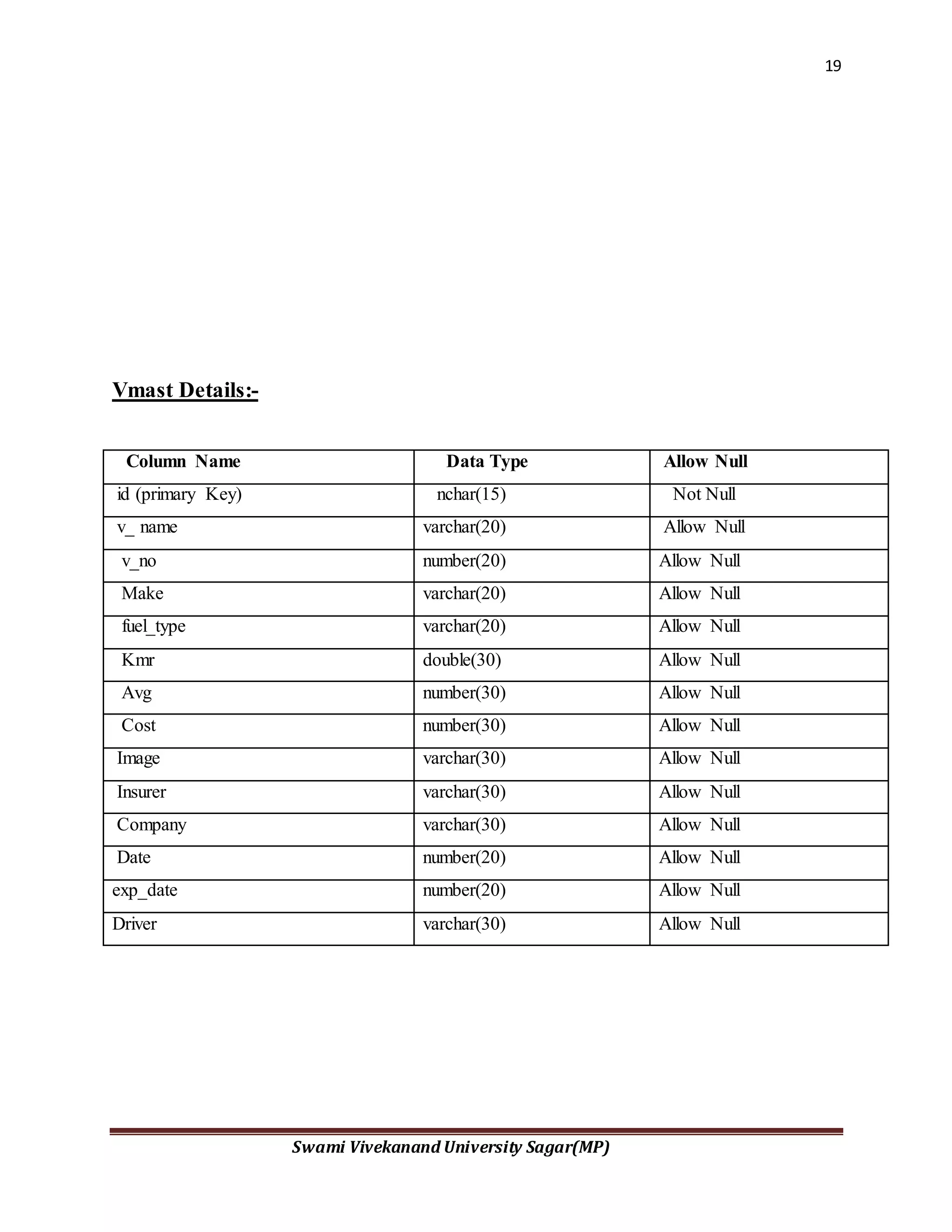
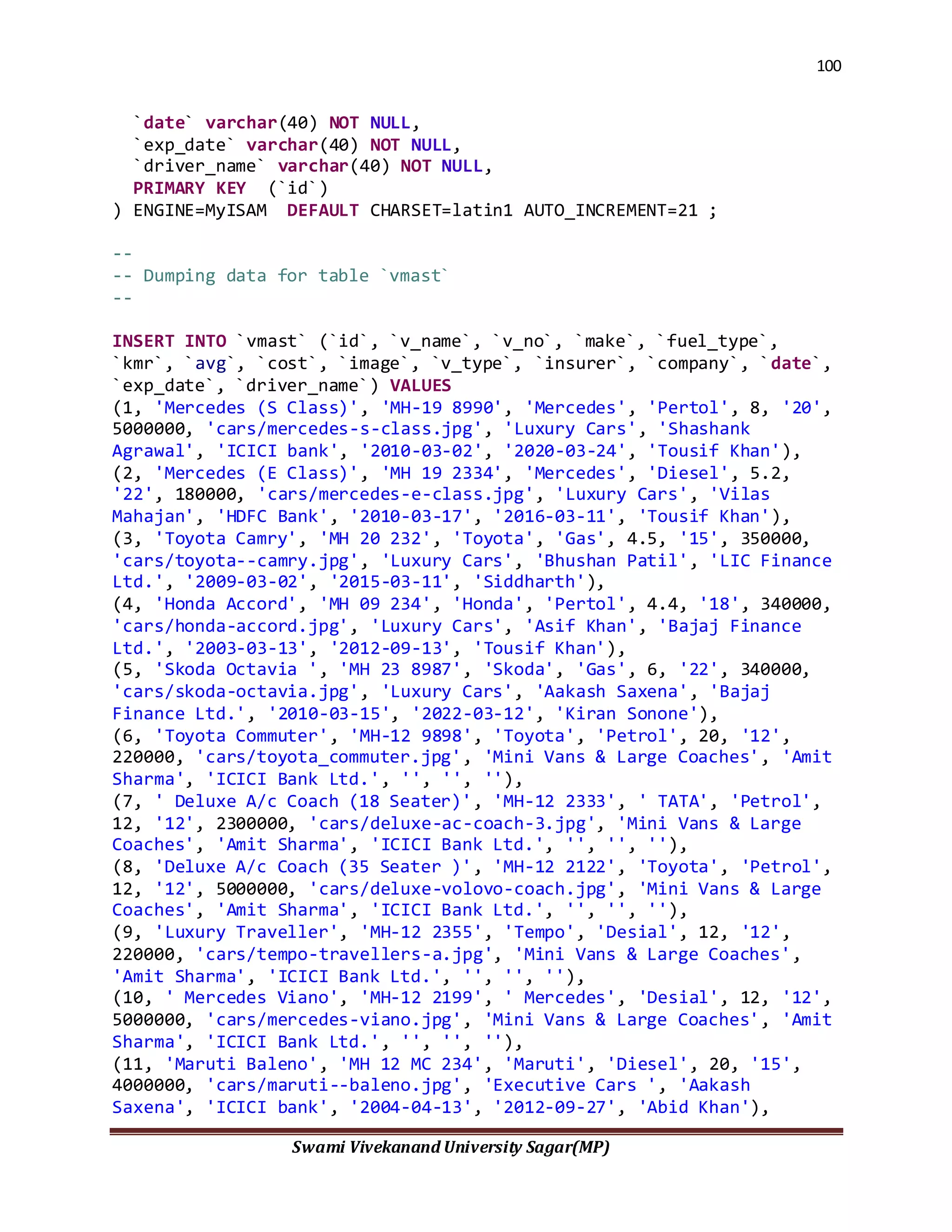
Vmast Details:-
Column Name Data Type Allow Null
id (primary Key) nchar(15) Not Null
v_ name varchar(20) Allow Null
v_no number(20) Allow Null
Make varchar(20) Allow Null
fuel_type varchar(20) Allow Null
Kmr double(30) Allow Null
Avg number(30) Allow Null
Cost number(30) Allow Null
Image varchar(30) Allow Null
Insurer varchar(30) Allow Null
Company varchar(30) Allow Null
Date number(20) Allow Null
exp_date number(20) Allow Null
Driver varchar(30) Allow Null
20
Swami Vivekanand University Sagar(MP)
3.3 Choice of Tools and Technology
Introduction:-
The Vehicle ManagementSystemES bundle service-enablesSAPVehicle ManagementforAutomotive,
whichisrun by automotive importersanddistributioncenters.Usingthe servicesinthisESbundle,
importersanddistributioncenterscanprovide acomposite applicationfortheirdealerstoenable them
to searchfor available vehiclesandordervehiclesthatmatcha customer'sspecifications.
FromDealer Stockto CustomOrders:-
Because of many interrelated factors, today's automotive markets face increasing competition
and slowing demand. Chiefly, the Internet has made customers far more astute by greatly
increasing market transparency. This transparency has armed customers with the means to seek
out dealers that can sell them the makes and models of vehicles of their choice with a wide array
of personalized specifications, at prices they have negotiated. Given this market climate, dealers
and manufacturers alike know that without the ability to respond rapidly to customer
requirements, the odds of success will remain stacked against them. The made-to-stock model by
which they once operated is no longer satisfactory. Instead, to generate and maintain competitive
advantage, businesses have adopted sophisticated order-to-delivery models and are now taking
steps to streamline them such that the time from order to delivery is greatly expedited.
In short, sales representatives at dealerships must be able to search for and locate vehicles whose
configurations meet the demands of inquiring customers, at will. If the desired vehicle has not
yet been manufactured, the dealer must be able to create an order for its manufacture and
delivery in a manner that both manufacturers and distributors can accommodate, as well.
Whatthe Vehicle ManagementSystemES BundleDoes
Figure 1 shows the parties involved in this interaction. The OEM manufactures the vehicles, the
importer or distribution center orders vehicles from the OEM, and dealers then sell the vehicles
to the public. The Vehicle Management System ES bundle service- enables the interaction
between the dealers and SAP Vehicle Management for Automotive, which importers and
distribution centers run.
21
Swami Vivekanand University Sagar(MP)
Deploying the services in this ES bundle, dealers using a composite application or dealer portal
can:
 Create and modifyvehicle configurationsinSAPVehicleManagementforAutomotive
 Findand readinformationaboutexistingvehiclesinSAPVehicle ManagementforAutomotive
 Vehiclescanbe locatedandaccessedusingconfiguration dataandotherelementssuchas
customerdata,reference numbers,andvehicle batchIDs
 Create,modify,find,andreadsalesordersforvehiclesinSAPVehicle Managementfor
Automotive
 Generate detailedestimatesforspecificvehicleconfigurations
The VMS ES bundle leveragesenterpriseSOA byservice-enablingSAPVehicle Managementfor
Automotive.
Audience
Importers and distribution centers that want to extend the functionality of SAP Vehicle
Management for Automotive to their dealers will find the Vehicle Management System ES
bundle especially helpful.
The roles in these industries that can use this bundle include:
 System administrators
 Sales and importer representatives
 Dealers
How to Use This ES Bundle
Until recently, the model upon which the automotive industry based most of its production and
stock methods was "make-to-stock." Each year manufacturers used past sales patterns to
determine production for the immediate future. They produced a given number of vehicles
according to a given set of configurations and then shipped those vehicles to market, where they
were kept in stock as available for purchase.
Within this context, SAP developed SAP Vehicle Management for Automotive. SAP Vehicle
Management for Automotive provides OEMs, importers and distributors with a single,
centralized tool for procuring, configuring, managing, selling and tracking vehicles in either the
make-to-stock model or in some cases a make-to-order scenario. In this latter case, make-to-
order primarily has allowed customers purchasing high-end vehicles to configure the vehicle to
their particular tastes.
22
Swami Vivekanand University Sagar(MP)
Today, however, the automotive industry is going through a transition that reflects greater
demand by all customers--not just those purchasing high-end vehicles--to order vehicles
configured to meet their particular needs. In response, the automotive industry is seeking ways to
efficiently and cost effectively meet customer expectations.
Underlying successful implementation of this newer model is the ability to reduce the order-to-
delivery time by providing a smooth and seamless process for the search and/or order of a
vehicle configured to the customer's needs.
The Vehicle Management System ES bundle extends the functionality of SAP Vehicle
Management for Automotive to the associated dealers of vehicle importers and distributors. This
means that through a composite application or portal based on these services, a dealer's sales
representative is able to search for a vehicle matching the customer's desired configuration or, if
necessary, initiate the process to order a matching vehicle from an OEM.
For example, an importer in the US acts as a distribution point for vehicles manufactured by
Toyota. This importer will use SAP Vehicle Management for Automotive to manage, configure,
order, and sell vehicles. The dealer portal provided by the importer to its associated dealers will
allow dealers to access SAP Vehicle Management for Automotive. The enterprise services
contained in this bundle will enable dealers to search for vehicles in stock or on order from
Toyota as well as create sales orders for those vehicles. If no vehicle matching the customer's
configuration is in stock or on order, the dealer can submit a sales order to SAP Vehicle
Management for Automotive, which in turn triggers the importer to place a sales order with
Toyota indicating the specifications of the vehicle in question.
This section will explore a series of use cases for the Vehicle Management System ES bundle.
Each scenario will show how different outcomes can be achieved by using the enterprise services
in different combinations. While these examples illustrate a few of the ways that this ES bundle
could be used, the intention is to show the flexibility and reusability of these business objects and
enterprise service operations so that you will have a clearer understanding of how to best deploy
them in your own environment. This wiki is also a space for you to share knowledge and
collaborate with others who are implementing the Vehicle Management System ES bundle.
Use Case1: Searchingforandpurchasinganexistingvehicle
In this use case, a customer has entered a car dealership with the intent to purchase a new car.
Before arriving, however, she has researched the various possible configurations that are
available for the make and model she is interested in, including body color, upholstery type and
color, audio, tire rims, and so forth, and made a definite decision about what she wants. In this
scenario the customer will test drive a similar vehicle, search for the availability of a vehicle
matching a particular configuration, read through a search list of vehicles, negotiate a price, and
the sales representative will create a sales order.
23
Swami Vivekanand University Sagar(MP)
Findinga Vehiclethat Matches a Specified Configuration
After the customer has test driven the make and model of her choice, she wants to know whether
she can buy her customized version of it. To determine if such a vehicle is available, the sales
representative can enter all of the options she has chosen into the dealer portal UI. This gives the
dealer access to the importer's or distributor's database as well as visibility to backend systems.
The dealer can then select the search option and enter the search criteria for the vehicle. When
the search is initiated the application invokes the Find Automotive Vehicle Basic Data by
Elements service operation, which uses the Automotive Vehicle business object. This service
will search within SAP Vehicle Management for Automotive by vehicle configuration and
related elements and return a list of cars that match the specified search terms with each vehicle's
ID number.
Readingthe Details of a Vehicle
A list appears on the dealer's UI from which the customer can select and view the details of a
vehicle. Clicking on the link to a vehicle invokes the Read Automotive Vehicle enterprise
service, which presents the details of that particular car. The application uses the vehicle ID as
the input for the read service. The business object used is Automotive Vehicle.
Generatinga ListPricefor a Vehicle
The customer is satisfied with the car and its projected delivery date, but she needs to know how
much it will cost as configured. To find out the list price, the sales representative selects an
option that invokes the Check Sales Order Creation service operation, which uses the Sales
Order business object.
Creatinga Sales Orderfor a Vehicle
After negotiating a price with the customer, the sales representative can create a sales order for
the vehicle. To complete the sale, the dealer adds the customer's information such as name,
contact information, payment type, and so on, and submits the order to the importer or distributor
by selecting an option in the UI that invokes the Create Sales Order service operation. This
enterprise service is actually a standard SAP Sales and Distribution service and is run with the
data returned from the read service, such as the batch number (ID), configuration data,
manufacturing plant, equipment number, usage code, initial registration date, counter reading,
price, current location, production date and time, and planned date and delivery and time.
Essentially, the composite application forwards the information from the Read Automotive
Vehicle service to the Create Sales Order service seamlessly.
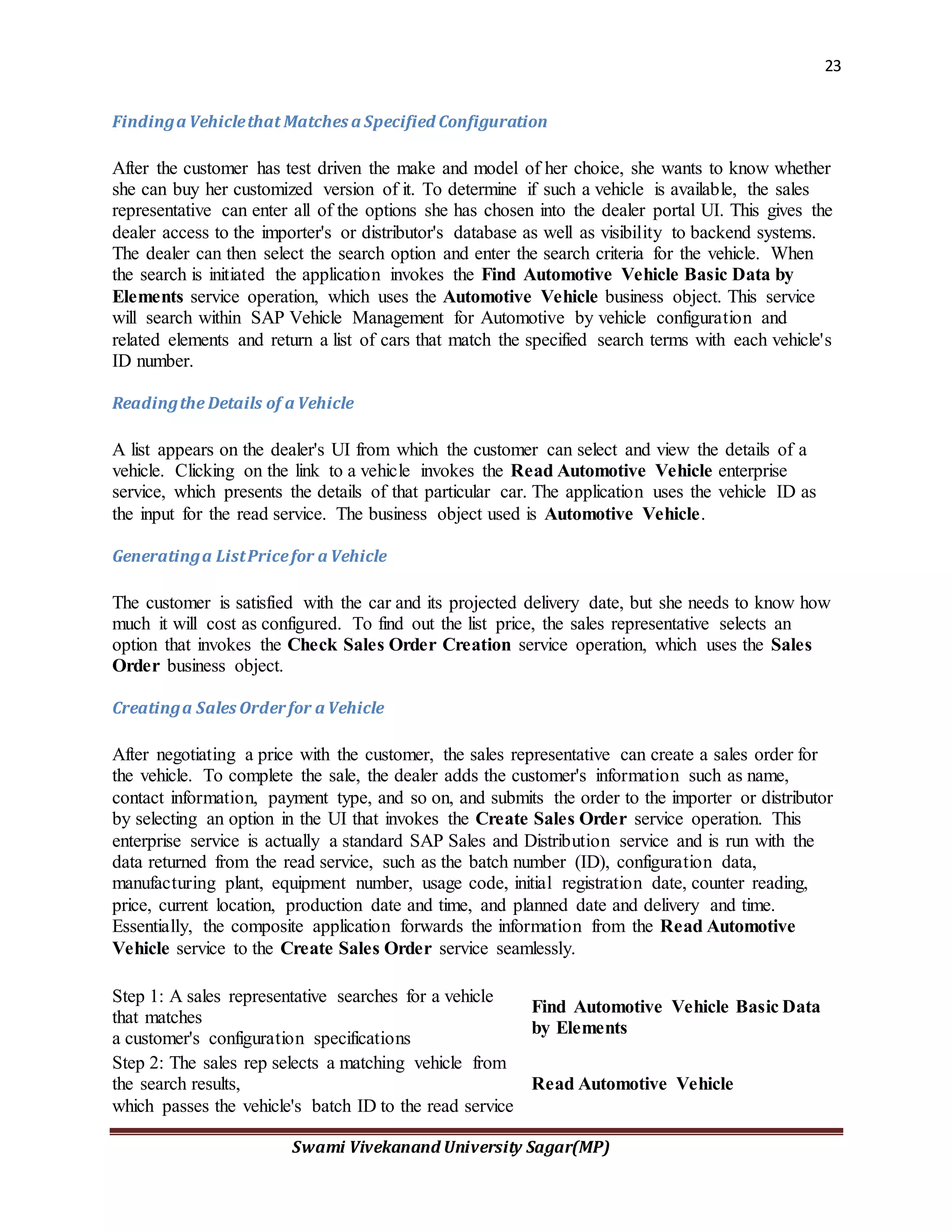
Step 1: A sales representative searches for a vehicle
that matches
a customer's configuration specifications
Find Automotive Vehicle Basic Data
by Elements
Step 2: The sales rep selects a matching vehicle from
the search results,
which passes the vehicle's batch ID to the read service
Read Automotive Vehicle
24
Swami Vivekanand University Sagar(MP)
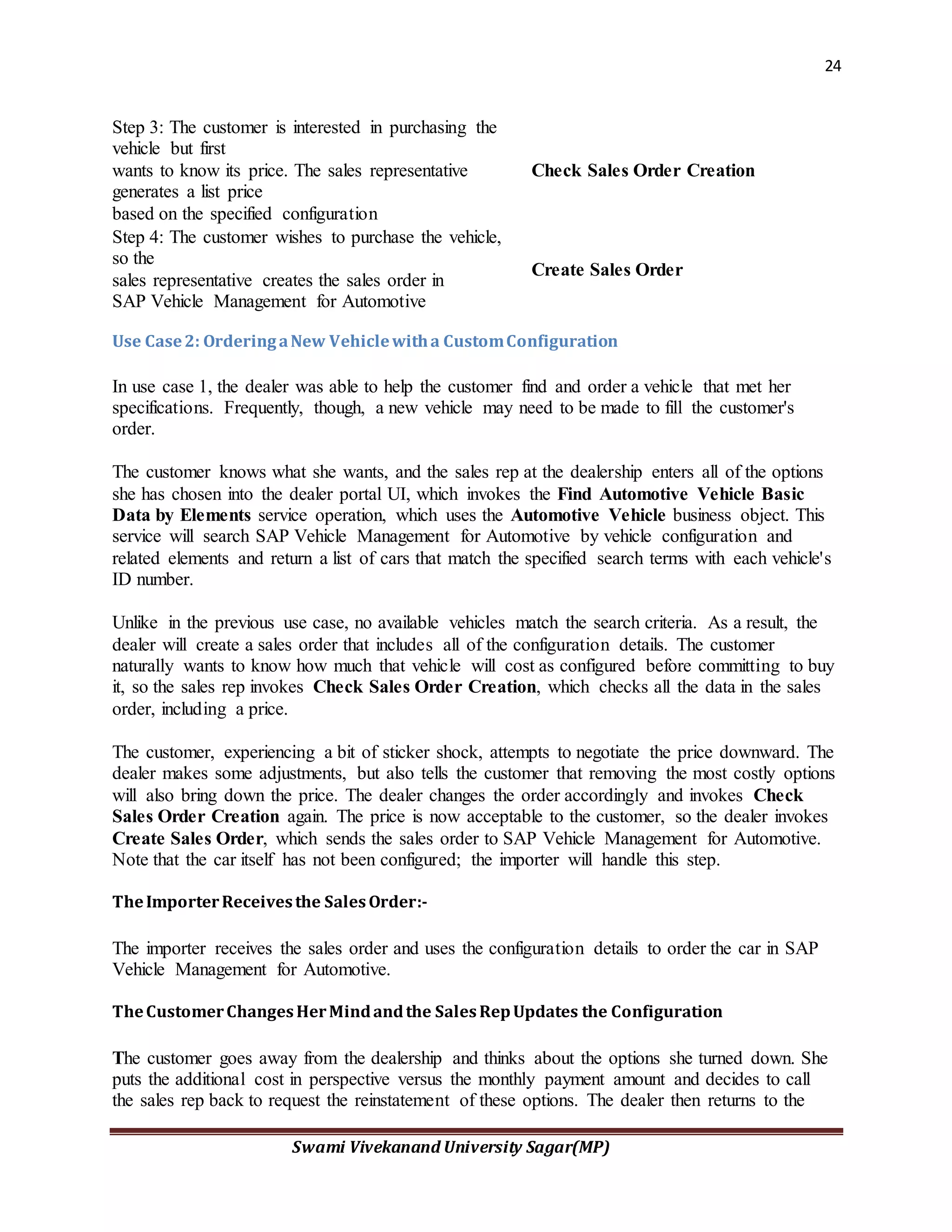
Step 3: The customer is interested in purchasing the
vehicle but first
wants to know its price. The sales representative
generates a list price
based on the specified configuration
Check Sales Order Creation
Step 4: The customer wishes to purchase the vehicle,
so the
sales representative creates the sales order in
SAP Vehicle Management for Automotive
Create Sales Order
Use Case2: OrderingaNew Vehiclewitha CustomConfiguration
In use case 1, the dealer was able to help the customer find and order a vehicle that met her
specifications. Frequently, though, a new vehicle may need to be made to fill the customer's
order.
The customer knows what she wants, and the sales rep at the dealership enters all of the options
she has chosen into the dealer portal UI, which invokes the Find Automotive Vehicle Basic
Data by Elements service operation, which uses the Automotive Vehicle business object. This
service will search SAP Vehicle Management for Automotive by vehicle configuration and
related elements and return a list of cars that match the specified search terms with each vehicle's
ID number.
Unlike in the previous use case, no available vehicles match the search criteria. As a result, the
dealer will create a sales order that includes all of the configuration details. The customer
naturally wants to know how much that vehicle will cost as configured before committing to buy
it, so the sales rep invokes Check Sales Order Creation, which checks all the data in the sales
order, including a price.
The customer, experiencing a bit of sticker shock, attempts to negotiate the price downward. The
dealer makes some adjustments, but also tells the customer that removing the most costly options
will also bring down the price. The dealer changes the order accordingly and invokes Check
Sales Order Creation again. The price is now acceptable to the customer, so the dealer invokes
Create Sales Order, which sends the sales order to SAP Vehicle Management for Automotive.
Note that the car itself has not been configured; the importer will handle this step.
TheImporterReceivesthe SalesOrder:-
The importer receives the sales order and uses the configuration details to order the car in SAP
Vehicle Management for Automotive.
TheCustomerChangesHerMindandthe SalesRepUpdates the Configuration
The customer goes away from the dealership and thinks about the options she turned down. She
puts the additional cost in perspective versus the monthly payment amount and decides to call
the sales rep back to request the reinstatement of these options. The dealer then returns to the
25
Swami Vivekanand University Sagar(MP)
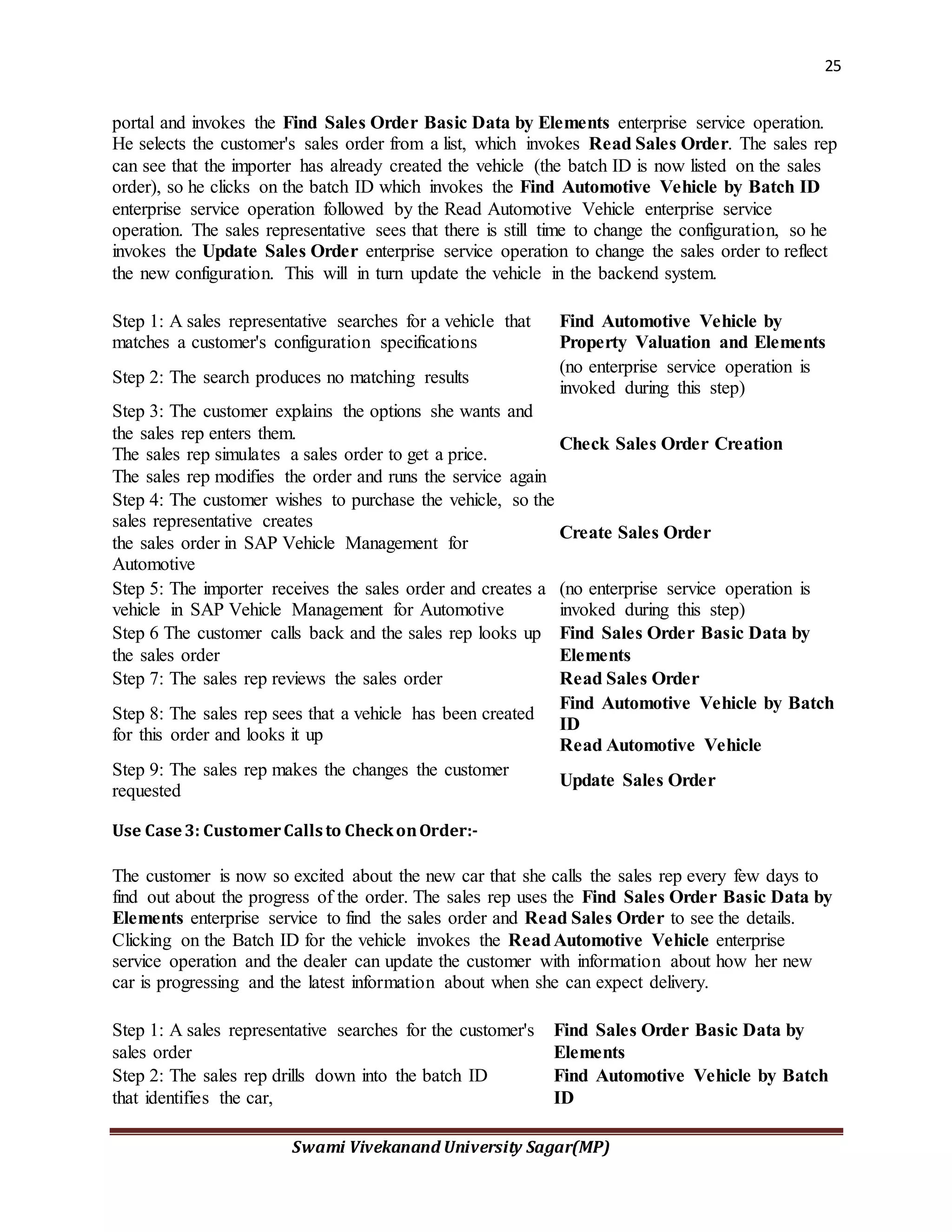
portal and invokes the Find Sales Order Basic Data by Elements enterprise service operation.
He selects the customer's sales order from a list, which invokes Read Sales Order. The sales rep
can see that the importer has already created the vehicle (the batch ID is now listed on the sales
order), so he clicks on the batch ID which invokes the Find Automotive Vehicle by Batch ID
enterprise service operation followed by the Read Automotive Vehicle enterprise service
operation. The sales representative sees that there is still time to change the configuration, so he
invokes the Update Sales Order enterprise service operation to change the sales order to reflect
the new configuration. This will in turn update the vehicle in the backend system.
Step 1: A sales representative searches for a vehicle that
matches a customer's configuration specifications
Find Automotive Vehicle by
Property Valuation and Elements
Step 2: The search produces no matching results
(no enterprise service operation is
invoked during this step)
Step 3: The customer explains the options she wants and
the sales rep enters them.
The sales rep simulates a sales order to get a price.
The sales rep modifies the order and runs the service again
Check Sales Order Creation
Step 4: The customer wishes to purchase the vehicle, so the
sales representative creates
the sales order in SAP Vehicle Management for
Automotive
Create Sales Order
Step 5: The importer receives the sales order and creates a
vehicle in SAP Vehicle Management for Automotive
(no enterprise service operation is
invoked during this step)
Step 6 The customer calls back and the sales rep looks up
the sales order
Find Sales Order Basic Data by
Elements
Step 7: The sales rep reviews the sales order Read Sales Order
Step 8: The sales rep sees that a vehicle has been created
for this order and looks it up
Find Automotive Vehicle by Batch
ID
Read Automotive Vehicle
Step 9: The sales rep makes the changes the customer
requested
Update Sales Order
Use Case3: CustomerCallsto CheckonOrder:-
The customer is now so excited about the new car that she calls the sales rep every few days to
find out about the progress of the order. The sales rep uses the Find Sales Order Basic Data by
Elements enterprise service to find the sales order and Read Sales Order to see the details.
Clicking on the Batch ID for the vehicle invokes the ReadAutomotive Vehicle enterprise
service operation and the dealer can update the customer with information about how her new
car is progressing and the latest information about when she can expect delivery.
Step 1: A sales representative searches for the customer's
sales order
Find Sales Order Basic Data by
Elements
Step 2: The sales rep drills down into the batch ID
that identifies the car,
Find Automotive Vehicle by Batch
ID
26
Swami Vivekanand University Sagar(MP)
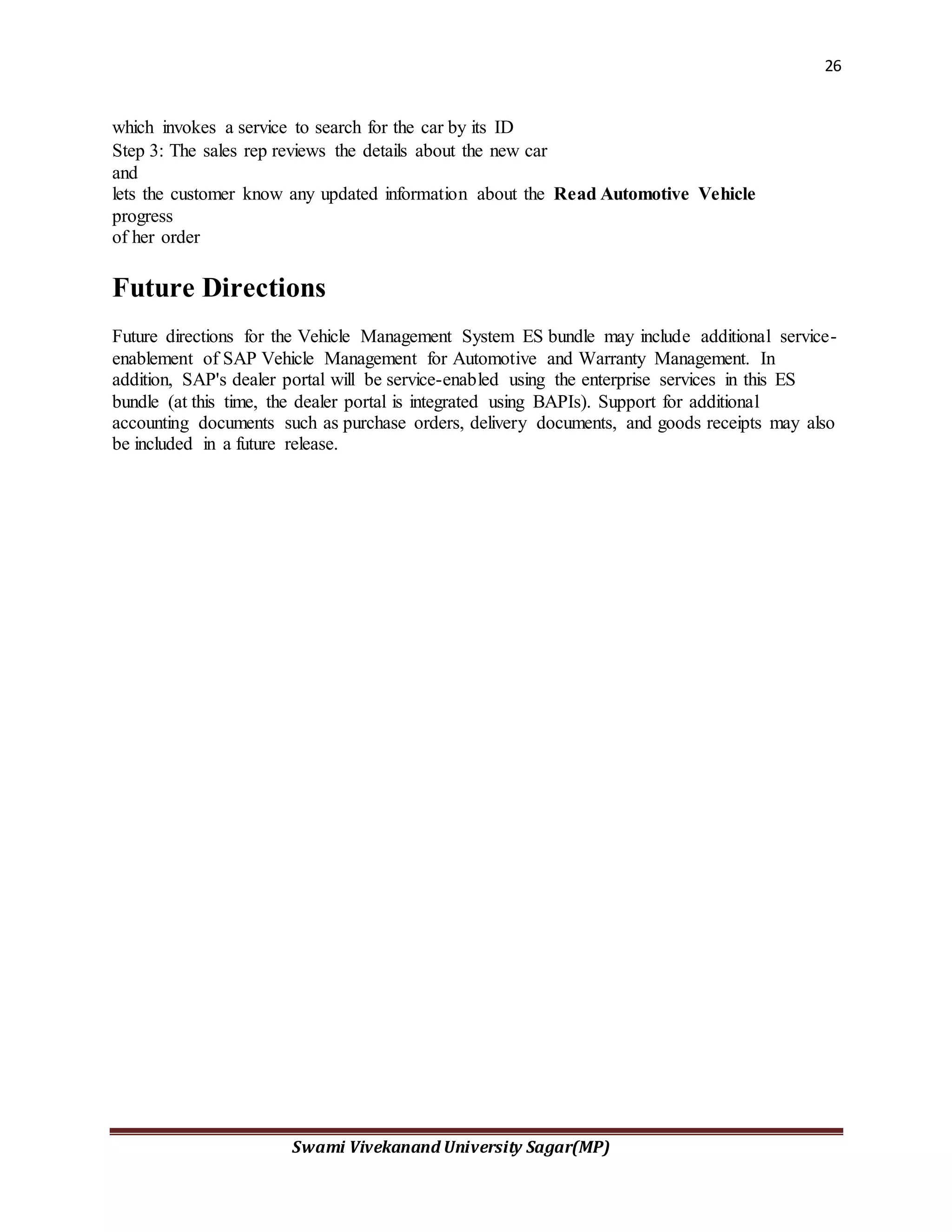
which invokes a service to search for the car by its ID
Step 3: The sales rep reviews the details about the new car
and
lets the customer know any updated information about the
progress
of her order
Read Automotive Vehicle
Future Directions
Future directions for the Vehicle Management System ES bundle may include additional service-
enablement of SAP Vehicle Management for Automotive and Warranty Management. In
addition, SAP's dealer portal will be service-enabled using the enterprise services in this ES
bundle (at this time, the dealer portal is integrated using BAPIs). Support for additional
accounting documents such as purchase orders, delivery documents, and goods receipts may also
be included in a future release.
27
Swami Vivekanand University Sagar(MP)
CHAPTER 4
Testing and Implementation
Objective of Testing
Software testing is an investigation conducted to provide stakeholders with information about
the quality of the product or service under test. Software testing can also provide an objective,
independent view of the software to allow the business to appreciate and understand the risks of
software implementation. Test techniques include, but are not limited to, the process of executing
a program or application with the intent of finding software bugs (errors or other defects).
Software testing can be stated as the process of validating and verifying that a software
program/application/product:
1. meets the requirements that guided its design and development;
2. works as expected; and
3. can be implemented with the same characteristics.
Software testing, depending on the testing method employed, can be implemented at any time in
the development process. However, most of the test effort traditionally occurs after the
requirements have been defined and the coding process has been completed having been shown
that fixing a bug is less expensive when found earlier in the development process. Although in
the Agile approaches most of the test effort is, conversely, on-going. As such, the methodology
of the test is governed by the software development methodology adopted.
Different software development models will focus the test effort at different points in the
development process. Newer development models, such as Agile, often employ test driven
development and place an increased portion of the testing in the hands of the developer, before it
reaches a formal team of testers. In a more traditional model, most of the test execution occurs
after the requirements have been defined and the coding process has been completed. Testing can
28
Swami Vivekanand University Sagar(MP)
never completely identify all the defects within software. Instead, it furnishes a criticism or
comparison that compares the state and behavior of the product against oracles—principles or
mechanisms by which someone might recognize a problem. These oracles may include (but are
not limited to) specifications, contracts,[3] comparable products, past versions of the same
product, inferences about intended or expected purpose, user or customer expectations,
relevant standards, applicable laws, or other criteria.
Every software product has a target audience. For example, the audience for video game
software is completely different from banking software. Therefore, when an organization
develops or otherwise invests in a software product, it can assess whether the software product
will be acceptable to its end users, its target audience, its purchasers, and other stakeholders.
Software testing is the process of attempting to make this assessment.
4.2 Types of Testing
4.2.1 Black BoxTesting
Black-box testing treats the software as a "black box"—without any knowledge of internal
implementation. Black-box testing methods include: equivalence partitioning, boundary value
analysis, all-pairs testing, fuzz testing, model-based testing, exploratory testing and specification-
based testing.
 Specification-based testing: Specification-based testing aims to test the
functionality of software according to the applicable requirements. Thus, the
tester inputs data into, and only sees the output from, the test object. This level of
testing usually requires thorough test cases to be provided to the tester, who then
can simply verify that for a given input, the output value (or behavior), either "is"
or "is not" the same as the expected value specified in the test case.
Specification-based testing is necessary, but it is insufficient to guard against certain
risks.
 Advantages and disadvantages: The black-box tester has no "bonds" with the
code, and a tester's perception is very simple: a code must have bugs. Using the
principle, "Ask and you shall receive," black-box testers find bugs where
29
Swami Vivekanand University Sagar(MP)
programmers do not. On the other hand, black-box testing has been said to be
"like a walk in a dark labyrinth without a flashlight," because the tester doesn't
know how the software being tested was actually constructed. As a result, there
are situations when (1) a tester writes many test cases to check something that
could have been tested by only one test case, and/or (2) some parts of the back-
end are not tested at all.
Therefore, black-box testing has the advantage of "an unaffiliated opinion", on the one hand, and
the disadvantage of "blind exploring", on the other
4.2.2 White Box Testing
White-box testing is when the tester has access to the internal data structures and algorithms
including the code that implements these.
Types of white-box testing
The following types of white-box testing exist:
 API testing (application programming interface) - testing of the application using
public and private APIs
 Code coverage - creating tests to satisfy some criteria of code coverage (e.g., the
test designer can create tests to cause all statements in the program to be executed
at least once)
 Fault injection methods - improving the coverage of a test by introducing faults to
test code paths
 Mutation testing methods
 Static testing - All types
Test coverage
White-box testing methods can also be used to evaluate the completeness of a test suite
that was created with black-box testing methods. This allows the software team to
examine parts of a system that are rarely tested and ensures that the most important
function points have been tested.[21]
30
Swami Vivekanand University Sagar(MP)
Two common forms of code coverage are:
 Function coverage, which reports on functions executed
 Statement coverage, which reports on the number of lines executed to complete
the test
They both return a code coverage metric, measured as a percentage.
4.2.3 FunctionalTesting
Functional testing refers to activities that verify a specific action or function of the code. These
are usually found in the code requirements documentation, although some development
methodologies work from use cases or user stories. Functional tests tend to answer the question
of "can the user do this" or "does this particular feature work."
Non-functional testing refers to aspects of the software that may not be related to a specific
function or user action, such as scalability or other performance, behavior under certain
constraints, or security. Testing will determine the flake point, the point at which extremes of
scalability or performance leads to unstable execution. Non-functional requirements tend to be
those that reflect the quality of the product, particularly in the context of the suitability
perspective of its users.
4.2.4 SystemTesting
System testing of software or hardware is testing conducted on a complete, integrated system to
evaluate the system's compliance with its specified requirements. System testing falls within the
scope of black box testing, and as such, should require no knowledge of the inner design of the
code or logic.
As a rule, system testing takes, as its input, all of the "integrated" software components that have
successfully passed integration testing and also the software system itself integrated with any
applicable hardware system(s). The purpose of integration testing is to detect any inconsistencies
between the software units that are integrated together (called assemblages) or between any of
31
Swami Vivekanand University Sagar(MP)
the assemblages and the hardware. System testing is a more limited type of testing; it seeks to
detect defects both within the "inter-assemblages" and also within the system as a whole.
4.3Various levelOf Testing
Before implementation the system is tested at two levels:
Level 1
Level 2
4.3.1 Level1 Testing (Alpha Testing)
Alpha testing is simulated or actual operational testing by potential users/customers or an
independent test team at the developers' site. Alpha testing is often employed for off-the-shelf
software as a form of internal acceptance testing, before the software goes to beta testing.
4.3.2 Level2 Testing (Beta testing)
Beta testing comes after alpha testing and can be considered a form of external user acceptance
testing. Versions of the software, known as beta versions, are released to a limited audience
outside of the programming team. The software is released to groups of people so that further
testing can ensure the product has few faults or bugs. Sometimes, beta versions are made
available to the open public to increase the feedback field to a maximal number of future users.
4.3.3 Recoveryand Security
A forced system failure is induced to test a backup recovery procedure for file integrity.
Inaccurate data are entered to see how the system responds in terms of error detection and
protection. Related to file integrity is a test to demonstrate that data and programs are secure
from unauthorized access.
4.3.4 Usability Documentationand Procedure:
The usability test verifies the user-friendly nature of the system. This relates to normal operating
and error-handling procedures.
32
Swami Vivekanand University Sagar(MP)
4.4 Quality Assurance
Though controversial, software testing is a part of the software quality assurance (SQA) process.
In SQA, software process specialists and auditors are concerned for the software development
process rather than just the artifacts such as documentation, code and systems. They examine and
change the software engineering process itself to reduce the number of faults that end up in the
delivered software: the so-called defect rate.
What constitutes an "acceptable defect rate" depends on the nature of the software; A flight
simulator video game would have much higher defect tolerance than software for an actual
airplane.
Although there are close links with SQA, testing departments often exist independently, and
there may be no SQA function in some companies.
Software testing is a task intended to detect defects in software by contrasting a computer
program's expected results with its actual results for a given set of inputs. By contrast, QA
(quality assurance) is the implementation of policies and procedures intended to prevent defects
from occurring in the first place.
4.5 System Implementation
During the implementation stage the system in physically created. Necessary programs are
coded, debugged and documented. A new hardware is selected, ordered and installed.
4.6 System Specification
Every computer system consists of three major elements.
1. The Hardware
2. Application software such as visual studio
3. Operating system
For successful operation of the package following must be kept in mind:
33
Swami Vivekanand University Sagar(MP)
Too many packages should not be used, as very few system may have all those packages
installed due to memory problem. Thus, the compatibility of the system development will get
reduced.
4.6.1 Hardware Requirements
 Corei3 Processor
 512 MB RAM
 40 GB HDD
 Color Monitor
 Keyboard, Mouse
4.6.2 Software Requirements
1. Jdk1.7
2. my Sql Server5.1.7
3.Tomcat1.7
3. AJAX
4. Filezilla
5. Microsoft Office 2007
34
Swami Vivekanand University Sagar(MP)
4.7 Installation
The application installation script have to be generated from the current server where the
application source code saved and installed in the main server from where the application is to be
run. This was done using a special code, which generates all SQL-Statements to insert preliminary
data (like menu entries, code in code directories etc) at server and the operational modules of the
application made available to the end user successfully.
4.8 Implementation
The system is still under construction few report are yet to me made after that this system will be
implanted at client side. Users will be given a training to use the package and special work shop is
conducted by the courier for the purpose and according to their feedback the change implanted in
the software.
35
Swami Vivekanand University Sagar(MP)
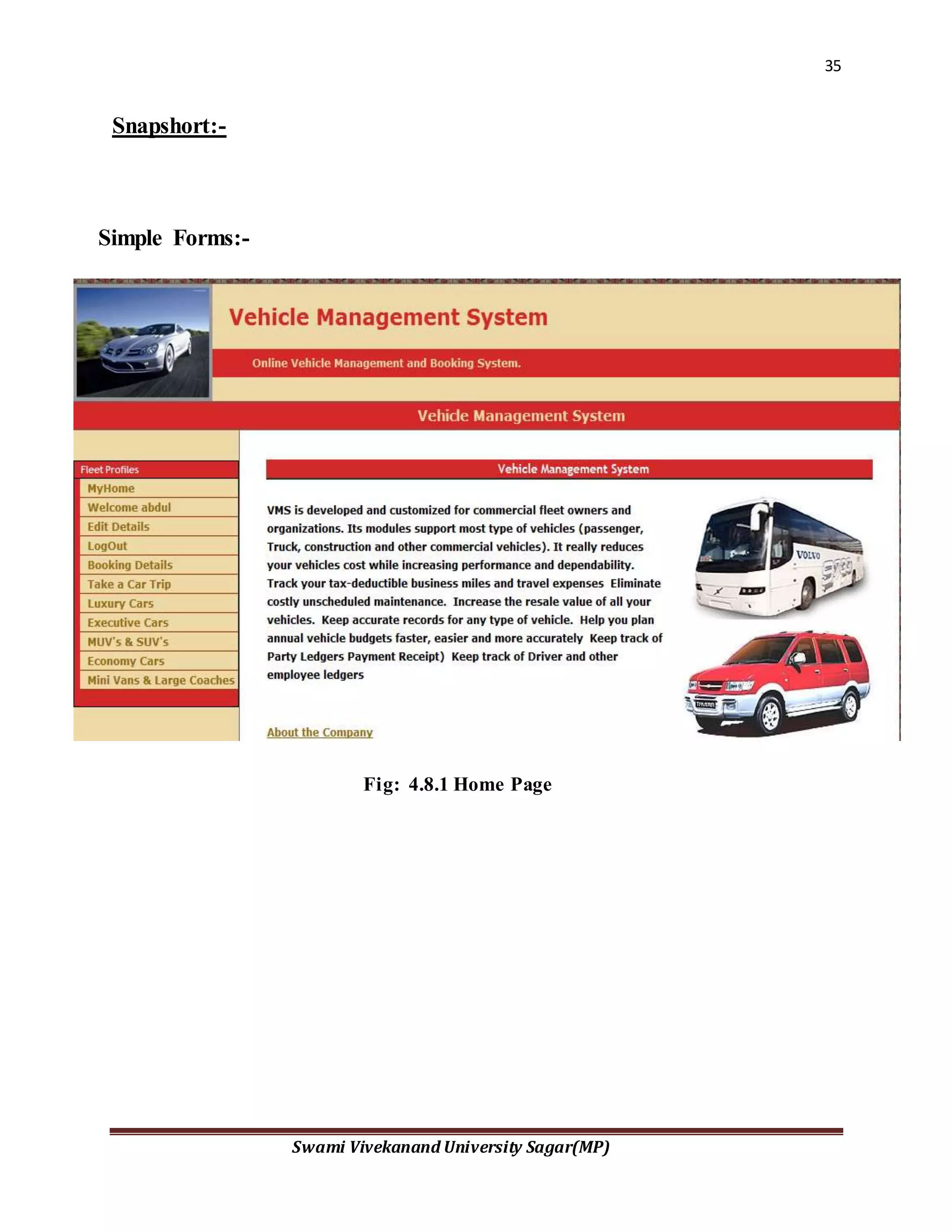
Snapshort:-
Simple Forms:-
Fig: 4.8.1 Home Page
36
Swami Vivekanand University Sagar(MP)
Fig: 4.8.1 Home Page
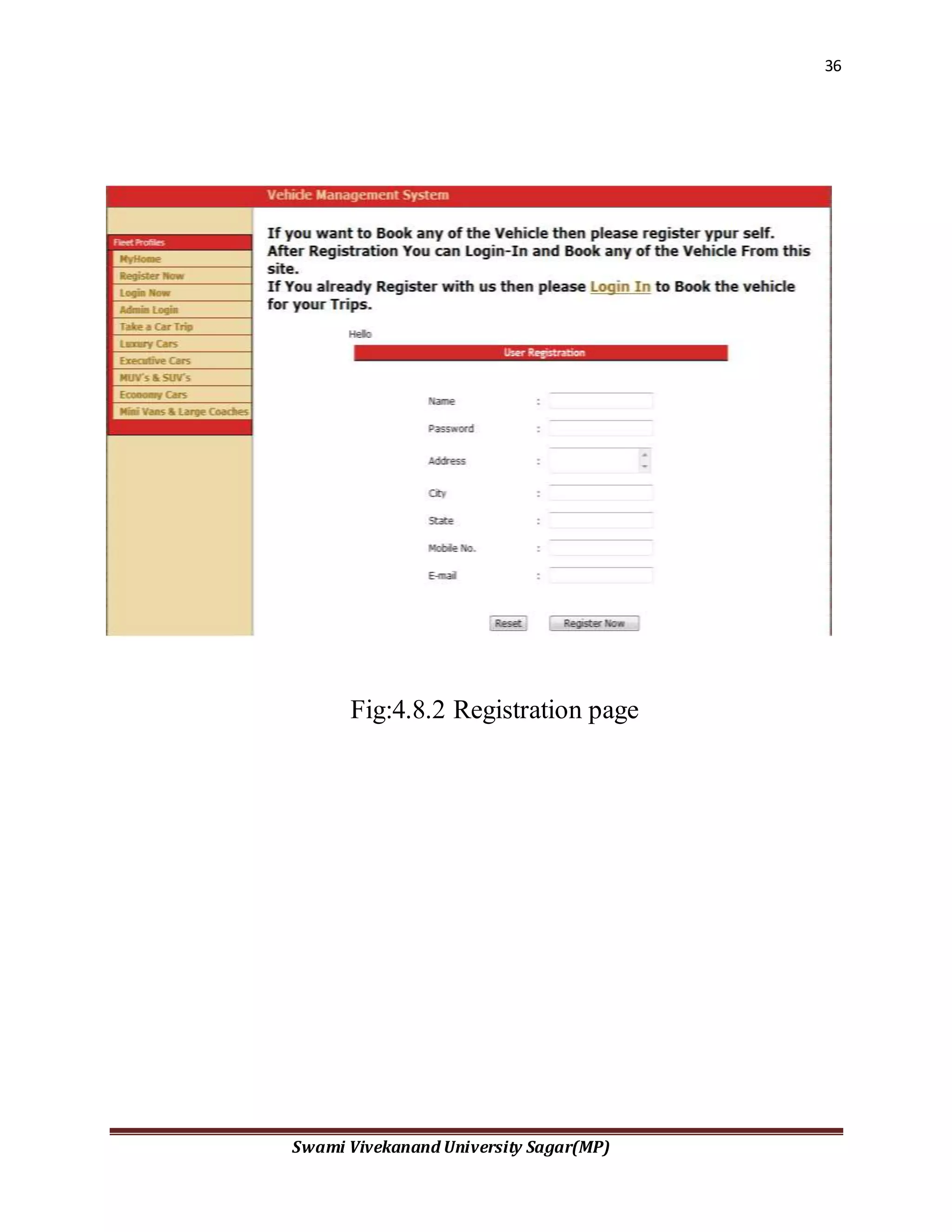
Fig:4.8.2 Registration page
37
Swami Vivekanand University Sagar(MP)
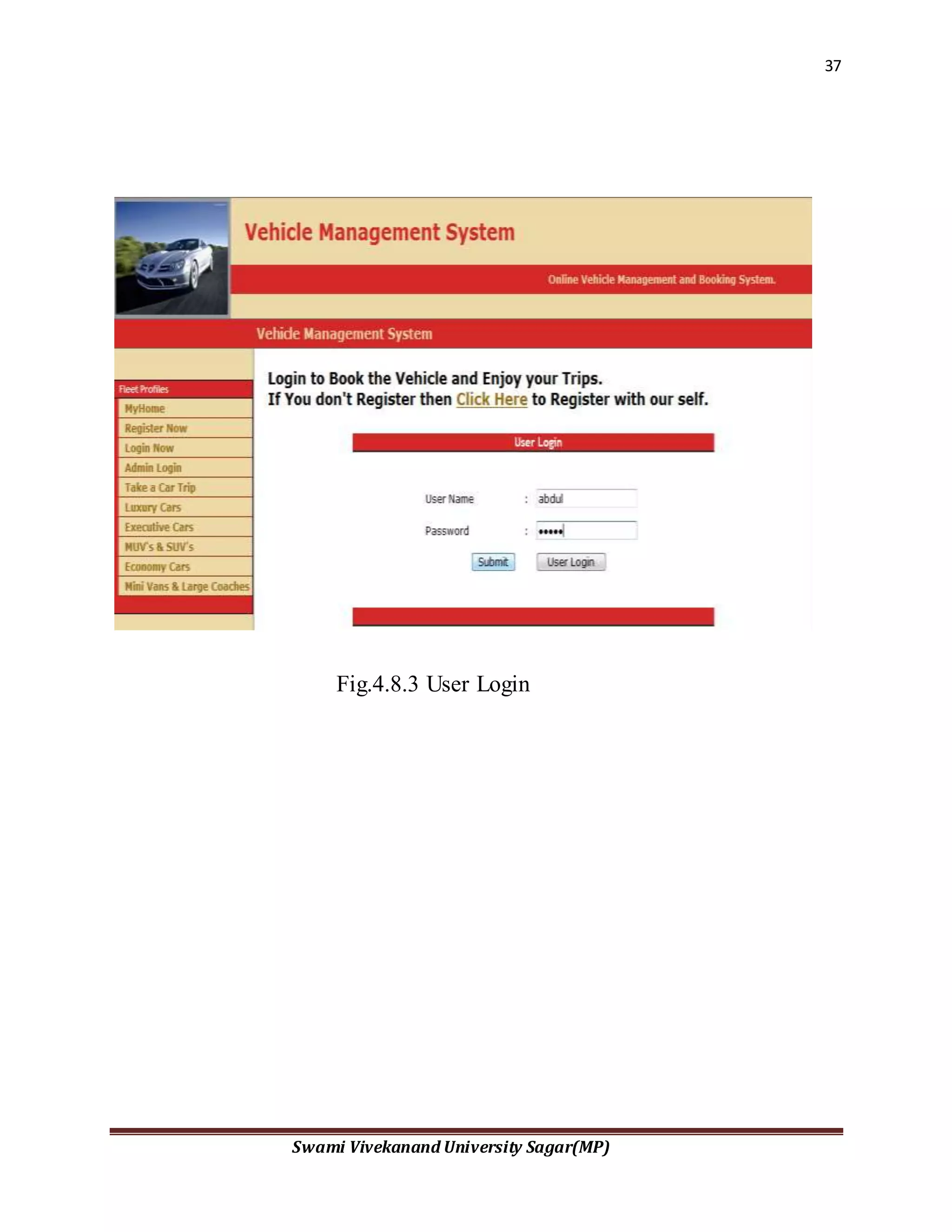
Fig.4.8.3 User Login
38
Swami Vivekanand University Sagar(MP)
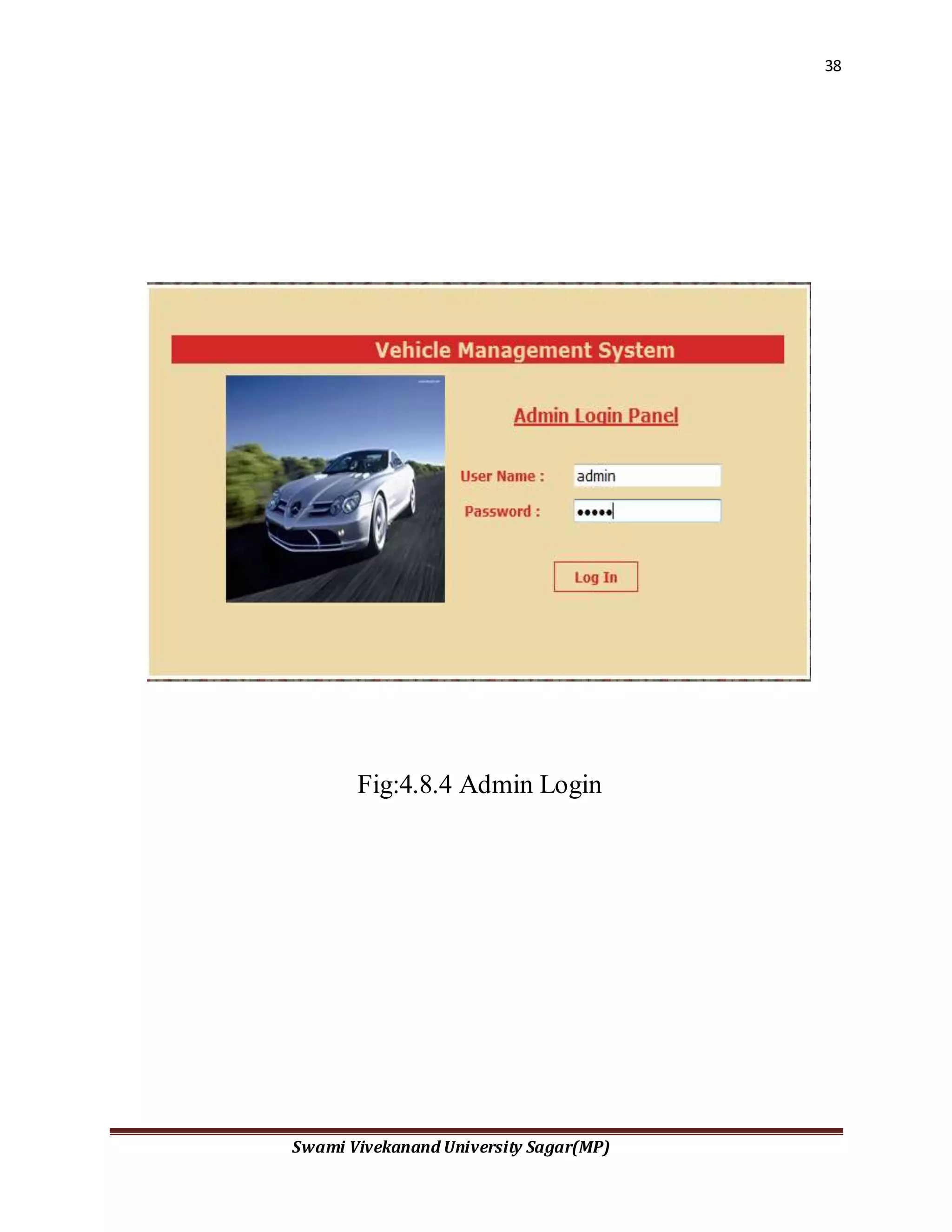
Fig:4.8.4 Admin Login
39
Swami Vivekanand University Sagar(MP)
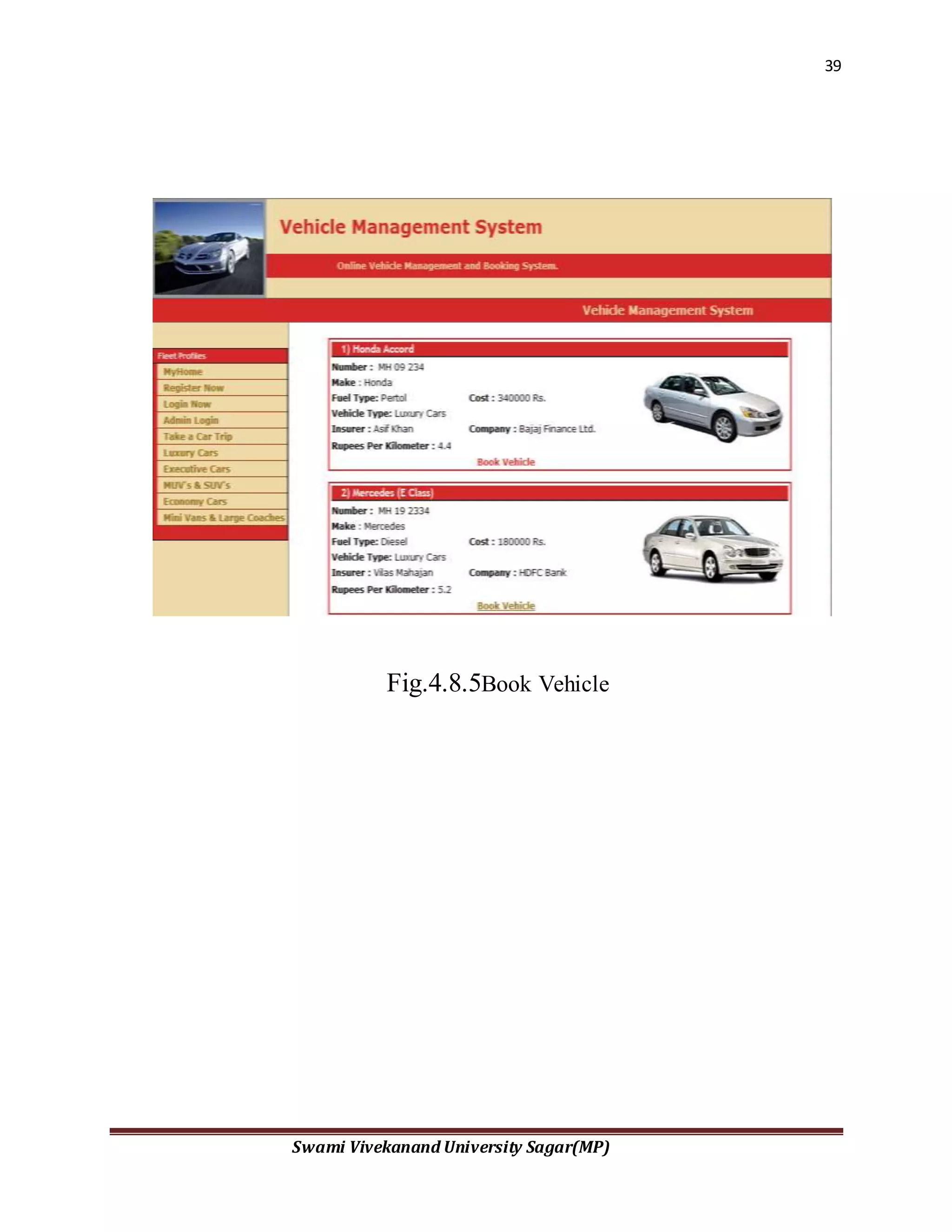
Fig.4.8.5Book Vehicle
40
Swami Vivekanand University Sagar(MP)
Fig.4.8.5 Choose a font
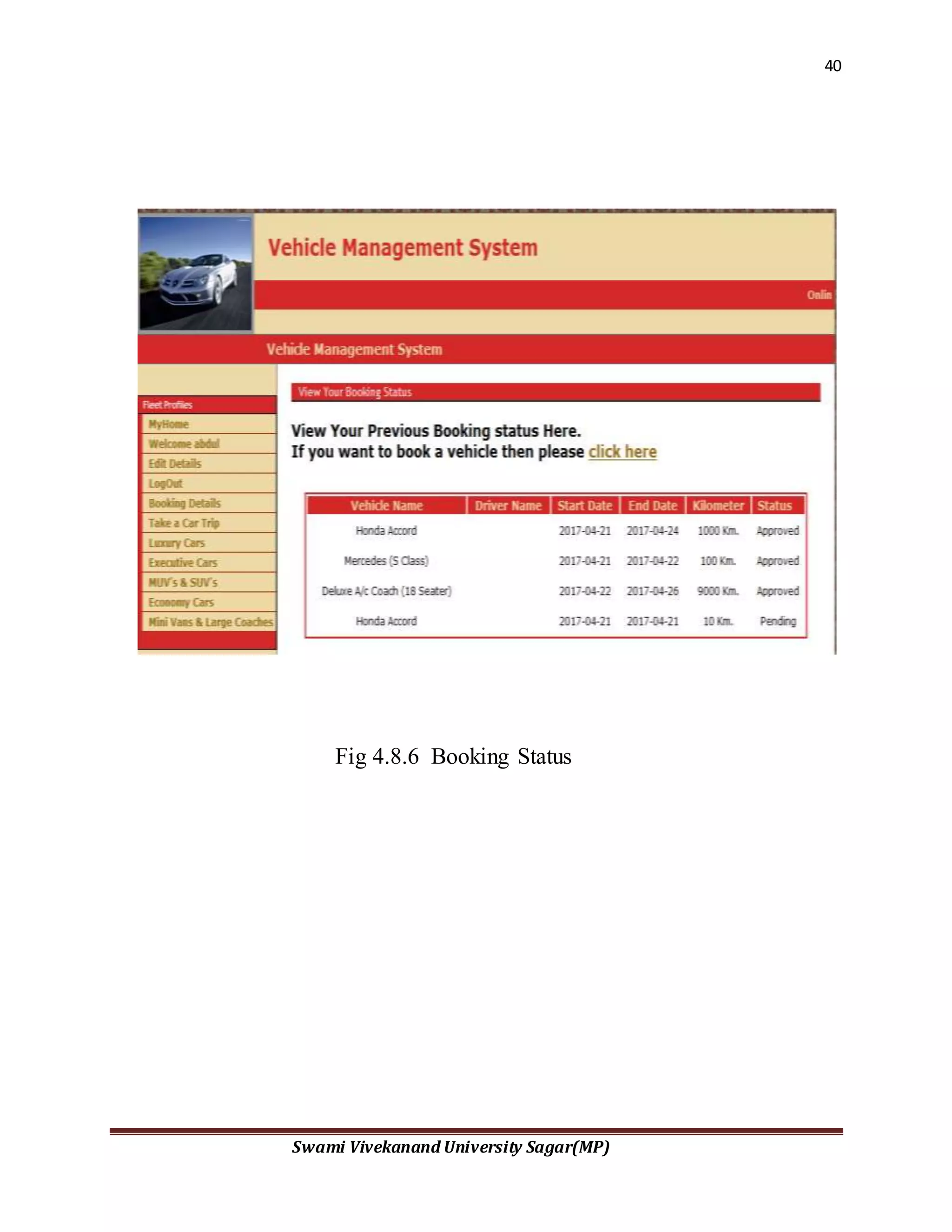
Fig 4.8.6 Booking Status
41
Swami Vivekanand University Sagar(MP)
Fig 4.8.6 Find Text
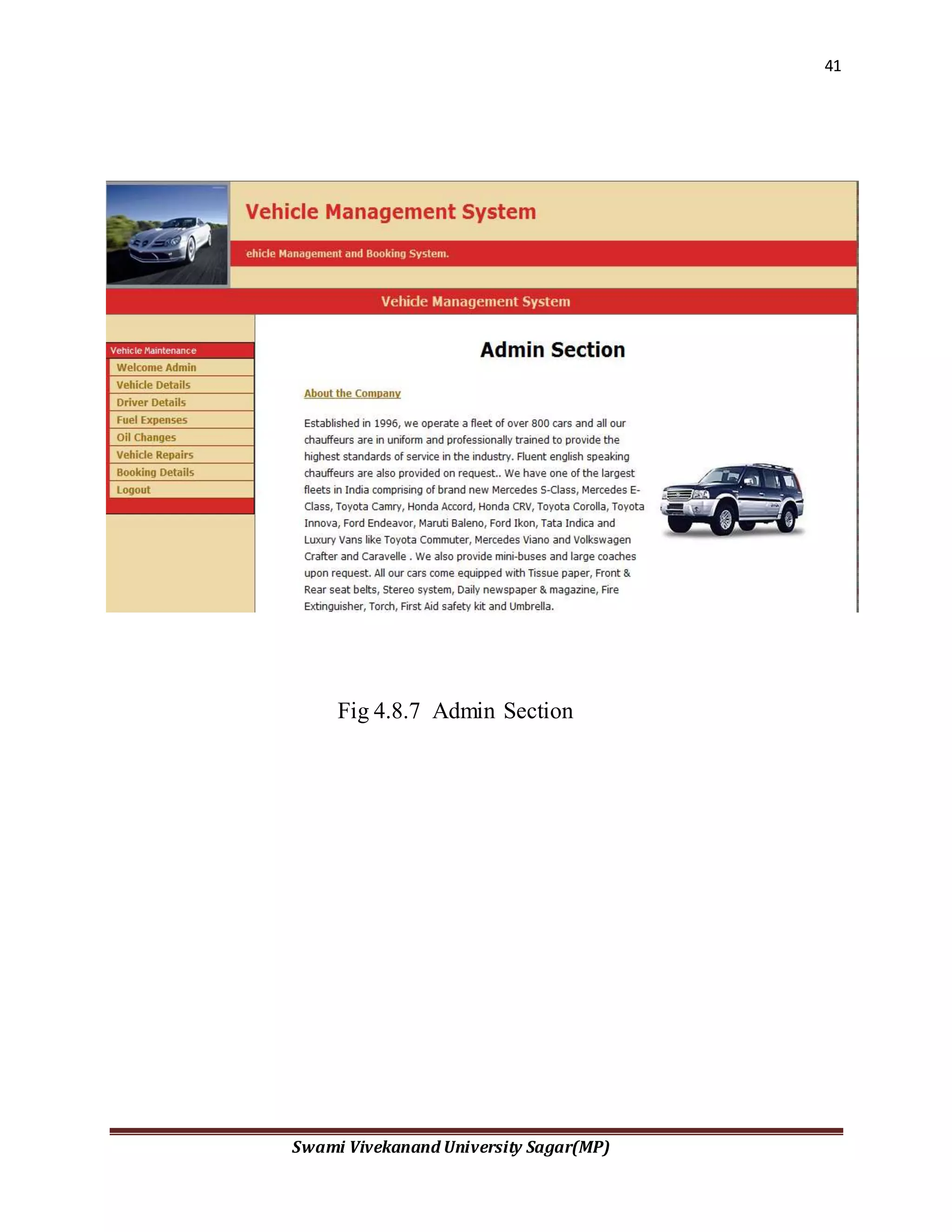
Fig 4.8.7 Admin Section
42
Swami Vivekanand University Sagar(MP)
Fig 4.8.7 Find and Replace
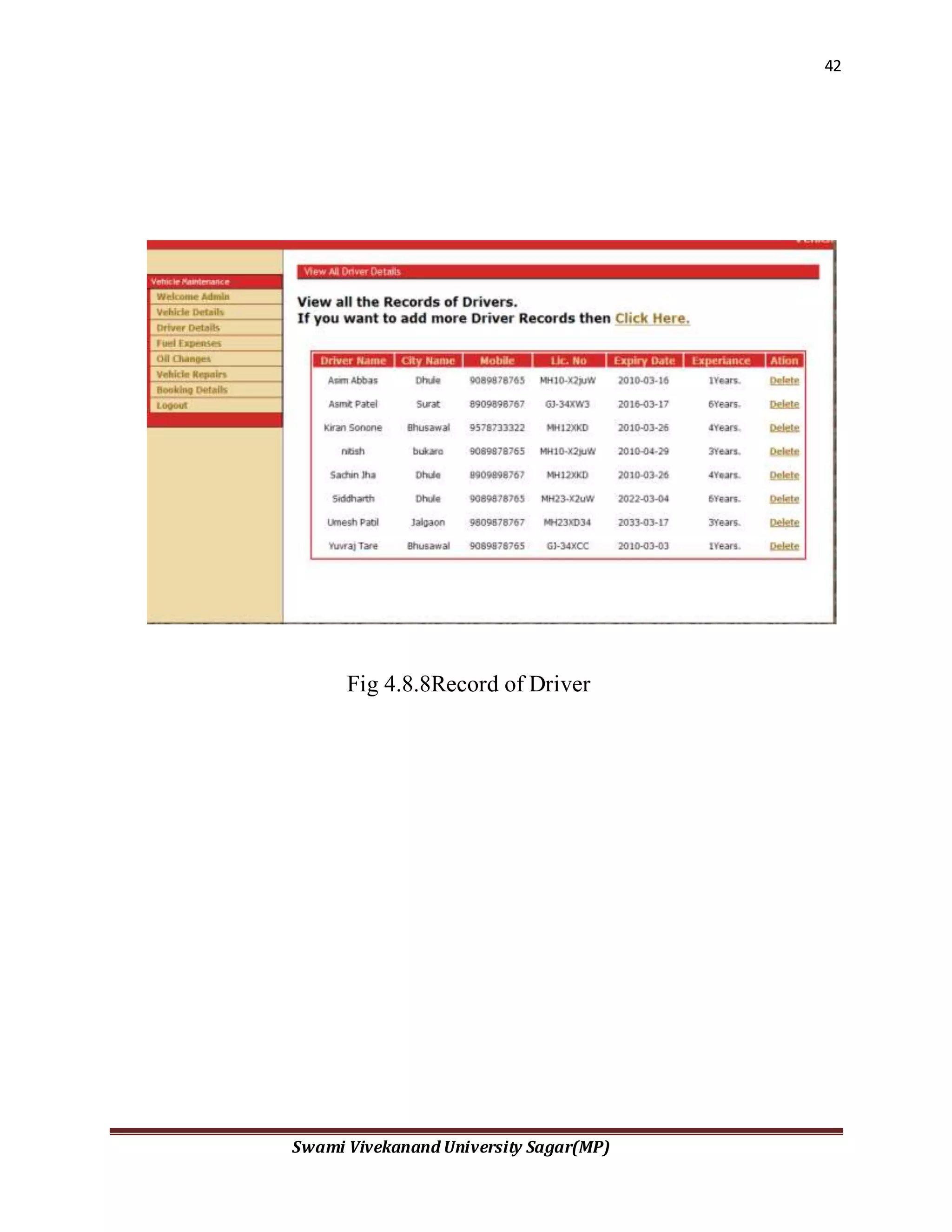
Fig 4.8.8Record of Driver
43
Swami Vivekanand University Sagar(MP)
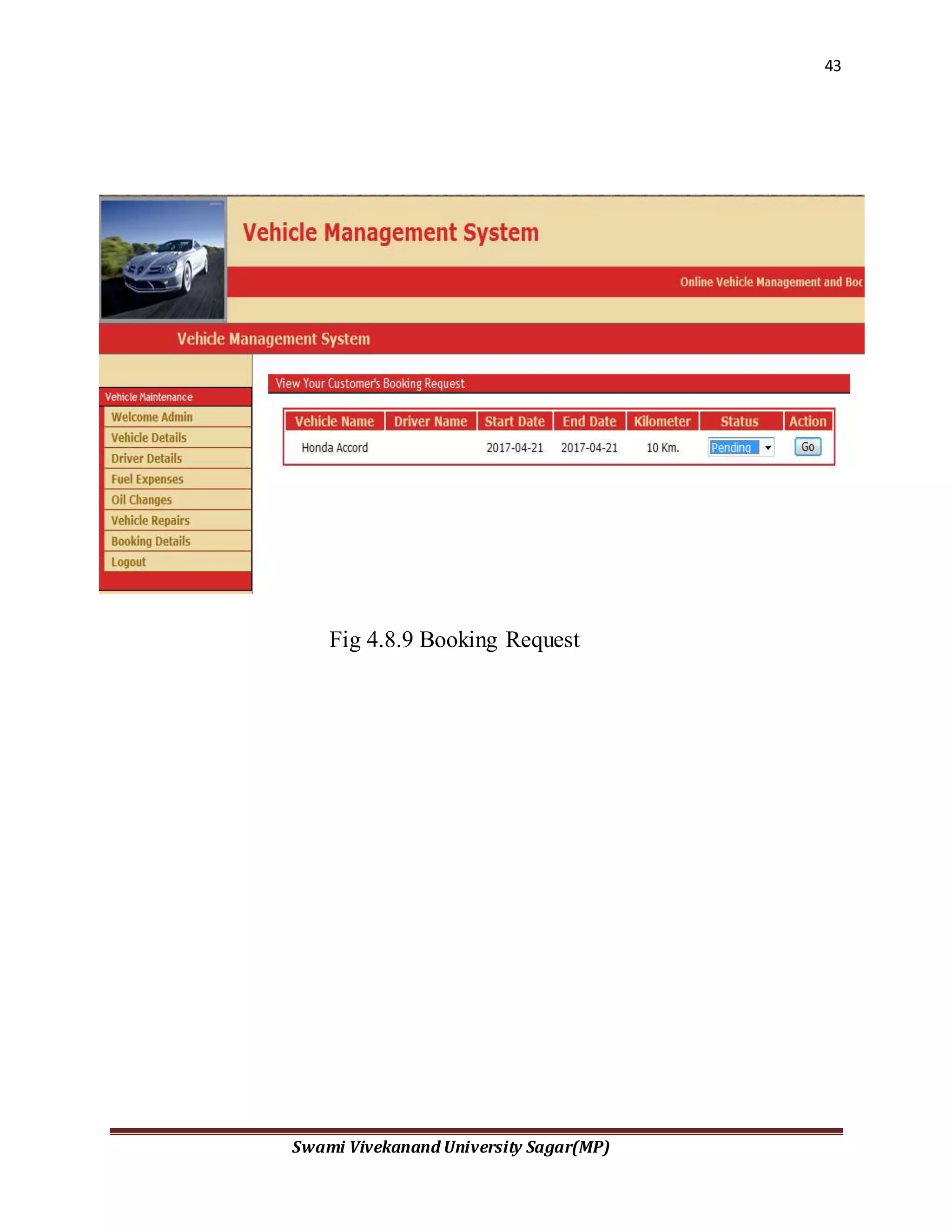
Fig 4.8.9 Booking Request
44
Swami Vivekanand University Sagar(MP)
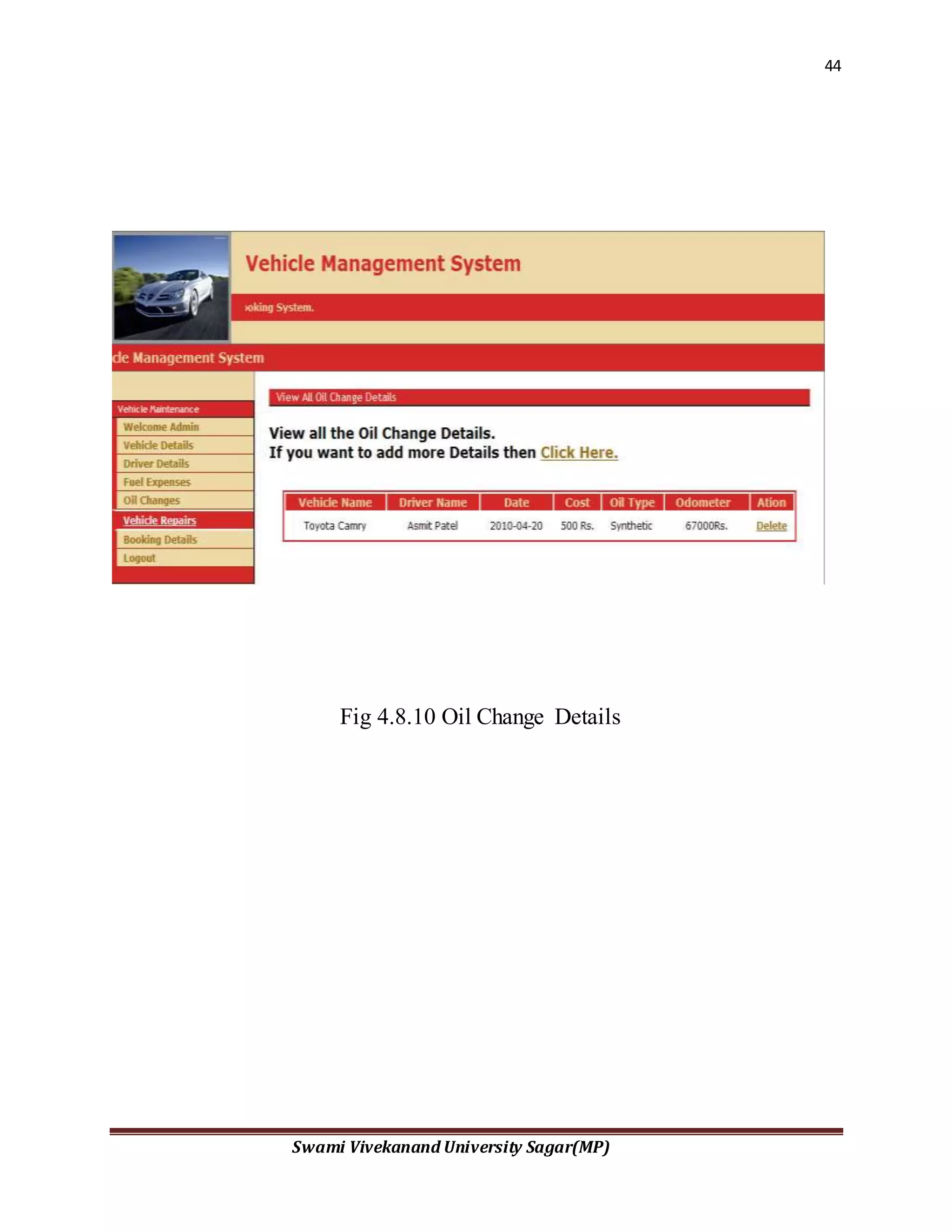
Fig 4.8.10 Oil Change Details
45
Swami Vivekanand University Sagar(MP)
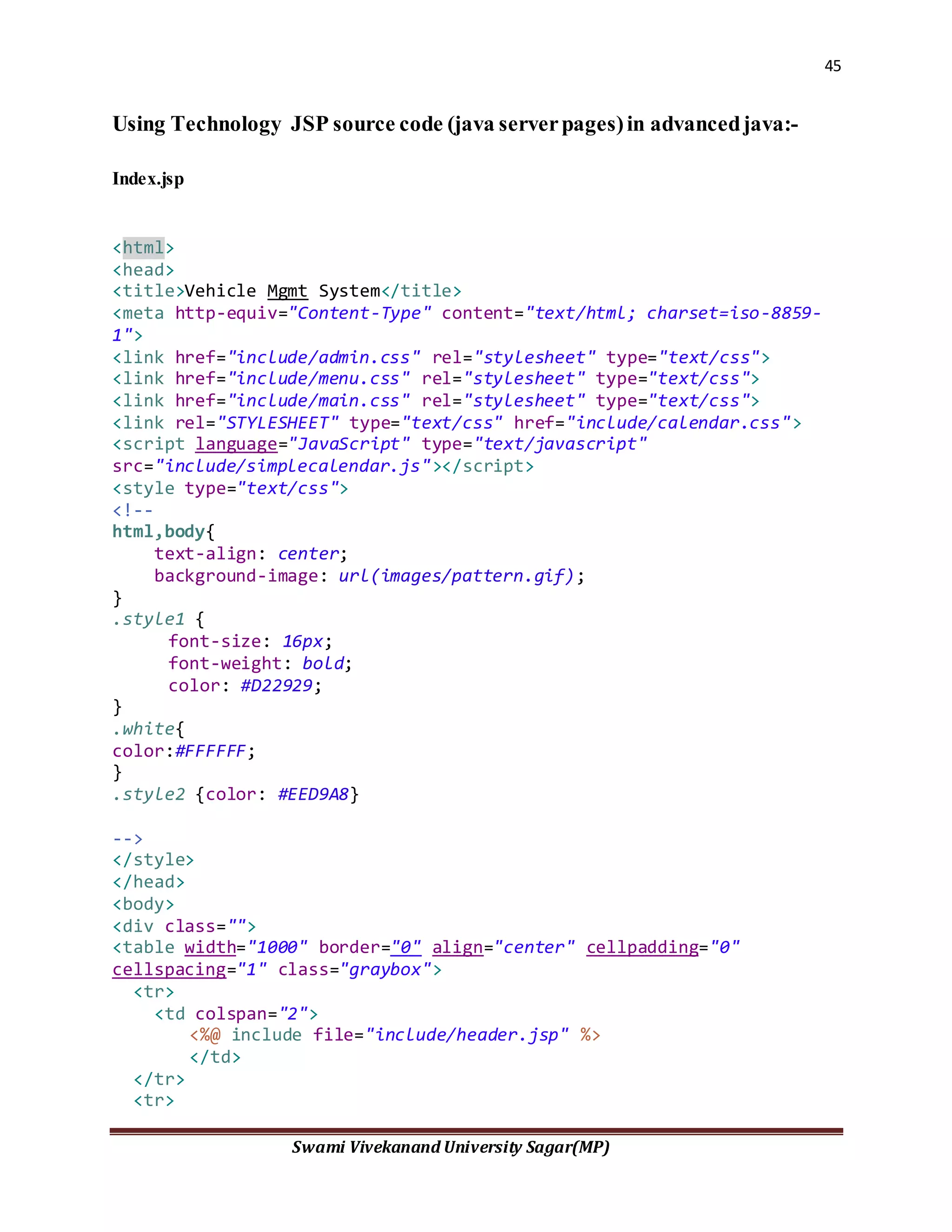
Using Technology JSP source code (java serverpages)in advancedjava:-
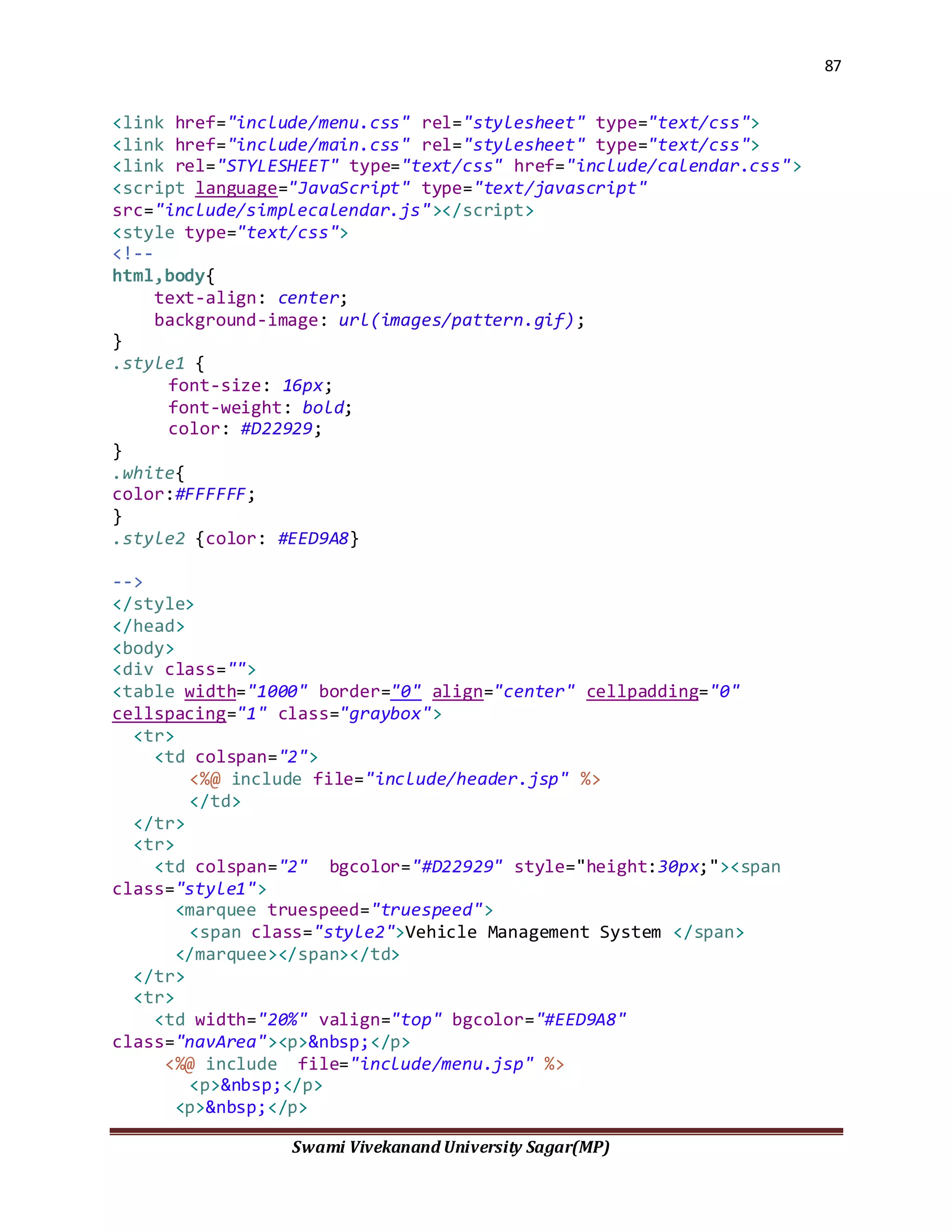
Index.jsp
<html>
<head>
<title>Vehicle Mgmt System</title>
<meta http-equiv="Content-Type" content="text/html; charset=iso-8859-
1">
<link href="include/admin.css" rel="stylesheet" type="text/css">
<link href="include/menu.css" rel="stylesheet" type="text/css">
<link href="include/main.css" rel="stylesheet" type="text/css">
<link rel="STYLESHEET" type="text/css" href="include/calendar.css">
<script language="JavaScript" type="text/javascript"
src="include/simplecalendar.js"></script>
<style type="text/css">
<!--
html,body{
text-align: center;
background-image: url(images/pattern.gif);
}
.style1 {
font-size: 16px;
font-weight: bold;
color: #D22929;
}
.white{
color:#FFFFFF;
}
.style2 {color: #EED9A8}
-->
</style>
</head>
<body>
<div class="">
<table width="1000" border="0" align="center" cellpadding="0"
cellspacing="1" class="graybox">
<tr>
<td colspan="2">
<%@ include file="include/header.jsp" %>
</td>
</tr>
<tr>
46
Swami Vivekanand University Sagar(MP)
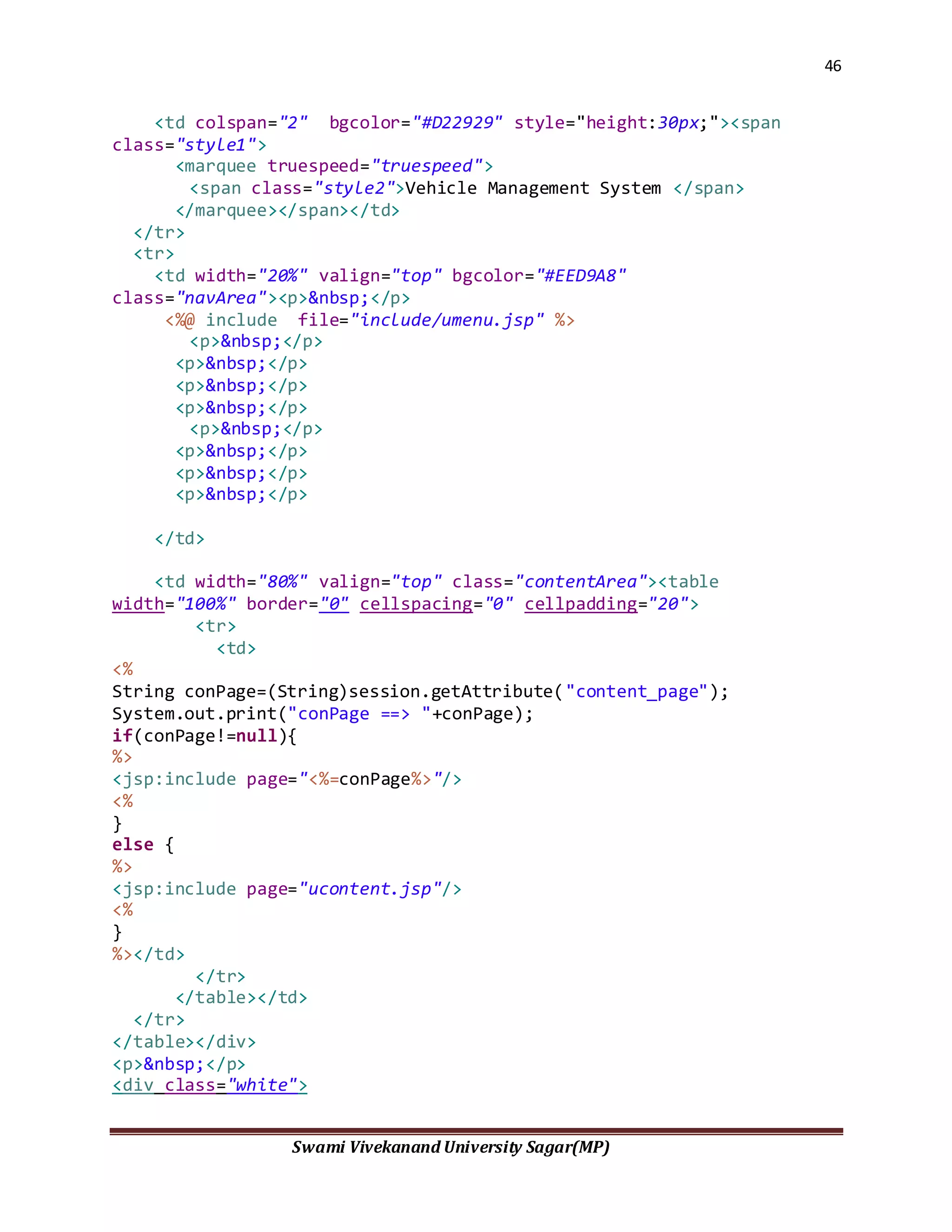
<td colspan="2" bgcolor="#D22929" style="height:30px;"><span
class="style1">
<marquee truespeed="truespeed">
<span class="style2">Vehicle Management System </span>
</marquee></span></td>
</tr>
<tr>
<td width="20%" valign="top" bgcolor="#EED9A8"
class="navArea"><p>&nbsp;</p>
<%@ include file="include/umenu.jsp" %>
<p>&nbsp;</p>
<p>&nbsp;</p>
<p>&nbsp;</p>
<p>&nbsp;</p>
<p>&nbsp;</p>
<p>&nbsp;</p>
<p>&nbsp;</p>
<p>&nbsp;</p>
</td>
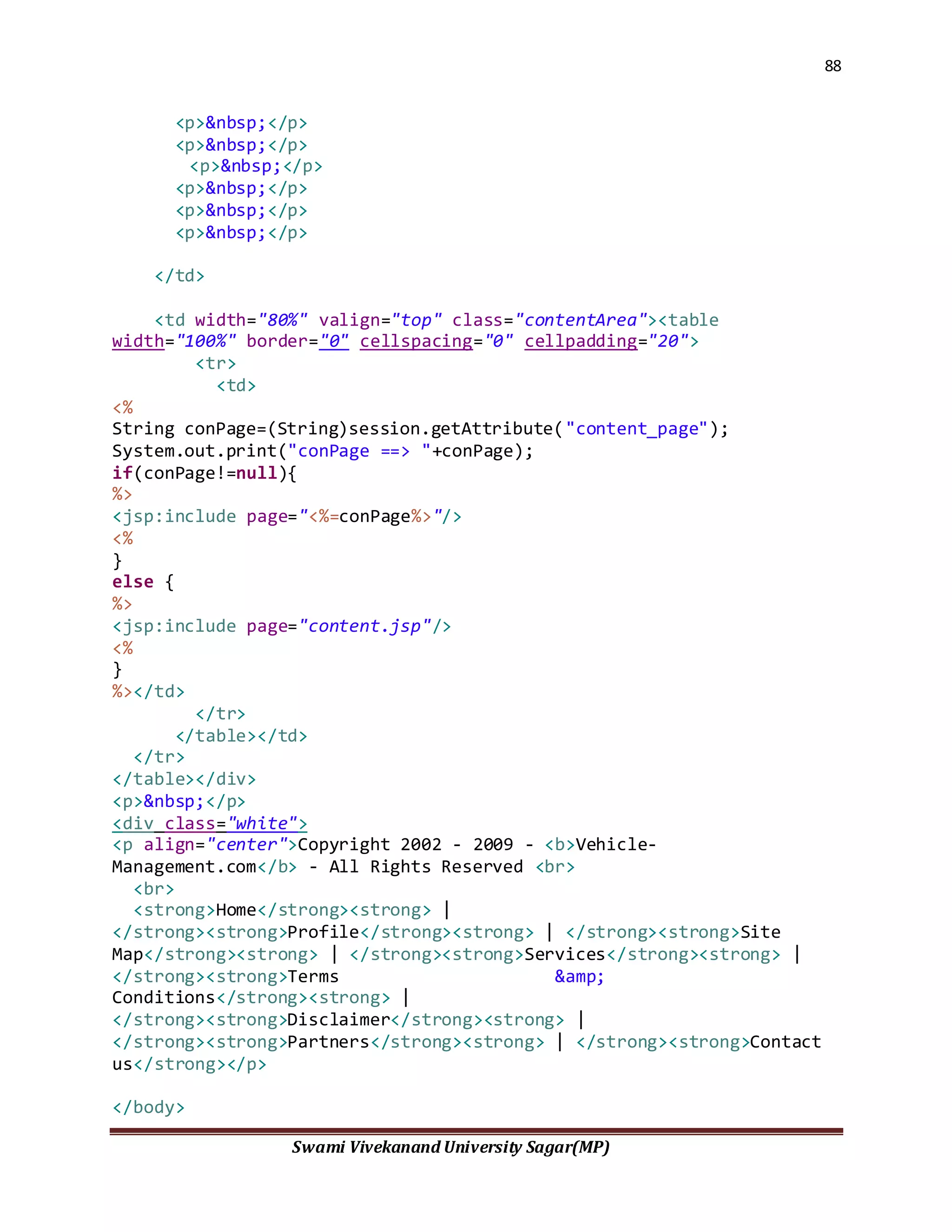
<td width="80%" valign="top" class="contentArea"><table
width="100%" border="0" cellspacing="0" cellpadding="20">
<tr>
<td>
<%
String conPage=(String)session.getAttribute("content_page");
System.out.print("conPage ==> "+conPage);
if(conPage!=null){
%>
<jsp:include page="<%=conPage%>"/>
<%
}
else {
%>
<jsp:include page="ucontent.jsp"/>
<%
}
%></td>
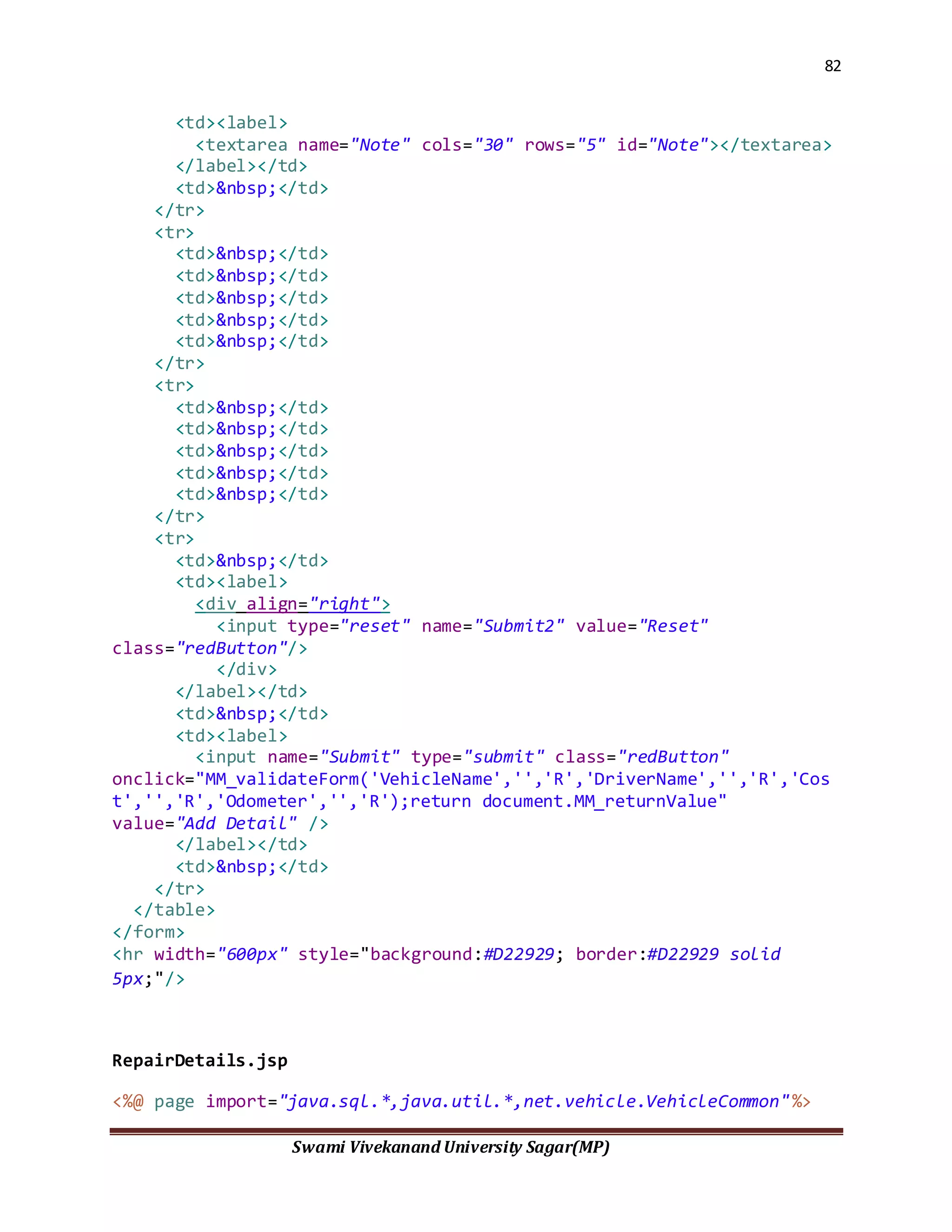
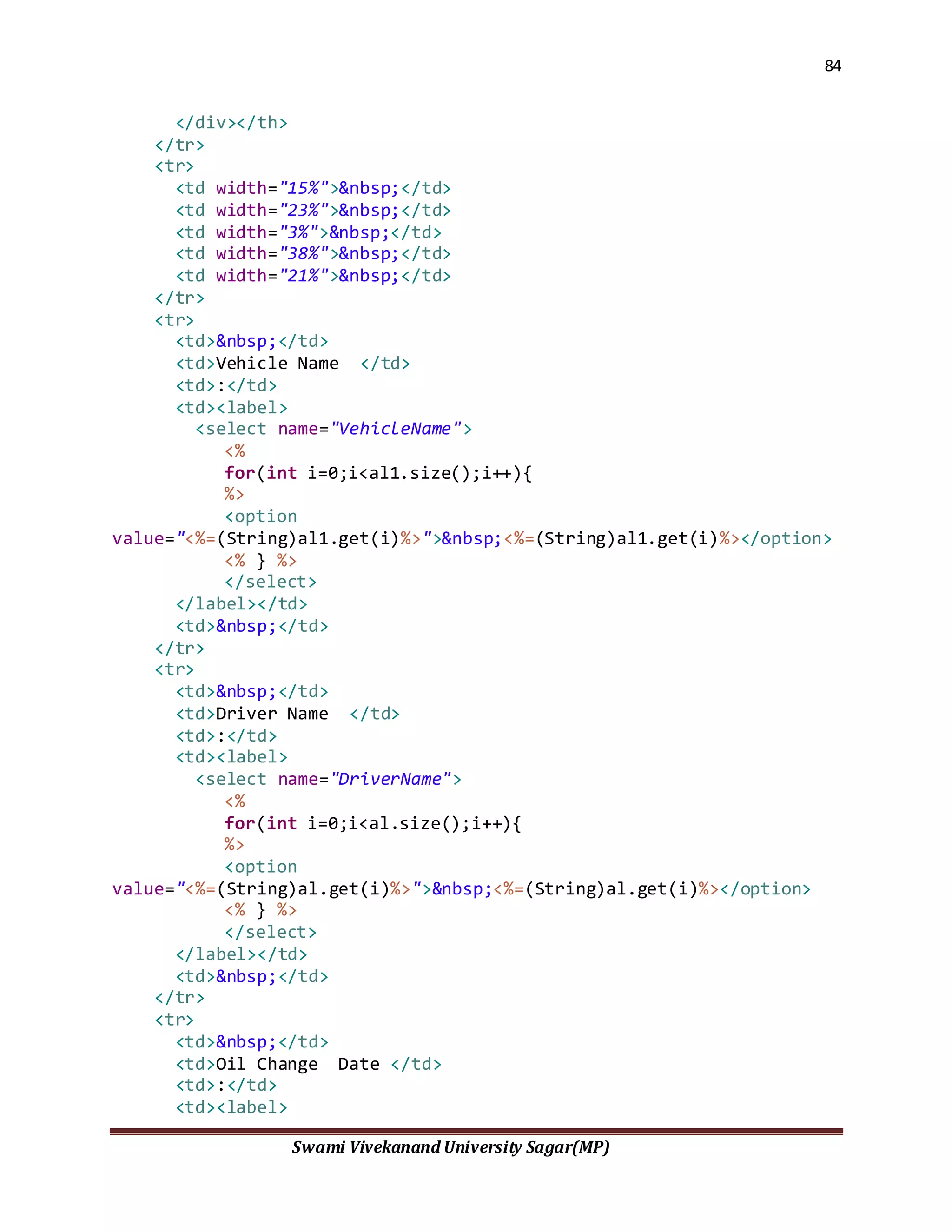
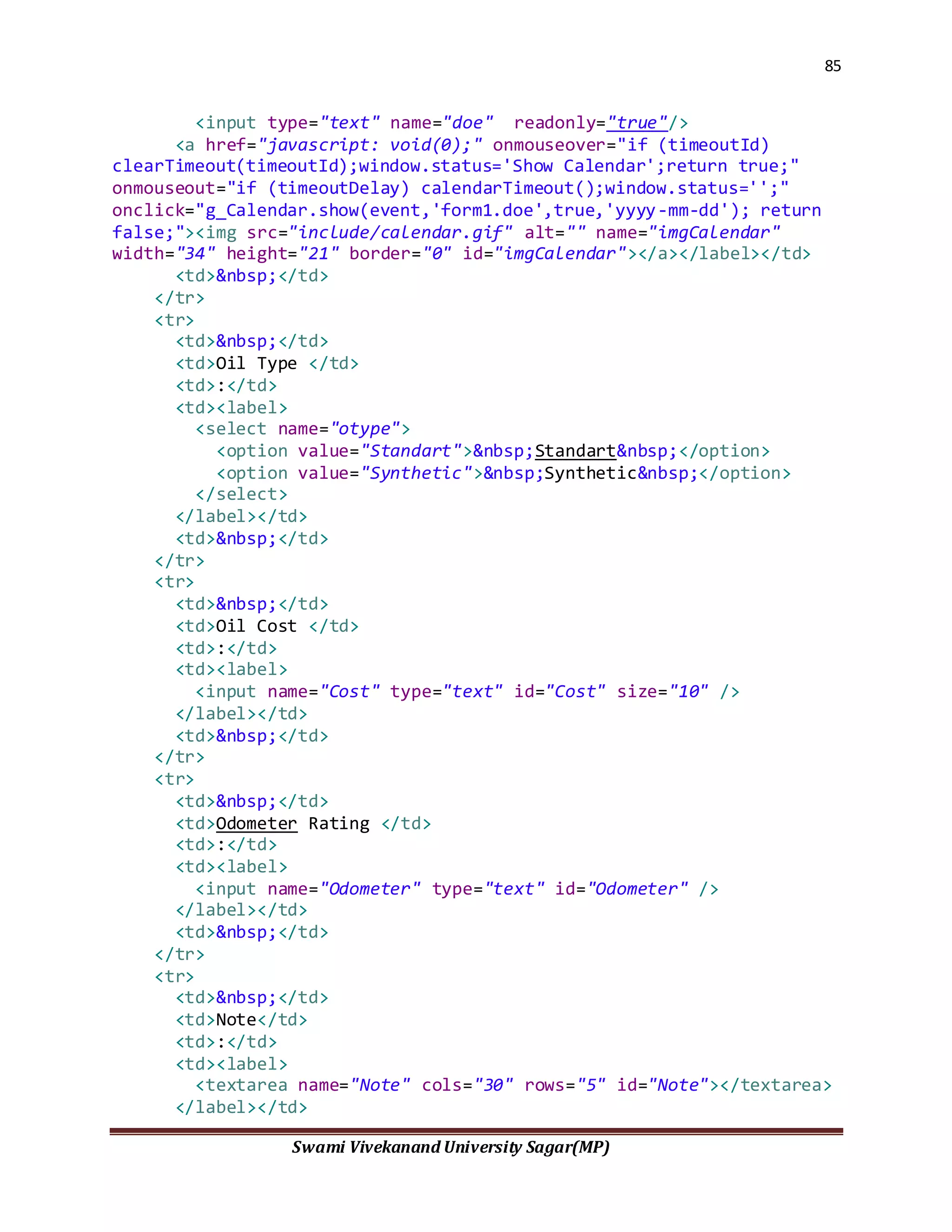
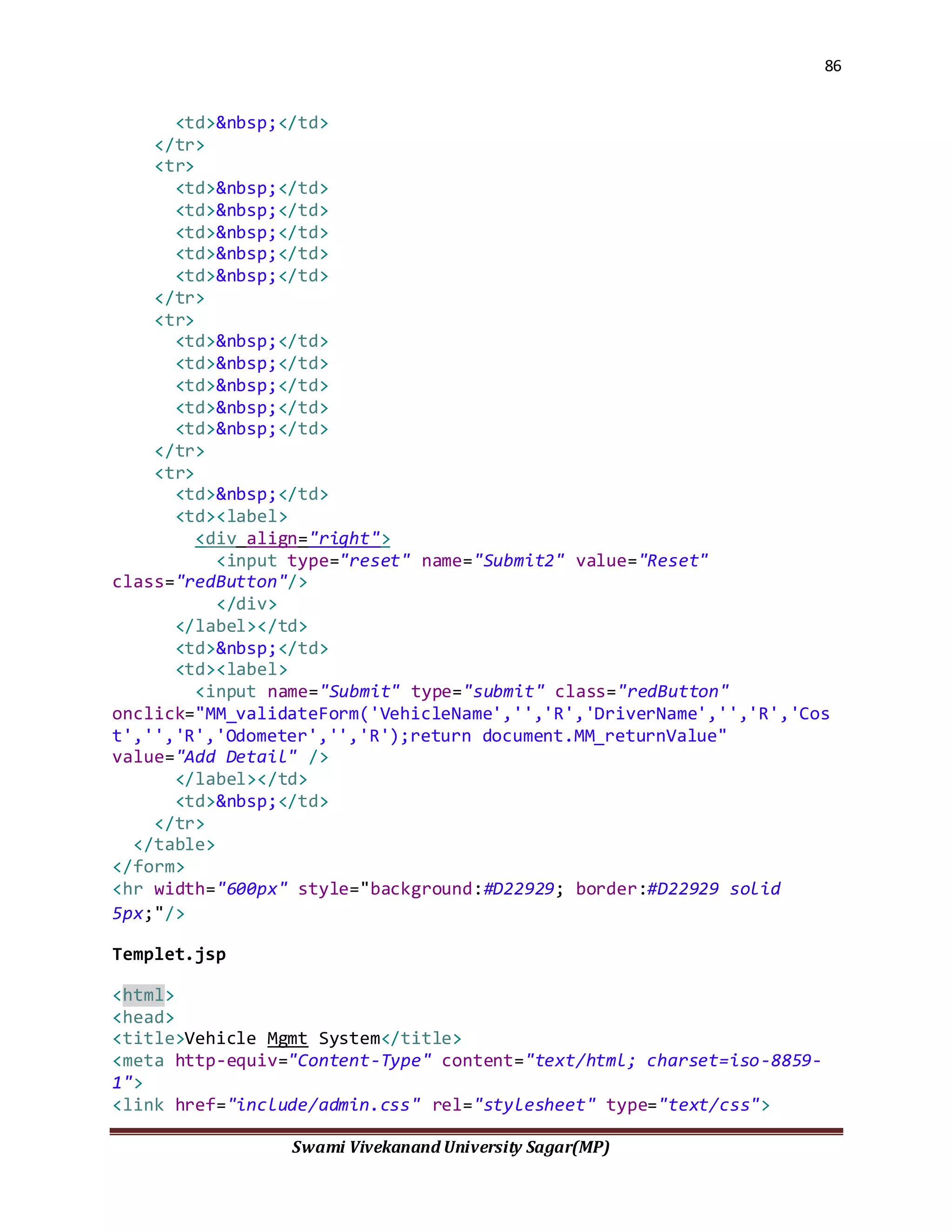
</tr>
</table></td>
</tr>
</table></div>
<p>&nbsp;</p>
<div class="white">
47
Swami Vivekanand University Sagar(MP)
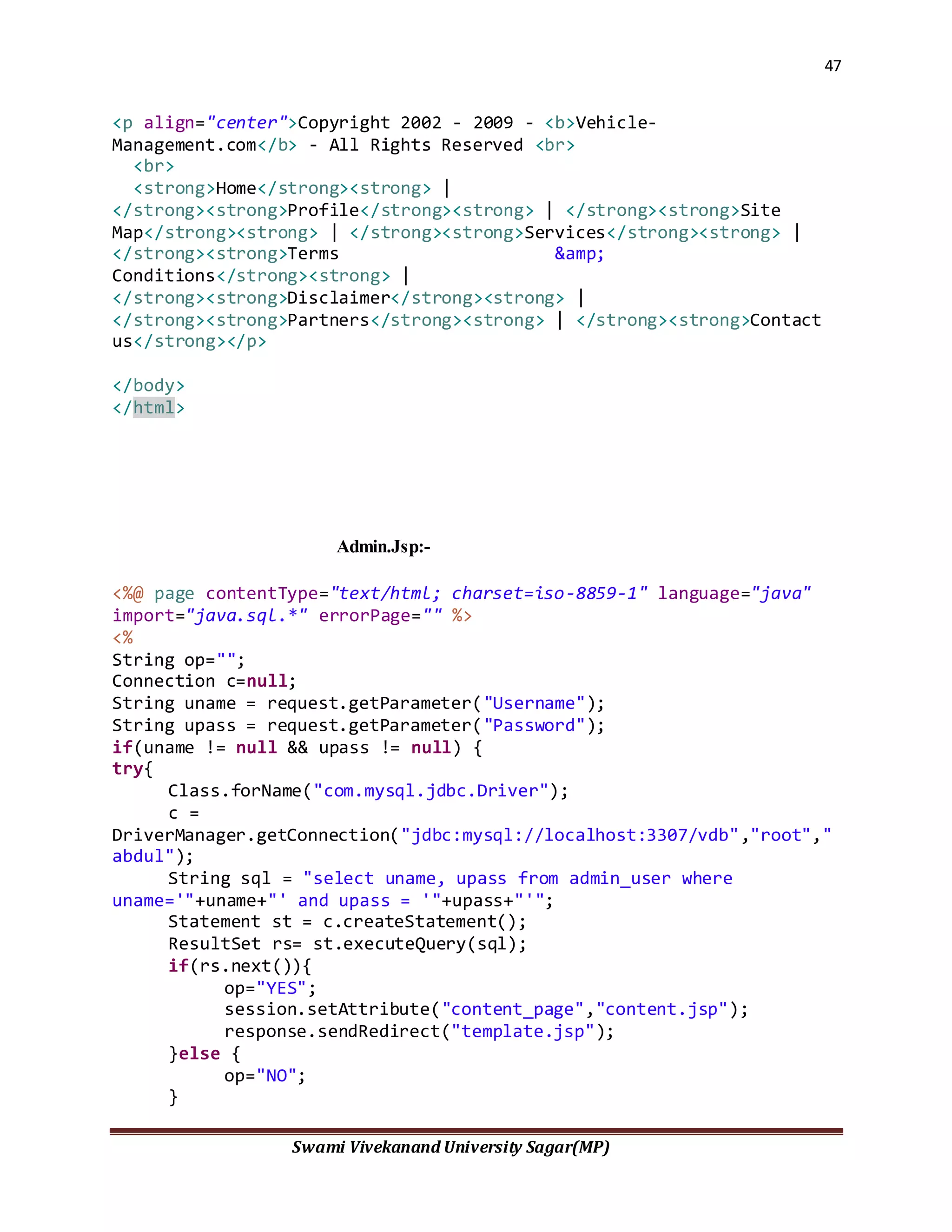
<p align="center">Copyright 2002 - 2009 - <b>Vehicle-
Management.com</b> - All Rights Reserved <br>
<br>
<strong>Home</strong><strong> |
</strong><strong>Profile</strong><strong> | </strong><strong>Site
Map</strong><strong> | </strong><strong>Services</strong><strong> |
</strong><strong>Terms &amp;
Conditions</strong><strong> |
</strong><strong>Disclaimer</strong><strong> |
</strong><strong>Partners</strong><strong> | </strong><strong>Contact
us</strong></p>
</body>
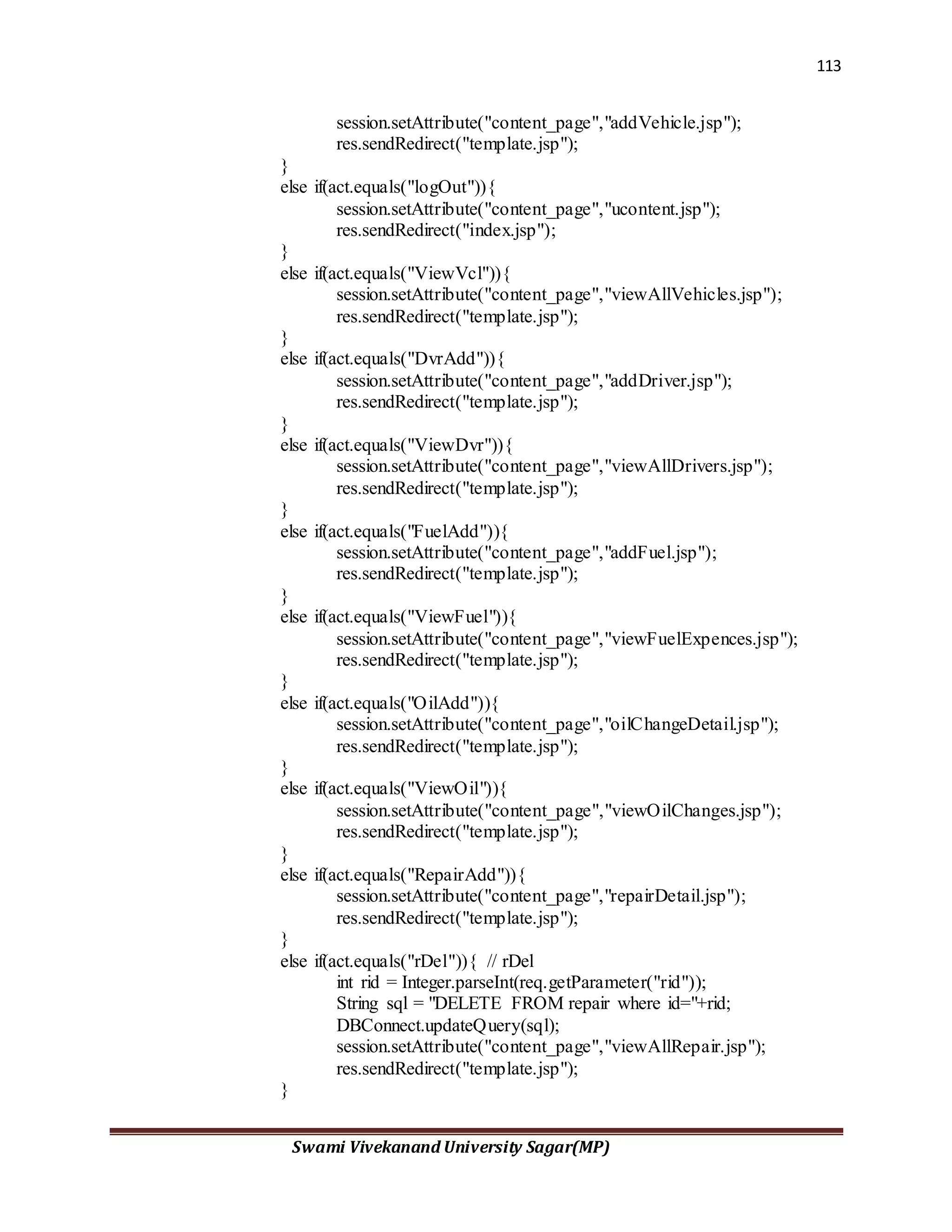
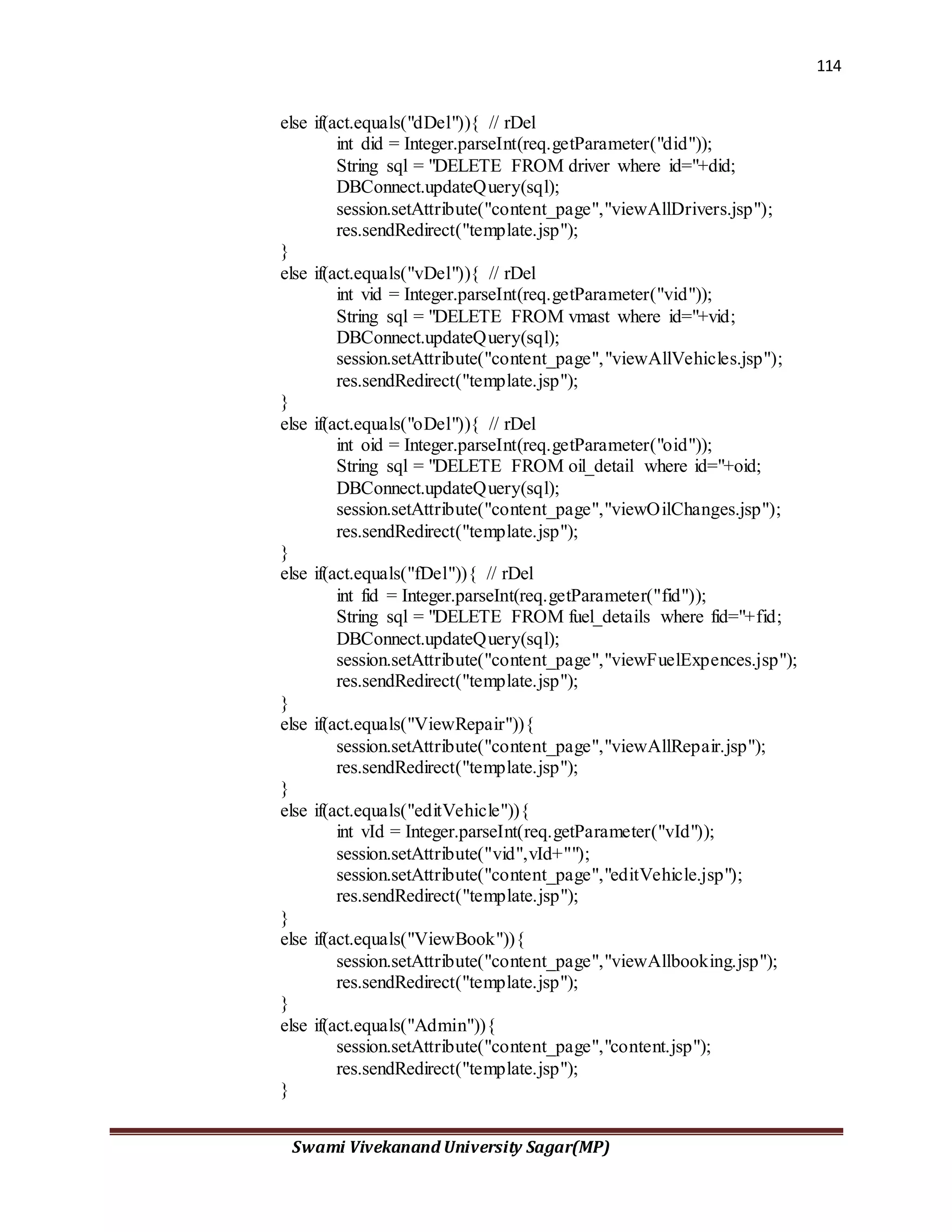
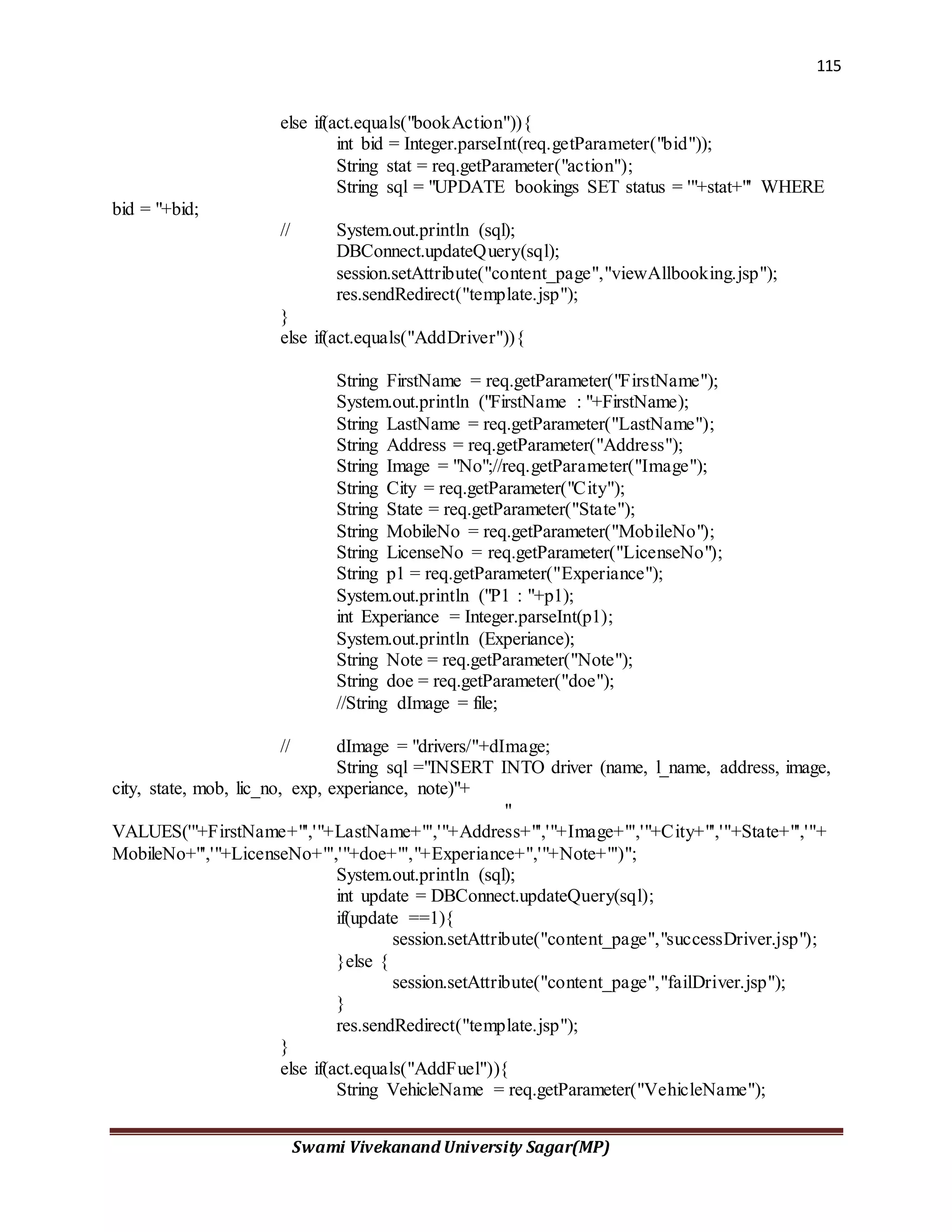
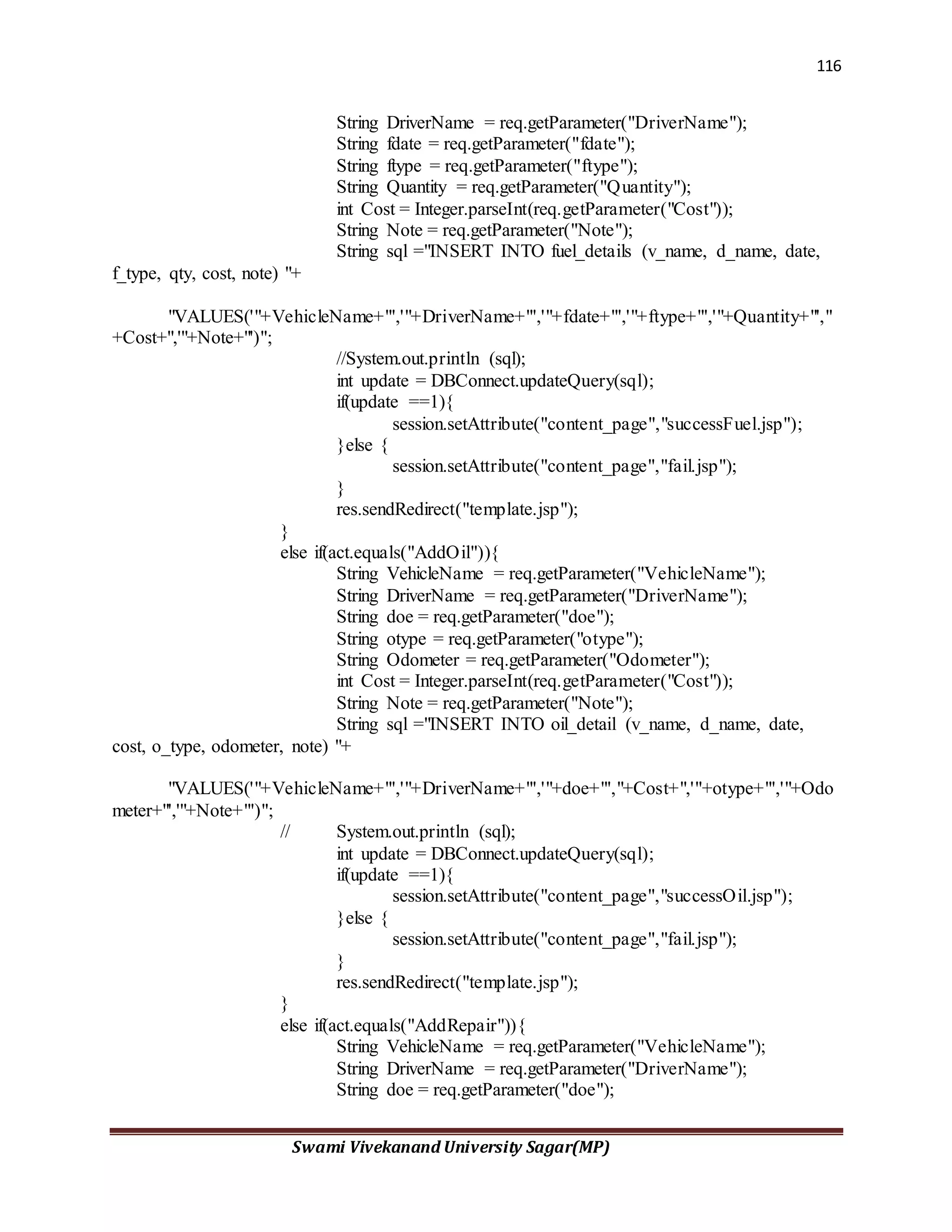
</html>
Admin.Jsp:-
<%@ page contentType="text/html; charset=iso-8859-1" language="java"
import="java.sql.*" errorPage="" %>
<%
String op="";
Connection c=null;
String uname = request.getParameter("Username");
String upass = request.getParameter("Password");
if(uname != null && upass != null) {
try{
Class.forName("com.mysql.jdbc.Driver");
c =
DriverManager.getConnection("jdbc:mysql://localhost:3307/vdb","root","
abdul");
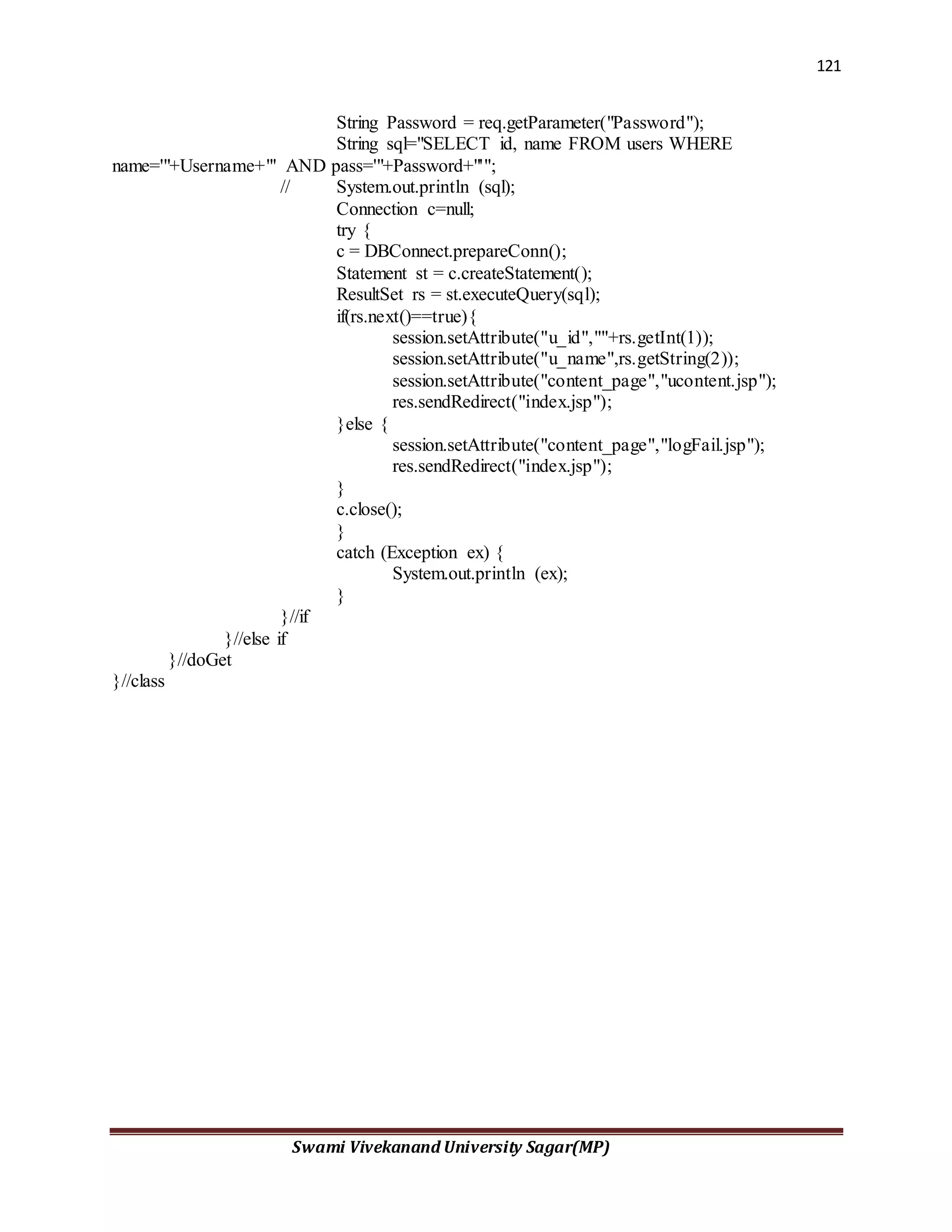
String sql = "select uname, upass from admin_user where
uname='"+uname+"' and upass = '"+upass+"'";
Statement st = c.createStatement();
ResultSet rs= st.executeQuery(sql);
if(rs.next()){
op="YES";
session.setAttribute("content_page","content.jsp");
response.sendRedirect("template.jsp");
}else {
op="NO";
}
48
Swami Vivekanand University Sagar(MP)
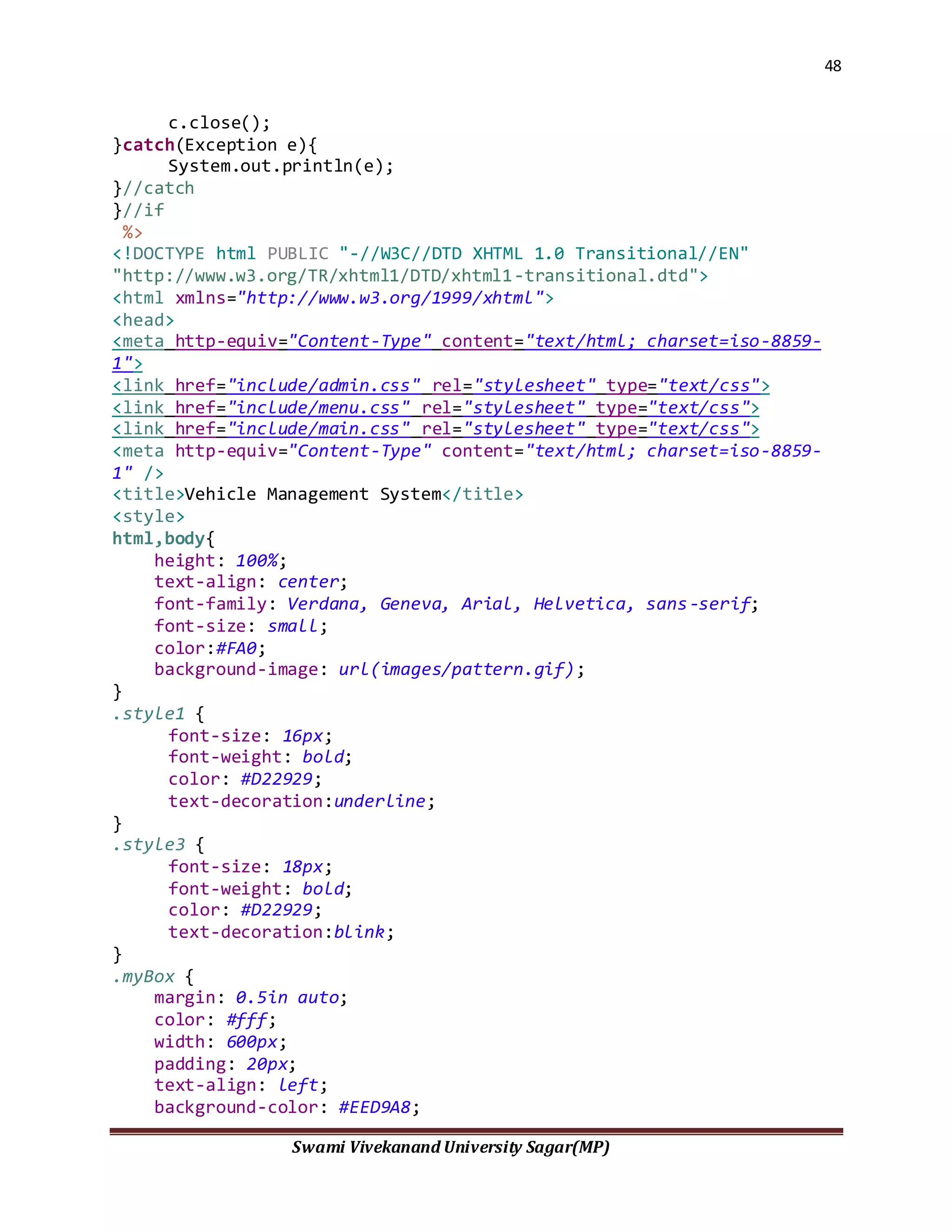
c.close();
}catch(Exception e){
System.out.println(e);
}//catch
}//if
%>
<!DOCTYPE html PUBLIC "-//W3C//DTD XHTML 1.0 Transitional//EN"
"http://www.w3.org/TR/xhtml1/DTD/xhtml1-transitional.dtd">
<html xmlns="http://www.w3.org/1999/xhtml">
<head>
<meta http-equiv="Content-Type" content="text/html; charset=iso-8859-
1">
<link href="include/admin.css" rel="stylesheet" type="text/css">
<link href="include/menu.css" rel="stylesheet" type="text/css">
<link href="include/main.css" rel="stylesheet" type="text/css">
<meta http-equiv="Content-Type" content="text/html; charset=iso-8859-
1" />
<title>Vehicle Management System</title>
<style>
html,body{
height: 100%;
text-align: center;
font-family: Verdana, Geneva, Arial, Helvetica, sans-serif;
font-size: small;
color:#FA0;
background-image: url(images/pattern.gif);
}
.style1 {
font-size: 16px;
font-weight: bold;
color: #D22929;
text-decoration:underline;
}
.style3 {
font-size: 18px;
font-weight: bold;
color: #D22929;
text-decoration:blink;
}
.myBox {
margin: 0.5in auto;
color: #fff;
width: 600px;
padding: 20px;
text-align: left;
background-color: #EED9A8;
49
Swami Vivekanand University Sagar(MP)
border: 3px solid #fff;
/* Do rounding (native in Firefox and Safari) */
-webkit-border-radius: 20px;
-moz-border-radius: 20px;
}
.style4 {color: #EED9A8}
.style5 {color: #D22929}
.style6 {color: #D22929; font-weight: bold; }
</style>
<script type="text/JavaScript">
<!--
function MM_findObj(n, d) { //v4.01
var p,i,x; if(!d) d=document;
if((p=n.indexOf("?"))>0&&parent.frames.length) {
d=parent.frames[n.substring(p+1)].document; n=n.substring(0,p);}
if(!(x=d[n])&&d.all) x=d.all[n]; for (i=0;!x&&i<d.forms.length;i++)
x=d.forms[i][n];
for(i=0;!x&&d.layers&&i<d.layers.length;i++)
x=MM_findObj(n,d.layers[i].document);
if(!x && d.getElementById) x=d.getElementById(n); return x;
}
function MM_validateForm() { //v4.0
var
i,p,q,nm,test,num,min,max,errors='',args=MM_validateForm.arguments;
for (i=0; i<(args.length-2); i+=3) { test=args[i+2];
val=MM_findObj(args[i]);
if (val) { nm=val.name; if ((val=val.value)!="") {
if (test.indexOf('isEmail')!=-1) { p=val.indexOf('@');
if (p<1 || p==(val.length-1)) errors+='- '+nm+' must contain
an e-mail address.n';
} else if (test!='R') { num = parseFloat(val);
if (isNaN(val)) errors+='- '+nm+' must contain a number.n';
if (test.indexOf('inRange') != -1) { p=test.indexOf(':');
min=test.substring(8,p); max=test.substring(p+1);
if (num<min || max<num) errors+='- '+nm+' must contain a
number between '+min+' and '+max+'.n';
} } } else if (test.charAt(0) == 'R') errors += '- '+nm+' is
required.n'; }
} if (errors) alert('The following error(s) occurred:n'+errors);
document.MM_returnValue = (errors == '');
}
//-->
</script>
</head>
50
Swami Vivekanand University Sagar(MP)
<body>
<div class="myBox">
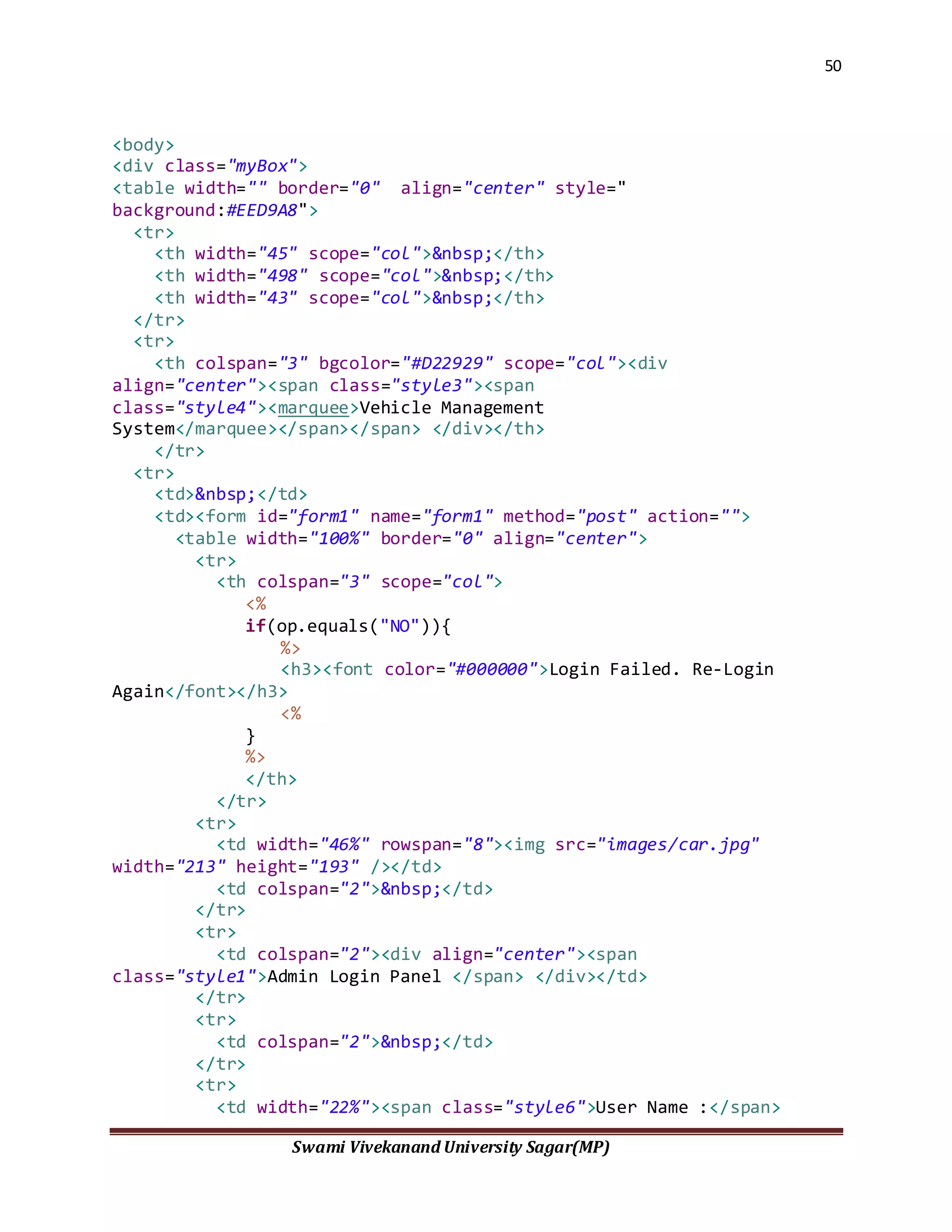
<table width="" border="0" align="center" style="
background:#EED9A8">
<tr>
<th width="45" scope="col">&nbsp;</th>
<th width="498" scope="col">&nbsp;</th>
<th width="43" scope="col">&nbsp;</th>
</tr>
<tr>
<th colspan="3" bgcolor="#D22929" scope="col"><div
align="center"><span class="style3"><span
class="style4"><marquee>Vehicle Management
System</marquee></span></span> </div></th>
</tr>
<tr>
<td>&nbsp;</td>
<td><form id="form1" name="form1" method="post" action="">
<table width="100%" border="0" align="center">
<tr>
<th colspan="3" scope="col">
<%
if(op.equals("NO")){
%>
<h3><font color="#000000">Login Failed. Re-Login
Again</font></h3>
<%
}
%>
</th>
</tr>
<tr>
<td width="46%" rowspan="8"><img src="images/car.jpg"
width="213" height="193" /></td>
<td colspan="2">&nbsp;</td>
</tr>
<tr>
<td colspan="2"><div align="center"><span
class="style1">Admin Login Panel </span> </div></td>
</tr>
<tr>
<td colspan="2">&nbsp;</td>
</tr>
<tr>
<td width="22%"><span class="style6">User Name :</span>
51
Swami Vivekanand University Sagar(MP)
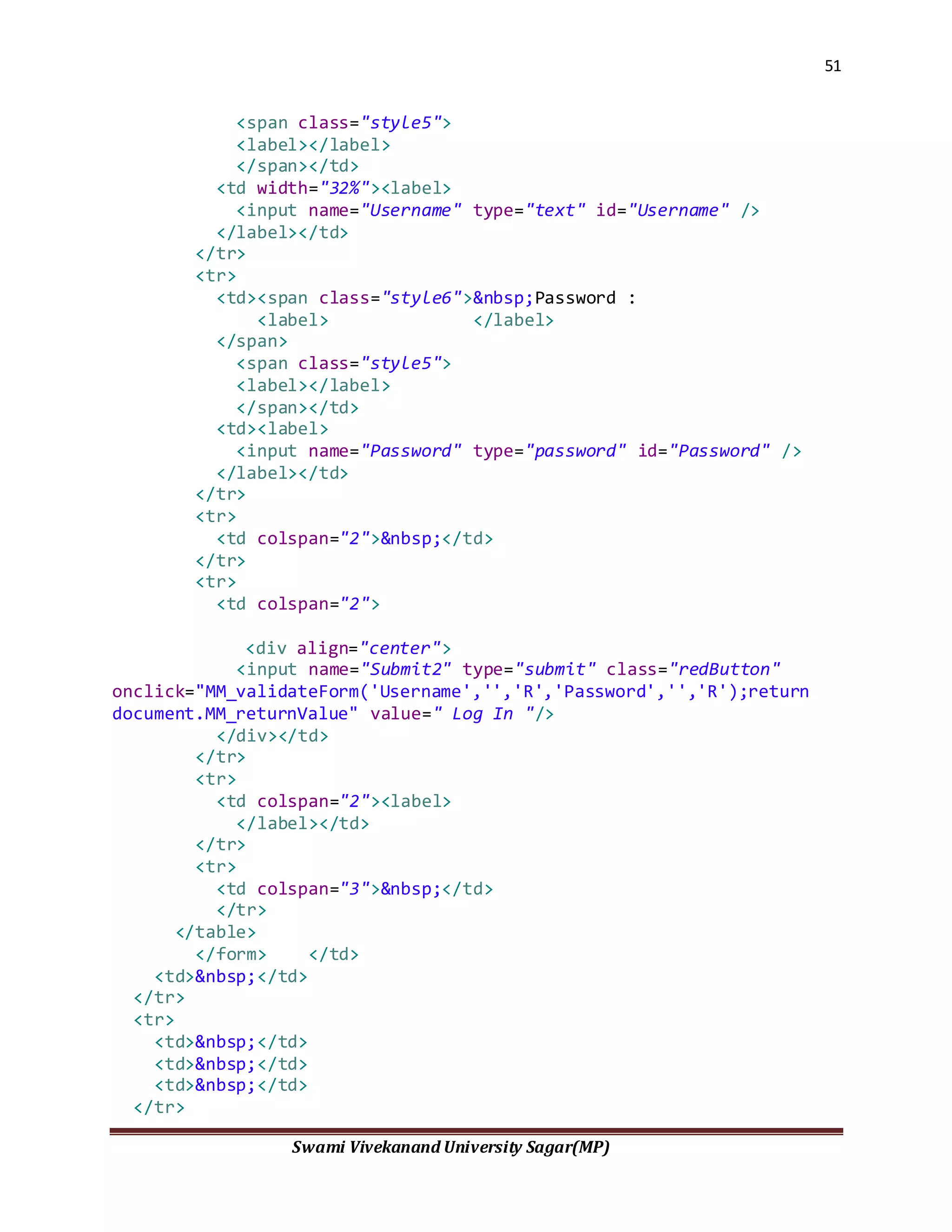
<span class="style5">
<label></label>
</span></td>
<td width="32%"><label>
<input name="Username" type="text" id="Username" />
</label></td>
</tr>
<tr>
<td><span class="style6">&nbsp;Password :
<label> </label>
</span>
<span class="style5">
<label></label>
</span></td>
<td><label>
<input name="Password" type="password" id="Password" />
</label></td>
</tr>
<tr>
<td colspan="2">&nbsp;</td>
</tr>
<tr>
<td colspan="2">
<div align="center">
<input name="Submit2" type="submit" class="redButton"
onclick="MM_validateForm('Username','','R','Password','','R');return
document.MM_returnValue" value=" Log In "/>
</div></td>
</tr>
<tr>
<td colspan="2"><label>
</label></td>
</tr>
<tr>
<td colspan="3">&nbsp;</td>
</tr>
</table>
</form> </td>
<td>&nbsp;</td>
</tr>
<tr>
<td>&nbsp;</td>
<td>&nbsp;</td>
<td>&nbsp;</td>
</tr>
52
Swami Vivekanand University Sagar(MP)
</table>
</div>
</body>
</html>
Register.jsp:-
<script type="text/JavaScript">
<!--
function MM_findObj(n, d) { //v4.01
var p,i,x; if(!d) d=document;
if((p=n.indexOf("?"))>0&&parent.frames.length) {
d=parent.frames[n.substring(p+1)].document; n=n.substring(0,p);}
if(!(x=d[n])&&d.all) x=d.all[n]; for (i=0;!x&&i<d.forms.length;i++)
x=d.forms[i][n];
for(i=0;!x&&d.layers&&i<d.layers.length;i++)
x=MM_findObj(n,d.layers[i].document);
if(!x && d.getElementById) x=d.getElementById(n); return x;
}
function MM_validateForm() { //v4.0
var
i,p,q,nm,test,num,min,max,errors='',args=MM_validateForm.arguments;
for (i=0; i<(args.length-2); i+=3) { test=args[i+2];
val=MM_findObj(args[i]);
if (val) { nm=val.name; if ((val=val.value)!="") {
if (test.indexOf('isEmail')!=-1) { p=val.indexOf('@');
if (p<1 || p==(val.length-1)) errors+='- '+nm+' must contain
an e-mail address.n';
} else if (test!='R') { num = parseFloat(val);
if (isNaN(val)) errors+='- '+nm+' must contain a number.n';
if (test.indexOf('inRange') != -1) { p=test.indexOf(':');
min=test.substring(8,p); max=test.substring(p+1);
if (num<min || max<num) errors+='- '+nm+' must contain a
number between '+min+' and '+max+'.n';
53
Swami Vivekanand University Sagar(MP)
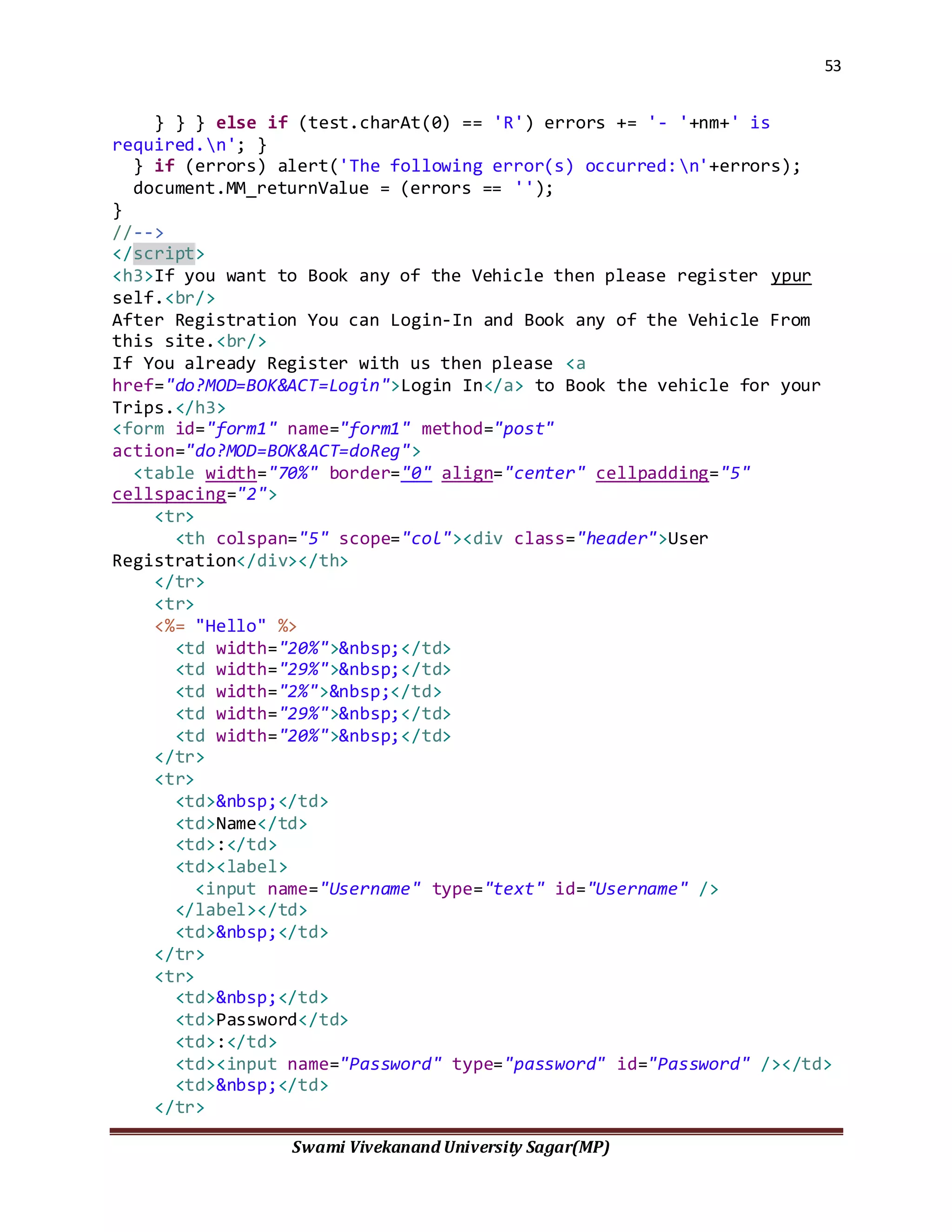
} } } else if (test.charAt(0) == 'R') errors += '- '+nm+' is
required.n'; }
} if (errors) alert('The following error(s) occurred:n'+errors);
document.MM_returnValue = (errors == '');
}
//-->
</script>
<h3>If you want to Book any of the Vehicle then please register ypur
self.<br/>
After Registration You can Login-In and Book any of the Vehicle From
this site.<br/>
If You already Register with us then please <a
href="do?MOD=BOK&ACT=Login">Login In</a> to Book the vehicle for your
Trips.</h3>
<form id="form1" name="form1" method="post"
action="do?MOD=BOK&ACT=doReg">
<table width="70%" border="0" align="center" cellpadding="5"
cellspacing="2">
<tr>
<th colspan="5" scope="col"><div class="header">User
Registration</div></th>
</tr>
<tr>
<%= "Hello" %>
<td width="20%">&nbsp;</td>
<td width="29%">&nbsp;</td>
<td width="2%">&nbsp;</td>
<td width="29%">&nbsp;</td>
<td width="20%">&nbsp;</td>
</tr>
<tr>
<td>&nbsp;</td>
<td>Name</td>
<td>:</td>
<td><label>
<input name="Username" type="text" id="Username" />
</label></td>
<td>&nbsp;</td>
</tr>
<tr>
<td>&nbsp;</td>
<td>Password</td>
<td>:</td>
<td><input name="Password" type="password" id="Password" /></td>
<td>&nbsp;</td>
</tr>
54
Swami Vivekanand University Sagar(MP)
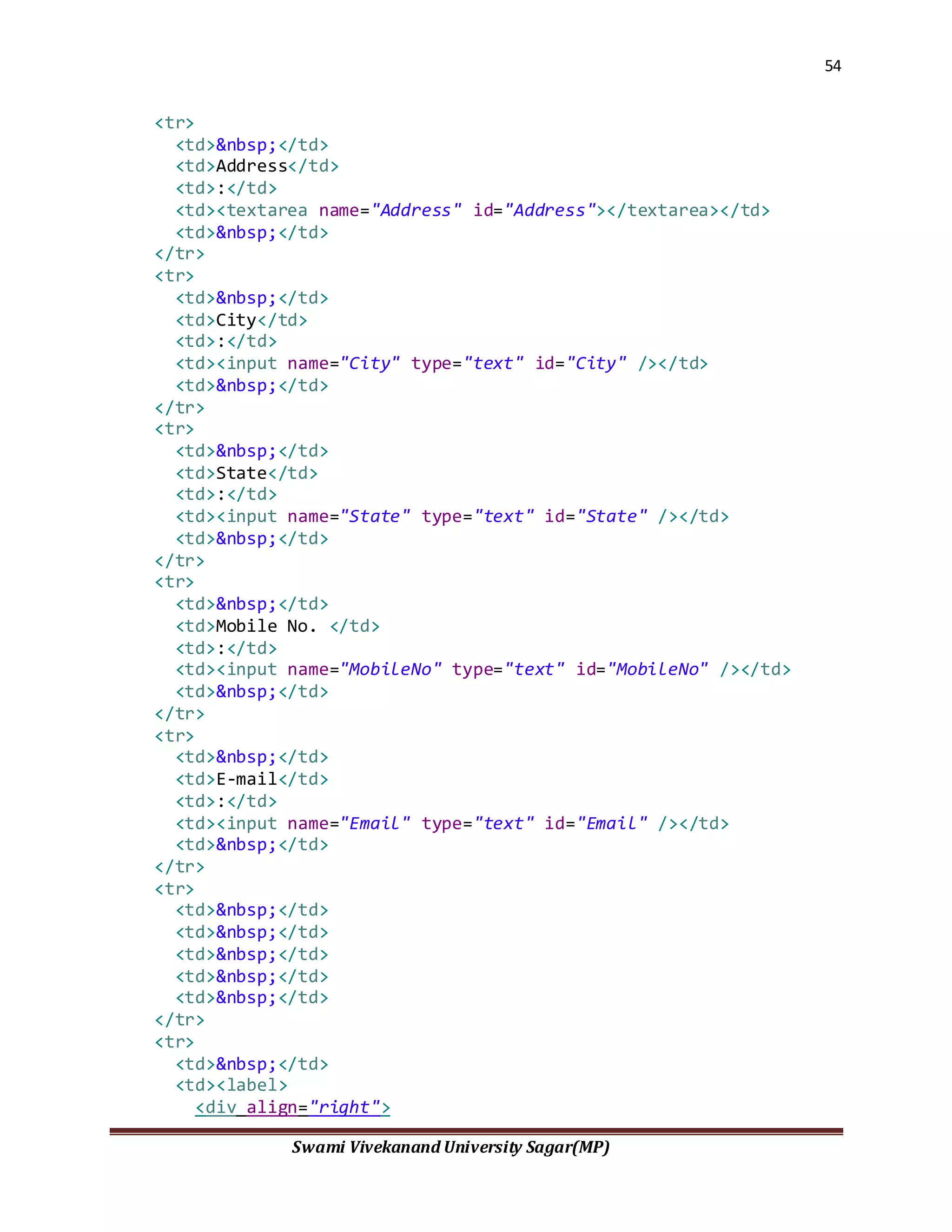
<tr>
<td>&nbsp;</td>
<td>Address</td>
<td>:</td>
<td><textarea name="Address" id="Address"></textarea></td>
<td>&nbsp;</td>
</tr>
<tr>
<td>&nbsp;</td>
<td>City</td>
<td>:</td>
<td><input name="City" type="text" id="City" /></td>
<td>&nbsp;</td>
</tr>
<tr>
<td>&nbsp;</td>
<td>State</td>
<td>:</td>
<td><input name="State" type="text" id="State" /></td>
<td>&nbsp;</td>
</tr>
<tr>
<td>&nbsp;</td>
<td>Mobile No. </td>
<td>:</td>
<td><input name="MobileNo" type="text" id="MobileNo" /></td>
<td>&nbsp;</td>
</tr>
<tr>
<td>&nbsp;</td>
<td>E-mail</td>
<td>:</td>
<td><input name="Email" type="text" id="Email" /></td>
<td>&nbsp;</td>
</tr>
<tr>
<td>&nbsp;</td>
<td>&nbsp;</td>
<td>&nbsp;</td>
<td>&nbsp;</td>
<td>&nbsp;</td>
</tr>
<tr>
<td>&nbsp;</td>
<td><label>
<div align="right">
55
Swami Vivekanand University Sagar(MP)
<input type="reset" name="Submit2" value="Reset" />
</div>
</label></td>
<td>&nbsp;</td>
<td><label>
<input name="Submit" type="submit"
onclick="MM_validateForm('Username','','R','Password','','R','City',''
,'R','State','','R','MobileNo','','R','Email','','RisEmail','Address',
'','R');return document.MM_returnValue" value="Register Now" />
</label></td>
<td>&nbsp;</td>
</tr>
<tr>
<td>&nbsp;</td>
<td>&nbsp;</td>
<td>&nbsp;</td>
<td>&nbsp;</td>
<td>&nbsp;</td>
</tr>
<tr>
<td colspan="5"><div class="header">&nbsp;</div></td>
</tr>
</table>
</form>
Driver.jsp:-
<script type="text/JavaScript">
<!--
function MM_findObj(n, d) { //v4.01
var p,i,x; if(!d) d=document;
if((p=n.indexOf("?"))>0&&parent.frames.length) {
d=parent.frames[n.substring(p+1)].document; n=n.substring(0,p);}
if(!(x=d[n])&&d.all) x=d.all[n]; for (i=0;!x&&i<d.forms.length;i++)
x=d.forms[i][n];
for(i=0;!x&&d.layers&&i<d.layers.length;i++)
x=MM_findObj(n,d.layers[i].document);
if(!x && d.getElementById) x=d.getElementById(n); return x;
}
function MM_validateForm() { //v4.0
var
i,p,q,nm,test,num,min,max,errors='',args=MM_validateForm.arguments;
for (i=0; i<(args.length-2); i+=3) { test=args[i+2];
val=MM_findObj(args[i]);
56
Swami Vivekanand University Sagar(MP)
if (val) { nm=val.name; if ((val=val.value)!="") {
if (test.indexOf('isEmail')!=-1) { p=val.indexOf('@');
if (p<1 || p==(val.length-1)) errors+='- '+nm+' must contain
an e-mail address.n';
} else if (test!='R') { num = parseFloat(val);
if (isNaN(val)) errors+='- '+nm+' must contain a number.n';
if (test.indexOf('inRange') != -1) { p=test.indexOf(':');
min=test.substring(8,p); max=test.substring(p+1);
if (num<min || max<num) errors+='- '+nm+' must contain a
number between '+min+' and '+max+'.n';
} } } else if (test.charAt(0) == 'R') errors += '- '+nm+' is
required.n'; }
} if (errors) alert('The following error(s) occurred:n'+errors);
document.MM_returnValue = (errors == '');
}
//-->
</script>
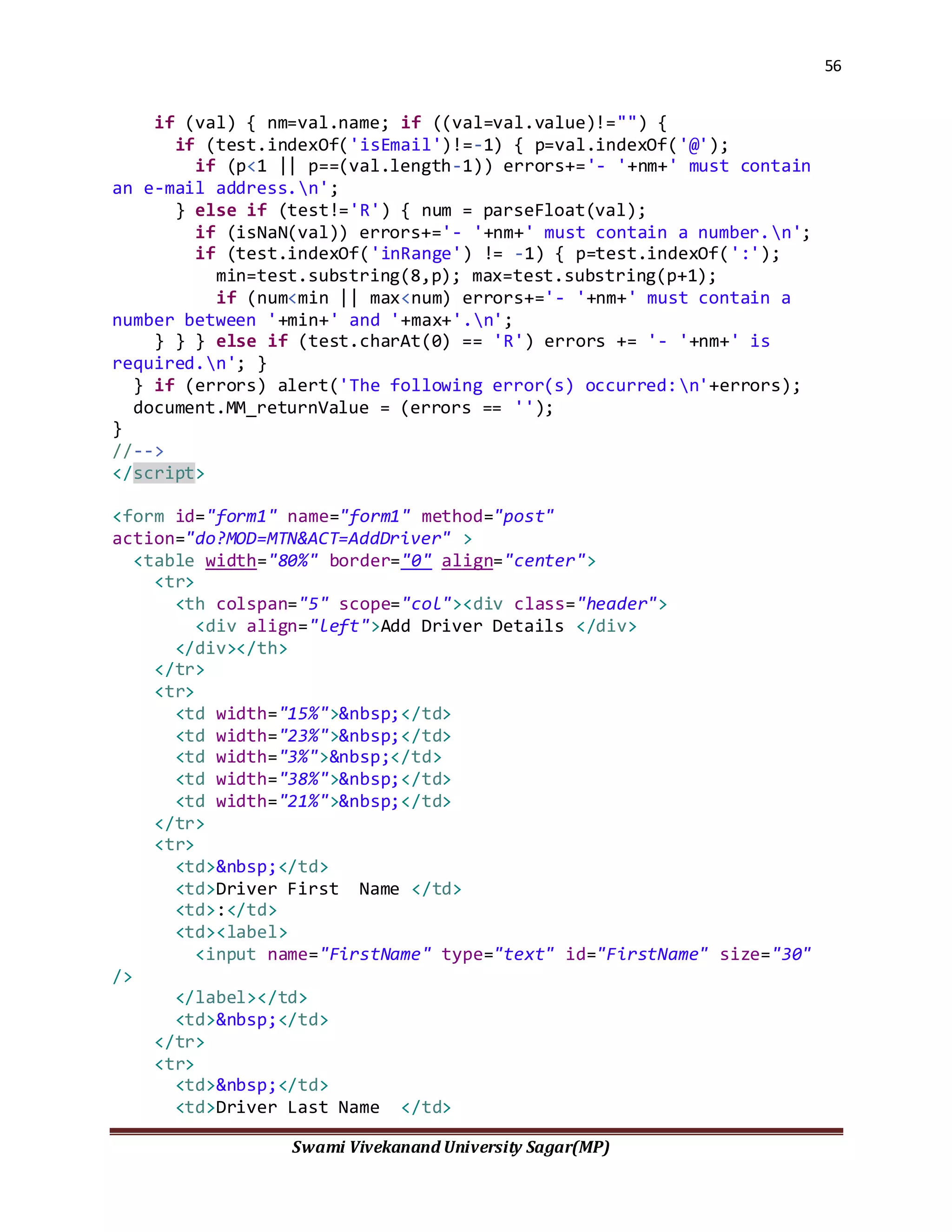
<form id="form1" name="form1" method="post"
action="do?MOD=MTN&ACT=AddDriver" >
<table width="80%" border="0" align="center">
<tr>
<th colspan="5" scope="col"><div class="header">
<div align="left">Add Driver Details </div>
</div></th>
</tr>
<tr>
<td width="15%">&nbsp;</td>
<td width="23%">&nbsp;</td>
<td width="3%">&nbsp;</td>
<td width="38%">&nbsp;</td>
<td width="21%">&nbsp;</td>
</tr>
<tr>
<td>&nbsp;</td>
<td>Driver First Name </td>
<td>:</td>
<td><label>
<input name="FirstName" type="text" id="FirstName" size="30"
/>
</label></td>
<td>&nbsp;</td>
</tr>
<tr>
<td>&nbsp;</td>
<td>Driver Last Name </td>
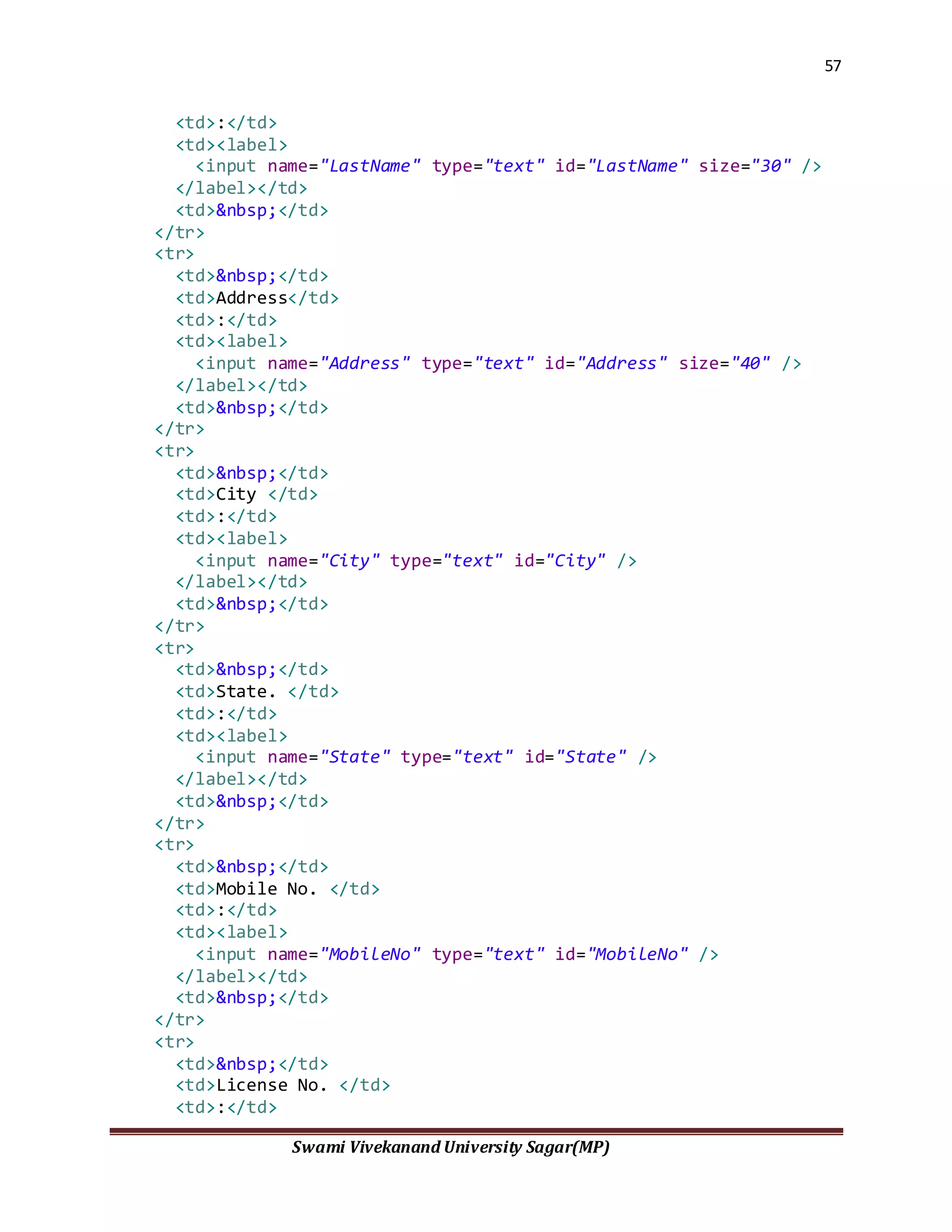
57
Swami Vivekanand University Sagar(MP)
<td>:</td>
<td><label>
<input name="LastName" type="text" id="LastName" size="30" />
</label></td>
<td>&nbsp;</td>
</tr>
<tr>
<td>&nbsp;</td>
<td>Address</td>
<td>:</td>
<td><label>
<input name="Address" type="text" id="Address" size="40" />
</label></td>
<td>&nbsp;</td>
</tr>
<tr>
<td>&nbsp;</td>
<td>City </td>
<td>:</td>
<td><label>
<input name="City" type="text" id="City" />
</label></td>
<td>&nbsp;</td>
</tr>
<tr>
<td>&nbsp;</td>
<td>State. </td>
<td>:</td>
<td><label>
<input name="State" type="text" id="State" />
</label></td>
<td>&nbsp;</td>
</tr>
<tr>
<td>&nbsp;</td>
<td>Mobile No. </td>
<td>:</td>
<td><label>
<input name="MobileNo" type="text" id="MobileNo" />
</label></td>
<td>&nbsp;</td>
</tr>
<tr>
<td>&nbsp;</td>
<td>License No. </td>
<td>:</td>
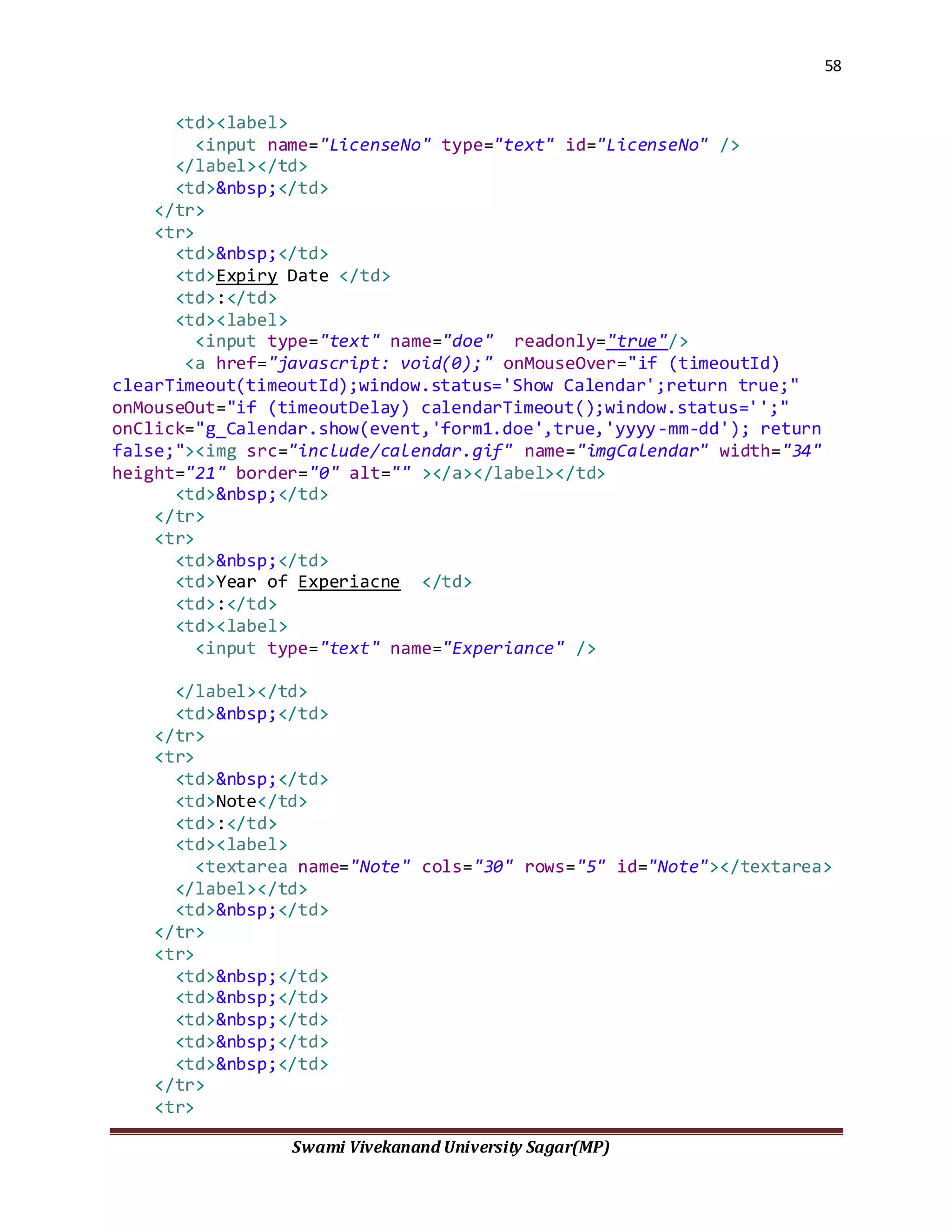
58
Swami Vivekanand University Sagar(MP)
<td><label>
<input name="LicenseNo" type="text" id="LicenseNo" />
</label></td>
<td>&nbsp;</td>
</tr>
<tr>
<td>&nbsp;</td>
<td>Expiry Date </td>
<td>:</td>
<td><label>
<input type="text" name="doe" readonly="true"/>
<a href="javascript: void(0);" onMouseOver="if (timeoutId)
clearTimeout(timeoutId);window.status='Show Calendar';return true;"
onMouseOut="if (timeoutDelay) calendarTimeout();window.status='';"
onClick="g_Calendar.show(event,'form1.doe',true,'yyyy-mm-dd'); return
false;"><img src="include/calendar.gif" name="imgCalendar" width="34"
height="21" border="0" alt="" ></a></label></td>
<td>&nbsp;</td>
</tr>
<tr>
<td>&nbsp;</td>
<td>Year of Experiacne </td>
<td>:</td>
<td><label>
<input type="text" name="Experiance" />
</label></td>
<td>&nbsp;</td>
</tr>
<tr>
<td>&nbsp;</td>
<td>Note</td>
<td>:</td>
<td><label>
<textarea name="Note" cols="30" rows="5" id="Note"></textarea>
</label></td>
<td>&nbsp;</td>
</tr>
<tr>
<td>&nbsp;</td>
<td>&nbsp;</td>
<td>&nbsp;</td>
<td>&nbsp;</td>
<td>&nbsp;</td>
</tr>
<tr>
59
Swami Vivekanand University Sagar(MP)
<td>&nbsp;</td>
<td>&nbsp;</td>
<td>&nbsp;</td>
<td>&nbsp;</td>
<td>&nbsp;</td>
</tr>
<tr>
<td>&nbsp;</td>
<td><label>
<div align="right">
<input type="reset" name="Submit2" value="Reset"
class="redButton"/>
</div>
</label></td>
<td>&nbsp;</td>
<td><label>
<input name="Submit" type="submit" class="redButton"
onclick="MM_validateForm('FirstName','','R','LastName','','R','Address
','','R','City','','R','State','','R','MobileNo','','R','LicenseNo',''
,'R','Experiance','','RisNum');return document.MM_returnValue"
value="Add Driver" />
</label></td>
<td>&nbsp;</td>
</tr>
</table>
</form>
<hr width="600px" style="background:#D22929; border:#D22929 solid
2px;"/>
Fuel.jsp
<%@ page import="java.sql.*,java.util.*,net.vehicle.VehicleCommon"%>
<%
ArrayList al=VehicleCommon.getDrivers();
ArrayList al1=VehicleCommon.getVehicles();
%>
<script type="text/JavaScript">
<!--
function MM_findObj(n, d) { //v4.01
var p,i,x; if(!d) d=document;
if((p=n.indexOf("?"))>0&&parent.frames.length) {
d=parent.frames[n.substring(p+1)].document; n=n.substring(0,p);}
if(!(x=d[n])&&d.all) x=d.all[n]; for (i=0;!x&&i<d.forms.length;i++)
x=d.forms[i][n];
60
Swami Vivekanand University Sagar(MP)
for(i=0;!x&&d.layers&&i<d.layers.length;i++)
x=MM_findObj(n,d.layers[i].document);
if(!x && d.getElementById) x=d.getElementById(n); return x;
}
function MM_validateForm() { //v4.0
var
i,p,q,nm,test,num,min,max,errors='',args=MM_validateForm.arguments;
for (i=0; i<(args.length-2); i+=3) { test=args[i+2];
val=MM_findObj(args[i]);
if (val) { nm=val.name; if ((val=val.value)!="") {
if (test.indexOf('isEmail')!=-1) { p=val.indexOf('@');
if (p<1 || p==(val.length-1)) errors+='- '+nm+' must contain
an e-mail address.n';
} else if (test!='R') { num = parseFloat(val);
if (isNaN(val)) errors+='- '+nm+' must contain a number.n';
if (test.indexOf('inRange') != -1) { p=test.indexOf(':');
min=test.substring(8,p); max=test.substring(p+1);
if (num<min || max<num) errors+='- '+nm+' must contain a
number between '+min+' and '+max+'.n';
} } } else if (test.charAt(0) == 'R') errors += '- '+nm+' is
required.n'; }
} if (errors) alert('The following error(s) occurred:n'+errors);
document.MM_returnValue = (errors == '');
}
//-->
</script>
<form id="form1" name="form1" method="post"
action="do?MOD=MTN&ACT=AddFuel">
<table width="80%" border="0" align="center">
<tr>
<th colspan="5" scope="col"><div class="header">
<div align="left">Add Fuel Expences Details </div>
</div></th>
</tr>
<tr>
<td width="15%">&nbsp;</td>
<td width="23%">&nbsp;</td>
<td width="3%">&nbsp;</td>
<td width="38%">&nbsp;</td>
<td width="21%">&nbsp;</td>
</tr>
<tr>
<td>&nbsp;</td>
<td>Vehicle Name </td>
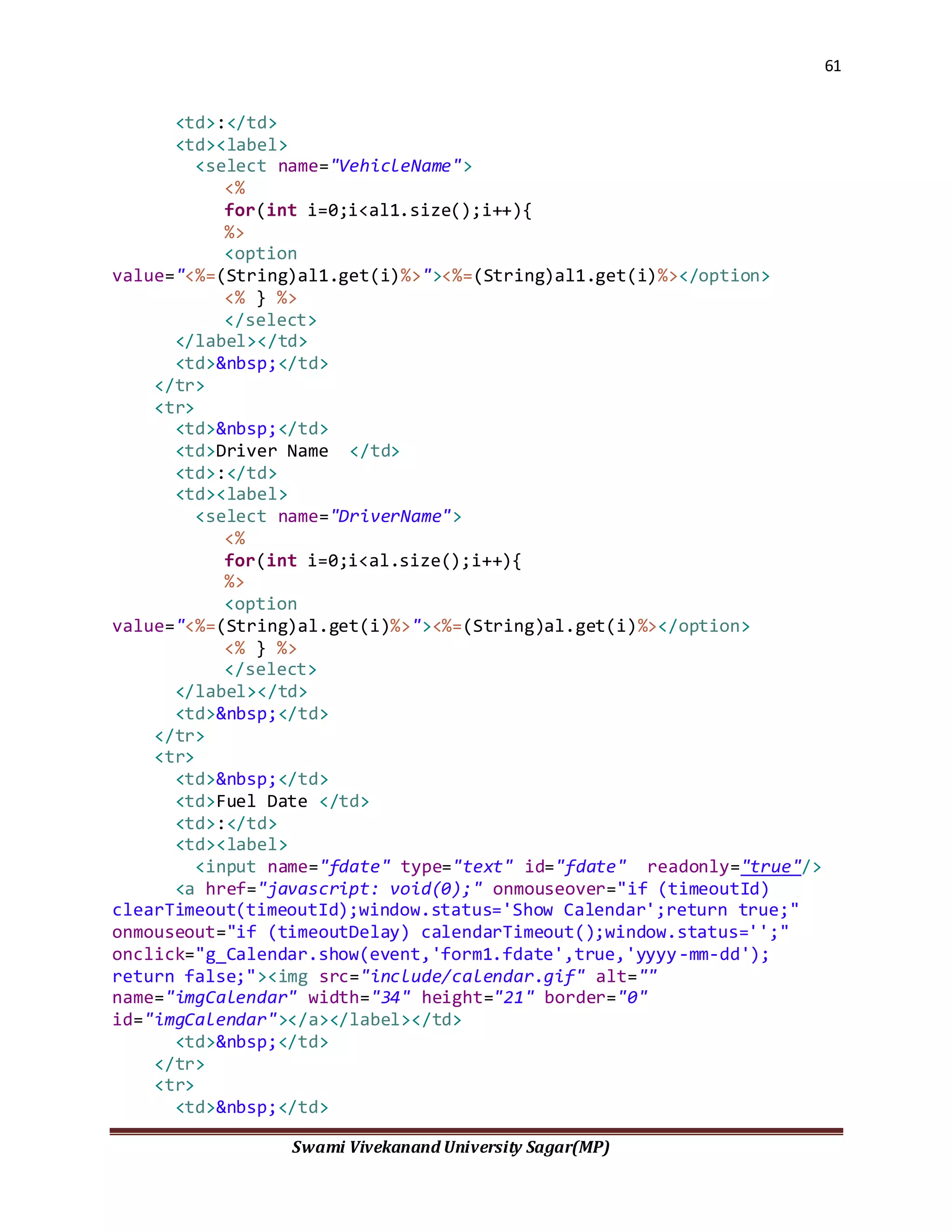
61
Swami Vivekanand University Sagar(MP)
<td>:</td>
<td><label>
<select name="VehicleName">
<%
for(int i=0;i<al1.size();i++){
%>
<option
value="<%=(String)al1.get(i)%>"><%=(String)al1.get(i)%></option>
<% } %>
</select>
</label></td>
<td>&nbsp;</td>
</tr>
<tr>
<td>&nbsp;</td>
<td>Driver Name </td>
<td>:</td>
<td><label>
<select name="DriverName">
<%
for(int i=0;i<al.size();i++){
%>
<option
value="<%=(String)al.get(i)%>"><%=(String)al.get(i)%></option>
<% } %>
</select>
</label></td>
<td>&nbsp;</td>
</tr>
<tr>
<td>&nbsp;</td>
<td>Fuel Date </td>
<td>:</td>
<td><label>
<input name="fdate" type="text" id="fdate" readonly="true"/>
<a href="javascript: void(0);" onmouseover="if (timeoutId)
clearTimeout(timeoutId);window.status='Show Calendar';return true;"
onmouseout="if (timeoutDelay) calendarTimeout();window.status='';"
onclick="g_Calendar.show(event,'form1.fdate',true,'yyyy-mm-dd');
return false;"><img src="include/calendar.gif" alt=""
name="imgCalendar" width="34" height="21" border="0"
id="imgCalendar"></a></label></td>
<td>&nbsp;</td>
</tr>
<tr>
<td>&nbsp;</td>
62
Swami Vivekanand University Sagar(MP)
<td>Fuel Type </td>
<td>:</td>
<td><label>
<select name="ftype">
<option value="Pertol">&nbsp;Pertol&nbsp;</option>
<option value="Diesel">&nbsp;Diesel&nbsp;</option>
<option value="Gas">&nbsp;Gas&nbsp;</option>
<option value="Hybrid">&nbsp;Hybrid&nbsp;</option>
<option value="Electricity">&nbsp;Electricity&nbsp;</option>
</select>
</label></td>
<td>&nbsp;</td>
</tr>
<tr>
<td>&nbsp;</td>
<td>Fuel Quantity</td>
<td>:</td>
<td><label>
<input name="Quantity" type="text" id="Quantity" size="10" />
</label></td>
<td>&nbsp;</td>
</tr>
<tr>
<td>&nbsp;</td>
<td>Total Cost . </td>
<td>:</td>
<td><label>
<input name="Cost" type="text" id="Cost" />
</label></td>
<td>&nbsp;</td>
</tr>
<tr>
<td>&nbsp;</td>
<td>Note</td>
<td>:</td>
<td><label>
<textarea name="Note" cols="30" rows="5" id="Note"></textarea>
</label></td>
<td>&nbsp;</td>
</tr>
<tr>
<td>&nbsp;</td>
<td>&nbsp;</td>
<td>&nbsp;</td>
<td>&nbsp;</td>
<td>&nbsp;</td>
63
Swami Vivekanand University Sagar(MP)
</tr>
<tr>
<td>&nbsp;</td>
<td>&nbsp;</td>
<td>&nbsp;</td>
<td>&nbsp;</td>
<td>&nbsp;</td>
</tr>
<tr>
<td>&nbsp;</td>
<td><label>
<div align="right">
<input type="reset" name="Submit2" value="Reset"
class="redButton"/>
</div>
</label></td>
<td>&nbsp;</td>
<td><label>
<input name="Submit" type="submit" class="redButton"
onclick="MM_validateForm('VehicleName','','R','DriverName','','R','Qua
ntity','','R','Cost','','R');return document.MM_returnValue"
value="Add Fuel Details" />
</label></td>
<td>&nbsp;</td>
</tr>
</table>
</form>
<hr width="600px" style="background:#D22929; border:#D22929 solid
2px;"/>
Addvehicle.jsp:-
<%@ page import="java.sql.*,java.util.*,net.vehicle.VehicleCommon"%>
<%
ArrayList al=VehicleCommon.getDrivers();
%>
<script type="text/JavaScript">
<!--
function MM_findObj(n, d) { //v4.01
64
Swami Vivekanand University Sagar(MP)
var p,i,x; if(!d) d=document;
if((p=n.indexOf("?"))>0&&parent.frames.length) {
d=parent.frames[n.substring(p+1)].document; n=n.substring(0,p);}
if(!(x=d[n])&&d.all) x=d.all[n]; for (i=0;!x&&i<d.forms.length;i++)
x=d.forms[i][n];
for(i=0;!x&&d.layers&&i<d.layers.length;i++)
x=MM_findObj(n,d.layers[i].document);
if(!x && d.getElementById) x=d.getElementById(n); return x;
}
function MM_validateForm() { //v4.0
var
i,p,q,nm,test,num,min,max,errors='',args=MM_validateForm.arguments;
for (i=0; i<(args.length-2); i+=3) { test=args[i+2];
val=MM_findObj(args[i]);
if (val) { nm=val.name; if ((val=val.value)!="") {
if (test.indexOf('isEmail')!=-1) { p=val.indexOf('@');
if (p<1 || p==(val.length-1)) errors+='- '+nm+' must contain
an e-mail address.n';
} else if (test!='R') { num = parseFloat(val);
if (isNaN(val)) errors+='- '+nm+' must contain a number.n';
if (test.indexOf('inRange') != -1) { p=test.indexOf(':');
min=test.substring(8,p); max=test.substring(p+1);
if (num<min || max<num) errors+='- '+nm+' must contain a
number between '+min+' and '+max+'.n';
} } } else if (test.charAt(0) == 'R') errors += '- '+nm+' is
required.n'; }
} if (errors) alert('The following error(s) occurred:n'+errors);
document.MM_returnValue = (errors == '');
}
//-->
</script>
<form id="form1" name="form1" method="post"
action="do?MOD=MTN&ACT=AddVehicle" enctype="multipart/form-data">
<table width="80%" border="0" align="center">
<tr>
<th colspan="5" scope="col"><div class="header">
<div align="left">Add Vehicle Details </div>
</div></th>
</tr>
<tr>
<td width="15%">&nbsp;</td>
<td width="23%">&nbsp;</td>
<td width="3%">&nbsp;</td>
<td width="38%">&nbsp;</td>
65
Swami Vivekanand University Sagar(MP)
<td width="21%">&nbsp;</td>
</tr>
<tr>
<td>&nbsp;</td>
<td>Vehicle Name </td>
<td>:</td>
<td><label>
<input name="VehicleName" type="text" id="VehicleName"
size="30" />
</label></td>
<td>&nbsp;</td>
</tr>
<tr>
<td>&nbsp;</td>
<td>Vehicle No. </td>
<td>:</td>
<td><label>
<input name="VehicleNo" type="text" id="VehicleNo" />
</label></td>
<td>&nbsp;</td>
</tr>
<tr>
<td>&nbsp;</td>
<td>Make</td>
<td>:</td>
<td><label>
<input name="Make" type="text" id="Make" />
</label></td>
<td>&nbsp;</td>
</tr>
<tr>
<td>&nbsp;</td>
<td>Fuel Type </td>
<td>:</td>
<td><label>
<select name="ftype">
<option value="Pertol">&nbsp;Pertol&nbsp;</option>
<option value="Diesel">&nbsp;Diesel&nbsp;</option>
<option value="Gas">&nbsp;Gas&nbsp;</option>
<option value="Hybrid">&nbsp;Hybrid&nbsp;</option>
<option value="Electricity">&nbsp;Electricity&nbsp;</option>
</select>
</label></td>
<td>&nbsp;</td>
</tr>
<tr>
66
Swami Vivekanand University Sagar(MP)
<td>&nbsp;</td>
<td>Rs / K.m. </td>
<td>:</td>
<td><label>
<input name="Rs" type="text" id="Rs" size="10" />
</label></td>
<td>&nbsp;</td>
</tr>
<tr>
<td>&nbsp;</td>
<td>Average</td>
<td>:</td>
<td><label>
<input name="Average" type="text" id="Average" />
</label></td>
<td>&nbsp;</td>
</tr>
<tr>
<td>&nbsp;</td>
<td>Cost</td>
<td>:</td>
<td><label>
<input name="Cost" type="text" id="Cost" size="10" />
</label></td>
<td>&nbsp;</td>
</tr>
<tr>
<td>&nbsp;</td>
<td>Image</td>
<td>:</td>
<td><label>
<input name="Image" type="file" id="Image" />
</label></td>
<td>&nbsp;</td>
</tr>
<tr>
<td>&nbsp;</td>
<td>Vehicle Type </td>
<td>:</td>
<td><label>
<select name="vtype">
<option value="Luxury Cars">&nbsp;Luxury Cars</option>
<option value="Executive Cars ">&nbsp;Executive Cars
</option>
<option value="MUVs & SUVs">&nbsp;MUVs & SUVs</option>
<option value="Economy Cars">&nbsp;Economy Cars</option>
67
Swami Vivekanand University Sagar(MP)
<option value="Mini Vans & Large Coaches">&nbsp;Mini Vans &
Large Coaches</option>
</select>
</label></td>
<td>&nbsp;</td>
</tr>
<tr>
<td>&nbsp;</td>
<td>&nbsp;</td>
<td>&nbsp;</td>
<td>&nbsp;</td>
<td>&nbsp;</td>
</tr>
<tr>
<td colspan="5"><div class="header">Insurance Details</div></td>
</tr>
<tr>
<td>&nbsp;</td>
<td>&nbsp;</td>
<td>&nbsp;</td>
<td>&nbsp;</td>
<td>&nbsp;</td>
</tr>
<tr>
<td>&nbsp;</td>
<td>Insurer Name </td>
<td>:</td>
<td><label>
<input name="InsurerName" type="text" id="InsurerName" />
</label></td>
<td>&nbsp;</td>
</tr>
<tr>
<td>&nbsp;</td>
<td>Company Name </td>
<td>:</td>
<td><label>
<input name="CompanyName" type="text" id="CompanyName"
size="30" />
</label></td>
<td>&nbsp;</td>
</tr>
<tr>
<td>&nbsp;</td>
<td>Date Of. Insurance </td>
<td>:</td>
68
Swami Vivekanand University Sagar(MP)
<td><label>
<input name="doi" type="text" id="doi" readonly="true" />
<a href="javascript: void(0);" onMouseOver="if (timeoutId)
clearTimeout(timeoutId);window.status='Show Calendar';return true;"
onMouseOut="if (timeoutDelay) calendarTimeout();window.status='';"
onClick="g_Calendar.show(event,'form1.doi',true,'yyyy-mm-dd'); return
false;"><img src="include/calendar.gif" name="imgCalendar" width="34"
height="21" border="0" alt="" ></a></label></td>
<td>&nbsp;</td>
</tr>
<tr>
<td>&nbsp;</td>
<td>Date of Expiry </td>
<td>:</td>
<td><label>
<input type="text" name="doe" readonly="true" /><a
href="javascript: void(0);" onMouseOver="if (timeoutId)
clearTimeout(timeoutId);window.status='Show Calendar';return true;"
onMouseOut="if (timeoutDelay) calendarTimeout();window.status='';"
onClick="g_Calendar.show(event,'form1.doe',true,'yyyy-mm-dd'); return
false;"><img src="include/calendar.gif" name="imgCalendar" width="34"
height="21" border="0" alt="" ></a>
</label></td>
<td>&nbsp;</td>
</tr>
<tr>
<td>&nbsp;</td>
<td>Driver Name </td>
<td>:</td>
<td><label>
<select name="dname" id="dname">
<%
for(int i=0;i<al.size();i++){
%>
<option
value="<%=(String)al.get(i)%>"><%=(String)al.get(i)%></option>
<% } %>
</select>
</label></td>
<td>&nbsp;</td>
</tr>
<tr>
<td>&nbsp;</td>
<td>&nbsp;</td>
<td>&nbsp;</td>
<td>&nbsp;</td>
69
Swami Vivekanand University Sagar(MP)
<td>&nbsp;</td>
</tr>
<tr>
<td>&nbsp;</td>
<td><div align="right">
<input type="reset" name="Submit2" value="Reset"
class="redButton" />
</div></td>
<td>&nbsp;</td>
<td><label>
<input name="Submit" type="submit" class="redButton"
onclick="MM_validateForm('VehicleName','','R','VehicleNo','','R','Make
','','R','Rs','','R','Average','','R','Cost','','R','InsurerName','','
R','CompanyName','','R');return document.MM_returnValue" value="Add
Vehicle" />
</label></td>
<td>&nbsp;</td>
</tr>
</table>
</form>
<hr width="600px" style="background:#D22929; border:#D22929 solid
2px;"/>
Book User.jsp:-
<%@ page contentType="text/html; charset=iso-8859-1" language="java"
import="java.sql.*,
java.util.*,
net.vehicle.*" errorPage="" %>
<%
int id = Integer.parseInt((String)session.getAttribute("u_id"));
ArrayList all = VehicleCommon.viewBookingByID(id);
int size = all.size();
%>
<style type="text/css">
<!--
.style10 {color: #EED9A8; font-weight: bold; font-size: 14px; }
-->
</style>
70
Swami Vivekanand University Sagar(MP)
<div class="header">View Your Booking Status</div>
<h3>View Your Previous Booking status Here.<br/>If you want to book a
vehicle then please <a href="do?MOD=BOK&ACT=View&v=lux">click
here</a></h3>
<br/>
<table width="95%" align="center" style="border:#D22929 solid
2px;padding:10px;" border="0">
<tr>
<th bgcolor="#D22929" scope="col"><span class="style10">Vehicle
Name </span></th>
<th bgcolor="#D22929" scope="col"><span class="style10">Driver
Name </span></th>
<th bgcolor="#D22929" scope="col"><span class="style10">Start
Date</span></th>
<th bgcolor="#D22929" scope="col"><span class="style10">End Date
</span></th>
<th bgcolor="#D22929" scope="col"><span
class="style10">Kilometer</span></th>
<th bgcolor="#D22929" scope="col"><span
class="style10">Status&nbsp;&nbsp;</span></th>
</tr>
<%
for(int i=0;i<size;i++){
ArrayList one=(ArrayList)all.get(i);
%>
<tr style="height:30px; padding:4px;">
<td><div align="center"><%=(String)one.get(0)%></div></td>
<td><div align="center"><%=(String)one.get(1)%></div></td>
<td><div align="center"><%=(String)one.get(2)%></div></td>
<td><div align="center"><%=(String)one.get(3)%></div></td>
<td><div
align="center"><%=(String)one.get(4)%>&nbsp;Km.</div></td>
<td><div align="center"><%=(String)one.get(5)%></div></td>
</tr>
<% } %>
</table>
Edit Vehicle:-
<%@ page contentType="text/html; charset=iso-8859-1" language="java"
import="java.sql.*,
java.util.*,
net.vehicle.*" errorPage="" %>
<%
int vid = Integer.parseInt((String)session.getAttribute("vid"));
71
Swami Vivekanand University Sagar(MP)
//out.println("<h3>Vehicle ID :"+vid);
ArrayList all = VehicleCommon.viewVehiclesByID(vid);
ArrayList al=VehicleCommon.getDrivers();
int size = all.size();
for(int i=0;i<size;i++){
ArrayList one=(ArrayList)all.get(i);
%>
<script type="text/JavaScript">
<!--
function MM_findObj(n, d) { //v4.01
var p,i,x; if(!d) d=document;
if((p=n.indexOf("?"))>0&&parent.frames.length) {
d=parent.frames[n.substring(p+1)].document; n=n.substring(0,p);}
if(!(x=d[n])&&d.all) x=d.all[n]; for (i=0;!x&&i<d.forms.length;i++)
x=d.forms[i][n];
for(i=0;!x&&d.layers&&i<d.layers.length;i++)
x=MM_findObj(n,d.layers[i].document);
if(!x && d.getElementById) x=d.getElementById(n); return x;
}
function MM_validateForm() { //v4.0
var
i,p,q,nm,test,num,min,max,errors='',args=MM_validateForm.arguments;
for (i=0; i<(args.length-2); i+=3) { test=args[i+2];
val=MM_findObj(args[i]);
if (val) { nm=val.name; if ((val=val.value)!="") {
if (test.indexOf('isEmail')!=-1) { p=val.indexOf('@');
if (p<1 || p==(val.length-1)) errors+='- '+nm+' must contain
an e-mail address.n';
} else if (test!='R') { num = parseFloat(val);
if (isNaN(val)) errors+='- '+nm+' must contain a number.n';
if (test.indexOf('inRange') != -1) { p=test.indexOf(':');
min=test.substring(8,p); max=test.substring(p+1);
if (num<min || max<num) errors+='- '+nm+' must contain a
number between '+min+' and '+max+'.n';
} } } else if (test.charAt(0) == 'R') errors += '- '+nm+' is
required.n'; }
} if (errors) alert('The following error(s) occurred:n'+errors);
document.MM_returnValue = (errors == '');
}
//-->
</script>
<div class="header">Vehicle Edit </div>
<h3>Following are the Vehicle Details.You can Edit the Details </h3>
<br/>
72
Swami Vivekanand University Sagar(MP)
<form id="form1" name="form1" method="post"
action="do?MOD=BOK&ACT=doBok">
<table width="90%" align="center" style="border:#D22929 solid
2px;padding:5px;" border="0" >
<tr>
<th colspan="3" scope="col"><div class="header">
<div align="left">&nbsp;&nbsp;<%=(String)one.get(1)%></div>
</div></th>
</tr>
<tr>
<td><strong>Number : </strong>&nbsp;<%=(String)one.get(2)%></td>
<td><strong>Rupees Per Kilometer :
</strong><%=(String)one.get(6)%></td>
<td width="21%" rowspan="9"><img src="<%=(String)one.get(8)%>"
width="220" height="120" /></td>
</tr>
<tr>
<td colspan="2"><strong>Make</strong> :
<%=(String)one.get(3)%></td>
</tr>
<tr>
<td width="36%"><strong>Fuel Type:</strong>
<%=(String)one.get(4)%></td>
<td width="43%"><strong>Cost :
</strong><%=one.get(7)%>&nbsp;Rs.</td>
</tr>
<tr>
<td colspan="2"><strong>Vehicle Type:
</strong><%=one.get(9)%></td>
</tr>
<tr>
<td><strong>Insurer :</strong> <%=one.get(10)%></td>
<td><strong>Company :</strong> <%=one.get(11)%></td>
</tr>
<tr>
<td colspan="2"><hr width="400px" align="left"
style="border:#990000 solid 2px;"/></td>
</tr>
<tr>
<td colspan="2"><div align="center"><a href="#"><strong>Edit
Vehicle Details</strong> </a></div></td>
</tr>
<tr>
<td colspan="2"><input type="hidden" name="v_name"
value="<%=(String)one.get(1)%>" /></td>
</tr>
73
Swami Vivekanand University Sagar(MP)
<tr>
<td colspan="2"></td>
</tr>
<tr>
<td colspan="2"><strong>Journey Start Date :</strong>
<label>
<input name="sdate" type="text" id="sdate" size="20"
readonly="true"/>
<a href="javascript: void(0);" onMouseOver="if (timeoutId)
clearTimeout(timeoutId);window.status='Show Calendar';return true;"
onMouseOut="if (timeoutDelay) calendarTimeout();window.status='';"
onClick="g_Calendar.show(event,'form1.sdate',true,'yyyy-mm-dd');
return false;"><img src="include/calendar.gif" name="imgCalendar"
width="25" height="21" border="0" alt="" ></a></label></td>
<td>&nbsp;</td>
</tr>
<tr>
<td colspan="2"><strong>Journey End
Date:</strong>&nbsp;&nbsp;&nbsp;
<label>
<input name="edate" type="text" id="edate" size="20"
readonly="true"/>
<a href="javascript: void(0);" onMouseOver="if (timeoutId)
clearTimeout(timeoutId);window.status='Show Calendar';return true;"
onMouseOut="if (timeoutDelay) calendarTimeout();window.status='';"
onClick="g_Calendar.show(event,'form1.edate',true,'yyyy-mm-dd');
return false;"><img src="include/calendar.gif" name="imgCalendar"
width="25" height="21" border="0" alt="" ></a></label></td>
<td>&nbsp;</td>
</tr>
<tr>
<td colspan="3"><label><strong>Number of Days:</strong>
<input name="NoOfDays" type="text" id="NoOfDays" size="5" />
&nbsp;&nbsp;&nbsp;&nbsp;&nbsp;&nbsp;<strong>Journey In KiloMeters
:</strong>
<input name="KiloMeters" type="text" id="KiloMeters" size="5" />
Km
</label></td>
</tr>
<tr>
<td colspan="2"><strong>Number Of Seats
:</strong>&nbsp;&nbsp;&nbsp;
<label>
<input name="NoOfSeats" type="text" id="NoOfSeats" size="8" />
</label></td>
<td>&nbsp;</td>
74
Swami Vivekanand University Sagar(MP)
</tr>
<tr>
<td>&nbsp;</td>
<td>&nbsp;</td>
<td>&nbsp;</td>
</tr>
<tr>
<td><label>
<div align="right">
<input type="reset" name="Submit2" value="Reset"
class="redButton"/>
</div>
</label></td>
<td><label>
<input name="Submit" type="submit" class="redButton"
onclick="MM_validateForm('NoOfDays','','RisNum','KiloMeters','','RisNu
m','NoOfSeats','','RisNum');return document.MM_returnValue" value="
Book This Vehicle "/>
</label></td>
<td>&nbsp;</td>
</tr>
<tr>
<td colspan="2">&nbsp;</td>
<td>&nbsp;</td>
</tr>
</table>
</form>
<br/>
<% } %>
<br/>
Get Car Trip.jsp
<style type="text/css">
<!--
.miles {
background-position:center;
background-color:#D29C1A;
font-size:14px;
}
-->
</style>
<script
src="http://maps.google.com/maps?file=api&amp;v=2&amp;sensor=true_or_f
75
Swami Vivekanand University Sagar(MP)
alse&amp;key=ABQIAAAAoHM8pz-43OqZkNZnTO6iOBSBpEJMvDeVXGvLDvx25sRDM-
khzhSTUMtgo_3O8aBbB3prpdlz_kfkrg" type="text/javascript"></script>
<script src="epoly.js" type="text/javascript"></script>
<div id="logo"><a href="#/index.html"></a></div>
<table id="main" border="0" cellpadding="0" cellspacing="0"
width="600">
<tbody><tr>
<td id="leftside" valign="top"> <div id="map" style="width:
600px; height: 400px; border:#990000 solid 2px;"></div>
<br>
<br>
<div id="controls">
<form onSubmit="start();return false" action="#">
<table width="539" border="0" align="center">
<tr>
<td colspan="3" bgcolor="#D29C1A">&nbsp;</td>
</tr>
<tr>
<td>&nbsp;</td>
<td>&nbsp;</td>
<td>&nbsp;</td>
</tr>
<tr>
<td width="226"><div align="right"><strong>Start Point
</strong></div></td>
<td width="13"><div align="center"><strong>:</strong></div></td>
<td width="286"><label>
<input size="40" maxlength="30" id="startpoint"
value="jalgaon,maharashtra" type="text">
</label></td>
</tr>
<tr>
<td><div align="right"><strong>End Point </strong></div></td>
<td><div align="center"><strong>:</strong></div></td>
<td><label>
<input size="40" maxlength="30" id="endpoint" value="bhusawal,
maharashtra" type="text">
</label></td>
</tr>
<tr>
<td colspan="2">&nbsp;</td>
<td>&nbsp;</td>
</tr>
<tr>
76
Swami Vivekanand University Sagar(MP)
<td colspan="2"><label>
<div align="right">
<input type="reset" name="Submit2" value="Reset" />
</div>
</label></td>
<td><label>
<input type="submit" name="Submit" value="Start Travelling" />
</label></td>
</tr>
<tr>
<td>&nbsp;</td>
<td>&nbsp;</td>
<td>&nbsp;</td>
</tr>
<tr>
<td colspan="3" bgcolor="#D29C1A">&nbsp;</td>
</tr>
</table>
</form>
</div>
<div class="miles">
<font color="#FF0000"><center>
<div id="step">&nbsp;</div>
<div id="distance">Miles: 0.00</div>
</center></font></div>
</p></td>
<td bordercolor="#FFFFFF" id="rightside"
valign="top">&nbsp;</td>
</tr>
</tbody></table>
<p class="small">&nbsp;</p>
<font size="1">
</font><p align="center"><!--WEBBOT bot="Script" startspan
PREVIEW="Site Meter" -->
</p><font size="1">
</font>
<script type="text/javascript">
//<![CDATA[
if (GBrowserIsCompatible()) {
var map = new GMap2(document.getElementById("map"));
map.addControl(new GMapTypeControl());
77
Swami Vivekanand University Sagar(MP)
map.setCenter(new GLatLng(21.005035, 75.561218), 10);
var dirn = new GDirections();
var step = 5; // metres
var tick = 100; // milliseconds
var poly;
var eol;
var car = new GIcon();
car.image="caricon.png"
car.iconSize=new GSize(32,18);
car.iconAnchor=new GPoint(16,9);
var marker;
var k=0;
var stepnum=0;
var speed = "";
function animate(d) {
if (d>eol) {
document.getElementById("step").innerHTML = "<b>Trip
completed</b>";
document.getElementById("distance").innerHTML = "Miles:
"+(d/1609.344).toFixed(2);
return;
}
var p = poly.GetPointAtDistance(d);
if (k++>=180/step) {
map.panTo(p);
k=0;
}
marker.setPoint(p);
document.getElementById("distance").innerHTML = "Miles:
"+(d/1609.344).toFixed(2)+speed;
if (stepnum+1 < dirn.getRoute(0).getNumSteps()) {
if (dirn.getRoute(0).getStep(stepnum).getPolylineIndex() <
poly.GetIndexAtDistance(d)) {
stepnum++;
var steptext =
dirn.getRoute(0).getStep(stepnum).getDescriptionHtml();
document.getElementById("step").innerHTML = "<b>Next:</b>
"+steptext;
var stepdist = dirn.getRoute(0).getStep(stepnum-
1).getDistance().meters;
var steptime = dirn.getRoute(0).getStep(stepnum-
1).getDuration().seconds;
var stepspeed = ((stepdist/steptime) * 2.24).toFixed(0);
step = stepspeed/2.5;
speed = "<br>Current speed: " + stepspeed +" mph";
78
Swami Vivekanand University Sagar(MP)
}
} else {
if (dirn.getRoute(0).getStep(stepnum).getPolylineIndex() <
poly.GetIndexAtDistance(d)) {
document.getElementById("step").innerHTML = "<b>Next:
Arrive at your destination</b>";
}
}
setTimeout("animate("+(d+step)+")", tick);
}
GEvent.addListener(dirn,"load", function() {
document.getElementById("controls").style.display="none";
poly=dirn.getPolyline();
eol=poly.Distance();
map.setCenter(poly.getVertex(0),17);
map.addOverlay(new GMarker(poly.getVertex(0),G_START_ICON));
map.addOverlay(new
GMarker(poly.getVertex(poly.getVertexCount()-1),G_END_ICON));
marker = new GMarker(poly.getVertex(0),{icon:car});
map.addOverlay(marker);
var steptext =
dirn.getRoute(0).getStep(stepnum).getDescriptionHtml();
document.getElementById("step").innerHTML = steptext;
setTimeout("animate(0)",2000); // Allow time for the initial
map display
});
GEvent.addListener(dirn,"error", function() {
alert("Location(s) not recognised. Code:
"+dirn.getStatus().code);
});
function start() {
var startpoint = document.getElementById("startpoint").value;
var endpoint = document.getElementById("endpoint").value;
dirn.loadFromWaypoints([startpoint,endpoint],{getPolyline:true,getStep
s:true});
}
}
//]]>
</script>
79
Swami Vivekanand University Sagar(MP)
Oil change Detail.jsp:-
<%@ page import="java.sql.*,java.util.*,net.vehicle.VehicleCommon"%>
<%
ArrayList al=VehicleCommon.getDrivers();
ArrayList al1=VehicleCommon.getVehicles();
%>
<script type="text/JavaScript">
<!--
function MM_findObj(n, d) { //v4.01
var p,i,x; if(!d) d=document;
if((p=n.indexOf("?"))>0&&parent.frames.length) {
d=parent.frames[n.substring(p+1)].document; n=n.substring(0,p);}
if(!(x=d[n])&&d.all) x=d.all[n]; for (i=0;!x&&i<d.forms.length;i++)
x=d.forms[i][n];
for(i=0;!x&&d.layers&&i<d.layers.length;i++)
x=MM_findObj(n,d.layers[i].document);
if(!x && d.getElementById) x=d.getElementById(n); return x;
}
function MM_validateForm() { //v4.0
var
i,p,q,nm,test,num,min,max,errors='',args=MM_validateForm.arguments;
for (i=0; i<(args.length-2); i+=3) { test=args[i+2];
val=MM_findObj(args[i]);
if (val) { nm=val.name; if ((val=val.value)!="") {
if (test.indexOf('isEmail')!=-1) { p=val.indexOf('@');
if (p<1 || p==(val.length-1)) errors+='- '+nm+' must contain
an e-mail address.n';
} else if (test!='R') { num = parseFloat(val);
if (isNaN(val)) errors+='- '+nm+' must contain a number.n';
if (test.indexOf('inRange') != -1) { p=test.indexOf(':');
min=test.substring(8,p); max=test.substring(p+1);
if (num<min || max<num) errors+='- '+nm+' must contain a
number between '+min+' and '+max+'.n';
} } } else if (test.charAt(0) == 'R') errors += '- '+nm+' is
required.n'; }
} if (errors) alert('The following error(s) occurred:n'+errors);
document.MM_returnValue = (errors == '');
}
//-->
</script>
<form id="form1" name="form1" method="post"
action="do?MOD=MTN&ACT=AddOil">
<table width="80%" border="0" align="center">
80
Swami Vivekanand University Sagar(MP)
<tr>
<th colspan="5" scope="col"><div class="header">
<div align="left">Add Oil Change Details </div>
</div></th>
</tr>
<tr>
<td width="15%">&nbsp;</td>
<td width="23%">&nbsp;</td>
<td width="3%">&nbsp;</td>
<td width="38%">&nbsp;</td>
<td width="21%">&nbsp;</td>
</tr>
<tr>
<td>&nbsp;</td>
<td>Vehicle Name </td>
<td>:</td>
<td><label>
<select name="VehicleName">
<%
for(int i=0;i<al1.size();i++){
%>
<option
value="<%=(String)al1.get(i)%>">&nbsp;<%=(String)al1.get(i)%></option>
<% } %>
</select>
</label></td>
<td>&nbsp;</td>
</tr>
<tr>
<td>&nbsp;</td>
<td>Driver Name </td>
<td>:</td>
<td><label>
<select name="DriverName">
<%
for(int i=0;i<al.size();i++){
%>
<option
value="<%=(String)al.get(i)%>">&nbsp;<%=(String)al.get(i)%></option>
<% } %>
</select>
</label></td>
<td>&nbsp;</td>
</tr>
<tr>
<td>&nbsp;</td>
81
Swami Vivekanand University Sagar(MP)
<td>Oil Change Date </td>
<td>:</td>
<td><label>
<input type="text" name="doe" readonly="true"/>
<a href="javascript: void(0);" onmouseover="if (timeoutId)
clearTimeout(timeoutId);window.status='Show Calendar';return true;"
onmouseout="if (timeoutDelay) calendarTimeout();window.status='';"
onclick="g_Calendar.show(event,'form1.doe',true,'yyyy-mm-dd'); return
false;"><img src="include/calendar.gif" alt="" name="imgCalendar"
width="34" height="21" border="0" id="imgCalendar"></a></label></td>
<td>&nbsp;</td>
</tr>
<tr>
<td>&nbsp;</td>
<td>Oil Type </td>
<td>:</td>
<td><label>
<select name="otype">
<option value="Standart">&nbsp;Standart&nbsp;</option>
<option value="Synthetic">&nbsp;Synthetic&nbsp;</option>
</select>
</label></td>
<td>&nbsp;</td>
</tr>
<tr>
<td>&nbsp;</td>
<td>Oil Cost </td>
<td>:</td>
<td><label>
<input name="Cost" type="text" id="Cost" size="10" />
</label></td>
<td>&nbsp;</td>
</tr>
<tr>
<td>&nbsp;</td>
<td>Odometer Rating </td>
<td>:</td>
<td><label>
<input name="Odometer" type="text" id="Odometer" />
</label></td>
<td>&nbsp;</td>
</tr>
<tr>
<td>&nbsp;</td>
<td>Note</td>
<td>:</td>
82
Swami Vivekanand University Sagar(MP)
<td><label>
<textarea name="Note" cols="30" rows="5" id="Note"></textarea>
</label></td>
<td>&nbsp;</td>
</tr>
<tr>
<td>&nbsp;</td>
<td>&nbsp;</td>
<td>&nbsp;</td>
<td>&nbsp;</td>
<td>&nbsp;</td>
</tr>
<tr>
<td>&nbsp;</td>
<td>&nbsp;</td>
<td>&nbsp;</td>
<td>&nbsp;</td>
<td>&nbsp;</td>
</tr>
<tr>
<td>&nbsp;</td>
<td><label>
<div align="right">
<input type="reset" name="Submit2" value="Reset"
class="redButton"/>
</div>
</label></td>
<td>&nbsp;</td>
<td><label>
<input name="Submit" type="submit" class="redButton"
onclick="MM_validateForm('VehicleName','','R','DriverName','','R','Cos
t','','R','Odometer','','R');return document.MM_returnValue"
value="Add Detail" />
</label></td>
<td>&nbsp;</td>
</tr>
</table>
</form>
<hr width="600px" style="background:#D22929; border:#D22929 solid
5px;"/>
RepairDetails.jsp
<%@ page import="java.sql.*,java.util.*,net.vehicle.VehicleCommon"%>
83
Swami Vivekanand University Sagar(MP)
<%
ArrayList al=VehicleCommon.getDrivers();
ArrayList al1=VehicleCommon.getVehicles();
%>
<script type="text/JavaScript">
<!--
function MM_findObj(n, d) { //v4.01
var p,i,x; if(!d) d=document;
if((p=n.indexOf("?"))>0&&parent.frames.length) {
d=parent.frames[n.substring(p+1)].document; n=n.substring(0,p);}
if(!(x=d[n])&&d.all) x=d.all[n]; for (i=0;!x&&i<d.forms.length;i++)
x=d.forms[i][n];
for(i=0;!x&&d.layers&&i<d.layers.length;i++)
x=MM_findObj(n,d.layers[i].document);
if(!x && d.getElementById) x=d.getElementById(n); return x;
}
function MM_validateForm() { //v4.0
var
i,p,q,nm,test,num,min,max,errors='',args=MM_validateForm.arguments;
for (i=0; i<(args.length-2); i+=3) { test=args[i+2];
val=MM_findObj(args[i]);
if (val) { nm=val.name; if ((val=val.value)!="") {
if (test.indexOf('isEmail')!=-1) { p=val.indexOf('@');
if (p<1 || p==(val.length-1)) errors+='- '+nm+' must contain
an e-mail address.n';
} else if (test!='R') { num = parseFloat(val);
if (isNaN(val)) errors+='- '+nm+' must contain a number.n';
if (test.indexOf('inRange') != -1) { p=test.indexOf(':');
min=test.substring(8,p); max=test.substring(p+1);
if (num<min || max<num) errors+='- '+nm+' must contain a
number between '+min+' and '+max+'.n';
} } } else if (test.charAt(0) == 'R') errors += '- '+nm+' is
required.n'; }
} if (errors) alert('The following error(s) occurred:n'+errors);
document.MM_returnValue = (errors == '');
}
//-->
</script>
<form id="form1" name="form1" method="post"
action="do?MOD=MTN&ACT=AddOil">
<table width="80%" border="0" align="center">
<tr>
<th colspan="5" scope="col"><div class="header">
<div align="left">Add Oil Change Details </div>
84
Swami Vivekanand University Sagar(MP)
</div></th>
</tr>
<tr>
<td width="15%">&nbsp;</td>
<td width="23%">&nbsp;</td>
<td width="3%">&nbsp;</td>
<td width="38%">&nbsp;</td>
<td width="21%">&nbsp;</td>
</tr>
<tr>
<td>&nbsp;</td>
<td>Vehicle Name </td>
<td>:</td>
<td><label>
<select name="VehicleName">
<%
for(int i=0;i<al1.size();i++){
%>
<option
value="<%=(String)al1.get(i)%>">&nbsp;<%=(String)al1.get(i)%></option>
<% } %>
</select>
</label></td>
<td>&nbsp;</td>
</tr>
<tr>
<td>&nbsp;</td>
<td>Driver Name </td>
<td>:</td>
<td><label>
<select name="DriverName">
<%
for(int i=0;i<al.size();i++){
%>
<option
value="<%=(String)al.get(i)%>">&nbsp;<%=(String)al.get(i)%></option>
<% } %>
</select>
</label></td>
<td>&nbsp;</td>
</tr>
<tr>
<td>&nbsp;</td>
<td>Oil Change Date </td>
<td>:</td>
<td><label>
85
Swami Vivekanand University Sagar(MP)
<input type="text" name="doe" readonly="true"/>
<a href="javascript: void(0);" onmouseover="if (timeoutId)
clearTimeout(timeoutId);window.status='Show Calendar';return true;"
onmouseout="if (timeoutDelay) calendarTimeout();window.status='';"
onclick="g_Calendar.show(event,'form1.doe',true,'yyyy-mm-dd'); return
false;"><img src="include/calendar.gif" alt="" name="imgCalendar"
width="34" height="21" border="0" id="imgCalendar"></a></label></td>
<td>&nbsp;</td>
</tr>
<tr>
<td>&nbsp;</td>
<td>Oil Type </td>
<td>:</td>
<td><label>
<select name="otype">
<option value="Standart">&nbsp;Standart&nbsp;</option>
<option value="Synthetic">&nbsp;Synthetic&nbsp;</option>
</select>
</label></td>
<td>&nbsp;</td>
</tr>
<tr>
<td>&nbsp;</td>
<td>Oil Cost </td>
<td>:</td>
<td><label>
<input name="Cost" type="text" id="Cost" size="10" />
</label></td>
<td>&nbsp;</td>
</tr>
<tr>
<td>&nbsp;</td>
<td>Odometer Rating </td>
<td>:</td>
<td><label>
<input name="Odometer" type="text" id="Odometer" />
</label></td>
<td>&nbsp;</td>
</tr>
<tr>
<td>&nbsp;</td>
<td>Note</td>
<td>:</td>
<td><label>
<textarea name="Note" cols="30" rows="5" id="Note"></textarea>
</label></td>
86
Swami Vivekanand University Sagar(MP)
<td>&nbsp;</td>
</tr>
<tr>
<td>&nbsp;</td>
<td>&nbsp;</td>
<td>&nbsp;</td>
<td>&nbsp;</td>
<td>&nbsp;</td>
</tr>
<tr>
<td>&nbsp;</td>
<td>&nbsp;</td>
<td>&nbsp;</td>
<td>&nbsp;</td>
<td>&nbsp;</td>
</tr>
<tr>
<td>&nbsp;</td>
<td><label>
<div align="right">
<input type="reset" name="Submit2" value="Reset"
class="redButton"/>
</div>
</label></td>
<td>&nbsp;</td>
<td><label>
<input name="Submit" type="submit" class="redButton"
onclick="MM_validateForm('VehicleName','','R','DriverName','','R','Cos
t','','R','Odometer','','R');return document.MM_returnValue"
value="Add Detail" />
</label></td>
<td>&nbsp;</td>
</tr>
</table>
</form>
<hr width="600px" style="background:#D22929; border:#D22929 solid
5px;"/>
Templet.jsp
<html>
<head>
<title>Vehicle Mgmt System</title>
<meta http-equiv="Content-Type" content="text/html; charset=iso-8859-
1">
<link href="include/admin.css" rel="stylesheet" type="text/css">
87
Swami Vivekanand University Sagar(MP)
<link href="include/menu.css" rel="stylesheet" type="text/css">
<link href="include/main.css" rel="stylesheet" type="text/css">
<link rel="STYLESHEET" type="text/css" href="include/calendar.css">
<script language="JavaScript" type="text/javascript"
src="include/simplecalendar.js"></script>
<style type="text/css">
<!--
html,body{
text-align: center;
background-image: url(images/pattern.gif);
}
.style1 {
font-size: 16px;
font-weight: bold;
color: #D22929;
}
.white{
color:#FFFFFF;
}
.style2 {color: #EED9A8}
-->
</style>
</head>
<body>
<div class="">
<table width="1000" border="0" align="center" cellpadding="0"
cellspacing="1" class="graybox">
<tr>
<td colspan="2">
<%@ include file="include/header.jsp" %>
</td>
</tr>
<tr>
<td colspan="2" bgcolor="#D22929" style="height:30px;"><span
class="style1">
<marquee truespeed="truespeed">
<span class="style2">Vehicle Management System </span>
</marquee></span></td>
</tr>
<tr>
<td width="20%" valign="top" bgcolor="#EED9A8"
class="navArea"><p>&nbsp;</p>
<%@ include file="include/menu.jsp" %>
<p>&nbsp;</p>
<p>&nbsp;</p>
88
Swami Vivekanand University Sagar(MP)
<p>&nbsp;</p>
<p>&nbsp;</p>
<p>&nbsp;</p>
<p>&nbsp;</p>
<p>&nbsp;</p>
<p>&nbsp;</p>
</td>
<td width="80%" valign="top" class="contentArea"><table
width="100%" border="0" cellspacing="0" cellpadding="20">
<tr>
<td>
<%
String conPage=(String)session.getAttribute("content_page");
System.out.print("conPage ==> "+conPage);
if(conPage!=null){
%>
<jsp:include page="<%=conPage%>"/>
<%
}
else {
%>
<jsp:include page="content.jsp"/>
<%
}
%></td>
</tr>
</table></td>
</tr>
</table></div>
<p>&nbsp;</p>
<div class="white">
<p align="center">Copyright 2002 - 2009 - <b>Vehicle-
Management.com</b> - All Rights Reserved <br>
<br>
<strong>Home</strong><strong> |
</strong><strong>Profile</strong><strong> | </strong><strong>Site
Map</strong><strong> | </strong><strong>Services</strong><strong> |
</strong><strong>Terms &amp;
Conditions</strong><strong> |
</strong><strong>Disclaimer</strong><strong> |
</strong><strong>Partners</strong><strong> | </strong><strong>Contact
us</strong></p>
</body>
89
Swami Vivekanand University Sagar(MP)
</html>
uEdit.jps:-
<%@ page contentType="text/html; charset=iso-8859-1" language="java"
import="java.sql.*,
java.util.*,
net.vehicle.*" errorPage="" %>
<%
int id = Integer.parseInt((String)session.getAttribute("u_id"));
ArrayList all = VehicleCommon.viewUserDetails(id);
//int size = all.size();
//System.out.print(all+""+size);
%>
<script type="text/JavaScript">
<!--
function MM_findObj(n, d) { //v4.01
var p,i,x; if(!d) d=document;
if((p=n.indexOf("?"))>0&&parent.frames.length) {
d=parent.frames[n.substring(p+1)].document; n=n.substring(0,p);}
if(!(x=d[n])&&d.all) x=d.all[n]; for (i=0;!x&&i<d.forms.length;i++)
x=d.forms[i][n];
for(i=0;!x&&d.layers&&i<d.layers.length;i++)
x=MM_findObj(n,d.layers[i].document);
if(!x && d.getElementById) x=d.getElementById(n); return x;
}
function MM_validateForm() { //v4.0
var
i,p,q,nm,test,num,min,max,errors='',args=MM_validateForm.arguments;
for (i=0; i<(args.length-2); i+=3) { test=args[i+2];
val=MM_findObj(args[i]);
if (val) { nm=val.name; if ((val=val.value)!="") {
if (test.indexOf('isEmail')!=-1) { p=val.indexOf('@');
if (p<1 || p==(val.length-1)) errors+='- '+nm+' must contain
an e-mail address.n';
} else if (test!='R') { num = parseFloat(val);
if (isNaN(val)) errors+='- '+nm+' must contain a number.n';
if (test.indexOf('inRange') != -1) { p=test.indexOf(':');
min=test.substring(8,p); max=test.substring(p+1);
if (num<min || max<num) errors+='- '+nm+' must contain a
number between '+min+' and '+max+'.n';
90
Swami Vivekanand University Sagar(MP)
} } } else if (test.charAt(0) == 'R') errors += '- '+nm+' is
required.n'; }
} if (errors) alert('The following error(s) occurred:n'+errors);
document.MM_returnValue = (errors == '');
}
//-->
</script>
<form id="form1" name="form1" method="post"
action="do?MOD=BOK&ACT=doEdit">
<table width="60%" border="0" align="center" cellpadding="5"
cellspacing="2">
<tr>
<th colspan="5" scope="col"><div class="header">Edit
Details</div></th>
</tr>
<tr>
<td width="11%">&nbsp;</td>
<td width="29%">User Name </td>
<td width="2%">:</td>
<td width="38%"><label>
<input name="Username" type="text" id="Username"
value="<%=(String)all.get(0)%>" />
</label></td>
<td width="20%">&nbsp;</td>
</tr>
<tr>
<td>&nbsp;</td>
<td>Password</td>
<td>:</td>
<td><label>
<input name="Password" type="text" id="Password"
value="<%=(String)all.get(1)%>" />
</label></td>
<td>&nbsp;</td>
</tr>
<tr>
<td>&nbsp;</td>
<td>Address</td>
<td>:</td>
<td><label>
<input name="Address" type="text" id="Address"
value="<%=(String)all.get(2)%>" size="30"/>
</label></td>
<td>&nbsp;</td>
</tr>
91
Swami Vivekanand University Sagar(MP)
<tr>
<td>&nbsp;</td>
<td>City</td>
<td>:</td>
<td><input name="City" type="text" id="City"
value="<%=(String)all.get(3)%>"/></td>
<td>&nbsp;</td>
</tr>
<tr>
<td>&nbsp;</td>
<td>State</td>
<td>:</td>
<td><input name="State" type="text" id="State"
value="<%=(String)all.get(4)%>"/></td>
<td>&nbsp;</td>
</tr>
<tr>
<td>&nbsp;</td>
<td>Mobile No. </td>
<td>:</td>
<td><input name="Mobile" type="text" id="Mobile"
value="<%=(String)all.get(5)%>" /></td>
<td>&nbsp;</td>
</tr>
<tr>
<td>&nbsp;</td>
<td>Email</td>
<td>:</td>
<td><label>
<input name="Email" type="text" id="Email"
value="<%=(String)all.get(6)%>" />
</label></td>
<td>&nbsp;</td>
</tr>
<tr>
<td>&nbsp;</td>
<td><label>
<div align="right">
<input type="reset" name="Submit2" value="Reset" />
</div>
</label></td>
<td colspan="2"><label>
<input name="Submit" type="submit"
onclick="MM_validateForm('Username','','R','Password','','R','Address'
,'','R','City','','R','State','','R','Mobile','','R','Email','','RisEm
ail');return document.MM_returnValue" value="User Edit" />
92
Swami Vivekanand University Sagar(MP)
</label></td>
<td>&nbsp;</td>
</tr>
<tr>
<td>&nbsp;</td>
<td>&nbsp;</td>
<td>&nbsp;</td>
<td>&nbsp;</td>
<td>&nbsp;</td>
</tr>
<tr>
<td colspan="5">&nbsp;</td>
</tr>
</table>
</form>
uLogin.jsp:
<script type="text/JavaScript">
<!--
function MM_findObj(n, d) { //v4.01
var p,i,x; if(!d) d=document;
if((p=n.indexOf("?"))>0&&parent.frames.length) {
d=parent.frames[n.substring(p+1)].document; n=n.substring(0,p);}
if(!(x=d[n])&&d.all) x=d.all[n]; for (i=0;!x&&i<d.forms.length;i++)
x=d.forms[i][n];
for(i=0;!x&&d.layers&&i<d.layers.length;i++)
x=MM_findObj(n,d.layers[i].document);
if(!x && d.getElementById) x=d.getElementById(n); return x;
}
function MM_validateForm() { //v4.0
var
i,p,q,nm,test,num,min,max,errors='',args=MM_validateForm.arguments;
for (i=0; i<(args.length-2); i+=3) { test=args[i+2];
val=MM_findObj(args[i]);
if (val) { nm=val.name; if ((val=val.value)!="") {
if (test.indexOf('isEmail')!=-1) { p=val.indexOf('@');
if (p<1 || p==(val.length-1)) errors+='- '+nm+' must contain
an e-mail address.n';
} else if (test!='R') { num = parseFloat(val);
if (isNaN(val)) errors+='- '+nm+' must contain a number.n';
if (test.indexOf('inRange') != -1) { p=test.indexOf(':');
min=test.substring(8,p); max=test.substring(p+1);
93
Swami Vivekanand University Sagar(MP)
if (num<min || max<num) errors+='- '+nm+' must contain a
number between '+min+' and '+max+'.n';
} } } else if (test.charAt(0) == 'R') errors += '- '+nm+' is
required.n'; }
} if (errors) alert('The following error(s) occurred:n'+errors);
document.MM_returnValue = (errors == '');
}
//-->
</script>
<h3>Login to Book the Vehicle and Enjoy your Trips.<br/>
If You don't Register then <a href="do?MOD=BOK&ACT=Reg">Click Here</a>
to Register with our self.</h3>
<form id="form1" name="form1" method="post"
action="do?MOD=BOK&ACT=doLog">
<table width="70%" border="0" align="center" cellpadding="5"
cellspacing="2">
<tr>
<th colspan="5" scope="col"><div class="header">&nbsp;User
Login</div></th>
</tr>
<tr>
<td width="20%">&nbsp;</td>
<td width="27%">&nbsp;</td>
<td width="2%">&nbsp;</td>
<td width="31%">&nbsp;</td>
<td width="20%">&nbsp;</td>
</tr>
<tr>
<td>&nbsp;</td>
<td>User Name</td>
<td>:</td>
<td><label>
<input name="Username" type="text" id="Username" />
</label></td>
<td>&nbsp;</td>
</tr>
<tr>
<td>&nbsp;</td>
<td>Password</td>
<td>:</td>
<td><label>
<input name="Password" type="password" id="Password" />
</label></td>
<td>&nbsp;</td>
</tr>
<tr>
94
Swami Vivekanand University Sagar(MP)
<td>&nbsp;</td>
<td><label>
<div align="right">
<input type="submit" name="Submit2" value="Submit" />
</div>
</label></td>
<td>&nbsp;</td>
<td><label>
<input name="Submit" type="submit"
onclick="MM_validateForm('Username','','R','Password','','R');return
document.MM_returnValue" value="User Login" />
</label></td>
<td>&nbsp;</td>
</tr>
<tr>
<td>&nbsp;</td>
<td>&nbsp;</td>
<td>&nbsp;</td>
<td>&nbsp;</td>
<td>&nbsp;</td>
</tr>
<tr>
<td colspan="5"><div class="header">&nbsp;</div></td>
</tr>
</table>
</form>
Vdb.sql
CREATE TABLE IF NOT EXISTS `admin_user` (
`id` int(10) NOT NULL auto_increment,
`uname` varchar(30) NOT NULL,
`upass` varchar(30) NOT NULL,
`login` varchar(40) NOT NULL,
`logout` varchar(40) NOT NULL,
PRIMARY KEY (`id`)
) ENGINE=MyISAM DEFAULT CHARSET=latin1 AUTO_INCREMENT=2 ;
--
-- Dumping data for table `admin_user`
--
95
Swami Vivekanand University Sagar(MP)
INSERT INTO `admin_user` (`id`, `uname`, `upass`, `login`, `logout`)
VALUES
(1, 'admin', 'admin', '', '');
-- --------------------------------------------------------
--
-- Table structure for table `bookings`
--
CREATE TABLE IF NOT EXISTS `bookings` (
`bid` int(10) NOT NULL auto_increment,
`uid` int(10) NOT NULL,
`u_name` varchar(40) NOT NULL,
`v_name` varchar(50) NOT NULL,
`d_name` varchar(50) NOT NULL,
`sdate` varchar(30) NOT NULL,
`edate` varchar(30) NOT NULL,
`nod` int(10) NOT NULL,
`km` varbinary(10) NOT NULL,
`no_of_seats` int(10) NOT NULL,
`status` varchar(20) NOT NULL,
`b_date` varchar(40) NOT NULL,
PRIMARY KEY (`bid`)
) ENGINE=MyISAM DEFAULT CHARSET=latin1 AUTO_INCREMENT=4 ;
--
-- Dumping data for table `bookings`
--
INSERT INTO `bookings` (`bid`, `uid`, `u_name`, `v_name`, `d_name`,
`sdate`, `edate`, `nod`, `km`, `no_of_seats`, `status`, `b_date`)
VALUES
(1, 1, 'Nitish', 'Honda Accord', 'Siddharth', '2010-04-21', '2010-04-
23', 3, '1200', 5, 'Approved', '2010-04-02 21:26:05'),
(2, 2, 'vaibhav', 'Chevrolet Tavera', 'Arun Kumbhar', '2010-04-21',
'2010-04-23', 3, '800', 6, 'Pending', '2010-04-03 12:27:31'),
(3, 2, 'vaibhav', 'Toyota Innova', 'Siddharth', '2010-04-15', '2010-
04-20', 6, '2300', 5, 'Approved', '2010-04-03 12:29:02');
-- --------------------------------------------------------
--
-- Table structure for table `driver`
--
96
Swami Vivekanand University Sagar(MP)
CREATE TABLE IF NOT EXISTS `driver` (
`id` int(10) NOT NULL auto_increment,
`name` varchar(40) NOT NULL,
`l_name` varchar(40) NOT NULL,
`address` varchar(100) NOT NULL,
`image` varchar(100) NOT NULL,
`city` varchar(40) NOT NULL,
`state` varchar(30) NOT NULL,
`mob` varchar(15) NOT NULL,
`lic_no` varchar(20) NOT NULL,
`exp` varchar(20) NOT NULL,
`experiance` int(4) NOT NULL,
`note` varchar(200) NOT NULL,
PRIMARY KEY (`id`)
) ENGINE=MyISAM DEFAULT CHARSET=latin1 AUTO_INCREMENT=16 ;
--
-- Dumping data for table `driver`
--
INSERT INTO `driver` (`id`, `name`, `l_name`, `address`, `image`,
`city`, `state`, `mob`, `lic_no`, `exp`, `experiance`, `note`) VALUES
(2, 'Siddharth', 'Siddharth', 'New Modern Colony', 'any', 'Dhule',
'Maharashtra', '9089878765', 'MH23-X2uW', '2022-03-04', 6,
'Siddharth'),
(3, 'Umesh Patil', 'Umesh Patil', '34, Near Petrol Pump', 'any',
'Jalgaon', 'Maharashtra', '9809878767', 'MH23XD34', '2033-03-17', 3,
'Umesh is having 3 year of Expericance'),
(4, 'Kiran Sonone', 'Kiran Sonone', '2/12, Ishwar Colony', 'any',
'Bhusawal', 'Maharashtra', '9578733322', 'MH12XKD', '2010-03-26', 4,
'Kiran is having 4 year fo Exp. He is Good and Intelligent and First
Choice of Customers.'),
(5, 'Asmit Patel', 'Asmit Patel', '34, New Baji market', 'any',
'Surat', 'Gujarat', '8909898767', 'GJ-34XW3', '2016-03-17', 6, 'Well
Known in Gujarat.'),
(6, 'Sachin Jha', 'Sachin Jha', '34, New Baji market', 'images/',
'Dhule', 'Maharashtra', '8909898767', 'MH12XKD', '2010-03-26', 4,
'rec'),
(10, 'Yuvraj Tare', 'Yuvraj Tare', '34, Near Petrol Pump',
'images/images/ims.gif', 'Bhusawal', 'Gujarat', '9089878765', 'GJ-
34XCC', '2010-03-03', 1, 'asdasdrnsadsarnd'),
(11, 'Asim Abbas', 'Asim Abbas', 'New Modern Colony',
'images/rdc.gif', 'Dhule', 'Maharashtra', '9089878765', 'MH10-X2juW',
'2010-03-16', 1, 'asdasd'),
(15, 'nitish', 'kumar', '290, shani peth,', 'No', 'bukaro',
'jharkhand', '9089878765', 'MH10-X2juW', '2010-04-29', 3, 'sadas');
97
Swami Vivekanand University Sagar(MP)
-- --------------------------------------------------------
--
-- Table structure for table `fuel_details`
--
CREATE TABLE IF NOT EXISTS `fuel_details` (
`fid` int(10) NOT NULL auto_increment,
`v_name` varchar(50) NOT NULL,
`d_name` varchar(50) NOT NULL,
`date` varchar(40) NOT NULL,
`f_type` varchar(40) NOT NULL,
`qty` varchar(10) NOT NULL,
`cost` int(10) NOT NULL,
`note` varchar(200) NOT NULL,
PRIMARY KEY (`fid`)
) ENGINE=MyISAM DEFAULT CHARSET=latin1 AUTO_INCREMENT=5 ;
--
-- Dumping data for table `fuel_details`
--
INSERT INTO `fuel_details` (`fid`, `v_name`, `d_name`, `date`,
`f_type`, `qty`, `cost`, `note`) VALUES
(1, 'Swing XLS', 'Tousif Khan', '2010-03-18', 'Diesel', '12', 600,
'Diesel Added'),
(2, 'HUNDAI Sonata', 'Asmit Patel', '2010-03-09', 'Diesel', '30',
1500, 'Asmit Goes to full the fuel and fill the tank. the bill was
1500 Rs.'),
(4, 'TATA Nano XL', 'Kiran Sonone', '2010-03-25', 'Pertol', '23',
1250, 'Filled in Nano.');
-- --------------------------------------------------------
--
-- Table structure for table `oil_detail`
--
CREATE TABLE IF NOT EXISTS `oil_detail` (
`id` int(11) NOT NULL auto_increment,
`v_name` varchar(50) NOT NULL,
`d_name` varchar(50) NOT NULL,
`date` varchar(40) NOT NULL,
`cost` int(10) NOT NULL,
`o_type` varchar(30) NOT NULL,
98
Swami Vivekanand University Sagar(MP)
`odometer` varchar(20) NOT NULL,
`note` varchar(200) NOT NULL,
PRIMARY KEY (`id`)
) ENGINE=MyISAM DEFAULT CHARSET=latin1 AUTO_INCREMENT=5 ;
--
-- Dumping data for table `oil_detail`
--
INSERT INTO `oil_detail` (`id`, `v_name`, `d_name`, `date`, `cost`,
`o_type`, `odometer`, `note`) VALUES
(4, 'Toyota Camry', 'Asmit Patel', '2010-04-20', 500, 'Synthetic',
'67000', 'gdgfdg');
-- --------------------------------------------------------
--
-- Table structure for table `repair`
--
CREATE TABLE IF NOT EXISTS `repair` (
`id` int(10) NOT NULL auto_increment,
`v_name` varchar(50) NOT NULL,
`g_name` varchar(50) NOT NULL,
`d_name` varchar(50) NOT NULL,
`date` varchar(40) NOT NULL,
`odometer` varchar(20) NOT NULL,
`cost` int(10) NOT NULL,
`note` varchar(200) NOT NULL,
PRIMARY KEY (`id`)
) ENGINE=MyISAM DEFAULT CHARSET=latin1 AUTO_INCREMENT=4 ;
--
-- Dumping data for table `repair`
--
INSERT INTO `repair` (`id`, `v_name`, `g_name`, `d_name`, `date`,
`odometer`, `cost`, `note`) VALUES
(1, 'Swing XLS', 'Kerala Garage', 'Siddharth', '2010-03-11', '23423',
1200, 'Repairs'),
(2, 'TATA Nano XL', 'Nisar Autoo Garage', 'Kiran Sonone', '2009-03-
05', '23000', 23000, 'Problem is Nano then repaired by Nisar Bhai and
Delivered in 4 Days.');
-- --------------------------------------------------------
99
Swami Vivekanand University Sagar(MP)
--
-- Table structure for table `users`
--
CREATE TABLE IF NOT EXISTS `users` (
`id` int(10) NOT NULL auto_increment,
`name` varchar(50) NOT NULL,
`pass` varchar(50) NOT NULL,
`add1` varchar(200) NOT NULL,
`city` varchar(40) NOT NULL,
`state` varchar(30) NOT NULL,
`mobile` varchar(15) NOT NULL,
`email` varchar(30) NOT NULL,
PRIMARY KEY (`id`)
) ENGINE=MyISAM DEFAULT CHARSET=latin1 AUTO_INCREMENT=3 ;
--
-- Dumping data for table `users`
--
INSERT INTO `users` (`id`, `name`, `pass`, `add1`, `city`, `state`,
`mobile`, `email`) VALUES
(1, 'Nitish', 'nitish123', '2, saraswati road', 'Faizpur',
'Maharashtra', '9898987876', 'nitish@gmail.com'),
(2, 'vaibhav', 'vaibhav', 'XYZ', 'jalgaon', 'Maharashtra',
'8909898767', 'vaibhav@gmail.com');
-- --------------------------------------------------------
--
-- Table structure for table `vmast`
--
CREATE TABLE IF NOT EXISTS `vmast` (
`id` int(10) NOT NULL auto_increment,
`v_name` varchar(40) NOT NULL,
`v_no` varchar(40) NOT NULL,
`make` varchar(20) NOT NULL,
`fuel_type` varchar(40) NOT NULL,
`kmr` double NOT NULL,
`avg` varchar(10) NOT NULL,
`cost` int(10) NOT NULL,
`image` varchar(50) NOT NULL,
`v_type` varchar(40) NOT NULL,
`insurer` varchar(50) NOT NULL,
`company` varchar(50) NOT NULL,
100
Swami Vivekanand University Sagar(MP)
`date` varchar(40) NOT NULL,
`exp_date` varchar(40) NOT NULL,
`driver_name` varchar(40) NOT NULL,
PRIMARY KEY (`id`)
) ENGINE=MyISAM DEFAULT CHARSET=latin1 AUTO_INCREMENT=21 ;
--
-- Dumping data for table `vmast`
--
INSERT INTO `vmast` (`id`, `v_name`, `v_no`, `make`, `fuel_type`,
`kmr`, `avg`, `cost`, `image`, `v_type`, `insurer`, `company`, `date`,
`exp_date`, `driver_name`) VALUES
(1, 'Mercedes (S Class)', 'MH-19 8990', 'Mercedes', 'Pertol', 8, '20',
5000000, 'cars/mercedes-s-class.jpg', 'Luxury Cars', 'Shashank
Agrawal', 'ICICI bank', '2010-03-02', '2020-03-24', 'Tousif Khan'),
(2, 'Mercedes (E Class)', 'MH 19 2334', 'Mercedes', 'Diesel', 5.2,
'22', 180000, 'cars/mercedes-e-class.jpg', 'Luxury Cars', 'Vilas
Mahajan', 'HDFC Bank', '2010-03-17', '2016-03-11', 'Tousif Khan'),
(3, 'Toyota Camry', 'MH 20 232', 'Toyota', 'Gas', 4.5, '15', 350000,
'cars/toyota--camry.jpg', 'Luxury Cars', 'Bhushan Patil', 'LIC Finance
Ltd.', '2009-03-02', '2015-03-11', 'Siddharth'),
(4, 'Honda Accord', 'MH 09 234', 'Honda', 'Pertol', 4.4, '18', 340000,
'cars/honda-accord.jpg', 'Luxury Cars', 'Asif Khan', 'Bajaj Finance
Ltd.', '2003-03-13', '2012-09-13', 'Tousif Khan'),
(5, 'Skoda Octavia ', 'MH 23 8987', 'Skoda', 'Gas', 6, '22', 340000,
'cars/skoda-octavia.jpg', 'Luxury Cars', 'Aakash Saxena', 'Bajaj
Finance Ltd.', '2010-03-15', '2022-03-12', 'Kiran Sonone'),
(6, 'Toyota Commuter', 'MH-12 9898', 'Toyota', 'Petrol', 20, '12',
220000, 'cars/toyota_commuter.jpg', 'Mini Vans & Large Coaches', 'Amit
Sharma', 'ICICI Bank Ltd.', '', '', ''),
(7, ' Deluxe A/c Coach (18 Seater)', 'MH-12 2333', ' TATA', 'Petrol',
12, '12', 2300000, 'cars/deluxe-ac-coach-3.jpg', 'Mini Vans & Large
Coaches', 'Amit Sharma', 'ICICI Bank Ltd.', '', '', ''),
(8, 'Deluxe A/c Coach (35 Seater )', 'MH-12 2122', 'Toyota', 'Petrol',
12, '12', 5000000, 'cars/deluxe-volovo-coach.jpg', 'Mini Vans & Large
Coaches', 'Amit Sharma', 'ICICI Bank Ltd.', '', '', ''),
(9, 'Luxury Traveller', 'MH-12 2355', 'Tempo', 'Desial', 12, '12',
220000, 'cars/tempo-travellers-a.jpg', 'Mini Vans & Large Coaches',
'Amit Sharma', 'ICICI Bank Ltd.', '', '', ''),
(10, ' Mercedes Viano', 'MH-12 2199', ' Mercedes', 'Desial', 12, '12',
5000000, 'cars/mercedes-viano.jpg', 'Mini Vans & Large Coaches', 'Amit
Sharma', 'ICICI Bank Ltd.', '', '', ''),
(11, 'Maruti Baleno', 'MH 12 MC 234', 'Maruti', 'Diesel', 20, '15',
4000000, 'cars/maruti--baleno.jpg', 'Executive Cars ', 'Aakash
Saxena', 'ICICI bank', '2004-04-13', '2012-09-27', 'Abid Khan'),
101
Swami Vivekanand University Sagar(MP)
(12, 'Ford Fiesta', 'MH 12 8787', 'Ford', 'Diesel', 24, '21', 2300000,
'cars/ford-fiesta.jpg', 'Executive Cars', 'Asif Khan', 'HDFC Bank',
'2010-04-22', '2022-04-13', 'Kiran Sonone'),
(13, 'Toyota Corolla', 'MH 23 2234', 'Toyota', 'Pertol', 23, '15',
5500000, 'cars/toyota-corolla.jpg', 'Executive Cars ', 'Aakash
Saxena', 'ICICI bank', '2010-04-14', '2033-04-19', 'Abid Khan'),
(14, 'Honda Civic', 'MH 23 K878', 'Honda', 'Pertol', 18, '12',
3500000, 'cars/honda-civic.jpg', 'Executive Cars ', 'Shashank
Agrawal', 'LIC Finance Ltd.', '2005-04-20', '2018-04-18', 'Kiran
Sonone'),
(15, 'Tata Indica', 'MH 12 BC12 ', 'Tata', 'Diesel', 10, '22', 450000,
'cars/tata-indica.jpg', 'Economy Cars', 'Bhushan Patil', 'Bajaj
Finance Ltd.', '2009-02-11', '2012-04-19', 'Sachin Jha'),
(16, 'Maruti Swift', 'MH 24 898', 'Maruti', 'Diesel', 12, '23',
340000, 'cars/swift.jpg', 'Economy Cars', 'Bhushan Patil', 'Bajaj
Finance Ltd.', '2005-11-24', '2012-04-11', 'Yuvraj Tare'),
(17, 'Wagon R', 'MH 23', 'Wagon R', 'Diesel', 10, '15', 2300000,
'cars/wagnor.jpg', 'Economy Cars', 'Bhushan Patil', 'Bajaj Finance
Ltd.', '2005-09-29', '2010-04-23', 'Kiran Sonone'),
(18, 'Chevrolet Tavera', 'MH 12 8787', 'Chevrolet', 'Diesel', 10,
'12', 700000, 'cars/chevrolet-tavera.jpg', 'MUVs & SUVs', 'Vilas
Mahajan', 'Bajaj Finance Ltd.', '2007-04-25', '2019-04-24', 'Yuvraj
Tare'),
(19, 'Ford Endeavour', 'MH 23 c876', 'Ford', 'Diesel', 18, '18',
780000, 'cars/ford-endeavour.jpg', 'MUVs & SUVs', 'Vilas Mahajan',
'LIC Finance Ltd.', '2004-04-23', '2016-12-22', 'Asim Abbas'),
(20, 'Toyota Innova', 'Mh 23 N676', 'Toyota', 'Diesel', 23, '15',
800000, 'cars/toyota-innova.jpg', 'MUVs & SUVs', 'Vilas Mahajan', 'LIC
Finance Ltd.', '2004-07-15', '2016-10-19', 'Asmit Patel');
102
Swami Vivekanand University Sagar(MP)
Source code in java:-
package net.vehicle;
import java.sql.*;
import java.io.IOException;
import java.util.*;
public class DBConnect {
public static Connection prepareConn() {
//System.out.println ("In prepareConn().....");
Connection con=null;
try {
Class.forName("com.mysql.jdbc.Driver");
con=DriverManager.getConnection("jdbc:mysql://localhost:3307/vdb","root","abdul");
}
catch (Exception ex) {
System.out.println ("Exception in preapreConn()...."+ex);
}
return con;
}//prepareConn
public static void closeConn(Connection con) throws SQLException,IOException {
//System.out.println ("In closeConn().....");
if(con!=null)
con.close();
}//closeConn
public static int updateQuery(String sql) {
int update=0;
try{
Connection con=prepareConn();
Statement stmt=con.createStatement();
update=stmt.executeUpdate(sql);
closeConn(con);
}catch(Exception e){
System.out.println ("Exception in updateQuery()..."+e);
}
return update;
}//updateQuery
103
Swami Vivekanand University Sagar(MP)
//-----------------------------------------------------------------------------
public static ArrayList doUserLogin(String sql) {
ResultSet rs=null;
ArrayList one=new ArrayList();
try {
Connection con=prepareConn();
Statement stmt=con.createStatement();
rs=stmt.executeQuery(sql);
while(rs.next()){
one.add(rs.getInt(1));
one.add(rs.getString(2));
}
closeConn(con);
}
catch (Exception ex) {
System.out.println ("Exception in executeQuery()...."+ex);
}
return one;
}
//--------------------------------------------------------------------------
}//class
package net.vehicle;
import java.util.*;
import javax.servlet.*;
import javax.servlet.http.*;
import javazoom.upload.*;
public class UploadFiles {
public static String upload(HttpServletRequest req,String fileText){
System.out.println ("In upload().....");
String file="";
try{
if(MultipartFormDataRequest.isMultipartFormData(req)){
104
Swami Vivekanand University Sagar(MP)
System.out.println ("in If.....");
MultipartFormDataRequest mReq = new
MultipartFormDataRequest(req);
Hashtable files = mReq.getFiles();
System.out.println ("Hashtable : "+files);
if((files!=null) && (!files.isEmpty())){
UploadFile uFile = (UploadFile)files.get(fileText);
if(uFile!=null){
file =uFile.getFileName();
System.out.println ("File Name : "+file+"n");
UploadBean upBean = new UploadBean();
upBean.setFolderstore(req.getRealPath("images"));
upBean.store(mReq,fileText);
}
}//if
else {
System.out.println ("No Uploaded Files");
}
}//if
else {
System.out.println ("Request is not MitliPart...");
}
}catch(Exception e){
System.out.println ("Upload Exception :"+e);
}
return file;
}//upload
}//class
package net.vehicle;
import java.sql.*;
import java.util.*;
public class VehicleCommon {
public static ArrayList getDrivers() {
Connection c=null;
ArrayList al=new ArrayList();
try {
105
Swami Vivekanand University Sagar(MP)
String sql="SELECT DISTINCT(name) FROM driver ORDER BY name";
c = DBConnect.prepareConn();
Statement st=c.createStatement();
ResultSet rs =st.executeQuery(sql);
while(rs.next()) {
al.add(rs.getString(1));
}
DBConnect.closeConn(c);
}
catch (Exception ex) {
System.out.println (ex);
}
return al;
}
public static ArrayList getVehicles() {
Connection c=null;
ArrayList al=new ArrayList();
try {
String sql="SELECT DISTINCT(v_name) FROM vmast ORDER BY v_name";
c = DBConnect.prepareConn();
Statement st=c.createStatement();
ResultSet rs =st.executeQuery(sql);
while(rs.next()) {
al.add(rs.getString(1));
}
DBConnect.closeConn(c);
}
catch (Exception ex) {
System.out.println (ex);
}
return al;
}
//--------------------------------------------------------------------------
public static ArrayList viewAllFuelDetails() {
ArrayList all=new ArrayList();
Connection c=null;
try {
String sql="SELECT * FROM fuel_details ORDER BY v_name";
c = DBConnect.prepareConn();
Statement st=c.createStatement();
ResultSet rs =st.executeQuery(sql);
while(rs.next()) {
ArrayList one = new ArrayList();
106
Swami Vivekanand University Sagar(MP)
one.add(rs.getString(2));
one.add(rs.getString(3));
one.add(rs.getString(4));
one.add(rs.getString(5));
one.add(rs.getString(6));
one.add(rs.getInt(7)+"");
one.add(rs.getInt(1)+"");
all.add(one);
}
DBConnect.closeConn(c);
}
catch (Exception ex) {
System.out.println (ex);
}
return all;
}//viewAllFuelDetails
//--------------------------------------------------------------------------
public static ArrayList viewAllOilChanges() {
ArrayList all=new ArrayList();
Connection c=null;
try {
String sql="SELECT * FROM oil_detail ORDER BY v_name";
c = DBConnect.prepareConn();
Statement st=c.createStatement();
ResultSet rs =st.executeQuery(sql);
while(rs.next()) {
ArrayList one = new ArrayList();
one.add(rs.getInt(1)+"");
one.add(rs.getString(2));
one.add(rs.getString(3));
one.add(rs.getString(4));
one.add(rs.getInt(5)+"");
one.add(rs.getString(6));
one.add(rs.getString(7));
all.add(one);
}
DBConnect.closeConn(c);
}
catch (Exception ex) {
System.out.println (ex);
}
return all;
}//viewAllFuelDetails
//--------------------------------------------------------------------------
public static ArrayList viewAllRepair() {
107
Swami Vivekanand University Sagar(MP)
ArrayList all=new ArrayList();
Connection c=null;
try {
String sql="SELECT * FROM repair ORDER BY v_name";
c = DBConnect.prepareConn();
Statement st=c.createStatement();
ResultSet rs =st.executeQuery(sql);
while(rs.next()) {
ArrayList one = new ArrayList();
one.add(rs.getInt(1)+"");
one.add(rs.getString(2));
one.add(rs.getString(3));
one.add(rs.getString(4));
one.add(rs.getString(5));
one.add(rs.getString(6));
one.add(rs.getInt(7)+"");
all.add(one);
}
DBConnect.closeConn(c);
}
catch (Exception ex) {
System.out.println (ex);
}
return all;
}//viewAllFuelDetails
//---------------------------------------------------------------------------------
public static ArrayList viewAllDrivers() {
ArrayList all=new ArrayList();
Connection c=null;
try {
String sql="SELECT * FROM driver ORDER BY name";
c = DBConnect.prepareConn();
Statement st=c.createStatement();
ResultSet rs =st.executeQuery(sql);
while(rs.next()) {
ArrayList one = new ArrayList();
one.add(rs.getInt(1));
one.add(rs.getString(2));
one.add(rs.getString(6));
one.add(rs.getString(8));
one.add(rs.getString(9));
one.add(rs.getString(10));
one.add(rs.getInt(11));
all.add(one);
}
DBConnect.closeConn(c);
108
Swami Vivekanand University Sagar(MP)
}
catch (Exception ex) {
System.out.println (ex);
}
return all;
}//viewAllFuelDetails
//---------------------------------------------------------------------------------
public static ArrayList viewAllVehicles() {
ArrayList all=new ArrayList();
Connection c=null;
try {
String sql="SELECT * FROM vmast ORDER BY v_name";
c = DBConnect.prepareConn();
Statement st=c.createStatement();
ResultSet rs =st.executeQuery(sql);
while(rs.next()) {
ArrayList one = new ArrayList();
one.add(rs.getInt(1)+"");
one.add(rs.getString(2));
one.add(rs.getString(3));
one.add(rs.getString(4));
one.add(rs.getString(5));
one.add(rs.getDouble(6));
one.add(rs.getString(7));
one.add(rs.getInt(8));
one.add(rs.getString(9));
one.add(rs.getString(10));
one.add(rs.getString(11));
one.add(rs.getString(12));
one.add(rs.getString(15));
//one.add(rs.getString(12));
all.add(one);
}
DBConnect.closeConn(c);
}
catch (Exception ex) {
System.out.println (ex);
}
return all;
}//viewAllFuelDetails
//---------------------------------------------------------------------------------
public static ArrayList viewVehiclesByType(String type) {
ArrayList all=new ArrayList();
Connection c=null;
109
Swami Vivekanand University Sagar(MP)
try {
String sql="SELECT * FROM vmast WHERE v_type='"+type+"' ORDER
BY v_name";
c = DBConnect.prepareConn();
Statement st=c.createStatement();
ResultSet rs =st.executeQuery(sql);
while(rs.next()) {
ArrayList one = new ArrayList();
one.add(rs.getInt(1)+"");
one.add(rs.getString(2));
one.add(rs.getString(3));
one.add(rs.getString(4));
one.add(rs.getString(5));
one.add(rs.getDouble(6)+"");
one.add(rs.getString(7));
one.add(rs.getInt(8));
one.add(rs.getString(9));
one.add(rs.getString(10));
one.add(rs.getString(11));
one.add(rs.getString(12));
one.add(rs.getString(15));
//one.add(rs.getString(12));
all.add(one);
}
DBConnect.closeConn(c);
}
catch (Exception ex) {
System.out.println (ex);
}
return all;
}//viewAllFuelDetails
//-------------------------------------
public static ArrayList viewVehiclesByID(int id) {
ArrayList all=new ArrayList();
Connection c=null;
try {
String sql="SELECT * FROM vmast WHERE id="+id;//+"' ORDER BY
v_name";
c = DBConnect.prepareConn();
Statement st=c.createStatement();
ResultSet rs =st.executeQuery(sql);
while(rs.next()) {
ArrayList one = new ArrayList();
one.add(rs.getInt(1)+"");
one.add(rs.getString(2));
one.add(rs.getString(3));
110
Swami Vivekanand University Sagar(MP)
one.add(rs.getString(4));
one.add(rs.getString(5));
one.add(rs.getDouble(6));
one.add(rs.getString(7));
one.add(rs.getInt(8));
one.add(rs.getString(9));
one.add(rs.getString(10));
one.add(rs.getString(11));
one.add(rs.getString(12));
one.add(rs.getString(15));
//one.add(rs.getString(12));
all.add(one);
}
DBConnect.closeConn(c);
}
catch (Exception ex) {
System.out.println (ex);
}
return all;
}//viewAllFuelDetails
//--------------------------------------
public static ArrayList viewBookingByID(int id) {
ArrayList all=new ArrayList();
Connection c=null;
try {
String sql="SELECT * FROM bookings WHERE uid="+id+" ORDER
BY status";
c = DBConnect.prepareConn();
Statement st=c.createStatement();
ResultSet rs =st.executeQuery(sql);
while(rs.next()) {
ArrayList one = new ArrayList();
one.add(rs.getString(4));
one.add(rs.getString(5));
one.add(rs.getString(6));
one.add(rs.getString(7));
one.add(rs.getString(9));
one.add(rs.getString(11));
all.add(one);
}
DBConnect.closeConn(c);
}
catch (Exception ex) {
System.out.println (ex);
}
111
Swami Vivekanand University Sagar(MP)
return all;
}//viewAllFuelDetails
//--------------------------------
public static ArrayList viewAllBooking() {
ArrayList all=new ArrayList();
Connection c=null;
try {
String sql="SELECT * FROM bookings WHERE status = 'Pending'";//
c = DBConnect.prepareConn();
Statement st=c.createStatement();
ResultSet rs =st.executeQuery(sql);
while(rs.next()) {
ArrayList one = new ArrayList();
one.add(rs.getInt(1)+"");
one.add(rs.getString(4));
one.add(rs.getString(5));
one.add(rs.getString(6));
one.add(rs.getString(7));
one.add(rs.getString(9));
one.add(rs.getString(11));
all.add(one);
}
DBConnect.closeConn(c);
}
catch (Exception ex) {
System.out.println (ex);
}
return all;
}//viewAllFuelDetails
//-------------------------------------
public static ArrayList viewUserDetails(int id) {
ArrayList one=new ArrayList();
Connection c=null;
try {
String sql="SELECT * FROM users WHERE id="+id;//+"' ORDER BY
v_name";
c = DBConnect.prepareConn();
Statement st=c.createStatement();
ResultSet rs =st.executeQuery(sql);
while(rs.next()) {
one.add(rs.getString(2));
one.add(rs.getString(3));
one.add(rs.getString(4));
one.add(rs.getString(5));
one.add(rs.getString(6));
one.add(rs.getString(7));
112
Swami Vivekanand University Sagar(MP)
one.add(rs.getString(8));
}
DBConnect.closeConn(c);
}
catch (Exception ex) {
System.out.println (ex);
}
return one;
}//viewAllFuelDetails
}
Servlet:
package net.vehicle;
import javax.servlet.*;
import javax.servlet.http.*;
import java.io.*;
import javazoom.upload.*;
import java.util.Hashtable;
import java.sql.*;
public class VehicleServlet extends HttpServlet {
public void doGet(HttpServletRequest req,HttpServletResponse res)
throws ServletException,IOException {
process(req,res);
}//doGet
public void doPost(HttpServletRequest req,HttpServletResponse res)
throws ServletException,IOException {
process(req,res);
}//doGet
public void process(HttpServletRequest req,HttpServletResponse res)
throws ServletException,IOException {
String mod = req.getParameter("MOD");
String act = req.getParameter("ACT");
HttpSession session = req.getSession();
if(mod.equals("MTN")){
if(act.equals("VclAdd")){
113
Swami Vivekanand University Sagar(MP)
session.setAttribute("content_page","addVehicle.jsp");
res.sendRedirect("template.jsp");
}
else if(act.equals("logOut")){
session.setAttribute("content_page","ucontent.jsp");
res.sendRedirect("index.jsp");
}
else if(act.equals("ViewVcl")){
session.setAttribute("content_page","viewAllVehicles.jsp");
res.sendRedirect("template.jsp");
}
else if(act.equals("DvrAdd")){
session.setAttribute("content_page","addDriver.jsp");
res.sendRedirect("template.jsp");
}
else if(act.equals("ViewDvr")){
session.setAttribute("content_page","viewAllDrivers.jsp");
res.sendRedirect("template.jsp");
}
else if(act.equals("FuelAdd")){
session.setAttribute("content_page","addFuel.jsp");
res.sendRedirect("template.jsp");
}
else if(act.equals("ViewFuel")){
session.setAttribute("content_page","viewFuelExpences.jsp");
res.sendRedirect("template.jsp");
}
else if(act.equals("OilAdd")){
session.setAttribute("content_page","oilChangeDetail.jsp");
res.sendRedirect("template.jsp");
}
else if(act.equals("ViewOil")){
session.setAttribute("content_page","viewOilChanges.jsp");
res.sendRedirect("template.jsp");
}
else if(act.equals("RepairAdd")){
session.setAttribute("content_page","repairDetail.jsp");
res.sendRedirect("template.jsp");
}
else if(act.equals("rDel")){ // rDel
int rid = Integer.parseInt(req.getParameter("rid"));
String sql = "DELETE FROM repair where id="+rid;
DBConnect.updateQuery(sql);
session.setAttribute("content_page","viewAllRepair.jsp");
res.sendRedirect("template.jsp");
}
114
Swami Vivekanand University Sagar(MP)
else if(act.equals("dDel")){ // rDel
int did = Integer.parseInt(req.getParameter("did"));
String sql = "DELETE FROM driver where id="+did;
DBConnect.updateQuery(sql);
session.setAttribute("content_page","viewAllDrivers.jsp");
res.sendRedirect("template.jsp");
}
else if(act.equals("vDel")){ // rDel
int vid = Integer.parseInt(req.getParameter("vid"));
String sql = "DELETE FROM vmast where id="+vid;
DBConnect.updateQuery(sql);
session.setAttribute("content_page","viewAllVehicles.jsp");
res.sendRedirect("template.jsp");
}
else if(act.equals("oDel")){ // rDel
int oid = Integer.parseInt(req.getParameter("oid"));
String sql = "DELETE FROM oil_detail where id="+oid;
DBConnect.updateQuery(sql);
session.setAttribute("content_page","viewOilChanges.jsp");
res.sendRedirect("template.jsp");
}
else if(act.equals("fDel")){ // rDel
int fid = Integer.parseInt(req.getParameter("fid"));
String sql = "DELETE FROM fuel_details where fid="+fid;
DBConnect.updateQuery(sql);
session.setAttribute("content_page","viewFuelExpences.jsp");
res.sendRedirect("template.jsp");
}
else if(act.equals("ViewRepair")){
session.setAttribute("content_page","viewAllRepair.jsp");
res.sendRedirect("template.jsp");
}
else if(act.equals("editVehicle")){
int vId = Integer.parseInt(req.getParameter("vId"));
session.setAttribute("vid",vId+"");
session.setAttribute("content_page","editVehicle.jsp");
res.sendRedirect("template.jsp");
}
else if(act.equals("ViewBook")){
session.setAttribute("content_page","viewAllbooking.jsp");
res.sendRedirect("template.jsp");
}
else if(act.equals("Admin")){
session.setAttribute("content_page","content.jsp");
res.sendRedirect("template.jsp");
}
115
Swami Vivekanand University Sagar(MP)
else if(act.equals("bookAction")){
int bid = Integer.parseInt(req.getParameter("bid"));
String stat = req.getParameter("action");
String sql = "UPDATE bookings SET status = '"+stat+"' WHERE
bid = "+bid;
// System.out.println (sql);
DBConnect.updateQuery(sql);
session.setAttribute("content_page","viewAllbooking.jsp");
res.sendRedirect("template.jsp");
}
else if(act.equals("AddDriver")){
String FirstName = req.getParameter("FirstName");
System.out.println ("FirstName : "+FirstName);
String LastName = req.getParameter("LastName");
String Address = req.getParameter("Address");
String Image = "No";//req.getParameter("Image");
String City = req.getParameter("City");
String State = req.getParameter("State");
String MobileNo = req.getParameter("MobileNo");
String LicenseNo = req.getParameter("LicenseNo");
String p1 = req.getParameter("Experiance");
System.out.println ("P1 : "+p1);
int Experiance = Integer.parseInt(p1);
System.out.println (Experiance);
String Note = req.getParameter("Note");
String doe = req.getParameter("doe");
//String dImage = file;
// dImage = "drivers/"+dImage;
String sql ="INSERT INTO driver (name, l_name, address, image,
city, state, mob, lic_no, exp, experiance, note)"+
"
VALUES('"+FirstName+"','"+LastName+"','"+Address+"','"+Image+"','"+City+"','"+State+"','"+
MobileNo+"','"+LicenseNo+"','"+doe+"',"+Experiance+",'"+Note+"')";
System.out.println (sql);
int update = DBConnect.updateQuery(sql);
if(update ==1){
session.setAttribute("content_page","successDriver.jsp");
}else {
session.setAttribute("content_page","failDriver.jsp");
}
res.sendRedirect("template.jsp");
}
else if(act.equals("AddFuel")){
String VehicleName = req.getParameter("VehicleName");
116
Swami Vivekanand University Sagar(MP)
String DriverName = req.getParameter("DriverName");
String fdate = req.getParameter("fdate");
String ftype = req.getParameter("ftype");
String Quantity = req.getParameter("Quantity");
int Cost = Integer.parseInt(req.getParameter("Cost"));
String Note = req.getParameter("Note");
String sql ="INSERT INTO fuel_details (v_name, d_name, date,
f_type, qty, cost, note) "+
"VALUES('"+VehicleName+"','"+DriverName+"','"+fdate+"','"+ftype+"','"+Quantity+"',"
+Cost+",'"+Note+"')";
//System.out.println (sql);
int update = DBConnect.updateQuery(sql);
if(update ==1){
session.setAttribute("content_page","successFuel.jsp");
}else {
session.setAttribute("content_page","fail.jsp");
}
res.sendRedirect("template.jsp");
}
else if(act.equals("AddOil")){
String VehicleName = req.getParameter("VehicleName");
String DriverName = req.getParameter("DriverName");
String doe = req.getParameter("doe");
String otype = req.getParameter("otype");
String Odometer = req.getParameter("Odometer");
int Cost = Integer.parseInt(req.getParameter("Cost"));
String Note = req.getParameter("Note");
String sql ="INSERT INTO oil_detail (v_name, d_name, date,
cost, o_type, odometer, note) "+
"VALUES('"+VehicleName+"','"+DriverName+"','"+doe+"',"+Cost+",'"+otype+"','"+Odo
meter+"','"+Note+"')";
// System.out.println (sql);
int update = DBConnect.updateQuery(sql);
if(update ==1){
session.setAttribute("content_page","successOil.jsp");
}else {
session.setAttribute("content_page","fail.jsp");
}
res.sendRedirect("template.jsp");
}
else if(act.equals("AddRepair")){
String VehicleName = req.getParameter("VehicleName");
String DriverName = req.getParameter("DriverName");
String doe = req.getParameter("doe");
117
Swami Vivekanand University Sagar(MP)
String GarageName = req.getParameter("GarageName");
String Odometer = req.getParameter("Odometer");
int Cost = Integer.parseInt(req.getParameter("Cost"));
String Note = req.getParameter("Note");
String sql ="INSERT INTO repair (v_name, g_name, d_name,
date, odometer, cost, note) "+
"VALUES('"+VehicleName+"','"+GarageName+"','"+DriverName+"','"+doe+"','"+Odom
eter+"',"+Cost+",'"+Note+"')";
// System.out.println (sql);
int update = DBConnect.updateQuery(sql);
if(update ==1){
session.setAttribute("content_page","successRepair.jsp");
}else {
session.setAttribute("content_page","fail.jsp");
}
res.sendRedirect("template.jsp");
}
else if(act.equals("AddVehicle")){
// add image code...
MultipartFormDataRequest mreq =null;
Hashtable ht=null;
String file="";
UploadFile uFile = null;
try {
mreq = new MultipartFormDataRequest(req);
ht = mreq.getFiles();
uFile=(UploadFile)ht.get("Image");
UploadBean upBean=new UploadBean();
upBean.setFolderstore(req.getRealPath("cars"));
upBean.store(mreq,"Image");
file = uFile.getFileName();
System.out.println ("File : "+file);
}
catch (Exception ex) {
System.out.println (ex);
}
String VehicleName = mreq.getParameter("VehicleName");
String VehicleNo = mreq.getParameter("VehicleNo");
String Make = mreq.getParameter("Make");
String ftype = mreq.getParameter("ftype");
double Rs = Double.parseDouble(mreq.getParameter("Rs"));
String Average = mreq.getParameter("Average");
int Cost = Integer.parseInt(mreq.getParameter("Cost"));
String Image = mreq.getParameter("Image");
118
Swami Vivekanand University Sagar(MP)
String vtype = mreq.getParameter("vtype");
String InsurerName = mreq.getParameter("InsurerName");
String CompanyName = mreq.getParameter("CompanyName");
String doi = mreq.getParameter("doi");
String doe = mreq.getParameter("doe");
String dname = mreq.getParameter("dname");
String cImage = file;
cImage = "cars/"+cImage;
String sql ="INSERT INTO vmast (v_name, v_no, make,
fuel_type, kmr, avg, cost, image, v_type, insurer, company, date, exp_date, driver_name)"+
"VALUES('"+VehicleName+"','"+VehicleNo+"','"+Make+"','"+ftype+"',"+Rs+",'"+Avera
ge+"',"+Cost+",'"+cImage+"','"+vtype+"','"+InsurerName+"','"+CompanyName+"','"+doi+"','"+d
oe+"','"+dname+"')";
// System.out.println (sql);
int update = DBConnect.updateQuery(sql);
if(update ==1){
session.setAttribute("content_page","successVehicle.jsp");
}else {
session.setAttribute("content_page","fail.jsp");
}
res.sendRedirect("template.jsp");
}
}//if
else if(mod.equals("BOK")){ //*******************************
if(act.equals("View")){ //
session.setAttribute("content_page","view.jsp");
session.setAttribute("view",req.getParameter("v"));
res.sendRedirect("index.jsp");
}
else if(act.equals("Home")){ //
session.setAttribute("content_page","ucontent.jsp");
res.sendRedirect("index.jsp");
}else if(act.equals("bok")){ //
String vid = req.getParameter("vid");
String uname = (String)session.getAttribute("u_name");
if(uname != null){
session.setAttribute("content_page","bokVehicle.jsp");
session.setAttribute("vid",vid);
}else {
session.setAttribute("content_page","uLogin.jsp");
}
res.sendRedirect("index.jsp");
}
else if(act.equals("Logout")){ //
session.removeAttribute("u_id");
119
Swami Vivekanand University Sagar(MP)
session.removeAttribute("u_name");
session.setAttribute("content_page","ucontent.jsp");
res.sendRedirect("index.jsp");
}
else if(act.equals("Car")){ //
session.setAttribute("content_page","get-a-car-trip.jsp");
res.sendRedirect("index.jsp");
}
else if(act.equals("Reg")){ //
session.setAttribute("content_page","Register.jsp");
res.sendRedirect("index.jsp");
}
else if(act.equals("bokUser")){ //
session.setAttribute("content_page","bokUser.jsp");
res.sendRedirect("index.jsp");
}
else if(act.equals("Login")){ //
session.setAttribute("content_page","uLogin.jsp");
res.sendRedirect("index.jsp");
}else if(act.equals("doBok")){ //
int uid = Integer.parseInt((String)session.getAttribute("u_id"));
String uname = (String)session.getAttribute("u_name");
String vname = req.getParameter("v_name");
String sdate = req.getParameter("sdate");
String edate = req.getParameter("edate");
int NoOfDays = Integer.parseInt(req.getParameter("NoOfDays"));
String KiloMeters = req.getParameter("KiloMeters");
int NoOfSeats = Integer.parseInt(req.getParameter("NoOfSeats"));
String status = "Pending";
String sql = "INSERT INTO bookings (uid, u_name, v_name,
d_name, sdate, edate, nod, km, no_of_seats, status, b_date) "+
" VALUES
("+uid+",'"+uname+"','"+vname+"','','"+sdate+"','"+edate+"',"+NoOfDays+",'"+KiloMeters+"',"+
NoOfSeats+",'Pending',NOW())";
// System.out.println (sql);
int update = DBConnect.updateQuery(sql);
if(update ==1){
session.setAttribute("content_page","bokSuccess.jsp");
}else {
session.setAttribute("content_page","bokFail.jsp");
}
res.sendRedirect("index.jsp");
}
else if(act.equals("uEdit")){
session.setAttribute("content_page","uEdit.jsp");
120
Swami Vivekanand University Sagar(MP)
res.sendRedirect("index.jsp");
}else if(act.equals("doEdit")){
int uid = Integer.parseInt((String)session.getAttribute("u_id"));
String uname = req.getParameter("Username");
String upass = req.getParameter("Password");
String add = req.getParameter("Address");
String city = req.getParameter("City");
String state = req.getParameter("State");
String mob = req.getParameter("Mobile");
String email = req.getParameter("Email");
String sql ="UPDATE users SET name='"+uname+"',
pass='"+upass+"', add1='"+add+"', city='"+city+"', state='"+state+"', mobile='"+mob+"',
email='"+email+"' WHERE id="+uid;
System.out.println (sql);
int up=DBConnect.updateQuery(sql);
if(up ==1){
session.setAttribute("content_page","uEditSuccess.jsp");
}else {
session.setAttribute("content_page","uEditFail.jsp");
}
res.sendRedirect("index.jsp");
}
else if(act.equals("doReg")){ //
String Username = req.getParameter("Username");
String Password = req.getParameter("Password");
String Address = req.getParameter("Address");
String City = req.getParameter("City");
String State = req.getParameter("State");
String MobileNo = req.getParameter("MobileNo");
String Email = req.getParameter("Email");
String sql = "INSERT INTO users (name, pass, add1, city, state,
mobile, email)"+
" VALUES
('"+Username+"','"+Password+"','"+Address+"','"+City+"','"+State+"','"+MobileNo+"','"+Email+
"')";
//System.out.println (sql);
System.out.println("Hi");
int i = DBConnect.updateQuery(sql);
if(i==1){
session.setAttribute("content_page","regSuccess.jsp");
}else {
session.setAttribute("content_page","regFail.jsp");
}
res.sendRedirect("index.jsp");
}else if(act.equals("doLog")){
String Username = req.getParameter("Username");
121
Swami Vivekanand University Sagar(MP)
String Password = req.getParameter("Password");
String sql="SELECT id, name FROM users WHERE
name='"+Username+"' AND pass='"+Password+"'";
// System.out.println (sql);
Connection c=null;
try {
c = DBConnect.prepareConn();
Statement st = c.createStatement();
ResultSet rs = st.executeQuery(sql);
if(rs.next()==true){
session.setAttribute("u_id",""+rs.getInt(1));
session.setAttribute("u_name",rs.getString(2));
session.setAttribute("content_page","ucontent.jsp");
res.sendRedirect("index.jsp");
}else {
session.setAttribute("content_page","logFail.jsp");
res.sendRedirect("index.jsp");
}
c.close();
}
catch (Exception ex) {
System.out.println (ex);
}
}//if
}//else if
}//doGet
}//class
122
Swami Vivekanand University Sagar(MP)
Using Technology HTML and CSS , JSP, JAVASCRIPT,
SERVLET in java:-
1.HTML and CSS:-
Hypertext Markup Language (HTML) is the standard markup language for creating web
pages and web applications. With Cascading Style Sheets (CSS) and JavaScript it forms a triad
of cornerstone technologies for the World Wide Web.[1] Web browsers receive HTML
documents from a webserver or from local storage and render them into multimedia web pages.
HTML describes the structure of a web page semantically and originally included cues for the
appearance of the document.
HTML elements are the building blocks of HTML pages. With HTML constructs, images and
other objects, such as interactive forms, may be embedded into the rendered page. It provides a
means to create structured documents by denoting structural semantics for text such as headings,
paragraphs, lists, links, quotes and other items. HTML elements are delineated by tags, written
using angle brackets. Tags such as <img /> and <input /> introduce content into the page
directly. Others such as <p>...</p> surround and provide information about document text and
may include other tags as sub-elements. Browsers do not display the HTML tags, but use them to
interpret the content of the page.
HTML can embed programs written in a scripting language such as JavaScript which affect the
behavior and content of web pages. Inclusion of CSS defines the look and layout of content. The
World Wide Web Consortium (W3C), maintainer of both the HTML and the CSS standards, has
encouraged the use of CSS over explicit presentational HTML since 1997.[2]
Development:-
Tim Berners-Lee
In 1980, physicist Tim Berners-Lee, a contractor at CERN, proposed and prototyped ENQUIRE,
a system for CERN researchers to use and share documents. In 1989, Berners-Lee wrote a memo
proposing an Internet-based hypertext system.[3] Berners-Lee specified HTML and wrote the
browser and server software in late 1990. That year, Berners-Lee and CERN data systems
engineer Robert Cailliau collaborated on a joint request for funding, but the project was not
formally adopted by CERN. In his personal notes[4] from 1990 he listed[5] "some of the many
areas in which hypertext is used" and put an encyclopedia first.
The first publicly available description of HTML was a document called "HTML Tags", first
mentioned on the Internet by Tim Berners-Lee in late 1991.[6][7] It describes 18 elements
comprising the initial, relatively simple design of HTML. Except for the hyperlink tag, these
123
Swami Vivekanand University Sagar(MP)
were strongly influenced by SGMLguid, an in-house Standard Generalized Markup Language
(SGML)-based documentation format at CERN. Eleven of these elements still exist in HTML
4.[8]
HTML is a markup language that web browsers use to interpret and compose text, images, and
other material into visual or audible web pages. Default characteristics for every item of HTML
markup are defined in the browser, and these characteristics can be altered or enhanced by the
web page designer's additional use of CSS. Many of the text elements are found in the 1988 ISO
technical report TR 9537 Techniques for using SGML, which in turn covers the features of early
text formatting languages such as that used by the RUNOFF command developed in the early
1960s for the CTSS (Compatible Time-Sharing System) operating system: these formatting
commands were derived from the commands used by typesetters to manually format documents.
However, the SGML concept of generalized markup is based on elements (nested annotated
ranges with attributes) rather than merely print effects, with also the separation of structure and
markup; HTML has been progressively moved in this direction with CSS.
Berners-Lee considered HTML to be an application of SGML. It was formally defined as such
by the Internet Engineering Task Force (IETF) with the mid-1993 publication of the first
proposal for an HTML specification, the "Hypertext Markup Language (HTML)" Internet Draft
by Berners-Lee and Dan Connolly, which included an SGML Document Type Definition to
define the grammar.[9][10] The draft expired after six months, but was notable for its
acknowledgment of the NCSA Mosaic browser's custom tag for embedding in-line images,
reflecting the IETF's philosophy of basing standards on successful prototypes.[11] Similarly, Dave
Raggett's competing Internet-Draft, "HTML+ (Hypertext Markup Format)", from late 1993,
suggested standardizing already-implemented features like tables and fill-out forms.[12]
After the HTML and HTML+ drafts expired in early 1994, the IETF created an HTML Working
Group, which in 1995 completed "HTML 2.0", the first HTML specification intended to be
treated as a standard against which future implementations should be based.[13]
Further development under the auspices of the IETF was stalled by competing interests. Since
1996, the HTML specifications have been maintained, with input from commercial software
vendors, by the World Wide Web Consortium (W3C).[14] However, in 2000, HTML also became
an international standard (ISO/IEC 15445:2000). HTML 4.01 was published in late 1999, with
further errata published through 2001. In 2004, development began on HTML5 in the Web
Hypertext Application Technology Working Group (WHATWG), which became a joint
deliverable with the W3C in 2008, and completed and standardized on 28 October 2014.[1
124
Swami Vivekanand University Sagar(MP)
HTML Versions
Since the early days of the web, there have been many versions of HTML:
Version Year
HTML 1991
HTML 2.0 1995
HTML 3.2 1997
HTML 4.01 1999
XHTML 2000
HTML5 2014
2.Java Server Pages(JSP):-
JavaServer Pages (JSP) is a technology that helps software developers create dynamically
generated web pages based on HTML, XML, or other document types. Released in 1999 by Sun
Microsystems,[1] JSP is similar to PHP, ASP and React's JSX, but it uses the Java programming
language.
To deploy and run JavaServer Pages, a compatible web server with a servlet container, such as
Apache Tomcat or Jetty, is required.
Overview:-
Architecturally, JSP may be viewed as a high-level abstraction of Java servlets. JSPs are
translated into servlets at runtime, therefore JSP is a Servlet; each JSP servlet is cached and re-
used until the original JSP is modified.[2]
125
Swami Vivekanand University Sagar(MP)
JSP can be used independently or as the view component of a server-side model–view–controller
design, normally with JavaBeans as the model and Java servlets (or a framework such as Apache
Struts) as the controller. This is a type of Model 2 architecture.[3]
JSP allows Java code and certain pre-defined actions to be interleaved with static web markup
content, such as HTML, with the resulting page being compiled and executed on the server to
deliver a document. The compiled pages, as well as any dependent Java libraries, contain Java
bytecode rather than machine code. Like any other Java program, they must be executed within a
Java virtual machine (JVM) that interacts with the server's host operating system to provide an
abstract, platform-neutral environment.
JSPs are usually used to deliver HTML and XML documents, but through the use of
OutputStream, they can deliver other types of data as well.[4]
The Web container creates JSP implicit objects like request, response, session, application,
config, page, pageContext, out and exception. JSP Engine creates these objects during translation
phase.
Syntax:-
JSP pages use several delimiters for scripting functions. The most basic is <% ... %>, which
encloses a JSP scriptlet. A scriptlet is a fragment of Java code that is run when the user requests
the page. Other common delimiters include <%= ... %> for expressions, where the scriptlet and
delimiters are replaced with the result of evaluating the expression, and directives, denoted with
<%@ ... %>.[5]
Java code is not required to be complete or self-contained within a single scriptlet block. It can
straddle markup content, provided that the page as a whole is syntactically correct. For example,
any Java if/for/while blocks opened in one scriptlet must be correctly closed in a later scriptlet for
the page to successfully compile.
Content that falls inside a split block of Java code (spanning multiple scriptlets) is subject to that
code. Content inside an if block will only appear in the output when the if condition evaluates to
true. Likewise, content inside a loop construct may appear multiple times in the output,
depending upon how many times the loop body runs.
126
Swami Vivekanand University Sagar(MP)
3.JavaScript:-
JavaScript often abbreviated as "JS", is a high-level, dynamic, untyped, and interpreted run-
time language.[7] It has been standardized in the ECMAScript language specification.[8]
Alongside HTML and CSS, JavaScript is one of the three core technologies of World Wide Web
content production; the majority of websites employ it, and all modern Web browsers support it
without the need for plug-ins.[7] JavaScript is prototype-based with first-class functions, making
it a multi-paradigm language, supporting object-oriented,[9] imperative, and functional
programming styles.[7] It has an API for working with text, arrays, dates and regular expressions,
but does not include any I/O, such as networking, storage, or graphics facilities, relying for these
upon the host environment in which it is embedded.[8]
Although there are strong outward similarities between JavaScript and Java, including language
name, syntax, and respective standard libraries, the two are distinct languages and differ greatly
in their design. JavaScript was influenced by programming languages such as Self and
Scheme.[10]
JavaScript is also used in environments that are not Web-based, such as PDF documents, site-
specific browsers, and desktop widgets. Newer and faster JavaScript virtual machines (VMs) and
platforms built upon them have also increased the popularity of JavaScript for server-side Web
applications. On the client side, developers have traditionally implemented JavaScript as an
interpreted language, but more recent browsers perform just-in-time compilation. Programmers
also use JavaScript in video-game development, in crafting desktop and mobile applications, and
in server-side network programming with run-time environments such as Node.js.
BeginningsatNetscape:-
In 1993, the National Center for Supercomputing Applications (NCSA), a unit of the University
of Illinois at Urbana-Champaign, released NCSA Mosaic, the first popular graphical Web
browser, which played an important part in expanding the growth of the nascent World Wide
Web. In 1994, a company called Mosaic Communications was founded in Mountain View,
California and employed many of the original NCSA Mosaic authors to create Mosaic Netscape.
However, it intentionally shared no code with NCSA Mosaic. The internal codename for the
company's browser was Mozilla, which stood for "Mosaic killer", as the company's goal was to
displace NCSA Mosaic as the world's number one web browser. The first version of the Web
browser, Mosaic Netscape 0.9, was released in late 1994. Within four months it had already
taken three-quarters of the browser market and became the main browser for Internet in the
1990s. To avoid trademark ownership problems with the NCSA, the browser was subsequently
127
Swami Vivekanand University Sagar(MP)
renamed Netscape Navigator in the same year, and the company took the name Netscape
Communications.
Netscape Communications realized that the Web needed to become more dynamic. Marc
Andreessen, the founder of the company believed that HTML needed a "glue language" that was
easy to use by Web designers and part-time programmers to assemble components such as
images and plugins, where the code could be written directly in the Web page markup. In 1995,
the company recruited Brendan Eich with the goal of embedding the Scheme programming
language into its Netscape Navigator. Before he could get started, Netscape Communications
collaborated with Sun Microsystems to include in Netscape Navigator Sun's more static
programming language Java, in order to compete with Microsoft for user adoption of Web
technologies and platforms.[11] Netscape Communications then decided that the scripting
language they wanted to create would complement Java and should have a similar syntax, which
excluded adopting other languages such as Perl, Python, TCL, or Scheme. To defend the idea of
JavaScript against competing proposals, the company needed a prototype. Eich wrote one in 10
days, in May 1995.
Although it was developed under the name Mocha, the language was officially called
LiveScript when it first shipped in beta releases of Netscape Navigator 2.0 in September 1995,
but it was renamed JavaScript[2] when it was deployed in the Netscape Navigator 2.0 beta 3 in
December.[12] The final choice of name caused confusion, giving the impression that the
language was a spin-off of the Java programming language, and the choice has been
characterized as a marketing ploy by Netscape to give JavaScript the cachet of what was then the
hot new Web programming language.
There is a common misconception that JavaScript was influenced by an earlier Web page
scripting language developed by Nombas named C-- (not to be confused with the later C--
created in 1997).[13][14] Brendan Eich, however, had never heard of C-- before he created
LiveScript.[15] Nombas did pitch their embedded Web page scripting to Netscape, though Web
page scripting was not a new concept, as shown by the ViolaWWW Web browser.[16] Nombas
later switched to offering JavaScript instead of C-- in their ScriptEase product and was part of
the TC39 group that standardized ECMAScript.
Server-sideJavaScript:-
In December 1995, soon after releasing JavaScript for browsers, Netscape introduced an
implementation of the language for server-side scripting with Netscape Enterprise Server.[18]
Since the mid-2000s, additional server-side JavaScript implementations have been introduced,
such as Node.js in 2009.
128
Swami Vivekanand University Sagar(MP)
4.Java Servlet:-
Introduction
Servlets are most often used to process or store a Java class in Java EE that conforms to the Java
Servlet API,[2] a standard for implementing Java classes that respond to requests. Servlets could
in principle communicate over any client–server protocol, but they are most often used with the
HTTP protocol. Thus "servlet" is often used as shorthand for "HTTP servlet".[3] Thus, a software
developer may use a servlet to add dynamic content to a web server using the Java platform. The
generated content is commonly HTML, but may be other data such as XML. Servlets can
maintain state in session variables across many server transactions by using HTTP cookies, or
URL rewriting.
To deploy and run a servlet, a web container must be used. A web container (also known as a
servlet container) is essentially the component of a web server that interacts with the servlets.
The web container is responsible for managing the lifecycle of servlets, mapping a URL to a
particular servlet and ensuring that the URL requester has the correct access rights.
The Servlet API, contained in the Java package hierarchy javax.servlet, defines the expected
interactions of the web container and a servlet.[3]
A Servlet is an object that receives a request and generates a response based on that request.
The basic Servlet package defines Java objects to represent servlet requests and responses, as
well as objects to reflect the servlet's configuration parameters and execution environment. The
package javax.servlet.http defines HTTP-specific subclasses of the generic servlet elements,
including session management objects that track multiple requests and responses between the
web server and a client. Servlets may be packaged in a WAR file as a web application.
Servlets can be generated automatically from JavaServer Pages (JSP) by the JavaServer Pages
compiler. The difference between servlets and JSP is that servlets typically embed HTML inside
Java code, while JSPs embed Java code in HTML. While the direct usage of servlets to generate
HTML (as shown in the example below) has become rare, the higher level MVC web framework
in Java EE (JSF) still explicitly uses the servlet technology for the low level request/response
handling via the FacesServlet. A somewhat older usage is to use servlets in conjunction with
JSPs in a pattern called "Model 2", which is a flavor of the model–view–controller.
The current version of Servlet is 3.1.
129
Swami Vivekanand University Sagar(MP)
History
The Servlet1 specification was created by Pavni Diwanji[4] while she worked at Sun
Microsystems, with version 1.0 finalized in June 1997. Starting with version 2.3, the
specification was developed under the Java Community Process. JSR 53 defined both the Servlet
2.3 and JavaServer Page 1.2 specifications. JSR 154 specifies the Servlet 2.4 and 2.5
specifications. As of June 9, 2015, the current version of the Servlet specification is 3.1.
In his blog on java.net, Sun veteran and GlassFish lead Jim Driscoll details the history of servlet
technology.[5] James Gosling first thought of servlets in the early days of Java, but the concept
did not become a product until Sun shipped the Java Web Server[clarify] product. This was before
what is now the Java Platform, Enterprise Edition was made into a specification.
Servlet Version:-
Servlet API
version
Released Platform Important Changes
Servlet4.0
Under
development
Java EE 8 HTTP/2
Servlet3.1 May 2013 Java EE 7
Non-blockingI/O,HTTPprotocol upgrade mechanism
(WebSocket)[6]
Servlet3.0 December2009
Java EE 6, Java
SE 6
Pluggability, Ease of development, Async Servlet,
Security, File Uploading
Servlet2.5 September2005
Java EE 5, Java
SE 5
RequiresJavaSE5, supportsannotation
Servlet2.4 November2003
J2EE 1.4, J2SE
1.3
web.xml usesXMLSchema
Servlet2.3 August2001
J2EE 1.3, J2SE
1.2
Additionof Filter
Servlet2.2 August1999
J2EE 1.2, J2SE
1.2
Becomespartof J2EE, introducedindependentweb
applicationsin.warfiles
Servlet2.1 November1998 Unspecified
Firstofficial specification,added
RequestDispatcher, ServletContext
130
Swami Vivekanand University Sagar(MP)
CHAPTER 5
RESULT AND CONCLUSION
This section discuses the result of work done in this project and also mentions the future
scope improvement
Conclusion
The software will be developed by implementing the concept of modularity which in turn
reduces the complexity involved in maintaining it. The administrator should have a sound
technical knowledge about maintaining the software and further enhancements will be
undertaken by the developer.
The application is portable which ensure its adaptability for use on different computer
terminals with different operating system and standards.
The factors guarantee the software’s availability includes proper termination and correct
input details. Also the resources used for the project development are Microsoft certified
which speaks of its high quality standards.
Hence we may conclude that the application system being developed helps a great deal in
modifying the computerized COURIER MANAGEMENT SYSTEM
Future Scope of Improvement
5.1 SUPPORTS FOR WAITING LIST FUNCTIONALITY
LMS shall be made more easily delivered the packets and shall accept packet by the
receivers in easy way. Courier the packets handling capability of LMS shall be made
more advanced, by enabling it to send requests to the Library Scheduler to schedule extra
Books.
131
Swami Vivekanand University Sagar(MP)
Depending on the customers demand in a special Library, providing the quick issue
facility
The telephonic interface of the LMS shall be improved to support more functionality like
allowing the students to return a book etc, by incorporating security measures.
LMS shall be made more dynamic and helpful to users by enabling it to send instant
message to the costumer, of a unissued books, through email, phone, fax etc. informing
them about the change and providing them with other feasible alternatives.
Annexure E – Defination/Glossary
Data- describe the numbers, text, graphics, images and voice storedin this form that can
be used by a computer.
Record – A set of related data items treated as a unit.
File- Set of record is termed as storage of files, and record in computer
LAN Based Application - an application which run on internet or intranet.
Project Life Cycle (PLC) – Describe a way to make a successful Project.
Configuration status reporting (CSR) – an activity that help software Developer to
understanding what changes have been made and why.
Validation – Test to ensure that the software confirms to its requirement
Prototyping-Creating a mock –up of an application
132
Swami Vivekanand University Sagar(MP)

Project report vehicle management system

  • 1.
    1 Swami Vivekanand UniversitySagar(MP) CHAPTER 1: INTRODUCTION In the fast changing world, information technology and information management are going to play an important role. We are living in the computer age during past some year .The computer has gaining popularity. Computer revolution found its way into almost every aspect of human life and living. A computer is admirably suited to handle any information and hence is an information processor that is, it can receive data, perform some basic operations on that data and produces results according to a predetermined program. is a web based application in which the whole records of the passenger in the vehicle would be manage the details about different students which have received the books would be kept. The students would be able to know the books availability status on the basis of proper login which would be provided to them. The management would be able to know the whole library status on a single click and customized reports would be generated. 1.1BACKGROUND In the background of Vehical Sanagement System all the manual and paper work which was done in the past would be removed by the use the web technology different huge size register were use to maintain. The records of books and details about books issues etc. All these things would be software based and customize report would be generated paper work would be lesser. This project of “VEHICLE MANAGEMENT SYSTEM” of gives us the complete information about the library. We can enter the record of new books and retrieve the details of books available in the library. We can issue the books to the students and maintain their records and can also check how many books are issued and stock available in the library. In this project we can maintain the late fine of students who returns the issued books after the due date. Throughout the project the focus has been on presenting
  • 2.
    2 Swami Vivekanand UniversitySagar(MP) information and comments in an easy and intelligible manner. The project is very useful for those who want to know about VEHICLE MANAGEMENT SYSTEM. 1.1.1 System Objective Today’s world is computer world because most of work is doing with the help of computer. Dependency on computer is behind the few reasons. We cannot easily manage to store large number of data or information single handle. If we will be need some information or data in urgency then we cannot manage in manually these works are very difficult if we cannot use computer. 1.1.2 SystemContext: This section clearly depicts the environment and boundaries of the LMS and the entities with which it interacts. it helps us see how the system fits into the existing scheme of things. What the system will do by itself and what it expects other entities to do is clearly delineated. 1.1.1 Functional Requirement In the background of Vehicle Management System was all the manual and paper work which was done in the past would be removed by the use the web technology different huge size register were use to maintain. The records of books and details about books issues etc. All these things would be software based and customize report would be generated paper work would be lesser. This project of “VEHICLE MANAGEMENT SYSTEM” of gives us the complete information about the Vehicle. We can enter the record of new books and retrieve the details of books available in the library. We can issue the books to the students and maintain their records and can also check how many books are issued and stock available in the library. In this project we can maintain the late fine of students who returns the issued books after the due date. Throughout the project the focus has been on presenting information and comments in an easy and intelligible manner. The project is very useful for those who want to know about Vehicle Management System.
  • 3.
    3 Swami Vivekanand UniversitySagar(MP) 1.1.2Non-Functional Requirement These are quality requirement that stipulate the performance levels required of the system for various kind of activate. Numerical lower and upper limits set conditions on the response times, access times etc of the system. Sometimes tradeoffs are necessary among various non-functional requirements. 1.1.3 Future Requirement These are the specifications which are not provided for now in the current version of LMS but which could be incorporated into future versions. Some of these need advanced technologies and interface with other system. The LMS could be designed in future to enhance the existing capabilities or add entirely new ones. 1.2 OBJECTIVES Today’s world is computer world because most of work is doing with the help of computer. Dependency on computer is behind the few reasons. We cannot easily manage to store large number of data or information single handily. If we will be need some information or data in urgency then we cannot manage in manually these works are very difficult if we cannot use computer. So the objective of this project is to overcome the limitation of the manual approach. This project is started towards systematically automating all the work that is done manually at present. Their aim is to focus following aspects: o The main objective is to automate non computer environment o To save manpower. o It will speed the processing of data and transaction. o It will provide all the error reporting and handling features, so that the user is warned and made aware of any foreseen errors. Thus it will reduce the error rate. o It will provide various ways through which we generate various types of report. o It will provide best security features such as provisions of passwords.
  • 4.
    4 Swami Vivekanand UniversitySagar(MP) 1.3 PROBLEM DEFINATION System and their relationships within and outside of the system. Here the key question is- what all problems exist in the present system? What must be done to solve the problem? Analysis begins when a user or manager begins a study of the System Analysis is a detailed study of the various operations performed by a program using existing system. During analysis, data collected on the various files, decision points and transactions handled by the present system. The success of the system depends largely on how clearly the problem is defined, thoroughly investigated and properly carried out through the choice of solution. A good analysis model should provide not only the mechanisms of problem understanding but also the frame work of the solution. Thus it should be studied thoroughly by collecting data about the system. Then the proposed system should be analyzed thoroughly in accordance with the needs 1.4 PURPOSE The purpose of this application is to keep the record of text in the editor properly and the different text which is issues to the activities. The availability of content can be easily managed and tex thaving different system of library . 1.5 SCOPE The scope of this project is to enhance the facilities available in the current notepad system and different security measures would be applicable in the future for the student point of view and management point of view. The application would be fruitful. The different areas where we can use this application are: o Any education institute can make use of it for providing information about user, content of the available notepad Feature.
  • 5.
    5 Swami Vivekanand UniversitySagar(MP) CHAPTER 2 : Problem Formulation Introduction Problem introduction or problem starting is the starting point of the software development activity. The objective of this statement is to answer: Exactly what must the system do? The software project is initiated by the client’s need. In the beginning, these needs are on the minds of various people in the client’s organization. The analyst has to identify the requirements by talking to the people and understanding to their needs. It goes without saying that an accurate and through understanding of software requirement are essentials to the success of software development effort. All further development like system analysis. System design and coding will depends on how accurate and well understood the requirements are poorly analyzed and specified software will disappoint the user and will bring brief to the developer. No matter how well designed and well appearances are often deceiving. Chances of misinterpretation are very high, ambiguity is probable and communication gap between customer and developer is bound to bring confusions. Requirements understanding begin with a clear and concise heading stating in sentence the task to be performed. Then requirements are describe in a technical manner precise statement. 2.1 Feasibility study All projects are feasible given unlimited resources and infinite time! Unfortunately, the development of computer based system is more likely to be plagued by a scarcity of resources and difficult delivery dates. It is both necessary and prudent to evaluate the feasibility of the project at the earliest possible time. Months or years of effort, Money loss and untold professional embarrassment can be averted I few better understand the project at its study time. This type of study determines if an application can and should be developed. Once it has been determining that, application is feasible. After that analyst can go ahead and prepares the project specification, which finalizes project requirements. Feasibility studies are undertaken within tight time constraints.
  • 6.
    6 Swami Vivekanand UniversitySagar(MP) 1. Technical Feasibility 2. Operational Feasibility 3. Economic Feasibility 4. Legal Feasibility 2.2 Technical Feasibility As we know the technical feasibility is concerned with specifying equipment and software that will successfully satisfy the user requirement. The technical needs of the system may vary considerably, but might include:  The facility to produce outputs of advertisements, shopping and mailing in a given time for ease of use.  Response time under certain condition is minimal.  Ability to process a certain volume of transaction at a particular speed.  Facility to communicate data to distinct location. In examining the technical feasibility, configuration of the system is given more importance than the actual make of hardware. The configuration should give the complete picture about the system’s requirements- how many workstations are required, how these units are interconnected so that they could operate and communicate smoothly. 2.3 Operational Feasibility Proposed projects are beneficial only if they can be turned into information system that will meet the financial management requirements of the business/organization. This test of feasibility asks if the system will work when it developed and installed. Are there major barriers to implementation? Some of the important questions that are useful to test the operational feasibility of a project are given below:
  • 7.
    7 Swami Vivekanand UniversitySagar(MP)  Is there sufficient support for the project from the implementation? From user? If the present system is well liked and used to the extent that persons will not be able to see reasons for change, there may be resistance.  Are current business methods acceptable to the user? If they are not, user may welcome a change that will bring about a more operational and useful system  Have the user been involved in the planning and development of the Project? If they are involved at the earliest stage of project development, the chances of resistance can be possibly reduced.  Will the proposed system cause harm? Will it produce poorer result in any case or area?  Will the performance of staff member fall down after implementation? Issue that  Appears to be quite minor at the early stage can grow into major problem after Implementation. 2. 4 Economical Feasibility Economic analysis is the most frequently used technique for evaluating the effectiveness of the proposed system. More commonly known as cost/benefits analysis, the procedure is to determine the benefits and savings that are expected from the purposed system and compared with costs. If benefits outweigh cost, a decision is taken to design and implement the system. Otherwise, further justification or alternative of the proposed system will have to be made if it has a chance of being approved. This is an ongoing effort that improves in accuracy at each phase of the system life cycle. The analysis part also clears the doubt of economic problems which could be possible in developing the system. As already mentioned that the company has to just pay the developed software cost and not other investment is needed at the time of implementation of the new system as the preliminary requirements already exist in the company. 2.5 Legal Feasibility In the legal feasibility is necessary to check that the software we are going to develop is legally correct which means that the ideas which we have taken for the proposed system will be legally implemented or not so , it is also an important step in feasibility study.
  • 8.
    8 Swami Vivekanand UniversitySagar(MP) 2.6 PROBLEM SPECIFICATION The definition of our problem lies in manual system and a fully automated system. 2.6.1 Manual System The system is very time consuming and lazy. This system is more prone to error and sometimes the approach to various problems is unstructured. 2.6.2 Technical System With the advent of latest technology if we do not update our system then our business result in losses gradually with time. The technical system contains the tools of latest trend i.e. computers, printers, FAX, Internet etc the system with the technology are very fast, accurate, user friendly and reliable. 2.6.3 Need of Vehicle Management System Software A Vehicle Management System is a person or a company who can texting and formating data are distinguished from ordinary mail services by features such as speed, security, tracking, signature, specialization and individualization of express services, and swift bidding times, which are optional for most everyday auction services. As a premium service, library are usually more expensive than usual mail services, and their use is typically restricted to issuing where one or more of these features are considered important enough to warrant the cost. 2.7 The ProposedVehicle Management SystemS/w It will be able to manage inforrmation about writing data in more user friendly way. This system will manage text and Return result at various colleges.. Various reports based on the data entered by employee at branches are generated at Main Branch or Head office. These report are helpful in Manpower Management Decision. 2.8 Existing System The Existing system comprises of a system in which details are to be manually handled this is not use friend.
  • 9.
    9 Swami Vivekanand UniversitySagar(MP) CHAPTER 3 System Architecture and Design 3.1 DEFINING A SYSTEM Collection of component, which are interconnected, and work together to realize some objective, from a system. There are three components in every system, namely input, processing and output Input Output 3.1.1 SYSTEM DEVELOPMENT LIFE CYCLE The Systems development life cycle (SDLC), or Software development process in systems engineering, information systems and software engineering, is a process of creating or altering information systems, and the models and methodologies that people use to develop these systems. In software engineering, the SDLC concept underpins many kinds of software development methodologies. These methodologies form the framework for planning and controlling the creation of an information system the software development process. Broadly, following are the different activities to be considered while defining the system development life cycle for the said project:  Problem Definition  System Analysis  Study of existing system  Drawback of the existing system  Proposed system Processing
  • 10.
    10 Swami Vivekanand UniversitySagar(MP)  System Requirement study  Data flow analysis  Feasibility study  System design  Input Design (Database & Forms)  Updating  Report design  Administration  Testing  Implementation  Maintenance 3.1.2 SYSTEM ANALYSIS Systems analysis is the study of sets of interacting entities, including computer systems analysis. This field is closely related to requirements analysis or operations research. It is also "an explicit formal inquiry carried out to help someone (referred to as the decision maker) identify a better course of action and make a better decision than he might otherwise have made. System development can generally be thought of having two major components: systems analysis and systems design. In System Analysis more emphasis is given to understanding the details of an existing system or a proposed one and then deciding whether the proposed system is desirable or not and whether the existing system needs improvements. Thus, system analysis is the process of investigating a system, identifying problems, and using the information to recommend improvements to the system.
  • 11.
    11 Swami Vivekanand UniversitySagar(MP) 3.1.3 SYSTEM DESIGN Systems design is the process of defining the architecture, components, modules, interfaces, and data for a system to satisfy specified requirements. One could see it as the application of systems theory to product development. There is some overlap with the disciplines of systems analysis, systems architecture and systems engineering. If the broader topic of product development "blends the perspective of marketing, design, and manufacturing into a single approach to product development," then design is the act of taking the marketing information and creating the design of the product to be manufactured. Systems design is therefore the process of defining and developing systems to satisfy specified requirements of the user. Until the 1990s systems design had a crucial and respected role in the data processing industry. In the 1990s standardization of hardware and software resulted in the ability to build modular systems. The increasing importance of software running on generic platforms has enhanced the discipline of software engineering. Object-oriented analysis and design methods are becoming the most widely used methods for computer systems design. The UML has become the standard language in object-oriented analysis and design. It is widely used for modeling software systems and is increasingly used for high designing non-software systems and organizations 3.2 Reports GeneratedBy the System 1) List of Total Passenger detail 2) A lot Car different type 3) Tour and Trip 4) Travelling pass 5) Fare per K/m
  • 12.
    12 Swami Vivekanand UniversitySagar(MP) ER DIAGRAM n User Section Vehicle Management System Admin Section Car Trip Map Home Vehicle Detail Welcome home Status Driver Detail Vehicleluxury Editdetail Travelling Bookingdetail Fuel excutive Economy Oil change Bookings Logout Help ViewHelp AboutCompany Startingpoint Endingpoint
  • 13.
    13 Swami Vivekanand UniversitySagar(MP) Context LevelDiagram Vehicle Vehicle Management System Admin Travelling User
  • 14.
    14 Swami Vivekanand UniversitySagar(MP) First Level Data Flow Diagram Passenger Home Fare Tour & TripVehicle V M S Per K/M Driver
  • 15.
    15 Swami Vivekanand UniversitySagar(MP) Vehicle Management System Connected My SQL Server online:- Booking Tables: Column Name Data Type Allow Null Boooking Id (primary Key) varchar(15) Not Null User Id(Primary Key) archar(20) Not Null b_name varchar(20) Allow Null u_Name varchar(20) Allow Null v_name varchar(50) Allow Null s_date varchar(50) Allow Null e_date varchar(50) Allow Null Km varchar(50) Allow Null Status varchar(50) Allow Null No of seat varchar(50) AllowNull Node varchar(50) AllowNull
  • 16.
    16 Swami Vivekanand UniversitySagar(MP) Admin User Driver Details Column Name Data Type Allow Null id (primary Key) nchar(15) Not Null u_name varchar(20) Allow Null u_pass varchar(20) Allow Null Login Nchar(20) Allow Null Logout Nchar(20) Allow Null Column Name Data Type Allow Null id (primary Key) nchar(15) Not Null Name varchar(20) Allow Null Address varchar(40) Allow Null Image varchar(50) Allow Null City varchar(20) Allow Null lic_no Varchar(30) Not Null Experience Int[4] Allow Null
  • 17.
    17 Swami Vivekanand UniversitySagar(MP) Fuel Detail: Oil Details:- Column Name Data Type Allow Null F_ id (primary Key) nchar(15) Not Null v_Name varchar(20) Allow Null d_name varchar(40) Allow Null Date number(20) Allow Null F_type varchar(20) Allow Null Qty varchar(30) Not Null Note varchar(30) Allow Null Column Name Data Type Allow Null id (primary Key) nchar(15) Not Null v_Name varchar(20) Allow Null d_name varchar(40) Allow Null Date number(20) Allow Null o_type varchar(20) Allow Null Odometer varchar(30) Not Null
  • 18.
    18 Swami Vivekanand UniversitySagar(MP) Repair Details:- User Details:- Note varchar(30) Allow Null Column Name Data Type Allow Null id (primary Key) nchar(15) Not Null v_Name varchar(20) Allow Null g_name varchar(40) Allow Null g_name varchar(20) Allow Null o_type varchar(20) Allow Null Oodometer varchar(30) Not Null Note varchar(30) Allow Null Column Name Data Type Allow Null id (primary Key) nchar(15) Not Null Name varchar(20) Allow Null Pass varchar(40) Allow Null add1 varchar(20) Allow Null City varchar(20) Allow Null State varchar(30) Allow Null Mobile varchar(30) Allow Null Email varchar(30) Allow Null
  • 19.
    19 Swami Vivekanand UniversitySagar(MP) Vmast Details:- Column Name Data Type Allow Null id (primary Key) nchar(15) Not Null v_ name varchar(20) Allow Null v_no number(20) Allow Null Make varchar(20) Allow Null fuel_type varchar(20) Allow Null Kmr double(30) Allow Null Avg number(30) Allow Null Cost number(30) Allow Null Image varchar(30) Allow Null Insurer varchar(30) Allow Null Company varchar(30) Allow Null Date number(20) Allow Null exp_date number(20) Allow Null Driver varchar(30) Allow Null
  • 20.
    20 Swami Vivekanand UniversitySagar(MP) 3.3 Choice of Tools and Technology Introduction:- The Vehicle ManagementSystemES bundle service-enablesSAPVehicle ManagementforAutomotive, whichisrun by automotive importersanddistributioncenters.Usingthe servicesinthisESbundle, importersanddistributioncenterscanprovide acomposite applicationfortheirdealerstoenable them to searchfor available vehiclesandordervehiclesthatmatcha customer'sspecifications. FromDealer Stockto CustomOrders:- Because of many interrelated factors, today's automotive markets face increasing competition and slowing demand. Chiefly, the Internet has made customers far more astute by greatly increasing market transparency. This transparency has armed customers with the means to seek out dealers that can sell them the makes and models of vehicles of their choice with a wide array of personalized specifications, at prices they have negotiated. Given this market climate, dealers and manufacturers alike know that without the ability to respond rapidly to customer requirements, the odds of success will remain stacked against them. The made-to-stock model by which they once operated is no longer satisfactory. Instead, to generate and maintain competitive advantage, businesses have adopted sophisticated order-to-delivery models and are now taking steps to streamline them such that the time from order to delivery is greatly expedited. In short, sales representatives at dealerships must be able to search for and locate vehicles whose configurations meet the demands of inquiring customers, at will. If the desired vehicle has not yet been manufactured, the dealer must be able to create an order for its manufacture and delivery in a manner that both manufacturers and distributors can accommodate, as well. Whatthe Vehicle ManagementSystemES BundleDoes Figure 1 shows the parties involved in this interaction. The OEM manufactures the vehicles, the importer or distribution center orders vehicles from the OEM, and dealers then sell the vehicles to the public. The Vehicle Management System ES bundle service- enables the interaction between the dealers and SAP Vehicle Management for Automotive, which importers and distribution centers run.
  • 21.
    21 Swami Vivekanand UniversitySagar(MP) Deploying the services in this ES bundle, dealers using a composite application or dealer portal can:  Create and modifyvehicle configurationsinSAPVehicleManagementforAutomotive  Findand readinformationaboutexistingvehiclesinSAPVehicle ManagementforAutomotive  Vehiclescanbe locatedandaccessedusingconfiguration dataandotherelementssuchas customerdata,reference numbers,andvehicle batchIDs  Create,modify,find,andreadsalesordersforvehiclesinSAPVehicle Managementfor Automotive  Generate detailedestimatesforspecificvehicleconfigurations The VMS ES bundle leveragesenterpriseSOA byservice-enablingSAPVehicle Managementfor Automotive. Audience Importers and distribution centers that want to extend the functionality of SAP Vehicle Management for Automotive to their dealers will find the Vehicle Management System ES bundle especially helpful. The roles in these industries that can use this bundle include:  System administrators  Sales and importer representatives  Dealers How to Use This ES Bundle Until recently, the model upon which the automotive industry based most of its production and stock methods was "make-to-stock." Each year manufacturers used past sales patterns to determine production for the immediate future. They produced a given number of vehicles according to a given set of configurations and then shipped those vehicles to market, where they were kept in stock as available for purchase. Within this context, SAP developed SAP Vehicle Management for Automotive. SAP Vehicle Management for Automotive provides OEMs, importers and distributors with a single, centralized tool for procuring, configuring, managing, selling and tracking vehicles in either the make-to-stock model or in some cases a make-to-order scenario. In this latter case, make-to- order primarily has allowed customers purchasing high-end vehicles to configure the vehicle to their particular tastes.
  • 22.
    22 Swami Vivekanand UniversitySagar(MP) Today, however, the automotive industry is going through a transition that reflects greater demand by all customers--not just those purchasing high-end vehicles--to order vehicles configured to meet their particular needs. In response, the automotive industry is seeking ways to efficiently and cost effectively meet customer expectations. Underlying successful implementation of this newer model is the ability to reduce the order-to- delivery time by providing a smooth and seamless process for the search and/or order of a vehicle configured to the customer's needs. The Vehicle Management System ES bundle extends the functionality of SAP Vehicle Management for Automotive to the associated dealers of vehicle importers and distributors. This means that through a composite application or portal based on these services, a dealer's sales representative is able to search for a vehicle matching the customer's desired configuration or, if necessary, initiate the process to order a matching vehicle from an OEM. For example, an importer in the US acts as a distribution point for vehicles manufactured by Toyota. This importer will use SAP Vehicle Management for Automotive to manage, configure, order, and sell vehicles. The dealer portal provided by the importer to its associated dealers will allow dealers to access SAP Vehicle Management for Automotive. The enterprise services contained in this bundle will enable dealers to search for vehicles in stock or on order from Toyota as well as create sales orders for those vehicles. If no vehicle matching the customer's configuration is in stock or on order, the dealer can submit a sales order to SAP Vehicle Management for Automotive, which in turn triggers the importer to place a sales order with Toyota indicating the specifications of the vehicle in question. This section will explore a series of use cases for the Vehicle Management System ES bundle. Each scenario will show how different outcomes can be achieved by using the enterprise services in different combinations. While these examples illustrate a few of the ways that this ES bundle could be used, the intention is to show the flexibility and reusability of these business objects and enterprise service operations so that you will have a clearer understanding of how to best deploy them in your own environment. This wiki is also a space for you to share knowledge and collaborate with others who are implementing the Vehicle Management System ES bundle. Use Case1: Searchingforandpurchasinganexistingvehicle In this use case, a customer has entered a car dealership with the intent to purchase a new car. Before arriving, however, she has researched the various possible configurations that are available for the make and model she is interested in, including body color, upholstery type and color, audio, tire rims, and so forth, and made a definite decision about what she wants. In this scenario the customer will test drive a similar vehicle, search for the availability of a vehicle matching a particular configuration, read through a search list of vehicles, negotiate a price, and the sales representative will create a sales order.
  • 23.
    23 Swami Vivekanand UniversitySagar(MP) Findinga Vehiclethat Matches a Specified Configuration After the customer has test driven the make and model of her choice, she wants to know whether she can buy her customized version of it. To determine if such a vehicle is available, the sales representative can enter all of the options she has chosen into the dealer portal UI. This gives the dealer access to the importer's or distributor's database as well as visibility to backend systems. The dealer can then select the search option and enter the search criteria for the vehicle. When the search is initiated the application invokes the Find Automotive Vehicle Basic Data by Elements service operation, which uses the Automotive Vehicle business object. This service will search within SAP Vehicle Management for Automotive by vehicle configuration and related elements and return a list of cars that match the specified search terms with each vehicle's ID number. Readingthe Details of a Vehicle A list appears on the dealer's UI from which the customer can select and view the details of a vehicle. Clicking on the link to a vehicle invokes the Read Automotive Vehicle enterprise service, which presents the details of that particular car. The application uses the vehicle ID as the input for the read service. The business object used is Automotive Vehicle. Generatinga ListPricefor a Vehicle The customer is satisfied with the car and its projected delivery date, but she needs to know how much it will cost as configured. To find out the list price, the sales representative selects an option that invokes the Check Sales Order Creation service operation, which uses the Sales Order business object. Creatinga Sales Orderfor a Vehicle After negotiating a price with the customer, the sales representative can create a sales order for the vehicle. To complete the sale, the dealer adds the customer's information such as name, contact information, payment type, and so on, and submits the order to the importer or distributor by selecting an option in the UI that invokes the Create Sales Order service operation. This enterprise service is actually a standard SAP Sales and Distribution service and is run with the data returned from the read service, such as the batch number (ID), configuration data, manufacturing plant, equipment number, usage code, initial registration date, counter reading, price, current location, production date and time, and planned date and delivery and time. Essentially, the composite application forwards the information from the Read Automotive Vehicle service to the Create Sales Order service seamlessly. Step 1: A sales representative searches for a vehicle that matches a customer's configuration specifications Find Automotive Vehicle Basic Data by Elements Step 2: The sales rep selects a matching vehicle from the search results, which passes the vehicle's batch ID to the read service Read Automotive Vehicle
  • 24.
    24 Swami Vivekanand UniversitySagar(MP) Step 3: The customer is interested in purchasing the vehicle but first wants to know its price. The sales representative generates a list price based on the specified configuration Check Sales Order Creation Step 4: The customer wishes to purchase the vehicle, so the sales representative creates the sales order in SAP Vehicle Management for Automotive Create Sales Order Use Case2: OrderingaNew Vehiclewitha CustomConfiguration In use case 1, the dealer was able to help the customer find and order a vehicle that met her specifications. Frequently, though, a new vehicle may need to be made to fill the customer's order. The customer knows what she wants, and the sales rep at the dealership enters all of the options she has chosen into the dealer portal UI, which invokes the Find Automotive Vehicle Basic Data by Elements service operation, which uses the Automotive Vehicle business object. This service will search SAP Vehicle Management for Automotive by vehicle configuration and related elements and return a list of cars that match the specified search terms with each vehicle's ID number. Unlike in the previous use case, no available vehicles match the search criteria. As a result, the dealer will create a sales order that includes all of the configuration details. The customer naturally wants to know how much that vehicle will cost as configured before committing to buy it, so the sales rep invokes Check Sales Order Creation, which checks all the data in the sales order, including a price. The customer, experiencing a bit of sticker shock, attempts to negotiate the price downward. The dealer makes some adjustments, but also tells the customer that removing the most costly options will also bring down the price. The dealer changes the order accordingly and invokes Check Sales Order Creation again. The price is now acceptable to the customer, so the dealer invokes Create Sales Order, which sends the sales order to SAP Vehicle Management for Automotive. Note that the car itself has not been configured; the importer will handle this step. TheImporterReceivesthe SalesOrder:- The importer receives the sales order and uses the configuration details to order the car in SAP Vehicle Management for Automotive. TheCustomerChangesHerMindandthe SalesRepUpdates the Configuration The customer goes away from the dealership and thinks about the options she turned down. She puts the additional cost in perspective versus the monthly payment amount and decides to call the sales rep back to request the reinstatement of these options. The dealer then returns to the
  • 25.
    25 Swami Vivekanand UniversitySagar(MP) portal and invokes the Find Sales Order Basic Data by Elements enterprise service operation. He selects the customer's sales order from a list, which invokes Read Sales Order. The sales rep can see that the importer has already created the vehicle (the batch ID is now listed on the sales order), so he clicks on the batch ID which invokes the Find Automotive Vehicle by Batch ID enterprise service operation followed by the Read Automotive Vehicle enterprise service operation. The sales representative sees that there is still time to change the configuration, so he invokes the Update Sales Order enterprise service operation to change the sales order to reflect the new configuration. This will in turn update the vehicle in the backend system. Step 1: A sales representative searches for a vehicle that matches a customer's configuration specifications Find Automotive Vehicle by Property Valuation and Elements Step 2: The search produces no matching results (no enterprise service operation is invoked during this step) Step 3: The customer explains the options she wants and the sales rep enters them. The sales rep simulates a sales order to get a price. The sales rep modifies the order and runs the service again Check Sales Order Creation Step 4: The customer wishes to purchase the vehicle, so the sales representative creates the sales order in SAP Vehicle Management for Automotive Create Sales Order Step 5: The importer receives the sales order and creates a vehicle in SAP Vehicle Management for Automotive (no enterprise service operation is invoked during this step) Step 6 The customer calls back and the sales rep looks up the sales order Find Sales Order Basic Data by Elements Step 7: The sales rep reviews the sales order Read Sales Order Step 8: The sales rep sees that a vehicle has been created for this order and looks it up Find Automotive Vehicle by Batch ID Read Automotive Vehicle Step 9: The sales rep makes the changes the customer requested Update Sales Order Use Case3: CustomerCallsto CheckonOrder:- The customer is now so excited about the new car that she calls the sales rep every few days to find out about the progress of the order. The sales rep uses the Find Sales Order Basic Data by Elements enterprise service to find the sales order and Read Sales Order to see the details. Clicking on the Batch ID for the vehicle invokes the ReadAutomotive Vehicle enterprise service operation and the dealer can update the customer with information about how her new car is progressing and the latest information about when she can expect delivery. Step 1: A sales representative searches for the customer's sales order Find Sales Order Basic Data by Elements Step 2: The sales rep drills down into the batch ID that identifies the car, Find Automotive Vehicle by Batch ID
  • 26.
    26 Swami Vivekanand UniversitySagar(MP) which invokes a service to search for the car by its ID Step 3: The sales rep reviews the details about the new car and lets the customer know any updated information about the progress of her order Read Automotive Vehicle Future Directions Future directions for the Vehicle Management System ES bundle may include additional service- enablement of SAP Vehicle Management for Automotive and Warranty Management. In addition, SAP's dealer portal will be service-enabled using the enterprise services in this ES bundle (at this time, the dealer portal is integrated using BAPIs). Support for additional accounting documents such as purchase orders, delivery documents, and goods receipts may also be included in a future release.
  • 27.
    27 Swami Vivekanand UniversitySagar(MP) CHAPTER 4 Testing and Implementation Objective of Testing Software testing is an investigation conducted to provide stakeholders with information about the quality of the product or service under test. Software testing can also provide an objective, independent view of the software to allow the business to appreciate and understand the risks of software implementation. Test techniques include, but are not limited to, the process of executing a program or application with the intent of finding software bugs (errors or other defects). Software testing can be stated as the process of validating and verifying that a software program/application/product: 1. meets the requirements that guided its design and development; 2. works as expected; and 3. can be implemented with the same characteristics. Software testing, depending on the testing method employed, can be implemented at any time in the development process. However, most of the test effort traditionally occurs after the requirements have been defined and the coding process has been completed having been shown that fixing a bug is less expensive when found earlier in the development process. Although in the Agile approaches most of the test effort is, conversely, on-going. As such, the methodology of the test is governed by the software development methodology adopted. Different software development models will focus the test effort at different points in the development process. Newer development models, such as Agile, often employ test driven development and place an increased portion of the testing in the hands of the developer, before it reaches a formal team of testers. In a more traditional model, most of the test execution occurs after the requirements have been defined and the coding process has been completed. Testing can
  • 28.
    28 Swami Vivekanand UniversitySagar(MP) never completely identify all the defects within software. Instead, it furnishes a criticism or comparison that compares the state and behavior of the product against oracles—principles or mechanisms by which someone might recognize a problem. These oracles may include (but are not limited to) specifications, contracts,[3] comparable products, past versions of the same product, inferences about intended or expected purpose, user or customer expectations, relevant standards, applicable laws, or other criteria. Every software product has a target audience. For example, the audience for video game software is completely different from banking software. Therefore, when an organization develops or otherwise invests in a software product, it can assess whether the software product will be acceptable to its end users, its target audience, its purchasers, and other stakeholders. Software testing is the process of attempting to make this assessment. 4.2 Types of Testing 4.2.1 Black BoxTesting Black-box testing treats the software as a "black box"—without any knowledge of internal implementation. Black-box testing methods include: equivalence partitioning, boundary value analysis, all-pairs testing, fuzz testing, model-based testing, exploratory testing and specification- based testing.  Specification-based testing: Specification-based testing aims to test the functionality of software according to the applicable requirements. Thus, the tester inputs data into, and only sees the output from, the test object. This level of testing usually requires thorough test cases to be provided to the tester, who then can simply verify that for a given input, the output value (or behavior), either "is" or "is not" the same as the expected value specified in the test case. Specification-based testing is necessary, but it is insufficient to guard against certain risks.  Advantages and disadvantages: The black-box tester has no "bonds" with the code, and a tester's perception is very simple: a code must have bugs. Using the principle, "Ask and you shall receive," black-box testers find bugs where
  • 29.
    29 Swami Vivekanand UniversitySagar(MP) programmers do not. On the other hand, black-box testing has been said to be "like a walk in a dark labyrinth without a flashlight," because the tester doesn't know how the software being tested was actually constructed. As a result, there are situations when (1) a tester writes many test cases to check something that could have been tested by only one test case, and/or (2) some parts of the back- end are not tested at all. Therefore, black-box testing has the advantage of "an unaffiliated opinion", on the one hand, and the disadvantage of "blind exploring", on the other 4.2.2 White Box Testing White-box testing is when the tester has access to the internal data structures and algorithms including the code that implements these. Types of white-box testing The following types of white-box testing exist:  API testing (application programming interface) - testing of the application using public and private APIs  Code coverage - creating tests to satisfy some criteria of code coverage (e.g., the test designer can create tests to cause all statements in the program to be executed at least once)  Fault injection methods - improving the coverage of a test by introducing faults to test code paths  Mutation testing methods  Static testing - All types Test coverage White-box testing methods can also be used to evaluate the completeness of a test suite that was created with black-box testing methods. This allows the software team to examine parts of a system that are rarely tested and ensures that the most important function points have been tested.[21]
  • 30.
    30 Swami Vivekanand UniversitySagar(MP) Two common forms of code coverage are:  Function coverage, which reports on functions executed  Statement coverage, which reports on the number of lines executed to complete the test They both return a code coverage metric, measured as a percentage. 4.2.3 FunctionalTesting Functional testing refers to activities that verify a specific action or function of the code. These are usually found in the code requirements documentation, although some development methodologies work from use cases or user stories. Functional tests tend to answer the question of "can the user do this" or "does this particular feature work." Non-functional testing refers to aspects of the software that may not be related to a specific function or user action, such as scalability or other performance, behavior under certain constraints, or security. Testing will determine the flake point, the point at which extremes of scalability or performance leads to unstable execution. Non-functional requirements tend to be those that reflect the quality of the product, particularly in the context of the suitability perspective of its users. 4.2.4 SystemTesting System testing of software or hardware is testing conducted on a complete, integrated system to evaluate the system's compliance with its specified requirements. System testing falls within the scope of black box testing, and as such, should require no knowledge of the inner design of the code or logic. As a rule, system testing takes, as its input, all of the "integrated" software components that have successfully passed integration testing and also the software system itself integrated with any applicable hardware system(s). The purpose of integration testing is to detect any inconsistencies between the software units that are integrated together (called assemblages) or between any of
  • 31.
    31 Swami Vivekanand UniversitySagar(MP) the assemblages and the hardware. System testing is a more limited type of testing; it seeks to detect defects both within the "inter-assemblages" and also within the system as a whole. 4.3Various levelOf Testing Before implementation the system is tested at two levels: Level 1 Level 2 4.3.1 Level1 Testing (Alpha Testing) Alpha testing is simulated or actual operational testing by potential users/customers or an independent test team at the developers' site. Alpha testing is often employed for off-the-shelf software as a form of internal acceptance testing, before the software goes to beta testing. 4.3.2 Level2 Testing (Beta testing) Beta testing comes after alpha testing and can be considered a form of external user acceptance testing. Versions of the software, known as beta versions, are released to a limited audience outside of the programming team. The software is released to groups of people so that further testing can ensure the product has few faults or bugs. Sometimes, beta versions are made available to the open public to increase the feedback field to a maximal number of future users. 4.3.3 Recoveryand Security A forced system failure is induced to test a backup recovery procedure for file integrity. Inaccurate data are entered to see how the system responds in terms of error detection and protection. Related to file integrity is a test to demonstrate that data and programs are secure from unauthorized access. 4.3.4 Usability Documentationand Procedure: The usability test verifies the user-friendly nature of the system. This relates to normal operating and error-handling procedures.
  • 32.
    32 Swami Vivekanand UniversitySagar(MP) 4.4 Quality Assurance Though controversial, software testing is a part of the software quality assurance (SQA) process. In SQA, software process specialists and auditors are concerned for the software development process rather than just the artifacts such as documentation, code and systems. They examine and change the software engineering process itself to reduce the number of faults that end up in the delivered software: the so-called defect rate. What constitutes an "acceptable defect rate" depends on the nature of the software; A flight simulator video game would have much higher defect tolerance than software for an actual airplane. Although there are close links with SQA, testing departments often exist independently, and there may be no SQA function in some companies. Software testing is a task intended to detect defects in software by contrasting a computer program's expected results with its actual results for a given set of inputs. By contrast, QA (quality assurance) is the implementation of policies and procedures intended to prevent defects from occurring in the first place. 4.5 System Implementation During the implementation stage the system in physically created. Necessary programs are coded, debugged and documented. A new hardware is selected, ordered and installed. 4.6 System Specification Every computer system consists of three major elements. 1. The Hardware 2. Application software such as visual studio 3. Operating system For successful operation of the package following must be kept in mind:
  • 33.
    33 Swami Vivekanand UniversitySagar(MP) Too many packages should not be used, as very few system may have all those packages installed due to memory problem. Thus, the compatibility of the system development will get reduced. 4.6.1 Hardware Requirements  Corei3 Processor  512 MB RAM  40 GB HDD  Color Monitor  Keyboard, Mouse 4.6.2 Software Requirements 1. Jdk1.7 2. my Sql Server5.1.7 3.Tomcat1.7 3. AJAX 4. Filezilla 5. Microsoft Office 2007
  • 34.
    34 Swami Vivekanand UniversitySagar(MP) 4.7 Installation The application installation script have to be generated from the current server where the application source code saved and installed in the main server from where the application is to be run. This was done using a special code, which generates all SQL-Statements to insert preliminary data (like menu entries, code in code directories etc) at server and the operational modules of the application made available to the end user successfully. 4.8 Implementation The system is still under construction few report are yet to me made after that this system will be implanted at client side. Users will be given a training to use the package and special work shop is conducted by the courier for the purpose and according to their feedback the change implanted in the software.
  • 35.
    35 Swami Vivekanand UniversitySagar(MP) Snapshort:- Simple Forms:- Fig: 4.8.1 Home Page
  • 36.
    36 Swami Vivekanand UniversitySagar(MP) Fig: 4.8.1 Home Page Fig:4.8.2 Registration page
  • 37.
    37 Swami Vivekanand UniversitySagar(MP) Fig.4.8.3 User Login
  • 38.
    38 Swami Vivekanand UniversitySagar(MP) Fig:4.8.4 Admin Login
  • 39.
    39 Swami Vivekanand UniversitySagar(MP) Fig.4.8.5Book Vehicle
  • 40.
    40 Swami Vivekanand UniversitySagar(MP) Fig.4.8.5 Choose a font Fig 4.8.6 Booking Status
  • 41.
    41 Swami Vivekanand UniversitySagar(MP) Fig 4.8.6 Find Text Fig 4.8.7 Admin Section
  • 42.
    42 Swami Vivekanand UniversitySagar(MP) Fig 4.8.7 Find and Replace Fig 4.8.8Record of Driver
  • 43.
    43 Swami Vivekanand UniversitySagar(MP) Fig 4.8.9 Booking Request
  • 44.
    44 Swami Vivekanand UniversitySagar(MP) Fig 4.8.10 Oil Change Details
  • 45.
    45 Swami Vivekanand UniversitySagar(MP) Using Technology JSP source code (java serverpages)in advancedjava:- Index.jsp <html> <head> <title>Vehicle Mgmt System</title> <meta http-equiv="Content-Type" content="text/html; charset=iso-8859- 1"> <link href="include/admin.css" rel="stylesheet" type="text/css"> <link href="include/menu.css" rel="stylesheet" type="text/css"> <link href="include/main.css" rel="stylesheet" type="text/css"> <link rel="STYLESHEET" type="text/css" href="include/calendar.css"> <script language="JavaScript" type="text/javascript" src="include/simplecalendar.js"></script> <style type="text/css"> <!-- html,body{ text-align: center; background-image: url(images/pattern.gif); } .style1 { font-size: 16px; font-weight: bold; color: #D22929; } .white{ color:#FFFFFF; } .style2 {color: #EED9A8} --> </style> </head> <body> <div class=""> <table width="1000" border="0" align="center" cellpadding="0" cellspacing="1" class="graybox"> <tr> <td colspan="2"> <%@ include file="include/header.jsp" %> </td> </tr> <tr>
  • 46.
    46 Swami Vivekanand UniversitySagar(MP) <td colspan="2" bgcolor="#D22929" style="height:30px;"><span class="style1"> <marquee truespeed="truespeed"> <span class="style2">Vehicle Management System </span> </marquee></span></td> </tr> <tr> <td width="20%" valign="top" bgcolor="#EED9A8" class="navArea"><p>&nbsp;</p> <%@ include file="include/umenu.jsp" %> <p>&nbsp;</p> <p>&nbsp;</p> <p>&nbsp;</p> <p>&nbsp;</p> <p>&nbsp;</p> <p>&nbsp;</p> <p>&nbsp;</p> <p>&nbsp;</p> </td> <td width="80%" valign="top" class="contentArea"><table width="100%" border="0" cellspacing="0" cellpadding="20"> <tr> <td> <% String conPage=(String)session.getAttribute("content_page"); System.out.print("conPage ==> "+conPage); if(conPage!=null){ %> <jsp:include page="<%=conPage%>"/> <% } else { %> <jsp:include page="ucontent.jsp"/> <% } %></td> </tr> </table></td> </tr> </table></div> <p>&nbsp;</p> <div class="white">
  • 47.
    47 Swami Vivekanand UniversitySagar(MP) <p align="center">Copyright 2002 - 2009 - <b>Vehicle- Management.com</b> - All Rights Reserved <br> <br> <strong>Home</strong><strong> | </strong><strong>Profile</strong><strong> | </strong><strong>Site Map</strong><strong> | </strong><strong>Services</strong><strong> | </strong><strong>Terms &amp; Conditions</strong><strong> | </strong><strong>Disclaimer</strong><strong> | </strong><strong>Partners</strong><strong> | </strong><strong>Contact us</strong></p> </body> </html> Admin.Jsp:- <%@ page contentType="text/html; charset=iso-8859-1" language="java" import="java.sql.*" errorPage="" %> <% String op=""; Connection c=null; String uname = request.getParameter("Username"); String upass = request.getParameter("Password"); if(uname != null && upass != null) { try{ Class.forName("com.mysql.jdbc.Driver"); c = DriverManager.getConnection("jdbc:mysql://localhost:3307/vdb","root"," abdul"); String sql = "select uname, upass from admin_user where uname='"+uname+"' and upass = '"+upass+"'"; Statement st = c.createStatement(); ResultSet rs= st.executeQuery(sql); if(rs.next()){ op="YES"; session.setAttribute("content_page","content.jsp"); response.sendRedirect("template.jsp"); }else { op="NO"; }
  • 48.
    48 Swami Vivekanand UniversitySagar(MP) c.close(); }catch(Exception e){ System.out.println(e); }//catch }//if %> <!DOCTYPE html PUBLIC "-//W3C//DTD XHTML 1.0 Transitional//EN" "http://www.w3.org/TR/xhtml1/DTD/xhtml1-transitional.dtd"> <html xmlns="http://www.w3.org/1999/xhtml"> <head> <meta http-equiv="Content-Type" content="text/html; charset=iso-8859- 1"> <link href="include/admin.css" rel="stylesheet" type="text/css"> <link href="include/menu.css" rel="stylesheet" type="text/css"> <link href="include/main.css" rel="stylesheet" type="text/css"> <meta http-equiv="Content-Type" content="text/html; charset=iso-8859- 1" /> <title>Vehicle Management System</title> <style> html,body{ height: 100%; text-align: center; font-family: Verdana, Geneva, Arial, Helvetica, sans-serif; font-size: small; color:#FA0; background-image: url(images/pattern.gif); } .style1 { font-size: 16px; font-weight: bold; color: #D22929; text-decoration:underline; } .style3 { font-size: 18px; font-weight: bold; color: #D22929; text-decoration:blink; } .myBox { margin: 0.5in auto; color: #fff; width: 600px; padding: 20px; text-align: left; background-color: #EED9A8;
  • 49.
    49 Swami Vivekanand UniversitySagar(MP) border: 3px solid #fff; /* Do rounding (native in Firefox and Safari) */ -webkit-border-radius: 20px; -moz-border-radius: 20px; } .style4 {color: #EED9A8} .style5 {color: #D22929} .style6 {color: #D22929; font-weight: bold; } </style> <script type="text/JavaScript"> <!-- function MM_findObj(n, d) { //v4.01 var p,i,x; if(!d) d=document; if((p=n.indexOf("?"))>0&&parent.frames.length) { d=parent.frames[n.substring(p+1)].document; n=n.substring(0,p);} if(!(x=d[n])&&d.all) x=d.all[n]; for (i=0;!x&&i<d.forms.length;i++) x=d.forms[i][n]; for(i=0;!x&&d.layers&&i<d.layers.length;i++) x=MM_findObj(n,d.layers[i].document); if(!x && d.getElementById) x=d.getElementById(n); return x; } function MM_validateForm() { //v4.0 var i,p,q,nm,test,num,min,max,errors='',args=MM_validateForm.arguments; for (i=0; i<(args.length-2); i+=3) { test=args[i+2]; val=MM_findObj(args[i]); if (val) { nm=val.name; if ((val=val.value)!="") { if (test.indexOf('isEmail')!=-1) { p=val.indexOf('@'); if (p<1 || p==(val.length-1)) errors+='- '+nm+' must contain an e-mail address.n'; } else if (test!='R') { num = parseFloat(val); if (isNaN(val)) errors+='- '+nm+' must contain a number.n'; if (test.indexOf('inRange') != -1) { p=test.indexOf(':'); min=test.substring(8,p); max=test.substring(p+1); if (num<min || max<num) errors+='- '+nm+' must contain a number between '+min+' and '+max+'.n'; } } } else if (test.charAt(0) == 'R') errors += '- '+nm+' is required.n'; } } if (errors) alert('The following error(s) occurred:n'+errors); document.MM_returnValue = (errors == ''); } //--> </script> </head>
  • 50.
    50 Swami Vivekanand UniversitySagar(MP) <body> <div class="myBox"> <table width="" border="0" align="center" style=" background:#EED9A8"> <tr> <th width="45" scope="col">&nbsp;</th> <th width="498" scope="col">&nbsp;</th> <th width="43" scope="col">&nbsp;</th> </tr> <tr> <th colspan="3" bgcolor="#D22929" scope="col"><div align="center"><span class="style3"><span class="style4"><marquee>Vehicle Management System</marquee></span></span> </div></th> </tr> <tr> <td>&nbsp;</td> <td><form id="form1" name="form1" method="post" action=""> <table width="100%" border="0" align="center"> <tr> <th colspan="3" scope="col"> <% if(op.equals("NO")){ %> <h3><font color="#000000">Login Failed. Re-Login Again</font></h3> <% } %> </th> </tr> <tr> <td width="46%" rowspan="8"><img src="images/car.jpg" width="213" height="193" /></td> <td colspan="2">&nbsp;</td> </tr> <tr> <td colspan="2"><div align="center"><span class="style1">Admin Login Panel </span> </div></td> </tr> <tr> <td colspan="2">&nbsp;</td> </tr> <tr> <td width="22%"><span class="style6">User Name :</span>
  • 51.
    51 Swami Vivekanand UniversitySagar(MP) <span class="style5"> <label></label> </span></td> <td width="32%"><label> <input name="Username" type="text" id="Username" /> </label></td> </tr> <tr> <td><span class="style6">&nbsp;Password : <label> </label> </span> <span class="style5"> <label></label> </span></td> <td><label> <input name="Password" type="password" id="Password" /> </label></td> </tr> <tr> <td colspan="2">&nbsp;</td> </tr> <tr> <td colspan="2"> <div align="center"> <input name="Submit2" type="submit" class="redButton" onclick="MM_validateForm('Username','','R','Password','','R');return document.MM_returnValue" value=" Log In "/> </div></td> </tr> <tr> <td colspan="2"><label> </label></td> </tr> <tr> <td colspan="3">&nbsp;</td> </tr> </table> </form> </td> <td>&nbsp;</td> </tr> <tr> <td>&nbsp;</td> <td>&nbsp;</td> <td>&nbsp;</td> </tr>
  • 52.
    52 Swami Vivekanand UniversitySagar(MP) </table> </div> </body> </html> Register.jsp:- <script type="text/JavaScript"> <!-- function MM_findObj(n, d) { //v4.01 var p,i,x; if(!d) d=document; if((p=n.indexOf("?"))>0&&parent.frames.length) { d=parent.frames[n.substring(p+1)].document; n=n.substring(0,p);} if(!(x=d[n])&&d.all) x=d.all[n]; for (i=0;!x&&i<d.forms.length;i++) x=d.forms[i][n]; for(i=0;!x&&d.layers&&i<d.layers.length;i++) x=MM_findObj(n,d.layers[i].document); if(!x && d.getElementById) x=d.getElementById(n); return x; } function MM_validateForm() { //v4.0 var i,p,q,nm,test,num,min,max,errors='',args=MM_validateForm.arguments; for (i=0; i<(args.length-2); i+=3) { test=args[i+2]; val=MM_findObj(args[i]); if (val) { nm=val.name; if ((val=val.value)!="") { if (test.indexOf('isEmail')!=-1) { p=val.indexOf('@'); if (p<1 || p==(val.length-1)) errors+='- '+nm+' must contain an e-mail address.n'; } else if (test!='R') { num = parseFloat(val); if (isNaN(val)) errors+='- '+nm+' must contain a number.n'; if (test.indexOf('inRange') != -1) { p=test.indexOf(':'); min=test.substring(8,p); max=test.substring(p+1); if (num<min || max<num) errors+='- '+nm+' must contain a number between '+min+' and '+max+'.n';
  • 53.
    53 Swami Vivekanand UniversitySagar(MP) } } } else if (test.charAt(0) == 'R') errors += '- '+nm+' is required.n'; } } if (errors) alert('The following error(s) occurred:n'+errors); document.MM_returnValue = (errors == ''); } //--> </script> <h3>If you want to Book any of the Vehicle then please register ypur self.<br/> After Registration You can Login-In and Book any of the Vehicle From this site.<br/> If You already Register with us then please <a href="do?MOD=BOK&ACT=Login">Login In</a> to Book the vehicle for your Trips.</h3> <form id="form1" name="form1" method="post" action="do?MOD=BOK&ACT=doReg"> <table width="70%" border="0" align="center" cellpadding="5" cellspacing="2"> <tr> <th colspan="5" scope="col"><div class="header">User Registration</div></th> </tr> <tr> <%= "Hello" %> <td width="20%">&nbsp;</td> <td width="29%">&nbsp;</td> <td width="2%">&nbsp;</td> <td width="29%">&nbsp;</td> <td width="20%">&nbsp;</td> </tr> <tr> <td>&nbsp;</td> <td>Name</td> <td>:</td> <td><label> <input name="Username" type="text" id="Username" /> </label></td> <td>&nbsp;</td> </tr> <tr> <td>&nbsp;</td> <td>Password</td> <td>:</td> <td><input name="Password" type="password" id="Password" /></td> <td>&nbsp;</td> </tr>
  • 54.
    54 Swami Vivekanand UniversitySagar(MP) <tr> <td>&nbsp;</td> <td>Address</td> <td>:</td> <td><textarea name="Address" id="Address"></textarea></td> <td>&nbsp;</td> </tr> <tr> <td>&nbsp;</td> <td>City</td> <td>:</td> <td><input name="City" type="text" id="City" /></td> <td>&nbsp;</td> </tr> <tr> <td>&nbsp;</td> <td>State</td> <td>:</td> <td><input name="State" type="text" id="State" /></td> <td>&nbsp;</td> </tr> <tr> <td>&nbsp;</td> <td>Mobile No. </td> <td>:</td> <td><input name="MobileNo" type="text" id="MobileNo" /></td> <td>&nbsp;</td> </tr> <tr> <td>&nbsp;</td> <td>E-mail</td> <td>:</td> <td><input name="Email" type="text" id="Email" /></td> <td>&nbsp;</td> </tr> <tr> <td>&nbsp;</td> <td>&nbsp;</td> <td>&nbsp;</td> <td>&nbsp;</td> <td>&nbsp;</td> </tr> <tr> <td>&nbsp;</td> <td><label> <div align="right">
  • 55.
    55 Swami Vivekanand UniversitySagar(MP) <input type="reset" name="Submit2" value="Reset" /> </div> </label></td> <td>&nbsp;</td> <td><label> <input name="Submit" type="submit" onclick="MM_validateForm('Username','','R','Password','','R','City','' ,'R','State','','R','MobileNo','','R','Email','','RisEmail','Address', '','R');return document.MM_returnValue" value="Register Now" /> </label></td> <td>&nbsp;</td> </tr> <tr> <td>&nbsp;</td> <td>&nbsp;</td> <td>&nbsp;</td> <td>&nbsp;</td> <td>&nbsp;</td> </tr> <tr> <td colspan="5"><div class="header">&nbsp;</div></td> </tr> </table> </form> Driver.jsp:- <script type="text/JavaScript"> <!-- function MM_findObj(n, d) { //v4.01 var p,i,x; if(!d) d=document; if((p=n.indexOf("?"))>0&&parent.frames.length) { d=parent.frames[n.substring(p+1)].document; n=n.substring(0,p);} if(!(x=d[n])&&d.all) x=d.all[n]; for (i=0;!x&&i<d.forms.length;i++) x=d.forms[i][n]; for(i=0;!x&&d.layers&&i<d.layers.length;i++) x=MM_findObj(n,d.layers[i].document); if(!x && d.getElementById) x=d.getElementById(n); return x; } function MM_validateForm() { //v4.0 var i,p,q,nm,test,num,min,max,errors='',args=MM_validateForm.arguments; for (i=0; i<(args.length-2); i+=3) { test=args[i+2]; val=MM_findObj(args[i]);
  • 56.
    56 Swami Vivekanand UniversitySagar(MP) if (val) { nm=val.name; if ((val=val.value)!="") { if (test.indexOf('isEmail')!=-1) { p=val.indexOf('@'); if (p<1 || p==(val.length-1)) errors+='- '+nm+' must contain an e-mail address.n'; } else if (test!='R') { num = parseFloat(val); if (isNaN(val)) errors+='- '+nm+' must contain a number.n'; if (test.indexOf('inRange') != -1) { p=test.indexOf(':'); min=test.substring(8,p); max=test.substring(p+1); if (num<min || max<num) errors+='- '+nm+' must contain a number between '+min+' and '+max+'.n'; } } } else if (test.charAt(0) == 'R') errors += '- '+nm+' is required.n'; } } if (errors) alert('The following error(s) occurred:n'+errors); document.MM_returnValue = (errors == ''); } //--> </script> <form id="form1" name="form1" method="post" action="do?MOD=MTN&ACT=AddDriver" > <table width="80%" border="0" align="center"> <tr> <th colspan="5" scope="col"><div class="header"> <div align="left">Add Driver Details </div> </div></th> </tr> <tr> <td width="15%">&nbsp;</td> <td width="23%">&nbsp;</td> <td width="3%">&nbsp;</td> <td width="38%">&nbsp;</td> <td width="21%">&nbsp;</td> </tr> <tr> <td>&nbsp;</td> <td>Driver First Name </td> <td>:</td> <td><label> <input name="FirstName" type="text" id="FirstName" size="30" /> </label></td> <td>&nbsp;</td> </tr> <tr> <td>&nbsp;</td> <td>Driver Last Name </td>
  • 57.
    57 Swami Vivekanand UniversitySagar(MP) <td>:</td> <td><label> <input name="LastName" type="text" id="LastName" size="30" /> </label></td> <td>&nbsp;</td> </tr> <tr> <td>&nbsp;</td> <td>Address</td> <td>:</td> <td><label> <input name="Address" type="text" id="Address" size="40" /> </label></td> <td>&nbsp;</td> </tr> <tr> <td>&nbsp;</td> <td>City </td> <td>:</td> <td><label> <input name="City" type="text" id="City" /> </label></td> <td>&nbsp;</td> </tr> <tr> <td>&nbsp;</td> <td>State. </td> <td>:</td> <td><label> <input name="State" type="text" id="State" /> </label></td> <td>&nbsp;</td> </tr> <tr> <td>&nbsp;</td> <td>Mobile No. </td> <td>:</td> <td><label> <input name="MobileNo" type="text" id="MobileNo" /> </label></td> <td>&nbsp;</td> </tr> <tr> <td>&nbsp;</td> <td>License No. </td> <td>:</td>
  • 58.
    58 Swami Vivekanand UniversitySagar(MP) <td><label> <input name="LicenseNo" type="text" id="LicenseNo" /> </label></td> <td>&nbsp;</td> </tr> <tr> <td>&nbsp;</td> <td>Expiry Date </td> <td>:</td> <td><label> <input type="text" name="doe" readonly="true"/> <a href="javascript: void(0);" onMouseOver="if (timeoutId) clearTimeout(timeoutId);window.status='Show Calendar';return true;" onMouseOut="if (timeoutDelay) calendarTimeout();window.status='';" onClick="g_Calendar.show(event,'form1.doe',true,'yyyy-mm-dd'); return false;"><img src="include/calendar.gif" name="imgCalendar" width="34" height="21" border="0" alt="" ></a></label></td> <td>&nbsp;</td> </tr> <tr> <td>&nbsp;</td> <td>Year of Experiacne </td> <td>:</td> <td><label> <input type="text" name="Experiance" /> </label></td> <td>&nbsp;</td> </tr> <tr> <td>&nbsp;</td> <td>Note</td> <td>:</td> <td><label> <textarea name="Note" cols="30" rows="5" id="Note"></textarea> </label></td> <td>&nbsp;</td> </tr> <tr> <td>&nbsp;</td> <td>&nbsp;</td> <td>&nbsp;</td> <td>&nbsp;</td> <td>&nbsp;</td> </tr> <tr>
  • 59.
    59 Swami Vivekanand UniversitySagar(MP) <td>&nbsp;</td> <td>&nbsp;</td> <td>&nbsp;</td> <td>&nbsp;</td> <td>&nbsp;</td> </tr> <tr> <td>&nbsp;</td> <td><label> <div align="right"> <input type="reset" name="Submit2" value="Reset" class="redButton"/> </div> </label></td> <td>&nbsp;</td> <td><label> <input name="Submit" type="submit" class="redButton" onclick="MM_validateForm('FirstName','','R','LastName','','R','Address ','','R','City','','R','State','','R','MobileNo','','R','LicenseNo','' ,'R','Experiance','','RisNum');return document.MM_returnValue" value="Add Driver" /> </label></td> <td>&nbsp;</td> </tr> </table> </form> <hr width="600px" style="background:#D22929; border:#D22929 solid 2px;"/> Fuel.jsp <%@ page import="java.sql.*,java.util.*,net.vehicle.VehicleCommon"%> <% ArrayList al=VehicleCommon.getDrivers(); ArrayList al1=VehicleCommon.getVehicles(); %> <script type="text/JavaScript"> <!-- function MM_findObj(n, d) { //v4.01 var p,i,x; if(!d) d=document; if((p=n.indexOf("?"))>0&&parent.frames.length) { d=parent.frames[n.substring(p+1)].document; n=n.substring(0,p);} if(!(x=d[n])&&d.all) x=d.all[n]; for (i=0;!x&&i<d.forms.length;i++) x=d.forms[i][n];
  • 60.
    60 Swami Vivekanand UniversitySagar(MP) for(i=0;!x&&d.layers&&i<d.layers.length;i++) x=MM_findObj(n,d.layers[i].document); if(!x && d.getElementById) x=d.getElementById(n); return x; } function MM_validateForm() { //v4.0 var i,p,q,nm,test,num,min,max,errors='',args=MM_validateForm.arguments; for (i=0; i<(args.length-2); i+=3) { test=args[i+2]; val=MM_findObj(args[i]); if (val) { nm=val.name; if ((val=val.value)!="") { if (test.indexOf('isEmail')!=-1) { p=val.indexOf('@'); if (p<1 || p==(val.length-1)) errors+='- '+nm+' must contain an e-mail address.n'; } else if (test!='R') { num = parseFloat(val); if (isNaN(val)) errors+='- '+nm+' must contain a number.n'; if (test.indexOf('inRange') != -1) { p=test.indexOf(':'); min=test.substring(8,p); max=test.substring(p+1); if (num<min || max<num) errors+='- '+nm+' must contain a number between '+min+' and '+max+'.n'; } } } else if (test.charAt(0) == 'R') errors += '- '+nm+' is required.n'; } } if (errors) alert('The following error(s) occurred:n'+errors); document.MM_returnValue = (errors == ''); } //--> </script> <form id="form1" name="form1" method="post" action="do?MOD=MTN&ACT=AddFuel"> <table width="80%" border="0" align="center"> <tr> <th colspan="5" scope="col"><div class="header"> <div align="left">Add Fuel Expences Details </div> </div></th> </tr> <tr> <td width="15%">&nbsp;</td> <td width="23%">&nbsp;</td> <td width="3%">&nbsp;</td> <td width="38%">&nbsp;</td> <td width="21%">&nbsp;</td> </tr> <tr> <td>&nbsp;</td> <td>Vehicle Name </td>
  • 61.
    61 Swami Vivekanand UniversitySagar(MP) <td>:</td> <td><label> <select name="VehicleName"> <% for(int i=0;i<al1.size();i++){ %> <option value="<%=(String)al1.get(i)%>"><%=(String)al1.get(i)%></option> <% } %> </select> </label></td> <td>&nbsp;</td> </tr> <tr> <td>&nbsp;</td> <td>Driver Name </td> <td>:</td> <td><label> <select name="DriverName"> <% for(int i=0;i<al.size();i++){ %> <option value="<%=(String)al.get(i)%>"><%=(String)al.get(i)%></option> <% } %> </select> </label></td> <td>&nbsp;</td> </tr> <tr> <td>&nbsp;</td> <td>Fuel Date </td> <td>:</td> <td><label> <input name="fdate" type="text" id="fdate" readonly="true"/> <a href="javascript: void(0);" onmouseover="if (timeoutId) clearTimeout(timeoutId);window.status='Show Calendar';return true;" onmouseout="if (timeoutDelay) calendarTimeout();window.status='';" onclick="g_Calendar.show(event,'form1.fdate',true,'yyyy-mm-dd'); return false;"><img src="include/calendar.gif" alt="" name="imgCalendar" width="34" height="21" border="0" id="imgCalendar"></a></label></td> <td>&nbsp;</td> </tr> <tr> <td>&nbsp;</td>
  • 62.
    62 Swami Vivekanand UniversitySagar(MP) <td>Fuel Type </td> <td>:</td> <td><label> <select name="ftype"> <option value="Pertol">&nbsp;Pertol&nbsp;</option> <option value="Diesel">&nbsp;Diesel&nbsp;</option> <option value="Gas">&nbsp;Gas&nbsp;</option> <option value="Hybrid">&nbsp;Hybrid&nbsp;</option> <option value="Electricity">&nbsp;Electricity&nbsp;</option> </select> </label></td> <td>&nbsp;</td> </tr> <tr> <td>&nbsp;</td> <td>Fuel Quantity</td> <td>:</td> <td><label> <input name="Quantity" type="text" id="Quantity" size="10" /> </label></td> <td>&nbsp;</td> </tr> <tr> <td>&nbsp;</td> <td>Total Cost . </td> <td>:</td> <td><label> <input name="Cost" type="text" id="Cost" /> </label></td> <td>&nbsp;</td> </tr> <tr> <td>&nbsp;</td> <td>Note</td> <td>:</td> <td><label> <textarea name="Note" cols="30" rows="5" id="Note"></textarea> </label></td> <td>&nbsp;</td> </tr> <tr> <td>&nbsp;</td> <td>&nbsp;</td> <td>&nbsp;</td> <td>&nbsp;</td> <td>&nbsp;</td>
  • 63.
    63 Swami Vivekanand UniversitySagar(MP) </tr> <tr> <td>&nbsp;</td> <td>&nbsp;</td> <td>&nbsp;</td> <td>&nbsp;</td> <td>&nbsp;</td> </tr> <tr> <td>&nbsp;</td> <td><label> <div align="right"> <input type="reset" name="Submit2" value="Reset" class="redButton"/> </div> </label></td> <td>&nbsp;</td> <td><label> <input name="Submit" type="submit" class="redButton" onclick="MM_validateForm('VehicleName','','R','DriverName','','R','Qua ntity','','R','Cost','','R');return document.MM_returnValue" value="Add Fuel Details" /> </label></td> <td>&nbsp;</td> </tr> </table> </form> <hr width="600px" style="background:#D22929; border:#D22929 solid 2px;"/> Addvehicle.jsp:- <%@ page import="java.sql.*,java.util.*,net.vehicle.VehicleCommon"%> <% ArrayList al=VehicleCommon.getDrivers(); %> <script type="text/JavaScript"> <!-- function MM_findObj(n, d) { //v4.01
  • 64.
    64 Swami Vivekanand UniversitySagar(MP) var p,i,x; if(!d) d=document; if((p=n.indexOf("?"))>0&&parent.frames.length) { d=parent.frames[n.substring(p+1)].document; n=n.substring(0,p);} if(!(x=d[n])&&d.all) x=d.all[n]; for (i=0;!x&&i<d.forms.length;i++) x=d.forms[i][n]; for(i=0;!x&&d.layers&&i<d.layers.length;i++) x=MM_findObj(n,d.layers[i].document); if(!x && d.getElementById) x=d.getElementById(n); return x; } function MM_validateForm() { //v4.0 var i,p,q,nm,test,num,min,max,errors='',args=MM_validateForm.arguments; for (i=0; i<(args.length-2); i+=3) { test=args[i+2]; val=MM_findObj(args[i]); if (val) { nm=val.name; if ((val=val.value)!="") { if (test.indexOf('isEmail')!=-1) { p=val.indexOf('@'); if (p<1 || p==(val.length-1)) errors+='- '+nm+' must contain an e-mail address.n'; } else if (test!='R') { num = parseFloat(val); if (isNaN(val)) errors+='- '+nm+' must contain a number.n'; if (test.indexOf('inRange') != -1) { p=test.indexOf(':'); min=test.substring(8,p); max=test.substring(p+1); if (num<min || max<num) errors+='- '+nm+' must contain a number between '+min+' and '+max+'.n'; } } } else if (test.charAt(0) == 'R') errors += '- '+nm+' is required.n'; } } if (errors) alert('The following error(s) occurred:n'+errors); document.MM_returnValue = (errors == ''); } //--> </script> <form id="form1" name="form1" method="post" action="do?MOD=MTN&ACT=AddVehicle" enctype="multipart/form-data"> <table width="80%" border="0" align="center"> <tr> <th colspan="5" scope="col"><div class="header"> <div align="left">Add Vehicle Details </div> </div></th> </tr> <tr> <td width="15%">&nbsp;</td> <td width="23%">&nbsp;</td> <td width="3%">&nbsp;</td> <td width="38%">&nbsp;</td>
  • 65.
    65 Swami Vivekanand UniversitySagar(MP) <td width="21%">&nbsp;</td> </tr> <tr> <td>&nbsp;</td> <td>Vehicle Name </td> <td>:</td> <td><label> <input name="VehicleName" type="text" id="VehicleName" size="30" /> </label></td> <td>&nbsp;</td> </tr> <tr> <td>&nbsp;</td> <td>Vehicle No. </td> <td>:</td> <td><label> <input name="VehicleNo" type="text" id="VehicleNo" /> </label></td> <td>&nbsp;</td> </tr> <tr> <td>&nbsp;</td> <td>Make</td> <td>:</td> <td><label> <input name="Make" type="text" id="Make" /> </label></td> <td>&nbsp;</td> </tr> <tr> <td>&nbsp;</td> <td>Fuel Type </td> <td>:</td> <td><label> <select name="ftype"> <option value="Pertol">&nbsp;Pertol&nbsp;</option> <option value="Diesel">&nbsp;Diesel&nbsp;</option> <option value="Gas">&nbsp;Gas&nbsp;</option> <option value="Hybrid">&nbsp;Hybrid&nbsp;</option> <option value="Electricity">&nbsp;Electricity&nbsp;</option> </select> </label></td> <td>&nbsp;</td> </tr> <tr>
  • 66.
    66 Swami Vivekanand UniversitySagar(MP) <td>&nbsp;</td> <td>Rs / K.m. </td> <td>:</td> <td><label> <input name="Rs" type="text" id="Rs" size="10" /> </label></td> <td>&nbsp;</td> </tr> <tr> <td>&nbsp;</td> <td>Average</td> <td>:</td> <td><label> <input name="Average" type="text" id="Average" /> </label></td> <td>&nbsp;</td> </tr> <tr> <td>&nbsp;</td> <td>Cost</td> <td>:</td> <td><label> <input name="Cost" type="text" id="Cost" size="10" /> </label></td> <td>&nbsp;</td> </tr> <tr> <td>&nbsp;</td> <td>Image</td> <td>:</td> <td><label> <input name="Image" type="file" id="Image" /> </label></td> <td>&nbsp;</td> </tr> <tr> <td>&nbsp;</td> <td>Vehicle Type </td> <td>:</td> <td><label> <select name="vtype"> <option value="Luxury Cars">&nbsp;Luxury Cars</option> <option value="Executive Cars ">&nbsp;Executive Cars </option> <option value="MUVs & SUVs">&nbsp;MUVs & SUVs</option> <option value="Economy Cars">&nbsp;Economy Cars</option>
  • 67.
    67 Swami Vivekanand UniversitySagar(MP) <option value="Mini Vans & Large Coaches">&nbsp;Mini Vans & Large Coaches</option> </select> </label></td> <td>&nbsp;</td> </tr> <tr> <td>&nbsp;</td> <td>&nbsp;</td> <td>&nbsp;</td> <td>&nbsp;</td> <td>&nbsp;</td> </tr> <tr> <td colspan="5"><div class="header">Insurance Details</div></td> </tr> <tr> <td>&nbsp;</td> <td>&nbsp;</td> <td>&nbsp;</td> <td>&nbsp;</td> <td>&nbsp;</td> </tr> <tr> <td>&nbsp;</td> <td>Insurer Name </td> <td>:</td> <td><label> <input name="InsurerName" type="text" id="InsurerName" /> </label></td> <td>&nbsp;</td> </tr> <tr> <td>&nbsp;</td> <td>Company Name </td> <td>:</td> <td><label> <input name="CompanyName" type="text" id="CompanyName" size="30" /> </label></td> <td>&nbsp;</td> </tr> <tr> <td>&nbsp;</td> <td>Date Of. Insurance </td> <td>:</td>
  • 68.
    68 Swami Vivekanand UniversitySagar(MP) <td><label> <input name="doi" type="text" id="doi" readonly="true" /> <a href="javascript: void(0);" onMouseOver="if (timeoutId) clearTimeout(timeoutId);window.status='Show Calendar';return true;" onMouseOut="if (timeoutDelay) calendarTimeout();window.status='';" onClick="g_Calendar.show(event,'form1.doi',true,'yyyy-mm-dd'); return false;"><img src="include/calendar.gif" name="imgCalendar" width="34" height="21" border="0" alt="" ></a></label></td> <td>&nbsp;</td> </tr> <tr> <td>&nbsp;</td> <td>Date of Expiry </td> <td>:</td> <td><label> <input type="text" name="doe" readonly="true" /><a href="javascript: void(0);" onMouseOver="if (timeoutId) clearTimeout(timeoutId);window.status='Show Calendar';return true;" onMouseOut="if (timeoutDelay) calendarTimeout();window.status='';" onClick="g_Calendar.show(event,'form1.doe',true,'yyyy-mm-dd'); return false;"><img src="include/calendar.gif" name="imgCalendar" width="34" height="21" border="0" alt="" ></a> </label></td> <td>&nbsp;</td> </tr> <tr> <td>&nbsp;</td> <td>Driver Name </td> <td>:</td> <td><label> <select name="dname" id="dname"> <% for(int i=0;i<al.size();i++){ %> <option value="<%=(String)al.get(i)%>"><%=(String)al.get(i)%></option> <% } %> </select> </label></td> <td>&nbsp;</td> </tr> <tr> <td>&nbsp;</td> <td>&nbsp;</td> <td>&nbsp;</td> <td>&nbsp;</td>
  • 69.
    69 Swami Vivekanand UniversitySagar(MP) <td>&nbsp;</td> </tr> <tr> <td>&nbsp;</td> <td><div align="right"> <input type="reset" name="Submit2" value="Reset" class="redButton" /> </div></td> <td>&nbsp;</td> <td><label> <input name="Submit" type="submit" class="redButton" onclick="MM_validateForm('VehicleName','','R','VehicleNo','','R','Make ','','R','Rs','','R','Average','','R','Cost','','R','InsurerName','',' R','CompanyName','','R');return document.MM_returnValue" value="Add Vehicle" /> </label></td> <td>&nbsp;</td> </tr> </table> </form> <hr width="600px" style="background:#D22929; border:#D22929 solid 2px;"/> Book User.jsp:- <%@ page contentType="text/html; charset=iso-8859-1" language="java" import="java.sql.*, java.util.*, net.vehicle.*" errorPage="" %> <% int id = Integer.parseInt((String)session.getAttribute("u_id")); ArrayList all = VehicleCommon.viewBookingByID(id); int size = all.size(); %> <style type="text/css"> <!-- .style10 {color: #EED9A8; font-weight: bold; font-size: 14px; } --> </style>
  • 70.
    70 Swami Vivekanand UniversitySagar(MP) <div class="header">View Your Booking Status</div> <h3>View Your Previous Booking status Here.<br/>If you want to book a vehicle then please <a href="do?MOD=BOK&ACT=View&v=lux">click here</a></h3> <br/> <table width="95%" align="center" style="border:#D22929 solid 2px;padding:10px;" border="0"> <tr> <th bgcolor="#D22929" scope="col"><span class="style10">Vehicle Name </span></th> <th bgcolor="#D22929" scope="col"><span class="style10">Driver Name </span></th> <th bgcolor="#D22929" scope="col"><span class="style10">Start Date</span></th> <th bgcolor="#D22929" scope="col"><span class="style10">End Date </span></th> <th bgcolor="#D22929" scope="col"><span class="style10">Kilometer</span></th> <th bgcolor="#D22929" scope="col"><span class="style10">Status&nbsp;&nbsp;</span></th> </tr> <% for(int i=0;i<size;i++){ ArrayList one=(ArrayList)all.get(i); %> <tr style="height:30px; padding:4px;"> <td><div align="center"><%=(String)one.get(0)%></div></td> <td><div align="center"><%=(String)one.get(1)%></div></td> <td><div align="center"><%=(String)one.get(2)%></div></td> <td><div align="center"><%=(String)one.get(3)%></div></td> <td><div align="center"><%=(String)one.get(4)%>&nbsp;Km.</div></td> <td><div align="center"><%=(String)one.get(5)%></div></td> </tr> <% } %> </table> Edit Vehicle:- <%@ page contentType="text/html; charset=iso-8859-1" language="java" import="java.sql.*, java.util.*, net.vehicle.*" errorPage="" %> <% int vid = Integer.parseInt((String)session.getAttribute("vid"));
  • 71.
    71 Swami Vivekanand UniversitySagar(MP) //out.println("<h3>Vehicle ID :"+vid); ArrayList all = VehicleCommon.viewVehiclesByID(vid); ArrayList al=VehicleCommon.getDrivers(); int size = all.size(); for(int i=0;i<size;i++){ ArrayList one=(ArrayList)all.get(i); %> <script type="text/JavaScript"> <!-- function MM_findObj(n, d) { //v4.01 var p,i,x; if(!d) d=document; if((p=n.indexOf("?"))>0&&parent.frames.length) { d=parent.frames[n.substring(p+1)].document; n=n.substring(0,p);} if(!(x=d[n])&&d.all) x=d.all[n]; for (i=0;!x&&i<d.forms.length;i++) x=d.forms[i][n]; for(i=0;!x&&d.layers&&i<d.layers.length;i++) x=MM_findObj(n,d.layers[i].document); if(!x && d.getElementById) x=d.getElementById(n); return x; } function MM_validateForm() { //v4.0 var i,p,q,nm,test,num,min,max,errors='',args=MM_validateForm.arguments; for (i=0; i<(args.length-2); i+=3) { test=args[i+2]; val=MM_findObj(args[i]); if (val) { nm=val.name; if ((val=val.value)!="") { if (test.indexOf('isEmail')!=-1) { p=val.indexOf('@'); if (p<1 || p==(val.length-1)) errors+='- '+nm+' must contain an e-mail address.n'; } else if (test!='R') { num = parseFloat(val); if (isNaN(val)) errors+='- '+nm+' must contain a number.n'; if (test.indexOf('inRange') != -1) { p=test.indexOf(':'); min=test.substring(8,p); max=test.substring(p+1); if (num<min || max<num) errors+='- '+nm+' must contain a number between '+min+' and '+max+'.n'; } } } else if (test.charAt(0) == 'R') errors += '- '+nm+' is required.n'; } } if (errors) alert('The following error(s) occurred:n'+errors); document.MM_returnValue = (errors == ''); } //--> </script> <div class="header">Vehicle Edit </div> <h3>Following are the Vehicle Details.You can Edit the Details </h3> <br/>
  • 72.
    72 Swami Vivekanand UniversitySagar(MP) <form id="form1" name="form1" method="post" action="do?MOD=BOK&ACT=doBok"> <table width="90%" align="center" style="border:#D22929 solid 2px;padding:5px;" border="0" > <tr> <th colspan="3" scope="col"><div class="header"> <div align="left">&nbsp;&nbsp;<%=(String)one.get(1)%></div> </div></th> </tr> <tr> <td><strong>Number : </strong>&nbsp;<%=(String)one.get(2)%></td> <td><strong>Rupees Per Kilometer : </strong><%=(String)one.get(6)%></td> <td width="21%" rowspan="9"><img src="<%=(String)one.get(8)%>" width="220" height="120" /></td> </tr> <tr> <td colspan="2"><strong>Make</strong> : <%=(String)one.get(3)%></td> </tr> <tr> <td width="36%"><strong>Fuel Type:</strong> <%=(String)one.get(4)%></td> <td width="43%"><strong>Cost : </strong><%=one.get(7)%>&nbsp;Rs.</td> </tr> <tr> <td colspan="2"><strong>Vehicle Type: </strong><%=one.get(9)%></td> </tr> <tr> <td><strong>Insurer :</strong> <%=one.get(10)%></td> <td><strong>Company :</strong> <%=one.get(11)%></td> </tr> <tr> <td colspan="2"><hr width="400px" align="left" style="border:#990000 solid 2px;"/></td> </tr> <tr> <td colspan="2"><div align="center"><a href="#"><strong>Edit Vehicle Details</strong> </a></div></td> </tr> <tr> <td colspan="2"><input type="hidden" name="v_name" value="<%=(String)one.get(1)%>" /></td> </tr>
  • 73.
    73 Swami Vivekanand UniversitySagar(MP) <tr> <td colspan="2"></td> </tr> <tr> <td colspan="2"><strong>Journey Start Date :</strong> <label> <input name="sdate" type="text" id="sdate" size="20" readonly="true"/> <a href="javascript: void(0);" onMouseOver="if (timeoutId) clearTimeout(timeoutId);window.status='Show Calendar';return true;" onMouseOut="if (timeoutDelay) calendarTimeout();window.status='';" onClick="g_Calendar.show(event,'form1.sdate',true,'yyyy-mm-dd'); return false;"><img src="include/calendar.gif" name="imgCalendar" width="25" height="21" border="0" alt="" ></a></label></td> <td>&nbsp;</td> </tr> <tr> <td colspan="2"><strong>Journey End Date:</strong>&nbsp;&nbsp;&nbsp; <label> <input name="edate" type="text" id="edate" size="20" readonly="true"/> <a href="javascript: void(0);" onMouseOver="if (timeoutId) clearTimeout(timeoutId);window.status='Show Calendar';return true;" onMouseOut="if (timeoutDelay) calendarTimeout();window.status='';" onClick="g_Calendar.show(event,'form1.edate',true,'yyyy-mm-dd'); return false;"><img src="include/calendar.gif" name="imgCalendar" width="25" height="21" border="0" alt="" ></a></label></td> <td>&nbsp;</td> </tr> <tr> <td colspan="3"><label><strong>Number of Days:</strong> <input name="NoOfDays" type="text" id="NoOfDays" size="5" /> &nbsp;&nbsp;&nbsp;&nbsp;&nbsp;&nbsp;<strong>Journey In KiloMeters :</strong> <input name="KiloMeters" type="text" id="KiloMeters" size="5" /> Km </label></td> </tr> <tr> <td colspan="2"><strong>Number Of Seats :</strong>&nbsp;&nbsp;&nbsp; <label> <input name="NoOfSeats" type="text" id="NoOfSeats" size="8" /> </label></td> <td>&nbsp;</td>
  • 74.
    74 Swami Vivekanand UniversitySagar(MP) </tr> <tr> <td>&nbsp;</td> <td>&nbsp;</td> <td>&nbsp;</td> </tr> <tr> <td><label> <div align="right"> <input type="reset" name="Submit2" value="Reset" class="redButton"/> </div> </label></td> <td><label> <input name="Submit" type="submit" class="redButton" onclick="MM_validateForm('NoOfDays','','RisNum','KiloMeters','','RisNu m','NoOfSeats','','RisNum');return document.MM_returnValue" value=" Book This Vehicle "/> </label></td> <td>&nbsp;</td> </tr> <tr> <td colspan="2">&nbsp;</td> <td>&nbsp;</td> </tr> </table> </form> <br/> <% } %> <br/> Get Car Trip.jsp <style type="text/css"> <!-- .miles { background-position:center; background-color:#D29C1A; font-size:14px; } --> </style> <script src="http://maps.google.com/maps?file=api&amp;v=2&amp;sensor=true_or_f
  • 75.
    75 Swami Vivekanand UniversitySagar(MP) alse&amp;key=ABQIAAAAoHM8pz-43OqZkNZnTO6iOBSBpEJMvDeVXGvLDvx25sRDM- khzhSTUMtgo_3O8aBbB3prpdlz_kfkrg" type="text/javascript"></script> <script src="epoly.js" type="text/javascript"></script> <div id="logo"><a href="#/index.html"></a></div> <table id="main" border="0" cellpadding="0" cellspacing="0" width="600"> <tbody><tr> <td id="leftside" valign="top"> <div id="map" style="width: 600px; height: 400px; border:#990000 solid 2px;"></div> <br> <br> <div id="controls"> <form onSubmit="start();return false" action="#"> <table width="539" border="0" align="center"> <tr> <td colspan="3" bgcolor="#D29C1A">&nbsp;</td> </tr> <tr> <td>&nbsp;</td> <td>&nbsp;</td> <td>&nbsp;</td> </tr> <tr> <td width="226"><div align="right"><strong>Start Point </strong></div></td> <td width="13"><div align="center"><strong>:</strong></div></td> <td width="286"><label> <input size="40" maxlength="30" id="startpoint" value="jalgaon,maharashtra" type="text"> </label></td> </tr> <tr> <td><div align="right"><strong>End Point </strong></div></td> <td><div align="center"><strong>:</strong></div></td> <td><label> <input size="40" maxlength="30" id="endpoint" value="bhusawal, maharashtra" type="text"> </label></td> </tr> <tr> <td colspan="2">&nbsp;</td> <td>&nbsp;</td> </tr> <tr>
  • 76.
    76 Swami Vivekanand UniversitySagar(MP) <td colspan="2"><label> <div align="right"> <input type="reset" name="Submit2" value="Reset" /> </div> </label></td> <td><label> <input type="submit" name="Submit" value="Start Travelling" /> </label></td> </tr> <tr> <td>&nbsp;</td> <td>&nbsp;</td> <td>&nbsp;</td> </tr> <tr> <td colspan="3" bgcolor="#D29C1A">&nbsp;</td> </tr> </table> </form> </div> <div class="miles"> <font color="#FF0000"><center> <div id="step">&nbsp;</div> <div id="distance">Miles: 0.00</div> </center></font></div> </p></td> <td bordercolor="#FFFFFF" id="rightside" valign="top">&nbsp;</td> </tr> </tbody></table> <p class="small">&nbsp;</p> <font size="1"> </font><p align="center"><!--WEBBOT bot="Script" startspan PREVIEW="Site Meter" --> </p><font size="1"> </font> <script type="text/javascript"> //<![CDATA[ if (GBrowserIsCompatible()) { var map = new GMap2(document.getElementById("map")); map.addControl(new GMapTypeControl());
  • 77.
    77 Swami Vivekanand UniversitySagar(MP) map.setCenter(new GLatLng(21.005035, 75.561218), 10); var dirn = new GDirections(); var step = 5; // metres var tick = 100; // milliseconds var poly; var eol; var car = new GIcon(); car.image="caricon.png" car.iconSize=new GSize(32,18); car.iconAnchor=new GPoint(16,9); var marker; var k=0; var stepnum=0; var speed = ""; function animate(d) { if (d>eol) { document.getElementById("step").innerHTML = "<b>Trip completed</b>"; document.getElementById("distance").innerHTML = "Miles: "+(d/1609.344).toFixed(2); return; } var p = poly.GetPointAtDistance(d); if (k++>=180/step) { map.panTo(p); k=0; } marker.setPoint(p); document.getElementById("distance").innerHTML = "Miles: "+(d/1609.344).toFixed(2)+speed; if (stepnum+1 < dirn.getRoute(0).getNumSteps()) { if (dirn.getRoute(0).getStep(stepnum).getPolylineIndex() < poly.GetIndexAtDistance(d)) { stepnum++; var steptext = dirn.getRoute(0).getStep(stepnum).getDescriptionHtml(); document.getElementById("step").innerHTML = "<b>Next:</b> "+steptext; var stepdist = dirn.getRoute(0).getStep(stepnum- 1).getDistance().meters; var steptime = dirn.getRoute(0).getStep(stepnum- 1).getDuration().seconds; var stepspeed = ((stepdist/steptime) * 2.24).toFixed(0); step = stepspeed/2.5; speed = "<br>Current speed: " + stepspeed +" mph";
  • 78.
    78 Swami Vivekanand UniversitySagar(MP) } } else { if (dirn.getRoute(0).getStep(stepnum).getPolylineIndex() < poly.GetIndexAtDistance(d)) { document.getElementById("step").innerHTML = "<b>Next: Arrive at your destination</b>"; } } setTimeout("animate("+(d+step)+")", tick); } GEvent.addListener(dirn,"load", function() { document.getElementById("controls").style.display="none"; poly=dirn.getPolyline(); eol=poly.Distance(); map.setCenter(poly.getVertex(0),17); map.addOverlay(new GMarker(poly.getVertex(0),G_START_ICON)); map.addOverlay(new GMarker(poly.getVertex(poly.getVertexCount()-1),G_END_ICON)); marker = new GMarker(poly.getVertex(0),{icon:car}); map.addOverlay(marker); var steptext = dirn.getRoute(0).getStep(stepnum).getDescriptionHtml(); document.getElementById("step").innerHTML = steptext; setTimeout("animate(0)",2000); // Allow time for the initial map display }); GEvent.addListener(dirn,"error", function() { alert("Location(s) not recognised. Code: "+dirn.getStatus().code); }); function start() { var startpoint = document.getElementById("startpoint").value; var endpoint = document.getElementById("endpoint").value; dirn.loadFromWaypoints([startpoint,endpoint],{getPolyline:true,getStep s:true}); } } //]]> </script>
  • 79.
    79 Swami Vivekanand UniversitySagar(MP) Oil change Detail.jsp:- <%@ page import="java.sql.*,java.util.*,net.vehicle.VehicleCommon"%> <% ArrayList al=VehicleCommon.getDrivers(); ArrayList al1=VehicleCommon.getVehicles(); %> <script type="text/JavaScript"> <!-- function MM_findObj(n, d) { //v4.01 var p,i,x; if(!d) d=document; if((p=n.indexOf("?"))>0&&parent.frames.length) { d=parent.frames[n.substring(p+1)].document; n=n.substring(0,p);} if(!(x=d[n])&&d.all) x=d.all[n]; for (i=0;!x&&i<d.forms.length;i++) x=d.forms[i][n]; for(i=0;!x&&d.layers&&i<d.layers.length;i++) x=MM_findObj(n,d.layers[i].document); if(!x && d.getElementById) x=d.getElementById(n); return x; } function MM_validateForm() { //v4.0 var i,p,q,nm,test,num,min,max,errors='',args=MM_validateForm.arguments; for (i=0; i<(args.length-2); i+=3) { test=args[i+2]; val=MM_findObj(args[i]); if (val) { nm=val.name; if ((val=val.value)!="") { if (test.indexOf('isEmail')!=-1) { p=val.indexOf('@'); if (p<1 || p==(val.length-1)) errors+='- '+nm+' must contain an e-mail address.n'; } else if (test!='R') { num = parseFloat(val); if (isNaN(val)) errors+='- '+nm+' must contain a number.n'; if (test.indexOf('inRange') != -1) { p=test.indexOf(':'); min=test.substring(8,p); max=test.substring(p+1); if (num<min || max<num) errors+='- '+nm+' must contain a number between '+min+' and '+max+'.n'; } } } else if (test.charAt(0) == 'R') errors += '- '+nm+' is required.n'; } } if (errors) alert('The following error(s) occurred:n'+errors); document.MM_returnValue = (errors == ''); } //--> </script> <form id="form1" name="form1" method="post" action="do?MOD=MTN&ACT=AddOil"> <table width="80%" border="0" align="center">
  • 80.
    80 Swami Vivekanand UniversitySagar(MP) <tr> <th colspan="5" scope="col"><div class="header"> <div align="left">Add Oil Change Details </div> </div></th> </tr> <tr> <td width="15%">&nbsp;</td> <td width="23%">&nbsp;</td> <td width="3%">&nbsp;</td> <td width="38%">&nbsp;</td> <td width="21%">&nbsp;</td> </tr> <tr> <td>&nbsp;</td> <td>Vehicle Name </td> <td>:</td> <td><label> <select name="VehicleName"> <% for(int i=0;i<al1.size();i++){ %> <option value="<%=(String)al1.get(i)%>">&nbsp;<%=(String)al1.get(i)%></option> <% } %> </select> </label></td> <td>&nbsp;</td> </tr> <tr> <td>&nbsp;</td> <td>Driver Name </td> <td>:</td> <td><label> <select name="DriverName"> <% for(int i=0;i<al.size();i++){ %> <option value="<%=(String)al.get(i)%>">&nbsp;<%=(String)al.get(i)%></option> <% } %> </select> </label></td> <td>&nbsp;</td> </tr> <tr> <td>&nbsp;</td>
  • 81.
    81 Swami Vivekanand UniversitySagar(MP) <td>Oil Change Date </td> <td>:</td> <td><label> <input type="text" name="doe" readonly="true"/> <a href="javascript: void(0);" onmouseover="if (timeoutId) clearTimeout(timeoutId);window.status='Show Calendar';return true;" onmouseout="if (timeoutDelay) calendarTimeout();window.status='';" onclick="g_Calendar.show(event,'form1.doe',true,'yyyy-mm-dd'); return false;"><img src="include/calendar.gif" alt="" name="imgCalendar" width="34" height="21" border="0" id="imgCalendar"></a></label></td> <td>&nbsp;</td> </tr> <tr> <td>&nbsp;</td> <td>Oil Type </td> <td>:</td> <td><label> <select name="otype"> <option value="Standart">&nbsp;Standart&nbsp;</option> <option value="Synthetic">&nbsp;Synthetic&nbsp;</option> </select> </label></td> <td>&nbsp;</td> </tr> <tr> <td>&nbsp;</td> <td>Oil Cost </td> <td>:</td> <td><label> <input name="Cost" type="text" id="Cost" size="10" /> </label></td> <td>&nbsp;</td> </tr> <tr> <td>&nbsp;</td> <td>Odometer Rating </td> <td>:</td> <td><label> <input name="Odometer" type="text" id="Odometer" /> </label></td> <td>&nbsp;</td> </tr> <tr> <td>&nbsp;</td> <td>Note</td> <td>:</td>
  • 82.
    82 Swami Vivekanand UniversitySagar(MP) <td><label> <textarea name="Note" cols="30" rows="5" id="Note"></textarea> </label></td> <td>&nbsp;</td> </tr> <tr> <td>&nbsp;</td> <td>&nbsp;</td> <td>&nbsp;</td> <td>&nbsp;</td> <td>&nbsp;</td> </tr> <tr> <td>&nbsp;</td> <td>&nbsp;</td> <td>&nbsp;</td> <td>&nbsp;</td> <td>&nbsp;</td> </tr> <tr> <td>&nbsp;</td> <td><label> <div align="right"> <input type="reset" name="Submit2" value="Reset" class="redButton"/> </div> </label></td> <td>&nbsp;</td> <td><label> <input name="Submit" type="submit" class="redButton" onclick="MM_validateForm('VehicleName','','R','DriverName','','R','Cos t','','R','Odometer','','R');return document.MM_returnValue" value="Add Detail" /> </label></td> <td>&nbsp;</td> </tr> </table> </form> <hr width="600px" style="background:#D22929; border:#D22929 solid 5px;"/> RepairDetails.jsp <%@ page import="java.sql.*,java.util.*,net.vehicle.VehicleCommon"%>
  • 83.
    83 Swami Vivekanand UniversitySagar(MP) <% ArrayList al=VehicleCommon.getDrivers(); ArrayList al1=VehicleCommon.getVehicles(); %> <script type="text/JavaScript"> <!-- function MM_findObj(n, d) { //v4.01 var p,i,x; if(!d) d=document; if((p=n.indexOf("?"))>0&&parent.frames.length) { d=parent.frames[n.substring(p+1)].document; n=n.substring(0,p);} if(!(x=d[n])&&d.all) x=d.all[n]; for (i=0;!x&&i<d.forms.length;i++) x=d.forms[i][n]; for(i=0;!x&&d.layers&&i<d.layers.length;i++) x=MM_findObj(n,d.layers[i].document); if(!x && d.getElementById) x=d.getElementById(n); return x; } function MM_validateForm() { //v4.0 var i,p,q,nm,test,num,min,max,errors='',args=MM_validateForm.arguments; for (i=0; i<(args.length-2); i+=3) { test=args[i+2]; val=MM_findObj(args[i]); if (val) { nm=val.name; if ((val=val.value)!="") { if (test.indexOf('isEmail')!=-1) { p=val.indexOf('@'); if (p<1 || p==(val.length-1)) errors+='- '+nm+' must contain an e-mail address.n'; } else if (test!='R') { num = parseFloat(val); if (isNaN(val)) errors+='- '+nm+' must contain a number.n'; if (test.indexOf('inRange') != -1) { p=test.indexOf(':'); min=test.substring(8,p); max=test.substring(p+1); if (num<min || max<num) errors+='- '+nm+' must contain a number between '+min+' and '+max+'.n'; } } } else if (test.charAt(0) == 'R') errors += '- '+nm+' is required.n'; } } if (errors) alert('The following error(s) occurred:n'+errors); document.MM_returnValue = (errors == ''); } //--> </script> <form id="form1" name="form1" method="post" action="do?MOD=MTN&ACT=AddOil"> <table width="80%" border="0" align="center"> <tr> <th colspan="5" scope="col"><div class="header"> <div align="left">Add Oil Change Details </div>
  • 84.
    84 Swami Vivekanand UniversitySagar(MP) </div></th> </tr> <tr> <td width="15%">&nbsp;</td> <td width="23%">&nbsp;</td> <td width="3%">&nbsp;</td> <td width="38%">&nbsp;</td> <td width="21%">&nbsp;</td> </tr> <tr> <td>&nbsp;</td> <td>Vehicle Name </td> <td>:</td> <td><label> <select name="VehicleName"> <% for(int i=0;i<al1.size();i++){ %> <option value="<%=(String)al1.get(i)%>">&nbsp;<%=(String)al1.get(i)%></option> <% } %> </select> </label></td> <td>&nbsp;</td> </tr> <tr> <td>&nbsp;</td> <td>Driver Name </td> <td>:</td> <td><label> <select name="DriverName"> <% for(int i=0;i<al.size();i++){ %> <option value="<%=(String)al.get(i)%>">&nbsp;<%=(String)al.get(i)%></option> <% } %> </select> </label></td> <td>&nbsp;</td> </tr> <tr> <td>&nbsp;</td> <td>Oil Change Date </td> <td>:</td> <td><label>
  • 85.
    85 Swami Vivekanand UniversitySagar(MP) <input type="text" name="doe" readonly="true"/> <a href="javascript: void(0);" onmouseover="if (timeoutId) clearTimeout(timeoutId);window.status='Show Calendar';return true;" onmouseout="if (timeoutDelay) calendarTimeout();window.status='';" onclick="g_Calendar.show(event,'form1.doe',true,'yyyy-mm-dd'); return false;"><img src="include/calendar.gif" alt="" name="imgCalendar" width="34" height="21" border="0" id="imgCalendar"></a></label></td> <td>&nbsp;</td> </tr> <tr> <td>&nbsp;</td> <td>Oil Type </td> <td>:</td> <td><label> <select name="otype"> <option value="Standart">&nbsp;Standart&nbsp;</option> <option value="Synthetic">&nbsp;Synthetic&nbsp;</option> </select> </label></td> <td>&nbsp;</td> </tr> <tr> <td>&nbsp;</td> <td>Oil Cost </td> <td>:</td> <td><label> <input name="Cost" type="text" id="Cost" size="10" /> </label></td> <td>&nbsp;</td> </tr> <tr> <td>&nbsp;</td> <td>Odometer Rating </td> <td>:</td> <td><label> <input name="Odometer" type="text" id="Odometer" /> </label></td> <td>&nbsp;</td> </tr> <tr> <td>&nbsp;</td> <td>Note</td> <td>:</td> <td><label> <textarea name="Note" cols="30" rows="5" id="Note"></textarea> </label></td>
  • 86.
    86 Swami Vivekanand UniversitySagar(MP) <td>&nbsp;</td> </tr> <tr> <td>&nbsp;</td> <td>&nbsp;</td> <td>&nbsp;</td> <td>&nbsp;</td> <td>&nbsp;</td> </tr> <tr> <td>&nbsp;</td> <td>&nbsp;</td> <td>&nbsp;</td> <td>&nbsp;</td> <td>&nbsp;</td> </tr> <tr> <td>&nbsp;</td> <td><label> <div align="right"> <input type="reset" name="Submit2" value="Reset" class="redButton"/> </div> </label></td> <td>&nbsp;</td> <td><label> <input name="Submit" type="submit" class="redButton" onclick="MM_validateForm('VehicleName','','R','DriverName','','R','Cos t','','R','Odometer','','R');return document.MM_returnValue" value="Add Detail" /> </label></td> <td>&nbsp;</td> </tr> </table> </form> <hr width="600px" style="background:#D22929; border:#D22929 solid 5px;"/> Templet.jsp <html> <head> <title>Vehicle Mgmt System</title> <meta http-equiv="Content-Type" content="text/html; charset=iso-8859- 1"> <link href="include/admin.css" rel="stylesheet" type="text/css">
  • 87.
    87 Swami Vivekanand UniversitySagar(MP) <link href="include/menu.css" rel="stylesheet" type="text/css"> <link href="include/main.css" rel="stylesheet" type="text/css"> <link rel="STYLESHEET" type="text/css" href="include/calendar.css"> <script language="JavaScript" type="text/javascript" src="include/simplecalendar.js"></script> <style type="text/css"> <!-- html,body{ text-align: center; background-image: url(images/pattern.gif); } .style1 { font-size: 16px; font-weight: bold; color: #D22929; } .white{ color:#FFFFFF; } .style2 {color: #EED9A8} --> </style> </head> <body> <div class=""> <table width="1000" border="0" align="center" cellpadding="0" cellspacing="1" class="graybox"> <tr> <td colspan="2"> <%@ include file="include/header.jsp" %> </td> </tr> <tr> <td colspan="2" bgcolor="#D22929" style="height:30px;"><span class="style1"> <marquee truespeed="truespeed"> <span class="style2">Vehicle Management System </span> </marquee></span></td> </tr> <tr> <td width="20%" valign="top" bgcolor="#EED9A8" class="navArea"><p>&nbsp;</p> <%@ include file="include/menu.jsp" %> <p>&nbsp;</p> <p>&nbsp;</p>
  • 88.
    88 Swami Vivekanand UniversitySagar(MP) <p>&nbsp;</p> <p>&nbsp;</p> <p>&nbsp;</p> <p>&nbsp;</p> <p>&nbsp;</p> <p>&nbsp;</p> </td> <td width="80%" valign="top" class="contentArea"><table width="100%" border="0" cellspacing="0" cellpadding="20"> <tr> <td> <% String conPage=(String)session.getAttribute("content_page"); System.out.print("conPage ==> "+conPage); if(conPage!=null){ %> <jsp:include page="<%=conPage%>"/> <% } else { %> <jsp:include page="content.jsp"/> <% } %></td> </tr> </table></td> </tr> </table></div> <p>&nbsp;</p> <div class="white"> <p align="center">Copyright 2002 - 2009 - <b>Vehicle- Management.com</b> - All Rights Reserved <br> <br> <strong>Home</strong><strong> | </strong><strong>Profile</strong><strong> | </strong><strong>Site Map</strong><strong> | </strong><strong>Services</strong><strong> | </strong><strong>Terms &amp; Conditions</strong><strong> | </strong><strong>Disclaimer</strong><strong> | </strong><strong>Partners</strong><strong> | </strong><strong>Contact us</strong></p> </body>
  • 89.
    89 Swami Vivekanand UniversitySagar(MP) </html> uEdit.jps:- <%@ page contentType="text/html; charset=iso-8859-1" language="java" import="java.sql.*, java.util.*, net.vehicle.*" errorPage="" %> <% int id = Integer.parseInt((String)session.getAttribute("u_id")); ArrayList all = VehicleCommon.viewUserDetails(id); //int size = all.size(); //System.out.print(all+""+size); %> <script type="text/JavaScript"> <!-- function MM_findObj(n, d) { //v4.01 var p,i,x; if(!d) d=document; if((p=n.indexOf("?"))>0&&parent.frames.length) { d=parent.frames[n.substring(p+1)].document; n=n.substring(0,p);} if(!(x=d[n])&&d.all) x=d.all[n]; for (i=0;!x&&i<d.forms.length;i++) x=d.forms[i][n]; for(i=0;!x&&d.layers&&i<d.layers.length;i++) x=MM_findObj(n,d.layers[i].document); if(!x && d.getElementById) x=d.getElementById(n); return x; } function MM_validateForm() { //v4.0 var i,p,q,nm,test,num,min,max,errors='',args=MM_validateForm.arguments; for (i=0; i<(args.length-2); i+=3) { test=args[i+2]; val=MM_findObj(args[i]); if (val) { nm=val.name; if ((val=val.value)!="") { if (test.indexOf('isEmail')!=-1) { p=val.indexOf('@'); if (p<1 || p==(val.length-1)) errors+='- '+nm+' must contain an e-mail address.n'; } else if (test!='R') { num = parseFloat(val); if (isNaN(val)) errors+='- '+nm+' must contain a number.n'; if (test.indexOf('inRange') != -1) { p=test.indexOf(':'); min=test.substring(8,p); max=test.substring(p+1); if (num<min || max<num) errors+='- '+nm+' must contain a number between '+min+' and '+max+'.n';
  • 90.
    90 Swami Vivekanand UniversitySagar(MP) } } } else if (test.charAt(0) == 'R') errors += '- '+nm+' is required.n'; } } if (errors) alert('The following error(s) occurred:n'+errors); document.MM_returnValue = (errors == ''); } //--> </script> <form id="form1" name="form1" method="post" action="do?MOD=BOK&ACT=doEdit"> <table width="60%" border="0" align="center" cellpadding="5" cellspacing="2"> <tr> <th colspan="5" scope="col"><div class="header">Edit Details</div></th> </tr> <tr> <td width="11%">&nbsp;</td> <td width="29%">User Name </td> <td width="2%">:</td> <td width="38%"><label> <input name="Username" type="text" id="Username" value="<%=(String)all.get(0)%>" /> </label></td> <td width="20%">&nbsp;</td> </tr> <tr> <td>&nbsp;</td> <td>Password</td> <td>:</td> <td><label> <input name="Password" type="text" id="Password" value="<%=(String)all.get(1)%>" /> </label></td> <td>&nbsp;</td> </tr> <tr> <td>&nbsp;</td> <td>Address</td> <td>:</td> <td><label> <input name="Address" type="text" id="Address" value="<%=(String)all.get(2)%>" size="30"/> </label></td> <td>&nbsp;</td> </tr>
  • 91.
    91 Swami Vivekanand UniversitySagar(MP) <tr> <td>&nbsp;</td> <td>City</td> <td>:</td> <td><input name="City" type="text" id="City" value="<%=(String)all.get(3)%>"/></td> <td>&nbsp;</td> </tr> <tr> <td>&nbsp;</td> <td>State</td> <td>:</td> <td><input name="State" type="text" id="State" value="<%=(String)all.get(4)%>"/></td> <td>&nbsp;</td> </tr> <tr> <td>&nbsp;</td> <td>Mobile No. </td> <td>:</td> <td><input name="Mobile" type="text" id="Mobile" value="<%=(String)all.get(5)%>" /></td> <td>&nbsp;</td> </tr> <tr> <td>&nbsp;</td> <td>Email</td> <td>:</td> <td><label> <input name="Email" type="text" id="Email" value="<%=(String)all.get(6)%>" /> </label></td> <td>&nbsp;</td> </tr> <tr> <td>&nbsp;</td> <td><label> <div align="right"> <input type="reset" name="Submit2" value="Reset" /> </div> </label></td> <td colspan="2"><label> <input name="Submit" type="submit" onclick="MM_validateForm('Username','','R','Password','','R','Address' ,'','R','City','','R','State','','R','Mobile','','R','Email','','RisEm ail');return document.MM_returnValue" value="User Edit" />
  • 92.
    92 Swami Vivekanand UniversitySagar(MP) </label></td> <td>&nbsp;</td> </tr> <tr> <td>&nbsp;</td> <td>&nbsp;</td> <td>&nbsp;</td> <td>&nbsp;</td> <td>&nbsp;</td> </tr> <tr> <td colspan="5">&nbsp;</td> </tr> </table> </form> uLogin.jsp: <script type="text/JavaScript"> <!-- function MM_findObj(n, d) { //v4.01 var p,i,x; if(!d) d=document; if((p=n.indexOf("?"))>0&&parent.frames.length) { d=parent.frames[n.substring(p+1)].document; n=n.substring(0,p);} if(!(x=d[n])&&d.all) x=d.all[n]; for (i=0;!x&&i<d.forms.length;i++) x=d.forms[i][n]; for(i=0;!x&&d.layers&&i<d.layers.length;i++) x=MM_findObj(n,d.layers[i].document); if(!x && d.getElementById) x=d.getElementById(n); return x; } function MM_validateForm() { //v4.0 var i,p,q,nm,test,num,min,max,errors='',args=MM_validateForm.arguments; for (i=0; i<(args.length-2); i+=3) { test=args[i+2]; val=MM_findObj(args[i]); if (val) { nm=val.name; if ((val=val.value)!="") { if (test.indexOf('isEmail')!=-1) { p=val.indexOf('@'); if (p<1 || p==(val.length-1)) errors+='- '+nm+' must contain an e-mail address.n'; } else if (test!='R') { num = parseFloat(val); if (isNaN(val)) errors+='- '+nm+' must contain a number.n'; if (test.indexOf('inRange') != -1) { p=test.indexOf(':'); min=test.substring(8,p); max=test.substring(p+1);
  • 93.
    93 Swami Vivekanand UniversitySagar(MP) if (num<min || max<num) errors+='- '+nm+' must contain a number between '+min+' and '+max+'.n'; } } } else if (test.charAt(0) == 'R') errors += '- '+nm+' is required.n'; } } if (errors) alert('The following error(s) occurred:n'+errors); document.MM_returnValue = (errors == ''); } //--> </script> <h3>Login to Book the Vehicle and Enjoy your Trips.<br/> If You don't Register then <a href="do?MOD=BOK&ACT=Reg">Click Here</a> to Register with our self.</h3> <form id="form1" name="form1" method="post" action="do?MOD=BOK&ACT=doLog"> <table width="70%" border="0" align="center" cellpadding="5" cellspacing="2"> <tr> <th colspan="5" scope="col"><div class="header">&nbsp;User Login</div></th> </tr> <tr> <td width="20%">&nbsp;</td> <td width="27%">&nbsp;</td> <td width="2%">&nbsp;</td> <td width="31%">&nbsp;</td> <td width="20%">&nbsp;</td> </tr> <tr> <td>&nbsp;</td> <td>User Name</td> <td>:</td> <td><label> <input name="Username" type="text" id="Username" /> </label></td> <td>&nbsp;</td> </tr> <tr> <td>&nbsp;</td> <td>Password</td> <td>:</td> <td><label> <input name="Password" type="password" id="Password" /> </label></td> <td>&nbsp;</td> </tr> <tr>
  • 94.
    94 Swami Vivekanand UniversitySagar(MP) <td>&nbsp;</td> <td><label> <div align="right"> <input type="submit" name="Submit2" value="Submit" /> </div> </label></td> <td>&nbsp;</td> <td><label> <input name="Submit" type="submit" onclick="MM_validateForm('Username','','R','Password','','R');return document.MM_returnValue" value="User Login" /> </label></td> <td>&nbsp;</td> </tr> <tr> <td>&nbsp;</td> <td>&nbsp;</td> <td>&nbsp;</td> <td>&nbsp;</td> <td>&nbsp;</td> </tr> <tr> <td colspan="5"><div class="header">&nbsp;</div></td> </tr> </table> </form> Vdb.sql CREATE TABLE IF NOT EXISTS `admin_user` ( `id` int(10) NOT NULL auto_increment, `uname` varchar(30) NOT NULL, `upass` varchar(30) NOT NULL, `login` varchar(40) NOT NULL, `logout` varchar(40) NOT NULL, PRIMARY KEY (`id`) ) ENGINE=MyISAM DEFAULT CHARSET=latin1 AUTO_INCREMENT=2 ; -- -- Dumping data for table `admin_user` --
  • 95.
    95 Swami Vivekanand UniversitySagar(MP) INSERT INTO `admin_user` (`id`, `uname`, `upass`, `login`, `logout`) VALUES (1, 'admin', 'admin', '', ''); -- -------------------------------------------------------- -- -- Table structure for table `bookings` -- CREATE TABLE IF NOT EXISTS `bookings` ( `bid` int(10) NOT NULL auto_increment, `uid` int(10) NOT NULL, `u_name` varchar(40) NOT NULL, `v_name` varchar(50) NOT NULL, `d_name` varchar(50) NOT NULL, `sdate` varchar(30) NOT NULL, `edate` varchar(30) NOT NULL, `nod` int(10) NOT NULL, `km` varbinary(10) NOT NULL, `no_of_seats` int(10) NOT NULL, `status` varchar(20) NOT NULL, `b_date` varchar(40) NOT NULL, PRIMARY KEY (`bid`) ) ENGINE=MyISAM DEFAULT CHARSET=latin1 AUTO_INCREMENT=4 ; -- -- Dumping data for table `bookings` -- INSERT INTO `bookings` (`bid`, `uid`, `u_name`, `v_name`, `d_name`, `sdate`, `edate`, `nod`, `km`, `no_of_seats`, `status`, `b_date`) VALUES (1, 1, 'Nitish', 'Honda Accord', 'Siddharth', '2010-04-21', '2010-04- 23', 3, '1200', 5, 'Approved', '2010-04-02 21:26:05'), (2, 2, 'vaibhav', 'Chevrolet Tavera', 'Arun Kumbhar', '2010-04-21', '2010-04-23', 3, '800', 6, 'Pending', '2010-04-03 12:27:31'), (3, 2, 'vaibhav', 'Toyota Innova', 'Siddharth', '2010-04-15', '2010- 04-20', 6, '2300', 5, 'Approved', '2010-04-03 12:29:02'); -- -------------------------------------------------------- -- -- Table structure for table `driver` --
  • 96.
    96 Swami Vivekanand UniversitySagar(MP) CREATE TABLE IF NOT EXISTS `driver` ( `id` int(10) NOT NULL auto_increment, `name` varchar(40) NOT NULL, `l_name` varchar(40) NOT NULL, `address` varchar(100) NOT NULL, `image` varchar(100) NOT NULL, `city` varchar(40) NOT NULL, `state` varchar(30) NOT NULL, `mob` varchar(15) NOT NULL, `lic_no` varchar(20) NOT NULL, `exp` varchar(20) NOT NULL, `experiance` int(4) NOT NULL, `note` varchar(200) NOT NULL, PRIMARY KEY (`id`) ) ENGINE=MyISAM DEFAULT CHARSET=latin1 AUTO_INCREMENT=16 ; -- -- Dumping data for table `driver` -- INSERT INTO `driver` (`id`, `name`, `l_name`, `address`, `image`, `city`, `state`, `mob`, `lic_no`, `exp`, `experiance`, `note`) VALUES (2, 'Siddharth', 'Siddharth', 'New Modern Colony', 'any', 'Dhule', 'Maharashtra', '9089878765', 'MH23-X2uW', '2022-03-04', 6, 'Siddharth'), (3, 'Umesh Patil', 'Umesh Patil', '34, Near Petrol Pump', 'any', 'Jalgaon', 'Maharashtra', '9809878767', 'MH23XD34', '2033-03-17', 3, 'Umesh is having 3 year of Expericance'), (4, 'Kiran Sonone', 'Kiran Sonone', '2/12, Ishwar Colony', 'any', 'Bhusawal', 'Maharashtra', '9578733322', 'MH12XKD', '2010-03-26', 4, 'Kiran is having 4 year fo Exp. He is Good and Intelligent and First Choice of Customers.'), (5, 'Asmit Patel', 'Asmit Patel', '34, New Baji market', 'any', 'Surat', 'Gujarat', '8909898767', 'GJ-34XW3', '2016-03-17', 6, 'Well Known in Gujarat.'), (6, 'Sachin Jha', 'Sachin Jha', '34, New Baji market', 'images/', 'Dhule', 'Maharashtra', '8909898767', 'MH12XKD', '2010-03-26', 4, 'rec'), (10, 'Yuvraj Tare', 'Yuvraj Tare', '34, Near Petrol Pump', 'images/images/ims.gif', 'Bhusawal', 'Gujarat', '9089878765', 'GJ- 34XCC', '2010-03-03', 1, 'asdasdrnsadsarnd'), (11, 'Asim Abbas', 'Asim Abbas', 'New Modern Colony', 'images/rdc.gif', 'Dhule', 'Maharashtra', '9089878765', 'MH10-X2juW', '2010-03-16', 1, 'asdasd'), (15, 'nitish', 'kumar', '290, shani peth,', 'No', 'bukaro', 'jharkhand', '9089878765', 'MH10-X2juW', '2010-04-29', 3, 'sadas');
  • 97.
    97 Swami Vivekanand UniversitySagar(MP) -- -------------------------------------------------------- -- -- Table structure for table `fuel_details` -- CREATE TABLE IF NOT EXISTS `fuel_details` ( `fid` int(10) NOT NULL auto_increment, `v_name` varchar(50) NOT NULL, `d_name` varchar(50) NOT NULL, `date` varchar(40) NOT NULL, `f_type` varchar(40) NOT NULL, `qty` varchar(10) NOT NULL, `cost` int(10) NOT NULL, `note` varchar(200) NOT NULL, PRIMARY KEY (`fid`) ) ENGINE=MyISAM DEFAULT CHARSET=latin1 AUTO_INCREMENT=5 ; -- -- Dumping data for table `fuel_details` -- INSERT INTO `fuel_details` (`fid`, `v_name`, `d_name`, `date`, `f_type`, `qty`, `cost`, `note`) VALUES (1, 'Swing XLS', 'Tousif Khan', '2010-03-18', 'Diesel', '12', 600, 'Diesel Added'), (2, 'HUNDAI Sonata', 'Asmit Patel', '2010-03-09', 'Diesel', '30', 1500, 'Asmit Goes to full the fuel and fill the tank. the bill was 1500 Rs.'), (4, 'TATA Nano XL', 'Kiran Sonone', '2010-03-25', 'Pertol', '23', 1250, 'Filled in Nano.'); -- -------------------------------------------------------- -- -- Table structure for table `oil_detail` -- CREATE TABLE IF NOT EXISTS `oil_detail` ( `id` int(11) NOT NULL auto_increment, `v_name` varchar(50) NOT NULL, `d_name` varchar(50) NOT NULL, `date` varchar(40) NOT NULL, `cost` int(10) NOT NULL, `o_type` varchar(30) NOT NULL,
  • 98.
    98 Swami Vivekanand UniversitySagar(MP) `odometer` varchar(20) NOT NULL, `note` varchar(200) NOT NULL, PRIMARY KEY (`id`) ) ENGINE=MyISAM DEFAULT CHARSET=latin1 AUTO_INCREMENT=5 ; -- -- Dumping data for table `oil_detail` -- INSERT INTO `oil_detail` (`id`, `v_name`, `d_name`, `date`, `cost`, `o_type`, `odometer`, `note`) VALUES (4, 'Toyota Camry', 'Asmit Patel', '2010-04-20', 500, 'Synthetic', '67000', 'gdgfdg'); -- -------------------------------------------------------- -- -- Table structure for table `repair` -- CREATE TABLE IF NOT EXISTS `repair` ( `id` int(10) NOT NULL auto_increment, `v_name` varchar(50) NOT NULL, `g_name` varchar(50) NOT NULL, `d_name` varchar(50) NOT NULL, `date` varchar(40) NOT NULL, `odometer` varchar(20) NOT NULL, `cost` int(10) NOT NULL, `note` varchar(200) NOT NULL, PRIMARY KEY (`id`) ) ENGINE=MyISAM DEFAULT CHARSET=latin1 AUTO_INCREMENT=4 ; -- -- Dumping data for table `repair` -- INSERT INTO `repair` (`id`, `v_name`, `g_name`, `d_name`, `date`, `odometer`, `cost`, `note`) VALUES (1, 'Swing XLS', 'Kerala Garage', 'Siddharth', '2010-03-11', '23423', 1200, 'Repairs'), (2, 'TATA Nano XL', 'Nisar Autoo Garage', 'Kiran Sonone', '2009-03- 05', '23000', 23000, 'Problem is Nano then repaired by Nisar Bhai and Delivered in 4 Days.'); -- --------------------------------------------------------
  • 99.
    99 Swami Vivekanand UniversitySagar(MP) -- -- Table structure for table `users` -- CREATE TABLE IF NOT EXISTS `users` ( `id` int(10) NOT NULL auto_increment, `name` varchar(50) NOT NULL, `pass` varchar(50) NOT NULL, `add1` varchar(200) NOT NULL, `city` varchar(40) NOT NULL, `state` varchar(30) NOT NULL, `mobile` varchar(15) NOT NULL, `email` varchar(30) NOT NULL, PRIMARY KEY (`id`) ) ENGINE=MyISAM DEFAULT CHARSET=latin1 AUTO_INCREMENT=3 ; -- -- Dumping data for table `users` -- INSERT INTO `users` (`id`, `name`, `pass`, `add1`, `city`, `state`, `mobile`, `email`) VALUES (1, 'Nitish', 'nitish123', '2, saraswati road', 'Faizpur', 'Maharashtra', '9898987876', 'nitish@gmail.com'), (2, 'vaibhav', 'vaibhav', 'XYZ', 'jalgaon', 'Maharashtra', '8909898767', 'vaibhav@gmail.com'); -- -------------------------------------------------------- -- -- Table structure for table `vmast` -- CREATE TABLE IF NOT EXISTS `vmast` ( `id` int(10) NOT NULL auto_increment, `v_name` varchar(40) NOT NULL, `v_no` varchar(40) NOT NULL, `make` varchar(20) NOT NULL, `fuel_type` varchar(40) NOT NULL, `kmr` double NOT NULL, `avg` varchar(10) NOT NULL, `cost` int(10) NOT NULL, `image` varchar(50) NOT NULL, `v_type` varchar(40) NOT NULL, `insurer` varchar(50) NOT NULL, `company` varchar(50) NOT NULL,
  • 100.
    100 Swami Vivekanand UniversitySagar(MP) `date` varchar(40) NOT NULL, `exp_date` varchar(40) NOT NULL, `driver_name` varchar(40) NOT NULL, PRIMARY KEY (`id`) ) ENGINE=MyISAM DEFAULT CHARSET=latin1 AUTO_INCREMENT=21 ; -- -- Dumping data for table `vmast` -- INSERT INTO `vmast` (`id`, `v_name`, `v_no`, `make`, `fuel_type`, `kmr`, `avg`, `cost`, `image`, `v_type`, `insurer`, `company`, `date`, `exp_date`, `driver_name`) VALUES (1, 'Mercedes (S Class)', 'MH-19 8990', 'Mercedes', 'Pertol', 8, '20', 5000000, 'cars/mercedes-s-class.jpg', 'Luxury Cars', 'Shashank Agrawal', 'ICICI bank', '2010-03-02', '2020-03-24', 'Tousif Khan'), (2, 'Mercedes (E Class)', 'MH 19 2334', 'Mercedes', 'Diesel', 5.2, '22', 180000, 'cars/mercedes-e-class.jpg', 'Luxury Cars', 'Vilas Mahajan', 'HDFC Bank', '2010-03-17', '2016-03-11', 'Tousif Khan'), (3, 'Toyota Camry', 'MH 20 232', 'Toyota', 'Gas', 4.5, '15', 350000, 'cars/toyota--camry.jpg', 'Luxury Cars', 'Bhushan Patil', 'LIC Finance Ltd.', '2009-03-02', '2015-03-11', 'Siddharth'), (4, 'Honda Accord', 'MH 09 234', 'Honda', 'Pertol', 4.4, '18', 340000, 'cars/honda-accord.jpg', 'Luxury Cars', 'Asif Khan', 'Bajaj Finance Ltd.', '2003-03-13', '2012-09-13', 'Tousif Khan'), (5, 'Skoda Octavia ', 'MH 23 8987', 'Skoda', 'Gas', 6, '22', 340000, 'cars/skoda-octavia.jpg', 'Luxury Cars', 'Aakash Saxena', 'Bajaj Finance Ltd.', '2010-03-15', '2022-03-12', 'Kiran Sonone'), (6, 'Toyota Commuter', 'MH-12 9898', 'Toyota', 'Petrol', 20, '12', 220000, 'cars/toyota_commuter.jpg', 'Mini Vans & Large Coaches', 'Amit Sharma', 'ICICI Bank Ltd.', '', '', ''), (7, ' Deluxe A/c Coach (18 Seater)', 'MH-12 2333', ' TATA', 'Petrol', 12, '12', 2300000, 'cars/deluxe-ac-coach-3.jpg', 'Mini Vans & Large Coaches', 'Amit Sharma', 'ICICI Bank Ltd.', '', '', ''), (8, 'Deluxe A/c Coach (35 Seater )', 'MH-12 2122', 'Toyota', 'Petrol', 12, '12', 5000000, 'cars/deluxe-volovo-coach.jpg', 'Mini Vans & Large Coaches', 'Amit Sharma', 'ICICI Bank Ltd.', '', '', ''), (9, 'Luxury Traveller', 'MH-12 2355', 'Tempo', 'Desial', 12, '12', 220000, 'cars/tempo-travellers-a.jpg', 'Mini Vans & Large Coaches', 'Amit Sharma', 'ICICI Bank Ltd.', '', '', ''), (10, ' Mercedes Viano', 'MH-12 2199', ' Mercedes', 'Desial', 12, '12', 5000000, 'cars/mercedes-viano.jpg', 'Mini Vans & Large Coaches', 'Amit Sharma', 'ICICI Bank Ltd.', '', '', ''), (11, 'Maruti Baleno', 'MH 12 MC 234', 'Maruti', 'Diesel', 20, '15', 4000000, 'cars/maruti--baleno.jpg', 'Executive Cars ', 'Aakash Saxena', 'ICICI bank', '2004-04-13', '2012-09-27', 'Abid Khan'),
  • 101.
    101 Swami Vivekanand UniversitySagar(MP) (12, 'Ford Fiesta', 'MH 12 8787', 'Ford', 'Diesel', 24, '21', 2300000, 'cars/ford-fiesta.jpg', 'Executive Cars', 'Asif Khan', 'HDFC Bank', '2010-04-22', '2022-04-13', 'Kiran Sonone'), (13, 'Toyota Corolla', 'MH 23 2234', 'Toyota', 'Pertol', 23, '15', 5500000, 'cars/toyota-corolla.jpg', 'Executive Cars ', 'Aakash Saxena', 'ICICI bank', '2010-04-14', '2033-04-19', 'Abid Khan'), (14, 'Honda Civic', 'MH 23 K878', 'Honda', 'Pertol', 18, '12', 3500000, 'cars/honda-civic.jpg', 'Executive Cars ', 'Shashank Agrawal', 'LIC Finance Ltd.', '2005-04-20', '2018-04-18', 'Kiran Sonone'), (15, 'Tata Indica', 'MH 12 BC12 ', 'Tata', 'Diesel', 10, '22', 450000, 'cars/tata-indica.jpg', 'Economy Cars', 'Bhushan Patil', 'Bajaj Finance Ltd.', '2009-02-11', '2012-04-19', 'Sachin Jha'), (16, 'Maruti Swift', 'MH 24 898', 'Maruti', 'Diesel', 12, '23', 340000, 'cars/swift.jpg', 'Economy Cars', 'Bhushan Patil', 'Bajaj Finance Ltd.', '2005-11-24', '2012-04-11', 'Yuvraj Tare'), (17, 'Wagon R', 'MH 23', 'Wagon R', 'Diesel', 10, '15', 2300000, 'cars/wagnor.jpg', 'Economy Cars', 'Bhushan Patil', 'Bajaj Finance Ltd.', '2005-09-29', '2010-04-23', 'Kiran Sonone'), (18, 'Chevrolet Tavera', 'MH 12 8787', 'Chevrolet', 'Diesel', 10, '12', 700000, 'cars/chevrolet-tavera.jpg', 'MUVs & SUVs', 'Vilas Mahajan', 'Bajaj Finance Ltd.', '2007-04-25', '2019-04-24', 'Yuvraj Tare'), (19, 'Ford Endeavour', 'MH 23 c876', 'Ford', 'Diesel', 18, '18', 780000, 'cars/ford-endeavour.jpg', 'MUVs & SUVs', 'Vilas Mahajan', 'LIC Finance Ltd.', '2004-04-23', '2016-12-22', 'Asim Abbas'), (20, 'Toyota Innova', 'Mh 23 N676', 'Toyota', 'Diesel', 23, '15', 800000, 'cars/toyota-innova.jpg', 'MUVs & SUVs', 'Vilas Mahajan', 'LIC Finance Ltd.', '2004-07-15', '2016-10-19', 'Asmit Patel');
  • 102.
    102 Swami Vivekanand UniversitySagar(MP) Source code in java:- package net.vehicle; import java.sql.*; import java.io.IOException; import java.util.*; public class DBConnect { public static Connection prepareConn() { //System.out.println ("In prepareConn()....."); Connection con=null; try { Class.forName("com.mysql.jdbc.Driver"); con=DriverManager.getConnection("jdbc:mysql://localhost:3307/vdb","root","abdul"); } catch (Exception ex) { System.out.println ("Exception in preapreConn()...."+ex); } return con; }//prepareConn public static void closeConn(Connection con) throws SQLException,IOException { //System.out.println ("In closeConn()....."); if(con!=null) con.close(); }//closeConn public static int updateQuery(String sql) { int update=0; try{ Connection con=prepareConn(); Statement stmt=con.createStatement(); update=stmt.executeUpdate(sql); closeConn(con); }catch(Exception e){ System.out.println ("Exception in updateQuery()..."+e); } return update; }//updateQuery
  • 103.
    103 Swami Vivekanand UniversitySagar(MP) //----------------------------------------------------------------------------- public static ArrayList doUserLogin(String sql) { ResultSet rs=null; ArrayList one=new ArrayList(); try { Connection con=prepareConn(); Statement stmt=con.createStatement(); rs=stmt.executeQuery(sql); while(rs.next()){ one.add(rs.getInt(1)); one.add(rs.getString(2)); } closeConn(con); } catch (Exception ex) { System.out.println ("Exception in executeQuery()...."+ex); } return one; } //-------------------------------------------------------------------------- }//class package net.vehicle; import java.util.*; import javax.servlet.*; import javax.servlet.http.*; import javazoom.upload.*; public class UploadFiles { public static String upload(HttpServletRequest req,String fileText){ System.out.println ("In upload()....."); String file=""; try{ if(MultipartFormDataRequest.isMultipartFormData(req)){
  • 104.
    104 Swami Vivekanand UniversitySagar(MP) System.out.println ("in If....."); MultipartFormDataRequest mReq = new MultipartFormDataRequest(req); Hashtable files = mReq.getFiles(); System.out.println ("Hashtable : "+files); if((files!=null) && (!files.isEmpty())){ UploadFile uFile = (UploadFile)files.get(fileText); if(uFile!=null){ file =uFile.getFileName(); System.out.println ("File Name : "+file+"n"); UploadBean upBean = new UploadBean(); upBean.setFolderstore(req.getRealPath("images")); upBean.store(mReq,fileText); } }//if else { System.out.println ("No Uploaded Files"); } }//if else { System.out.println ("Request is not MitliPart..."); } }catch(Exception e){ System.out.println ("Upload Exception :"+e); } return file; }//upload }//class package net.vehicle; import java.sql.*; import java.util.*; public class VehicleCommon { public static ArrayList getDrivers() { Connection c=null; ArrayList al=new ArrayList(); try {
  • 105.
    105 Swami Vivekanand UniversitySagar(MP) String sql="SELECT DISTINCT(name) FROM driver ORDER BY name"; c = DBConnect.prepareConn(); Statement st=c.createStatement(); ResultSet rs =st.executeQuery(sql); while(rs.next()) { al.add(rs.getString(1)); } DBConnect.closeConn(c); } catch (Exception ex) { System.out.println (ex); } return al; } public static ArrayList getVehicles() { Connection c=null; ArrayList al=new ArrayList(); try { String sql="SELECT DISTINCT(v_name) FROM vmast ORDER BY v_name"; c = DBConnect.prepareConn(); Statement st=c.createStatement(); ResultSet rs =st.executeQuery(sql); while(rs.next()) { al.add(rs.getString(1)); } DBConnect.closeConn(c); } catch (Exception ex) { System.out.println (ex); } return al; } //-------------------------------------------------------------------------- public static ArrayList viewAllFuelDetails() { ArrayList all=new ArrayList(); Connection c=null; try { String sql="SELECT * FROM fuel_details ORDER BY v_name"; c = DBConnect.prepareConn(); Statement st=c.createStatement(); ResultSet rs =st.executeQuery(sql); while(rs.next()) { ArrayList one = new ArrayList();
  • 106.
    106 Swami Vivekanand UniversitySagar(MP) one.add(rs.getString(2)); one.add(rs.getString(3)); one.add(rs.getString(4)); one.add(rs.getString(5)); one.add(rs.getString(6)); one.add(rs.getInt(7)+""); one.add(rs.getInt(1)+""); all.add(one); } DBConnect.closeConn(c); } catch (Exception ex) { System.out.println (ex); } return all; }//viewAllFuelDetails //-------------------------------------------------------------------------- public static ArrayList viewAllOilChanges() { ArrayList all=new ArrayList(); Connection c=null; try { String sql="SELECT * FROM oil_detail ORDER BY v_name"; c = DBConnect.prepareConn(); Statement st=c.createStatement(); ResultSet rs =st.executeQuery(sql); while(rs.next()) { ArrayList one = new ArrayList(); one.add(rs.getInt(1)+""); one.add(rs.getString(2)); one.add(rs.getString(3)); one.add(rs.getString(4)); one.add(rs.getInt(5)+""); one.add(rs.getString(6)); one.add(rs.getString(7)); all.add(one); } DBConnect.closeConn(c); } catch (Exception ex) { System.out.println (ex); } return all; }//viewAllFuelDetails //-------------------------------------------------------------------------- public static ArrayList viewAllRepair() {
  • 107.
    107 Swami Vivekanand UniversitySagar(MP) ArrayList all=new ArrayList(); Connection c=null; try { String sql="SELECT * FROM repair ORDER BY v_name"; c = DBConnect.prepareConn(); Statement st=c.createStatement(); ResultSet rs =st.executeQuery(sql); while(rs.next()) { ArrayList one = new ArrayList(); one.add(rs.getInt(1)+""); one.add(rs.getString(2)); one.add(rs.getString(3)); one.add(rs.getString(4)); one.add(rs.getString(5)); one.add(rs.getString(6)); one.add(rs.getInt(7)+""); all.add(one); } DBConnect.closeConn(c); } catch (Exception ex) { System.out.println (ex); } return all; }//viewAllFuelDetails //--------------------------------------------------------------------------------- public static ArrayList viewAllDrivers() { ArrayList all=new ArrayList(); Connection c=null; try { String sql="SELECT * FROM driver ORDER BY name"; c = DBConnect.prepareConn(); Statement st=c.createStatement(); ResultSet rs =st.executeQuery(sql); while(rs.next()) { ArrayList one = new ArrayList(); one.add(rs.getInt(1)); one.add(rs.getString(2)); one.add(rs.getString(6)); one.add(rs.getString(8)); one.add(rs.getString(9)); one.add(rs.getString(10)); one.add(rs.getInt(11)); all.add(one); } DBConnect.closeConn(c);
  • 108.
    108 Swami Vivekanand UniversitySagar(MP) } catch (Exception ex) { System.out.println (ex); } return all; }//viewAllFuelDetails //--------------------------------------------------------------------------------- public static ArrayList viewAllVehicles() { ArrayList all=new ArrayList(); Connection c=null; try { String sql="SELECT * FROM vmast ORDER BY v_name"; c = DBConnect.prepareConn(); Statement st=c.createStatement(); ResultSet rs =st.executeQuery(sql); while(rs.next()) { ArrayList one = new ArrayList(); one.add(rs.getInt(1)+""); one.add(rs.getString(2)); one.add(rs.getString(3)); one.add(rs.getString(4)); one.add(rs.getString(5)); one.add(rs.getDouble(6)); one.add(rs.getString(7)); one.add(rs.getInt(8)); one.add(rs.getString(9)); one.add(rs.getString(10)); one.add(rs.getString(11)); one.add(rs.getString(12)); one.add(rs.getString(15)); //one.add(rs.getString(12)); all.add(one); } DBConnect.closeConn(c); } catch (Exception ex) { System.out.println (ex); } return all; }//viewAllFuelDetails //--------------------------------------------------------------------------------- public static ArrayList viewVehiclesByType(String type) { ArrayList all=new ArrayList(); Connection c=null;
  • 109.
    109 Swami Vivekanand UniversitySagar(MP) try { String sql="SELECT * FROM vmast WHERE v_type='"+type+"' ORDER BY v_name"; c = DBConnect.prepareConn(); Statement st=c.createStatement(); ResultSet rs =st.executeQuery(sql); while(rs.next()) { ArrayList one = new ArrayList(); one.add(rs.getInt(1)+""); one.add(rs.getString(2)); one.add(rs.getString(3)); one.add(rs.getString(4)); one.add(rs.getString(5)); one.add(rs.getDouble(6)+""); one.add(rs.getString(7)); one.add(rs.getInt(8)); one.add(rs.getString(9)); one.add(rs.getString(10)); one.add(rs.getString(11)); one.add(rs.getString(12)); one.add(rs.getString(15)); //one.add(rs.getString(12)); all.add(one); } DBConnect.closeConn(c); } catch (Exception ex) { System.out.println (ex); } return all; }//viewAllFuelDetails //------------------------------------- public static ArrayList viewVehiclesByID(int id) { ArrayList all=new ArrayList(); Connection c=null; try { String sql="SELECT * FROM vmast WHERE id="+id;//+"' ORDER BY v_name"; c = DBConnect.prepareConn(); Statement st=c.createStatement(); ResultSet rs =st.executeQuery(sql); while(rs.next()) { ArrayList one = new ArrayList(); one.add(rs.getInt(1)+""); one.add(rs.getString(2)); one.add(rs.getString(3));
  • 110.
    110 Swami Vivekanand UniversitySagar(MP) one.add(rs.getString(4)); one.add(rs.getString(5)); one.add(rs.getDouble(6)); one.add(rs.getString(7)); one.add(rs.getInt(8)); one.add(rs.getString(9)); one.add(rs.getString(10)); one.add(rs.getString(11)); one.add(rs.getString(12)); one.add(rs.getString(15)); //one.add(rs.getString(12)); all.add(one); } DBConnect.closeConn(c); } catch (Exception ex) { System.out.println (ex); } return all; }//viewAllFuelDetails //-------------------------------------- public static ArrayList viewBookingByID(int id) { ArrayList all=new ArrayList(); Connection c=null; try { String sql="SELECT * FROM bookings WHERE uid="+id+" ORDER BY status"; c = DBConnect.prepareConn(); Statement st=c.createStatement(); ResultSet rs =st.executeQuery(sql); while(rs.next()) { ArrayList one = new ArrayList(); one.add(rs.getString(4)); one.add(rs.getString(5)); one.add(rs.getString(6)); one.add(rs.getString(7)); one.add(rs.getString(9)); one.add(rs.getString(11)); all.add(one); } DBConnect.closeConn(c); } catch (Exception ex) { System.out.println (ex); }
  • 111.
    111 Swami Vivekanand UniversitySagar(MP) return all; }//viewAllFuelDetails //-------------------------------- public static ArrayList viewAllBooking() { ArrayList all=new ArrayList(); Connection c=null; try { String sql="SELECT * FROM bookings WHERE status = 'Pending'";// c = DBConnect.prepareConn(); Statement st=c.createStatement(); ResultSet rs =st.executeQuery(sql); while(rs.next()) { ArrayList one = new ArrayList(); one.add(rs.getInt(1)+""); one.add(rs.getString(4)); one.add(rs.getString(5)); one.add(rs.getString(6)); one.add(rs.getString(7)); one.add(rs.getString(9)); one.add(rs.getString(11)); all.add(one); } DBConnect.closeConn(c); } catch (Exception ex) { System.out.println (ex); } return all; }//viewAllFuelDetails //------------------------------------- public static ArrayList viewUserDetails(int id) { ArrayList one=new ArrayList(); Connection c=null; try { String sql="SELECT * FROM users WHERE id="+id;//+"' ORDER BY v_name"; c = DBConnect.prepareConn(); Statement st=c.createStatement(); ResultSet rs =st.executeQuery(sql); while(rs.next()) { one.add(rs.getString(2)); one.add(rs.getString(3)); one.add(rs.getString(4)); one.add(rs.getString(5)); one.add(rs.getString(6)); one.add(rs.getString(7));
  • 112.
    112 Swami Vivekanand UniversitySagar(MP) one.add(rs.getString(8)); } DBConnect.closeConn(c); } catch (Exception ex) { System.out.println (ex); } return one; }//viewAllFuelDetails } Servlet: package net.vehicle; import javax.servlet.*; import javax.servlet.http.*; import java.io.*; import javazoom.upload.*; import java.util.Hashtable; import java.sql.*; public class VehicleServlet extends HttpServlet { public void doGet(HttpServletRequest req,HttpServletResponse res) throws ServletException,IOException { process(req,res); }//doGet public void doPost(HttpServletRequest req,HttpServletResponse res) throws ServletException,IOException { process(req,res); }//doGet public void process(HttpServletRequest req,HttpServletResponse res) throws ServletException,IOException { String mod = req.getParameter("MOD"); String act = req.getParameter("ACT"); HttpSession session = req.getSession(); if(mod.equals("MTN")){ if(act.equals("VclAdd")){
  • 113.
    113 Swami Vivekanand UniversitySagar(MP) session.setAttribute("content_page","addVehicle.jsp"); res.sendRedirect("template.jsp"); } else if(act.equals("logOut")){ session.setAttribute("content_page","ucontent.jsp"); res.sendRedirect("index.jsp"); } else if(act.equals("ViewVcl")){ session.setAttribute("content_page","viewAllVehicles.jsp"); res.sendRedirect("template.jsp"); } else if(act.equals("DvrAdd")){ session.setAttribute("content_page","addDriver.jsp"); res.sendRedirect("template.jsp"); } else if(act.equals("ViewDvr")){ session.setAttribute("content_page","viewAllDrivers.jsp"); res.sendRedirect("template.jsp"); } else if(act.equals("FuelAdd")){ session.setAttribute("content_page","addFuel.jsp"); res.sendRedirect("template.jsp"); } else if(act.equals("ViewFuel")){ session.setAttribute("content_page","viewFuelExpences.jsp"); res.sendRedirect("template.jsp"); } else if(act.equals("OilAdd")){ session.setAttribute("content_page","oilChangeDetail.jsp"); res.sendRedirect("template.jsp"); } else if(act.equals("ViewOil")){ session.setAttribute("content_page","viewOilChanges.jsp"); res.sendRedirect("template.jsp"); } else if(act.equals("RepairAdd")){ session.setAttribute("content_page","repairDetail.jsp"); res.sendRedirect("template.jsp"); } else if(act.equals("rDel")){ // rDel int rid = Integer.parseInt(req.getParameter("rid")); String sql = "DELETE FROM repair where id="+rid; DBConnect.updateQuery(sql); session.setAttribute("content_page","viewAllRepair.jsp"); res.sendRedirect("template.jsp"); }
  • 114.
    114 Swami Vivekanand UniversitySagar(MP) else if(act.equals("dDel")){ // rDel int did = Integer.parseInt(req.getParameter("did")); String sql = "DELETE FROM driver where id="+did; DBConnect.updateQuery(sql); session.setAttribute("content_page","viewAllDrivers.jsp"); res.sendRedirect("template.jsp"); } else if(act.equals("vDel")){ // rDel int vid = Integer.parseInt(req.getParameter("vid")); String sql = "DELETE FROM vmast where id="+vid; DBConnect.updateQuery(sql); session.setAttribute("content_page","viewAllVehicles.jsp"); res.sendRedirect("template.jsp"); } else if(act.equals("oDel")){ // rDel int oid = Integer.parseInt(req.getParameter("oid")); String sql = "DELETE FROM oil_detail where id="+oid; DBConnect.updateQuery(sql); session.setAttribute("content_page","viewOilChanges.jsp"); res.sendRedirect("template.jsp"); } else if(act.equals("fDel")){ // rDel int fid = Integer.parseInt(req.getParameter("fid")); String sql = "DELETE FROM fuel_details where fid="+fid; DBConnect.updateQuery(sql); session.setAttribute("content_page","viewFuelExpences.jsp"); res.sendRedirect("template.jsp"); } else if(act.equals("ViewRepair")){ session.setAttribute("content_page","viewAllRepair.jsp"); res.sendRedirect("template.jsp"); } else if(act.equals("editVehicle")){ int vId = Integer.parseInt(req.getParameter("vId")); session.setAttribute("vid",vId+""); session.setAttribute("content_page","editVehicle.jsp"); res.sendRedirect("template.jsp"); } else if(act.equals("ViewBook")){ session.setAttribute("content_page","viewAllbooking.jsp"); res.sendRedirect("template.jsp"); } else if(act.equals("Admin")){ session.setAttribute("content_page","content.jsp"); res.sendRedirect("template.jsp"); }
  • 115.
    115 Swami Vivekanand UniversitySagar(MP) else if(act.equals("bookAction")){ int bid = Integer.parseInt(req.getParameter("bid")); String stat = req.getParameter("action"); String sql = "UPDATE bookings SET status = '"+stat+"' WHERE bid = "+bid; // System.out.println (sql); DBConnect.updateQuery(sql); session.setAttribute("content_page","viewAllbooking.jsp"); res.sendRedirect("template.jsp"); } else if(act.equals("AddDriver")){ String FirstName = req.getParameter("FirstName"); System.out.println ("FirstName : "+FirstName); String LastName = req.getParameter("LastName"); String Address = req.getParameter("Address"); String Image = "No";//req.getParameter("Image"); String City = req.getParameter("City"); String State = req.getParameter("State"); String MobileNo = req.getParameter("MobileNo"); String LicenseNo = req.getParameter("LicenseNo"); String p1 = req.getParameter("Experiance"); System.out.println ("P1 : "+p1); int Experiance = Integer.parseInt(p1); System.out.println (Experiance); String Note = req.getParameter("Note"); String doe = req.getParameter("doe"); //String dImage = file; // dImage = "drivers/"+dImage; String sql ="INSERT INTO driver (name, l_name, address, image, city, state, mob, lic_no, exp, experiance, note)"+ " VALUES('"+FirstName+"','"+LastName+"','"+Address+"','"+Image+"','"+City+"','"+State+"','"+ MobileNo+"','"+LicenseNo+"','"+doe+"',"+Experiance+",'"+Note+"')"; System.out.println (sql); int update = DBConnect.updateQuery(sql); if(update ==1){ session.setAttribute("content_page","successDriver.jsp"); }else { session.setAttribute("content_page","failDriver.jsp"); } res.sendRedirect("template.jsp"); } else if(act.equals("AddFuel")){ String VehicleName = req.getParameter("VehicleName");
  • 116.
    116 Swami Vivekanand UniversitySagar(MP) String DriverName = req.getParameter("DriverName"); String fdate = req.getParameter("fdate"); String ftype = req.getParameter("ftype"); String Quantity = req.getParameter("Quantity"); int Cost = Integer.parseInt(req.getParameter("Cost")); String Note = req.getParameter("Note"); String sql ="INSERT INTO fuel_details (v_name, d_name, date, f_type, qty, cost, note) "+ "VALUES('"+VehicleName+"','"+DriverName+"','"+fdate+"','"+ftype+"','"+Quantity+"'," +Cost+",'"+Note+"')"; //System.out.println (sql); int update = DBConnect.updateQuery(sql); if(update ==1){ session.setAttribute("content_page","successFuel.jsp"); }else { session.setAttribute("content_page","fail.jsp"); } res.sendRedirect("template.jsp"); } else if(act.equals("AddOil")){ String VehicleName = req.getParameter("VehicleName"); String DriverName = req.getParameter("DriverName"); String doe = req.getParameter("doe"); String otype = req.getParameter("otype"); String Odometer = req.getParameter("Odometer"); int Cost = Integer.parseInt(req.getParameter("Cost")); String Note = req.getParameter("Note"); String sql ="INSERT INTO oil_detail (v_name, d_name, date, cost, o_type, odometer, note) "+ "VALUES('"+VehicleName+"','"+DriverName+"','"+doe+"',"+Cost+",'"+otype+"','"+Odo meter+"','"+Note+"')"; // System.out.println (sql); int update = DBConnect.updateQuery(sql); if(update ==1){ session.setAttribute("content_page","successOil.jsp"); }else { session.setAttribute("content_page","fail.jsp"); } res.sendRedirect("template.jsp"); } else if(act.equals("AddRepair")){ String VehicleName = req.getParameter("VehicleName"); String DriverName = req.getParameter("DriverName"); String doe = req.getParameter("doe");
  • 117.
    117 Swami Vivekanand UniversitySagar(MP) String GarageName = req.getParameter("GarageName"); String Odometer = req.getParameter("Odometer"); int Cost = Integer.parseInt(req.getParameter("Cost")); String Note = req.getParameter("Note"); String sql ="INSERT INTO repair (v_name, g_name, d_name, date, odometer, cost, note) "+ "VALUES('"+VehicleName+"','"+GarageName+"','"+DriverName+"','"+doe+"','"+Odom eter+"',"+Cost+",'"+Note+"')"; // System.out.println (sql); int update = DBConnect.updateQuery(sql); if(update ==1){ session.setAttribute("content_page","successRepair.jsp"); }else { session.setAttribute("content_page","fail.jsp"); } res.sendRedirect("template.jsp"); } else if(act.equals("AddVehicle")){ // add image code... MultipartFormDataRequest mreq =null; Hashtable ht=null; String file=""; UploadFile uFile = null; try { mreq = new MultipartFormDataRequest(req); ht = mreq.getFiles(); uFile=(UploadFile)ht.get("Image"); UploadBean upBean=new UploadBean(); upBean.setFolderstore(req.getRealPath("cars")); upBean.store(mreq,"Image"); file = uFile.getFileName(); System.out.println ("File : "+file); } catch (Exception ex) { System.out.println (ex); } String VehicleName = mreq.getParameter("VehicleName"); String VehicleNo = mreq.getParameter("VehicleNo"); String Make = mreq.getParameter("Make"); String ftype = mreq.getParameter("ftype"); double Rs = Double.parseDouble(mreq.getParameter("Rs")); String Average = mreq.getParameter("Average"); int Cost = Integer.parseInt(mreq.getParameter("Cost")); String Image = mreq.getParameter("Image");
  • 118.
    118 Swami Vivekanand UniversitySagar(MP) String vtype = mreq.getParameter("vtype"); String InsurerName = mreq.getParameter("InsurerName"); String CompanyName = mreq.getParameter("CompanyName"); String doi = mreq.getParameter("doi"); String doe = mreq.getParameter("doe"); String dname = mreq.getParameter("dname"); String cImage = file; cImage = "cars/"+cImage; String sql ="INSERT INTO vmast (v_name, v_no, make, fuel_type, kmr, avg, cost, image, v_type, insurer, company, date, exp_date, driver_name)"+ "VALUES('"+VehicleName+"','"+VehicleNo+"','"+Make+"','"+ftype+"',"+Rs+",'"+Avera ge+"',"+Cost+",'"+cImage+"','"+vtype+"','"+InsurerName+"','"+CompanyName+"','"+doi+"','"+d oe+"','"+dname+"')"; // System.out.println (sql); int update = DBConnect.updateQuery(sql); if(update ==1){ session.setAttribute("content_page","successVehicle.jsp"); }else { session.setAttribute("content_page","fail.jsp"); } res.sendRedirect("template.jsp"); } }//if else if(mod.equals("BOK")){ //******************************* if(act.equals("View")){ // session.setAttribute("content_page","view.jsp"); session.setAttribute("view",req.getParameter("v")); res.sendRedirect("index.jsp"); } else if(act.equals("Home")){ // session.setAttribute("content_page","ucontent.jsp"); res.sendRedirect("index.jsp"); }else if(act.equals("bok")){ // String vid = req.getParameter("vid"); String uname = (String)session.getAttribute("u_name"); if(uname != null){ session.setAttribute("content_page","bokVehicle.jsp"); session.setAttribute("vid",vid); }else { session.setAttribute("content_page","uLogin.jsp"); } res.sendRedirect("index.jsp"); } else if(act.equals("Logout")){ // session.removeAttribute("u_id");
  • 119.
    119 Swami Vivekanand UniversitySagar(MP) session.removeAttribute("u_name"); session.setAttribute("content_page","ucontent.jsp"); res.sendRedirect("index.jsp"); } else if(act.equals("Car")){ // session.setAttribute("content_page","get-a-car-trip.jsp"); res.sendRedirect("index.jsp"); } else if(act.equals("Reg")){ // session.setAttribute("content_page","Register.jsp"); res.sendRedirect("index.jsp"); } else if(act.equals("bokUser")){ // session.setAttribute("content_page","bokUser.jsp"); res.sendRedirect("index.jsp"); } else if(act.equals("Login")){ // session.setAttribute("content_page","uLogin.jsp"); res.sendRedirect("index.jsp"); }else if(act.equals("doBok")){ // int uid = Integer.parseInt((String)session.getAttribute("u_id")); String uname = (String)session.getAttribute("u_name"); String vname = req.getParameter("v_name"); String sdate = req.getParameter("sdate"); String edate = req.getParameter("edate"); int NoOfDays = Integer.parseInt(req.getParameter("NoOfDays")); String KiloMeters = req.getParameter("KiloMeters"); int NoOfSeats = Integer.parseInt(req.getParameter("NoOfSeats")); String status = "Pending"; String sql = "INSERT INTO bookings (uid, u_name, v_name, d_name, sdate, edate, nod, km, no_of_seats, status, b_date) "+ " VALUES ("+uid+",'"+uname+"','"+vname+"','','"+sdate+"','"+edate+"',"+NoOfDays+",'"+KiloMeters+"',"+ NoOfSeats+",'Pending',NOW())"; // System.out.println (sql); int update = DBConnect.updateQuery(sql); if(update ==1){ session.setAttribute("content_page","bokSuccess.jsp"); }else { session.setAttribute("content_page","bokFail.jsp"); } res.sendRedirect("index.jsp"); } else if(act.equals("uEdit")){ session.setAttribute("content_page","uEdit.jsp");
  • 120.
    120 Swami Vivekanand UniversitySagar(MP) res.sendRedirect("index.jsp"); }else if(act.equals("doEdit")){ int uid = Integer.parseInt((String)session.getAttribute("u_id")); String uname = req.getParameter("Username"); String upass = req.getParameter("Password"); String add = req.getParameter("Address"); String city = req.getParameter("City"); String state = req.getParameter("State"); String mob = req.getParameter("Mobile"); String email = req.getParameter("Email"); String sql ="UPDATE users SET name='"+uname+"', pass='"+upass+"', add1='"+add+"', city='"+city+"', state='"+state+"', mobile='"+mob+"', email='"+email+"' WHERE id="+uid; System.out.println (sql); int up=DBConnect.updateQuery(sql); if(up ==1){ session.setAttribute("content_page","uEditSuccess.jsp"); }else { session.setAttribute("content_page","uEditFail.jsp"); } res.sendRedirect("index.jsp"); } else if(act.equals("doReg")){ // String Username = req.getParameter("Username"); String Password = req.getParameter("Password"); String Address = req.getParameter("Address"); String City = req.getParameter("City"); String State = req.getParameter("State"); String MobileNo = req.getParameter("MobileNo"); String Email = req.getParameter("Email"); String sql = "INSERT INTO users (name, pass, add1, city, state, mobile, email)"+ " VALUES ('"+Username+"','"+Password+"','"+Address+"','"+City+"','"+State+"','"+MobileNo+"','"+Email+ "')"; //System.out.println (sql); System.out.println("Hi"); int i = DBConnect.updateQuery(sql); if(i==1){ session.setAttribute("content_page","regSuccess.jsp"); }else { session.setAttribute("content_page","regFail.jsp"); } res.sendRedirect("index.jsp"); }else if(act.equals("doLog")){ String Username = req.getParameter("Username");
  • 121.
    121 Swami Vivekanand UniversitySagar(MP) String Password = req.getParameter("Password"); String sql="SELECT id, name FROM users WHERE name='"+Username+"' AND pass='"+Password+"'"; // System.out.println (sql); Connection c=null; try { c = DBConnect.prepareConn(); Statement st = c.createStatement(); ResultSet rs = st.executeQuery(sql); if(rs.next()==true){ session.setAttribute("u_id",""+rs.getInt(1)); session.setAttribute("u_name",rs.getString(2)); session.setAttribute("content_page","ucontent.jsp"); res.sendRedirect("index.jsp"); }else { session.setAttribute("content_page","logFail.jsp"); res.sendRedirect("index.jsp"); } c.close(); } catch (Exception ex) { System.out.println (ex); } }//if }//else if }//doGet }//class
  • 122.
    122 Swami Vivekanand UniversitySagar(MP) Using Technology HTML and CSS , JSP, JAVASCRIPT, SERVLET in java:- 1.HTML and CSS:- Hypertext Markup Language (HTML) is the standard markup language for creating web pages and web applications. With Cascading Style Sheets (CSS) and JavaScript it forms a triad of cornerstone technologies for the World Wide Web.[1] Web browsers receive HTML documents from a webserver or from local storage and render them into multimedia web pages. HTML describes the structure of a web page semantically and originally included cues for the appearance of the document. HTML elements are the building blocks of HTML pages. With HTML constructs, images and other objects, such as interactive forms, may be embedded into the rendered page. It provides a means to create structured documents by denoting structural semantics for text such as headings, paragraphs, lists, links, quotes and other items. HTML elements are delineated by tags, written using angle brackets. Tags such as <img /> and <input /> introduce content into the page directly. Others such as <p>...</p> surround and provide information about document text and may include other tags as sub-elements. Browsers do not display the HTML tags, but use them to interpret the content of the page. HTML can embed programs written in a scripting language such as JavaScript which affect the behavior and content of web pages. Inclusion of CSS defines the look and layout of content. The World Wide Web Consortium (W3C), maintainer of both the HTML and the CSS standards, has encouraged the use of CSS over explicit presentational HTML since 1997.[2] Development:- Tim Berners-Lee In 1980, physicist Tim Berners-Lee, a contractor at CERN, proposed and prototyped ENQUIRE, a system for CERN researchers to use and share documents. In 1989, Berners-Lee wrote a memo proposing an Internet-based hypertext system.[3] Berners-Lee specified HTML and wrote the browser and server software in late 1990. That year, Berners-Lee and CERN data systems engineer Robert Cailliau collaborated on a joint request for funding, but the project was not formally adopted by CERN. In his personal notes[4] from 1990 he listed[5] "some of the many areas in which hypertext is used" and put an encyclopedia first. The first publicly available description of HTML was a document called "HTML Tags", first mentioned on the Internet by Tim Berners-Lee in late 1991.[6][7] It describes 18 elements comprising the initial, relatively simple design of HTML. Except for the hyperlink tag, these
  • 123.
    123 Swami Vivekanand UniversitySagar(MP) were strongly influenced by SGMLguid, an in-house Standard Generalized Markup Language (SGML)-based documentation format at CERN. Eleven of these elements still exist in HTML 4.[8] HTML is a markup language that web browsers use to interpret and compose text, images, and other material into visual or audible web pages. Default characteristics for every item of HTML markup are defined in the browser, and these characteristics can be altered or enhanced by the web page designer's additional use of CSS. Many of the text elements are found in the 1988 ISO technical report TR 9537 Techniques for using SGML, which in turn covers the features of early text formatting languages such as that used by the RUNOFF command developed in the early 1960s for the CTSS (Compatible Time-Sharing System) operating system: these formatting commands were derived from the commands used by typesetters to manually format documents. However, the SGML concept of generalized markup is based on elements (nested annotated ranges with attributes) rather than merely print effects, with also the separation of structure and markup; HTML has been progressively moved in this direction with CSS. Berners-Lee considered HTML to be an application of SGML. It was formally defined as such by the Internet Engineering Task Force (IETF) with the mid-1993 publication of the first proposal for an HTML specification, the "Hypertext Markup Language (HTML)" Internet Draft by Berners-Lee and Dan Connolly, which included an SGML Document Type Definition to define the grammar.[9][10] The draft expired after six months, but was notable for its acknowledgment of the NCSA Mosaic browser's custom tag for embedding in-line images, reflecting the IETF's philosophy of basing standards on successful prototypes.[11] Similarly, Dave Raggett's competing Internet-Draft, "HTML+ (Hypertext Markup Format)", from late 1993, suggested standardizing already-implemented features like tables and fill-out forms.[12] After the HTML and HTML+ drafts expired in early 1994, the IETF created an HTML Working Group, which in 1995 completed "HTML 2.0", the first HTML specification intended to be treated as a standard against which future implementations should be based.[13] Further development under the auspices of the IETF was stalled by competing interests. Since 1996, the HTML specifications have been maintained, with input from commercial software vendors, by the World Wide Web Consortium (W3C).[14] However, in 2000, HTML also became an international standard (ISO/IEC 15445:2000). HTML 4.01 was published in late 1999, with further errata published through 2001. In 2004, development began on HTML5 in the Web Hypertext Application Technology Working Group (WHATWG), which became a joint deliverable with the W3C in 2008, and completed and standardized on 28 October 2014.[1
  • 124.
    124 Swami Vivekanand UniversitySagar(MP) HTML Versions Since the early days of the web, there have been many versions of HTML: Version Year HTML 1991 HTML 2.0 1995 HTML 3.2 1997 HTML 4.01 1999 XHTML 2000 HTML5 2014 2.Java Server Pages(JSP):- JavaServer Pages (JSP) is a technology that helps software developers create dynamically generated web pages based on HTML, XML, or other document types. Released in 1999 by Sun Microsystems,[1] JSP is similar to PHP, ASP and React's JSX, but it uses the Java programming language. To deploy and run JavaServer Pages, a compatible web server with a servlet container, such as Apache Tomcat or Jetty, is required. Overview:- Architecturally, JSP may be viewed as a high-level abstraction of Java servlets. JSPs are translated into servlets at runtime, therefore JSP is a Servlet; each JSP servlet is cached and re- used until the original JSP is modified.[2]
  • 125.
    125 Swami Vivekanand UniversitySagar(MP) JSP can be used independently or as the view component of a server-side model–view–controller design, normally with JavaBeans as the model and Java servlets (or a framework such as Apache Struts) as the controller. This is a type of Model 2 architecture.[3] JSP allows Java code and certain pre-defined actions to be interleaved with static web markup content, such as HTML, with the resulting page being compiled and executed on the server to deliver a document. The compiled pages, as well as any dependent Java libraries, contain Java bytecode rather than machine code. Like any other Java program, they must be executed within a Java virtual machine (JVM) that interacts with the server's host operating system to provide an abstract, platform-neutral environment. JSPs are usually used to deliver HTML and XML documents, but through the use of OutputStream, they can deliver other types of data as well.[4] The Web container creates JSP implicit objects like request, response, session, application, config, page, pageContext, out and exception. JSP Engine creates these objects during translation phase. Syntax:- JSP pages use several delimiters for scripting functions. The most basic is <% ... %>, which encloses a JSP scriptlet. A scriptlet is a fragment of Java code that is run when the user requests the page. Other common delimiters include <%= ... %> for expressions, where the scriptlet and delimiters are replaced with the result of evaluating the expression, and directives, denoted with <%@ ... %>.[5] Java code is not required to be complete or self-contained within a single scriptlet block. It can straddle markup content, provided that the page as a whole is syntactically correct. For example, any Java if/for/while blocks opened in one scriptlet must be correctly closed in a later scriptlet for the page to successfully compile. Content that falls inside a split block of Java code (spanning multiple scriptlets) is subject to that code. Content inside an if block will only appear in the output when the if condition evaluates to true. Likewise, content inside a loop construct may appear multiple times in the output, depending upon how many times the loop body runs.
  • 126.
    126 Swami Vivekanand UniversitySagar(MP) 3.JavaScript:- JavaScript often abbreviated as "JS", is a high-level, dynamic, untyped, and interpreted run- time language.[7] It has been standardized in the ECMAScript language specification.[8] Alongside HTML and CSS, JavaScript is one of the three core technologies of World Wide Web content production; the majority of websites employ it, and all modern Web browsers support it without the need for plug-ins.[7] JavaScript is prototype-based with first-class functions, making it a multi-paradigm language, supporting object-oriented,[9] imperative, and functional programming styles.[7] It has an API for working with text, arrays, dates and regular expressions, but does not include any I/O, such as networking, storage, or graphics facilities, relying for these upon the host environment in which it is embedded.[8] Although there are strong outward similarities between JavaScript and Java, including language name, syntax, and respective standard libraries, the two are distinct languages and differ greatly in their design. JavaScript was influenced by programming languages such as Self and Scheme.[10] JavaScript is also used in environments that are not Web-based, such as PDF documents, site- specific browsers, and desktop widgets. Newer and faster JavaScript virtual machines (VMs) and platforms built upon them have also increased the popularity of JavaScript for server-side Web applications. On the client side, developers have traditionally implemented JavaScript as an interpreted language, but more recent browsers perform just-in-time compilation. Programmers also use JavaScript in video-game development, in crafting desktop and mobile applications, and in server-side network programming with run-time environments such as Node.js. BeginningsatNetscape:- In 1993, the National Center for Supercomputing Applications (NCSA), a unit of the University of Illinois at Urbana-Champaign, released NCSA Mosaic, the first popular graphical Web browser, which played an important part in expanding the growth of the nascent World Wide Web. In 1994, a company called Mosaic Communications was founded in Mountain View, California and employed many of the original NCSA Mosaic authors to create Mosaic Netscape. However, it intentionally shared no code with NCSA Mosaic. The internal codename for the company's browser was Mozilla, which stood for "Mosaic killer", as the company's goal was to displace NCSA Mosaic as the world's number one web browser. The first version of the Web browser, Mosaic Netscape 0.9, was released in late 1994. Within four months it had already taken three-quarters of the browser market and became the main browser for Internet in the 1990s. To avoid trademark ownership problems with the NCSA, the browser was subsequently
  • 127.
    127 Swami Vivekanand UniversitySagar(MP) renamed Netscape Navigator in the same year, and the company took the name Netscape Communications. Netscape Communications realized that the Web needed to become more dynamic. Marc Andreessen, the founder of the company believed that HTML needed a "glue language" that was easy to use by Web designers and part-time programmers to assemble components such as images and plugins, where the code could be written directly in the Web page markup. In 1995, the company recruited Brendan Eich with the goal of embedding the Scheme programming language into its Netscape Navigator. Before he could get started, Netscape Communications collaborated with Sun Microsystems to include in Netscape Navigator Sun's more static programming language Java, in order to compete with Microsoft for user adoption of Web technologies and platforms.[11] Netscape Communications then decided that the scripting language they wanted to create would complement Java and should have a similar syntax, which excluded adopting other languages such as Perl, Python, TCL, or Scheme. To defend the idea of JavaScript against competing proposals, the company needed a prototype. Eich wrote one in 10 days, in May 1995. Although it was developed under the name Mocha, the language was officially called LiveScript when it first shipped in beta releases of Netscape Navigator 2.0 in September 1995, but it was renamed JavaScript[2] when it was deployed in the Netscape Navigator 2.0 beta 3 in December.[12] The final choice of name caused confusion, giving the impression that the language was a spin-off of the Java programming language, and the choice has been characterized as a marketing ploy by Netscape to give JavaScript the cachet of what was then the hot new Web programming language. There is a common misconception that JavaScript was influenced by an earlier Web page scripting language developed by Nombas named C-- (not to be confused with the later C-- created in 1997).[13][14] Brendan Eich, however, had never heard of C-- before he created LiveScript.[15] Nombas did pitch their embedded Web page scripting to Netscape, though Web page scripting was not a new concept, as shown by the ViolaWWW Web browser.[16] Nombas later switched to offering JavaScript instead of C-- in their ScriptEase product and was part of the TC39 group that standardized ECMAScript. Server-sideJavaScript:- In December 1995, soon after releasing JavaScript for browsers, Netscape introduced an implementation of the language for server-side scripting with Netscape Enterprise Server.[18] Since the mid-2000s, additional server-side JavaScript implementations have been introduced, such as Node.js in 2009.
  • 128.
    128 Swami Vivekanand UniversitySagar(MP) 4.Java Servlet:- Introduction Servlets are most often used to process or store a Java class in Java EE that conforms to the Java Servlet API,[2] a standard for implementing Java classes that respond to requests. Servlets could in principle communicate over any client–server protocol, but they are most often used with the HTTP protocol. Thus "servlet" is often used as shorthand for "HTTP servlet".[3] Thus, a software developer may use a servlet to add dynamic content to a web server using the Java platform. The generated content is commonly HTML, but may be other data such as XML. Servlets can maintain state in session variables across many server transactions by using HTTP cookies, or URL rewriting. To deploy and run a servlet, a web container must be used. A web container (also known as a servlet container) is essentially the component of a web server that interacts with the servlets. The web container is responsible for managing the lifecycle of servlets, mapping a URL to a particular servlet and ensuring that the URL requester has the correct access rights. The Servlet API, contained in the Java package hierarchy javax.servlet, defines the expected interactions of the web container and a servlet.[3] A Servlet is an object that receives a request and generates a response based on that request. The basic Servlet package defines Java objects to represent servlet requests and responses, as well as objects to reflect the servlet's configuration parameters and execution environment. The package javax.servlet.http defines HTTP-specific subclasses of the generic servlet elements, including session management objects that track multiple requests and responses between the web server and a client. Servlets may be packaged in a WAR file as a web application. Servlets can be generated automatically from JavaServer Pages (JSP) by the JavaServer Pages compiler. The difference between servlets and JSP is that servlets typically embed HTML inside Java code, while JSPs embed Java code in HTML. While the direct usage of servlets to generate HTML (as shown in the example below) has become rare, the higher level MVC web framework in Java EE (JSF) still explicitly uses the servlet technology for the low level request/response handling via the FacesServlet. A somewhat older usage is to use servlets in conjunction with JSPs in a pattern called "Model 2", which is a flavor of the model–view–controller. The current version of Servlet is 3.1.
  • 129.
    129 Swami Vivekanand UniversitySagar(MP) History The Servlet1 specification was created by Pavni Diwanji[4] while she worked at Sun Microsystems, with version 1.0 finalized in June 1997. Starting with version 2.3, the specification was developed under the Java Community Process. JSR 53 defined both the Servlet 2.3 and JavaServer Page 1.2 specifications. JSR 154 specifies the Servlet 2.4 and 2.5 specifications. As of June 9, 2015, the current version of the Servlet specification is 3.1. In his blog on java.net, Sun veteran and GlassFish lead Jim Driscoll details the history of servlet technology.[5] James Gosling first thought of servlets in the early days of Java, but the concept did not become a product until Sun shipped the Java Web Server[clarify] product. This was before what is now the Java Platform, Enterprise Edition was made into a specification. Servlet Version:- Servlet API version Released Platform Important Changes Servlet4.0 Under development Java EE 8 HTTP/2 Servlet3.1 May 2013 Java EE 7 Non-blockingI/O,HTTPprotocol upgrade mechanism (WebSocket)[6] Servlet3.0 December2009 Java EE 6, Java SE 6 Pluggability, Ease of development, Async Servlet, Security, File Uploading Servlet2.5 September2005 Java EE 5, Java SE 5 RequiresJavaSE5, supportsannotation Servlet2.4 November2003 J2EE 1.4, J2SE 1.3 web.xml usesXMLSchema Servlet2.3 August2001 J2EE 1.3, J2SE 1.2 Additionof Filter Servlet2.2 August1999 J2EE 1.2, J2SE 1.2 Becomespartof J2EE, introducedindependentweb applicationsin.warfiles Servlet2.1 November1998 Unspecified Firstofficial specification,added RequestDispatcher, ServletContext
  • 130.
    130 Swami Vivekanand UniversitySagar(MP) CHAPTER 5 RESULT AND CONCLUSION This section discuses the result of work done in this project and also mentions the future scope improvement Conclusion The software will be developed by implementing the concept of modularity which in turn reduces the complexity involved in maintaining it. The administrator should have a sound technical knowledge about maintaining the software and further enhancements will be undertaken by the developer. The application is portable which ensure its adaptability for use on different computer terminals with different operating system and standards. The factors guarantee the software’s availability includes proper termination and correct input details. Also the resources used for the project development are Microsoft certified which speaks of its high quality standards. Hence we may conclude that the application system being developed helps a great deal in modifying the computerized COURIER MANAGEMENT SYSTEM Future Scope of Improvement 5.1 SUPPORTS FOR WAITING LIST FUNCTIONALITY LMS shall be made more easily delivered the packets and shall accept packet by the receivers in easy way. Courier the packets handling capability of LMS shall be made more advanced, by enabling it to send requests to the Library Scheduler to schedule extra Books.
  • 131.
    131 Swami Vivekanand UniversitySagar(MP) Depending on the customers demand in a special Library, providing the quick issue facility The telephonic interface of the LMS shall be improved to support more functionality like allowing the students to return a book etc, by incorporating security measures. LMS shall be made more dynamic and helpful to users by enabling it to send instant message to the costumer, of a unissued books, through email, phone, fax etc. informing them about the change and providing them with other feasible alternatives. Annexure E – Defination/Glossary Data- describe the numbers, text, graphics, images and voice storedin this form that can be used by a computer. Record – A set of related data items treated as a unit. File- Set of record is termed as storage of files, and record in computer LAN Based Application - an application which run on internet or intranet. Project Life Cycle (PLC) – Describe a way to make a successful Project. Configuration status reporting (CSR) – an activity that help software Developer to understanding what changes have been made and why. Validation – Test to ensure that the software confirms to its requirement Prototyping-Creating a mock –up of an application
  • 132.