W.Meints

The Metro design language
        for app developers
Who am I?
Willem Meints
Lead developer

Info Support
Professional Development Centre

http://www.fizzylogic.nl/


@wmeints
Agenda


  What is WP7?   Concepts


    Applying     Resources
Introduction
C#
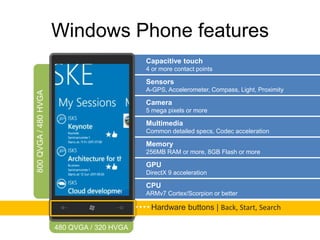
Windows Phone features
         Capacitive touch
         4 or more contact points

         Sensors
         A-GPS, Accelerometer, Compass, Light, Proximity

         Camera
         5 mega pixels or more

         Multimedia
         Common detailed specs, Codec acceleration

         Memory
         256MB RAM or more, 8GB Flash or more

         GPU
         DirectX 9 acceleration

         CPU
         ARMv7 Cortex/Scorpion or better

          Hardware buttons | Back, Start, Search
Concepts
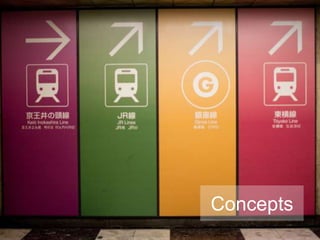
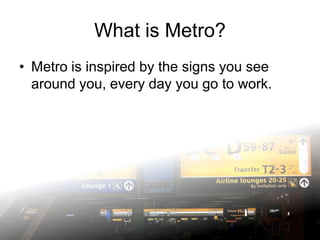
What is Metro?
• Metro is inspired by the signs you see
  around you, every day you go to work.
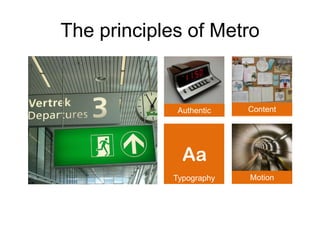
The principles of Metro


              Authentic   Content


             Typography   Motion
Be authentic
• A phone is a digital device with unique capabilities.


    – Don’t try to make your app look like the
      real thing
    – The app needs to fit only to your phone
    – Embrace the digital format
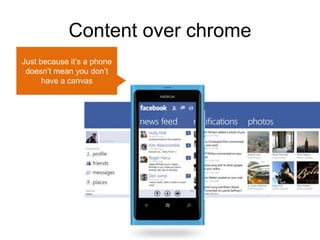
Content over chrome
Just because it’s a phone
 doesn’t mean you don’t
      have a canvas
Celebrate typography
• A major part of information is presented as
  text on a screen or a sign.

• Metro is not 100% about typography, but it
  plays a big role in presenting data.

• True to it’s authenticity, fonts are crisp and
  optimized for modern phone displays
Celebrate typography
• Metro applies typography by
   – Using different font sizes
   – Varying the font weights

• Good typography is important for
  presenting structured information.
Get your interface in motion
• Motion gives a sense of space inside an otherwise
  somewhat abstract environment.


   – Am I moving from one end of the app to
     the opposite end?
   – Or maybe just a small step in the
     process?
Get your interface in motion
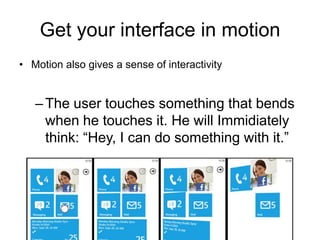
• Motion also gives a sense of interactivity


   – The user touches something that bends
     when he touches it. He will Immidiately
     think: “Hey, I can do something with it.”
Applying Metro
   design
Before you start
• Find the best idea to build an app
  – Not only will this bring alot of money into your
    pocket, it also helps the rest of the process.
  – A clear idea makes it easier to come up with a
    working solution later on.
Before you start - Journeys
• Idea: Record your personal walking
  statistics
  – Why? I have to walk 5KM every day because
    of a chronic condition. I can’t reach that right
    now, so I want to see how things are
    progressing towards that goal.

  – Key scenario: Record GPS coordinates and
    calculate the distance.
Creating the structure of the app
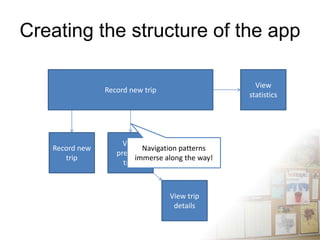
• Content first: Structure the data that you’re
  going to display so that it turns into
  information.

• A good information architecture will make
  or break your app!
Creating the structure of the app
• Split the behavior of
  the app from the data.
  – Structure the behavior
    using storyboarding
  – Structure the
    information using UML
    or any other language
    that allows you to
    organize data
    structures
Creating the structure of the app

                                                    View
                Record new trip
                                                  statistics


                     View
   Record new              Navigation patterns
                   previous
      trip               immerse along the way!
                     trips


                                  View trip
                                   details
Creating the visual design
• Based on the information architecture you
  can create a visual design for your app.

• Don’t worry about branding just yet.
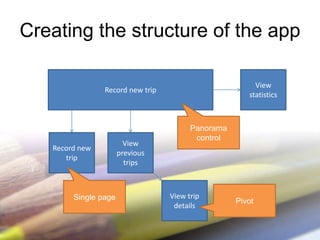
Creating the structure of the app

                                                        View
                Record new trip
                                                      statistics


                                        Panorama
                                         control
                        View
   Record new
                      previous
      trip
                        trips


        Single page               View trip
                                                   Pivot
                                   details
Creating the visual design
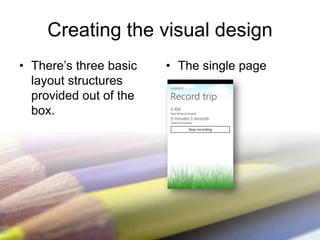
• There’s three basic   • The single page
  layout structures
  provided out of the
  box.
Creating the visual design
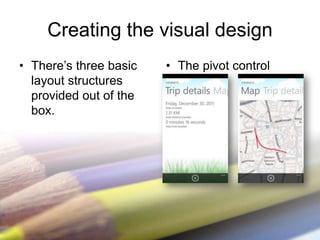
• There’s three basic   • The pivot control
  layout structures
  provided out of the
  box.
Creating the visual design
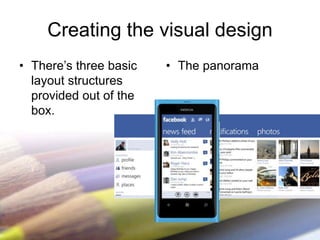
• There’s three basic   • The panorama
  layout structures
  provided out of the
  box.
Adding motion
• Each move in the application has a
  corresponding animation:

  – Jump between two conceptual spaces: Swivel
  – Drill down, without dead-end: Horizontal slide
  – Drill down with dead-end: Slide down

• Things that are interactive tilt backwards
  when you touch them.
Adding motion
• All the animations on Windows Phone 7
  are done using time based storyboards.

  – Most of them are actually premade for your
    convenience.

  – Wait, let me just show you!
Branding your app
• Branding an app is a great idea!
  – Having a consistant look, helps the user
    recognize they are in the right spot (or not).

  – It can also help establish a pleasant memory
    of the company that’s behind the app if
    combined with a good experience.
Branding your app
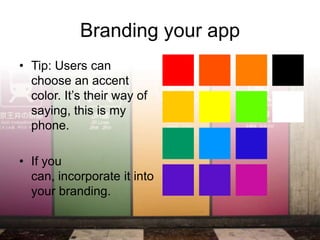
• Tip: Users can
  choose an accent
  color. It’s their way of
  saying, this is my
  phone.

• If you
  can, incorporate it into
  your branding.
Resources
Useful resources
• Official Metro design guidelines:
  http://msdn.microsoft.com/en-
  us/library/hh202915(v=vs.92).aspx

• Series of blogposts on WP7 app design:
  http://ux.artu.tv/?page_id=190
Useful resources
• Wireframing toolkit:
  http://blogs.claritycon.com/windowsphone7/
  2011/01/12/wicked-wireframes-wp7-vector-
  ux-kit-3/
http://www.fizzylogic.nl/


@wmeints

The metro design language for app developers

  • 1.
    W.Meints The Metro designlanguage for app developers
  • 2.
    Who am I? WillemMeints Lead developer Info Support Professional Development Centre http://www.fizzylogic.nl/ @wmeints
  • 3.
    Agenda Whatis WP7? Concepts Applying Resources
  • 4.
  • 5.
  • 6.
    Windows Phone features Capacitive touch 4 or more contact points Sensors A-GPS, Accelerometer, Compass, Light, Proximity Camera 5 mega pixels or more Multimedia Common detailed specs, Codec acceleration Memory 256MB RAM or more, 8GB Flash or more GPU DirectX 9 acceleration CPU ARMv7 Cortex/Scorpion or better Hardware buttons | Back, Start, Search
  • 7.
  • 8.
    What is Metro? •Metro is inspired by the signs you see around you, every day you go to work.
  • 9.
    The principles ofMetro Authentic Content Typography Motion
  • 10.
    Be authentic • Aphone is a digital device with unique capabilities. – Don’t try to make your app look like the real thing – The app needs to fit only to your phone – Embrace the digital format
  • 11.
    Content over chrome Justbecause it’s a phone doesn’t mean you don’t have a canvas
  • 12.
    Celebrate typography • Amajor part of information is presented as text on a screen or a sign. • Metro is not 100% about typography, but it plays a big role in presenting data. • True to it’s authenticity, fonts are crisp and optimized for modern phone displays
  • 13.
    Celebrate typography • Metroapplies typography by – Using different font sizes – Varying the font weights • Good typography is important for presenting structured information.
  • 14.
    Get your interfacein motion • Motion gives a sense of space inside an otherwise somewhat abstract environment. – Am I moving from one end of the app to the opposite end? – Or maybe just a small step in the process?
  • 15.
    Get your interfacein motion • Motion also gives a sense of interactivity – The user touches something that bends when he touches it. He will Immidiately think: “Hey, I can do something with it.”
  • 16.
  • 17.
    Before you start •Find the best idea to build an app – Not only will this bring alot of money into your pocket, it also helps the rest of the process. – A clear idea makes it easier to come up with a working solution later on.
  • 18.
    Before you start- Journeys • Idea: Record your personal walking statistics – Why? I have to walk 5KM every day because of a chronic condition. I can’t reach that right now, so I want to see how things are progressing towards that goal. – Key scenario: Record GPS coordinates and calculate the distance.
  • 19.
    Creating the structureof the app • Content first: Structure the data that you’re going to display so that it turns into information. • A good information architecture will make or break your app!
  • 20.
    Creating the structureof the app • Split the behavior of the app from the data. – Structure the behavior using storyboarding – Structure the information using UML or any other language that allows you to organize data structures
  • 21.
    Creating the structureof the app View Record new trip statistics View Record new Navigation patterns previous trip immerse along the way! trips View trip details
  • 22.
    Creating the visualdesign • Based on the information architecture you can create a visual design for your app. • Don’t worry about branding just yet.
  • 23.
    Creating the structureof the app View Record new trip statistics Panorama control View Record new previous trip trips Single page View trip Pivot details
  • 24.
    Creating the visualdesign • There’s three basic • The single page layout structures provided out of the box.
  • 25.
    Creating the visualdesign • There’s three basic • The pivot control layout structures provided out of the box.
  • 26.
    Creating the visualdesign • There’s three basic • The panorama layout structures provided out of the box.
  • 27.
    Adding motion • Eachmove in the application has a corresponding animation: – Jump between two conceptual spaces: Swivel – Drill down, without dead-end: Horizontal slide – Drill down with dead-end: Slide down • Things that are interactive tilt backwards when you touch them.
  • 28.
    Adding motion • Allthe animations on Windows Phone 7 are done using time based storyboards. – Most of them are actually premade for your convenience. – Wait, let me just show you!
  • 29.
    Branding your app •Branding an app is a great idea! – Having a consistant look, helps the user recognize they are in the right spot (or not). – It can also help establish a pleasant memory of the company that’s behind the app if combined with a good experience.
  • 30.
    Branding your app •Tip: Users can choose an accent color. It’s their way of saying, this is my phone. • If you can, incorporate it into your branding.
  • 31.
  • 32.
    Useful resources • OfficialMetro design guidelines: http://msdn.microsoft.com/en- us/library/hh202915(v=vs.92).aspx • Series of blogposts on WP7 app design: http://ux.artu.tv/?page_id=190
  • 33.
    Useful resources • Wireframingtoolkit: http://blogs.claritycon.com/windowsphone7/ 2011/01/12/wicked-wireframes-wp7-vector- ux-kit-3/
  • 34.