Perl One Liners for the Shell
Dave Oswald
● Conferences Committee
Chairman
● Salt Lake Perl Mongers
Organizer
● Software Engineer
● Platform & Infrastructure
Engineering Manager
perl [switches] [--] [programfile]
[arguments]
Switches
-0[octal] specify record separator (0, if no argument)
-a autosplit mode with -n or -p (splits $_ into @F)
-C[number/list] enables the listed Unicode features
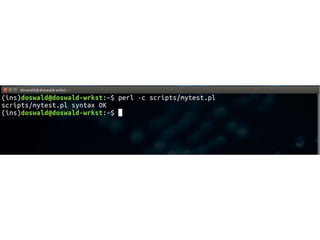
-c check syntax only (runs BEGIN and CHECK blocks)
-d[:debugger] run program under debugger
-D[number/list] set debugging flags (argument is a bit mask or alphabets)
-e program one line of program (several -e's allowed, omit programfile)
-E program like -e, but enables all optional features
-f don't do $sitelib/sitecustomize.pl at startup
-F/pattern/ split() pattern for -a switch (//'s are optional)
-i[extension] edit <> files in place (makes backup if extension supplied)
-Idirectory specify @INC/#include directory (several -I's allowed)
-l[octal] enable line ending processing, specifies line terminator
-[mM][-]module execute "use/no module..." before executing program
-n assume "while (<>) { ... }" loop around program
-p assume loop like -n but print line also, like sed
-s enable rudimentary parsing for switches after programfile
-S look for programfile using PATH environment variable
-t enable tainting warnings
-T enable tainting checks
-u dump core after parsing program
-U allow unsafe operations
-v print version, patchlevel and license
-V[:variable] print configuration summary (or a single Config.pm variable)
-w enable many useful warnings
-W enable all warnings
-x[directory] ignore text before #!perl line (optionally cd to directory)
-X disable all warnings
perldoc perlrun
Introducing the tools
perl -e ''
-e
perl -e 'print "Hello World!n"'
Hello World!
#!/usr/bin/env perl
print 'Hello World!n';
Hello World!
echo 'Hello World'
while (defined(local $_ = <>)) {
...
print;
}
$ perl myscript file1.txt file2.txt
Internally <> reads from each file in @ARGV, falling
back to STDIN.
A concept in Perl is only valid if it can be
expressed as a one-liner.
-- Documentation for Inline::C
perl -pe '...'
while (defined(local $_ = <>)) {
...
print;
}
$ perl myscript file1.txt file2.txt
while (defined(local $_ = <>)) {
chomp
...
$_ .= "n";
print;
}
$ perl myscript file1.txt file2.txt
perl -lpe '...'
Reverse the characters in every word in a
dictionary
perl -ple '$_ = reverse'
~/scripts/2of12inf.txt
Count by fives
seq 1 10 | perl -lpe '$_ *= 5'
-l
chomps input, adds newline to output.
-l
chomps input, adds newline to output.
$/ = $ = "n"
-p
Creates a loop that iterates over lines of input,
carries out any actions in the code block, and
prints each line.
$.
perl -pe '$_ = "$. " . $_'
2of12inf.txt
$.
Special variable contains the line number of the
most recently read line of input.
Lines start at 1.
Sometimes printing every line of input is not
wanted.
-n
perl -ne 'print "$.: $_" if m/^th/'
2of12inf.txt
Let’s get a count at the end.
This means we need something to happen only
one time, after the loop is done.
perl -ne 'if (m/^th/) {$c++; print} END{print
"$cn"}'
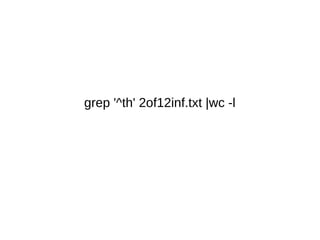
grep '^th' 2of12inf.txt |wc -l
-n iterates over lines of a file without printing.
You can print explicitly.
-n is useful as a filter similar to GNU grep.
END{ ... }
Can be used to defer an action to after the
iterating is done.
Input can come from STDIN rather than a file.
This allows pipes to work.
seq 1 10 |perl -ne '$_*=5; print "$_n" if $_ % 3
== 0'
perl -l0pe '...' filename
-l0
Specify an octal ASCII value as input/output
record separator.
-0
Set output record separator to octal value
-0oct and -loct
Useful for working with null-terminated lines or
input.
-a
df |perl -ane 'next if $. == 1; print "$F[-1]
$F[-2]n"'
-a
Auto-split each line on whitespace into @F
Let’s split on comma and change to colon
-F/pattern/
perl -F/,/ -ne '$"=":"; print "@F";'
csv
-F/pattern/
Specifies an alternate split pattern.
$" = "..."
Specifies an alternate “join” delimiter when an
array is interpolated into a string.
perl -pe 'tr/,/:/' csv
-i
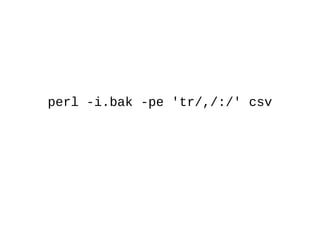
perl -i.bak -pe 'tr/,/:/' csv
-i
In-place edit a file.
Optionally create a backup of original.
perl -i.bak -pe 'tr/:/,/' csv
Fixed.
Handling multiple files distinctly
eof
perl -ne 'print; print "EOFn" if eof'
2of12inf.txt
Use eof to detect end of input files.
-M
Load a module at startup
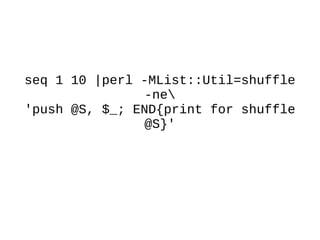
seq 1 10 |perl -MList::Util=shuffle
-ne 'push @S, $_; END{print for
shuffle @S}'
seq 1 10 |perl -MList::Util=shuffle
-ne
'push @S, $_; END{print for shuffle
@S}'
-M
Loads a module at startup.
Optionally specify an import list.
May invoke -M more than once.
perl -Mstrict -Mwarnings -e '$foo=10'
(Strict violation)
What modules are loaded when I load
Data::Dumper?
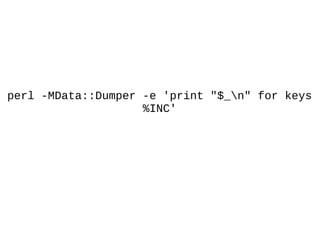
perl -MData::Dumper -e 'print "$_n" for keys
%INC'
Where is Perl finding Data::Dumper?
perl -MData::Dumper -e 'print qq/
$INC{"Data/Dumper.pm"}n/'
qq/.../
Same as "..."
Used to specify an alternate quoting mechanism
q/.../ '...'
qq/.../ '...'
qr/.../ m/.../
qx/.../ `...`
q{...} '...'
qq{...} '...'
qr{...} m/.../
qx{...} `...`
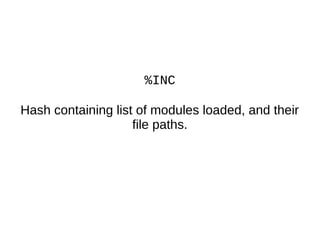
%INC
Hash containing list of modules loaded, and their
file paths.
-E
perl -MData::Dumper -E 'say
$INC{"Data/Dumper.pm"}'
-E
Allow use of say keyword.
say is like print, but auto-appends newline.
-E
Also enables all feature keywords for the Perl
version in use.
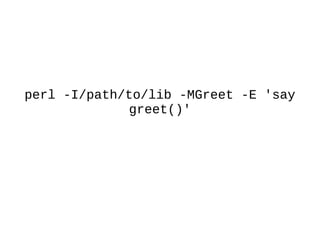
-I
perl -I/path/to/lib -MGreet -E 'say
greet()'
perl -I./lib -E 'say for @INC';
-I
Specify the first path to search for a module.
Multiple -I switches are fine.
-V
perl -V
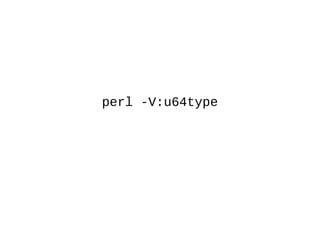
perl -V:u64type
perl -MConfig -E 'say
$Config{u64type}'
Find all mentions of a feature in Perl POD
"*delta.pod" articles for current version of Perl.
How do I know when feature X was
added to Perl?
How do I know when feature X was
added to Perl?
grep -ri 'signatures' $(find $(perl -E 'say for @INC')
-name '*delta.pod')
Perl's documentation
● perlrun
– Explanation of all command-line switches.
● perlvar
– Explanation of Perl's "special variables"
● perlsyn
– Description of syntax
Perl is part of Linux's rich set of tools.
daoswald@gmail.com
Slides available on Slideshare

Perl one-liners