Oracle Tracing 
By Shaji
Agenda for the Session 
• General Oracle Tracing 
• 10,046 Tracing 
• Trace Analyzer
Rules of Session: 
Interrupt me: 
• if you think I have got something wrong. 
• if you have a question. 
• if you can’t hear me.
Purpose of Tracing 
• Measure timing statistics for a given query, 
a batch process, or an entire system. 
• fast method of finding where potential 
bottlenecks on the system reside.
Key Parameters Affecting Tracing: 
• TIMED_STATISTICS 
Default Value : True 
• MAX_DUMP_FILE_SIZE 
Default Value : 500 OS Blocks 
• USER_DUMP_DEST 
Default Value : Operating system-dependent
Enabling the SQL Trace Facility 
• DBMS_MONITOR.DATABASE_TRACE_ENABLE 
procedure (recommended) 
eg: 
EXECUTE DBMS_MONITOR.SESSION_TRACE_ENABLE 
(session_id => 27, serial_num => 60,waits => TRUE, 
binds => FALSE); 
EXECUTE DBMS_MONITOR.SESSION_TRACE_DISABLE( 
session_id => 27, serial_num => 60); 
* Requires DBA Role
Enabling the SQL Trace Facility 
• DBMS_SESSION.SET_SQL_TRACE procedure 
eg: 
EXECUTE DBMS_SESSION.SESSION_TRACE_ENABLE 
(waits => TRUE, binds => FALSE); 
EXECUTE DBMS_SESSION.SESSION_TRACE_DISABLE();
Enabling the SQL Trace Facility 
ALTER SESSION SET SQL_TRACE = TRUE; 
SET AUTOTRACE ON;
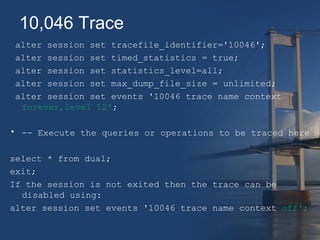
10,046 Trace 
alter session set tracefile_identifier='10046'; 
alter session set timed_statistics = true; 
alter session set statistics_level=all; 
alter session set max_dump_file_size = unlimited; 
alter session set events '10046 trace name context 
forever,level 12'; 
• -- Execute the queries or operations to be traced here 
select * from dual; 
exit; 
If the session is not exited then the trace can be 
disabled using: 
alter session set events '10046 trace name context off';
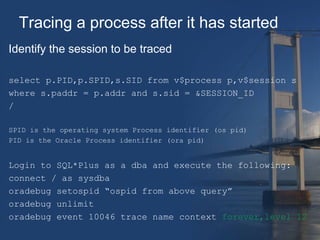
Tracing a process after it has started 
Identify the session to be traced 
select p.PID,p.SPID,s.SID from v$process p,v$session s 
where s.paddr = p.addr and s.sid = &SESSION_ID 
/ 
SPID is the operating system Process identifier (os pid) 
PID is the Oracle Process identifier (ora pid) 
Login to SQL*Plus as a dba and execute the following: 
connect / as sysdba 
oradebug setospid “ospid from above query” 
oradebug unlimit 
oradebug event 10046 trace name context forever,level 12
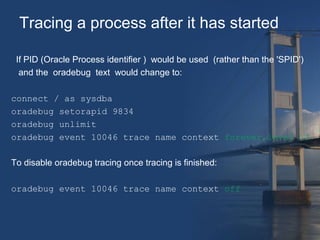
Tracing a process after it has started 
If PID (Oracle Process identifier ) would be used (rather than the 'SPID') 
and the oradebug text would change to: 
connect / as sysdba 
oradebug setorapid 9834 
oradebug unlimit 
oradebug event 10046 trace name context forever,level 12 
To disable oradebug tracing once tracing is finished: 
oradebug event 10046 trace name context off
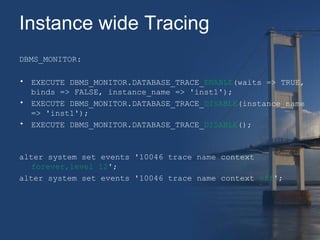
Instance wide Tracing 
DBMS_MONITOR: 
• EXECUTE DBMS_MONITOR.DATABASE_TRACE_ENABLE(waits => TRUE, 
binds => FALSE, instance_name => 'inst1'); 
• EXECUTE DBMS_MONITOR.DATABASE_TRACE_DISABLE(instance_name 
=> 'inst1'); 
• EXECUTE DBMS_MONITOR.DATABASE_TRACE_DISABLE(); 
alter system set events '10046 trace name context 
forever,level 12'; 
alter system set events '10046 trace name context off';
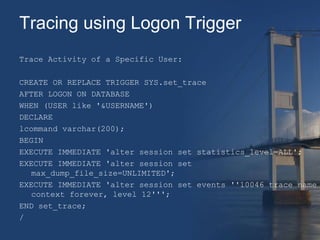
Tracing using Logon Trigger 
Trace Activity of a Specific User: 
CREATE OR REPLACE TRIGGER SYS.set_trace 
AFTER LOGON ON DATABASE 
WHEN (USER like '&USERNAME') 
DECLARE 
lcommand varchar(200); 
BEGIN 
EXECUTE IMMEDIATE 'alter session set statistics_level=ALL'; 
EXECUTE IMMEDIATE 'alter session set 
max_dump_file_size=UNLIMITED'; 
EXECUTE IMMEDIATE 'alter session set events ''10046 trace name 
context forever, level 12'''; 
END set_trace; 
/
Tracing Individual SQL Statements 
• SQL trace can be initiated for an individual SQL statement 
by substituting the required SQL_ID into the following 
statement. 
ALTER SESSION SET EVENTS 
'trace[rdbms.SQL_Optimizer.*][sql:sql_id]'; 
ALTER SESSION SET EVENTS 
'trace[rdbms.SQL_Optimizer.*] off'; 
• The SQL_ID of a statement can be found in the V$SQL or 
V$SQLSTAT view for recent SQL, or from the 
DBA_HIST_SQLSTAT view from the AWR repository for 
historical statements.
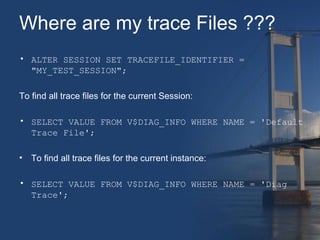
Where are my trace Files ??? 
• ALTER SESSION SET TRACEFILE_IDENTIFIER = 
"MY_TEST_SESSION"; 
To find all trace files for the current Session: 
• SELECT VALUE FROM V$DIAG_INFO WHERE NAME = 'Default 
Trace File'; 
• To find all trace files for the current instance: 
• SELECT VALUE FROM V$DIAG_INFO WHERE NAME = 'Diag 
Trace';
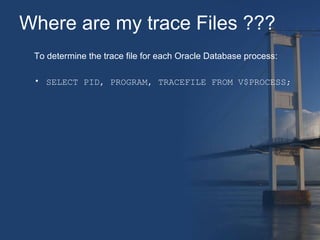
Where are my trace Files ??? 
To determine the trace file for each Oracle Database process: 
• SELECT PID, PROGRAM, TRACEFILE FROM V$PROCESS;
Trcsess 
• TRCSESS is the tool offered from Oracle to consolidate 
trace files. This is needed on shared server installations as 
sessions are executed from different processes writing the 
sql trace to different log files. 
• Consolidates trace output based on Session ID, Client ID, 
Service name, Action name, Module name 
• After trcsess merges the trace information into a single 
output file, the output file could be processed by TKPROF. 
trcsess [output=output_file_name] 
[session=session_id] 
[clientid=client_id] 
[service=service_name] 
[action=action_name] 
[module=module_name] 
[trace_files]
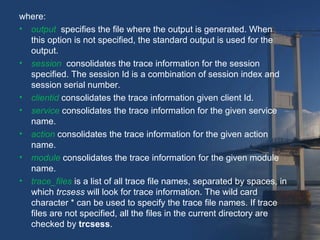
where: 
• output specifies the file where the output is generated. When 
this option is not specified, the standard output is used for the 
output. 
• session consolidates the trace information for the session 
specified. The session Id is a combination of session index and 
session serial number. 
• clientid consolidates the trace information given client Id. 
• service consolidates the trace information for the given service 
name. 
• action consolidates the trace information for the given action 
name. 
• module consolidates the trace information for the given module 
name. 
• trace_files is a list of all trace file names, separated by spaces, in 
which trcsess will look for trace information. The wild card 
character * can be used to specify the trace file names. If trace 
files are not specified, all the files in the current directory are 
checked by trcsess.
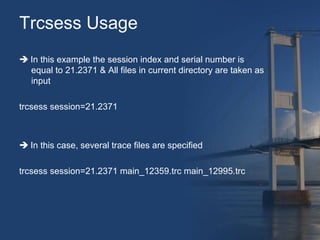
Trcsess Usage 
 In this example the session index and serial number is 
equal to 21.2371 & All files in current directory are taken as 
input 
trcsess session=21.2371 
 In this case, several trace files are specified 
trcsess session=21.2371 main_12359.trc main_12995.trc
tkprof 
• SQL traces files are produced in raw form. 
• tkprof utility can be used to translate it to more Human 
Readable form 
• Tkprof does not control the contents of a trace file, it simply 
formats them 
Usage: tkprof tracefile outputfile [explain= ] [table= ] 
[print= ] [insert= ] [sys= ] [sort= ]
Where 
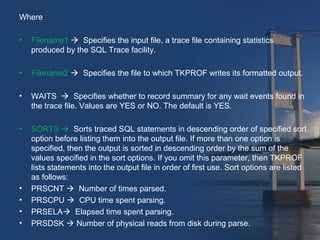
• Filename1  Specifies the input file, a trace file containing statistics 
produced by the SQL Trace facility. 
• Filename2  Specifies the file to which TKPROF writes its formatted output. 
• WAITS  Specifies whether to record summary for any wait events found in 
the trace file. Values are YES or NO. The default is YES. 
• SORTS  Sorts traced SQL statements in descending order of specified sort 
option before listing them into the output file. If more than one option is 
specified, then the output is sorted in descending order by the sum of the 
values specified in the sort options. If you omit this parameter, then TKPROF 
lists statements into the output file in order of first use. Sort options are listed 
as follows: 
• PRSCNT  Number of times parsed. 
• PRSCPU  CPU time spent parsing. 
• PRSELA Elapsed time spent parsing. 
• PRSDSK  Number of physical reads from disk during parse.
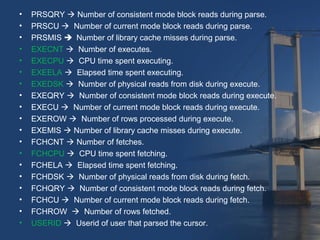
• PRSQRY  Number of consistent mode block reads during parse. 
• PRSCU  Number of current mode block reads during parse. 
• PRSMIS  Number of library cache misses during parse. 
• EXECNT  Number of executes. 
• EXECPU  CPU time spent executing. 
• EXEELA  Elapsed time spent executing. 
• EXEDSK  Number of physical reads from disk during execute. 
• EXEQRY  Number of consistent mode block reads during execute. 
• EXECU  Number of current mode block reads during execute. 
• EXEROW  Number of rows processed during execute. 
• EXEMIS  Number of library cache misses during execute. 
• FCHCNT  Number of fetches. 
• FCHCPU  CPU time spent fetching. 
• FCHELA  Elapsed time spent fetching. 
• FCHDSK  Number of physical reads from disk during fetch. 
• FCHQRY  Number of consistent mode block reads during fetch. 
• FCHCU  Number of current mode block reads during fetch. 
• FCHROW  Number of rows fetched. 
• USERID  Userid of user that parsed the cursor.
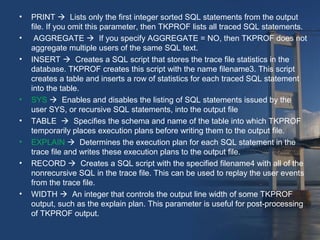
• PRINT  Lists only the first integer sorted SQL statements from the output 
file. If you omit this parameter, then TKPROF lists all traced SQL statements. 
• AGGREGATE  If you specify AGGREGATE = NO, then TKPROF does not 
aggregate multiple users of the same SQL text. 
• INSERT  Creates a SQL script that stores the trace file statistics in the 
database. TKPROF creates this script with the name filename3. This script 
creates a table and inserts a row of statistics for each traced SQL statement 
into the table. 
• SYS  Enables and disables the listing of SQL statements issued by the 
user SYS, or recursive SQL statements, into the output file 
• TABLE  Specifies the schema and name of the table into which TKPROF 
temporarily places execution plans before writing them to the output file. 
• EXPLAIN  Determines the execution plan for each SQL statement in the 
trace file and writes these execution plans to the output file. 
• RECORD  Creates a SQL script with the specified filename4 with all of the 
nonrecursive SQL in the trace file. This can be used to replay the user events 
from the trace file. 
• WIDTH  An integer that controls the output line width of some TKPROF 
output, such as the explain plan. This parameter is useful for post-processing 
of TKPROF output.
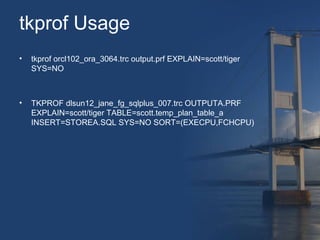
tkprof Usage 
• tkprof orcl102_ora_3064.trc output.prf EXPLAIN=scott/tiger 
SYS=NO 
• TKPROF dlsun12_jane_fg_sqlplus_007.trc OUTPUTA.PRF 
EXPLAIN=scott/tiger TABLE=scott.temp_plan_table_a 
INSERT=STOREA.SQL SYS=NO SORT=(EXECPU,FCHCPU)
Trace analyzer 
• Trace Analyzer, also known as TRCANLZR or TRCA, is a 
tool provided by Oracle Server Technologies Center of 
Expertise - ST CoE. TRCA inputs one or several SQL 
trace(s) generated by Event 10046 and outputs a 
diagnostics report in two formats (html and text). These 
reports are commonly used to diagnose processes 
performing poorly. 
• TRCA identifies expensive SQL out of the provided trace(s), 
then it connects to the database and collects their explain 
plans, Cost-based Optimizer CBO statistics, metadata, 
configuration parameters, and similar elements that 
influence the performance of the process being analyzed.
Trace analyzer Output 
• TRCANLZR (TRCA): SQL_TRACE/Event 10046 Trace 
File Analyzer - Tool for Interpreting Raw SQL Traces [ID 
224270.1] 
HTML Document
Questions
Reference 
• Oracle® Database Administrator's Guide 11g Release 1 (11.1) - 
chapter 21 Using Application Tracing Tools 
• How To Collect 10046 Trace (SQL_TRACE) Diagnostics for 
Performance Issues [ID 376442.1] 
• http://www.oracle-base.com/articles/misc/sql-trace-10046-trcsess-and-tkprof.• http://docs.oracle.com/cd/B19306_01/appdev.102/b14258/d_monitor.htm 
• TRCANLZR (TRCA): SQL_TRACE/Event 10046 Trace File 
Analyzer - Tool for Interpreting Raw SQL Traces [ID 224270.1]
Thank You 
Shaji- EDMS Team

Oracle Tracing

  • 1.
  • 2.
    Agenda for theSession • General Oracle Tracing • 10,046 Tracing • Trace Analyzer
  • 3.
    Rules of Session: Interrupt me: • if you think I have got something wrong. • if you have a question. • if you can’t hear me.
  • 4.
    Purpose of Tracing • Measure timing statistics for a given query, a batch process, or an entire system. • fast method of finding where potential bottlenecks on the system reside.
  • 5.
    Key Parameters AffectingTracing: • TIMED_STATISTICS Default Value : True • MAX_DUMP_FILE_SIZE Default Value : 500 OS Blocks • USER_DUMP_DEST Default Value : Operating system-dependent
  • 6.
    Enabling the SQLTrace Facility • DBMS_MONITOR.DATABASE_TRACE_ENABLE procedure (recommended) eg: EXECUTE DBMS_MONITOR.SESSION_TRACE_ENABLE (session_id => 27, serial_num => 60,waits => TRUE, binds => FALSE); EXECUTE DBMS_MONITOR.SESSION_TRACE_DISABLE( session_id => 27, serial_num => 60); * Requires DBA Role
  • 7.
    Enabling the SQLTrace Facility • DBMS_SESSION.SET_SQL_TRACE procedure eg: EXECUTE DBMS_SESSION.SESSION_TRACE_ENABLE (waits => TRUE, binds => FALSE); EXECUTE DBMS_SESSION.SESSION_TRACE_DISABLE();
  • 8.
    Enabling the SQLTrace Facility ALTER SESSION SET SQL_TRACE = TRUE; SET AUTOTRACE ON;
  • 9.
    10,046 Trace altersession set tracefile_identifier='10046'; alter session set timed_statistics = true; alter session set statistics_level=all; alter session set max_dump_file_size = unlimited; alter session set events '10046 trace name context forever,level 12'; • -- Execute the queries or operations to be traced here select * from dual; exit; If the session is not exited then the trace can be disabled using: alter session set events '10046 trace name context off';
  • 10.
    Tracing a processafter it has started Identify the session to be traced select p.PID,p.SPID,s.SID from v$process p,v$session s where s.paddr = p.addr and s.sid = &SESSION_ID / SPID is the operating system Process identifier (os pid) PID is the Oracle Process identifier (ora pid) Login to SQL*Plus as a dba and execute the following: connect / as sysdba oradebug setospid “ospid from above query” oradebug unlimit oradebug event 10046 trace name context forever,level 12
  • 11.
    Tracing a processafter it has started If PID (Oracle Process identifier ) would be used (rather than the 'SPID') and the oradebug text would change to: connect / as sysdba oradebug setorapid 9834 oradebug unlimit oradebug event 10046 trace name context forever,level 12 To disable oradebug tracing once tracing is finished: oradebug event 10046 trace name context off
  • 12.
    Instance wide Tracing DBMS_MONITOR: • EXECUTE DBMS_MONITOR.DATABASE_TRACE_ENABLE(waits => TRUE, binds => FALSE, instance_name => 'inst1'); • EXECUTE DBMS_MONITOR.DATABASE_TRACE_DISABLE(instance_name => 'inst1'); • EXECUTE DBMS_MONITOR.DATABASE_TRACE_DISABLE(); alter system set events '10046 trace name context forever,level 12'; alter system set events '10046 trace name context off';
  • 13.
    Tracing using LogonTrigger Trace Activity of a Specific User: CREATE OR REPLACE TRIGGER SYS.set_trace AFTER LOGON ON DATABASE WHEN (USER like '&USERNAME') DECLARE lcommand varchar(200); BEGIN EXECUTE IMMEDIATE 'alter session set statistics_level=ALL'; EXECUTE IMMEDIATE 'alter session set max_dump_file_size=UNLIMITED'; EXECUTE IMMEDIATE 'alter session set events ''10046 trace name context forever, level 12'''; END set_trace; /
  • 14.
    Tracing Individual SQLStatements • SQL trace can be initiated for an individual SQL statement by substituting the required SQL_ID into the following statement. ALTER SESSION SET EVENTS 'trace[rdbms.SQL_Optimizer.*][sql:sql_id]'; ALTER SESSION SET EVENTS 'trace[rdbms.SQL_Optimizer.*] off'; • The SQL_ID of a statement can be found in the V$SQL or V$SQLSTAT view for recent SQL, or from the DBA_HIST_SQLSTAT view from the AWR repository for historical statements.
  • 15.
    Where are mytrace Files ??? • ALTER SESSION SET TRACEFILE_IDENTIFIER = "MY_TEST_SESSION"; To find all trace files for the current Session: • SELECT VALUE FROM V$DIAG_INFO WHERE NAME = 'Default Trace File'; • To find all trace files for the current instance: • SELECT VALUE FROM V$DIAG_INFO WHERE NAME = 'Diag Trace';
  • 16.
    Where are mytrace Files ??? To determine the trace file for each Oracle Database process: • SELECT PID, PROGRAM, TRACEFILE FROM V$PROCESS;
  • 17.
    Trcsess • TRCSESSis the tool offered from Oracle to consolidate trace files. This is needed on shared server installations as sessions are executed from different processes writing the sql trace to different log files. • Consolidates trace output based on Session ID, Client ID, Service name, Action name, Module name • After trcsess merges the trace information into a single output file, the output file could be processed by TKPROF. trcsess [output=output_file_name] [session=session_id] [clientid=client_id] [service=service_name] [action=action_name] [module=module_name] [trace_files]
  • 18.
    where: • outputspecifies the file where the output is generated. When this option is not specified, the standard output is used for the output. • session consolidates the trace information for the session specified. The session Id is a combination of session index and session serial number. • clientid consolidates the trace information given client Id. • service consolidates the trace information for the given service name. • action consolidates the trace information for the given action name. • module consolidates the trace information for the given module name. • trace_files is a list of all trace file names, separated by spaces, in which trcsess will look for trace information. The wild card character * can be used to specify the trace file names. If trace files are not specified, all the files in the current directory are checked by trcsess.
  • 19.
    Trcsess Usage In this example the session index and serial number is equal to 21.2371 & All files in current directory are taken as input trcsess session=21.2371  In this case, several trace files are specified trcsess session=21.2371 main_12359.trc main_12995.trc
  • 20.
    tkprof • SQLtraces files are produced in raw form. • tkprof utility can be used to translate it to more Human Readable form • Tkprof does not control the contents of a trace file, it simply formats them Usage: tkprof tracefile outputfile [explain= ] [table= ] [print= ] [insert= ] [sys= ] [sort= ]
  • 21.
    Where • Filename1 Specifies the input file, a trace file containing statistics produced by the SQL Trace facility. • Filename2  Specifies the file to which TKPROF writes its formatted output. • WAITS  Specifies whether to record summary for any wait events found in the trace file. Values are YES or NO. The default is YES. • SORTS  Sorts traced SQL statements in descending order of specified sort option before listing them into the output file. If more than one option is specified, then the output is sorted in descending order by the sum of the values specified in the sort options. If you omit this parameter, then TKPROF lists statements into the output file in order of first use. Sort options are listed as follows: • PRSCNT  Number of times parsed. • PRSCPU  CPU time spent parsing. • PRSELA Elapsed time spent parsing. • PRSDSK  Number of physical reads from disk during parse.
  • 22.
    • PRSQRY Number of consistent mode block reads during parse. • PRSCU  Number of current mode block reads during parse. • PRSMIS  Number of library cache misses during parse. • EXECNT  Number of executes. • EXECPU  CPU time spent executing. • EXEELA  Elapsed time spent executing. • EXEDSK  Number of physical reads from disk during execute. • EXEQRY  Number of consistent mode block reads during execute. • EXECU  Number of current mode block reads during execute. • EXEROW  Number of rows processed during execute. • EXEMIS  Number of library cache misses during execute. • FCHCNT  Number of fetches. • FCHCPU  CPU time spent fetching. • FCHELA  Elapsed time spent fetching. • FCHDSK  Number of physical reads from disk during fetch. • FCHQRY  Number of consistent mode block reads during fetch. • FCHCU  Number of current mode block reads during fetch. • FCHROW  Number of rows fetched. • USERID  Userid of user that parsed the cursor.
  • 23.
    • PRINT Lists only the first integer sorted SQL statements from the output file. If you omit this parameter, then TKPROF lists all traced SQL statements. • AGGREGATE  If you specify AGGREGATE = NO, then TKPROF does not aggregate multiple users of the same SQL text. • INSERT  Creates a SQL script that stores the trace file statistics in the database. TKPROF creates this script with the name filename3. This script creates a table and inserts a row of statistics for each traced SQL statement into the table. • SYS  Enables and disables the listing of SQL statements issued by the user SYS, or recursive SQL statements, into the output file • TABLE  Specifies the schema and name of the table into which TKPROF temporarily places execution plans before writing them to the output file. • EXPLAIN  Determines the execution plan for each SQL statement in the trace file and writes these execution plans to the output file. • RECORD  Creates a SQL script with the specified filename4 with all of the nonrecursive SQL in the trace file. This can be used to replay the user events from the trace file. • WIDTH  An integer that controls the output line width of some TKPROF output, such as the explain plan. This parameter is useful for post-processing of TKPROF output.
  • 24.
    tkprof Usage •tkprof orcl102_ora_3064.trc output.prf EXPLAIN=scott/tiger SYS=NO • TKPROF dlsun12_jane_fg_sqlplus_007.trc OUTPUTA.PRF EXPLAIN=scott/tiger TABLE=scott.temp_plan_table_a INSERT=STOREA.SQL SYS=NO SORT=(EXECPU,FCHCPU)
  • 25.
    Trace analyzer •Trace Analyzer, also known as TRCANLZR or TRCA, is a tool provided by Oracle Server Technologies Center of Expertise - ST CoE. TRCA inputs one or several SQL trace(s) generated by Event 10046 and outputs a diagnostics report in two formats (html and text). These reports are commonly used to diagnose processes performing poorly. • TRCA identifies expensive SQL out of the provided trace(s), then it connects to the database and collects their explain plans, Cost-based Optimizer CBO statistics, metadata, configuration parameters, and similar elements that influence the performance of the process being analyzed.
  • 26.
    Trace analyzer Output • TRCANLZR (TRCA): SQL_TRACE/Event 10046 Trace File Analyzer - Tool for Interpreting Raw SQL Traces [ID 224270.1] HTML Document
  • 27.
  • 28.
    Reference • Oracle®Database Administrator's Guide 11g Release 1 (11.1) - chapter 21 Using Application Tracing Tools • How To Collect 10046 Trace (SQL_TRACE) Diagnostics for Performance Issues [ID 376442.1] • http://www.oracle-base.com/articles/misc/sql-trace-10046-trcsess-and-tkprof.• http://docs.oracle.com/cd/B19306_01/appdev.102/b14258/d_monitor.htm • TRCANLZR (TRCA): SQL_TRACE/Event 10046 Trace File Analyzer - Tool for Interpreting Raw SQL Traces [ID 224270.1]
  • 29.