Copyright © 2012, Oracle and/or its affiliates. All rights reserved.
Understanding Serial Execution Plans
Copyright © 2012, Oracle and/or its affiliates. All rights reserved.
6 - 2
Objectives
After completing this lesson, you should be able to:
• Gather execution plans
• Display execution plans
• Interpret execution plans
Copyright © 2012, Oracle and/or its affiliates. All rights reserved.
6 - 3
What Is an Execution Plan?
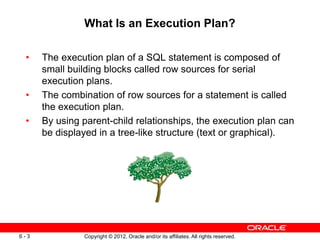
• The execution plan of a SQL statement is composed of
small building blocks called row sources for serial
execution plans.
• The combination of row sources for a statement is called
the execution plan.
• By using parent-child relationships, the execution plan can
be displayed in a tree-like structure (text or graphical).
Copyright © 2012, Oracle and/or its affiliates. All rights reserved.
6 - 4
Reviewing the Execution Plan
By reviewing execution plans, you should be able to assess if
the suboptimal plan is caused by the optimizer’s wrong
assumptions, calculations, or other factors:
• Drive from the table that has the most selective filter.
• Check to confirm the following:
– The driving table has the best filter.
– The fewest number of rows are returned to the next step.
– The join method is appropriate for the number of rows
returned.
– Views are correctly used.
– There are any unintentional Cartesian products.
– Tables are accessed efficiently.
Copyright © 2012, Oracle and/or its affiliates. All rights reserved.
6 - 5
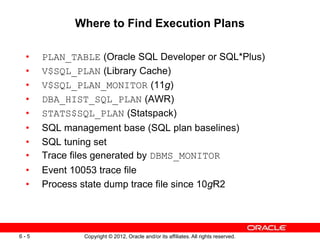
Where to Find Execution Plans
• PLAN_TABLE (Oracle SQL Developer or SQL*Plus)
• V$SQL_PLAN (Library Cache)
• V$SQL_PLAN_MONITOR (11g)
• DBA_HIST_SQL_PLAN (AWR)
• STATS$SQL_PLAN (Statspack)
• SQL management base (SQL plan baselines)
• SQL tuning set
• Trace files generated by DBMS_MONITOR
• Event 10053 trace file
• Process state dump trace file since 10gR2
Copyright © 2012, Oracle and/or its affiliates. All rights reserved.
6 - 7
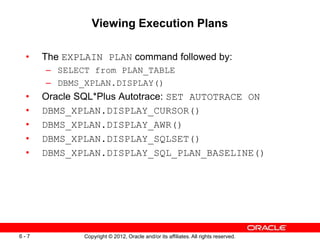
Viewing Execution Plans
• The EXPLAIN PLAN command followed by:
– SELECT from PLAN_TABLE
– DBMS_XPLAN.DISPLAY()
• Oracle SQL*Plus Autotrace: SET AUTOTRACE ON
• DBMS_XPLAN.DISPLAY_CURSOR()
• DBMS_XPLAN.DISPLAY_AWR()
• DBMS_XPLAN.DISPLAY_SQLSET()
• DBMS_XPLAN.DISPLAY_SQL_PLAN_BASELINE()
Copyright © 2012, Oracle and/or its affiliates. All rights reserved.
6 - 8
The EXPLAIN PLAN Command: Overview
• Generates an optimizer execution plan
• Stores the plan in PLAN_TABLE
• Does not execute the statement itself
Copyright © 2012, Oracle and/or its affiliates. All rights reserved.
6 - 9
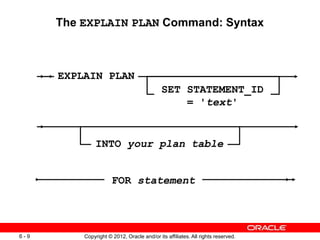
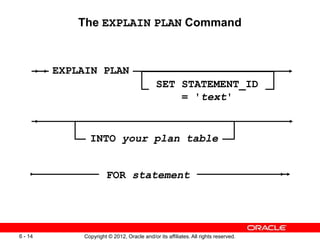
The EXPLAIN PLAN Command: Syntax
SET STATEMENT_ID
= 'text'
EXPLAIN PLAN
INTO your plan table
FOR statement
Copyright © 2012, Oracle and/or its affiliates. All rights reserved.
6 - 10
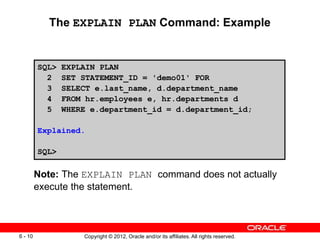
The EXPLAIN PLAN Command: Example
SQL> EXPLAIN PLAN
2 SET STATEMENT_ID = 'demo01' FOR
3 SELECT e.last_name, d.department_name
4 FROM hr.employees e, hr.departments d
5 WHERE e.department_id = d.department_id;
Explained.
SQL>
Note: The EXPLAIN PLAN command does not actually
execute the statement.
Copyright © 2012, Oracle and/or its affiliates. All rights reserved.
6 - 11
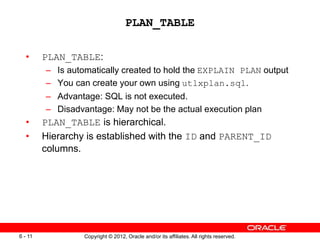
PLAN_TABLE
• PLAN_TABLE:
– Is automatically created to hold the EXPLAIN PLAN output
– You can create your own using utlxplan.sql.
– Advantage: SQL is not executed.
– Disadvantage: May not be the actual execution plan
• PLAN_TABLE is hierarchical.
• Hierarchy is established with the ID and PARENT_ID
columns.
Copyright © 2012, Oracle and/or its affiliates. All rights reserved.
6 - 12
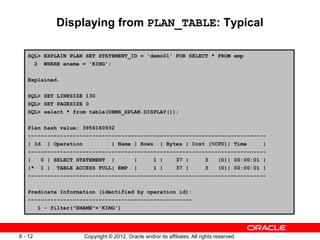
Displaying from PLAN_TABLE: Typical
SQL> EXPLAIN PLAN SET STATEMENT_ID = 'demo01' FOR SELECT * FROM emp
2 WHERE ename = 'KING';
Explained.
SQL> SET LINESIZE 130
SQL> SET PAGESIZE 0
SQL> select * from table(DBMS_XPLAN.DISPLAY());
Plan hash value: 3956160932
--------------------------------------------------------------------------
| Id | Operation | Name | Rows | Bytes | Cost (%CPU)| Time |
--------------------------------------------------------------------------
| 0 | SELECT STATEMENT | | 1 | 37 | 3 (0)| 00:00:01 |
|* 1 | TABLE ACCESS FULL| EMP | 1 | 37 | 3 (0)| 00:00:01 |
--------------------------------------------------------------------------
Predicate Information (identified by operation id):
---------------------------------------------------
1 - filter("ENAME"='KING')
Copyright © 2012, Oracle and/or its affiliates. All rights reserved.
6 - 13
Displaying from PLAN_TABLE: ALL
SQL> select * from table(DBMS_XPLAN.DISPLAY(null,null,'ALL'));
Plan hash value: 3956160932
--------------------------------------------------------------------------
| Id | Operation | Name | Rows | Bytes | Cost (%CPU)| Time |
--------------------------------------------------------------------------
| 0 | SELECT STATEMENT | | 1 | 37 | 3 (0)| 00:00:01 |
|* 1 | TABLE ACCESS FULL| EMP | 1 | 37 | 3 (0)| 00:00:01 |
--------------------------------------------------------------------------
Query Block Name / Object Alias (identified by operation id):
-------------------------------------------------------------
1 - SEL$1 / EMP@SEL$1
Predicate Information (identified by operation id):
---------------------------------------------------
1 - filter("ENAME"='KING')
Column Projection Information (identified by operation id):
-----------------------------------------------------------
1 - "EMP"."EMPNO"[NUMBER,22], "ENAME"[VARCHAR2,10], "EMP"."JOB"[VARCHAR2,9],
"EMP"."MGR"[NUMBER,22], "EMP"."HIREDATE"[DATE,7], "EMP"."SAL"[NUMBER,22],
"EMP"."COMM"[NUMBER,22], "EMP"."DEPTNO"[NUMBER,22]
Copyright © 2012, Oracle and/or its affiliates. All rights reserved.
6 - 14
SET STATEMENT_ID
= 'text'
EXPLAIN PLAN
INTO your plan table
FOR statement
The EXPLAIN PLAN Command
Copyright © 2012, Oracle and/or its affiliates. All rights reserved.
6 - 15
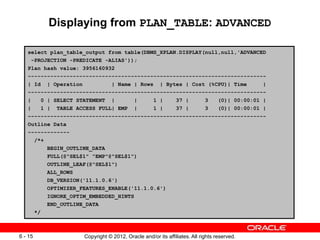
Displaying from PLAN_TABLE: ADVANCED
select plan_table_output from table(DBMS_XPLAN.DISPLAY(null,null,'ADVANCED
-PROJECTION -PREDICATE -ALIAS'));
Plan hash value: 3956160932
--------------------------------------------------------------------------
| Id | Operation | Name | Rows | Bytes | Cost (%CPU)| Time |
--------------------------------------------------------------------------
| 0 | SELECT STATEMENT | | 1 | 37 | 3 (0)| 00:00:01 |
| 1 | TABLE ACCESS FULL| EMP | 1 | 37 | 3 (0)| 00:00:01 |
--------------------------------------------------------------------------
Outline Data
-------------
/*+
BEGIN_OUTLINE_DATA
FULL(@"SEL$1" "EMP"@"SEL$1")
OUTLINE_LEAF(@"SEL$1")
ALL_ROWS
DB_VERSION('11.1.0.6')
OPTIMIZER_FEATURES_ENABLE('11.1.0.6')
IGNORE_OPTIM_EMBEDDED_HINTS
END_OUTLINE_DATA
*/
Copyright © 2012, Oracle and/or its affiliates. All rights reserved.
6 - 16
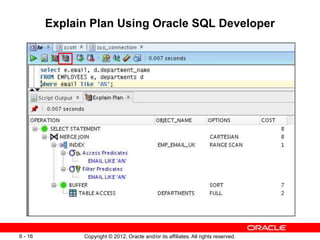
Explain Plan Using Oracle SQL Developer
Copyright © 2012, Oracle and/or its affiliates. All rights reserved.
6 - 17
Quiz
An EXPLAIN PLAN command executes the statement and
inserts the plan used by the optimizer into a table.
a. True
b. False
Copyright © 2012, Oracle and/or its affiliates. All rights reserved.
6 - 18
Quiz
Which of the following is NOT true about a PLAN_TABLE?
a. The PLAN_TABLE is automatically created to hold the
EXPLAIN PLAN output.
b. You cannot create your own PLAN_TABLE.
c. The actual SQL command is not executed.
d. The plan in the PLAN_TABLE may not be the actual
execution plan.
Copyright © 2012, Oracle and/or its affiliates. All rights reserved.
6 - 19
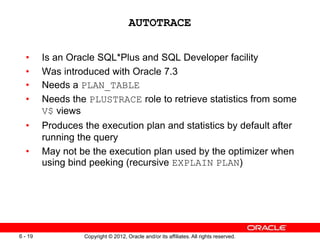
AUTOTRACE
• Is an Oracle SQL*Plus and SQL Developer facility
• Was introduced with Oracle 7.3
• Needs a PLAN_TABLE
• Needs the PLUSTRACE role to retrieve statistics from some
V$ views
• Produces the execution plan and statistics by default after
running the query
• May not be the execution plan used by the optimizer when
using bind peeking (recursive EXPLAIN PLAN)
Copyright © 2012, Oracle and/or its affiliates. All rights reserved.
6 - 20
The AUTOTRACE Syntax
OFF
TRACE[ONLY]
EXPLAIN
STATISTICS
SHOW AUTOTRACE
SET AUTOTRACE ON
Copyright © 2012, Oracle and/or its affiliates. All rights reserved.
6 - 21
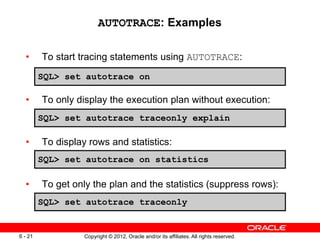
AUTOTRACE: Examples
• To start tracing statements using AUTOTRACE:
• To only display the execution plan without execution:
• To display rows and statistics:
• To get only the plan and the statistics (suppress rows):
SQL> set autotrace on
SQL> set autotrace traceonly explain
SQL> set autotrace on statistics
SQL> set autotrace traceonly
Copyright © 2012, Oracle and/or its affiliates. All rights reserved.
6 - 22
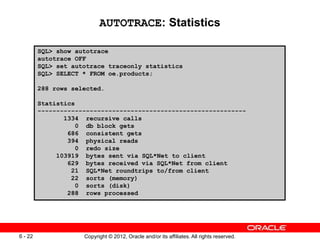
AUTOTRACE: Statistics
SQL> show autotrace
autotrace OFF
SQL> set autotrace traceonly statistics
SQL> SELECT * FROM oe.products;
288 rows selected.
Statistics
--------------------------------------------------------
1334 recursive calls
0 db block gets
686 consistent gets
394 physical reads
0 redo size
103919 bytes sent via SQL*Net to client
629 bytes received via SQL*Net from client
21 SQL*Net roundtrips to/from client
22 sorts (memory)
0 sorts (disk)
288 rows processed
Copyright © 2012, Oracle and/or its affiliates. All rights reserved.
6 - 24
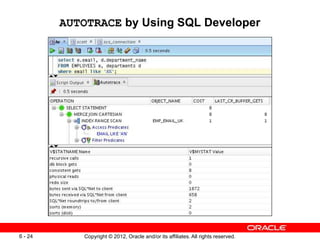
AUTOTRACE by Using SQL Developer
Copyright © 2012, Oracle and/or its affiliates. All rights reserved.
6 - 25
Quiz
A user needs to be granted some specialized privileges to
generate AUTOTRACE statistics.
a. True
b. False
Copyright © 2012, Oracle and/or its affiliates. All rights reserved.
6 - 26
Using the V$SQL_PLAN View
• V$SQL_PLAN provides a way of examining the execution
plan for cursors that are still in the library cache.
• V$SQL_PLAN is very similar to PLAN_TABLE:
– PLAN_TABLE shows a theoretical plan that can be used if
this statement were to be executed.
– V$SQL_PLAN contains the actual plan used.
• It contains the execution plan of every cursor in the library
cache (including child).
• Link to V$SQL:
– ADDRESS, HASH_VALUE, and CHILD_NUMBER
Copyright © 2012, Oracle and/or its affiliates. All rights reserved.
6 - 28
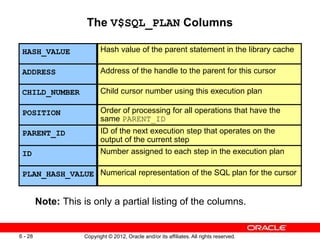
The V$SQL_PLAN Columns
Note: This is only a partial listing of the columns.
HASH_VALUE Hash value of the parent statement in the library cache
ADDRESS Address of the handle to the parent for this cursor
CHILD_NUMBER Child cursor number using this execution plan
POSITION Order of processing for all operations that have the
same PARENT_ID
PARENT_ID ID of the next execution step that operates on the
output of the current step
ID Number assigned to each step in the execution plan
PLAN_HASH_VALUE Numerical representation of the SQL plan for the cursor
Copyright © 2012, Oracle and/or its affiliates. All rights reserved.
6 - 29
The V$SQL_PLAN_STATISTICS View
• V$SQL_PLAN_STATISTICS provides actual execution
statistics:
– STATISTICS_LEVEL set to ALL
– The GATHER_PLAN_STATISTICS hint
• V$SQL_PLAN_STATISTICS_ALL enables
side-by-side comparisons of the optimizer estimates with
the actual execution statistics.
Copyright © 2012, Oracle and/or its affiliates. All rights reserved.
6 - 30
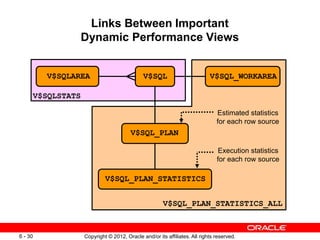
Links Between Important
Dynamic Performance Views
V$SQL
V$SQL_PLAN
V$SQL_PLAN_STATISTICS
V$SQLAREA V$SQL_WORKAREA
V$SQL_PLAN_STATISTICS_ALL
V$SQLSTATS
Execution statistics
for each row source
Estimated statistics
for each row source
Copyright © 2012, Oracle and/or its affiliates. All rights reserved.
6 - 32
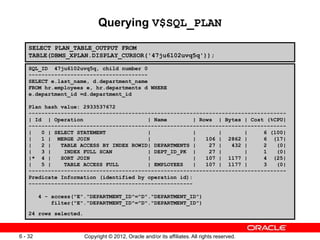
Querying V$SQL_PLAN
SQL_ID 47ju6102uvq5q, child number 0
-------------------------------------
SELECT e.last_name, d.department_name
FROM hr.employees e, hr.departments d WHERE
e.department_id =d.department_id
Plan hash value: 2933537672
--------------------------------------------------------------------------------
| Id | Operation | Name | Rows | Bytes | Cost (%CPU|
--------------------------------------------------------------------------------
| 0 | SELECT STATEMENT | | | | 6 (100|
| 1 | MERGE JOIN | | 106 | 2862 | 6 (17|
| 2 | TABLE ACCESS BY INDEX ROWID| DEPARTMENTS | 27 | 432 | 2 (0|
| 3 | INDEX FULL SCAN | DEPT_ID_PK | 27 | | 1 (0|
|* 4 | SORT JOIN | | 107 | 1177 | 4 (25|
| 5 | TABLE ACCESS FULL | EMPLOYEES | 107 | 1177 | 3 (0|
--------------------------------------------------------------------------------
Predicate Information (identified by operation id):
---------------------------------------------------
4 - access("E"."DEPARTMENT_ID"="D"."DEPARTMENT_ID")
filter("E"."DEPARTMENT_ID"="D"."DEPARTMENT_ID")
24 rows selected.
SELECT PLAN_TABLE_OUTPUT FROM
TABLE(DBMS_XPLAN.DISPLAY_CURSOR('47ju6102uvq5q'));
Copyright © 2012, Oracle and/or its affiliates. All rights reserved.
6 - 34
Automatic Workload Repository
• Collects, processes, and maintains performance statistics
for problem-detection and self-tuning purposes
• Includes the following statistics:
– Object statistics
– Time-model statistics
– Some system and session statistics
– Active Session History (ASH) statistics
• Automatically generates snapshots of the performance
data
Copyright © 2012, Oracle and/or its affiliates. All rights reserved.
6 - 36
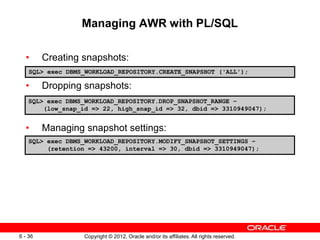
Managing AWR with PL/SQL
• Creating snapshots:
• Dropping snapshots:
• Managing snapshot settings:
SQL> exec DBMS_WORKLOAD_REPOSITORY.CREATE_SNAPSHOT ('ALL');
SQL> exec DBMS_WORKLOAD_REPOSITORY.DROP_SNAPSHOT_RANGE –
(low_snap_id => 22, high_snap_id => 32, dbid => 3310949047);
SQL> exec DBMS_WORKLOAD_REPOSITORY.MODIFY_SNAPSHOT_SETTINGS –
(retention => 43200, interval => 30, dbid => 3310949047);
Copyright © 2012, Oracle and/or its affiliates. All rights reserved.
6 - 38
Important AWR Views
• V$ACTIVE_SESSION_HISTORY
• V$ metric views
• DBA_HIST views:
– DBA_HIST_ACTIVE_SESS_HISTORY
– DBA_HIST_BASELINE DBA_HIST_DATABASE_INSTANCE
– DBA_HIST_SNAPSHOT
– DBA_HIST_SQL_PLAN
– DBA_HIST_WR_CONTROL
Copyright © 2012, Oracle and/or its affiliates. All rights reserved.
6 - 39
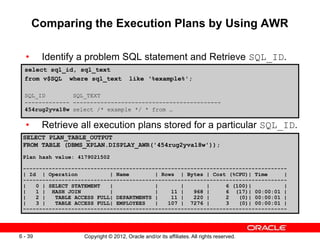
Comparing the Execution Plans by Using AWR
• Identify a problem SQL statement and Retrieve SQL_ID.
• Retrieve all execution plans stored for a particular SQL_ID.
select sql_id, sql_text
from v$SQL where sql_text like ‘%example%';
SQL_ID SQL_TEXT
------------- -------------------------------------------
454rug2yva18w select /* example */ * from …
SELECT PLAN_TABLE_OUTPUT
FROM TABLE (DBMS_XPLAN.DISPLAY_AWR('454rug2yva18w'));
Plan hash value: 4179021502
----------------------------------------------------------------------------------
| Id | Operation | Name | Rows | Bytes | Cost (%CPU)| Time |
----------------------------------------------------------------------------------
| 0 | SELECT STATEMENT | | | | 6 (100)| |
| 1 | HASH JOIN | | 11 | 968 | 6 (17)| 00:00:01 |
| 2 | TABLE ACCESS FULL| DEPARTMENTS | 11 | 220 | 2 (0)| 00:00:01 |
| 3 | TABLE ACCESS FULL| EMPLOYEES | 107 | 7276 | 3 (0)| 00:00:01 |
----------------------------------------------------------------------------------
Copyright © 2012, Oracle and/or its affiliates. All rights reserved.
6 - 41
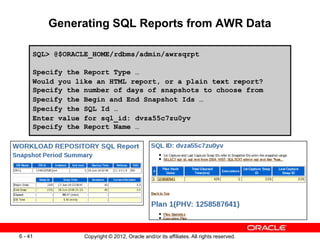
Generating SQL Reports from AWR Data
SQL> @$ORACLE_HOME/rdbms/admin/awrsqrpt
Specify the Report Type …
Would you like an HTML report, or a plain text report?
Specify the number of days of snapshots to choose from
Specify the Begin and End Snapshot Ids …
Specify the SQL Id …
Enter value for sql_id: dvza55c7zu0yv
Specify the Report Name …
Copyright © 2012, Oracle and/or its affiliates. All rights reserved.
6 - 42
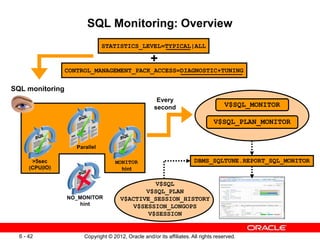
STATISTICS_LEVEL=TYPICAL|ALL
CONTROL_MANAGEMENT_PACK_ACCESS=DIAGNOSTIC+TUNING
+
SQL monitoring
Every
second V$SQL_MONITOR
V$SQL_PLAN_MONITOR
V$SQL
V$SQL_PLAN
V$ACTIVE_SESSION_HISTORY
V$SESSION_LONGOPS
V$SESSION
DBMS_SQLTUNE.REPORT_SQL_MONITOR
SQL Monitoring: Overview
Copyright © 2012, Oracle and/or its affiliates. All rights reserved.
6 - 44
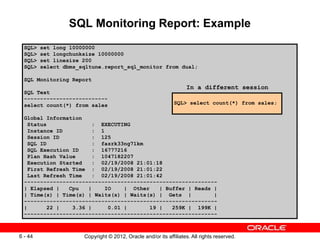
SQL Monitoring Report: Example
SQL> set long 10000000
SQL> set longchunksize 10000000
SQL> set linesize 200
SQL> select dbms_sqltune.report_sql_monitor from dual;
SQL Monitoring Report
SQL Text
--------------------------
select count(*) from sales
Global Information
Status : EXECUTING
Instance ID : 1
Session ID : 125
SQL ID : fazrk33ng71km
SQL Execution ID : 16777216
Plan Hash Value : 1047182207
Execution Started : 02/19/2008 21:01:18
First Refresh Time : 02/19/2008 21:01:22
Last Refresh Time : 02/19/2008 21:01:42
------------------------------------------------------------
| Elapsed | Cpu | IO | Other | Buffer | Reads |
| Time(s) | Time(s) | Waits(s) | Waits(s) | Gets | |
------------------------------------------------------------
| 22 | 3.36 | 0.01 | 19 | 259K | 199K |
------------------------------------------------------------
SQL> select count(*) from sales;
In a different session
Copyright © 2012, Oracle and/or its affiliates. All rights reserved.
6 - 45
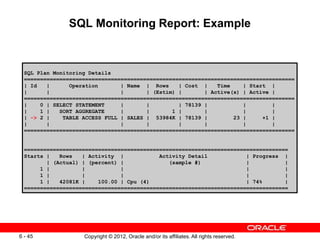
SQL Monitoring Report: Example
SQL Plan Monitoring Details
====================================================================================
| Id | Operation | Name | Rows | Cost | Time | Start |
| | | | (Estim) | | Active(s) | Active |
====================================================================================
| 0 | SELECT STATEMENT | | | 78139 | | |
| 1 | SORT AGGREGATE | | 1 | | | |
| -> 2 | TABLE ACCESS FULL | SALES | 53984K | 78139 | 23 | +1 |
| | | | | | | |
====================================================================================
==================================================================================
Starts | Rows | Activity | Activity Detail | Progress |
| (Actual) | (percent) | (sample #) | |
1 | | | | |
1 | | | | |
1 | 42081K | 100.00 | Cpu (4) | 74% |
==================================================================================
Copyright © 2012, Oracle and/or its affiliates. All rights reserved.
6 - 47
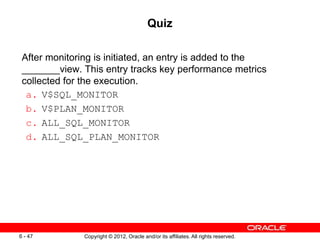
Quiz
After monitoring is initiated, an entry is added to the
_______view. This entry tracks key performance metrics
collected for the execution.
a. V$SQL_MONITOR
b. V$PLAN_MONITOR
c. ALL_SQL_MONITOR
d. ALL_SQL_PLAN_MONITOR
Copyright © 2012, Oracle and/or its affiliates. All rights reserved.
6 - 48
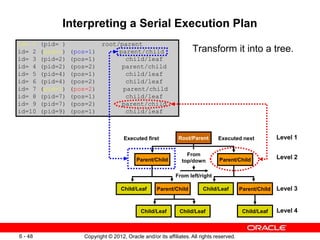
Interpreting a Serial Execution Plan
Transform it into a tree.
Level 1
Level 2
Level 3
Level 4
Parent/Child
Child/Leaf
Parent/Child
Child/Leaf Parent/Child
Child/Leaf
Child/Leaf
Child/Leaf
id= 1 (pid= ) root/parent
id= 2 (pid=1) (pos=1) parent/child
id= 3 (pid=2) (pos=1) child/leaf
id= 4 (pid=2) (pos=2) parent/child
id= 5 (pid=4) (pos=1) child/leaf
id= 6 (pid=4) (pos=2) child/leaf
id= 7 (pid=1) (pos=2) parent/child
id= 8 (pid=7) (pos=1) child/leaf
id= 9 (pid=7) (pos=2) parent/child
id=10 (pid=9) (pos=1) child/leaf
From
top/down
From left/right
Executed first Executed next
Parent/Child
Root/Parent
Copyright © 2012, Oracle and/or its affiliates. All rights reserved.
6 - 50
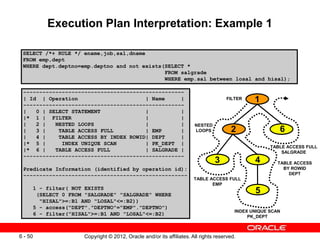
Execution Plan Interpretation: Example 1
SELECT /*+ RULE */ ename,job,sal,dname
FROM emp,dept
WHERE dept.deptno=emp.deptno and not exists(SELECT *
FROM salgrade
WHERE emp.sal between losal and hisal);
--------------------------------------------------
| Id | Operation | Name |
--------------------------------------------------
| 0 | SELECT STATEMENT | |
|* 1 | FILTER | |
| 2 | NESTED LOOPS | |
| 3 | TABLE ACCESS FULL | EMP |
| 4 | TABLE ACCESS BY INDEX ROWID| DEPT |
|* 5 | INDEX UNIQUE SCAN | PK_DEPT |
|* 6 | TABLE ACCESS FULL | SALGRADE |
--------------------------------------------------
Predicate Information (identified by operation id):
---------------------------------------------------
1 - filter( NOT EXISTS
(SELECT 0 FROM "SALGRADE" "SALGRADE" WHERE
"HISAL">=:B1 AND "LOSAL"<=:B2))
5 - access("DEPT"."DEPTNO"="EMP"."DEPTNO")
6 - filter("HISAL">=:B1 AND "LOSAL"<=:B2)
NESTED
LOOPS 2 6
3 4
5
1
FILTER
TABLE ACCESS FULL
SALGRADE
TABLE ACCESS FULL
EMP
TABLE ACCESS
BY ROWID
DEPT
INDEX UNIQUE SCAN
PK_DEPT
Copyright © 2012, Oracle and/or its affiliates. All rights reserved.
6 - 52
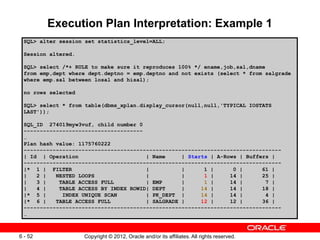
Execution Plan Interpretation: Example 1
SQL> alter session set statistics_level=ALL;
Session altered.
SQL> select /*+ RULE to make sure it reproduces 100% */ ename,job,sal,dname
from emp,dept where dept.deptno = emp.deptno and not exists (select * from salgrade
where emp.sal between losal and hisal);
no rows selected
SQL> select * from table(dbms_xplan.display_cursor(null,null,'TYPICAL IOSTATS
LAST'));
SQL_ID 274019myw3vuf, child number 0
-------------------------------------
…
Plan hash value: 1175760222
--------------------------------------------------------------------------------
| Id | Operation | Name | Starts | A-Rows | Buffers |
--------------------------------------------------------------------------------
|* 1 | FILTER | | 1 | 0 | 61 |
| 2 | NESTED LOOPS | | 1 | 14 | 25 |
| 3 | TABLE ACCESS FULL | EMP | 1 | 14 | 7 |
| 4 | TABLE ACCESS BY INDEX ROWID| DEPT | 14 | 14 | 18 |
|* 5 | INDEX UNIQUE SCAN | PK_DEPT | 14 | 14 | 4 |
|* 6 | TABLE ACCESS FULL | SALGRADE | 12 | 12 | 36 |
--------------------------------------------------------------------------------
…
Copyright © 2012, Oracle and/or its affiliates. All rights reserved.
6 - 53
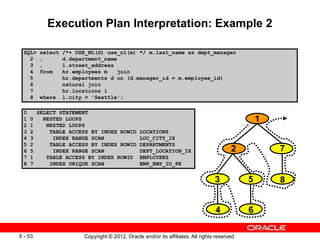
Execution Plan Interpretation: Example 2
SQL> select /*+ USE_NL(d) use_nl(m) */ m.last_name as dept_manager
2 , d.department_name
3 , l.street_address
4 from hr.employees m join
5 hr.departments d on (d.manager_id = m.employee_id)
6 natural join
7 hr.locations l
8 where l.city = 'Seattle';
0 SELECT STATEMENT
1 0 NESTED LOOPS
2 1 NESTED LOOPS
3 2 TABLE ACCESS BY INDEX ROWID LOCATIONS
4 3 INDEX RANGE SCAN LOC_CITY_IX
5 2 TABLE ACCESS BY INDEX ROWID DEPARTMENTS
6 5 INDEX RANGE SCAN DEPT_LOCATION_IX
7 1 TABLE ACCESS BY INDEX ROWID EMPLOYEES
8 7 INDEX UNIQUE SCAN EMP_EMP_ID_PK
2 7
3 5
6
1
4
8
Copyright © 2012, Oracle and/or its affiliates. All rights reserved.
6 - 55
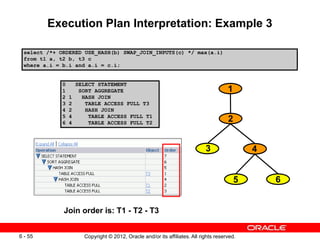
Execution Plan Interpretation: Example 3
select /*+ ORDERED USE_HASH(b) SWAP_JOIN_INPUTS(c) */ max(a.i)
from t1 a, t2 b, t3 c
where a.i = b.i and a.i = c.i;
0 SELECT STATEMENT
1 SORT AGGREGATE
2 1 HASH JOIN
3 2 TABLE ACCESS FULL T3
4 2 HASH JOIN
5 4 TABLE ACCESS FULL T1
6 4 TABLE ACCESS FULL T2
3
5 6
2
1
Join order is: T1 - T2 - T3
4
Copyright © 2012, Oracle and/or its affiliates. All rights reserved.
6 - 56
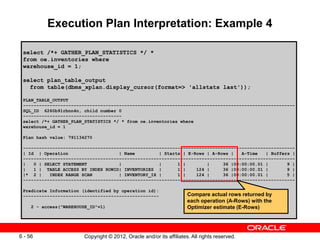
Execution Plan Interpretation: Example 4
select /*+ GATHER_PLAN_STATISTICS */ *
from oe.inventories where
warehouse_id = 1;
select plan_table_output
from table(dbms_xplan.display_cursor(format=> 'allstats last'));
PLAN_TABLE_OUTPUT
------------------------------------------------------------------------------------------------------
SQL_ID 6260b91rbnn4n, child number 0
-------------------------------------
select /*+ GATHER_PLAN_STATISTICS */ * from oe.inventories where
warehouse_id = 1
Plan hash value: 791134270
------------------------------------------------------------------------------------------------------
| Id | Operation | Name | Starts | E-Rows | A-Rows | A-Time | Buffers |
------------------------------------------------------------------------------------------------------
| 0 | SELECT STATEMENT | | 1 | | 36 |00:00:00.01 | 9 |
| 1 | TABLE ACCESS BY INDEX ROWID| INVENTORIES | 1 | 124 | 36 |00:00:00.01 | 9 |
|* 2 | INDEX RANGE SCAN | INVENTORY_IX | 1 | 124 | 36 |00:00:00.01 | 5 |
------------------------------------------------------------------------------------------------------
Predicate Information (identified by operation id):
---------------------------------------------------
2 - access("WAREHOUSE_ID"=1)
Compare actual rows returned by
each operation (A-Rows) with the
Optimizer estimate (E-Rows)
Copyright © 2012, Oracle and/or its affiliates. All rights reserved.
6 - 57
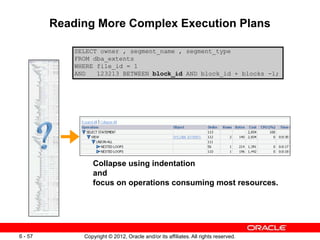
Reading More Complex Execution Plans
SELECT owner , segment_name , segment_type
FROM dba_extents
WHERE file_id = 1
AND 123213 BETWEEN block_id AND block_id + blocks -1;
Collapse using indentation
and
focus on operations consuming most resources.
Copyright © 2012, Oracle and/or its affiliates. All rights reserved.
6 - 58
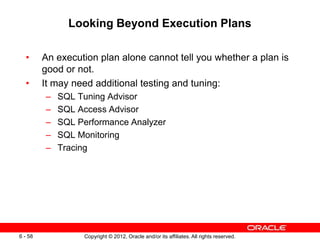
Looking Beyond Execution Plans
• An execution plan alone cannot tell you whether a plan is
good or not.
• It may need additional testing and tuning:
– SQL Tuning Advisor
– SQL Access Advisor
– SQL Performance Analyzer
– SQL Monitoring
– Tracing
Copyright © 2012, Oracle and/or its affiliates. All rights reserved.
6 - 59
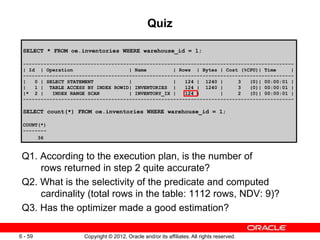
Quiz
Q1. According to the execution plan, is the number of
rows returned in step 2 quite accurate?
Q2. What is the selectivity of the predicate and computed
cardinality (total rows in the table: 1112 rows, NDV: 9)?
Q3. Has the optimizer made a good estimation?
SELECT * FROM oe.inventories WHERE warehouse_id = 1;
--------------------------------------------------------------------------------------------
| Id | Operation | Name | Rows | Bytes | Cost (%CPU)| Time |
--------------------------------------------------------------------------------------------
| 0 | SELECT STATEMENT | | 124 | 1240 | 3 (0)| 00:00:01 |
| 1 | TABLE ACCESS BY INDEX ROWID| INVENTORIES | 124 | 1240 | 3 (0)| 00:00:01 |
|* 2 | INDEX RANGE SCAN | INVENTORY_IX | 124 | | 2 (0)| 00:00:01 |
--------------------------------------------------------------------------------------------
SELECT count(*) FROM oe.inventories WHERE warehouse_id = 1;
COUNT(*)
--------
36
Copyright © 2012, Oracle and/or its affiliates. All rights reserved.
6 - 60
Summary
In this lesson, you should have learned how to:
• Gather execution plans
• Display execution plans
• Interpret execution plans
Copyright © 2012, Oracle and/or its affiliates. All rights reserved.
6 - 61
Practice 6: Overview
This practice covers the following topics:
• Using different techniques to extract execution plans
• Using SQL monitoring

D73549GC10_06.pptx

  • 1.
    Copyright © 2012,Oracle and/or its affiliates. All rights reserved. Understanding Serial Execution Plans
  • 2.
    Copyright © 2012,Oracle and/or its affiliates. All rights reserved. 6 - 2 Objectives After completing this lesson, you should be able to: • Gather execution plans • Display execution plans • Interpret execution plans
  • 3.
    Copyright © 2012,Oracle and/or its affiliates. All rights reserved. 6 - 3 What Is an Execution Plan? • The execution plan of a SQL statement is composed of small building blocks called row sources for serial execution plans. • The combination of row sources for a statement is called the execution plan. • By using parent-child relationships, the execution plan can be displayed in a tree-like structure (text or graphical).
  • 4.
    Copyright © 2012,Oracle and/or its affiliates. All rights reserved. 6 - 4 Reviewing the Execution Plan By reviewing execution plans, you should be able to assess if the suboptimal plan is caused by the optimizer’s wrong assumptions, calculations, or other factors: • Drive from the table that has the most selective filter. • Check to confirm the following: – The driving table has the best filter. – The fewest number of rows are returned to the next step. – The join method is appropriate for the number of rows returned. – Views are correctly used. – There are any unintentional Cartesian products. – Tables are accessed efficiently.
  • 5.
    Copyright © 2012,Oracle and/or its affiliates. All rights reserved. 6 - 5 Where to Find Execution Plans • PLAN_TABLE (Oracle SQL Developer or SQL*Plus) • V$SQL_PLAN (Library Cache) • V$SQL_PLAN_MONITOR (11g) • DBA_HIST_SQL_PLAN (AWR) • STATS$SQL_PLAN (Statspack) • SQL management base (SQL plan baselines) • SQL tuning set • Trace files generated by DBMS_MONITOR • Event 10053 trace file • Process state dump trace file since 10gR2
  • 6.
    Copyright © 2012,Oracle and/or its affiliates. All rights reserved. 6 - 7 Viewing Execution Plans • The EXPLAIN PLAN command followed by: – SELECT from PLAN_TABLE – DBMS_XPLAN.DISPLAY() • Oracle SQL*Plus Autotrace: SET AUTOTRACE ON • DBMS_XPLAN.DISPLAY_CURSOR() • DBMS_XPLAN.DISPLAY_AWR() • DBMS_XPLAN.DISPLAY_SQLSET() • DBMS_XPLAN.DISPLAY_SQL_PLAN_BASELINE()
  • 7.
    Copyright © 2012,Oracle and/or its affiliates. All rights reserved. 6 - 8 The EXPLAIN PLAN Command: Overview • Generates an optimizer execution plan • Stores the plan in PLAN_TABLE • Does not execute the statement itself
  • 8.
    Copyright © 2012,Oracle and/or its affiliates. All rights reserved. 6 - 9 The EXPLAIN PLAN Command: Syntax SET STATEMENT_ID = 'text' EXPLAIN PLAN INTO your plan table FOR statement
  • 9.
    Copyright © 2012,Oracle and/or its affiliates. All rights reserved. 6 - 10 The EXPLAIN PLAN Command: Example SQL> EXPLAIN PLAN 2 SET STATEMENT_ID = 'demo01' FOR 3 SELECT e.last_name, d.department_name 4 FROM hr.employees e, hr.departments d 5 WHERE e.department_id = d.department_id; Explained. SQL> Note: The EXPLAIN PLAN command does not actually execute the statement.
  • 10.
    Copyright © 2012,Oracle and/or its affiliates. All rights reserved. 6 - 11 PLAN_TABLE • PLAN_TABLE: – Is automatically created to hold the EXPLAIN PLAN output – You can create your own using utlxplan.sql. – Advantage: SQL is not executed. – Disadvantage: May not be the actual execution plan • PLAN_TABLE is hierarchical. • Hierarchy is established with the ID and PARENT_ID columns.
  • 11.
    Copyright © 2012,Oracle and/or its affiliates. All rights reserved. 6 - 12 Displaying from PLAN_TABLE: Typical SQL> EXPLAIN PLAN SET STATEMENT_ID = 'demo01' FOR SELECT * FROM emp 2 WHERE ename = 'KING'; Explained. SQL> SET LINESIZE 130 SQL> SET PAGESIZE 0 SQL> select * from table(DBMS_XPLAN.DISPLAY()); Plan hash value: 3956160932 -------------------------------------------------------------------------- | Id | Operation | Name | Rows | Bytes | Cost (%CPU)| Time | -------------------------------------------------------------------------- | 0 | SELECT STATEMENT | | 1 | 37 | 3 (0)| 00:00:01 | |* 1 | TABLE ACCESS FULL| EMP | 1 | 37 | 3 (0)| 00:00:01 | -------------------------------------------------------------------------- Predicate Information (identified by operation id): --------------------------------------------------- 1 - filter("ENAME"='KING')
  • 12.
    Copyright © 2012,Oracle and/or its affiliates. All rights reserved. 6 - 13 Displaying from PLAN_TABLE: ALL SQL> select * from table(DBMS_XPLAN.DISPLAY(null,null,'ALL')); Plan hash value: 3956160932 -------------------------------------------------------------------------- | Id | Operation | Name | Rows | Bytes | Cost (%CPU)| Time | -------------------------------------------------------------------------- | 0 | SELECT STATEMENT | | 1 | 37 | 3 (0)| 00:00:01 | |* 1 | TABLE ACCESS FULL| EMP | 1 | 37 | 3 (0)| 00:00:01 | -------------------------------------------------------------------------- Query Block Name / Object Alias (identified by operation id): ------------------------------------------------------------- 1 - SEL$1 / EMP@SEL$1 Predicate Information (identified by operation id): --------------------------------------------------- 1 - filter("ENAME"='KING') Column Projection Information (identified by operation id): ----------------------------------------------------------- 1 - "EMP"."EMPNO"[NUMBER,22], "ENAME"[VARCHAR2,10], "EMP"."JOB"[VARCHAR2,9], "EMP"."MGR"[NUMBER,22], "EMP"."HIREDATE"[DATE,7], "EMP"."SAL"[NUMBER,22], "EMP"."COMM"[NUMBER,22], "EMP"."DEPTNO"[NUMBER,22]
  • 13.
    Copyright © 2012,Oracle and/or its affiliates. All rights reserved. 6 - 14 SET STATEMENT_ID = 'text' EXPLAIN PLAN INTO your plan table FOR statement The EXPLAIN PLAN Command
  • 14.
    Copyright © 2012,Oracle and/or its affiliates. All rights reserved. 6 - 15 Displaying from PLAN_TABLE: ADVANCED select plan_table_output from table(DBMS_XPLAN.DISPLAY(null,null,'ADVANCED -PROJECTION -PREDICATE -ALIAS')); Plan hash value: 3956160932 -------------------------------------------------------------------------- | Id | Operation | Name | Rows | Bytes | Cost (%CPU)| Time | -------------------------------------------------------------------------- | 0 | SELECT STATEMENT | | 1 | 37 | 3 (0)| 00:00:01 | | 1 | TABLE ACCESS FULL| EMP | 1 | 37 | 3 (0)| 00:00:01 | -------------------------------------------------------------------------- Outline Data ------------- /*+ BEGIN_OUTLINE_DATA FULL(@"SEL$1" "EMP"@"SEL$1") OUTLINE_LEAF(@"SEL$1") ALL_ROWS DB_VERSION('11.1.0.6') OPTIMIZER_FEATURES_ENABLE('11.1.0.6') IGNORE_OPTIM_EMBEDDED_HINTS END_OUTLINE_DATA */
  • 15.
    Copyright © 2012,Oracle and/or its affiliates. All rights reserved. 6 - 16 Explain Plan Using Oracle SQL Developer
  • 16.
    Copyright © 2012,Oracle and/or its affiliates. All rights reserved. 6 - 17 Quiz An EXPLAIN PLAN command executes the statement and inserts the plan used by the optimizer into a table. a. True b. False
  • 17.
    Copyright © 2012,Oracle and/or its affiliates. All rights reserved. 6 - 18 Quiz Which of the following is NOT true about a PLAN_TABLE? a. The PLAN_TABLE is automatically created to hold the EXPLAIN PLAN output. b. You cannot create your own PLAN_TABLE. c. The actual SQL command is not executed. d. The plan in the PLAN_TABLE may not be the actual execution plan.
  • 18.
    Copyright © 2012,Oracle and/or its affiliates. All rights reserved. 6 - 19 AUTOTRACE • Is an Oracle SQL*Plus and SQL Developer facility • Was introduced with Oracle 7.3 • Needs a PLAN_TABLE • Needs the PLUSTRACE role to retrieve statistics from some V$ views • Produces the execution plan and statistics by default after running the query • May not be the execution plan used by the optimizer when using bind peeking (recursive EXPLAIN PLAN)
  • 19.
    Copyright © 2012,Oracle and/or its affiliates. All rights reserved. 6 - 20 The AUTOTRACE Syntax OFF TRACE[ONLY] EXPLAIN STATISTICS SHOW AUTOTRACE SET AUTOTRACE ON
  • 20.
    Copyright © 2012,Oracle and/or its affiliates. All rights reserved. 6 - 21 AUTOTRACE: Examples • To start tracing statements using AUTOTRACE: • To only display the execution plan without execution: • To display rows and statistics: • To get only the plan and the statistics (suppress rows): SQL> set autotrace on SQL> set autotrace traceonly explain SQL> set autotrace on statistics SQL> set autotrace traceonly
  • 21.
    Copyright © 2012,Oracle and/or its affiliates. All rights reserved. 6 - 22 AUTOTRACE: Statistics SQL> show autotrace autotrace OFF SQL> set autotrace traceonly statistics SQL> SELECT * FROM oe.products; 288 rows selected. Statistics -------------------------------------------------------- 1334 recursive calls 0 db block gets 686 consistent gets 394 physical reads 0 redo size 103919 bytes sent via SQL*Net to client 629 bytes received via SQL*Net from client 21 SQL*Net roundtrips to/from client 22 sorts (memory) 0 sorts (disk) 288 rows processed
  • 22.
    Copyright © 2012,Oracle and/or its affiliates. All rights reserved. 6 - 24 AUTOTRACE by Using SQL Developer
  • 23.
    Copyright © 2012,Oracle and/or its affiliates. All rights reserved. 6 - 25 Quiz A user needs to be granted some specialized privileges to generate AUTOTRACE statistics. a. True b. False
  • 24.
    Copyright © 2012,Oracle and/or its affiliates. All rights reserved. 6 - 26 Using the V$SQL_PLAN View • V$SQL_PLAN provides a way of examining the execution plan for cursors that are still in the library cache. • V$SQL_PLAN is very similar to PLAN_TABLE: – PLAN_TABLE shows a theoretical plan that can be used if this statement were to be executed. – V$SQL_PLAN contains the actual plan used. • It contains the execution plan of every cursor in the library cache (including child). • Link to V$SQL: – ADDRESS, HASH_VALUE, and CHILD_NUMBER
  • 25.
    Copyright © 2012,Oracle and/or its affiliates. All rights reserved. 6 - 28 The V$SQL_PLAN Columns Note: This is only a partial listing of the columns. HASH_VALUE Hash value of the parent statement in the library cache ADDRESS Address of the handle to the parent for this cursor CHILD_NUMBER Child cursor number using this execution plan POSITION Order of processing for all operations that have the same PARENT_ID PARENT_ID ID of the next execution step that operates on the output of the current step ID Number assigned to each step in the execution plan PLAN_HASH_VALUE Numerical representation of the SQL plan for the cursor
  • 26.
    Copyright © 2012,Oracle and/or its affiliates. All rights reserved. 6 - 29 The V$SQL_PLAN_STATISTICS View • V$SQL_PLAN_STATISTICS provides actual execution statistics: – STATISTICS_LEVEL set to ALL – The GATHER_PLAN_STATISTICS hint • V$SQL_PLAN_STATISTICS_ALL enables side-by-side comparisons of the optimizer estimates with the actual execution statistics.
  • 27.
    Copyright © 2012,Oracle and/or its affiliates. All rights reserved. 6 - 30 Links Between Important Dynamic Performance Views V$SQL V$SQL_PLAN V$SQL_PLAN_STATISTICS V$SQLAREA V$SQL_WORKAREA V$SQL_PLAN_STATISTICS_ALL V$SQLSTATS Execution statistics for each row source Estimated statistics for each row source
  • 28.
    Copyright © 2012,Oracle and/or its affiliates. All rights reserved. 6 - 32 Querying V$SQL_PLAN SQL_ID 47ju6102uvq5q, child number 0 ------------------------------------- SELECT e.last_name, d.department_name FROM hr.employees e, hr.departments d WHERE e.department_id =d.department_id Plan hash value: 2933537672 -------------------------------------------------------------------------------- | Id | Operation | Name | Rows | Bytes | Cost (%CPU| -------------------------------------------------------------------------------- | 0 | SELECT STATEMENT | | | | 6 (100| | 1 | MERGE JOIN | | 106 | 2862 | 6 (17| | 2 | TABLE ACCESS BY INDEX ROWID| DEPARTMENTS | 27 | 432 | 2 (0| | 3 | INDEX FULL SCAN | DEPT_ID_PK | 27 | | 1 (0| |* 4 | SORT JOIN | | 107 | 1177 | 4 (25| | 5 | TABLE ACCESS FULL | EMPLOYEES | 107 | 1177 | 3 (0| -------------------------------------------------------------------------------- Predicate Information (identified by operation id): --------------------------------------------------- 4 - access("E"."DEPARTMENT_ID"="D"."DEPARTMENT_ID") filter("E"."DEPARTMENT_ID"="D"."DEPARTMENT_ID") 24 rows selected. SELECT PLAN_TABLE_OUTPUT FROM TABLE(DBMS_XPLAN.DISPLAY_CURSOR('47ju6102uvq5q'));
  • 29.
    Copyright © 2012,Oracle and/or its affiliates. All rights reserved. 6 - 34 Automatic Workload Repository • Collects, processes, and maintains performance statistics for problem-detection and self-tuning purposes • Includes the following statistics: – Object statistics – Time-model statistics – Some system and session statistics – Active Session History (ASH) statistics • Automatically generates snapshots of the performance data
  • 30.
    Copyright © 2012,Oracle and/or its affiliates. All rights reserved. 6 - 36 Managing AWR with PL/SQL • Creating snapshots: • Dropping snapshots: • Managing snapshot settings: SQL> exec DBMS_WORKLOAD_REPOSITORY.CREATE_SNAPSHOT ('ALL'); SQL> exec DBMS_WORKLOAD_REPOSITORY.DROP_SNAPSHOT_RANGE – (low_snap_id => 22, high_snap_id => 32, dbid => 3310949047); SQL> exec DBMS_WORKLOAD_REPOSITORY.MODIFY_SNAPSHOT_SETTINGS – (retention => 43200, interval => 30, dbid => 3310949047);
  • 31.
    Copyright © 2012,Oracle and/or its affiliates. All rights reserved. 6 - 38 Important AWR Views • V$ACTIVE_SESSION_HISTORY • V$ metric views • DBA_HIST views: – DBA_HIST_ACTIVE_SESS_HISTORY – DBA_HIST_BASELINE DBA_HIST_DATABASE_INSTANCE – DBA_HIST_SNAPSHOT – DBA_HIST_SQL_PLAN – DBA_HIST_WR_CONTROL
  • 32.
    Copyright © 2012,Oracle and/or its affiliates. All rights reserved. 6 - 39 Comparing the Execution Plans by Using AWR • Identify a problem SQL statement and Retrieve SQL_ID. • Retrieve all execution plans stored for a particular SQL_ID. select sql_id, sql_text from v$SQL where sql_text like ‘%example%'; SQL_ID SQL_TEXT ------------- ------------------------------------------- 454rug2yva18w select /* example */ * from … SELECT PLAN_TABLE_OUTPUT FROM TABLE (DBMS_XPLAN.DISPLAY_AWR('454rug2yva18w')); Plan hash value: 4179021502 ---------------------------------------------------------------------------------- | Id | Operation | Name | Rows | Bytes | Cost (%CPU)| Time | ---------------------------------------------------------------------------------- | 0 | SELECT STATEMENT | | | | 6 (100)| | | 1 | HASH JOIN | | 11 | 968 | 6 (17)| 00:00:01 | | 2 | TABLE ACCESS FULL| DEPARTMENTS | 11 | 220 | 2 (0)| 00:00:01 | | 3 | TABLE ACCESS FULL| EMPLOYEES | 107 | 7276 | 3 (0)| 00:00:01 | ----------------------------------------------------------------------------------
  • 33.
    Copyright © 2012,Oracle and/or its affiliates. All rights reserved. 6 - 41 Generating SQL Reports from AWR Data SQL> @$ORACLE_HOME/rdbms/admin/awrsqrpt Specify the Report Type … Would you like an HTML report, or a plain text report? Specify the number of days of snapshots to choose from Specify the Begin and End Snapshot Ids … Specify the SQL Id … Enter value for sql_id: dvza55c7zu0yv Specify the Report Name …
  • 34.
    Copyright © 2012,Oracle and/or its affiliates. All rights reserved. 6 - 42 STATISTICS_LEVEL=TYPICAL|ALL CONTROL_MANAGEMENT_PACK_ACCESS=DIAGNOSTIC+TUNING + SQL monitoring Every second V$SQL_MONITOR V$SQL_PLAN_MONITOR V$SQL V$SQL_PLAN V$ACTIVE_SESSION_HISTORY V$SESSION_LONGOPS V$SESSION DBMS_SQLTUNE.REPORT_SQL_MONITOR SQL Monitoring: Overview
  • 35.
    Copyright © 2012,Oracle and/or its affiliates. All rights reserved. 6 - 44 SQL Monitoring Report: Example SQL> set long 10000000 SQL> set longchunksize 10000000 SQL> set linesize 200 SQL> select dbms_sqltune.report_sql_monitor from dual; SQL Monitoring Report SQL Text -------------------------- select count(*) from sales Global Information Status : EXECUTING Instance ID : 1 Session ID : 125 SQL ID : fazrk33ng71km SQL Execution ID : 16777216 Plan Hash Value : 1047182207 Execution Started : 02/19/2008 21:01:18 First Refresh Time : 02/19/2008 21:01:22 Last Refresh Time : 02/19/2008 21:01:42 ------------------------------------------------------------ | Elapsed | Cpu | IO | Other | Buffer | Reads | | Time(s) | Time(s) | Waits(s) | Waits(s) | Gets | | ------------------------------------------------------------ | 22 | 3.36 | 0.01 | 19 | 259K | 199K | ------------------------------------------------------------ SQL> select count(*) from sales; In a different session
  • 36.
    Copyright © 2012,Oracle and/or its affiliates. All rights reserved. 6 - 45 SQL Monitoring Report: Example SQL Plan Monitoring Details ==================================================================================== | Id | Operation | Name | Rows | Cost | Time | Start | | | | | (Estim) | | Active(s) | Active | ==================================================================================== | 0 | SELECT STATEMENT | | | 78139 | | | | 1 | SORT AGGREGATE | | 1 | | | | | -> 2 | TABLE ACCESS FULL | SALES | 53984K | 78139 | 23 | +1 | | | | | | | | | ==================================================================================== ================================================================================== Starts | Rows | Activity | Activity Detail | Progress | | (Actual) | (percent) | (sample #) | | 1 | | | | | 1 | | | | | 1 | 42081K | 100.00 | Cpu (4) | 74% | ==================================================================================
  • 37.
    Copyright © 2012,Oracle and/or its affiliates. All rights reserved. 6 - 47 Quiz After monitoring is initiated, an entry is added to the _______view. This entry tracks key performance metrics collected for the execution. a. V$SQL_MONITOR b. V$PLAN_MONITOR c. ALL_SQL_MONITOR d. ALL_SQL_PLAN_MONITOR
  • 38.
    Copyright © 2012,Oracle and/or its affiliates. All rights reserved. 6 - 48 Interpreting a Serial Execution Plan Transform it into a tree. Level 1 Level 2 Level 3 Level 4 Parent/Child Child/Leaf Parent/Child Child/Leaf Parent/Child Child/Leaf Child/Leaf Child/Leaf id= 1 (pid= ) root/parent id= 2 (pid=1) (pos=1) parent/child id= 3 (pid=2) (pos=1) child/leaf id= 4 (pid=2) (pos=2) parent/child id= 5 (pid=4) (pos=1) child/leaf id= 6 (pid=4) (pos=2) child/leaf id= 7 (pid=1) (pos=2) parent/child id= 8 (pid=7) (pos=1) child/leaf id= 9 (pid=7) (pos=2) parent/child id=10 (pid=9) (pos=1) child/leaf From top/down From left/right Executed first Executed next Parent/Child Root/Parent
  • 39.
    Copyright © 2012,Oracle and/or its affiliates. All rights reserved. 6 - 50 Execution Plan Interpretation: Example 1 SELECT /*+ RULE */ ename,job,sal,dname FROM emp,dept WHERE dept.deptno=emp.deptno and not exists(SELECT * FROM salgrade WHERE emp.sal between losal and hisal); -------------------------------------------------- | Id | Operation | Name | -------------------------------------------------- | 0 | SELECT STATEMENT | | |* 1 | FILTER | | | 2 | NESTED LOOPS | | | 3 | TABLE ACCESS FULL | EMP | | 4 | TABLE ACCESS BY INDEX ROWID| DEPT | |* 5 | INDEX UNIQUE SCAN | PK_DEPT | |* 6 | TABLE ACCESS FULL | SALGRADE | -------------------------------------------------- Predicate Information (identified by operation id): --------------------------------------------------- 1 - filter( NOT EXISTS (SELECT 0 FROM "SALGRADE" "SALGRADE" WHERE "HISAL">=:B1 AND "LOSAL"<=:B2)) 5 - access("DEPT"."DEPTNO"="EMP"."DEPTNO") 6 - filter("HISAL">=:B1 AND "LOSAL"<=:B2) NESTED LOOPS 2 6 3 4 5 1 FILTER TABLE ACCESS FULL SALGRADE TABLE ACCESS FULL EMP TABLE ACCESS BY ROWID DEPT INDEX UNIQUE SCAN PK_DEPT
  • 40.
    Copyright © 2012,Oracle and/or its affiliates. All rights reserved. 6 - 52 Execution Plan Interpretation: Example 1 SQL> alter session set statistics_level=ALL; Session altered. SQL> select /*+ RULE to make sure it reproduces 100% */ ename,job,sal,dname from emp,dept where dept.deptno = emp.deptno and not exists (select * from salgrade where emp.sal between losal and hisal); no rows selected SQL> select * from table(dbms_xplan.display_cursor(null,null,'TYPICAL IOSTATS LAST')); SQL_ID 274019myw3vuf, child number 0 ------------------------------------- … Plan hash value: 1175760222 -------------------------------------------------------------------------------- | Id | Operation | Name | Starts | A-Rows | Buffers | -------------------------------------------------------------------------------- |* 1 | FILTER | | 1 | 0 | 61 | | 2 | NESTED LOOPS | | 1 | 14 | 25 | | 3 | TABLE ACCESS FULL | EMP | 1 | 14 | 7 | | 4 | TABLE ACCESS BY INDEX ROWID| DEPT | 14 | 14 | 18 | |* 5 | INDEX UNIQUE SCAN | PK_DEPT | 14 | 14 | 4 | |* 6 | TABLE ACCESS FULL | SALGRADE | 12 | 12 | 36 | -------------------------------------------------------------------------------- …
  • 41.
    Copyright © 2012,Oracle and/or its affiliates. All rights reserved. 6 - 53 Execution Plan Interpretation: Example 2 SQL> select /*+ USE_NL(d) use_nl(m) */ m.last_name as dept_manager 2 , d.department_name 3 , l.street_address 4 from hr.employees m join 5 hr.departments d on (d.manager_id = m.employee_id) 6 natural join 7 hr.locations l 8 where l.city = 'Seattle'; 0 SELECT STATEMENT 1 0 NESTED LOOPS 2 1 NESTED LOOPS 3 2 TABLE ACCESS BY INDEX ROWID LOCATIONS 4 3 INDEX RANGE SCAN LOC_CITY_IX 5 2 TABLE ACCESS BY INDEX ROWID DEPARTMENTS 6 5 INDEX RANGE SCAN DEPT_LOCATION_IX 7 1 TABLE ACCESS BY INDEX ROWID EMPLOYEES 8 7 INDEX UNIQUE SCAN EMP_EMP_ID_PK 2 7 3 5 6 1 4 8
  • 42.
    Copyright © 2012,Oracle and/or its affiliates. All rights reserved. 6 - 55 Execution Plan Interpretation: Example 3 select /*+ ORDERED USE_HASH(b) SWAP_JOIN_INPUTS(c) */ max(a.i) from t1 a, t2 b, t3 c where a.i = b.i and a.i = c.i; 0 SELECT STATEMENT 1 SORT AGGREGATE 2 1 HASH JOIN 3 2 TABLE ACCESS FULL T3 4 2 HASH JOIN 5 4 TABLE ACCESS FULL T1 6 4 TABLE ACCESS FULL T2 3 5 6 2 1 Join order is: T1 - T2 - T3 4
  • 43.
    Copyright © 2012,Oracle and/or its affiliates. All rights reserved. 6 - 56 Execution Plan Interpretation: Example 4 select /*+ GATHER_PLAN_STATISTICS */ * from oe.inventories where warehouse_id = 1; select plan_table_output from table(dbms_xplan.display_cursor(format=> 'allstats last')); PLAN_TABLE_OUTPUT ------------------------------------------------------------------------------------------------------ SQL_ID 6260b91rbnn4n, child number 0 ------------------------------------- select /*+ GATHER_PLAN_STATISTICS */ * from oe.inventories where warehouse_id = 1 Plan hash value: 791134270 ------------------------------------------------------------------------------------------------------ | Id | Operation | Name | Starts | E-Rows | A-Rows | A-Time | Buffers | ------------------------------------------------------------------------------------------------------ | 0 | SELECT STATEMENT | | 1 | | 36 |00:00:00.01 | 9 | | 1 | TABLE ACCESS BY INDEX ROWID| INVENTORIES | 1 | 124 | 36 |00:00:00.01 | 9 | |* 2 | INDEX RANGE SCAN | INVENTORY_IX | 1 | 124 | 36 |00:00:00.01 | 5 | ------------------------------------------------------------------------------------------------------ Predicate Information (identified by operation id): --------------------------------------------------- 2 - access("WAREHOUSE_ID"=1) Compare actual rows returned by each operation (A-Rows) with the Optimizer estimate (E-Rows)
  • 44.
    Copyright © 2012,Oracle and/or its affiliates. All rights reserved. 6 - 57 Reading More Complex Execution Plans SELECT owner , segment_name , segment_type FROM dba_extents WHERE file_id = 1 AND 123213 BETWEEN block_id AND block_id + blocks -1; Collapse using indentation and focus on operations consuming most resources.
  • 45.
    Copyright © 2012,Oracle and/or its affiliates. All rights reserved. 6 - 58 Looking Beyond Execution Plans • An execution plan alone cannot tell you whether a plan is good or not. • It may need additional testing and tuning: – SQL Tuning Advisor – SQL Access Advisor – SQL Performance Analyzer – SQL Monitoring – Tracing
  • 46.
    Copyright © 2012,Oracle and/or its affiliates. All rights reserved. 6 - 59 Quiz Q1. According to the execution plan, is the number of rows returned in step 2 quite accurate? Q2. What is the selectivity of the predicate and computed cardinality (total rows in the table: 1112 rows, NDV: 9)? Q3. Has the optimizer made a good estimation? SELECT * FROM oe.inventories WHERE warehouse_id = 1; -------------------------------------------------------------------------------------------- | Id | Operation | Name | Rows | Bytes | Cost (%CPU)| Time | -------------------------------------------------------------------------------------------- | 0 | SELECT STATEMENT | | 124 | 1240 | 3 (0)| 00:00:01 | | 1 | TABLE ACCESS BY INDEX ROWID| INVENTORIES | 124 | 1240 | 3 (0)| 00:00:01 | |* 2 | INDEX RANGE SCAN | INVENTORY_IX | 124 | | 2 (0)| 00:00:01 | -------------------------------------------------------------------------------------------- SELECT count(*) FROM oe.inventories WHERE warehouse_id = 1; COUNT(*) -------- 36
  • 47.
    Copyright © 2012,Oracle and/or its affiliates. All rights reserved. 6 - 60 Summary In this lesson, you should have learned how to: • Gather execution plans • Display execution plans • Interpret execution plans
  • 48.
    Copyright © 2012,Oracle and/or its affiliates. All rights reserved. 6 - 61 Practice 6: Overview This practice covers the following topics: • Using different techniques to extract execution plans • Using SQL monitoring