1
Introduction toIntroduction to
Performance testingPerformance testing
&&
Overview ofOverview of
Rational performance testerRational performance tester
- Padmanaban Vellingiri- Padmanaban Vellingiri
2
AgendaAgenda
 Why performance testing ?Why performance testing ?
 Types of performance testingTypes of performance testing
 Performance engineering methodologyPerformance engineering methodology
 Performance objectives & MetricsPerformance objectives & Metrics
 Why Rational performance tester ?Why Rational performance tester ?
 Overview of Rational performance testerOverview of Rational performance tester
 Tutorial on Rational performance testerTutorial on Rational performance tester
 Tool download infoTool download info
3
Why performance testing ?Why performance testing ?
 Is the application fast enough to complete the task ?Is the application fast enough to complete the task ?
 Will the system handle more than expected user load ?Will the system handle more than expected user load ?
 Is the system stable enough to go into production?Is the system stable enough to go into production?
 Is the system stable under heavy user load ?Is the system stable under heavy user load ?
 Are you confident that users will have positive experience on the system ?Are you confident that users will have positive experience on the system ?
4
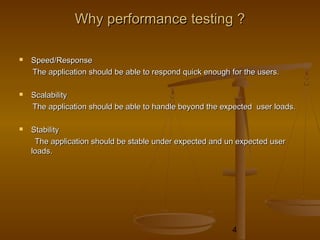
WhyWhy performanceperformance testing ?testing ?
 Speed/ResponseSpeed/Response
The application should be able to respond quick enough for the users.The application should be able to respond quick enough for the users.
 ScalabilityScalability
The application should be able to handle beyond the expected user loads.The application should be able to handle beyond the expected user loads.
 StabilityStability
The application should be stable under expected and un expected userThe application should be stable under expected and un expected user
loads.loads.
5
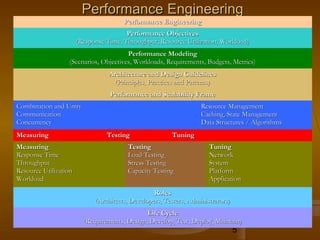
PerformancePerformance EngineeringEngineering
Performance EngineeringPerformance Engineering
Performance ObjectivesPerformance Objectives
(Response Time, Throughput, Resource Utilization, Workload)(Response Time, Throughput, Resource Utilization, Workload)
Performance ModelingPerformance Modeling
(Scenarios, Objectives, Workloads, Requirements, Budgets, Metrics)(Scenarios, Objectives, Workloads, Requirements, Budgets, Metrics)
Architecture and Design GuidelinesArchitecture and Design Guidelines
(Principles, Practices and Patterns)(Principles, Practices and Patterns)
Performance and Scalability FramePerformance and Scalability Frame
Combination and UnityCombination and Unity
CommunicationCommunication
ConcurrencyConcurrency
Resource ManagementResource Management
Caching, State ManagementCaching, State Management
Data Structures / AlgorithmsData Structures / Algorithms
Measuring Testing TuningMeasuring Testing Tuning
MeasuringMeasuring
Response TimeResponse Time
ThroughputThroughput
Resource UtilizationResource Utilization
WorkloadWorkload
TestingTesting
Load TestingLoad Testing
Stress TestingStress Testing
Capacity TestingCapacity Testing
TuningTuning
NetworkNetwork
SystemSystem
PlatformPlatform
ApplicationApplication
RolesRoles
(Architects, Developers, Testers, Administrators)(Architects, Developers, Testers, Administrators)
Life CycleLife Cycle
(Requirements, Design, Develop, Test, Deploy, Maintain)(Requirements, Design, Develop, Test, Deploy, Maintain)
6
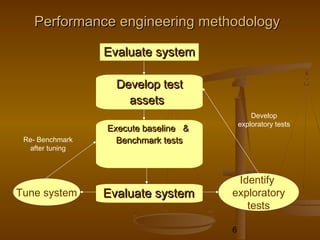
PerformancePerformance engineering methodologyengineering methodology
EvaluateEvaluate systemsystem
Develop testDevelop test
assetsassets
Execute baseline &Execute baseline &
Benchmark testsBenchmark tests
Evaluate systemEvaluate systemTune system
Identify
exploratory
tests
Re- Benchmark
after tuning
Develop
exploratory tests
7
PerformancePerformance engineeringengineering methodologymethodology
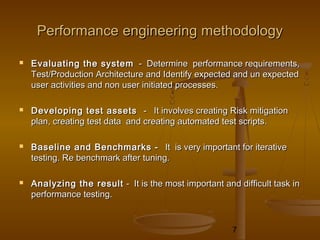
 Evaluating the systemEvaluating the system - Determine performance requirements,- Determine performance requirements,
Test/Production Architecture and Identify expected and un expectedTest/Production Architecture and Identify expected and un expected
user activities and non user initiated processes.user activities and non user initiated processes.
 Developing test assetsDeveloping test assets - It involves creating Risk mitigation- It involves creating Risk mitigation
plan, creating test data and creating automated test scripts.plan, creating test data and creating automated test scripts.

 Baseline and Benchmarks -Baseline and Benchmarks - It is very important for iterativeIt is very important for iterative
testing. Re benchmark after tuning.testing. Re benchmark after tuning.
 Analyzing the resultAnalyzing the result - It is the most important and difficult task in- It is the most important and difficult task in
performance testing.performance testing.
8
Types of performance testingTypes of performance testing
 Classic performance testingClassic performance testing - It measures response times and- It measures response times and
transaction rates.transaction rates.
 Load testingLoad testing - It measures the system's ability to handle varied- It measures the system's ability to handle varied
workloads.workloads.
 Stress testing -Stress testing - Stress test examines how the application behavesStress test examines how the application behaves
under a maximum user load.under a maximum user load.
 Volume testingVolume testing - It subjects the software to larger and larger amounts of- It subjects the software to larger and larger amounts of
data to determine its point of failure.data to determine its point of failure.
9
Load testing processLoad testing process
 Identify key scenarios -Identify key scenarios - Identify application scenarios that are critical forIdentify application scenarios that are critical for
performance.performance.
 Identify workload -Identify workload - Distribute the total application load among the keyDistribute the total application load among the key
scenarios identified in Step 1.scenarios identified in Step 1.
 Identify metrics -Identify metrics - Identify the metrics you want to collect about the applicationIdentify the metrics you want to collect about the application
when running the test.when running the test.
 Create test cases -Create test cases - Create the test cases, in which you define steps forCreate the test cases, in which you define steps for
conducting a single test along with the expected results.conducting a single test along with the expected results.
 Simulate load -Simulate load - Use test tools to simulate load in accordance with the testUse test tools to simulate load in accordance with the test
cases. Capture the resulting metric data.cases. Capture the resulting metric data.
 Analyze results -Analyze results - Analyze the metric data captured during the test. You beginAnalyze the metric data captured during the test. You begin
load testing with a total number of users distributed against your user profile, andload testing with a total number of users distributed against your user profile, and
then you start to incrementally increase the load for each test cycle, analyzing thethen you start to incrementally increase the load for each test cycle, analyzing the
results each time.results each time.
10
Performance ObjectivesPerformance Objectives
 Application response timeApplication response time
- How long does it take to complete a process ?- How long does it take to complete a process ?
 Configuration sizingConfiguration sizing
- Which configuration provides the best performance level ?- Which configuration provides the best performance level ?
 AcceptanceAcceptance
- Is the system stable enough to go into production ?- Is the system stable enough to go into production ?
 RegressionRegression
- Does the new version of the software adversely affect response time ?- Does the new version of the software adversely affect response time ?
 ReliabilityReliability
- How stable is the system under a heavy work load ?- How stable is the system under a heavy work load ?
 Capacity planningCapacity planning
- At what point does degradation in performance occur?- At what point does degradation in performance occur?
 Bottleneck identificationBottleneck identification
- What is the cause of degradation in performance?- What is the cause of degradation in performance?
11
Performance MetricsPerformance Metrics
 Response TimeResponse Time
- Defined as the interval between a user’s request and the system- Defined as the interval between a user’s request and the system
response.response.
- Interval between the end of a request submission and the end of aInterval between the end of a request submission and the end of a
corresponding response from the system.corresponding response from the system.
 Turnaround timeTurnaround time
- Time between submission of batch job and completion of the output.Time between submission of batch job and completion of the output.
 ThroughputThroughput
- Defined as the Rate (request per unit of time) at which the requests can- Defined as the Rate (request per unit of time) at which the requests can
be serviced by the system.be serviced by the system.
- CPU throughput is measured in MIPS or MFLOPS.- CPU throughput is measured in MIPS or MFLOPS.
- Network throughput is measured in PPS - packets per second or BPS -Network throughput is measured in PPS - packets per second or BPS -
bits per second.bits per second.
12
Performance MetricsPerformance Metrics
 Nominal CapacityNominal Capacity
- Throughput of a system generally increases as the load on the systemThroughput of a system generally increases as the load on the system
increases. After a certain load, it stops increasing and may startincreases. After a certain load, it stops increasing and may start
dropping. Maximum achievable throughput under ideal workloaddropping. Maximum achievable throughput under ideal workload
conditions is called Nominal Capacity of a system.conditions is called Nominal Capacity of a system.
 Usable CapacityUsable Capacity
- Maximum throughput achievable without exceeding a pre-specified- Maximum throughput achievable without exceeding a pre-specified
response time limit.response time limit.
13
Why Rational performance tester ?Why Rational performance tester ?
 Visual Test EditorVisual Test Editor
 Automatic identification of variable data and data-driven testingAutomatic identification of variable data and data-driven testing
 High scalabilityHigh scalability
 Eclipse BasedEclipse Based
 It is primarily wizard-driven so even business analysts or testers with noIt is primarily wizard-driven so even business analysts or testers with no
Java experience can use this tool effectively.Java experience can use this tool effectively.
 SAP supportSAP support
 Siebel 7.8 supportSiebel 7.8 support
 Report export to HTMLReport export to HTML
14
Rational Performance TesterRational Performance Tester
 IBM Rational Performance Tester is a performance test creation,IBM Rational Performance Tester is a performance test creation,
execution and analysis tool that helps teams validate the scalability andexecution and analysis tool that helps teams validate the scalability and
reliability of their Web-based applications.reliability of their Web-based applications.
 Rational Performance Tester is also entitled to a free download of the IBMRational Performance Tester is also entitled to a free download of the IBM
Performance Optimization Toolkit. It helps identify the root-cause ofPerformance Optimization Toolkit. It helps identify the root-cause of
performance problems by decomposing response time into the amount ofperformance problems by decomposing response time into the amount of
time spent within each J2EE or ARM-instrumented component.time spent within each J2EE or ARM-instrumented component.
 IBM Rational Performance Tester Extension for SAP and Siebel TestIBM Rational Performance Tester Extension for SAP and Siebel Test
Automation, designed to provide performance testing of SAP(4.6, 4.7) andAutomation, designed to provide performance testing of SAP(4.6, 4.7) and
Siebel v7.7 and v7.8 applications.Siebel v7.7 and v7.8 applications.
15
Rational Performance TesterRational Performance Tester
Rational Performance Tester Extension for Siebel TestRational Performance Tester Extension for Siebel Test
AutomationAutomation
 It extends the applicability of IBM Rational Performance Tester to Siebel 7.7 and 7.8It extends the applicability of IBM Rational Performance Tester to Siebel 7.7 and 7.8
applications and provides automatic data correlation of Siebel data during creationapplications and provides automatic data correlation of Siebel data during creation
and execution of the test.and execution of the test.
 Siebel Extension and the STA module have to be installed to create automated testSiebel Extension and the STA module have to be installed to create automated test
scripts that test typical business transactions in Siebel applications.scripts that test typical business transactions in Siebel applications.
 The Rational Performance Tester Extension for Siebel Test Automation is deliveredThe Rational Performance Tester Extension for Siebel Test Automation is delivered
via the Rational Product Updater.via the Rational Product Updater.
 Siebel Test Automation (STA) module has to be installed which is using theSiebel Test Automation (STA) module has to be installed which is using the
extension Siebel Test Automation.extension Siebel Test Automation.
16
Rational Performance TesterRational Performance Tester
Rational Performance Tester Extension for SAP ApplicationsRational Performance Tester Extension for SAP Applications
 IBM Rational Performance Tester Extension for SAP Applications extends IBMIBM Rational Performance Tester Extension for SAP Applications extends IBM
Rational Performance Tester support to include SAP 4.6 and 4.7 applications.Rational Performance Tester support to include SAP 4.6 and 4.7 applications.
 IBM Rational Performance Tester Extension for SAP Applications provides theIBM Rational Performance Tester Extension for SAP Applications provides the
custom tools like SAP Recorder,SAP Protocol Browser for test editing and SAPcustom tools like SAP Recorder,SAP Protocol Browser for test editing and SAP
Performance Reports.Performance Reports.
 IBM Rational Performance Tester does not support the SAP versions other than SAPIBM Rational Performance Tester does not support the SAP versions other than SAP
4.6C and 4.7.4.6C and 4.7.
17
Rational Performance TesterRational Performance Tester
 Test CreationTest Creation
 Test EditingTest Editing
 Work Load and SchedulingWork Load and Scheduling
 Execution and Evaluation of Test ResultsExecution and Evaluation of Test Results
18
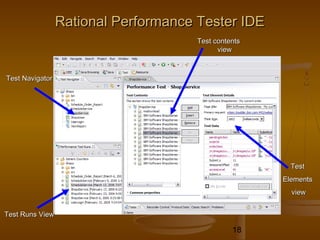
Rational Performance Tester IDERational Performance Tester IDE
Test NavigatorTest Navigator
Test Runs ViewTest Runs View
Test contentsTest contents
viewview
TestTest
ElementsElements
viewview
19
Test CreationTest Creation
 Configure Internet Explorer for recording.Configure Internet Explorer for recording.
Install the certificate to avoid the warning message on a securedInstall the certificate to avoid the warning message on a secured
web site.web site.
 RecordingRecording
- Make sure you are in the Test perspective.- Make sure you are in the Test perspective.
- Verify the recording browser through the HTTP recorder.- Verify the recording browser through the HTTP recorder.
- Select the test project and provide the file name and complete the- Select the test project and provide the file name and complete the
recording.recording.
20
Test Editing Using DatapoolsTest Editing Using Datapools
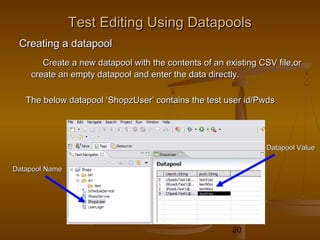
Creating a datapoolCreating a datapool
Create a new datapool with the contents of an existing CSV file,orCreate a new datapool with the contents of an existing CSV file,or
create an empty datapool and enter the data directly.create an empty datapool and enter the data directly.
The below datapool ‘ShopzUser’ contains the test user id/PwdsThe below datapool ‘ShopzUser’ contains the test user id/Pwds
Datapool NameDatapool Name
Datapool ValueDatapool Value
21
Test Editing Using DatapoolsTest Editing Using Datapools
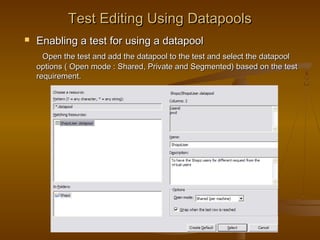
 Enabling a test for using a datapoolEnabling a test for using a datapool
Open the test and add the datapool to the test and select the datapoolOpen the test and add the datapool to the test and select the datapool
options ( Open mode : Shared, Private and Segmented) based on the testoptions ( Open mode : Shared, Private and Segmented) based on the test
requirement.requirement.
22
Test Editing Using DatapoolsTest Editing Using Datapools
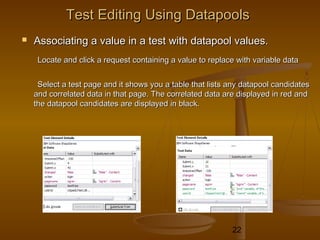
 Associating a value in a test with datapool values.Associating a value in a test with datapool values.
Locate and click a request containing a value to replace with variable dataLocate and click a request containing a value to replace with variable data
Select a test page and it shows you a table that lists any datapool candidatesSelect a test page and it shows you a table that lists any datapool candidates
and correlated data in that page. The correlated data are displayed in red andand correlated data in that page. The correlated data are displayed in red and
the datapool candidates are displayed in black.the datapool candidates are displayed in black.
23
Test Editing by data CorrelationTest Editing by data Correlation
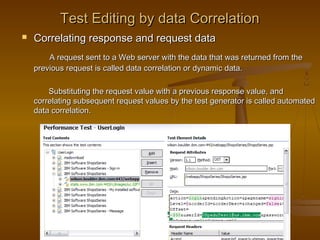
 Correlating response and request dataCorrelating response and request data
A request sent to a Web server with the data that was returned from theA request sent to a Web server with the data that was returned from the
previous request is called data correlation or dynamic data.previous request is called data correlation or dynamic data.
Substituting the request value with a previous response value, andSubstituting the request value with a previous response value, and
correlating subsequent request values by the test generator is called automatedcorrelating subsequent request values by the test generator is called automated
data correlation.data correlation.
24
Test Editing by data CorrelationTest Editing by data Correlation
Reference and Field ReferenceReference and Field Reference
 A reference (usually in response data) which points to a specific value that youA reference (usually in response data) which points to a specific value that you
want to use from a subsequent test location (usually in request) is calledwant to use from a subsequent test location (usually in request) is called
reference.reference.
 A reference (usually in response data) which points to a range of data is calledA reference (usually in response data) which points to a range of data is called
field reference.field reference.
The references and field references can be created fromThe references and field references can be created from
 A request URL or post data (URL and Data fields)A request URL or post data (URL and Data fields)
 A request or response header value (Value column of a Request Headers tableA request or response header value (Value column of a Request Headers table
or a Response Headers table)or a Response Headers table)
 Response content (Content field)Response content (Content field)
25
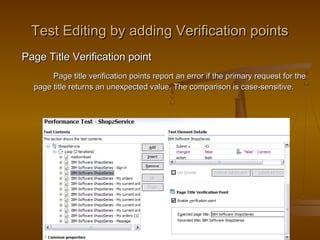
Test Editing by adding Verification pointsTest Editing by adding Verification points
Page Title Verification pointPage Title Verification point
Page title verification points report an error if the primary request for thePage title verification points report an error if the primary request for the
page title returns an unexpected value. The comparison is case-sensitive.page title returns an unexpected value. The comparison is case-sensitive.
26
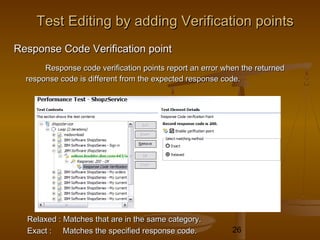
Response Code Verification pointResponse Code Verification point
Response code verification points report an error when the returnedResponse code verification points report an error when the returned
response code is different from the expected response code.response code is different from the expected response code.
Relaxed : Matches that are in the same category.Relaxed : Matches that are in the same category.
Exact : Matches the specified response code.Exact : Matches the specified response code.
Test Editing by adding Verification pointsTest Editing by adding Verification points
27
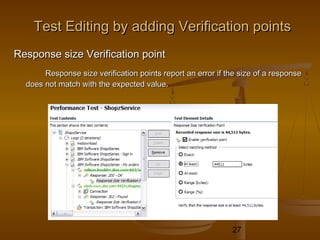
Test Editing by adding Verification pointsTest Editing by adding Verification points
Response size Verification pointResponse size Verification point
Response size verification points report an error if the size of a responseResponse size verification points report an error if the size of a response
does not match with the expected value.does not match with the expected value.
28
Test Editing by adding Verification pointsTest Editing by adding Verification points
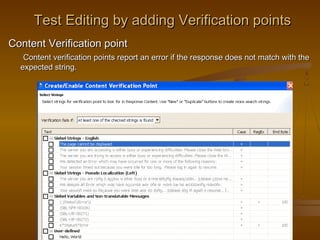
Content Verification pointContent Verification point
Content verification points report an error if the response does not match with theContent verification points report an error if the response does not match with the
expected string.expected string.
29
Test Editing by adding Test ElementsTest Editing by adding Test Elements
 By adding a transactionBy adding a transaction
 By adding conditional logicBy adding conditional logic
 By adding a loopBy adding a loop
30
Workload & SchedulingWorkload & Scheduling
 Create user GroupsCreate user Groups
Group tests by characteristicsGroup tests by characteristics
Influence the test execution orderInfluence the test execution order
 Creating SchedulesCreating Schedules
By creating a schedule, we can accurately emulate the actions of individualBy creating a schedule, we can accurately emulate the actions of individual
usersusers
 Running the user groups at remote locationRunning the user groups at remote location
IBM Rational Agent Controller must be installed on the remote computer.IBM Rational Agent Controller must be installed on the remote computer.
Firewalls on both the local computer and the remote computer must eitherFirewalls on both the local computer and the remote computer must either
be disabled or be configured to allow connections among the computers.be disabled or be configured to allow connections among the computers.
31
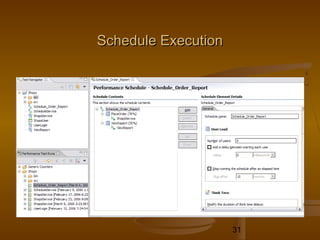
Schedule ExecutionSchedule Execution
32
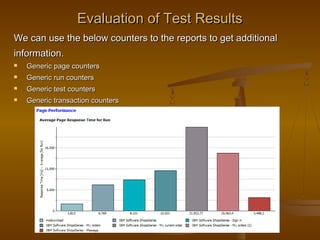
Evaluation of Test ResultsEvaluation of Test Results
We can use the below counters to the reports to get additionalWe can use the below counters to the reports to get additional
information.information.
 Generic page countersGeneric page counters
 Generic run countersGeneric run counters
 Generic test countersGeneric test counters
 Generic transaction countersGeneric transaction counters
33
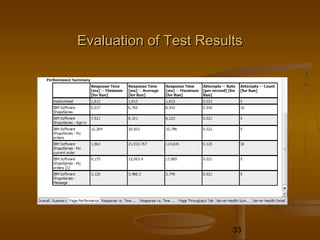
Evaluation of Test ResultsEvaluation of Test Results
34
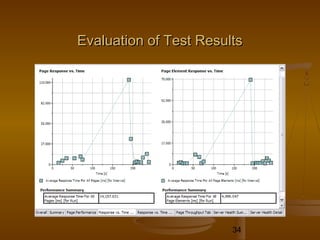
Evaluation of Test ResultsEvaluation of Test Results
35
Tool download InfoTool download Info
 IBM Rational Performance Tester supports Linux, Windows 2000IBM Rational Performance Tester supports Linux, Windows 2000
Windows 2003 and Windows XP.Windows 2003 and Windows XP.
 System Requirements are given in the URLSystem Requirements are given in the URL
http://www-306.ibm.com/software/awdtools/tester/performance/sysreq/index.htmlhttp://www-306.ibm.com/software/awdtools/tester/performance/sysreq/index.html
 IBM Rational Performance Tester V6.1 can be downloaded from the URLIBM Rational Performance Tester V6.1 can be downloaded from the URL
belowbelow
http://w3-03.ibm.com/software/sales/saletool.nsf/salestools/bt-
rational$Rational_download
36
Tool download InfoTool download Info
 You can download the "Rational Performance Optimization tool kit" & the Data
Collection Infrastructure (DCI) form the URL below,
http://www-306.ibm.com/software/rational/toolkit/ipo_toolkit.html or
http://www-128.ibm.com/developerworks/rational/library/05/523_perf/
 Install the "Rational Performance Optimization tool kit" in the machine and Install
the DCI in the hosts from where you want to measure the
performance. If you are running the application from the local machines
you have to install the DCI in the local machine.
37
Thank YouThank You

Performance testing and rpt

  • 1.
    1 Introduction toIntroduction to PerformancetestingPerformance testing && Overview ofOverview of Rational performance testerRational performance tester - Padmanaban Vellingiri- Padmanaban Vellingiri
  • 2.
    2 AgendaAgenda  Why performancetesting ?Why performance testing ?  Types of performance testingTypes of performance testing  Performance engineering methodologyPerformance engineering methodology  Performance objectives & MetricsPerformance objectives & Metrics  Why Rational performance tester ?Why Rational performance tester ?  Overview of Rational performance testerOverview of Rational performance tester  Tutorial on Rational performance testerTutorial on Rational performance tester  Tool download infoTool download info
  • 3.
    3 Why performance testing?Why performance testing ?  Is the application fast enough to complete the task ?Is the application fast enough to complete the task ?  Will the system handle more than expected user load ?Will the system handle more than expected user load ?  Is the system stable enough to go into production?Is the system stable enough to go into production?  Is the system stable under heavy user load ?Is the system stable under heavy user load ?  Are you confident that users will have positive experience on the system ?Are you confident that users will have positive experience on the system ?
  • 4.
    4 WhyWhy performanceperformance testing?testing ?  Speed/ResponseSpeed/Response The application should be able to respond quick enough for the users.The application should be able to respond quick enough for the users.  ScalabilityScalability The application should be able to handle beyond the expected user loads.The application should be able to handle beyond the expected user loads.  StabilityStability The application should be stable under expected and un expected userThe application should be stable under expected and un expected user loads.loads.
  • 5.
    5 PerformancePerformance EngineeringEngineering Performance EngineeringPerformanceEngineering Performance ObjectivesPerformance Objectives (Response Time, Throughput, Resource Utilization, Workload)(Response Time, Throughput, Resource Utilization, Workload) Performance ModelingPerformance Modeling (Scenarios, Objectives, Workloads, Requirements, Budgets, Metrics)(Scenarios, Objectives, Workloads, Requirements, Budgets, Metrics) Architecture and Design GuidelinesArchitecture and Design Guidelines (Principles, Practices and Patterns)(Principles, Practices and Patterns) Performance and Scalability FramePerformance and Scalability Frame Combination and UnityCombination and Unity CommunicationCommunication ConcurrencyConcurrency Resource ManagementResource Management Caching, State ManagementCaching, State Management Data Structures / AlgorithmsData Structures / Algorithms Measuring Testing TuningMeasuring Testing Tuning MeasuringMeasuring Response TimeResponse Time ThroughputThroughput Resource UtilizationResource Utilization WorkloadWorkload TestingTesting Load TestingLoad Testing Stress TestingStress Testing Capacity TestingCapacity Testing TuningTuning NetworkNetwork SystemSystem PlatformPlatform ApplicationApplication RolesRoles (Architects, Developers, Testers, Administrators)(Architects, Developers, Testers, Administrators) Life CycleLife Cycle (Requirements, Design, Develop, Test, Deploy, Maintain)(Requirements, Design, Develop, Test, Deploy, Maintain)
  • 6.
    6 PerformancePerformance engineering methodologyengineeringmethodology EvaluateEvaluate systemsystem Develop testDevelop test assetsassets Execute baseline &Execute baseline & Benchmark testsBenchmark tests Evaluate systemEvaluate systemTune system Identify exploratory tests Re- Benchmark after tuning Develop exploratory tests
  • 7.
    7 PerformancePerformance engineeringengineering methodologymethodology Evaluating the systemEvaluating the system - Determine performance requirements,- Determine performance requirements, Test/Production Architecture and Identify expected and un expectedTest/Production Architecture and Identify expected and un expected user activities and non user initiated processes.user activities and non user initiated processes.  Developing test assetsDeveloping test assets - It involves creating Risk mitigation- It involves creating Risk mitigation plan, creating test data and creating automated test scripts.plan, creating test data and creating automated test scripts.  Baseline and Benchmarks -Baseline and Benchmarks - It is very important for iterativeIt is very important for iterative testing. Re benchmark after tuning.testing. Re benchmark after tuning.  Analyzing the resultAnalyzing the result - It is the most important and difficult task in- It is the most important and difficult task in performance testing.performance testing.
  • 8.
    8 Types of performancetestingTypes of performance testing  Classic performance testingClassic performance testing - It measures response times and- It measures response times and transaction rates.transaction rates.  Load testingLoad testing - It measures the system's ability to handle varied- It measures the system's ability to handle varied workloads.workloads.  Stress testing -Stress testing - Stress test examines how the application behavesStress test examines how the application behaves under a maximum user load.under a maximum user load.  Volume testingVolume testing - It subjects the software to larger and larger amounts of- It subjects the software to larger and larger amounts of data to determine its point of failure.data to determine its point of failure.
  • 9.
    9 Load testing processLoadtesting process  Identify key scenarios -Identify key scenarios - Identify application scenarios that are critical forIdentify application scenarios that are critical for performance.performance.  Identify workload -Identify workload - Distribute the total application load among the keyDistribute the total application load among the key scenarios identified in Step 1.scenarios identified in Step 1.  Identify metrics -Identify metrics - Identify the metrics you want to collect about the applicationIdentify the metrics you want to collect about the application when running the test.when running the test.  Create test cases -Create test cases - Create the test cases, in which you define steps forCreate the test cases, in which you define steps for conducting a single test along with the expected results.conducting a single test along with the expected results.  Simulate load -Simulate load - Use test tools to simulate load in accordance with the testUse test tools to simulate load in accordance with the test cases. Capture the resulting metric data.cases. Capture the resulting metric data.  Analyze results -Analyze results - Analyze the metric data captured during the test. You beginAnalyze the metric data captured during the test. You begin load testing with a total number of users distributed against your user profile, andload testing with a total number of users distributed against your user profile, and then you start to incrementally increase the load for each test cycle, analyzing thethen you start to incrementally increase the load for each test cycle, analyzing the results each time.results each time.
  • 10.
    10 Performance ObjectivesPerformance Objectives Application response timeApplication response time - How long does it take to complete a process ?- How long does it take to complete a process ?  Configuration sizingConfiguration sizing - Which configuration provides the best performance level ?- Which configuration provides the best performance level ?  AcceptanceAcceptance - Is the system stable enough to go into production ?- Is the system stable enough to go into production ?  RegressionRegression - Does the new version of the software adversely affect response time ?- Does the new version of the software adversely affect response time ?  ReliabilityReliability - How stable is the system under a heavy work load ?- How stable is the system under a heavy work load ?  Capacity planningCapacity planning - At what point does degradation in performance occur?- At what point does degradation in performance occur?  Bottleneck identificationBottleneck identification - What is the cause of degradation in performance?- What is the cause of degradation in performance?
  • 11.
    11 Performance MetricsPerformance Metrics Response TimeResponse Time - Defined as the interval between a user’s request and the system- Defined as the interval between a user’s request and the system response.response. - Interval between the end of a request submission and the end of aInterval between the end of a request submission and the end of a corresponding response from the system.corresponding response from the system.  Turnaround timeTurnaround time - Time between submission of batch job and completion of the output.Time between submission of batch job and completion of the output.  ThroughputThroughput - Defined as the Rate (request per unit of time) at which the requests can- Defined as the Rate (request per unit of time) at which the requests can be serviced by the system.be serviced by the system. - CPU throughput is measured in MIPS or MFLOPS.- CPU throughput is measured in MIPS or MFLOPS. - Network throughput is measured in PPS - packets per second or BPS -Network throughput is measured in PPS - packets per second or BPS - bits per second.bits per second.
  • 12.
    12 Performance MetricsPerformance Metrics Nominal CapacityNominal Capacity - Throughput of a system generally increases as the load on the systemThroughput of a system generally increases as the load on the system increases. After a certain load, it stops increasing and may startincreases. After a certain load, it stops increasing and may start dropping. Maximum achievable throughput under ideal workloaddropping. Maximum achievable throughput under ideal workload conditions is called Nominal Capacity of a system.conditions is called Nominal Capacity of a system.  Usable CapacityUsable Capacity - Maximum throughput achievable without exceeding a pre-specified- Maximum throughput achievable without exceeding a pre-specified response time limit.response time limit.
  • 13.
    13 Why Rational performancetester ?Why Rational performance tester ?  Visual Test EditorVisual Test Editor  Automatic identification of variable data and data-driven testingAutomatic identification of variable data and data-driven testing  High scalabilityHigh scalability  Eclipse BasedEclipse Based  It is primarily wizard-driven so even business analysts or testers with noIt is primarily wizard-driven so even business analysts or testers with no Java experience can use this tool effectively.Java experience can use this tool effectively.  SAP supportSAP support  Siebel 7.8 supportSiebel 7.8 support  Report export to HTMLReport export to HTML
  • 14.
    14 Rational Performance TesterRationalPerformance Tester  IBM Rational Performance Tester is a performance test creation,IBM Rational Performance Tester is a performance test creation, execution and analysis tool that helps teams validate the scalability andexecution and analysis tool that helps teams validate the scalability and reliability of their Web-based applications.reliability of their Web-based applications.  Rational Performance Tester is also entitled to a free download of the IBMRational Performance Tester is also entitled to a free download of the IBM Performance Optimization Toolkit. It helps identify the root-cause ofPerformance Optimization Toolkit. It helps identify the root-cause of performance problems by decomposing response time into the amount ofperformance problems by decomposing response time into the amount of time spent within each J2EE or ARM-instrumented component.time spent within each J2EE or ARM-instrumented component.  IBM Rational Performance Tester Extension for SAP and Siebel TestIBM Rational Performance Tester Extension for SAP and Siebel Test Automation, designed to provide performance testing of SAP(4.6, 4.7) andAutomation, designed to provide performance testing of SAP(4.6, 4.7) and Siebel v7.7 and v7.8 applications.Siebel v7.7 and v7.8 applications.
  • 15.
    15 Rational Performance TesterRationalPerformance Tester Rational Performance Tester Extension for Siebel TestRational Performance Tester Extension for Siebel Test AutomationAutomation  It extends the applicability of IBM Rational Performance Tester to Siebel 7.7 and 7.8It extends the applicability of IBM Rational Performance Tester to Siebel 7.7 and 7.8 applications and provides automatic data correlation of Siebel data during creationapplications and provides automatic data correlation of Siebel data during creation and execution of the test.and execution of the test.  Siebel Extension and the STA module have to be installed to create automated testSiebel Extension and the STA module have to be installed to create automated test scripts that test typical business transactions in Siebel applications.scripts that test typical business transactions in Siebel applications.  The Rational Performance Tester Extension for Siebel Test Automation is deliveredThe Rational Performance Tester Extension for Siebel Test Automation is delivered via the Rational Product Updater.via the Rational Product Updater.  Siebel Test Automation (STA) module has to be installed which is using theSiebel Test Automation (STA) module has to be installed which is using the extension Siebel Test Automation.extension Siebel Test Automation.
  • 16.
    16 Rational Performance TesterRationalPerformance Tester Rational Performance Tester Extension for SAP ApplicationsRational Performance Tester Extension for SAP Applications  IBM Rational Performance Tester Extension for SAP Applications extends IBMIBM Rational Performance Tester Extension for SAP Applications extends IBM Rational Performance Tester support to include SAP 4.6 and 4.7 applications.Rational Performance Tester support to include SAP 4.6 and 4.7 applications.  IBM Rational Performance Tester Extension for SAP Applications provides theIBM Rational Performance Tester Extension for SAP Applications provides the custom tools like SAP Recorder,SAP Protocol Browser for test editing and SAPcustom tools like SAP Recorder,SAP Protocol Browser for test editing and SAP Performance Reports.Performance Reports.  IBM Rational Performance Tester does not support the SAP versions other than SAPIBM Rational Performance Tester does not support the SAP versions other than SAP 4.6C and 4.7.4.6C and 4.7.
  • 17.
    17 Rational Performance TesterRationalPerformance Tester  Test CreationTest Creation  Test EditingTest Editing  Work Load and SchedulingWork Load and Scheduling  Execution and Evaluation of Test ResultsExecution and Evaluation of Test Results
  • 18.
    18 Rational Performance TesterIDERational Performance Tester IDE Test NavigatorTest Navigator Test Runs ViewTest Runs View Test contentsTest contents viewview TestTest ElementsElements viewview
  • 19.
    19 Test CreationTest Creation Configure Internet Explorer for recording.Configure Internet Explorer for recording. Install the certificate to avoid the warning message on a securedInstall the certificate to avoid the warning message on a secured web site.web site.  RecordingRecording - Make sure you are in the Test perspective.- Make sure you are in the Test perspective. - Verify the recording browser through the HTTP recorder.- Verify the recording browser through the HTTP recorder. - Select the test project and provide the file name and complete the- Select the test project and provide the file name and complete the recording.recording.
  • 20.
    20 Test Editing UsingDatapoolsTest Editing Using Datapools Creating a datapoolCreating a datapool Create a new datapool with the contents of an existing CSV file,orCreate a new datapool with the contents of an existing CSV file,or create an empty datapool and enter the data directly.create an empty datapool and enter the data directly. The below datapool ‘ShopzUser’ contains the test user id/PwdsThe below datapool ‘ShopzUser’ contains the test user id/Pwds Datapool NameDatapool Name Datapool ValueDatapool Value
  • 21.
    21 Test Editing UsingDatapoolsTest Editing Using Datapools  Enabling a test for using a datapoolEnabling a test for using a datapool Open the test and add the datapool to the test and select the datapoolOpen the test and add the datapool to the test and select the datapool options ( Open mode : Shared, Private and Segmented) based on the testoptions ( Open mode : Shared, Private and Segmented) based on the test requirement.requirement.
  • 22.
    22 Test Editing UsingDatapoolsTest Editing Using Datapools  Associating a value in a test with datapool values.Associating a value in a test with datapool values. Locate and click a request containing a value to replace with variable dataLocate and click a request containing a value to replace with variable data Select a test page and it shows you a table that lists any datapool candidatesSelect a test page and it shows you a table that lists any datapool candidates and correlated data in that page. The correlated data are displayed in red andand correlated data in that page. The correlated data are displayed in red and the datapool candidates are displayed in black.the datapool candidates are displayed in black.
  • 23.
    23 Test Editing bydata CorrelationTest Editing by data Correlation  Correlating response and request dataCorrelating response and request data A request sent to a Web server with the data that was returned from theA request sent to a Web server with the data that was returned from the previous request is called data correlation or dynamic data.previous request is called data correlation or dynamic data. Substituting the request value with a previous response value, andSubstituting the request value with a previous response value, and correlating subsequent request values by the test generator is called automatedcorrelating subsequent request values by the test generator is called automated data correlation.data correlation.
  • 24.
    24 Test Editing bydata CorrelationTest Editing by data Correlation Reference and Field ReferenceReference and Field Reference  A reference (usually in response data) which points to a specific value that youA reference (usually in response data) which points to a specific value that you want to use from a subsequent test location (usually in request) is calledwant to use from a subsequent test location (usually in request) is called reference.reference.  A reference (usually in response data) which points to a range of data is calledA reference (usually in response data) which points to a range of data is called field reference.field reference. The references and field references can be created fromThe references and field references can be created from  A request URL or post data (URL and Data fields)A request URL or post data (URL and Data fields)  A request or response header value (Value column of a Request Headers tableA request or response header value (Value column of a Request Headers table or a Response Headers table)or a Response Headers table)  Response content (Content field)Response content (Content field)
  • 25.
    25 Test Editing byadding Verification pointsTest Editing by adding Verification points Page Title Verification pointPage Title Verification point Page title verification points report an error if the primary request for thePage title verification points report an error if the primary request for the page title returns an unexpected value. The comparison is case-sensitive.page title returns an unexpected value. The comparison is case-sensitive.
  • 26.
    26 Response Code VerificationpointResponse Code Verification point Response code verification points report an error when the returnedResponse code verification points report an error when the returned response code is different from the expected response code.response code is different from the expected response code. Relaxed : Matches that are in the same category.Relaxed : Matches that are in the same category. Exact : Matches the specified response code.Exact : Matches the specified response code. Test Editing by adding Verification pointsTest Editing by adding Verification points
  • 27.
    27 Test Editing byadding Verification pointsTest Editing by adding Verification points Response size Verification pointResponse size Verification point Response size verification points report an error if the size of a responseResponse size verification points report an error if the size of a response does not match with the expected value.does not match with the expected value.
  • 28.
    28 Test Editing byadding Verification pointsTest Editing by adding Verification points Content Verification pointContent Verification point Content verification points report an error if the response does not match with theContent verification points report an error if the response does not match with the expected string.expected string.
  • 29.
    29 Test Editing byadding Test ElementsTest Editing by adding Test Elements  By adding a transactionBy adding a transaction  By adding conditional logicBy adding conditional logic  By adding a loopBy adding a loop
  • 30.
    30 Workload & SchedulingWorkload& Scheduling  Create user GroupsCreate user Groups Group tests by characteristicsGroup tests by characteristics Influence the test execution orderInfluence the test execution order  Creating SchedulesCreating Schedules By creating a schedule, we can accurately emulate the actions of individualBy creating a schedule, we can accurately emulate the actions of individual usersusers  Running the user groups at remote locationRunning the user groups at remote location IBM Rational Agent Controller must be installed on the remote computer.IBM Rational Agent Controller must be installed on the remote computer. Firewalls on both the local computer and the remote computer must eitherFirewalls on both the local computer and the remote computer must either be disabled or be configured to allow connections among the computers.be disabled or be configured to allow connections among the computers.
  • 31.
  • 32.
    32 Evaluation of TestResultsEvaluation of Test Results We can use the below counters to the reports to get additionalWe can use the below counters to the reports to get additional information.information.  Generic page countersGeneric page counters  Generic run countersGeneric run counters  Generic test countersGeneric test counters  Generic transaction countersGeneric transaction counters
  • 33.
    33 Evaluation of TestResultsEvaluation of Test Results
  • 34.
    34 Evaluation of TestResultsEvaluation of Test Results
  • 35.
    35 Tool download InfoTooldownload Info  IBM Rational Performance Tester supports Linux, Windows 2000IBM Rational Performance Tester supports Linux, Windows 2000 Windows 2003 and Windows XP.Windows 2003 and Windows XP.  System Requirements are given in the URLSystem Requirements are given in the URL http://www-306.ibm.com/software/awdtools/tester/performance/sysreq/index.htmlhttp://www-306.ibm.com/software/awdtools/tester/performance/sysreq/index.html  IBM Rational Performance Tester V6.1 can be downloaded from the URLIBM Rational Performance Tester V6.1 can be downloaded from the URL belowbelow http://w3-03.ibm.com/software/sales/saletool.nsf/salestools/bt- rational$Rational_download
  • 36.
    36 Tool download InfoTooldownload Info  You can download the "Rational Performance Optimization tool kit" & the Data Collection Infrastructure (DCI) form the URL below, http://www-306.ibm.com/software/rational/toolkit/ipo_toolkit.html or http://www-128.ibm.com/developerworks/rational/library/05/523_perf/  Install the "Rational Performance Optimization tool kit" in the machine and Install the DCI in the hosts from where you want to measure the performance. If you are running the application from the local machines you have to install the DCI in the local machine.
  • 37.