





PerformanceTesting
Prepared By : Hassan Mohammed
Agenda
▪ Why performance testing?
▪ Fundamental of performance testing
▪ Performance testing process
▪ Result analysis
▪ HP Loadrunner
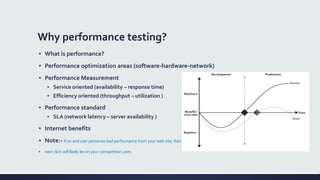
Why performance testing?
▪ What is performance?
▪ Performance optimization areas (software-hardware-network)
▪ Performance Measurement
▪ Service oriented (availability – response time)
▪ Efficiency oriented (throughput – utilization )
▪ Performance standard
▪ SLA (network latency – server availability )
▪ Internet benefits
▪ Note:- If an end user perceives bad performance from your web site, their
▪ next click will likely be on your-competition.com.
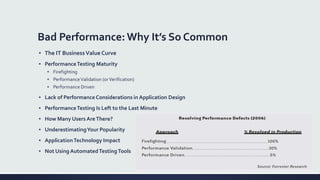
Bad Performance: Why It’s So Common
▪ The IT BusinessValue Curve
▪ PerformanceTesting Maturity
▪ Firefighting
▪ PerformanceValidation (orVerification)
▪ Performance Driven
▪ Lack of PerformanceConsiderations in Application Design
▪ PerformanceTesting Is Left to the Last Minute
▪ How Many Users AreThere?
▪ UnderestimatingYour Popularity
▪ ApplicationTechnology Impact
▪ Not Using AutomatedTestingTools
The Fundamentals of Effective
Application
PerformanceTesting
Performance awareness should be built into the application life
cycle as early as possible.
Effective performance testing factors
▪ Choosing an appropriate performance testing tool
▪ Designing an appropriate performance test environment
▪ Setting realistic and appropriate performance targets
▪ Making sure your application is stable enough for performance testing
▪ Obtaining a code freeze
▪ Identifying and scripting the business-critical transactions
▪ Providing sufficient test data of high quality
▪ Ensuring accurate performance test design
▪ Identifying the server and network monitoring key Performance Indicators (KPIs)
▪ Allocating enough time to performance test effectively
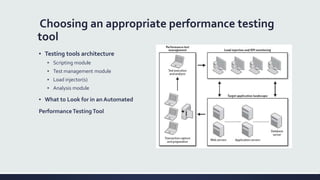
Choosing an appropriate performance testing
tool
▪ Testing tools architecture
▪ Scripting module
▪ Test management module
▪ Load injector(s)
▪ Analysis module
▪ What to Look for in an Automated
PerformanceTestingTool
Designing an Appropriate PerformanceTest
Environment
▪ PerformanceTest environment
▪ An exact or very close copy of the live environment. Ideal
▪ A subset of the live environment with fewer servers but specification and tier-deployment matches to that of
the live environment. frequently achievable
▪ A subset of the live environment with fewer servers of lower specification. most common situation
▪ Virtualization
▪ Load Generators
▪ Load balancing
▪ User session limits
▪ Addressing Different Deployment Models
▪ Available bandwidth
▪ Network latency
▪ Load injection from aWAN location
▪ Network simulation
Setting Realistic and Appropriate Performance
Targets. (SLA)
▪ Consensus
▪ Key PerformanceTargets
▪ Availability or uptime
▪ Response time
▪ Concurrency, scalability, and throughput
▪ Network utilization
▪ Server utilization
Making SureYour Application Is Stable Enough
for PerformanceTesting
▪ Avoid High data presentation
▪ Update Poorly performing SQL
▪ Large numbers of application network round trips
▪ Undetected application errors
Obtaining a Code Freeze
Identifying and Scripting the Business-Critical
Transactions
▪ Transaction Checklist
▪ Transaction ReplayValidation
▪ Verify single user replay
▪ Verify multiuser replay
▪ What to Measure? (createTransactions )
▪ To Log In or Not to Log In
▪ Peaceful Coexistence
Providing SufficientTest Data of High Quality
▪ Input Data
▪ User credentials
▪ Search criteria
▪ Associated documents
▪ Target Data
▪ Sizing
▪ Data rollback
▪ Runtime Data
▪ Data Security
Ensuring Accurate PerformanceTest Design
▪ Performance test types
▪ Baseline test
▪ Load test
▪ Stress test
▪ Soak or stability test
▪ Pacing time &Think time
▪ Injection Profile
▪ Big Bang
▪ Ramp-up
▪ Ramp-up (with step)
▪ Ramp up (with step), Ramp down (with step)
▪ Delayed start
▪ Setting the Number ofVirtual Users per script business case
Ensuring Accurate PerformanceTest Design. cont.
▪ Deciding on PerformanceTestTypes
▪ Baseline test each transaction
▪ Load test each transaction
▪ Isolation test individual transactions
▪ Load test transaction groups
▪ Isolation test transaction groups
▪ Soak test transaction groups
▪ Stress test transaction groups
▪ Load Injection Point of Presence
▪ Putting It AllTogether
Identifying the Server and Network Key
Performance Indicators (KPIs)
▪ Server KPIs
▪ • Processor utilization percentage
▪ • Available memory in bytes
▪ • Processor queue length
▪ • Physical disk: % DiskTime
▪ Network KPIs
Allocating EnoughTime to PerformanceTest
Effectively
▪ Lead time to prepare test environment
▪ Lead time to prepare the injection environment
▪ Time to identify and script business transactions
▪ Time to identify and create enough test data
▪ Time to instrument the test environment
▪ Time to prepare and execute performance test runs
▪ Time to deal with any problems identified
PerformanceTest Process
-Prof Of Concept (POC)
-From RequirementTo PerformanceTest
Prof Of Concept (POC)
▪ Prerequisites
▪ Process
▪ Deliverables
From Requirements to PerformanceTest
▪ Activity Duration Guidelines
▪ Step 1: Pre-Engagement Requirements Capture
▪ Step 2:Test Environment Build
▪ Step 3:Transaction Scripting
▪ Step 4: PerformanceTest Build
▪ Step 5: PerformanceTest Execution
▪ Step 6 (Post-Test Phase): Analyze Results, Report, Retest
Interpreting Results: Effective
Root-Cause Analysis
The Analysis Process
• Real-Time Analysis
• Response-time data for each transaction in the performance test
• You must be able to monitor the injection profile
• You should be able to monitor the state of all load injectors
• You need to monitor data that relates to any server,
• A display of any performance thresholds
• A display of all errors that occur during test execution
• Post-Test Analysis
• All performance related information that was gathered during the test should be available at the test’s conclusion and
may be stored
Types of Output from a PerformanceTest
• Statistics Primer
• Mean and median
• Standard deviation and normal distribution
• Nth percentile
• Response-Time Measurement
• Throughput and Capacity
• Monitoring Key Performance Indicators (KPIs)
• Server performance
• Network Performance
• Load Injector Performance
Performance testing
Performance testing

Performance testing

  • 1.
  • 2.
    Agenda ▪ Why performancetesting? ▪ Fundamental of performance testing ▪ Performance testing process ▪ Result analysis ▪ HP Loadrunner
  • 3.
    Why performance testing? ▪What is performance? ▪ Performance optimization areas (software-hardware-network) ▪ Performance Measurement ▪ Service oriented (availability – response time) ▪ Efficiency oriented (throughput – utilization ) ▪ Performance standard ▪ SLA (network latency – server availability ) ▪ Internet benefits ▪ Note:- If an end user perceives bad performance from your web site, their ▪ next click will likely be on your-competition.com.
  • 4.
    Bad Performance: WhyIt’s So Common ▪ The IT BusinessValue Curve ▪ PerformanceTesting Maturity ▪ Firefighting ▪ PerformanceValidation (orVerification) ▪ Performance Driven ▪ Lack of PerformanceConsiderations in Application Design ▪ PerformanceTesting Is Left to the Last Minute ▪ How Many Users AreThere? ▪ UnderestimatingYour Popularity ▪ ApplicationTechnology Impact ▪ Not Using AutomatedTestingTools
  • 5.
    The Fundamentals ofEffective Application PerformanceTesting Performance awareness should be built into the application life cycle as early as possible.
  • 6.
    Effective performance testingfactors ▪ Choosing an appropriate performance testing tool ▪ Designing an appropriate performance test environment ▪ Setting realistic and appropriate performance targets ▪ Making sure your application is stable enough for performance testing ▪ Obtaining a code freeze ▪ Identifying and scripting the business-critical transactions ▪ Providing sufficient test data of high quality ▪ Ensuring accurate performance test design ▪ Identifying the server and network monitoring key Performance Indicators (KPIs) ▪ Allocating enough time to performance test effectively
  • 7.
    Choosing an appropriateperformance testing tool ▪ Testing tools architecture ▪ Scripting module ▪ Test management module ▪ Load injector(s) ▪ Analysis module ▪ What to Look for in an Automated PerformanceTestingTool
  • 8.
    Designing an AppropriatePerformanceTest Environment ▪ PerformanceTest environment ▪ An exact or very close copy of the live environment. Ideal ▪ A subset of the live environment with fewer servers but specification and tier-deployment matches to that of the live environment. frequently achievable ▪ A subset of the live environment with fewer servers of lower specification. most common situation ▪ Virtualization ▪ Load Generators ▪ Load balancing ▪ User session limits ▪ Addressing Different Deployment Models ▪ Available bandwidth ▪ Network latency ▪ Load injection from aWAN location ▪ Network simulation
  • 9.
    Setting Realistic andAppropriate Performance Targets. (SLA) ▪ Consensus ▪ Key PerformanceTargets ▪ Availability or uptime ▪ Response time ▪ Concurrency, scalability, and throughput ▪ Network utilization ▪ Server utilization
  • 10.
    Making SureYour ApplicationIs Stable Enough for PerformanceTesting ▪ Avoid High data presentation ▪ Update Poorly performing SQL ▪ Large numbers of application network round trips ▪ Undetected application errors
  • 11.
  • 12.
    Identifying and Scriptingthe Business-Critical Transactions ▪ Transaction Checklist ▪ Transaction ReplayValidation ▪ Verify single user replay ▪ Verify multiuser replay ▪ What to Measure? (createTransactions ) ▪ To Log In or Not to Log In ▪ Peaceful Coexistence
  • 13.
    Providing SufficientTest Dataof High Quality ▪ Input Data ▪ User credentials ▪ Search criteria ▪ Associated documents ▪ Target Data ▪ Sizing ▪ Data rollback ▪ Runtime Data ▪ Data Security
  • 14.
    Ensuring Accurate PerformanceTestDesign ▪ Performance test types ▪ Baseline test ▪ Load test ▪ Stress test ▪ Soak or stability test ▪ Pacing time &Think time ▪ Injection Profile ▪ Big Bang ▪ Ramp-up ▪ Ramp-up (with step) ▪ Ramp up (with step), Ramp down (with step) ▪ Delayed start ▪ Setting the Number ofVirtual Users per script business case
  • 15.
    Ensuring Accurate PerformanceTestDesign. cont. ▪ Deciding on PerformanceTestTypes ▪ Baseline test each transaction ▪ Load test each transaction ▪ Isolation test individual transactions ▪ Load test transaction groups ▪ Isolation test transaction groups ▪ Soak test transaction groups ▪ Stress test transaction groups ▪ Load Injection Point of Presence ▪ Putting It AllTogether
  • 16.
    Identifying the Serverand Network Key Performance Indicators (KPIs) ▪ Server KPIs ▪ • Processor utilization percentage ▪ • Available memory in bytes ▪ • Processor queue length ▪ • Physical disk: % DiskTime ▪ Network KPIs
  • 17.
    Allocating EnoughTime toPerformanceTest Effectively ▪ Lead time to prepare test environment ▪ Lead time to prepare the injection environment ▪ Time to identify and script business transactions ▪ Time to identify and create enough test data ▪ Time to instrument the test environment ▪ Time to prepare and execute performance test runs ▪ Time to deal with any problems identified
  • 18.
    PerformanceTest Process -Prof OfConcept (POC) -From RequirementTo PerformanceTest
  • 19.
    Prof Of Concept(POC) ▪ Prerequisites ▪ Process ▪ Deliverables
  • 20.
    From Requirements toPerformanceTest ▪ Activity Duration Guidelines ▪ Step 1: Pre-Engagement Requirements Capture ▪ Step 2:Test Environment Build ▪ Step 3:Transaction Scripting ▪ Step 4: PerformanceTest Build ▪ Step 5: PerformanceTest Execution ▪ Step 6 (Post-Test Phase): Analyze Results, Report, Retest
  • 21.
  • 22.
    The Analysis Process •Real-Time Analysis • Response-time data for each transaction in the performance test • You must be able to monitor the injection profile • You should be able to monitor the state of all load injectors • You need to monitor data that relates to any server, • A display of any performance thresholds • A display of all errors that occur during test execution • Post-Test Analysis • All performance related information that was gathered during the test should be available at the test’s conclusion and may be stored
  • 23.
    Types of Outputfrom a PerformanceTest • Statistics Primer • Mean and median • Standard deviation and normal distribution • Nth percentile • Response-Time Measurement • Throughput and Capacity • Monitoring Key Performance Indicators (KPIs) • Server performance • Network Performance • Load Injector Performance