P E R F O R M A N C E T E S T I N G
Basics of
Created By:
Charu Anand
What is performance testing
Performance testing is a type of testing intended to
determine the responsiveness, throughput,
reliability, and/or scalability of a system under a
given workload.
Why is performance testing necessary?
 Assess whether system is ready for production.
 Identify whether system is scalable to handle more
load.
 Evaluate against performance criteria.
 Compare performance characteristics of multiple
systems or system configurations.
Why is performance testing necessary?
 Identify bottlenecks in the system.
 Expose memory management bugs such as, memory
leaks, buffer overflows, etc.
 Provide report to stake holders regarding the
performance of the system.
 Support system tuning.
 Find throughput levels.
Types of performance tests
 Performance testing- focus is upon achieving
response times, throughput, and resource-
utilization levels that meet the performance
objectives of the system.
Types of performance tests
 Load testing- focus is on validating performance
characteristics of the system when subjected to
workloads and load volumes anticipated during
production operations.
Types of performance tests
 Stress testing- determine under what conditions
an application will fail, how it will fail, and what
indicators can be monitored to warn of an impending
failure.
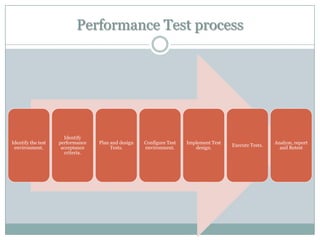
Performance Test process
Identify the test
environment.
Identify
performance
acceptance
criteria.
Plan and design
Tests.
Configure Test
environment.
Implement Test
design.
Execute Tests.
Analyze, report
and Retest
Identify Test environment
 In this step, test environment is decided based on
the technological implementations of the system
under test.
 It involves feasibility analysis on tools that will
support the technology of the system.
 Identify the type of architecture and the
configurations that will be required with respect to
hardware and software to deploy the application.
Identify performance acceptance criteria
 determine performance goals that needs to be
measured for the application
 define the SLA's that are to be monitored the
application.
Design test
 In the design phase, business scenarios for which
performance testing is to be done is arrived.
 workload distribution for the scenarios are
identified.
 Test data is prepared for the scenarios to emulate
real users.
Configure test environment
 this involves deploying the system under in the
concerned environment which should replicate the
production environment.
 setup of tools that will be used in measuring the
performance is done.
Implement Test Design
 This involves scripting the user actions for the
business scenarios in the chosen tool.
 Scripting is done in such a way that the tool emulates
the user behavior as accurate to the real life scenario
as possible.
 Scripts are enhanced to support execution for
emulating multiple users.
Execute tests
 This involves executing the scripts based on the
defined workload distribution model.
 The execution is preceded by a smoke test which
ensures that scripts and the monitoring tools are
working properly under normal load conditions.
Then execution is done for various loads based on
the SLA requirements.
Analyzing Test Result and Reporting
 the most important part of performance testing is
analyzing the test results and reporting the findings.
 The technical team requires the detailed analysis on
what are the performance bottlenecks and what
factors contribute to performance degradation.
 Based on the reports tuning is done to the
application or the system.
Performance Monitoring
 Performance monitoring focuses on observing the
system under test to collect performance statistics
which help in identification of potential bottlenecks.
 Monitoring is done in both client side and Server
side with the help of monitoring tools.
 Example: Performance monitor is a built-in
monitoring tool for Windows, which can gather
server side metrics.
Common performance metrics
Some of the common metrics to be monitored are:
 Client side metrics
1. Response time.
2. Throughput.
 Server side metrics
1. CPU utilization.
2. Memory utilization.
3. Network utilization.
4. Disk utilization.
Response time
 Response time is a measure of how responsive an
application or subsystem is to a client request.
 It represents how long a user must wait for a
request to be processed by an application. Slow
response time equals an unhappy user experience,
and may also result in the loss of revenue.
 It is measured in seconds [or msec in some cases].
Throughput
 Throughput is the number of units of work that can
be handled per unit of time.
 It shows how much data is flowing back and forth
from servers.
 It is measured in KB/sec or MB/sec.
CPU utilization
 CPU utilization can refer to the level of CPU
throughput.
 CPU utilization monitoring shows the workload of a
given physical processor for real machines or of
virtual processors for virtual machines.
Memory Utilization
 Memory utilization refers to the amount of memory
being used up while processing a request.
Network utilization
 Network utilization is the ratio of current network traffic
to the maximum traffic that the port can handle.
 It indicates the bandwidth use in the network. While
high network utilization indicates the network is busy,
low network utilization indicates the network is idle.
 When network utilization exceeds the threshold under
normal condition, it will cause low transmission speed,
intermittence, request delay and so on.
 By monitoring network utilization, we can understand
whether the network is idle, normal or busy which helps
us to set proper benchmark and troubleshoot network
failures.
Disk Utilization
 The percentage of CPU time consumed by disk I/O.
 There are two objects for the disk—Physical Disk and
Logical Disk.
 The Physical Disk object is used for the analysis of the
overall disk, despite the partitions that may be on the
disk.
 When evaluating overall disk performance this would be
the one to select.
 The Logical Disk object analyzes information for a single
and not necessarily representative of the entire load that
the disk is burdened with.
 The Logical Disk object is useful primarily when looking
at the affects or a particular application, like SQL Server
Thank
You

Performance testing basics

  • 1.
    P E RF O R M A N C E T E S T I N G Basics of Created By: Charu Anand
  • 2.
    What is performancetesting Performance testing is a type of testing intended to determine the responsiveness, throughput, reliability, and/or scalability of a system under a given workload.
  • 3.
    Why is performancetesting necessary?  Assess whether system is ready for production.  Identify whether system is scalable to handle more load.  Evaluate against performance criteria.  Compare performance characteristics of multiple systems or system configurations.
  • 4.
    Why is performancetesting necessary?  Identify bottlenecks in the system.  Expose memory management bugs such as, memory leaks, buffer overflows, etc.  Provide report to stake holders regarding the performance of the system.  Support system tuning.  Find throughput levels.
  • 5.
    Types of performancetests  Performance testing- focus is upon achieving response times, throughput, and resource- utilization levels that meet the performance objectives of the system.
  • 6.
    Types of performancetests  Load testing- focus is on validating performance characteristics of the system when subjected to workloads and load volumes anticipated during production operations.
  • 7.
    Types of performancetests  Stress testing- determine under what conditions an application will fail, how it will fail, and what indicators can be monitored to warn of an impending failure.
  • 8.
    Performance Test process Identifythe test environment. Identify performance acceptance criteria. Plan and design Tests. Configure Test environment. Implement Test design. Execute Tests. Analyze, report and Retest
  • 9.
    Identify Test environment In this step, test environment is decided based on the technological implementations of the system under test.  It involves feasibility analysis on tools that will support the technology of the system.  Identify the type of architecture and the configurations that will be required with respect to hardware and software to deploy the application.
  • 10.
    Identify performance acceptancecriteria  determine performance goals that needs to be measured for the application  define the SLA's that are to be monitored the application.
  • 11.
    Design test  Inthe design phase, business scenarios for which performance testing is to be done is arrived.  workload distribution for the scenarios are identified.  Test data is prepared for the scenarios to emulate real users.
  • 12.
    Configure test environment this involves deploying the system under in the concerned environment which should replicate the production environment.  setup of tools that will be used in measuring the performance is done.
  • 13.
    Implement Test Design This involves scripting the user actions for the business scenarios in the chosen tool.  Scripting is done in such a way that the tool emulates the user behavior as accurate to the real life scenario as possible.  Scripts are enhanced to support execution for emulating multiple users.
  • 14.
    Execute tests  Thisinvolves executing the scripts based on the defined workload distribution model.  The execution is preceded by a smoke test which ensures that scripts and the monitoring tools are working properly under normal load conditions. Then execution is done for various loads based on the SLA requirements.
  • 15.
    Analyzing Test Resultand Reporting  the most important part of performance testing is analyzing the test results and reporting the findings.  The technical team requires the detailed analysis on what are the performance bottlenecks and what factors contribute to performance degradation.  Based on the reports tuning is done to the application or the system.
  • 16.
    Performance Monitoring  Performancemonitoring focuses on observing the system under test to collect performance statistics which help in identification of potential bottlenecks.  Monitoring is done in both client side and Server side with the help of monitoring tools.  Example: Performance monitor is a built-in monitoring tool for Windows, which can gather server side metrics.
  • 17.
    Common performance metrics Someof the common metrics to be monitored are:  Client side metrics 1. Response time. 2. Throughput.  Server side metrics 1. CPU utilization. 2. Memory utilization. 3. Network utilization. 4. Disk utilization.
  • 18.
    Response time  Responsetime is a measure of how responsive an application or subsystem is to a client request.  It represents how long a user must wait for a request to be processed by an application. Slow response time equals an unhappy user experience, and may also result in the loss of revenue.  It is measured in seconds [or msec in some cases].
  • 19.
    Throughput  Throughput isthe number of units of work that can be handled per unit of time.  It shows how much data is flowing back and forth from servers.  It is measured in KB/sec or MB/sec.
  • 20.
    CPU utilization  CPUutilization can refer to the level of CPU throughput.  CPU utilization monitoring shows the workload of a given physical processor for real machines or of virtual processors for virtual machines.
  • 21.
    Memory Utilization  Memoryutilization refers to the amount of memory being used up while processing a request.
  • 22.
    Network utilization  Networkutilization is the ratio of current network traffic to the maximum traffic that the port can handle.  It indicates the bandwidth use in the network. While high network utilization indicates the network is busy, low network utilization indicates the network is idle.  When network utilization exceeds the threshold under normal condition, it will cause low transmission speed, intermittence, request delay and so on.  By monitoring network utilization, we can understand whether the network is idle, normal or busy which helps us to set proper benchmark and troubleshoot network failures.
  • 23.
    Disk Utilization  Thepercentage of CPU time consumed by disk I/O.  There are two objects for the disk—Physical Disk and Logical Disk.  The Physical Disk object is used for the analysis of the overall disk, despite the partitions that may be on the disk.  When evaluating overall disk performance this would be the one to select.  The Logical Disk object analyzes information for a single and not necessarily representative of the entire load that the disk is burdened with.  The Logical Disk object is useful primarily when looking at the affects or a particular application, like SQL Server
  • 24.

Editor's Notes

  • #4 Assess whether system is ready for production.Identify whether system is scalable to handle more load.Evaluate against performance criteriaCompare performance characteristics of multiple systems or system configurationsIdentify bottlenecks in the systemProvide report to stake holders regarding the performance of the system.Support system tuningFind throughput levels
  • #8 Stress testing- validating performance characteristics of the system when subjected to conditions beyond those anticipated during production operations such as limited memory, insufficient disk space, or server failure.
  • #9 Identify the test environment.Identify performance acceptance criteria.Plan and design Tests.Configure Test environment.Implement Test design.Execute Tests.Analyze, report and Retest
  • #10 Identify test environment
  • #11 identify performance criteria-.
  • #12 plan and design test-
  • #13 configure test environment
  • #14 Implement test design
  • #15 Execute tests-
  • #16 Analyze test results and report