Introduce to
Outline
What is docker?
Why docker?
Dockerfile
What is docker?
An open platform for developing,
shipping, and running applications
What it want to solve?
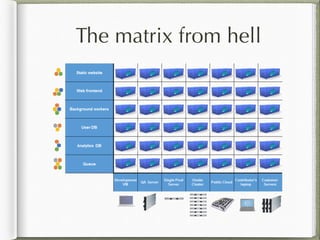
The matrix from hell
“You've got all types of servers, all types of
different languages and frameworks, and all
types of application versions to try and
maintain across those platforms”

- Ben Golub, CEO of Docker
The matrix from hell
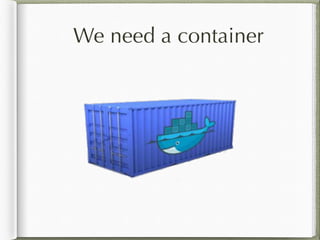
We need a container
The matrix from hell
Installation
From ubuntu mainstream
Docker goes into Ubuntu mainstream
since 14.04
Currently, v0.9
apt-get install docker.io
From Official Repo
The latest version: v1.0
echo deb https://get.docker.io/ubuntu docker main > /
etc/apt/sources.list.d/docker.list
apt-key adv --keyserver hkp://keyserver.ubuntu.com:80
--recv-keys
36A1D7869245C8950F966E92D8576A8BA88D21E9
apt-get update
apt-get install lxc-docker
Why Docker?
Fast and less overhead
Image versioning
Portable
Fast and less overhead
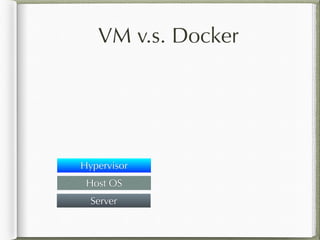
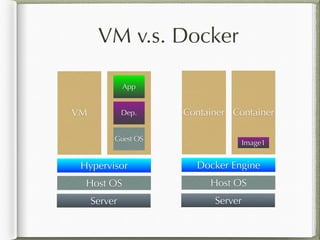
VM v.s. Docker
VM v.s. Docker
Server
Host OS
VM v.s. Docker
Server
Host OS
Hypervisor
VM v.s. Docker
Server
Host OS
VM VM
Hypervisor
VM v.s. Docker
Server
Host OS
VM VM
Guest OS
Hypervisor
VM v.s. Docker
Server
Host OS
VM VM
Guest OS
Hypervisor
Dep.
VM v.s. Docker
Server
Host OS
VM VM
Guest OS
Hypervisor
Dep.
App
VM v.s. Docker
Server
Host OS
VM VM
Guest OS
Hypervisor
Dep.
App
Server
Host OS
VM v.s. Docker
Server
Host OS
VM VM
Guest OS
Hypervisor
Dep.
App
Server
Host OS
Docker Engine
VM v.s. Docker
Server
Host OS
VM VM
Guest OS
Hypervisor
Dep.
App
Server
Host OS
Container Container
Docker Engine
VM v.s. Docker
Server
Host OS
VM VM
Guest OS
Hypervisor
Dep.
App
Server
Host OS
Container Container
Docker Engine
Image1
VM v.s. Docker
Server
Host OS
VM VM
Guest OS
Hypervisor
Dep.
App
Server
Host OS
Container Container
Docker Engine
Image1
Image2
VM v.s. Docker
Server
Host OS
VM VM
Guest OS
Hypervisor
Dep.
App
Server
Host OS
Container Container
Docker Engine
Image1
App1
Image2
VM v.s. Docker
Server
Host OS
VM VM
Guest OS
Hypervisor
Dep.
App
Server
Host OS
Container Container
Docker Engine
Image1
App1
Image2
App2
VM v.s. Docker
Server
Host OS
VM VM
Guest OS
Hypervisor
Dep.
App
Server
Host OS
Container Container
Docker Engine
Image1
App1
Image2
App2
App3
Live Demo
IP: 10.10.100.108
Username: test
Password: 123456
docker pull
Download image from Docker Hub
docker pull [image]
Ex: docker pull debian
docker run (1)
docker run [image] [command]
-i interactive mode
-t pseudo-tty
Ex: docker -i -t run debian /bin/bash
Image versioning
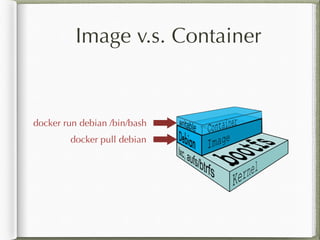
Image v.s. Container
Base on LXC and AUFS
Images are read-only
Read / write on container
Files in container won’t keep 

unless you commit
Image v.s. Container
Base on LXC and AUFS
Images are read-only
Read and write on container
Files in container won’t keep 

unless you commit
Image v.s. Container
docker pull debian
Image v.s. Container
docker pull debian
docker run debian /bin/bash
docker commit
docker commit [Container ID] [image
name]
docker commit 1c1f5 new_image
Image v.s. Container
docker pull debian
docker run debian /bin/bash
Image v.s. Container
docker pull debian
docker commit
docker commit
docker run debian /bin/bash
Image v.s. Container
docker pull debian
docker commit
docker commit
docker run debian /bin/bash
Portable
Runs on all major Linux distributions
Boot2docker for Mac and Windows users
A ~25 MB tiny VM inside
Ship your container
There are three ways to ship your
container:
Docker Hub (docker push)
docker save
docker export
docker save / load
This packing will preserve the history of a
docker
docker save [Image Name] > [Archive
Name]
docker load < [Archive Name]
docker export / import
This way only keep the difference
docker export [Container ID] > [Archive
Name]
cat [Archive Name] | docker import -
[Image Name[:Tag]]
Separation of Data and
App
docker run (2)
-v [host directory]:[container directory]

Bind mount a volume
-p [host port]:[container port]

Publish a container's port to the host
Other useful command
docker ps
docker images
docker kill
docker rm
docker rmi
docker logs
docker inspect
Dockerfile
Syntax
FROM
RUN
ENV
ADD
VOLUME
EXPOSE
CMD
Example
docker build
docker build -t [Image Name[:Tag]]

<path to Dockerfile>
docker build -t my_image:v1 .
Build once, run
anywhere
Examples
My Concern
Easy to setup over a VM
Separate data and application
Reproduce my environment fast
Jenkins
Initialize shared volume before service
start
Use supervisor to manage multiple
services
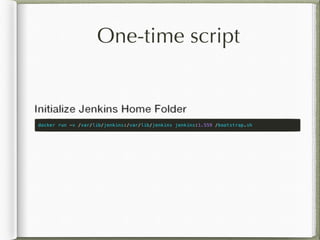
One-time script
Can not use upstart
Use supervisor
Summarize
Do one thing at a time
Treat a docker container as an app
Ecosystem
CoreOS - Work with SystemD
Openstack - An instance type
Docker Hub (Docker Index)
Many providers

- Digital Ocean, EC2, Linode, Google
Cloud Platform
Gotcha
Don’t have its /sbin/init (Issue 1024)
Share kernel, can not run different Linux
Kernel at a time
Use --privileged if needed
Not mentioned
Link to another container
Use share volume on another container
Q & A

Introduction to docker