Performance Analysis  of Idle Programs Erik Altman  Matthew Arnold   Stephen Fink  Nick Mitchell  Peter Sweeney IBM T.J. Watson Research Center “ WAIT Performance Tool”
Overview Application-driven scalability study Performance analysis of large enterprise app Code changes resulting in 1.4X - 5X improvement WAIT performance tool So easy your mother/father could use it Demo Implementation details Lessons learned Performance tooling The multicore controversy Are we working on the right things? professor
Application-Driven Scalability Study  App-driven scalability study (2008/2009) Goal:  Identify scaling problems and solutions for future multicore architectures Approach:  application-driven (data-driven) exploration  Choose a  real  application Let workload drive the research Identify scalability problems Restructure application to improve scalability Assumption: application is already parallel Not attempting automatically parallelize serial code Open to adding fine-grained parallelism within transaction Infrastructure Two  POWER5 p596  machines ( 64-core , 128 hw threads) Team members Erik Altman, Matthew Arnold, Rajesh Bordewekar, Robert Delmonico, Nick Mitchell, Peter Sweeney
Application “ Zanzibar”: content management system Multitier: J2EE (Java) application server, DB2, LDAP, client(s) Document ingestions and retrieval  Used by hospitals, banks, etc Data + metadata Mature code In production several years, multiple major releases Previous performance study in 2007  Plan of attack First ensure it scales on smaller hardware (4-core / 8 core) Then upgrade to large 64-core machine Find and fix bottlenecks until it scales
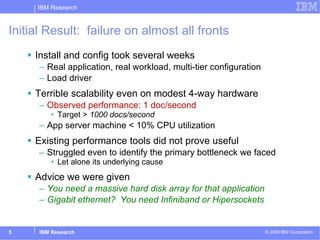
Initial Result:  failure on almost all fronts Install and config took several weeks Real application, real workload, multi-tier configuration Load driver Terrible scalability even on modest 4-way hardware Observed performance: 1 doc/second   Target >  1000 docs/second   App server machine < 10% CPU utilization Existing performance tools did not prove useful Struggled even to identify the primary bottleneck we faced Let alone its underlying cause Advice we were given You need a massive hard disk array for that application Gigabit ethernet?  You need Infiniband or Hipersockets
Stop!  We’ve already learned several lessons Lesson 1:  This “application-driven” research idea stinks “ We aren’t the right people to be doing this.  Someone else should get this deployed so we can focus on what we’re good at: Java performance analysis.” Lesson 2:  Ignore lesson 1 Despite being frustrated, we learned a lot Whole point was to open our mind to new problems We  are  an important demographic Mostly-competent non-experts “ Why is the app I just installed an order of magnititude too slow?”  Very  common question Disclaimer:  if you go down this road You  will  end up working on things you didn’t intend (or want?) to
OK so let’s find some bottlenecks  Matt and Nick, see what you can find! Matt :   I installed and ran Java Lock Analyzer. I don’t see any hot locks Nick:   Yeah, I did kill -3 to generate javacores and the thread stacks show   we’re waiting on the database Matt: I installed and ran tprof. Method toLowerCase() is the hottest method Nick: Yeah, that was clear from the thread dumps too   Observation 1 Seasoned performance experts often don’t use any fancy tools Start with simple utilities:  top, ps, kill -3, oprofile, netperf Top performance experts don’t use tools developed in research? Observation 2   The tools we found were a mismatch for “performance triage” Targeted focus: Hot locks, GC analyzer, DB query analyzer, etc How do I know which tool to use first? Once you fix one bottleneck, you start all over High installation and usage effort
Constraints of a real-world production deployment Instrument the application? NO! Recompile the application? NON! Deploy a fancy monitoring agent? NICHT! Analysis the source? ノー ! Install more modern JVM?  yIntagh !
Let’s see what Javacores can do Zanzibar analysis done almost entirely using Javacores Methodology used Trigger a few javacores from server under load Manually inspect  Look for frequently occurring thread stacks Whether running, or blocked Fix problem Repeat
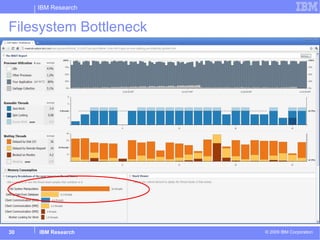
No single class of bottleneck dominated Bottlenecks found Exceeded disk throughput on the database machine Exceeded disk throughput on the application server machine Application overuse of filesystem metadata operations Lock contention in application code Saturating network GC bottlenecks due to JVM implementation GC bottlenecks due to application issues Difficulties driving enough load due to bottlenecks in load generator
1) Lock Contention Found 11 hot locks Replaced with Thread-local storage Fine-grained data replication Good for lazily initialized, read-only data Concurrent collections Significantly more scalable Alternative: App server cloning Coarse grained data replication
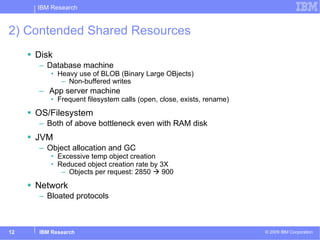
2) Contended Shared Resources Disk Database machine Heavy use of BLOB (Binary Large OBjects) Non-buffered writes App server machine Frequent filesystem calls (open, close, exists, rename) OS/Filesystem Both of above bottleneck even with RAM disk JVM  Object allocation and GC Excessive temp object creation Reduced object creation rate by 3X  Objects per request: 2850    900 Network Bloated protocols
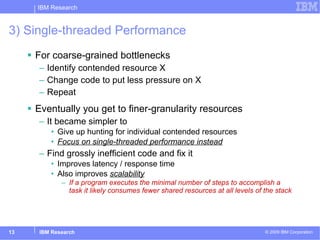
3) Single-threaded Performance For coarse-grained bottlenecks Identify contended resource X Change code to put less pressure on X Repeat Eventually you get to finer-granularity resources It became simpler to  Give up hunting for individual contended resources Focus on single-threaded performance instead Find grossly inefficient code and fix it  Improves latency / response time Also improves  scalability If a program executes the minimal number of steps to accomplish a task it likely consumes fewer shared resources at all levels of the stack
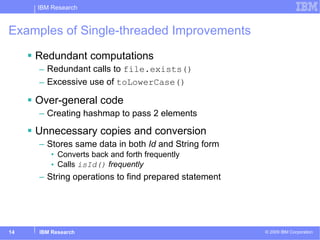
Examples of Single-threaded Improvements Redundant computations Redundant calls to  file.exists() Excessive use of  toLowerCase() Over-general code Creating hashmap to pass 2 elements Unnecessary copies and conversion Stores same data in both  Id  and String form Converts back and forth frequently Calls  isId()  frequently String operations to find prepared statement
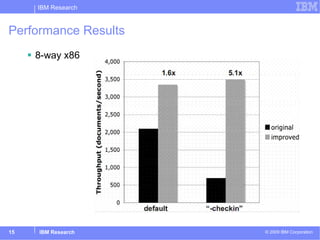
Performance Results 8-way x86
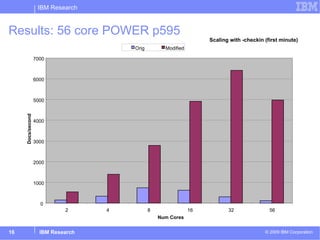
Results: 56 core POWER p595  Scaling with -checkin (first minute) 0 1000 2000 3000 4000 5000 6000 7000 2 4 8 16 32 56 Num Cores Docs/second Orig Modified
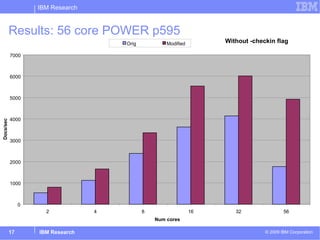
Results: 56 core POWER p595  Without -checkin flag 0 1000 2000 3000 4000 5000 6000 7000 2 4 8 16 32 56 Num cores Docs/sec Orig Modified
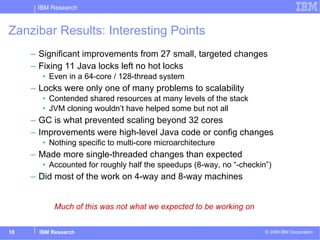
Zanzibar Results: Interesting Points Significant improvements from 27 small, targeted changes Fixing 11 Java locks left no hot locks Even in a 64-core / 128-thread system Locks were only one of many problems to scalability Contended shared resources at many levels of the stack JVM cloning wouldn’t have helped some but not all GC is what prevented scaling beyond 32 cores  Improvements were high-level Java code or config changes Nothing specific to multi-core microarchitecture  Made more single-threaded changes than expected Accounted for roughly half the speedups (8-way, no “-checkin”) Did most of the work on 4-way and 8-way machines Much of this was not what we expected to be working on
Overview Zanzibar scalability study Performance analysis of large enterprise app Code changes resulting in 1.4X - 5X improvement WAIT performance tool Demo Implementation details Lessons learned Performance tooling The multicore controversy Are we working on the right things?
WAIT Performance Tool OOPSLA 2010 “Performance analysis of idle programs. Quickly identify performance and scalability inhibitors”  - Altman, Arnold, Fink, Mitchell Quickly identify primary bottleneck Usable in large-scale, deployed production setting Intrusive monitoring not an option Learn from past experiences Rule based “Taught” about common causes of bottlenecks.
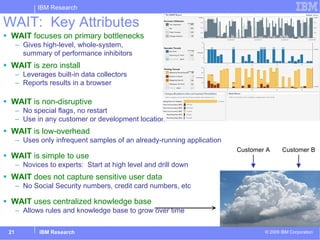
WAIT:  Key Attributes WAIT  focuses on primary bottlenecks Gives high-level, whole-system,  summary of performance inhibitors WAIT  is zero install Leverages built-in data collectors Reports results in a browser    WAIT  is non-disruptive No special flags, no restart Use in any customer or development location  WAIT  is low-overhead Uses only infrequent samples of an already-running application WAIT  is simple to use Novices to experts:  Start at high level and drill down WAIT  does not capture sensitive user data No Social Security numbers, credit card numbers, etc WAIT  uses centralized knowledge base Allows rules and knowledge base to grow over time Customer A Customer B WAIT Cloud Server
What information does WAIT use? Standard O/S tools CPU utliization: (vmstat) Process utilization: (ps) Memory stats:  …
What information does WAIT use? Standard O/S tools CPU utliization: (vmstat) Process utilization: (ps) Memory stats:  … JVM dump files  Most JVMs respond to SIGQUIT (kill -3) Dump state of JVM to stderr or file IBM JVMs produce “javacore” Works with all IBM JVMs, Sun/Oracle JVMs
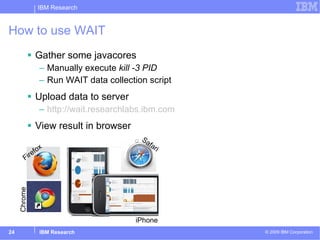
How to use WAIT Gather some javacores Manually execute  kill -3 PID Run WAIT data collection script Upload data to server http:// wait.researchlabs.ibm.com View result in browser Firefox Safari Chrome iPhone
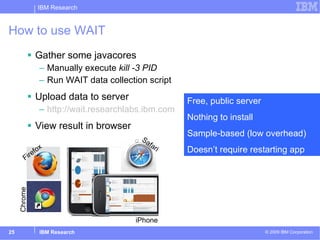
How to use WAIT Gather some javacores Manually execute  kill -3 PID Run WAIT data collection script Upload data to server http:// wait.researchlabs.ibm.com View result in browser Firefox Safari Chrome iPhone Free, public server Nothing to install Sample-based (low overhead) Doesn’t require restarting app
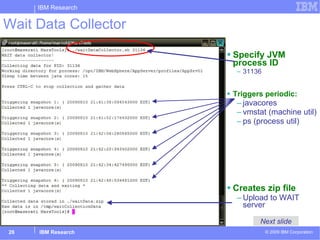
Wait Data Collector Specify JVM process ID 31136 Triggers periodic: javacores vmstat (machine util) ps (process util) Creates zip file  Upload to WAIT server Next slide
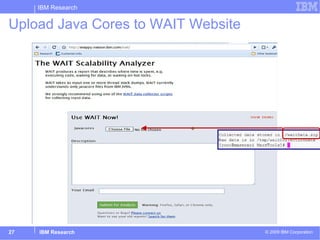
Upload Java Cores to WAIT Website
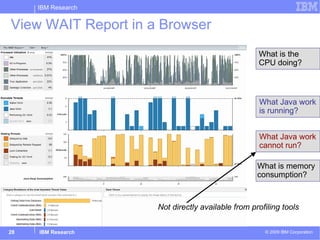
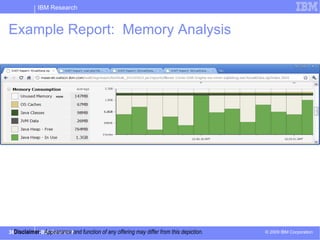
What is the   CPU doing? What Java work is running? What Java work cannot run? View WAIT Report in a Browser What is memory  consumption? Not directly available from profiling tools
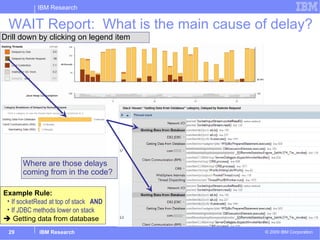
WAIT Report:  What is the main cause of delay? Drill down by clicking on legend item Where are those delays coming from in the code? Example Rule:  If socketRead at top of stack  AND If JDBC methods lower on stack    Getting data from database
Filesystem Bottleneck
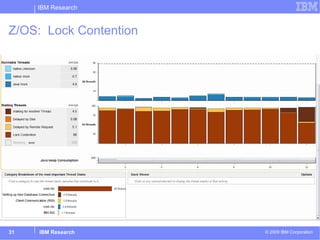
Z/OS:  Lock Contention
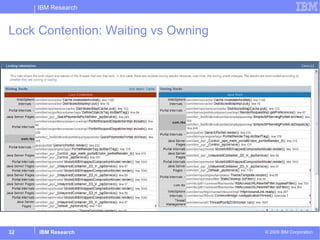
Lock Contention: Waiting vs Owning
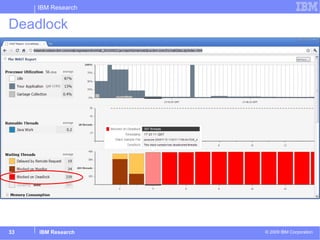
Deadlock
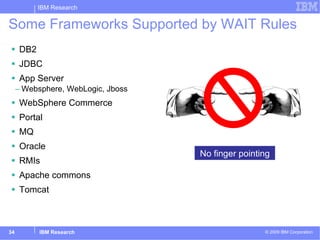
DB2 JDBC App Server Websphere, WebLogic, Jboss WebSphere Commerce Portal MQ Oracle  RMIs Apache commons Tomcat Some Frameworks Supported by WAIT Rules No finger pointing
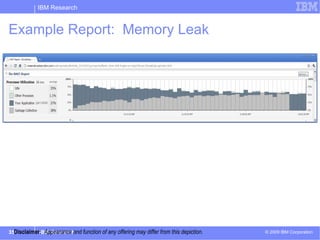
Example Report:  Memory Leak Disclaimer:   Appearance and function of any offering may differ from this depiction.
Example Report:  Memory Analysis Disclaimer:   Appearance and function of any offering may differ from this depiction.
WAIT Implementation Details
Looks Simple! In some ways it is.  In others, it’s not.  Some information presented is nontrivial to compute
Looks Simple! In some ways it is.  In others, it’s not.  Some information presented is nontrivial to compute Example:  is thread running or sleeping? Difficult to determine give input data Thread states reported by JVM are useless JVM stops all threads before writing out thread stacks
Looks Simple! In some ways it is.  In others, it’s not.  Some information presented is nontrivial to compute Example:  is thread running or sleeping? Difficult to determine give input data Thread states reported by JVM are useless JVM stops all threads before writing out thread stacks What is the “correct” thread state? Java language level JVM level O/S level
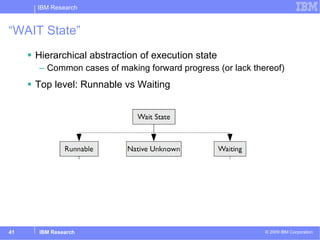
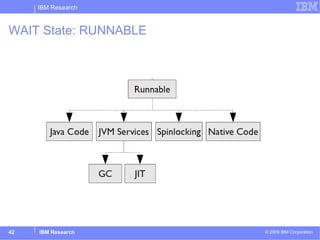
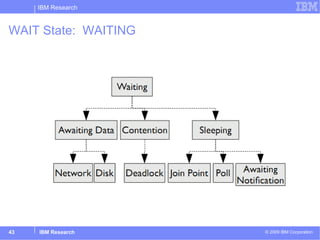
“WAIT State” Hierarchical abstraction of execution state Common cases of making forward progress (or lack thereof) Top level: Runnable vs Waiting
WAIT State: RUNNABLE
WAIT State:  WAITING
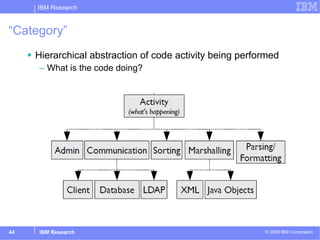
“Category” Hierarchical abstraction of code activity being performed What is the code doing?
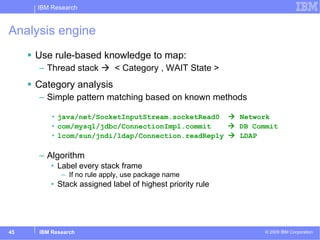
Analysis engine Use rule-based knowledge to map: Thread stack     < Category , WAIT State > Category analysis Simple pattern matching based on known methods java/net/SocketInputStream.socketRead0    Network  com/mysql/jdbc/ConnectionImpl.commit      DB Commit lcom/sun/jndi/ldap/Connection.readReply    LDAP Algorithm Label every stack frame If no rule apply, use package name Stack assigned label of highest priority rule
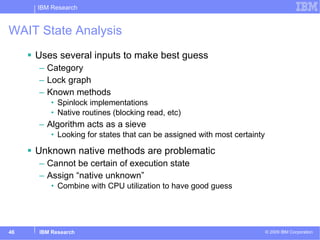
WAIT State Analysis Uses several inputs to make best guess Category Lock graph Known methods Spinlock implementations Native routines (blocking read, etc) Algorithm acts as a sieve Looking for states that can be assigned with most certainty Unknown native methods are problematic Cannot be certain of execution state  Assign “native unknown” Combine with CPU utilization to have good guess
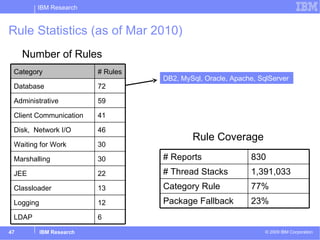
Rule Statistics (as of Mar 2010) Number of Rules DB2, MySql, Oracle, Apache, SqlServer Rule Coverage 6 LDAP 12 Logging 13 Classloader 22 JEE 30 Marshalling 30 Waiting for Work 46 Disk,  Network I/O 41 Client Communication 59 Administrative 72 Database # Rules Category 23% Package Fallback 77% Category Rule 1,391,033 # Thread Stacks 830 # Reports
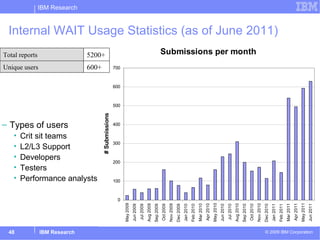
Internal WAIT Usage Statistics (as of June 2011) Types of users Crit sit teams L2/L3 Support Developers Testers Performance analysts 600+ Unique users  5200+ Total reports
Who is using WAIT?
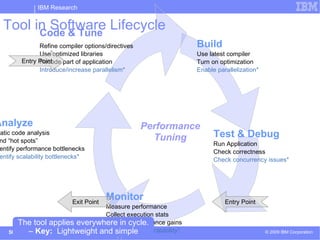
Tool in Software Lifecycle Entry Point Entry Point Exit Point Performance Tuning The tool applies everywhere in cycle. –  Key:   Lightweight and simple Build Use latest compiler Turn on optimization Enable parallelization* Analyze Static code analysis Find “hot spots”  Identify performance bottlenecks Identify scalability bottlenecks* Code & Tune Refine compiler options/directives Use optimized libraries Recode part of application Introduce/increase parallelism* Test & Debug Run Application Check correctness  Check concurrency issues* Monitor Measure performance Collect execution stats Validate performance gains Gather stats on scalability*
Testimonial: Health Care System Crit-Sit April-May 2010:   Tool team worked intensively on custom workload Batch, Java, Database Major health care provider Approximately 10x gain during that period  Metric:   Transactions per hour Others continued to use tool intensively through August – when performance goal achieved. 400+ WAIT reports over 4 months as part of standard performance testing script Result:  60x overall improvement 30 small, localized changes “ Tell your boss you have a tool I would buy.”   &quot;The [other] guys are still trying to figure out how to get the tracing installed on all the tiers.&quot;  Crit-Sit  = Critical Situation / Problem
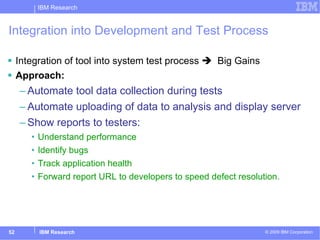
Integration into Development and Test Process Integration of tool into system test process     Big Gains Approach: Automate tool data collection during tests Automate uploading of data to analysis and display server Show reports to testers: Understand performance Identify bugs Track application health Forward report URL to developers to speed defect resolution.
Overview Zanzibar scalability study Performance analysis of large enterprise app Code changes resulting in 1.4X - 5X improvement WAIT performance tool Demo Implementation details Lessons learned Performance tooling The multicore controversy Are we working on the right things?
Is the WAIT tool “Research”? In some aspects, NO Lots of engineering Focus on portability and robustness Significant UI work In many ways, YES Philosophy: do  more  with  less Opposite of predominant mindset in research community Gather more data    more precise result Would be nice to see more of the  less-is-more  approach May be harder to publish Concrete research statements still possible “ We achieved 90% of the accuracy of technique X without  having to Y”
+1 for managed languages User-triggered snapshots (Javacores) beneficial Significant advantage of managed languages? Keep in mind when designing future languages and runtimes We should write down  What we found useful What we wish we have but don’t,  Ex OS thread states for all threads Window of CPU utilization in javacores Other applications? Web browsers OS-level virtual machines (VMWare) Hypervisors
Ease of use matters for adoption “Zero-install” / view in browser very popular among users Reality is that people are lazy/busy Any barrier to entry significantly reduces likelihood of use Cloud-based tooling Incremental growth of knowledge base Update rules and fix bugs as new submissions come in Critical to early adoption of WAIT Enables collaboration Users pass around URLs Cross-report analysis Huge repository of data to mine Downside Requires network connection Some users do have confidentiality concerns
Cloud and Testing Cloud model changes software development process You observe all executions of the program as they occur Huge advantages Rapid bug detection and turnaround for fixes Fix bug immediately and make changes live This agile model was key to success of WAIT But this creates new problems Common scenario Observe bug on user submission Fix bug and release ASAP to avoid reoccurrence of bug Discover that in our haste we broke several other things
The Good News:  Lots of regression data We have all the input data ever seen Input data for 5000+ executions  All used for regression testing Problem: time Took several hours to run full regression on single machine We expect data to grow by 10x (100x?) in a few years Solution: parallelize Implemented with hadoop using ~100 small-medium machines  Full regression in 15-20 mins Todo: automatic test prioritization
Summary Data-driven study of large application Painful but worth it.  Learned a lot.  Didn’t rely on much existing tooling Mismatch for performance triage No single problem or magic fix  Hot locks far from the only problem Contended resources at many levels of the software stack Very little was multi-core specific  WAIT Tool: Quickly identify primary performance inhibitors  Real demand for this seemingly simple concept Scalability analysis: focus on what is  not  running  Ease of use matters to adoption Do your best with easily available information Why don’t we see more of this? Strategy that has proven quite powerful Expert system presents high-level guess at what the problem is Allow drilling down to raw data as proof WAIT available now  https:// wait.researchlabs.ibm.com /   Tool, Documentation:  Demo, Examples, Manual
The End

Performance Analysis of Idle Programs

  • 1.
    Performance Analysis of Idle Programs Erik Altman Matthew Arnold Stephen Fink Nick Mitchell Peter Sweeney IBM T.J. Watson Research Center “ WAIT Performance Tool”
  • 2.
    Overview Application-driven scalabilitystudy Performance analysis of large enterprise app Code changes resulting in 1.4X - 5X improvement WAIT performance tool So easy your mother/father could use it Demo Implementation details Lessons learned Performance tooling The multicore controversy Are we working on the right things? professor
  • 3.
    Application-Driven Scalability Study App-driven scalability study (2008/2009) Goal: Identify scaling problems and solutions for future multicore architectures Approach: application-driven (data-driven) exploration Choose a real application Let workload drive the research Identify scalability problems Restructure application to improve scalability Assumption: application is already parallel Not attempting automatically parallelize serial code Open to adding fine-grained parallelism within transaction Infrastructure Two POWER5 p596 machines ( 64-core , 128 hw threads) Team members Erik Altman, Matthew Arnold, Rajesh Bordewekar, Robert Delmonico, Nick Mitchell, Peter Sweeney
  • 4.
    Application “ Zanzibar”:content management system Multitier: J2EE (Java) application server, DB2, LDAP, client(s) Document ingestions and retrieval Used by hospitals, banks, etc Data + metadata Mature code In production several years, multiple major releases Previous performance study in 2007 Plan of attack First ensure it scales on smaller hardware (4-core / 8 core) Then upgrade to large 64-core machine Find and fix bottlenecks until it scales
  • 5.
    Initial Result: failure on almost all fronts Install and config took several weeks Real application, real workload, multi-tier configuration Load driver Terrible scalability even on modest 4-way hardware Observed performance: 1 doc/second Target > 1000 docs/second App server machine < 10% CPU utilization Existing performance tools did not prove useful Struggled even to identify the primary bottleneck we faced Let alone its underlying cause Advice we were given You need a massive hard disk array for that application Gigabit ethernet? You need Infiniband or Hipersockets
  • 6.
    Stop! We’vealready learned several lessons Lesson 1: This “application-driven” research idea stinks “ We aren’t the right people to be doing this. Someone else should get this deployed so we can focus on what we’re good at: Java performance analysis.” Lesson 2: Ignore lesson 1 Despite being frustrated, we learned a lot Whole point was to open our mind to new problems We are an important demographic Mostly-competent non-experts “ Why is the app I just installed an order of magnititude too slow?” Very common question Disclaimer: if you go down this road You will end up working on things you didn’t intend (or want?) to
  • 7.
    OK so let’sfind some bottlenecks Matt and Nick, see what you can find! Matt : I installed and ran Java Lock Analyzer. I don’t see any hot locks Nick: Yeah, I did kill -3 to generate javacores and the thread stacks show we’re waiting on the database Matt: I installed and ran tprof. Method toLowerCase() is the hottest method Nick: Yeah, that was clear from the thread dumps too Observation 1 Seasoned performance experts often don’t use any fancy tools Start with simple utilities: top, ps, kill -3, oprofile, netperf Top performance experts don’t use tools developed in research? Observation 2 The tools we found were a mismatch for “performance triage” Targeted focus: Hot locks, GC analyzer, DB query analyzer, etc How do I know which tool to use first? Once you fix one bottleneck, you start all over High installation and usage effort
  • 8.
    Constraints of areal-world production deployment Instrument the application? NO! Recompile the application? NON! Deploy a fancy monitoring agent? NICHT! Analysis the source? ノー ! Install more modern JVM? yIntagh !
  • 9.
    Let’s see whatJavacores can do Zanzibar analysis done almost entirely using Javacores Methodology used Trigger a few javacores from server under load Manually inspect Look for frequently occurring thread stacks Whether running, or blocked Fix problem Repeat
  • 10.
    No single classof bottleneck dominated Bottlenecks found Exceeded disk throughput on the database machine Exceeded disk throughput on the application server machine Application overuse of filesystem metadata operations Lock contention in application code Saturating network GC bottlenecks due to JVM implementation GC bottlenecks due to application issues Difficulties driving enough load due to bottlenecks in load generator
  • 11.
    1) Lock ContentionFound 11 hot locks Replaced with Thread-local storage Fine-grained data replication Good for lazily initialized, read-only data Concurrent collections Significantly more scalable Alternative: App server cloning Coarse grained data replication
  • 12.
    2) Contended SharedResources Disk Database machine Heavy use of BLOB (Binary Large OBjects) Non-buffered writes App server machine Frequent filesystem calls (open, close, exists, rename) OS/Filesystem Both of above bottleneck even with RAM disk JVM Object allocation and GC Excessive temp object creation Reduced object creation rate by 3X Objects per request: 2850  900 Network Bloated protocols
  • 13.
    3) Single-threaded PerformanceFor coarse-grained bottlenecks Identify contended resource X Change code to put less pressure on X Repeat Eventually you get to finer-granularity resources It became simpler to Give up hunting for individual contended resources Focus on single-threaded performance instead Find grossly inefficient code and fix it Improves latency / response time Also improves scalability If a program executes the minimal number of steps to accomplish a task it likely consumes fewer shared resources at all levels of the stack
  • 14.
    Examples of Single-threadedImprovements Redundant computations Redundant calls to file.exists() Excessive use of toLowerCase() Over-general code Creating hashmap to pass 2 elements Unnecessary copies and conversion Stores same data in both Id and String form Converts back and forth frequently Calls isId() frequently String operations to find prepared statement
  • 15.
  • 16.
    Results: 56 corePOWER p595 Scaling with -checkin (first minute) 0 1000 2000 3000 4000 5000 6000 7000 2 4 8 16 32 56 Num Cores Docs/second Orig Modified
  • 17.
    Results: 56 corePOWER p595 Without -checkin flag 0 1000 2000 3000 4000 5000 6000 7000 2 4 8 16 32 56 Num cores Docs/sec Orig Modified
  • 18.
    Zanzibar Results: InterestingPoints Significant improvements from 27 small, targeted changes Fixing 11 Java locks left no hot locks Even in a 64-core / 128-thread system Locks were only one of many problems to scalability Contended shared resources at many levels of the stack JVM cloning wouldn’t have helped some but not all GC is what prevented scaling beyond 32 cores Improvements were high-level Java code or config changes Nothing specific to multi-core microarchitecture Made more single-threaded changes than expected Accounted for roughly half the speedups (8-way, no “-checkin”) Did most of the work on 4-way and 8-way machines Much of this was not what we expected to be working on
  • 19.
    Overview Zanzibar scalabilitystudy Performance analysis of large enterprise app Code changes resulting in 1.4X - 5X improvement WAIT performance tool Demo Implementation details Lessons learned Performance tooling The multicore controversy Are we working on the right things?
  • 20.
    WAIT Performance ToolOOPSLA 2010 “Performance analysis of idle programs. Quickly identify performance and scalability inhibitors” - Altman, Arnold, Fink, Mitchell Quickly identify primary bottleneck Usable in large-scale, deployed production setting Intrusive monitoring not an option Learn from past experiences Rule based “Taught” about common causes of bottlenecks.
  • 21.
    WAIT: KeyAttributes WAIT focuses on primary bottlenecks Gives high-level, whole-system, summary of performance inhibitors WAIT is zero install Leverages built-in data collectors Reports results in a browser WAIT is non-disruptive No special flags, no restart Use in any customer or development location WAIT is low-overhead Uses only infrequent samples of an already-running application WAIT is simple to use Novices to experts: Start at high level and drill down WAIT does not capture sensitive user data No Social Security numbers, credit card numbers, etc WAIT uses centralized knowledge base Allows rules and knowledge base to grow over time Customer A Customer B WAIT Cloud Server
  • 22.
    What information doesWAIT use? Standard O/S tools CPU utliization: (vmstat) Process utilization: (ps) Memory stats: …
  • 23.
    What information doesWAIT use? Standard O/S tools CPU utliization: (vmstat) Process utilization: (ps) Memory stats: … JVM dump files Most JVMs respond to SIGQUIT (kill -3) Dump state of JVM to stderr or file IBM JVMs produce “javacore” Works with all IBM JVMs, Sun/Oracle JVMs
  • 24.
    How to useWAIT Gather some javacores Manually execute kill -3 PID Run WAIT data collection script Upload data to server http:// wait.researchlabs.ibm.com View result in browser Firefox Safari Chrome iPhone
  • 25.
    How to useWAIT Gather some javacores Manually execute kill -3 PID Run WAIT data collection script Upload data to server http:// wait.researchlabs.ibm.com View result in browser Firefox Safari Chrome iPhone Free, public server Nothing to install Sample-based (low overhead) Doesn’t require restarting app
  • 26.
    Wait Data CollectorSpecify JVM process ID 31136 Triggers periodic: javacores vmstat (machine util) ps (process util) Creates zip file Upload to WAIT server Next slide
  • 27.
    Upload Java Coresto WAIT Website
  • 28.
    What is the CPU doing? What Java work is running? What Java work cannot run? View WAIT Report in a Browser What is memory consumption? Not directly available from profiling tools
  • 29.
    WAIT Report: What is the main cause of delay? Drill down by clicking on legend item Where are those delays coming from in the code? Example Rule: If socketRead at top of stack AND If JDBC methods lower on stack  Getting data from database
  • 30.
  • 31.
    Z/OS: LockContention
  • 32.
  • 33.
  • 34.
    DB2 JDBC AppServer Websphere, WebLogic, Jboss WebSphere Commerce Portal MQ Oracle RMIs Apache commons Tomcat Some Frameworks Supported by WAIT Rules No finger pointing
  • 35.
    Example Report: Memory Leak Disclaimer: Appearance and function of any offering may differ from this depiction.
  • 36.
    Example Report: Memory Analysis Disclaimer: Appearance and function of any offering may differ from this depiction.
  • 37.
  • 38.
    Looks Simple! Insome ways it is. In others, it’s not. Some information presented is nontrivial to compute
  • 39.
    Looks Simple! Insome ways it is. In others, it’s not. Some information presented is nontrivial to compute Example: is thread running or sleeping? Difficult to determine give input data Thread states reported by JVM are useless JVM stops all threads before writing out thread stacks
  • 40.
    Looks Simple! Insome ways it is. In others, it’s not. Some information presented is nontrivial to compute Example: is thread running or sleeping? Difficult to determine give input data Thread states reported by JVM are useless JVM stops all threads before writing out thread stacks What is the “correct” thread state? Java language level JVM level O/S level
  • 41.
    “WAIT State” Hierarchicalabstraction of execution state Common cases of making forward progress (or lack thereof) Top level: Runnable vs Waiting
  • 42.
  • 43.
    WAIT State: WAITING
  • 44.
    “Category” Hierarchical abstractionof code activity being performed What is the code doing?
  • 45.
    Analysis engine Userule-based knowledge to map: Thread stack  < Category , WAIT State > Category analysis Simple pattern matching based on known methods java/net/SocketInputStream.socketRead0  Network com/mysql/jdbc/ConnectionImpl.commit  DB Commit lcom/sun/jndi/ldap/Connection.readReply  LDAP Algorithm Label every stack frame If no rule apply, use package name Stack assigned label of highest priority rule
  • 46.
    WAIT State AnalysisUses several inputs to make best guess Category Lock graph Known methods Spinlock implementations Native routines (blocking read, etc) Algorithm acts as a sieve Looking for states that can be assigned with most certainty Unknown native methods are problematic Cannot be certain of execution state Assign “native unknown” Combine with CPU utilization to have good guess
  • 47.
    Rule Statistics (asof Mar 2010) Number of Rules DB2, MySql, Oracle, Apache, SqlServer Rule Coverage 6 LDAP 12 Logging 13 Classloader 22 JEE 30 Marshalling 30 Waiting for Work 46 Disk, Network I/O 41 Client Communication 59 Administrative 72 Database # Rules Category 23% Package Fallback 77% Category Rule 1,391,033 # Thread Stacks 830 # Reports
  • 48.
    Internal WAIT UsageStatistics (as of June 2011) Types of users Crit sit teams L2/L3 Support Developers Testers Performance analysts 600+ Unique users 5200+ Total reports
  • 49.
  • 50.
    Tool in SoftwareLifecycle Entry Point Entry Point Exit Point Performance Tuning The tool applies everywhere in cycle. – Key: Lightweight and simple Build Use latest compiler Turn on optimization Enable parallelization* Analyze Static code analysis Find “hot spots” Identify performance bottlenecks Identify scalability bottlenecks* Code & Tune Refine compiler options/directives Use optimized libraries Recode part of application Introduce/increase parallelism* Test & Debug Run Application Check correctness Check concurrency issues* Monitor Measure performance Collect execution stats Validate performance gains Gather stats on scalability*
  • 51.
    Testimonial: Health CareSystem Crit-Sit April-May 2010: Tool team worked intensively on custom workload Batch, Java, Database Major health care provider Approximately 10x gain during that period Metric: Transactions per hour Others continued to use tool intensively through August – when performance goal achieved. 400+ WAIT reports over 4 months as part of standard performance testing script Result: 60x overall improvement 30 small, localized changes “ Tell your boss you have a tool I would buy.” &quot;The [other] guys are still trying to figure out how to get the tracing installed on all the tiers.&quot; Crit-Sit = Critical Situation / Problem
  • 52.
    Integration into Developmentand Test Process Integration of tool into system test process  Big Gains Approach: Automate tool data collection during tests Automate uploading of data to analysis and display server Show reports to testers: Understand performance Identify bugs Track application health Forward report URL to developers to speed defect resolution.
  • 53.
    Overview Zanzibar scalabilitystudy Performance analysis of large enterprise app Code changes resulting in 1.4X - 5X improvement WAIT performance tool Demo Implementation details Lessons learned Performance tooling The multicore controversy Are we working on the right things?
  • 54.
    Is the WAITtool “Research”? In some aspects, NO Lots of engineering Focus on portability and robustness Significant UI work In many ways, YES Philosophy: do more with less Opposite of predominant mindset in research community Gather more data  more precise result Would be nice to see more of the less-is-more approach May be harder to publish Concrete research statements still possible “ We achieved 90% of the accuracy of technique X without having to Y”
  • 55.
    +1 for managedlanguages User-triggered snapshots (Javacores) beneficial Significant advantage of managed languages? Keep in mind when designing future languages and runtimes We should write down What we found useful What we wish we have but don’t, Ex OS thread states for all threads Window of CPU utilization in javacores Other applications? Web browsers OS-level virtual machines (VMWare) Hypervisors
  • 56.
    Ease of usematters for adoption “Zero-install” / view in browser very popular among users Reality is that people are lazy/busy Any barrier to entry significantly reduces likelihood of use Cloud-based tooling Incremental growth of knowledge base Update rules and fix bugs as new submissions come in Critical to early adoption of WAIT Enables collaboration Users pass around URLs Cross-report analysis Huge repository of data to mine Downside Requires network connection Some users do have confidentiality concerns
  • 57.
    Cloud and TestingCloud model changes software development process You observe all executions of the program as they occur Huge advantages Rapid bug detection and turnaround for fixes Fix bug immediately and make changes live This agile model was key to success of WAIT But this creates new problems Common scenario Observe bug on user submission Fix bug and release ASAP to avoid reoccurrence of bug Discover that in our haste we broke several other things
  • 58.
    The Good News: Lots of regression data We have all the input data ever seen Input data for 5000+ executions All used for regression testing Problem: time Took several hours to run full regression on single machine We expect data to grow by 10x (100x?) in a few years Solution: parallelize Implemented with hadoop using ~100 small-medium machines Full regression in 15-20 mins Todo: automatic test prioritization
  • 59.
    Summary Data-driven studyof large application Painful but worth it. Learned a lot. Didn’t rely on much existing tooling Mismatch for performance triage No single problem or magic fix Hot locks far from the only problem Contended resources at many levels of the software stack Very little was multi-core specific WAIT Tool: Quickly identify primary performance inhibitors Real demand for this seemingly simple concept Scalability analysis: focus on what is not running Ease of use matters to adoption Do your best with easily available information Why don’t we see more of this? Strategy that has proven quite powerful Expert system presents high-level guess at what the problem is Allow drilling down to raw data as proof WAIT available now https:// wait.researchlabs.ibm.com / Tool, Documentation: Demo, Examples, Manual
  • 60.

Editor's Notes

  • #2 http://www.faqs.org/photo-dict/phrase/3311/running-hourglass.html