@manarth
Marcus Deglos
Performance all teh
things!
BREAKING NEWS
Drupal is Slow!
JUST HOW SLOW ARE WE
TALKING, EXACTLY?
BENCHMARKING
A single request and response
<!DOCTYPE html PUBLIC "-//W3C//DTD XHTML+RDFa 1.0//EN"

"http://www.w3.org/MarkUp/DTD/xhtml-rdfa-1.dtd">
<html
xmlns="http://www.w3.org/1999/xhtml" xml:lang="en" version="XHTML+RDFa 1.0"
dir="ltr"
 xmlns:content="http://purl.org/rss/1.0/modules/content/"

xmlns:dc="http://purl.org/dc/terms/"
 xmlns:foaf="http://xmlns.com/foaf/0.1/"

xmlns:og="http://ogp.me/ns#"
 xmlns:rdfs="http://www.w3.org/2000/01/rdf-schema#"

xmlns:sioc="http://rdfs.org/sioc/ns#"
 xmlns:sioct="http://rdfs.org/sioc/types#"

xmlns:skos="http://www.w3.org/2004/02/skos/core#"

xmlns:xsd="http://www.w3.org/2001/XMLSchema#">

<head
profile="http://www.w3.org/1999/xhtml/vocab">
 <meta http-equiv="Content-Type"
content="text/html; charset=utf-8" />
<link rel="shortcut icon"
href="http://testbed.local/misc/favicon.ico" type="image/vnd.microsoft.icon" />
<meta
name="Generator" content="Drupal 7 (http://drupal.org)" />
 <title>Welcome to Site-
Install | Site-Install</title>
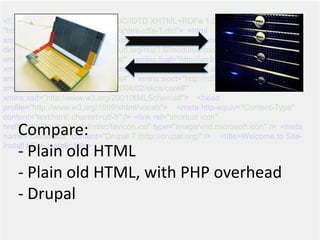
Compare:
- Plain old HTML
- Plain old HTML, with PHP overhead
- Drupal
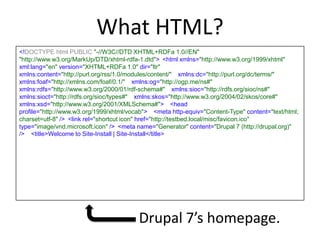
What HTML?
<!DOCTYPE html PUBLIC "-//W3C//DTD XHTML+RDFa 1.0//EN"

"http://www.w3.org/MarkUp/DTD/xhtml-rdfa-1.dtd">
<html xmlns="http://www.w3.org/1999/xhtml"
xml:lang="en" version="XHTML+RDFa 1.0" dir="ltr"

xmlns:content="http://purl.org/rss/1.0/modules/content/"
 xmlns:dc="http://purl.org/dc/terms/"

xmlns:foaf="http://xmlns.com/foaf/0.1/"
 xmlns:og="http://ogp.me/ns#"

xmlns:rdfs="http://www.w3.org/2000/01/rdf-schema#"
 xmlns:sioc="http://rdfs.org/sioc/ns#"

xmlns:sioct="http://rdfs.org/sioc/types#"
 xmlns:skos="http://www.w3.org/2004/02/skos/core#"

xmlns:xsd="http://www.w3.org/2001/XMLSchema#">

<head
profile="http://www.w3.org/1999/xhtml/vocab">
 <meta http-equiv="Content-Type" content="text/html;
charset=utf-8" />
<link rel="shortcut icon" href="http://testbed.local/misc/favicon.ico"
type="image/vnd.microsoft.icon" />
<meta name="Generator" content="Drupal 7 (http://drupal.org)"
/>
 <title>Welcome to Site-Install | Site-Install</title>
Drupal 7’s homepage.
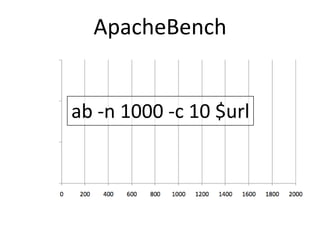
ApacheBench
ab -n 1000 -c 10 $url
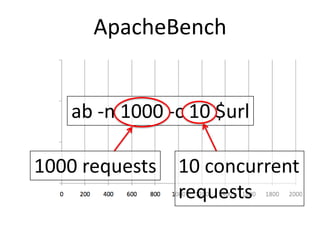
ApacheBench
ab -n 1000 -c 10 $url
1000 requests 10 concurrent
requests
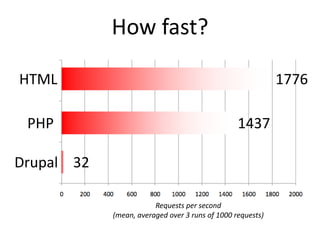
How fast?
HTML 1776
PHP 1437
Drupal 32
Requests per second
(mean, averaged over 3 runs of 1000 requests)
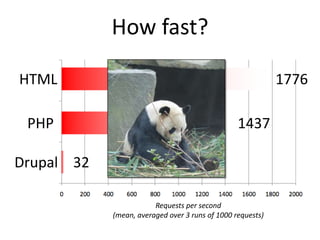
How fast?
HTML 1776
PHP 1437
Drupal 32
Requests per second
(mean, averaged over 3 runs of 1000 requests)
HOW DO WE MAKE IT FASTER?
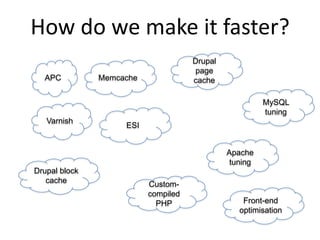
How do we make it faster?
APC Memcache
Varnish
Drupal
page
cache
Drupal block
cache
Apache
tuning
Custom-
compiled
PHP
MySQL
tuning
Front-end
optimisation
ESI
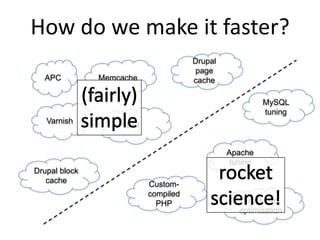
How do we make it faster?
APC Memcache
Varnish
Drupal
page
cache
Drupal block
cache
Apache
tuning
Custom-
compiled
PHP
MySQL
tuning
Front-end
optimisation
ESI
SIMPLE QUICK WINS
APC, memcache, and Drupal caches
A
Perfect
Cure?
JUST WHAT IS THIS APC THING
ANYWAY?
APC: an opcode cache.
Welcome to the world of PHP internals
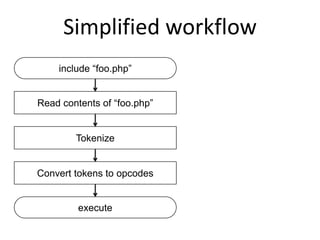
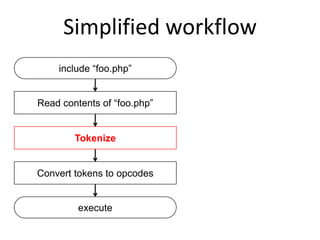
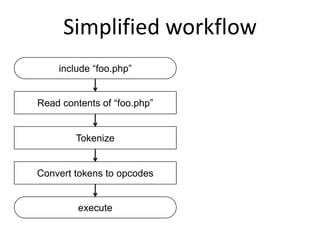
Simplified workflow
include “foo.php”
Read contents of “foo.php”
Tokenize
Convert tokens to opcodes
execute
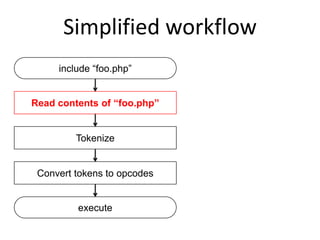
Simplified workflow
include “foo.php”
Read contents of “foo.php”
Tokenize
Convert tokens to opcodes
execute
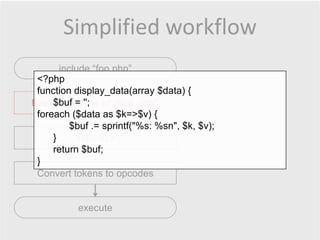
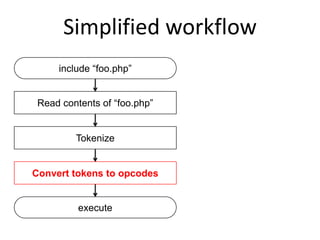
Simplified workflow
include “foo.php”
Read contents of “foo.php”
Tokenize
Convert tokens to opcodes
execute
<?php
function display_data(array $data) {
$buf = '';
foreach ($data as $k=>$v) {
$buf .= sprintf("%s: %sn", $k, $v);
}
return $buf;
}
Simplified workflow
include “foo.php”
Read contents of “foo.php”
Tokenize
Convert tokens to opcodes
execute
Simplified workflow
include “foo.php”
Read contents of “foo.php”
Tokenize
Convert tokens to opcodes
execute
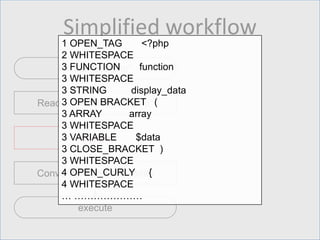
1 OPEN_TAG <?php
2 WHITESPACE
3 FUNCTION function
3 WHITESPACE
3 STRING display_data
3 OPEN BRACKET (
3 ARRAY array
3 WHITESPACE
3 VARIABLE $data
3 CLOSE_BRACKET )
3 WHITESPACE
4 OPEN_CURLY {
4 WHITESPACE
… …………………
Simplified workflow
include “foo.php”
Read contents of “foo.php”
Tokenize
Convert tokens to opcodes
execute
Simplified workflow
include “foo.php”
Read contents of “foo.php”
Tokenize
Convert tokens to opcodes
execute
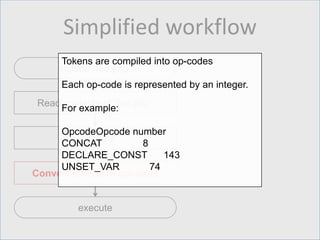
Tokens are compiled into op-codes
Each op-code is represented by an integer.
For example:
OpcodeOpcode number
CONCAT 8
DECLARE_CONST 143
UNSET_VAR 74
Simplified workflow
include “foo.php”
Read contents of “foo.php”
Tokenize
Convert tokens to opcodes
execute
Simplified workflow
include “foo.php”
Read contents of “foo.php”
Tokenize
Convert tokens to opcodes
execute
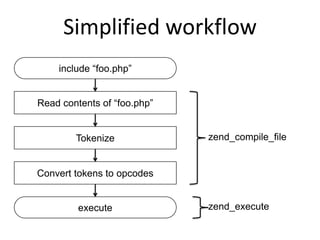
zend_compile_file
zend_execute
Simplified workflow
include “foo.php”
Read contents of “foo.php”
Tokenize
Convert tokens to opcodes
execute
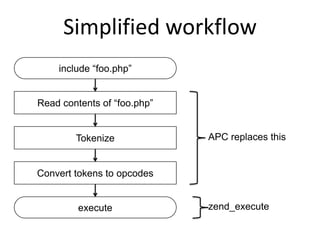
APC replaces this
zend_execute
Simplified workflow
include “foo.php”
Read contents of “foo.php”
Tokenize
Convert tokens to opcodes
execute zend_execute
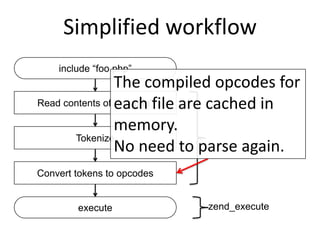
The compiled opcodes for
each file are cached in
memory.
No need to parse again.
Simplified workflow
include “foo.php”
Read contents of “foo.php”
Tokenize
Convert tokens to opcodes
execute
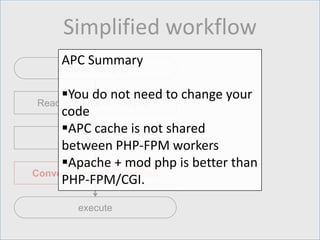
APC Summary
You do not need to change your
code
APC cache is not shared
between PHP-FPM workers
Apache + mod php is better than
PHP-FPM/CGI.
Installing APC
$ sudo apt-get install php-apc
Reading package lists... Done
Building dependency tree
Reading state information... Done
The following NEW packages will be installed:
php-apc
0 upgraded, 1 newly installed, 0 to remove and 8 not upgraded.
Need to get 0 B/79.2 kB of archives.
After this operation, 233 kB of additional disk space will be used.
Selecting previously unselected package php-apc.
(Reading database ... 68234 files and directories currently installed.)
Unpacking php-apc (from .../php-apc_3.1.7-1_i386.deb) ...
Processing triggers for libapache2-mod-php5 ...
* Reloading web server config apache2 apache2:
Could not reliably determine the server's fully qualified domain name, using 127.0.1.1 for ServerName
[ OK ]
Setting up php-apc (3.1.7-1) ...
$ sudo apache2ctl restart
Installing APC
$ sudo apt-get install php-apc
Reading package lists... Done
Building dependency tree
Reading state information... Done
The following NEW packages will be installed:
php-apc
0 upgraded, 1 newly installed, 0 to remove and 8 not upgraded.
Need to get 0 B/79.2 kB of archives.
After this operation, 233 kB of additional disk space will be used.
Selecting previously unselected package php-apc.
(Reading database ... 68234 files and directories currently installed.)
Unpacking php-apc (from .../php-apc_3.1.7-1_i386.deb) ...
Processing triggers for libapache2-mod-php5 ...
* Reloading web server config apache2 apache2:
Could not reliably determine the server's fully qualified domain name, using 127.0.1.1 for ServerName
[ OK ]
Setting up php-apc (3.1.7-1) ...
$ sudo apache2ctl restart
Use `sudo` if you need more
privileges than your user
account has.
Installing APC
$ sudo apt-get install php-apc
Reading package lists... Done
Building dependency tree
Reading state information... Done
The following NEW packages will be installed:
php-apc
0 upgraded, 1 newly installed, 0 to remove and 8 not upgraded.
Need to get 0 B/79.2 kB of archives.
After this operation, 233 kB of additional disk space will be used.
Selecting previously unselected package php-apc.
(Reading database ... 68234 files and directories currently installed.)
Unpacking php-apc (from .../php-apc_3.1.7-1_i386.deb) ...
Processing triggers for libapache2-mod-php5 ...
* Reloading web server config apache2 apache2:
Could not reliably determine the server's fully qualified domain name, using 127.0.1.1 for ServerName
[ OK ]
Setting up php-apc (3.1.7-1) ...
$ sudo apache2ctl restart
Package manager command
may vary according to O/S.
Redhat/CentOS usually uses
`yum install` instead.
Installing APC
$ sudo apt-get install php-apc
Reading package lists... Done
Building dependency tree
Reading state information... Done
The following NEW packages will be installed:
php-apc
0 upgraded, 1 newly installed, 0 to remove and 8 not upgraded.
Need to get 0 B/79.2 kB of archives.
After this operation, 233 kB of additional disk space will be used.
Selecting previously unselected package php-apc.
(Reading database ... 68234 files and directories currently installed.)
Unpacking php-apc (from .../php-apc_3.1.7-1_i386.deb) ...
Processing triggers for libapache2-mod-php5 ...
* Reloading web server config apache2 apache2:
Could not reliably determine the server's fully qualified domain name, using 127.0.1.1 for ServerName
[ OK ]
Setting up php-apc (3.1.7-1) ...
$ sudo apache2ctl restart
The name of the package
varies according to distro,
for example `php-pecl-apc`
in some variations.
Installing APC
$ sudo apt-get install php-apc
Reading package lists... Done
Building dependency tree
Reading state information... Done
The following NEW packages will be installed:
php-apc
0 upgraded, 1 newly installed, 0 to remove and 8 not upgraded.
Need to get 0 B/79.2 kB of archives.
After this operation, 233 kB of additional disk space will be used.
Selecting previously unselected package php-apc.
(Reading database ... 68234 files and directories currently installed.)
Unpacking php-apc (from .../php-apc_3.1.7-1_i386.deb) ...
Processing triggers for libapache2-mod-php5 ...
* Reloading web server config apache2 apache2:
Could not reliably determine the server's fully qualified domain name, using 127.0.1.1 for ServerName
[ OK ]
Setting up php-apc (3.1.7-1) ...
$ sudo apache2ctl restart
Restart Apache for the
change to take effect.
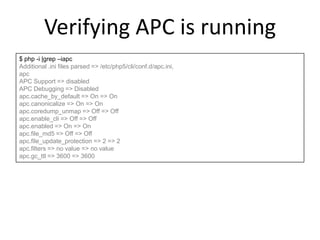
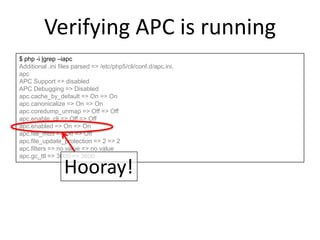
Verifying APC is running
$ php -i |grep –iapc
Additional .ini files parsed => /etc/php5/cli/conf.d/apc.ini,
apc
APC Support => disabled
APC Debugging => Disabled
apc.cache_by_default => On => On
apc.canonicalize => On => On
apc.coredump_unmap => Off => Off
apc.enable_cli => Off => Off
apc.enabled => On => On
apc.file_md5 => Off => Off
apc.file_update_protection => 2 => 2
apc.filters => no value => no value
apc.gc_ttl => 3600 => 3600
Verifying APC is running
$ php -i |grep –iapc
Additional .ini files parsed => /etc/php5/cli/conf.d/apc.ini,
apc
APC Support => disabled
APC Debugging => Disabled
apc.cache_by_default => On => On
apc.canonicalize => On => On
apc.coredump_unmap => Off => Off
apc.enable_cli => Off => Off
apc.enabled => On => On
apc.file_md5 => Off => Off
apc.file_update_protection => 2 => 2
apc.filters => no value => no value
apc.gc_ttl => 3600 => 3600
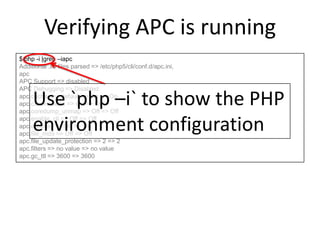
Use `php –i` to show the PHP
environment configuration
Verifying APC is running
$ php -i |grep –iapc
Additional .ini files parsed => /etc/php5/cli/conf.d/apc.ini,
apc
APC Support => disabled
APC Debugging => Disabled
apc.cache_by_default => On => On
apc.canonicalize => On => On
apc.coredump_unmap => Off => Off
apc.enable_cli => Off => Off
apc.enabled => On => On
apc.file_md5 => Off => Off
apc.file_update_protection => 2 => 2
apc.filters => no value => no value
apc.gc_ttl => 3600 => 3600
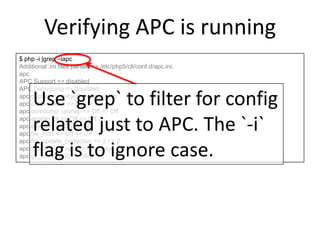
Use `grep` to filter for config
related just to APC. The `-i`
flag is to ignore case.
Verifying APC is running
$ php -i |grep –iapc
Additional .ini files parsed => /etc/php5/cli/conf.d/apc.ini,
apc
APC Support => disabled
APC Debugging => Disabled
apc.cache_by_default => On => On
apc.canonicalize => On => On
apc.coredump_unmap => Off => Off
apc.enable_cli => Off => Off
apc.enabled => On => On
apc.file_md5 => Off => Off
apc.file_update_protection => 2 => 2
apc.filters => no value => no value
apc.gc_ttl => 3600 => 3600
Hooray!
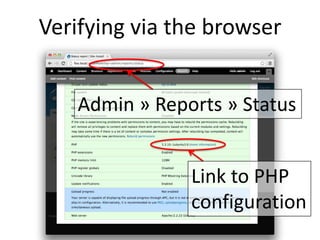
Verifying via the browser
Link to PHP
configuration
Admin » Reports » Status
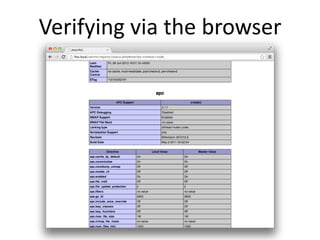
Verifying via the browser
Benchmarking time!
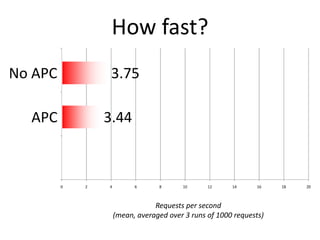
How fast?
Requests per second
(mean, averaged over 3 runs of 1000 requests)
No APC 3.75
APC 3.44
Wait, WHAT?!
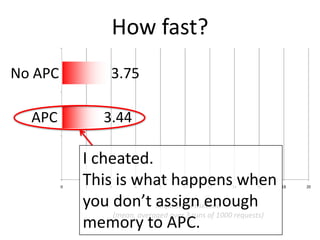
How fast?
Requests per second
(mean, averaged over 3 runs of 1000 requests)
No APC 3.75
APC 3.44
I cheated.
This is what happens when
you don’t assign enough
memory to APC.
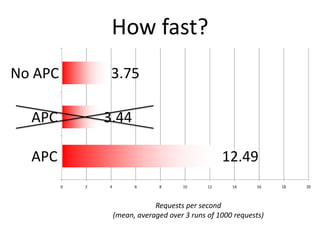
How fast?
Requests per second
(mean, averaged over 3 runs of 1000 requests)
No APC 3.75
APC 3.44
APC 12.49
Memcache
What does it do?
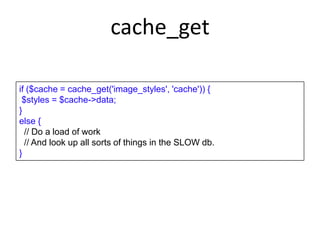
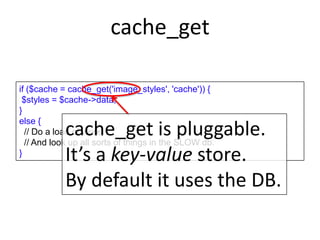
cache_get
if ($cache = cache_get('image_styles', 'cache')) {
$styles = $cache->data;
}
else {
// Do a load of work
// And look up all sorts of things in the SLOW db.
}
cache_get
if ($cache = cache_get('image_styles', 'cache')) {
$styles = $cache->data;
}
else {
// Do a load of work
// And look up all sorts of things in the SLOW db.
}
cache_get is pluggable.
It’s a key-value store.
By default it uses the DB.
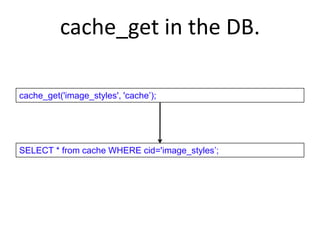
cache_get in the DB.
cache_get('image_styles', 'cache’);
SELECT * from cache WHERE cid='image_styles’;
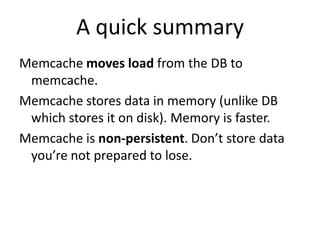
A quick summary
Memcache moves load from the DB to
memcache.
Memcache stores data in memory (unlike DB
which stores it on disk). Memory is faster.
Memcache is non-persistent. Don’t store data
you’re not prepared to lose.
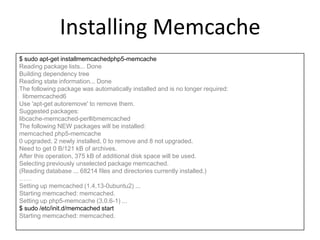
Installing Memcache
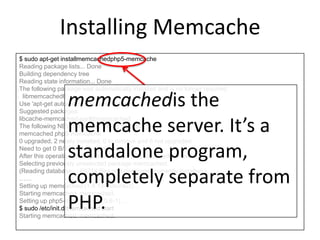
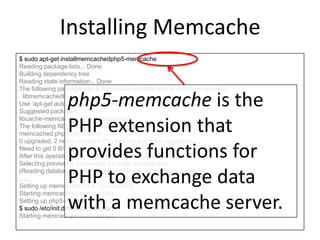
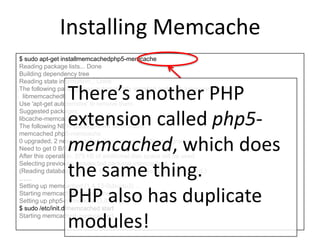
$ sudo apt-get installmemcachedphp5-memcache
Reading package lists... Done
Building dependency tree
Reading state information... Done
The following package was automatically installed and is no longer required:
libmemcached6
Use 'apt-get autoremove' to remove them.
Suggested packages:
libcache-memcached-perllibmemcached
The following NEW packages will be installed:
memcached php5-memcache
0 upgraded, 2 newly installed, 0 to remove and 8 not upgraded.
Need to get 0 B/121 kB of archives.
After this operation, 375 kB of additional disk space will be used.
Selecting previously unselected package memcached.
(Reading database ... 68214 files and directories currently installed.)
……
Setting up memcached (1.4.13-0ubuntu2) ...
Starting memcached: memcached.
Setting up php5-memcache (3.0.6-1) ...
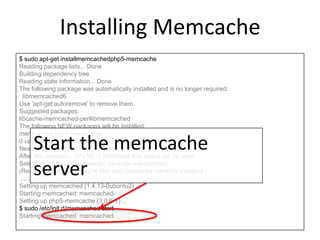
$ sudo /etc/init.d/memcached start
Starting memcached: memcached.
Installing Memcache
$ sudo apt-get installmemcachedphp5-memcache
Reading package lists... Done
Building dependency tree
Reading state information... Done
The following package was automatically installed and is no longer required:
libmemcached6
Use 'apt-get autoremove' to remove them.
Suggested packages:
libcache-memcached-perllibmemcached
The following NEW packages will be installed:
memcached php5-memcache
0 upgraded, 2 newly installed, 0 to remove and 8 not upgraded.
Need to get 0 B/121 kB of archives.
After this operation, 375 kB of additional disk space will be used.
Selecting previously unselected package memcached.
(Reading database ... 68214 files and directories currently installed.)
……
Setting up memcached (1.4.13-0ubuntu2) ...
Starting memcached: memcached.
Setting up php5-memcache (3.0.6-1) ...
$ sudo /etc/init.d/memcached start
Starting memcached: memcached.
memcachedis the
memcache server. It’s a
standalone program,
completely separate from
PHP.
Installing Memcache
$ sudo apt-get installmemcachedphp5-memcache
Reading package lists... Done
Building dependency tree
Reading state information... Done
The following package was automatically installed and is no longer required:
libmemcached6
Use 'apt-get autoremove' to remove them.
Suggested packages:
libcache-memcached-perllibmemcached
The following NEW packages will be installed:
memcached php5-memcache
0 upgraded, 2 newly installed, 0 to remove and 8 not upgraded.
Need to get 0 B/121 kB of archives.
After this operation, 375 kB of additional disk space will be used.
Selecting previously unselected package memcached.
(Reading database ... 68214 files and directories currently installed.)
……
Setting up memcached (1.4.13-0ubuntu2) ...
Starting memcached: memcached.
Setting up php5-memcache (3.0.6-1) ...
$ sudo /etc/init.d/memcached start
Starting memcached: memcached.
php5-memcache is the
PHP extension that
provides functions for
PHP to exchange data
with a memcache server.
Installing Memcache
$ sudo apt-get installmemcachedphp5-memcache
Reading package lists... Done
Building dependency tree
Reading state information... Done
The following package was automatically installed and is no longer required:
libmemcached6
Use 'apt-get autoremove' to remove them.
Suggested packages:
libcache-memcached-perllibmemcached
The following NEW packages will be installed:
memcached php5-memcache
0 upgraded, 2 newly installed, 0 to remove and 8 not upgraded.
Need to get 0 B/121 kB of archives.
After this operation, 375 kB of additional disk space will be used.
Selecting previously unselected package memcached.
(Reading database ... 68214 files and directories currently installed.)
……
Setting up memcached (1.4.13-0ubuntu2) ...
Starting memcached: memcached.
Setting up php5-memcache (3.0.6-1) ...
$ sudo /etc/init.d/memcached start
Starting memcached: memcached.
There’s another PHP
extension called php5-
memcached, which does
the same thing.
PHP also has duplicate
modules!
Installing Memcache
$ sudo apt-get installmemcachedphp5-memcache
Reading package lists... Done
Building dependency tree
Reading state information... Done
The following package was automatically installed and is no longer required:
libmemcached6
Use 'apt-get autoremove' to remove them.
Suggested packages:
libcache-memcached-perllibmemcached
The following NEW packages will be installed:
memcached php5-memcache
0 upgraded, 2 newly installed, 0 to remove and 8 not upgraded.
Need to get 0 B/121 kB of archives.
After this operation, 375 kB of additional disk space will be used.
Selecting previously unselected package memcached.
(Reading database ... 68214 files and directories currently installed.)
……
Setting up memcached (1.4.13-0ubuntu2) ...
Starting memcached: memcached.
Setting up php5-memcache (3.0.6-1) ...
$ sudo /etc/init.d/memcached start
Starting memcached: memcached.
Start the memcache
server
Drupal config for Memcache
Download the memcache module.
Add the configuration to settings.php.
settings.php changes
/**
* Memcache configuration.
*/
define('MEMCACHE_PATH', 'sites/all/modules/contrib/memcache/memcache.inc');
// Include the base cache class that memcache extends.
include_once('./includes/cache.inc');
// Include the memcache files.
include_once(MEMCACHE_PATH);
// Optionally configure a prefix; most sites won't need this.
# $conf['memcache_key_prefix'] = 'foo';
// Declare memcache as a potential backend.
$conf['cache_backends'][] = MEMCACHE_PATH;
// Set the default cache to use memcache.
$conf['cache_default_class'] = 'MemCacheDrupal';
// Form-cache must use non-volatile storage.
$conf['cache_class_cache_form'] = 'DrupalDatabaseCache';
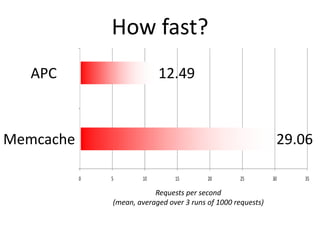
How fast?
Requests per second
(mean, averaged over 3 runs of 1000 requests)
APC 12.49
Memcache 29.06
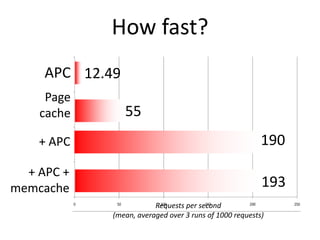
How fast?
Page
cache 55
+ APC 190
+ APC +
memcache 193
Requests per second
(mean, averaged over 3 runs of 1000 requests)
APC 12.49
Varnish…live demo!
(uh oh…)
A QUICK SUMMARY
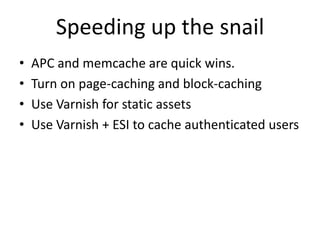
Speeding up the snail
• APC and memcache are quick wins.
• Turn on page-caching and block-caching
• Use Varnish for static assets
• Use Varnish + ESI to cache authenticated users
Thanks for coming!
 Blog: http://deglos.com
 Email: marcus@techito.co.uk
 Slides: http://slideshare.net/manarth
 Twitter: @manarth
Questions?
 Build websites
 Develop modules
 Offer technical consultancy
http://techito.co.uk/

Performance all teh things

  • 1.
  • 2.
  • 3.
    JUST HOW SLOWARE WE TALKING, EXACTLY?
  • 4.
  • 5.
    <!DOCTYPE html PUBLIC"-//W3C//DTD XHTML+RDFa 1.0//EN"
 "http://www.w3.org/MarkUp/DTD/xhtml-rdfa-1.dtd">
<html xmlns="http://www.w3.org/1999/xhtml" xml:lang="en" version="XHTML+RDFa 1.0" dir="ltr"
 xmlns:content="http://purl.org/rss/1.0/modules/content/"
 xmlns:dc="http://purl.org/dc/terms/"
 xmlns:foaf="http://xmlns.com/foaf/0.1/"
 xmlns:og="http://ogp.me/ns#"
 xmlns:rdfs="http://www.w3.org/2000/01/rdf-schema#"
 xmlns:sioc="http://rdfs.org/sioc/ns#"
 xmlns:sioct="http://rdfs.org/sioc/types#"
 xmlns:skos="http://www.w3.org/2004/02/skos/core#"
 xmlns:xsd="http://www.w3.org/2001/XMLSchema#">

<head profile="http://www.w3.org/1999/xhtml/vocab">
 <meta http-equiv="Content-Type" content="text/html; charset=utf-8" />
<link rel="shortcut icon" href="http://testbed.local/misc/favicon.ico" type="image/vnd.microsoft.icon" />
<meta name="Generator" content="Drupal 7 (http://drupal.org)" />
 <title>Welcome to Site- Install | Site-Install</title> Compare: - Plain old HTML - Plain old HTML, with PHP overhead - Drupal
  • 6.
    What HTML? <!DOCTYPE htmlPUBLIC "-//W3C//DTD XHTML+RDFa 1.0//EN"
 "http://www.w3.org/MarkUp/DTD/xhtml-rdfa-1.dtd">
<html xmlns="http://www.w3.org/1999/xhtml" xml:lang="en" version="XHTML+RDFa 1.0" dir="ltr"
 xmlns:content="http://purl.org/rss/1.0/modules/content/"
 xmlns:dc="http://purl.org/dc/terms/"
 xmlns:foaf="http://xmlns.com/foaf/0.1/"
 xmlns:og="http://ogp.me/ns#"
 xmlns:rdfs="http://www.w3.org/2000/01/rdf-schema#"
 xmlns:sioc="http://rdfs.org/sioc/ns#"
 xmlns:sioct="http://rdfs.org/sioc/types#"
 xmlns:skos="http://www.w3.org/2004/02/skos/core#"
 xmlns:xsd="http://www.w3.org/2001/XMLSchema#">

<head profile="http://www.w3.org/1999/xhtml/vocab">
 <meta http-equiv="Content-Type" content="text/html; charset=utf-8" />
<link rel="shortcut icon" href="http://testbed.local/misc/favicon.ico" type="image/vnd.microsoft.icon" />
<meta name="Generator" content="Drupal 7 (http://drupal.org)" />
 <title>Welcome to Site-Install | Site-Install</title> Drupal 7’s homepage.
  • 7.
  • 8.
    ApacheBench ab -n 1000-c 10 $url 1000 requests 10 concurrent requests
  • 9.
    How fast? HTML 1776 PHP1437 Drupal 32 Requests per second (mean, averaged over 3 runs of 1000 requests)
  • 10.
    How fast? HTML 1776 PHP1437 Drupal 32 Requests per second (mean, averaged over 3 runs of 1000 requests)
  • 11.
    HOW DO WEMAKE IT FASTER?
  • 12.
    How do wemake it faster? APC Memcache Varnish Drupal page cache Drupal block cache Apache tuning Custom- compiled PHP MySQL tuning Front-end optimisation ESI
  • 13.
    How do wemake it faster? APC Memcache Varnish Drupal page cache Drupal block cache Apache tuning Custom- compiled PHP MySQL tuning Front-end optimisation ESI
  • 14.
    SIMPLE QUICK WINS APC,memcache, and Drupal caches
  • 15.
  • 16.
    JUST WHAT ISTHIS APC THING ANYWAY? APC: an opcode cache. Welcome to the world of PHP internals
  • 17.
    Simplified workflow include “foo.php” Readcontents of “foo.php” Tokenize Convert tokens to opcodes execute
  • 18.
    Simplified workflow include “foo.php” Readcontents of “foo.php” Tokenize Convert tokens to opcodes execute
  • 19.
    Simplified workflow include “foo.php” Readcontents of “foo.php” Tokenize Convert tokens to opcodes execute <?php function display_data(array $data) { $buf = ''; foreach ($data as $k=>$v) { $buf .= sprintf("%s: %sn", $k, $v); } return $buf; }
  • 20.
    Simplified workflow include “foo.php” Readcontents of “foo.php” Tokenize Convert tokens to opcodes execute
  • 21.
    Simplified workflow include “foo.php” Readcontents of “foo.php” Tokenize Convert tokens to opcodes execute 1 OPEN_TAG <?php 2 WHITESPACE 3 FUNCTION function 3 WHITESPACE 3 STRING display_data 3 OPEN BRACKET ( 3 ARRAY array 3 WHITESPACE 3 VARIABLE $data 3 CLOSE_BRACKET ) 3 WHITESPACE 4 OPEN_CURLY { 4 WHITESPACE … …………………
  • 22.
    Simplified workflow include “foo.php” Readcontents of “foo.php” Tokenize Convert tokens to opcodes execute
  • 23.
    Simplified workflow include “foo.php” Readcontents of “foo.php” Tokenize Convert tokens to opcodes execute Tokens are compiled into op-codes Each op-code is represented by an integer. For example: OpcodeOpcode number CONCAT 8 DECLARE_CONST 143 UNSET_VAR 74
  • 24.
    Simplified workflow include “foo.php” Readcontents of “foo.php” Tokenize Convert tokens to opcodes execute
  • 25.
    Simplified workflow include “foo.php” Readcontents of “foo.php” Tokenize Convert tokens to opcodes execute zend_compile_file zend_execute
  • 26.
    Simplified workflow include “foo.php” Readcontents of “foo.php” Tokenize Convert tokens to opcodes execute APC replaces this zend_execute
  • 27.
    Simplified workflow include “foo.php” Readcontents of “foo.php” Tokenize Convert tokens to opcodes execute zend_execute The compiled opcodes for each file are cached in memory. No need to parse again.
  • 28.
    Simplified workflow include “foo.php” Readcontents of “foo.php” Tokenize Convert tokens to opcodes execute APC Summary You do not need to change your code APC cache is not shared between PHP-FPM workers Apache + mod php is better than PHP-FPM/CGI.
  • 29.
    Installing APC $ sudoapt-get install php-apc Reading package lists... Done Building dependency tree Reading state information... Done The following NEW packages will be installed: php-apc 0 upgraded, 1 newly installed, 0 to remove and 8 not upgraded. Need to get 0 B/79.2 kB of archives. After this operation, 233 kB of additional disk space will be used. Selecting previously unselected package php-apc. (Reading database ... 68234 files and directories currently installed.) Unpacking php-apc (from .../php-apc_3.1.7-1_i386.deb) ... Processing triggers for libapache2-mod-php5 ... * Reloading web server config apache2 apache2: Could not reliably determine the server's fully qualified domain name, using 127.0.1.1 for ServerName [ OK ] Setting up php-apc (3.1.7-1) ... $ sudo apache2ctl restart
  • 30.
    Installing APC $ sudoapt-get install php-apc Reading package lists... Done Building dependency tree Reading state information... Done The following NEW packages will be installed: php-apc 0 upgraded, 1 newly installed, 0 to remove and 8 not upgraded. Need to get 0 B/79.2 kB of archives. After this operation, 233 kB of additional disk space will be used. Selecting previously unselected package php-apc. (Reading database ... 68234 files and directories currently installed.) Unpacking php-apc (from .../php-apc_3.1.7-1_i386.deb) ... Processing triggers for libapache2-mod-php5 ... * Reloading web server config apache2 apache2: Could not reliably determine the server's fully qualified domain name, using 127.0.1.1 for ServerName [ OK ] Setting up php-apc (3.1.7-1) ... $ sudo apache2ctl restart Use `sudo` if you need more privileges than your user account has.
  • 31.
    Installing APC $ sudoapt-get install php-apc Reading package lists... Done Building dependency tree Reading state information... Done The following NEW packages will be installed: php-apc 0 upgraded, 1 newly installed, 0 to remove and 8 not upgraded. Need to get 0 B/79.2 kB of archives. After this operation, 233 kB of additional disk space will be used. Selecting previously unselected package php-apc. (Reading database ... 68234 files and directories currently installed.) Unpacking php-apc (from .../php-apc_3.1.7-1_i386.deb) ... Processing triggers for libapache2-mod-php5 ... * Reloading web server config apache2 apache2: Could not reliably determine the server's fully qualified domain name, using 127.0.1.1 for ServerName [ OK ] Setting up php-apc (3.1.7-1) ... $ sudo apache2ctl restart Package manager command may vary according to O/S. Redhat/CentOS usually uses `yum install` instead.
  • 32.
    Installing APC $ sudoapt-get install php-apc Reading package lists... Done Building dependency tree Reading state information... Done The following NEW packages will be installed: php-apc 0 upgraded, 1 newly installed, 0 to remove and 8 not upgraded. Need to get 0 B/79.2 kB of archives. After this operation, 233 kB of additional disk space will be used. Selecting previously unselected package php-apc. (Reading database ... 68234 files and directories currently installed.) Unpacking php-apc (from .../php-apc_3.1.7-1_i386.deb) ... Processing triggers for libapache2-mod-php5 ... * Reloading web server config apache2 apache2: Could not reliably determine the server's fully qualified domain name, using 127.0.1.1 for ServerName [ OK ] Setting up php-apc (3.1.7-1) ... $ sudo apache2ctl restart The name of the package varies according to distro, for example `php-pecl-apc` in some variations.
  • 33.
    Installing APC $ sudoapt-get install php-apc Reading package lists... Done Building dependency tree Reading state information... Done The following NEW packages will be installed: php-apc 0 upgraded, 1 newly installed, 0 to remove and 8 not upgraded. Need to get 0 B/79.2 kB of archives. After this operation, 233 kB of additional disk space will be used. Selecting previously unselected package php-apc. (Reading database ... 68234 files and directories currently installed.) Unpacking php-apc (from .../php-apc_3.1.7-1_i386.deb) ... Processing triggers for libapache2-mod-php5 ... * Reloading web server config apache2 apache2: Could not reliably determine the server's fully qualified domain name, using 127.0.1.1 for ServerName [ OK ] Setting up php-apc (3.1.7-1) ... $ sudo apache2ctl restart Restart Apache for the change to take effect.
  • 34.
    Verifying APC isrunning $ php -i |grep –iapc Additional .ini files parsed => /etc/php5/cli/conf.d/apc.ini, apc APC Support => disabled APC Debugging => Disabled apc.cache_by_default => On => On apc.canonicalize => On => On apc.coredump_unmap => Off => Off apc.enable_cli => Off => Off apc.enabled => On => On apc.file_md5 => Off => Off apc.file_update_protection => 2 => 2 apc.filters => no value => no value apc.gc_ttl => 3600 => 3600
  • 35.
    Verifying APC isrunning $ php -i |grep –iapc Additional .ini files parsed => /etc/php5/cli/conf.d/apc.ini, apc APC Support => disabled APC Debugging => Disabled apc.cache_by_default => On => On apc.canonicalize => On => On apc.coredump_unmap => Off => Off apc.enable_cli => Off => Off apc.enabled => On => On apc.file_md5 => Off => Off apc.file_update_protection => 2 => 2 apc.filters => no value => no value apc.gc_ttl => 3600 => 3600 Use `php –i` to show the PHP environment configuration
  • 36.
    Verifying APC isrunning $ php -i |grep –iapc Additional .ini files parsed => /etc/php5/cli/conf.d/apc.ini, apc APC Support => disabled APC Debugging => Disabled apc.cache_by_default => On => On apc.canonicalize => On => On apc.coredump_unmap => Off => Off apc.enable_cli => Off => Off apc.enabled => On => On apc.file_md5 => Off => Off apc.file_update_protection => 2 => 2 apc.filters => no value => no value apc.gc_ttl => 3600 => 3600 Use `grep` to filter for config related just to APC. The `-i` flag is to ignore case.
  • 37.
    Verifying APC isrunning $ php -i |grep –iapc Additional .ini files parsed => /etc/php5/cli/conf.d/apc.ini, apc APC Support => disabled APC Debugging => Disabled apc.cache_by_default => On => On apc.canonicalize => On => On apc.coredump_unmap => Off => Off apc.enable_cli => Off => Off apc.enabled => On => On apc.file_md5 => Off => Off apc.file_update_protection => 2 => 2 apc.filters => no value => no value apc.gc_ttl => 3600 => 3600 Hooray!
  • 38.
    Verifying via thebrowser Link to PHP configuration Admin » Reports » Status
  • 39.
  • 40.
  • 41.
    How fast? Requests persecond (mean, averaged over 3 runs of 1000 requests) No APC 3.75 APC 3.44
  • 42.
  • 43.
    How fast? Requests persecond (mean, averaged over 3 runs of 1000 requests) No APC 3.75 APC 3.44 I cheated. This is what happens when you don’t assign enough memory to APC.
  • 44.
    How fast? Requests persecond (mean, averaged over 3 runs of 1000 requests) No APC 3.75 APC 3.44 APC 12.49
  • 45.
  • 46.
    cache_get if ($cache =cache_get('image_styles', 'cache')) { $styles = $cache->data; } else { // Do a load of work // And look up all sorts of things in the SLOW db. }
  • 47.
    cache_get if ($cache =cache_get('image_styles', 'cache')) { $styles = $cache->data; } else { // Do a load of work // And look up all sorts of things in the SLOW db. } cache_get is pluggable. It’s a key-value store. By default it uses the DB.
  • 48.
    cache_get in theDB. cache_get('image_styles', 'cache’); SELECT * from cache WHERE cid='image_styles’;
  • 49.
    A quick summary Memcachemoves load from the DB to memcache. Memcache stores data in memory (unlike DB which stores it on disk). Memory is faster. Memcache is non-persistent. Don’t store data you’re not prepared to lose.
  • 50.
    Installing Memcache $ sudoapt-get installmemcachedphp5-memcache Reading package lists... Done Building dependency tree Reading state information... Done The following package was automatically installed and is no longer required: libmemcached6 Use 'apt-get autoremove' to remove them. Suggested packages: libcache-memcached-perllibmemcached The following NEW packages will be installed: memcached php5-memcache 0 upgraded, 2 newly installed, 0 to remove and 8 not upgraded. Need to get 0 B/121 kB of archives. After this operation, 375 kB of additional disk space will be used. Selecting previously unselected package memcached. (Reading database ... 68214 files and directories currently installed.) …… Setting up memcached (1.4.13-0ubuntu2) ... Starting memcached: memcached. Setting up php5-memcache (3.0.6-1) ... $ sudo /etc/init.d/memcached start Starting memcached: memcached.
  • 51.
    Installing Memcache $ sudoapt-get installmemcachedphp5-memcache Reading package lists... Done Building dependency tree Reading state information... Done The following package was automatically installed and is no longer required: libmemcached6 Use 'apt-get autoremove' to remove them. Suggested packages: libcache-memcached-perllibmemcached The following NEW packages will be installed: memcached php5-memcache 0 upgraded, 2 newly installed, 0 to remove and 8 not upgraded. Need to get 0 B/121 kB of archives. After this operation, 375 kB of additional disk space will be used. Selecting previously unselected package memcached. (Reading database ... 68214 files and directories currently installed.) …… Setting up memcached (1.4.13-0ubuntu2) ... Starting memcached: memcached. Setting up php5-memcache (3.0.6-1) ... $ sudo /etc/init.d/memcached start Starting memcached: memcached. memcachedis the memcache server. It’s a standalone program, completely separate from PHP.
  • 52.
    Installing Memcache $ sudoapt-get installmemcachedphp5-memcache Reading package lists... Done Building dependency tree Reading state information... Done The following package was automatically installed and is no longer required: libmemcached6 Use 'apt-get autoremove' to remove them. Suggested packages: libcache-memcached-perllibmemcached The following NEW packages will be installed: memcached php5-memcache 0 upgraded, 2 newly installed, 0 to remove and 8 not upgraded. Need to get 0 B/121 kB of archives. After this operation, 375 kB of additional disk space will be used. Selecting previously unselected package memcached. (Reading database ... 68214 files and directories currently installed.) …… Setting up memcached (1.4.13-0ubuntu2) ... Starting memcached: memcached. Setting up php5-memcache (3.0.6-1) ... $ sudo /etc/init.d/memcached start Starting memcached: memcached. php5-memcache is the PHP extension that provides functions for PHP to exchange data with a memcache server.
  • 53.
    Installing Memcache $ sudoapt-get installmemcachedphp5-memcache Reading package lists... Done Building dependency tree Reading state information... Done The following package was automatically installed and is no longer required: libmemcached6 Use 'apt-get autoremove' to remove them. Suggested packages: libcache-memcached-perllibmemcached The following NEW packages will be installed: memcached php5-memcache 0 upgraded, 2 newly installed, 0 to remove and 8 not upgraded. Need to get 0 B/121 kB of archives. After this operation, 375 kB of additional disk space will be used. Selecting previously unselected package memcached. (Reading database ... 68214 files and directories currently installed.) …… Setting up memcached (1.4.13-0ubuntu2) ... Starting memcached: memcached. Setting up php5-memcache (3.0.6-1) ... $ sudo /etc/init.d/memcached start Starting memcached: memcached. There’s another PHP extension called php5- memcached, which does the same thing. PHP also has duplicate modules!
  • 54.
    Installing Memcache $ sudoapt-get installmemcachedphp5-memcache Reading package lists... Done Building dependency tree Reading state information... Done The following package was automatically installed and is no longer required: libmemcached6 Use 'apt-get autoremove' to remove them. Suggested packages: libcache-memcached-perllibmemcached The following NEW packages will be installed: memcached php5-memcache 0 upgraded, 2 newly installed, 0 to remove and 8 not upgraded. Need to get 0 B/121 kB of archives. After this operation, 375 kB of additional disk space will be used. Selecting previously unselected package memcached. (Reading database ... 68214 files and directories currently installed.) …… Setting up memcached (1.4.13-0ubuntu2) ... Starting memcached: memcached. Setting up php5-memcache (3.0.6-1) ... $ sudo /etc/init.d/memcached start Starting memcached: memcached. Start the memcache server
  • 55.
    Drupal config forMemcache Download the memcache module. Add the configuration to settings.php.
  • 56.
    settings.php changes /** * Memcacheconfiguration. */ define('MEMCACHE_PATH', 'sites/all/modules/contrib/memcache/memcache.inc'); // Include the base cache class that memcache extends. include_once('./includes/cache.inc'); // Include the memcache files. include_once(MEMCACHE_PATH); // Optionally configure a prefix; most sites won't need this. # $conf['memcache_key_prefix'] = 'foo'; // Declare memcache as a potential backend. $conf['cache_backends'][] = MEMCACHE_PATH; // Set the default cache to use memcache. $conf['cache_default_class'] = 'MemCacheDrupal'; // Form-cache must use non-volatile storage. $conf['cache_class_cache_form'] = 'DrupalDatabaseCache';
  • 57.
    How fast? Requests persecond (mean, averaged over 3 runs of 1000 requests) APC 12.49 Memcache 29.06
  • 58.
    How fast? Page cache 55 +APC 190 + APC + memcache 193 Requests per second (mean, averaged over 3 runs of 1000 requests) APC 12.49
  • 59.
  • 60.
  • 61.
    Speeding up thesnail • APC and memcache are quick wins. • Turn on page-caching and block-caching • Use Varnish for static assets • Use Varnish + ESI to cache authenticated users
  • 62.
    Thanks for coming! Blog: http://deglos.com  Email: marcus@techito.co.uk  Slides: http://slideshare.net/manarth  Twitter: @manarth Questions?
  • 63.
     Build websites Develop modules  Offer technical consultancy http://techito.co.uk/