MTS 3013
PENGATURCARAAN
BERSTRUKTUR
BASIC PROGRAMMING
Parts of a C++ Program
// sample C++ program
#include <iostream>
using namespace std;
int main()
{
cout << "Hello, there!";
return 0;
}
comment
preprocessor
directive
which namespace
to use
beginning of
function named main
beginning of
block for main
output
statement
string
literal
send 0 to
operating system
end of block
for main
Special Characters
Character Name Meaning
// Double slash Beginning of a comment
# Pound sign Beginning of preprocessor
directive
< > Open/close brackets Enclose filename in #include
( ) Open/close
parentheses
Used when naming a
function
{ } Open/close brace Encloses a group of
statements
" " Open/close
quotation marks
Encloses string of
characters
; Semicolon End of a programming
statement
The cout Object
 Displays output on the computer screen
 You use the stream insertion operator << to
send output to cout:
cout << "Programming is fun!";
The cout Object
 Can be used to send more than one item to
cout:
cout << "Hello " << "there!";
Or:
cout << "Hello ";
cout << "there!";
The cout Object
 This produces one line of output:
cout << "Programming is ";
cout << "fun!";
The endl Manipulator
 You can use the endl manipulator to start a
new line of output. This will produce two
lines of output:
cout << "Programming is" << endl;
cout << "fun!";
The endl Manipulator
Programming is
fun!
cout << "Programming is" << endl;
cout << "fun!";
The n Escape Sequence
 You can also use the n escape sequence
to start a new line of output. This will
produce two lines of output:
cout << "Programming isn";
cout << "fun!";
Notice that the n is INSIDE
the string.
The n Escape Sequence
Programming is
fun!
cout << "Programming isn";
cout << "fun!";
The #include Directive
 Inserts the contents of another file into the
program
 This is a preprocessor directive, not part of
C++ language
 #include lines not seen by compiler
 Do not place a semicolon at end of
#include line
Variables and Literals
 Variable: a storage location in memory
 Has a name and a type of data it can hold
 Must be defined before it can be used:
int item;
Variable Definition
Identifiers
 An identifier is a programmer-defined name
for some part of a program: variables,
functions, etc.
C++ Key Words
You cannot use any of the C++ key words as an
identifier. These words have reserved meaning.
Variable Names
 A variable name should represent the
purpose of the variable. For example:
itemsOrdered
The purpose of this variable is to hold the
number of items ordered.
Identifier Rules
 The first character of an identifier must be
an alphabetic character or and underscore (
_ ),
 After the first character you may use
alphabetic characters, numbers, or
underscore characters.
 Upper- and lowercase characters are
distinct
Valid and Invalid Identifiers
IDENTIFIER VALID? REASON IF INVALID
totalSales Yes
total_Sales Yes
total.Sales No Cannot contain .
4thQtrSales No Cannot begin with digit
totalSale$ No Cannot contain $
Integer Data Types
 Integer variables can hold whole numbers such as
12, 7, and -99.
Defining Variables
 Variables of the same type can be defined
- On separate lines:
int length;
int width;
unsigned int area;
- On the same line:
int length, width;
unsigned int area;
 Variables of different types must be in different
definitions
This program has three variables:
checking, miles, and days
Integer Literals
 An integer literal is an integer value that is
typed into a program’s code. For example:
itemsOrdered = 15;
In this code, 15 is an integer literal.
Integer Literals
Integer Literals
 Integer literals are stored in memory as ints by
default
 To store an integer constant in a long memory
location, put ‘L’ at the end of the number: 1234L
 Constants that begin with ‘0’ (zero) are base 8:
075
 Constants that begin with ‘0x’ are base 16:
0x75A
The char Data Type
 Used to hold characters or very small integer
values
 Usually 1 byte of memory
 Numeric value of character from the
character set is stored in memory:
CODE:
char letter;
letter = 'C';
MEMORY:
letter
67
Character Literals
 Character literals must be enclosed in single
quote marks. Example:
'A'
Character Strings
 A series of characters in consecutive memory
locations:
"Hello"
 Stored with the null terminator, 0, at the
end:
 Comprised of the characters between the "
"
H e l l o 0
Floating-Point Data Types
 The floating-point data types are:
float
double
long double
 They can hold real numbers such as:
12.45 -3.8
 Stored in a form similar to scientific notation
 All floating-point numbers are signed
Floating-Point Data Types
Floating-point Literals
 Can be represented in
 Fixed point (decimal) notation:
31.4159 0.0000625
 E notation:
3.14159E1 6.25e-5
 Are double by default
 Can be forced to be float (3.14159f) or long
double (0.0000625L)
 Represents values that are true or false
 bool variables are stored as small integers
 false is represented by 0, true by 1:
bool allDone = true;
bool finished = false;
The bool Data Type
allDone
1 0
finished
Determining the Size of a Data
Type
The sizeof operator gives the size of any data
type or variable:
double amount;
cout << "A double is stored in "
<< sizeof(double) << "bytesn";
cout << "Variable amount is stored in
"
<< sizeof(amount)
<< "bytesn";
Variable Assignments and
Initialization
 An assignment statement uses the = operator
to store a value in a variable.
item = 12;
 This statement assigns the value 12 to the
item variable.
Assignment
 The variable receiving the value must appear
on the left side of the = operator.
 This will NOT work:
// ERROR!
12 = item;
Variable Initialization
 To initialize a variable means to assign it a
value when it is defined:
int length = 12;
 Can initialize some or all variables:
int length = 12, width = 5, area;
Scope
 The scope of a variable: the part of the
program in which the variable can be
accessed
 A variable cannot be used before it is defined
Arithmetic Operators
 Used for performing numeric calculations
 C++ has unary, binary, and ternary operators:
 unary (1 operand) -5
 binary (2 operands) 13 - 7
 ternary (3 operands) exp1 ? exp2 : exp3
Binary Arithmetic Operators
SYMBOL OPERATION EXAMPLE VALUE OF
ans
+ addition ans = 7 + 3; 10
- subtraction ans = 7 - 3; 4
* multiplication ans = 7 * 3; 21
/ division ans = 7 / 3; 2
% modulus ans = 7 % 3; 1
A Closer Look at the / Operator
 / (division) operator performs integer division
if both operands are integers
cout << 13 / 5; // displays 2
cout << 91 / 7; // displays 13
 If either operand is floating point, the result is
floating point
cout << 13 / 5.0; // displays 2.6
cout << 91.0 / 7; // displays 13.0
A Closer Look at the % Operator
 % (modulus) operator computes the remainder
resulting from integer division
cout << 13 % 5; // displays 3
 % requires integers for both operands
cout << 13 % 5.0; // error
Comments
 Used to document parts of the program
 Intended for persons reading the source code
of the program:
 Indicate the purpose of the program
 Describe the use of variables
 Explain complex sections of code
 Are ignored by the compiler
Single-Line Comments
Begin with // through to the end of line:
int length = 12; // length in inches
int width = 15; // width in inches
int area; // calculated area
// calculate rectangle area
area = length * width;
Multi-Line Comments
 Begin with /*, end with */
 Can span multiple lines:
/* this is a multi-line
comment
*/
 Can begin and end on the same line:
int area; /* calculated area */
Programming Style
 The visual organization of the source code
 Includes the use of spaces, tabs, and blank
lines
 Does not affect the syntax of the program
 Affects the readability of the source code
Programming Style
Common elements to improve readability:
 Braces { } aligned vertically
 Indentation of statements within a set of
braces
 Blank lines between declaration and other
statements
 Long statements wrapped over multiple
lines with aligned operators
Standard and Prestandard C++
Older-style C++ programs:
 Use .h at end of header files:
 #include <iostream.h>
 Do not use using namespace convention
 May not compile with a standard C++ compiler
The cin Object
 Standard input object
 Like cout, requires iostream file
 Used to read input from keyboard
 Information retrieved from cin with >>
 Input is stored in one or more variables
The cin Object
 cin converts data to the type that matches
the variable:
int height;
cout << "How tall is the room? ";
cin >> height;
Displaying a Prompt
 A prompt is a message that instructs the user
to enter data.
 You should always use cout to display a
prompt before each cin statement.
cout << "How tall is the room? ";
cin >> height;
The cin Object
 Can be used to input more than one value:
cin >> height >> width;
 Multiple values from keyboard must be separated
by spaces
 Order is important: first value entered goes to first
variable, etc.
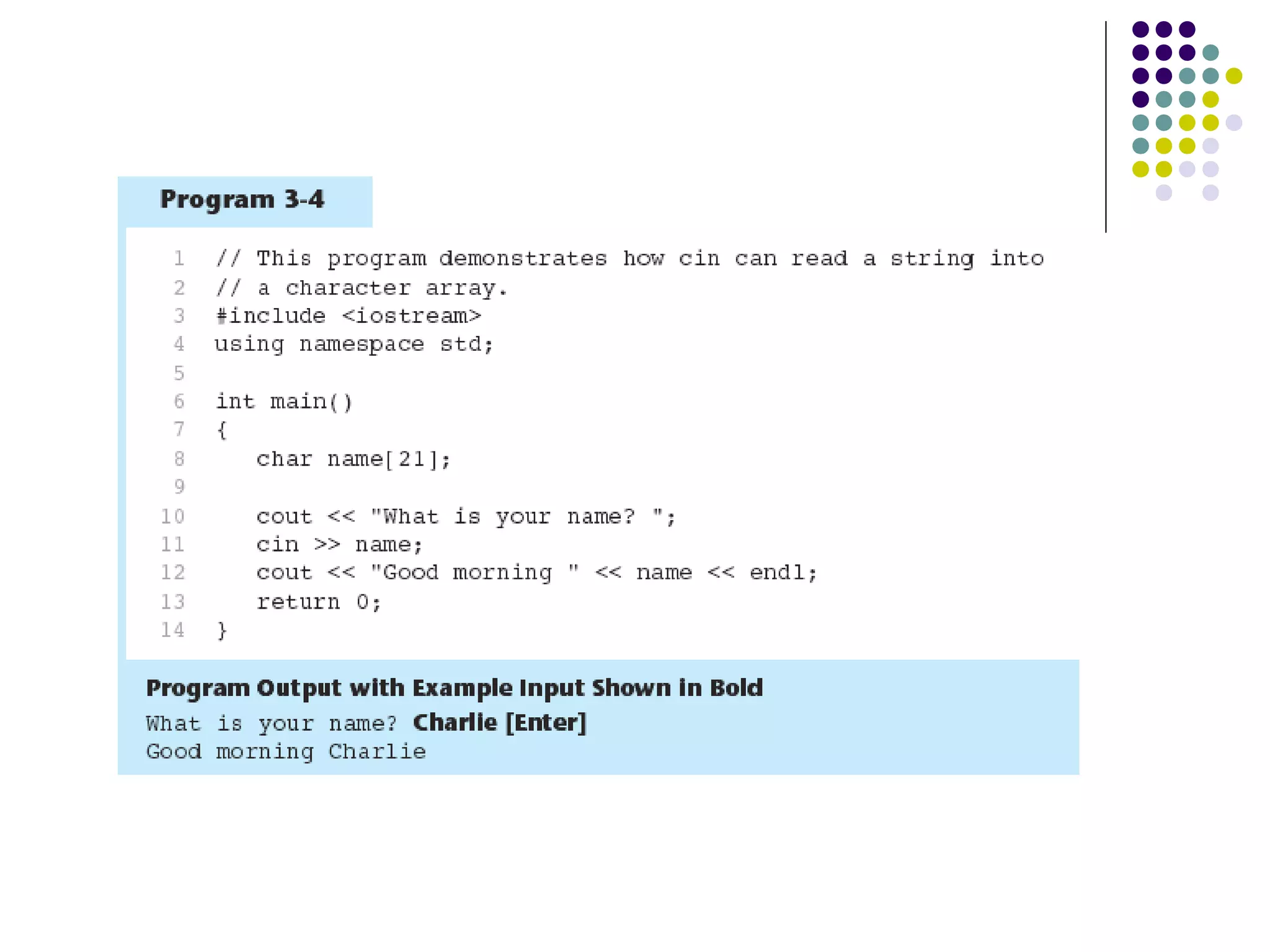
Reading Strings with cin
 Can be used to read in a string
 Must first declare an array to hold characters in
string:
char myName[21];
 nyName is name of array, 21 is the number of
characters that can be stored (the size of the
array), including the NULL character at the end
 Can be used with cin to assign a value:
cin >> myName;
Mathematical Expressions
 Can create complex expressions using
multiple mathematical operators
 An expression can be a literal, a variable, or
a mathematical combination of constants
and variables
 Can be used in assignment, cout, other
statements:
area = 2 * PI * radius;
cout << "border is: " << 2*(l+w);
Order of Operations
In an expression with more than one
operator, evaluate in this order:
- (unary negation), in order, left to right
* / %, in order, left to right
+ -, in order, left to right
In the expression 2 + 2 * 2 – 2
evaluate
first
evaluate
second
evaluate
third
Order of Operations
Associativity of Operators
 - (unary negation) associates right to left
 *, /, %, +, - associate right to left
 parentheses ( ) can be used to override the
order of operations:
2 + 2 * 2 – 2 = 4
(2 + 2) * 2 – 2 = 6
2 + 2 * (2 – 2) = 2
(2 + 2) * (2 – 2) = 0
Grouping with Parentheses
Algebraic Expressions
 Multiplication requires an operator:
Area=lw is written as Area = l * w;
 There is no exponentiation operator:
Area=s2
is written as Area = pow(s, 2);
 Parentheses may be needed to maintain order
of operations:
is written as
m = (y2-y1) /(x2-x1);
12
12
xx
yy
m
−
−
=
Algebraic Expressions
Type Casting
 Used for manual data type conversion
 Useful for floating point division using ints:
double m;
m = static_cast<double>(y2-y1)
/(x2-x1);
 Useful to see int value of a char variable:
char ch = 'C';
cout << ch << " is "
<< static_cast<int>(ch);
C-Style and Prestandard Type
Cast Expressions
 C-Style cast: data type name in ()
cout << ch << " is " << (int)ch;
 Prestandard C++ cast: value in ()
cout << ch << " is " << int(ch);
 Both are still supported in C++, although
static_cast is preferred
Named Constants
 Named constant (constant variable): variable
whose content cannot be changed during
program execution
 Used for representing constant values with
descriptive names:
const double TAX_RATE = 0.0675;
const int NUM_STATES = 50;
 Often named in uppercase letters
Constants and Array Sizes
 It is a common practice to use a named
constant to indicate the size of an array:
const int SIZE = 21;
char name[SIZE];
const vs. #define
 #define – C-style of naming constants:
#define NUM_STATES 50
 Note no ; at end
 Interpreted by pre-processor rather than
compiler
 Does not occupy memory location like
const
Multiple Assignment and
Combined Assignment
 The = can be used to assign a value to
multiple variables:
x = y = z = 5;
 Value of = is the value that is assigned
 Associates right to left:
x = (y = (z = 5));
value
is 5
value
is 5
value
is 5
Combined Assignment
 Look at the following statement:
sum = sum + 1;
This adds 1 to the variable sum.
Combined Assignment
 The combined assignment operators
provide a shorthand for these types of
statements.
 The statement
sum = sum + 1;
is equivalent to
sum += 1;
Combined Assignment
Operators
More Mathematical Library
Functions
 Require cmath header file
 Take double as input, return a double
 Commonly used functions:
sin Sine
cos Cosine
tan Tangent
sqrt Square root
log Natural (e) log
abs Absolute value (takes and returns
an int)
More Mathematical Library
Functions
 These require cstdlib header file
 rand(): returns a random number (int)
between 0 and the largest int the compute
holds. Yields same sequence of numbers
each time program is run.
 srand(x): initializes random number
generator with unsigned int x
Formatting Output
 Can control how output displays for numeric,
string data:
 size
 position
 number of digits
 Requires iomanip header file
Stream Manipulators
 Used to control how an output field is
displayed
 Some affect just the next value displayed:
 setw(x): print in a field at least x spaces wide.
Use more spaces if field is not wide enough
Stream Manipulators

Pengaturcaraan asas

  • 1.
  • 2.
    Parts of aC++ Program // sample C++ program #include <iostream> using namespace std; int main() { cout << "Hello, there!"; return 0; } comment preprocessor directive which namespace to use beginning of function named main beginning of block for main output statement string literal send 0 to operating system end of block for main
  • 3.
    Special Characters Character NameMeaning // Double slash Beginning of a comment # Pound sign Beginning of preprocessor directive < > Open/close brackets Enclose filename in #include ( ) Open/close parentheses Used when naming a function { } Open/close brace Encloses a group of statements " " Open/close quotation marks Encloses string of characters ; Semicolon End of a programming statement
  • 4.
    The cout Object Displays output on the computer screen  You use the stream insertion operator << to send output to cout: cout << "Programming is fun!";
  • 5.
    The cout Object Can be used to send more than one item to cout: cout << "Hello " << "there!"; Or: cout << "Hello "; cout << "there!";
  • 6.
    The cout Object This produces one line of output: cout << "Programming is "; cout << "fun!";
  • 7.
    The endl Manipulator You can use the endl manipulator to start a new line of output. This will produce two lines of output: cout << "Programming is" << endl; cout << "fun!";
  • 8.
    The endl Manipulator Programmingis fun! cout << "Programming is" << endl; cout << "fun!";
  • 9.
    The n EscapeSequence  You can also use the n escape sequence to start a new line of output. This will produce two lines of output: cout << "Programming isn"; cout << "fun!"; Notice that the n is INSIDE the string.
  • 10.
    The n EscapeSequence Programming is fun! cout << "Programming isn"; cout << "fun!";
  • 11.
    The #include Directive Inserts the contents of another file into the program  This is a preprocessor directive, not part of C++ language  #include lines not seen by compiler  Do not place a semicolon at end of #include line
  • 12.
    Variables and Literals Variable: a storage location in memory  Has a name and a type of data it can hold  Must be defined before it can be used: int item;
  • 13.
  • 14.
    Identifiers  An identifieris a programmer-defined name for some part of a program: variables, functions, etc.
  • 15.
    C++ Key Words Youcannot use any of the C++ key words as an identifier. These words have reserved meaning.
  • 16.
    Variable Names  Avariable name should represent the purpose of the variable. For example: itemsOrdered The purpose of this variable is to hold the number of items ordered.
  • 17.
    Identifier Rules  Thefirst character of an identifier must be an alphabetic character or and underscore ( _ ),  After the first character you may use alphabetic characters, numbers, or underscore characters.  Upper- and lowercase characters are distinct
  • 18.
    Valid and InvalidIdentifiers IDENTIFIER VALID? REASON IF INVALID totalSales Yes total_Sales Yes total.Sales No Cannot contain . 4thQtrSales No Cannot begin with digit totalSale$ No Cannot contain $
  • 19.
    Integer Data Types Integer variables can hold whole numbers such as 12, 7, and -99.
  • 20.
    Defining Variables  Variablesof the same type can be defined - On separate lines: int length; int width; unsigned int area; - On the same line: int length, width; unsigned int area;  Variables of different types must be in different definitions
  • 21.
    This program hasthree variables: checking, miles, and days
  • 22.
    Integer Literals  Aninteger literal is an integer value that is typed into a program’s code. For example: itemsOrdered = 15; In this code, 15 is an integer literal.
  • 23.
  • 24.
    Integer Literals  Integerliterals are stored in memory as ints by default  To store an integer constant in a long memory location, put ‘L’ at the end of the number: 1234L  Constants that begin with ‘0’ (zero) are base 8: 075  Constants that begin with ‘0x’ are base 16: 0x75A
  • 25.
    The char DataType  Used to hold characters or very small integer values  Usually 1 byte of memory  Numeric value of character from the character set is stored in memory: CODE: char letter; letter = 'C'; MEMORY: letter 67
  • 26.
    Character Literals  Characterliterals must be enclosed in single quote marks. Example: 'A'
  • 28.
    Character Strings  Aseries of characters in consecutive memory locations: "Hello"  Stored with the null terminator, 0, at the end:  Comprised of the characters between the " " H e l l o 0
  • 29.
    Floating-Point Data Types The floating-point data types are: float double long double  They can hold real numbers such as: 12.45 -3.8  Stored in a form similar to scientific notation  All floating-point numbers are signed
  • 30.
  • 31.
    Floating-point Literals  Canbe represented in  Fixed point (decimal) notation: 31.4159 0.0000625  E notation: 3.14159E1 6.25e-5  Are double by default  Can be forced to be float (3.14159f) or long double (0.0000625L)
  • 33.
     Represents valuesthat are true or false  bool variables are stored as small integers  false is represented by 0, true by 1: bool allDone = true; bool finished = false; The bool Data Type allDone 1 0 finished
  • 35.
    Determining the Sizeof a Data Type The sizeof operator gives the size of any data type or variable: double amount; cout << "A double is stored in " << sizeof(double) << "bytesn"; cout << "Variable amount is stored in " << sizeof(amount) << "bytesn";
  • 36.
    Variable Assignments and Initialization An assignment statement uses the = operator to store a value in a variable. item = 12;  This statement assigns the value 12 to the item variable.
  • 37.
    Assignment  The variablereceiving the value must appear on the left side of the = operator.  This will NOT work: // ERROR! 12 = item;
  • 38.
    Variable Initialization  Toinitialize a variable means to assign it a value when it is defined: int length = 12;  Can initialize some or all variables: int length = 12, width = 5, area;
  • 40.
    Scope  The scopeof a variable: the part of the program in which the variable can be accessed  A variable cannot be used before it is defined
  • 42.
    Arithmetic Operators  Usedfor performing numeric calculations  C++ has unary, binary, and ternary operators:  unary (1 operand) -5  binary (2 operands) 13 - 7  ternary (3 operands) exp1 ? exp2 : exp3
  • 43.
    Binary Arithmetic Operators SYMBOLOPERATION EXAMPLE VALUE OF ans + addition ans = 7 + 3; 10 - subtraction ans = 7 - 3; 4 * multiplication ans = 7 * 3; 21 / division ans = 7 / 3; 2 % modulus ans = 7 % 3; 1
  • 45.
    A Closer Lookat the / Operator  / (division) operator performs integer division if both operands are integers cout << 13 / 5; // displays 2 cout << 91 / 7; // displays 13  If either operand is floating point, the result is floating point cout << 13 / 5.0; // displays 2.6 cout << 91.0 / 7; // displays 13.0
  • 46.
    A Closer Lookat the % Operator  % (modulus) operator computes the remainder resulting from integer division cout << 13 % 5; // displays 3  % requires integers for both operands cout << 13 % 5.0; // error
  • 47.
    Comments  Used todocument parts of the program  Intended for persons reading the source code of the program:  Indicate the purpose of the program  Describe the use of variables  Explain complex sections of code  Are ignored by the compiler
  • 48.
    Single-Line Comments Begin with// through to the end of line: int length = 12; // length in inches int width = 15; // width in inches int area; // calculated area // calculate rectangle area area = length * width;
  • 49.
    Multi-Line Comments  Beginwith /*, end with */  Can span multiple lines: /* this is a multi-line comment */  Can begin and end on the same line: int area; /* calculated area */
  • 50.
    Programming Style  Thevisual organization of the source code  Includes the use of spaces, tabs, and blank lines  Does not affect the syntax of the program  Affects the readability of the source code
  • 51.
    Programming Style Common elementsto improve readability:  Braces { } aligned vertically  Indentation of statements within a set of braces  Blank lines between declaration and other statements  Long statements wrapped over multiple lines with aligned operators
  • 52.
    Standard and PrestandardC++ Older-style C++ programs:  Use .h at end of header files:  #include <iostream.h>  Do not use using namespace convention  May not compile with a standard C++ compiler
  • 53.
    The cin Object Standard input object  Like cout, requires iostream file  Used to read input from keyboard  Information retrieved from cin with >>  Input is stored in one or more variables
  • 55.
    The cin Object cin converts data to the type that matches the variable: int height; cout << "How tall is the room? "; cin >> height;
  • 56.
    Displaying a Prompt A prompt is a message that instructs the user to enter data.  You should always use cout to display a prompt before each cin statement. cout << "How tall is the room? "; cin >> height;
  • 57.
    The cin Object Can be used to input more than one value: cin >> height >> width;  Multiple values from keyboard must be separated by spaces  Order is important: first value entered goes to first variable, etc.
  • 59.
    Reading Strings withcin  Can be used to read in a string  Must first declare an array to hold characters in string: char myName[21];  nyName is name of array, 21 is the number of characters that can be stored (the size of the array), including the NULL character at the end  Can be used with cin to assign a value: cin >> myName;
  • 61.
    Mathematical Expressions  Cancreate complex expressions using multiple mathematical operators  An expression can be a literal, a variable, or a mathematical combination of constants and variables  Can be used in assignment, cout, other statements: area = 2 * PI * radius; cout << "border is: " << 2*(l+w);
  • 62.
    Order of Operations Inan expression with more than one operator, evaluate in this order: - (unary negation), in order, left to right * / %, in order, left to right + -, in order, left to right In the expression 2 + 2 * 2 – 2 evaluate first evaluate second evaluate third
  • 63.
  • 64.
    Associativity of Operators - (unary negation) associates right to left  *, /, %, +, - associate right to left  parentheses ( ) can be used to override the order of operations: 2 + 2 * 2 – 2 = 4 (2 + 2) * 2 – 2 = 6 2 + 2 * (2 – 2) = 2 (2 + 2) * (2 – 2) = 0
  • 65.
  • 66.
    Algebraic Expressions  Multiplicationrequires an operator: Area=lw is written as Area = l * w;  There is no exponentiation operator: Area=s2 is written as Area = pow(s, 2);  Parentheses may be needed to maintain order of operations: is written as m = (y2-y1) /(x2-x1); 12 12 xx yy m − − =
  • 67.
  • 68.
    Type Casting  Usedfor manual data type conversion  Useful for floating point division using ints: double m; m = static_cast<double>(y2-y1) /(x2-x1);  Useful to see int value of a char variable: char ch = 'C'; cout << ch << " is " << static_cast<int>(ch);
  • 70.
    C-Style and PrestandardType Cast Expressions  C-Style cast: data type name in () cout << ch << " is " << (int)ch;  Prestandard C++ cast: value in () cout << ch << " is " << int(ch);  Both are still supported in C++, although static_cast is preferred
  • 71.
    Named Constants  Namedconstant (constant variable): variable whose content cannot be changed during program execution  Used for representing constant values with descriptive names: const double TAX_RATE = 0.0675; const int NUM_STATES = 50;  Often named in uppercase letters
  • 73.
    Constants and ArraySizes  It is a common practice to use a named constant to indicate the size of an array: const int SIZE = 21; char name[SIZE];
  • 74.
    const vs. #define #define – C-style of naming constants: #define NUM_STATES 50  Note no ; at end  Interpreted by pre-processor rather than compiler  Does not occupy memory location like const
  • 75.
    Multiple Assignment and CombinedAssignment  The = can be used to assign a value to multiple variables: x = y = z = 5;  Value of = is the value that is assigned  Associates right to left: x = (y = (z = 5)); value is 5 value is 5 value is 5
  • 76.
    Combined Assignment  Lookat the following statement: sum = sum + 1; This adds 1 to the variable sum.
  • 77.
    Combined Assignment  Thecombined assignment operators provide a shorthand for these types of statements.  The statement sum = sum + 1; is equivalent to sum += 1;
  • 78.
  • 79.
    More Mathematical Library Functions Require cmath header file  Take double as input, return a double  Commonly used functions: sin Sine cos Cosine tan Tangent sqrt Square root log Natural (e) log abs Absolute value (takes and returns an int)
  • 80.
    More Mathematical Library Functions These require cstdlib header file  rand(): returns a random number (int) between 0 and the largest int the compute holds. Yields same sequence of numbers each time program is run.  srand(x): initializes random number generator with unsigned int x
  • 81.
    Formatting Output  Cancontrol how output displays for numeric, string data:  size  position  number of digits  Requires iomanip header file
  • 82.
    Stream Manipulators  Usedto control how an output field is displayed  Some affect just the next value displayed:  setw(x): print in a field at least x spaces wide. Use more spaces if field is not wide enough
  • 85.