1
Chapter 1
1. Introductionto C++
Program (Software)
❖ Set of instructions that tell computer what to do
❖ Program is a piece of code that performs specific task.
❖ We use programs to interact with computers.
❖ To write programs we use programming languages
Programming languages
❖ Programming languages are languages used to write programs.
❖ Computers are machines, they do not understand human languages.
❖ Programs are written in a language that computer can understand.
Machine Language
❖ A computer’s native language
❖ Uses zeros & ones (0 and 1) Binary Language.
❖ Every instruction should be written in machine language before it can be executed.
❖ All instructions written in other programming languages must be translated in machine
code instructions.
Assembly Language
❖ It was developed to make programming easier.
❖ Machine dependent.
❖ Introduced keywords (add, sub, -------------------)
❖ Assembler translates assembly code into machine code.
High level Programming languages
❖ Are new generations of programming languages.
❖ Uses English words (Easy to learn and use)
❖ Program written in a high-level language is called source code or source program code.
2.
2
What is C++?
❖C++ is a cross-platform language that can be used to create high-performance
applications.
❖ C++ was developed by Bjarne Stroustrup, as an extension to the C language in 1979.
❖ C++ gives programmers a high level of control over system resources and memory.
Why Use C++
❖ C++ is one of the world's most popular programming languages.
❖ C++ can be found in today's operating systems, Graphical User Interfaces, and embedded
systems.
❖ C++ is portable and can be used to develop applications that can be adapted to multiple
platforms.
C++ Syntax
❖ Let's break up the following code to understand it better:
Example
#include <iostream>
using namespace std;
int main() {
cout << "Hello World!"; return 0; }
Example explained
Line 1: #include <iostream>is a header file library that lets us work with input and output
objects, such as cout(used in line 5). Header files add functionality to C++ programs.
Line 2: using namespace stdmeans that we can use names for objects and variables from the
standard library.
Line 3: A blank line. C++ ignores white space. But we use it to make the code more readable.
Line 4: Another thing that always appear in a C++ program, is int main(). This is called a
function. Any code inside its curly brackets {}will be executed.
3.
3
Line 5: cout(pronounced"see-out") is an object used together with the insertion operator
(<<) to output/print text. In our example it will output "Hello World".
❖ Note: Every C++ statement ends with a semicolon ;.
❖ Note: The body of int main()could also been written as:
int main () { cout << "Hello World! "; return 0; }
Line 6: return 0 ends the main function.
Line 7: Do not forget to add the closing curly bracket}to actually end the main function.
C++ Output (Print Text)
The cout object, together with the <<operator, is used to output values/print text: Example
#include <iostream>
using namespace std;
int main() {
cout << "Hello World!";
return 0;
}
You can add as many coutobjects as you want. However, note that it does not insert a new line at
the end of the output:
C++ New Lines
To insert a new line, you can use the ncharacter: Example
#include <iostream>
using namespace std;
int main() {
cout << "Hello World!n";
cout << "I am learning C++";
return 0; }
4.
4
Another way toinsert a new line, is with the endl manipulator:
Example
#include <iostream>
using namespace std;
int main() {
cout << "Hello World!" << endl;
cout << "I am learning C++";
return 0;}
Both nand endl are used to break lines. However, nis used more often and is the preferred
way.
C++ Comments
Comments can be used to explain C++ code, and to make it more readable. It can also be used to
prevent execution when testing alternative code. Comments can be singled-lined or multi-lined.
Single-line Comments
Single-line comments start with two forward slashes (//).
// This is a comment
C++ Multi-line Comments
Multi-line comments start with /* and ends with */.
/* The code below will print the words Hello World! to the screen, and it is amazing */
5.
5
2. C++ Variables
Variablesare containers for storing data values.
In C++, there are different types of variables (defined with different keywords), for example:
❖ int - stores integers (whole numbers), without decimals, such as 123 or -123
❖ double - stores floating point numbers, with decimals, such as 19.99 or -19.99
❖ char - stores single characters, such as 'a' or 'B'. Char values are surrounded by single
quotes
❖ string - stores text, such as "Hello World". String values are surrounded by double quotes
❖ bool - stores values with two states: true or false
Declaring (Creating) Variables
To create a variable, specify the type and assign it a value:
Syntax
type variableName = value;
Where type is one of C++ types (such as int), and variableName is the name of the variable (such
as x or myName). The equal sign is used to assign values to the variable.
Example
Create a variable called myNum of type int and assign it the value 15:
int myNum = 15;
cout << myNum;
You can also declare a variable without assigning the value, and assign the value later: Example
int myNum;
myNum = 15;
cout << myNum;
Note that if you assign a new value to an existing variable, it will overwrite the previous value:
6.
6
Example
int myNum =15; // myNum is 15
myNum = 10; // Now myNum is 10
cout << myNum; // Outputs 10
Display Variables
The coutobject is used together with the <<operator to display variables.
To combine both text and a variable, separate them with the <<operator: Example
int myAge = 35;
cout << "I am " << myAge << " years old.";
Declare Many Variables
To declare more than one variable of the same type, use a comma-separated list:
int x = 5, y = 6, z = 50; cout << x + y + z;
C++ Identifiers
❖ All C++ variables must be identified with unique names. These unique names are called
identifiers.
❖ Identifiers can be short names (like x and y) or more descriptive names (age, sum,
totalVolume).
❖ Note: It is recommended to use descriptive names in order to create understandable and
maintainable code:
The general rules for naming variables are:
❖ Names can contain letters, digits and underscores
❖ Names must begin with a letter or an underscore (_)
❖ Names are case sensitive (myVar and myvar are different variables)
❖ Names cannot contain whitespaces or special characters like !, #, %, etc.
❖ Reserved words (like C++ keywords, such as int) cannot be used as names
7.
7
3. User Input
Youhave already learned that cout is used to output (print) values. Now we will use cin to get
user input.
Cin is a predefined variable that reads data from the keyboard with the extraction operator (>>).
In the following example, the user can input a number, which is stored in the variable x. Then we
print the value of x:
Example
int x;
cout << “Type a number: “; // Type a number and press enter cin >> x; // Get user input from the
keyboard
cout << “Your number is: “ << x; // Display the input value
Good To Know
❖ cout is pronounced “see-out”. Used for output, and uses the insertion operator (<<)
❖ cin is pronounced “see-in”. Used for input, and uses the extraction operator (>>)
Creating a Simple Calculator
In this example, the user must input two numbers. Then we print the sum by calculating (adding)
the two numbers: Example
int x, y;
int sum;
cout << “Type a number: “;
cin >> x;
cout << “Type another number: “;
cin >> y;
sum = x + y;
cout << “Sum is: “ << sum;
There you go! You just built a basic
calculator!
8.
8
4. C++ DataTypes
As explained in the Variables topic, a variable in C++ must be a specified data type:
Example
int myNum = 5; // Integer (whole number)
float myFloatNum = 5.99; // Floating point number
double myDoubleNum = 9.98; // Floating point number
char myLetter = 'D'; // Character
bool myBoolean = true; // Boolean
string myText = "Hello"; // String
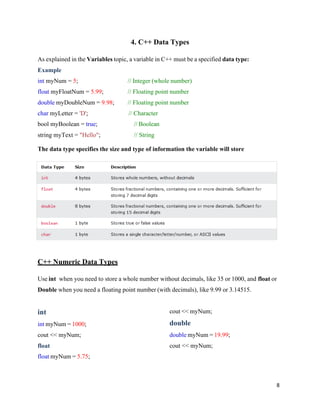
The data type specifies the size and type of information the variable will store
C++ Numeric Data Types
Use int when you need to store a whole number without decimals, like 35 or 1000, and float or
Double when you need a floating point number (with decimals), like 9.99 or 3.14515.
int
int myNum = 1000;
cout << myNum;
float
float myNum = 5.75;
cout << myNum;
double
double myNum = 19.99;
cout << myNum;
9.
9
C++ Boolean DataTypes
A boolean data type is declared with the boolkeyword and can only take the values trueor
False. When the value is returned, true= 1and false= 0.
Example
bool isCodingFun = true;
bool isFishTasty = false;
cout << isCodingFun; // Outputs 1 (true)
cout << isFishTasty; // Outputs 0 (false)
C++ Character Data Types
The char data type is used to store a single character. The character must be surrounded by single
quotes, like 'A' or 'c':
Example
char myGrade = 'B';
cout << myGrade;
C++ String Data Types
Strings are used for storing text.
A stringvariable contains a collection of characters surrounded by double quotes:
Example
Create a variable of type stringand assign it a value:
string greeting = "Hello";
cout << greating;
C++ String Concatenation
The +operator can be used between strings to add them together to make a new string. This is
called concatenation: Example
string firstName = "John";
string lastName = "Doe";
string fullName = firstName + " " + lastName;
cout << fullName;
10.
10
C++ User InputStrings
It is possible to use the extraction operator >>on cinto display a string entered by a user:
Example
string firstName;
cout << "Type your first name: ";
cin >> firstName; // get user input from the keyboard
cout << "Your name is: " << firstName;
// Type your first name: John
// Your name is: John
However, cinconsiders a space (whitespace, tabs, etc) as a terminating character, which means
that it can only display a single word (even if you type many words):
5. C++ Operators
Operators are used to perform operations on variables and values.
In the example below, we use the +operator to add together two values:
Example
int x = 100 + 50;
Although the +operator is often used to add together two values, like in the example above, it can
also be used to add together a variable and a value, or a variable and another variable:
Example
int sum1 = 100 + 50; // 150 (100 + 50)
int sum2 = sum1 + 250; // 400 (150 + 250)
int sum3 = sum2 + sum2; // 800 (400 + 400)
C++ divides the operators into the following groups:
11.
11
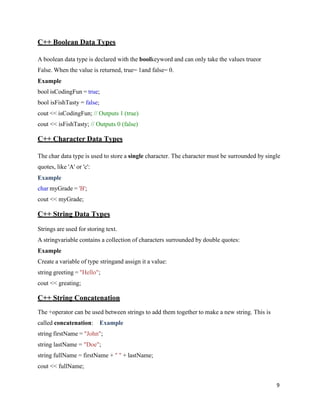
Arithmetic operators
Arithmetic operatorsare used to perform common mathematical operations.
Example
Int x = 1000;
Int y = 1000;
cout << x + y;
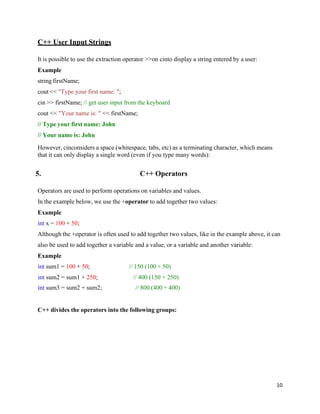
Comparison operators
Comparison operators are used to compare two values.
Note: The return value of a comparison is either true (1) or false (0).
12.
12
Example
Int x =1000;
Int y = 2000;
cout << x > y; // returns 1 (true) because 2000 is greater than 1000
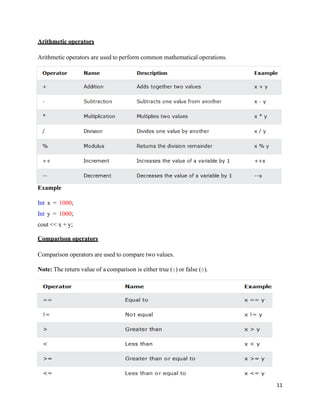
Assignment operators
Assignment operators are used to assign values to variables.
Example
Int x = 1000;
x += 1000;
cout << x;
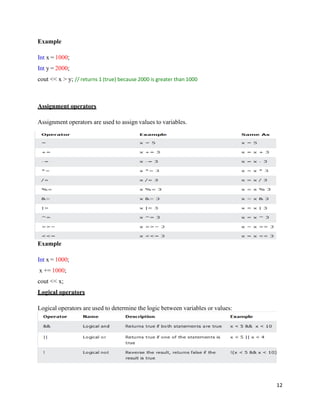
Logical operators
Logical operators are used to determine the logic between variables or values:
13.
13
Chapter 2 DECISIONMAKING
1. Conditions
The if Statement
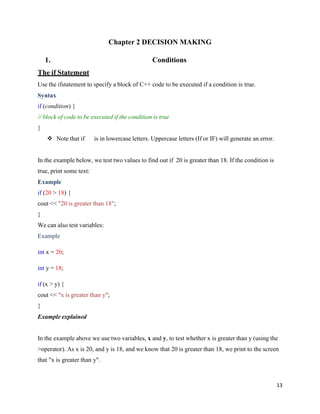
Use the ifstatement to specify a block of C++ code to be executed if a condition is true.
Syntax
if (condition) {
// block of code to be executed if the condition is true
}
❖ Note that if is in lowercase letters. Uppercase letters (If or IF) will generate an error.
In the example below, we test two values to find out if 20 is greater than 18. If the condition is
true, print some text:
Example
if (20 > 18) {
cout << "20 is greater than 18";
}
We can also test variables:
Example
int x = 20;
int y = 18;
if (x > y) {
cout << "x is greater than y";
}
Example explained
In the example above we use two variables, x and y, to test whether x is greater than y (using the
>operator). As x is 20, and y is 18, and we know that 20 is greater than 18, we print to the screen
that "x is greater than y".
14.
14
The else Statement
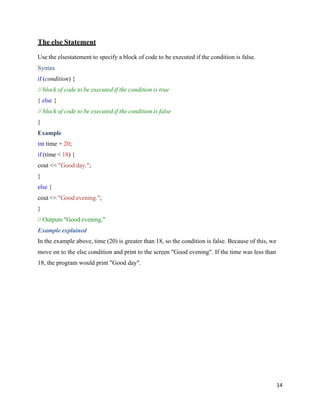
Usethe elsestatement to specify a block of code to be executed if the condition is false.
Syntax
if (condition) {
// block of code to be executed if the condition is true
} else {
// block of code to be executed if the condition is false
}
Example
int time = 20;
if (time < 18) {
cout << "Good day.";
}
else {
cout << "Good evening.";
}
// Outputs "Good evening."
Example explained
In the example above, time (20) is greater than 18, so the condition is false. Because of this, we
move on to the else condition and print to the screen "Good evening". If the time was less than
18, the program would print "Good day".
15.
15
The Else IfStatement
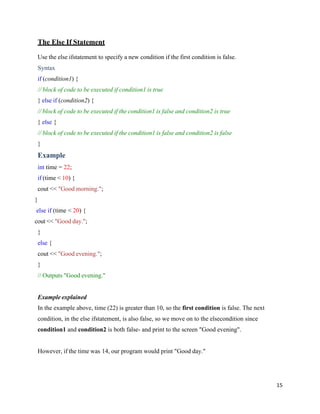
Use the else ifstatement to specify a new condition if the first condition is false.
Syntax
if (condition1) {
// block of code to be executed if condition1 is true
} else if (condition2) {
// block of code to be executed if the condition1 is false and condition2 is true
} else {
// block of code to be executed if the condition1 is false and condition2 is false
}
Example
int time = 22;
if (time < 10) {
cout << "Good morning.";
}
else if (time < 20) {
cout << "Good day.";
}
else {
cout << "Good evening.";
}
// Outputs "Good evening."
Example explained
In the example above, time (22) is greater than 10, so the first condition is false. The next
condition, in the else ifstatement, is also false, so we move on to the elsecondition since
condition1 and condition2 is both false- and print to the screen "Good evening".
However, if the time was 14, our program would print "Good day."
16.
16
2. C++ SwitchStatements
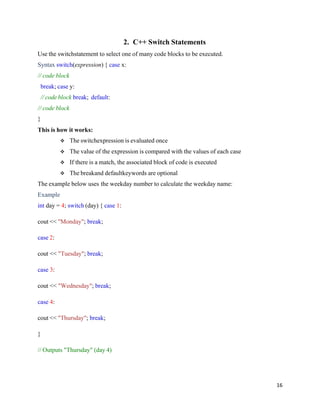
Use the switchstatement to select one of many code blocks to be executed.
Syntax switch(expression) { case x:
// code block
break; case y:
// code block break; default:
// code block
}
This is how it works:
❖ The switchexpression is evaluated once
❖ The value of the expression is compared with the values of each case
❖ If there is a match, the associated block of code is executed
❖ The breakand defaultkeywords are optional
The example below uses the weekday number to calculate the weekday name:
Example
int day = 4; switch (day) { case 1:
cout << "Monday"; break;
case 2:
cout << "Tuesday"; break;
case 3:
cout << "Wednesday"; break;
case 4:
cout << "Thursday"; break;
}
// Outputs "Thursday" (day 4)
17.
17
The break Keyword
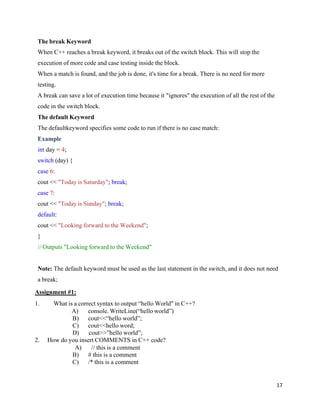
WhenC++ reaches a break keyword, it breaks out of the switch block. This will stop the
execution of more code and case testing inside the block.
When a match is found, and the job is done, it's time for a break. There is no need for more
testing.
A break can save a lot of execution time because it "ignores" the execution of all the rest of the
code in the switch block.
The default Keyword
The defaultkeyword specifies some code to run if there is no case match:
Example
int day = 4;
switch (day) {
case 6:
cout << "Today is Saturday"; break;
case 7:
cout << "Today is Sunday"; break;
default:
cout << "Looking forward to the Weekend";
}
// Outputs "Looking forward to the Weekend"
Note: The default keyword must be used as the last statement in the switch, and it does not need
a break;
Assignment #1:
1. What is a correct syntax to output “hello World" in C++?
A) console. WriteLine(“hello world”)
B) cout<<“hello world”;
C) cout<<hello word;
D) cout>>”hello world”;
2. How do you insert COMMENTS in C++ code?
A) // this is a comment
B) # this is a comment
C) /* this is a comment
18.
18
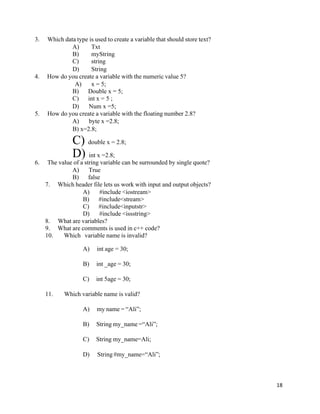
3. Which datatype is used to create a variable that should store text?
A) Txt
B) myString
C) string
D) String
4. How do you create a variable with the numeric value 5?
A) x = 5;
B) Double x = 5;
C) int x = 5 ;
D) Num x =5;
5. How do you create a variable with the floating number 2.8?
A) byte x =2.8;
B) x=2.8;
C) double x = 2.8;
D) int x =2.8;
6. The value of a string variable can be surrounded by single quote?
A) True
B) false
7. Which header file lets us work with input and output objects?
A) #include <iostream>
B) #include<stream>
C) #include<inputstr>
D) #include <issstring>
8. What are variables?
9. What are comments is used in c++ code?
10. Which variable name is invalid?
A) int age = 30;
B) int _age = 30;
C) int 5age = 30;
11. Which variable name is valid?
A) my name = “Ali”;
B) String my_name =“Ali”;
C) String my_name=Ali;
D) String #my_name=“Ali”;