Moving Average in C
C Program for a Moving Average Filter
Colin McAllister, 24/7/2017
Moving Average in C
 A simple C program to transform input data to
output data. (Time-series data)
 Purpose: Demonstration of C programming.
 Audience: Aspiring C or C++ Developers.
 Model: A simple signal processing example.
 Features: data types, control flow, floating point
numbers, program input and output.
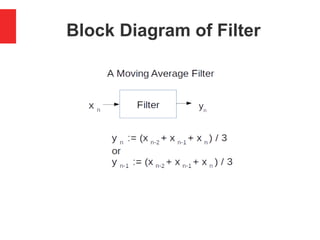
Block Diagram of Filter
Data Types
 0,1 – Boolean constants (False,True)
 int – Signed integer
 unsigned int – Unsigned integer
 double – Floating point (real) number
 double x[t], y[t] – Arrays of data
C Language Features
 main() function
 Program input - scanf()
 Program output - printf()
 Control flow – A simple “while(True)“ loop
 Blocks of code – Bound by “{“ and “}“
 Data types – assignment (equals sign “=“)
 Floating point numbers – Average value
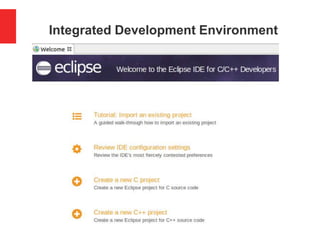
Integrated Development Environment
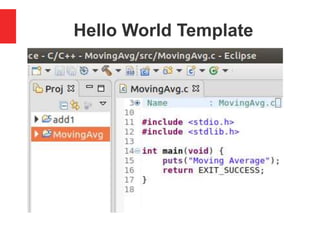
Hello World Template
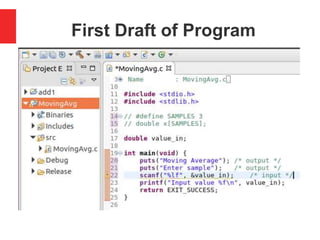
First Draft of Program
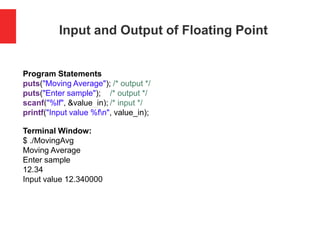
Input and Output of Floating Point
Program Statements
puts("Moving Average"); /* output */
puts("Enter sample"); /* output */
scanf("%lf", &value_in); /* input */
printf("Input value %fn", value_in);
Terminal Window:
$ ./MovingAvg
Moving Average
Enter sample
12.34
Input value 12.340000
Calculate Average of Three Numbers
#define SAMPLES 3
double x[SAMPLES];
double value_in, avg;
int i;
int main(void) {
puts("Moving Average"); /* output */
printf("Enter %d samples:n", SAMPLES); /* output */
for(i=0; i<SAMPLES; i++)
{ scanf("%lf", &value_in); /* input */
x[2]=x[1];
x[1]=x[0];
x[0]=value_in;
avg = (x[0]+x[1]+x[2])/3.0;
printf("Average %fn", avg);
}
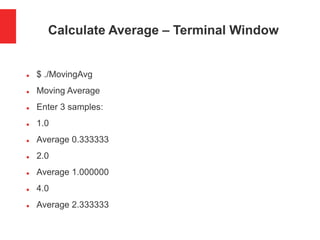
Calculate Average – Terminal Window
 $ ./MovingAvg
 Moving Average
 Enter 3 samples:
 1.0
 Average 0.333333
 2.0
 Average 1.000000
 4.0
 Average 2.333333
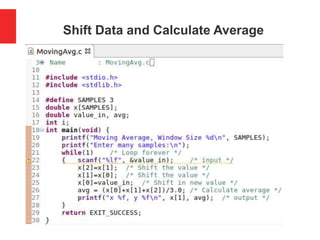
Shift Data and Calculate Average
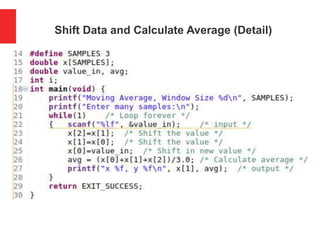
Shift Data and Calculate Average (Detail)
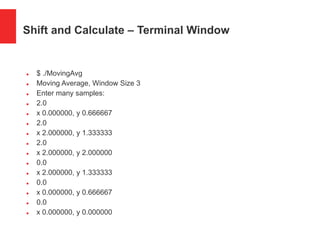
Shift and Calculate – Terminal Window
 $ ./MovingAvg
 Moving Average, Window Size 3
 Enter many samples:
 2.0
 x 0.000000, y 0.666667
 2.0
 x 2.000000, y 1.333333
 2.0
 x 2.000000, y 2.000000
 0.0
 x 2.000000, y 1.333333
 0.0
 x 0.000000, y 0.666667
 0.0
 x 0.000000, y 0.000000
Your Questions or Comments?
Clip art from www.123rf.com
Coding Considerations
 Develop in your favourite IDE
 Fix compiler errors and warnings
 Use Debugger to step through code
 Make code modular – Use functions
 Port program from C to C++
 Use OOP features of C++
 Use modern containers and iterators
 Try different compilers or even languages
Application Considerations
 Applications: Read about FIR Filters
 Optimisation: Avoid shifting the data
 Optimisation: Replace double with int
 Generate test data using Trig functions
 Generate noisy test data using rand()
 Use filter to improve Signal/Noise ratio
 Frequency response of Low pass filter
 Plot graphs to visualise Filter operation

Moving Average Filter in C

  • 1.
    Moving Average inC C Program for a Moving Average Filter Colin McAllister, 24/7/2017
  • 2.
    Moving Average inC  A simple C program to transform input data to output data. (Time-series data)  Purpose: Demonstration of C programming.  Audience: Aspiring C or C++ Developers.  Model: A simple signal processing example.  Features: data types, control flow, floating point numbers, program input and output.
  • 3.
  • 4.
    Data Types  0,1– Boolean constants (False,True)  int – Signed integer  unsigned int – Unsigned integer  double – Floating point (real) number  double x[t], y[t] – Arrays of data
  • 5.
    C Language Features main() function  Program input - scanf()  Program output - printf()  Control flow – A simple “while(True)“ loop  Blocks of code – Bound by “{“ and “}“  Data types – assignment (equals sign “=“)  Floating point numbers – Average value
  • 6.
  • 7.
  • 8.
  • 9.
    Input and Outputof Floating Point Program Statements puts("Moving Average"); /* output */ puts("Enter sample"); /* output */ scanf("%lf", &value_in); /* input */ printf("Input value %fn", value_in); Terminal Window: $ ./MovingAvg Moving Average Enter sample 12.34 Input value 12.340000
  • 10.
    Calculate Average ofThree Numbers #define SAMPLES 3 double x[SAMPLES]; double value_in, avg; int i; int main(void) { puts("Moving Average"); /* output */ printf("Enter %d samples:n", SAMPLES); /* output */ for(i=0; i<SAMPLES; i++) { scanf("%lf", &value_in); /* input */ x[2]=x[1]; x[1]=x[0]; x[0]=value_in; avg = (x[0]+x[1]+x[2])/3.0; printf("Average %fn", avg); }
  • 11.
    Calculate Average –Terminal Window  $ ./MovingAvg  Moving Average  Enter 3 samples:  1.0  Average 0.333333  2.0  Average 1.000000  4.0  Average 2.333333
  • 12.
    Shift Data andCalculate Average
  • 13.
    Shift Data andCalculate Average (Detail)
  • 14.
    Shift and Calculate– Terminal Window  $ ./MovingAvg  Moving Average, Window Size 3  Enter many samples:  2.0  x 0.000000, y 0.666667  2.0  x 2.000000, y 1.333333  2.0  x 2.000000, y 2.000000  0.0  x 2.000000, y 1.333333  0.0  x 0.000000, y 0.666667  0.0  x 0.000000, y 0.000000
  • 15.
    Your Questions orComments? Clip art from www.123rf.com
  • 16.
    Coding Considerations  Developin your favourite IDE  Fix compiler errors and warnings  Use Debugger to step through code  Make code modular – Use functions  Port program from C to C++  Use OOP features of C++  Use modern containers and iterators  Try different compilers or even languages
  • 17.
    Application Considerations  Applications:Read about FIR Filters  Optimisation: Avoid shifting the data  Optimisation: Replace double with int  Generate test data using Trig functions  Generate noisy test data using rand()  Use filter to improve Signal/Noise ratio  Frequency response of Low pass filter  Plot graphs to visualise Filter operation