PATSEER PROJECTS
Patent Project Management, Analytics and Collaboration Made Easy
About Us
 11 years of experience in Intellectual
Property Solutions
 Launched Patent iNSIGHT Pro in Jan 2006
and gained quick market acceptance to
achieve more than 400 users across
100+organisations globally
 Known for excellence in customer support
and willingness to adapt products to meet
varying customer needs
 Strong Customer references in key IP
verticals such as Pharmaceutical, Biotech,
Electronics, Medical Devices, IP services
and Research Labs.
 Strong Focus on R&D and continuous
product enhancements that solve greater
challenges and needs of IP professionals
 Track record for successful custom IP
Software development and delivery
Products
Why PatSeer Projects?
 Because Patent Data is complex and managing patents /non-patent
literature in a competitive intelligence solution can be very tedious
 Because the data doesn't have any use unless it is shared with the
right person at the right time in the right fashion
 Because Sharing Excel files back and forth between team members
can quickly become a versioning and data management nightmare
 Because you believe that intelligence extraction and delivery
platform is as important as the information itself
 Because you don’t want to waste too much time in data merging,
integration and continuous updation
 Because today’s corporate teams are spread globally and information
sharing and collaboration is performed online
 Because you are looking for a one stop solution for data
download, integration, analysis, sharing and export
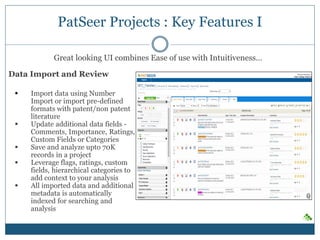
PatSeer Projects : Key Features I
Data Import and Review
 Import data using Number
Import or import pre-defined
formats with patent/non patent
literature
 Update additional data fields -
Comments, Importance, Ratings,
Custom Fields or Categories
 Save and analyze upto 70K
records in a project
 Leverage flags, ratings, custom
fields, hierarchical categories to
add context to your analysis
 All imported data and additional
metadata is automatically
indexed for searching and
analysis
Great looking UI combines Ease of use with Intuitiveness…
Analysis
 Multiple Result Views, Custom View, Detailed Record View
 Analyze search results via multi-dimensional charts
(column/line/pie/area/bubble/heatmap/geographical map)
Exports
 Multiple Export formats including
Word/Excel/CSV/XML/Patent iNSIGHT Pro format
 Charts can also be included in Word and Excel exports
PatSeer Projects : Key Features II
PatSeer Projects Edition
Unique Capabilities
Powerful Patent Analysis and charting options
• Unleash the data-mining power of the platform
to conduct analysis that is simply not possible
due to export limitations or desktop CPU
limitation
• Powerful UI that requires no-learning curve
• Multi-dimensional (X vs. Y ) analysis using
great looking charts, custom fields, hierarchical
categorization, Flags, Ratings and more
• Add you sub-search query as a new dimension
to any chart
• Merge Multiple Assignee names into a single
dimension in your chart
• Interactive visualizations with full drill-down
capability
PatSeer Projects are not Folders !
• Not just folders where you would put some patents and analyze or export them.
• PatSeer Projects is where you invite collaborators ( external search firm, counsels), setup business
dashboards for R&D/management , create workflows for ongoing tasks and get work done !
Sample Corporate User Scenario –
FTO analysis for invention in Germany
• User Creates Project and add all related
records to it
• User shares project with external search
agency to review and add missing records to
the project
• Once all relevant records added user removes
access from search agency
• User adds custom fields such as R&D
Rating/Comments, Counsel Rating/Comments
• User shares project with R&D team member -
Only key biblio fields, Images and R&D
rating/comments shared
• User shares project with Counsel - both R&D
fields and counsel fields shared
• R&D member cant see counsel fields Counsel
cant see other project fields the user may have
created.
• User compiles the results and creates a
management dashboard with analysis of
rating/comments.
Sample Service Provider User Scenario -
Competitive Monitoring for a client
• User Creates Project and add all related
records to it
• User created custom hierarchical
taxonomy(buckets) and categorizes records
around it
• User adds ratings as per project needs
• User saves charts and other analysis within
project
• User creates a dashboard (Patent Dashlet™)
summarizing the output
• User shares project with client
• User keep project and dashboard updated
over the year with the client being able to see
new records added and new analysis done
• Docs/Images and other attachments also
saved within the project
PatSeer Projects – Bring organizational context to your insights
Create your organizational
taxonomy, import your custom
metadata and make your
analysis more business relevant.
• Hierarchical Categorization -
No limit on number of
categories
• Custom Flags and Rating
• Unlimited Custom Fields of 10
different types to suit all types
of needs
• Generate multi-dimensional
charts and heatmap tables with
ease using all the custom
metadata
NFC Applications
Patent Dashlets®
Create and share multiple interactive dashboards for different teams. (E.g. legal, marketing).
• Each dashboard combines fields relevant to each team.
• Share multiple dashboards from one project each being exclusive to a team
• Dashlet can include interactive Custom fields such as drop-downs, bullets, checkbox, etc.
Collaboration and Security
Share platform and not just data !
• Control what the other person can view and how he or she can interact with the project data
• Prevent one shared user from seeing other shared user’s data
• Limit viewing of a shared user to only a subset of records in a project
• Per –record Multi-user commenting, attachments and more !
Thank You!!

PatSeer Projects Overview

  • 1.
    PATSEER PROJECTS Patent ProjectManagement, Analytics and Collaboration Made Easy
  • 2.
    About Us  11years of experience in Intellectual Property Solutions  Launched Patent iNSIGHT Pro in Jan 2006 and gained quick market acceptance to achieve more than 400 users across 100+organisations globally  Known for excellence in customer support and willingness to adapt products to meet varying customer needs  Strong Customer references in key IP verticals such as Pharmaceutical, Biotech, Electronics, Medical Devices, IP services and Research Labs.  Strong Focus on R&D and continuous product enhancements that solve greater challenges and needs of IP professionals  Track record for successful custom IP Software development and delivery Products
  • 3.
    Why PatSeer Projects? Because Patent Data is complex and managing patents /non-patent literature in a competitive intelligence solution can be very tedious  Because the data doesn't have any use unless it is shared with the right person at the right time in the right fashion  Because Sharing Excel files back and forth between team members can quickly become a versioning and data management nightmare  Because you believe that intelligence extraction and delivery platform is as important as the information itself  Because you don’t want to waste too much time in data merging, integration and continuous updation  Because today’s corporate teams are spread globally and information sharing and collaboration is performed online  Because you are looking for a one stop solution for data download, integration, analysis, sharing and export
  • 4.
    PatSeer Projects :Key Features I Data Import and Review  Import data using Number Import or import pre-defined formats with patent/non patent literature  Update additional data fields - Comments, Importance, Ratings, Custom Fields or Categories  Save and analyze upto 70K records in a project  Leverage flags, ratings, custom fields, hierarchical categories to add context to your analysis  All imported data and additional metadata is automatically indexed for searching and analysis Great looking UI combines Ease of use with Intuitiveness…
  • 5.
    Analysis  Multiple ResultViews, Custom View, Detailed Record View  Analyze search results via multi-dimensional charts (column/line/pie/area/bubble/heatmap/geographical map) Exports  Multiple Export formats including Word/Excel/CSV/XML/Patent iNSIGHT Pro format  Charts can also be included in Word and Excel exports PatSeer Projects : Key Features II
  • 6.
  • 7.
    Powerful Patent Analysisand charting options • Unleash the data-mining power of the platform to conduct analysis that is simply not possible due to export limitations or desktop CPU limitation • Powerful UI that requires no-learning curve • Multi-dimensional (X vs. Y ) analysis using great looking charts, custom fields, hierarchical categorization, Flags, Ratings and more • Add you sub-search query as a new dimension to any chart • Merge Multiple Assignee names into a single dimension in your chart • Interactive visualizations with full drill-down capability
  • 8.
    PatSeer Projects arenot Folders ! • Not just folders where you would put some patents and analyze or export them. • PatSeer Projects is where you invite collaborators ( external search firm, counsels), setup business dashboards for R&D/management , create workflows for ongoing tasks and get work done ! Sample Corporate User Scenario – FTO analysis for invention in Germany • User Creates Project and add all related records to it • User shares project with external search agency to review and add missing records to the project • Once all relevant records added user removes access from search agency • User adds custom fields such as R&D Rating/Comments, Counsel Rating/Comments • User shares project with R&D team member - Only key biblio fields, Images and R&D rating/comments shared • User shares project with Counsel - both R&D fields and counsel fields shared • R&D member cant see counsel fields Counsel cant see other project fields the user may have created. • User compiles the results and creates a management dashboard with analysis of rating/comments. Sample Service Provider User Scenario - Competitive Monitoring for a client • User Creates Project and add all related records to it • User created custom hierarchical taxonomy(buckets) and categorizes records around it • User adds ratings as per project needs • User saves charts and other analysis within project • User creates a dashboard (Patent Dashlet™) summarizing the output • User shares project with client • User keep project and dashboard updated over the year with the client being able to see new records added and new analysis done • Docs/Images and other attachments also saved within the project
  • 9.
    PatSeer Projects –Bring organizational context to your insights Create your organizational taxonomy, import your custom metadata and make your analysis more business relevant. • Hierarchical Categorization - No limit on number of categories • Custom Flags and Rating • Unlimited Custom Fields of 10 different types to suit all types of needs • Generate multi-dimensional charts and heatmap tables with ease using all the custom metadata NFC Applications
  • 10.
    Patent Dashlets® Create andshare multiple interactive dashboards for different teams. (E.g. legal, marketing). • Each dashboard combines fields relevant to each team. • Share multiple dashboards from one project each being exclusive to a team • Dashlet can include interactive Custom fields such as drop-downs, bullets, checkbox, etc.
  • 11.
    Collaboration and Security Shareplatform and not just data ! • Control what the other person can view and how he or she can interact with the project data • Prevent one shared user from seeing other shared user’s data • Limit viewing of a shared user to only a subset of records in a project • Per –record Multi-user commenting, attachments and more !
  • 12.