Java One 2013 
Java One 2013 
Make Text Search “Work” 
for your Apps 
Anirban Mukherjee 
amukherjee@verisign.com 
Manish Maheshwari 
mmaheshwari@verisign.com 
08-May-2013
Speakers 
Anirban 
Software Architect, Verisign 
Manish 
Software Architect, Verisign 
Verisign Public 2
Agenda 
• Overview of Text Search 
• What is Text Search 
• Differences from traditional database search 
• Text Search implementation for regular web applications 
• Relational Databases vs Text Search Engines 
• Recommended design principles 
Verisign Public 3
Overview of Text Search 
Verisign Public 4
What is Text Search (1/2) 
• Also called Full-text search 
• Enter a few keywords 
• Get results fast with most relevant matches on top 
• Can work well on unstructured information 
• Documents e.g. resumes, papers 
• Free text fields like Titles and Descriptions 
• Non-exact or approximate matches may be returned 
Verisign Public 5
What is Text Search (2/2) 
• Origins in document processing systems and web search 
• Now a de-facto requirement for regular web applications 
• Enterprise applications 
• Cloud apps / SaaS solutions for Enterprises 
• Expanding into Real-time analytics 
• We will focus on apps with relational database stores 
• Unique challenges 
• Don’t fit Text engines as naturally as Document oriented 
data stores 
• Frequent entity modifications are usually involved 
Verisign Public 6
Lookup-style search: Example 
• Explicit fields 
• No relevance ranking for results 
• Traditional RDBMS style implementation using SQL 
• Wildcards can be used for partial matches (uses SQL “like”) 
• Limits on results, pagination often absent 
Verisign Public 7
Text Search: Example 
• No explicit fields specified in input (may be present in Advanced Search) 
• Keyword based operation 
• Results are ordered by relevance and paginated 
• No need to use wildcards 
• Auto-suggestion is often present while typing input keywords 
Verisign Public 8
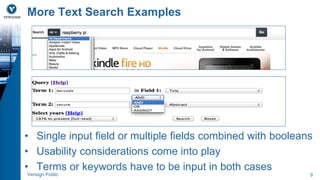
More Text Search Examples 
• Single input field or multiple fields combined with booleans 
• Usability considerations come into play 
• Terms or keywords have to be input in both cases 
Verisign Public 9
Text Search features: Summary 
• Term based search at fast speeds 
• index returns docs matching input terms fast 
• boolean AND, OR, NOT combinations can be used 
• Relevance 
• usually based on TF (frequency of the term in a document) and IDF 
(rarity of the term across all documents) 
• other factors can be incorporated if needed 
• Approximate matches 
• Stemming and Synonyms 
• Fuzzy matches and spelling auto-corrections 
Verisign Public 10
Inverted Index/ Text index 
• Helps in fast retrieval of documents matching terms 
• Index creating involves a good bit of processing 
• Different fields in a document can be indexed differently 
• Indexing is very closely tied to search queries 
• Text Engines can handle many indexes 
Verisign Public 11
Popular Java-based Text Search 
libraries and platforms 
Verisign Public 12
RDBMS Full-text Search components 
• Proprietary extensions to SQL to support text search 
• Pros: Single data source for Apps 
• Apps can interact with the database only 
• Cons: Limits on flexibility, portability and perhaps scalability 
Verisign Public 13
Typical Text Search App architecture 
• RelationalEntity – TextDoc mappings have to be done 
properly 
• Only a subset of data should go to text index 
• DB is primary datastore 
• Text searches always hit text index first 
Verisign Public 14
Location of the Text Search Engine 
• Library/plugin 
• Lucene 
• Hibernate Search 
• Database Full-text 
• Oracle Text 
• MySQL Full-text 
• Search servers 
• Solr 
• Elasticsearch 
Verisign Public 15
Relation Databases vs Text 
Engines 
Verisign Public 16
RDBMS vs Text Engine: Structural Mismatch 
• Relational databases 
• many data types 
• tables represent entities 
• entities have relationships between them 
• normalized schema and joins 
• Text engines 
• fundamentally only type is string 
• flat documents 
• no relationships between documents 
• joins between documents are not supported 
• Relationships have to be flattened and embedded into text documents 
• duplication of data 
• can be difficult to implement 
• relationships can be complex and 2-way too 
Verisign Public 17
RDBMS vs Text Engine: Sync Mismatch 
• Data updates have to be performed in two different places 
• RDBMS and Text Engine 
• Structural mismatch can make this fragile 
• change to a single entity can affect many documents 
• updates occur from many places in the app 
• Text engines are not transactional like RDBMS 
• Not all Text Engines are near real-time capable 
• Elasticsearch focuses on near real-time updates 
• “commit” for Text engines is expensive 
Verisign Public 18
RDBMS vs Text Engine: Retrieval Mismatch 
• Text Engine should typically have only a subset of the full 
data 
• Text index is not a database 
• Too much data in the index makes it slow 
• Purpose of text index is to provide initial result page(s) 
• Document type plus entity primary key from the database 
uniquely identifies a document 
• Represents an entity (often partial) 
• Full details can be retrieved from database 
• Ideally should use at most a single database query per result view 
Verisign Public 19
Design Principles for Text 
Search Apps 
Verisign Public 20
Design Principles for Text Search apps 
• We consider regular web apps which have relational 
databases as the primary data source 
• User confidence in the search solution is vital 
• Some principles may require thinking that departs from 
traditional database apps 
Verisign Public 21
P1: The most basic searches must work perfectly 
first 
Problem: If the app does not return good results for the basic 
cases, users will lose faith very easily. 
• E.g.: If an exact Title is entered, user certainly expects it to be 
listed right on top 
• Stemming, synonyms etc. must not jeopardize exact matches 
• Precision is more important than recall 
• Test cases should cover these elaborately 
• Make it clear to users that matches are primarily keyword based 
Verisign Public 22
P2: Text Indexes should be used for all applicable 
views of the data (1/2) 
Problem: Sync mismatch can cause loss of confidence 
since data showing up in the tables may not be showing up 
in searches. 
• The data mismatch may arise due to regular indexing 
delays or application bugs. 
• Avoid views built directly from the database tables while 
bypassing the text index 
• Detection of indexing issues/errors happens early 
• corrective action can be taken fast 
Verisign Public 23
P2: Text Indexes should be used for all applicable 
views of the data (2/2) 
• Admin views can have a secondary option to look up the 
database directly in case of problems 
• Elasticsearch and latest versions of Solr strive to make 
index updates available in near real-time 
Verisign Public 24
P3: Accommodate regular Text index re-creation 
(1/2) 
Problem: Index re-creation can be time consuming and 
involve application downtime. 
• Improvements and enhancements to text search typically require full 
index re-creation. 
• Text indexes may also get out of sync with the primary database 
store due to errors and bugs. 
• Text indexes are not as resilient or robust as databases with respect 
to durability. 
Verisign Public 25
P3: Accommodate regular Text index re-creation 
(2/2) 
• Embrace the need for full index re-creation 
• Devise ways to do it smoothly on demand and regularly 
• Strategy 1: Keep alternate indexes in active/passive. 
Periodically, 
• re-create the passive and switch it to active mode 
• switch the old active to passive mode (to be re-created next) 
• Strategy 2: Store timestamp for every doc at indexing time 
• re-index all documents using the database data 
• Remove all docs with timestamp older than the re-index start time 
Verisign Public 26
P4: Indexing and Searches are closely tied - think of 
both together 
Problem: Enhancements are needed to the search. Addition 
of more searchable data is breaking older stuff. 
• Unlike in the database, index updates are strongly coupled 
to the types of queries 
• not viable to do data modeling work first and think of queries later 
• Strive to limit the amount of indexed data 
• Bulk indexing is much slower than bulk database loads 
• Scale out the search servers as data grows 
• Performance testing is needed with a focus on frequent searches 
Verisign Public 27
P5: Avoid treating the Text Engine as a relational 
store 
Problem: Searches have become really slow as the data has 
grown. Each subsequent page also takes a long time to load. 
• Anti-pattern: Direct one-to-one table to doc mapping with “joins” 
inside the App 
• Text engines are not relational databases 
• App joins will tend to collapse as data grows, they may involve many 
Text engine queries 
• Strive to make the summary results load directly from the Text 
Engine 
• Initial results list page should have minimal fields 
• Only minimum essential fields have to be in the index 
• Avoid sorts on many fields, consider faceting instead 
Verisign Public 28
P6: Avoid wildcards in user input (1/2) 
Problem: Users are not fully satisfied with keyword based 
matches. They want partial matches within the keywords too. 
• Search engines allow wildcards but there are major pitfalls 
• Relevance is lost, results are returned in arbitrary order similar to 
SQL “like” or grep 
• If stemming is in use, stems and not the original terms are in 
present the index. So wildcards may not give expected matches 
• E.g. management has Porter stem manag which is what gets into the 
index. So it no longer matches the wildcard pattern manage* 
Verisign Public 29
P6: Avoid wildcards in user input (2/2) 
• Make use of auto-suggestion on a small number of 
important fields as the user types the input 
• Tends to be quite performant and lightweight if implemented 
properly 
• Can usually be implemented with edge n-grams for prefix matches 
• Try to avoid full n-grams for arbitrary substring matches 
• Number of edge n-grams is O(L), number of full n-grams is O(L2) 
Verisign Public 30
Popular form of Auto-suggestion today 
Verisign Public 31
P7: Analyze and improve 
Problem: Things are evolving rapidly and data volumes are 
increasing. It is hard to keep pace and improve performance 
and user experience. 
• Logs should be regularly analyzed for user behavior 
• Performance testing needs to be done at higher loads 
• Platform upgrades may be a reality 
• Rate-limiting needs to be implemented 
• But changes need to be resisted too … 
Verisign Public 32
Conclusion 
• Text search is still evolving rapidly 
• Lucene is 12+ years old but is still very active 
• along with Solr and Elasticsearch 
• Cloud apps and high traffic websites need to scale up 
constantly 
• Relational databases backends are not going away soon 
• Good Text search designs will continue help 
• Enterprise search is now expanding to real-time analytics 
Verisign Public 33
References 
• Hibernate Search in Action, Manning Publishers 
• http://www.elasticsearch.org 
• http://www.lucidworks.com/ 
Verisign Public 34
Thank You 
© 2013 VeriSign, Inc. All rights reserved. VERISIGN and other trademarks, service marks, and 
designs are registered or unregistered trademarks of VeriSign, Inc. and its subsidiaries in the United 
States and in foreign countries. All other trademarks are property of their respective owners.

Make Text Search "Work" for Your Apps - JavaOne 2013

  • 1.
    Java One 2013 Java One 2013 Make Text Search “Work” for your Apps Anirban Mukherjee amukherjee@verisign.com Manish Maheshwari mmaheshwari@verisign.com 08-May-2013
  • 2.
    Speakers Anirban SoftwareArchitect, Verisign Manish Software Architect, Verisign Verisign Public 2
  • 3.
    Agenda • Overviewof Text Search • What is Text Search • Differences from traditional database search • Text Search implementation for regular web applications • Relational Databases vs Text Search Engines • Recommended design principles Verisign Public 3
  • 4.
    Overview of TextSearch Verisign Public 4
  • 5.
    What is TextSearch (1/2) • Also called Full-text search • Enter a few keywords • Get results fast with most relevant matches on top • Can work well on unstructured information • Documents e.g. resumes, papers • Free text fields like Titles and Descriptions • Non-exact or approximate matches may be returned Verisign Public 5
  • 6.
    What is TextSearch (2/2) • Origins in document processing systems and web search • Now a de-facto requirement for regular web applications • Enterprise applications • Cloud apps / SaaS solutions for Enterprises • Expanding into Real-time analytics • We will focus on apps with relational database stores • Unique challenges • Don’t fit Text engines as naturally as Document oriented data stores • Frequent entity modifications are usually involved Verisign Public 6
  • 7.
    Lookup-style search: Example • Explicit fields • No relevance ranking for results • Traditional RDBMS style implementation using SQL • Wildcards can be used for partial matches (uses SQL “like”) • Limits on results, pagination often absent Verisign Public 7
  • 8.
    Text Search: Example • No explicit fields specified in input (may be present in Advanced Search) • Keyword based operation • Results are ordered by relevance and paginated • No need to use wildcards • Auto-suggestion is often present while typing input keywords Verisign Public 8
  • 9.
    More Text SearchExamples • Single input field or multiple fields combined with booleans • Usability considerations come into play • Terms or keywords have to be input in both cases Verisign Public 9
  • 10.
    Text Search features:Summary • Term based search at fast speeds • index returns docs matching input terms fast • boolean AND, OR, NOT combinations can be used • Relevance • usually based on TF (frequency of the term in a document) and IDF (rarity of the term across all documents) • other factors can be incorporated if needed • Approximate matches • Stemming and Synonyms • Fuzzy matches and spelling auto-corrections Verisign Public 10
  • 11.
    Inverted Index/ Textindex • Helps in fast retrieval of documents matching terms • Index creating involves a good bit of processing • Different fields in a document can be indexed differently • Indexing is very closely tied to search queries • Text Engines can handle many indexes Verisign Public 11
  • 12.
    Popular Java-based TextSearch libraries and platforms Verisign Public 12
  • 13.
    RDBMS Full-text Searchcomponents • Proprietary extensions to SQL to support text search • Pros: Single data source for Apps • Apps can interact with the database only • Cons: Limits on flexibility, portability and perhaps scalability Verisign Public 13
  • 14.
    Typical Text SearchApp architecture • RelationalEntity – TextDoc mappings have to be done properly • Only a subset of data should go to text index • DB is primary datastore • Text searches always hit text index first Verisign Public 14
  • 15.
    Location of theText Search Engine • Library/plugin • Lucene • Hibernate Search • Database Full-text • Oracle Text • MySQL Full-text • Search servers • Solr • Elasticsearch Verisign Public 15
  • 16.
    Relation Databases vsText Engines Verisign Public 16
  • 17.
    RDBMS vs TextEngine: Structural Mismatch • Relational databases • many data types • tables represent entities • entities have relationships between them • normalized schema and joins • Text engines • fundamentally only type is string • flat documents • no relationships between documents • joins between documents are not supported • Relationships have to be flattened and embedded into text documents • duplication of data • can be difficult to implement • relationships can be complex and 2-way too Verisign Public 17
  • 18.
    RDBMS vs TextEngine: Sync Mismatch • Data updates have to be performed in two different places • RDBMS and Text Engine • Structural mismatch can make this fragile • change to a single entity can affect many documents • updates occur from many places in the app • Text engines are not transactional like RDBMS • Not all Text Engines are near real-time capable • Elasticsearch focuses on near real-time updates • “commit” for Text engines is expensive Verisign Public 18
  • 19.
    RDBMS vs TextEngine: Retrieval Mismatch • Text Engine should typically have only a subset of the full data • Text index is not a database • Too much data in the index makes it slow • Purpose of text index is to provide initial result page(s) • Document type plus entity primary key from the database uniquely identifies a document • Represents an entity (often partial) • Full details can be retrieved from database • Ideally should use at most a single database query per result view Verisign Public 19
  • 20.
    Design Principles forText Search Apps Verisign Public 20
  • 21.
    Design Principles forText Search apps • We consider regular web apps which have relational databases as the primary data source • User confidence in the search solution is vital • Some principles may require thinking that departs from traditional database apps Verisign Public 21
  • 22.
    P1: The mostbasic searches must work perfectly first Problem: If the app does not return good results for the basic cases, users will lose faith very easily. • E.g.: If an exact Title is entered, user certainly expects it to be listed right on top • Stemming, synonyms etc. must not jeopardize exact matches • Precision is more important than recall • Test cases should cover these elaborately • Make it clear to users that matches are primarily keyword based Verisign Public 22
  • 23.
    P2: Text Indexesshould be used for all applicable views of the data (1/2) Problem: Sync mismatch can cause loss of confidence since data showing up in the tables may not be showing up in searches. • The data mismatch may arise due to regular indexing delays or application bugs. • Avoid views built directly from the database tables while bypassing the text index • Detection of indexing issues/errors happens early • corrective action can be taken fast Verisign Public 23
  • 24.
    P2: Text Indexesshould be used for all applicable views of the data (2/2) • Admin views can have a secondary option to look up the database directly in case of problems • Elasticsearch and latest versions of Solr strive to make index updates available in near real-time Verisign Public 24
  • 25.
    P3: Accommodate regularText index re-creation (1/2) Problem: Index re-creation can be time consuming and involve application downtime. • Improvements and enhancements to text search typically require full index re-creation. • Text indexes may also get out of sync with the primary database store due to errors and bugs. • Text indexes are not as resilient or robust as databases with respect to durability. Verisign Public 25
  • 26.
    P3: Accommodate regularText index re-creation (2/2) • Embrace the need for full index re-creation • Devise ways to do it smoothly on demand and regularly • Strategy 1: Keep alternate indexes in active/passive. Periodically, • re-create the passive and switch it to active mode • switch the old active to passive mode (to be re-created next) • Strategy 2: Store timestamp for every doc at indexing time • re-index all documents using the database data • Remove all docs with timestamp older than the re-index start time Verisign Public 26
  • 27.
    P4: Indexing andSearches are closely tied - think of both together Problem: Enhancements are needed to the search. Addition of more searchable data is breaking older stuff. • Unlike in the database, index updates are strongly coupled to the types of queries • not viable to do data modeling work first and think of queries later • Strive to limit the amount of indexed data • Bulk indexing is much slower than bulk database loads • Scale out the search servers as data grows • Performance testing is needed with a focus on frequent searches Verisign Public 27
  • 28.
    P5: Avoid treatingthe Text Engine as a relational store Problem: Searches have become really slow as the data has grown. Each subsequent page also takes a long time to load. • Anti-pattern: Direct one-to-one table to doc mapping with “joins” inside the App • Text engines are not relational databases • App joins will tend to collapse as data grows, they may involve many Text engine queries • Strive to make the summary results load directly from the Text Engine • Initial results list page should have minimal fields • Only minimum essential fields have to be in the index • Avoid sorts on many fields, consider faceting instead Verisign Public 28
  • 29.
    P6: Avoid wildcardsin user input (1/2) Problem: Users are not fully satisfied with keyword based matches. They want partial matches within the keywords too. • Search engines allow wildcards but there are major pitfalls • Relevance is lost, results are returned in arbitrary order similar to SQL “like” or grep • If stemming is in use, stems and not the original terms are in present the index. So wildcards may not give expected matches • E.g. management has Porter stem manag which is what gets into the index. So it no longer matches the wildcard pattern manage* Verisign Public 29
  • 30.
    P6: Avoid wildcardsin user input (2/2) • Make use of auto-suggestion on a small number of important fields as the user types the input • Tends to be quite performant and lightweight if implemented properly • Can usually be implemented with edge n-grams for prefix matches • Try to avoid full n-grams for arbitrary substring matches • Number of edge n-grams is O(L), number of full n-grams is O(L2) Verisign Public 30
  • 31.
    Popular form ofAuto-suggestion today Verisign Public 31
  • 32.
    P7: Analyze andimprove Problem: Things are evolving rapidly and data volumes are increasing. It is hard to keep pace and improve performance and user experience. • Logs should be regularly analyzed for user behavior • Performance testing needs to be done at higher loads • Platform upgrades may be a reality • Rate-limiting needs to be implemented • But changes need to be resisted too … Verisign Public 32
  • 33.
    Conclusion • Textsearch is still evolving rapidly • Lucene is 12+ years old but is still very active • along with Solr and Elasticsearch • Cloud apps and high traffic websites need to scale up constantly • Relational databases backends are not going away soon • Good Text search designs will continue help • Enterprise search is now expanding to real-time analytics Verisign Public 33
  • 34.
    References • HibernateSearch in Action, Manning Publishers • http://www.elasticsearch.org • http://www.lucidworks.com/ Verisign Public 34
  • 35.
    Thank You ©2013 VeriSign, Inc. All rights reserved. VERISIGN and other trademarks, service marks, and designs are registered or unregistered trademarks of VeriSign, Inc. and its subsidiaries in the United States and in foreign countries. All other trademarks are property of their respective owners.