
PatSeer Premier
The Complete Professional Patent Research, Analysis and Collaboration
Package!
About Us
 11 years of experience in Intellectual Property
Solutions
 Launched Patent iNSIGHT Pro in Jan 2006
and gained quick market acceptance to
achieve more than 400 users across
100+organisations globally
 Known for excellence in customer support
and willingness to adapt products to meet
varying customer needs
 Strong Customer references in key IP verticals
such as Pharmaceutical, Biotech, Electronics,
Medical Devices, IP services and Research
Labs.
 Strong Focus on R&D and continuous product
enhancements that solve greater challenges
and needs of IP professionals
 Track record for successful custom IP
Software development and delivery
Products
PatSeer
61 million+ Full Text Records
from 43 Patent Offices (US,EP,
WO, DE, FR, GB,JP,KR,CN,ES,
CA,CH,AT,AU,IN,BR,TH,RU,
PH, SE , NO,DK,FI,BE,NL,LU ,
MX,AP, CO, DD, EA, IL, MA,
MC, OA, TW, TJ, KG, AM, UZ,
MD, GE and PT)
DOCDB
109 million+
Biblio records
covering 104+
countries
INPADOC
56 million+
Families and
Legal Status
Normalized
Assignee
Names for Top
3000
Companies
Corporate Tree
for top 3000
patent holding
Corporate
Groups
US
Reassignments
and Maintenance
Data
Semantic Index of
Conceptually
Related Terms for
Search Assistance
PDFs, Mosaic,
Calculated
Fields and
more..
Searchable Full
Text English
Translations of
JP, KR, CN, FR,
DE, DK, FI, RU,
BE, NL, LU, TW
PatSeer Database Content
Value Added
Content
PatSeer Key Features - I
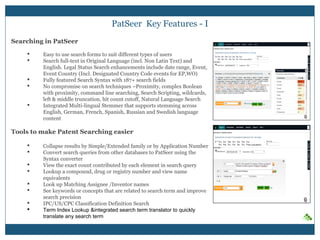
Searching in PatSeer
 Easy to use search forms to suit different types of users
 Search full-text in Original Language (incl. Non Latin Text) and
English. Legal Status Search enhancements include date range, Event,
Event Country (Incl. Designated Country Code events for EP,WO)
 Fully featured Search Syntax with 191+ search fields
 No compromise on search techniques –Proximity, complex Boolean
with proximity, command line searching, Search Scripting, wildcards,
left & middle truncation, hit count cutoff, Natural Language Search
 Integrated Multi-lingual Stemmer that supports stemming across
English, German, French, Spanish, Russian and Swedish language
content
Tools to make Patent Searching easier
 Collapse results by Simple/Extended family or by Application Number
 Convert search queries from other databases to PatSeer using the
Syntax converter
 View the exact count contributed by each element in search query
 Lookup a compound, drug or registry number and view name
equivalents
 Look up Matching Assignee /Inventor names
 See keywords or concepts that are related to search term and improve
search precision
 IPC/US/CPC Classification Definition Search
 Term Index Lookup &integrated search term translator to quickly
translate any search term
Viewing Results
 Different views to scan through large result sets or dig deeper into details
of each record
 Filter result set using filters to narrow down results with ease
 Multiple Detailed views of records can be opened in separate window
tabs to allow for easy comparison
 Integrated links to PDF, image mosaics, legal status, register data
 Key Concepts which give a quick idea of important concepts covered in
the text
 Live translator to translate all non-English claims to English
Analyzing Results
 Visualize the relationships between all the publications that result from
the original application using the Family Tree
 Instantly search for records that are similar to a particular records using
co-citation analysis
 Analyze search results via multi-dimensional charts
(column/line/pie/area/bubble/heatmap/geographical map)
 Generate multi and cross dimensional charts/tables using our unique
first-in-industry chart layering technology
 View forward and backward citations of records in a tree format
 Topics Chart to visualize hierarchical topics data, depicted by concentric
circles
PatSeer Key Features - II
Sharing and Collaborating using PatSeer Projects
 Save and analyze up to 70K records in a project
 Import your Meta data from CSV /Excel files
 Import external records/ journals/ non-patent literature from list of
supported files.
 Leverage flags, ratings, custom fields, hierarchical categories to add
context to your analysis
 Share and Collaborate project data effectively using Patent Dashlets™
Exporting Results
 Multiple Export formats including Word/Excel/CSV/PDF/XML/Patent
iNSIGHT Pro format
 Charts can also be included in Word and Excel exports
 Export all the family members for each record instead of just the record
in the result set when working with SFAM/EFAM deduped results sets
 Export the publication number of the record as per the format followed
by its respective patent office
Monitoring and Alerts
 Create weekly or monthly search alerts
 Setup Record Monitors to track changes to any record
 Receive record details of each alerts result in the form of
Word/Excel/CSV and XML files
PatSeer Key Features - III
So ……………… Why PatSeer ?
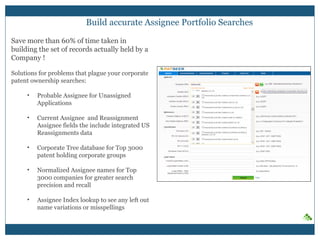
Build accurate Assignee Portfolio Searches
Save more than 60% of time taken in
building the set of records actually held by a
Company !
Solutions for problems that plague your corporate
patent ownership searches:
• Probable Assignee for Unassigned
Applications
• Current Assignee and Reassignment
Assignee fields the include integrated US
Reassignments data
• Corporate Tree database for Top 3000
patent holding corporate groups
• Normalized Assignee names for Top
3000 companies for greater search
precision and recall
• Assignee Index lookup to see any left out
name variations or misspellings
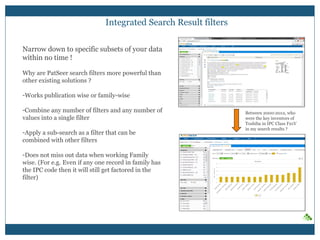
Integrated Search Result filters
Narrow down to specific subsets of your data
within no time !
Why are PatSeer search filters more powerful than
other existing solutions ?
- Works publication wise or family-wise
- Combine any number of filters and any number
of values into a single filter
- Apply a sub-search as a filter that can be
combined with other filters
- Does not miss out data when working Family
wise. (For e.g. Even if any one record in family
has the IPC code then it will still get factored in
the filter)
Between 2000-2012, who
were the key inventors of
Toshiba in IPC Class F21V
in my search results ?
“Hybrid” Patent Database – Now you can analyze online with confidence !
PatSeer integrates a dual-family
definitions engine and a publication
based engine at search level itself to
combine the benefits of both
databases and offer you full flexibility
in how you search, display and view
your result-set.
Benefits:
• No need to export result everytime to
gather precise insights
• Capability to decide which record shows
up in your results view when searching
by family
• Flexibility to choose the type of
underlying engine most suited for your
task
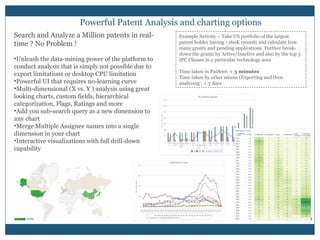
Powerful Patent Analysis and charting options
Search and Analyze a Million patents in
real-time ? No Problem !
• Unleash the data-mining power of the platform
to conduct analysis that is simply not possible
due to export limitations or desktop CPU
limitation
• Powerful UI that requires no-learning curve
• Multi-dimensional (X vs. Y ) analysis using
great looking charts, custom fields, hierarchical
categorization, Flags, Ratings and more
• Add you sub-search query as a new dimension
to any chart
• Merge Multiple Assignee names into a single
dimension in your chart
• Interactive visualizations with full drill-down
capability
Example Activity – Take US portfolio of the largest
patent holder having >160K records and calculate how
many grants and pending applications. Further break-
down the grants by Active/Inactive and also by the top 3
IPC Classes in a particular technology area
Time taken in PatSeer: < 3 minutes
Time taken by other means (Exporting and then
analyzing : > 3 days
PatSeer Projects are not Folders !
• Not just folders where you would put some patents and analyze or export them.
• PatSeer Projects is where you invite collaborators ( external search firm, counsels), setup business
dashboards for R&D/management , create workflows for ongoing tasks and get work done !
Sample Corporate User Scenario –
FTO analysis for invention in Germany
• User Creates Project and add all related
records to it
• User shares project with external search
agency to review and add missing records to
the project
• Once all relevant records added user removes
access from search agency
• User adds custom fields such as R&D
Rating/Comments, Counsel Rating/Comments
• User shares project with R&D team member -
Only key biblio fields, Images and R&D
rating/comments shared
• User shares project with Counsel - both R&D
fields and counsel fields shared
• R&D member cant see counsel fields Counsel
cant see other project fields the user may have
created.
• User compiles the results and creates a
management dashboard with analysis of
rating/comments.
Sample Service Provider User Scenario -
Competitive Monitoring for a client
• User Creates Project and add all related
records to it
• User created custom hierarchical
taxonomy(buckets) and categorizes records
around it
• User adds ratings as per project needs
• User saves charts and other analysis within
project
• User creates a dashboard (Patent Dashlet™)
summarizing the output
• User shares project with client
• User keep project and dashboard updated
over the year with the client being able to see
new records added and new analysis done
• Docs/Images and other attachments also
saved within the project
PatSeer Projects – Bring organizational context to your insights
Create your organizational
taxonomy, import your custom
metadata and make your analysis
more business relevant.
• Hierarchical Categorization - No
limit on number of categories
• Custom Flags and Rating
• Unlimited Custom Fields of 9
different types to suit all types of
needs
• Generate multi-dimensional charts
and heatmap tables with ease
using all the custom metadata
NFC Applications
Patent Dashlets®
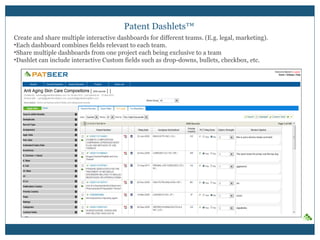
Create and share multiple interactive dashboards for different teams. (E.g. legal, marketing).
• Each dashboard combines fields relevant to each team.
• Share multiple dashboards from one project each being exclusive to a team
• Dashlet can include interactive Custom fields such as drop-downs, bullets, checkbox, etc.
Collaboration and Security
Share platform and not just data !
• Share projects with anyone (who need not be a subscriber)
• Control what the other person can view and how he or she can interact with the project data
• Prevent one shared user from seeing other shared user’s data
• Limit viewing of a shared user to only a subset of records in a project
• Per –record Multi-user commenting, attachments and more !
Rapid user feedback incorporation
In 2014 alone, around 148 different feedback requests were incorporated across the various
PatSeer releases that came out during the year. That translates to implementing nearly three
feedback requests a week!
How to take a trial?
PatSeer provides two week, no-obligation free trials and can also arrange for web-based demos.
These demos can include a live case study on a custom technology area, which can help
showcase the benefits of the solutions in a familiar context. Interested users can
sign up at www.patseer.com.
PatSeer Customer Testimonial
“We have been utilizing PatSeer for couple of years and find it to be very useful. It has a very
easy to use interface, and has enough customization to fit a variety of needs.
We have also been extremely pleased with the regular updates to the software and the seamless
service provided by Gridlogics. I would highly recommend this for anyone who manages a
patent portfolio or needs organized access to patent filings.”
- VP, Software Company
Try PatSeer to see for yourself !
sales@patseer.com
US Tel: +1-866-716-1507
UK Tel: +44-20-3286-2301
Asia Pacific Tel: +91-22-3220-8312
www.patseer.com

PatSeer Premier Overview

  • 1.
    PatSeer Premier The CompleteProfessional Patent Research, Analysis and Collaboration Package!
  • 2.
    About Us  11years of experience in Intellectual Property Solutions  Launched Patent iNSIGHT Pro in Jan 2006 and gained quick market acceptance to achieve more than 400 users across 100+organisations globally  Known for excellence in customer support and willingness to adapt products to meet varying customer needs  Strong Customer references in key IP verticals such as Pharmaceutical, Biotech, Electronics, Medical Devices, IP services and Research Labs.  Strong Focus on R&D and continuous product enhancements that solve greater challenges and needs of IP professionals  Track record for successful custom IP Software development and delivery Products
  • 3.
    PatSeer 61 million+ FullText Records from 43 Patent Offices (US,EP, WO, DE, FR, GB,JP,KR,CN,ES, CA,CH,AT,AU,IN,BR,TH,RU, PH, SE , NO,DK,FI,BE,NL,LU , MX,AP, CO, DD, EA, IL, MA, MC, OA, TW, TJ, KG, AM, UZ, MD, GE and PT) DOCDB 109 million+ Biblio records covering 104+ countries INPADOC 56 million+ Families and Legal Status Normalized Assignee Names for Top 3000 Companies Corporate Tree for top 3000 patent holding Corporate Groups US Reassignments and Maintenance Data Semantic Index of Conceptually Related Terms for Search Assistance PDFs, Mosaic, Calculated Fields and more.. Searchable Full Text English Translations of JP, KR, CN, FR, DE, DK, FI, RU, BE, NL, LU, TW PatSeer Database Content Value Added Content
  • 4.
    PatSeer Key Features- I Searching in PatSeer  Easy to use search forms to suit different types of users  Search full-text in Original Language (incl. Non Latin Text) and English. Legal Status Search enhancements include date range, Event, Event Country (Incl. Designated Country Code events for EP,WO)  Fully featured Search Syntax with 191+ search fields  No compromise on search techniques –Proximity, complex Boolean with proximity, command line searching, Search Scripting, wildcards, left & middle truncation, hit count cutoff, Natural Language Search  Integrated Multi-lingual Stemmer that supports stemming across English, German, French, Spanish, Russian and Swedish language content Tools to make Patent Searching easier  Collapse results by Simple/Extended family or by Application Number  Convert search queries from other databases to PatSeer using the Syntax converter  View the exact count contributed by each element in search query  Lookup a compound, drug or registry number and view name equivalents  Look up Matching Assignee /Inventor names  See keywords or concepts that are related to search term and improve search precision  IPC/US/CPC Classification Definition Search  Term Index Lookup &integrated search term translator to quickly translate any search term
  • 5.
    Viewing Results  Differentviews to scan through large result sets or dig deeper into details of each record  Filter result set using filters to narrow down results with ease  Multiple Detailed views of records can be opened in separate window tabs to allow for easy comparison  Integrated links to PDF, image mosaics, legal status, register data  Key Concepts which give a quick idea of important concepts covered in the text  Live translator to translate all non-English claims to English Analyzing Results  Visualize the relationships between all the publications that result from the original application using the Family Tree  Instantly search for records that are similar to a particular records using co-citation analysis  Analyze search results via multi-dimensional charts (column/line/pie/area/bubble/heatmap/geographical map)  Generate multi and cross dimensional charts/tables using our unique first-in-industry chart layering technology  View forward and backward citations of records in a tree format  Topics Chart to visualize hierarchical topics data, depicted by concentric circles PatSeer Key Features - II
  • 6.
    Sharing and Collaboratingusing PatSeer Projects  Save and analyze up to 70K records in a project  Import your Meta data from CSV /Excel files  Import external records/ journals/ non-patent literature from list of supported files.  Leverage flags, ratings, custom fields, hierarchical categories to add context to your analysis  Share and Collaborate project data effectively using Patent Dashlets™ Exporting Results  Multiple Export formats including Word/Excel/CSV/PDF/XML/Patent iNSIGHT Pro format  Charts can also be included in Word and Excel exports  Export all the family members for each record instead of just the record in the result set when working with SFAM/EFAM deduped results sets  Export the publication number of the record as per the format followed by its respective patent office Monitoring and Alerts  Create weekly or monthly search alerts  Setup Record Monitors to track changes to any record  Receive record details of each alerts result in the form of Word/Excel/CSV and XML files PatSeer Key Features - III
  • 7.
  • 8.
    Build accurate AssigneePortfolio Searches Save more than 60% of time taken in building the set of records actually held by a Company ! Solutions for problems that plague your corporate patent ownership searches: • Probable Assignee for Unassigned Applications • Current Assignee and Reassignment Assignee fields the include integrated US Reassignments data • Corporate Tree database for Top 3000 patent holding corporate groups • Normalized Assignee names for Top 3000 companies for greater search precision and recall • Assignee Index lookup to see any left out name variations or misspellings
  • 9.
    Integrated Search Resultfilters Narrow down to specific subsets of your data within no time ! Why are PatSeer search filters more powerful than other existing solutions ? - Works publication wise or family-wise - Combine any number of filters and any number of values into a single filter - Apply a sub-search as a filter that can be combined with other filters - Does not miss out data when working Family wise. (For e.g. Even if any one record in family has the IPC code then it will still get factored in the filter) Between 2000-2012, who were the key inventors of Toshiba in IPC Class F21V in my search results ?
  • 10.
    “Hybrid” Patent Database– Now you can analyze online with confidence ! PatSeer integrates a dual-family definitions engine and a publication based engine at search level itself to combine the benefits of both databases and offer you full flexibility in how you search, display and view your result-set. Benefits: • No need to export result everytime to gather precise insights • Capability to decide which record shows up in your results view when searching by family • Flexibility to choose the type of underlying engine most suited for your task
  • 11.
    Powerful Patent Analysisand charting options Search and Analyze a Million patents in real-time ? No Problem ! • Unleash the data-mining power of the platform to conduct analysis that is simply not possible due to export limitations or desktop CPU limitation • Powerful UI that requires no-learning curve • Multi-dimensional (X vs. Y ) analysis using great looking charts, custom fields, hierarchical categorization, Flags, Ratings and more • Add you sub-search query as a new dimension to any chart • Merge Multiple Assignee names into a single dimension in your chart • Interactive visualizations with full drill-down capability Example Activity – Take US portfolio of the largest patent holder having >160K records and calculate how many grants and pending applications. Further break- down the grants by Active/Inactive and also by the top 3 IPC Classes in a particular technology area Time taken in PatSeer: < 3 minutes Time taken by other means (Exporting and then analyzing : > 3 days
  • 12.
    PatSeer Projects arenot Folders ! • Not just folders where you would put some patents and analyze or export them. • PatSeer Projects is where you invite collaborators ( external search firm, counsels), setup business dashboards for R&D/management , create workflows for ongoing tasks and get work done ! Sample Corporate User Scenario – FTO analysis for invention in Germany • User Creates Project and add all related records to it • User shares project with external search agency to review and add missing records to the project • Once all relevant records added user removes access from search agency • User adds custom fields such as R&D Rating/Comments, Counsel Rating/Comments • User shares project with R&D team member - Only key biblio fields, Images and R&D rating/comments shared • User shares project with Counsel - both R&D fields and counsel fields shared • R&D member cant see counsel fields Counsel cant see other project fields the user may have created. • User compiles the results and creates a management dashboard with analysis of rating/comments. Sample Service Provider User Scenario - Competitive Monitoring for a client • User Creates Project and add all related records to it • User created custom hierarchical taxonomy(buckets) and categorizes records around it • User adds ratings as per project needs • User saves charts and other analysis within project • User creates a dashboard (Patent Dashlet™) summarizing the output • User shares project with client • User keep project and dashboard updated over the year with the client being able to see new records added and new analysis done • Docs/Images and other attachments also saved within the project
  • 13.
    PatSeer Projects –Bring organizational context to your insights Create your organizational taxonomy, import your custom metadata and make your analysis more business relevant. • Hierarchical Categorization - No limit on number of categories • Custom Flags and Rating • Unlimited Custom Fields of 9 different types to suit all types of needs • Generate multi-dimensional charts and heatmap tables with ease using all the custom metadata NFC Applications
  • 14.
    Patent Dashlets® Create andshare multiple interactive dashboards for different teams. (E.g. legal, marketing). • Each dashboard combines fields relevant to each team. • Share multiple dashboards from one project each being exclusive to a team • Dashlet can include interactive Custom fields such as drop-downs, bullets, checkbox, etc.
  • 15.
    Collaboration and Security Shareplatform and not just data ! • Share projects with anyone (who need not be a subscriber) • Control what the other person can view and how he or she can interact with the project data • Prevent one shared user from seeing other shared user’s data • Limit viewing of a shared user to only a subset of records in a project • Per –record Multi-user commenting, attachments and more !
  • 16.
    Rapid user feedbackincorporation In 2014 alone, around 148 different feedback requests were incorporated across the various PatSeer releases that came out during the year. That translates to implementing nearly three feedback requests a week! How to take a trial? PatSeer provides two week, no-obligation free trials and can also arrange for web-based demos. These demos can include a live case study on a custom technology area, which can help showcase the benefits of the solutions in a familiar context. Interested users can sign up at www.patseer.com. PatSeer Customer Testimonial “We have been utilizing PatSeer for couple of years and find it to be very useful. It has a very easy to use interface, and has enough customization to fit a variety of needs. We have also been extremely pleased with the regular updates to the software and the seamless service provided by Gridlogics. I would highly recommend this for anyone who manages a patent portfolio or needs organized access to patent filings.” - VP, Software Company
  • 17.
    Try PatSeer tosee for yourself ! sales@patseer.com US Tel: +1-866-716-1507 UK Tel: +44-20-3286-2301 Asia Pacific Tel: +91-22-3220-8312 www.patseer.com