A Buyer’s Guide
for Selecting Patent Search and Analysis Software
Introduction: The Changing
Role of Patent Data
Why are Patents So Pivotal?
What is the IP Lifecycle…and Where
is Your Analysis Focused?	
Which Options are Available to
Search and Analyze Patents?
	
How This Guide Can Help
Data Coverage and Quality:
The Building Blocks of a Solid
Patent Search
Types of Patent Literature: What Are
They and Why Are They Important?
Data Coverage
Data Quality	
Data Correlation	
Non-Patent Literature (NPL)
Search Methods: Great Search
Results Are Foundational to
Great Analysis
Misleading Verbiage: Can You Guess
What This Patent is For?
Search Types	
Prioritizing Your Results for
Maximum Benefit	
What You Need Determines
How You Search
Visualizations and Reporting:
Moving Beyond Basic Search
Results
Results that are Easy to Customize	
Graphics that are Easy to Understand	
Visualizations that are Easy to Share
Software Usability:
Accelerating Your Analysis	
Ease of Use for a Variety of Skill Levels	
Ease of In-Tool Collaboration	
Speed: Delivering the Result Set	
Service Quality:
Cultivating the Partnership
Onboarding	
Ongoing Support	
Software and Feature Enhancements	
Pulling it all Together:
Rankings and Ratings
A Model for Rankings and Ratings	
In Summary
Addendum: The Expected
Payback for IP Analysis Software
3
4
6
7
9
10
11
14
15
16
18
19
20
24
25
28
29
30
32
Table of Contents
Introduction: The Changing
Role Of Patent Data
The purchase of Patent Search
and Analysis Software can be
daunting. As custodians of
patent strategy, Intellectual
Property Professionals consider
many factors, including data
coverage, search methods,
visualizations and reporting,
software usability, and
service quality. Paramount to
the decision, however, is to
understand the purpose of
the search and to whom the
information will be presented.
This Buyer’s Guide helps the
IP Professional determine how
to evaluate different vendors
by asking acute questions, and
provides a rating evaluation for
the vendors in consideration,
in order to truly make the
best decision when selecting
a Patent Search and Analysis
Software.
3
Why are Patents So Pivotal?
The analysis of patents yields
many results: the ability to spot
trends, to minimize litigation,
to guide research, to build
portfolios, all in an effort to
make better business decisions.
If you are struggling with the
purchase of an Intellectual
Property (IP) Analysis Software
program or service, or are re-
evaluating what you currently
employ, you are not alone. The
world may be getting smaller,
but the amount of patents
available only gets larger…and
the sources of data along with
it. How can you be confident
that your data is consistently
current and complete? Are
you positive that your patent
analysis incorporates the mise
en scène? Most importantly,
are you able to perform these
duties individually or do you
need help? Organizations
large and small the world over
use professional IP analysis
services and/or platforms to
support their patent analysis, in
a variety of ways.
“Patents are useful for competitive analysis and
technology trend analysis…Patents have always been
analyzed in R&D project management to assess competitive
position and to avoid infringement. Patent analysis is also a
valuable approach that uses patent data to derive information
about a particular industry or technology used in forecasting.”
Daim, T.U., Rueda, G., Martin, H. & Gerdsri, P.
“Forecasting emerging technologies: Use of bibliometrics and patent analysis.”
Technological Forecasting and Social Change (73, 2006) : 981-1012. Web. 12 April. 2016
View More Online >>
IP
LIFECYCLE
ACQUIRE
PROTECT
C
O
N
CEIVE PREPA
R
E
MONETIZE
4
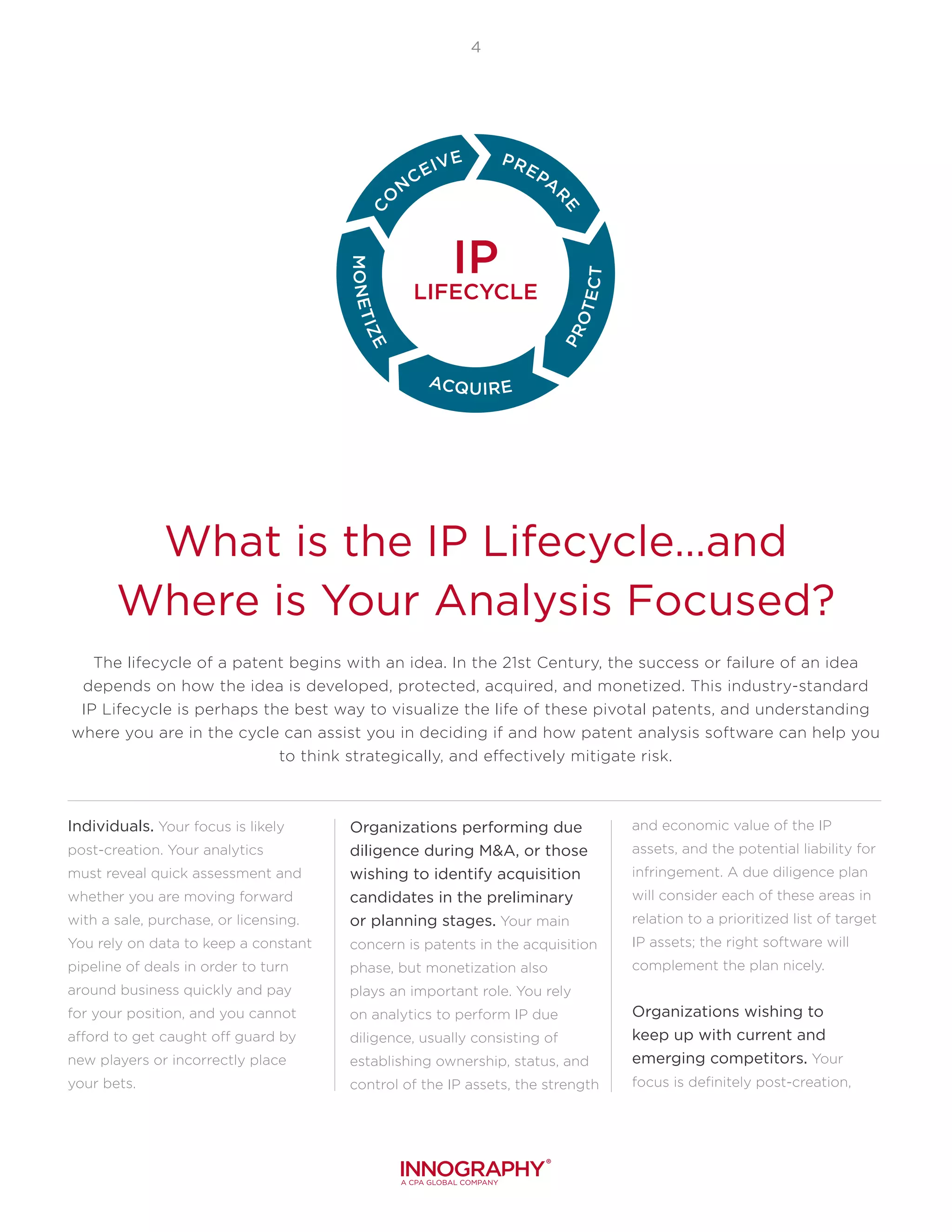
The lifecycle of a patent begins with an idea. In the 21st Century, the success or failure of an idea
depends on how the idea is developed, protected, acquired, and monetized. This industry-standard
IP Lifecycle is perhaps the best way to visualize the life of these pivotal patents, and understanding
where you are in the cycle can assist you in deciding if and how patent analysis software can help you
to think strategically, and effectively mitigate risk.
What is the IP Lifecycle…and
Where is Your Analysis Focused?
Individuals. Your focus is likely
post-creation. Your analytics
must reveal quick assessment and
whether you are moving forward
with a sale, purchase, or licensing.
You rely on data to keep a constant
pipeline of deals in order to turn
around business quickly and pay
for your position, and you cannot
afford to get caught off guard by
new players or incorrectly place
your bets.
Organizations performing due
diligence during M&A, or those
wishing to identify acquisition
candidates in the preliminary
or planning stages. Your main
concern is patents in the acquisition
phase, but monetization also
plays an important role. You rely
on analytics to perform IP due
diligence, usually consisting of
establishing ownership, status, and
control of the IP assets, the strength
and economic value of the IP
assets, and the potential liability for
infringement. A due diligence plan
will consider each of these areas in
relation to a prioritized list of target
IP assets; the right software will
complement the plan nicely.
Organizations wishing to
keep up with current and
emerging competitors. Your
focus is definitely post-creation,
"Wherever you see a successful business, someone
once made a courageous decision."
Peter Drucker
5
as you rely on analytics to reveal
trends in a variety of industries,
tip a company off regarding new
developments, as well as which
outside companies are swimming
close to boundaries with their
latest patent applications. Your
main concern is protection and
acquisition.
Larger, multi-national
corporations, ranging from
automakers to silicon valley
giants, protect products and
monetize their IP. Throw a dart,
and you will land on an applicable
part of the IP Lifecycle in your
team or organization. You will
have tens of thousands of patents,
will constantly be filing more
(and allowing some to expire),
and recognizing that others need
to be protected or enhanced for
monetization. Most likely you
will already be using a high-level,
professional analytics tool and/or
software.
Law firms and consulting firms
detecting litigation threats and
building protection for new IP.
From smaller patent attorneys to
nationally-ranked firms, you are
less concerned with concept and
the preparation of patents. You
are filing patent applications at a
record pace for your clients and
managing valuable intellectual
property rights via an IP
management system. Your clients
are increasingly looking to their
law firms to counsel them through
risk mitigation and explore ways
to develop, evolve, and expand
existing IP portfolios.
University technology transfer
offices (TTOs) or transfers of
technology (TOTs) seeking to
improve quality in research
by incorporating industry
partners, entrepreneurs and
investors. Your focus is the entire
IP Lifecycle, determining who
and what and where to facilitate
research. For many schools,
patents are a critical source of
both income and prestige, and the
achievement of optimal licensing
opportunities is key for the
success of their programs.
Small product companies
or product development
groups within a company
who discover technology
trends. Agile, new technology
development teams watch for
emerging competitors and identify
litigation risk. You also focus
on the IP Lifecycle as a whole,
maneuvering the white space
and uncovering new markets with
thorough searches and detailed
reporting.
6
Which Options Are Available To
Search And Analyze Patents?
Free/Low-Cost Patent
Search Tools
These provide basic search on
raw data and will not include data
corrections or the ability to see
a company’s current portfolio.
There will be limited language
consideration, no semantic
searching, narrow geographic and
jurisdictional coverage, and no
way to rank patents by quality or
importance. Free patent search tools
often have holes in the database,
security and privacy risks, and as
much as an 18-month lag in updated
listings due to priority settings.
Services Firms: Law Firms
and Consulting Firms
They perform custom IP
analysis projects for a fixed price
or hourly fee, where the output is
a report followed by a discussion
around the specific analysis
requested. This is an important
component when you are
interested in leveraging a
firms’ expertise about patent
information, analysis
techniques, and – sometimes –
their legal advice regarding
your specific
technology domain.
Patent Analytics
Platforms
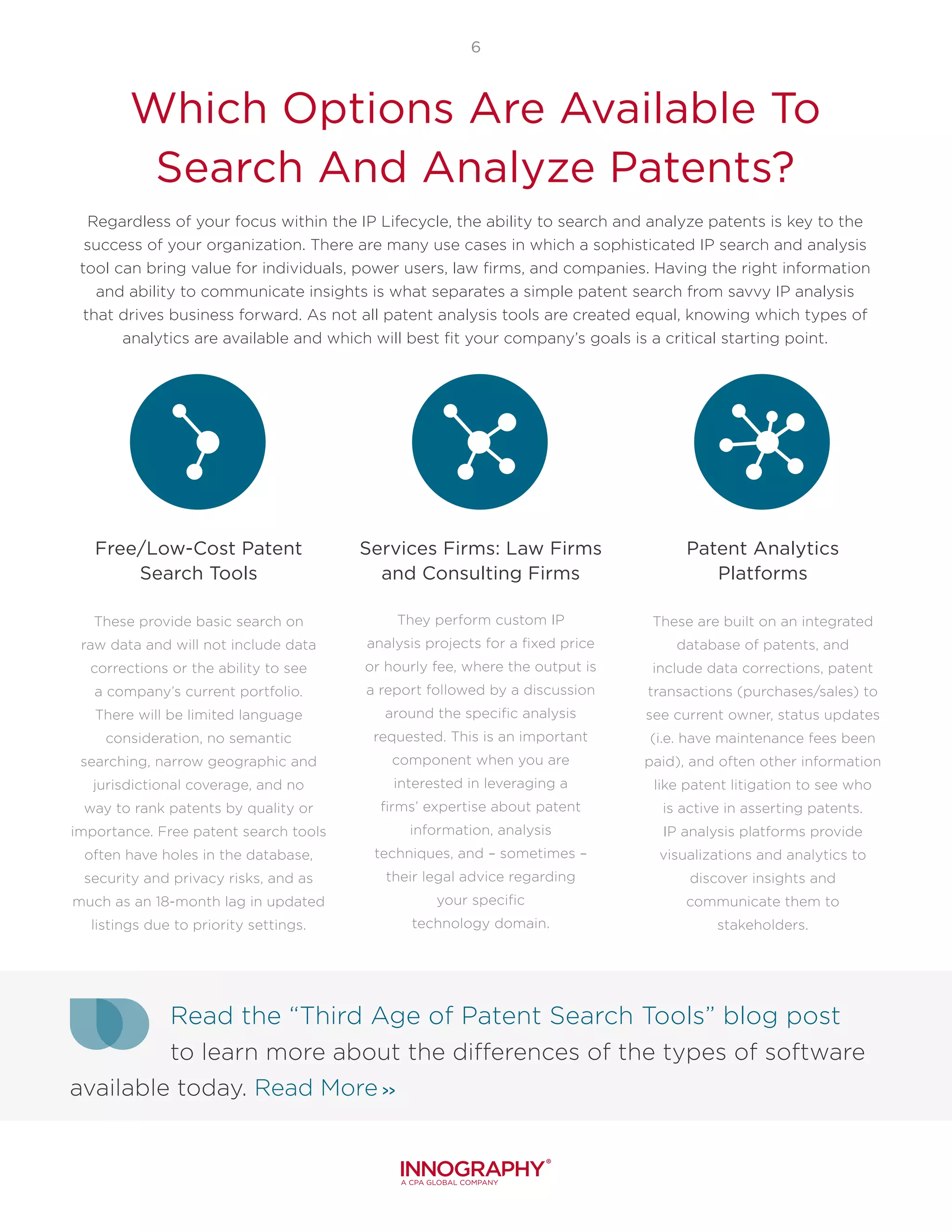
These are built on an integrated
database of patents, and
include data corrections, patent
transactions (purchases/sales) to
see current owner, status updates
(i.e. have maintenance fees been
paid), and often other information
like patent litigation to see who
is active in asserting patents.
IP analysis platforms provide
visualizations and analytics to
discover insights and
communicate them to
stakeholders.
Regardless of your focus within the IP Lifecycle, the ability to search and analyze patents is key to the
success of your organization. There are many use cases in which a sophisticated IP search and analysis
tool can bring value for individuals, power users, law firms, and companies. Having the right information
and ability to communicate insights is what separates a simple patent search from savvy IP analysis
that drives business forward. As not all patent analysis tools are created equal, knowing which types of
analytics are available and which will best fit your company’s goals is a critical starting point.
Read the “Third Age of Patent Search Tools” blog post
to learn more about the differences of the types of software
available today. Read More >>
7
How This Guide Can Help
The insights presented in this guide were cultivated over the last decade of experiences working with
thousands of professionals globally, including R&D experts, patent and product portfolio managers,
research analysts, general counsel, M&A professionals and more. This Buyer’s Guide is dedicated to aid
the evaluation of the software tools, capabilities, and services in the patent data and analytics market
and how to weigh them against your wish list and that of your organization.
Does all this seem like more than you need? Check out
our blog post “9 Things to Consider When Selecting IP
Analysis Software” for a slimmed down list of considerations.
Read the Blog >>
Not every section will be important to your
organization. Therefore, prioritize, use the checklist,
and work with key stakeholders to identify vital
areas and needs. At the end, there is a suggested
ratings framework to help keep track of what is
most relevant to your organization. The following
are the five areas covered in this guide:
Data Coverage and Quality
Search Methods
Visualizations and Reporting
Software Usability
Service Quality
3 = Must Have
2 = Nice to Have
1 = Could be Useful
0 = Not Required or Important
There is a sample evaluation at the end of each section,
or contact us now to request the downloadable version
of the IP Buyer‘s Guide Worksheet.
Please use the following guideline for rating as they apply
to your specific scenario:
Data Coverage and Quality:
The Building Blocks of a
Solid Patent Search
Your patent search data is built
on previously filed patents,
patent metadata, and non-
patent literature (NPL) from
jurisdictions around the world.
All of these documents combine
to form your patent document
library, the collection of which
illuminates the patent story
from beginning to end,
highlighting original and
current owners, previous and
potential litigation, and current
status in the IP Lifecycle. The
information is readily available
on many platforms, but what
is the coverage and quality of
the data provided? Is the data
correlated the way it needs to
be? Does the data come ready
for analysis or does it require
manual fixing and combining of
data sets to reach reasonable
conclusions? The service
provider you choose should
be prepared to answer these
questions in order to determine
if their solution will fit your
specific needs.
9
Types of Patent Literature: What Are
They and Why Are They Important?
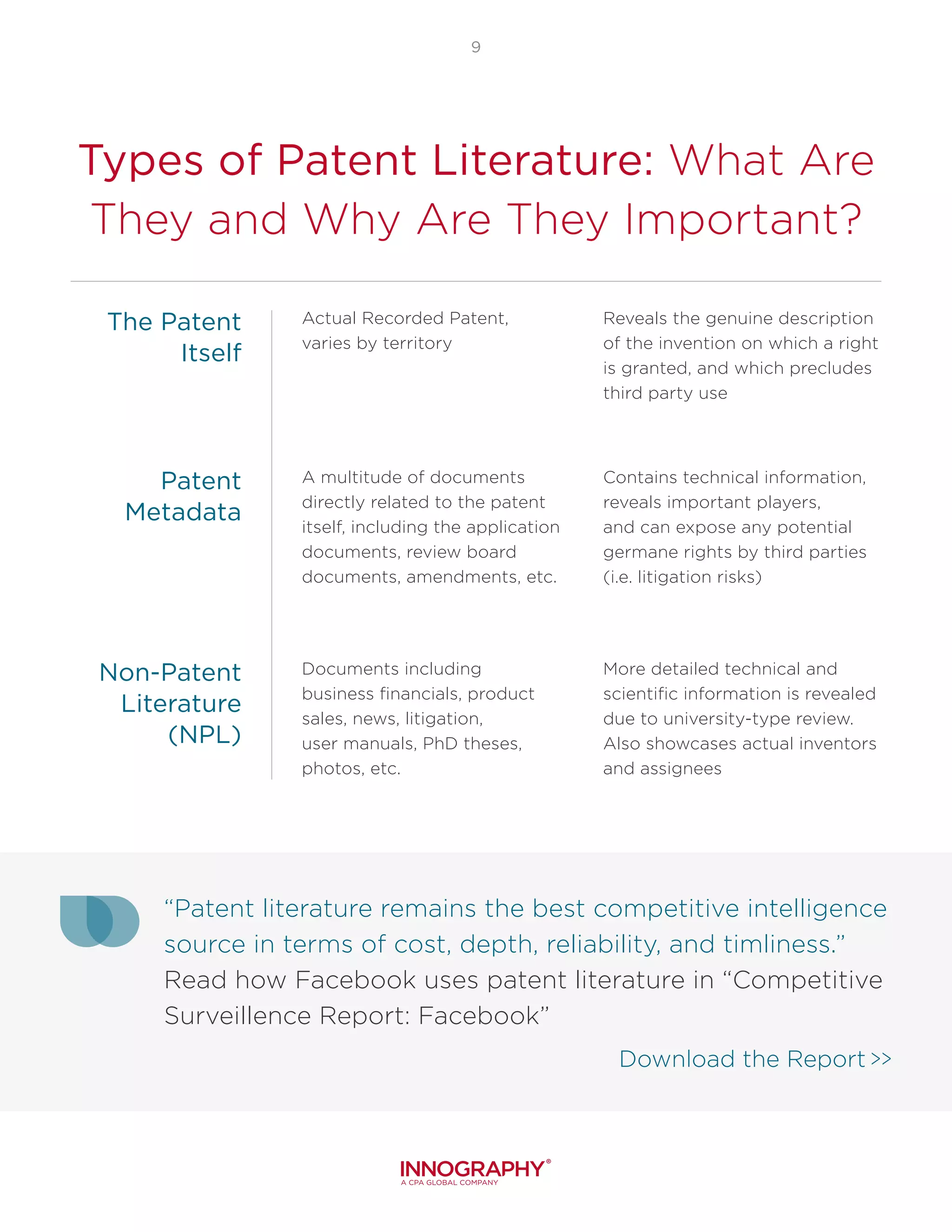
Actual Recorded Patent,
varies by territory
A multitude of documents
directly related to the patent
itself, including the application
documents, review board
documents, amendments, etc.
Documents including
business financials, product
sales, news, litigation,
user manuals, PhD theses,
photos, etc.
More detailed technical and
scientific information is revealed
due to university-type review.
Also showcases actual inventors
and assignees
Contains technical information,
reveals important players,
and can expose any potential
germane rights by third parties
(i.e. litigation risks)
Reveals the genuine description
of the invention on which a right
is granted, and which precludes
third party use
The Patent
Itself
Patent
Metadata
Non-Patent
Literature
(NPL)
“Patent literature remains the best competitive intelligence
source in terms of cost, depth, reliability, and timliness.”
Read how Facebook uses patent literature in “Competitive
Surveillence Report: Facebook”
Download the Report >>
10
Data
Coverage
Data
Quality
Some tools can search worldwide; others charge
more for this feature and may leave important
regions out of their basic offerings. With China as
an emerging leader in patent filings, it would be
helpful to choose a provider that covers all relevant
jurisdictions that impact your work.
What countries are covered? Can countries
be searched simultaneously?
Is the data translated into English or only
available in the native filing language? If so,
how is the translation performed?
Does your solution provider provide provide
full-text versus bibliographic information?
What countries are covered? Can countries
be searched simultaneously?
Is the data translated into English or only
available in the native filing language? If so,
how is the translation performed?
Does your solution provider provide provide
full-text versus bibliographic information?
1
2
3
With the volume of data changing worldwide on
a weekly basis, no system can be 100% perfect
every single moment. There are a number of data
points that have to be accounted for, filled in, and
reported, determining how confident one can be in
the data process behind the scenes. For example,
many public patents have different spellings for the
same company owner names and some patent data
elements are simply entered incorrectly (see the
IBM example). Every day, mergers and acquisitions
take place and the ownership or company hierarchy
information is not updated by some patent search
companies at all or at a slow cadence.
Will the software identify varied spellings of
company names and associate them with the
correct ultimate owner?
Does the software have the capability of not
only identifying but correcting erroneous data
elements?
Are missing data elements “filled in” when
possible, like classification codes?
How often is all patent data updated: weekly,
monthly, quarterly?
When errors are found, what is the process
for reporting a data element that requires
correction within the platform?
Are updates to the patents automatically
performed when a patent is sold or transferred,
a patent lapses, or a patent is found invalid in
court?
4
5
1
2
3
6
4
5
6
11
Data
Correlation
Non-Patent
Literature (NPL)
Correlation of data means that data sources,
including trademark, litigation, financial, patent, and
standards, are all pulled together to create a full
picture around a patent. In doing so, the user lessens
their risk of missing any important information,
thereby maximizing business opportunity.
For example, searching “which companies are
defendants in this technology space?” requires
linking patents to litigation across companies. Data
correlation gives organizations back time…time that
can be spent on analysis rather than manually fixing
data errors (i.e. the owner name to get a company’s
total portfolio) and combining and correlating data
sets to get to the sought-after answers.
Are the databases separate or combined? (i.e.
are there different areas to get litigation data
about a patent vs. basic patent information?)
What custom or private data can be put into
the tool, tied to patents specifically or to the
searches being performed? Watch the “Public
+ Private IP Data is the Future of IPMS” video
and learn more.
How can data correlation be used to improve
the context and insights from IP analyses?
1
2
3
NPL is a term that encompasses anything that is not
a patent, yet relates to the target subject matter, and
it can be a valuable ally in supporting your patent
analysis. There are no comprehensive NPL libraries,
as not all of the world’s documents are available
online. Some services, however, do offer millions of
documents and provide tools to narrow searches to
achieve the most helpful findings.
How much NPL data is available?
What type of data is included? Is there an extra
cost for access to NPL data?
What search methods are available for the NPL
data?
From where is the NPL data sourced (i.e.,
technical standards, journals, etc.)?
Are there features that enable users to
incorporate NPL data into patent search
results?
4
5
1
2
3
Non-patent literature |nohn-pat-nt lit-er-uh-cher|
1. any literature or document that is not a patent.
2. these can include journal articles, guides, manuals, even YouTube.
12
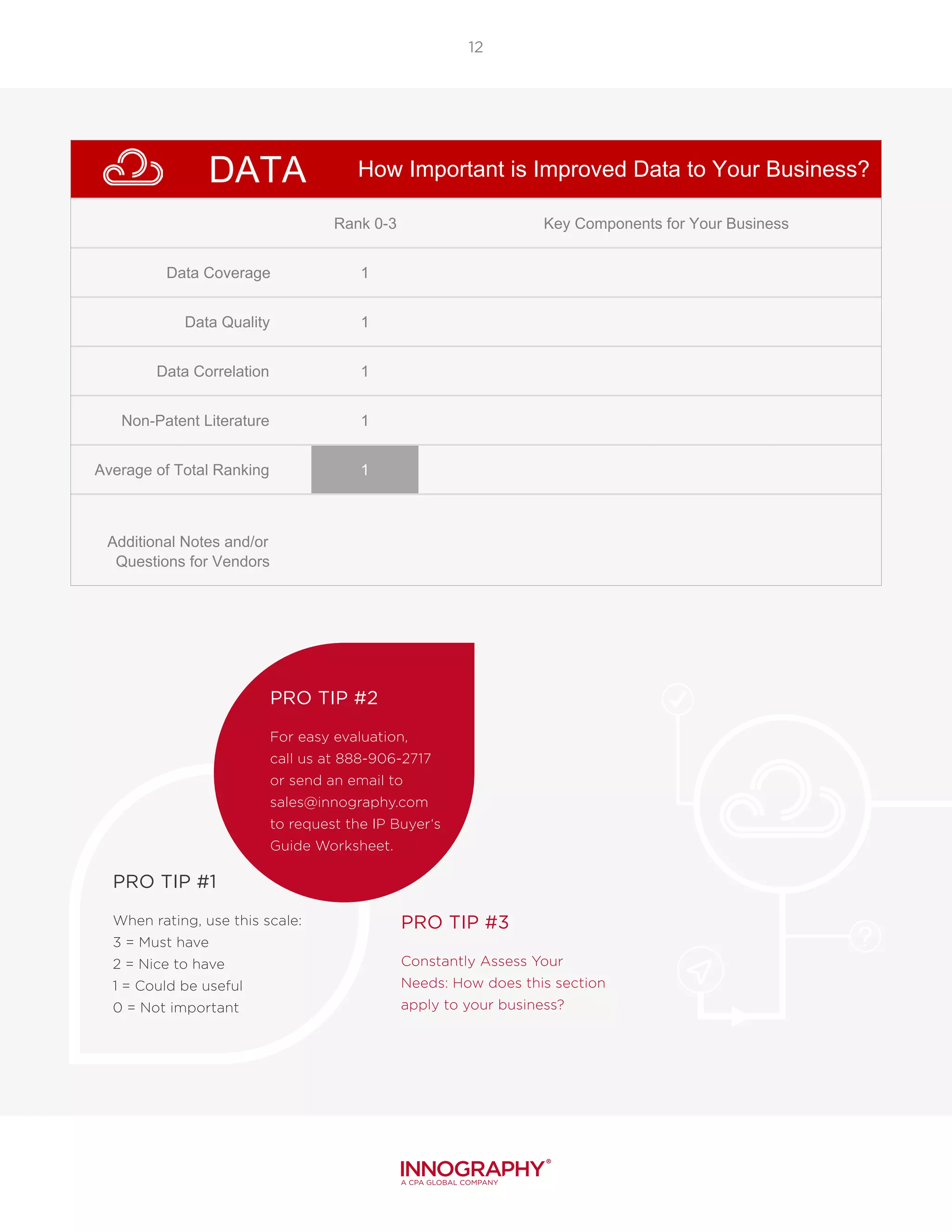
PRO TIP #1
When rating, use this scale:
3 = Must have
2 = Nice to have
1 = Could be useful
0 = Not important
PRO TIP #2
For easy evaluation,
call us at 888-906-2717
or send an email to
sales@innography.com
to request the IP Buyer‘s
Guide Worksheet.
PRO TIP #3
Constantly Assess Your
Needs: How does this section
apply to your business?
DATA
Rank 0-3 Key Components for Your Business
Data Coverage 1
Data Quality 1
Data Correlation 1
Non-Patent Literature 1
Average of Total Ranking 1
Additional Notes and/or
Questions for Vendors
3 = Must Have
2 = Nice To Have
1 = Could Be Useful
0 = Not At All Necessary
How Important is Improved Data to Your Business?
Search Methods: Great Search
Results Are Foundational
To Great Analysis
Multiple search methods
allow the relevant patents to
be identified faster and more
assuredly, but some patents and
applications can use unusual and
even unforeseen terminologies,
for several reasons:
TERMINOLOGIES CHANGE
OVER TIME: Patents are long-
lived assets and documents,
and the commonly accepted
terminology can evolve,
especially early in the
technology’s lifecycle when the
seminal patent applications are
filed.
DIFFERENT INDUSTRIES USE
DIFFERENT TERMS: In some
cases, the most interesting
patents, or the ones to watch
out for, can come from adjacent
industries that use different terms
for the same invention.
MANY PATENT FILINGS ARE
TRANSLATED: International
inventors will often translate
their applications from other
languages to English to file in
the U.S., giving rise to
unexpected terms.
SOME PATENTS HAVE
PURPOSEFULLY MISLEADING
VERBIAGE: A few patent filers
will even use terms that conceal
the technology that is being
described, hoping that the
patents will not be discovered by
the usual keyword searches.
Having found the proper building blocks of data, it is now time to start building your document
library, or patent search results project. Every patent analysis starts with a search to find the
relevant patents, and the key to a thorough global patent search is to use multiple methods.
14
Misleading Verbiage: Can You Guess
What This Patent is For?
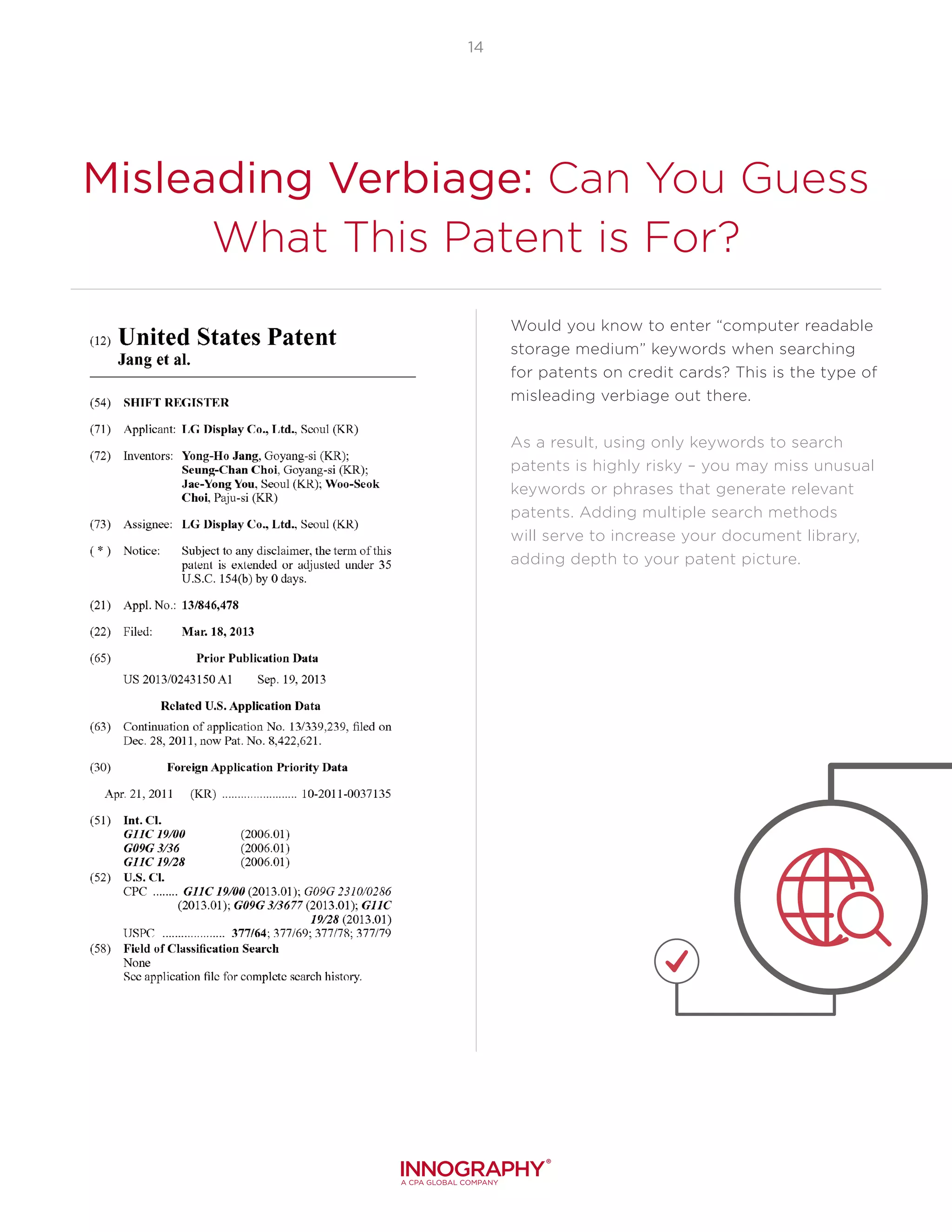
Would you know to enter “computer readable
storage medium” keywords when searching
for patents on credit cards? This is the type of
misleading verbiage out there.
As a result, using only keywords to search
patents is highly risky – you may miss unusual
keywords or phrases that generate relevant
patents. Adding multiple search methods
will serve to increase your document library,
adding depth to your patent picture.
Search Types
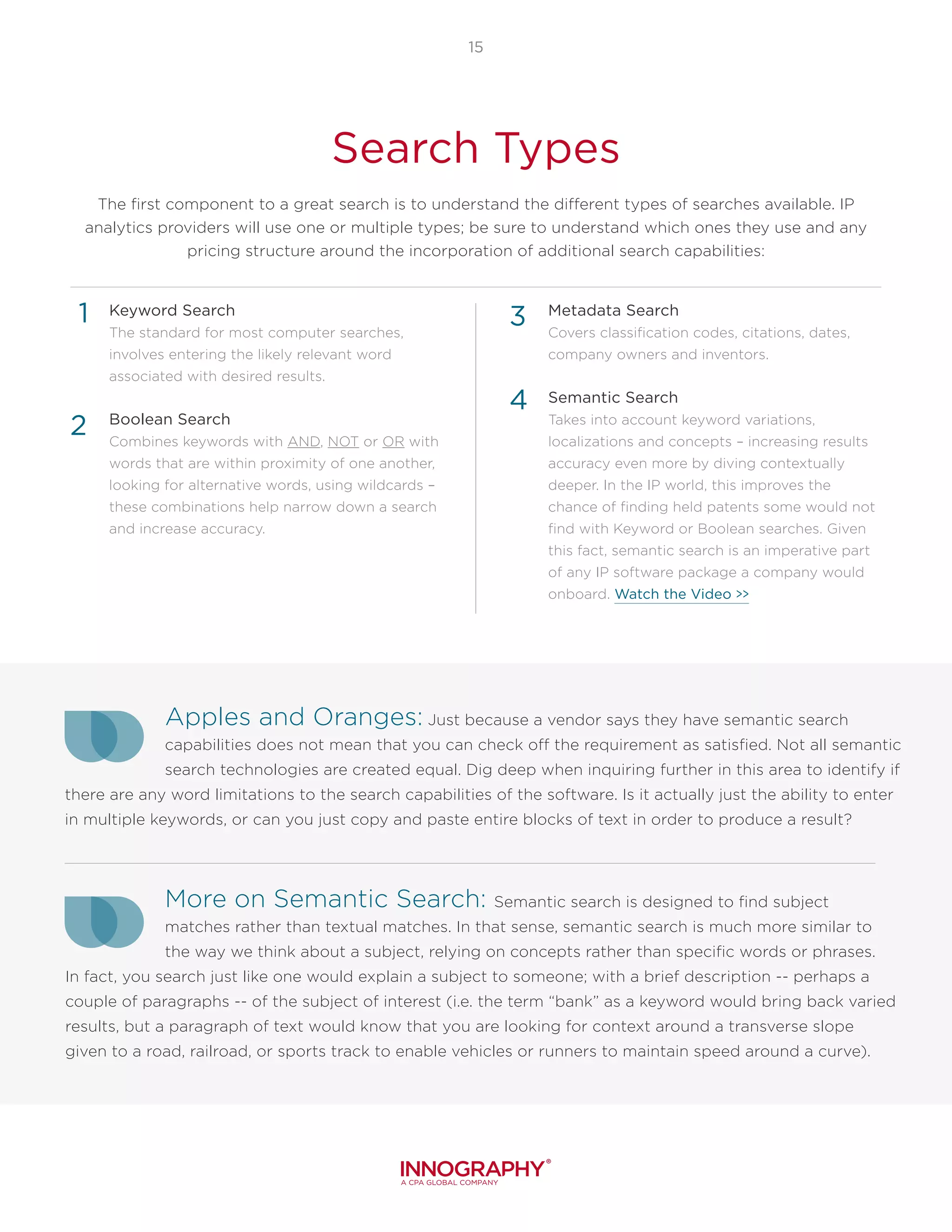
The first component to a great search is to understand the different types of searches available. IP
analytics providers will use one or multiple types; be sure to understand which ones they use and any
pricing structure around the incorporation of additional search capabilities:
15
Keyword Search
The standard for most computer searches,
involves entering the likely relevant word
associated with desired results.
Boolean Search
Combines keywords with AND, NOT or OR with
words that are within proximity of one another,
looking for alternative words, using wildcards –
these combinations help narrow down a search
and increase accuracy.
Metadata Search
Covers classification codes, citations, dates,
company owners and inventors.
Semantic Search
Takes into account keyword variations,
localizations and concepts – increasing results
accuracy even more by diving contextually
deeper. In the IP world, this improves the
chance of finding held patents some would not
find with Keyword or Boolean searches. Given
this fact, semantic search is an imperative part
of any IP software package a company would
onboard. Watch the Video >>
Apples and Oranges: Just because a vendor says they have semantic search
capabilities does not mean that you can check off the requirement as satisfied. Not all semantic
search technologies are created equal. Dig deep when inquiring further in this area to identify if
there are any word limitations to the search capabilities of the software. Is it actually just the ability to enter
in multiple keywords, or can you just copy and paste entire blocks of text in order to produce a result?
More on Semantic Search: Semantic search is designed to find subject
matches rather than textual matches. In that sense, semantic search is much more similar to
the way we think about a subject, relying on concepts rather than specific words or phrases.
In fact, you search just like one would explain a subject to someone; with a brief description -- perhaps a
couple of paragraphs -- of the subject of interest (i.e. the term “bank” as a keyword would bring back varied
results, but a paragraph of text would know that you are looking for context around a transverse slope
given to a road, railroad, or sports track to enable vehicles or runners to maintain speed around a curve).
4
1
2
3
16
Another component to a great search is
your ability to prioritize your relevant data
sets. Prioritizing allows the user to draw
clear, germane conclusions, and lessons
your chances of getting stuck in the mud
determining applicability of numerous patent
sets, which can number well into the hundreds
or thousands. Once you understand the way
results are prioritized by different software
firms, you can determine if this will benefit
your business:
What assistance in prioritizing patents does
the tool provide?
If you do not like their prioritization approach
or need a new one for a specific analysis,
can you “program” your own prioritization
approach?
“More Like This”
Keep an eye out for
unique features within
software that provide a boost to
your search capabilities. The ‘more
like this’ button within Innography’s
Advanced Analysis allows you to
search for additional patents that
look like the gem you have just
found and can be a major timesaver.
Prioritizing
Your Results for
Maximum Benefit
What You Need
Determines
How You Search
1
2
Understanding the difference between search
methods, the types of results they produce and how
to prioritize those results is a large part of conducting
a great search. Being able to toggle between different
types of searches, however, is paramount, as there are
many ways to get information.
Companies need to use the right search tool for the
right job, and not all search criteria demand the same
search type. Missing that one seminal patent will
make all the difference between a sound business
decision and a detrimental one. Assess the full set
of capabilities for searching for any software being
considered:
How easy is it to save searches and search
results, so searchers can go back to them at a
later time?
Will standard keyword searches return relevant
and desired results?
Does the tool provide semantic search in order
to search by concept rather than keywords?
Does the semantic search use multiple keywords
or is it truly concept-driven?
Can the company search by metadata such as
classification codes, citations, dates, ultimate
owners and inventors? How easy is it to search
for all the patents currently owned by top
competitors?”
Does the platform allow for faceted navigation
to explore information organized by various
filters?
4
5
1
2
3
17
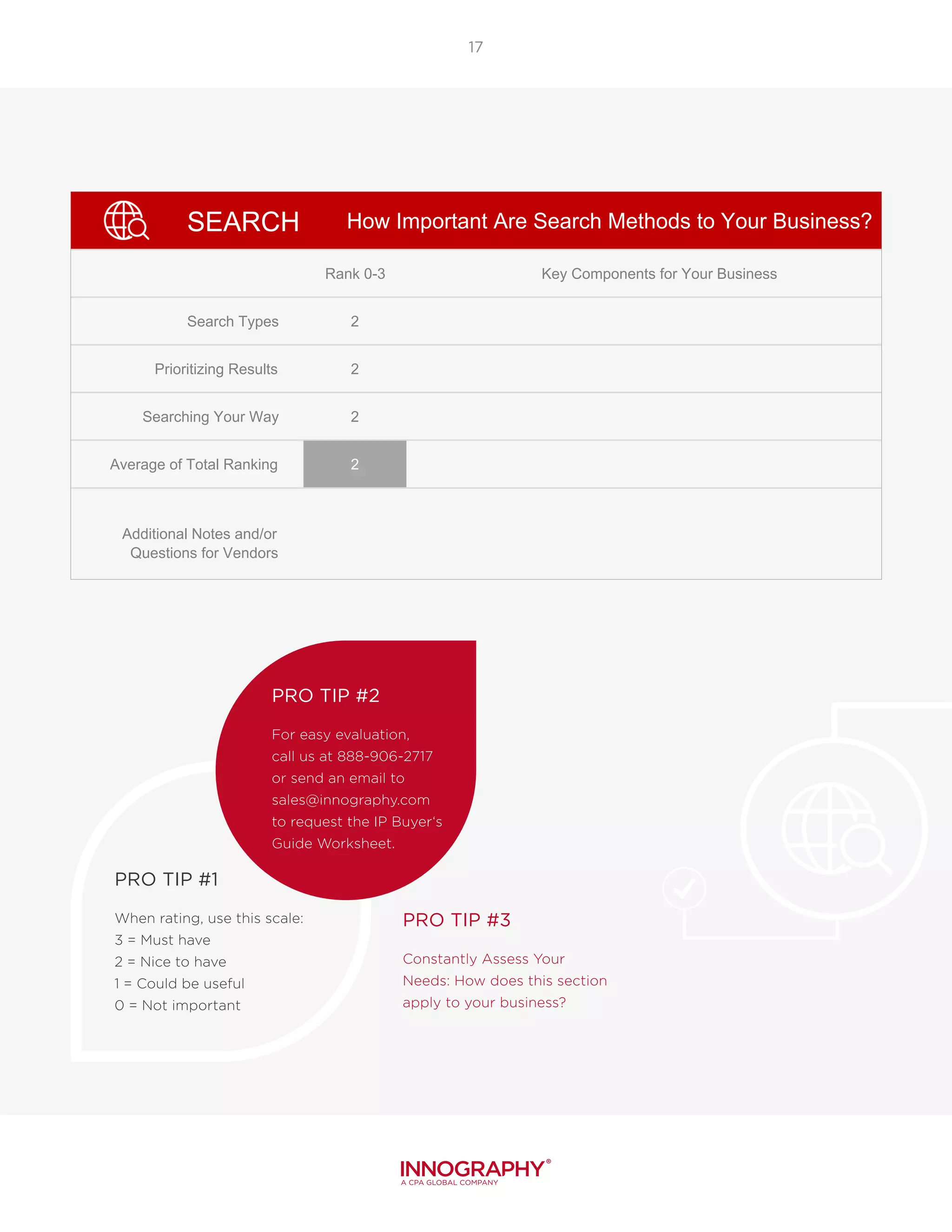
SEARCH
Rank 0-3 Key Components for Your Business
Search Types 2
Prioritizing Results 2
Searching Your Way 2
Average of Total Ranking 2
Additional Notes and/or
Questions for Vendors
3 = Must Have
2 = Nice To Have
1 = Could Be Useful
0 = Not At All Necessary
How Important Are Search Methods to Your Business?
PRO TIP #1
When rating, use this scale:
3 = Must have
2 = Nice to have
1 = Could be useful
0 = Not important
PRO TIP #2
For easy evaluation,
call us at 888-906-2717
or send an email to
sales@innography.com
to request the IP Buyer‘s
Guide Worksheet.
PRO TIP #3
Constantly Assess Your
Needs: How does this section
apply to your business?
Visualizations and Reporting:
Moving Beyond Basic
Search Results
With all the legwork invested
in a thorough, accurate search,
now it is time to present
findings. But it is not enough
to derive the best insights
and present your findings to
the stakeholder, end of story.
Rather, effective communication
requires a different method of
delivery to multiple interested
persons, though the underlying
dataset remains the same. The
results must be conveyed in
a way that is easily digested
and quickly incorporated into
business decisions, no matter
the experience level of the
person reviewing the analysis.
Results that are Easy to Customize
Canned visuals can be distracting, and they simply do not fit the bill for tailoring your presentation
to 100% of your targeted audience. At some point, you will need to be able to customize the visual to
convey the right insight clearly and without clutter.
Examples of customizations
include removing unnecessary
groups of patents or categories
in the visual, changing color
schemes, and renaming groups
to reflect the vernacular of
your audience. Choose a
provider that has answers to
these questions in order to get
your message across:
What customization
capabilities are in the
software?
Is the functionality easy to
learn?
If the tool does not support a
specific customization, does
it allow easy exporting of the
visual and the data into Excel
or some other tool for further
modification?
What integration is available to
prevent the cycle of searching,
exporting, and creating a
visual?
“The main goal of data visualization is to communicate
information clearly and effectively through graphical
means. To convey ideas effectively, both aesthetic form and
functionality need to go hand in hand, providing insights into a
rather sparse and complex data set by communicating its
key-aspects in a more intuitive way.”
Friedman (2008)
19
1
2
3
4
With all the legwork invested in a thorough, accurate
search, now it is time to present findings. Working
together, the visualizations of results will improve the absorption
of data and help the reader understand the information quickly.
20
Graphics that are Easy to
Understand
The user, i.e. the person sending the message or creating the presentation,
will want to keep in mind the following ideas:
Graphics convey insights hidden in lengthy analysis
results. If you are not currently using them to convey
your results, could they benefit your message?
Templates are a great way to streamline the creation
of your graphics and view differing representations
of your message.
Working together, the visualizations of results will
improve the absorption of data and help the reader
understand the information quickly.
It is hard to know how your specific needs will be
met, so be sure to ask for template samples, as well
as content and visualization samples.
Are the visualizations easy to read and do they
clearly communicate the key insights?
How many graphic choices does the user
have?
Further, the user also must consider how their
message or presentation will be received. The way
your reports and results are viewed is as important
as the information itself! Consider their objectives,
title, preferred viewing method (computer or hard-
copy), and span of attention.
Which visualization will best facilitate your
message? Watch the Video >>
Is your team going to get more out of a hard-
to-read, convoluted, highly-technical report, or
one that is structured and worded simply with
vivid color graphs and charts?
Would they like the ability to change the
charts colors to reflect a brand or show greater
contrast?
1
2
1
2
3
Visualizations that are
Easy to Share
An organization may regularly require that data or results be shared with others who are not necessarily
IP experts, which is when clearly communicating the analysis in non-IP terms is important.
21
As the person responsible for communicating the
patent analysis results, you may also need to share
large amounts of data with multiple team members
on various levels of end user and/or subject matter
expertise.
How many steps does it take to share analysis
with other users within your team or company?
Who can results be shared with and by what
means? Does it count towards total user seats
in the software license?
Does the data automatically update and
notify everyone who has received the report
previously?
What interactive functionality is available
to drill down and drill in on the graphics
(increasing transparency on data and
meaning)?
Brand-able/White label results help give
a professional look to any IP report or
dashboard. Does the software support that
capability?
Can you export the visualizations? In what
formats are the exports available (.csv/.jpg/.
pdf)?
Keep in Mind: When sending information, data sets, or results outside
the organization, your professional reputation can be increased with the use
of uniformly designed, branded reports, and dashboards. The ease with which others
can view information also enhances the professional appearance and shows how much
thought they have put into how others will view results. Ask what options are available
regarding branding efforts to increase your reputation.
4
1
2
3
5
6
22
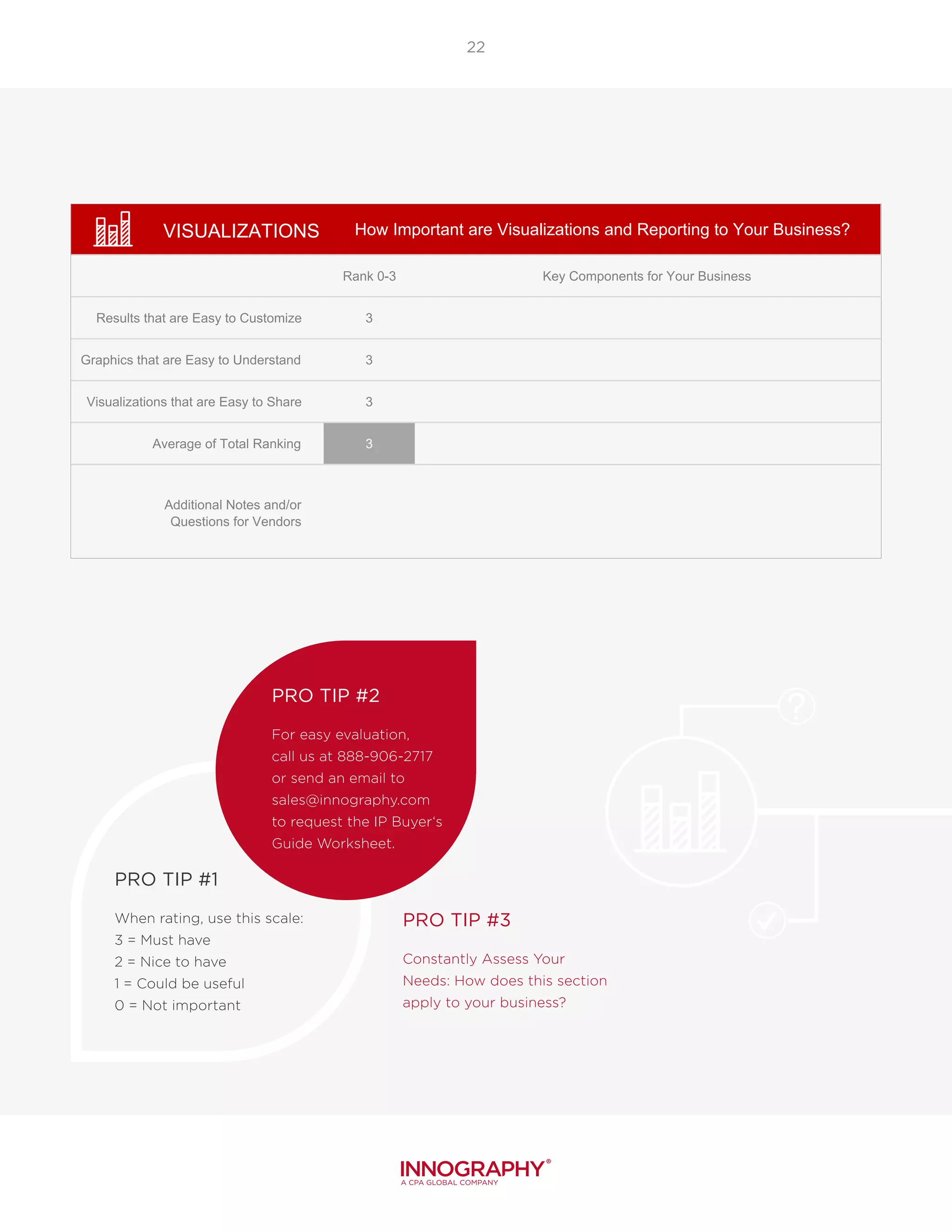
VISUALIZATIONS
Rank 0-3 Key Components for Your Business
Results that are Easy to Customize 3
Graphics that are Easy to Understand 3
Visualizations that are Easy to Share 3
Average of Total Ranking 3
Additional Notes and/or
Questions for Vendors
3 = Must Have
2 = Nice To Have
1 = Could Be Useful
0 = Not At All Necessary
How Important are Visualizations and Reporting to Your Business?
PRO TIP #1
When rating, use this scale:
3 = Must have
2 = Nice to have
1 = Could be useful
0 = Not important
PRO TIP #2
For easy evaluation,
call us at 888-906-2717
or send an email to
sales@innography.com
to request the IP Buyer‘s
Guide Worksheet.
PRO TIP #3
Constantly Assess Your
Needs: How does this section
apply to your business?
Software Usability:
Accelerating Your Analysis
An often overlooked component
during a patent search software
assessment is the intuitiveness
of the entire platform, which will
impact training time for new
employees and adoption of the
program or service selected.
Further, time is money and
for intellectual property
professionals minutes can
translate to millions of dollars
in lost – or won – opportunities.
Easy-to-use software with
accurate and quick delivery of
patent search results means
more iteration and refinement,
additional learning, and better
answers, faster. You may want
to consider separating out
the needs of expected power-
users vs. occasional users. Also,
investigate the experience of
anyone receiving the output of
analysis, as they are a user too.
24
Ease of Use for a Variety of
Skill Levels
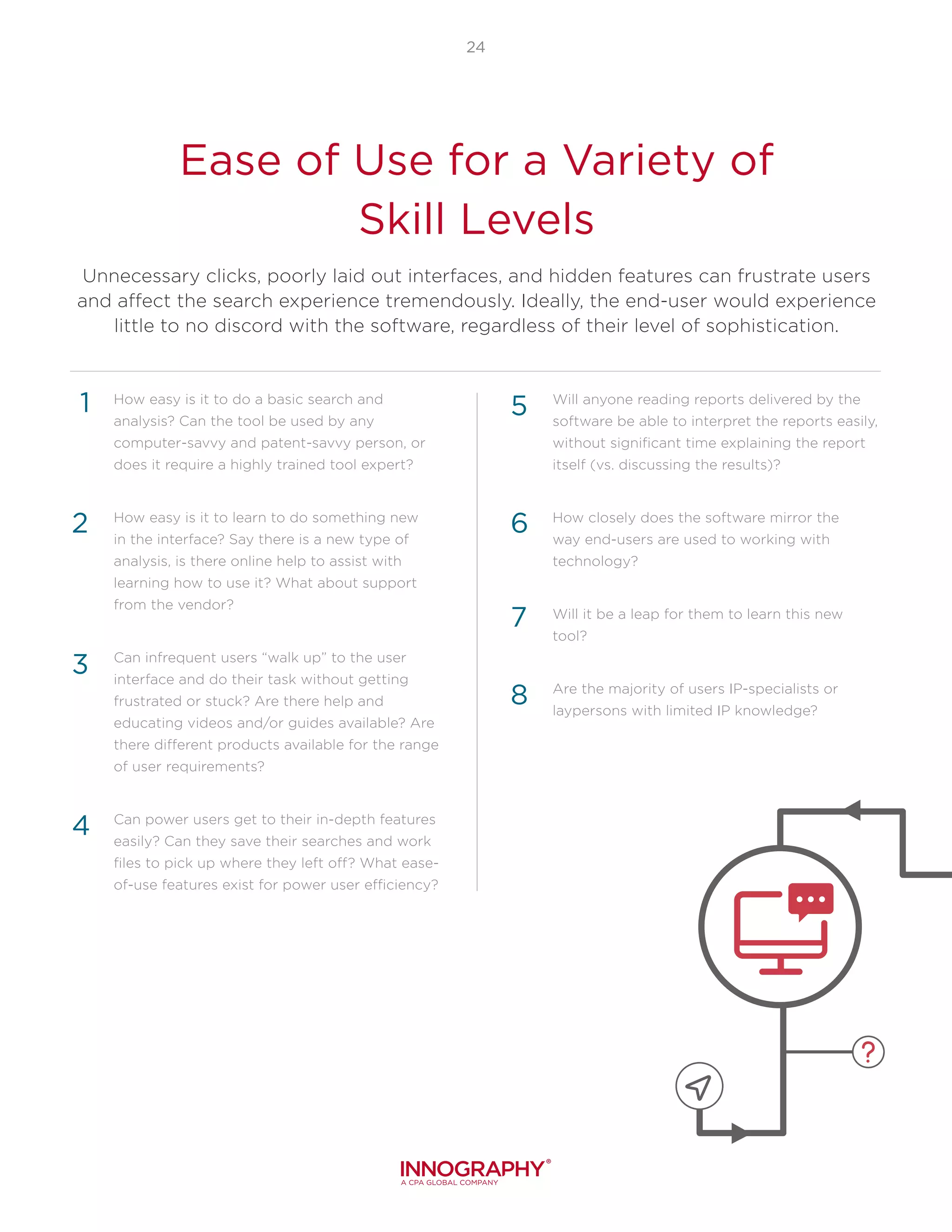
Unnecessary clicks, poorly laid out interfaces, and hidden features can frustrate users
and affect the search experience tremendously. Ideally, the end-user would experience
little to no discord with the software, regardless of their level of sophistication.
How easy is it to do a basic search and
analysis? Can the tool be used by any
computer-savvy and patent-savvy person, or
does it require a highly trained tool expert?
How easy is it to learn to do something new
in the interface? Say there is a new type of
analysis, is there online help to assist with
learning how to use it? What about support
from the vendor?
Can infrequent users “walk up” to the user
interface and do their task without getting
frustrated or stuck? Are there help and
educating videos and/or guides available? Are
there different products available for the range
of user requirements?
Can power users get to their in-depth features
easily? Can they save their searches and work
files to pick up where they left off? What ease-
of-use features exist for power user efficiency?
Will anyone reading reports delivered by the
software be able to interpret the reports easily,
without significant time explaining the report
itself (vs. discussing the results)?
How closely does the software mirror the
way end-users are used to working with
technology?
Will it be a leap for them to learn this new
tool?
Are the majority of users IP-specialists or
laypersons with limited IP knowledge?
4
1
2
3
5
6
7
8
25
Ease of In-Tool
Collaboration
Speed: Delivering
the Result Set
Some companies function with remote team
members or members in other departments. When
a project requires the sharing of search results or
someone needs to hand them off for analysis, it is
nice to know what options are available. Be sure to
include the following in your evaluation:
Are the databases separate or combined? (i.e.
are there different areas to get litigation data
about a patent vs. basic patent information?)
What custom or private data can be put into
the tool, tied to patents specifically or to the
searches being performed?
How can data correlation be used to improve
the context and insights from IP analyses?
1
2
3
Time is money, this is a well-established adage –
but in the intellectual property world, minutes can
literally mean millions of dollars. Therefore, the speed
in which results are generated and exported is a
definite factor to consider.
Faster speeds allow users to iterate and refine
the analysis more, learn more, and get to a better
answer faster. You may consider ranking the speed
for each platform being evaluated, e.g. producing
results within seconds gets top score, between 10-30
seconds gets medium score; anything over a minute
would receive a zero or even a negative score. There
is only one question to pose here:
How much How fast are search results
presented and exported?
1
Modern IPMS systems are now available to drive the value
of intellectual property and meet the needs of today’s IP
organization. Hear Innography CEO John Martin describe how
to meet the needs of the next decade of IP management.
Listen Here >>
26
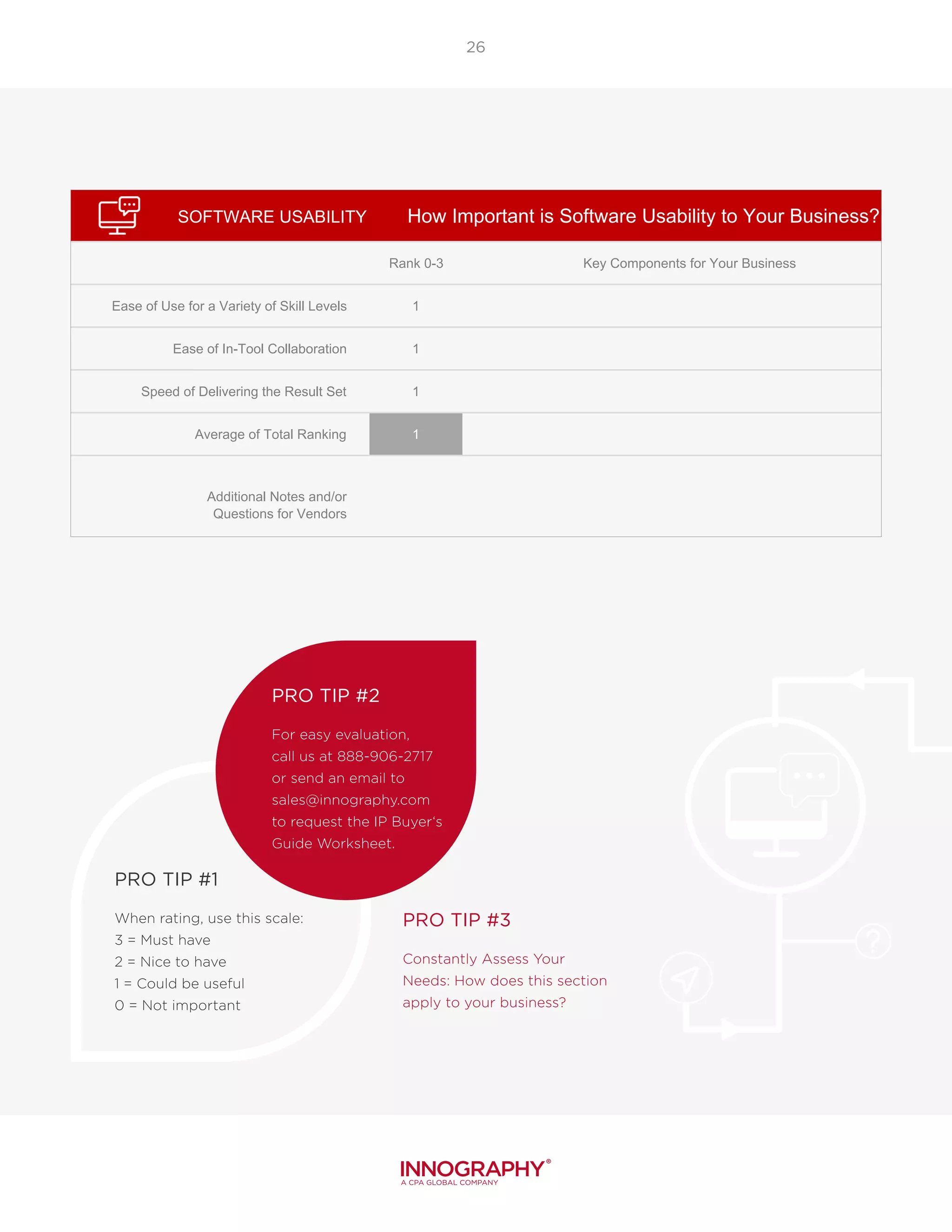
SOFTWARE USABILITY
Rank 0-3 Key Components for Your Business
Ease of Use for a Variety of Skill Levels 1
Ease of In-Tool Collaboration 1
Speed of Delivering the Result Set 1
Average of Total Ranking 1
Additional Notes and/or
Questions for Vendors
3 = Must Have
2 = Nice To Have
1 = Could Be Useful
0 = Not At All Necessary
How Important is Software Usability to Your Business?
PRO TIP #1
When rating, use this scale:
3 = Must have
2 = Nice to have
1 = Could be useful
0 = Not important
PRO TIP #2
For easy evaluation,
call us at 888-906-2717
or send an email to
sales@innography.com
to request the IP Buyer‘s
Guide Worksheet.
PRO TIP #3
Constantly Assess Your
Needs: How does this section
apply to your business?
Service Quality: Cultivating
The Partnership
Learning a new tool presents
change and could produce
challenges. The services
available during ramp-up and
after the sale of new software
can make or break a team’s
adoption of that tool and has a
direct impact on productivity.
Seek a software company
with excellent customer
service and a team that will
be there when they are
needed. Some vendors just
sell tools, but others build a
partnership that is focused on
helping clients be successful
in their broader IP goals.
Your organization should not
be surprised by the details.
Rather, you should be involved
every step of the way and
know exactly what you are
getting from your IP analytics
software partner.
“Today’s client-focused organizations are achieving
operational excellence by establishing listening posts and
incorporating impartial client feedback into the decision-making
process.”
Evan Klein, Founder and President of Satrix Solutions
28
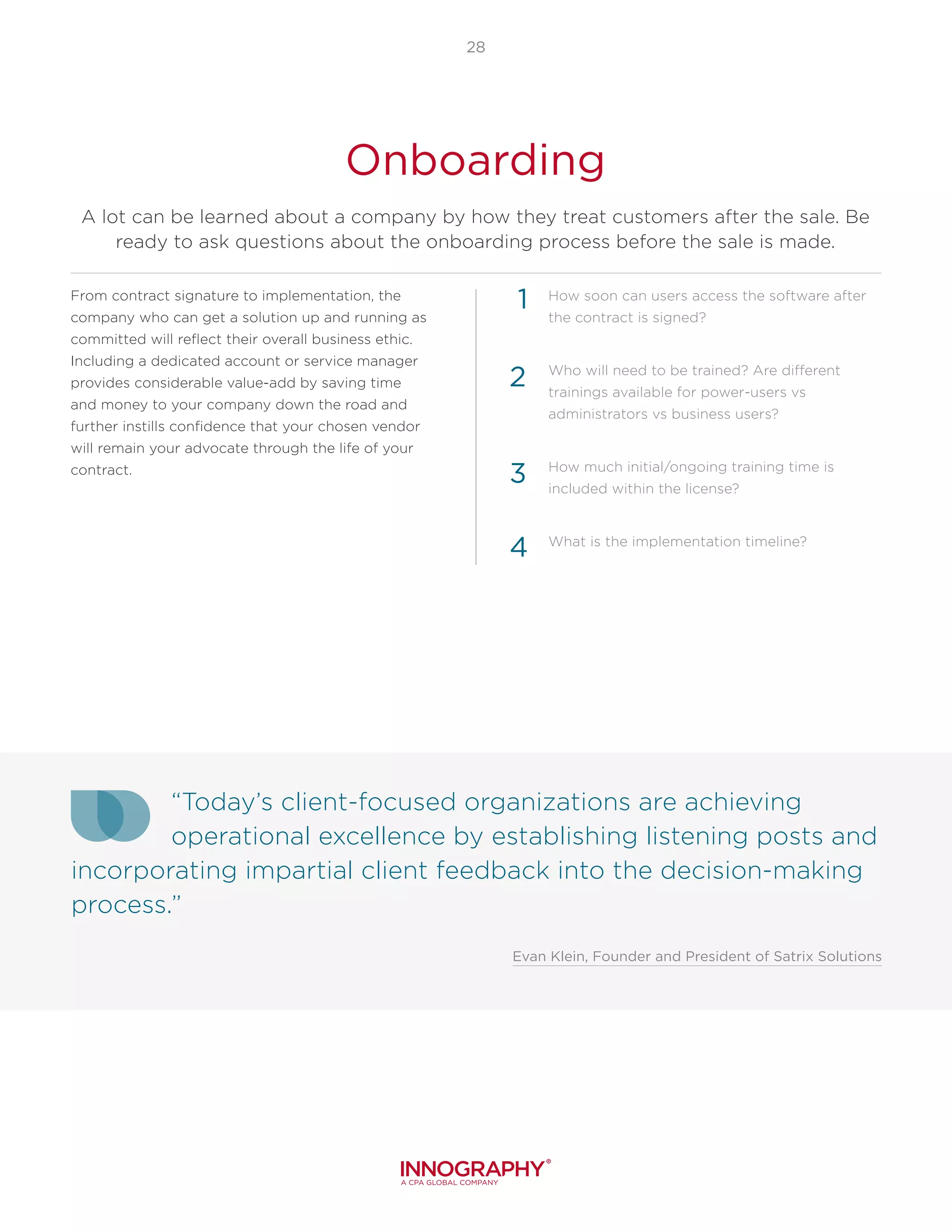
Onboarding
A lot can be learned about a company by how they treat customers after the sale. Be
ready to ask questions about the onboarding process before the sale is made.
From contract signature to implementation, the
company who can get a solution up and running as
committed will reflect their overall business ethic.
Including a dedicated account or service manager
provides considerable value-add by saving time
and money to your company down the road and
further instills confidence that your chosen vendor
will remain your advocate through the life of your
contract.
How soon can users access the software after
the contract is signed?
Who will need to be trained? Are different
trainings available for power-users vs
administrators vs business users?
How much initial/ongoing training time is
included within the license?
What is the implementation timeline?
1
2
3
4
29
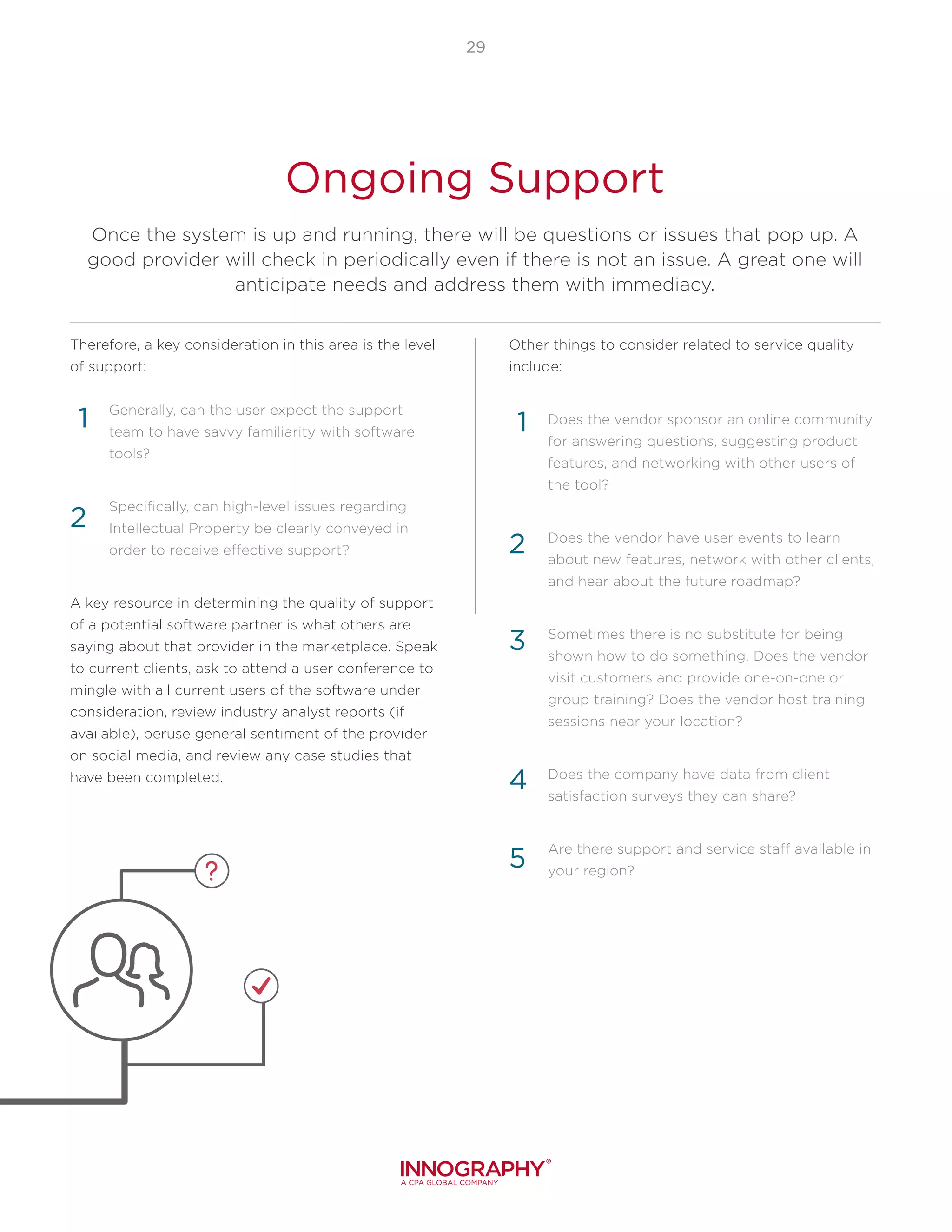
Ongoing Support
Once the system is up and running, there will be questions or issues that pop up. A
good provider will check in periodically even if there is not an issue. A great one will
anticipate needs and address them with immediacy.
Therefore, a key consideration in this area is the level
of support:
Generally, can the user expect the support
team to have savvy familiarity with software
tools?
Specifically, can high-level issues regarding
Intellectual Property be clearly conveyed in
order to receive effective support?
A key resource in determining the quality of support
of a potential software partner is what others are
saying about that provider in the marketplace. Speak
to current clients, ask to attend a user conference to
mingle with all current users of the software under
consideration, review industry analyst reports (if
available), peruse general sentiment of the provider
on social media, and review any case studies that
have been completed.
Other things to consider related to service quality
include:
Does the vendor sponsor an online community
for answering questions, suggesting product
features, and networking with other users of
the tool?
Does the vendor have user events to learn
about new features, network with other clients,
and hear about the future roadmap?
Sometimes there is no substitute for being
shown how to do something. Does the vendor
visit customers and provide one-on-one or
group training? Does the vendor host training
sessions near your location?
Does the company have data from client
satisfaction surveys they can share?
Are there support and service staff available in
your region?
1
2
3
4
1
2
5
30
Software and Feature Enhancements
Another inevitable technical occurrence will be updates to software and related
services. Again, this is where some solution providers differ greatly. Expect any updates
to be fast and painless and not inhibit team productivity, and also expect that any
updates reflect the changing needs of you as the customer.
How often are enhancements and new features
added? What is the extent of a typical update?
What is the process for making product
enhancement suggestions? What is the
vendor’s speed and frequency of updates to
incorporate suggestions? Will direct access to
the product team be provided?
When are updates performed? E.g. overnight or
during work hours?
What advance notice, training and on-call
support does the vendor typically provide for
software updates?
Is there an opportunity, as a customer, for
your involvement in the product roadmap
development process?
3
4
1
2
5
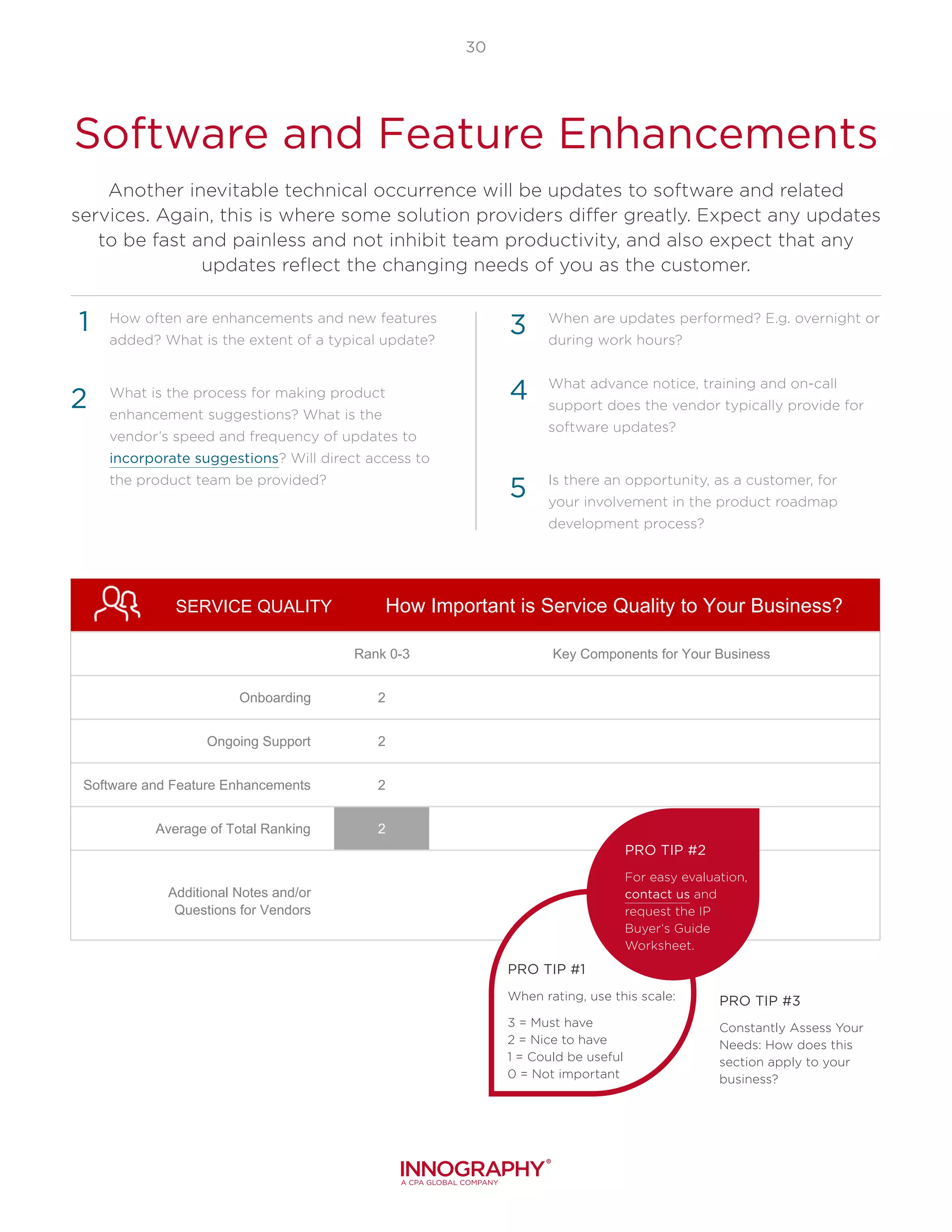
SERVICE QUALITY
Rank 0-3 Key Components for Your Business
Onboarding 2
Ongoing Support 2
Software and Feature Enhancements 2
Average of Total Ranking 2
Additional Notes and/or
Questions for Vendors
3 = Must Have
2 = Nice To Have
1 = Could Be Useful
0 = Not At All Necessary
How Important is Service Quality to Your Business?
PRO TIP #1
When rating, use this scale:
3 = Must have
2 = Nice to have
1 = Could be useful
0 = Not important
PRO TIP #2
For easy evaluation,
contact us and
request the IP
Buyer‘s Guide
Worksheet.
PRO TIP #3
Constantly Assess Your
Needs: How does this
section apply to your
business?
Pulling It All
Together:
Rankings and Ratings
Using this document as a
starting point, rank in priority
order each area, then rate each
software being evaluated. Do
not forget to investigate any
finalists being considered – how
are they viewed in the industry?
Ask to speak to references.
For the most important
factors in your decision, find
ways to get proof-points from
the vendor. If time permits,
conduct a Proof of Concept to
try the product of the top two
finalists. Know that it is not
all in the numbers – the
bottom-line decision is which
vendor will make the most
significant contribution to the
evaluation for your intellectual
property needs.
32
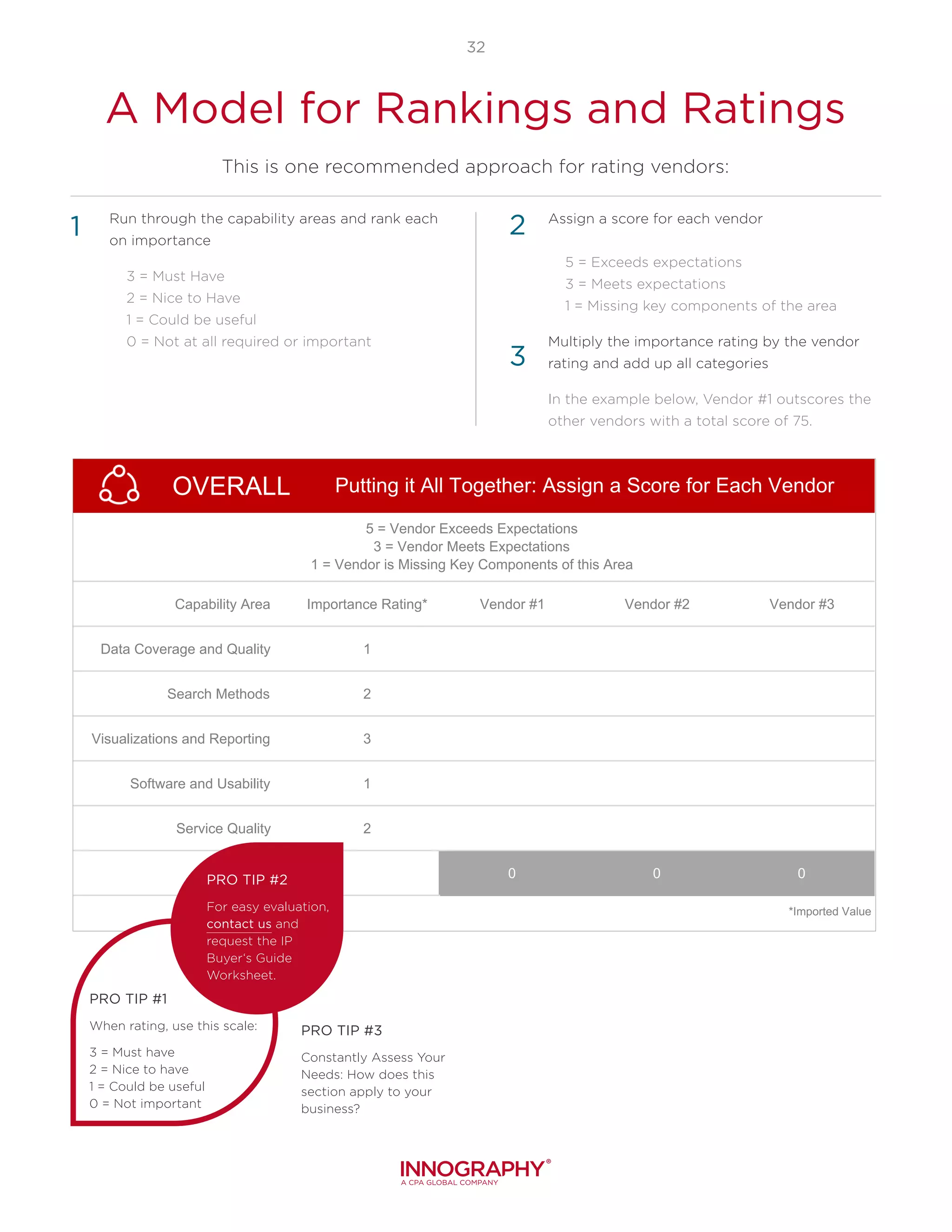
Run through the capability areas and rank each
on importance
	 3 = Must Have
	 2 = Nice to Have
	 1 = Could be useful
	 0 = Not at all required or important
Assign a score for each vendor
	 5 = Exceeds expectations
	 3 = Meets expectations
	 1 = Missing key components of the area
Multiply the importance rating by the vendor
rating and add up all categories
In the example below, Vendor #1 outscores the
other vendors with a total score of 75.
3
1 2
OVERALL
Capability Area Importance Rating* Vendor #1 Vendor #2 Vendor #3
Data Coverage and Quality 1
Search Methods 2
Visualizations and Reporting 3
Software and Usability 1
Service Quality 2
0 0 0
*Imported Value
5 = Vendor Exceeds Expectations
3 = Vendor Meets Expectations
1 = Vendor is Missing Key Components of this Area
Putting it All Together: Assign a Score for Each Vendor
PRO TIP #1
When rating, use this scale:
3 = Must have
2 = Nice to have
1 = Could be useful
0 = Not important
PRO TIP #2
For easy evaluation,
contact us and
request the IP
Buyer‘s Guide
Worksheet.
PRO TIP #3
Constantly Assess Your
Needs: How does this
section apply to your
business?
A Model for Rankings and Ratings
This is one recommended approach for rating vendors:
In Summary
Regardless of your industry
or focus on the IP Lifecycle,
you will better enable yourself
to spot trends, minimize
litigation, guide research, build
portfolios, and make sound,
fruitful business decisions with
the power of patent analysis in
your pocket. From free/low-cost
basic search tools to savvy IP
analysis platforms, your choice
in partner services is worthy of
your time and research.
This Buyer’s Guide taps into
industry standards and, while
it may not apply to your
business on every level, it will
guide you through the life of
your business as you grow and
prosper. Now that you have a
better grasp of how you expect
to use IP analytics, you know
what questions to ask when
shopping around. Getting
as specific as possible when
asking questions will ensure
you make the best choice for
your organization and a good
IP analytics partner will know
how to answer questions
regarding ROI expectations.
If you have any questions or
comments about this guide, or
to request the IP Buyer‘s Guide
Worksheet, please contact us
at sales@innography.com or call
888.906.2717
Patent analysis is pivotal to 21st century business strategy.
Addendum:
The Expected Payback
For IP Analysis Software
YOU CAN EXPECT TO SAVE
SIGNIFICANT TIME AND
MONEY: With budget constraints
and shrinking headcounts, the
need for data and analysis
is increasing. Software can
help cut costs by streamlining
analysis previous to the patent
prosecution process, identifying
which patents to let expire, and
avoiding duplicate filings. Doing
more, a lot more, with the same
amount of time and people, can
save hours per use. See what
Special Projects Manager Kathy
Williams from Kyocera International
Inc. has to say about the speed
of analysis with Innography‘s IP
Search and Analytics Software
NEW REVENUE AVENUES WILL
OPEN UP: In a fast-moving
market, opportunities can be
missed. Almost all businesses
have some form of intellectual
property but many do not take
full advantage of their IP assets.
Whether the goal is to license,
franchise, or sell IP, an analytics
partner is there to help.
YOU WILL BETTER UNDERSTAND
AND REDUCE RISK: Those
wishing to protect against
patent infringement litigation
from competitors, litigation
from non-practicing entities
(NPEs), acquisition risks (patent
ownership issues and new
litigation risks), and the risk of
emerging competitors from
anywhere in the world.
Not sure if using a patent search and analytics software platform is right
for you? Clients have told us time and again that there are benefits to
selecting the best tool for the team:
innography.com | info@innography.com | 888.906.2717 |
© 2016 Innography, A CPA Global Company. All rights reserved. Innography, CustomStrength, Patent Market Tracker,
PatentIQ, PatentScout, and PatentStrength are registered trademarks and IP AnswerGuide, IdeaScout, PatentGuard, and Vippet are
trademarks of Innography, A CPA Global Company. Innography disclaims any proprietary interest in the marks and names of others.
Want to see how
Innography measures up?
Call Us to Schedule
Your Demo!
AWARDS
Innography’s
Advanced Analysis
wins its fourth CODiE
award in 2016.
MEDIA
PatentIQ visualization
software featured
online in Fortune
Magazine.
CLIENTS
Top companies
globally choose
Innography

WhitePaper-BuyersGuidePatentSearchAnalysisSoftware-AdvancedAnalysis-Corporates-Global-EN-062016

  • 1.
    A Buyer’s Guide forSelecting Patent Search and Analysis Software
  • 2.
    Introduction: The Changing Roleof Patent Data Why are Patents So Pivotal? What is the IP Lifecycle…and Where is Your Analysis Focused? Which Options are Available to Search and Analyze Patents? How This Guide Can Help Data Coverage and Quality: The Building Blocks of a Solid Patent Search Types of Patent Literature: What Are They and Why Are They Important? Data Coverage Data Quality Data Correlation Non-Patent Literature (NPL) Search Methods: Great Search Results Are Foundational to Great Analysis Misleading Verbiage: Can You Guess What This Patent is For? Search Types Prioritizing Your Results for Maximum Benefit What You Need Determines How You Search Visualizations and Reporting: Moving Beyond Basic Search Results Results that are Easy to Customize Graphics that are Easy to Understand Visualizations that are Easy to Share Software Usability: Accelerating Your Analysis Ease of Use for a Variety of Skill Levels Ease of In-Tool Collaboration Speed: Delivering the Result Set Service Quality: Cultivating the Partnership Onboarding Ongoing Support Software and Feature Enhancements Pulling it all Together: Rankings and Ratings A Model for Rankings and Ratings In Summary Addendum: The Expected Payback for IP Analysis Software 3 4 6 7 9 10 11 14 15 16 18 19 20 24 25 28 29 30 32 Table of Contents
  • 3.
    Introduction: The Changing RoleOf Patent Data The purchase of Patent Search and Analysis Software can be daunting. As custodians of patent strategy, Intellectual Property Professionals consider many factors, including data coverage, search methods, visualizations and reporting, software usability, and service quality. Paramount to the decision, however, is to understand the purpose of the search and to whom the information will be presented. This Buyer’s Guide helps the IP Professional determine how to evaluate different vendors by asking acute questions, and provides a rating evaluation for the vendors in consideration, in order to truly make the best decision when selecting a Patent Search and Analysis Software.
  • 4.
    3 Why are PatentsSo Pivotal? The analysis of patents yields many results: the ability to spot trends, to minimize litigation, to guide research, to build portfolios, all in an effort to make better business decisions. If you are struggling with the purchase of an Intellectual Property (IP) Analysis Software program or service, or are re- evaluating what you currently employ, you are not alone. The world may be getting smaller, but the amount of patents available only gets larger…and the sources of data along with it. How can you be confident that your data is consistently current and complete? Are you positive that your patent analysis incorporates the mise en scène? Most importantly, are you able to perform these duties individually or do you need help? Organizations large and small the world over use professional IP analysis services and/or platforms to support their patent analysis, in a variety of ways. “Patents are useful for competitive analysis and technology trend analysis…Patents have always been analyzed in R&D project management to assess competitive position and to avoid infringement. Patent analysis is also a valuable approach that uses patent data to derive information about a particular industry or technology used in forecasting.” Daim, T.U., Rueda, G., Martin, H. & Gerdsri, P. “Forecasting emerging technologies: Use of bibliometrics and patent analysis.” Technological Forecasting and Social Change (73, 2006) : 981-1012. Web. 12 April. 2016 View More Online >>
  • 5.
    IP LIFECYCLE ACQUIRE PROTECT C O N CEIVE PREPA R E MONETIZE 4 The lifecycleof a patent begins with an idea. In the 21st Century, the success or failure of an idea depends on how the idea is developed, protected, acquired, and monetized. This industry-standard IP Lifecycle is perhaps the best way to visualize the life of these pivotal patents, and understanding where you are in the cycle can assist you in deciding if and how patent analysis software can help you to think strategically, and effectively mitigate risk. What is the IP Lifecycle…and Where is Your Analysis Focused? Individuals. Your focus is likely post-creation. Your analytics must reveal quick assessment and whether you are moving forward with a sale, purchase, or licensing. You rely on data to keep a constant pipeline of deals in order to turn around business quickly and pay for your position, and you cannot afford to get caught off guard by new players or incorrectly place your bets. Organizations performing due diligence during M&A, or those wishing to identify acquisition candidates in the preliminary or planning stages. Your main concern is patents in the acquisition phase, but monetization also plays an important role. You rely on analytics to perform IP due diligence, usually consisting of establishing ownership, status, and control of the IP assets, the strength and economic value of the IP assets, and the potential liability for infringement. A due diligence plan will consider each of these areas in relation to a prioritized list of target IP assets; the right software will complement the plan nicely. Organizations wishing to keep up with current and emerging competitors. Your focus is definitely post-creation,
  • 6.
    "Wherever you seea successful business, someone once made a courageous decision." Peter Drucker 5 as you rely on analytics to reveal trends in a variety of industries, tip a company off regarding new developments, as well as which outside companies are swimming close to boundaries with their latest patent applications. Your main concern is protection and acquisition. Larger, multi-national corporations, ranging from automakers to silicon valley giants, protect products and monetize their IP. Throw a dart, and you will land on an applicable part of the IP Lifecycle in your team or organization. You will have tens of thousands of patents, will constantly be filing more (and allowing some to expire), and recognizing that others need to be protected or enhanced for monetization. Most likely you will already be using a high-level, professional analytics tool and/or software. Law firms and consulting firms detecting litigation threats and building protection for new IP. From smaller patent attorneys to nationally-ranked firms, you are less concerned with concept and the preparation of patents. You are filing patent applications at a record pace for your clients and managing valuable intellectual property rights via an IP management system. Your clients are increasingly looking to their law firms to counsel them through risk mitigation and explore ways to develop, evolve, and expand existing IP portfolios. University technology transfer offices (TTOs) or transfers of technology (TOTs) seeking to improve quality in research by incorporating industry partners, entrepreneurs and investors. Your focus is the entire IP Lifecycle, determining who and what and where to facilitate research. For many schools, patents are a critical source of both income and prestige, and the achievement of optimal licensing opportunities is key for the success of their programs. Small product companies or product development groups within a company who discover technology trends. Agile, new technology development teams watch for emerging competitors and identify litigation risk. You also focus on the IP Lifecycle as a whole, maneuvering the white space and uncovering new markets with thorough searches and detailed reporting.
  • 7.
    6 Which Options AreAvailable To Search And Analyze Patents? Free/Low-Cost Patent Search Tools These provide basic search on raw data and will not include data corrections or the ability to see a company’s current portfolio. There will be limited language consideration, no semantic searching, narrow geographic and jurisdictional coverage, and no way to rank patents by quality or importance. Free patent search tools often have holes in the database, security and privacy risks, and as much as an 18-month lag in updated listings due to priority settings. Services Firms: Law Firms and Consulting Firms They perform custom IP analysis projects for a fixed price or hourly fee, where the output is a report followed by a discussion around the specific analysis requested. This is an important component when you are interested in leveraging a firms’ expertise about patent information, analysis techniques, and – sometimes – their legal advice regarding your specific technology domain. Patent Analytics Platforms These are built on an integrated database of patents, and include data corrections, patent transactions (purchases/sales) to see current owner, status updates (i.e. have maintenance fees been paid), and often other information like patent litigation to see who is active in asserting patents. IP analysis platforms provide visualizations and analytics to discover insights and communicate them to stakeholders. Regardless of your focus within the IP Lifecycle, the ability to search and analyze patents is key to the success of your organization. There are many use cases in which a sophisticated IP search and analysis tool can bring value for individuals, power users, law firms, and companies. Having the right information and ability to communicate insights is what separates a simple patent search from savvy IP analysis that drives business forward. As not all patent analysis tools are created equal, knowing which types of analytics are available and which will best fit your company’s goals is a critical starting point. Read the “Third Age of Patent Search Tools” blog post to learn more about the differences of the types of software available today. Read More >>
  • 8.
    7 How This GuideCan Help The insights presented in this guide were cultivated over the last decade of experiences working with thousands of professionals globally, including R&D experts, patent and product portfolio managers, research analysts, general counsel, M&A professionals and more. This Buyer’s Guide is dedicated to aid the evaluation of the software tools, capabilities, and services in the patent data and analytics market and how to weigh them against your wish list and that of your organization. Does all this seem like more than you need? Check out our blog post “9 Things to Consider When Selecting IP Analysis Software” for a slimmed down list of considerations. Read the Blog >> Not every section will be important to your organization. Therefore, prioritize, use the checklist, and work with key stakeholders to identify vital areas and needs. At the end, there is a suggested ratings framework to help keep track of what is most relevant to your organization. The following are the five areas covered in this guide: Data Coverage and Quality Search Methods Visualizations and Reporting Software Usability Service Quality 3 = Must Have 2 = Nice to Have 1 = Could be Useful 0 = Not Required or Important There is a sample evaluation at the end of each section, or contact us now to request the downloadable version of the IP Buyer‘s Guide Worksheet. Please use the following guideline for rating as they apply to your specific scenario:
  • 9.
    Data Coverage andQuality: The Building Blocks of a Solid Patent Search Your patent search data is built on previously filed patents, patent metadata, and non- patent literature (NPL) from jurisdictions around the world. All of these documents combine to form your patent document library, the collection of which illuminates the patent story from beginning to end, highlighting original and current owners, previous and potential litigation, and current status in the IP Lifecycle. The information is readily available on many platforms, but what is the coverage and quality of the data provided? Is the data correlated the way it needs to be? Does the data come ready for analysis or does it require manual fixing and combining of data sets to reach reasonable conclusions? The service provider you choose should be prepared to answer these questions in order to determine if their solution will fit your specific needs.
  • 10.
    9 Types of PatentLiterature: What Are They and Why Are They Important? Actual Recorded Patent, varies by territory A multitude of documents directly related to the patent itself, including the application documents, review board documents, amendments, etc. Documents including business financials, product sales, news, litigation, user manuals, PhD theses, photos, etc. More detailed technical and scientific information is revealed due to university-type review. Also showcases actual inventors and assignees Contains technical information, reveals important players, and can expose any potential germane rights by third parties (i.e. litigation risks) Reveals the genuine description of the invention on which a right is granted, and which precludes third party use The Patent Itself Patent Metadata Non-Patent Literature (NPL) “Patent literature remains the best competitive intelligence source in terms of cost, depth, reliability, and timliness.” Read how Facebook uses patent literature in “Competitive Surveillence Report: Facebook” Download the Report >>
  • 11.
    10 Data Coverage Data Quality Some tools cansearch worldwide; others charge more for this feature and may leave important regions out of their basic offerings. With China as an emerging leader in patent filings, it would be helpful to choose a provider that covers all relevant jurisdictions that impact your work. What countries are covered? Can countries be searched simultaneously? Is the data translated into English or only available in the native filing language? If so, how is the translation performed? Does your solution provider provide provide full-text versus bibliographic information? What countries are covered? Can countries be searched simultaneously? Is the data translated into English or only available in the native filing language? If so, how is the translation performed? Does your solution provider provide provide full-text versus bibliographic information? 1 2 3 With the volume of data changing worldwide on a weekly basis, no system can be 100% perfect every single moment. There are a number of data points that have to be accounted for, filled in, and reported, determining how confident one can be in the data process behind the scenes. For example, many public patents have different spellings for the same company owner names and some patent data elements are simply entered incorrectly (see the IBM example). Every day, mergers and acquisitions take place and the ownership or company hierarchy information is not updated by some patent search companies at all or at a slow cadence. Will the software identify varied spellings of company names and associate them with the correct ultimate owner? Does the software have the capability of not only identifying but correcting erroneous data elements? Are missing data elements “filled in” when possible, like classification codes? How often is all patent data updated: weekly, monthly, quarterly? When errors are found, what is the process for reporting a data element that requires correction within the platform? Are updates to the patents automatically performed when a patent is sold or transferred, a patent lapses, or a patent is found invalid in court? 4 5 1 2 3 6 4 5 6
  • 12.
    11 Data Correlation Non-Patent Literature (NPL) Correlation ofdata means that data sources, including trademark, litigation, financial, patent, and standards, are all pulled together to create a full picture around a patent. In doing so, the user lessens their risk of missing any important information, thereby maximizing business opportunity. For example, searching “which companies are defendants in this technology space?” requires linking patents to litigation across companies. Data correlation gives organizations back time…time that can be spent on analysis rather than manually fixing data errors (i.e. the owner name to get a company’s total portfolio) and combining and correlating data sets to get to the sought-after answers. Are the databases separate or combined? (i.e. are there different areas to get litigation data about a patent vs. basic patent information?) What custom or private data can be put into the tool, tied to patents specifically or to the searches being performed? Watch the “Public + Private IP Data is the Future of IPMS” video and learn more. How can data correlation be used to improve the context and insights from IP analyses? 1 2 3 NPL is a term that encompasses anything that is not a patent, yet relates to the target subject matter, and it can be a valuable ally in supporting your patent analysis. There are no comprehensive NPL libraries, as not all of the world’s documents are available online. Some services, however, do offer millions of documents and provide tools to narrow searches to achieve the most helpful findings. How much NPL data is available? What type of data is included? Is there an extra cost for access to NPL data? What search methods are available for the NPL data? From where is the NPL data sourced (i.e., technical standards, journals, etc.)? Are there features that enable users to incorporate NPL data into patent search results? 4 5 1 2 3 Non-patent literature |nohn-pat-nt lit-er-uh-cher| 1. any literature or document that is not a patent. 2. these can include journal articles, guides, manuals, even YouTube.
  • 13.
    12 PRO TIP #1 Whenrating, use this scale: 3 = Must have 2 = Nice to have 1 = Could be useful 0 = Not important PRO TIP #2 For easy evaluation, call us at 888-906-2717 or send an email to sales@innography.com to request the IP Buyer‘s Guide Worksheet. PRO TIP #3 Constantly Assess Your Needs: How does this section apply to your business? DATA Rank 0-3 Key Components for Your Business Data Coverage 1 Data Quality 1 Data Correlation 1 Non-Patent Literature 1 Average of Total Ranking 1 Additional Notes and/or Questions for Vendors 3 = Must Have 2 = Nice To Have 1 = Could Be Useful 0 = Not At All Necessary How Important is Improved Data to Your Business?
  • 14.
    Search Methods: GreatSearch Results Are Foundational To Great Analysis Multiple search methods allow the relevant patents to be identified faster and more assuredly, but some patents and applications can use unusual and even unforeseen terminologies, for several reasons: TERMINOLOGIES CHANGE OVER TIME: Patents are long- lived assets and documents, and the commonly accepted terminology can evolve, especially early in the technology’s lifecycle when the seminal patent applications are filed. DIFFERENT INDUSTRIES USE DIFFERENT TERMS: In some cases, the most interesting patents, or the ones to watch out for, can come from adjacent industries that use different terms for the same invention. MANY PATENT FILINGS ARE TRANSLATED: International inventors will often translate their applications from other languages to English to file in the U.S., giving rise to unexpected terms. SOME PATENTS HAVE PURPOSEFULLY MISLEADING VERBIAGE: A few patent filers will even use terms that conceal the technology that is being described, hoping that the patents will not be discovered by the usual keyword searches. Having found the proper building blocks of data, it is now time to start building your document library, or patent search results project. Every patent analysis starts with a search to find the relevant patents, and the key to a thorough global patent search is to use multiple methods.
  • 15.
    14 Misleading Verbiage: CanYou Guess What This Patent is For? Would you know to enter “computer readable storage medium” keywords when searching for patents on credit cards? This is the type of misleading verbiage out there. As a result, using only keywords to search patents is highly risky – you may miss unusual keywords or phrases that generate relevant patents. Adding multiple search methods will serve to increase your document library, adding depth to your patent picture.
  • 16.
    Search Types The firstcomponent to a great search is to understand the different types of searches available. IP analytics providers will use one or multiple types; be sure to understand which ones they use and any pricing structure around the incorporation of additional search capabilities: 15 Keyword Search The standard for most computer searches, involves entering the likely relevant word associated with desired results. Boolean Search Combines keywords with AND, NOT or OR with words that are within proximity of one another, looking for alternative words, using wildcards – these combinations help narrow down a search and increase accuracy. Metadata Search Covers classification codes, citations, dates, company owners and inventors. Semantic Search Takes into account keyword variations, localizations and concepts – increasing results accuracy even more by diving contextually deeper. In the IP world, this improves the chance of finding held patents some would not find with Keyword or Boolean searches. Given this fact, semantic search is an imperative part of any IP software package a company would onboard. Watch the Video >> Apples and Oranges: Just because a vendor says they have semantic search capabilities does not mean that you can check off the requirement as satisfied. Not all semantic search technologies are created equal. Dig deep when inquiring further in this area to identify if there are any word limitations to the search capabilities of the software. Is it actually just the ability to enter in multiple keywords, or can you just copy and paste entire blocks of text in order to produce a result? More on Semantic Search: Semantic search is designed to find subject matches rather than textual matches. In that sense, semantic search is much more similar to the way we think about a subject, relying on concepts rather than specific words or phrases. In fact, you search just like one would explain a subject to someone; with a brief description -- perhaps a couple of paragraphs -- of the subject of interest (i.e. the term “bank” as a keyword would bring back varied results, but a paragraph of text would know that you are looking for context around a transverse slope given to a road, railroad, or sports track to enable vehicles or runners to maintain speed around a curve). 4 1 2 3
  • 17.
    16 Another component toa great search is your ability to prioritize your relevant data sets. Prioritizing allows the user to draw clear, germane conclusions, and lessons your chances of getting stuck in the mud determining applicability of numerous patent sets, which can number well into the hundreds or thousands. Once you understand the way results are prioritized by different software firms, you can determine if this will benefit your business: What assistance in prioritizing patents does the tool provide? If you do not like their prioritization approach or need a new one for a specific analysis, can you “program” your own prioritization approach? “More Like This” Keep an eye out for unique features within software that provide a boost to your search capabilities. The ‘more like this’ button within Innography’s Advanced Analysis allows you to search for additional patents that look like the gem you have just found and can be a major timesaver. Prioritizing Your Results for Maximum Benefit What You Need Determines How You Search 1 2 Understanding the difference between search methods, the types of results they produce and how to prioritize those results is a large part of conducting a great search. Being able to toggle between different types of searches, however, is paramount, as there are many ways to get information. Companies need to use the right search tool for the right job, and not all search criteria demand the same search type. Missing that one seminal patent will make all the difference between a sound business decision and a detrimental one. Assess the full set of capabilities for searching for any software being considered: How easy is it to save searches and search results, so searchers can go back to them at a later time? Will standard keyword searches return relevant and desired results? Does the tool provide semantic search in order to search by concept rather than keywords? Does the semantic search use multiple keywords or is it truly concept-driven? Can the company search by metadata such as classification codes, citations, dates, ultimate owners and inventors? How easy is it to search for all the patents currently owned by top competitors?” Does the platform allow for faceted navigation to explore information organized by various filters? 4 5 1 2 3
  • 18.
    17 SEARCH Rank 0-3 KeyComponents for Your Business Search Types 2 Prioritizing Results 2 Searching Your Way 2 Average of Total Ranking 2 Additional Notes and/or Questions for Vendors 3 = Must Have 2 = Nice To Have 1 = Could Be Useful 0 = Not At All Necessary How Important Are Search Methods to Your Business? PRO TIP #1 When rating, use this scale: 3 = Must have 2 = Nice to have 1 = Could be useful 0 = Not important PRO TIP #2 For easy evaluation, call us at 888-906-2717 or send an email to sales@innography.com to request the IP Buyer‘s Guide Worksheet. PRO TIP #3 Constantly Assess Your Needs: How does this section apply to your business?
  • 19.
    Visualizations and Reporting: MovingBeyond Basic Search Results With all the legwork invested in a thorough, accurate search, now it is time to present findings. But it is not enough to derive the best insights and present your findings to the stakeholder, end of story. Rather, effective communication requires a different method of delivery to multiple interested persons, though the underlying dataset remains the same. The results must be conveyed in a way that is easily digested and quickly incorporated into business decisions, no matter the experience level of the person reviewing the analysis.
  • 20.
    Results that areEasy to Customize Canned visuals can be distracting, and they simply do not fit the bill for tailoring your presentation to 100% of your targeted audience. At some point, you will need to be able to customize the visual to convey the right insight clearly and without clutter. Examples of customizations include removing unnecessary groups of patents or categories in the visual, changing color schemes, and renaming groups to reflect the vernacular of your audience. Choose a provider that has answers to these questions in order to get your message across: What customization capabilities are in the software? Is the functionality easy to learn? If the tool does not support a specific customization, does it allow easy exporting of the visual and the data into Excel or some other tool for further modification? What integration is available to prevent the cycle of searching, exporting, and creating a visual? “The main goal of data visualization is to communicate information clearly and effectively through graphical means. To convey ideas effectively, both aesthetic form and functionality need to go hand in hand, providing insights into a rather sparse and complex data set by communicating its key-aspects in a more intuitive way.” Friedman (2008) 19 1 2 3 4
  • 21.
    With all thelegwork invested in a thorough, accurate search, now it is time to present findings. Working together, the visualizations of results will improve the absorption of data and help the reader understand the information quickly. 20 Graphics that are Easy to Understand The user, i.e. the person sending the message or creating the presentation, will want to keep in mind the following ideas: Graphics convey insights hidden in lengthy analysis results. If you are not currently using them to convey your results, could they benefit your message? Templates are a great way to streamline the creation of your graphics and view differing representations of your message. Working together, the visualizations of results will improve the absorption of data and help the reader understand the information quickly. It is hard to know how your specific needs will be met, so be sure to ask for template samples, as well as content and visualization samples. Are the visualizations easy to read and do they clearly communicate the key insights? How many graphic choices does the user have? Further, the user also must consider how their message or presentation will be received. The way your reports and results are viewed is as important as the information itself! Consider their objectives, title, preferred viewing method (computer or hard- copy), and span of attention. Which visualization will best facilitate your message? Watch the Video >> Is your team going to get more out of a hard- to-read, convoluted, highly-technical report, or one that is structured and worded simply with vivid color graphs and charts? Would they like the ability to change the charts colors to reflect a brand or show greater contrast? 1 2 1 2 3
  • 22.
    Visualizations that are Easyto Share An organization may regularly require that data or results be shared with others who are not necessarily IP experts, which is when clearly communicating the analysis in non-IP terms is important. 21 As the person responsible for communicating the patent analysis results, you may also need to share large amounts of data with multiple team members on various levels of end user and/or subject matter expertise. How many steps does it take to share analysis with other users within your team or company? Who can results be shared with and by what means? Does it count towards total user seats in the software license? Does the data automatically update and notify everyone who has received the report previously? What interactive functionality is available to drill down and drill in on the graphics (increasing transparency on data and meaning)? Brand-able/White label results help give a professional look to any IP report or dashboard. Does the software support that capability? Can you export the visualizations? In what formats are the exports available (.csv/.jpg/. pdf)? Keep in Mind: When sending information, data sets, or results outside the organization, your professional reputation can be increased with the use of uniformly designed, branded reports, and dashboards. The ease with which others can view information also enhances the professional appearance and shows how much thought they have put into how others will view results. Ask what options are available regarding branding efforts to increase your reputation. 4 1 2 3 5 6
  • 23.
    22 VISUALIZATIONS Rank 0-3 KeyComponents for Your Business Results that are Easy to Customize 3 Graphics that are Easy to Understand 3 Visualizations that are Easy to Share 3 Average of Total Ranking 3 Additional Notes and/or Questions for Vendors 3 = Must Have 2 = Nice To Have 1 = Could Be Useful 0 = Not At All Necessary How Important are Visualizations and Reporting to Your Business? PRO TIP #1 When rating, use this scale: 3 = Must have 2 = Nice to have 1 = Could be useful 0 = Not important PRO TIP #2 For easy evaluation, call us at 888-906-2717 or send an email to sales@innography.com to request the IP Buyer‘s Guide Worksheet. PRO TIP #3 Constantly Assess Your Needs: How does this section apply to your business?
  • 24.
    Software Usability: Accelerating YourAnalysis An often overlooked component during a patent search software assessment is the intuitiveness of the entire platform, which will impact training time for new employees and adoption of the program or service selected. Further, time is money and for intellectual property professionals minutes can translate to millions of dollars in lost – or won – opportunities. Easy-to-use software with accurate and quick delivery of patent search results means more iteration and refinement, additional learning, and better answers, faster. You may want to consider separating out the needs of expected power- users vs. occasional users. Also, investigate the experience of anyone receiving the output of analysis, as they are a user too.
  • 25.
    24 Ease of Usefor a Variety of Skill Levels Unnecessary clicks, poorly laid out interfaces, and hidden features can frustrate users and affect the search experience tremendously. Ideally, the end-user would experience little to no discord with the software, regardless of their level of sophistication. How easy is it to do a basic search and analysis? Can the tool be used by any computer-savvy and patent-savvy person, or does it require a highly trained tool expert? How easy is it to learn to do something new in the interface? Say there is a new type of analysis, is there online help to assist with learning how to use it? What about support from the vendor? Can infrequent users “walk up” to the user interface and do their task without getting frustrated or stuck? Are there help and educating videos and/or guides available? Are there different products available for the range of user requirements? Can power users get to their in-depth features easily? Can they save their searches and work files to pick up where they left off? What ease- of-use features exist for power user efficiency? Will anyone reading reports delivered by the software be able to interpret the reports easily, without significant time explaining the report itself (vs. discussing the results)? How closely does the software mirror the way end-users are used to working with technology? Will it be a leap for them to learn this new tool? Are the majority of users IP-specialists or laypersons with limited IP knowledge? 4 1 2 3 5 6 7 8
  • 26.
    25 Ease of In-Tool Collaboration Speed:Delivering the Result Set Some companies function with remote team members or members in other departments. When a project requires the sharing of search results or someone needs to hand them off for analysis, it is nice to know what options are available. Be sure to include the following in your evaluation: Are the databases separate or combined? (i.e. are there different areas to get litigation data about a patent vs. basic patent information?) What custom or private data can be put into the tool, tied to patents specifically or to the searches being performed? How can data correlation be used to improve the context and insights from IP analyses? 1 2 3 Time is money, this is a well-established adage – but in the intellectual property world, minutes can literally mean millions of dollars. Therefore, the speed in which results are generated and exported is a definite factor to consider. Faster speeds allow users to iterate and refine the analysis more, learn more, and get to a better answer faster. You may consider ranking the speed for each platform being evaluated, e.g. producing results within seconds gets top score, between 10-30 seconds gets medium score; anything over a minute would receive a zero or even a negative score. There is only one question to pose here: How much How fast are search results presented and exported? 1 Modern IPMS systems are now available to drive the value of intellectual property and meet the needs of today’s IP organization. Hear Innography CEO John Martin describe how to meet the needs of the next decade of IP management. Listen Here >>
  • 27.
    26 SOFTWARE USABILITY Rank 0-3Key Components for Your Business Ease of Use for a Variety of Skill Levels 1 Ease of In-Tool Collaboration 1 Speed of Delivering the Result Set 1 Average of Total Ranking 1 Additional Notes and/or Questions for Vendors 3 = Must Have 2 = Nice To Have 1 = Could Be Useful 0 = Not At All Necessary How Important is Software Usability to Your Business? PRO TIP #1 When rating, use this scale: 3 = Must have 2 = Nice to have 1 = Could be useful 0 = Not important PRO TIP #2 For easy evaluation, call us at 888-906-2717 or send an email to sales@innography.com to request the IP Buyer‘s Guide Worksheet. PRO TIP #3 Constantly Assess Your Needs: How does this section apply to your business?
  • 28.
    Service Quality: Cultivating ThePartnership Learning a new tool presents change and could produce challenges. The services available during ramp-up and after the sale of new software can make or break a team’s adoption of that tool and has a direct impact on productivity. Seek a software company with excellent customer service and a team that will be there when they are needed. Some vendors just sell tools, but others build a partnership that is focused on helping clients be successful in their broader IP goals. Your organization should not be surprised by the details. Rather, you should be involved every step of the way and know exactly what you are getting from your IP analytics software partner.
  • 29.
    “Today’s client-focused organizationsare achieving operational excellence by establishing listening posts and incorporating impartial client feedback into the decision-making process.” Evan Klein, Founder and President of Satrix Solutions 28 Onboarding A lot can be learned about a company by how they treat customers after the sale. Be ready to ask questions about the onboarding process before the sale is made. From contract signature to implementation, the company who can get a solution up and running as committed will reflect their overall business ethic. Including a dedicated account or service manager provides considerable value-add by saving time and money to your company down the road and further instills confidence that your chosen vendor will remain your advocate through the life of your contract. How soon can users access the software after the contract is signed? Who will need to be trained? Are different trainings available for power-users vs administrators vs business users? How much initial/ongoing training time is included within the license? What is the implementation timeline? 1 2 3 4
  • 30.
    29 Ongoing Support Once thesystem is up and running, there will be questions or issues that pop up. A good provider will check in periodically even if there is not an issue. A great one will anticipate needs and address them with immediacy. Therefore, a key consideration in this area is the level of support: Generally, can the user expect the support team to have savvy familiarity with software tools? Specifically, can high-level issues regarding Intellectual Property be clearly conveyed in order to receive effective support? A key resource in determining the quality of support of a potential software partner is what others are saying about that provider in the marketplace. Speak to current clients, ask to attend a user conference to mingle with all current users of the software under consideration, review industry analyst reports (if available), peruse general sentiment of the provider on social media, and review any case studies that have been completed. Other things to consider related to service quality include: Does the vendor sponsor an online community for answering questions, suggesting product features, and networking with other users of the tool? Does the vendor have user events to learn about new features, network with other clients, and hear about the future roadmap? Sometimes there is no substitute for being shown how to do something. Does the vendor visit customers and provide one-on-one or group training? Does the vendor host training sessions near your location? Does the company have data from client satisfaction surveys they can share? Are there support and service staff available in your region? 1 2 3 4 1 2 5
  • 31.
    30 Software and FeatureEnhancements Another inevitable technical occurrence will be updates to software and related services. Again, this is where some solution providers differ greatly. Expect any updates to be fast and painless and not inhibit team productivity, and also expect that any updates reflect the changing needs of you as the customer. How often are enhancements and new features added? What is the extent of a typical update? What is the process for making product enhancement suggestions? What is the vendor’s speed and frequency of updates to incorporate suggestions? Will direct access to the product team be provided? When are updates performed? E.g. overnight or during work hours? What advance notice, training and on-call support does the vendor typically provide for software updates? Is there an opportunity, as a customer, for your involvement in the product roadmap development process? 3 4 1 2 5 SERVICE QUALITY Rank 0-3 Key Components for Your Business Onboarding 2 Ongoing Support 2 Software and Feature Enhancements 2 Average of Total Ranking 2 Additional Notes and/or Questions for Vendors 3 = Must Have 2 = Nice To Have 1 = Could Be Useful 0 = Not At All Necessary How Important is Service Quality to Your Business? PRO TIP #1 When rating, use this scale: 3 = Must have 2 = Nice to have 1 = Could be useful 0 = Not important PRO TIP #2 For easy evaluation, contact us and request the IP Buyer‘s Guide Worksheet. PRO TIP #3 Constantly Assess Your Needs: How does this section apply to your business?
  • 32.
    Pulling It All Together: Rankingsand Ratings Using this document as a starting point, rank in priority order each area, then rate each software being evaluated. Do not forget to investigate any finalists being considered – how are they viewed in the industry? Ask to speak to references. For the most important factors in your decision, find ways to get proof-points from the vendor. If time permits, conduct a Proof of Concept to try the product of the top two finalists. Know that it is not all in the numbers – the bottom-line decision is which vendor will make the most significant contribution to the evaluation for your intellectual property needs.
  • 33.
    32 Run through thecapability areas and rank each on importance 3 = Must Have 2 = Nice to Have 1 = Could be useful 0 = Not at all required or important Assign a score for each vendor 5 = Exceeds expectations 3 = Meets expectations 1 = Missing key components of the area Multiply the importance rating by the vendor rating and add up all categories In the example below, Vendor #1 outscores the other vendors with a total score of 75. 3 1 2 OVERALL Capability Area Importance Rating* Vendor #1 Vendor #2 Vendor #3 Data Coverage and Quality 1 Search Methods 2 Visualizations and Reporting 3 Software and Usability 1 Service Quality 2 0 0 0 *Imported Value 5 = Vendor Exceeds Expectations 3 = Vendor Meets Expectations 1 = Vendor is Missing Key Components of this Area Putting it All Together: Assign a Score for Each Vendor PRO TIP #1 When rating, use this scale: 3 = Must have 2 = Nice to have 1 = Could be useful 0 = Not important PRO TIP #2 For easy evaluation, contact us and request the IP Buyer‘s Guide Worksheet. PRO TIP #3 Constantly Assess Your Needs: How does this section apply to your business? A Model for Rankings and Ratings This is one recommended approach for rating vendors:
  • 34.
    In Summary Regardless ofyour industry or focus on the IP Lifecycle, you will better enable yourself to spot trends, minimize litigation, guide research, build portfolios, and make sound, fruitful business decisions with the power of patent analysis in your pocket. From free/low-cost basic search tools to savvy IP analysis platforms, your choice in partner services is worthy of your time and research. This Buyer’s Guide taps into industry standards and, while it may not apply to your business on every level, it will guide you through the life of your business as you grow and prosper. Now that you have a better grasp of how you expect to use IP analytics, you know what questions to ask when shopping around. Getting as specific as possible when asking questions will ensure you make the best choice for your organization and a good IP analytics partner will know how to answer questions regarding ROI expectations. If you have any questions or comments about this guide, or to request the IP Buyer‘s Guide Worksheet, please contact us at sales@innography.com or call 888.906.2717 Patent analysis is pivotal to 21st century business strategy.
  • 35.
    Addendum: The Expected Payback ForIP Analysis Software YOU CAN EXPECT TO SAVE SIGNIFICANT TIME AND MONEY: With budget constraints and shrinking headcounts, the need for data and analysis is increasing. Software can help cut costs by streamlining analysis previous to the patent prosecution process, identifying which patents to let expire, and avoiding duplicate filings. Doing more, a lot more, with the same amount of time and people, can save hours per use. See what Special Projects Manager Kathy Williams from Kyocera International Inc. has to say about the speed of analysis with Innography‘s IP Search and Analytics Software NEW REVENUE AVENUES WILL OPEN UP: In a fast-moving market, opportunities can be missed. Almost all businesses have some form of intellectual property but many do not take full advantage of their IP assets. Whether the goal is to license, franchise, or sell IP, an analytics partner is there to help. YOU WILL BETTER UNDERSTAND AND REDUCE RISK: Those wishing to protect against patent infringement litigation from competitors, litigation from non-practicing entities (NPEs), acquisition risks (patent ownership issues and new litigation risks), and the risk of emerging competitors from anywhere in the world. Not sure if using a patent search and analytics software platform is right for you? Clients have told us time and again that there are benefits to selecting the best tool for the team:
  • 36.
    innography.com | info@innography.com| 888.906.2717 | © 2016 Innography, A CPA Global Company. All rights reserved. Innography, CustomStrength, Patent Market Tracker, PatentIQ, PatentScout, and PatentStrength are registered trademarks and IP AnswerGuide, IdeaScout, PatentGuard, and Vippet are trademarks of Innography, A CPA Global Company. Innography disclaims any proprietary interest in the marks and names of others. Want to see how Innography measures up? Call Us to Schedule Your Demo! AWARDS Innography’s Advanced Analysis wins its fourth CODiE award in 2016. MEDIA PatentIQ visualization software featured online in Fortune Magazine. CLIENTS Top companies globally choose Innography