+
William Stallings
Computer Organization
and Architecture
10th Edition
© 2016 Pearson Education, Inc., Hoboken,
NJ. All rights reserved.
+ Chapter
Instruction Sets
© 2016 Pearson Education, Inc., Hoboken, NJ. All rights reserved.
+
Machine Instruction Characteristics
 The operation of the processor is determined by the
instructions it executes, referred to as machine instructions or
computer instructions
 The collection of different instructions that the processor can
execute is referred to as the processor’s instruction set
 Each instruction must contain the information required by the
processor for execution
© 2016 Pearson Education, Inc., Hoboken, NJ. All rights reserved.
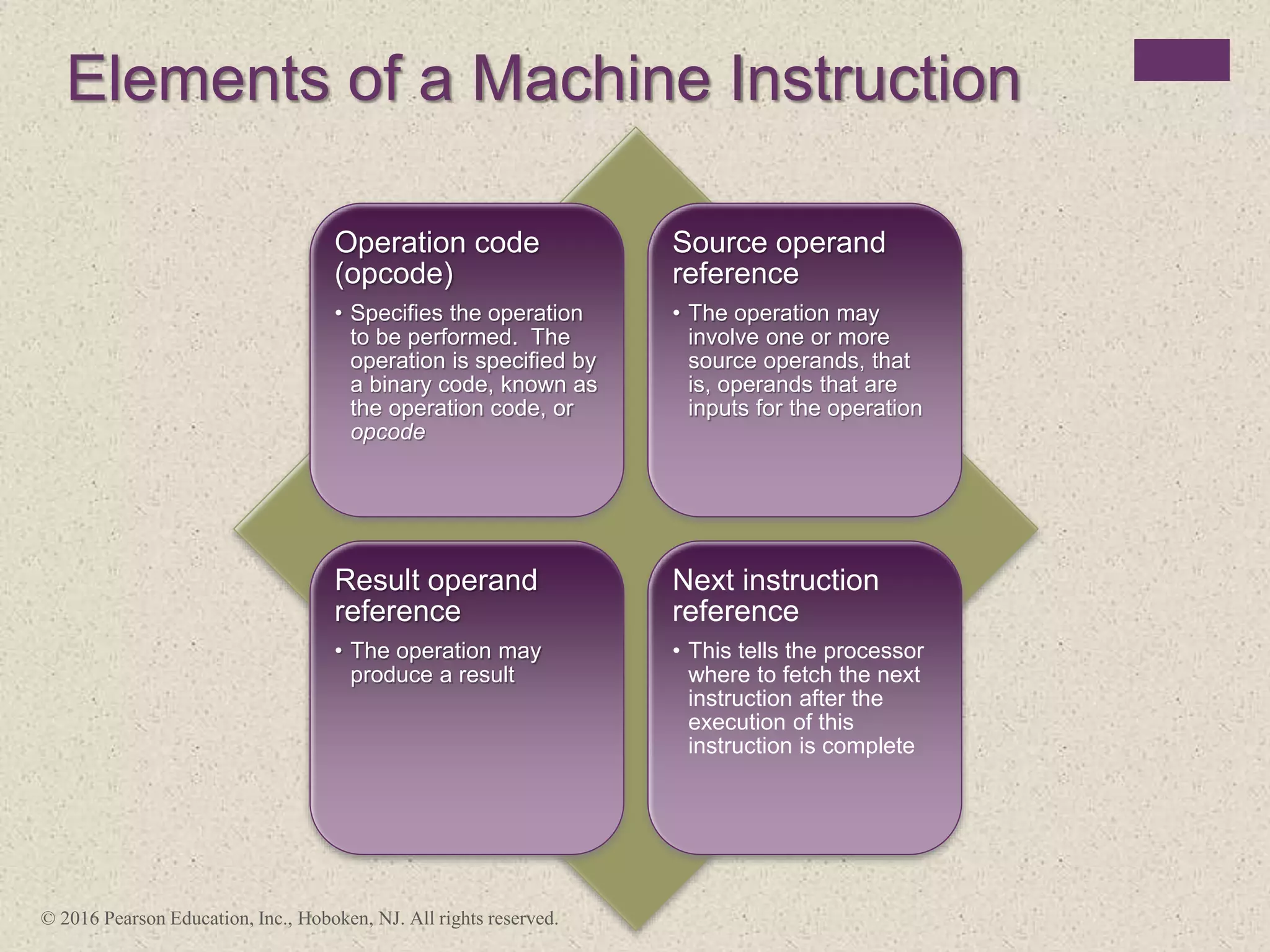
Elements of a Machine Instruction
Operation code
(opcode)
• Specifies the operation
to be performed. The
operation is specified by
a binary code, known as
the operation code, or
opcode
Source operand
reference
• The operation may
involve one or more
source operands, that
is, operands that are
inputs for the operation
Result operand
reference
• The operation may
produce a result
Next instruction
reference
• This tells the processor
where to fetch the next
instruction after the
execution of this
instruction is complete
© 2016 Pearson Education, Inc., Hoboken, NJ. All rights reserved.
Instruction
address
calculation
Instruction
operation
decoding
Operand
address
calculation
Data
Operation
Operand
address
calculation
Instruction
fetch
Instruction complete,
fetch next instruction
Multiple
operands
Return for string
or vector data
Figure 12.1 Instruction Cycle State Diagram
Operand
fetch
Operand
store
Multiple
results
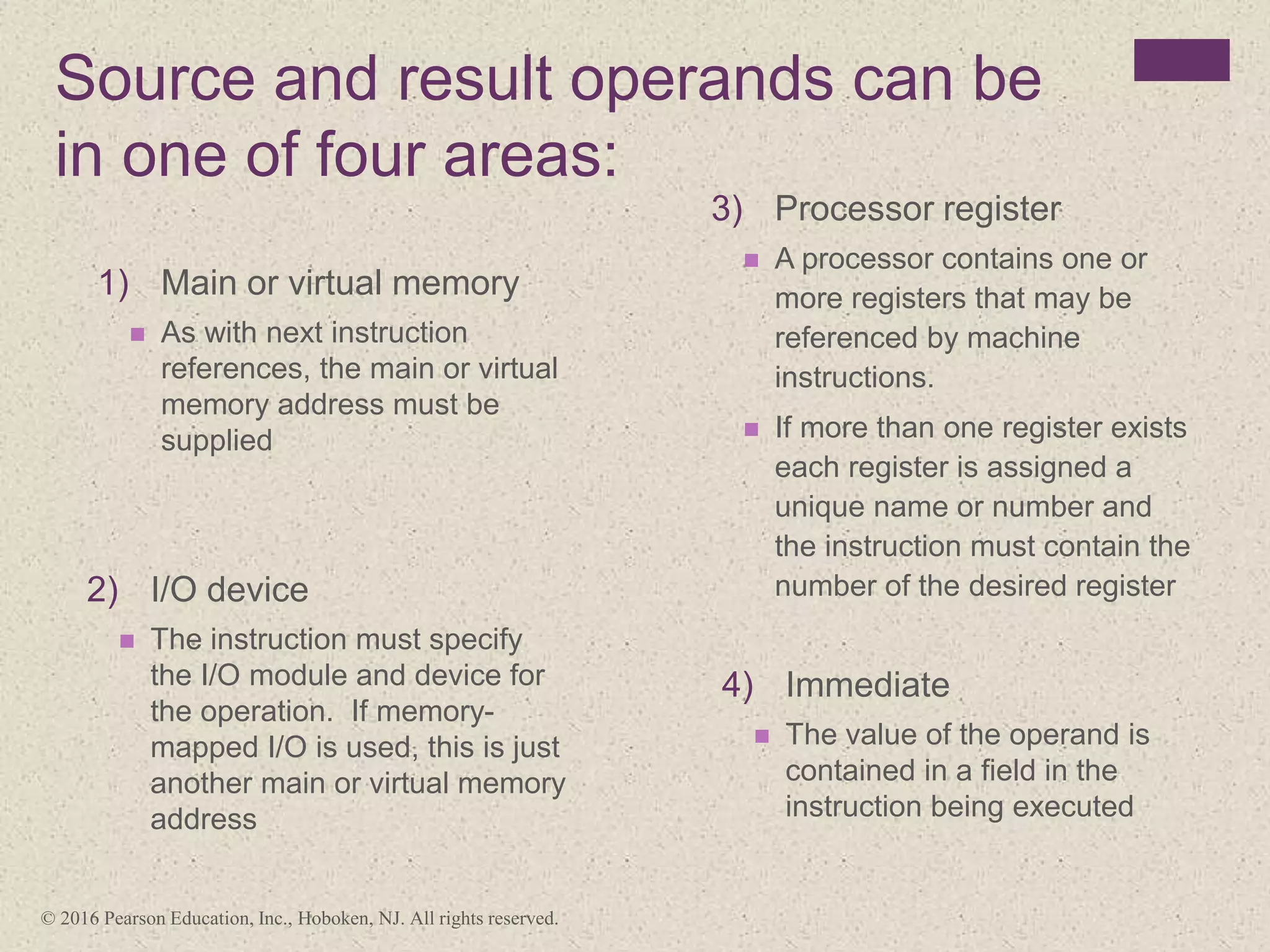
Source and result operands can be
in one of four areas:
3) Processor register
 A processor contains one or
more registers that may be
referenced by machine
instructions.
 If more than one register exists
each register is assigned a
unique name or number and
the instruction must contain the
number of the desired register
2) I/O device
 The instruction must specify
the I/O module and device for
the operation. If memory-
mapped I/O is used, this is just
another main or virtual memory
address
1) Main or virtual memory
 As with next instruction
references, the main or virtual
memory address must be
supplied
4) Immediate
 The value of the operand is
contained in a field in the
instruction being executed
© 2016 Pearson Education, Inc., Hoboken, NJ. All rights reserved.
+
Instruction Representation
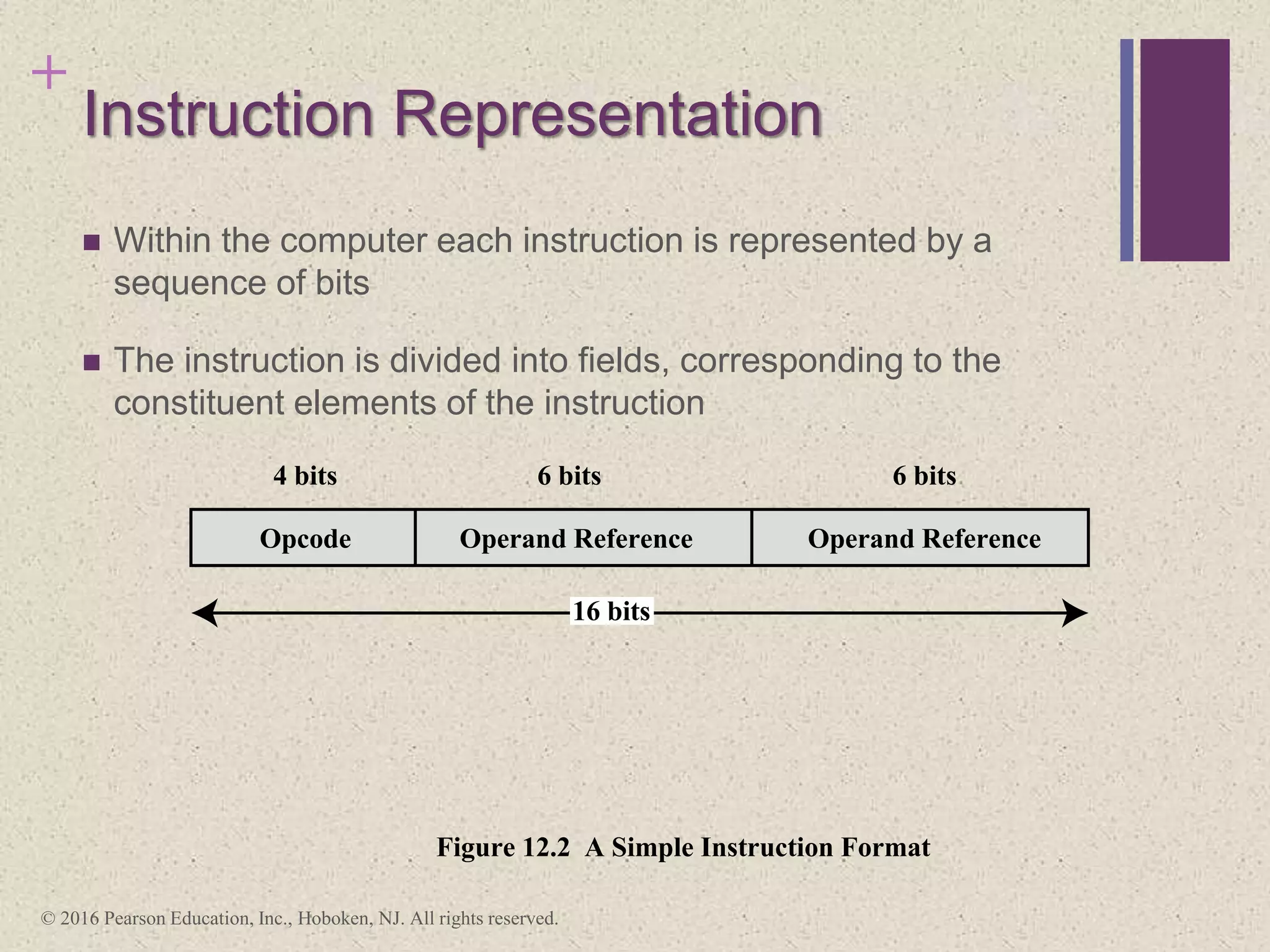
 Within the computer each instruction is represented by a
sequence of bits
 The instruction is divided into fields, corresponding to the
constituent elements of the instruction
Opcode
4 bits 6 bits 6 bits
16 bits
Figure 10.2 A Simple Instruction Format
Figure 12.2 A Simple Instruction Format
Operand Reference Operand Reference
© 2016 Pearson Education, Inc., Hoboken, NJ. All rights reserved.
+
Instruction Representation
 Opcodes are represented by abbreviations
called mnemonics
 Examples include:
 ADD Add
 SUB Subtract
 MUL Multiply
 DIV Divide
 LOAD Load data from memory
 STOR Store data to memory
 Operands are also represented symbolically
 Each symbolic opcode has a fixed binary representation
 The programmer specifies the location of each symbolic operand
© 2016 Pearson Education, Inc., Hoboken, NJ. All rights reserved.
Instruction Types
•I/O instructions are
needed to transfer
programs and data into
memory and the results of
computations back out to
the user
•Test instructions are used to test the
value of a data word or the status of
a computation
•Branch instructions are used to
branch to a different set of
instructions depending on the
decision made
•Movement of data into or
out of register and or
memory locations
•Arithmetic instructions provide
computational capabilities for
processing numeric data
•Logic (Boolean) instructions operate
on the bits of a word as bits rather
than as numbers, thus they provide
capabilities for processing any other
type of data the user may wish to
employ
Data
processing
Data
storage
Data
movement
Control
© 2016 Pearson Education, Inc., Hoboken, NJ. All rights reserved.
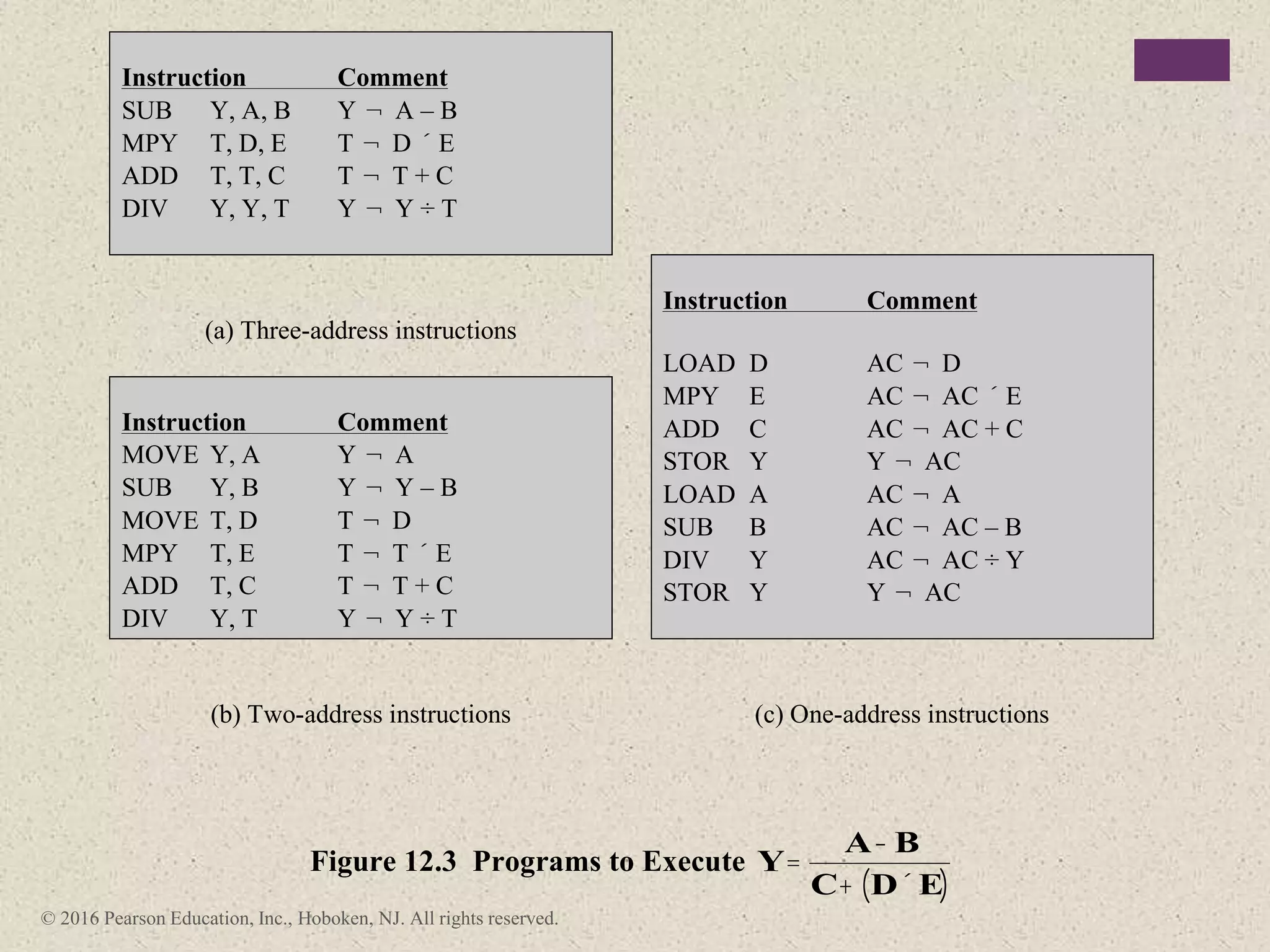
Instruction Comment
SUB Y, A, B Y ¬ A – B
MPY T, D, E T ¬ D ´ E
ADD T, T, C T ¬ T + C
DIV Y, Y, T Y ¬ Y ÷ T
(a) Three-address instructions
Instruction Comment
LOAD D AC ¬ D
MPY E AC ¬ AC ´ E
ADD C AC ¬ AC + C
STOR Y Y ¬ AC
LOAD A AC ¬ A
SUB B AC ¬ AC – B
DIV Y AC ¬ AC ÷ Y
STOR Y Y ¬ AC
Instruction Comment
MOVE Y, A Y ¬ A
SUB Y, B Y ¬ Y – B
MOVE T, D T ¬ D
MPY T, E T ¬ T ´ E
ADD T, C T ¬ T + C
DIV Y, T Y ¬ Y ÷ T
(b) Two-address instructions (c) One-address instructions
Figure 12.3 Programs to Execute Y=
A- B
C+ D´ E
( )
AC = accumulator
T = top of stack
(T – 1) = second element of stack
A, B, C = memory or register locations
© 2016 Pearson Education, Inc., Hoboken, NJ. All rights reserved.
Number of Addresses Symbolic Representation Interpretation
3 OP A, B, C A ¬ B OP C
2 OP A, B A ¬ A OP B
1 OP A AC ¬ AC OP A
0 OP T ¬ (T – 1) OP T
Table 12.1
Utilization of Instruction Addresses
(Nonbranching Instructions)
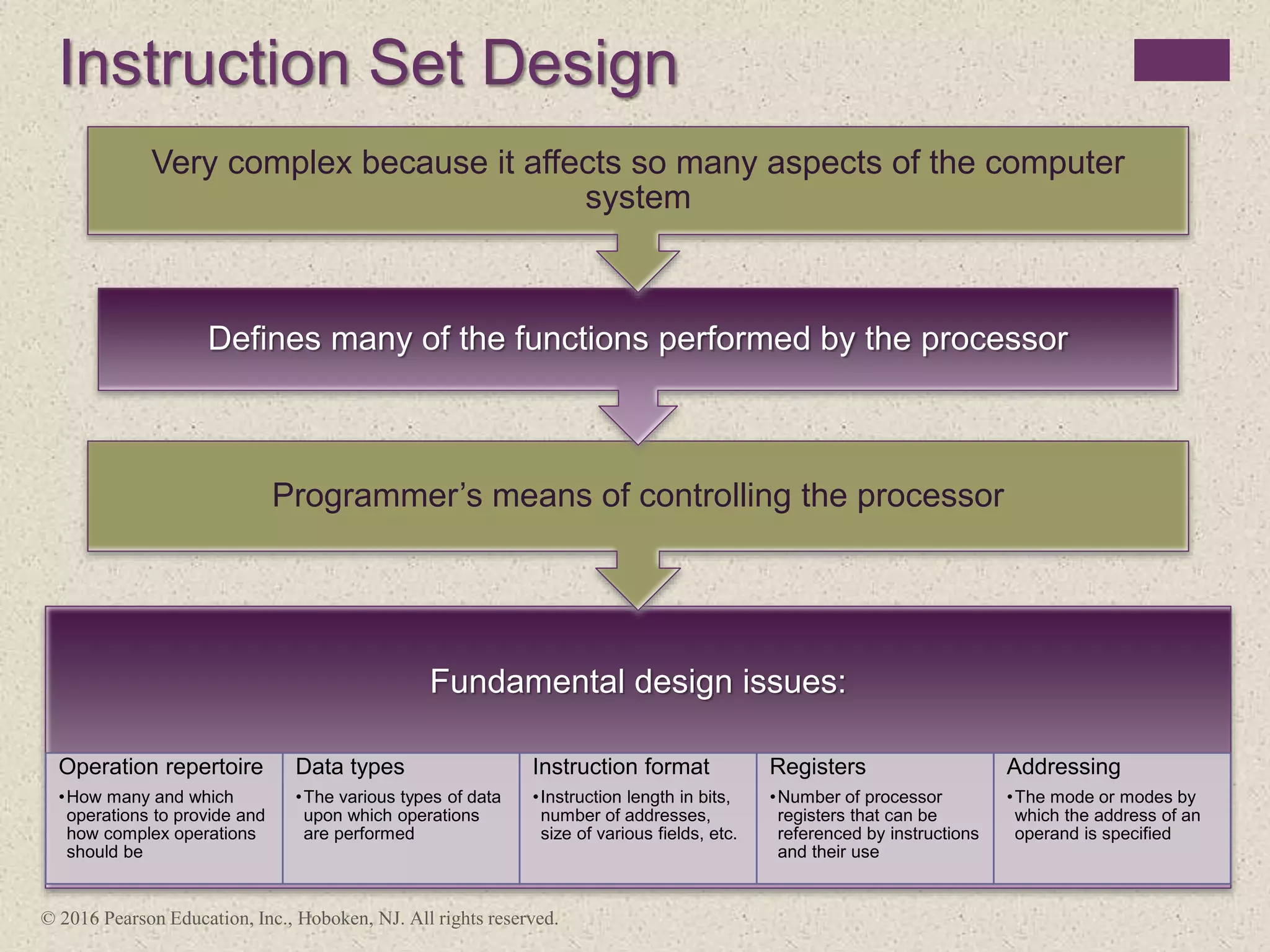
Instruction Set Design
Fundamental design issues:
Operation repertoire
•How many and which
operations to provide and
how complex operations
should be
Data types
•The various types of data
upon which operations
are performed
Instruction format
•Instruction length in bits,
number of addresses,
size of various fields, etc.
Registers
•Number of processor
registers that can be
referenced by instructions
and their use
Addressing
•The mode or modes by
which the address of an
operand is specified
Programmer’s means of controlling the processor
Defines many of the functions performed by the processor
Very complex because it affects so many aspects of the computer
system
© 2016 Pearson Education, Inc., Hoboken, NJ. All rights reserved.
Types of Operands
© 2016 Pearson Education, Inc., Hoboken, NJ. All rights reserved.
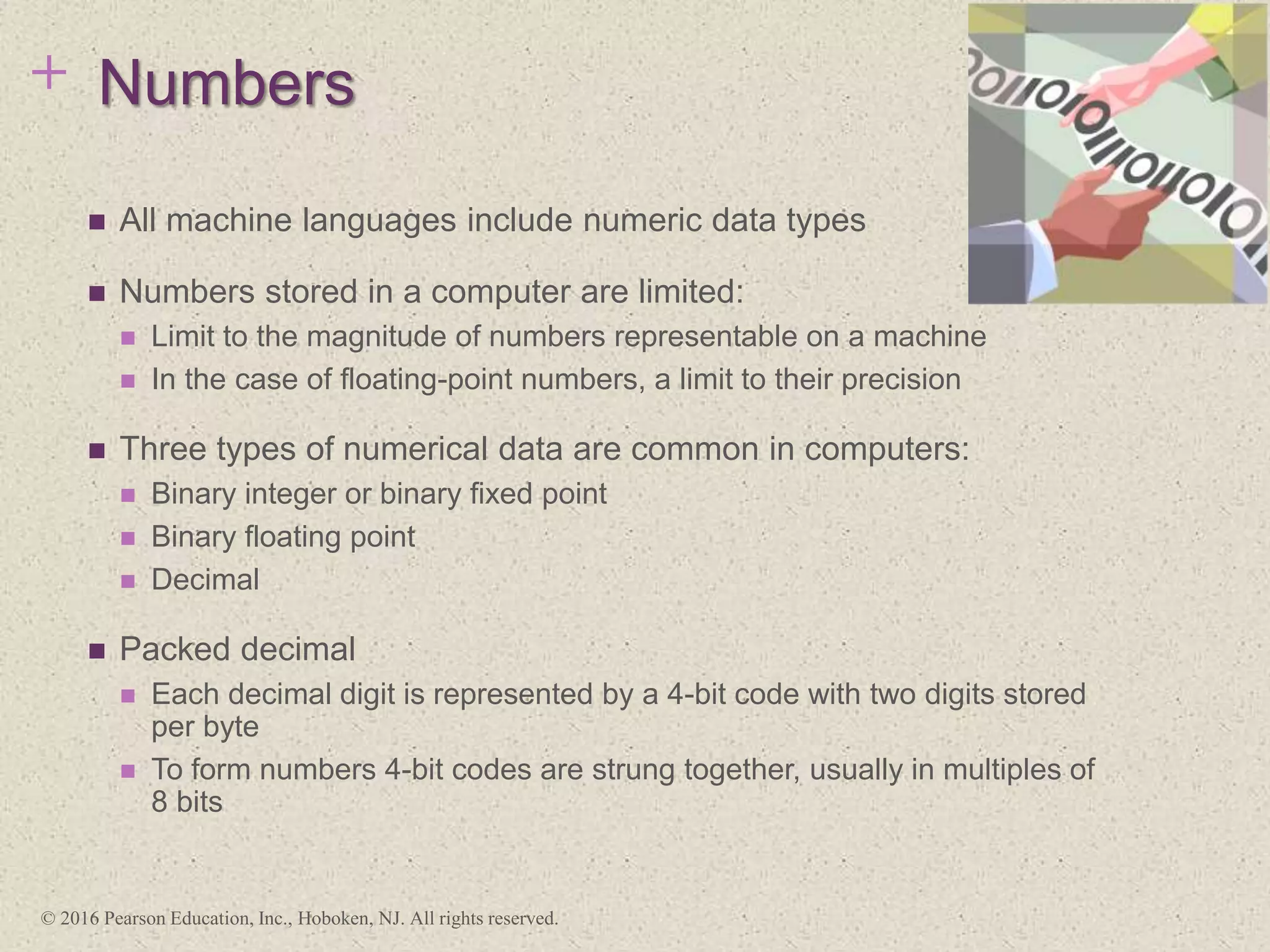
+ Numbers
 All machine languages include numeric data types
 Numbers stored in a computer are limited:
 Limit to the magnitude of numbers representable on a machine
 In the case of floating-point numbers, a limit to their precision
 Three types of numerical data are common in computers:
 Binary integer or binary fixed point
 Binary floating point
 Decimal
 Packed decimal
 Each decimal digit is represented by a 4-bit code with two digits stored
per byte
 To form numbers 4-bit codes are strung together, usually in multiples of
8 bits
© 2016 Pearson Education, Inc., Hoboken, NJ. All rights reserved.
+
Characters
 A common form of data is text or character strings
 Textual data in character form cannot be easily stored or
transmitted by data processing and communications systems
because they are designed for binary data
 Most commonly used character code is the International
Reference Alphabet (IRA)
 Referred to in the United States as the American Standard Code for
Information Interchange (ASCII)
 Another code used to encode characters is the Extended
Binary Coded Decimal Interchange Code (EBCDIC)
 EBCDIC is used on IBM mainframes
© 2016 Pearson Education, Inc., Hoboken, NJ. All rights reserved.
+
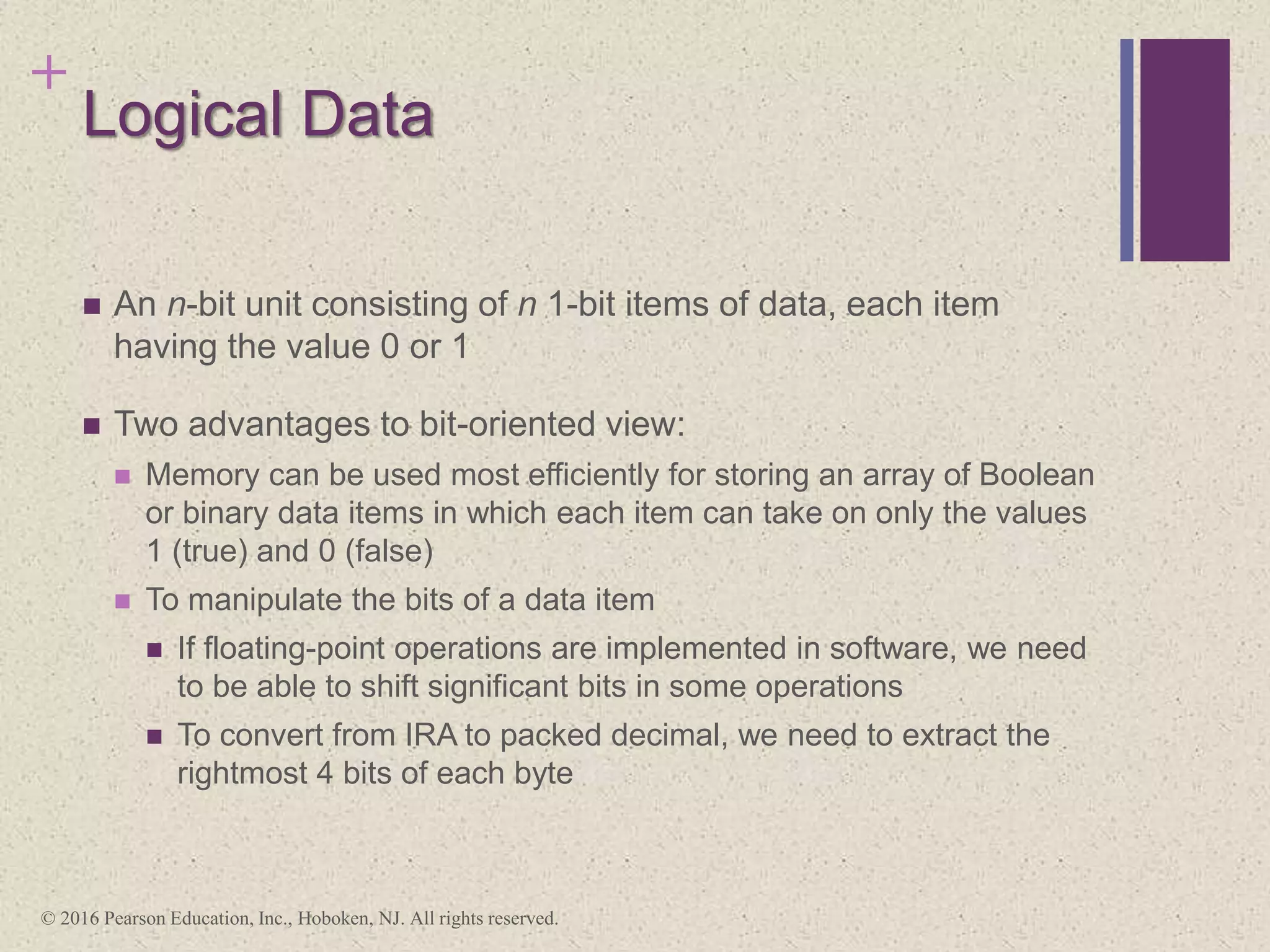
Logical Data
 An n-bit unit consisting of n 1-bit items of data, each item
having the value 0 or 1
 Two advantages to bit-oriented view:
 Memory can be used most efficiently for storing an array of Boolean
or binary data items in which each item can take on only the values
1 (true) and 0 (false)
 To manipulate the bits of a data item
 If floating-point operations are implemented in software, we need
to be able to shift significant bits in some operations
 To convert from IRA to packed decimal, we need to extract the
rightmost 4 bits of each byte
© 2016 Pearson Education, Inc., Hoboken, NJ. All rights reserved.
Data Type Description
General Byte, word (16 bits), doubleword (32 bits), quadword (64 bits),
and double quadword (128 bits) locations with arbitrary binary
contents.
Integer A signed binary value co4ntained in a byte, word, or doubleword,
using twos complement representation.
Ordinal An unsigned integer contained in a byte, word, or doubleword.
Unpacked binary coded
decimal (BCD)
A representation of a BCD digit in the range 0 through 9, with one
digit in each byte.
Packed BCD Packed byte representation of two BCD digits; value in the range 0
to 99.
Near pointer A 16-bit, 32-bit, or 64-bit effective address that represents the
offset within a segment. Used for all pointers in a nonsegmented
memory and for references within a segment in a segmented
memory.
Far pointer A logical address consisting of a 16-bit segment selector and an
offset of 16, 32, or 64 bits. Far pointers are used for memory
references in a segmented memory model where the identity of a
segment being accessed must be specified explicitly.
Bit field A contiguous sequence of bits in which the position of each bit is
considered as an independent unit. A bit string can begin at any bit
position of any byte and can contain up to 32 bits.
Bit string A contiguous sequence of bits, containing from zero to 232 – 1
bits.
Byte string A contiguous sequence of bytes, words, or doublewords,
containing from zero to 232 – 1 bytes.
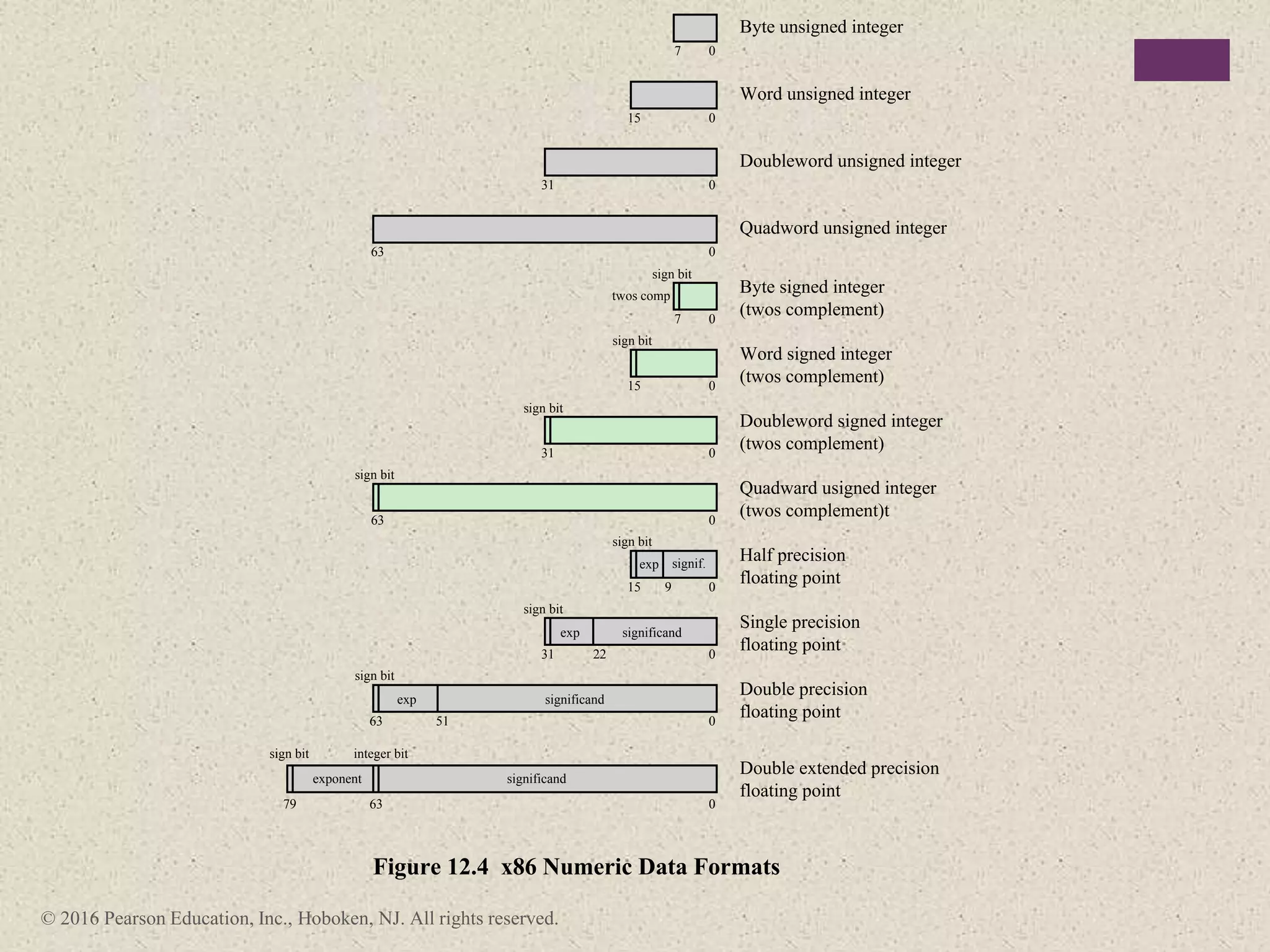
Floating point See Figure 12.4.
Packed SIMD (single
instruction, multiple data)
Packed 64-bit and 128-bit data types
Table 12.2
x86
Data Types
© 2016 Pearson Education, Inc., Hoboken, NJ. All rights reserved.
sign bit
sign bit
sign bit
integer bit
exponent significand
exp significand
exp significand
twos comp
sign bit
sign bit
sign bit
Figure 12.4 x86 Numeric Data Formats
Byte unsigned integer
Word unsigned integer
Doubleword unsigned integer
Quadword unsigned integer
Byte signed integer
(twos complement)
Word signed integer
(twos complement)
Doubleword signed integer
(twos complement)
Quadward usigned integer
(twos complement)t
Single precision
floating point
Double precision
floating point
Double extended precision
floating point
0
7
7
0
15
15
0
31
31
31 22
0
63
63
63
63
79
0
0
sign bit
Half precision
floating point
15 0
0
0
0
0
51
0
sign bit
9
exp signif.
+
Single-Instruction-Multiple-Data
(SIMD) Data Types
 Introduced to the x86 architecture as part of the extensions of the
instruction set to optimize performance of multimedia applications
 The basic concept is that multiple operands are packed into a single
referenced memory item and that these multiple operands are
operated on in parallel.
 These extensions include MMX (multimedia extensions) and SSE
(streaming SIMD extensions)
 Data types:
 Packed byte and packed byte integer
 Packed word and packed word integer
 Packed doubleword and packed doubleword integer
 Packed quadword and packed quadword integer
 Packed single-precision floating-point and packed double-precision floating-
point
© 2016 Pearson Education, Inc., Hoboken, NJ. All rights reserved.
ARM Data Types
ARM processors support
data types of:
• 8 (byte)
• 16 (halfword)
• 32 (word) bits in length
Alignment checking
• When the appropriate
control bit is set, a data
abort signal indicates an
alignment fault for
attempting unaligned access
Unaligned access
• When this option is enabled,
the processor uses one or
more memory accesses to
generate the required
transfer of adjacent bytes
transparently to the
programmer
For all three data types
an unsigned
interpretation is
supported in which the
value represents an
unsigned, nonnegative
integer
All three data types can
also be used for twos
complement signed
integers
© 2016 Pearson Education, Inc., Hoboken, NJ. All rights reserved.
Type Operation Name Description
Move (transfer) Transfer word or block from source to destination
Store Transfer word from processor to memory
Load (fetch) Transfer word from memory to processor
Exchange Swap contents of source and destination
Clear (reset) Transfer word of 0s to destination
Set Transfer word of 1s to destination
Push Transfer word from source to top of stack
Data Transfer
Pop Transfer word from top of stack to destination
Add Compute sum of two operands
Subtract Compute difference of two operands
Multiply Compute product of two operands
Divide Compute quotient of two operands
Absolute Replace operand by its absolute value
Negate Change sign of operand
Increment Add 1 to operand
Arithmetic
Decrement Subtract 1 from operand
AND Perform logical AND
OR Perform logical OR
NOT (complement) Perform logical NOT
Exclusive-OR Perform logical XOR
Test Test specified condition; set flag(s) based on outcome
Compare Make logical or arithmetic comparison of two or more
operands; set flag(s) based on outcome
Set Control
Variables
Class of instructions to set controls for protection
purposes, interrupt handling, timer control, etc.
Shift Left (right) shift operand, introducing constants at end
Logical
Rotate Left (right) shift operand, with wraparound end
Table 12.3
Common
Instruction Set
Operations
(page 1 of 2)
(Table can be found on page
426 in textbook.)
© 2016 Pearson Education, Inc., Hoboken, NJ. All rights reserved.
Type Operation Name Description
Jump (branch) Unconditional transfer; load PC with specified address
Jump Conditional Test specified condition; either load PC with specified
address or do nothing, based on condition
Jump to Subroutine Place current program control information in known
location; jump to specified address
Return Replace contents of PC and other register from known
location
Execute Fetch operand from specified location and execute as
instruction; do not modify PC
Skip Increment PC to skip next instruction
Skip Conditional Test specified condition; either skip or do nothing based
on condition
Halt Stop program execution
Wait (hold) Stop program execution; test specified condition
repeatedly; resume execution when condition is satisfied
Transfer of Control
No operation No operation is performed, but program execution is
continued
Input (read) Transfer data from specified I/O port or device to
destination (e.g., main memory or processor register)
Output (write) Transfer data from specified source to I/O port or device
Start I/O Transfer instructions to I/O processor to initiate I/O
operation
Input/Output
Test I/O Transfer status information from I/O system to specified
destination
Translate Translate values in a section of memory based on a table
of correspondences
Conversion
Convert Convert the contents of a word from one form to another
(e.g., packed decimal to binary)
Table 12.3
Common
Instruction Set
Operations
(page 2 of 2)
(Table can be found on page
426 in textbook.)
© 2016 Pearson Education, Inc., Hoboken, NJ. All rights reserved.
Transfer data from one location to another
Data Transfer
If memory is involved:
Determine memory address
Perform virtual-to-actual-memory address transformation
Check cache
Initiate memory read/write
May involve data transfer, before and/or after
Perform function in ALU
Arithmetic
Set condition codes and flags
Logical Same as arithmetic
Conversion Similar to arithmetic and logical. May involve special logic to
perform conversion
Transfer of Control
Update program counter. For subroutine call/return, manage
parameter passing and linkage
Issue command to I/O module
I/O
If memory-mapped I/O, determine memory-mapped address
Table 12.4
Processor Actions for Various Types of Operations
(Table can be found on page 427 in textbook.)
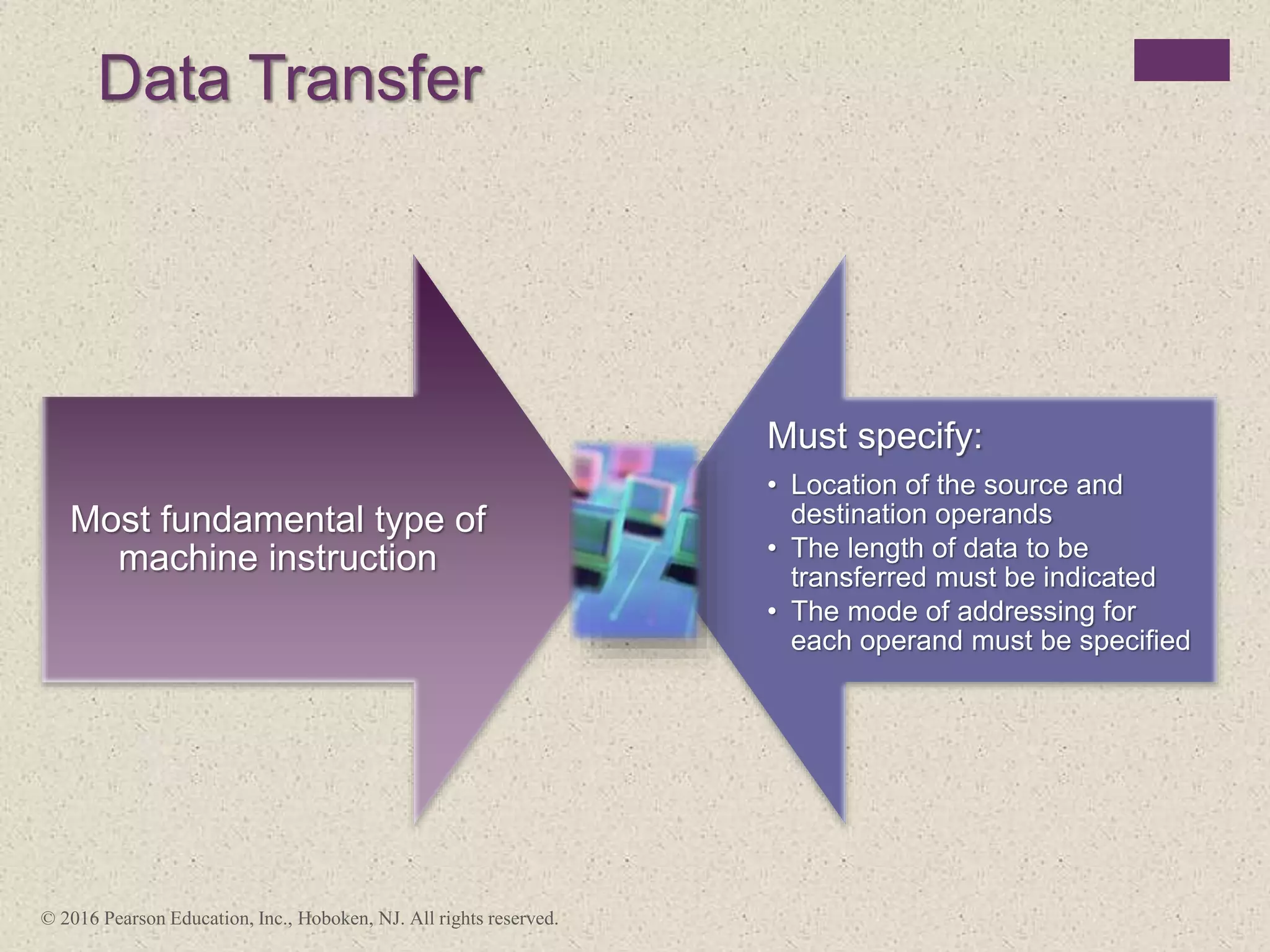
Data Transfer
Most fundamental type of
machine instruction
Must specify:
• Location of the source and
destination operands
• The length of data to be
transferred must be indicated
• The mode of addressing for
each operand must be specified
© 2016 Pearson Education, Inc., Hoboken, NJ. All rights reserved.
Operation
Mnemonic Name
Number of Bits
Transferred Description
L Load 32 Transfer from memory to register
LH Load Halfword 16 Transfer from memory to register
LR Load 32 Transfer from register to register
LER Load (Short) 32 Transfer from floating-point register to
floating-point register
LE Load (Short) 32 Transfer from memory to floating-point
register
LDR Load (Long) 64 Transfer from floating-point register to
floating-point register
LD Load (Long) 64 Transfer from memory to floating-point
register
ST Store 32 Transfer from register to memory
STH Store Halfword 16 Transfer from register to memory
STC Store Character 8 Transfer from register to memory
STE Store (Short) 32 Transfer from floating-point register to
memory
STD Store (Long) 64 Transfer from floating-point register to
memory
Table 12.5
Examples of IBM EAS/390 Data Transfer Operations
(Table can be found on page 428 in textbook.)
+
Arithmetic
 Most machines provide the basic arithmetic
operations of add, subtract, multiply, and divide
 These are provided for signed integer (fixed-point)
numbers
 Often they are also provided for floating-point and
packed decimal numbers
 Other possible operations include a variety of
single-operand instructions:
 Absolute
 Take the absolute value of the operand
 Negate
 Negate the operand
 Increment
 Add 1 to the operand
Decrement
 Subtract 1 from the operand
© 2016 Pearson Education, Inc., Hoboken, NJ. All rights reserved.
P Q NOT P P AND Q P OR Q P XOR Q P=Q
0 0 1 0 0 0 1
0 1 1 0 1 1 0
1 0 0 0 1 1 0
1 1 0 1 1 0 1
Table 12.6
Basic Logical Operations
© 2016 Pearson Education, Inc., Hoboken, NJ. All rights reserved.
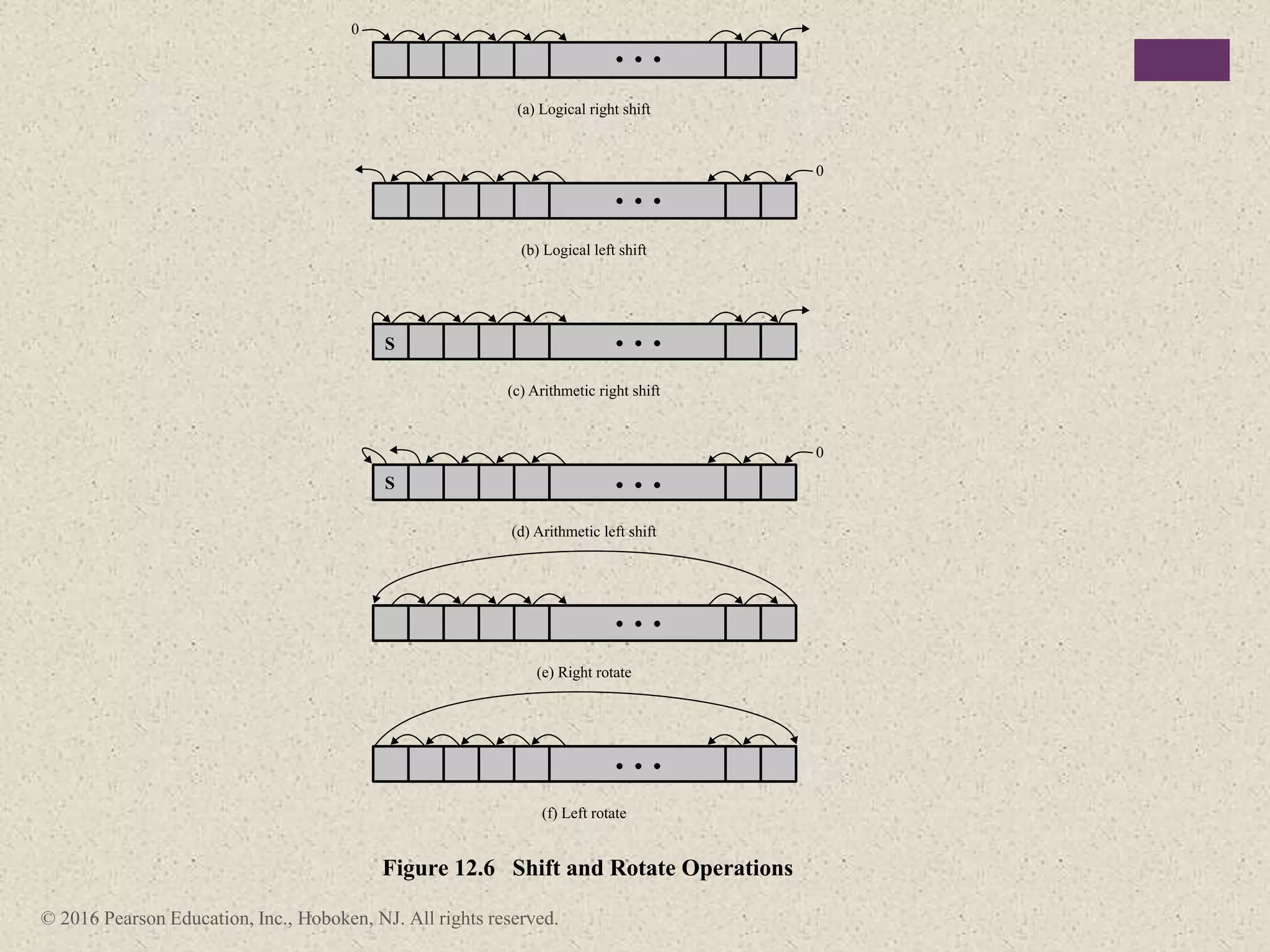
(a) Logical right shift
0
0
(e) Right rotate
(c) Arithmetic right shift
S
(b) Logical left shift
(f) Left rotate
0
(d) Arithmetic left shift
S
Figure 12.6 Shift and Rotate Operations
© 2016 Pearson Education, Inc., Hoboken, NJ. All rights reserved.
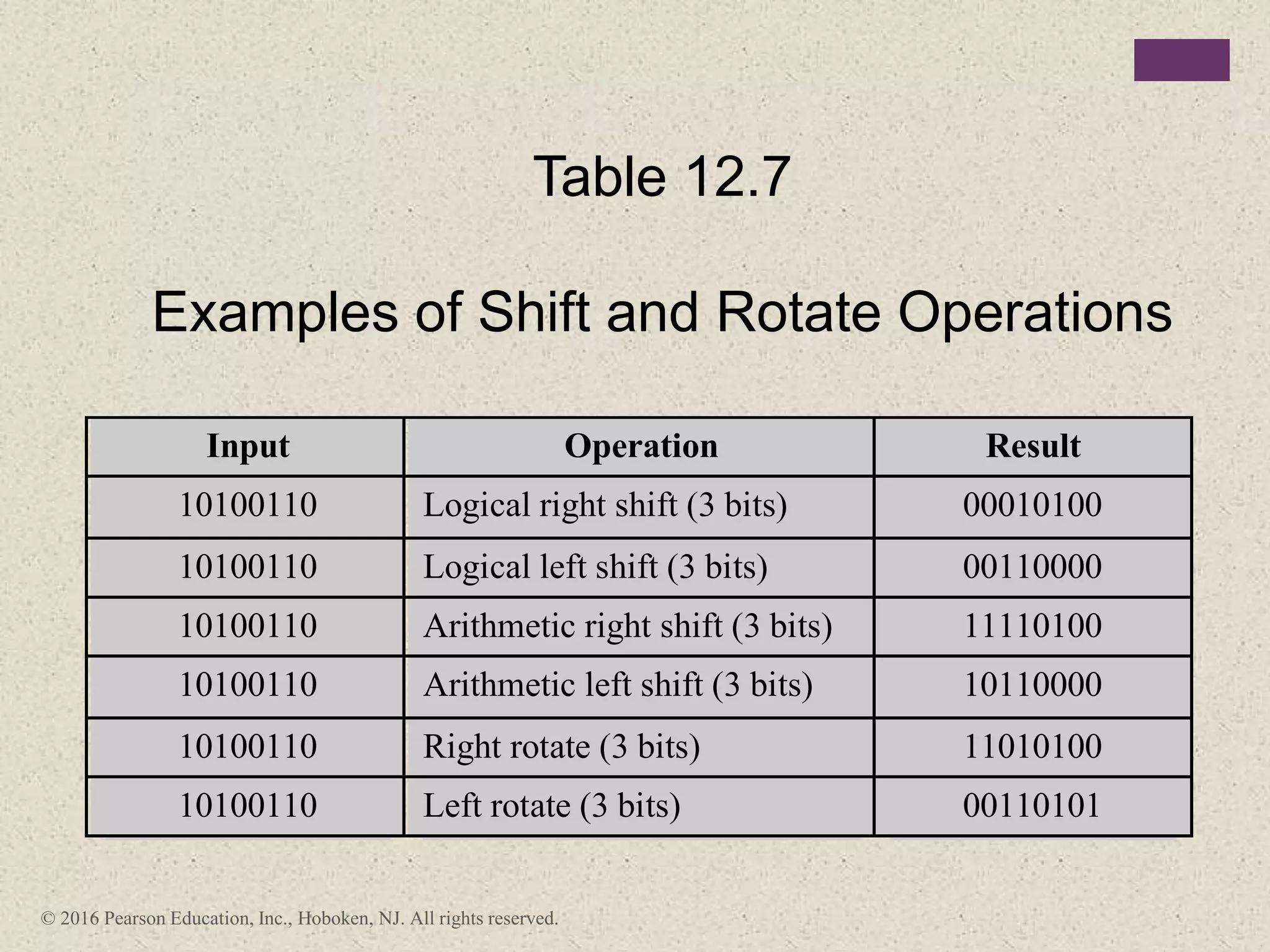
Input Operation Result
10100110 Logical right shift (3 bits) 00010100
10100110 Logical left shift (3 bits) 00110000
10100110 Arithmetic right shift (3 bits) 11110100
10100110 Arithmetic left shift (3 bits) 10110000
10100110 Right rotate (3 bits) 11010100
10100110 Left rotate (3 bits) 00110101
Table 12.7
Examples of Shift and Rotate Operations
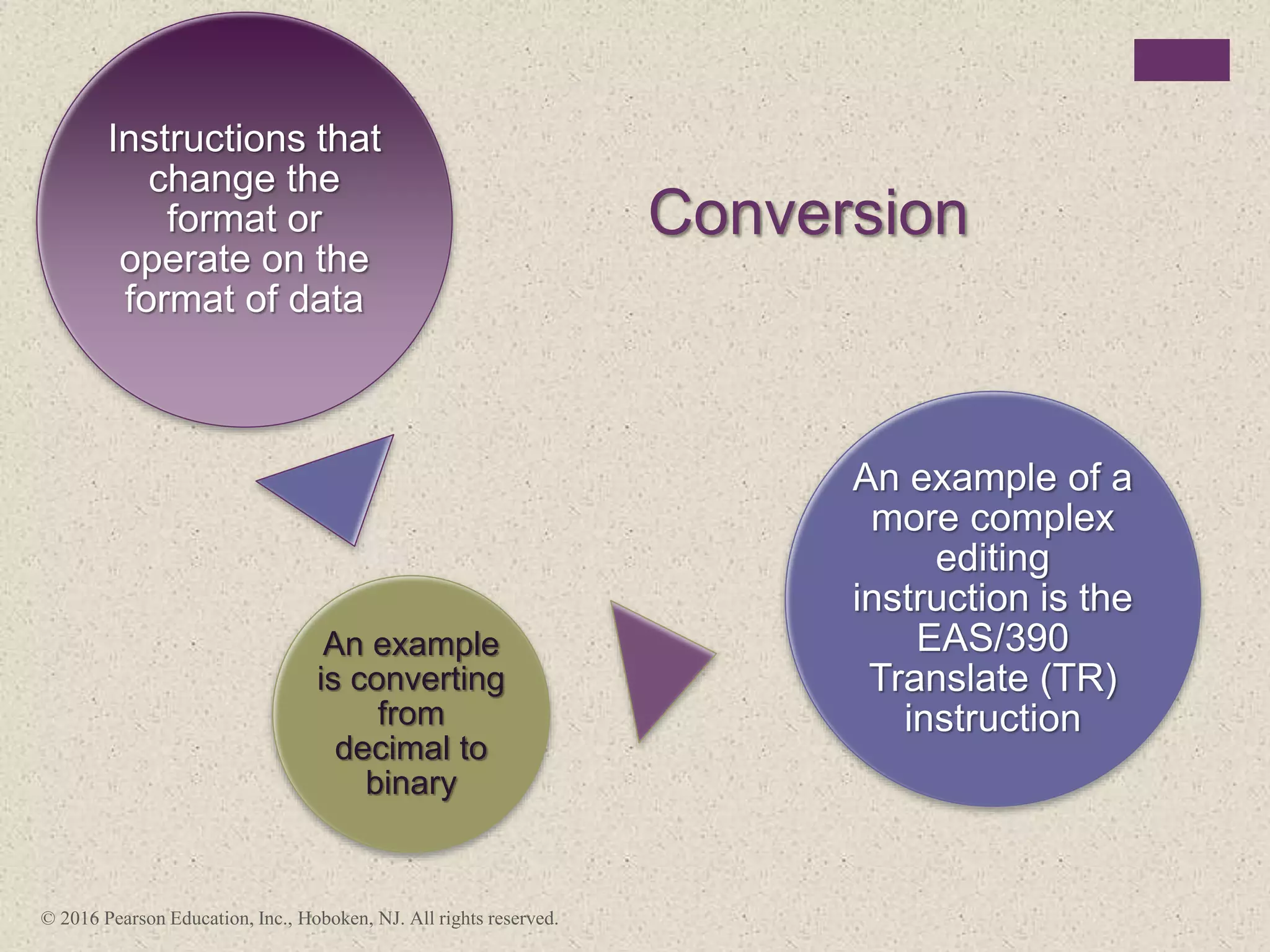
Conversion
Instructions that
change the
format or
operate on the
format of data
An example
is converting
from
decimal to
binary
An example of a
more complex
editing
instruction is the
EAS/390
Translate (TR)
instruction
© 2016 Pearson Education, Inc., Hoboken, NJ. All rights reserved.
+
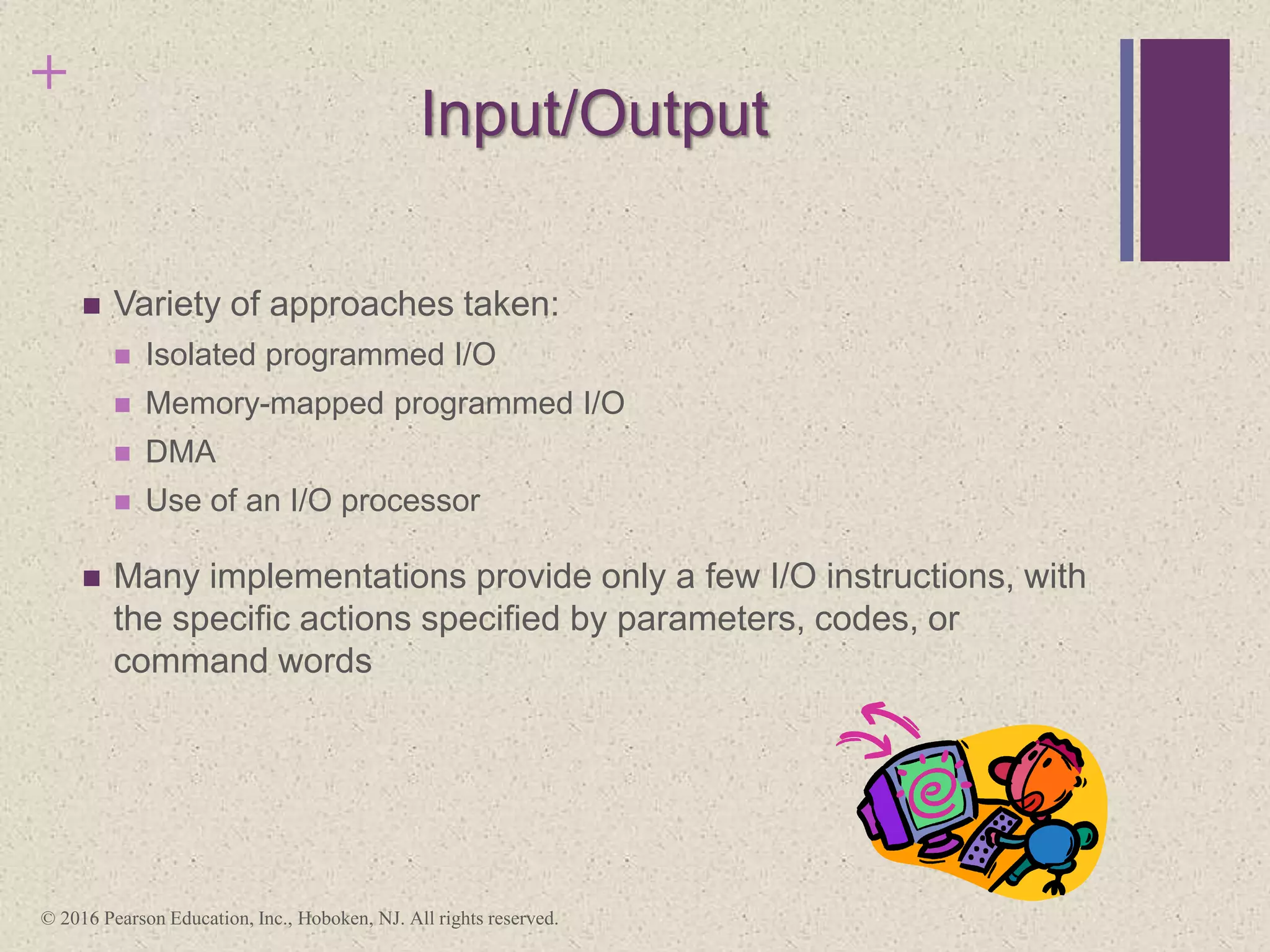
Input/Output
 Variety of approaches taken:
 Isolated programmed I/O
 Memory-mapped programmed I/O
 DMA
 Use of an I/O processor
 Many implementations provide only a few I/O instructions, with
the specific actions specified by parameters, codes, or
command words
© 2016 Pearson Education, Inc., Hoboken, NJ. All rights reserved.
System Control
Instructions that can be executed only while the processor is in a certain
privileged state or is executing a program in a special privileged area of
memory
Typically these instructions are reserved for the use of the operating
system
Examples of system control operations:
A system control
instruction may read or
alter a control register
An instruction to read or
modify a storage protection
key
Access to process control
blocks in a
multiprogramming system
© 2016 Pearson Education, Inc., Hoboken, NJ. All rights reserved.
+
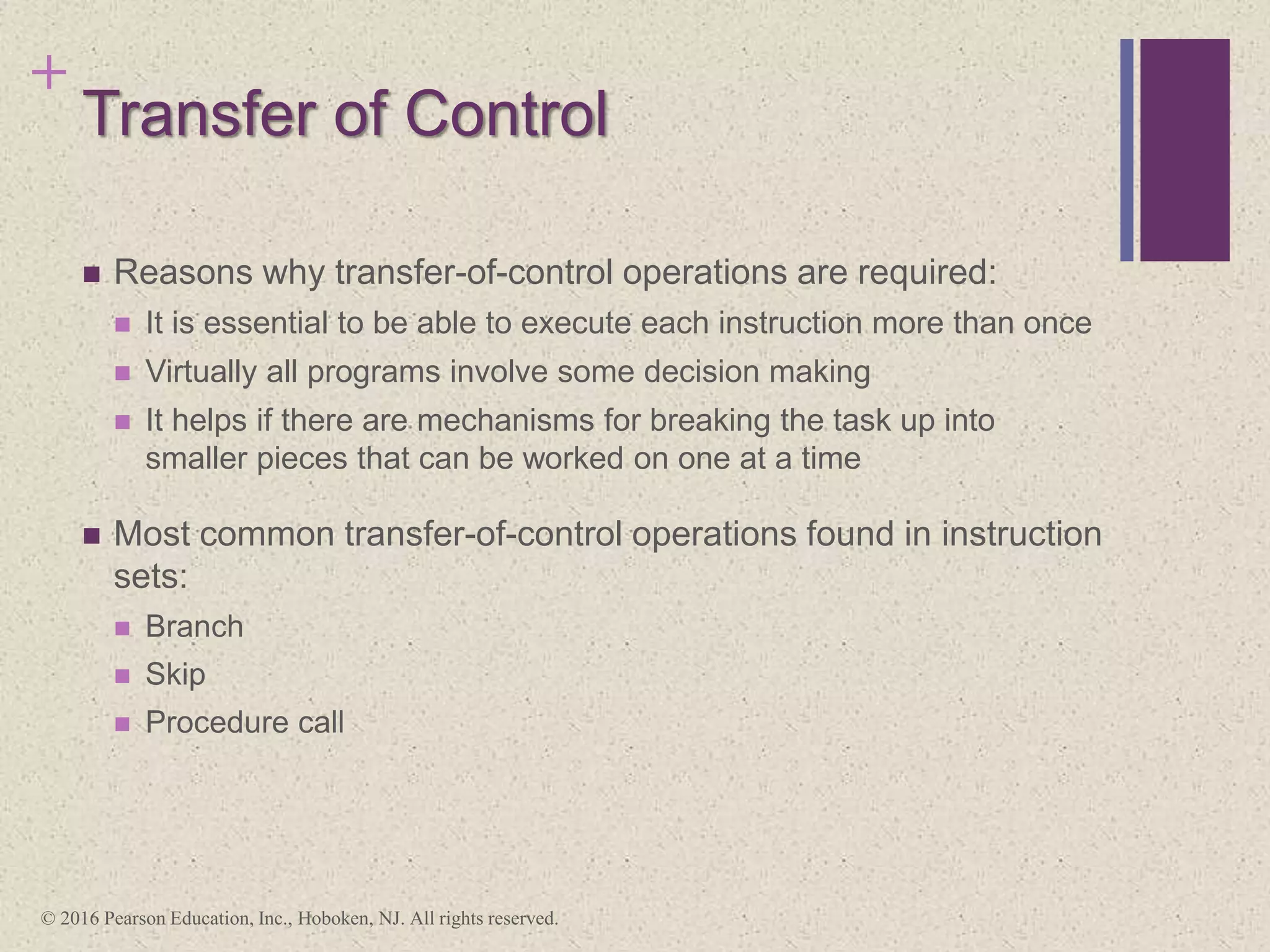
Transfer of Control
 Reasons why transfer-of-control operations are required:
 It is essential to be able to execute each instruction more than once
 Virtually all programs involve some decision making
 It helps if there are mechanisms for breaking the task up into
smaller pieces that can be worked on one at a time
 Most common transfer-of-control operations found in instruction
sets:
 Branch
 Skip
 Procedure call
© 2016 Pearson Education, Inc., Hoboken, NJ. All rights reserved.
Figure 12.7 Branch Instructions
Memory
address
200
201
202
203
SUB X, Y
BRZ 211
BR 202
BRE R1, R2, 235
210
211
225
235
Unconditional
branch Conditional
branch
Conditional
branch
Instruction
Skip Instructions
Includes an implied
address
Typically implies that one
instruction be skipped,
thus the implied address
equals the address of the
next instruction plus one
instruction length
Because the skip
instruction does not
require a destination
address field it is free to
do other things
Example is the
increment-and-skip-if-
zero (ISZ) instruction
© 2016 Pearson Education, Inc., Hoboken, NJ. All rights reserved.
+
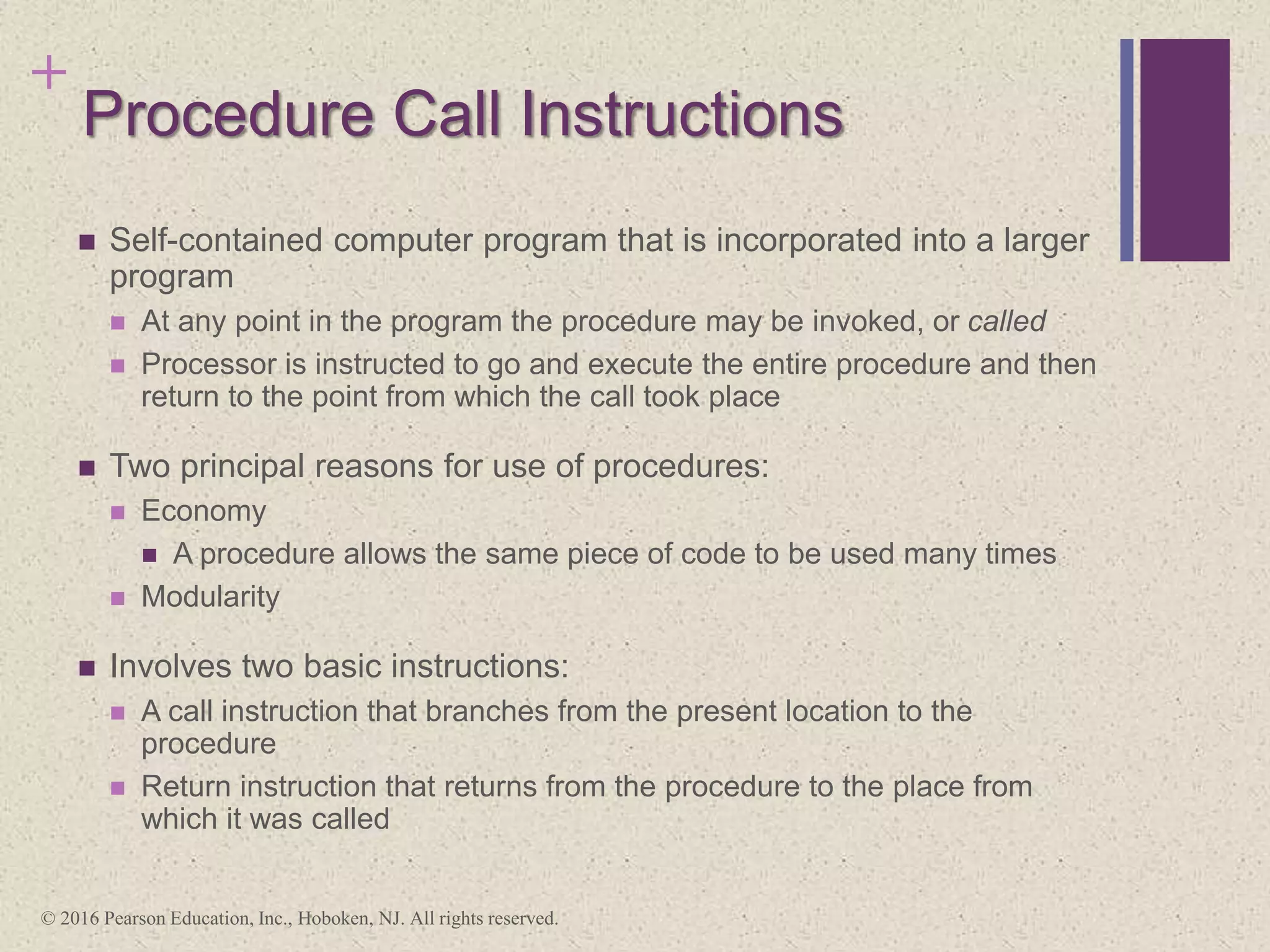
Procedure Call Instructions
 Self-contained computer program that is incorporated into a larger
program
 At any point in the program the procedure may be invoked, or called
 Processor is instructed to go and execute the entire procedure and then
return to the point from which the call took place
 Two principal reasons for use of procedures:
 Economy
 A procedure allows the same piece of code to be used many times
 Modularity
 Involves two basic instructions:
 A call instruction that branches from the present location to the
procedure
 Return instruction that returns from the procedure to the place from
which it was called
© 2016 Pearson Education, Inc., Hoboken, NJ. All rights reserved.
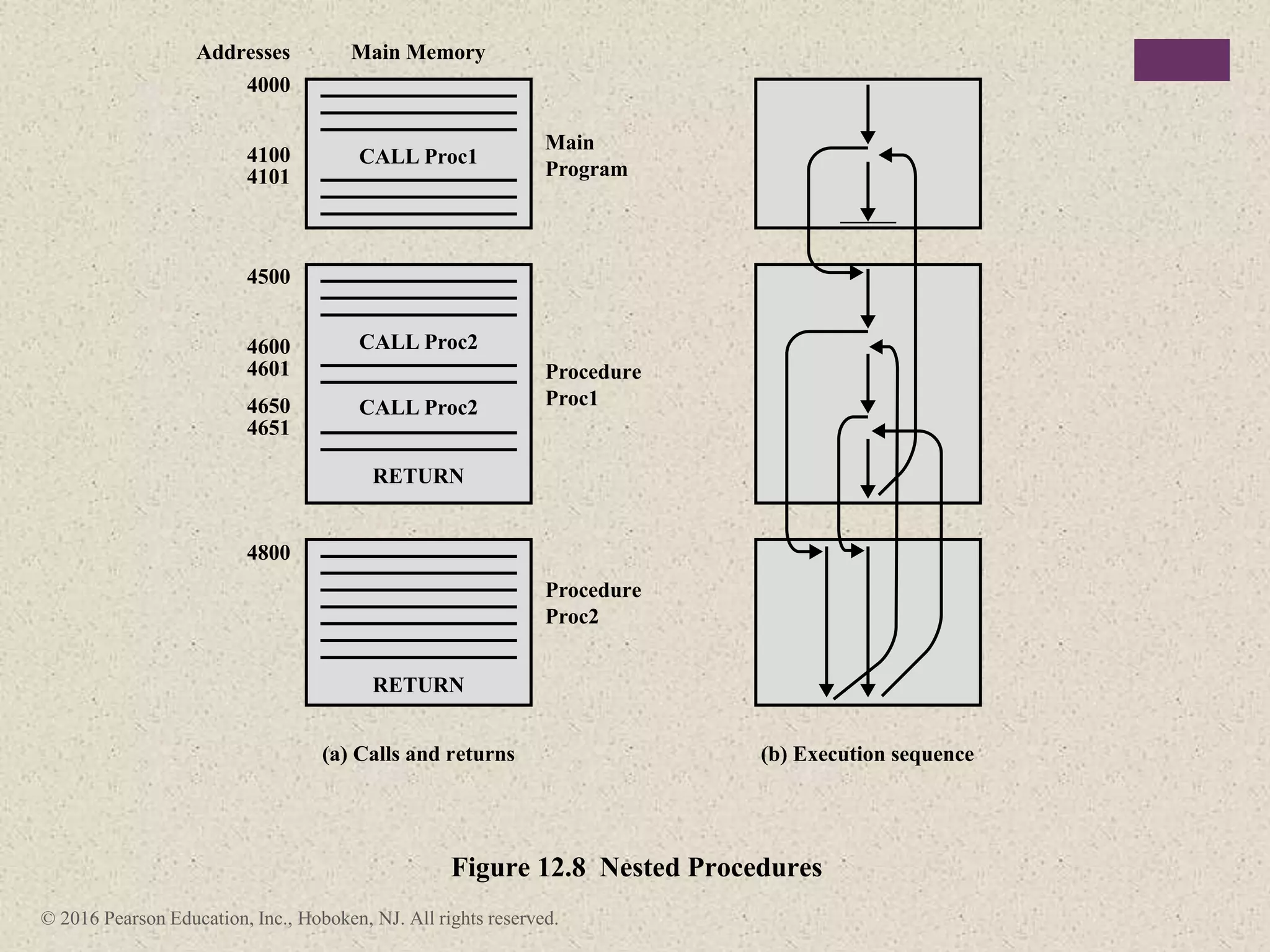
CALL Proc1
Main Memory
Main
Program
Procedure
Proc1
Procedure
Proc2
Addresses
4000
4100
4101
4500
4800
4600
4601
4650
4651
CALL Proc2
CALL Proc2
RETURN
RETURN
(a) Calls and returns (b) Execution sequence
Figure 12.8 Nested Procedures
© 2016 Pearson Education, Inc., Hoboken, NJ. All rights reserved.
Figure 12.9 Use of Stack to Implement Nested Procedures of Figure 12.8
(a) Initial stack
contents
4101
(b) After
CALL Proc1
4101
4601
(c) Initial
CALL Proc2
4101
(d) After
RETURN
4101
4651
(e) After
CALL Proc2
4101
(f) After
RETURN
(g) After
RETURN
+ Summary
 Machine instruction
characteristics
 Elements of a machine
instruction
 Instruction representation
 Instruction types
 Number of addresses
 Instruction set design
 Types of operands
 Numbers
 Characters
 Logical data
 Intel x86 and ARM data types
 Types of operations
 Data transfer
 Arithmetic
 Logical
 Conversion
 Input/output
 System control
 Transfer of control
 Intel x86 and ARM operation
types
Chapter 12
Instruction Sets:
Characteristics and
Functions
© 2016 Pearson Education, Inc., Hoboken, NJ. All rights reserved.

Part 1.pptx

  • 1.
    + William Stallings Computer Organization andArchitecture 10th Edition © 2016 Pearson Education, Inc., Hoboken, NJ. All rights reserved.
  • 2.
    + Chapter Instruction Sets ©2016 Pearson Education, Inc., Hoboken, NJ. All rights reserved.
  • 3.
    + Machine Instruction Characteristics The operation of the processor is determined by the instructions it executes, referred to as machine instructions or computer instructions  The collection of different instructions that the processor can execute is referred to as the processor’s instruction set  Each instruction must contain the information required by the processor for execution © 2016 Pearson Education, Inc., Hoboken, NJ. All rights reserved.
  • 4.
    Elements of aMachine Instruction Operation code (opcode) • Specifies the operation to be performed. The operation is specified by a binary code, known as the operation code, or opcode Source operand reference • The operation may involve one or more source operands, that is, operands that are inputs for the operation Result operand reference • The operation may produce a result Next instruction reference • This tells the processor where to fetch the next instruction after the execution of this instruction is complete © 2016 Pearson Education, Inc., Hoboken, NJ. All rights reserved.
  • 5.
    © 2016 PearsonEducation, Inc., Hoboken, NJ. All rights reserved. Instruction address calculation Instruction operation decoding Operand address calculation Data Operation Operand address calculation Instruction fetch Instruction complete, fetch next instruction Multiple operands Return for string or vector data Figure 12.1 Instruction Cycle State Diagram Operand fetch Operand store Multiple results
  • 6.
    Source and resultoperands can be in one of four areas: 3) Processor register  A processor contains one or more registers that may be referenced by machine instructions.  If more than one register exists each register is assigned a unique name or number and the instruction must contain the number of the desired register 2) I/O device  The instruction must specify the I/O module and device for the operation. If memory- mapped I/O is used, this is just another main or virtual memory address 1) Main or virtual memory  As with next instruction references, the main or virtual memory address must be supplied 4) Immediate  The value of the operand is contained in a field in the instruction being executed © 2016 Pearson Education, Inc., Hoboken, NJ. All rights reserved.
  • 7.
    + Instruction Representation  Withinthe computer each instruction is represented by a sequence of bits  The instruction is divided into fields, corresponding to the constituent elements of the instruction Opcode 4 bits 6 bits 6 bits 16 bits Figure 10.2 A Simple Instruction Format Figure 12.2 A Simple Instruction Format Operand Reference Operand Reference © 2016 Pearson Education, Inc., Hoboken, NJ. All rights reserved.
  • 8.
    + Instruction Representation  Opcodesare represented by abbreviations called mnemonics  Examples include:  ADD Add  SUB Subtract  MUL Multiply  DIV Divide  LOAD Load data from memory  STOR Store data to memory  Operands are also represented symbolically  Each symbolic opcode has a fixed binary representation  The programmer specifies the location of each symbolic operand © 2016 Pearson Education, Inc., Hoboken, NJ. All rights reserved.
  • 9.
    Instruction Types •I/O instructionsare needed to transfer programs and data into memory and the results of computations back out to the user •Test instructions are used to test the value of a data word or the status of a computation •Branch instructions are used to branch to a different set of instructions depending on the decision made •Movement of data into or out of register and or memory locations •Arithmetic instructions provide computational capabilities for processing numeric data •Logic (Boolean) instructions operate on the bits of a word as bits rather than as numbers, thus they provide capabilities for processing any other type of data the user may wish to employ Data processing Data storage Data movement Control © 2016 Pearson Education, Inc., Hoboken, NJ. All rights reserved.
  • 10.
    © 2016 PearsonEducation, Inc., Hoboken, NJ. All rights reserved. Instruction Comment SUB Y, A, B Y ¬ A – B MPY T, D, E T ¬ D ´ E ADD T, T, C T ¬ T + C DIV Y, Y, T Y ¬ Y ÷ T (a) Three-address instructions Instruction Comment LOAD D AC ¬ D MPY E AC ¬ AC ´ E ADD C AC ¬ AC + C STOR Y Y ¬ AC LOAD A AC ¬ A SUB B AC ¬ AC – B DIV Y AC ¬ AC ÷ Y STOR Y Y ¬ AC Instruction Comment MOVE Y, A Y ¬ A SUB Y, B Y ¬ Y – B MOVE T, D T ¬ D MPY T, E T ¬ T ´ E ADD T, C T ¬ T + C DIV Y, T Y ¬ Y ÷ T (b) Two-address instructions (c) One-address instructions Figure 12.3 Programs to Execute Y= A- B C+ D´ E ( )
  • 11.
    AC = accumulator T= top of stack (T – 1) = second element of stack A, B, C = memory or register locations © 2016 Pearson Education, Inc., Hoboken, NJ. All rights reserved. Number of Addresses Symbolic Representation Interpretation 3 OP A, B, C A ¬ B OP C 2 OP A, B A ¬ A OP B 1 OP A AC ¬ AC OP A 0 OP T ¬ (T – 1) OP T Table 12.1 Utilization of Instruction Addresses (Nonbranching Instructions)
  • 12.
    Instruction Set Design Fundamentaldesign issues: Operation repertoire •How many and which operations to provide and how complex operations should be Data types •The various types of data upon which operations are performed Instruction format •Instruction length in bits, number of addresses, size of various fields, etc. Registers •Number of processor registers that can be referenced by instructions and their use Addressing •The mode or modes by which the address of an operand is specified Programmer’s means of controlling the processor Defines many of the functions performed by the processor Very complex because it affects so many aspects of the computer system © 2016 Pearson Education, Inc., Hoboken, NJ. All rights reserved.
  • 13.
    Types of Operands ©2016 Pearson Education, Inc., Hoboken, NJ. All rights reserved.
  • 14.
    + Numbers  Allmachine languages include numeric data types  Numbers stored in a computer are limited:  Limit to the magnitude of numbers representable on a machine  In the case of floating-point numbers, a limit to their precision  Three types of numerical data are common in computers:  Binary integer or binary fixed point  Binary floating point  Decimal  Packed decimal  Each decimal digit is represented by a 4-bit code with two digits stored per byte  To form numbers 4-bit codes are strung together, usually in multiples of 8 bits © 2016 Pearson Education, Inc., Hoboken, NJ. All rights reserved.
  • 15.
    + Characters  A commonform of data is text or character strings  Textual data in character form cannot be easily stored or transmitted by data processing and communications systems because they are designed for binary data  Most commonly used character code is the International Reference Alphabet (IRA)  Referred to in the United States as the American Standard Code for Information Interchange (ASCII)  Another code used to encode characters is the Extended Binary Coded Decimal Interchange Code (EBCDIC)  EBCDIC is used on IBM mainframes © 2016 Pearson Education, Inc., Hoboken, NJ. All rights reserved.
  • 16.
    + Logical Data  Ann-bit unit consisting of n 1-bit items of data, each item having the value 0 or 1  Two advantages to bit-oriented view:  Memory can be used most efficiently for storing an array of Boolean or binary data items in which each item can take on only the values 1 (true) and 0 (false)  To manipulate the bits of a data item  If floating-point operations are implemented in software, we need to be able to shift significant bits in some operations  To convert from IRA to packed decimal, we need to extract the rightmost 4 bits of each byte © 2016 Pearson Education, Inc., Hoboken, NJ. All rights reserved.
  • 17.
    © 2016 PearsonEducation, Inc., Hoboken, NJ. All rights reserved. Data Type Description General Byte, word (16 bits), doubleword (32 bits), quadword (64 bits), and double quadword (128 bits) locations with arbitrary binary contents. Integer A signed binary value co4ntained in a byte, word, or doubleword, using twos complement representation. Ordinal An unsigned integer contained in a byte, word, or doubleword. Unpacked binary coded decimal (BCD) A representation of a BCD digit in the range 0 through 9, with one digit in each byte. Packed BCD Packed byte representation of two BCD digits; value in the range 0 to 99. Near pointer A 16-bit, 32-bit, or 64-bit effective address that represents the offset within a segment. Used for all pointers in a nonsegmented memory and for references within a segment in a segmented memory. Far pointer A logical address consisting of a 16-bit segment selector and an offset of 16, 32, or 64 bits. Far pointers are used for memory references in a segmented memory model where the identity of a segment being accessed must be specified explicitly. Bit field A contiguous sequence of bits in which the position of each bit is considered as an independent unit. A bit string can begin at any bit position of any byte and can contain up to 32 bits. Bit string A contiguous sequence of bits, containing from zero to 232 – 1 bits. Byte string A contiguous sequence of bytes, words, or doublewords, containing from zero to 232 – 1 bytes. Floating point See Figure 12.4. Packed SIMD (single instruction, multiple data) Packed 64-bit and 128-bit data types Table 12.2 x86 Data Types
  • 18.
    © 2016 PearsonEducation, Inc., Hoboken, NJ. All rights reserved. sign bit sign bit sign bit integer bit exponent significand exp significand exp significand twos comp sign bit sign bit sign bit Figure 12.4 x86 Numeric Data Formats Byte unsigned integer Word unsigned integer Doubleword unsigned integer Quadword unsigned integer Byte signed integer (twos complement) Word signed integer (twos complement) Doubleword signed integer (twos complement) Quadward usigned integer (twos complement)t Single precision floating point Double precision floating point Double extended precision floating point 0 7 7 0 15 15 0 31 31 31 22 0 63 63 63 63 79 0 0 sign bit Half precision floating point 15 0 0 0 0 0 51 0 sign bit 9 exp signif.
  • 19.
    + Single-Instruction-Multiple-Data (SIMD) Data Types Introduced to the x86 architecture as part of the extensions of the instruction set to optimize performance of multimedia applications  The basic concept is that multiple operands are packed into a single referenced memory item and that these multiple operands are operated on in parallel.  These extensions include MMX (multimedia extensions) and SSE (streaming SIMD extensions)  Data types:  Packed byte and packed byte integer  Packed word and packed word integer  Packed doubleword and packed doubleword integer  Packed quadword and packed quadword integer  Packed single-precision floating-point and packed double-precision floating- point © 2016 Pearson Education, Inc., Hoboken, NJ. All rights reserved.
  • 20.
    ARM Data Types ARMprocessors support data types of: • 8 (byte) • 16 (halfword) • 32 (word) bits in length Alignment checking • When the appropriate control bit is set, a data abort signal indicates an alignment fault for attempting unaligned access Unaligned access • When this option is enabled, the processor uses one or more memory accesses to generate the required transfer of adjacent bytes transparently to the programmer For all three data types an unsigned interpretation is supported in which the value represents an unsigned, nonnegative integer All three data types can also be used for twos complement signed integers © 2016 Pearson Education, Inc., Hoboken, NJ. All rights reserved.
  • 21.
    © 2016 PearsonEducation, Inc., Hoboken, NJ. All rights reserved. Type Operation Name Description Move (transfer) Transfer word or block from source to destination Store Transfer word from processor to memory Load (fetch) Transfer word from memory to processor Exchange Swap contents of source and destination Clear (reset) Transfer word of 0s to destination Set Transfer word of 1s to destination Push Transfer word from source to top of stack Data Transfer Pop Transfer word from top of stack to destination Add Compute sum of two operands Subtract Compute difference of two operands Multiply Compute product of two operands Divide Compute quotient of two operands Absolute Replace operand by its absolute value Negate Change sign of operand Increment Add 1 to operand Arithmetic Decrement Subtract 1 from operand AND Perform logical AND OR Perform logical OR NOT (complement) Perform logical NOT Exclusive-OR Perform logical XOR Test Test specified condition; set flag(s) based on outcome Compare Make logical or arithmetic comparison of two or more operands; set flag(s) based on outcome Set Control Variables Class of instructions to set controls for protection purposes, interrupt handling, timer control, etc. Shift Left (right) shift operand, introducing constants at end Logical Rotate Left (right) shift operand, with wraparound end Table 12.3 Common Instruction Set Operations (page 1 of 2) (Table can be found on page 426 in textbook.)
  • 22.
    © 2016 PearsonEducation, Inc., Hoboken, NJ. All rights reserved. Type Operation Name Description Jump (branch) Unconditional transfer; load PC with specified address Jump Conditional Test specified condition; either load PC with specified address or do nothing, based on condition Jump to Subroutine Place current program control information in known location; jump to specified address Return Replace contents of PC and other register from known location Execute Fetch operand from specified location and execute as instruction; do not modify PC Skip Increment PC to skip next instruction Skip Conditional Test specified condition; either skip or do nothing based on condition Halt Stop program execution Wait (hold) Stop program execution; test specified condition repeatedly; resume execution when condition is satisfied Transfer of Control No operation No operation is performed, but program execution is continued Input (read) Transfer data from specified I/O port or device to destination (e.g., main memory or processor register) Output (write) Transfer data from specified source to I/O port or device Start I/O Transfer instructions to I/O processor to initiate I/O operation Input/Output Test I/O Transfer status information from I/O system to specified destination Translate Translate values in a section of memory based on a table of correspondences Conversion Convert Convert the contents of a word from one form to another (e.g., packed decimal to binary) Table 12.3 Common Instruction Set Operations (page 2 of 2) (Table can be found on page 426 in textbook.)
  • 23.
    © 2016 PearsonEducation, Inc., Hoboken, NJ. All rights reserved. Transfer data from one location to another Data Transfer If memory is involved: Determine memory address Perform virtual-to-actual-memory address transformation Check cache Initiate memory read/write May involve data transfer, before and/or after Perform function in ALU Arithmetic Set condition codes and flags Logical Same as arithmetic Conversion Similar to arithmetic and logical. May involve special logic to perform conversion Transfer of Control Update program counter. For subroutine call/return, manage parameter passing and linkage Issue command to I/O module I/O If memory-mapped I/O, determine memory-mapped address Table 12.4 Processor Actions for Various Types of Operations (Table can be found on page 427 in textbook.)
  • 24.
    Data Transfer Most fundamentaltype of machine instruction Must specify: • Location of the source and destination operands • The length of data to be transferred must be indicated • The mode of addressing for each operand must be specified © 2016 Pearson Education, Inc., Hoboken, NJ. All rights reserved.
  • 25.
    © 2016 PearsonEducation, Inc., Hoboken, NJ. All rights reserved. Operation Mnemonic Name Number of Bits Transferred Description L Load 32 Transfer from memory to register LH Load Halfword 16 Transfer from memory to register LR Load 32 Transfer from register to register LER Load (Short) 32 Transfer from floating-point register to floating-point register LE Load (Short) 32 Transfer from memory to floating-point register LDR Load (Long) 64 Transfer from floating-point register to floating-point register LD Load (Long) 64 Transfer from memory to floating-point register ST Store 32 Transfer from register to memory STH Store Halfword 16 Transfer from register to memory STC Store Character 8 Transfer from register to memory STE Store (Short) 32 Transfer from floating-point register to memory STD Store (Long) 64 Transfer from floating-point register to memory Table 12.5 Examples of IBM EAS/390 Data Transfer Operations (Table can be found on page 428 in textbook.)
  • 26.
    + Arithmetic  Most machinesprovide the basic arithmetic operations of add, subtract, multiply, and divide  These are provided for signed integer (fixed-point) numbers  Often they are also provided for floating-point and packed decimal numbers  Other possible operations include a variety of single-operand instructions:  Absolute  Take the absolute value of the operand  Negate  Negate the operand  Increment  Add 1 to the operand Decrement  Subtract 1 from the operand © 2016 Pearson Education, Inc., Hoboken, NJ. All rights reserved.
  • 27.
    © 2016 PearsonEducation, Inc., Hoboken, NJ. All rights reserved. P Q NOT P P AND Q P OR Q P XOR Q P=Q 0 0 1 0 0 0 1 0 1 1 0 1 1 0 1 0 0 0 1 1 0 1 1 0 1 1 0 1 Table 12.6 Basic Logical Operations
  • 28.
    © 2016 PearsonEducation, Inc., Hoboken, NJ. All rights reserved. (a) Logical right shift 0 0 (e) Right rotate (c) Arithmetic right shift S (b) Logical left shift (f) Left rotate 0 (d) Arithmetic left shift S Figure 12.6 Shift and Rotate Operations
  • 29.
    © 2016 PearsonEducation, Inc., Hoboken, NJ. All rights reserved. Input Operation Result 10100110 Logical right shift (3 bits) 00010100 10100110 Logical left shift (3 bits) 00110000 10100110 Arithmetic right shift (3 bits) 11110100 10100110 Arithmetic left shift (3 bits) 10110000 10100110 Right rotate (3 bits) 11010100 10100110 Left rotate (3 bits) 00110101 Table 12.7 Examples of Shift and Rotate Operations
  • 30.
    Conversion Instructions that change the formator operate on the format of data An example is converting from decimal to binary An example of a more complex editing instruction is the EAS/390 Translate (TR) instruction © 2016 Pearson Education, Inc., Hoboken, NJ. All rights reserved.
  • 31.
    + Input/Output  Variety ofapproaches taken:  Isolated programmed I/O  Memory-mapped programmed I/O  DMA  Use of an I/O processor  Many implementations provide only a few I/O instructions, with the specific actions specified by parameters, codes, or command words © 2016 Pearson Education, Inc., Hoboken, NJ. All rights reserved.
  • 32.
    System Control Instructions thatcan be executed only while the processor is in a certain privileged state or is executing a program in a special privileged area of memory Typically these instructions are reserved for the use of the operating system Examples of system control operations: A system control instruction may read or alter a control register An instruction to read or modify a storage protection key Access to process control blocks in a multiprogramming system © 2016 Pearson Education, Inc., Hoboken, NJ. All rights reserved.
  • 33.
    + Transfer of Control Reasons why transfer-of-control operations are required:  It is essential to be able to execute each instruction more than once  Virtually all programs involve some decision making  It helps if there are mechanisms for breaking the task up into smaller pieces that can be worked on one at a time  Most common transfer-of-control operations found in instruction sets:  Branch  Skip  Procedure call © 2016 Pearson Education, Inc., Hoboken, NJ. All rights reserved.
  • 34.
    © 2016 PearsonEducation, Inc., Hoboken, NJ. All rights reserved. Figure 12.7 Branch Instructions Memory address 200 201 202 203 SUB X, Y BRZ 211 BR 202 BRE R1, R2, 235 210 211 225 235 Unconditional branch Conditional branch Conditional branch Instruction
  • 35.
    Skip Instructions Includes animplied address Typically implies that one instruction be skipped, thus the implied address equals the address of the next instruction plus one instruction length Because the skip instruction does not require a destination address field it is free to do other things Example is the increment-and-skip-if- zero (ISZ) instruction © 2016 Pearson Education, Inc., Hoboken, NJ. All rights reserved.
  • 36.
    + Procedure Call Instructions Self-contained computer program that is incorporated into a larger program  At any point in the program the procedure may be invoked, or called  Processor is instructed to go and execute the entire procedure and then return to the point from which the call took place  Two principal reasons for use of procedures:  Economy  A procedure allows the same piece of code to be used many times  Modularity  Involves two basic instructions:  A call instruction that branches from the present location to the procedure  Return instruction that returns from the procedure to the place from which it was called © 2016 Pearson Education, Inc., Hoboken, NJ. All rights reserved.
  • 37.
    © 2016 PearsonEducation, Inc., Hoboken, NJ. All rights reserved. CALL Proc1 Main Memory Main Program Procedure Proc1 Procedure Proc2 Addresses 4000 4100 4101 4500 4800 4600 4601 4650 4651 CALL Proc2 CALL Proc2 RETURN RETURN (a) Calls and returns (b) Execution sequence Figure 12.8 Nested Procedures
  • 38.
    © 2016 PearsonEducation, Inc., Hoboken, NJ. All rights reserved. Figure 12.9 Use of Stack to Implement Nested Procedures of Figure 12.8 (a) Initial stack contents 4101 (b) After CALL Proc1 4101 4601 (c) Initial CALL Proc2 4101 (d) After RETURN 4101 4651 (e) After CALL Proc2 4101 (f) After RETURN (g) After RETURN
  • 39.
    + Summary  Machineinstruction characteristics  Elements of a machine instruction  Instruction representation  Instruction types  Number of addresses  Instruction set design  Types of operands  Numbers  Characters  Logical data  Intel x86 and ARM data types  Types of operations  Data transfer  Arithmetic  Logical  Conversion  Input/output  System control  Transfer of control  Intel x86 and ARM operation types Chapter 12 Instruction Sets: Characteristics and Functions © 2016 Pearson Education, Inc., Hoboken, NJ. All rights reserved.