P2G: INTRODUCTION
Kate Ahern, M.S.Ed.
Easter Seals MA
WHY AAC?
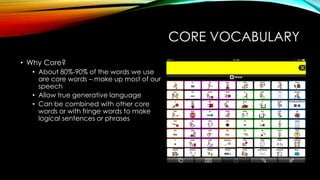
CORE VOCABULARY
• Why Core?
• About 80%-90% of the words we use
are core words – make up most of our
speech
• Allow true generative language
• Can be combined with other core
words or with fringe words to make
logical sentences or phrases
LANGUAGE STEALERS
CORE VOCABULARY
• Why Core?
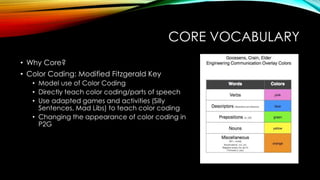
• Color Coding: Modified Fitzgerald Key
• Model use of Color Coding
• Directly teach color coding/parts of speech
• Use adapted games and activities (Silly
Sentences, Mad Libs) to teach color coding
• Changing the appearance of color coding in
P2G
CORE VOCABULARY
• Why Core?
• Color Coding: Modified Fitzgerald Key
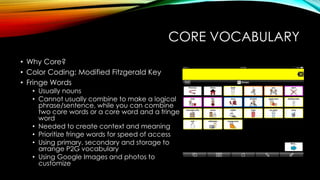
• Fringe Words
• Usually nouns
• Cannot usually combine to make a logical
phrase/sentence, while you can combine
two core words or a core word and a fringe
word
• Needed to create context and meaning
• Prioritize fringe words for speed of access
• Using primary, secondary and storage to
arrange P2G vocabulary
• Using Google Images and photos to
customize
BASIC VOCABULARY
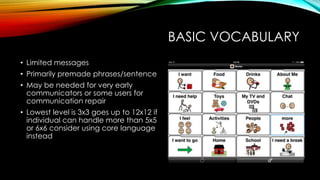
• Limited messages
• Primarily premade phrases/sentence
• May be needed for very early
communicators or some users for
communication repair
• Lowest level is 3x3 goes up to 12x12 if
individual can handle more than 5x5
or 6x6 consider using core language
instead
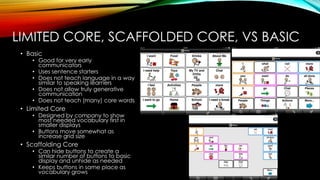
LIMITED CORE, SCAFFOLDED CORE, VS BASIC
• Basic
• Good for very early
communicators
• Uses sentence starters
• Does not teach language in a way
similar to speaking learners
• Does not allow truly generative
communication
• Does not teach (many) core words
• Limited Core
• Designed by company to show
most needed vocabulary first in
smaller displays
• Buttons move somewhat as
increase grid size
• Scaffolding Core
• Can hide buttons to create a
similar number of buttons to basic
display and unhide as needed
• Keeps buttons in same place as
vocabulary grows
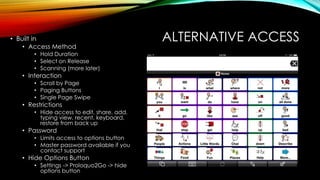
ALTERNATIVE ACCESS• Built in
• Access Method
• Hold Duration
• Select on Release
• Scanning (more later)
• Interaction
• Scroll by Page
• Paging Buttons
• Single Page Swipe
• Restrictions
• Hide access to edit, share, add,
typing view, recent, keyboard,
restore from back up
• Password
• Limits access to options button
• Master password available if you
contact support
• Hide Options Button
• Settings -> Proloquo2Go -> hide
options button
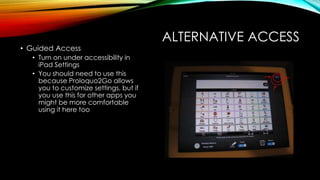
ALTERNATIVE ACCESS
• Guided Access
• Turn on under accessibility in
iPad Settings
• You should need to use this
because Proloquo2Go allows
you to customize settings, but if
you use this for other apps you
might be more comfortable
using it here too
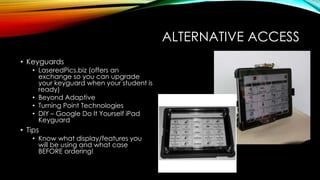
ALTERNATIVE ACCESS
• Keyguards
• LaseredPics.biz (offers an
exchange so you can upgrade
your keyguard when your student is
ready)
• Beyond Adaptive
• Turning Point Technologies
• DIY – Google Do It Yourself iPad
Keyguard
• Tips
• Know what display/features you
will be using and what case
BEFORE ordering!
ALTERNATIVE ACCESS
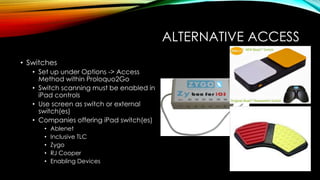
• Switches
• Set up under Options -> Access
Method within Proloquo2Go
• Switch scanning must be enabled in
iPad controls
• Use screen as switch or external
switch(es)
• Companies offering iPad switch(es)
• Ablenet
• Inclusive TLC
• Zygo
• RJ Cooper
• Enabling Devices
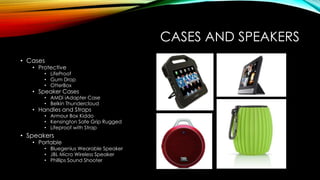
CASES AND SPEAKERS
• Cases
• Protective
• LifeProof
• Gum Drop
• OtterBox
• Speaker Cases
• AMDi iAdapter Case
• Belkin Thundercloud
• Handles and Straps
• Armour Box Kiddo
• Kensington Safe Grip Rugged
• Lifeproof with Strap
• Speakers
• Portable
• Bluegenius Wearable Speaker
• JBL Micro Wireless Speaker
• Phillips Sound Shooter

Getting off the Ground with Proloquo2Go

  • 1.
    P2G: INTRODUCTION Kate Ahern,M.S.Ed. Easter Seals MA
  • 2.
  • 3.
    CORE VOCABULARY • WhyCore? • About 80%-90% of the words we use are core words – make up most of our speech • Allow true generative language • Can be combined with other core words or with fringe words to make logical sentences or phrases
  • 4.
  • 5.
    CORE VOCABULARY • WhyCore? • Color Coding: Modified Fitzgerald Key • Model use of Color Coding • Directly teach color coding/parts of speech • Use adapted games and activities (Silly Sentences, Mad Libs) to teach color coding • Changing the appearance of color coding in P2G
  • 6.
    CORE VOCABULARY • WhyCore? • Color Coding: Modified Fitzgerald Key • Fringe Words • Usually nouns • Cannot usually combine to make a logical phrase/sentence, while you can combine two core words or a core word and a fringe word • Needed to create context and meaning • Prioritize fringe words for speed of access • Using primary, secondary and storage to arrange P2G vocabulary • Using Google Images and photos to customize
  • 7.
    BASIC VOCABULARY • Limitedmessages • Primarily premade phrases/sentence • May be needed for very early communicators or some users for communication repair • Lowest level is 3x3 goes up to 12x12 if individual can handle more than 5x5 or 6x6 consider using core language instead
  • 8.
    LIMITED CORE, SCAFFOLDEDCORE, VS BASIC • Basic • Good for very early communicators • Uses sentence starters • Does not teach language in a way similar to speaking learners • Does not allow truly generative communication • Does not teach (many) core words • Limited Core • Designed by company to show most needed vocabulary first in smaller displays • Buttons move somewhat as increase grid size • Scaffolding Core • Can hide buttons to create a similar number of buttons to basic display and unhide as needed • Keeps buttons in same place as vocabulary grows
  • 9.
    ALTERNATIVE ACCESS• Builtin • Access Method • Hold Duration • Select on Release • Scanning (more later) • Interaction • Scroll by Page • Paging Buttons • Single Page Swipe • Restrictions • Hide access to edit, share, add, typing view, recent, keyboard, restore from back up • Password • Limits access to options button • Master password available if you contact support • Hide Options Button • Settings -> Proloquo2Go -> hide options button
  • 10.
    ALTERNATIVE ACCESS • GuidedAccess • Turn on under accessibility in iPad Settings • You should need to use this because Proloquo2Go allows you to customize settings, but if you use this for other apps you might be more comfortable using it here too
  • 11.
    ALTERNATIVE ACCESS • Keyguards •LaseredPics.biz (offers an exchange so you can upgrade your keyguard when your student is ready) • Beyond Adaptive • Turning Point Technologies • DIY – Google Do It Yourself iPad Keyguard • Tips • Know what display/features you will be using and what case BEFORE ordering!
  • 12.
    ALTERNATIVE ACCESS • Switches •Set up under Options -> Access Method within Proloquo2Go • Switch scanning must be enabled in iPad controls • Use screen as switch or external switch(es) • Companies offering iPad switch(es) • Ablenet • Inclusive TLC • Zygo • RJ Cooper • Enabling Devices
  • 13.
    CASES AND SPEAKERS •Cases • Protective • LifeProof • Gum Drop • OtterBox • Speaker Cases • AMDi iAdapter Case • Belkin Thundercloud • Handles and Straps • Armour Box Kiddo • Kensington Safe Grip Rugged • Lifeproof with Strap • Speakers • Portable • Bluegenius Wearable Speaker • JBL Micro Wireless Speaker • Phillips Sound Shooter