SUPPORTING STUDENTS WITH
DISABILITIES
Teaching Techniques and Assistive Technology
Speech (Communication) Impairments
Mary Williams
Shelby Pendleton-Weathers
5 TEACHING STRATEGIES
• Be patient
• Use picture boards
• Encourage participation in classroom activities and discussions
• Don’t be afraid to ask the student to repeat if you do not
understand
• Give extra time
BE PATIENT
• One of the most effective
strategies to use because it
creates a no pressure
environment where the student
can feel more comfortable
expressing themselves
• Creates a trusting and respectful
environment
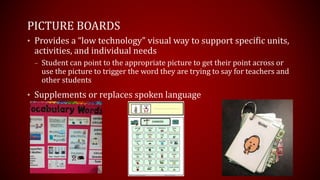
PICTURE BOARDS
• Provides a “low technology” visual way to support specific units,
activities, and individual needs
– Student can point to the appropriate picture to get their point across or
use the picture to trigger the word they are trying to say for teachers and
other students
• Supplements or replaces spoken language
ENCOURAGE PARTICIPATION IN CLASSROOM
ACTIVITIES AND DISCUSSIONS
• Classroom buddies can support participation and encourage
friendships to develop
• Using shared reading will help to improve language and
communication skills
• Creates acceptance of differences in and out of the classroom
• Planning group projects where all students participate to their
individual levels will boost self confidence
DON’T BE AFRAID TO ASK THE STUDENT TO
REPEAT IF YOU DO NOT UNDERSTAND
• Make eye contact when listening and
speaking to the student will show the
student you care about what they are
trying to say
– Look for non-verbal cues of what they are
saying (hand gestures, facial cues, etc.)
• Strive to understand what the
individual is saying by focusing
on what he or she says rather
than how he or she says it shows the
student they are important and
builds self confidence,
comprehension, and improved
communication
GIVE EXTRA TIME
• Providing extra time for verbal
answers will allow the student to
not feel pressured or anxious
about their skills
• Allow more time for the student
to complete tests in their most
comfortable way of
communicating will help improve
assessment scores
• Do not rush through lesson plans
to ensure comprehension
ASSISTIVE TECHNOLOGY
For students with speech and language
impairments, the major types of assistive
technology can be divided into two areas.
• First, students with speech and language impairments have
an array of computer software packages available to develop
their speech and language skills
• Secondly, students with speech and language impairments
may use augmentative or alternative communication (AAC).
• AAC is the use of symbols, aids, strategies, and techniques
to enhance the communication process.
• This includes sign language and various communication
boards, both manual and electronic, that are used by
individuals with impaired oral motor skills.
SPEECH BUDDIES
HTTPS://WWW.SPEECHBUDDY.COM/PARENTS/TOOLS
Speech Buddies Placement Tools treat the five most common
problem sounds. They treat mild to severe speech challenges
and have been proven to improve speech 3-4 times faster than
traditional methods alone.
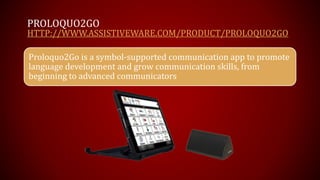
PROLOQUO2GO
HTTP://WWW.ASSISTIVEWARE.COM/PRODUCT/PROLOQUO2GO
Proloquo2Go is a symbol-supported communication app to promote
language development and grow communication skills, from
beginning to advanced communicators
Personalize the
Vocabulary
Fast and Easy
Editing
Language
Development
Literacy
Classroom &
Therapy
Let Your Voice
be Heard
Bilingual
support
Accessibility
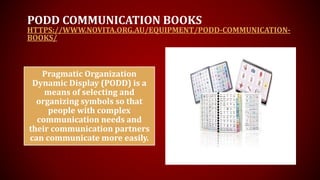
PODD COMMUNICATION BOOKS
HTTPS://WWW.NOVITA.ORG.AU/EQUIPMENT/PODD-COMMUNICATION-
BOOKS/
Pragmatic Organization
Dynamic Display (PODD) is a
means of selecting and
organizing symbols so that
people with complex
communication needs and
their communication partners
can communicate more easily.
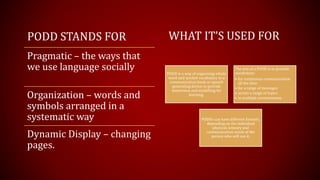
PODD STANDS FOR
Pragmatic – the ways that
we use language socially
Organization – words and
symbols arranged in a
systematic way
Dynamic Display – changing
pages.
PODD is a way of organizing whole
word and symbol vocabulary in a
communication book or speech
generating device to provide
immersion and modelling for
learning.
The aim of a PODD is to provide
vocabulary:
• for continuous communication
all the time
• for a range of messages
• across a range of topics
• in multiple environments.
PODDs can have different formats,
depending on the individual
physical, sensory and
communication needs of the
person who will use it.
WHAT IT’S USED FOR
VARIOUS APPLICATIONS
App Name Focus Age Group Description Download Info ICON
Peek-a-Boo Barn Life • Spatial concepts (in, on,
under, next to)
• Animal sounds
• Vocabulary (animals
names, open/shut, barn)
• Turn-taking
• WH questions (what,
where)
0-3 Listen to animal noises,
then push barn doors to
reveal the farm animal
inside. Available in 10
languages.
Free on iTunes for
iPhone/iPad (full version,
$1.99). $2.99 on Android
Toca Boca Kitchen Monsters • Verbs
• Labeling (foods)
• Language expansion
(practice 2+ word
phrases)
• WH questions
• Following directions
• Environmental sounds
2-6 Choose and prepare various
foods before feeding them
to a Toca monster
Free on iTunes for
iPhone/iPad
TallyTots • Verbs
• Two-word combinations
• Counting
• Concepts (i.e. matching,
size (big/little, on/off)
• Following directions
2-6 Involves counting 1-20.
Each number coordinates
with an activity that
illustrates language
concepts
$2.99 on iTunes for
iPhone/iPad and
KindleFire/Android
Speech Tutor • Articulation
• Visual cues (what
mouth, lips, tongue, etc.
are doing) for
production
• Tips for producing the
sound
• Other information
about a selected sound
All Ages Watch a virtual mouth as
it produces selected
sounds. This application
also provides tips for
producing the sound and
age for when we expect
mastery of each sound.
Free on iTunes for
iPhone/iPad
My PlayHome Lite • Vocabulary (around the
house)
• Actions
• Pronouns
• Following directions
2-6 Manipulate people and
things inside an interactive
home (i.e. make Mom drink
water, put Dad behind the
couch, make the boy jump
on a chair).
Free on iTunes for iPad (full
version, $3.99). $2.99 on
Android
Articulation Station • Articulation
• Matching
• Labeling
All Ages Speech sounds in words,
sentences and stories in all
positions of words (i.e.
initial, medial and final).
Choose from flashcards or
matching games. Easy to
keep track of accuracy and
progress
Free to download on iTunes
for iPhone/iPad (additional
sounds $2.99 each).
iSequence • Sequencing
• Expressive language
(grammar, syntax)
• Vocabulary
5-7 Put 3-4 picture sequences in
the correct order. Includes
100 sequences
$2.99 on iTunes for
iPhone/iPad
VARIOUS APPLICATIONS
Blue Whale – NACD • Apraxia and
articulation (CVC
productions only)
1+ Imitate consonant-vowel-
consonant (“CVC”)
productions. 8 levels of
complexity included.
$4.99 on iTunes for iPad.
Also available for $4.99
for Kindle, Android
tablets and Nook.
Describe It to Me • Word-finding
• Categories
• Salient features
• Object function
• Parts
• Location
5+ Complements EET program
(Expanding Expression
Tool). App can be used both
expressively (e.g. to
generate ideas), or
receptively (e.g. correctly
select or point to various
objects’ categories, function,
parts). Customize
vocabulary given child’s
needs, as well as skills
targeted (categories, parts,
etc).
$9.99 on iTunes for iPad
(free sample on iTunes).
Full Social Skills Builder • Understanding emotions
• Perspective taking
• Identifying appropriate
responses (making
comments, asking for
information)
5-12 Videos are organized
according to age group
(school age, adolescent).
Watch videos in different
environments (school,
community). Child answers
3-5 multiple choice
questions following video.
$14.99 on iTunes for
iPhone/iPad (free sample
on iTunes).
VARIOUS APPLICATIONS
VOCAS
HTTP://EVENGROUNDS.COM/BLOG/VOCAS-ASSISTIVE-
TECHNOLOGIES-FOR-PEOPLE-WITH-SPEECH-IMPAIRMENTS
VOCAs refer to Voice
Output Communication
Aids. These are
electronic devices used
by people who are
either unable to speak
or whose speech is
difficult to understand.
WHO USES VOCAS?
VOCAs are used by people who
have limited or absent speech to
communicate with the people
around them. These include
people who suffer from
neurological disorders, such as
autism, cerebral palsy, multiple
sclerosis, and epilepsy.
ARE THERE DIFFERENT TYPES OF VOCAS?
• Some VOCAs use paper or plastic
sheets with words or symbols to
represent the words or messages
that have been recorded. In this case,
the set of words or symbols is
'static': it does not change. But other
VOCAs display the words or symbols
on a screen, like a computer – these
'dynamic' displays change according
to what the AAC speaker selects: for
example, selecting the symbol 'food'
might change the display to a set of
symbols for different things to eat
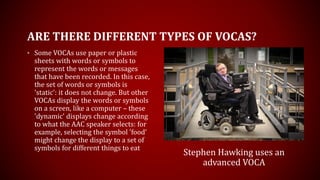
Stephen Hawking uses an
advanced VOCA
Single Message VOCAs
• speak a recorded message
• At its simplest, a high-tech device is a switch that speaks a recorded message when the switch is pressed. The message can
be re-recorded as necessary so the same device can be used, for example, to take a message recorded by Mum to school
and to bring home a message recorded by a teacher.
Message Sequencer VOCAs
• allow the user to have a series of messages
• A message sequencer allows the user to have a series of messages. Each time the switch is pressed, the next message in
the sequence is spoken.
Overlay VOCAs
• allow the user to select from a number of messages; overlays with pictures, symbols or words are placed are placed over the
keys to show which one will say which message
• There are a wide range of commercially available devices that use paper based overlays. Devices range from 2 to 128 keys.
Overlays with pictures, symbols or words placed are placed over the keys to show which one will say which message.
Dynamic Screen VOCAs
• display symbols or graphics on the screen rather than on paper overlays
• Dynamic screen devices display symbols or graphics on the screen rather than on paper sheets. The device can store
multiple ‘pages’ and the user can navigate between them by selecting an appropriate key on the screen.
DIFFERENT KINDS OF VOCAS
Characteristics of Communication disorders
Language
Form Disorders
Phonology – sounds used to
make word parts (e.g., 40
phonemes in English language)
Morphology – rules for
construction words (e.g., plurals,
suffixes)
Syntax – rules for connecting
words together (e.g., word order,
organization)
Content Disorders
Semantics – rules that dictate
meaning (e.g., vocabulary)
Use Disorders
Pragmatics – applications of
language in social contexts (e.g.,
conversation)
Speech
Articulation Disorders (common)
Phonological – mental
representation problem (can make
sound, but doesn’t)
Articulation – structural problem
(can’t make sound)
Substitutions, omissions,
additions, distortions
Fluency Disorders – interruptions
in the flow of speaking (e.g
stuttering)
Voice Disorders – pitch, duration,
intensity, resonance, vocal quality
Motor Speech Disorders
Apraxia – lack of coordinated
muscle movement
Disarthria – weak, slow, or
paralyzed muscles

Supporting students with disabilities

  • 1.
    SUPPORTING STUDENTS WITH DISABILITIES TeachingTechniques and Assistive Technology Speech (Communication) Impairments Mary Williams Shelby Pendleton-Weathers
  • 3.
    5 TEACHING STRATEGIES •Be patient • Use picture boards • Encourage participation in classroom activities and discussions • Don’t be afraid to ask the student to repeat if you do not understand • Give extra time
  • 4.
    BE PATIENT • Oneof the most effective strategies to use because it creates a no pressure environment where the student can feel more comfortable expressing themselves • Creates a trusting and respectful environment
  • 5.
    PICTURE BOARDS • Providesa “low technology” visual way to support specific units, activities, and individual needs – Student can point to the appropriate picture to get their point across or use the picture to trigger the word they are trying to say for teachers and other students • Supplements or replaces spoken language
  • 6.
    ENCOURAGE PARTICIPATION INCLASSROOM ACTIVITIES AND DISCUSSIONS • Classroom buddies can support participation and encourage friendships to develop • Using shared reading will help to improve language and communication skills • Creates acceptance of differences in and out of the classroom • Planning group projects where all students participate to their individual levels will boost self confidence
  • 7.
    DON’T BE AFRAIDTO ASK THE STUDENT TO REPEAT IF YOU DO NOT UNDERSTAND • Make eye contact when listening and speaking to the student will show the student you care about what they are trying to say – Look for non-verbal cues of what they are saying (hand gestures, facial cues, etc.) • Strive to understand what the individual is saying by focusing on what he or she says rather than how he or she says it shows the student they are important and builds self confidence, comprehension, and improved communication
  • 8.
    GIVE EXTRA TIME •Providing extra time for verbal answers will allow the student to not feel pressured or anxious about their skills • Allow more time for the student to complete tests in their most comfortable way of communicating will help improve assessment scores • Do not rush through lesson plans to ensure comprehension
  • 9.
    ASSISTIVE TECHNOLOGY For studentswith speech and language impairments, the major types of assistive technology can be divided into two areas. • First, students with speech and language impairments have an array of computer software packages available to develop their speech and language skills • Secondly, students with speech and language impairments may use augmentative or alternative communication (AAC). • AAC is the use of symbols, aids, strategies, and techniques to enhance the communication process. • This includes sign language and various communication boards, both manual and electronic, that are used by individuals with impaired oral motor skills.
  • 10.
    SPEECH BUDDIES HTTPS://WWW.SPEECHBUDDY.COM/PARENTS/TOOLS Speech BuddiesPlacement Tools treat the five most common problem sounds. They treat mild to severe speech challenges and have been proven to improve speech 3-4 times faster than traditional methods alone.
  • 12.
    PROLOQUO2GO HTTP://WWW.ASSISTIVEWARE.COM/PRODUCT/PROLOQUO2GO Proloquo2Go is asymbol-supported communication app to promote language development and grow communication skills, from beginning to advanced communicators
  • 13.
    Personalize the Vocabulary Fast andEasy Editing Language Development Literacy Classroom & Therapy Let Your Voice be Heard Bilingual support Accessibility
  • 14.
    PODD COMMUNICATION BOOKS HTTPS://WWW.NOVITA.ORG.AU/EQUIPMENT/PODD-COMMUNICATION- BOOKS/ PragmaticOrganization Dynamic Display (PODD) is a means of selecting and organizing symbols so that people with complex communication needs and their communication partners can communicate more easily.
  • 15.
    PODD STANDS FOR Pragmatic– the ways that we use language socially Organization – words and symbols arranged in a systematic way Dynamic Display – changing pages. PODD is a way of organizing whole word and symbol vocabulary in a communication book or speech generating device to provide immersion and modelling for learning. The aim of a PODD is to provide vocabulary: • for continuous communication all the time • for a range of messages • across a range of topics • in multiple environments. PODDs can have different formats, depending on the individual physical, sensory and communication needs of the person who will use it. WHAT IT’S USED FOR
  • 16.
    VARIOUS APPLICATIONS App NameFocus Age Group Description Download Info ICON Peek-a-Boo Barn Life • Spatial concepts (in, on, under, next to) • Animal sounds • Vocabulary (animals names, open/shut, barn) • Turn-taking • WH questions (what, where) 0-3 Listen to animal noises, then push barn doors to reveal the farm animal inside. Available in 10 languages. Free on iTunes for iPhone/iPad (full version, $1.99). $2.99 on Android Toca Boca Kitchen Monsters • Verbs • Labeling (foods) • Language expansion (practice 2+ word phrases) • WH questions • Following directions • Environmental sounds 2-6 Choose and prepare various foods before feeding them to a Toca monster Free on iTunes for iPhone/iPad TallyTots • Verbs • Two-word combinations • Counting • Concepts (i.e. matching, size (big/little, on/off) • Following directions 2-6 Involves counting 1-20. Each number coordinates with an activity that illustrates language concepts $2.99 on iTunes for iPhone/iPad and KindleFire/Android
  • 17.
    Speech Tutor •Articulation • Visual cues (what mouth, lips, tongue, etc. are doing) for production • Tips for producing the sound • Other information about a selected sound All Ages Watch a virtual mouth as it produces selected sounds. This application also provides tips for producing the sound and age for when we expect mastery of each sound. Free on iTunes for iPhone/iPad My PlayHome Lite • Vocabulary (around the house) • Actions • Pronouns • Following directions 2-6 Manipulate people and things inside an interactive home (i.e. make Mom drink water, put Dad behind the couch, make the boy jump on a chair). Free on iTunes for iPad (full version, $3.99). $2.99 on Android Articulation Station • Articulation • Matching • Labeling All Ages Speech sounds in words, sentences and stories in all positions of words (i.e. initial, medial and final). Choose from flashcards or matching games. Easy to keep track of accuracy and progress Free to download on iTunes for iPhone/iPad (additional sounds $2.99 each). iSequence • Sequencing • Expressive language (grammar, syntax) • Vocabulary 5-7 Put 3-4 picture sequences in the correct order. Includes 100 sequences $2.99 on iTunes for iPhone/iPad VARIOUS APPLICATIONS
  • 18.
    Blue Whale –NACD • Apraxia and articulation (CVC productions only) 1+ Imitate consonant-vowel- consonant (“CVC”) productions. 8 levels of complexity included. $4.99 on iTunes for iPad. Also available for $4.99 for Kindle, Android tablets and Nook. Describe It to Me • Word-finding • Categories • Salient features • Object function • Parts • Location 5+ Complements EET program (Expanding Expression Tool). App can be used both expressively (e.g. to generate ideas), or receptively (e.g. correctly select or point to various objects’ categories, function, parts). Customize vocabulary given child’s needs, as well as skills targeted (categories, parts, etc). $9.99 on iTunes for iPad (free sample on iTunes). Full Social Skills Builder • Understanding emotions • Perspective taking • Identifying appropriate responses (making comments, asking for information) 5-12 Videos are organized according to age group (school age, adolescent). Watch videos in different environments (school, community). Child answers 3-5 multiple choice questions following video. $14.99 on iTunes for iPhone/iPad (free sample on iTunes). VARIOUS APPLICATIONS
  • 19.
    VOCAS HTTP://EVENGROUNDS.COM/BLOG/VOCAS-ASSISTIVE- TECHNOLOGIES-FOR-PEOPLE-WITH-SPEECH-IMPAIRMENTS VOCAs refer toVoice Output Communication Aids. These are electronic devices used by people who are either unable to speak or whose speech is difficult to understand. WHO USES VOCAS? VOCAs are used by people who have limited or absent speech to communicate with the people around them. These include people who suffer from neurological disorders, such as autism, cerebral palsy, multiple sclerosis, and epilepsy.
  • 20.
    ARE THERE DIFFERENTTYPES OF VOCAS? • Some VOCAs use paper or plastic sheets with words or symbols to represent the words or messages that have been recorded. In this case, the set of words or symbols is 'static': it does not change. But other VOCAs display the words or symbols on a screen, like a computer – these 'dynamic' displays change according to what the AAC speaker selects: for example, selecting the symbol 'food' might change the display to a set of symbols for different things to eat Stephen Hawking uses an advanced VOCA
  • 21.
    Single Message VOCAs •speak a recorded message • At its simplest, a high-tech device is a switch that speaks a recorded message when the switch is pressed. The message can be re-recorded as necessary so the same device can be used, for example, to take a message recorded by Mum to school and to bring home a message recorded by a teacher. Message Sequencer VOCAs • allow the user to have a series of messages • A message sequencer allows the user to have a series of messages. Each time the switch is pressed, the next message in the sequence is spoken. Overlay VOCAs • allow the user to select from a number of messages; overlays with pictures, symbols or words are placed are placed over the keys to show which one will say which message • There are a wide range of commercially available devices that use paper based overlays. Devices range from 2 to 128 keys. Overlays with pictures, symbols or words placed are placed over the keys to show which one will say which message. Dynamic Screen VOCAs • display symbols or graphics on the screen rather than on paper overlays • Dynamic screen devices display symbols or graphics on the screen rather than on paper sheets. The device can store multiple ‘pages’ and the user can navigate between them by selecting an appropriate key on the screen. DIFFERENT KINDS OF VOCAS
  • 22.
  • 23.
    Language Form Disorders Phonology –sounds used to make word parts (e.g., 40 phonemes in English language) Morphology – rules for construction words (e.g., plurals, suffixes) Syntax – rules for connecting words together (e.g., word order, organization) Content Disorders Semantics – rules that dictate meaning (e.g., vocabulary) Use Disorders Pragmatics – applications of language in social contexts (e.g., conversation)
  • 24.
    Speech Articulation Disorders (common) Phonological– mental representation problem (can make sound, but doesn’t) Articulation – structural problem (can’t make sound) Substitutions, omissions, additions, distortions Fluency Disorders – interruptions in the flow of speaking (e.g stuttering) Voice Disorders – pitch, duration, intensity, resonance, vocal quality Motor Speech Disorders Apraxia – lack of coordinated muscle movement Disarthria – weak, slow, or paralyzed muscles