

1
Enterprise Cloud Databases
Product presentation
v2019-10-03
Bastien Verdebout (@bastienOVH) / Wilfried Roset
2
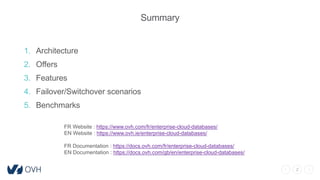
Summary
1. Architecture
2. Offers
3. Features
4. Failover/Switchover scenarios
5. Benchmarks
FR Website : https://www.ovh.com/fr/enterprise-cloud-databases/
EN Website : https://www.ovh.ie/enterprise-cloud-databases/
FR Documentation : https://docs.ovh.com/fr/enterprise-cloud-databases/
EN Documentation : https://docs.ovh.com/gb/en/enterprise-cloud-databases/
3
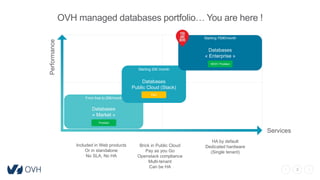
Performance
Services
Included in Web products
Or in standalone
No SLA, No HA
Databases
« Market »
From free to 20€/month
Databases
Public Cloud (Stack)
Databases
« Enterprise »
Brick in Public Cloud
Pay as you Go
Openstack compliance
Multi-tenant
Can be HA
HA by default
Dedicated hardware
(Single tenant)
Prodded
R&D
Starting 750€/month
Starting 20€ /month
OVH managed databases portfolio… You are here !
NEW ! Prodded
4
#1
Architecture
5
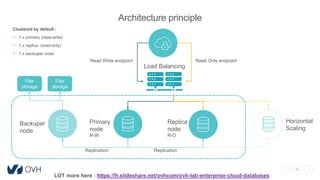
Architecture principle
Clustered by default :
 1 x primary (read-write)
 1 x replica (read-only)
 1 x backuper node
LOT more here : https://fr.slideshare.net/ovhcom/ovh-lab-enterprise-cloud-databases
Read Only endpointRead Write endpoint
Backuper
node
Primary
node
R-W
Replica
node
R-O
Horizontal
Scaling
Replication
Load Balancing
Replication
Filer
storage
Filer
storage
6
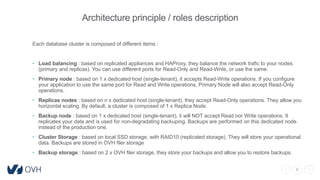
Architecture principle / roles description
Each database cluster is composed of different items :
• Load balancing : based on replicated appliances and HAProxy, they balance the network trafic to your nodes
(primary and replicas). You can use different ports for Read-Only and Read-Write, or use the same.
• Primary node : based on 1 x dedicated host (single-tenant), it accepts Read-Write operations. If you configure
your application to use the same port for Read and Write operations, Primary Node will also accept Read-Only
operations.
• Replicas nodes : based on n x dedicated host (single-tenant), they accept Read-Only operations. They allow you
horizontal scaling. By default, a cluster is composed of 1 x Replica Node.
• Backup node : based on 1 x dedicated host (single-tenant), it will NOT accept Read nor Write operations. It
replicates your data and is used for non-degradating backuping. Backups are performed on this dedicated node
instead of the production one.
• Cluster Storage : based on local SSD storage, with RAID10 (replicated storage). They will store your operational
data. Backups are stored in OVH filer storage
• Backup storage : based on 2 x OVH filer storage, they store your backups and allow you to restore backups.
7
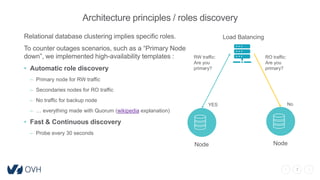
Architecture principles / roles discovery
Load Balancing
RW traffic:
Are you
primary?
Relational database clustering implies specific roles.
To counter outages scenarios, such as a “Primary Node
down”, we implemented high-availability templates :
• Automatic role discovery
– Primary node for RW traffic
– Secondaries nodes for RO traffic
– No traffic for backup node
– … everything made with Quorum (wikipedia explanation)
• Fast & Continuous discovery
– Probe every 30 seconds
Node
RO traffic:
Are you
primary?
Node
YES No
8
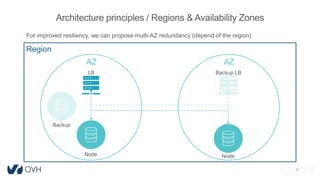
Architecture principles / Regions & Availability Zones
Region
AZ AZ
LB Backup LB
Node Node
Backup
For improved resiliency, we can propose multi-AZ redundancy (depend of the region)
9
#2
Offers
10
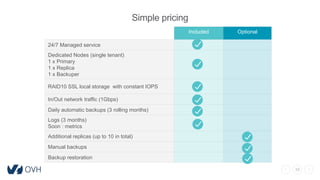
Simple pricing
Included Optional
24/7 Managed service
Dedicated Nodes (single tenant)
1 x Primary
1 x Replica
1 x Backuper
RAID10 SSL local storage with constant IOPS
In/Out network traffic (1Gbps)
Daily automatic backups (3 rolling months)
Logs (3 months)
Soon : metrics
Additional replicas (up to 10 in total)
Manual backups
Backup restoration
11
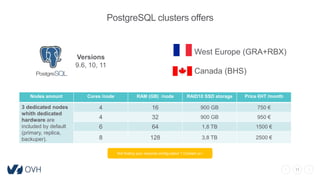
PostgreSQL clusters offers
Nodes amount Cores /node RAM (GB) /node RAID10 SSD storage Price €HT /month
3 dedicated nodes
whith dedicated
hardware are
included by default
(primary, replica,
backuper).
4 16 900 GB 750 €
4 32 900 GB 950 €
6 64 1,8 TB 1500 €
8 128 3,8 TB 2500 €
West Europe (GRA+RBX)
Canada (BHS)
Versions
9.6, 10, 11
Not finding your required configuration ? Contact us !
12
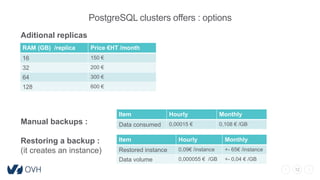
Aditional replicas
Manual backups :
Restoring a backup :
(it creates an instance)
PostgreSQL clusters offers : options
RAM (GB) /replica Price €HT /month
16 150 €
32 200 €
64 300 €
128 600 €
Item Hourly Monthly
Data consumed 0,00015 € 0,108 € /GB
Item Hourly Monthly
Restored instance 0,09€ /instance +- 65€ /instance
Data volume 0,000055 € /GB +- 0,04 € /GB
13
#3
Features
14
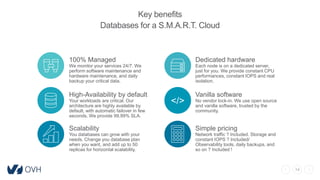
Key benefits
Databases for a S.M.A.R.T. Cloud
Dedicated hardware
Each node is on a dedicated server,
just for you. We provide constant CPU
performances, constant IOPS and real
isolation.
100% Managed
We monitor your services 24/7. We
perform software maintenance and
hardware maintenance, and daily
backup your critical data.
Vanilla software
No vendor lock-in. We use open source
and vanilla software, trusted by the
community.
Simple pricing
Network traffic ? Included. Storage and
constant IOPS ? Included/
Observability tools, daily backups, and
so on ? Included !
Scalability
You databases can grow with your
needs. Change you database plan
when you want, and add up to 50
replicas for horizontal scalability.
High-Availability by default
Your workloads are critical. Our
architecture are highly available by
default, with automatic failover in few
seconds. We provide 99,99% SLA.
</>
15
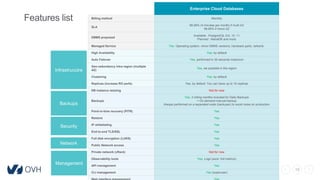
Features list
Enterprise Cloud Databases
Billing method Monthly
SLA
99,99% (4 minutes per month) if multi AZ
99,95% if mono AZ
DBMS proposed
Available : PostgreSQL 9.6, 10, 11
Planned : MariaDB and more
Managed Service Yes. Operating system, minor DBMS versions, hardware parts, network.
High Availability Yes, by default
Auto Failover Yes, performed in 30 seconds maximum
Geo-redundancy intra region (multiple
AZ)
Yes, we possible in the region
Clustering Yes, by default
Replicas (increase RO perfs) Yes, by default. You can have up to 10 replicas
DB instance resizing Not for now
Backups
Yes, 3 rolling months included for Daily Backups
+ On-demand manual backup
Always performed on a separated node (backuper) to avoid noise on production
Point-in-time recovery (PITR) Yes
Restore Yes
IP whitelisting Yes
End-to-end TLS/SSL Yes
Full disk encryption (LUKS) Yes
Public Network access Yes
Private network (vRack) Not for now
Observability tools Yes, Logs (soon :full metrics)
API management Yes
CLI management Yes (superuser)
Infrastrucutre
Backups
Management
Network
Security
16
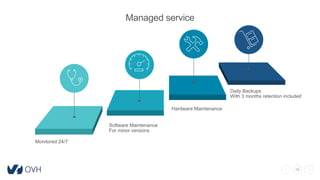
Managed service
Hardware Maintenance
Daily Backups
With 3 months retention included
Monitored 24/7
Software Maintenance
For minor versions
17
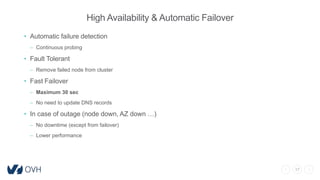
High Availability & Automatic Failover
• Automatic failure detection
– Continuous probing
• Fault Tolerant
– Remove failed node from cluster
• Fast Failover
– Maximum 30 sec
– No need to update DNS records
• In case of outage (node down, AZ down …)
– No downtime (except from failover)
– Lower performance
18
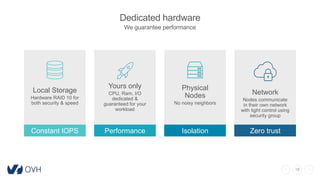
Dedicated hardware
We guarantee performance
Physical
Nodes
No noisy neighbors
Isolation
Network
Nodes communicate
in their own network
with tight control using
security group
Zero trustConstant IOPS
Local Storage
Hardware RAID 10 for
both security & speed
Yours only
CPU, Ram, I/O
dedicated &
guaranteed for your
workload
Performance
19
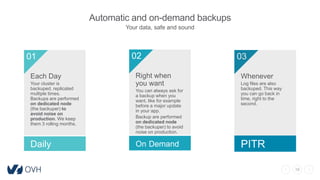
Automatic and on-demand backups
Your data, safe and sound
Each Day
Your cluster is
backuped, replicated
multiple times.
Backups are performed
on dedicated node
(the backuper) to
avoid noise on
production. We keep
them 3 rolling months.
01
Daily
Right when
you want
You can always ask for
a backup when you
want, like for example
before a major update
in your app.
Backup are performed
on dedicated node
(the backuper) to avoid
noise on production.
02
On Demand
03
Whenever
Log files are also
backuped. This way
you can go back in
time, right to the
second.
PITR
20
Restore
You are able to request backups restoration when you want !
• No downtime
– Restore on a dedicated host
• Close to the hour
– Choose between your backups or specify a date+hour (PITR)
• Pay per restore
– You select a cloud instance flavor, and you will pay your restore hourly.
21
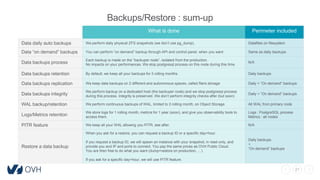
Backups/Restore : sum-up
What is done Perimeter included
Data daily auto backups We perform daily physical ZFS snapshots (we don’t use pg_dump). Datafiles on filesystem
Data “on demand” backups You can perform “on demand” backup through API and control panel, when you want Same as daily backups
Data backups process
Each backup is made on the “backuper node”, isolated from the production.
No impacts on your performances. We stop postgresql process on this node during this time.
N/A
Data backups retention By default, we keep all your backups for 3 rolling months. Daily backups
Data backups replication We keep data backups on 2 different and autonomous spaces, called filers storage Daily + “On demand” backups
Data backups integrity
We perform backup on a dedicated host (the backuper node) and we stop postgresql process
during this process. Integrity is preserved. We don’t perform integrity checks after (but soon)
Daily + “On demand” backups
WAL backup/retention We perform continuous backups of WAL, limited to 3 rolling month, on Object Storage. All WAL from primary node
Logs/Metrics retention
We store logs for 1 rolling month, metrics for 1 year (soon), and give you observability tools to
access them.
Logs : PostgreSQL process
Metrics : all nodes
PITR feature We keep all your WAL allowing you PITR, see after. N/A
Restore a data backup
When you ask for a restore, you can request a backup ID or a specific day+hour.
If you request a backup ID, we will spawn an instance with your snapshot, in read-only, and
provide you and IP and ports to connect. You pay the same prices as OVH Public Cloud.
You are then free to do what you want (dump+restore on production, …)
If you ask for a specific day+hour, we will use PITR feature.
Daily backups
+
“On demand” backups
22
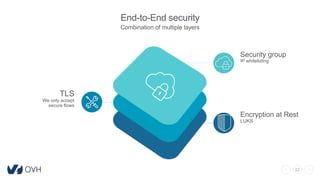
End-to-End security
Combination of multiple layers
TLS
We only accept
secure flows
Security group
IP whitelisting
Encryption at Rest
LUKS
23
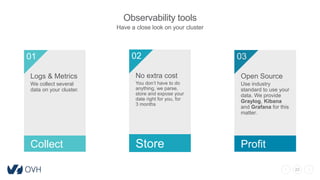
Observability tools
Have a close look on your cluster
Logs & Metrics
We collect several
data on your cluster.
01
Collect
No extra cost
You don’t have to do
anything, we parse,
store and expose your
date right for you, for
3 months
02
Store
03
Open Source
Use industry
standard to use your
data. We provide
Graylog, Kibana
and Grafana for this
matter.
Profit
24
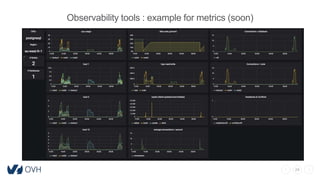
Observability tools : example for metrics (soon)
25
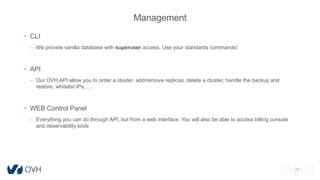
Management
• CLI
– We provide vanilla database with superuser access. Use your standards commands!
• API
– Our OVH API allow you to order a cluster, add/remove replicas, delete a cluster, handle the backup and
restore, whitelist IPs, …
• WEB Control Panel
– Everything you can do through API, but from a web interface. You will also be able to access billing console
and observability tools
26
PostgreSQL extensions
• On top of PostgreSQL default extension we include :
– Ip4r
– Pglogical
– Pgrouting
– Postgis
– Wal2json
• This list is growing as our community can ask for more extensions coming for PGDG
repository
27
#4
Failover/Switchover scenarios
28
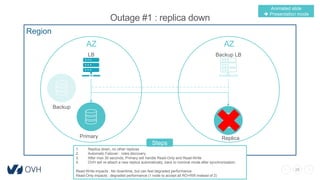
Outage #1 : replica down
Region
AZ AZ
LB Backup LB
Primary Replica
Backup
1. Replica down, no other replicas
2. Automatic Failover : roles discovery
3. After max 30 seconds, Primary will handle Read-Only and Read-Write
4. OVH will re-attach a new replica automatically, back to nominal mode after synchronization
Read-Write impacts : No downtime, but can feel degraded performance
Read-Only impacts : degraded performance (1 node to accept all RO+RW instead of 2)
Steps
Animated slide
 Presentation mode
29
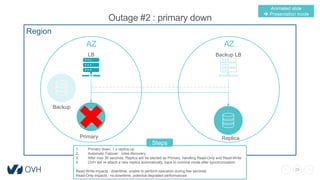
Outage #2 : primary down
Region
AZ AZ
LB Backup LB
Primary Replica
Backup
1. Primary down, 1 x replica up
2. Automatic Failover : roles discovery
3. After max 30 seconds, Replica will be elected as Primary, handling Read-Only and Read-Write
4. OVH will re-attach a new replica automatically, back to nominal mode after synchronization
Read-Write impacts : downtime, unable to perform operation during few seconds
Read-Only impacts : no downtime, potential degraded performances
Steps
Animated slide
 Presentation mode
30
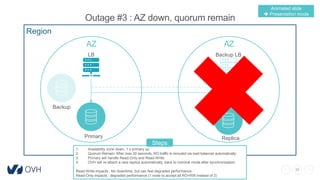
Outage #3 : AZ down, quorum remain
Region
AZ AZ
LB Backup LB
Primary Replica
Backup
1. Availability zone down, 1 x primary up
2. Quorum Remain: After max 30 seconds, RO traffic is rerouted via load balancer automatically
3. Primary will handle Read-Only and Read-Write
4. OVH will re-attach a new replica automatically, back to nominal mode after synchronization
Read-Write impacts : No downtime, but can feel degraded performance
Read-Only impacts : degraded performance (1 node to accept all RO+RW instead of 2)
Steps
Animated slide
 Presentation mode
31
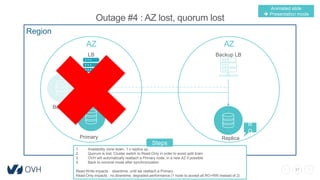
Outage #4 : AZ lost, quorum lost
Region
AZ AZ
LB Backup LB
Primary Replica
Backup
R
O
1. Availability zone down, 1 x replica up,
2. Quorum is lost. Cluster switch to Read-Only in order to avoid split brain
3. OVH will automatically reattach a Primary node, in a new AZ if possible
4. Back to nominal mode after synchronization
Read-Write impacts : downtime, until we reattach a Primary.
Read-Only impacts : no downtime, degraded performance (1 node to accept all RO+RW instead of 2)
Steps
Animated slide
 Presentation mode
32
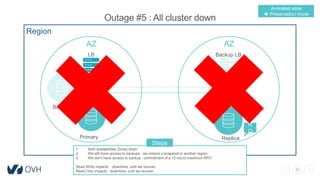
Outage #5 : All cluster down
Region
AZ AZ
LB Backup LB
Primary Replica
Backup
R
O
1. Both availabilities Zones down
2. We still have access to backups : we restore a snapshot in another region
3. We don’t have access to backup : commitment of a 12 hours maximum RPO
Read-Write impacts : downtime, until we recover.
Read-Only impacts : downtime, until we recover
Steps
Animated slide
 Presentation mode
33
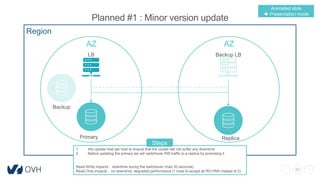
Planned #1 : Minor version update
Region
AZ AZ
LB Backup LB
Primary Replica
Backup
1. We update host per host to ensure that the cluster will not suffer any downtime
2. Before updating the primary we will switchover RW traffic to a replica by promoting it
Read-Write impacts : downtime during the switchover (max 30 seconds)
Read-Only impacts : no downtime, degraded performance (1 node to accept all RO+RW instead of 2)
Steps
Animated slide
 Presentation mode
34
#5
Benchmarks
35
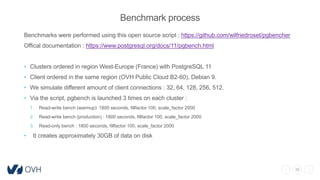
Benchmark process
Benchmarks were performed using this open source script : https://github.com/wilfriedroset/pgbencher
Offical documentation : https://www.postgresql.org/docs/11/pgbench.html
• Clusters ordered in region West-Europe (France) with PostgreSQL 11
• Client ordered in the same region (OVH Public Cloud B2-60), Debian 9.
• We simulate different amount of client connections : 32, 64, 128, 256, 512.
• Via the script, pgbench is launched 3 times on each cluster :
1. Read-write bench (warmup): 1800 seconds, fillfactor 100, scale_factor 2000
2. Read-write bench (production) : 1800 seconds, fillfactor 100, scale_factor 2000
3. Read-only bench : 1800 seconds, fillfactor 100, scale_factor 2000
• It creates approximately 30GB of data on disk
36
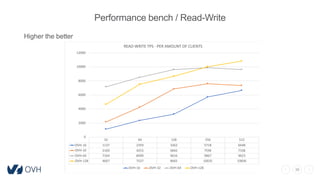
Performance bench / Read-Write
Higher the better
32 64 128 256 512
OVH-16 1137 2359 3262 5718 6648
OVH-32 2169 4253 6842 7596 7338
OVH-64 7164 8499 9616 9867 9623
OVH-128 4667 7537 8665 10035 10836
0
2000
4000
6000
8000
10000
12000
READ-WRITE TPS - PER AMOUNT OF CLIENTS
OVH-16 OVH-32 OVH-64 OVH-128
37
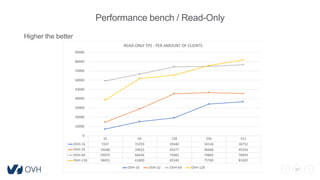
Performance bench / Read-Only
Higher the better
32 64 128 256 512
OVH-16 7247 15359 19440 34146 36752
OVH-32 14648 29023 45477 46668 45556
OVH-64 59074 66636 74283 74865 76693
OVH-128 38655 61800 65340 75700 81692
0
10000
20000
30000
40000
50000
60000
70000
80000
90000
READ-ONLY TPS - PER AMOUNT OF CLIENTS
OVH-16 OVH-32 OVH-64 OVH-128
38
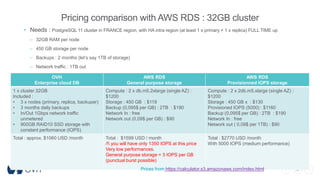
Pricing comparison with AWS RDS : 32GB cluster
• Needs : PostgreSQL 11 cluster in FRANCE region, with HA intra region (at least 1 x primary + 1 x replica) FULL TIME up
– 32GB RAM per node
– 450 GB storage per node
– Backups : 2 months (let’s say 1TB of storage)
– Network traffic : 1TB out
OVH
Enterprise cloud DB
AWS RDS
General purpose storage
AWS RDS
Provisionned IOPS storage
1 x cluster 32GB
Included :
• 3 x nodes (primary, replica, backuper)
• 3 months daily backups
• In/Out 1Gbps network traffic
unmetered
• 900GB RAID10 SSD storage with
constant performance (IOPS)
Compute : 2 x db.m5.2xlarge (single AZ) :
$1200
Storage : 450 GB : $119
Backup (0,095$ per GB) : 2TB : $190
Network In : free
Network out (0,09$ per GB) : $90
Compute : 2 x 2db.m5.xlarge (single AZ) :
$1200
Storage : 450 GB x : $130
Provisioned IOPS (5000) : $1160
Backup (0,095$ per GB) : 2TB : $190
Network In : free
Network out ( 0,09$ per 1TB) : $90
Total : approx. $1060 USD /month Total : $1599 USD / month
/! you will have only 1350 IOPS at this price
Very low performances.
General purpose storage = 3 IOPS per GB
(punctual burst possible)
Total : $2770 USD /month
With 5000 IOPS (medium performance)
Prices from https://calculator.s3.amazonaws.com/index.html
39
Thank you !
Order page and documentation :
FR Website : https://www.ovh.com/fr/enterprise-cloud-databases/
EN Website : https://www.ovh.ie/enterprise-cloud-databases/
FR Documentation : https://docs.ovh.com/fr/enterprise-cloud-databases/
EN Documentation : https://docs.ovh.com/gb/en/enterprise-cloud-
databases/

OVHcloud – Enterprise Cloud Databases

  • 1.
    1 Enterprise Cloud Databases Productpresentation v2019-10-03 Bastien Verdebout (@bastienOVH) / Wilfried Roset
  • 2.
    2 Summary 1. Architecture 2. Offers 3.Features 4. Failover/Switchover scenarios 5. Benchmarks FR Website : https://www.ovh.com/fr/enterprise-cloud-databases/ EN Website : https://www.ovh.ie/enterprise-cloud-databases/ FR Documentation : https://docs.ovh.com/fr/enterprise-cloud-databases/ EN Documentation : https://docs.ovh.com/gb/en/enterprise-cloud-databases/
  • 3.
    3 Performance Services Included in Webproducts Or in standalone No SLA, No HA Databases « Market » From free to 20€/month Databases Public Cloud (Stack) Databases « Enterprise » Brick in Public Cloud Pay as you Go Openstack compliance Multi-tenant Can be HA HA by default Dedicated hardware (Single tenant) Prodded R&D Starting 750€/month Starting 20€ /month OVH managed databases portfolio… You are here ! NEW ! Prodded
  • 4.
  • 5.
    5 Architecture principle Clustered bydefault :  1 x primary (read-write)  1 x replica (read-only)  1 x backuper node LOT more here : https://fr.slideshare.net/ovhcom/ovh-lab-enterprise-cloud-databases Read Only endpointRead Write endpoint Backuper node Primary node R-W Replica node R-O Horizontal Scaling Replication Load Balancing Replication Filer storage Filer storage
  • 6.
    6 Architecture principle /roles description Each database cluster is composed of different items : • Load balancing : based on replicated appliances and HAProxy, they balance the network trafic to your nodes (primary and replicas). You can use different ports for Read-Only and Read-Write, or use the same. • Primary node : based on 1 x dedicated host (single-tenant), it accepts Read-Write operations. If you configure your application to use the same port for Read and Write operations, Primary Node will also accept Read-Only operations. • Replicas nodes : based on n x dedicated host (single-tenant), they accept Read-Only operations. They allow you horizontal scaling. By default, a cluster is composed of 1 x Replica Node. • Backup node : based on 1 x dedicated host (single-tenant), it will NOT accept Read nor Write operations. It replicates your data and is used for non-degradating backuping. Backups are performed on this dedicated node instead of the production one. • Cluster Storage : based on local SSD storage, with RAID10 (replicated storage). They will store your operational data. Backups are stored in OVH filer storage • Backup storage : based on 2 x OVH filer storage, they store your backups and allow you to restore backups.
  • 7.
    7 Architecture principles /roles discovery Load Balancing RW traffic: Are you primary? Relational database clustering implies specific roles. To counter outages scenarios, such as a “Primary Node down”, we implemented high-availability templates : • Automatic role discovery – Primary node for RW traffic – Secondaries nodes for RO traffic – No traffic for backup node – … everything made with Quorum (wikipedia explanation) • Fast & Continuous discovery – Probe every 30 seconds Node RO traffic: Are you primary? Node YES No
  • 8.
    8 Architecture principles /Regions & Availability Zones Region AZ AZ LB Backup LB Node Node Backup For improved resiliency, we can propose multi-AZ redundancy (depend of the region)
  • 9.
  • 10.
    10 Simple pricing Included Optional 24/7Managed service Dedicated Nodes (single tenant) 1 x Primary 1 x Replica 1 x Backuper RAID10 SSL local storage with constant IOPS In/Out network traffic (1Gbps) Daily automatic backups (3 rolling months) Logs (3 months) Soon : metrics Additional replicas (up to 10 in total) Manual backups Backup restoration
  • 11.
    11 PostgreSQL clusters offers Nodesamount Cores /node RAM (GB) /node RAID10 SSD storage Price €HT /month 3 dedicated nodes whith dedicated hardware are included by default (primary, replica, backuper). 4 16 900 GB 750 € 4 32 900 GB 950 € 6 64 1,8 TB 1500 € 8 128 3,8 TB 2500 € West Europe (GRA+RBX) Canada (BHS) Versions 9.6, 10, 11 Not finding your required configuration ? Contact us !
  • 12.
    12 Aditional replicas Manual backups: Restoring a backup : (it creates an instance) PostgreSQL clusters offers : options RAM (GB) /replica Price €HT /month 16 150 € 32 200 € 64 300 € 128 600 € Item Hourly Monthly Data consumed 0,00015 € 0,108 € /GB Item Hourly Monthly Restored instance 0,09€ /instance +- 65€ /instance Data volume 0,000055 € /GB +- 0,04 € /GB
  • 13.
  • 14.
    14 Key benefits Databases fora S.M.A.R.T. Cloud Dedicated hardware Each node is on a dedicated server, just for you. We provide constant CPU performances, constant IOPS and real isolation. 100% Managed We monitor your services 24/7. We perform software maintenance and hardware maintenance, and daily backup your critical data. Vanilla software No vendor lock-in. We use open source and vanilla software, trusted by the community. Simple pricing Network traffic ? Included. Storage and constant IOPS ? Included/ Observability tools, daily backups, and so on ? Included ! Scalability You databases can grow with your needs. Change you database plan when you want, and add up to 50 replicas for horizontal scalability. High-Availability by default Your workloads are critical. Our architecture are highly available by default, with automatic failover in few seconds. We provide 99,99% SLA. </>
  • 15.
    15 Features list Enterprise CloudDatabases Billing method Monthly SLA 99,99% (4 minutes per month) if multi AZ 99,95% if mono AZ DBMS proposed Available : PostgreSQL 9.6, 10, 11 Planned : MariaDB and more Managed Service Yes. Operating system, minor DBMS versions, hardware parts, network. High Availability Yes, by default Auto Failover Yes, performed in 30 seconds maximum Geo-redundancy intra region (multiple AZ) Yes, we possible in the region Clustering Yes, by default Replicas (increase RO perfs) Yes, by default. You can have up to 10 replicas DB instance resizing Not for now Backups Yes, 3 rolling months included for Daily Backups + On-demand manual backup Always performed on a separated node (backuper) to avoid noise on production Point-in-time recovery (PITR) Yes Restore Yes IP whitelisting Yes End-to-end TLS/SSL Yes Full disk encryption (LUKS) Yes Public Network access Yes Private network (vRack) Not for now Observability tools Yes, Logs (soon :full metrics) API management Yes CLI management Yes (superuser) Infrastrucutre Backups Management Network Security
  • 16.
    16 Managed service Hardware Maintenance DailyBackups With 3 months retention included Monitored 24/7 Software Maintenance For minor versions
  • 17.
    17 High Availability &Automatic Failover • Automatic failure detection – Continuous probing • Fault Tolerant – Remove failed node from cluster • Fast Failover – Maximum 30 sec – No need to update DNS records • In case of outage (node down, AZ down …) – No downtime (except from failover) – Lower performance
  • 18.
    18 Dedicated hardware We guaranteeperformance Physical Nodes No noisy neighbors Isolation Network Nodes communicate in their own network with tight control using security group Zero trustConstant IOPS Local Storage Hardware RAID 10 for both security & speed Yours only CPU, Ram, I/O dedicated & guaranteed for your workload Performance
  • 19.
    19 Automatic and on-demandbackups Your data, safe and sound Each Day Your cluster is backuped, replicated multiple times. Backups are performed on dedicated node (the backuper) to avoid noise on production. We keep them 3 rolling months. 01 Daily Right when you want You can always ask for a backup when you want, like for example before a major update in your app. Backup are performed on dedicated node (the backuper) to avoid noise on production. 02 On Demand 03 Whenever Log files are also backuped. This way you can go back in time, right to the second. PITR
  • 20.
    20 Restore You are ableto request backups restoration when you want ! • No downtime – Restore on a dedicated host • Close to the hour – Choose between your backups or specify a date+hour (PITR) • Pay per restore – You select a cloud instance flavor, and you will pay your restore hourly.
  • 21.
    21 Backups/Restore : sum-up Whatis done Perimeter included Data daily auto backups We perform daily physical ZFS snapshots (we don’t use pg_dump). Datafiles on filesystem Data “on demand” backups You can perform “on demand” backup through API and control panel, when you want Same as daily backups Data backups process Each backup is made on the “backuper node”, isolated from the production. No impacts on your performances. We stop postgresql process on this node during this time. N/A Data backups retention By default, we keep all your backups for 3 rolling months. Daily backups Data backups replication We keep data backups on 2 different and autonomous spaces, called filers storage Daily + “On demand” backups Data backups integrity We perform backup on a dedicated host (the backuper node) and we stop postgresql process during this process. Integrity is preserved. We don’t perform integrity checks after (but soon) Daily + “On demand” backups WAL backup/retention We perform continuous backups of WAL, limited to 3 rolling month, on Object Storage. All WAL from primary node Logs/Metrics retention We store logs for 1 rolling month, metrics for 1 year (soon), and give you observability tools to access them. Logs : PostgreSQL process Metrics : all nodes PITR feature We keep all your WAL allowing you PITR, see after. N/A Restore a data backup When you ask for a restore, you can request a backup ID or a specific day+hour. If you request a backup ID, we will spawn an instance with your snapshot, in read-only, and provide you and IP and ports to connect. You pay the same prices as OVH Public Cloud. You are then free to do what you want (dump+restore on production, …) If you ask for a specific day+hour, we will use PITR feature. Daily backups + “On demand” backups
  • 22.
    22 End-to-End security Combination ofmultiple layers TLS We only accept secure flows Security group IP whitelisting Encryption at Rest LUKS
  • 23.
    23 Observability tools Have aclose look on your cluster Logs & Metrics We collect several data on your cluster. 01 Collect No extra cost You don’t have to do anything, we parse, store and expose your date right for you, for 3 months 02 Store 03 Open Source Use industry standard to use your data. We provide Graylog, Kibana and Grafana for this matter. Profit
  • 24.
    24 Observability tools :example for metrics (soon)
  • 25.
    25 Management • CLI – Weprovide vanilla database with superuser access. Use your standards commands! • API – Our OVH API allow you to order a cluster, add/remove replicas, delete a cluster, handle the backup and restore, whitelist IPs, … • WEB Control Panel – Everything you can do through API, but from a web interface. You will also be able to access billing console and observability tools
  • 26.
    26 PostgreSQL extensions • Ontop of PostgreSQL default extension we include : – Ip4r – Pglogical – Pgrouting – Postgis – Wal2json • This list is growing as our community can ask for more extensions coming for PGDG repository
  • 27.
  • 28.
    28 Outage #1 :replica down Region AZ AZ LB Backup LB Primary Replica Backup 1. Replica down, no other replicas 2. Automatic Failover : roles discovery 3. After max 30 seconds, Primary will handle Read-Only and Read-Write 4. OVH will re-attach a new replica automatically, back to nominal mode after synchronization Read-Write impacts : No downtime, but can feel degraded performance Read-Only impacts : degraded performance (1 node to accept all RO+RW instead of 2) Steps Animated slide  Presentation mode
  • 29.
    29 Outage #2 :primary down Region AZ AZ LB Backup LB Primary Replica Backup 1. Primary down, 1 x replica up 2. Automatic Failover : roles discovery 3. After max 30 seconds, Replica will be elected as Primary, handling Read-Only and Read-Write 4. OVH will re-attach a new replica automatically, back to nominal mode after synchronization Read-Write impacts : downtime, unable to perform operation during few seconds Read-Only impacts : no downtime, potential degraded performances Steps Animated slide  Presentation mode
  • 30.
    30 Outage #3 :AZ down, quorum remain Region AZ AZ LB Backup LB Primary Replica Backup 1. Availability zone down, 1 x primary up 2. Quorum Remain: After max 30 seconds, RO traffic is rerouted via load balancer automatically 3. Primary will handle Read-Only and Read-Write 4. OVH will re-attach a new replica automatically, back to nominal mode after synchronization Read-Write impacts : No downtime, but can feel degraded performance Read-Only impacts : degraded performance (1 node to accept all RO+RW instead of 2) Steps Animated slide  Presentation mode
  • 31.
    31 Outage #4 :AZ lost, quorum lost Region AZ AZ LB Backup LB Primary Replica Backup R O 1. Availability zone down, 1 x replica up, 2. Quorum is lost. Cluster switch to Read-Only in order to avoid split brain 3. OVH will automatically reattach a Primary node, in a new AZ if possible 4. Back to nominal mode after synchronization Read-Write impacts : downtime, until we reattach a Primary. Read-Only impacts : no downtime, degraded performance (1 node to accept all RO+RW instead of 2) Steps Animated slide  Presentation mode
  • 32.
    32 Outage #5 :All cluster down Region AZ AZ LB Backup LB Primary Replica Backup R O 1. Both availabilities Zones down 2. We still have access to backups : we restore a snapshot in another region 3. We don’t have access to backup : commitment of a 12 hours maximum RPO Read-Write impacts : downtime, until we recover. Read-Only impacts : downtime, until we recover Steps Animated slide  Presentation mode
  • 33.
    33 Planned #1 :Minor version update Region AZ AZ LB Backup LB Primary Replica Backup 1. We update host per host to ensure that the cluster will not suffer any downtime 2. Before updating the primary we will switchover RW traffic to a replica by promoting it Read-Write impacts : downtime during the switchover (max 30 seconds) Read-Only impacts : no downtime, degraded performance (1 node to accept all RO+RW instead of 2) Steps Animated slide  Presentation mode
  • 34.
  • 35.
    35 Benchmark process Benchmarks wereperformed using this open source script : https://github.com/wilfriedroset/pgbencher Offical documentation : https://www.postgresql.org/docs/11/pgbench.html • Clusters ordered in region West-Europe (France) with PostgreSQL 11 • Client ordered in the same region (OVH Public Cloud B2-60), Debian 9. • We simulate different amount of client connections : 32, 64, 128, 256, 512. • Via the script, pgbench is launched 3 times on each cluster : 1. Read-write bench (warmup): 1800 seconds, fillfactor 100, scale_factor 2000 2. Read-write bench (production) : 1800 seconds, fillfactor 100, scale_factor 2000 3. Read-only bench : 1800 seconds, fillfactor 100, scale_factor 2000 • It creates approximately 30GB of data on disk
  • 36.
    36 Performance bench /Read-Write Higher the better 32 64 128 256 512 OVH-16 1137 2359 3262 5718 6648 OVH-32 2169 4253 6842 7596 7338 OVH-64 7164 8499 9616 9867 9623 OVH-128 4667 7537 8665 10035 10836 0 2000 4000 6000 8000 10000 12000 READ-WRITE TPS - PER AMOUNT OF CLIENTS OVH-16 OVH-32 OVH-64 OVH-128
  • 37.
    37 Performance bench /Read-Only Higher the better 32 64 128 256 512 OVH-16 7247 15359 19440 34146 36752 OVH-32 14648 29023 45477 46668 45556 OVH-64 59074 66636 74283 74865 76693 OVH-128 38655 61800 65340 75700 81692 0 10000 20000 30000 40000 50000 60000 70000 80000 90000 READ-ONLY TPS - PER AMOUNT OF CLIENTS OVH-16 OVH-32 OVH-64 OVH-128
  • 38.
    38 Pricing comparison withAWS RDS : 32GB cluster • Needs : PostgreSQL 11 cluster in FRANCE region, with HA intra region (at least 1 x primary + 1 x replica) FULL TIME up – 32GB RAM per node – 450 GB storage per node – Backups : 2 months (let’s say 1TB of storage) – Network traffic : 1TB out OVH Enterprise cloud DB AWS RDS General purpose storage AWS RDS Provisionned IOPS storage 1 x cluster 32GB Included : • 3 x nodes (primary, replica, backuper) • 3 months daily backups • In/Out 1Gbps network traffic unmetered • 900GB RAID10 SSD storage with constant performance (IOPS) Compute : 2 x db.m5.2xlarge (single AZ) : $1200 Storage : 450 GB : $119 Backup (0,095$ per GB) : 2TB : $190 Network In : free Network out (0,09$ per GB) : $90 Compute : 2 x 2db.m5.xlarge (single AZ) : $1200 Storage : 450 GB x : $130 Provisioned IOPS (5000) : $1160 Backup (0,095$ per GB) : 2TB : $190 Network In : free Network out ( 0,09$ per 1TB) : $90 Total : approx. $1060 USD /month Total : $1599 USD / month /! you will have only 1350 IOPS at this price Very low performances. General purpose storage = 3 IOPS per GB (punctual burst possible) Total : $2770 USD /month With 5000 IOPS (medium performance) Prices from https://calculator.s3.amazonaws.com/index.html
  • 39.
    39 Thank you ! Orderpage and documentation : FR Website : https://www.ovh.com/fr/enterprise-cloud-databases/ EN Website : https://www.ovh.ie/enterprise-cloud-databases/ FR Documentation : https://docs.ovh.com/fr/enterprise-cloud-databases/ EN Documentation : https://docs.ovh.com/gb/en/enterprise-cloud- databases/